In the intricate world of backend engineering, data is the foundation upon which applications are built. While writing code to manipulate that data is a core responsibility, understanding the structure of the data itself is equally critical. The Entity Relationship Diagram (ERD) serves as the blueprint for this structure. It is the visual language that communicates how information is stored, linked, and retrieved. For a backend developer, the ability to read an ERD fluently is not just a nice-to-have skill; it is a fundamental requirement for designing robust, scalable, and maintainable systems.
Many developers jump straight into writing queries without fully internalizing the schema’s architecture. This often leads to performance bottlenecks, data integrity issues, and difficult refactoring tasks later down the line. By mastering the art of interpreting an ERD, you gain the foresight to anticipate how data flows through your application and how changes in one area might ripple through the entire database. This guide provides a deep dive into the mechanics of reading ERDs, focusing on practical application rather than abstract theory.
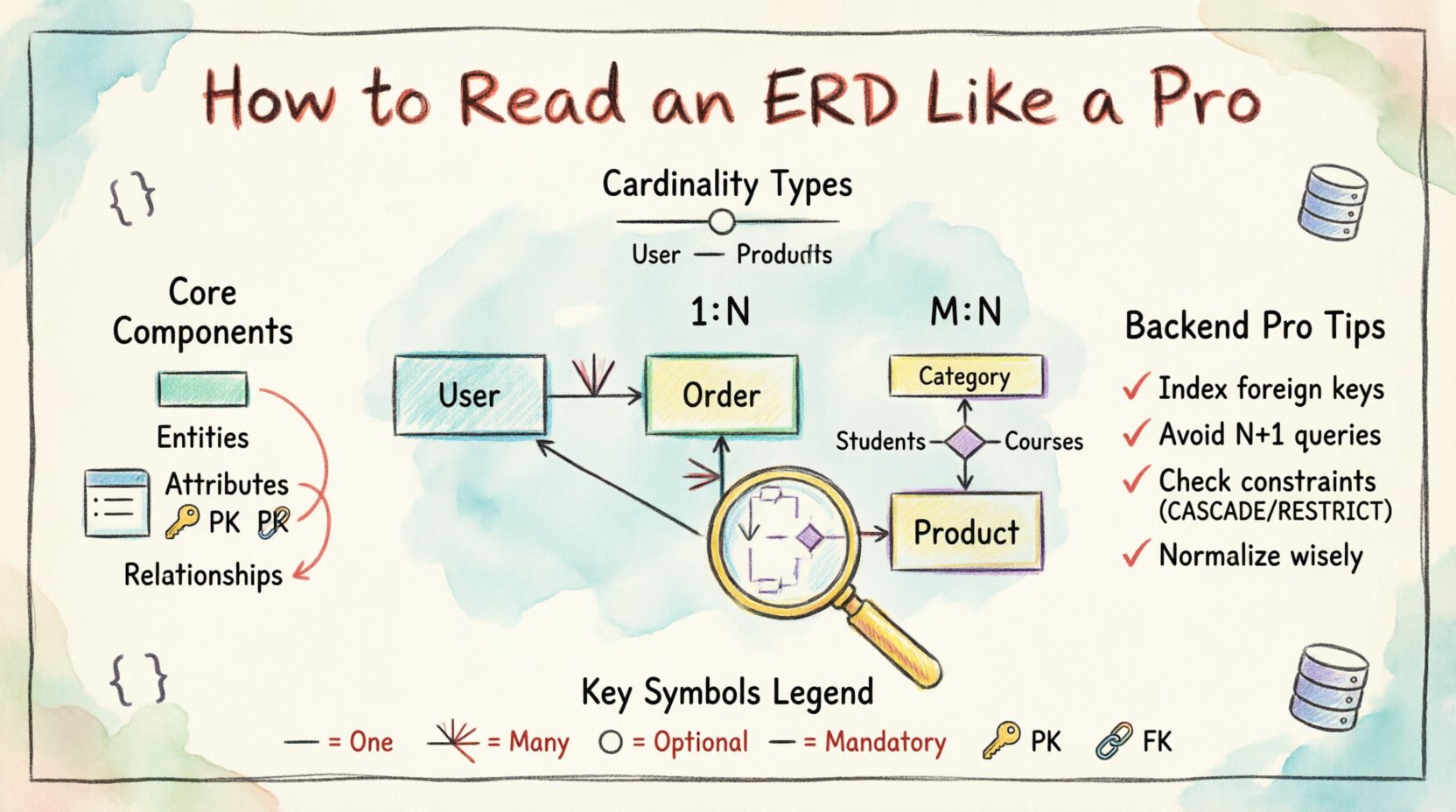
Understanding the Core Components of an ERD 🧱
Before navigating the connections, you must understand the individual symbols that make up the diagram. An ERD is composed of several distinct elements, each representing a specific aspect of the data model. Recognizing these elements instantly allows you to parse complex schemas without getting lost in the lines.
1. Entities (Tables)
The most prominent feature of an ERD is the entity. In the context of a relational database, an entity corresponds directly to a table. It represents a distinct object or concept about which data is stored. When you see a rectangle labeled with a name like Customer or Order, you are looking at a table.
- Visual Indicator: Typically a rectangle or a box containing the name.
- Function: Groups related data attributes together.
- Backend Implication: Every entity usually maps to a class or model in your codebase.
When reading an entity, pay attention to the text inside. Sometimes, it lists the attributes (columns) explicitly. Other times, it is an abstract representation where the details are stored in a separate documentation file. In either case, the entity name tells you the noun of your system.
2. Attributes (Columns)
Attributes define the properties of an entity. If an entity is a table, attributes are the columns within that table. They describe the specific data points required for each record.
- Primary Key: Often underlined or marked with a key icon. This uniquely identifies every row.
- Foreign Key: Often indicated by a line connecting to another entity. This establishes the relationship.
- Data Types: While not always shown visually, an experienced reader infers data types based on context (e.g., a field named email_address implies a string, created_at implies a timestamp).
Understanding attributes is crucial for writing efficient queries. If an attribute is not indexed, searching for it will trigger a full table scan. If it is a foreign key, it dictates join operations.
3. Relationships (Lines)
Relationships define how entities interact with one another. These lines connect two entities and describe the cardinality (how many). This is the most critical part of reading an ERD for backend logic, as it determines how data is linked across tables.
- Direction: Lines often have arrows or symbols at the ends to show directionality.
- Cardinality: Specifies if the relationship is one-to-one, one-to-many, or many-to-many.
- Optionality: Sometimes indicated by solid vs. dashed lines, showing if a relationship is mandatory or optional.
Decoding Cardinality and Relationships 🔗
Cardinality is the heart of the ERD. It dictates the constraints and logic of your database relationships. Misinterpreting cardinality can lead to data duplication or orphaned records. Let’s break down the three primary types of relationships you will encounter.
1. One-to-One (1:1)
This relationship exists when a single record in Table A is associated with exactly one record in Table B, and vice versa.
- Use Case: Splitting large tables for security or performance. For example, a User profile might be separated from a User_Settings table.
- Implementation: The foreign key in one table references the primary key in the other, often with a unique constraint.
- Backend Impact: Joins are usually necessary to retrieve full data, but the logic is straightforward.
2. One-to-Many (1:N)
This is the most common relationship in relational databases. One record in Table A can be associated with multiple records in Table B, but each record in Table B is associated with only one record in Table A.
- Use Case: A Category containing multiple Products.
- Implementation: The foreign key resides in the “Many” side table (Products) referencing the “One” side (Category).
- Backend Impact: When fetching a Category, you often load a list of Products. When fetching a Product, you load a single Category.
3. Many-to-Many (M:N)
This relationship occurs when records in Table A can be linked to multiple records in Table B, and records in Table B can be linked to multiple records in Table A.
- Use Case: Students enrolling in multiple Classes, and Classes having multiple Students.
- Implementation: This cannot be represented directly by a single foreign key. It requires a junction table (or bridge table) to resolve the relationship into two one-to-many relationships.
- Backend Impact: Queries often involve three tables. You must handle the junction table explicitly in your code to manage associations.
Table: Relationship Cardinality Summary
| Relationship Type | Example Scenario | Implementation Strategy | Query Complexity |
|---|---|---|---|
| One-to-One (1:1) | User & Profile | Unique Foreign Key | Low (Single Join) |
| One-to-Many (1:N) | Author & Books | Foreign Key on Many Side | Medium (List Join) |
| Many-to-Many (M:N) | Students & Courses | Junction Table | High (Three Table Join) |
Notation Styles and Symbols 📐
While the concepts remain consistent, the visual notation can vary depending on who designed the diagram. Familiarity with the common styles ensures you don’t miss subtle details.
Crow’s Foot Notation
This is widely used in modern database design tools. It uses specific symbols at the end of the relationship line to indicate cardinality.
- Single Line: Represents “One”.
- Crow’s Foot (Three branches): Represents “Many”.
- Circle: Represents “Optional” (Zero).
- Vertical Bar: Represents “Mandatory” (One).
For example, a line with a single bar on one side and a crow’s foot on the other indicates a One-to-Many relationship where the “One” side is mandatory.
Chen Notation
Less common in application development but frequent in academic or high-level architectural contexts. It uses diamonds to represent relationships instead of lines.
- Entities: Rectangles.
- Relationships: Diamonds.
- Attributes: Ovals.
When reading Chen notation, focus on the diamond shape. The cardinality labels (1, N, M) are placed on the lines connecting the diamond to the entities.
Keys and Constraints: The Rules of the Game 🔑
An ERD is not just about connections; it is about rules. Constraints ensure data integrity. As a backend developer, you need to know which constraints are enforced by the database and which must be handled in application logic.
Primary Keys (PK)
Every table should have a primary key. This value uniquely identifies each row. When reading the ERD, look for the underlined attribute.
- Surrogate Keys: Auto-incrementing integers (e.g., ID) that have no business meaning.
- Natural Keys: Business identifiers (e.g., Email, SKU) that are unique by nature.
Why it matters: Foreign keys reference primary keys. If you change the primary key strategy (e.g., UUID vs. Integer), you must update all dependent foreign keys and potentially restructure your application’s caching layers.
Foreign Keys (FK)
A foreign key is a field (or collection of fields) in one table that refers to the primary key in another table. It enforces referential integrity.
- ON DELETE CASCADE: If the parent record is deleted, the child records are automatically deleted.
- ON DELETE RESTRICT: Prevents deletion of the parent if child records exist.
- ON DELETE SET NULL: Sets the foreign key column to NULL if the parent is deleted.
Understanding these behaviors is vital when writing delete endpoints. A cascade delete can have unintended side effects if the relationship graph is complex.
Normalization and Data Structure 🧹
When analyzing an ERD, you should also evaluate the level of normalization. Normalization reduces data redundancy and improves integrity. However, it is not always a strict requirement for performance.
First Normal Form (1NF)
All columns must contain atomic values. No lists or arrays in a single cell. If you see a column named tags containing “tag1, tag2, tag3”, the schema violates 1NF.
Second Normal Form (2NF)
Must be in 1NF and all non-key attributes must be fully dependent on the primary key. This often involves moving attributes that depend on only part of a composite key into a separate table.
Third Normal Form (3NF)
Must be in 2NF and no transitive dependencies. If A determines B, and B determines C, then A determines C. In 3NF, C should not exist in the same table as B.
Denormalization in Practice
While normalization is the theoretical ideal, backend development often requires denormalization for performance. You might see duplicate data in an ERD designed for speed.
- Read vs. Write: Normalized schemas are better for writes; denormalized schemas are better for reads.
- Caching: Sometimes data is duplicated to reduce JOIN operations in high-traffic endpoints.
When you see redundant data in an ERD, question why. Is it a design flaw, or a deliberate optimization strategy?
Reading for Backend Optimization 🚀
Reading an ERD is not just about understanding data storage; it is about anticipating performance. A well-read schema allows you to write queries that utilize indexes effectively.
Identifying Indexing Opportunities
Look for attributes that are frequently used in search filters or sort operations. These should be indexed.
- Search Columns: Attributes used in WHERE clauses.
- Join Columns: Foreign keys should almost always be indexed to speed up JOINs.
- Sorting Columns: Attributes used in ORDER BY clauses.
Avoiding N+1 Queries
The ERD reveals the relationship structure. If you have a One-to-Many relationship, fetching the parent and then looping through to fetch children individually creates an N+1 query problem.
- Solution: Use eager loading or explicit JOINs based on the relationship path defined in the ERD.
- Warning: Complex Many-to-Many relationships can easily lead to performance issues if the junction table is not indexed on both foreign key columns.
Common Pitfalls in Schema Design ⚠️
Even experienced architects make mistakes. When reading an ERD, look for signs of poor design that might cause issues later.
1. Circular Dependencies
When Entity A depends on Entity B, and Entity B depends on Entity A, you create a circular dependency. This can lead to deadlocks during transaction commits or complex initialization logic.
2. Unbalanced Cardinality
Sometimes a Many-to-Many relationship is modeled incorrectly as a One-to-Many in both directions, leading to data duplication or loss of information.
3. Missing Metadata
An ERD that lacks timestamps (created_at, updated_at) makes auditing and debugging difficult. Backend systems often require this data for soft deletes or versioning.
4. Over-Normalization
Too many tables can make simple queries require excessive joins, slowing down the application. Look for tables that could be logically merged if they share the same lifecycle.
Practical Application: From Diagram to Code 💻
Once you understand the ERD, the next step is translating it into application logic. This process involves mapping the visual model to your codebase.
1. Model Mapping
Each entity becomes a class or model in your code. Attributes become properties. Relationships become associations or methods.
- One-to-One: Single object property.
- One-to-Many: Collection or List property.
- Many-to-Many: Collection of related models via a bridge.
2. API Design
The ERD dictates your API structure. A normalized schema often results in nested JSON responses or separate endpoints for related resources. For example, a /orders endpoint might include a /order-items nested structure.
3. Validation Logic
Constraints in the ERD (like NOT NULL) should be mirrored in your application-level validation. If the database allows a NULL value but your business logic requires a value, the application must enforce that rule before sending data to the database.
Maintaining Schema Integrity Over Time 🔧
An ERD is not static. As the application evolves, the schema changes. Your ability to read the ERD helps you manage migrations effectively.
1. Handling Migrations
When adding a new table or relationship, update the ERD immediately. This ensures your team has a current view of the system. Migrations should be versioned and tested against the current schema structure.
2. Refactoring
Refactoring often involves splitting tables or merging them. Understanding the relationship lines helps you determine which data needs to be moved and which foreign keys need to be updated.
3. Documentation
An ERD is a living document. If the diagram does not match the database, it is useless. Regular audits ensure the visual representation matches the physical reality.
Advanced Concepts: Recursive Relationships 🔁
Sometimes, an entity relates to itself. This is known as a recursive relationship.
- Example: An Employee entity where one employee is the manager of others.
- Implementation: A foreign key in the same table points to the primary key of the same table.
- Backend Logic: Requires recursive queries or traversal algorithms to find all subordinates or the full hierarchy.
Recognizing this pattern in an ERD is essential for building features like organizational charts or threaded comments.
Summary of Key Takeaways 📝
Mastering the ERD is a continuous process of observation and practice. It requires patience to trace every line and understand the implications of every symbol. By focusing on the components, relationships, and constraints, you build a mental model that guides your development.
- Know your symbols: Distinguish between entities, attributes, and relationships.
- Understand cardinality: Know the difference between 1:1, 1:N, and M:N.
- Check constraints: Look for keys and nullability rules.
- Consider performance: Use the ERD to plan indexing and query optimization.
- Keep it updated: Ensure the diagram reflects the current database state.
As you continue your journey as a backend developer, let the ERD be your compass. It provides the context needed to make informed decisions about data architecture, ensuring that the systems you build are not only functional but resilient and efficient.
Final Thoughts on Schema Literacy 🎓
The ability to read an ERD effectively separates a coder from an engineer. It shifts the focus from simply making code run to understanding how data behaves under load, how it persists, and how it relates to other information. This skill reduces debugging time, improves collaboration with data teams, and leads to better system design.
Take the time to study the diagrams in your projects. Ask questions about why certain relationships were chosen. Challenge the design when you see inefficiencies. In doing so, you contribute to a healthier data ecosystem and a more stable application.
Remember, the database is the source of truth. Treat the ERD as the map to that truth. With practice, reading these diagrams will become second nature, allowing you to navigate complex data landscapes with confidence and precision.