Enterprise architecture is a complex discipline that requires precise language to bridge the gap between business strategy and IT implementation. ArchiMate serves as the standard language for this purpose. Developed by The Open Group, it provides a framework for modeling enterprise architecture. This guide explores the core components, layers, and relationships that define the ArchiMate specification. Whether you are a business analyst, an IT architect, or a stakeholder, understanding this modeling language is essential for clarity and alignment.
This resource breaks down the methodology without referencing specific commercial tools. It focuses on the concepts, the structural logic, and the practical application of the standard. By the end of this reading, you will have a solid foundation in how to represent organizational structures and IT landscapes using ArchiMate.
🧩 What is ArchiMate?
ArchiMate is a modeling language designed to describe, analyze, and visualize enterprise architecture. It is not a methodology itself, but rather a framework that can be applied within methodologies like TOGAF. The primary goal is to support communication between business and IT stakeholders. It uses a specific set of concepts and rules to ensure that diagrams are consistent and understandable across different organizations.
The language is structured around several key principles:
- Abstraction: It allows you to model at different levels of detail, from high-level strategy to physical implementation.
- Consistency: Standardized symbols and rules prevent ambiguity in diagrams.
- Interoperability: It is an open standard, meaning it is not tied to a single vendor or proprietary software.
By using a common visual language, organizations can reduce miscommunication. When a business leader and a technical architect look at the same diagram, they should interpret the connections and elements identically. This shared understanding is critical for successful transformation projects.
🏗️ The Architecture Layers
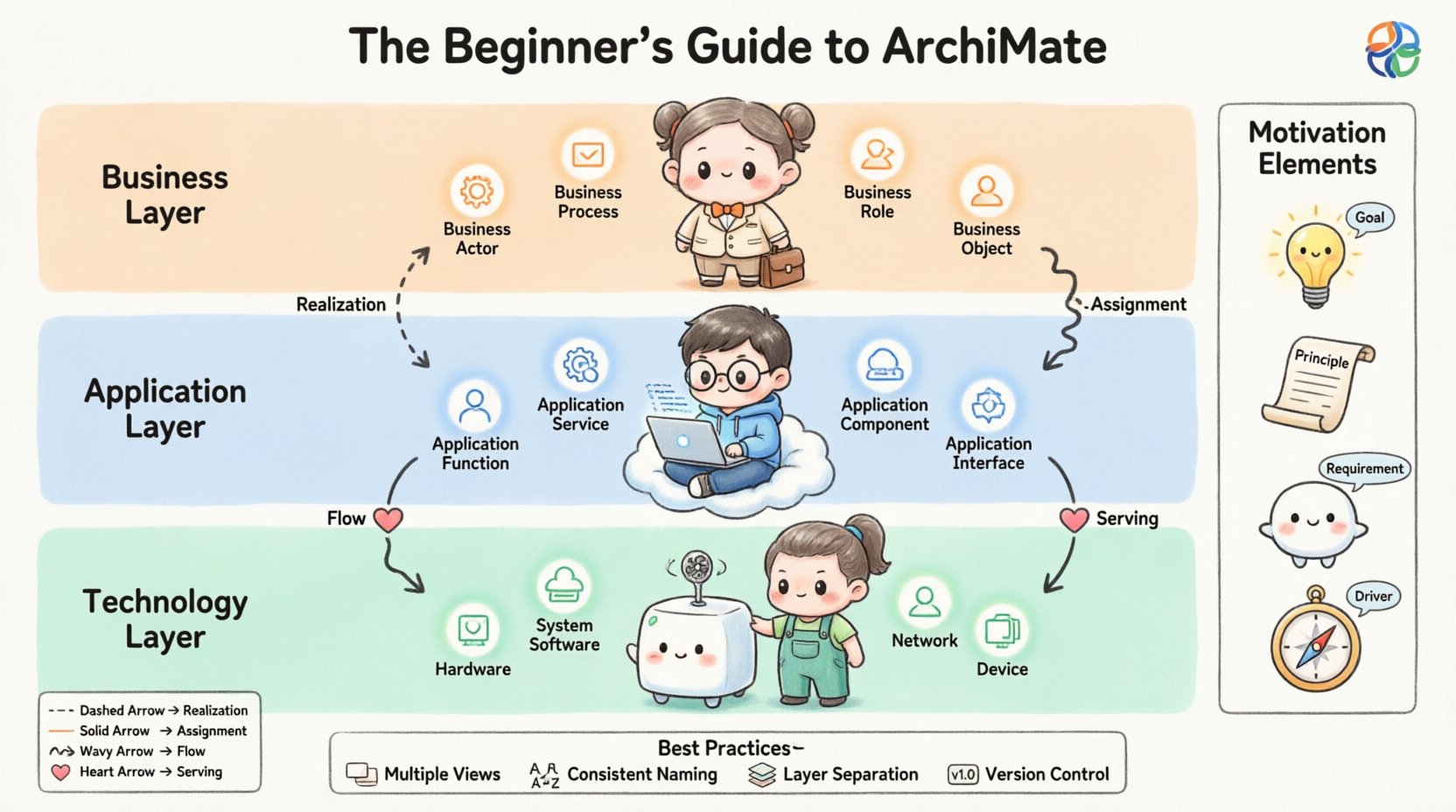
The core structure of ArchiMate is its layered view. This approach separates concerns, allowing architects to focus on specific aspects of the enterprise without being overwhelmed by the entire system at once. There are three primary layers, often referred to as the “Core Layers.” These are the Business Layer, the Application Layer, and the Technology Layer.
1. Business Layer
This layer represents the organization’s structure and processes. It focuses on how the business operates, independent of the technology used to support it. Key elements include:
- Business Actors: People or organizations performing a role.
- Business Processes: Activities that create value.
- Business Functions: Capabilities or areas of responsibility.
- Business Roles: Positions held by actors.
- Business Objects: Information or physical objects managed by the business.
For example, a “Sales Department” might be a Business Function. A “Customer Order” might be a Business Object. The relationships here describe how the business achieves its goals.
2. Application Layer
The Application Layer describes the software systems that support the business processes. It bridges the gap between what the business needs and the technology that delivers it. Elements in this layer include:
- Application Functions: Specific capabilities of a software system.
- Application Services: Functionality exposed to other systems or users.
- Application Components: Modular parts of a software application.
- Application Interfaces: Points of interaction between applications.
If the Business Layer defines the need for “Order Processing,” the Application Layer defines the specific software module that handles that logic. It ensures that the technical capabilities align with business requirements.
3. Technology Layer
The Technology Layer represents the physical and logical infrastructure that hosts the applications. This includes servers, networks, and storage. It is the foundation upon which the application layer rests. Elements include:
- Hardware: Physical devices like servers or routers.
- System Software: Operating systems or databases.
- Network: Communication infrastructure.
- Device: End-user devices or IoT components.
Understanding the Technology Layer is vital for capacity planning and infrastructure management. It shows where the applications actually run.
Layer Comparison Table
| Layer | Focus Area | Key Question |
|---|---|---|
| Business | Organization & Processes | What does the business do? |
| Application | Software Support | What software supports the business? |
| Technology | Infrastructure | Where does the software run? |
🔗 Relationships and Connectors
Merely listing elements is insufficient. ArchiMate focuses heavily on the relationships between them. These relationships define how elements interact, depend on, or influence one another. Understanding these connectors is key to reading an architecture diagram correctly.
Structural Relationships
Structural relationships describe static connections between elements.
- Association: A general relationship between two elements. It indicates that they are related in some way.
- Aggregation: A “has-a” relationship. One element is composed of other elements, but the parts can exist independently.
- Composition: A strong form of aggregation. The parts cannot exist without the whole.
- Realization: One element implements or provides another. For example, a Component realizes a Function.
- Specialization: One element is a specific type of another. It is an “is-a” relationship.
- Assignment: An actor is assigned to perform a process or function.
Behavioral Relationships
Behavioral relationships describe dynamic interactions or flows.
- Access: One element accesses another. For example, a Process accesses a Business Object.
- Trigger: One event triggers another. This is often used in event-driven architectures.
- Flow: Data or information flows from one element to another.
- Serving: A service is provided by one element to another.
| Relationship Type | Direction | Meaning |
|---|---|---|
| Realization | Top-Down | Implementation of specification |
| Specialization | Top-Down | Inheritance or categorization |
| Assignment | Horizontal | Actor performing a role |
| Access | Horizontal | Usage of data or object |
🎯 Motivational Elements
Architecture is not just about structure; it is about why we build it. The Motivational Layer adds context by defining the drivers behind the architecture. This layer helps explain the “why” to stakeholders who care about goals and constraints rather than just system components.
The core elements in this layer include:
- Goal: A desired state or outcome the enterprise wants to achieve.
- Principle: A rule or guideline that constrains or guides behavior.
- Requirement: A condition or capability that must be met.
- Assessment: A judgment on the value or risk of an element.
- Driver: An external or internal force that influences the enterprise.
For instance, a business might have a Goal to “Reduce Operational Costs.” A Principle might be “Use Cloud-Native Solutions.” A Requirement could be “System must be available 99.9% of the time.” These elements link to the core layers to show how the architecture serves the business intent.
🤝 Integration with TOGAF
ArchiMate is frequently used alongside the TOGAF framework. While TOGAF provides a methodology for developing enterprise architecture, ArchiMate provides the visual language to document it. They are complementary.
When using TOGAF, the Architecture Development Method (ADM) cycles through phases. ArchiMate diagrams are created at each phase to visualize the target state, baseline, and transition states. This integration ensures that the architectural work is documented consistently.
Key benefits of combining them include:
- Standardized Documentation: Both are open standards managed by The Open Group.
- Comprehensive View: TOGAF covers the process, while ArchiMate covers the content.
- Scalability: They can be applied to large enterprises or small projects.
It is important to note that ArchiMate can be used independently of TOGAF. Other frameworks or internal methodologies can adopt the ArchiMate notation for their own documentation needs.
✅ Best Practices for Modeling
To ensure that your architecture models remain useful and maintainable, follow these established practices. Avoid creating overly complex diagrams that are difficult to read. Clarity is more important than completeness in a single view.
- Use Multiple Views: Do not try to show everything on one page. Create separate diagrams for Business, Application, and Technology layers. Use a “Viewpoint” approach to tailor the diagram to the audience.
- Consistent Naming: Use clear, consistent names for all elements. Avoid abbreviations that might confuse stakeholders.
- Layer Separation: Keep the layers distinct. Do not mix Business and Technology elements in the same diagram unless you are specifically showing the mapping between them.
- Focus on Relationships: Ensure that the relationships are meaningful. Avoid random lines connecting elements without a defined relationship type.
- Version Control: Treat your models as living documents. Maintain version history to track changes over time.
❓ Frequently Asked Questions
Is ArchiMate free to use?
The ArchiMate specification is an open standard. The core concepts are available for use without licensing fees. However, specific tools that support the notation may require payment.
Can I use ArchiMate for software design?
Yes, but it is primarily designed for enterprise architecture. It covers the Application Layer, which includes software systems. For detailed code-level design, other languages like UML are often preferred, though ArchiMate can link high-level software concepts.
How do I start learning ArchiMate?
Start by reading the official specification provided by The Open Group. Practice by creating simple diagrams for your current organization. Focus on understanding the three core layers and the relationships between them before moving to advanced concepts like the Motivation Layer.
What is the difference between a Business Process and a Business Function?
A Business Function is a capability or area of responsibility (e.g., “Human Resources Management”). A Business Process is a sequence of activities that creates value (e.g., “Onboarding New Employees”). A Function is static, while a Process is dynamic.
🚀 Moving Forward
Mastering this modeling language takes time and practice. It is a tool for thinking, not just for drawing. As you create more diagrams, you will develop an intuition for how different parts of the organization interact. This understanding leads to better decision-making and more resilient systems.
Continue to explore the specification. Stay updated with new releases of the standard. Engage with the community to share experiences and challenges. The landscape of enterprise architecture is constantly evolving, and a solid grasp of these fundamentals will serve you well in any context.
Remember that the goal is communication. If your diagrams help people understand the system and make better choices, you are using the language correctly.