
Data is the lifeblood of modern organizations, yet it often flows through silos disconnected from strategic intent. For a Data Architect, the challenge is not merely storing and processing information, but ensuring every data asset serves a defined business purpose. This is where the ArchiMate modeling language becomes an indispensable tool. By providing a standardized framework, ArchiMate bridges the gap between raw data structures and high-level organizational objectives.
This guide explores how Data Architects can leverage ArchiMate to structure information architecture in a way that directly supports business goals. We will examine the specific layers of the framework, the relationships that define data flow, and practical strategies for maintaining alignment across the enterprise.
🔍 Understanding the Intersection of Data and Enterprise Architecture
Enterprise Architecture (EA) provides the blueprint for an organization, while Data Architecture defines the specific structure of information assets. Without a unifying language, these two disciplines often drift apart. Data Architects might optimize for performance and integrity, while Business Architects optimize for capability and value. ArchiMate offers a common vocabulary to synchronize these efforts.
When applying ArchiMate to data, the focus shifts from technical implementation details to the business context of that data. It answers critical questions:
- Which business capabilities require which data objects?
- How does data move between business processes?
- What is the impact of a change in data structure on business goals?
By integrating data concepts into the broader enterprise model, architects can visualize the entire value chain, from customer interaction to data storage.
🧩 The ArchiMate Metamodel: Layers Relevant to Data
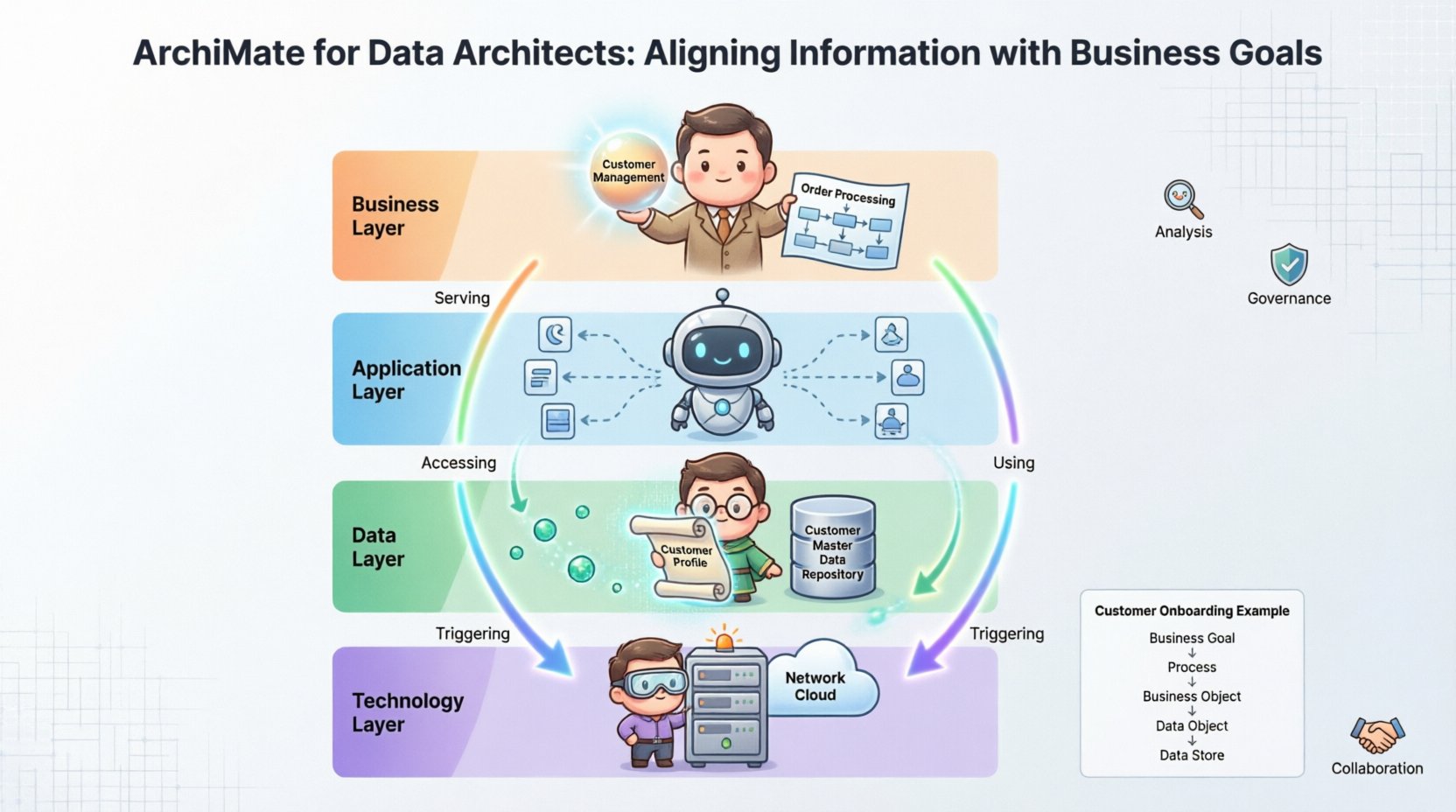
ArchiMate divides the enterprise into distinct layers. For a Data Architect, understanding how the Data Layer interacts with the Business and Application Layers is crucial. The framework is designed to show relationships across these layers.
1. Business Layer
This layer represents the organization’s strategy and operations. It includes elements like:
- Business Capabilities: The ability of the organization to perform specific activities (e.g., “Customer Management”).
- Business Processes: The sequences of activities that deliver value (e.g., “Order Processing”).
- Business Objects: The core entities processed within the business (e.g., “Customer”, “Invoice”).
For a Data Architect, the Business Object is the most critical link. It represents the logical definition of information before it is implemented in a database.
2. Application Layer
This layer describes the software systems that support business processes. Key elements include:
- Application Components: Software modules or services.
- Application Interfaces: Points of interaction between systems.
- Application Functions: Specific tasks performed by the software.
Data Architects must map how Application Components access or use the underlying data stores to ensure the right data supports the right functions.
3. Data Layer (Information Architecture)
ArchiMate explicitly defines a Data Workbench. This layer focuses on the structure and management of information. Key concepts include:
- Data Object: A logical representation of data (e.g., “Customer Account”).
- Data Store: A physical or logical repository where data is stored (e.g., “SQL Database”).
- Data Flow: The movement of data between objects.
4. Technology Layer
While less direct for logical data modeling, the Technology Layer describes the infrastructure. It includes:
- Hardware: Physical servers and storage.
- Network: Communication paths.
- System Software: Operating systems and databases.
The relationship between the Data Layer and the Technology Layer is often one of realization. A logical Data Object is realized by a physical Data Store on specific Technology Infrastructure.
🗺️ Mapping Business Capabilities to Data Objects
The core value of using ArchiMate for Data Architects lies in the ability to trace data back to business needs. This traceability ensures that no data is collected or stored without a clear justification.
Consider the relationship between a Business Capability and a Data Object. A business capability defines what the organization needs to do, while a data object defines what information is needed to do it.
Key Relationships in ArchiMate
To establish alignment, architects utilize specific relationships defined in the metamodel.
- Serving: A business process or application component serves a business capability. This implies the capability requires the process to exist.
- Accessing: An application component accesses a data object. This indicates the software reads or writes to the data.
- Using: A business process uses a business object. This links operational activity to the information involved.
- Triggering: One business event triggers another, often involving the creation or update of data.
By modeling these relationships, a Data Architect can create a Data Lineage map that shows the origin of data and its destination.
Example: Customer Onboarding
Imagine a process for Customer Onboarding. The alignment might look like this:
- Business Goal: Increase customer acquisition speed.
- Business Process: Customer Onboarding.
- Business Object: Customer Profile.
- Data Object: Customer Details (Name, ID, Contact).
- Data Store: Customer Master Data Repository.
Without ArchiMate, these connections might exist only in documentation or tribal knowledge. With the model, the impact of changing the “Customer Profile” structure is immediately visible across the entire process.
📊 Visualizing Data Flow and Value Streams
Data does not exist in static isolation; it flows. Understanding this flow is essential for performance and governance. ArchiMate allows architects to visualize how data moves through the enterprise value streams.
A Value Stream represents the sequence of activities that deliver value to a stakeholder. Data flows along this stream, enabling each activity.
Mapping Data to Value Streams
When modeling value streams, Data Architects should identify the specific data objects required at each step. This helps in identifying:
- Redundancy: Is the same data being collected multiple times?
- Gaps: Is there a missing data point required to complete a process?
- Latency: Is data moving too slowly between steps to meet business requirements?
For example, if a Marketing Campaign value stream requires Sales Data to personalize offers, the model should show the connection between the Marketing Application and the Sales Data Store. If this link is broken or weak, the business goal of personalization fails.
🛡️ Governance, Compliance, and Traceability
Data governance is a primary concern for modern organizations. Regulations like GDPR or CCPA require strict control over personal data. ArchiMate provides a structured way to model these constraints and ensure compliance.
Compliance Mapping
Architects can link regulatory requirements directly to data objects. This creates an audit trail that demonstrates compliance.
- Regulation: GDPR Article 17 (Right to Erasure).
- Data Object: Customer PII (Personally Identifiable Information).
- Process: Data Deletion Workflow.
By associating the regulation with the data object, the Data Architect can easily identify all systems and processes that hold this data. This makes impact analysis for regulatory changes significantly faster.
Traceability Matrix
A traceability matrix built using ArchiMate relationships ensures that every piece of data has a business owner and a technical implementation. This matrix typically includes:
- Business Owner: Who is responsible for the data quality?
- Data Steward: Who manages the definitions and standards?
- System Owner: Who manages the physical storage?
This clarity reduces ambiguity and supports a culture of data accountability.
⚙️ Common Pitfalls in Modeling Data with ArchiMate
While powerful, the framework can be misused if not applied with care. Data Architects should be aware of common mistakes that reduce the value of the model.
1. Over-Engineering the Model
Attempting to model every single field in every database is unnecessary. ArchiMate is a modeling language for architecture, not detailed database design. Focus on logical entities and major data flows, not atomic attributes.
2. Ignoring the Business Layer
Many Data Architects jump straight to the Data Layer. This creates silos. Always start with the Business Layer. If a data object does not support a business process or capability, it should be questioned.
3. Static vs. Dynamic Views
ArchiMate supports both static structure and dynamic behavior. Focusing only on static structures (tables) misses the dynamic reality of how data changes and moves over time. Ensure the model captures the lifecycle of data objects.
4. Lack of Collaboration
Enterprise Architecture is a collaborative effort. If the Data Architect models in isolation, the model will not reflect the reality of the Application or Technology layers. Regular synchronization with other architects is vital.
🤝 Collaboration Strategies for Data Architects
Successful implementation of ArchiMate requires cross-functional teamwork. The Data Architect does not work in a vacuum.
Working with Enterprise Architects
Enterprise Architects define the overall strategy. They need to know where data fits into the big picture. Data Architects should contribute to the Business Architecture view to ensure data strategies align with strategic goals.
Working with Application Architects
Application Architects define the software landscape. They need to know what data their applications consume and produce. Data Architects must ensure that data definitions match the application interfaces.
Working with Technology Architects
Technology Architects manage the infrastructure. They need to know the volume and type of data to provision appropriate storage and network capacity. The Data Layer model feeds directly into capacity planning.
📈 Impact Analysis and Change Management
One of the strongest use cases for ArchiMate is Impact Analysis. When a business change occurs, how does it affect the data?
Consider a scenario where the business decides to merge two customer segments. This change impacts:
- Business Processes: New workflows for the merged segment.
- Data Objects: Changes to the Customer entity structure.
- Applications: Systems that need to process the merged data.
- Technology: Potential migration of data stores.
By using the relationships in ArchiMate, the Data Architect can query the model to identify all affected components. This proactive approach reduces risk and prevents costly rework during implementation.
🔄 Data Lifecycle and ArchiMate
Data has a lifecycle, from creation to archival. ArchiMate can model this lifecycle to support data retention policies and optimization.
- Creation: Data is generated by a business process.
- Processing: Data is transformed or enriched by application functions.
- Storage: Data is persisted in a data store.
- Archival: Data is moved to cold storage based on rules.
- Destruction: Data is deleted in compliance with regulations.
Mapping these stages to the model helps in identifying opportunities for data optimization. For instance, if data is rarely accessed after a certain point, it can be moved to cheaper storage, reducing costs.
📋 Summary of Key ArchiMate Data Concepts
To assist in your modeling efforts, here is a summary of the core concepts relevant to Data Architects.
| Concept | Description | Relevance to Data Architecture |
|---|---|---|
| Business Object | Logical entity in the business domain. | Defines the semantic meaning of data. |
| Data Object | Logical representation of data. | Maps to database entities or tables. |
| Data Store | Repository for data. | Maps to databases, data warehouses, or lakes. |
| Business Process | Sequence of activities. | Identifies where data is consumed or produced. |
| Application Component | Software function. | Shows which systems touch the data. |
| Relationship | Links between elements. | Defines flow, access, and realization. |
🚀 Moving Forward with Data Alignment
Aligning information with business goals is not a one-time project; it is an ongoing discipline. ArchiMate provides the structure to maintain this alignment as the organization evolves.
By focusing on the logical relationships between business needs and data structures, Data Architects can move from being passive custodians of databases to active partners in business strategy. This shift ensures that data investments yield tangible returns.
Start by auditing your current data landscape against your business capabilities. Identify the gaps where data does not support strategy. Use the framework to model the ideal state. Then, work incrementally to bridge the gap. The result is an architecture that is robust, compliant, and strategically aligned.
Remember that the goal is clarity. A model that is too complex is useless. A model that is too simple misses the point. Find the balance that serves your organization’s specific needs. With consistent application of these principles, your data architecture will become a true competitive advantage.