
Welcome to the foundation of structured Enterprise Architecture. If you are reading this, you are likely looking to understand how business, applications, and technology align within an organization. This guide serves as a practical entry point into ArchiMate, the open modeling language designed for this exact purpose. We will explore the core concepts, structural layers, and relationships that define the framework. No marketing fluff, just the mechanics of the language. 🧭
What Is ArchiMate? 🤔
ArchiMate is a modeling language used to describe, analyze, and visualize the architecture of an enterprise. It provides a structured way to represent the relationships between business processes, organizational structures, information systems, and technology infrastructure. The goal is to ensure that digital transformation initiatives align with business strategy.
Unlike proprietary tools, ArchiMate is an open standard. It is not tied to a specific vendor or software product. This neutrality allows organizations to model their environments without being locked into a single ecosystem. The language focuses on the what and the how, rather than the implementation details of a specific tool. This makes it a versatile choice for architects who need to communicate across different departments.
Why Use This Language?
- Common Language: It bridges the gap between business stakeholders and technical teams.
- Standardization: It follows a consistent set of rules for diagrams and concepts.
- Alignment: It helps verify that technology investments support business goals.
- Flexibility: It supports various viewpoints for different audiences.
The Core Structure: Layers and Domains 🧱
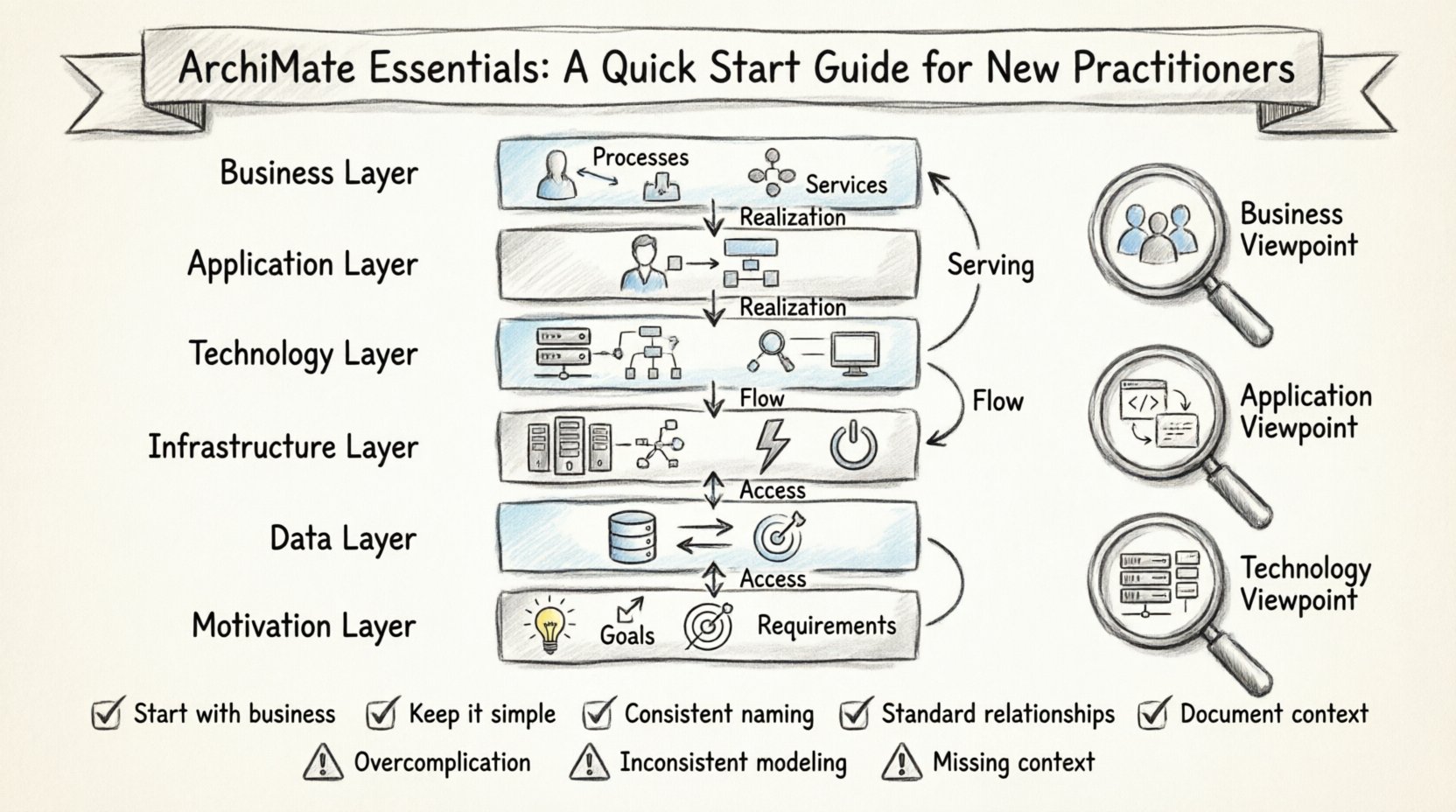
Understanding ArchiMate requires a grasp of its layered structure. The model is built upon several distinct layers that represent different aspects of the enterprise. These layers are stacked vertically to show how high-level business goals translate into physical infrastructure.
There are six primary layers, though the first three are the most frequently used in daily practice. Each layer contains specific elements that define its purpose.
1. Business Layer
This layer represents the visible activities of the organization. It is where the value creation happens. If you are a stakeholder asking “What does the company do?”, this is the layer you are looking at.
- Business Actor: A role played by a human, organization, or system that performs activities.
- Business Function: A logical grouping of activities within the business.
- Business Process: A set of activities that achieve a specific goal.
- Business Service: An externalized behavior offered by a business component.
- Business Object: A representation of information used in the business.
2. Application Layer
The application layer sits directly below the business layer. It represents the software systems that support the business activities. This is where the digital tools live. It does not describe the code, but rather the functionality provided by the software.
- Application Component: A modular part of an application system.
- Application Service: A functional capability provided by an application component.
- Application Interface: The point of interaction for the application service.
- Application Interaction: An exchange of information between components.
- Application Function: A part of an application component that provides a specific functionality.
3. Technology Layer
This layer describes the physical infrastructure required to run the applications. It includes servers, networks, and storage. It is the hardware foundation that makes the digital world possible.
- Node: A physical or virtual computing resource.
- Device: A physical device within a node.
- System Software: Software that manages hardware and provides services.
- Network: A communication medium.
- Artifact: A physical representation of a software component.
4. Infrastructure Layer
Often grouped with technology, this layer focuses on the physical environment. It includes data centers, cooling systems, and power supplies. It ensures the technology layer can operate reliably.
5. Data Layer
Data is a critical asset. This layer models the information objects and their relationships. It ensures that data flows correctly from the business layer down to the technology storage.
6. Motivation Layer
This layer adds the “why” to the model. It includes goals, principles, and requirements. It explains the reasoning behind architectural decisions. While optional in simple diagrams, it is crucial for governance.
Understanding Relationships 🔗
Elements in ArchiMate do not exist in isolation. They are connected through relationships. These relationships define how information flows and how dependencies are managed. Understanding these connections is vital for creating accurate diagrams.
There are three main types of relationships used to connect elements:
- Association: A non-directional link between two elements. It implies a connection but does not dictate flow.
- Specialization: Indicates that one element is a specific type of another. It is similar to inheritance in object-oriented programming.
- Realization: Shows that one element implements or provides the functionality of another. For example, an application service realizes a business service.
In addition to these, there are flow-based relationships that show movement:
- Access: One element accesses the data or functionality of another.
- Flow: Information flows from one element to another.
- Serving: An element provides a service to another.
- Triggering: One event triggers another.
Relationships Table
| Relationship | Direction | Meaning | Example |
|---|---|---|---|
| Association | Bi-directional | Connected but no specific flow | Actor performs Process |
| Access | Uni-directional | One uses the data of another | Process uses Business Object |
| Flow | Uni-directional | Data moves from A to B | Process outputs to Process |
| Realization | Uni-directional | Implements or Provides | Application realizes Business |
| Serving | Uni-directional | Provides a service | Technology serves Application |
Viewpoints and Perspectives 👁️
A complete model can become overwhelming if you try to show everything at once. This is where viewpoints come in. A viewpoint defines the perspective from which the architecture is viewed. It selects specific elements and relationships relevant to a specific audience.
For example, a C-level executive might only need a Business Layer viewpoint to see strategic alignment. A developer might need a Technology Layer viewpoint to see server configurations. By using viewpoints, you can tailor the information to the needs of the viewer.
Key Viewpoint Types
- Business Viewpoint: Focuses on business processes and services.
- Application Viewpoint: Focuses on software components and interfaces.
- Technology Viewpoint: Focuses on hardware and network infrastructure.
- Implementation Viewpoint: Focuses on migration and deployment.
- Motivation Viewpoint: Focuses on goals and requirements.
Best Practices for Modeling 📝
Creating a model is an iterative process. To maintain clarity and usability, follow these guidelines when building your diagrams.
1. Start with the Business Layer
Always begin by modeling the business capabilities. Understand what the organization does before deciding how technology supports it. If the business layer is unclear, the technical layers will lack direction.
2. Keep It Simple
Do not include every single detail in one diagram. Use layers to separate concerns. If a diagram has too many elements, it becomes unreadable. Split the model into multiple views.
3. Consistent Naming
Ensure that terms are used consistently across the model. If you call a process “Order Processing” in one diagram, do not call it “Order Management” in another. Consistency reduces confusion for the readers.
4. Use Standard Relationships
Stick to the standard relationship types defined in the language. Avoid creating custom relationships unless absolutely necessary. Standard relationships ensure that others can understand your model without a custom legend.
5. Document the Context
Every diagram should have a title and a description. Explain what the diagram shows and who the intended audience is. This context helps stakeholders navigate the model.
Common Pitfalls to Avoid ⚠️
Even experienced practitioners make mistakes. Being aware of common errors can save you time and prevent confusion later.
- Over-Modeling: Trying to model every single detail leads to a bloated repository. Focus on the essential elements that drive decision-making.
- Ignoring Dependencies: Failing to show how layers connect can lead to gaps in understanding. Ensure the flow from business to technology is clear.
- Mixing Layers: Do not place technology elements in the business layer diagram unless there is a specific reason. Keep the separation distinct.
- Lack of Maintenance: A model that is not updated becomes obsolete. Establish a process for reviewing and updating the architecture regularly.
- Ignoring the Motivation Layer: Without goals and requirements, it is hard to justify architectural decisions. Include the “why” when possible.
Implementing the Framework 🚀
Once you understand the concepts, the next step is implementation. This involves setting up a repository to store your models and defining the workflow for creating and reviewing them.
Step 1: Define the Scope
Determine which parts of the enterprise need modeling. Is it the entire organization or a specific department? Start small and expand as you gain confidence.
Step 2: Select the Environment
Choose a modeling environment that supports the standard. Ensure it allows for collaboration and version control. The environment should support the specific layers you plan to use.
Step 3: Train the Team
Ensure that everyone involved understands the notation. Conduct workshops or training sessions to align the team on the standards and best practices.
Step 4: Establish Governance
Define who can create, edit, and approve models. Governance ensures that the architecture remains consistent and accurate over time.
Advanced Concepts: The Enterprise Continuum 🌐
For practitioners ready to expand their knowledge, the Enterprise Continuum provides a framework for organizing architecture artifacts. It categorizes models based on their level of abstraction.
- Foundation Architecture: General concepts and patterns applicable to all industries.
- Common System Architecture: Industry-specific standards and reusable components.
- Industry Architecture: Specific solutions for a particular sector.
- Organization Architecture: The unique architecture of a specific organization.
Using the continuum helps in reusing existing models rather than building from scratch. It encourages a standardized approach to architecture across the enterprise.
Conclusion on the Journey 🛤️
Learning ArchiMate is a journey of continuous improvement. It requires patience and practice to master the nuances of the language. By focusing on the core layers, understanding the relationships, and adhering to best practices, you can create models that effectively communicate complex architectures.
Remember that the value lies in the communication, not just the diagram. A well-structured model facilitates better decision-making and alignment across the organization. Start with the basics, build your knowledge gradually, and always keep the business goals in mind. The framework is a tool to serve the enterprise, not the other way around. 🌟
As you move forward, keep exploring the various viewpoints and motivation concepts. These elements add depth and context to your models. With time and practice, you will find that the language becomes a natural part of your architectural thinking. The goal is clarity, alignment, and effective communication. Good luck on your path to becoming a proficient architect. 🎓