
Enterprise architecture often feels like a closed club reserved for IT specialists and system architects. Terms like “layers,” “domains,” and “relationships” can create a barrier for business leaders, product managers, and stakeholders who drive value but lack technical backgrounds. However, understanding the structure of an organization is critical for strategic alignment.
ArchiMate provides a standardized language to describe, analyze, and visualize this structure. It is not just a diagramming tool; it is a conceptual framework that bridges the gap between business strategy and technical implementation. This guide breaks down the framework into accessible concepts, ensuring you can engage with enterprise design without needing a coding degree.
🔍 What is ArchiMate?
At its core, ArchiMate is a modeling language for enterprise architecture. Think of it as a visual vocabulary. When architects discuss complex systems, they need a common way to ensure everyone understands the same way. Without a shared language, a business process owner might describe a workflow that the IT team interprets differently.
Developed by The Open Group, ArchiMate allows you to map out:
- Business Strategy: Where the organization wants to go.
- Business Processes: How the organization operates today.
- Applications: The software supporting the processes.
- Infrastructure: The hardware and network enabling the software.
For non-technical professionals, the value lies in clarity. It helps visualize how a change in strategy ripples down to the technology stack, or how a software limitation impacts business operations.
🏗️ The Core Structure: Layers and Domains
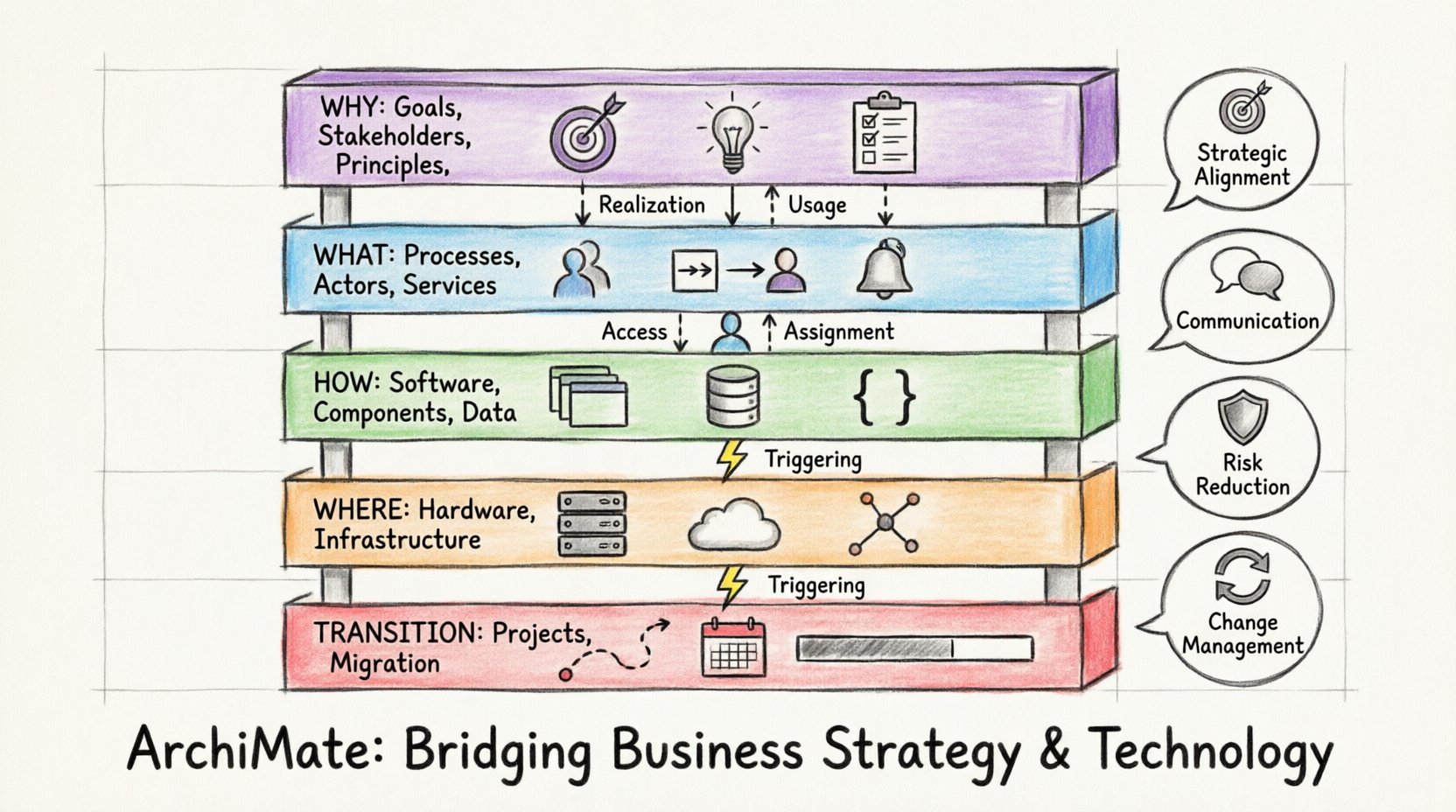
ArchiMate organizes enterprise architecture into layers. This separation helps manage complexity by grouping similar elements together. You do not need to memorize every element, but understanding the hierarchy is essential for communication.
1. The Motivation Layer 🎯
Often overlooked, this layer sits at the top. It defines why changes are happening. It includes:
- Stakeholders: Who cares about this architecture?
- Principles: Rules that guide decision-making.
- Requirements: Needs that must be met.
- Goals: Desired outcomes.
As a business professional, this is your primary layer. When you propose a new initiative, you are defining goals and requirements here. This layer ensures that technical work is always tied back to business value.
2. The Business Layer 🏢
This layer represents the organization as it operates in the real world. It is independent of the technology that supports it. Key elements include:
- Business Actors: People, departments, or external organizations.
- Business Processes: Sequences of activities that create value.
- Business Services: What the business offers to customers.
- Business Objects: Information being processed (e.g., an Invoice, a Customer Record).
When you map out a customer journey or a supply chain workflow, you are working within the Business Layer.
3. The Application Layer 💻
This layer represents the software applications that support the business processes. It is where the logic lives. Elements include:
- Application Services: Functions provided by software (e.g., “Calculate Tax”).
- Application Components: Modular parts of software.
- Data Objects: Data stored or manipulated by the application.
While you may not design the code, understanding which application supports which process helps in budgeting and resource allocation.
4. The Technology Layer 🔌
This is the physical foundation. It includes servers, networks, and cloud infrastructure. It is the hardware that hosts the applications.
- Nodes: Computing devices (servers, laptops).
- Infrastructure Services: Connectivity, storage, and security services.
5. The Implementation & Migration Layer 🚀
This layer deals with projects. It shows how the organization moves from its current state to a future state. It includes:
- Work Packages: Specific sets of activities.
- Projects: Groups of work packages.
- Programs: Groups of projects.
This is crucial for change management. It helps answer: “What project delivers which capability?”
📊 Understanding the Layers: A Comparison
| Layer | Focus | Example Question | Key Stakeholders |
|---|---|---|---|
| Motivation | Why are we doing this? | Does this align with our strategy? | Executives, Board |
| Business | What do we do? | How does this process work? | Process Owners, Managers |
| Application | What software helps? | Which system supports this function? | Product Managers, IT Leads |
| Technology | What hardware runs it? | Where is the data stored? | Infrastructure Teams, DevOps |
🔗 Relationships: Connecting the Dots
Static layers are not enough. You need to understand how elements interact. ArchiMate defines specific relationships that describe the flow of value and dependency. These are the “verbs” of the framework.
Realization Relationship
One element implements another. For example, a Business Process realizes a Business Service. A Software Component realizes an Application Service.
Usage Relationship
One element uses another. A Business Process uses an Application Service. This is common in system integration discussions.
Access Relationship
One element accesses another. A Business Object is accessed by a Business Process. This defines data flow.
Assignment Relationship
One element is assigned to another. A Business Actor is assigned to a Business Process. This clarifies ownership.
Triggering Relationship
One event triggers another. A Business Event triggers a Business Process. This is vital for workflow automation.
Understanding these relationships prevents silos. If you know that Process A uses Application B, you understand that a failure in Application B directly impacts Process A. This dependency mapping is a powerful tool for risk management.
💡 Why Non-Tech Professionals Need This Framework
There is often a perception that architecture is solely an IT concern. In reality, IT cannot function without business direction. Here is why engaging with ArchiMate benefits non-technical roles.
1. Strategic Alignment 🎯
It ensures that every dollar spent on technology ties back to a business goal. When you can visualize the link between a strategic goal and a specific software tool, you can justify investments more effectively.
2. Improved Communication 🗣️
Diagrams act as a universal translator. A complex text document can be misinterpreted. A structured model shows the flow. This reduces ambiguity during requirement gathering.
3. Risk Reduction 🛡️
By mapping dependencies, you can see where bottlenecks exist. If a business process relies on a single legacy system, the model highlights the risk of that single point of failure.
4. Change Management 🔄
When regulations change or market conditions shift, you can impact analysis. You can see exactly which applications or processes will be affected by a new requirement before you start building.
🚧 Common Challenges and Solutions
Adopting this framework comes with hurdles. Recognizing them early helps in navigating the process.
- Complexity Overload:
Trying to model everything at once can be overwhelming. Start small. Focus on a single business domain or a specific project scope. - Language Barrier:
Technical terms can confuse business stakeholders. Keep the glossary simple. Use the “Business Layer” as the primary view for non-technical teams. - Static Models:
Models often become outdated quickly. Treat them as living documents. Update them when significant changes occur, rather than trying to maintain a perfect historical record. - Lack of Ownership:
Who is responsible for the diagrams? Assign an architecture owner or a business analyst to maintain the integrity of the models.
🛠️ Practical Application: A Step-by-Step Approach
You do not need a complex tool to start thinking in ArchiMate. You can start with a whiteboard. Here is a logical flow for applying the concepts.
Step 1: Define the Motivation
Start with the “Why.” What is the business problem? Is it cost reduction, speed, or compliance? Document the goals and the stakeholders involved.
Step 2: Map the Current State
Draw the business processes as they exist today. Identify the actors involved. Do not worry about the software yet. Focus on the human and procedural flow.
Step 3: Identify the Support
Once the process is clear, identify the applications that support it. Which systems store the data? Which tools automate the handoffs?
Step 4: Define the Future State
Where do you want to be? Sketch the ideal process. Note which applications need to change or be replaced.
Step 5: Plan the Transition
Identify the projects required to move from Current to Future. What are the work packages? What is the timeline?
📈 The Future of Enterprise Design
The landscape of enterprise architecture is evolving. Digital transformation is driving a need for more agile frameworks. The static diagrams of the past are giving way to dynamic models that integrate with operational data.
For non-technical professionals, this means greater involvement. You are no longer just a consumer of IT output; you are a co-designer of the enterprise. The ability to read and contribute to architecture models is becoming a core competency for leadership.
Furthermore, the integration of AI and automation requires clear data models. Understanding how data flows through the architecture ensures that automation initiatives are built on solid foundations.
❓ Frequently Asked Questions
Is ArchiMate the same as TOGAF?
No. TOGAF is a method for developing an enterprise architecture. ArchiMate is the language used to describe that architecture. They work well together, but ArchiMate focuses on the notation and structure.
Do I need to learn a new software tool?
You can start with pen and paper or standard drawing tools. The framework is about the concepts, not the software. Tools exist to help manage complex models, but the thinking is the priority.
How detailed should my models be?
Detail depends on the audience. Executives need high-level strategic views. Project teams need detailed process flows. Create different views for different stakeholders.
Can ArchiMate help with cloud migration?
Yes. It helps map existing on-premise processes to cloud services. You can visualize the transition of applications and infrastructure to the cloud layer.
🔚 Final Thoughts
Enterprise architecture is not about creating perfect blueprints that sit on a shelf. It is about creating a shared understanding of how an organization functions. ArchiMate provides the structure to make that understanding explicit.
By learning the layers and relationships, non-technical professionals gain the ability to see the bigger picture. You can connect business goals to technical reality. You can identify risks before they become crises. You can facilitate better collaboration between departments.
Start small. Pick one process. Map the layers. Understand the connections. The complexity will become manageable, and the strategic value will become clear. This framework is a tool for clarity, not confusion.