
Enterprise architecture requires precise communication between stakeholders. Different modeling languages exist to describe various facets of an organization. ArchiMate has emerged as a leading standard for representing enterprise architecture. However, it does not operate in isolation. Understanding how it compares to other frameworks is vital for selecting the right approach.
This guide examines ArchiMate against prominent alternatives. We analyze strengths, limitations, and specific use cases. The goal is clarity, not promotion. You will gain insight into where ArchiMate fits within the broader modeling landscape.
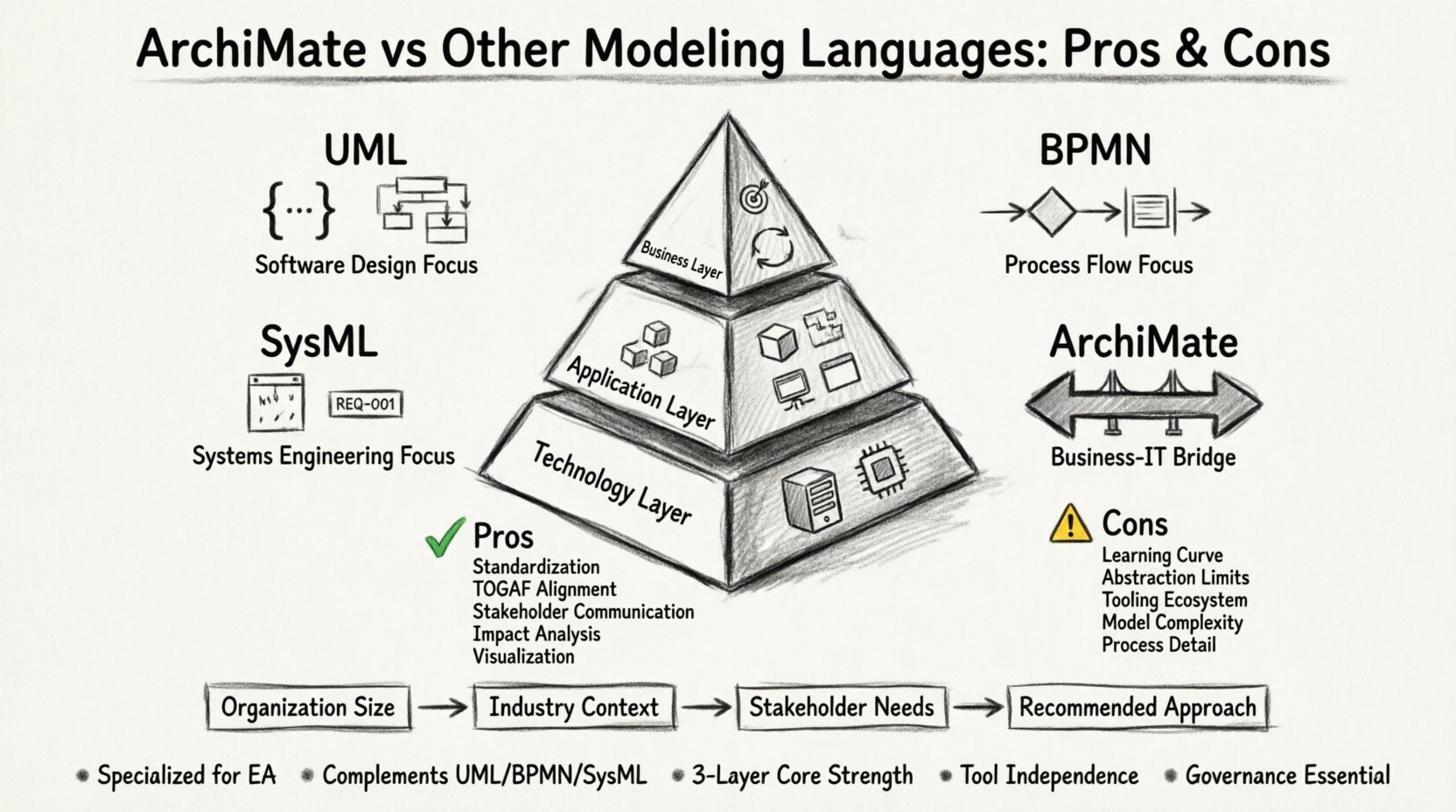
📐 Understanding ArchiMate: The Foundation
ArchiMate is an open and independent modeling language for enterprise architecture. It was created to provide a framework for describing, analyzing, and visualizing architecture designs. Unlike general-purpose modeling tools, ArchiMate focuses on the business domain.
It operates on a layered approach. This structure helps separate concerns within complex systems. The core layers include:
- Business Layer: Describes the business strategy, processes, organization, and actors.
- Application Layer: Covers the software applications that support the business functions.
- Technology Layer: Represents the physical and logical infrastructure supporting the applications.
By distinguishing these layers, architects can trace dependencies from high-level strategy down to the underlying hardware. This abstraction allows stakeholders to view problems from their specific perspective without getting lost in technical noise.
⚖️ ArchiMate vs. Unified Modeling Language (UML)
UML is the most widely used modeling language in software development. It excels at describing the structure and behavior of software systems. While powerful, its scope differs significantly from ArchiMate.
Scope Differences
UML is primarily designed for software engineers. It details class structures, interactions, and state machines. ArchiMate bridges the gap between business requirements and IT implementation. It speaks a language that business stakeholders understand better than code.
When to Use Which
- Use UML when: You are designing specific software components, defining database schemas, or detailing algorithmic logic.
- Use ArchiMate when: You are mapping business processes to IT capabilities or analyzing organizational change.
UML diagrams often become too complex for executive review. ArchiMate simplifies these views by focusing on relationships between business capabilities and services rather than code details.
🔄 ArchiMate vs. Business Process Model and Notation (BPMN)
BPMN is the standard for business process modeling. It focuses on the flow of activities within a process. ArchaMate includes process elements, but its primary function is structural.
Process vs. Structure
BPMN answers the question: “How does this work happen?”. It maps sequences, gateways, and events. ArchiMate answers: “What supports this work?”. It maps the capabilities, functions, and systems involved.
Integration Capabilities
These two languages are often used together. An architecture model in ArchiMate can reference a detailed process model in BPMN. This keeps the high-level view clean while allowing detailed process logic to exist elsewhere.
Key Distinctions
- BPMN: Time-driven, sequential, event-based.
- ArchiMate: Structure-driven, dependency-based, static.
Choosing one over the other depends on the deliverable. If the output is a workflow diagram, BPMN is superior. If the output is an architecture blueprint, ArchiMate is the standard.
🔧 ArchiMate vs. Systems Modeling Language (SysML)
SysML is derived from UML but tailored for systems engineering. It handles hardware, software, and human elements within complex systems. This makes it relevant for engineering-heavy environments.
Engineering vs. Enterprise
SysML focuses on the physical and functional constraints of a system. It deals with requirements allocation and interface definitions. ArchiMate focuses on the organizational context and IT landscape.
Complexity Management
SysML can become highly technical very quickly. It is designed for systems engineers who need to manage physical constraints. ArchiMate is designed for enterprise architects who need to manage organizational alignment.
Overlap Areas
- Both support requirements management.
- Both support block-based structuring.
- Both support interface definitions.
However, SysML lacks the specific business layer concepts found in ArchiMate. It does not inherently represent business roles or business services in a standardized way.
📊 Comparison Table
The following table summarizes the core differences between ArchiMate and other common modeling languages.
| Feature | ArchiMate | UML | BPMN | SysML |
|---|---|---|---|---|
| Primary Focus | Enterprise Architecture | Software Design | Business Processes | Systems Engineering |
| Target Audience | Architects, Business Leaders | Software Developers | Process Owners | Systems Engineers |
| Key Strength | Business-IT Alignment | Code Structure | Workflow Logic | System Constraints |
| Abstraction Level | High (Business to Tech) | Low (Implementation) | Medium (Process) | Variable (System) |
| Standard Body | ArchiMate Consortium | OMG | OMG | OMG |
✅ The Pros of Using ArchiMate
Adopting ArchiMate offers several distinct advantages for organizations managing complex IT landscapes.
1. Standardization and Interoperability
As an open standard, ArchiMate ensures that models can be exchanged between different tools. This prevents vendor lock-in. You are not tied to a single proprietary format.
2. Alignment with TOGAF
ArchiMate is the language of choice for the TOGAF framework. Many organizations use TOGAF for their architecture development method. Using ArchiMate creates a natural fit within this methodology.
3. Stakeholder Communication
The business layer of ArchiMate allows non-technical stakeholders to engage with the architecture. It uses familiar business terms rather than technical jargon. This improves decision-making speed.
4. Impact Analysis
The language supports impact analysis effectively. You can trace a change in the technology layer up to the business strategy. This helps assess risk before implementation.
5. Visualization
ArchiMate provides specific diagram types for different views. Application usage, technology deployment, and business interaction views are standardized. This consistency reduces learning time for new team members.
❌ The Cons of Using ArchiMate
Despite its strengths, ArchiMate is not a silver bullet. There are limitations to consider.
1. Learning Curve
The language has a specific syntax and set of concepts. Teams familiar with other notations may find the transition difficult. Training is often required to ensure consistency.
2. Abstraction Limitations
ArchiMate is not designed for detailed design. Attempting to model code-level logic using ArchiMate leads to clutter and inefficiency. It is not a replacement for UML in software design.
3. Tooling Ecosystem
While open, the number of high-quality modeling tools is smaller compared to UML tools. Selecting the right platform requires careful evaluation.
4. Complexity in Large Models
As models grow, maintaining consistency becomes challenging. Without strict governance, diagrams can become confusing. Version control is essential.
5. Process Detailing
ArchiMate handles processes, but not as granularly as BPMN. For operational workflows, it is often necessary to link to a BPMN model.
🚀 Implementation Best Practices
Successfully integrating ArchiMate into your workflow requires planning. Follow these guidelines to maximize value.
- Define Scope Early: Determine which layers are necessary for your projects. Do not model every layer if only the business layer is relevant.
- Establish Governance: Create a set of naming conventions. Consistency is key to maintaining a usable repository.
- Train the Team: Invest in certification or training. Understanding the meta-model is crucial for accurate modeling.
- Link to Tools: Connect the architecture repository to other systems. Ensure requirements and project data are linked.
- Iterate Gradually: Start with high-level views. Add detail as the model stabilizes. Avoid building a detailed model from day one.
🔮 Future Trends in Modeling
The landscape of enterprise architecture is evolving. Several trends are influencing how modeling languages are used.
Agile Integration
Traditional architecture documentation often conflicts with agile methodologies. Modern approaches seek to integrate architecture modeling into sprint cycles. ArchiMate is adapting to support this shift.
Automation
Model-driven architecture is gaining traction. Tools are becoming better at generating code or configuration from models. This reduces the gap between design and implementation.
Cloud-Native Focus
As organizations move to cloud environments, the technology layer is changing rapidly. Modeling languages are updating to include cloud-specific patterns and services.
🤔 Decision Framework
How do you decide if ArchiMate is right for your organization? Consider the following factors.
Organizational Size
- Large Enterprise: ArchiMate is highly recommended. The complexity requires a structured approach to documentation.
- Small Business: A lightweight approach may suffice. Formal modeling might add overhead without immediate value.
Industry Context
- Finance/Healthcare: High regulation requires clear documentation. ArchiMate supports compliance auditing.
- Software Startup: Speed is priority. UML or direct design may be more appropriate.
Stakeholder Needs
- Executive Leadership: Needs high-level views. ArchiMate business layer is ideal.
- Development Teams: Needs technical specs. UML is often preferred.
📝 Final Thoughts on Selection
Selecting a modeling language is a strategic decision. There is no single best option for every situation. ArchiMate excels in the domain of enterprise architecture and business-IT alignment.
Other languages serve different masters. UML serves code. BPMN serves processes. SysML serves systems. Understanding these distinctions prevents misapplication of tools.
For organizations seeking to bridge the gap between business strategy and technology execution, ArchiMate provides a robust framework. It enables clear communication and structured analysis. However, it requires discipline to implement effectively.
Start by assessing your current pain points. Is it lack of visibility? Poor alignment? Slow change management? If architecture visibility is the goal, ArchiMate is a strong candidate. If you need to manage complex software logic, consider a hybrid approach with UML.
The choice defines the clarity of your architectural vision. Invest time in understanding the capabilities and limitations of each language. This investment pays dividends in reduced risk and better decision-making.
🔍 Summary of Key Takeaways
- ArchiMate is specialized for enterprise architecture, not software design.
- It complements rather than replaces UML, BPMN, or SysML.
- The three-layer model (Business, Application, Technology) is its core strength.
- Standardization allows tool independence and better collaboration.
- Success depends on governance, training, and appropriate scope definition.
By weighing these factors, you can determine the most effective path for your architectural practice.