Beherrschen Sie Ihren Markt mit Visual Paradigms AI Porter-Five-Forces-Analyse

Dominate your market with Visual Paradigm’s AI Porter’s Five Forces Analyzer. Generate fast, professional industry reports with actionable strategic insights.

Lösen Sie die Geheimnisse Ihrer Branche und übertrumpfen Sie die Konkurrenz mit dem KI-gestützter Porter-Five-Forces-Analyse von Visual Paradigm! In der heutigen dynamischen Geschäftswelt ist das Verständnis der strukturellen Kräfte, die Ihre Rentabilität prägen, nicht nur ein Vorteil – es ist eine Notwendigkeit zum Überleben. Egal, ob Sie ein Gründungsunternehmer oder ein erfahrener Strategieexperte sind, dieses professionelles Branchenanalysetool bietet die Klarheit, die Sie benötigen, um gewinnende Entscheidungen zu treffen. Der Startbildschirm lädt Sie zu einer nahtlosen Erfahrung ein, bei der Sie einfach Ihre Geschäftstätigkeit beschreiben, um eine hochwertige strategische Maschine zu aktivieren, die für Sie arbeitet!

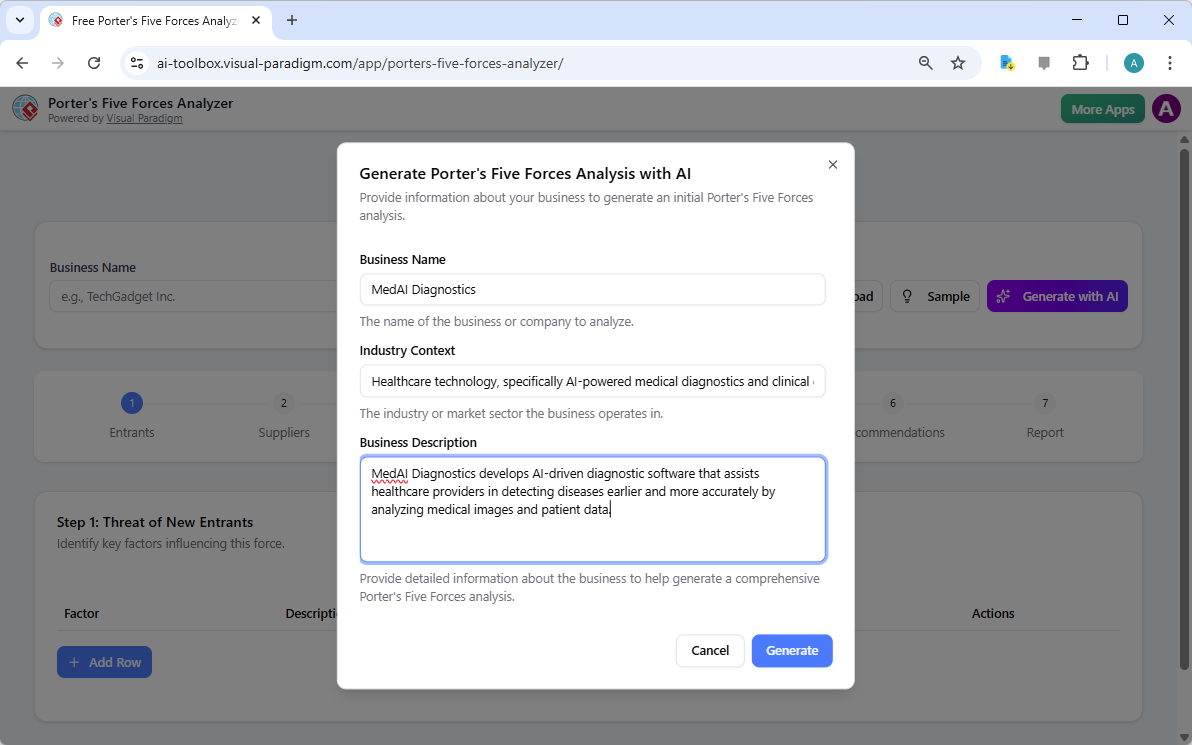
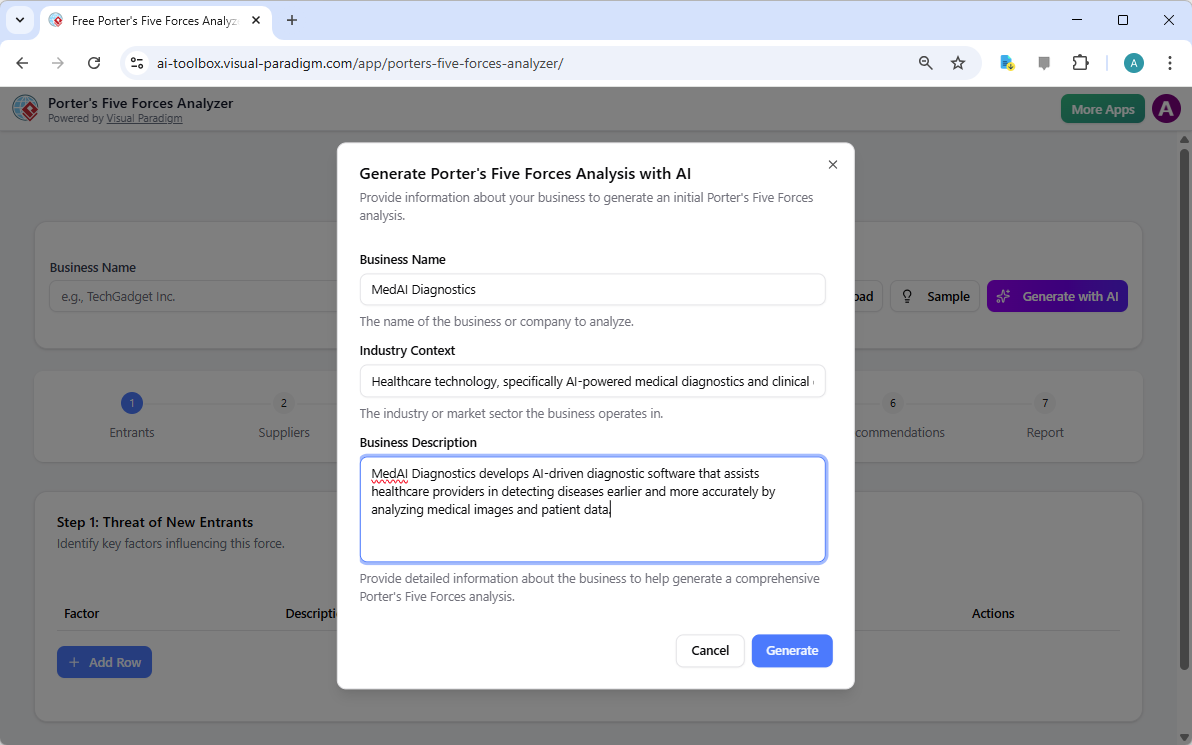
Wie bei der ersten Einrichtung zu sehen ist, können Benutzer spezifische Angaben wie Firmenname und Branchenkontext – beispielsweise ein innovativer medizinischer Diagnoseunternehmen – eingeben, um eine maßgeschneiderte Analyse zu erhalten. Diese intelligente Oberfläche fungiert als Ihr persönlicher Berater und schließt die Lücke zwischen Rohdaten und handlungsleitender Intelligenz.

Visual Paradigm’s AI-Powered Porter's Five Forces Analysis Tool landing screen, where users begin by entering a brief busines

Warum jedes Unternehmen eine KI-gestützte strategische Stärke benötigt

Die Durchführung einer manuellen Branchenstudie kann Tage an anstrengender Forschung in Anspruch nehmen. Mit Visual Paradigms benutzerfreundliche strategische Planungssoftware, können Sie innerhalb von Sekunden einen umfassenden Entwurf erstellen! Dieses Tool listet nicht nur Fakten auf; es interpretiert die Wettbewerbsintensität Ihrer spezifischen Marktnische und ermöglicht es Ihnen, sich auf die hochwertige Validierung zu konzentrieren, anstatt mühsame Dateneingaben vorzunehmen. Es ist das ultimative beste Branchenanalyse-Tool für alle, die sowohl Geschwindigkeit als auch Präzision schätzen.

Kurzübersicht der wichtigsten Vorteile

  • Blitzschnelle Analyse: Erstellen Sie innerhalb von Minuten einen vollständigen Five-Forces-Bericht mit Hilfe fortschrittlicher KI-Unterstützung.

  • Strukturierte 7-Schritte-Logik: Folgen Sie einem bewährten, professionellen Arbeitsablauf, der kein Steinchen unberührt lässt.

  • Totale Privatsphäre: Speichern Sie Ihre sensiblen strategischen Daten lokal als .json-Dateien – keine Cloud-Speicherung erforderlich!

  • Handlungsorientierte Intelligenz: Gehen Sie über Theorie hinaus mit konkreten strategischen Empfehlungen angepasst an Ihr Unternehmen.

  • Professionelle Ausgabe: Erstellen Sie hochwertige Berichte, die ideal für Präsentationen an Stakeholder und Vorstandssitzungen sind.

Schritt 1: Bekämpfung der Bedrohung durch neue Marktteilnehmer

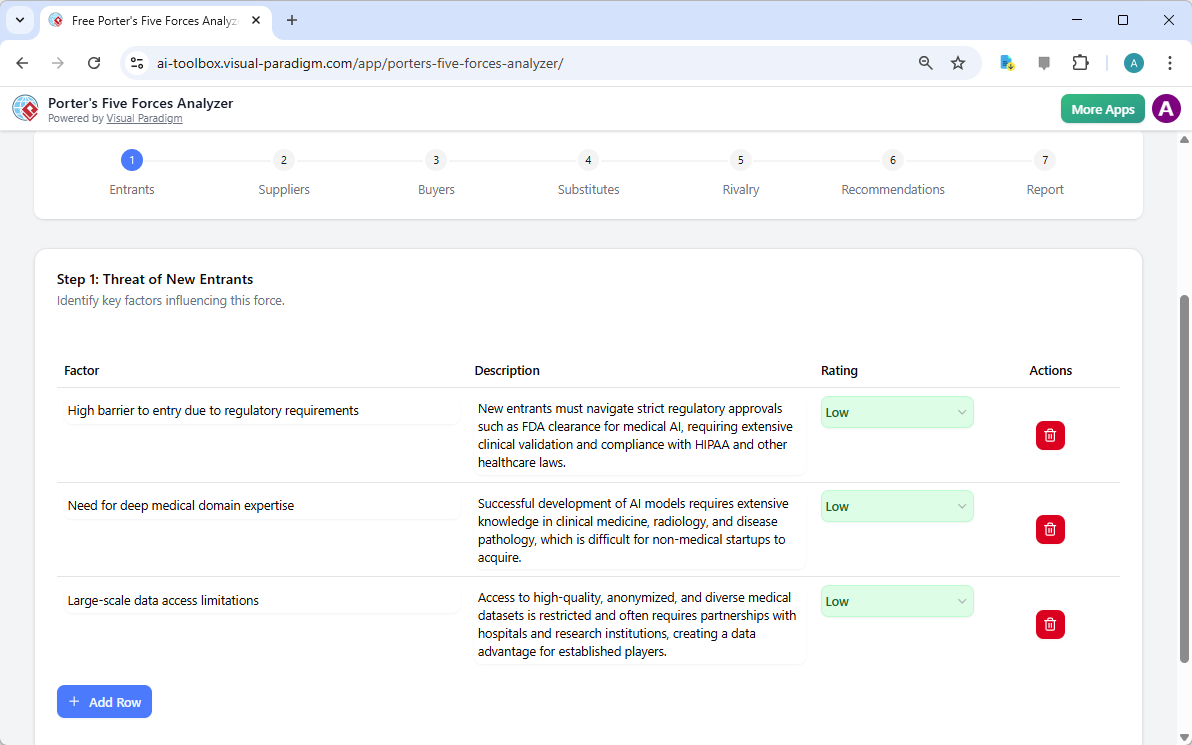
Der erste Schritt bei jeder robusten Analyse besteht darin, zu bewerten, wie leicht neue Akteure in Ihr Gebiet eindringen können. Mit dem KI-gestützten Porter-Five-Forces-Analyse-Tool, können Sie kritische Einstiegshürden wie regulatorische Anforderungen, Kapitalkosten und die Notwendigkeit spezialisierter Fachkenntnisse identifizieren. Im Beispiel eines KI-medizinischen Unternehmens zeigt das Tool auf, wie FDA-Zulassungen und tiefgreifendes medizinisches Wissen als starke Schutzschilder für etablierte Akteure wirken.

Durch die Bewertung dieser Faktoren als niedrig, mittel oder hoch erhalten Sie eine sofortige visuelle Darstellung der Abwehrfähigkeit Ihres Marktes. Dieses online strategisches Werkzeug stellt sicher, dass Sie niemals überrascht werden, wenn ein neuer Wettbewerber über Nacht auftaucht!

The screenshot of Step 1 of Visual Paradigm AI-Powered Porter's Five Forces Analysis Tool. - Professional online diagram make

Schritt 2: Bewertung der Verhandlungsmacht der Lieferanten

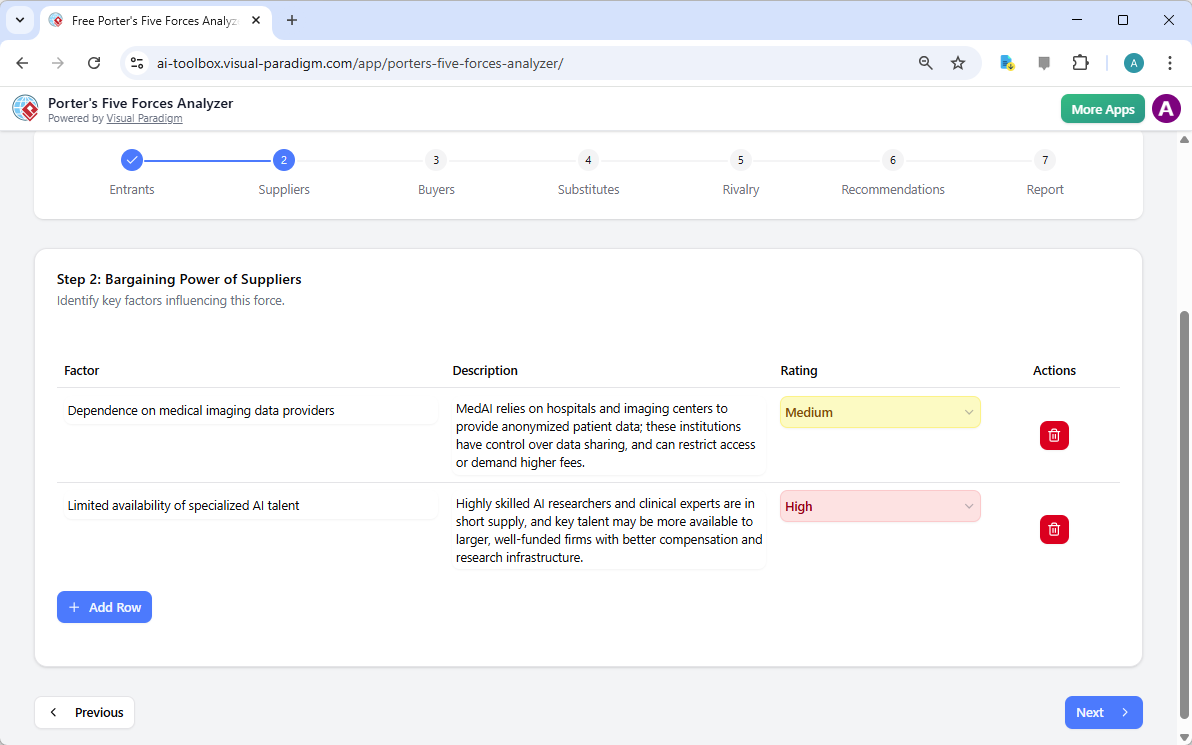
Saugen Ihre Lieferanten an Ihren Margen? Schritt 2 des Workflows konzentriert sich auf die Verhandlungsmacht der Lieferanten. Dieser Abschnitt hilft Ihnen, festzustellen, ob Ihr Unternehmen übermäßig von wenigen Schlüsselanbietern abhängt, wie beispielsweise spezialisiertem KI-Personal oder einzigartigen Datenanbietern. Die frühzeitige Identifizierung dieser Engpässe ermöglicht es Ihnen, Diversifizierungsstrategien zu entwickeln, bevor sie zu kritischen Problemen werden.

Die interaktiven dynamischen Tabellen ermöglichen es Ihnen, benutzerdefinierte Zeilen hinzuzufügen und KI-generierte Vorschläge zu verfeinern, sodass die Analyse die „wirkliche“ Realität Ihrer Lieferkette widerspiegelt. Strategisches Management wird so einfach und effektiv!

The screenshot of Step 2 of the Visual Paradigm  AI-Powered Porter's Five Forces Analysis Tool. - Professional online diagram

Schritt 3: Beherrschung der Verhandlungsmacht der Käufer

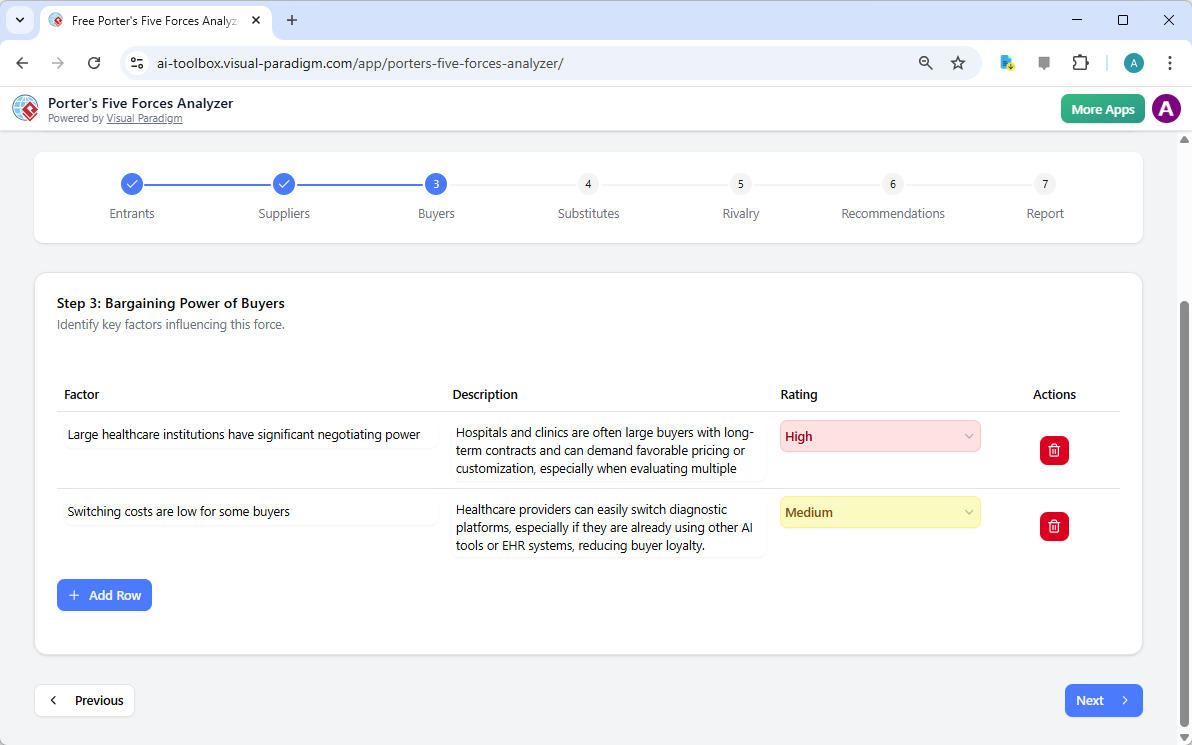
Ihre Kunden sind Ihr Lebensblut, doch ihre Macht, Preise zu senken, kann eine große Bedrohung darstellen. In Schritt 3 der beste künstliche-intelligenz-gestützte Porter-Five-Forces-Analyse untersucht die Verhandlungsmacht der Käufer. Für ein Unternehmen im medizinischen Technologiebereich könnte dies die Analyse des Verhandlungsdrucks großer Gesundheitseinrichtungen oder der niedrigen Umstellkosten umfassen, die die Markenloyalität verringern könnten.

Das Verständnis dieser Dynamiken ist entscheidend für Ihre Preisstrategie. Indem Sie erkennen, wann die Verhandlungsmacht der Käufer hoch ist, können Sie Ihre Aufmerksamkeit auf Differenzierung und zusätzliche Dienstleistungen richten, die Ihr Produkt unverzichtbar machen.

The screenshot of Step 3 of the Visual Paradigm  AI-Powered Porter's Five Forces Analysis Tool. - Professional online diagram

Schritt 4: Identifizierung der Bedrohung durch Ersatzprodukte

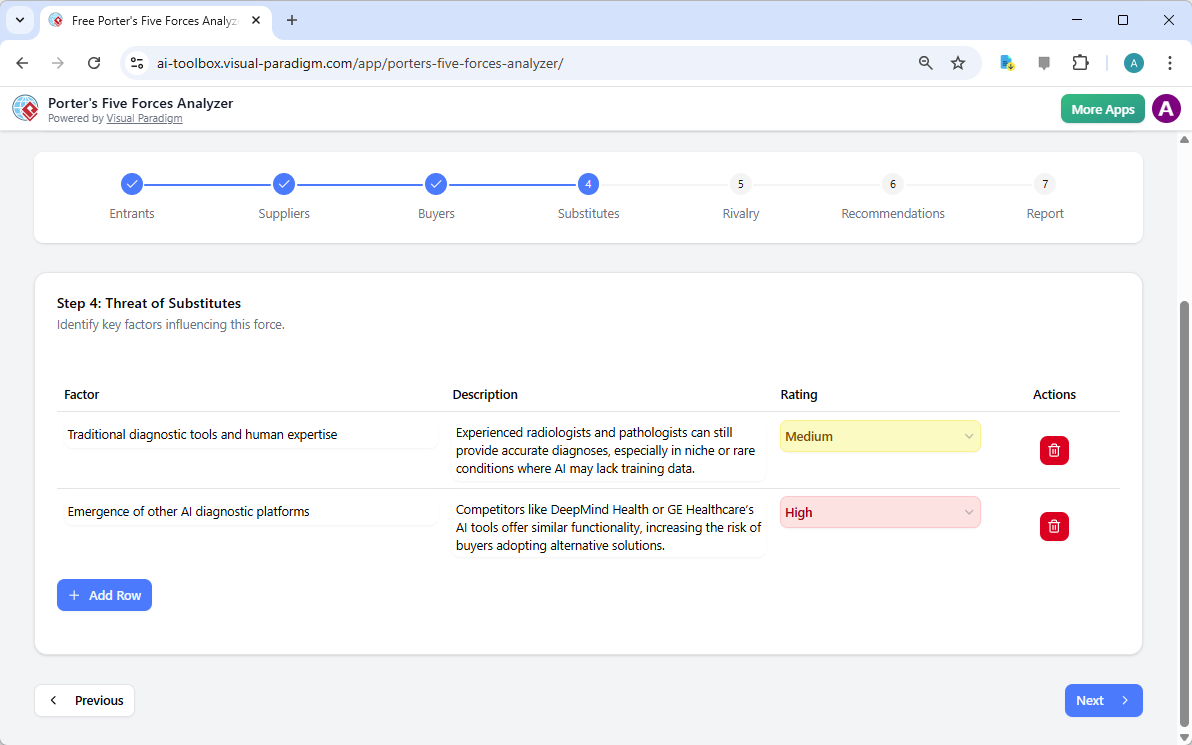
Der Wettbewerb kommt nicht immer von direkten Konkurrenten; manchmal stammt er aus völlig anderen Lösungsansätzen für dasselbe Problem. Schritt 4 führt Sie durch die Identifizierung der Bedrohung durch Ersatzprodukte. Ob es nun traditionelle menschliche Expertise ist, die gegen KI konkurriert, oder eine völlig neue Technologie – dieses Tool stellt sicher, dass Sie das große Ganze im Blick behalten.

Die Bewertung der Intensität dieser Ersatzprodukte hilft Ihnen, festzulegen, welche Bedrohungen in Ihren Marketing- und Forschungs- und Entwicklungsbemühungen die höchste Aufmerksamkeit erfordern. Mit diesem professionellen Analyse-Software, bleiben Sie immer einen Schritt voraus bei Marktveränderungen!

The screenshot of Step 4 of the Visual Paradigm  AI-Powered Porter's Five Forces Analysis Tool. - Professional online diagram

Schritt 5: Bewältigung des Wettbewerbs zwischen bestehenden Konkurrenten

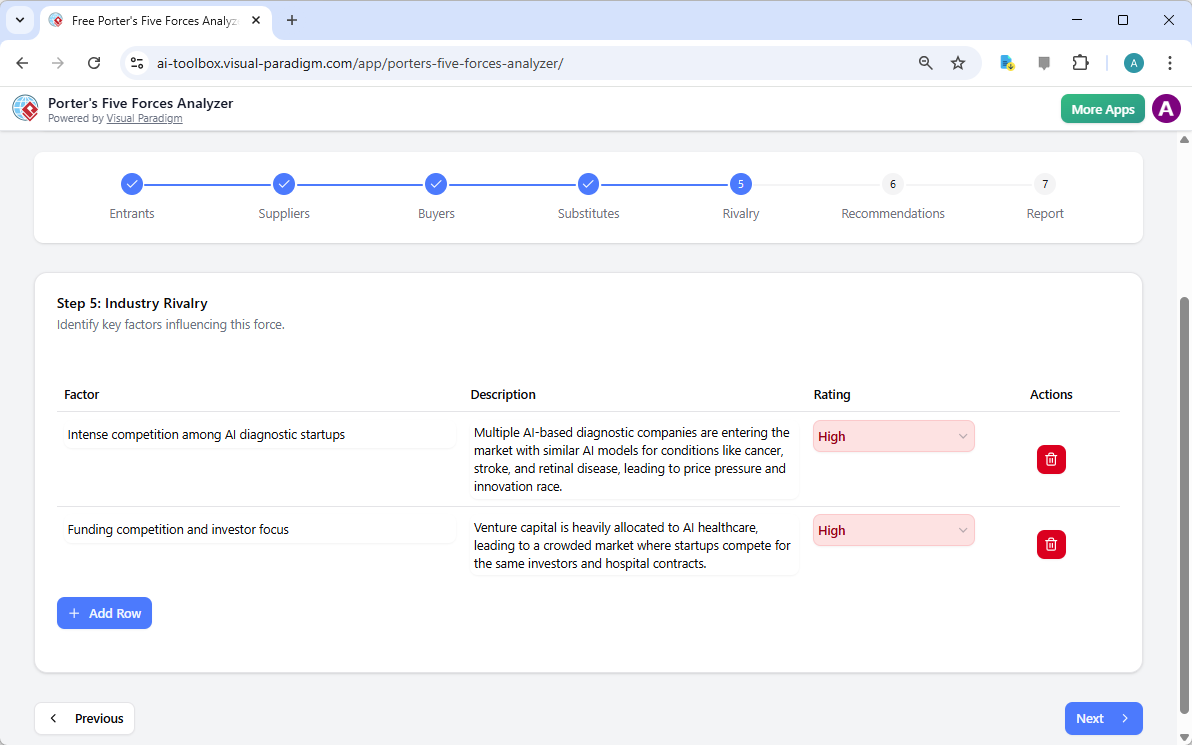
Die letzte Kraft im Rahmen ist die Konkurrenz zwischen bestehenden Konkurrenten. Hier wird oft der stärkste Druck gespürt, gekennzeichnet durch Preiskämpfe, aggressive Werbung und schnelle Innovation. Das Tool fordert Sie auf, die Anzahl der Konkurrenten und das Wachstum der Branche zu bewerten, um die Gesamtheiz des Marktes zu bestimmen.

In einem überfüllten Feld wie der KI-Gesundheitsversorgung ist das Verständnis des „Innovationswettlaufs“ von entscheidender Bedeutung. Dieser Schritt hilft Ihnen, das Wettbewerbsfeld zu visualisieren, damit Sie „Blue-Ocean“-Gelegenheiten finden können, in denen der Wettbewerb weniger intensiv ist.

The screenshot of Step 5 of the Visual Paradigm  AI-Powered Porter's Five Forces Analysis Tool. - Professional online diagram

Schritt 6: Entwicklung gewinnbringender strategischer Empfehlungen

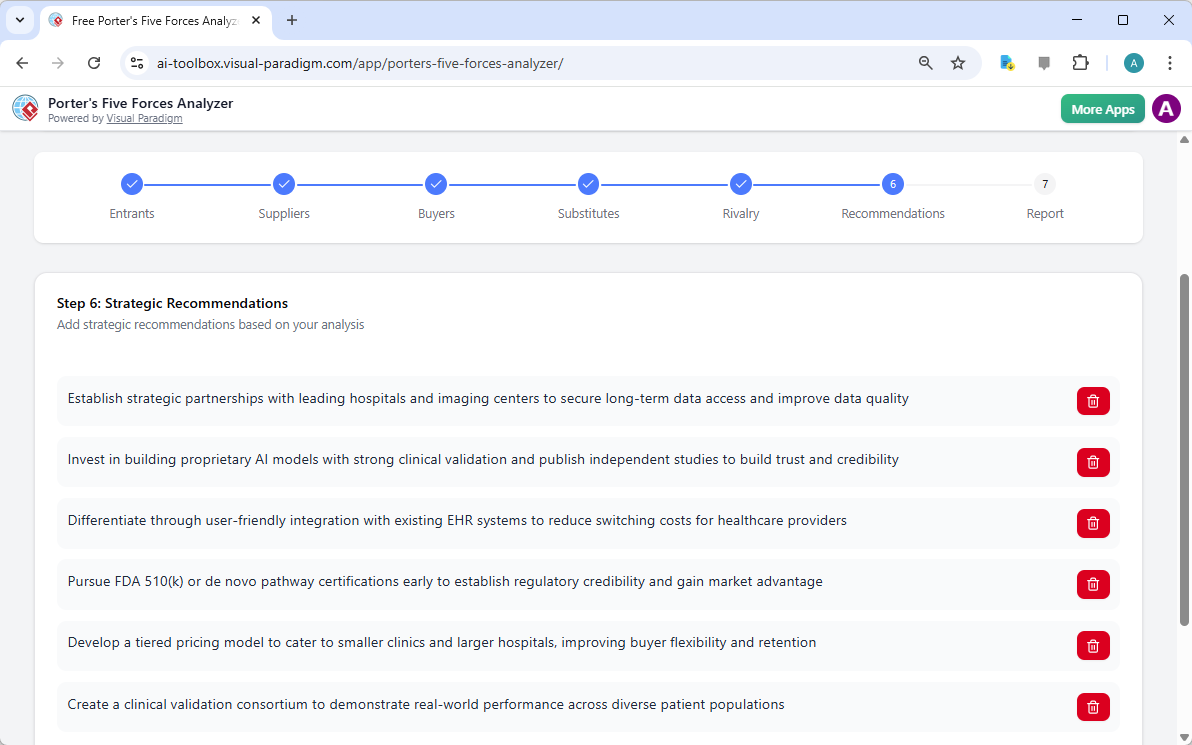
Eine Analyse ist nur so gut wie die Maßnahmen, die sie auslöst! Schritt 6 des KI-gestützte Porter-Five-Forces-Analyse ist der Ort, an dem die Magie geschieht. Auf Basis der in den vorherigen Schritten gesammelten Daten schlägt die KI starke strategische Empfehlungen. Dazu könnten die Verfolgung bestimmter Zertifizierungen, die Bildung strategischer Partnerschaften oder die Schaffung gestaffelter Preismodelle gehören, um einen größeren Marktanteil zu erlangen.

Hier verwandeln Sie Erkenntnisse in eine Erfolgsstrategie. Sie können diese Empfehlungen bearbeiten, um sie perfekt an die einzigartige Vision und die Ressourcenkapazitäten Ihres Unternehmens anzupassen.

The screenshot of Step 6 of the Visual Paradigm  AI-Powered Porter's Five Forces Analysis Tool - Professional online diagram

Schritt 7: Erstellung Ihres professionellen Endberichts

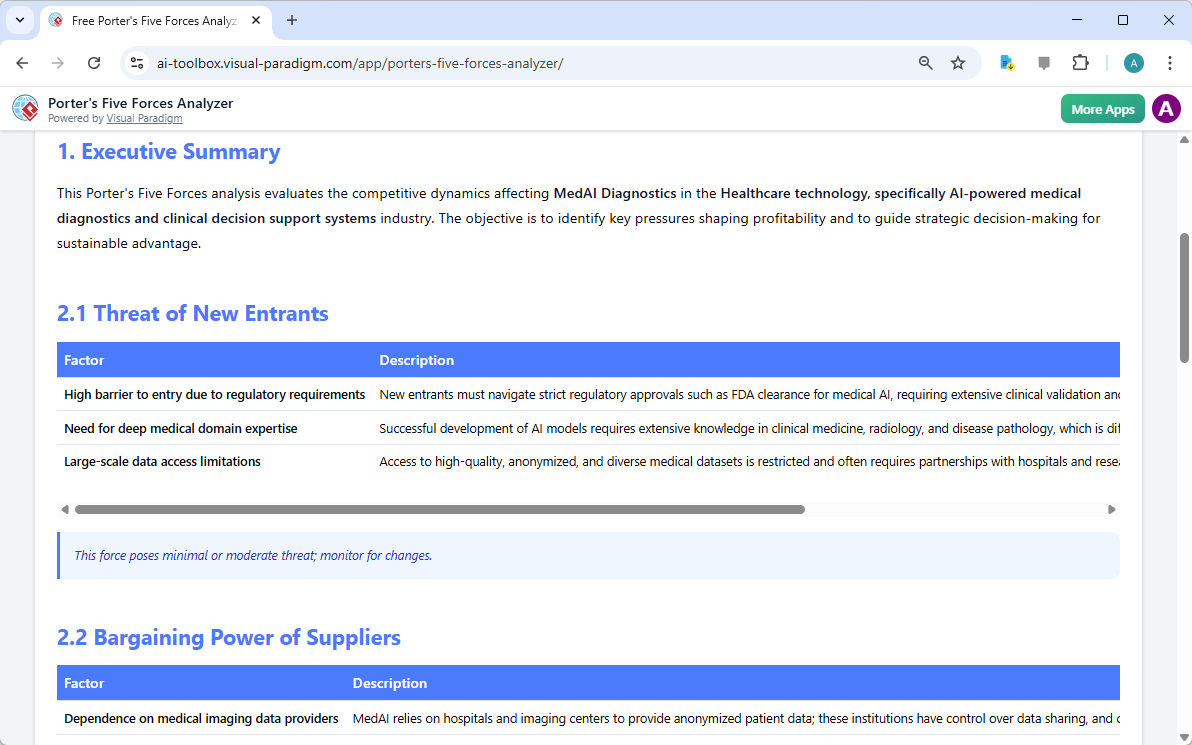
Der Höhepunkt Ihrer harten Arbeit ist ein konsolidierter Endbericht. Schritt 7 sammelt alle Faktoren, Bewertungen der Auswirkungen und Empfehlungen in einem professionellen, leicht lesbaren Format. Dies ist das Dokument, das Investoren überzeugt und Ihr Team ausrichtet. Es enthält eine Zusammenfassung für Führungskräfte und eine detaillierte Aufschlüsselung jedes Faktors und bietet einen umfassenden 360-Grad-Blick auf die Attraktivität Ihrer Branche.

Sie können diesen Bericht direkt ausdrucken oder als PDF speichern, was es unglaublich einfach macht, ihn mit Stakeholdern zu teilen oder in Ihren formellen Geschäftsplan einzubeziehen. Es ist das ultimative Ergebnis für jeden ernsthaften Geschäftsführer!

The screenshot of Step 7 of the Visual Paradigm  AI-Powered Porter's Five Forces Analysis Tool, displaying the automatically

Beherrschen Sie Ihre Strategie heute!

Es hat noch nie eine bessere Gelegenheit gegeben, die Kontrolle über Ihr wettbewerbsbezogenes Schicksal zu übernehmen. Visual Paradigms KI-gestützte Porter-Five-Forces-Analyse ist darauf ausgelegt, Sie mit den Erkenntnissen auszustatten, die Sie benötigen, um in jeder Branche erfolgreich zu sein. Von der Identifizierung verborgener Bedrohungen bis zur Nutzung ungenutzter Chancen ist dieses Werkzeug Ihr Tor zu strategischer Exzellenz. Lassen Sie Ihr Erfolg nicht dem Zufall überlassen – treffen Sie Ihre Entscheidungen auf der Grundlage des Goldstandard der Branchenanalyse!

Bereit, zu sehen, wo sich Ihr Unternehmen im Wettbewerbsfeld befindet? Nutzen Sie diese einfaches strategisches Planungstoolum Ihr Branchenwissen sofort in einen verteidigungsfähigen Wettbewerbsvorteil zu verwandeln!

Erleben Sie die Kraft der künstlichen Intelligenz in der Strategie:

Probieren Sie den Porter’s Five Forces Analyzer jetzt aus!

Erfahren Sie mehr über unsere innovativen strategischen Tools.

Verwandte Links

Umfassender Leitfaden zum Erstellen von beeindruckenden Flipbooks mit Fliplify von Visual Paradigm Online

Einführung

Fliplify, Teil von Visual Paradigm Online, ist ein leistungsstarkes Werkzeug, das Benutzern hilft, fesselnde digitale Flipbooks und Slideshows zu erstellen. Ob Sie von Grund auf beginnen oder bestehende Inhalte hochladen, Fliplify bietet eine nahtlose und benutzerfreundliche Erfahrung. Dieser Leitfaden führt Sie durch den Prozess der Erstellung beeindruckender Flipbooks und hebt die wichtigsten Funktionen, Anwendungsbereiche und die Gründe hervor, warum sich Fliplify abhebt.

Warum Fliplify wählen?

  1. Benutzerfreundliche Oberfläche:

    • Fliplify bietet eine intuitive und benutzerfreundliche Oberfläche, die es Benutzern erleichtert, professionell aussehende Flipbooks zu erstellen, ohne umfangreiche technische Kenntnisse zu benötigen24.
  2. Vielseitige Inhaltserschaffung:

    • Benutzer können Flipbooks aus verschiedenen Quellen erstellen, darunter PDFs, PowerPoint-Präsentationen und mehr. Diese Vielseitigkeit ermöglicht die Umwandlung einer breiten Vielzahl an Inhalten in ansprechende Flipbooks24.
  3. Anpassungsmöglichkeiten:

    • Fliplify ermöglicht es Benutzern, jedes Detail ihrer Flipbooks anpassen zu können, von Layout und Design bis hin zu interaktiven Elementen. Dadurch wird eine glänzende und professionelle Präsentation gewährleistet, die auf spezifische Anforderungen abgestimmt ist24.
  4. Interaktive Elemente:

    • Das Tool ermöglicht die Hinzufügung interaktiver Elemente wie Anmerkungen, Hervorhebungen und Kommentare, was die Interaktion und das Verständnis des Inhalts verbessert25.
  5. Nahtlose Integration:

    • Fliplify integriert sich nahtlos mit anderen Funktionen von Visual Paradigm Online und schafft ein umfassendes Werkzeugpaket für alle kreativen Bedürfnisse. Diese Integration sorgt für eine reibungslose und produktive Erfahrung26.

Anwendungsbereiche

  1. Geschäftliche Präsentationen:

    • Erstellen Sie ansprechende und interaktive Geschäftspräsentationen, die das Publikum fesseln und wichtige Botschaften effektiv vermitteln.
  2. Lerninhalte:

    • Entwickeln Sie Lernmaterialien, die optisch ansprechend und interaktiv sind und das Lernerlebnis für Schüler verbessern.
  3. Marketingmaterialien:

    • Gestalten Sie digitale Broschüren, Produktkataloge und andere Marketingmaterialien, die auffallen und potenzielle Kunden ansprechen.
  4. Persönliche Projekte:

    • Verwenden Sie Fliplify für persönliche Projekte, wie zum Beispiel das Erstellen von Fotoalben, Reise-Tagebüchern oder jeglichen anderen Inhalten, die von einem interaktiven und optisch ansprechenden Format profitieren.

Warum Fliplify sich abhebt

  1. Umfangreiches Werkzeugset:

    • Fliplify bietet ein leistungsfähiges Set an Tools zum Erstellen, Bearbeiten und Veröffentlichen von Flipbooks. Von grundlegenden Gestaltungselementen bis hin zu erweiterten Anpassungsmöglichkeiten bietet Fliplify alles, was zum Erstellen beeindruckender Flipbooks benötigt wird26.
  2. Einfach zu bedienen:

    • Die Plattform ist einfach zu bedienen und verfügt über eine übersichtliche Oberfläche, die es Nutzern ermöglicht, sich auf ihre kreativen Projekte zu konzentrieren, ohne sich mit komplizierten Softwareinstallationen herumzuquälen24.
  3. Hochwertige Ausgabe:

    • Fliplify stellt sicher, dass die veröffentlichten Flipbooks von hoher Qualität sind, mit professionell aussehenden Designs und interaktiven Elementen, die das Nutzererlebnis verbessern24.
  4. Kundensupport:

    • Visual Paradigm Online bietet hervorragenden Kundenservice und unterstützt Benutzer bei allen Problemen oder Fragen, die sie beim Einsatz der Flipbook-Funktion haben können27.

Merkmalliste

  1. Anpassbare Vorlagen:

    • Wählen Sie aus einer Vielzahl an anpassbaren Vorlagen, um Ihr Flipbook-Projekt zu beginnen. Diese Vorlagen bilden die Grundlage für Ihre Gestaltung und ermöglichen eine einfache Anpassung an Ihre spezifischen Anforderungen26.
  2. Interaktive Anmerkungen:

    • Fügen Sie Anmerkungen, Hervorhebungen und Kommentare zu Ihren Flipbooks hinzu, um die Interaktion und das Verständnis zu fördern. Diese interaktiven Elemente machen den Inhalt dynamischer und persönlicher25.
  3. Unterstützung mehrerer Dateiformate:

    • Konvertieren Sie verschiedene Dateitypen in Flipbooks, darunter PDFs, PowerPoint-Präsentationen, E-Books und Tabellenkalkulationen. Diese Vielseitigkeit ermöglicht die Umwandlung einer breiten Palette an Inhalten in ansprechende Flipbooks27.
  4. Erweiterte Gestaltungswerkzeuge:

    • Nutzen Sie erweiterte Gestaltungswerkzeuge, um Layout, Gestaltung und interaktive Elemente Ihrer Flipbooks anzupassen. Diese Werkzeuge sorgen für ein glänzendes und professionelles Erscheinungsbild26.
  5. Nahtlose Integration mit Visual Paradigm Online:

    • Fliplify integriert sich nahtlos mit anderen Funktionen von Visual Paradigm Online und bildet ein umfassendes Werkzeugset für all Ihre kreativen Bedürfnisse. Diese Integration sorgt für eine reibungslose und produktive Erfahrung26.

Fazit

Fliplify von Visual Paradigm Online zeichnet sich als eine leistungsstarke und benutzerfreundliche Werkzeug zum Erstellen beeindruckender Flipbooks aus. Mit seiner intuitiven Oberfläche, vielseitigen Möglichkeiten zur Inhaltserschaffung und fortgeschrittenen Gestaltungswerkzeugen bietet Fliplify alles, was man benötigt, um ansprechende und interaktive Flipbooks zu erstellen. Ob für Geschäftspräsentationen, Bildungsinhalte, Marketingmaterialien oder persönliche Projekte – Fliplify bietet ein nahtloses und produktives Erlebnis und ist somit die ideale Wahl für alle Ihre Flipbook-Bedürfnisse.

Umfassender Leitfaden zum Erstellen von wunderbaren Animations-Flipbooks mit Visual Paradigm’s AniFuzion und Fliplify

Einführung

Die Erstellung eines Animations-Flipbooks verbindet die fesselnde Natur von Animationen mit der interaktiven Erfahrung von Flipbooks. Die Tools AniFuzion und Fliplify von Visual Paradigm bieten eine nahtlose Möglichkeit, dies zu erreichen, und ermöglichen es Benutzern, fesselndes Content zu erstellen, das sich abhebt. Dieser Leitfaden führt Sie durch den Prozess der Erstellung eines Animations-Flipbooks und zeigt, warum diese Tools eine hervorragende Wahl sind und wie sie Ihren Content attraktiver und ansprechender gestalten können.

Warum Visual Paradigm’s AniFuzion und Fliplify wählen?

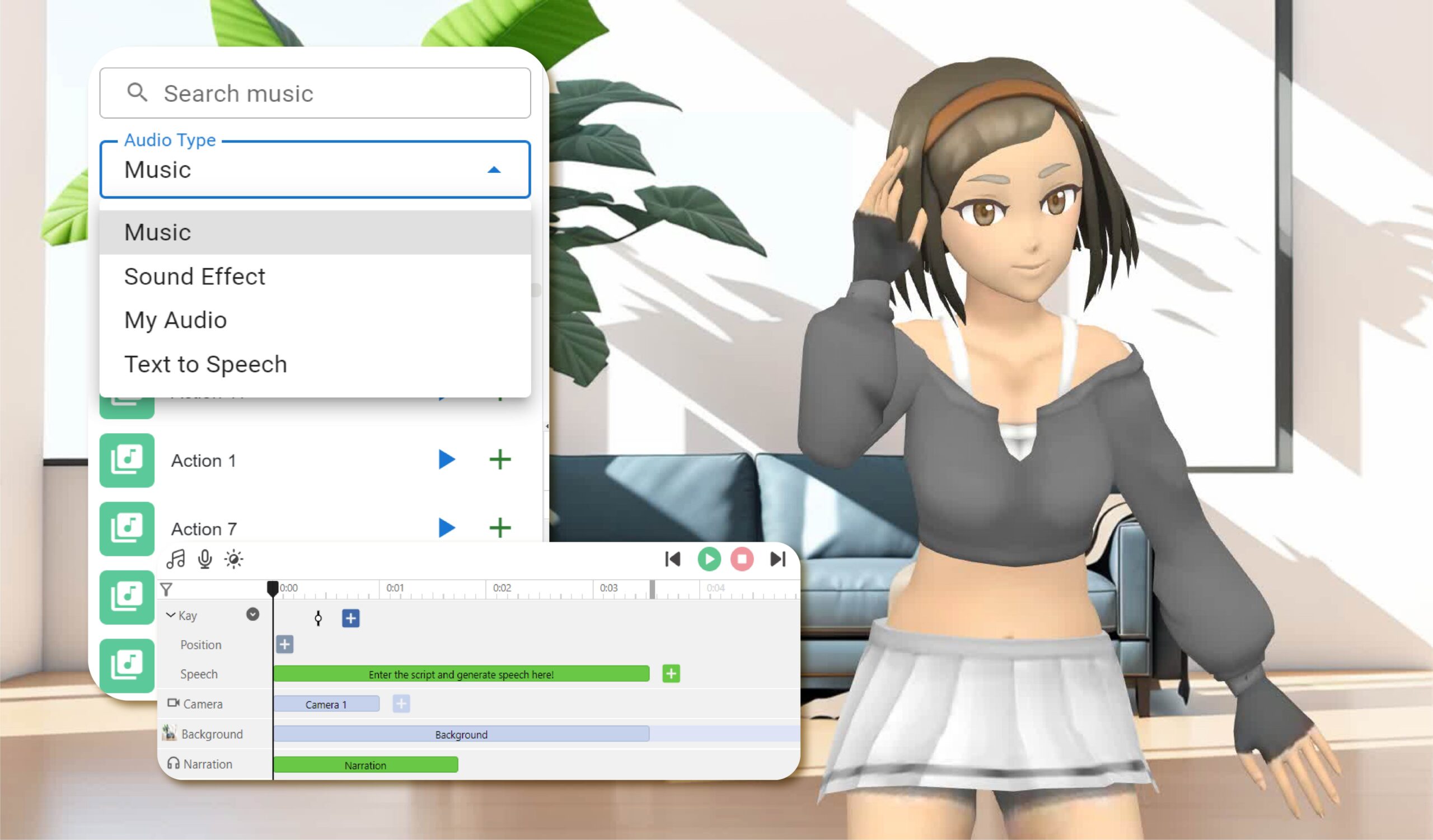
Elevate Your Animations with Sound in AniFuzion - AniFuzion

  1. Benutzerfreundliche Oberfläche:

    • Sowohl AniFuzion als auch Fliplify bieten intuitive Oberflächen, die es Benutzern unabhängig von ihrer technischen Expertise ermöglichen, professionelle Animationen und Flipbooks zu erstellen2024.
  2. Umfangreiches Werkzeugset:

    • Diese Tools bieten eine Vielzahl von Funktionen, darunter 2D- und 3D-Animation, anpassbare Vorlagen und interaktive Elemente, sodass Benutzer alles haben, was sie für die Erstellung ansprechenden Contents benötigen2126.
  3. Nahtlose Integration:

    • AniFuzion und Fliplify integrieren sich nahtlos miteinander und mit anderen Funktionen von Visual Paradigm Online und bilden so ein umfassendes Werkzeugset für all Ihre kreativen Bedürfnisse2126.
  4. Hochwertige Ausgabe:

    • Die Tools sorgen dafür, dass die endgültige Ausgabe von hoher Qualität ist, mit polierten und professionell aussehenden Animationen und Flipbooks, die das Publikum fesseln2024.
  5. Kundensupport:

    • Visual Paradigm bietet hervorragenden Kundensupport und unterstützt Benutzer bei allen Problemen oder Fragen, die sie beim Einsatz der Tools haben können27.

Wie animierte Flipbooks Inhalte ansprechend und ansprechend machen

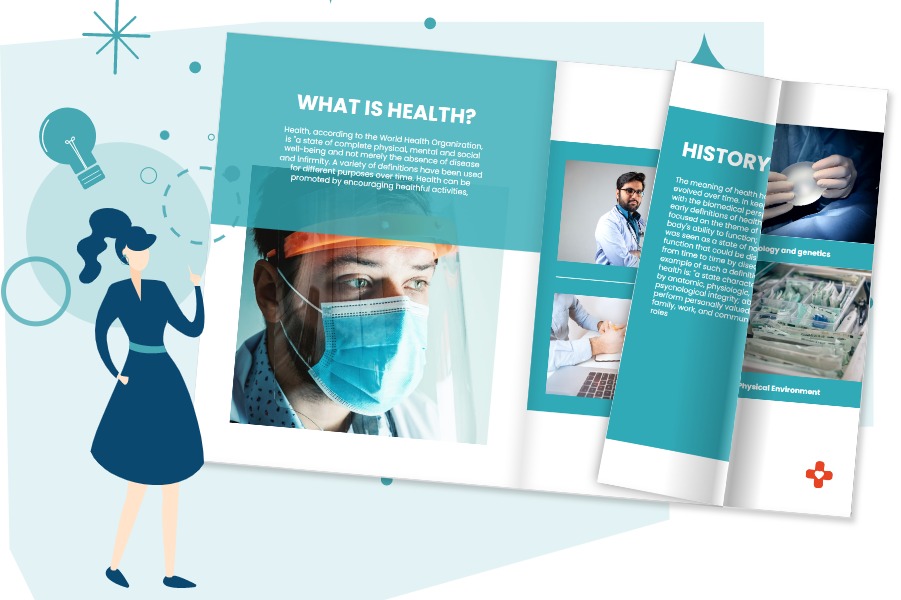
Flipping Book Animation Software - Visual Paradigm Blog

  1. Visuelle Attraktivität:

    • Animierte Flipbooks kombinieren die visuelle Attraktivität von Animationen mit der interaktiven Erfahrung von Flipbooks und machen den Inhalt ansprechender und visuell ansprechender20.
  2. Interaktive Erfahrung:

    • Die interaktive Natur von Flipbooks ermöglicht es Benutzern, sich auf dynamischere Weise mit dem Inhalt auseinanderzusetzen, was das Verständnis und die Behaltensleistung verbessert25.
  3. Geschichten erzählen:

    • Animierte Flipbooks ermöglichen es Benutzern, Geschichten auf überzeugendere Weise zu erzählen, indem sie Animationen nutzen, um Charaktere und Szenen zum Leben zu erwecken21.
  4. Vielseitigkeit:

    • Animierte Flipbooks können für eine Vielzahl von Zwecken eingesetzt werden, von Bildungsinhalten und Geschäftspräsentationen bis hin zu Marketingmaterialien und persönlichen Projekten2426.

Tutorial: Erstellen eines animierten Flipbooks mit AniFuzion und Fliplify

Visual Paradigm Flipbook Maker: Elevate Your Digital Presence with Dynamic and Engaging Flipbooks - Visual Paradigm Blog

Schritt 1: Erstellen von Animationen mit AniFuzion
  1. Registrieren und anmelden:

    • Registrieren Sie sich für ein Visual Paradigm Online-Konto und melden Sie sich an, um auf AniFuzion zugreifen zu können.
  2. Wählen Sie eine Vorlage oder beginnen Sie von Grund auf neu:

    • Durchstöbern Sie die verfügbaren Vorlagen oder entscheiden Sie sich dafür, von Grund auf neu zu beginnen. Vorlagen bieten eine Grundlage für Ihre Animation, während das Starten von Grund auf neu mehr Anpassungsmöglichkeiten ermöglicht21.
  3. Entwerfen Sie Ihre Animation:

    • Nutzen Sie die intuitive Oberfläche, um Ihre Animation zu gestalten. Fügen Sie Charaktere, Szenen und Gegenstände hinzu und passen Sie ihr Aussehen und ihre Aktionen an. Nutzen Sie die 2D- und 3D-Animationsfunktionen, um Ihre Vision zum Leben zu erwecken20.
  4. Fügen Sie interaktive Elemente hinzu:

    • Integrieren Sie interaktive Elemente wie Anmerkungen, Hervorhebungen und Kommentare, um die Interaktion und das Verständnis zu fördern25.
  5. Vorschau und Export:

    • Sehen Sie sich die Vorschau Ihrer Animation an, um sicherzustellen, dass sie Ihren Erwartungen entspricht. Sobald Sie zufrieden sind, exportieren Sie die Animation im gewünschten Format20.
Schritt 2: Erstellen Sie ein Flipbook mit Fliplify
  1. Laden Sie Ihre Animation hoch:

    • Melden Sie sich bei Visual Paradigm Online an und greifen Sie auf Fliplify zu. Laden Sie Ihre exportierte Animation hoch, um sie als Inhalt für Ihr Flipbook zu verwenden24.
  2. Wählen Sie eine Vorlage oder beginnen Sie von Grund auf neu:

    • Durchstöbern Sie die verfügbaren Flipbook-Vorlagen oder entscheiden Sie sich dafür, von Grund auf neu zu beginnen. Vorlagen bieten eine Grundlage für Ihr Flipbook, während das Starten von Grund auf neu mehr Anpassungsmöglichkeiten ermöglicht26.
  3. Entwerfen Sie Ihr Flipbook:

    • Verwenden Sie die intuitive Benutzeroberfläche, um Ihr Flipbook zu gestalten. Fügen Sie Seiten hinzu, passen Sie die Layouts an und integrieren Sie interaktive Elemente wie Anmerkungen und Hervorhebungen24.
  4. Integrieren Sie Ihre Animation:

    • Integrieren Sie Ihre Animation in das Flipbook, um sicherzustellen, dass sie nahtlos mit dem restlichen Inhalt zusammenfließt. Nutzen Sie die interaktiven Funktionen von Fliplify, um die Interaktion und das Verständnis der Animation zu verbessern25.
  5. Vorschau und Veröffentlichen:

    • Sehen Sie sich eine Vorschau Ihres Flipbooks an, um sicherzustellen, dass es Ihren Erwartungen entspricht. Sobald Sie zufrieden sind, veröffentlichen Sie das Flipbook und teilen Sie es mit Ihrer Zielgruppe24.

Fazit

Die Erstellung eines Animations-Flipbooks mit Visual Paradigm’s AniFuzion und Fliplify ist eine effektive Methode, um Ihren Inhalt ansprechender und interessanter zu gestalten. Mit ihren benutzerfreundlichen Oberflächen, umfassenden Werkzeugkisten, nahtlosen Integrationen und hochwertigen Ergebnissen bieten diese Tools alles, was zum Erstellen fesselnder Animations-Flipbooks benötigt wird. Unabhängig davon, ob für Bildungsinhalte, Geschäftspräsentationen, Marketingmaterialien oder persönliche Projekte – AniFuzion und Fliplify bieten eine reibungslose und produktive Erfahrung und sind somit die ideale Wahl für alle kreativen Bedürfnisse.

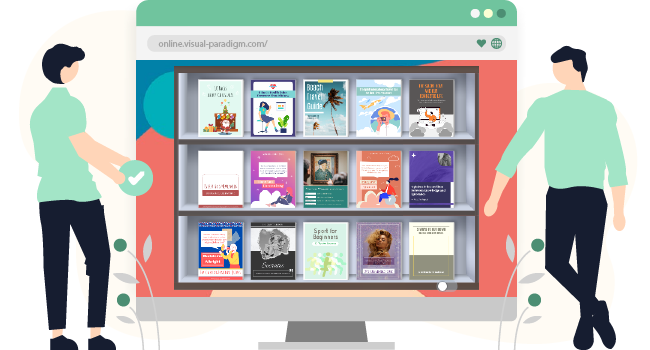
Umfassender Leitfaden zum Erstellen von Flipbooks und zum Organisieren sie zu einem schönen virtuellen Bücherregal

Einführung

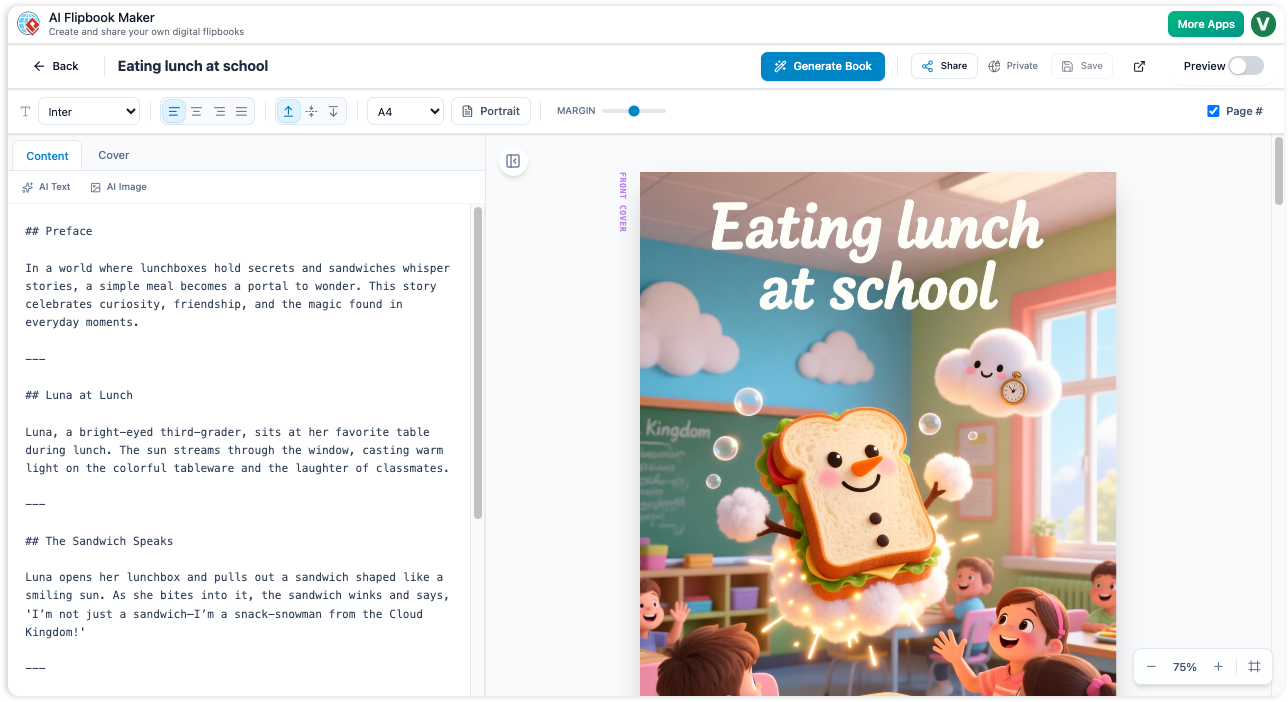
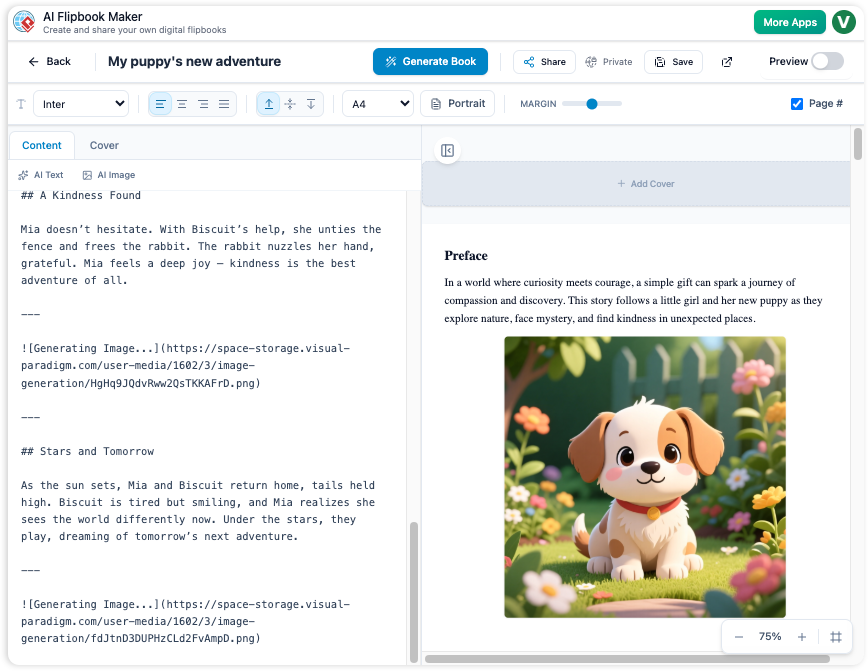
Das Erstellen von Flipbooks mit Visual Paradigm Online ist eine nahtlose und ansprechende Art, Ihre Inhalte darzustellen. Ob Sie Bildungsmaterialien, Geschäftspräsentationen oder persönliche Projekte gestalten, die Tools von Visual Paradigm bieten eine umfassende Reihe von Funktionen, um Ihre Ideen zum Leben zu erwecken. Dieser Leitfaden führt Sie Schritt für Schritt durch den Prozess des Erstellens von Flipbooks, der Integration von 2D- und 3D-Animationen, Text-zu-Sprache (TTS) und KI-Menschenstimmen sowie der Organisation in einem schönen virtuellen Bücherregal.

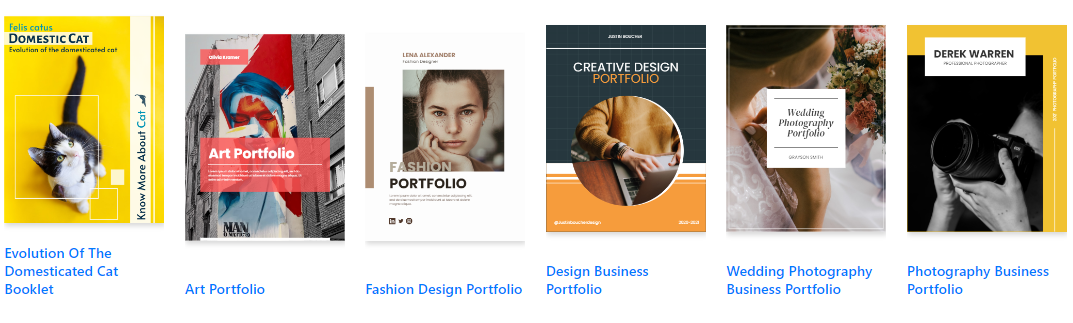
Fliplify:Visual Paradigm Online的翻页书设计大师| 學習EA, Agile & UML 和使用Visual Paradigm 技能- 點部落

Schritt 1: Erste Schritte mit Visual Paradigm Online

  1. Konto erstellen und anmelden:

    • Besuchen Sie die Visual Paradigm Online Website und erstellen Sie ein Konto, falls Sie noch keins besitzen.
    • Melden Sie sich an, um auf die Tool-Suite zuzugreifen, einschließlich Fliplify zum Erstellen von Flipbooks und AniFuzion zum Hinzufügen von Animationen.
  2. Erkunden Sie das Dashboard:

    • Machen Sie sich mit dem Dashboard vertraut, das Zugriff auf verschiedene Tools und Funktionen bietet.
    • Navigieren Sie zur Fliplify-Sektion, um mit der Erstellung Ihres Flipbooks zu beginnen.

Make Your Flipbook Stand Out with AniFuzion - Fliplify

Schritt 2: Erstellen eines Flipbooks mit Fliplify

  1. Wählen Sie eine Vorlage oder beginnen Sie von Grund auf:

    • Durchsuchen Sie die verfügbaren Flipbook-Vorlagen oder entscheiden Sie sich dafür, von Grund auf zu beginnen. Vorlagen bieten eine Grundlage für Ihre Gestaltung, während das Starten von Grund auf mehr Anpassungsmöglichkeiten ermöglicht26.
  2. Gestalten Sie Ihr Flipbook:

    • Nutzen Sie die intuitive Oberfläche, um Ihr Flipbook zu gestalten. Fügen Sie Seiten hinzu, passen Sie die Layouts an und integrieren Sie interaktive Elemente wie Anmerkungen, Hervorhebungen und Kommentare24.
    • Nutzen Sie die erweiterten Gestaltungswerkzeuge, um eine glatte und professionelle Präsentation sicherzustellen.
  3. Integrieren Sie 2D- und 3D-Animationen:

    • Verwenden Sie AniFuzion, um 2D- und 3D-Animationen zu erstellen oder zu importieren. Diese Animationen können nahtlos in Ihr Flipbook integriert werden, um die Interaktion und visuelle Attraktivität zu steigern20.
    • Stellen Sie sicher, dass die Animationen nahtlos mit dem restlichen Inhalt zusammenfließen und nutzen Sie die interaktiven Funktionen von Fliplify, um das Verständnis zu verbessern.25.

Visual Paradigm Online: Revolutionizing Digital Content Creation - Cybermedian

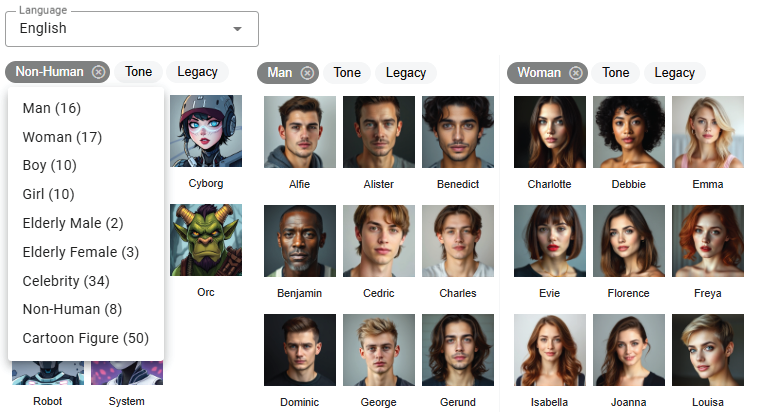
  1. Fügen Sie Text-zu-Sprache (TTS) und KI-Menschenstimmen hinzu:

    • Integrieren Sie TTS und KI-Menschenstimmen, um Ihr Flipbook zu erzählen. Diese Funktion verbessert die interaktive Erfahrung und macht den Inhalt ansprechender und zugänglicher.20.
    • Passen Sie die Stimmeinstellungen an den Ton und Stil Ihres Flipbooks an.

Bring Your Characters to Life with Enhanced TTS Support - Visual Paradigm  News

  1. Vorschau und Veröffentlichen:

    • Sehen Sie sich Ihre Flipbook-Vorschau an, um sicherzustellen, dass sie Ihren Erwartungen entspricht. Nehmen Sie bei Bedarf Anpassungen am Design und Inhalt vor.
    • Sobald Sie zufrieden sind, veröffentlichen Sie das Flipbook und teilen Sie es mit Ihrem Publikum.24.

Schritt 3: Anordnung von Flipbooks in einem virtuellen Bücherregal

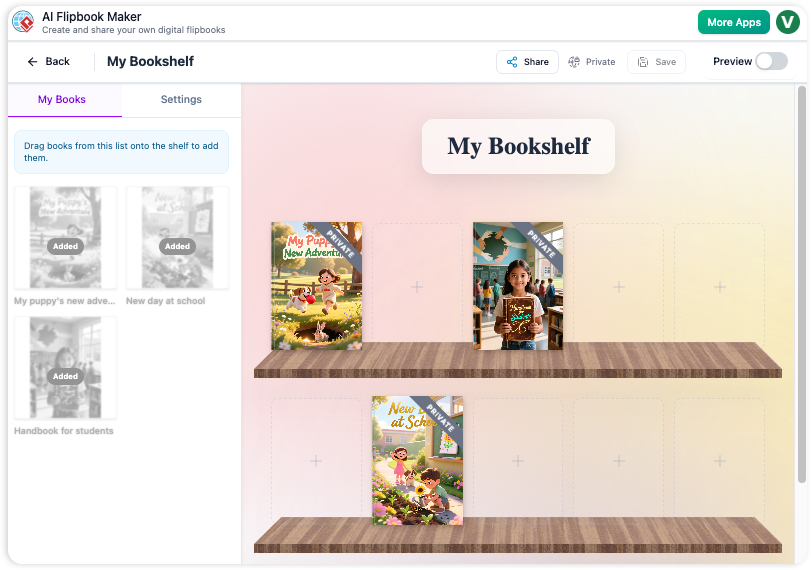
  1. Erstellen Sie ein virtuelles Bücherregal:

    • Navigieren Sie zur Funktion des virtuellen Bücherregals in Visual Paradigm Online.
    • Erstellen Sie ein neues Bücherregal und passen Sie sein Aussehen an Ihr Branding oder Ihren persönlichen Stil an.
  2. Fügen Sie Flipbooks zum Bücherregal hinzu:

    • Fügen Sie Ihre veröffentlichten Flipbooks zum virtuellen Bücherregal hinzu. Ordnen Sie sie nach Kategorie, Thema oder anderen Kriterien, die für Ihren Inhalt sinnvoll sind.
    • Passen Sie die Miniaturansichten und Beschreibungen jedes Flipbooks an, um sie optisch ansprechend und informativ zu gestalten.
  3. Passen Sie die Layout des Bücherregals an:

    • Ordnen Sie die Flipbooks auf dem Bücherregal auf ansprechende Weise an. Verwenden Sie die Layout-Tools, um Positionierung und Abstand der Flipbooks anzupassen.
    • Fügen Sie interaktive Elemente wie Links zu verwandten Inhalten oder zusätzlichen Ressourcen hinzu, um die Benutzererfahrung zu verbessern.
  4. Teilen Sie Ihr virtuelles Bücherregal:

    • Teilen Sie Ihre virtuelle Buchgalerie mit Ihrer Zielgruppe, indem Sie einen Link bereitstellen oder sie auf Ihrer Website einbetten.
    • Fördern Sie Ihre Buchgalerie über soziale Medien, E-Mail-Newsletter und andere Marketingkanäle, um eine breitere Zielgruppe zu erreichen.

Schritt 4: Steigerung der Interaktion durch interaktive Funktionen

  1. Interaktive Anmerkungen:

    • Fügen Sie Anmerkungen, Hervorhebungen und Kommentare zu Ihren Flipbooks hinzu, um die Interaktion und das Verständnis zu verbessern. Diese interaktiven Elemente machen den Inhalt dynamischer und persönlicher25.
  2. Quizze und Umfragen:

    • Integrieren Sie Quizze und Umfragen in Ihre Flipbooks, um Ihre Zielgruppe zu engagieren und Feedback zu sammeln. Diese Funktion ist besonders nützlich für Bildungsinhalte und Geschäftspräsentationen.
  3. Multimedia-Integration:

    • Integrieren Sie multimediale Elemente wie Videos, Bilder und Audio-Ausschnitte, um die visuelle Attraktivität und die Interaktion Ihrer Flipbooks zu steigern.
    • Stellen Sie sicher, dass die multimediale Inhalte nahtlos mit dem restlichen Inhalt integriert sind und nutzen Sie die interaktiven Funktionen von Fliplify, um das Verständnis zu verbessern25.

How to Add Voice to Characters by Text-to-Speech with Perfect Lip Sync-  AniFuzion


Fazit

Die Erstellung von Flipbooks mit Visual Paradigm Online und die Organisation in einer schönen virtuellen Buchgalerie ist eine leistungsfähige Methode, um Ihren Inhalt ansprechend und interaktiv zu präsentieren. Mit Funktionen wie 2D- und 3D-Animationen, TTS und KI-generierten menschlichen Stimmen können Sie die visuelle Attraktivität und die Interaktion Ihrer Flipbooks verbessern. Unabhängig davon, ob es sich um Bildungsinhalte, Geschäftspräsentationen oder persönliche Projekte handelt, bieten Visual Paradigm’s Tools ein umfassendes Spektrum an Funktionen, um Ihre Ideen zu verwirklichen und Ihre Zielgruppe zu begeistern.

Komplette Anleitung: Konvertieren Sie ein PDF in ein wunderschönes Flipbook in wenigen Klicks mit Visual Paradigm Online

Einführung

In der heutigen digitalen Ära ist es entscheidend, Inhalte auf eine ansprechende und interaktive Weise darzustellen, um die Aufmerksamkeit des Publikums zu gewinnen und zu halten. Eine effektive Möglichkeit, dies zu erreichen, besteht darin, traditionelle PDF-Dokumente in dynamische Flipbooks umzuwandeln. Visual Paradigm Online bietet eine leistungsstarke und benutzerfreundliche Lösung dafür mit seinem Fliplify-Tool. Diese umfassende Anleitung führt Sie Schritt für Schritt durch den Prozess, ein PDF in nur wenigen Klicks in ein wunderschönes Flipbook umzuwandeln, und hebt die wichtigsten Funktionen und Vorteile der Verwendung von Visual Paradigm Online hervor. Unabhängig davon, ob Sie Bildungsmaterialien, Geschäftspräsentationen oder persönliche Projekte erstellen, wird diese Anleitung Ihnen helfen, das volle Potenzial von Flipbooks auszuschöpfen, um Ihre Inhalte hervorzuheben.

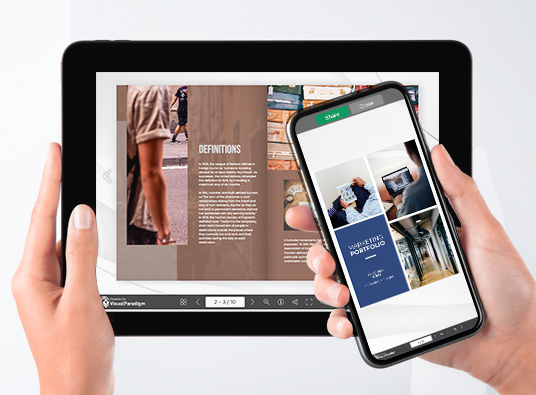
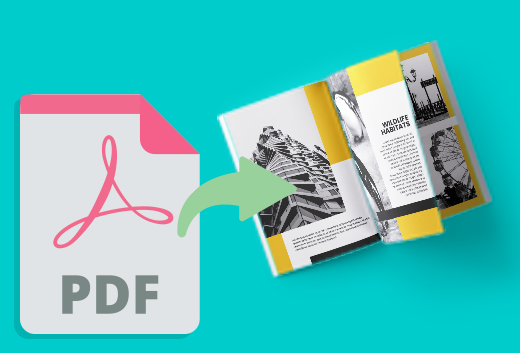
Can I turn my PDF into a Flipbook? - Visual Paradigm Blog

Die Umwandlung eines PDFs in ein ansprechendes Flipbook kann die Präsentation und Interaktivität Ihrer Inhalte erheblich verbessern. Visual Paradigm Online bietet eine nahtlose und benutzerfreundliche Möglichkeit dazu mit seinem leistungsstarken Fliplify-Tool. Diese Anleitung führt Sie Schritt für Schritt durch den Prozess der Umwandlung eines PDFs in ein Flipbook in nur wenigen Klicks und hebt die wichtigsten Funktionen und Vorteile der Verwendung von Visual Paradigm Online hervor.

Transform Your PDFs into Engaging Flipbooks with Our Powerful Tools - Visual Paradigm Blog

Schritt 1: Erste Schritte mit Visual Paradigm Online

  1. Konto erstellen und anmelden:

    • Besuchen Sie die Visual Paradigm Online Website und erstellen Sie ein Konto, falls Sie noch keins besitzen.
    • Melden Sie sich an, um auf die Tool-Suite zuzugreifen, einschließlich Fliplify zum Erstellen von Flipbooks.
  2. Navigieren Sie zu Fliplify:

    • Nach der Anmeldung navigieren Sie über das Dashboard zur Fliplify-Sektion. Hier werden Sie Ihr PDF in ein Flipbook umwandeln.

Schritt 2: Hochladen Ihrer PDF

  1. Laden Sie die PDF hoch:

    • Klicken Sie auf die Schaltfläche „Flipbook erstellen“ und wählen Sie die Option zum Hochladen einer PDF.
    • Wählen Sie die PDF-Datei von Ihrem Computer oder Cloud-Speicher aus, die Sie in ein Flipbook umwandeln möchten.
  2. Verarbeitung der PDF:

    • Visual Paradigm Online verarbeitet die hochgeladene PDF automatisch und konvertiert sie in das Flipbook-Format. Dieser Vorgang dauert in der Regel nur wenige Momente, abhängig von der Größe der PDF.

Schritt 3: Anpassen Ihres Flipbooks

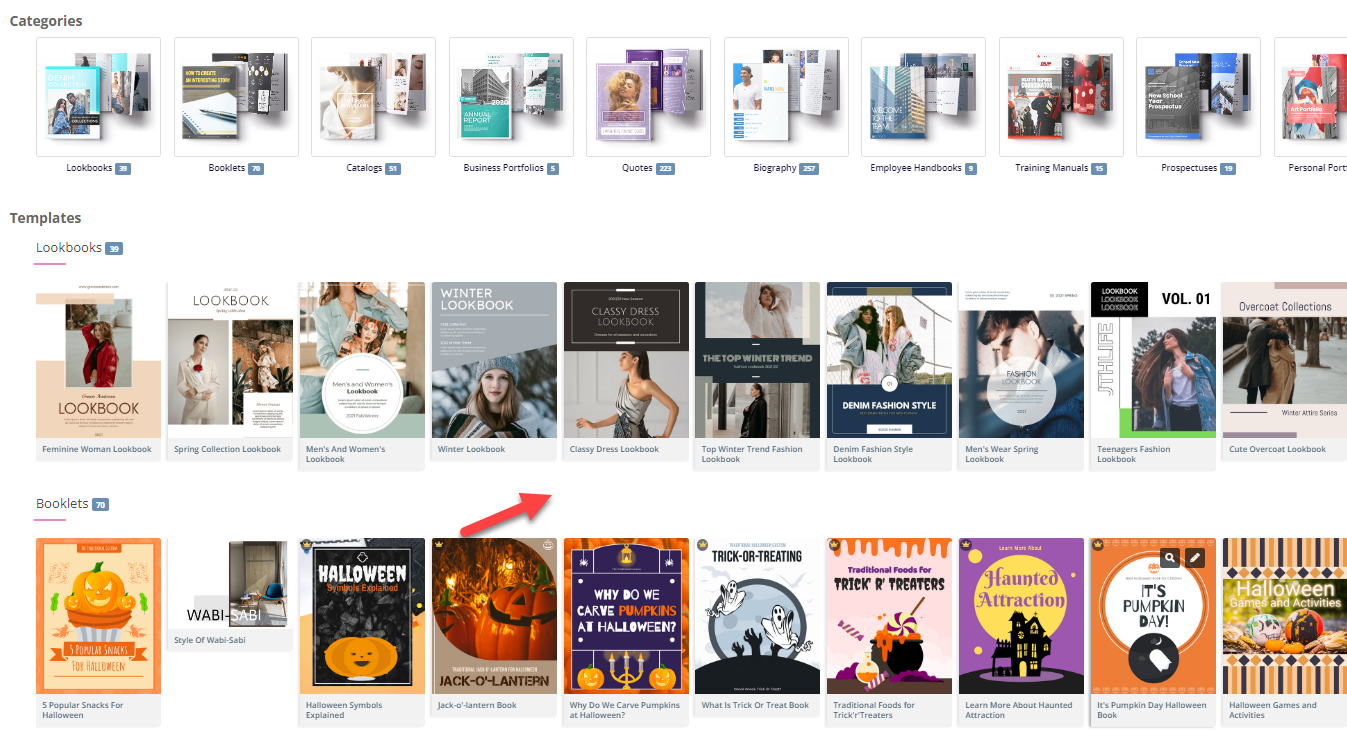
  1. Wählen Sie ein Template:

    • Durchsuchen Sie die verfügbaren Flipbook-Vorlagen und wählen Sie eine aus, die am besten zu Ihrem Inhalt passt. Vorlagen bieten eine Grundlage für Ihre Gestaltung und ermöglichen eine einfache Anpassung26.

Flipping into the Future: The Magic of Flipbooks with Animation Capability  - Visual Paradigm Blog

  1. Anpassen der Layout:

    • Verwenden Sie die intuitive Benutzeroberfläche, um die Layoutgestaltung Ihres Flipbooks anzupassen. Passen Sie die Seitengestaltung an, fügen Sie interaktive Elemente wie Anmerkungen, Hervorhebungen und Kommentare hinzu, um die Interaktion zu verbessern.24.
  2. Interaktive Elemente hinzufügen:

    • Integrieren Sie interaktive Elemente wie Links, Videos und Audio-Clips, um Ihr Flipbook ansprechender zu gestalten. Diese Elemente können mithilfe der Drag-and-Drop-Oberfläche einfach hinzugefügt werden.25.
  3. Animationen integrieren (optional):

    • Wenn Sie Ihr Flipbook mit Animationen verbessern möchten, können Sie das Tool AniFuzion von Visual Paradigm verwenden, um 2D- und 3D-Animationen zu erstellen oder zu importieren. Diese Animationen können nahtlos in Ihr Flipbook integriert werden, um optisch ansprechender zu wirken.20.

Schritt 4: Hinzufügen von Text-zu-Sprache (TTS) und KI-Menschenstimmen

  1. TTS aktivieren:

    • Integrieren Sie Text-zu-Sprache (TTS), um Ihr Flipbook vorzulesen. Diese Funktion verbessert die interaktive Erfahrung und macht den Inhalt ansprechender und zugänglicher.20.
  2. KI-Menschenstimmen anpassen:

    • Passen Sie die KI-Menschenstimmen an den Ton und Stil Ihres Flipbooks an. Passen Sie die Stimmeinstellungen an, um eine natürliche und professionelle Aussprache sicherzustellen.

Schritt 5: Vorschau und Veröffentlichung Ihres Flipbooks

  1. Vorschau des Flipbooks:

    • Sehen Sie sich eine Vorschau Ihres Flipbooks an, um sicherzustellen, dass es Ihren Erwartungen entspricht. Überprüfen Sie die Layoutgestaltung, interaktiven Elemente und Animationen, um sicherzustellen, dass alles an seinem Platz ist.
  2. Flipbook veröffentlichen:

    • Sobald Sie zufrieden sind, klicken Sie auf die Schaltfläche „Veröffentlichen“, um Ihr Flipbook live zu schalten. Sie können das Flipbook mit Ihrer Zielgruppe teilen, indem Sie einen Link bereitstellen oder es auf Ihrer Website einbetten.24.

Schritt 6: Ordnen Ihrer Flipbooks

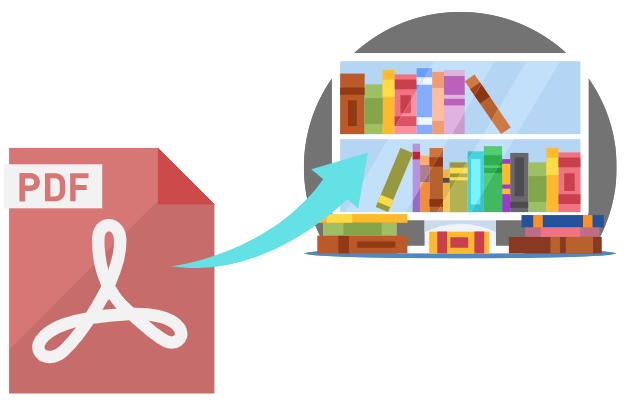
  1. Erstellen Sie eine virtuelle Bücherwand:

    • Navigieren Sie zur Funktion virtuelle Bücherwand in Visual Paradigm Online.
    • Erstellen Sie eine neue Bücherwand und passen Sie ihr Aussehen an Ihr Markenbild oder Ihren persönlichen Stil an.
  2. Fügen Sie Flipbooks der Bücherwand hinzu:

    • Fügen Sie Ihre veröffentlichten Flipbooks der virtuellen Bücherwand hinzu. Ordnen Sie sie nach Kategorie, Thema oder anderen Kriterien, die für Ihren Inhalt sinnvoll sind.
    • Passen Sie die Miniaturansichten und Beschreibungen jedes Flipbooks an, um sie optisch ansprechend und informativ zu gestalten.
  3. Teilen Sie Ihre virtuelle Bücherwand:

    • Teilen Sie Ihre virtuelle Bücherwand mit Ihrer Zielgruppe, indem Sie einen Link bereitstellen oder sie auf Ihrer Website einbetten.
    • Fördern Sie Ihre Bücherwand über soziale Medien, E-Mail-Newsletter und andere Marketingkanäle, um eine größere Zielgruppe zu erreichen.

Flipping Book Animation Software - Visual Paradigm Blog

Fazit

Die Umwandlung einer PDF in ein wunderschönes Flipbook mit Visual Paradigm Online ist eine einfache und ansprechende Art, Ihren Inhalt darzustellen. Mit Funktionen wie anpassbaren Vorlagen, interaktiven Elementen, Animationen, Text-zu-Sprache (TTS) und KI-Menschenstimmen können Sie fesselnde Flipbooks erstellen, die sich abheben. Ob für Bildungsinhalte, Geschäftspräsentationen oder persönliche Projekte – die Tools von Visual Paradigm bieten eine umfassende Auswahl an Funktionen, um Ihre Ideen zum Leben zu erwecken und Ihre Zielgruppe zu begeistern. Durch die Befolgung dieses Tutorials können Sie Ihre statischen PDFs in dynamische und interaktive Flipbooks verwandeln und die Präsentation und Interaktion Ihres Inhalts problemlos verbessern.

Dominate Your Market with Visual Paradigm’s AI Porter’s Five Forces Analyzer

Dominate your market with Visual Paradigm’s AI Porter’s Five Forces Analyzer. Generate fast, professional industry reports with actionable strategic insights.

Unlock the secrets of your industry and outmaneuver the competition with the AI-powered Porter’s Five Forces Analyzer from Visual Paradigm! In today’s fast-paced business environment, understanding the structural forces that shape your profitability isn’t just an advantage—it’s a necessity for survival. Whether you are a startup founder or a seasoned strategist, this professional industry analysis tool provides the clarity you need to make winning decisions. The landing screen invites you into a seamless experience where you simply describe your business to ignite a high-level strategic engine that works for you!

As seen in the initial setup, users can input specific details like business name and industry context—such as a cutting-edge medical diagnostics firm—to receive a tailored analysis. This intelligent interface acts as your personal consultant, bridging the gap between raw data and actionable intelligence.

Visual Paradigm’s AI-Powered Porter's Five Forces Analysis Tool landing screen, where users begin by entering a brief busines

Why Every Business Needs an AI-Powered Strategic Edge

Conducting a manual industry study can take days of grueling research. However, with Visual Paradigm’s easy-to-use strategic planning software, you can generate a comprehensive draft in seconds! This tool doesn’t just list facts; it interprets the competitive intensity of your specific market niche, allowing you to focus on high-level validation rather than tedious data entry. It is the ultimate best industry analysis tool for those who value both speed and precision.

Quick Summary of Key Benefits

  • Lightning-Fast Analysis: Generate a full Five Forces report in minutes using advanced AI assistance.

  • Structured 7-Step Logic: Follow a proven, professional workflow that leaves no stone unturned.

  • Total Privacy: Save your sensitive strategic data locally as .json files—no cloud storage required!

  • Actionable Intelligence: Move beyond theory with specific strategic recommendations tailored to your business.

  • Professional Output: Produce high-quality reports perfect for stakeholder presentations and board meetings.

Step 1: Confronting the Threat of New Entrants

The first step in any robust analysis is evaluating how easy it is for new players to enter your territory. Using the AI-powered Porter’s Five Forces Analyzer, you can identify critical barriers to entry such as regulatory requirements, capital costs, and the need for specialized domain expertise. In the example of an AI medical firm, the tool highlights how FDA clearances and deep medical knowledge act as powerful shields for established players.

By rating these factors as Low, Medium, or High, you gain an immediate visual representation of your market’s defensibility. This online strategic tool ensures that you are never blindsided by a new competitor appearing overnight!

The screenshot of Step 1 of Visual Paradigm AI-Powered Porter's Five Forces Analysis Tool. - Professional online diagram make

Step 2: Evaluating the Bargaining Power of Suppliers

Are your suppliers squeezing your margins? Step 2 of the workflow focuses on the Bargaining Power of Suppliers. This section helps you identify if your business is overly dependent on a few key providers, such as specialized AI talent or unique data providers. Identifying these bottlenecks early allows you to develop diversification strategies before they become critical issues.

The interactive dynamic tables allow you to add custom rows and refine AI-generated suggestions, ensuring the analysis reflects the “on-the-ground” reality of your supply chain. It’s strategic management made simple and effective!

The screenshot of Step 2 of the Visual Paradigm  AI-Powered Porter's Five Forces Analysis Tool. - Professional online diagram

Step 3: Mastering the Bargaining Power of Buyers

Your customers are your lifeblood, but their power to drive down prices can be a major threat. In Step 3, the best AI-powered Porter’s Five Forces Analyzer examines the Bargaining Power of Buyers. For a medical tech company, this might involve analyzing the negotiating leverage of large healthcare institutions or the low switching costs that might reduce brand loyalty.

Understanding these dynamics is crucial for your pricing strategy. By recognizing when buyer power is high, you can shift your focus toward differentiation and value-added services that make your product indispensable.

The screenshot of Step 3 of the Visual Paradigm  AI-Powered Porter's Five Forces Analysis Tool. - Professional online diagram

Step 4: Identifying the Threat of Substitute Products

Competition doesn’t always come from direct rivals; sometimes, it comes from entirely different ways of solving the same problem. Step 4 guides you through identifying the Threat of Substitutes. Whether it’s traditional human expertise competing against AI or a completely new technology, this tool ensures you are looking at the big picture.

Rating the intensity of these substitutes helps you prioritize which threats need the most attention in your marketing and R&D efforts. With this professional-grade analysis software, you’ll always stay one step ahead of market shifts!

The screenshot of Step 4 of the Visual Paradigm  AI-Powered Porter's Five Forces Analysis Tool. - Professional online diagram

Step 5: Navigating Rivalry Among Existing Competitors

The final force in the framework is the Rivalry Among Existing Competitors. This is often where the most intense pressure is felt, characterized by price wars, aggressive advertising, and rapid innovation. The tool prompts you to assess the number of competitors and the rate of industry growth to determine the overall heat of the market.

In a crowded field like AI healthcare, understanding the “innovation race” is vital. This step helps you visualize the competitive landscape so you can find “Blue Ocean” opportunities where rivalry is less intense.

The screenshot of Step 5 of the Visual Paradigm  AI-Powered Porter's Five Forces Analysis Tool. - Professional online diagram

Step 6: Developing Winning Strategic Recommendations

An analysis is only as good as the actions it inspires! Step 6 of the AI-powered Porter’s Five Forces Analyzer is where the magic happens. Based on the data gathered in the previous steps, the AI suggests powerful strategic recommendations. These might include pursuing specific certifications, forming strategic partnerships, or creating tiered pricing models to capture more market share.

This is where you transform insights into a roadmap for success. You can edit these recommendations to align perfectly with your company’s unique vision and resource capabilities.

The screenshot of Step 6 of the Visual Paradigm  AI-Powered Porter's Five Forces Analysis Tool - Professional online diagram

Step 7: Generating Your Professional Final Report

The culmination of your hard work is a consolidated final report. Step 7 gathers every factor, impact rating, and recommendation into a professional, easy-to-read format. This is the document that wins over investors and aligns your team. It includes an executive summary and a detailed breakdown of each force, providing a complete 360-degree view of your industry’s attractiveness.

You can print this report directly or save it as a PDF, making it incredibly easy to share with stakeholders or include in your formal business plan. It’s the ultimate deliverable for any serious business professional!

The screenshot of Step 7 of the Visual Paradigm  AI-Powered Porter's Five Forces Analysis Tool, displaying the automatically

Master Your Strategy Today!

There has never been a better time to take control of your competitive destiny. Visual Paradigm’s AI-powered Porter’s Five Forces Analyzer is designed to empower you with the insights needed to thrive in any industry. From identifying hidden threats to capitalizing on untapped opportunities, this tool is your gateway to strategic excellence. Don’t leave your success to chance—base your decisions on the gold standard of industry analysis!

Ready to see where your business stands in the competitive landscape? Use this easy-to-use strategic planning tool to transform your industry knowledge into a defensible competitive advantage right now!

Experience the power of AI-driven strategy:

Try the Porter’s Five Forces Analyzer Now!

Learn more about our innovative strategic tools.

Related Links

Comprehensive Tutorial: Convert a PDF to a Wonderful Flipbook in a Few Clicks Using Visual Paradigm Online

Introduction

In today’s digital age, presenting content in an engaging and interactive manner is crucial for capturing and retaining audience attention. One effective way to achieve this is by converting traditional PDF documents into dynamic flipbooks. Visual Paradigm Online offers a powerful and user-friendly solution for this transformation with its Fliplify tool. This comprehensive tutorial will guide you through the process of converting a PDF to a wonderful flipbook in just a few clicks, highlighting the key features and benefits of using Visual Paradigm Online. Whether you are creating educational materials, business presentations, or personal projects, this guide will help you leverage the full potential of flipbooks to make your content stand out.

Can I turn my PDF into a Flipbook? - Visual Paradigm Blog

Converting a PDF to an engaging flipbook can significantly enhance the presentation and interactivity of your content. Visual Paradigm Online offers a seamless and user-friendly way to achieve this with its powerful Fliplify tool. This tutorial will guide you through the process of converting a PDF to a flipbook in just a few clicks, highlighting the key features and benefits of using Visual Paradigm Online.

Transform Your PDFs into Engaging Flipbooks with Our Powerful Tools - Visual Paradigm Blog

Step 1: Getting Started with Visual Paradigm Online

  1. Sign Up and Log In:

    • Visit the Visual Paradigm Online website and sign up for an account if you don’t already have one.
    • Log in to access the suite of tools, including Fliplify for creating flipbooks.
  2. Navigate to Fliplify:

    • Once logged in, navigate to the Fliplify section from the dashboard. This is where you will convert your PDF into a flipbook.

Step 2: Uploading Your PDF

  1. Upload the PDF:

    • Click on the “Create Flipbook” button and select the option to upload a PDF.
    • Choose the PDF file from your computer or cloud storage that you want to convert into a flipbook.
  2. Processing the PDF:

    • Visual Paradigm Online will automatically process the uploaded PDF and convert it into a flipbook format. This process typically takes just a few moments, depending on the size of the PDF.

Step 3: Customizing Your Flipbook

  1. Choose a Template:

    • Browse through the available flipbook templates and select one that best suits your content. Templates provide a foundation for your design, allowing for easy customization 26.

Flipping into the Future: The Magic of Flipbooks with Animation Capability  - Visual Paradigm Blog

  1. Customize the Layout:

    • Use the intuitive interface to customize the layout of your flipbook. Adjust the page layout, add interactive elements like annotations, highlights, and comments to enhance engagement 24.
  2. Add Interactive Elements:

    • Incorporate interactive elements such as links, videos, and audio clips to make your flipbook more engaging. These elements can be easily added using the drag-and-drop interface 25.
  3. Integrate Animations (Optional):

    • If you want to enhance your flipbook with animations, you can use Visual Paradigm’s AniFuzion tool to create or import 2D and 3D animations. These animations can be seamlessly integrated into your flipbook to add visual appeal 20.

Step 4: Adding Text-to-Speech (TTS) and AI Human Voices

  1. Enable TTS:

    • Incorporate Text-to-Speech (TTS) to narrate your flipbook. This feature enhances the interactive experience, making the content more engaging and accessible 20.
  2. Customize AI Human Voices:

    • Customize the AI human voices to match the tone and style of your flipbook. Adjust the voice settings to ensure a natural and professional narration.

Step 5: Previewing and Publishing Your Flipbook

  1. Preview the Flipbook:

    • Preview your flipbook to ensure it meets your expectations. Check the layout, interactive elements, and animations to make sure everything is in place.
  2. Publish the Flipbook:

    • Once satisfied, click on the “Publish” button to make your flipbook live. You can share the flipbook with your audience by providing a link or embedding it on your website 24.

Step 6: Organizing Your Flipbooks

  1. Create a Virtual Bookshelf:

    • Navigate to the virtual bookshelf feature in Visual Paradigm Online.
    • Create a new bookshelf and customize its appearance to match your branding or personal style.
  2. Add Flipbooks to the Bookshelf:

    • Add your published flipbooks to the virtual bookshelf. Organize them by category, topic, or any other criteria that make sense for your content.
    • Customize the thumbnails and descriptions of each flipbook to make them visually appealing and informative.
  3. Share Your Virtual Bookshelf:

    • Share your virtual bookshelf with your audience by providing a link or embedding it on your website.
    • Promote your bookshelf through social media, email newsletters, and other marketing channels to reach a wider audience.

Flipping Book Animation Software - Visual Paradigm Blog

Conclusion

Converting a PDF to a wonderful flipbook using Visual Paradigm Online is a straightforward and engaging way to present your content. With features like customizable templates, interactive elements, animations, text-to-speech (TTS), and AI human voices, you can create captivating flipbooks that stand out. Whether for educational content, business presentations, or personal projects, Visual Paradigm’s tools offer a comprehensive suite of features to bring your ideas to life and captivate your audience. By following this tutorial, you can transform your static PDFs into dynamic and interactive flipbooks, enhancing the presentation and engagement of your content with ease.

Comprehensive Guide to Creating Flipbooks and Organizing Them into a Beautiful Virtual Bookshelf

Introduction

Creating flipbooks with Visual Paradigm Online is a seamless and engaging way to present your content. Whether you’re designing educational materials, business presentations, or personal projects, Visual Paradigm’s tools offer a comprehensive suite of features to bring your ideas to life. This guide will walk you through the process of creating flipbooks, incorporating 2D and 3D animations, text-to-speech (TTS), and AI human voices, and organizing them into a beautiful virtual bookshelf.

Fliplify:Visual Paradigm Online的翻页书设计大师| 學習EA, Agile & UML 和使用Visual Paradigm 技能- 點部落

Step 1: Getting Started with Visual Paradigm Online

  1. Sign Up and Log In:

    • Visit the Visual Paradigm Online website and sign up for an account if you don’t already have one.
    • Log in to access the suite of tools, including Fliplify for creating flipbooks and AniFuzion for adding animations.
  2. Explore the Dashboard:

    • Familiarize yourself with the dashboard, which provides access to various tools and features.
    • Navigate to the Fliplify section to start creating your flipbook.

Make Your Flipbook Stand Out with AniFuzion - Fliplify

Step 2: Creating a Flipbook with Fliplify

  1. Choose a Template or Start from Scratch:

    • Browse through the available flipbook templates or choose to start from scratch. Templates provide a foundation for your design, while starting from scratch allows for more customization 26.
  2. Design Your Flipbook:

    • Use the intuitive interface to design your flipbook. Add pages, customize the layout, and incorporate interactive elements such as annotations, highlights, and comments 24.
    • Utilize the advanced design tools to ensure a polished and professional presentation.
  3. Integrate 2D and 3D Animations:

    • Use AniFuzion to create or import 2D and 3D animations. These animations can be seamlessly integrated into your flipbook to enhance engagement and visual appeal 20.
    • Ensure that the animations flow seamlessly with the rest of the content, using the interactive features of Fliplify to enhance comprehension 25.

Visual Paradigm Online: Revolutionizing Digital Content Creation - Cybermedian

  1. Add Text-to-Speech (TTS) and AI Human Voices:

    • Incorporate TTS and AI human voices to narrate your flipbook. This feature enhances the interactive experience, making the content more engaging and accessible 20.
    • Customize the voice settings to match the tone and style of your flipbook.

Bring Your Characters to Life with Enhanced TTS Support - Visual Paradigm  News

  1. Preview and Publish:

    • Preview your flipbook to ensure it meets your expectations. Make any necessary adjustments to the design and content.
    • Once satisfied, publish the flipbook and share it with your audience 24.

Step 3: Organizing Flipbooks into a Virtual Bookshelf

  1. Create a Virtual Bookshelf:

    • Navigate to the virtual bookshelf feature in Visual Paradigm Online.
    • Create a new bookshelf and customize its appearance to match your branding or personal style.
  2. Add Flipbooks to the Bookshelf:

    • Add your published flipbooks to the virtual bookshelf. Organize them by category, topic, or any other criteria that make sense for your content.
    • Customize the thumbnails and descriptions of each flipbook to make them visually appealing and informative.
  3. Customize the Bookshelf Layout:

    • Arrange the flipbooks on the bookshelf in a visually appealing manner. Use the layout tools to adjust the positioning and spacing of the flipbooks.
    • Add interactive elements, such as links to related content or additional resources, to enhance the user experience.
  4. Share Your Virtual Bookshelf:

    • Share your virtual bookshelf with your audience by providing a link or embedding it on your website.
    • Promote your bookshelf through social media, email newsletters, and other marketing channels to reach a wider audience.

Step 4: Enhancing Engagement with Interactive Features

  1. Interactive Annotations:

    • Add annotations, highlights, and comments to your flipbooks to enhance engagement and comprehension. These interactive elements make the content more dynamic and personalized 25.
  2. Quizzes and Polls:

    • Incorporate quizzes and polls within your flipbooks to engage your audience and gather feedback. This feature is particularly useful for educational content and business presentations.
  3. Multimedia Integration:

    • Integrate multimedia elements, such as videos, images, and audio clips, to enhance the visual appeal and engagement of your flipbooks.
    • Ensure that the multimedia elements are seamlessly integrated with the rest of the content, using the interactive features of Fliplify to enhance comprehension 25.

How to Add Voice to Characters by Text-to-Speech with Perfect Lip Sync-  AniFuzion


Conclusion

Creating flipbooks with Visual Paradigm Online and organizing them into a beautiful virtual bookshelf is a powerful way to present your content engagingly and interactively. With features like 2D and 3D animations, TTS, and AI human voices, you can enhance the visual appeal and engagement of your flipbooks. Whether for educational content, business presentations, or personal projects, Visual Paradigm’s tools offer a comprehensive suite of features to bring your ideas to life and captivate your audience.

Comprehensive Tutorial for Creating Wonderful Animation Flipbooks with Visual Paradigm’s AniFuzion and Fliplify

Introduction

Creating an animation flipbook combines the engaging nature of animations with the interactive experience of flipbooks. Visual Paradigm’s AniFuzion and Fliplify tools offer a seamless way to achieve this, allowing users to create captivating content that stands out. This tutorial will guide you through the process of creating an animation flipbook, highlighting why these tools are an excellent choice and how they can make your content more attractive and engaging.

Why Choose Visual Paradigm’s AniFuzion and Fliplify?

Elevate Your Animations with Sound in AniFuzion - AniFuzion

  1. User-Friendly Interface:

    • Both AniFuzion and Fliplify provide intuitive interfaces that make it easy for users, regardless of their technical expertise, to create professional-quality animations and flipbooks 2024.
  2. Comprehensive Toolkit:

    • These tools offer a wide range of features, including 2D and 3D animation, customizable templates, and interactive elements, ensuring that users have everything they need to create engaging content 2126.
  3. Seamless Integration:

    • AniFuzion and Fliplify integrate seamlessly with each other and with other features of Visual Paradigm Online, creating a comprehensive suite for all your creative needs 2126.
  4. High-Quality Output:

    • The tools ensure that the final output is of high quality, with polished and professional-looking animations and flipbooks that captivate audiences 2024.
  5. Customer Support:

    • Visual Paradigm provides excellent customer support, assisting users with any issues or questions they may have while using the tools 27.

How Animated Flipbooks Make Content Attractive and Engaging

Flipping Book Animation Software - Visual Paradigm Blog

  1. Visual Appeal:

    • Animated flipbooks combine the visual appeal of animations with the interactive experience of flipbooks, making the content more engaging and visually appealing 20.
  2. Interactive Experience:

    • The interactive nature of flipbooks allows users to engage with the content in a more dynamic way, enhancing comprehension and retention 25.
  3. Storytelling:

    • Animated flipbooks enable users to tell stories in a more compelling way, using animations to bring characters and scenes to life 21.
  4. Versatility:

    • Animated flipbooks can be used for a wide range of purposes, from educational content and business presentations to marketing materials and personal projects 2426.

Tutorial: Creating an Animation Flipbook with AniFuzion and Fliplify

Visual Paradigm Flipbook Maker: Elevate Your Digital Presence with Dynamic and Engaging Flipbooks - Visual Paradigm Blog

Step 1: Create Animations with AniFuzion
  1. Sign Up and Log In:

    • Sign up for a Visual Paradigm Online account and log in to access AniFuzion.
  2. Choose a Template or Start from Scratch:

    • Browse through the available templates or choose to start from scratch. Templates provide a foundation for your animation, while starting from scratch allows for more customization 21.
  3. Design Your Animation:

    • Use the intuitive interface to design your animation. Add characters, scenes, and props, and customize their appearance and actions. Utilize the 2D and 3D animation features to bring your vision to life 20.
  4. Add Interactive Elements:

    • Incorporate interactive elements, such as annotations, highlights, and comments, to enhance engagement and comprehension 25.
  5. Preview and Export:

    • Preview your animation to ensure it meets your expectations. Once satisfied, export the animation in the desired format 20.
Step 2: Create a Flipbook with Fliplify
  1. Upload Your Animation:

    • Log in to Visual Paradigm Online and access Fliplify. Upload your exported animation to use as content for your flipbook 24.
  2. Choose a Template or Start from Scratch:

    • Browse through the available flipbook templates or choose to start from scratch. Templates provide a foundation for your flipbook, while starting from scratch allows for more customization 26.
  3. Design Your Flipbook:

    • Use the intuitive interface to design your flipbook. Add pages, customize the layout, and incorporate interactive elements, such as annotations and highlights 24.
  4. Integrate Your Animation:

    • Integrate your animation into the flipbook, ensuring that it flows seamlessly with the rest of the content. Utilize the interactive features of Fliplify to enhance the engagement and comprehension of the animation 25.
  5. Preview and Publish:

    • Preview your flipbook to ensure it meets your expectations. Once satisfied, publish the flipbook and share it with your audience 24.

Conclusion

Creating an animation flipbook with Visual Paradigm’s AniFuzion and Fliplify is a powerful way to make your content more attractive and engaging. With their user-friendly interfaces, comprehensive toolkits, seamless integration, and high-quality output, these tools provide everything needed to create captivating animation flipbooks. Whether for educational content, business presentations, marketing materials, or personal projects, AniFuzion and Fliplify offer a seamless and productive experience, making them an ideal choice for all your creative needs.

Comprehensive Tutorial for Creating Stunning Flipbooks with Fliplify of Visual Paradigm Online

Introduction

Fliplify, part of Visual Paradigm Online, is a powerful tool designed to help users create captivating digital flipbooks and slideshows. Whether you are starting from scratch or uploading existing content, Fliplify offers a seamless and user-friendly experience. This tutorial will guide you through the process of creating stunning flipbooks, highlighting the key features, application areas, and reasons why Fliplify stands out.

Why Choose Fliplify?

  1. User-Friendly Interface:

    • Fliplify provides an intuitive and user-friendly interface that makes it easy for users to create professional-looking flipbooks without the need for extensive technical knowledge 24.
  2. Versatile Content Creation:

    • Users can craft flipbooks from various sources, including PDFs, PowerPoints, and more. This versatility allows for a wide range of content to be transformed into engaging flipbooks 24.
  3. Customization Options:

    • Fliplify empowers users to customize every aspect of their flipbooks, from layout and design to interactive elements. This ensures a polished and professional presentation tailored to specific needs 24.
  4. Interactive Elements:

    • The tool allows for the addition of interactive elements, such as annotations, highlights, and comments, enhancing the engagement and comprehension of the content 25.
  5. Seamless Integration:

    • Fliplify seamlessly integrates with other features of Visual Paradigm Online, creating a comprehensive suite for all your creative needs. This integration ensures a smooth and productive experience 26.

Application Areas

  1. Business Presentations:

    • Create engaging and interactive business presentations that captivate audiences and effectively communicate key messages.
  2. Educational Content:

    • Develop educational materials that are visually appealing and interactive, enhancing the learning experience for students.
  3. Marketing Materials:

    • Design digital brochures, product catalogs, and other marketing materials that stand out and engage potential customers.
  4. Personal Projects:

    • Use Fliplify for personal projects, such as creating photo albums, travel journals, or any other content that benefits from an interactive and visually appealing format.

Why Fliplify Stands Out

  1. Comprehensive Toolkit:

    • Fliplify offers a robust set of tools for creating, editing, and publishing flipbooks. From basic design elements to advanced customization options, Fliplify provides everything needed to create stunning flipbooks 26.
  2. Easy to Use:

    • The platform is designed to be easy to use, with a straightforward interface that allows users to focus on their creative projects without the hassle of complex software installations 24.
  3. High-Quality Output:

    • Fliplify ensures that the published flipbooks are of high quality, with professional-looking designs and interactive elements that enhance the user experience 24.
  4. Customer Support:

    • Visual Paradigm Online provides excellent customer support, assisting users with any issues or questions they may have while using the Flipbook feature 27.

Feature List

  1. Customizable Templates:

    • Choose from a variety of customizable templates to start your flipbook project. These templates provide a foundation for your design, allowing for easy customization to fit your specific needs 26.
  2. Interactive Annotations:

    • Add annotations, highlights, and comments to your flipbooks to enhance engagement and comprehension. These interactive elements make the content more dynamic and personalized 25.
  3. Multiple File Format Support:

    • Convert various file types into flipbooks, including PDFs, PowerPoints, eBooks, and spreadsheets. This versatility allows for a wide range of content to be transformed into engaging flipbooks 27.
  4. Advanced Design Tools:

    • Utilize advanced design tools to customize the layout, design, and interactive elements of your flipbooks. These tools ensure a polished and professional presentation 26.
  5. Seamless Integration with Visual Paradigm Online:

    • Fliplify integrates seamlessly with other features of Visual Paradigm Online, creating a comprehensive suite for all your creative needs. This integration ensures a smooth and productive experience 26.

Conclusion

Fliplify of Visual Paradigm Online stands out as a powerful and user-friendly tool for creating stunning flipbooks. With its intuitive interface, versatile content creation options, and advanced design tools, Fliplify provides everything needed to create engaging and interactive flipbooks. Whether for business presentations, educational content, marketing materials, or personal projects, Fliplify offers a seamless and productive experience, making it an ideal choice for all your flipbook needs.