
When students begin their journey into software architecture, they often encounter the Unified Modeling Language (UML) suite of diagrams. While Class Diagrams are frequently introduced first, Object Diagrams provide a necessary snapshot of runtime reality. This guide explores Object Diagrams through the lens of actual academic submissions, offering concrete examples that clarify how instances relate to classes in real-world scenarios.
Understanding these diagrams is crucial for demonstrating that you grasp the distinction between a blueprint (Class) and a built structure (Object). Below, we break down the theory, compare the two primary diagram types, and analyze specific examples drawn from common student assignments. This approach ensures clarity without unnecessary complexity.
Understanding the Object Diagram Structure 🏗️
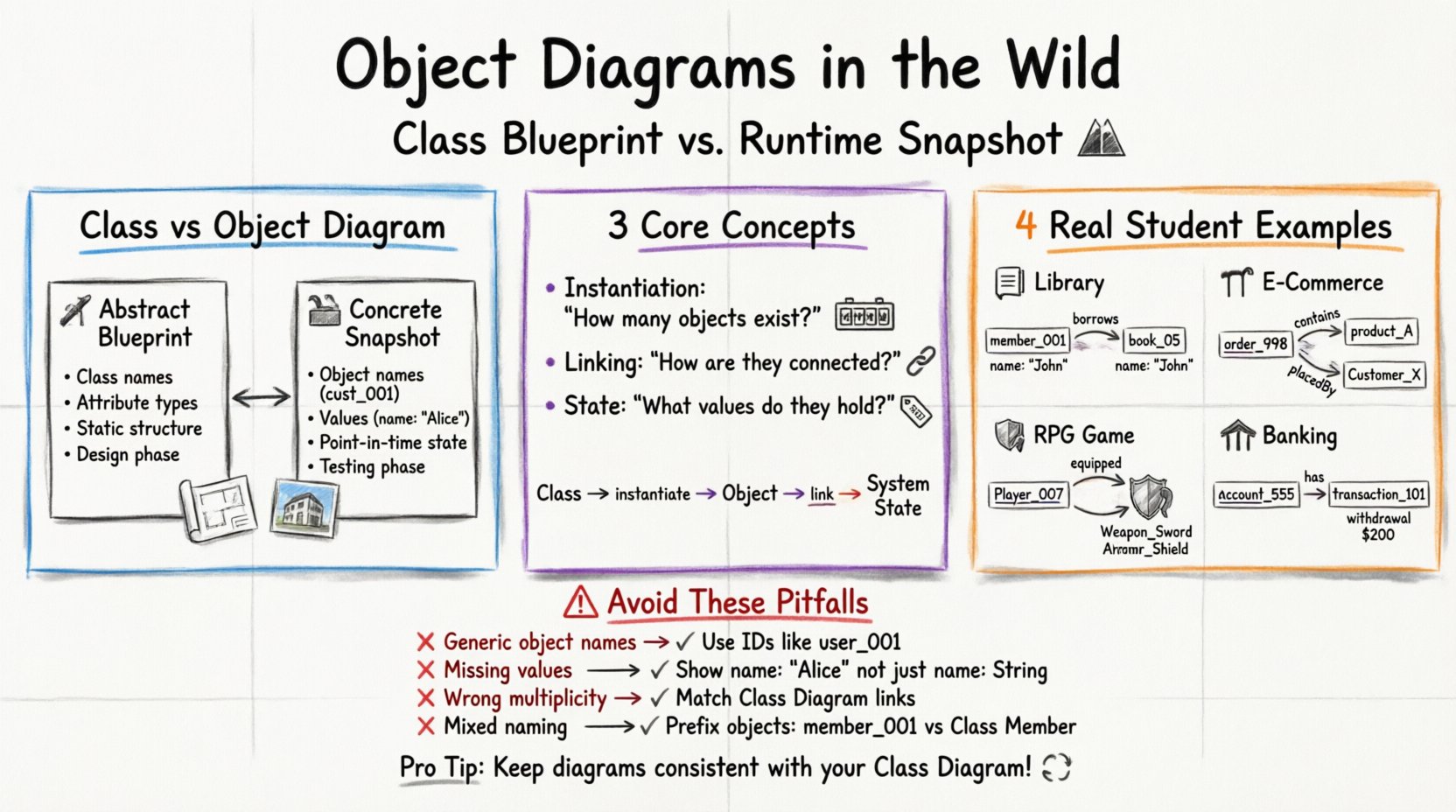
An Object Diagram represents a specific snapshot of a system at a given moment. Unlike a Class Diagram, which defines the abstract rules and potential behavior of a system, an Object Diagram shows the actual data values and relationships existing at a specific point in time. Think of the Class Diagram as the architectural plan for a house, while the Object Diagram is a photograph of the house once it is built and people are living inside it.
For academic projects, this distinction is vital. Professors use Object Diagrams to verify that you understand:
- Instantiation: How many instances of a class exist?
- Linking: How are these specific instances connected to one another?
- State: What specific values are held by the attributes of these instances?
When creating these diagrams for assignments, you are essentially modeling a state of the system. This helps in debugging logic errors because it forces you to consider the actual data flow rather than just the structural definition.
Object Diagram vs Class Diagram 🆚
Confusion often arises between Class and Object Diagrams. To clarify this for your next assignment, consider the following comparison. This table outlines the fundamental differences that will help you select the correct diagram for your specific task.
| Feature | Class Diagram | Object Diagram |
|---|---|---|
| Focus | Abstract structure and behavior | Concrete instances and data |
| Names | Class names (e.g., Customer) |
Object names (e.g., cust_001) |
| Attributes | Attribute names only (e.g., name: String) |
Attribute names with values (e.g., name: "Alice") |
| Timeframe | Static structure (Blueprint) | Snapshot in time (State) |
| Use Case | Design phase, defining rules | Testing phase, verifying data |
Notice how the Object Diagram requires specific values. In a student project, if you are modeling a library system, the Class Diagram defines that a Book has a title. The Object Diagram shows that book_101 has a title of “Introduction to Algorithms”.
Real-World Student Project Examples 🛠️
To make these concepts concrete, let us examine four common scenarios found in university assignments. Each scenario demonstrates how to structure the objects and links correctly.
Example 1: Library Management System 📚
This is a classic assignment. The Class Diagram defines Member and Book. The Object Diagram shows a specific borrowing event.
- Object Instance 1:
member_01memberID: 5001name: “Sarah Jenkins”membershipType: “Premium”status: “Active”
- Object Instance 2:
book_05isbn: 978-3-16-148410-0title: “Data Structures”status: “Checked Out”
- Relationship: A link connects
member_01tobook_05labeled “borrows”.- Role on Book side: 1..1 (One book)
- Role on Member side: 0..* (Many books over time)
In this assignment context, the Object Diagram proves that the student understands the many-to-many relationship logic. It shows that one specific member holds one specific book at this moment.
Example 2: E-Commerce Shopping Cart 🛒
E-commerce systems often require complex order processing. A Class Diagram defines Order, Product, and Customer. The Object Diagram captures a specific checkout state.
- Object Instance 1:
order_998orderID: O-998orderDate: “2023-10-12”totalAmount: 150.00paymentStatus: “Paid”
- Object Instance 2:
product_Asku: SKU-882itemName: “Wireless Mouse”unitPrice: 25.00
- Object Instance 3:
customer_XcustID: C-101email: “[email protected]”address: “123 Main St”
Links are critical here. order_998 is linked to customer_X via “placedBy”. order_998 is linked to product_A via “contains”. This structure helps professors verify that the aggregation relationships (Order contains Products) are correctly modeled with actual data.
Example 3: Role-Playing Game Inventory 🎮
Game development assignments often involve inventory systems. The Class Diagram defines Player, Weapon, and Armor. The Object Diagram shows a character’s loadout at a specific level.
- Object Instance 1:
player_007playerName: “Warrior_X”level: 15currentHealth: 100currentMana: 50
- Object Instance 2:
weapon_SwordweaponName: “Iron Sword”damageValue: 10durability: 85
- Object Instance 3:
armor_ShieldarmorName: “Wooden Shield”defenseValue: 5equipped: true
The relationship here is often composition or aggregation. If the weapon is destroyed, does it leave a void? The Object Diagram makes this visible. For example, player_007 has a link to weapon_Sword with a role of “equipped”. This shows the state of the inventory at that specific save point.
Example 4: Banking Transaction Ledger 🏦
Financial systems require high precision. The Class Diagram defines Account, Transaction, and User. The Object Diagram models a specific withdrawal event.
- Object Instance 1:
account_555accountNumber: 123456789balance: 5000.00currency: “USD”
- Object Instance 2:
transaction_101txnID: T-101type: “Withdrawal”amount: 200.00timestamp: “2023-10-12 14:00”
- Object Instance 3:
user_999userID: U-999fullName: “John Smith”accountType: “Checking”
The link between account_555 and transaction_101 is critical. It shows that this specific transaction affected this specific account balance. This level of detail is often required in senior-level database design assignments to prove data integrity.
Common Pitfalls in Academic Submissions ⚠️
Even with strong theoretical knowledge, students often make structural errors in their diagrams. Reviewing these common mistakes can help you avoid losing marks on technicalities.
- Forgetting Object Names: Every object must have a unique identifier. Using generic names like “Object 1” is insufficient. Use IDs like
user_001. - Missing Attribute Values: A Class Diagram shows types (e.g.,
int). An Object Diagram must show values (e.g.,50). If you leave values blank, the diagram is incomplete. - Incorrect Multiplicity: Ensure the links match the multiplicity defined in the Class Diagram. If a Class Diagram says “One Member borrows Many Books”, the Object Diagram should reflect that one member object connects to multiple book objects.
- Inconsistent Naming: Do not mix Class names and Object names in the same box. Object names usually have a prefix or underscore (e.g.,
member_01) to distinguish them from the ClassMember. - Ignoring Null Values: If an object has an optional attribute that is currently empty, it is better to represent it clearly or omit it than to leave a placeholder that implies a value exists.
Formatting Standards for Grading 📝
When submitting these diagrams for university courses, presentation matters. While the logic is paramount, readability ensures your grader can quickly verify your work.
- Consistent Sizing: Keep all object boxes the same width and height where possible. This creates a clean visual grid.
- Clear Labeling: Ensure the object name is at the top of the box, followed by a horizontal line, then the attributes and their values. Do not cram text into the box.
- Link Clarity: Use arrows or lines to show relationships. Label the lines with the role name (e.g., “owns”, “contains”, “borrows”).
- Legibility: If submitting a PDF, ensure the resolution is high. If submitting an image, ensure the text is not pixelated.
- Reference to Class Diagram: Always include a caption or reference indicating which Class Diagram this Object Diagram corresponds to. This links your work back to the broader system design.
Ensuring Consistency Across Models 🔄
A common challenge in large projects is maintaining consistency between the Class Diagram and the Object Diagram. If you update a Class Diagram (e.g., adding a new attribute), you must update the Object Diagram to reflect that new capability.
Here is a checklist to maintain this consistency:
- Attribute Alignment: Does every attribute in the Class Diagram appear as a potential attribute in the Object Diagram?
- Relationship Alignment: If you add a link in the Class Diagram, ensure it is represented in the Object Diagram if the relationship exists in the data.
- Value Types: Ensure the data types in the Object Diagram match the types defined in the Class Diagram. For instance, if the Class defines
priceasDecimal, the Object should show a number with decimal places, not a string like “$50”.
By following these practices, you demonstrate a mature understanding of system modeling. You are not just drawing shapes; you are documenting the state of a system. This is a skill that transfers directly to professional software engineering roles.
Final Thoughts on Modeling Realism 🧐
Creating Object Diagrams forces you to think about the data that populates your system. It moves the design process from abstract theory to concrete implementation details. Whether you are building a library app, a game inventory, or a banking ledger, the Object Diagram serves as a validation tool.
When you review your student projects, ensure that the objects you create are realistic. Do not create an object with impossible values. If a class is Product, the object should have a valid price and name. This attention to detail separates a basic assignment from a high-quality submission.
Remember, the goal is clarity. If a grader can look at your diagram and understand exactly what data exists in your system at that moment, you have succeeded. Focus on the instances, the values, and the connections. That is the essence of an effective Object Diagram.