


Struggling to articulate the core challenge your software project aims to solve? The Problem Description Generator from Visual Paradigm is the ultimate AI-powered tool to transform your project’s initial chaos into a clear, focused, and compelling narrative. This innovative solution empowers project managers, business analysts, and product owners to define the “why” behind their work with unprecedented speed and precision. By leveraging a library of structured templates and real-time AI feedback, this tool ensures your problem statement is not just written, but optimized for maximum impact from day one. It’s the secret weapon for launching projects with laser focus and setting the stage for success.
Key Takeaways:
-
Use a template-driven approach to ensure your problem statement is comprehensive and structured.
-
Fill in specific variables to customize the description for your unique project.
-
Get instant AI feedback to refine your problem statement for clarity and effectiveness.
-
Start any project with a solid, well-articulated understanding of the core issue.
Step 1: Choose Your Template – The Foundation of a Strong Problem Statement
Every great project begins with a solid foundation, and for a problem statement, that foundation is the right template. The first step in using the AI-Powered Problem Description Generator is to select a template that perfectly aligns with your project’s nature. As shown in
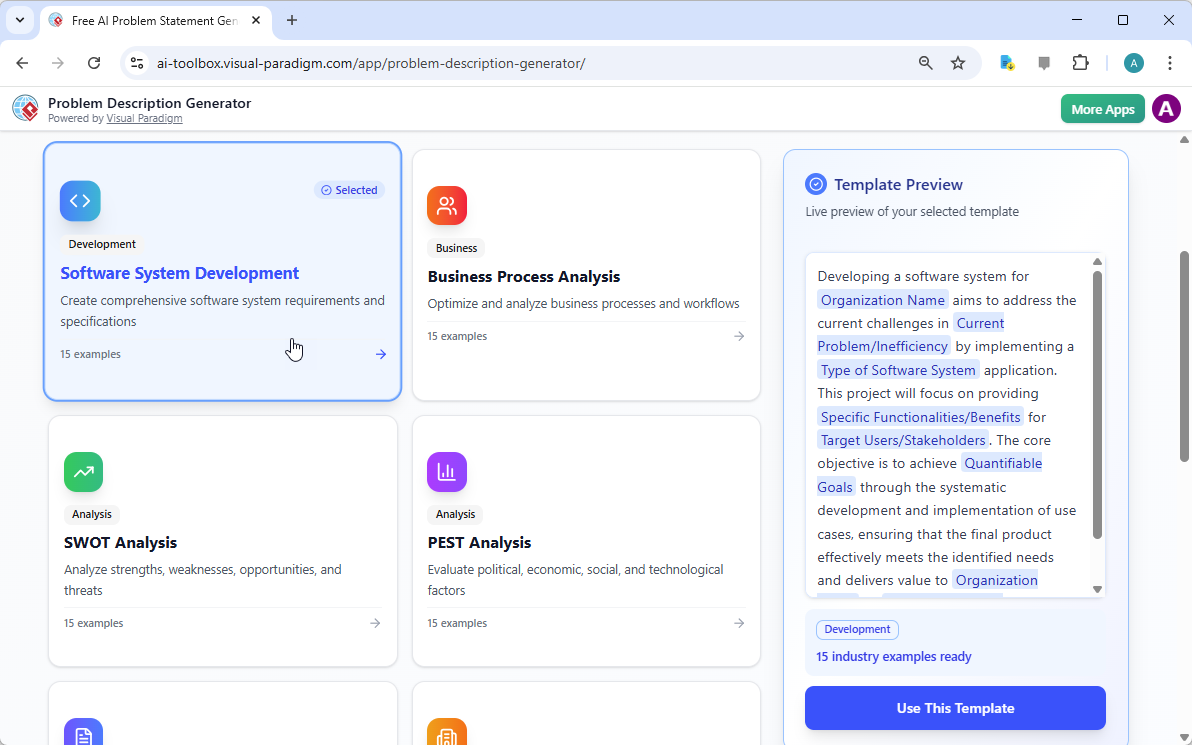
, the interface presents a clean, intuitive dashboard with a variety of templates for different business needs. Whether you’re tackling a software development initiative, optimizing a business process, or conducting a strategic analysis like a SWOT or PEST analysis, you can find a dedicated template. The “Software System Development” template, for instance, is specifically designed to help you create comprehensive software system requirements and specifications. By selecting the correct template, you immediately establish a professional structure that guides you to cover all critical aspects of the problem, ensuring no vital detail is overlooked. This step is crucial because it sets the tone and framework for the entire problem description, making the subsequent steps much more efficient and effective.
Step 2: Fill in the Variables – Customize Your Narrative
Once you’ve chosen your template, the magic happens in the “Edit Parameters” section.
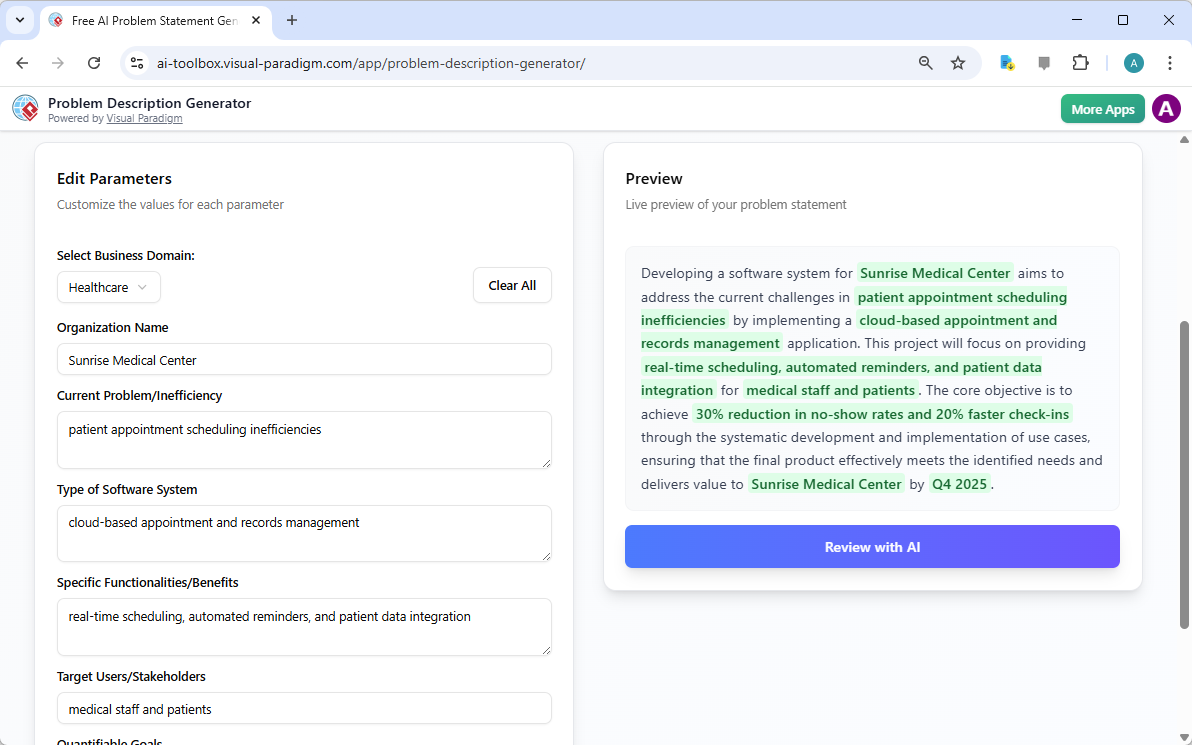
vividly illustrates this second step. On the left, you’re presented with a form filled with specific fields, such as “Organization Name,” “Current Problem/Inefficiency,” and “Type of Software System.” This is where you inject your project’s unique DNA. As you type in the details, the tool’s real-time preview on the right side dynamically updates, showing you exactly how your filled-in variables will look in the final problem description. This live preview is incredibly powerful. It allows you to see the narrative form your inputs are creating, spot any awkward phrasing, and make adjustments on the fly. The variables are highlighted in green, making it easy to see exactly what content is being inserted into the template. This process is not just about filling blanks; it’s about shaping a coherent story that clearly explains the problem, its impact, and the desired outcome. The ability to see your description evolve in real-time is a game-changer for clarity and confidence.
Step 3: Review with AI – Your Instant Expert Editor
The final, and arguably most powerful, step is the AI review. After you’ve filled in all the variables and are satisfied with the live preview, you can click the “Review with AI” button.
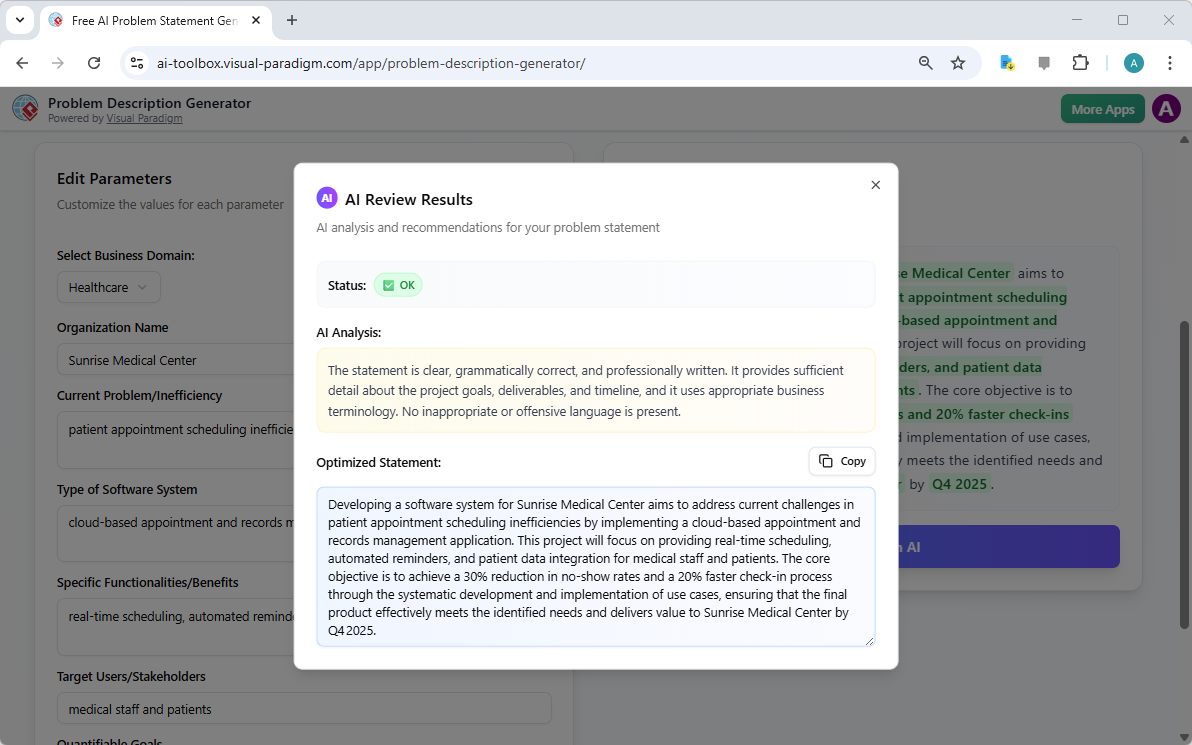
captures this moment perfectly. A modal window appears, presenting a detailed analysis of your generated problem statement. The AI doesn’t just check for grammar; it evaluates the statement for clarity, completeness, logical flow, and the use of appropriate business terminology. It provides a clear “Status” (like “OK”) and a detailed “AI Analysis” that highlights strengths and suggests improvements. For example, the AI might confirm that your statement is clear and professionally written, or it might suggest a more impactful way to phrase a key objective. This instant, objective feedback acts as a virtual expert editor, helping you refine your problem statement to ensure it is not only correct but also highly effective in communicating the project’s purpose. This final step ensures that your problem statement is ready to be shared with stakeholders, developers, or clients with confidence.
Unlock Your Project’s Potential
Defining a problem is often the hardest part of any initiative. A vague or poorly articulated problem statement can lead to wasted effort, misaligned solutions, and ultimately, project failure. The Problem Description Generator from Visual Paradigm solves this fundamental challenge. It combines the power of structured templates with the intelligence of AI to create a workflow that is both efficient and effective. By following the three simple steps—choose a template, fill in the variables, and review with AI—you can transform your initial project idea into a clear, compelling, and professional problem statement in minutes. This tool is not just a convenience; it’s a strategic advantage that ensures your project starts on the right foot. Stop guessing and start defining with confidence. Try the AI-Powered Problem Description Generator now and experience the difference it makes.
Related Links
-
AI Problem Description Generator – Visual Paradigm: Crafting a precise and professional problem description is the first critical step in any successful project. The AI-Powered Problem Description Generator in Visual Paradigm empowers you to articulate your project’s challenges and objectives with unparalleled clarity and efficiency.
-
Free AI-Powered Problem Description Generator – Visual Paradigm …: Why Our AI Problem Description Generator is Your Secret Weapon. Eliminate Writer’s Block. Get a head start with pre-filled templates tailored to your project type and business domain, so you never have to start from scratch.
-
What is an AI-Powered Problem Description Generator and How Can…: s the AI-Powered Problem Description Generator easy to use for beginners? How does this tool fit into the broader Visual Paradigm ecosystem? Ready to Try Problem Description Generator?…
-
Comprehensive Tutorial: Crafting Perfect Problem Descriptions with the …: Introduction A well-defined problem description is the cornerstone of any successful project or solution. However, articulating problems clearly and concisely can be challenging. …
-
Free AI Problem Description Generator with AI Review – Visual Paradigm …: Meta Description : Craft clear, concise, and impactful problem descriptions with our free AI tool. Select templates, fill variables, and get AI-driven feedback for perfect problem statements.
-
Crafting Project Problem Descriptions with Ease – Visual Paradigm Guides: The Problem Description Generator is a powerful tool that helps you create professional, tailored problem descriptions for your projects, whether in software development, business analysis, or enterprise architecture.
-
AI Problem Description Generator Examples – Sample AI Challenge …: Explore examples generated by the AI Problem Description Generator to better understand how to define and communicate AI challenges effectively.