Designing a robust data structure is the backbone of any reliable software system. An Entity Relationship Diagram (ERD) serves as the blueprint for how data is stored, linked, and retrieved. When this blueprint is flawed, the consequences ripple through the entire application, affecting performance, data integrity, and development velocity. Many teams rush into implementation without validating their schema design, leading to structural debt that is expensive to fix later.
This guide examines seven critical mistakes found in database modeling. Each point details the specific technical impact and provides actionable guidelines to prevent these errors. By understanding the mechanics of normalization, constraints, and relationship mapping, you can build systems that scale without compromising stability.
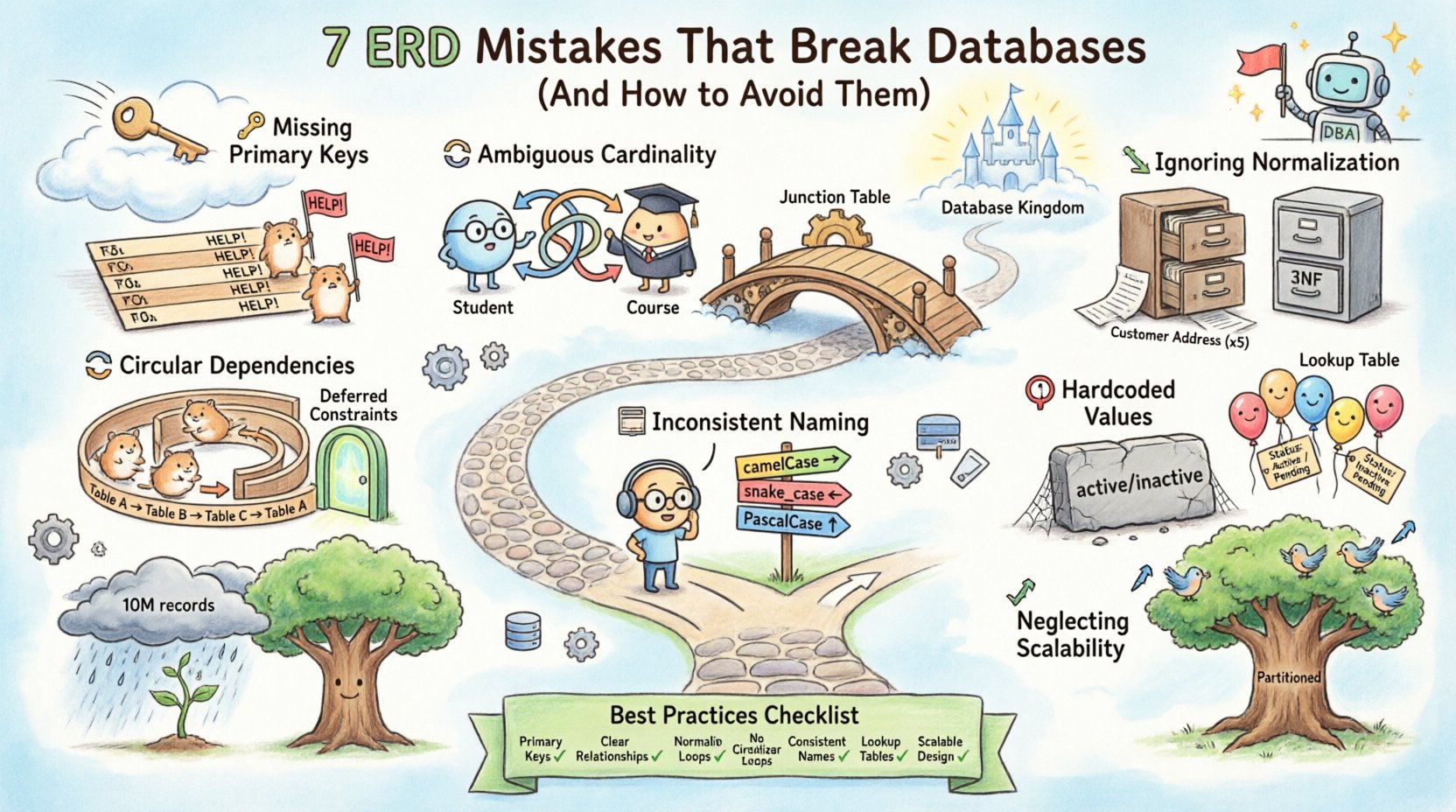
1. Missing or Weak Primary Keys 🔑
A primary key is the unique identifier for a record within a table. It is the anchor that ensures every row is distinct and retrievable. Omitting a primary key or designing it poorly is one of the most fundamental errors in database architecture.
The Technical Consequence
- Data Duplication: Without a unique constraint, the database cannot prevent duplicate records. This leads to inconsistent reporting and data integrity issues.
- Join Performance: Foreign key relationships rely on primary keys for efficient indexing. A missing or non-indexed primary key forces full table scans during joins, drastically slowing down query execution.
- Update Complexity: If you need to update a record, the system must rely on non-unique columns to find the row. If multiple rows match the search criteria, the update may apply to unintended data.
Best Practices to Avoid This
- Always define a primary key for every table, even if it seems redundant.
- Prefer surrogate keys (auto-incrementing integers or UUIDs) over natural keys (like email addresses or phone numbers) to avoid changes in business logic affecting the schema.
- Ensure the primary key column is not nullable.
- Use composite keys only when a single column cannot uniquely identify a row, such as in many-to-many relationship tables.
2. Ambiguous Relationship Cardinality 🔄
Cardinality defines the numerical relationship between records in two tables. Common types include one-to-one, one-to-many, and many-to-many. Misrepresenting these relationships in the diagram leads to structural mismatches in the physical database.
Common Pitfalls
- Assuming One-to-Many: Designers often default to a one-to-many relationship when a many-to-many exists. For example, a student can enroll in many courses, and a course can have many students. Modeling this as one-to-many requires duplicating student data across multiple course rows.
- Unlabeled Lines: ERD lines should indicate cardinality (e.g., crow’s foot notation). Leaving them unlabeled leaves developers guessing how the data relates.
- Ignoring Nullability: A one-to-one relationship might allow nulls in the foreign key column if the relationship is optional. Failing to model this constraint allows orphaned records.
The Correct Approach
- Explicitly map many-to-many relationships using a junction table (associative table) that contains foreign keys from both related tables.
- Document the cardinality clearly on the diagram lines.
- Apply database constraints (like UNIQUE constraints on foreign keys) to enforce the diagram’s logic.
| Relationship Type | Implementation Strategy | Common Error |
|---|---|---|
| One-to-One | Foreign Key in one table with a UNIQUE constraint | Adding a foreign key to both tables unnecessarily |
| One-to-Many | Foreign Key in the “Many” table | Storing parent data in the child table (denormalization) |
| Many-to-Many | Intermediate Junction Table | Storing multiple IDs in a single comma-separated column |
3. Ignoring Normalization Standards 📉
Normalization is the process of organizing data to reduce redundancy and improve integrity. While some modern systems embrace denormalization for read performance, skipping normalization entirely during the design phase creates significant maintenance burdens.
The Risks of Poor Normalization
- Update Anomalies: If a customer address is stored in five different order tables, updating their address requires five separate updates. If one update fails, the data becomes inconsistent.
- Insert Anomalies: You might not be able to add a new product category without also adding a product record, forcing the creation of dummy data.
- Delete Anomalies: Deleting a record might accidentally remove critical data related to other entities.
Implementation Guidelines
- Aim for Third Normal Form (3NF) as a baseline. This ensures that columns depend only on the primary key.
- Identify transitive dependencies where a non-key column depends on another non-key column.
- Separate distinct entities. If a table contains information about both “Orders” and “Customers”, split them.
- Denormalize only after profiling query performance. Do not pre-optimize for speed at the cost of integrity.
4. Creating Circular Dependencies 🔁
Circular dependencies occur when tables reference each other in a loop that prevents initialization or causes infinite recursion in queries. While recursive relationships (like an organizational chart where an employee has a manager) are valid, uncontrolled circular foreign keys can break the database.
Why This Breaks Systems
- Initialization Errors: During deployment, the database engine may reject the creation of foreign key constraints if a circular reference exists (e.g., Table A references B, and B references A) unless handled with deferred constraints.
- Query Stack Overflows: Recursive queries that traverse these loops without a stopping condition can consume all available memory.
- Referential Integrity Violations: Deleting a parent table might fail if child tables have not been cleared, but clearing children might fail because of other dependencies.
How to Resolve
- Use Deferred Constraints if your database supports them, allowing the database to check relationships after all data is loaded.
- For self-referencing tables (like categories), ensure the foreign key is nullable to allow root nodes.
- Design the schema to allow a logical hierarchy without forcing a physical foreign key loop on every level.
- Implement soft deletes to manage deletion cascades safely.
5. Inconsistent Naming Conventions 📝
Names are the interface between humans and machines. Inconsistent naming in table and column names makes the schema difficult to understand, maintain, and query. This often stems from a lack of a shared style guide.
Specific Issues
- Mixed Case: Mixing
camelCase,snake_case, andPascalCaseconfuses developers querying the data. - Reserved Keywords: Using names like
order,group, oruserwithout escaping can cause syntax errors in SQL queries. - Abbreviations: Using
usr_idvsuser_idvsuidin different tables reduces clarity. - Verbosity vs Brevity: Some columns are overly long, while others are cryptic abbreviations.
Establishing a Standard
- Adopt a consistent casing strategy (e.g.,
snake_casefor SQL tables is widely recommended). - Use descriptive names that reflect business meaning, not internal implementation details.
- Avoid reserved keywords entirely. If unavoidable, wrap them in quotes or brackets specific to the database engine.
- Standardize singular vs plural table names. Choose one and stick to it (e.g.,
usersvsuser). - Prefix foreign key columns with the referenced table name (e.g.,
user_id) to make relationships obvious.
6. Hardcoding Values in the Schema 🛑
Designers sometimes embed specific business values directly into the database structure, such as using a column to store specific status codes like active or inactive instead of using a generic status field, or hardcoding currency types.
The Impact on Flexibility
- Schema Changes: If a new status is needed, you may have to alter the table structure or add a new column, triggering deployment downtime.
- Data Validation: Application code often validates these values, but the database schema should enforce valid ranges or sets through constraints.
- Localization Issues: Hardcoding text values like
USDorEnglishmakes global expansion difficult.
Refactoring for Scalability
- Use Lookup Tables for any set of values that might change or grow (e.g., Status, Currency, Country).
- Implement Check Constraints to ensure only valid values are entered, but keep the definition of those values in the application or a separate configuration table.
- Use Enums only if the database system supports them robustly and the set is truly fixed.
- Separate configuration data from transactional data.
7. Neglecting Future Scalability 📈
Many ERDs are designed for the current dataset size without considering growth. A schema that works for 1,000 records may fail miserably at 10 million records due to locking, indexing, or partitioning issues.
Scalability Pitfalls
- Large Text Fields: Storing massive blobs or long text strings in the main table can bloat the index and slow down reads.
- Lack of Partitioning Keys: If the schema does not account for how data will be sharded or partitioned (e.g., by date or region), future horizontal scaling becomes a major refactor.
- Missing Indexes: Failing to anticipate which columns will be used for filtering or sorting in the future leads to performance bottlenecks.
- Write-Heavy Patterns: A design optimized for reads may choke on high-volume writes due to locking mechanisms on foreign keys.
Designing for Growth
- Review the Read/Write Ratio of your application. If it is write-heavy, minimize foreign key constraints that cause locking.
- Design Partitioning Keys into your primary schema. Ensure every table has a column that can be used to split data logically.
- Separate heavy text data into a separate table (1:1 relationship) to keep the main index lean.
- Plan for Soft Deletes instead of hard deletes to preserve data history without affecting current query performance.
Summary of Best Practices 📋
To ensure your database remains stable and maintainable, review your Entity Relationship Diagram against the following checklist before deployment.
- Keys: Every table has a primary key. Foreign keys are indexed.
- Relationships: Cardinality is clearly defined. Many-to-many uses junction tables.
- Normalization: Data redundancy is minimized according to 3NF standards.
- Dependencies: No circular foreign key loops without deferred constraints.
- Naming: Consistent casing and descriptive names used throughout.
- Values: No hardcoded business logic in the schema structure.
- Scale: Schema considers partitioning and indexing strategies for future load.
Final Thoughts on Data Modeling 🧠
Building a database is not just about writing CREATE TABLE statements. It is about modeling the reality of your business processes into a logical structure that a machine can process efficiently. The cost of fixing a schema error increases exponentially the later it is discovered in the development lifecycle.
By avoiding these seven common pitfalls, you reduce technical debt and create a foundation that supports complex queries and high-volume transactions. Prioritize clarity, integrity, and flexibility in your diagrams. A well-designed ERD is invisible to the end-user but essential for the system’s longevity.
Take the time to review your schema with fresh eyes or a peer review process. Ask questions about why a relationship exists and how it will behave under load. This diligence pays off in system reliability and developer productivity down the road.