Enterprise architecture often feels like a vast, uncharted territory. For application designers, the challenge is to bridge the gap between high-level business strategy and the technical reality of software implementation. This is where the ArchiMate framework becomes indispensable. It provides a standardized language to describe, analyze, and visualize the relationship between business processes, applications, and technology infrastructure. 🏛️
Understanding this framework is not about memorizing diagrams; it is about establishing a clear mental model of how your organization operates. This guide walks through the core mechanics of ArchiMate, focusing specifically on the Application Layer where design decisions live. We will explore the layers, relationships, and modeling patterns that ensure your architecture remains robust, scalable, and aligned with business goals. 💡
🌐 What is the ArchiMate Framework?
ArchiMate is an open and independent modeling language for enterprise architecture. It was developed by The Open Group to provide a common language for describing and visualizing enterprise architecture. Unlike specific software tools, ArchiMate is a conceptual framework. It defines a set of concepts and relationships that allow stakeholders to communicate effectively about the structure and behavior of an enterprise. 🗣️
For application designers, the value lies in the ability to trace requirements. When a business process changes, how does it impact the underlying applications? When a new technology is adopted, which applications must be refactored? ArchiMate provides the structural vocabulary to answer these questions without relying on vendor-specific jargon.
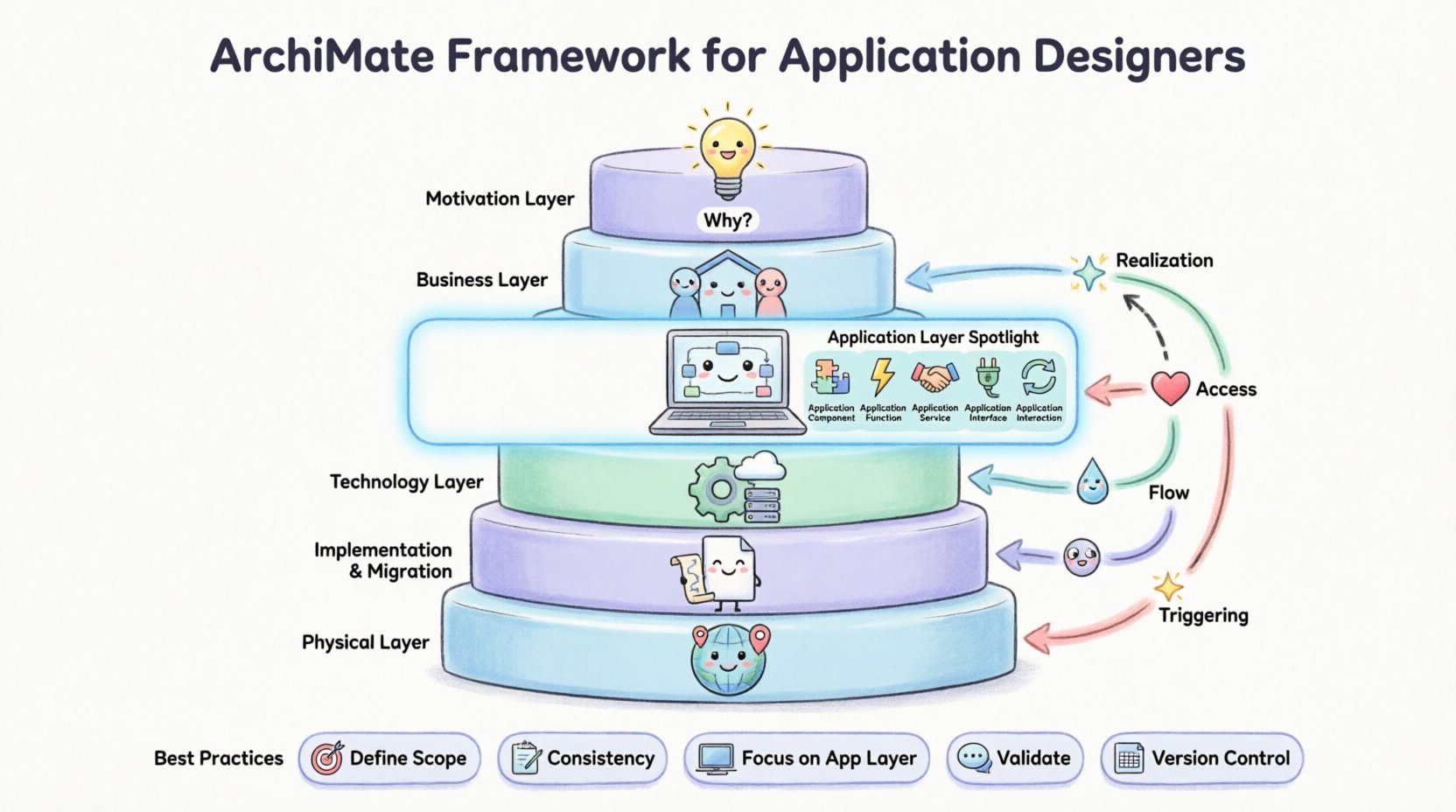
🏗️ The Core Layers of the Framework
ArchiMate organizes architectural elements into layers. This separation helps manage complexity by focusing on specific aspects of the enterprise at a time. While there are several layers, the Application Layer sits centrally, acting as a bridge between the business requirements and the technical implementation.
📂 The Motivation Layer
This layer defines the *why* behind the architecture. It includes:
- Stakeholders: Who has an interest in the architecture? 👥
- Assessments: What are the current problems or opportunities?
- Goals and Principles: What are we trying to achieve?
- Requirements: What constraints must the design meet?
🏢 The Business Layer
This layer describes the business structure and processes. It includes actors, roles, business processes, and business services. It is the view of the organization from the perspective of operations, not code. 🏢
💻 The Application Layer
This is the primary focus for application designers. It describes the logical software components that support the business layer. It includes applications, application functions, services, and interfaces. This layer is independent of the underlying hardware or technology. 💻
⚙️ The Technology Layer
This layer describes the physical and logical technology infrastructure. It includes hardware, software platforms, and network devices. It is the environment in which the applications run. ⚙️
📄 The Implementation & Migration Layer
This layer deals with the transition from the current state to the future state. It includes projects, work packages, and deliverables. 📄
🌍 The Physical Layer
This layer describes the physical infrastructure where the technology layer is deployed. It includes sites, buildings, and locations. 🌍
🔍 Deep Dive: The Application Layer
The Application Layer is the heart of application architecture. It focuses on the software systems that deliver business functionality. To model this layer effectively, you must understand the specific building blocks available.
🧩 Application Components
An application component is a logical software building block. It encapsulates functionality and data. Components are the primary units of implementation. They can be monolithic or microservices-oriented, but in the framework, they represent the functional unit. 🧩
⚡ Application Functions
Application functions describe the behavior provided by an application component. They are the specific actions the software performs, such as “Calculate Tax” or “Generate Invoice.” Functions are often derived from business processes. ⚡
🤝 Application Services
Services represent the functionality that an application exposes to other actors or applications. This is the contract view. A service defines what the application does, not how it does it. 🤝
🔌 Application Interfaces
Interfaces define the point of interaction between an application and an external actor or another application. They are the entry points for data or requests. 🔌
🔄 Application Interactions
Interactions represent the communication between applications. They describe the flow of information or control signals. 🔄
🔗 Understanding Relationships
Relationships define how the elements in the framework connect. Without relationships, the diagram is just a collection of icons. Relationships provide the logic and flow of the architecture.
Below is a table outlining the most critical relationships for application designers.
| Relationship | Direction | Description | Example |
|---|---|---|---|
| Association | Any | A general relationship between elements. | A Business Process uses an Application Function. |
| Specialization | Child to Parent | One element is a specific version of another. | A Mobile App is a specialization of a Web App. |
| Aggregation | Whole to Part | One element consists of other elements. | An Application Component consists of App Functions. |
| Flow | Source to Target | Data or information moves between elements. | Data flows from a Database to an Application. |
| Access | Source to Target | An element uses the functionality of another. | An Application accesses a Database. |
| Realization | Source to Target | An element realizes the specification of another. | A Component realizes a Service. |
| Triggering | Source to Target | An event triggers a behavior. | A User Action triggers a Business Process. |
🛠️ Key Relationships Explained
Realization: This is perhaps the most important relationship for designers. It connects the specification to the implementation. For example, an Application Service (Specification) is realized by an Application Component (Implementation). This ensures that what is promised to the business is actually built in the software. 🏗️
Access: This defines usage. An application accesses a database, or a business actor accesses a service. It is crucial for understanding dependencies. If the database changes, the application must adapt. 📂
Flow: This is specific to data movement. It is distinct from triggering, which is about control flow. Flow shows where data comes from and where it goes. It is essential for data architecture alignment. 📉
Association: This is the catch-all relationship. It is used when no other specific relationship fits. It implies a connection but does not specify the direction or nature of the interaction in detail. Use sparingly to maintain clarity. 🤝
🔗 Integrating the Layers
Application designers cannot work in a vacuum. The Application Layer must align with the Business Layer and the Technology Layer. This integration ensures that the software supports the business and runs on the available infrastructure.
🏢 Business to Application Alignment
The connection between Business and Application is critical. Business processes must be realized by application functions. If a business process is “Approve Loan,” there must be an application function handling that logic. This alignment prevents the creation of software that does not serve a business need. 📊
- Business Process to App Function: Direct realization.
- Business Role to App Role: Ensuring the right users interact with the right systems.
- Business Object to App Data: Mapping business data entities to database tables or data models.
💻 Application to Technology Alignment
Once the application logic is defined, it must be deployed. This is where the Technology Layer comes in. The Application Layer is independent of the Technology Layer, but the deployment relationship connects them. 🖥️
- Deployment: How the software is mapped to hardware or cloud resources.
- Hosting: Where the application runs.
- Execution: The runtime environment.
Understanding this separation allows for flexibility. You can change the technology (e.g., moving from on-premise to cloud) without changing the application logic, provided the interface remains consistent. ☁️
🎨 Modeling Patterns for Designers
Effective modeling requires patterns. These are recurring structures that solve common architectural problems. Using patterns improves consistency and reduces the learning curve for stakeholders.
📦 Component-Based Architecture
This pattern focuses on encapsulating functionality within components. Each component has a clear interface and internal logic. It promotes modularity and reuse. When modeling this, ensure that dependencies between components are minimized. 🧱
🛡️ Service-Oriented Architecture (SOA)
SOA emphasizes services as the primary building blocks. Applications expose services, and other applications consume them. The focus is on loose coupling. In ArchiMate, this is modeled using Services and Interfaces. 🌐
📝 Event-Driven Architecture
This pattern relies on the detection and processing of events. A change in state triggers an action. Modeling this requires the Triggering relationship. It is useful for real-time systems and reactive applications. ⚡
🔄 Data-Centric Architecture
Here, the data is the central element. Applications are built to manage and manipulate data. The Flow relationship is key here to show how data moves between systems. 🗃️
🛠️ Best Practices for Application Modeling
To create a valuable architecture model, follow these guidelines. Avoid creating diagrams that are too complex or too abstract. Aim for the right level of detail.
1️⃣ Define Scope Clearly
Start with a clear scope. What business domain are you modeling? Which applications are in scope? Defining boundaries prevents scope creep and keeps the model manageable. 🎯
2️⃣ Maintain Consistency
Use consistent naming conventions. If you call it “Customer Service” in one diagram, do not call it “Client Support” in another. Consistency aids understanding. 📝
3️⃣ Focus on the Application Layer
While integration is important, do not get lost in the Technology Layer details unless necessary for the design decision. Focus on what the software does, not just where it runs. 💻
4️⃣ Validate with Stakeholders
A model is useless if the stakeholders do not understand it. Walk through the diagrams with business and technical teams. Ensure the relationships match their mental model of the system. 🗣️
5️⃣ Version Control
Architecture evolves. Keep track of changes. Document why a change was made. This history is valuable for audits and future redesigns. 📅
🚫 Common Pitfalls to Avoid
Even experienced designers make mistakes. Being aware of common pitfalls can save time and prevent confusion.
❌ Over-Modeling
Trying to model every single detail leads to a diagram that is unreadable. Focus on the significant elements that drive decision-making. Less is often more. 📉
❌ Ignoring the Business Context
Designing applications without understanding the business process leads to misalignment. Always trace the application function back to the business process it supports. 🏢
❌ Mixing Layers Indiscriminately
Keep the layers distinct in your diagrams. Do not mix Business Processes with Database Tables unless you are specifically showing a deployment or realization relationship. Mixing layers confuses the reader. 🧩
❌ Static Diagrams Only
Architecture is not static. While ArchiMate focuses on static structures, consider the dynamic behavior where necessary. Use triggering and flow to show how the system reacts to events. ⏳
🚀 Adopting the Framework
Adopting ArchiMate is a journey. It requires training and practice. Start with a small pilot project. Model a specific business domain and apply the framework. Gather feedback and refine your approach. 📈
Training is essential. Ensure your team understands the semantics of the relationships. A symbol means the same thing to everyone. This shared language is the greatest benefit of the framework. 🤝
🔮 Future Considerations
As technology evolves, so does the framework. New patterns emerge, such as microservices and serverless architectures. ArchiMate is adaptable enough to model these modern approaches. The core concepts of components, services, and interfaces remain relevant regardless of the underlying technology. 🌐
Keep an eye on updates to the framework. The Open Group regularly releases new versions to address emerging trends. Staying current ensures your architecture remains relevant. 📜
📝 Summary
The ArchiMate framework offers a structured approach to application design. By understanding the layers, relationships, and patterns, designers can create architectures that are clear, consistent, and aligned with business needs. It is a tool for communication as much as it is a tool for design. 🛠️
Focus on the Application Layer to define the software capabilities. Connect it to the Business Layer to ensure value delivery. Link it to the Technology Layer to ensure feasibility. Avoid common pitfalls like over-modeling or mixing layers. With practice, ArchiMate becomes a natural part of your design process.
Start modeling today. Create a diagram that clarifies your system. Share it with your team. The journey to better architecture begins with a single line of connection. 🚀