
UML Use Case Specification: From Diagrams to Functional Requirements
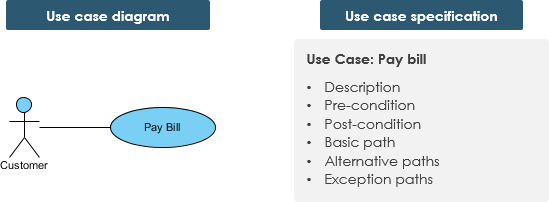
When starting a software engineering project, it is common to rely heavily on visual models. However, the image above illustrates a critical truth in system analysis: Just showing the use case diagram in UML notation is not enough. While the diagram provides a high-level overview of who interacts with the system and what they do, it lacks the granular detail required for developers to build the software correctly.
This tutorial explores the distinction between the Use Case Diagram and the Use Case Specification, explaining how to bridge the gap between a simple visual representation and a fully documented functional requirement.
Understanding the Two Sides of Modeling
The image presents two distinct but complementary artifacts:
1. The Use Case Diagram (Visual)
This is the visual representation where a stick figure represents an Actor (such as a “Customer”) connected to an oval representing the Use Case (such as “Pay Bill”). This diagram answers the question: “What tasks does the system need to perform for the user?”
2. The Use Case Specification (Textual)
Located on the right side of the image, the specification is the textual backbone of the project. It transforms the abstract “Pay Bill” oval into a concrete set of instructions. A robust specification typically includes:
- Description: A summary of the use case’s purpose.
- Pre-condition: What must be true before the use case starts (e.g., “User is logged in”).
- Post-condition: The state of the system after the use case finishes.
- Basic Path: The “Happy Path” or the ideal sequence of steps.
- Alternative Paths: Valid variations of the basic path (e.g., paying with a gift card instead of a credit card).
- Exception Paths: What happens when things go wrong (e.g., “Insufficient funds” or “Network error”).
The Art of Iterative Specification
A use case specification is rarely written perfectly in one sitting. The process is typically created in the analysis and design phases in an iterative manner.
Step 1: The Basic Flow
At first, only a brief description of the steps needed to carry out the normal flow is written. This outlines what functionality is provided by the use case without getting bogged down in edge cases.
Step 2: Fleshing out the Details
As analysis progresses, the steps are fleshed out to add more detail. This is where the “Pre-condition” and “Post-condition” are refined, and the interaction logic is clarified.
Step 3: Handling Exceptions
Finally, the exceptional flows are added. This is crucial for robust software design, ensuring the system can handle errors gracefully rather than crashing.
Use Case vs. Use Case Specification
To understand the value of the specification, we must first define the “Use Case” itself. A Use Case describes a task performed by an actor yielding a result of business value for a business. It may be visualized as a diagram or in a structured textual format.
A Use Case (the task a customer wants to perform) can be categorized into three types:
- Interactive: A system use case describes an actor’s interaction with a system in pursuit of a defined business goal (e.g., a user clicking buttons on a web form).
- Manual: A sequence of actions performed by an actor that may not involve a computer system (e.g., a receptionist logging a guest into a paper logbook).
- Automated: A sequence of steps performed by a program or script (e.g., a background job that generates a monthly report).
Standardizing Your Documentation
To ensure consistency across a development team, each project can adopt a standard use case template for the creation of the use case specification. This ensures that every developer and stakeholder reads the requirements in the same format, reducing ambiguity.
While tools like Visual Paradigm allow for the creation of both UML diagrams and detailed textual specifications, the fundamental requirement remains: the text explains the purpose and functionality that the diagram merely hints at.