
Mastering Multi-Instance Sub-Processes in Visual Paradigm BPMN
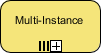
In the realm of Business Process Model and Notation (BPMN), efficiency is often the name of the game. When modeling complex business workflows, you frequently encounter scenarios where a specific task or a group of tasks needs to be executed multiple times. Visual Paradigm provides powerful tools to represent these scenarios, specifically through the concept of Multi-Instance Sub-Processes.
This tutorial will guide you through understanding the architecture of multi-instance sub-processes, how they function, and how to effectively model them using Visual Paradigm.
What is a Multi-Instance Sub-Process?
A Multi-Instance sub-process is a special type of sub-process that allows a set of activities to be repeated. Unlike a standard sub-process which runs once, a multi-instance sub-process can be configured to run either:
- Sequentially: One instance after another (e.g., approving 5 invoices one by one).
- Concurrently: Multiple instances running at the same time (e.g., processing 50 user registrations simultaneously).
The key architectural feature here is that the sub-process is treated as a “loop” or a collection of identical tasks. The notation for this is distinct and easily recognizable within the BPMN standard.
Visual Paradigm Modeling: The Multi-Instance Marker
Visual Paradigm adheres strictly to BPMN standards. When you add a Multi-Instance sub-process, you will see a specific marker on the diagram. This marker is crucial for communicating the process logic to stakeholders and developers.
The marker consists of two parallel vertical bars (representing multiple instances) and a plus sign (representing the addition of more instances). In Visual Paradigm, you can configure this behavior through the sub-process properties.
Key Characteristics of the Marker
- Visual Distinction: The icon sits at the bottom of the sub-process rectangle. It immediately signals to the viewer that this block of logic is not a single action but a collection of actions.
- Instance Count: The number of instances can be defined. You can set a fixed number (e.g., process exactly 10 orders) or a dynamic number (e.g., process until the list of orders is empty).
- Execution Behavior: The marker implies that the entry and exit flows of the sub-process are designed to handle multiple iterations.
Architecture and Logic Flow
When you model a Multi-Instance sub-process in Visual Paradigm, the system architecture changes slightly compared to a standard sub-process. The engine needs to manage the state of each iteration.
1. Initialization
Before the sub-process starts, the system evaluates the condition for the number of instances. This is often defined using an expression (like ${items.size} in Visual Paradigm’s scripting).
2. Iteration
As the process enters the sub-process, it creates an “instance” of the internal activities. If the mode is Concurrent, the system spawns multiple threads or processes to handle these instances in parallel. If the mode is Sequential, it waits for one to finish before starting the next.
3. Completion
The sub-process does not complete until all defined instances have finished their execution. This is a critical architectural constraint; the flow cannot exit the sub-process until the loop is fully resolved.
How to Configure in Visual Paradigm
To implement this in Visual Paradigm, follow these steps to ensure your diagram accurately reflects the intended architecture:
- Create a Sub-Process: Drag a Sub-Process activity onto your diagram.
- Open Properties: Double-click the sub-process to open the properties dialog.
- Enable Multi-Instance: Look for the “Multi-Instance” option. Check the box to enable it.
- Select Type: Choose between
SequentialorParallelbased on your requirements. - Define Loop Data: Set the collection variable (e.g.,
orders) and the loop count variable (e.g.,index) if you need to access specific data from the list during the iteration.
Why Use Multi-Instance Sub-Processes?
Using multi-instance sub-processes offers several architectural advantages:
- Clarity: It separates the logic of “how many times to run” from the logic of “what to do.” This makes the diagram cleaner and easier to read.
- Performance: By modeling parallel execution, you can identify bottlenecks where tasks could be run simultaneously to speed up the overall process.
- Flexibility: It allows your BPMN model to handle dynamic volumes of work without needing to duplicate the sub-process manually.
Conclusion
Mastering the Multi-Instance sub-process in Visual Paradigm is essential for creating robust, scalable BPMN models. Whether you are processing a single batch of data sequentially or scaling up to handle thousands of concurrent transactions, understanding the architecture and the specific markers ensures your process model is both accurate and efficient.