
UML Sequence Diagrams: Mastering MVC Stereotypes with Conditional Logic
In the realm of software architecture, the Model-View-Controller (MVC) pattern remains the gold standard for separating application logic from user interface components. However, translating the theoretical concepts of MVC into concrete technical diagrams requires a nuanced understanding of how objects interact over time. This tutorial focuses on implementing MVC Stereotypes within a Sequence Diagram, specifically demonstrating how to model conditional logic using the alt (alternative) fragment.
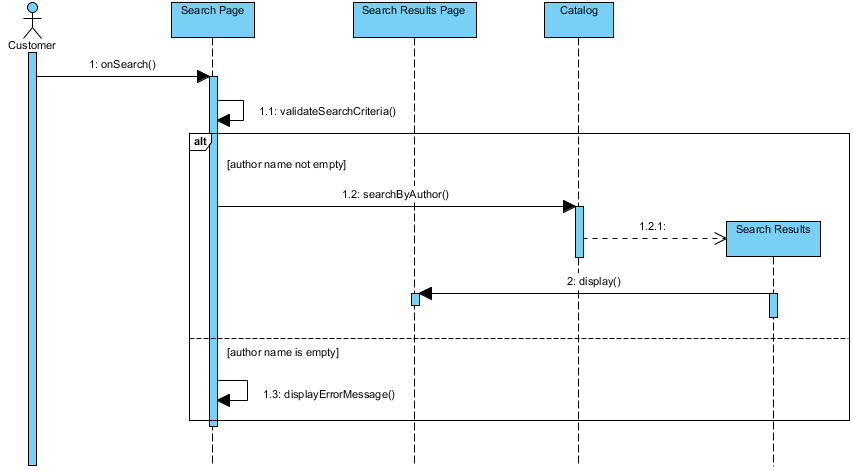
We will analyze a specific scenario involving a Customer interacting with a Search Page and a Catalog. The diagram illustrates a critical decision point: what happens when a user searches for a book by author, but the author’s name is missing?
Understanding the Participants: MVC Stereotypes
In Visual Paradigm, applying stereotypes helps classify objects within a diagram according to their role in the MVC architecture. This is crucial for maintaining architectural integrity in your models.
- Boundary (View): Represented by the Search Page and Search Results Page. These objects handle the presentation layer, receiving user input and displaying data.
- Control (Controller): Represented by the Catalog. This object manages the business logic, processing the request and querying data sources.
- Entity (Model): Represented by Search Results. This object represents the persistent data being retrieved.
Step-by-Step Analysis of the Interaction
The sequence diagram below demonstrates a flow where the system validates input before attempting to process a search. This ensures data integrity and prevents errors downstream.
1. The Trigger: User Interaction
The interaction begins with the Customer (the actor) initiating a search. This is represented by the message 1: onSearch() sent to the Search Page. The activation bar on the Search Page lifeline indicates that it becomes active and ready to process this request.
2. Internal Validation (The Self-Call)
Before communicating with the backend, the Search Page performs an internal check. The message 1.1: validateSearchCriteria() is a self-referencing message (a loop or self-call). This ensures that the form data entered by the user is not null or malformed before proceeding. If this step fails, the flow typically stops here, though the diagram focuses on the successful path.
3. The Conditional Logic: The alt Fragment
The core of this diagram is the alt (alternative) fragment. This construct allows the modeler to define different paths of execution based on a condition. The diagram is split into two distinct regions:
- Region 1: [author name not empty]
- Region 2: [author name is empty]
Scenario A: Successful Search (Valid Input)
If the condition [author name not empty] is met, the Search Page delegates the task to the controller. It sends the message 1.2: searchByAuthor() to the Catalog. The Catalog then queries the data source, represented by the dashed message 1.2.1: <<search>> to the Search Results (Entity).
Once the data is retrieved, the flow returns. The Catalog sends the 2: display() message back to the Search Page, which renders the results for the user.
Scenario B: Error Handling (Invalid Input)
If the condition [author name is empty] is met, the system skips the database query. Instead, the Search Page handles the error internally by calling 1.3: displayErrorMessage(). This prevents the system from attempting a query with invalid parameters, which could result in runtime exceptions.
Tooling: Visual Paradigm
To create and edit diagrams like the one above, Visual Paradigm offers a robust set of features specifically designed for UML modeling. It supports the creation of MVC Stereotypes and complex logic fragments without the need for manual coding.
Key Features in Visual Paradigm for this Task:
- Stereotype Management: You can easily apply stereotypes like
<<boundary>>,<<control>>, and<<entity>>to lifelines, ensuring your diagram adheres to architectural standards. - Sequence Diagram Fragments: The
altfragment is a standard feature in the toolbar. You can define the conditions (e.g.,[author name not empty]) directly in the fragment headers. - Code Generation: Visual Paradigm allows you to generate code skeletons for your MVC layers based on these diagrams, ensuring that your implementation matches your design.
Conclusion
By utilizing MVC stereotypes and conditional fragments, you transform a static list of messages into a dynamic representation of system behavior. This diagram effectively communicates how the application handles both success and failure states, ensuring that the user experience remains smooth and robust.