
Mastering UML Sequence Diagrams: Implementing Loops, Alternatives, and Optional Fragments
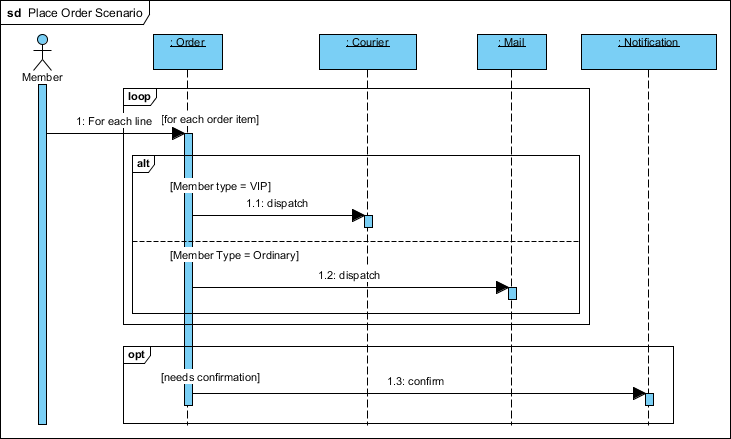
In the world of software architecture, a static diagram is often just a map, but a sequence diagram is a story. It narrates how different parts of a system interact over time to solve a specific business problem. Today, we will deconstruct a complex Order Processing Scenario using Visual Paradigm, focusing on the precise modeling of business logic through Combined Fragments. We will explore how to handle iteration (loops), conditional branching (alternatives), and optional behaviors (optional fragments) within a single, cohesive system flow.
Understanding the System Actors and Components
Before diving into the logic, we must establish the “cast” of our story. The sequence diagram defines the following participants:
- Member (Actor): The human user initiating the transaction. They are the trigger for the entire process.
- :Order (Component): The central orchestrator. It receives the request and manages the logic for processing line items.
- :Courier (Component): A specialized service responsible for high-priority, expedited shipments.
- :Mail (Component): A standard service responsible for regular, non-urgent shipments.
- :Notification (Component): A background service used for sending confirmations and alerts.
Deconstructing the Business Logic Flow
The core value of this diagram lies in how it handles the “Order Item” processing. It is not a linear path; it is dynamic. We can break this down into three distinct logical layers.
1. The Iteration: Processing Every Item
Business requirements often state that an order contains one or more items. A developer cannot write a separate function for item #1, item #2, and item #3. Instead, we use a Loop fragment.
In the diagram, you will see the box labeled loop surrounding the interaction with the Order component. The guard condition [for each order item] instructs the system to repeat the enclosed sequence for every single line item present in the cart. This abstraction is critical for scalability; whether the user buys one book or fifty, the logic remains consistent.
2. The Conditional Branch: VIP vs. Ordinary
Once the system is inside the loop and processing a specific item, it must decide how to ship it. This is where the Alternative (alt) fragment comes into play. The diagram shows a split path based on the Member Tier.
This is a classic if-else scenario modeled visually:
- Branch A (VIP): If the condition
[Member type = VIP]is met, the Order component sends adispatchmessage to the :Courier service. - Branch B (Ordinary): If the condition
[Member Type = Ordinary]is met, the logic diverts to the :Mail service instead.
By explicitly defining these guards, you ensure that the system logic is unambiguous. The developer knows exactly which service to invoke based on the user’s profile.
3. The Optional Task: Confirmation
Not every interaction requires a follow-up notification. Perhaps the user has “silent mode” enabled or the system is in a batch-processing mode. This behavior is captured by the Optional (opt) fragment.
The fragment is governed by the guard [needs confirmation]. If this condition is true, the Order component sends a confirm message to the :Notification service. If false, this entire block is skipped. This prevents the system from spamming users with unnecessary messages.
Visualizing the Logic in Code
To truly understand how these diagrams translate to technical specifications, let’s visualize the underlying logic using a pseudocode representation. This mirrors the structure of the UML Combined Fragments.
// 1. Loop: Iterate through all items in the cart
FOR EACH order_item IN order.items:

    // 2. Alt: Determine shipping method based on membership
    IF (member.type == VIP):
        :Order.dispatch(item, :Courier)
    ELSE IF (member.type == Ordinary):
        :Order.dispatch(item, :Mail)

// 3. Opt: Check if confirmation is required
IF (order.requires_confirmation):
    :Order.confirmation_trigger(:Notification)
Best Practices for Modeling Complex Logic
When using Visual Paradigm to document these workflows, keep the following architectural principles in mind to ensure your diagrams remain “readable blueprints” rather than confusing tangles.
- Be Explicit with Guards: Never leave a condition implied. Always write the condition, such as
[Member type = VIP], clearly in the fragment header. Ambiguity in the diagram leads to bugs in the code. - Nesting Matters: Notice the hierarchy in the diagram. The alt and opt fragments sit inside or adjacent to the loop. This nesting tells the developer exactly when the logic applies (e.g., the shipping decision happens for every item, not just once for the whole order).
- Keep it Readable: If a diagram becomes too crowded with nested fragments, consider breaking it down into separate diagrams or using “Interaction Uses” to reference sub-processes.
Conclusion
The “Place Order Scenario” demonstrates that effective UML modeling is about more than just connecting boxes; it is about capturing the decision-making intelligence of a system. By utilizing Visual Paradigm’s support for loop, alt, and opt combined fragments, you can transform vague requirements into precise technical specifications. When documenting complex workflows, remember: clear logic in the diagram equals clean code in the repository.
Tooling: Visual Paradigm
To implement these advanced modeling patterns, the industry-standard tool is Visual Paradigm. This comprehensive platform provides robust support for UML 2.0 Combined Fragments, allowing architects to define complex interaction logic with ease.
- Loop Fragments: Easily add iteration logic with customizable guard conditions.
- Alt/Opt Fragments: Drag and drop alternative and optional blocks to visualize branching logic.
- Export Capabilities: Generate documentation and even code skeletons directly from your sequence diagrams.
For those looking to get started, Visual Paradigm offers a UML Free Tool version, making it accessible for students and professionals alike to master these critical architectural skills.