
Visual Paradigm Flowcharts: Mastering Algorithm Logic for Simple Summation
In the world of software development and systems engineering, the ability to translate abstract logic into a concrete visual representation is a fundamental skill. Flowcharts remain one of the most effective tools for this purpose, serving as a universal language between technical developers and non-technical stakeholders. This tutorial dissects a fundamental algorithmic pattern: the summation process. We will walk through the anatomy of a flowchart, the specific shapes used to denote different actions, and the logic behind a simple arithmetic operation.
Understanding the Anatomy of a Flowchart
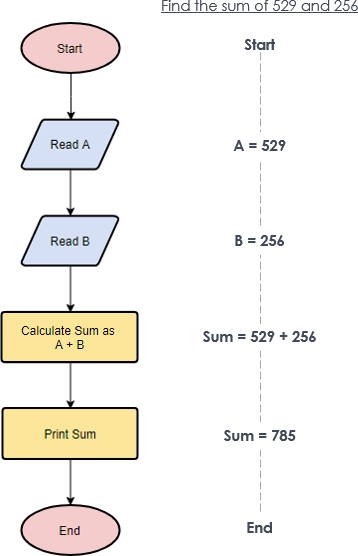
A flowchart is not merely a drawing; it is a structured map of an algorithm’s execution path. Every shape in a flowchart carries specific semantic meaning defined by industry standards (such as ANSI/ISO). In the example of calculating the sum of two numbers, we see a linear progression of events that demonstrates three critical components of any algorithm: input, processing, and output.
The Terminal: Start and End Points
Every algorithm must have a defined beginning and end. In flowcharting, these are represented by the Terminator symbol, which is typically a rounded rectangle or an oval.
- Start: Marks the entry point of the process. This is where the execution begins.
- End: Marks the termination of the process, often returning a value or halting execution.
Without these boundaries, a flowchart is directionless. In our summation example, the Start oval triggers the sequence, and the End oval confirms that the result has been successfully processed.
The Input/Output: Reading Data
Algorithms rarely operate in a vacuum; they require data. The parallelogram shape is universally recognized as the symbol for Input or Output (I/O). It signifies that the system is interacting with an external source or destination.
In the diagram provided, we observe two distinct parallelograms:
- Read A: The system waits for a value to be assigned to variable
A(e.g., 529). - Read B: The system waits for a value to be assigned to variable
B(e.g., 256).
It is important to note that while the shape is the same for input and output, the text label clarifies the action. Here, “Read” implies input, pulling data into the program’s memory.
The Process: Calculation Logic
Once data is acquired, the algorithm performs operations. The standard rectangle represents the Process step. This is where the “thinking” happens—mathematical calculations, variable assignments, or data manipulations.
In our context, the yellow rectangle labeled Calculate Sum as A + B represents the core logic. It takes the values currently stored in memory and combines them using the addition operator.
Visualizing the Data Flow
While the flowchart shows the steps, the diagram on the right side of the visual aid illustrates the state of the data at each step. This is often referred to as a trace or a walk-through.
Step 1: Start
   - System initializes.

Step 2: Read A
   - Action: User/System provides value.
   - State: A = 529

Step 3: Read B
   - Action: User/System provides value.
   - State: B = 256

Step 4: Calculate Sum
   - Logic: Sum = A + B
   - Calculation: Sum = 529 + 256
   - State: Sum = 785

Step 5: Print Sum
   - Action: Output the result to the console or display.

Step 6: End
   - System halts.
Why Use Flowcharts for Algorithm Design?
One might ask, “Why not just write the code?” While coding is the final step, designing with a flowchart first offers several strategic advantages:
- Language Agnostic: The logic of “Add A and B” is the same in Python, Java, or C++. A flowchart captures this logic without getting bogged down in syntax.
- Bug Detection: It is easier to spot logical errors (like an infinite loop or a missing variable check) on a diagram than in raw code.
- Stakeholder Communication: Project managers and clients often cannot read code, but they can easily understand a diagram that shows “Input -> Process -> Output.”
When modeling these systems, tools like Visual Paradigm are essential for maintaining professional standards. They allow for the automatic generation of code skeletons from these diagrams and ensure that the symbols conform to industry norms.
Conclusion
The simple summation flowchart is a microcosm of complex system architecture. It demonstrates the lifecycle of data: entering the system, being processed, and exiting as a result. By mastering these visual primitives, developers can design robust algorithms before writing a single line of code, ensuring clarity and efficiency in the software development process.