
From Brainstorm to Docs: Architecting Workflows with VP AI Ecosystem
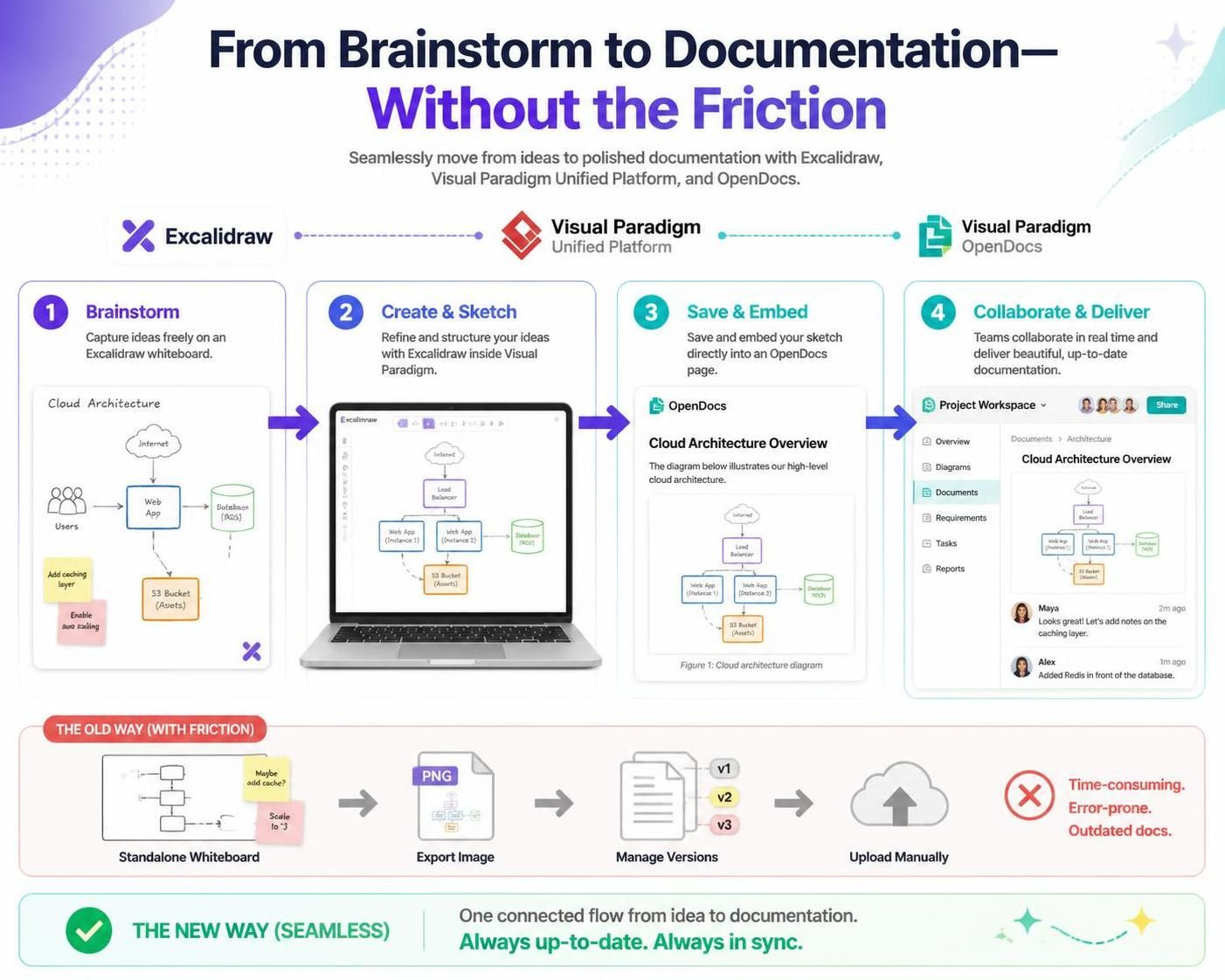
In modern software engineering, the gap between creative ideation and technical execution is often bridged by a series of tedious, error-prone manual steps. Traditionally, an architect might sketch a system on a whiteboard, take a photo, convert it to a PNG, and then manually upload it to a wiki. This “friction” leads to documentation debt—where the documentation becomes outdated the moment it is written.
This tutorial explores the architectural shift introduced by integrating Excalidraw directly into the Visual Paradigm Unified Platform. We will move from the traditional “Old Way” of file management to the “New Way” of native, live embedding, ensuring your system architecture diagrams remain the “Single Source of Truth.”
Understanding the Architecture: The Four-Stage Workflow
The integration creates a continuous pipeline that transforms a loose sketch into a structured, collaborative document. Let’s break down the system architecture of this workflow into four distinct phases.
Phase 1: Brainstorming (The Input Layer)
The process begins in the Excalidraw canvas. This layer is designed for “fluid, unstructured freedom.” Unlike rigid modeling tools that force you to snap to grids immediately, Excalidraw allows you to capture raw ideas using freehand drawing tools.
- Context: You are mapping out a high-level cloud topology.
- Components: Users, Web Apps, Load Balancers, and S3 Buckets are sketched rapidly.
- Value: This eliminates the cognitive load of choosing the right tool icon immediately, allowing the team to focus on the logic of the data flow.
Phase 2: Create & Sketch (The Processing Layer)
Here, the integration acts as the bridge. Instead of exporting the sketch, the team refines the ideas natively inside the Visual Paradigm environment. This is where the “frictionless” aspect of the architecture shines.
The Excalidraw editor is embedded directly into the workspace. You can:
- Refine the hand-drawn elements into structured boxes.
- Add specific attributes (e.g., changing a generic “Database” to a specific “RDS Instance”).
- Ensure the diagram is legible before it is published.
Phase 3: Save & Embed (The Persistence Layer)
This is the critical architectural change. In the traditional model, saving a diagram meant creating a static image file (PNG/JPG). In the Visual Paradigm OpenDocs architecture, the diagram is saved as a live object.
When you save the Excalidraw sketch to an OpenDocs page, it is not flattened into an image. It is embedded as a dynamic resource. This means:
- Inline Editing: If the architecture changes (e.g., you add a caching layer), you can click the diagram in the document and edit it immediately.
- Version Control: The diagram is linked to the project history, not just a file folder.
Phase 4: Collaborate & Deliver (The Output Layer)
The final stage is real-time collaboration. Because the diagram is embedded, team members can view the Cloud Architecture Overview in the OpenDocs interface and provide context-sensitive feedback.
Notice how the workflow allows users like “Maya” or “Alex” to leave notes directly on the document surrounding the diagram. This keeps the feedback loop tight and prevents the “lost diagram” syndrome common in distributed teams.
Contrasting the Architectural Patterns
To understand the value of this integration, we must compare the legacy workflow against the new native workflow.
The Old Way: High Friction
The traditional architecture relies on file silos. The workflow is:
- Standalone Whiteboard: Ideas are captured in a vacuum.
- Export Image: The diagram is converted to a static format (PNG).
- Manage Versions: The user must manually rename files (v1, v2, v3) to track changes.
- Upload Manually: The file is dragged into the documentation tool.
Result: Time-consuming, error-prone, and outdated documentation.
The New Way: Seamless Integration
The Visual Paradigm + Excalidraw architecture creates a connected flow. There is no export step. The asset is created, refined, and published in a single environment.
- One Connected Flow: From idea to documentation.
- Always Up-to-Date: The diagram in the document is the same file being edited.
- Always in Sync: No version mismatches between the design and the spec.
Modeling Concept: The Single Source of Truth
The core modeling concept here is the elimination of Documentation Debt. In agile development, specs become obsolete quickly. By making the diagram editable within the documentation itself, Visual Paradigm ensures that the visual representation of the system (the diagram) and the textual requirements (the doc) are always synchronized.
Conclusion
By integrating Excalidraw directly into the Visual Paradigm Unified Platform, teams can finally bridge the gap between the fluid freedom of brainstorming and the structured clarity of formal documentation. This architectural shift transforms the diagram from a static image into a living, collaborative asset.