
Architecting the VP Unified Platform: Bridging Desktop Modeling and the VP AI Ecosystem
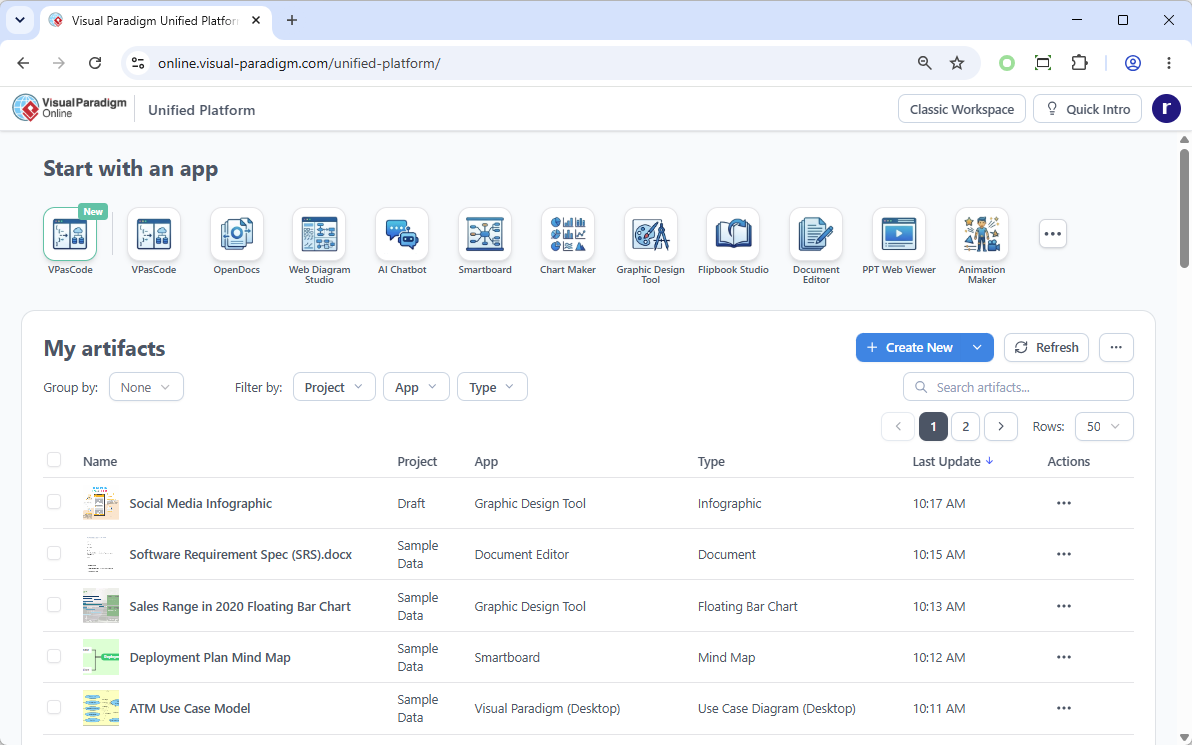
In the modern software development lifecycle, the friction between local modeling tools and cloud-based collaboration often leads to fragmented workflows. The Visual Paradigm Unified Platform addresses this challenge by redefining the system architecture of the modeling environment. Rather than treating the desktop application and the cloud service as separate entities, this architecture unifies them into a single, cohesive command hub.
This tutorial explores the architectural significance of the Unified Platform, demonstrating how it centralizes app management and synchronizes data between desktop and web environments.
The Shift from Siloed Tools to a Centralized Hub
Historically, enterprise modeling required users to manage a disjointed ecosystem. A developer might design a UML diagram locally using the Desktop application, while a technical writer documents requirements in a cloud-based document editor, and a project manager tracks progress on a web-based Smartboard. These tools often lacked deep integration, requiring manual file exports and imports.
The Unified Platform revolutionizes this by acting as a Centralized App & Data Management layer. It functions as a dashboard that aggregates access to over 100 distinct applications within the Visual Paradigm ecosystem. This approach significantly reduces cognitive load and eliminates the “click fatigue” associated with navigating between disparate web portals.
Understanding the Desktop & Web Synergy
A critical architectural feature of the Unified Platform is the Desktop & Web Synergy. This feature allows the Visual Paradigm Desktop application to embed the cloud-based Unified Platform directly within the user’s local interface.
Why This Architecture Matters
- Seamless Coexistence: Diagrams designed on the desktop and data stored in cloud apps now reside in the same logical space.
- Unified File System: Users can view all saved works across separate apps in a single, drive-like environment.
- Context Preservation: When launching a web tool (like the Smartboard) from the desktop, the user remains within the project context, avoiding the need to re-authenticate or re-navigate to the correct project folder.
Key Functional Modules
The Unified Platform organizes its ecosystem into distinct functional modules, allowing users to “Start with an app” based on their current task. Based on the interface architecture, the following core modules are integrated:
- VPasCode: Enables model-driven development by generating code from UML diagrams directly within the unified workspace.
- OpenDocs: A collaborative document editor for requirements and specifications, tightly coupled with project artifacts.
- Web Diagram Studio: A browser-based tool for creating diagrams without the overhead of local installation.
- AI Chatbot: Integrates artificial intelligence to assist in diagram generation and code analysis.
- Smartboard & Chart Maker: Tools for visualizing data and brainstorming sessions, bridging the gap between static documentation and dynamic presentation.
Artifact Management Architecture
The “My Artifacts” section of the platform represents the core data storage layer. It utilizes a robust filtering system to manage project data. Users can group artifacts by Project, App, or Type, providing a granular view of their repository.
Sample Artifact Structure:
{
  "artifact_name": "Software Requirement Spec (SRS).docx",
  "project_source": "Sample Data",
  "app_source": "Document Editor",
  "type": "Document",
  "last_update": "10:15 AM",
  "actions": ["Edit", "Share", "Download"]
}
This structured data approach ensures that every element—from a floating bar chart to a use case diagram—is traceable back to its origin application and project context.
Conclusion
The Unified Platform is not merely a new user interface; it is a fundamental shift in how modeling tools interact with users. By unifying the desktop and cloud experiences, Visual Paradigm has created a “True Command Hub” that streamlines the development lifecycle, reduces tool fragmentation, and ensures that all data artifacts are accessible within a single, cohesive environment.