
Mastering Sequence Diagrams with VPasCode: An ATM Cash Withdrawal Tutorial
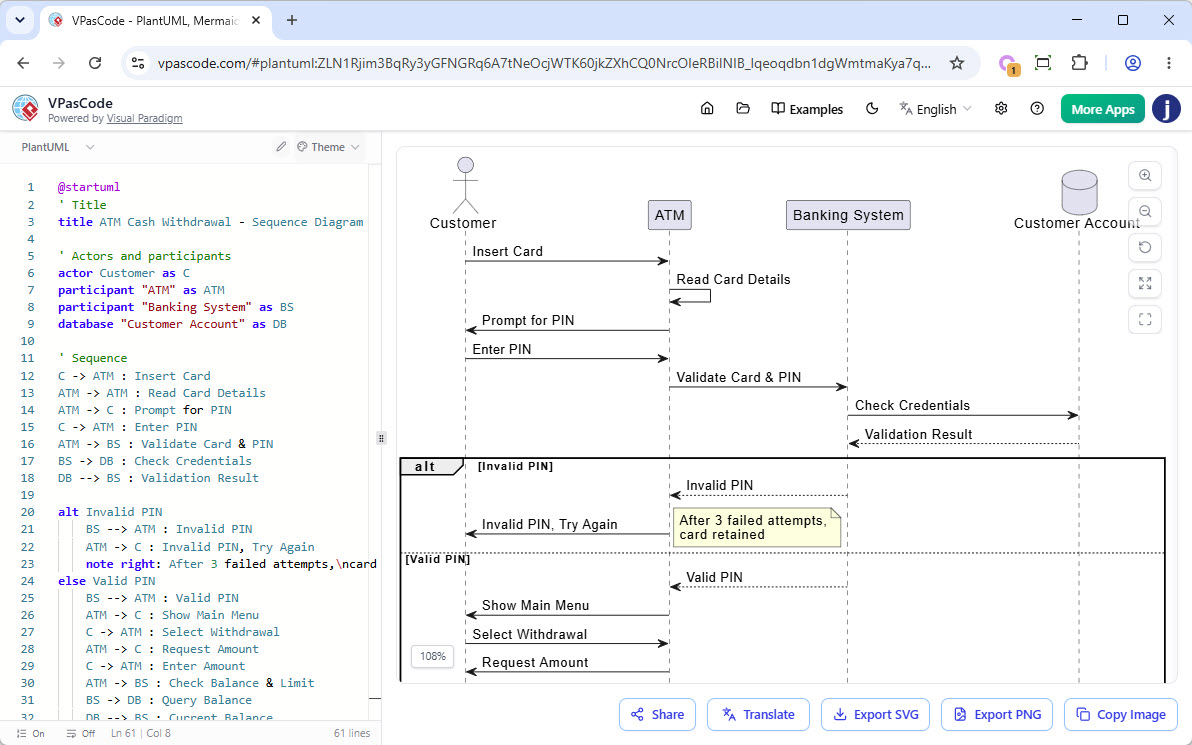
In the realm of software engineering, visualizing system behavior is just as critical as writing the code itself. Among the various types of diagrams used in UML (Unified Modeling Language), the Sequence Diagram is a powerful tool for describing the interactions between objects in an organized, time-sequential manner. This tutorial explores how to leverage VPasCode, a high-performance text-based modeling tool, to build a robust Sequence Diagram for an ATM Cash Withdrawal system.
Why Choose VPasCode?
Traditional modeling tools often rely on dragging and dropping icons, which can be cumbersome and slow. VPasCode offers a refreshing alternative by bringing the speed of code writing to the visualization of system architecture. By using a syntax-driven approach (similar to Markdown or LaTeX), developers can design complex diagrams with precision and efficiency.
The interface presents a split-screen view: the left side acts as a real-time code editor for PlantUML syntax, while the right side renders the diagram instantly. This allows for immediate feedback, making it easy to iterate on design changes.
Step-by-Step: Building the ATM System Diagram
Let’s walk through the logical steps to construct the sequence diagram shown in the provided context. We will break down the code into its foundational components: Actors, Participants, and the Interaction Sequence.
1. Defining the Title and Metadata
Every diagram should start with a clear identifier. In VPasCode, this is handled using the @startuml directive followed by the title keyword.
@startuml
title ATM Cash Withdrawal - Sequence Diagram
2. Identifying Actors and Participants
The next step is to define the “cast of characters.” In our scenario, we have a human user, a physical machine, a backend system, and data storage.
- Actor: The
Customerinitiates the process. - Participant: The
ATMacts as the interface. - Participant: The
Banking Systemhandles the logic. - Database: The
Customer Accountholds the funds.
In VPasCode, we map these to specific syntax keywords:
actor Customer as C
participant "ATM" as ATM
participant "Banking System" as BS
database "Customer Account" as DB
3. Constructing the Interaction Flow
The core of the diagram is the flow of messages. We use arrows to represent data or commands moving between participants. The general format is Sender -> Receiver : Message.
Let’s trace the initial flow: The Customer inserts a card, and the ATM reads it.
C -> ATM : Insert Card
ATM -> ATM : Read Card Details
4. Handling Logic with Alt/Else Blocks
Real-world systems are rarely linear; they branch based on conditions. In our diagram, the system must validate the PIN. If the PIN is correct, the user proceeds. If incorrect, the system locks the card.
VPasCode handles this logic using alt (alternative) and else blocks. This creates a conditional frame in the diagram.
alt Invalid PIN
    BS --> ATM : Invalid PIN
    ATM -> C : Invalid PIN, Try Again
    note right: After 3 failed attempts,
 card retained
else Valid PIN
    BS --> ATM : Valid PIN
    ATM -> C : Show Main Menu
    C -> ATM : Select Withdrawal
    ATM -> BS : Check Balance & Limit
    BS -> DB : Query Balance
    DB -> BS : Current Balance
end
Technical Deep Dive: The Anatomy of the Code
Understanding the syntax rules is crucial for mastering VPasCode. Here are the specific technical elements utilized in this tutorial:
- Actor Definition:
actor [Name] as [Alias]. This creates a stick figure and assigns a shorthand alias (e.g.,C) for brevity in subsequent lines. - Database Definition:
database [Name] as [Alias]. This renders a cylinder shape, distinct from standard rectangular participants. - Self-Reference:
ATM -> ATM. This indicates an internal process occurring within the ATM before interacting with the user or backend. - Note Annotation:
note right: [Text]. This adds a sticky note to the diagram, essential for documenting business rules like the “3 failed attempts” logic. - Multi-line Text: The use of
Conclusion
By using VPasCode, the process of diagramming shifts from a graphical chore to a structured coding task. The separation of logic (the code) from presentation (the rendered image) allows for version control, easier debugging, and rapid prototyping. Whether you are designing an ATM flow or a complex microservice architecture, the text-based approach ensures your diagrams are as maintainable as your codebase.