
Architecting Living Documentation with VP OpenDocs: From Chaos to Structure
In modern software development, the gap between code implementation and system documentation is often where value is lost. Files become scattered, duplicates multiply, and critical architectural decisions get buried in static PDFs that no one updates. This tutorial explores how to transition from unstructured file management to a Structured Knowledge Organization system using Visual Paradigm OpenDocs.
We will walk through the architectural shift from chaotic file storage to a navigable, hierarchical documentation space, explaining how this transformation enables “living documentation” that evolves with your project.
The Challenge of Unstructured Data
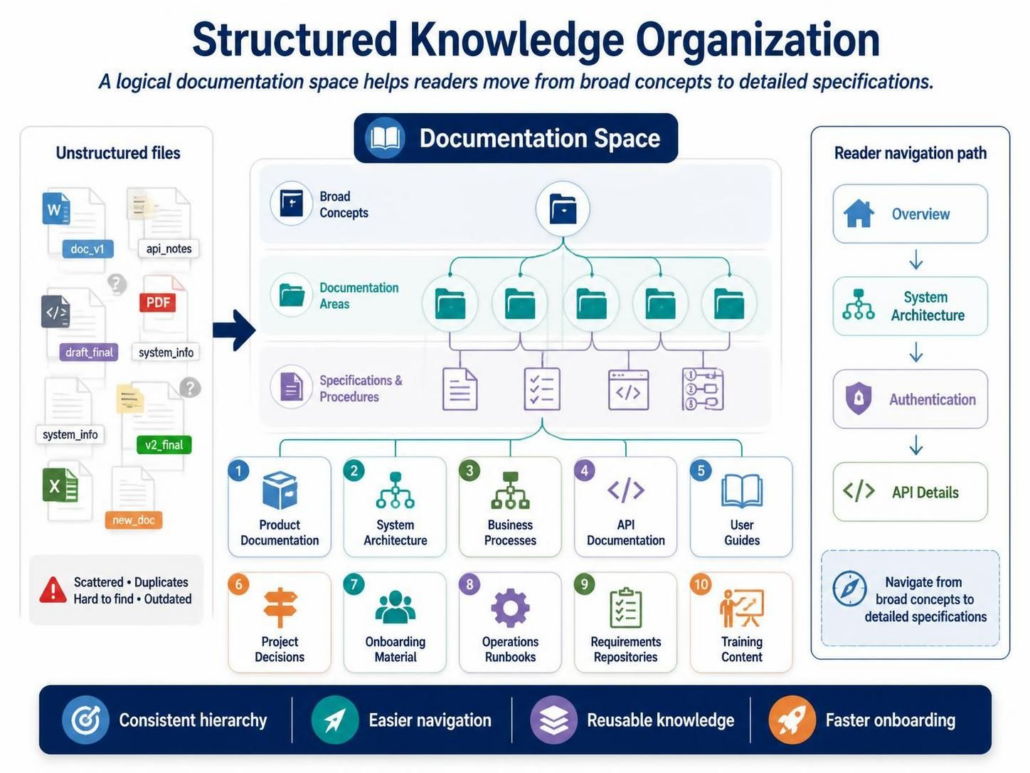
Traditional documentation management often resembles a digital junk drawer. Engineers, business analysts, and stakeholders save files in disparate locations without a central governance model. The image below illustrates the state of “Unstructured files,” characterized by scattered versions, format inconsistencies, and a lack of context.
- Version Confusion: Files like
docv1,draftfinal, andv2_finalcreate a headache for teams trying to identify the source of truth. - Format Fragmentation: Critical information is split across Word documents, Excel spreadsheets, code snippets, and PDFs, making cross-referencing difficult.
- Information Loss: Without a structured hierarchy, the “Why” behind a decision (Design Rationale) is often lost, leaving only the “What.”
The Solution: The Documentation Space Hierarchy
The core of the solution is the Documentation Space, a logical container that replaces the file system with a navigable knowledge graph. Instead of browsing folders, users navigate a consistent hierarchy designed to guide readers from broad concepts to detailed specifications.
1. Broad Concepts (The Entry Point)
Every documentation space starts with a high-level entry point. This acts as the “Overview” for your project, providing immediate context. Instead of asking “Where do I start?”, a new team member lands on a curated landing page.
2. Documentation Areas (The Folders)
Within the space, content is organized into specific “Documentation Areas.” These are not arbitrary folders but functional domains. Based on the architecture, we identify ten distinct pillars that cover the lifecycle of software development:
- Product Documentation: High-level feature definitions and value propositions.
- System Architecture: Visual diagrams (VPasCode) and structural descriptions of the backend.
- Business Processes: Workflow definitions and use cases.
- API Documentation: Technical interfaces, endpoints, and data schemas.
- User Guides: End-user instructions and UI walkthroughs.
- Project Decisions: Architecture Decision Records (ADRs) and design rationale.
- Onboarding Material: Accelerated learning paths for new team members.
- Operations Runbooks: Troubleshooting guides and maintenance procedures.
- Requirements Repositories: Traceable lists of functional and non-functional requirements.
- Training Content: Educational modules for specific roles.
3. Specifications & Procedures (The Details)
Underneath the areas, specific documents are linked. These are the granular artifacts—checklists, code snippets, and procedural steps—that support the broader concepts.
Reader Navigation Paths
The power of this architecture lies in the Reader Navigation Path. Unlike a flat list of files, a structured space allows for a logical flow of information. The system supports a “drill-down” methodology that mimics how humans learn:
- Overview: Start with the big picture. What is this system?
- System Architecture: Understand the components. How is it built?
- Authentication: Focus on security and access control.
- API Details: Dive into the technical implementation.
This path ensures that a reader is not overwhelmed by technical details before understanding the context.
Implementing the Hierarchy: A VPasCode Example
To structure this space, Visual Paradigm uses VPasCode. This allows you to define the hierarchy and content relationships in a text-based format that generates the documentation structure automatically.
// Define the root of the documentation space
DocumentationSpace "Project Alpha" {
    title "Project Alpha Documentation"

    // Define Documentation Areas
    Area "System Architecture" {
        icon "architecture"
        description "Core structural components and diagrams"
    }

    Area "API Documentation" {
        icon "api"
        description "Endpoints and data contracts"
    }

    // Define Specifications within an Area
    Specification "AuthFlow" {
        area "System Architecture"
        type "diagram"
        content "sequenceDiagram(Authentication)"
    }
}
Supporting Living Documentation
Traditional documentation is often a byproduct of a project—created at the end and rarely looked at again. OpenDocs flips this paradigm to support Living Documentation.
By maintaining the documentation space as a primary artifact (rather than an afterthought), teams can record:
- Current Architecture: Always accurate to the deployed system.
- Accepted Design Decisions: Captured in real-time as trade-offs are made.
- Known Constraints: Documented immediately to prevent future architectural debt.
- Operational Procedures: Updated as soon as a new incident is resolved.
Publishing and Sharing with AI Assistance
Once the hierarchy is established, the final step is dissemination. The same underlying information must be presented differently for different audiences. OpenDocs facilitates this by allowing you to curate views:
- Internal Engineering Teams: See the “System Architecture” and “API Details.”
- Business Stakeholders: See the “Business Processes” and “Product Documentation.”
- Students/Trainees: See the “Onboarding Material.”
AI-Assisted Workflows further accelerate this process. AI can be used to:
- Generate an initial explanation of a complex diagram.
- Summarize a model into a system overview.
- Draft the first version of API documentation.
- Identify inconsistencies between a diagram and its narrative text.
Conclusion
Moving from unstructured files to a structured knowledge organization transforms documentation from a burden into a strategic asset. By enforcing a consistent hierarchy, integrating visual artifacts, and enabling living documentation, teams achieve easier navigation, reusable knowledge, and faster onboarding. The result is a system where the documentation is not just a description of the software, but an integral part of its architecture.