
Enterprise architecture serves as the blueprint for organizational transformation. It bridges the gap between business strategy and IT execution. ArchiMate provides a standardized language for describing, analyzing, and visualizing enterprise architecture. However, a model is only as good as its adherence to principles and its clarity to stakeholders. Without disciplined practices, even the most detailed models can become obsolete or confusing artifacts.
This guide outlines proven methodologies for creating robust enterprise models. We focus on structural integrity, semantic accuracy, and practical governance. By following these standards, teams ensure their architecture remains a valuable asset rather than a documentation burden.
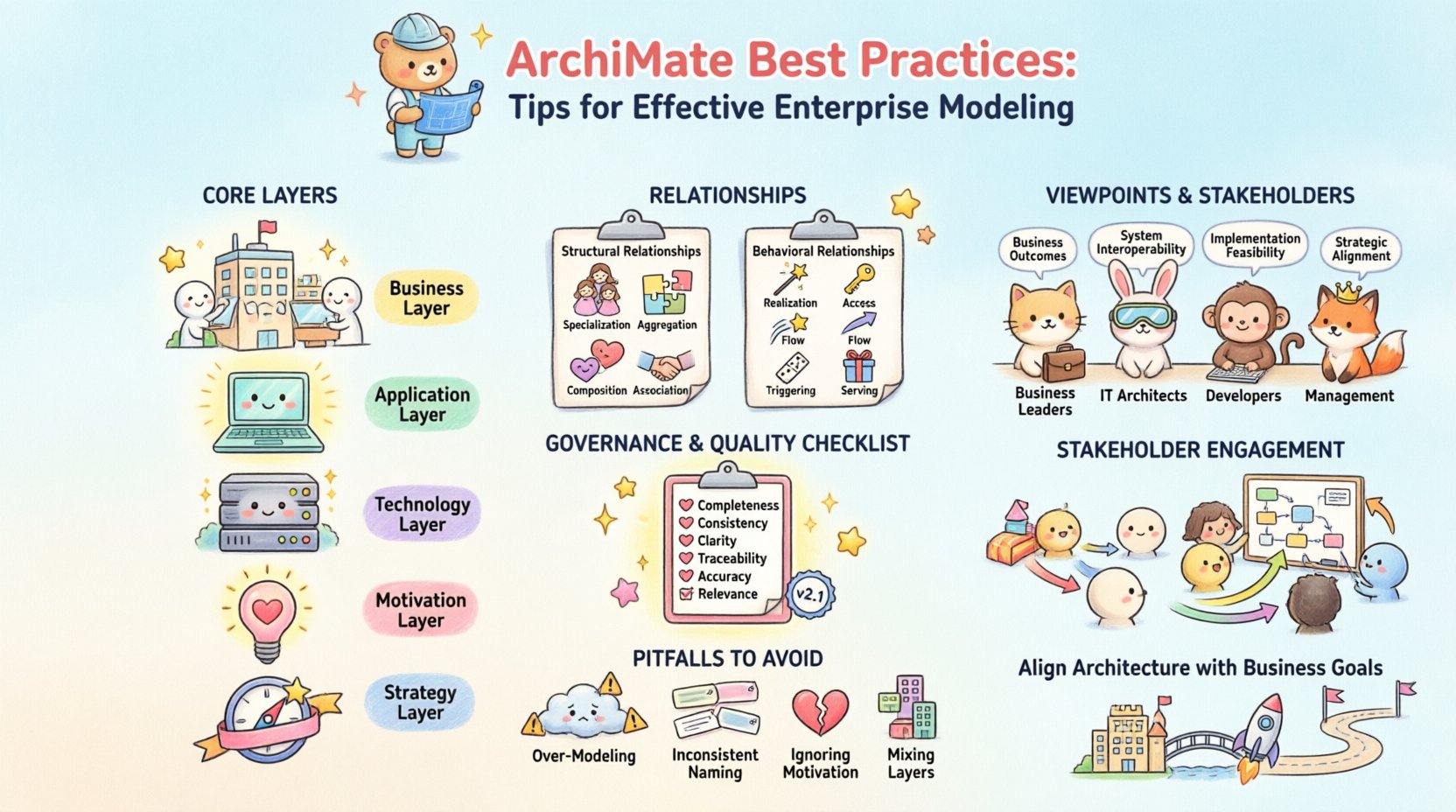
🔍 Understanding the Core ArchiMate Layers
The foundation of any ArchiMate model lies in its layering structure. These layers represent different perspectives of the enterprise. Using them correctly ensures separation of concerns and logical organization.
1. Business Layer
The Business Layer describes the organization, its business functions, and the services it delivers. Key concepts include:
- Business Actor: Entities performing activities (e.g., a department, a user, or an external partner).
- Business Role: A collection of responsibilities that an actor can perform.
- Business Function: A collection of activities that are performed by the organization.
- Business Process: A collection of activities that together produce a specific result.
- Business Object: Information that is managed or used during business activities.
- Business Service: A representation of a business function that is realized by a process.
2. Application Layer
This layer represents the software systems that support the business. It focuses on functionality and data management.
- Application Function: A function that can be realized by an application software component.
- Application Component: A software component that realizes one or more application functions.
- Application Interface: A boundary between components where services are provided or requested.
- Application Service: A representation of a service that is provided by an application component.
3. Technology Layer
The Technology Layer describes the hardware and infrastructure that host the applications.
- Device: Physical or virtual computing device.
- Network: Communication infrastructure.
- System Software: Software that manages hardware resources (e.g., OS).
- Node: A physical or virtual computing device.
- Artifact: A physical representation of a software component.
4. Motivation Layer
Understanding the “why” is critical for alignment. The Motivation Layer captures the reasons behind the architecture.
- Driver: Factors that drive the change or the architecture.
- Goal: A state that is desired to be achieved.
- Principle: A rule that guides behavior.
- Requirement: A condition that must be met.
- Assessment: A judgment on a situation.
5. Strategy & Physical Layers
The Strategy Layer links motivation to the business landscape, defining the strategic context. The Physical Layer connects the logical architecture to the physical world, often used for implementation and migration planning.
🔗 Mastering Relationships and Semantics
Correct relationships are the glue that holds a model together. Misusing relationships creates ambiguity. Below are the primary relationship types and their appropriate usage contexts.
Structural Relationships
| Relationship | Description | Common Use Case |
|---|---|---|
| Specialization | Indicates that one element is a specific type of another. | Inheritance or categorization. |
| Aggregation | Indicates a whole-part relationship where the part can exist independently. | Process activities or module composition. |
| Composition | Indicates a whole-part relationship where the part cannot exist independently. | Tight lifecycle coupling. |
| Association | Indicates a relationship between two elements without direction. | General links or mappings. |
Behavioral Relationships
| Relationship | Description | Common Use Case |
|---|---|---|
| Realization | Indicates that one element provides the specification for another. | Process realizing a service or component realizing a function. |
| Access | Indicates that one element accesses another. | Application accessing a database. |
| Flow | Indicates the flow of information or control. | Data flow between components. |
| Triggering | Indicates that one element triggers another. | Event triggering a process. |
| Serving | Indicates that one element serves another. | Service provider to consumer. |
When modeling, strict discipline regarding these relationships prevents logical errors. For instance, do not use Realization for a structural link. Use it only when one element implements the interface or specification of another. This distinction is crucial for impact analysis.
👁️ Strategic Use of Viewpoints
A single model cannot serve every audience. Viewpoints define the perspective from which stakeholders view the architecture. Views are the actual diagrams generated from the model based on these viewpoints.
Defining Viewpoints
Before creating a diagram, identify the stakeholder group. Are they business leaders? Developers? Auditors? Each group requires different information.
- Business Stakeholders: Focus on Business Layer concepts. Avoid deep technical details unless necessary.
- IT Architects: Require full stack views including Application and Technology layers.
- Developers: Need specific component interfaces and data flows.
- Management: Require high-level capability maps and strategic alignment.
Viewpoint Guidelines
To maintain clarity, follow these rules when designing viewpoints:
- Limit Scope: Do not show all layers in every view. A Business Capability map does not need to show database tables.
- Standardize Notation: Ensure consistent color coding and icon usage across all views.
- Annotate Context: Every view must have a clear title and legend explaining the symbols used.
- Traceability: Ensure elements in the view are traceable back to the core model.
🛡️ Governance and Maintenance
Architecture models decay quickly without governance. A static model becomes a liability. Continuous maintenance is required to keep the model relevant.
Version Control
Implement a strict versioning strategy. Every change to the model should be tracked. This allows teams to revert changes if necessary and understand the evolution of the architecture over time.
- Change Logs: Maintain a record of who changed what and why.
- Baseline Management: Define baselines for major releases or project milestones.
- Review Cycles: Schedule regular reviews to validate model accuracy.
Impact Analysis
One of the primary benefits of a structured model is the ability to perform impact analysis. When a change occurs, the model helps identify downstream effects.
- Identify the Change: Define the specific element being modified.
- Trace Dependencies: Use the model relationships to find connected elements.
- Assess Risk: Determine which business capabilities or services are affected.
- Communicate: Inform stakeholders of potential risks before implementation.
⚠️ Common Pitfalls to Avoid
Even experienced practitioners can fall into traps that reduce the value of their models. Awareness of these common errors helps maintain quality.
1. Over-Modeling
Creating a model for every single detail is unnecessary and time-consuming. Focus on the elements that drive decision-making. If a detail does not influence a business outcome or technical decision, it might not belong in the core architecture model.
2. Inconsistent Naming
Naming conventions are vital. If one team calls an element Customer Service and another calls it Client Support, the model becomes fragmented. Establish a glossary and enforce it across the organization.
3. Ignoring the Motivation Layer
Many models focus solely on structure and behavior. They fail to explain why the architecture exists. Without the Motivation Layer, stakeholders cannot understand the drivers behind the design. This leads to disengagement and lack of support for the architecture.
4. Mixing Layers Indiscriminately
Do not mix Business and Technology concepts in a single layer unless explicitly modeling a cross-layer relationship. Keep layers distinct to maintain clarity. Use relationships to connect them, not to blend them.
🤝 Stakeholder Engagement Strategies
Architecture is a communication tool. The most accurate model is useless if stakeholders do not understand it. Engagement strategies ensure the architecture is adopted and utilized.
Workshops and Validation
Conduct workshops where stakeholders review the model. This validates the accuracy of the content. It also provides an opportunity to correct misunderstandings early. Do not present a finished model for review; present drafts for feedback.
Visual Communication
Use visual cues to enhance understanding. While the language is standardized, color coding can help differentiate between layers or statuses. Ensure that color choices are accessible and meaningful.
Feedback Loops
Create a mechanism for ongoing feedback. Stakeholders should be able to suggest corrections or additions. This turns the architecture into a living document that evolves with the organization.
📊 Checklist for Model Quality
Before finalizing any model, run through this quality checklist. It ensures consistency and adherence to best practices.
- Completeness: Are all required elements present for the defined scope?
- Consistency: Are naming conventions and relationship types applied uniformly?
- Clarity: Is the diagram readable without excessive clutter?
- Traceability: Can every element be traced to a business driver or requirement?
- Accuracy: Does the model reflect the current state of the enterprise?
- Relevance: Does the model answer the specific questions of the intended audience?
🚀 Aligning Architecture with Business Goals
The ultimate value of enterprise architecture is alignment. The model must demonstrate how IT capabilities support business objectives. This requires close collaboration between business and IT leaders.
Capability Mapping
Map business capabilities to application capabilities. This highlights gaps where business functions lack technological support. It also identifies redundancies where multiple applications support the same function.
Roadmapping
Use the architecture model to create implementation roadmaps. Define the sequence of changes required to move from the current state to the target state. This ensures that every investment aligns with the strategic direction.
📝 Final Thoughts on Modeling Discipline
Building an enterprise architecture is a discipline that requires patience and precision. It is not about creating pretty diagrams; it is about creating a reliable source of truth. By adhering to these best practices, teams can ensure their models remain accurate, useful, and valuable over time.
Remember that the goal is not perfection but clarity. A model that is 90% accurate and 100% understood is more valuable than a 100% accurate model that is ignored. Focus on communication, consistency, and continuous improvement.
Start small. Focus on a specific domain or capability. Refine the process. Then expand. This incremental approach reduces risk and builds confidence across the organization. With dedication to these standards, enterprise architecture becomes a strategic asset that drives successful transformation.