
Building an Online Order Process Context Diagram with VPasCode
In the realm of software engineering and system architecture, the ability to translate abstract ideas into concrete visual models is paramount. However, writing the code for complex diagrams—such as UML Use Case or Sequence diagrams—can often be a bottleneck for architects and developers alike. This tutorial explores how to bridge the gap between natural language descriptions and professional system architecture diagrams using AI-assisted modeling, specifically focusing on the capabilities of Visual Paradigm’s VPasCode tool.
The Power of “Diagram-as-Code”
Modern modeling tools have evolved beyond simple drag-and-drop interfaces. They now embrace the “Diagram-as-Code” philosophy, where diagrams are defined by text. This approach offers version control compatibility, precision, and automation. However, writing syntax-heavy code like PlantUML or Mermaid from scratch requires a steep learning curve.
VPasCode addresses this by integrating AI generation directly into the workflow. This allows you to focus on the “What” (the logic and actors) rather than the “How” (the syntax).
Step-by-Step: Generating a Use Case Diagram
Let’s walk through the process of generating a comprehensive Use Case Diagram for an online food-delivery system. We will simulate the interaction within the VPasCode environment.
1. Identifying the Actors and Boundaries
Before writing a single line of code, you must define the scope of your system. A Use Case diagram is not just about what the system does; it is about who interacts with it. In our scenario, we have identified the following stakeholders:
- Customer: The end-user browsing and ordering.
- Restaurant Staff: The entity managing menus and fulfillment.
- Delivery Driver: The logistics component.
- Payment Gateway: The external financial service.
- Administrator: The system manager handling refunds and oversight.
2. Crafting the Natural Language Prompt
The magic of VPasCode lies in its ability to parse natural language. Instead of typing actor Customer and usecase BrowseRestaurants, you can describe the system in a sentence. The AI engine recognizes keywords and relationships automatically.
The Prompt Strategy:
To get the best results, your prompt should contain three elements:
- The Diagram Type: Explicitly state you want a “PlantUML use case diagram”.
- The Context: Define the system (e.g., “online food-delivery system”).
- The Details: List the actors and specific use cases (e.g., “browsing restaurants”, “handling refunds”).
3. The AI Generation Interface
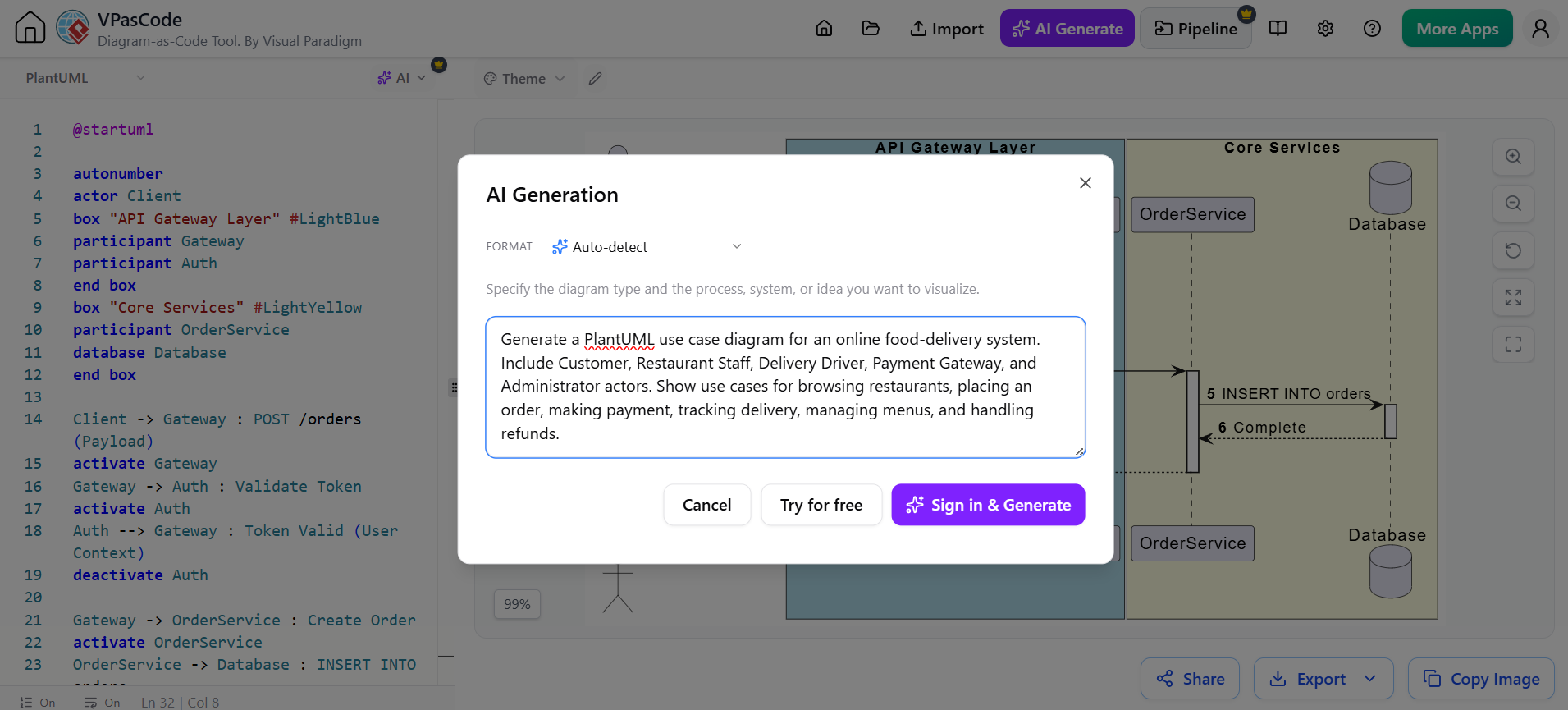
As demonstrated in the visual interface, the user inputs this prompt into the AI Generation modal. The tool provides a “Format” selector (set to Auto-detect in this example) and a text area for the description. Once the prompt is entered, the AI interprets the relationships and generates the code.
Understanding the Output: From Text to Syntax
Once the AI processes the prompt, it generates the underlying code on the left side of the editor. Let’s break down how the natural language prompt translates into the technical PlantUML syntax.
The Resulting Code Structure:
- Grouping: The AI uses
box "API Gateway Layer"andbox "Core Services"to organize the system architecture, visualizing the separation of concerns. - Participants: It creates
participantdefinitions for the system components likeGateway,Auth, andOrderService. - Logic Flow: It generates the interaction flow using commands like
activateanddeactivate, representing the lifecycle of a request.
For example, the prompt instruction to “Make payment” is translated into specific interaction steps between the Gateway and the Auth participant, ensuring the sequence logic is preserved.
Conclusion: The Future of Visual Modeling
The integration of AI into system modeling tools drastically reduces the time spent on boilerplate code and syntax errors. By shifting the focus to natural language descriptions, architects can iterate faster and validate system designs in real-time.
For professionals looking to streamline their documentation and architecture workflows, the Recommended tooling for this specific workflow is the Visual Paradigm VPasCode Tool. Its robust AI capabilities, combined with the flexibility of PlantUML, make it an essential asset for modern software development teams.