
Mastering Diagram-as-Code: Architecting System Architectures with VPasCode
In the modern software development lifecycle, documentation often falls behind implementation. Developers focus on writing code in their IDEs, while system architects struggle to maintain visual diagrams that accurately reflect the current state of the application. This disconnect leads to “documentation debt,” where diagrams become obsolete the moment they are saved.
VPasCode (Visual Paradigm as Code) addresses this critical gap by introducing a diagram-as-code workflow. This tutorial explores the system architecture behind VPasCode, how it integrates into the development pipeline, and how to leverage its text-based syntax to generate, refine, and version control your system architecture.
The Architecture of Diagram-as-Code
Traditional diagramming tools rely on drag-and-drop interfaces (GUIs), which are excellent for brainstorming but terrible for version control. A binary file representing a diagram cannot be easily diffed against a previous version to see what changed.
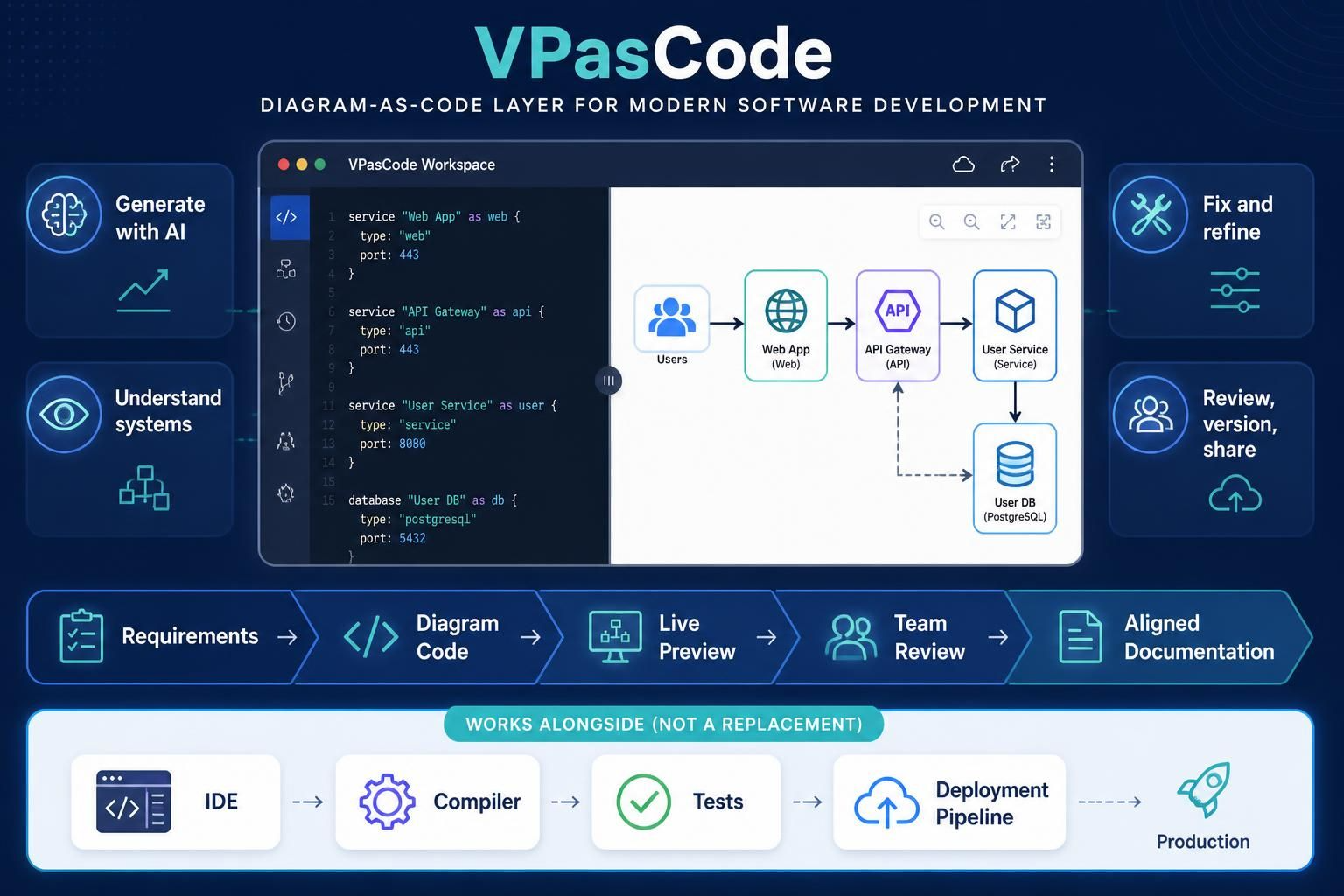
VPasCode shifts this paradigm by treating diagrams as source code. The architecture shown in the visual workspace consists of a split-pane interface:
- The Editor (Left): A text-based syntax area where developers define system components, services, and connections using declarative code.
- The Renderer (Right): A real-time preview engine that compiles the text into a visual system map.
This approach ensures that your architectural documentation lives alongside your application code, allowing for Git-based collaboration and automated reviews.
Core Components of the Syntax
Let’s analyze the syntax structure used in the VPasCode workspace. The language is designed to be readable and intuitive, defining entities with specific properties.
1. Defining Services
Services are the building blocks of your microservices architecture. They are defined using the service keyword, followed by a name and a type identifier. The code snippet below demonstrates how to define a Web App and an API Gateway:
service “Web App” as web {
type: “web”
port: 443
}
service “API Gateway” as api {
type: “api”
port: 443
}
2. Defining Databases
Persistent storage is a critical part of system architecture. VPasCode allows you to define database entities with specific types (e.g., PostgreSQL, MySQL) and ports.
database “User DB” as db {
type: “postgresql”
port: 5432
}
The Development Workflow
VPasCode is designed to work alongside your existing tools, not replace them. The workflow follows a linear progression from requirements to aligned documentation, ensuring that the visual representation is always synchronized with the code.
Step 1: Requirements & Diagram Code
The process begins with translating requirements into code. Instead of drawing boxes, you write definitions. This step ensures that the architecture is explicitly defined before implementation begins. By using a text-based language, teams can use standard code review practices (Pull Requests) to discuss architectural changes.
Step 2: Live Preview
Once the code is written, the VPasCode engine renders it instantly. This Live Preview allows developers to visualize the topology immediately. If you change a port number or add a new service, the diagram updates in real-time. This reduces the cognitive load of imagining how a system looks based on a text description.
Step 3: Team Review & Refine
Architecture is rarely a one-person job. The “Review, version, share” capability allows teams to collaborate on the diagram code. Furthermore, the “Fix and refine” feature leverages AI assistance. If a diagram is complex or contains errors, AI can help correct the syntax or suggest optimizations to the architecture.
Integration into the CI/CD Pipeline
One of the most powerful aspects of VPasCode is its integration into the standard software delivery pipeline. As shown in the bottom section of the interface, VPasCode operates as a “layer” that works alongside the IDE, Compiler, and Deployment Pipeline.
- IDE: Developers write code and architectural definitions.
- Compiler: The VPasCode engine compiles the diagram code.
- Tests: Automated checks can verify that the architecture meets security or compliance standards.
- Deployment Pipeline: The final, validated documentation is pushed to production environments or documentation portals.
Conclusion
Modern software teams require a reliable way to keep architectural artifacts aligned with implementation. By adopting a diagram-as-code workflow with VPasCode, teams can move away from static, outdated images and towards dynamic, version-controlled system maps. Whether you are generating diagrams with AI or refining complex system interactions, VPasCode provides the bridge between code and visual understanding.