
Mastering System Architecture with UML Package Diagrams in Visual Paradigm
In the realm of software engineering, managing complexity is the primary challenge. As applications evolve from monolithic scripts into distributed, multi-module systems, developers often find themselves lost in a web of dependencies. This is where Package Diagrams become indispensable. They serve as the high-level blueprint of your system, offering a macroscopic view of how subsystems interact without getting bogged down in the nitty-gritty of class-level implementation.
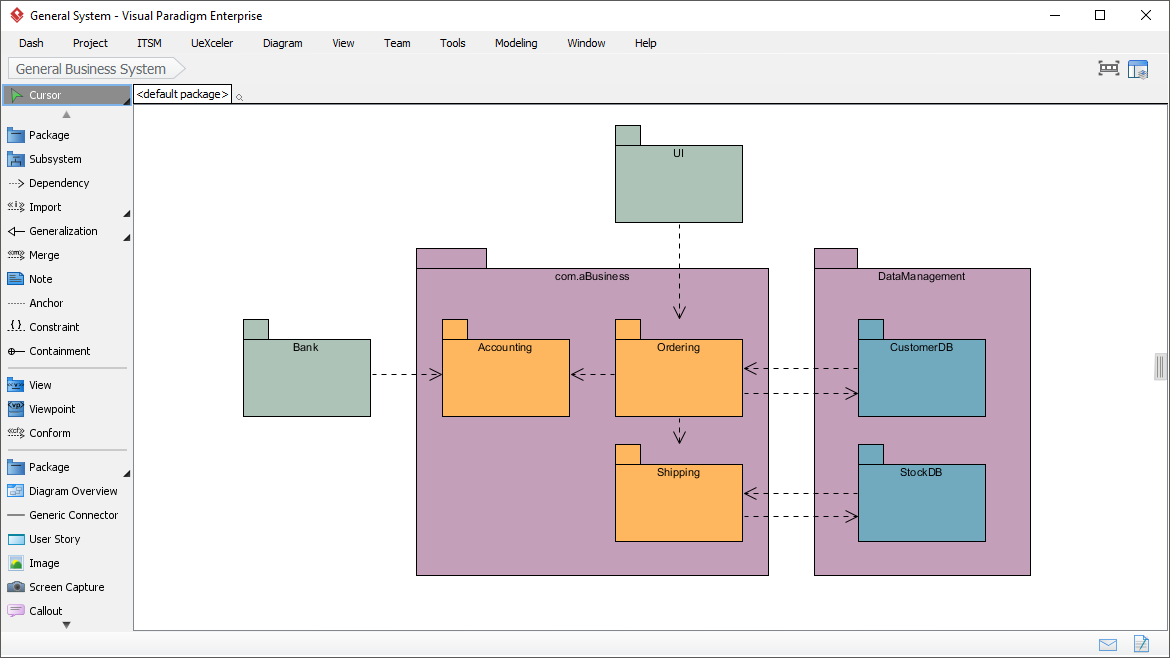
This tutorial explores the architecture presented in the provided Visual Paradigm diagram. We will dissect how a “General Business System” is organized into logical layers, analyze the dependency flows between the UI, Business Logic, and Data Management, and discuss how to leverage these diagrams for effective architectural reviews.
The Anatomy of a Package Diagram
A Package Diagram is essentially a container diagram. It allows you to group related elements—such as classes, interfaces, or other packages—into a single unit called a “Package.” In the diagram shown above, we see a classic layered architecture approach, visualized using distinct folders to represent logical subsystems.
1. The Container Hierarchy
Visual Paradigm uses the folder icon to represent packages. In our example, the system is divided into two primary containers:
- com.aBusiness: This large purple package encapsulates the core business logic. It acts as the “brain” of the application, orchestrating the flow of data.
- DataManagement: This package handles the persistence layer, managing how data is stored and retrieved from the database.
2. Subsystems and Modules
Within the com.aBusiness container, we see smaller, specific subsystems represented by orange folders:
- Accounting: Likely handles financial calculations, invoicing, and billing logic.
- Ordering: The central hub for managing customer orders.
- Shipping: Manages logistics and fulfillment processes.
Notice that these subsystems are distinct. This modular approach allows developers to work on “Ordering” without needing to understand the internal code of “Shipping,” provided the interfaces between them are well-defined.
Analyzing the Dependency Flow
The true power of a package diagram lies in the arrows connecting these boxes. These arrows represent dependencies (often called “uses” relationships). In UML, a dashed arrow pointing from element A to element B means that “A uses B.” If B changes, A might need to change.
Let’s trace the critical paths in this specific architecture:
The User Interface (UI) Layer
At the top, we see a package labeled UI. It connects to the Ordering subsystem via a dashed arrow.
UI --> OrderingThis indicates that the User Interface layer relies on the Ordering subsystem to perform its functions. For example, when a user clicks “Place Order” in the UI, the UI code triggers the methods within the Ordering package. This confirms a Top-Down dependency flow, which is a best practice in software architecture.
The Business Logic Flow
Inside the com.aBusiness package, there is a clear flow of control:
Ordering --> Accounting
Ordering --> Shipping
The Ordering subsystem depends on both Accounting and Shipping. This suggests that when an order is successfully placed, the system must immediately trigger accounting processes (to calculate costs) and shipping processes (to arrange delivery). This creates a cohesive workflow where the Ordering module acts as the coordinator.
External Interactions
On the left, we see a standalone package labeled Bank. It points towards the Accounting subsystem.
Bank --> AccountingThis is a crucial architectural detail. It implies that the Accounting subsystem has a dependency on an external banking system. Whether it’s an API call to verify credit or a webhook for payment confirmation, the business logic knows it needs to talk to the “Bank” to function correctly.
The Data Management Layer
The DataManagement package on the right contains the databases:
- CustomerDB
- StockDB
The dependencies here are interesting. The Ordering subsystem points to CustomerDB, and the Shipping subsystem points to StockDB.
Ordering --> CustomerDB
Shipping --> StockDB
This demonstrates Low Coupling. The Ordering module does not need to know about Stock; it only needs to know about Customers. Conversely, Shipping only cares about Inventory levels. This separation of concerns is vital for maintainability.
Best Practices for Architectural Modeling
When creating your own package diagrams to organize large-scale projects, keep the following principles in mind:
- Visualizing Coupling: A package diagram is the best tool for spotting “Coupling.” If you see a package that points to every other package in your system, you likely have a “God Package” or a tight coupling issue. Try to refactor so that dependencies are limited to specific interfaces.
- Directionality: Always ensure your arrows flow logically. In a standard MVC or Layered architecture, dependencies should flow “down” (UI to Controller to Model), never “up.” An arrow from a Database to a UI package is a major architectural smell.
- Scope Management: Use packages to define the scope of your modules. If a package is too large, split it. If a package is too small (just one class), it might not be a package at all.
Conclusion
By organizing your codebase into packages like com.aBusiness and DataManagement, you transform a chaotic codebase into a structured, understandable system. The diagram provided is not just a drawing; it is a communication tool that helps stakeholders understand how the UI, Business Logic, and Data layers interact. Mastering these diagrams is the first step toward building scalable, robust software systems.