
Mastering UML Sequence Diagrams: Best Practices for Clean Architecture Modeling
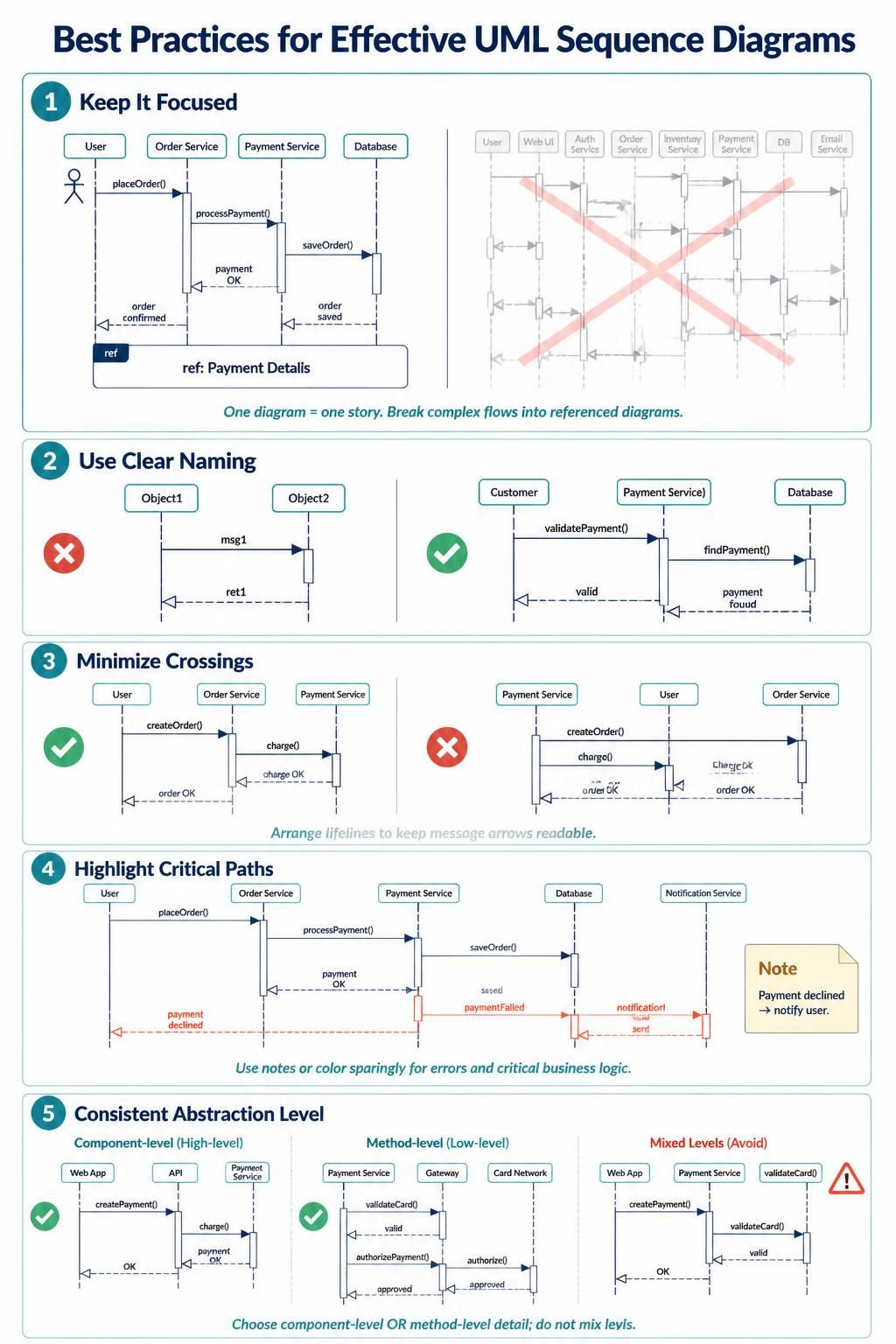
UML Sequence Diagrams are the backbone of understanding how different parts of a software system interact over time. Whether you are designing a microservices architecture or debugging a complex legacy application, clarity is king. A cluttered diagram confuses stakeholders and leads to implementation errors. Using professional modeling software like Visual Paradigm, you can ensure your diagrams are not just visually appealing, but logically sound.
In this tutorial, we will walk through the five critical pillars of creating effective sequence diagrams, transforming complex logic into readable stories.
1. Keep It Focused: The “One Story” Rule
One of the most common mistakes in system modeling is trying to cram an entire application workflow into a single diagram. This leads to “spaghetti diagrams” where lifelines are crammed together and arrows cross chaotically.
Instead, adhere to the principle that one diagram equals one story. If you are modeling the “Place Order” process, do not include the “User Login” or “Inventory Stocking” logic unless they are absolutely essential to that specific flow. If a process becomes too complex, use ref (Reference) fragments to break it down into sub-diagrams.
Example: Instead of drawing every step of a payment gateway, you might draw a frame labeled ref: Payment Details and create a separate diagram for the specific credit card validation logic.
Visualizing the Difference
Imagine a clean diagram with just the User, Order Service, and Payment Service versus a crowded one with Web UI, Auth, Inventory, DB, Email, and more. The latter is unreadable.
@startuml
actor User
participant "Order Service" as Order
participant "Payment Service" as Payment
participant "Database" as DB

User -> Order: placeOrder()
activate Order
Order -> Payment: processPayment()
activate Payment
Payment --> Order: payment OK
Order -> DB: saveOrder()
DB --> Order: order saved
Order --> User: order confirmed
deactivate Order
@enduml
2. Use Clear Naming for Lifelines and Messages
Technical diagrams are a form of communication. Using generic identifiers like Object1 or msg1 forces the reader to guess the context, which breaks their flow. Visual Paradigm allows you to customize these elements easily.
Always use descriptive names that reflect the business domain or the technical responsibility:
- Bad: “Object1” sending “msg1”.
- Good: “Customer” sending “validatePayment()”.
- Bad: “ret1”.
- Good: “valid”.
When a message returns a result, naming the return message (e.g., findPayment() returning payment found) adds significant clarity to the sequence flow.
3. Minimize Crossings: The Art of Layout
Readability is determined by how easily the eye can follow the arrows. When lifelines are arranged randomly, message arrows cross each other, creating a visual maze.
The Rule: Arrange your lifelines logically. Typically, you want to place the initiator (the User) on the far left, followed by the entry point (Controller/API), and then the backend services. If you have a “User” interacting with an “Order Service” and a “Payment Service,” the “Order Service” should logically sit between the User and the Payment Service.
@startuml
' Good Layout: Logical Flow
actor User
participant "Order Service" as Order
participant "Payment Service" as Payment

User -> Order: createOrder()
Order -> Payment: charge()
Payment --> Order: charge OK
Order --> User: order OK

' Bad Layout: Chaotic Crossings
' (Imagine lifelines arranged as: Payment, User, Order)
' The arrows would cross, making it hard to trace.
@enduml
4. Highlight Critical Paths and Errors
A sequence diagram is often used to visualize the “Happy Path” (success), but systems fail. It is crucial to highlight error paths or critical business logic without cluttering the diagram.
Use Notes or specific colors to distinguish between success and failure. For instance, you might use a red dashed line for a paymentFailed message and a yellow note to explain the consequence, such as “Notify user”.
Visual Paradigm makes this easy by allowing you to style messages. Don’t be afraid to use colors to guide the reader’s eye to the exception handling logic.
@startuml
actor User
participant "Order Service" as Order
participant "Payment Service" as Payment
participant "Notification Service" as Notify

User -> Order: placeOrder()
Order -> Payment: processPayment()
Payment --> Order: payment OK

' Highlighting a failure path
alt payment failed
    Order -> Payment: paymentFailed
    note right: Payment declined
    Payment -> Notify: notification
    Notify --> Order: send
    Order --> User: show error
end
@enduml
5. Maintain a Consistent Abstraction Level
A common pitfall is mixing levels of detail. You might start a diagram showing high-level component interactions (e.g., Web App calling API) and suddenly switch to low-level method calls (e.g., validateCard() calling DB.query()). This confuses the reader about the scope of the diagram.
You must decide early: are you modeling the Component Level (High-level) or the Method Level (Low-level)?
- Component-Level: Focus on how services talk to each other (e.g.,
Web App->API->Payment Service). - Method-Level: Focus on the internal logic (e.g.,
Payment Service->Gateway->Card Network).
Never mix them in the same diagram.
@startuml
' Component Level (High-Level)
participant "Web App"
participant "API"
participant "Payment Service"

Web App -> API: createPayment()
API -> Payment Service: charge()
Payment Service --> API: payment OK
API --> Web App: OK

' Method Level (Low-Level)
participant "Payment Service"
participant "Gateway"
participant "Card Network"

Payment Service -> Gateway: validateCard()
Gateway -> Card Network: authorize()
Card Network --> Gateway: approved
Gateway --> Payment Service: approved
@endumlConclusion
By following these five best practices—focusing on one story, using clear naming, minimizing crossings, highlighting errors, and maintaining abstraction levels—you will create sequence diagrams that are not just technical drawings, but powerful communication tools. Mastering these concepts with tools like Visual Paradigm will significantly improve your system architecture design.