
Mastering UML Sequence Diagrams in Visual Paradigm
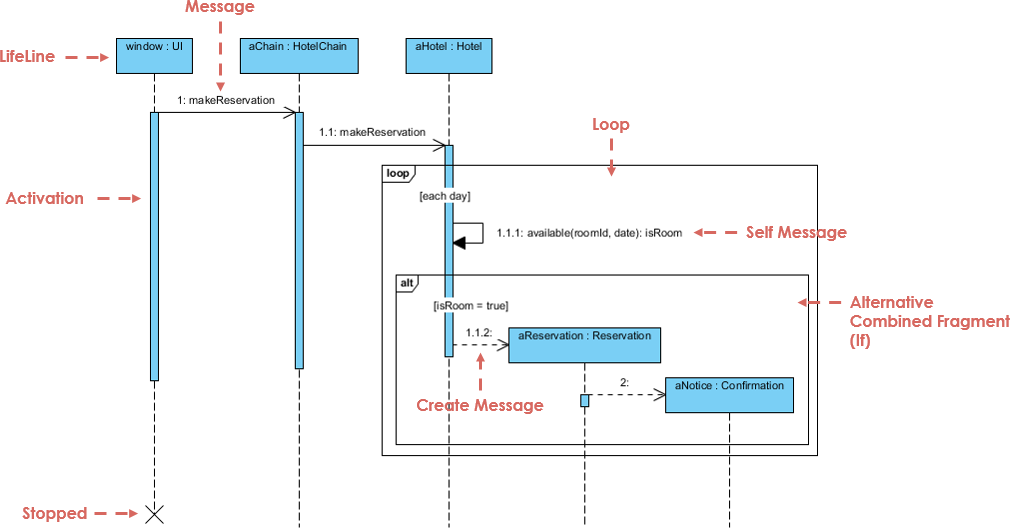
In the world of software architecture, static diagrams like Class and Object diagrams tell us what a system looks like, but they cannot explain how it behaves. To understand the dynamic flow of a system—the specific choreography of messages passed between objects—we turn to the Sequence Diagram. This tutorial explores the architecture of interactions, using the visual language of UML and the power of Visual Paradigm to model complex scenarios like a Hotel Reservation System.
What is a Sequence Diagram?
A Sequence Diagram is an interaction diagram that details how operations are carried out. It captures the chronological order of interactions, showing exactly what messages are sent and when they occur. Unlike static views, sequence diagrams are dynamic; they describe the runtime behavior and collaboration of object instances.
The organization of a sequence diagram is strictly temporal:
- Time flows downwards: The top of the diagram represents the start of the interaction, and the bottom represents the end.
- Objects are arranged left-to-right: Objects are positioned horizontally based on when they participate in the message sequence or to improve layout clarity.
Core Components of the Architecture
When modeling interactions, whether for a specific use case or a generic operation, we rely on specific structural elements. Let’s break down the anatomy of a sequence diagram using the Hotel System example.
1. Lifelines (The Actors)
A Lifeline represents an individual participant in the interaction. It is depicted as a vertical dashed line extending from an object instance (e.g., window : UI, aChain : HotelChain). The lifeline represents the existence of the object throughout the duration of the interaction.
2. Messages (The Communication)
Messages are the horizontal arrows connecting lifelines. They represent method calls or data passing between objects.
- Synchronous Messages: Represented by a solid arrowhead. The sender waits for the receiver to complete the task before continuing (e.g.,
1: makeReservation). - Self Messages: When an object interacts with itself (e.g., checking internal state), the arrow loops back to the same lifeline (e.g.,
1.1.1: available(roomId, date)). - Creation Messages: Represented by a dashed arrow with a solid head. This indicates the instantiation of a new object (e.g., creating a new
aReservation).
3. Activation Bars (Processing State)
The thin, vertical rectangles on a lifeline are called Activation Bars (or Focus of Control). They indicate the period during which an object is actively performing an action, either executing a method or waiting for a reply. When the bar is visible, the object is “active.”
4. Combined Fragments (Logic Flow)
Real-world systems rarely follow a single straight line. We use Combined Fragments (frames) to model logic:
- Loop: Denoted by the
loopframe. It indicates that the enclosed interaction repeats. In our diagram, the reservation process loops[each day]. - Alt (Alternative): Denoted by the
altframe. It represents conditional branching (If/Else). The diagram shows an[isRoom = true]condition, meaning the system behaves differently depending on room availability.
Step-by-Step Analysis: The Hotel Reservation Flow
Let’s trace the dynamic interaction shown in the provided diagram to understand the system architecture.
Phase 1: Initiation
The interaction begins with the window : UI object (the user interface) sending a makeReservation message to the aChain : HotelChain object. This represents the user initiating a booking request.
Phase 2: Validation (The Loop)
The HotelChain object delegates the work to an aHotel : Hotel object. Inside the loop frame, the system iterates through the requested days. For each day, the hotel checks availability by sending a self-message: available(roomId, date).
Phase 3: Conditional Logic (The Alt)
The system enters an alt fragment. It checks the condition [isRoom = true]. If a room is available:
- The system creates a new reservation object (
aReservation : Reservation). - It sends a confirmation message (
2: aNotice : Confirmation) to notify the user.
If the condition were false (room not available), the system would typically execute the else path (not shown in the active frame but implied by the structure).
Phase 4: Termination
Once the interaction is complete, the activation bars disappear, and a large X marks the end of the lifeline, indicating the object is no longer needed or the interaction has stopped.
Modeling Use Cases vs. Operations
Sequence diagrams are versatile tools used for different levels of abstraction:
- Instance Diagrams: These model specific interactions, showing just one path through a scenario (e.g., a successful booking).
- Generic Diagrams: These show all possible paths, including loops and alternatives, representing the general interaction logic.
- System Sequence Diagrams (SSD): These capture high-level interactions between the user and the system, or between the system and external subsystems, abstracting away the internal object details.
Tooling: Visual Paradigm
To effectively design and maintain these complex models, professional tooling is essential. Visual Paradigm offers a robust environment for creating Sequence Diagrams that adhere to strict UML standards.
Visual Paradigm allows you to:
- Drag-and-drop lifelines, messages, and combined fragments to rapidly construct your architecture.
- Automatically synchronize your diagrams with code, ensuring your model remains up-to-date as you develop.
- Export your interaction models into various formats for documentation and stakeholder presentations.
By mastering Sequence Diagrams, you gain the ability to visualize the heartbeat of your software, ensuring that every message sent and every object created serves a clear purpose in your system’s architecture.