
Mastering UML Sequence Diagrams: VPasCode Guidelines for Maintainable Architecture
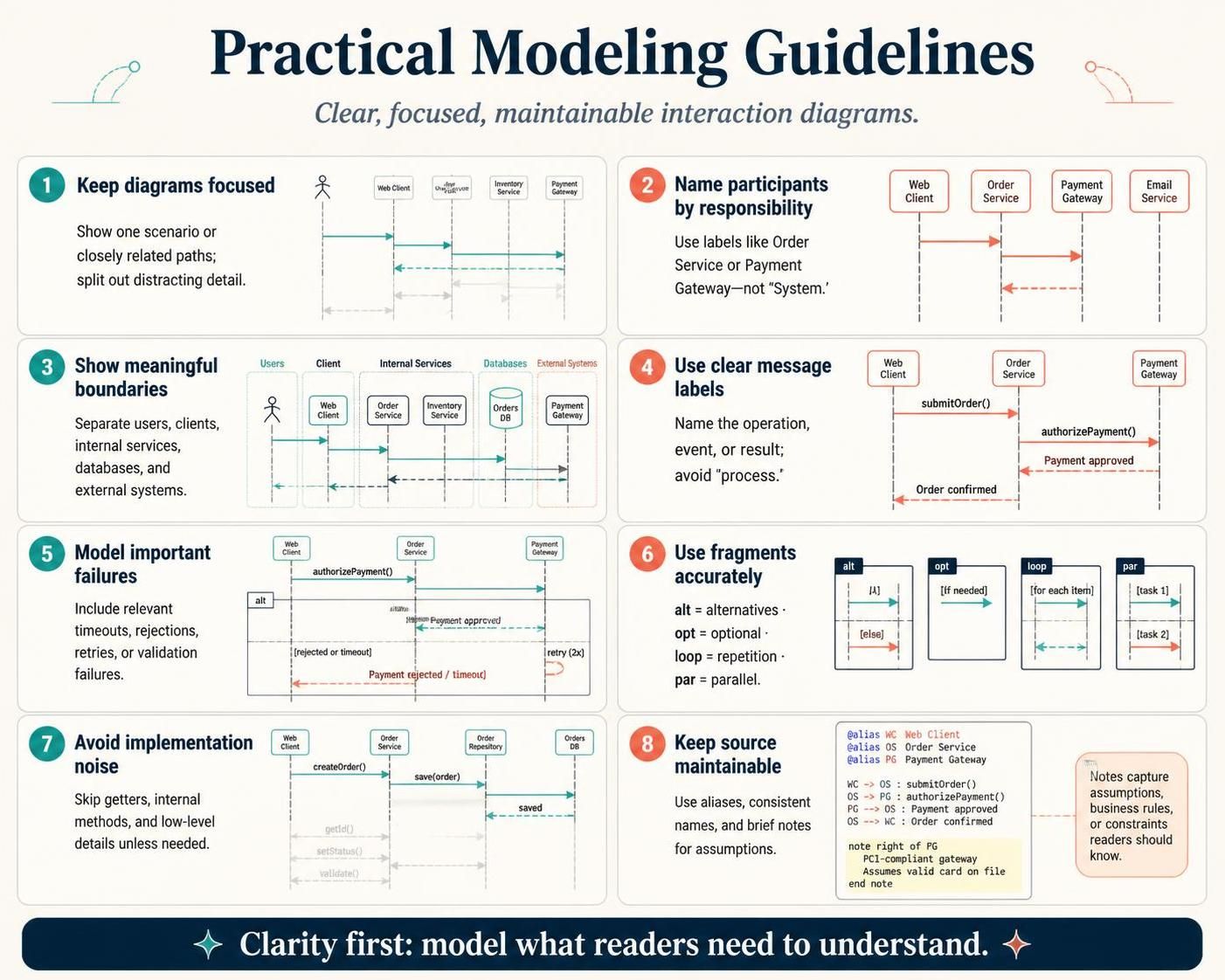
In the realm of software architecture, clarity is currency. A UML Sequence Diagram is a powerful tool for visualizing interactions between system components, but an overly complex diagram can be more confusing than a plain text document. Based on the Practical Modeling Guidelines for VPasCode, this tutorial walks you through the essential principles of creating clear, focused, and maintainable interaction diagrams.
Whether you are documenting a simple API call or mapping out a complex distributed transaction, these eight guidelines will help you focus on what matters: the behavior and responsibilities of your system.
1. The Art of Focus and Boundaries
The first step in effective modeling is knowing what to include and what to leave out. A common pitfall is trying to capture every possible interaction in a single view.
Keep Diagrams Focused
A single diagram should ideally illustrate one primary scenario or a closely related set of paths. If a diagram becomes cluttered with multiple unrelated workflows, split them into separate diagrams. This approach, often called “splitting out deep details,” ensures that the reader can immediately grasp the main interaction flow without getting lost in the noise.
Show Meaningful Boundaries
Visual organization is critical for readability. Use swimlanes, boxes, or distinct headers to separate different layers of the system. A well-structured diagram distinguishes between:
- Users: The human actors initiating actions.
- Clients: The software agents or interfaces used by users.
- Internal Services: The backend logic processing the requests.
- Databases: Where data persists.
- External Systems: Third-party APIs or gateways.
2. Naming Participants by Responsibility
Vague labels like “System” or “Server” are the enemies of clear documentation. Instead, name participants by their specific responsibility or business domain. For example, use labels like Order Service, Inventory Service, or Payment Gateway.
Why this matters: When a stakeholder reads “Payment Gateway,” they immediately understand the scope of that component. If they see “System,” they have to guess its function. Specificity reduces cognitive load and improves communication.
3. Clarity in Messaging
Messages on your interaction arrows should be meaningful. A good message label includes an operation name, an event, or an important result.
Use Clear Message Labels
Instead of generic labels like “process” or “send,” use specific method names or business events like submitOrder(), Payment approved, or Order confirmed. This transforms your diagram from a technical schematic into a business narrative.
4. Modeling Reality: Failures and Fragments
Real-world software is rarely a straight line from start to finish. It handles timeouts, rejections, and retries. To model this accurately, you must use UML fragments correctly.
Model Important Failures
Include relevant failure paths that matter to the scenario. If a payment fails, a validation error occurs, or a timeout happens, represent these paths. This helps developers and testers understand the system’s resilience.
Use Fragments Accurately
VPasCode supports standard UML fragments to structure complex logic:
alt(Alternative): Represents conditional logic (if/else).opt(Optional): Represents behavior that may or may not happen.loop: Represents repetition (e.g., iterating over a list of items).par(Parallel): Represents concurrent behavior (e.g., sending an email and a notification simultaneously).
5. Maintenance and Implementation Noise
Finally, keep your source code maintainable. A diagram should be a high-level specification, not a reflection of the underlying code.
Avoid Implementation Noise
Do not diagram every getter, internal method, or low-level detail unless the audience specifically needs it. If a method is just internal housekeeping (like getId() or setStatus()) and doesn’t affect the external flow, omit it. This keeps the diagram focused on the “what” rather than the “how.”
Keep Source Maintainable
Use aliases for long participant names to keep the diagram tidy. Use consistent naming conventions, and add short comments or notes for important assumptions. This makes the diagram easier to read and easier to update when the system evolves.
Summary: Clarity First
The ultimate goal of any technical diagram is communication. By keeping diagrams focused, naming participants by responsibility, and modeling only the relevant failure paths, you create artifacts that truly serve your team. Remember: Clarity first: model what readers need to understand.