
Mastering VPasCode: Visual Paradigm’s Multi-Engine UML Framework
Welcome to this comprehensive tutorial on utilizing VPasCode, the advanced diagram-as-code editor by Visual Paradigm. In the modern software development lifecycle, the ability to define system architecture through code offers unparalleled precision and version control capabilities. This guide explores the unique advantage of VPasCode: its multi-engine workspace.
Unlike many tools that lock you into a single syntax, VPasCode integrates multiple diagramming engines into one interface. This allows developers and architects to select the specific engine—PlantUML, Mermaid, or Graphviz—that best suits the complexity and nature of the task at hand.
1. Understanding the Multi-Engine Architecture
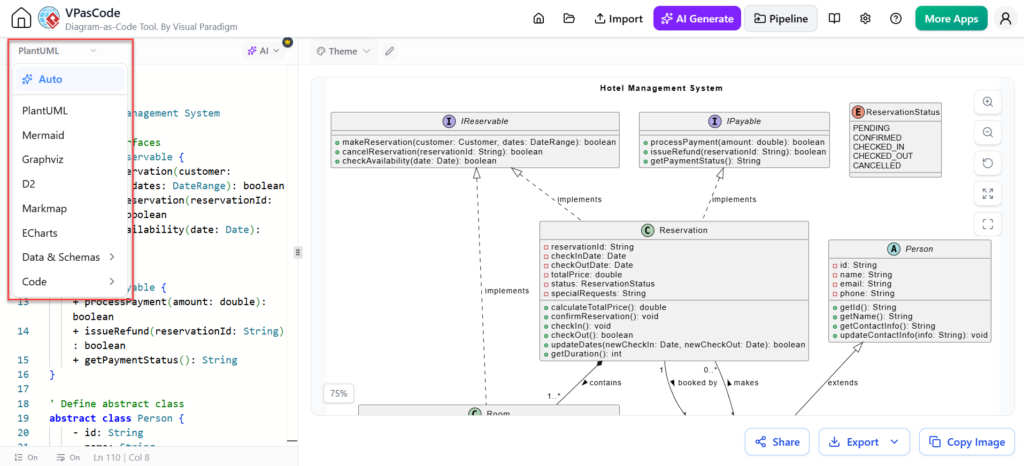
The core philosophy of VPasCode is flexibility. The interface shown in the screenshot demonstrates a seamless workflow where the user can toggle between different modeling languages without leaving the workspace. This eliminates the need to maintain separate browser tools or switch contexts for different diagram types.
The Three Pillars of VPasCode
- PlantUML: The industry standard for UML and software architecture. It is robust, feature-rich, and ideal for complex class structures, sequence flows, and state machines.
- Mermaid: A lightweight syntax designed for documentation. It is perfect for embedding diagrams directly into Markdown files, READMEs, and developer wikis.
- Graphviz: The engine of choice for graph-oriented structures. It excels at dependency maps, network visualizations, and mathematical graph representations.
2. Practical Application: Building a Hotel Management System
Let us walk through a practical example based on the interface provided. We are designing a Hotel Management System. In this scenario, we are using the PlantUML engine to model a Class Diagram. This specific engine is chosen because it supports advanced object-oriented concepts like interfaces, abstract classes, and inheritance.
Step 1: Defining Interfaces
First, we establish the contract of the system. In the code editor, we define interfaces using the interface keyword. This dictates what methods a class must implement without defining the logic itself.
' Define the reservation contract
interface IReservable {
    +makeReservation(customer: Customer, dates: DateRange): boolean
    +cancelReservation(reservationId: String): boolean
    +checkAvailability(date: Date): boolean
}

' Define the payment contract
interface IPayable {
    +processPayment(amount: double): boolean
    +issueRefund(reservationId: String): boolean
    +getPaymentStatus(): String
}
Step 2: Implementing Concrete Classes
Next, we create concrete classes that implement these interfaces. In the diagram, you can see the Reservation class implementing both IReservable and IPayable. The syntax for this is explicit, using the implements keyword.
class Reservation {
    - reservationId: String
    - checkInDate: Date
    - checkOutDate: Date
    - totalPrice: double
    - status: ReservationStatus

    +calculateTotalPrice(): double
    +confirmReservation(): void
    +checkIn(): void
    +checkOut(): void
    +updateDates(newCheckIn: Date, newCheckOut: Date): boolean
    +getDuration(): int
}

' Define the relationship
IReservable ..> Reservation : implements
IPayable ..> Reservation : implements
Step 3: Modeling Inheritance and Associations
Finally, we model the hierarchy and relationships between entities. The Person class is defined as abstract, serving as a base for different types of people in the hotel system. The ReservationStatus is modeled as an enumeration.
' Define abstract base class
abstract class Person {
    - id: String
    - name: String
    - email: String
    - phone: String

    +getId(): String
    +getName(): String
    +getContactInfo(): String
    +updateContactInfo(info: String): void
}

' Define an Enumeration for status
enum ReservationStatus {
    PENDING
    CONFIRMED
    CHECKED_IN
    CHECKED_OUT
    CANCELLED
}

' Define relationships
Person "1" *-- "1..*" Reservation : contains
Reservation "0..1" ..> "1" Person : booked by
3. Leveraging AI and Workflow Efficiency
VPasCode goes beyond static code rendering. The integration of AI features allows users to generate code snippets or entire diagrams from natural language prompts. Furthermore, the Pipeline feature mentioned in the toolbar suggests that these diagrams can be part of an automated CI/CD workflow, ensuring that your documentation stays in sync with your code.
By utilizing the multi-engine workspace, teams can:
- Avoid context switching between tools.
- Standardize their documentation format across different projects.
- Choose the most efficient rendering engine for specific diagram types.
Conclusion
Mastering VPasCode requires understanding not just the syntax of a single language, but the strengths of the different engines available. Whether you are building a detailed UML Class Diagram with PlantUML or a lightweight flowchart with Mermaid, VPasCode provides a unified, powerful environment for your architectural needs.