
From Whiteboard Chaos to Version Control: VPasCode & AI for Architecture
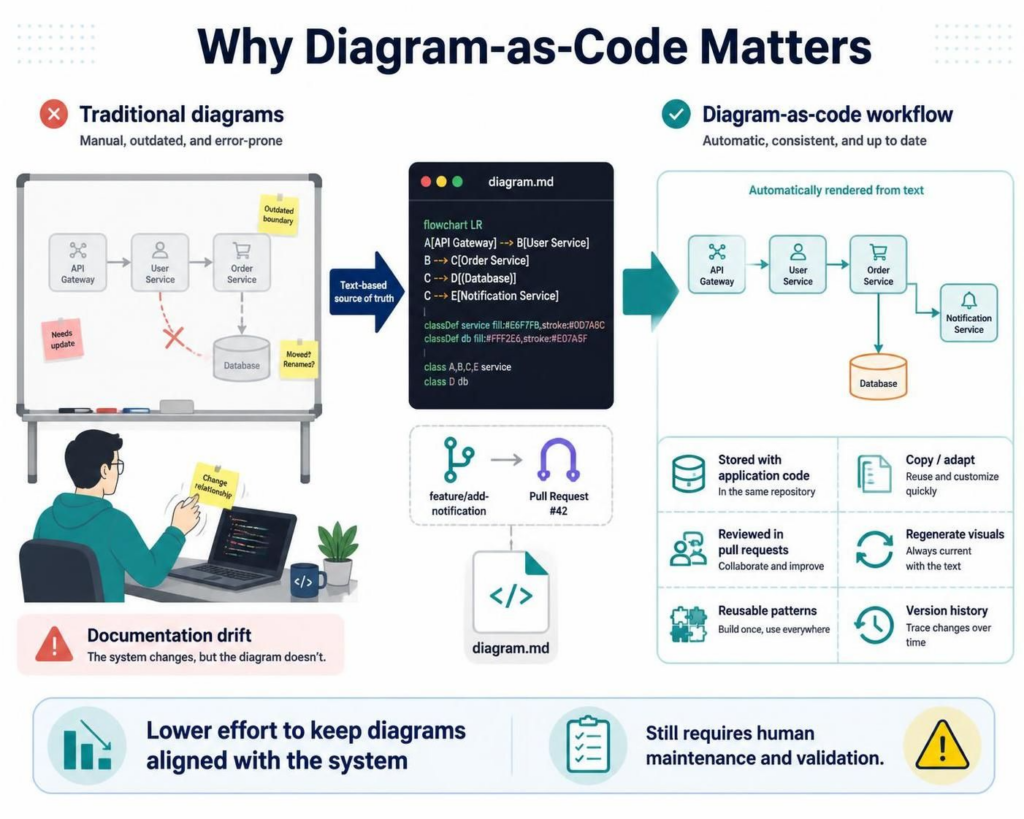
In the modern software development lifecycle, the distance between a deployed system and its documentation is often where accuracy is lost. This phenomenon, known as documentation drift, occurs when developers modify the code—adding a new API endpoint or changing a database schema—but neglect to update the corresponding visual architecture diagram. The result is a whiteboard or PDF that is “outdated” and “error-prone.”
This tutorial explores the Diagram-as-Code (DaC) paradigm, specifically focusing on how tools like Visual Paradigm’s VPasCode Editor transform this process. By treating architecture diagrams as text files, teams can leverage the power of version control, automation, and collaboration to keep their visual documentation synchronized with the codebase.
The Problem: The Whiteboard Bottleneck
Traditional modeling methods rely heavily on drag-and-drop interfaces on whiteboards or standalone design tools. While intuitive for initial brainstorming, these methods fail during iterative development. When a developer needs to reflect a change, such as a “User Service” moving to a new database, they must manually reposition shapes. This manual effort is high-friction, leading to skipped updates and stale diagrams.
The Solution: The Text-Based Source of Truth
Diagram-as-code shifts the paradigm by treating the diagram definition as text. Instead of manipulating pixels, developers manipulate lines of code. This text-based source of truth acts as the single source of reality for the system’s architecture.
The workflow typically follows this pattern:
- Define: The system architecture is defined in a text file (e.g.,
diagram.mdordiagram.plantuml). - Commit: This file is stored alongside the application code in the same repository.
- Review: Changes to the architecture are proposed via Pull Requests (PRs), allowing the team to review the logic of the system alongside the code logic.
- Render: A CI/CD pipeline or editor automatically renders the text file into a visual diagram.
Step-by-Step: Writing Architecture with VPasCode
To understand how this works, let’s walk through a concrete example of defining a microservices architecture using VPasCode syntax (similar to Mermaid.js or PlantUML).
Imagine a scenario where a developer introduces a new “Notification Service” to handle email alerts. In a traditional tool, they would have to draw a new box, draw an arrow from the “Order Service,” and manually align it. In VPasCode, they simply edit the text.
1. The Code Definition
Here is the raw text definition used in the editor. It describes the nodes and the flow between them.
flowchart LR
  A[API Gateway] --> B[User Service]
  B --> C[Order Service]
  C --> D[(Database)]
  C --> E[Notification Service]

  classDef service fill:#E6F7FF,stroke:#007ABC
  classDef db fill:#FFF2E6,stroke:#E07A5F
  class A,B,C,E service
  class D db
2. The Visual Rendering
When the VPasCode Editor processes this text, it automatically renders the visual components. Notice how the relationships are strictly defined by the arrows (-->) and the classes (classDef) are applied programmatically.
- API Gateway: The entry point.
- User Service & Order Service: Core business logic layers.
- Notification Service: The new addition, automatically linked to the Order Service.
- Database: The persistence layer.
This automation ensures that the visual representation is always consistent with the text definition. There is no manual “repositioning” required; the layout engine calculates the positions.
Key Benefits of the VPasCode Workflow
Adopting this workflow via Visual Paradigm’s AI-assisted tools provides distinct advantages over traditional modeling:
- Stored with Application Code: The diagram file lives in the same Git repository as the backend code, ensuring it is never separated from the source.
- Version History: Because it is a text file, you can see exactly when and why the architecture changed by looking at commit logs.
- Copy and Adapt: You can reuse existing patterns. If you have a standard “Microservice Template,” you can copy-paste it into a new diagram definition instantly.
- Collaborative Review: Teams can review diagram changes in Pull Requests, just like code changes.
Maintaining Accuracy
While Diagram-as-Code drastically reduces the effort required to update diagrams, it is important to note that it does not automatically generate code from diagrams, nor does it automatically update diagrams from code (unless integrated with specific reverse-engineering plugins). The developer must still maintain the source text and validate the model.
However, the “text-based workflow” lowers the barrier to entry. If a developer knows how to write code, they can easily update the architecture diagram. This closes the gap between implementation and documentation, ensuring the system remains well-documented throughout its lifecycle.