Mengotomatisasi Normalisasi Basis Data: Panduan Langkah demi Langkah Menggunakan Visual Paradigm AI DB Modeler

Pengantar Normalisasi yang Didorong oleh Kecerdasan Buatan

Normalisasi basis data adalah proses kritis dalam mengatur data untuk menjamin integritas dan menghilangkan redundansi. Meskipun secara tradisional merupakan tugas yang kompleks dan rentan kesalahan, alat modern telah berkembang untuk mengotomatisasi pekerjaan berat ini. Visual Paradigm AI DB Modeler berperan sebagai jembatan cerdas, mengubah konsep abstrak menjadi implementasi yang dioptimalkan secara teknis dan siap produksi.
Desktop AI Assistant

Untuk memahami nilai alat ini, pertimbangkan analogi pembuatan mobil. Jika Diagram Kelas adalah gambaran awal dan sebuah Diagram Hubungan Entitas (ERD) adalah gambaran teknis, maka normalisasiadalah proses penyetelan mesin untuk memastikan tidak ada baut longgar atau beban berlebihan. AI DB Modeler berfungsi sebagai ‘pabrik otomatis’ yang melaksanakan penyetelan ini untuk efisiensi maksimal. Tutorial ini memandu Anda melalui proses menggunakan AI DB Modeler untuk normalisasi skema basis data Anda secara efektif.

Doc Composer

Langkah 1: Mengakses Alur Kerja yang Dipandu

AI DB Modeler beroperasi menggunakan alur kerja khusus 7 langkah alur kerja yang dipandu. Normalisasi menjadi fokus utama pada Langkah 5. Sebelum mencapai tahap ini, alat ini memungkinkan Anda memasukkan kelas konseptual tingkat tinggi. Dari sana, alat ini menggunakan algoritma cerdas untuk mempersiapkan struktur agar siap dioptimalkan, memungkinkan pengguna beralih dari konsep ke tabel tanpa usaha manual.

Langkah 2: Melangkah Melalui Bentuk Normal

Setelah Anda mencapai tahap normalisasi, AI secara iteratif mengoptimalkan skema basis datamelalui tiga tahap utama kematangan arsitektur. Progresi bertahap ini memastikan bahwa basis data Anda memenuhi standar industri dalam hal keandalan.

Mencapai Bentuk Normal Pertama (1NF)

Tingkat optimasi pertama berfokus pada sifat atomik data Anda. AI menganalisis skema Anda untuk memastikan bahwa:

  • Setiap sel tabel berisi satu nilai atomik.
  • Setiap catatan dalam tabel bersifat unik.

Melangkah ke Bentuk Normal Kedua (2NF)

Membangun atas struktur 1NF, AI melakukan analisis lebih lanjut untuk membangun hubungan kuat antara kunci dan atribut. Pada langkah ini, alat ini memastikan bahwa semua atribut non-kunci sepenuhnya fungsional dan tergantung pada kunci utama, secara efektif menghilangkan ketergantungan parsial.

Menyelesaikan dengan Bentuk Normal Ketiga (3NF)

Untuk mencapai tingkat optimalisasi profesional standar, AI mengembangkan skema hingga 3NF. Ini melibatkan memastikan bahwa semua atribut tergantung hanya pada kunci utama. Dengan melakukan hal tersebut, alat ini menghilangkan ketergantungan transitif, yang merupakan sumber umum dari anomali data.

Langkah 3: Meninjau Deteksi Kesalahan Otomatis

Sepanjang proses normalisasi, AI DB Modeler menggunakanalgoritma cerdasuntuk mendeteksi kekurangan desain yang sering menghantui sistem yang dirancang buruk. Secara khusus, alat ini mencari anomali yang dapat menyebabkan:

  • kesalahan pembaruan
  • kesalahan penyisipan
  • kesalahan penghapusan

Dengan mengotomatisasi deteksi ini, alat ini menghilangkan beban manual dalam mencari masalah integritas potensial, memastikan fondasi yang kuat untuk aplikasi Anda.

Langkah 4: Memahami Perubahan Arsitektur

Salah satu fitur khas dari AI DB Modeler adalah transparansinya. Berbeda dengan alat tradisional yang hanya mengatur ulang tabel di latar belakang, alat ini berfungsi sebagai sumber pembelajaran.

Untuk setiap perubahan yang dibuat selama langkah 1NF, 2NF, dan 3NF, AI memberikanalasan dan penjelasan edukatif. Wawasan ini membantu pengguna memahami perubahan arsitektur khusus yang diperlukan untuk mengurangi redundansi, berfungsi sebagai alat pembelajaran berharga untuk menguasai praktik terbaik dalamdesain basis data.

Langkah 5: Validasi melalui Playground Interaktif

Setelah AI mengoptimalkan skema hingga 3NF, alur kerja berpindah keLangkah 6, di mana Anda dapat memverifikasi desain sebelum pelaksanaan nyatapenempatan. Alat ini menawarkan playground interaktif unik untuk validasi akhir.

Fitur Deskripsi
Uji Coba Langsung Pengguna dapat memulai instance basis data di browser berdasarkan tingkat normalisasi yang dipilih (Awal, 1NF, 2NF, atau 3NF).
Penyemaian Data Realistis Lingkungan diisi dengandata sampel realistis yang dihasilkan oleh AI, termasuk pernyataan INSERT dan skrip DML.

Lingkungan ini memungkinkan Anda menguji query dan memverifikasi kinerja terhadap struktur yang dinormalisasi secara langsung. Dengan berinteraksi dengan data yang telah diisi, Anda dapat memastikan bahwa skema memproses informasi dengan benar dan efisien, memastikan bahwa ‘mesin’ disesuaikan secara sempurna sebelum mobil melaju.

Mengubah Optimasi Proses: Panduan Lengkap tentang Pemetaan Aliran Nilai Berbasis AI

Pengantar Pemetaan Proses Modern

Pemetaan Aliran Nilai(VSM) telah lama diakui sebagai fondasi dari metodologi Lean. Alat ini memberikan wawasan visual penting kepada organisasi mengenai efisiensi proses, aliran material, dan pertukaran informasi. Namun, pendekatan tradisional dalam membuat dan menganalisis peta ini secara historis merupakan upaya manual yang melelahkan, melibatkan papan tulis, catatan kertas, dan perangkat lunak gambar statis. Proses manual ini sering kali menjadi penghalang masuk, mencegah tim untuk melakukan iterasi cepat terhadap perbaikan alur kerja mereka.

Lanskap optimasi proses sedang berubah dengan munculnya alat berbasis AI. Secara khusus, munculnyaEditor Pemetaan Aliran Nilai Berbasis AImewakili kemajuan besar. Teknologi ini memungkinkan praktisi untuk menghasilkan peta Aliran Nilai yang lengkap dan kaya data hanya dengan menggambarkan proses dalam bahasa alami. Dengan beralih dari pembuatan manual ke otomatisasi cerdas, bisnis dapat beralih dari ide mentah menjadi wawasan yang dapat ditindaklanjuti dalam hitungan menit, bukan jam.

Apa itu Pemetaan Aliran Nilai Berbasis AI?

The Pemetaan Aliran Nilai Berbasis AIEditor (VSM) Pemetaan Aliran Nilai Berbasis AI bukan hanya alat gambar; ia adalah platform canggih dan cerdas yang dirancang untuk memvisualisasikan, menganalisis, dan mengoptimalkan alur kerja. Pada intinya, alat ini menggunakan pemrosesan bahasa alami (NLP) untuk mengubah deskripsi teks sederhana tentang proses menjadi diagram yang lengkap dan dapat diedit. Kemampuan ini mendemokratisasi akses terhadap alat Lean, memungkinkan pengguna dengan tingkat keahlian teknis yang berbeda untuk membuat peta berkualitas profesional.

Di luar visualisasi, alat ini mengintegrasikan mesin pemetaan yang memungkinkan penyempurnaan secara halus. Pengguna dapat menyesuaikan langkah proses, mengedit titik data, dan mengatur ulang aliran menggunakan antarmuka seret dan lepas yang intuitif. Integrasi analis berbasis AI lebih meningkatkan alat ini, berperan sebagai konsultan virtual yang menganalisis data VSM untuk menghasilkan laporan yang bermakna, mengungkap hambatan, dan menyarankan perbaikan strategis secara otomatis.

Fitur Utama Editor AI VSM

Untuk benar-benar merevolusi optimasi proses, alat VSM modern menggabungkan otomatisasi dengan kemampuan analitis mendalam. Berikut adalah fitur penting yang mendefinisikan teknologi ini:

1. Generasi Diagram dari Teks

Manfaat paling langsung dari alat VSM berbasis AI adalah kemampuan untuk menghasilkan peta dari bahasa Inggris sederhana. Pengguna menggambarkan alur kerja mereka—mendetailkan urutan operasi, titik persediaan, dan aliran informasi—dan generator VSM secara instan menciptakan diagram yang rinci. Ini menghilangkan kekakuan ‘kanvas kosong’ dan memberikan struktur langsung untuk dikerjakan.

2. Perhitungan Timeline dan Metrik Otomatis

Perhitungan manual metrik Lean rentan terhadap kesalahan manusia. Editor berbasis AI mengotomatisasi seluruh proses ini. Saat pengguna memodifikasi peta, alat ini secara otomatis menghitung metrik penting secara real-time, termasuk:

  • Waktu Lead Total:Waktu total yang dibutuhkan agar suatu proses selesai dari awal hingga akhir.
  • Waktu yang Menambah Nilai (VAT):Bagian waktu yang dihabiskan untuk aktivitas yang benar-benar menambah nilai bagi pelanggan.
  • Persentase Efisiensi Proses:Metrik turunan yang menunjukkan seberapa efisien alur kerja tersebut.

3. Analisis dan Pelaporan Berbasis AI

Mungkin fitur paling transformasi adalah konsultan AI internal. Pengguna dapat meminta analisis terhadap peta kondisi saat ini. AI meninjau struktur data, timeline, dan aliran untuk menghasilkan laporan profesional. Laporan ini menyoroti temuan utama, mengidentifikasi metrik kinerja, dan memberikan rekomendasi strategis untuk menghilangkan pemborosan dan meningkatkan throughput.

4. Opsi Ekspor Berkualitas Tinggi

Agar VSM efektif, ia harus dapat disampaikan. Alat ini memfasilitasi ekspor peta jadi dalam format gambar PNG resolusi tinggi. Ini memastikan bahwa temuan dapat dengan mudah diintegrasikan ke dalam laporan manajemen, presentasi pemangku kepentingan, atau diskusi tim tanpa kehilangan kualitas visual.

Audien Target dan Kasus Penggunaan

Pemetaan proses berbasis AI bersifat serba guna, melayani berbagai profesional yang terlibat dalam efisiensi organisasi. Tabel di bawah ini menjelaskan siapa yang paling diuntungkan dan bagaimana:

Peran Manfaat Utama
Manajer Operasional Identifikasi dan hilangkan pemborosan (Muda) di jalur produksi untuk mengurangi biaya dan meningkatkan kecepatan.
Konsultan Peningkatan Proses Buat dan analisis VSM secara cepat untuk klien, memberikan nilai lebih cepat selama keterlibatan.
Tim Pengembangan Perangkat Lunak Terapkan prinsip Lean pada alur kerja DevOps dan Agile untuk menyederhanakan pipeline CI/CD.
Analisis Bisnis Peta perjalanan pelanggan yang kompleks dan proses bisnis internal untuk meningkatkan pengalaman pengguna.

Dari Visualisasi ke Insight yang Dapat Ditindaklanjuti

Tujuan akhir dari Pemetaan Aliran Nilaibukan peta itu sendiri, melainkan optimasi yang dapat diwujudkan. Dengan memanfaatkan AI, organisasi dapat berhenti menghabiskan waktu menggambar dan mulai menghabiskan waktu menganalisis. Insight otomatis yang disediakan oleh alat ini memungkinkan tim untuk fokus pada strategi tingkat tinggi daripada format tingkat rendah.

Baik tujuannya adalah mengurangi waktu siklus di pabrik manufaktur atau menyederhanakan sistem tiket layanan pelanggan, Pemetaan Aliran Nilai Berbasis AI memberikan kejelasan yang dibutuhkan untuk membuat keputusan berbasis data. Ini menutup celah antara kondisi saat ini dan kondisi masa depan, memastikan peningkatan proses yang berkelanjutan, akurat, dan efisien.

Di Luar Sketsa: Mengapa AI Kasual Gagal dalam Pemodelan Visual Profesional (dan Bagaimana Visual Paradigm Memperbaikinya)

Era AI dalam Arsitektur Perangkat Lunak

Dalam lanskap yang berkembang pesat dari rekayasa perangkat lunakdan arsitektur perusahaan, kemampuan untuk mengubah kebutuhan abstrak menjadi desain yang presisi dan dapat diambil tindakan merupakan keterampilan kritis. Model Bahasa Besar (LLM) yang umum seperti ChatGPT dan Claude telah merevolusi cara kita berpikir kreatif dan menghasilkan teks. Namun, ketika berbicara tentang pemodelan visual profesional, alat-alat ini sering kali gagal. Mereka menghasilkan apa yang paling tepat disebut sebagai ‘sketsa’—pendekatan kasar yang kekurangan ketelitian seperti gambar kerja yang dirancang secara teknis.


Panduan komprehensif ini mengeksplorasi celah signifikan antara pemodelan diagram AI kasual dan kebutuhan profesional, serta bagaimana Visual Paradigm (VP) ekosistem AImenjembatani celah ini dengan memberikan kemampuan pemodelan diagram yang sadar standar, berkelanjutan, dan iteratif.

1. Masalah ‘Seniman Sketsa’: Keterbatasan LLM AI Kasual

Alat AI kasual memperlakukan pemodelan terutama sebagai perpanjangan dari generasi teks. Ketika diminta membuat diagram, mereka biasanya menghasilkan kode dalam format sepertiMermaid atau PlantUML. Meskipun mengesankan untuk visualisasi cepat, pendekatan ini kekurangan kedalaman yang dibutuhkan dalam konteks rekayasa profesional.

Tidak Ada Mesin Render atau Editor Asli

LLM menghasilkan sintaks berbasis teks (misalnya kode diagram alir Mermaid), tetapi tidak menyediakan penampil atau editor bawaan untuk grafik vektor berkualitas tinggi (SVG). Pengguna dipaksa menempelkan kode ke renderer eksternal, sehingga langsung kehilangan interaktivitas. Jika perlu perubahan, pengguna harus meminta regenerasi penuh kode, sering kali menghasilkan tata letak yang sama sekali berbeda.

Ketidakakuratan Semantik dan Pelanggaran Standar

Model umum sering salah memahami standar pemodelan yang ketat seperti UML atau ArchiMate. Kesalahan umum meliputi:

  • Mengaburkan agregasi (pemilikan bersama) dengan komposisi (pemilikan eksklusif).
  • Menggambar panah warisan yang tidak valid atau arah hubungan yang salah.
  • Membuat asosiasi dua arah di mana asosiasi satu arah secara teknis benar.

Meskipun hasilnya terlihat menarik secara estetika, mereka gagal sebagai artefak rekayasa karena tidak mematuhi aturan semantik yang mengatur arsitektur sistem.

Kurangnya Status yang Berkelanjutan

Mungkin keterbatasan yang paling mengecewakan adalah kurangnya memori terhadap struktur visual. Setiap permintaan meregenerasi diagram dari awal. Misalnya, meminta LLM untuk ‘menambahkan penanganan kesalahan pada diagram urutan ini’ sering kali merusak tata letak yang ada, memutus koneksi, atau bahkan melupakan elemen sebelumnya sepenuhnya. Tidak ada status berkelanjutan yang melacak perkembangan model.

2. Risiko Dunia Nyata dalam Mengandalkan Pembuatan Diagram AI yang Cepat

Menggunakan LLM umum untuk pekerjaan arsitektur yang serius menimbulkan risiko yang dapat melemahkan kualitas proyek dan jadwal.

Kesenjangan Desain-Implementasi

Visual yang samar atau tidak benar secara semantik menyebabkan kode yang tidak selaras. Tim pengembangan membuang waktu berharga dalam rapat untuk menjelaskan maksud di balik diagram yang tidak presisi. Gambar yang “cantik” tetapi salah secara teknis justru lebih buruk daripada tidak memiliki diagram sama sekali.

Ketergantungan Sintaks

Ironisnya, menggunakan alat “dibantu AI” seperti ChatGPT untuk diagram sering kali mengharuskan pengguna mempelajari sintaks khusus (Mermaid/PlantUML) untuk memperbaiki kesalahan secara manual. Hal ini menciptakan penghalang keahlian yang menghilangkan manfaat efisiensi dari penggunaan AI.

Isolasi Alur Kerja

Diagram yang dihasilkan oleh LLM berupa gambar statis atau potongan kode. Mereka terputus dari kontrol versi, platform kolaborasi, dan tugas lanjutan seperti pembuatan kode atau pembuatan skema basis data. Mereka ada dalam isolasi, tidak mampu berkembang bersama proyek.

3. Bagaimana Visual Paradigm AI Menghadirkan Pemodelan Berkualitas Profesional

Visual Paradigm telah mengubah pembuatan diagram menjadi konversasional, berbasis standar, dan terintegrasiproses. Berbeda dengan LLM berbasis teks, VP AI memahami meta-model dasar dari UML 2.5,ArchiMate3, C4, BPMN, dan SysML, menghasilkan model yang sesuai standar dan dapat diedit.

Struktur yang Konsisten dengan Teknologi “Perbaikan Diagram”

Visual Paradigm mempertahankan diagram sebagai objek hidupdaripada skrip yang bisa dibuang. Pengguna dapat mengeluarkan perintah dalam bahasa alami untuk memperbarui bagian tertentu dari diagram tanpa memicu regenerasi penuh.

Sebagai contoh, pengguna dapat memberi perintah: “Tambahkan langkah otentikasi dua faktor setelah login” atau “Ubah nama aktor Pelanggan menjadi Pengguna.”Sistem secara instan menyesuaikan tata letak, koneksi, dan semantik sambil mempertahankan integritas bagian lain dari model. Ini menghilangkan tautan yang rusak dan kekacauan tata letak yang umum terjadi pada alat-alat kasual.

Kecerdasan yang Sesuai Standar

Dilatih pada notasi formal, VP AI secara aktif menerapkan aturan, memastikan:

  • Kemungkinan kelipatan yang benar dalam asosiasi.
  • Penggunaan stereotip yang tepat.
  • Pandangan ArchiMate yang valid (misalnya, Peta Kemampuan, Penggunaan Teknologi).

Ini menghasilkan rancangan teknis yang andal yang dapat dipercaya oleh pengembang dan arsitek secara bersamaan.

4. Menghubungkan Kebutuhan ke Desain: Alur Kerja AI Lanjutan

Visual Paradigm melampaui generasi sederhana dengan menyediakan aplikasi terstruktur yang memandu pengguna dari ide abstrak ke desain konkret.

Analisis Teks Berbasis AI

Fitur ini menganalisis teks yang tidak terstruktur—seperti dokumen kebutuhan atau cerita pengguna—untuk mengekstrak kandidat kelas, atribut, operasi, dan hubungan. Fitur ini dapat menghasilkan diagram kelas awal secara otomatis berdasarkan analisis tersebut.
AI Diagram Generator | Visual Paradigm

Kasus Contoh:Masukkan deskripsi seperti“Sebuah platform e-commerce memungkinkan pelanggan menelusuri produk, menambahkan ke keranjang, melakukan checkout dengan gateway pembayaran, dan melacak pesanan.”AI mengidentifikasi kelas (Pelanggan, Produk, Keranjang, Pesanan, Gateway Pembayaran), atribut (harga, kuantitas), dan asosiasi (Pelanggan melakukan Pesanan).

Wizard AI 10 Langkah

Untuk diagram kompleks sepertiUML Model Kelas, VP menawarkan wizard panduan. Alat ini memandu pengguna melalui urutan logis: Tentukan Tujuan → Lingkup → Kelas → Atribut → Hubungan → Operasi → Tinjau → Hasilkan. Pendekatan manusia dalam loop ini memvalidasi desain di setiap tahap, mencegah kesalahan “satu kali” yang umum terjadi pada generasi berbasis prompt.

5. Perbandingan: LLM Kasual vs. AI Visual Paradigm

Fitur LLM Kasual (ChatGPT, Claude) AI Visual Paradigm
Format Output Kode berbasis teks (Mermaid, PlantUML) Model Asli yang Dapat Diedit & Grafik Vektor
Status & Kelangsungan Tidak ada (Diregenerasi dari awal) Konsisten (Mendukung pembaruan inkremental)
Kepatuhan Standar Rendah (Membuat sintaksatur/aturan yang tidak akurat) Tinggi (Mengenakan aturan UML/BPMN/ArchiMate)
Kemampuan diedit Memerlukan pengeditan kode manual Antarmuka Percakapan & Seret dan Letakkan
Integrasi Potongan Terisolasi Seluruh Siklus (Generasi Kode, Skema DB, Kerja Tim)

Kesimpulan: Dari Pemahatan Manual ke Rekayasa Cerdas

Pembuatan diagram tradisional sering terasa seperti memahat marmer—lambat, rentan kesalahan, dan tidak dapat dibatalkan. AI LLM kasual meningkatkan kecepatan menggambar sketsa tetapi tetap terbatas karena ketidakmampuannya menghasilkan visual yang konsisten, konsisten, dan direkayasa.

Visual Paradigm AIberfungsi seperti pencetak 3D presisi tinggi untuk arsitektur perangkat lunak. Memungkinkan pengguna memasukkan spesifikasi bahasa Inggris biasa dan menerima struktur yang sesuai standar dan dapat diedit. Mendukung iterasi percakapan dan menggerakkan implementasi langsung melalui generasi kode dan integrasi basis data.

AI Diagram Generation Guide: Instantly Create System Models with Visual  Paradigm's AI - Visual Paradigm Guides

Bagi arsitek perangkat lunak, tim perusahaan, dan pengembang yang lelah menghasilkan ulang potongan Mermaid yang rusak, Visual Paradigm mewakili evolusi berikutnya: pemodelan cerdas yang menghargai standar, mempertahankan maksud, dan mempercepat pengiriman.

Panduan Lengkap tentang Diagram Urutan UML untuk Pengembangan Berbasis Kasus Pengguna: Apa, Mengapa, Bagaimana, dan Bagaimana AI Membuatnya Lebih Mudah

Dalam pengembangan perangkat lunak modern, desain berbasis kasus pengguna adalah fondasi utama dari pemodelan sistem yang efektif. Ini berfokus pada pengambilan tujuan pengguna dan perilaku sistem melalui skenario dunia nyata. Di inti pendekatan ini terletak pada diagram urutan UML—alat visual yang kuat yang menghidupkan kasus pengguna dengan menunjukkan bagaimana objek berinteraksi seiring waktu.

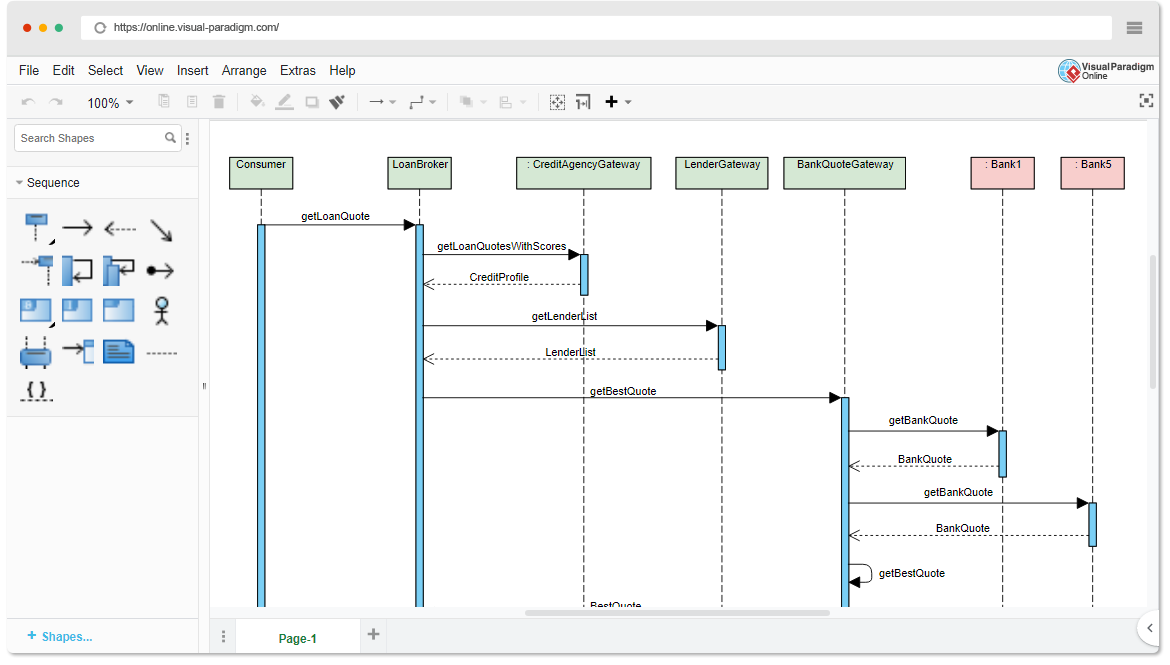
Online Sequence Diagram Tool

Panduan komprehensif ini dirancang untuk pemula dan tim yang ingin memahami:

  • Apa itu diagram urutan dan mengapa hal itu penting

  • Bagaimana membuatnya menggunakan pendekatan berbasis kasus pengguna

  • Konsep kunci dan contoh dunia nyata

  • Bagaimana Pembuat Diagram Urutan AI Visual Paradigm mempercepat seluruh proses—membuat pemodelan lebih cepat, lebih cerdas, dan lebih kolaboratif.


🎯 Apa Itu Pendekatan Berbasis Kasus Pengguna?

Sebuah pendekatan berbasis kasus pengguna mengedepankan desain sistem di sekitar tujuan pengguna. Setiap kasus pengguna menggambarkan interaksi tertentu antara pengguna (aktor) dan sistem untuk mencapai hasil yang bermakna.

Contoh:
“Sebagai pelanggan, saya ingin masuk ke akun saya agar saya dapat melihat riwayat pesanan saya.”

Kasus penggunaan bukan hanya dokumentasi—mereka adalahblueprint untuk fungsionalitas, dandiagram urutanadalah cara ideal untuk memvisualisasikan bagaimana kasus penggunaan tersebut terungkap secara real time.


🧩 Mengapa menggunakan diagram urutan dalam pengembangan berbasis kasus pengguna?

Diagram urutan secara unik cocok untuk mendukung pemodelan kasus pengguna karena mereka:

✅ Menunjukkan alur dinamisinteraksi
✅ Menyoroti waktu dan urutanpesan
✅ Mengklarifikasi tanggung jawabantara objek
✅ Mengungkap kasus tepi (misalnya, input tidak valid, waktu habis)
✅ Mendukung validasikasus penggunaan selama desain dan pengujian
✅ Meningkatkan komunikasiantara pengembang, penguji, dan pemangku kepentingan

🔍 Tanpa diagram urutan, kasus penggunaan bisa tetap abstrak. Dengan mereka, mereka menjadiblueprint yang dapat dieksekusi.


📌 Konsep Kunci Diagram Urutan UML (Ramah Pemula)

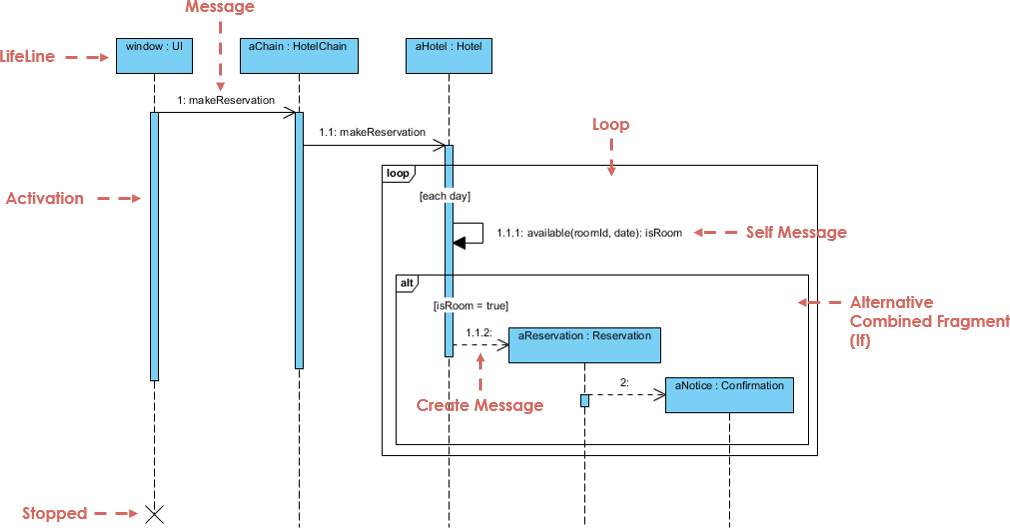
Sebelum terjun ke kasus penggunaan, mari kita kuasai blok pembangun utamanya:

Sequence Diagram Example

Elemen Deskripsi Visual
Lifeline Garis putus-putus vertikal yang mewakili objek atau aktor. Menunjukkan eksistensi sepanjang waktu. ───────────────
Pesan Panah horizontal antar lifeline. Menunjukkan komunikasi.
  • Sinkron Panah padat dengan kepala terisi. Pemanggil menunggu respons.
  • Asinkron Panah padat dengan kepala terbuka. Tidak menunggu.
  • Kembali Panah putus-putus (respons).
  • Pesan diri Panah yang kembali ke lifeline yang sama (pemrosesan internal).
Batang Aktivasi Persegi panjang tipis pada lifeline yang menunjukkan kapan suatu objek aktif. ▯▯▯
Fragment Gabungan Kotak yang mewakili logika kontrol:
  • alt Alternatif (jika/else) alt: sukses / gagal
  • opsi Opsional (dapat terjadi atau tidak) opsi: cetak struk
  • ulang Perulangan (misalnya, perulangan while) ulang: coba lagi 3 kali
  • par Eksekusi paralel par: periksa pembayaran & stok
Pembuatan/Penghapusan buatpesan atau “X” di akhir garis kehidupan buat: PenggunaatauX

💡 Tips: Selalu mulai dengan kasus penggunaan, lalu petakan ke diagram urutan.


🔄 Cara Membuat Diagram Urutan dari Kasus Penggunaan (Langkah demi Langkah)

Mari kita bahas contoh dunia nyata menggunakan pendekatan berbasis kasus penggunaan.

Free AI Sequence Diagram Refinement Tool - Visual Paradigm AI


📌 Contoh: Kasus Penggunaan – “Pengguna Masuk ke Sistem”

Teks Kasus Penggunaan:

Sebagai pengguna, saya ingin masuk ke akun saya menggunakan nama pengguna dan kata sandi saya agar saya dapat mengakses profil saya.

Langkah 1: Mengidentifikasi Aktor dan Objek

  • AktorPengguna

  • ObjekLoginViewLoginControllerDatabase

Langkah 2: Menentukan Alur Utama

  1. Pengguna → LoginView: Memasukkan nama pengguna/kata sandi

  2. LoginView → LoginController: Mengirim kredensial

  3. LoginController → Database: Memeriksa apakah pengguna ada

  4. Database → LoginController: Mengembalikan hasil

  5. LoginController → LoginView: Mengirim sukses/gagal

  6. LoginView → Pengguna: Menampilkan pesan

Langkah 3: Tambahkan Logika Kontrol dengan Fragmen Gabungan

Gunakan alt fragmen untuk menampilkan:

  • Jalur sukses: “Login berhasil”

  • Jalur gagal: “Kredensial tidak valid”

✅ Ini menangkap titik keputusan dalam kasus penggunaan.

Langkah 4: Tambahkan Batang Aktivasi

  • Tambahkan batang aktivasi ke LoginController dan Database untuk menampilkan waktu pemrosesan.

Langkah 5: Diagram Akhir

Sekarang Anda memiliki diagram urutan yang lengkap, diagram urutan yang selaras dengan kasus penggunaan yang mencerminkan perilaku sistem nyata.

🔗 Lihat ini dalam aksi: Diagram Urutan UML Berbasis AI


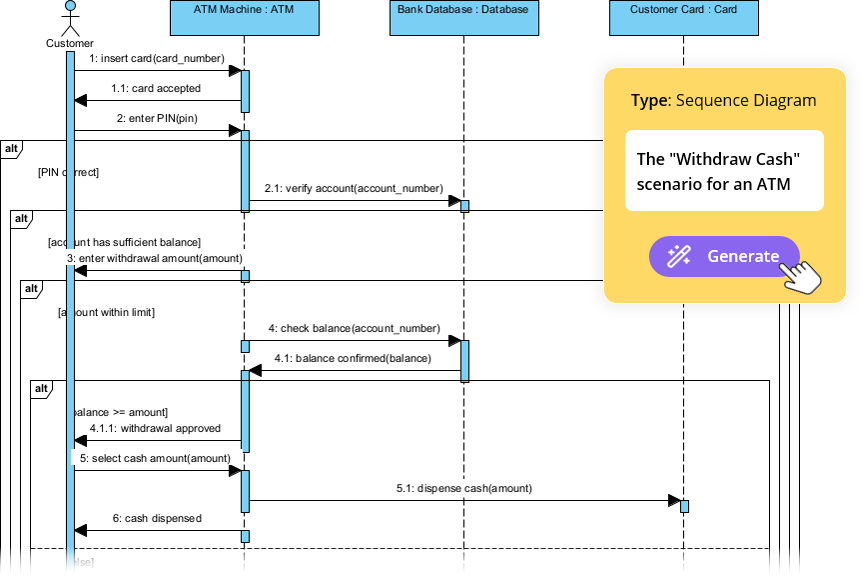
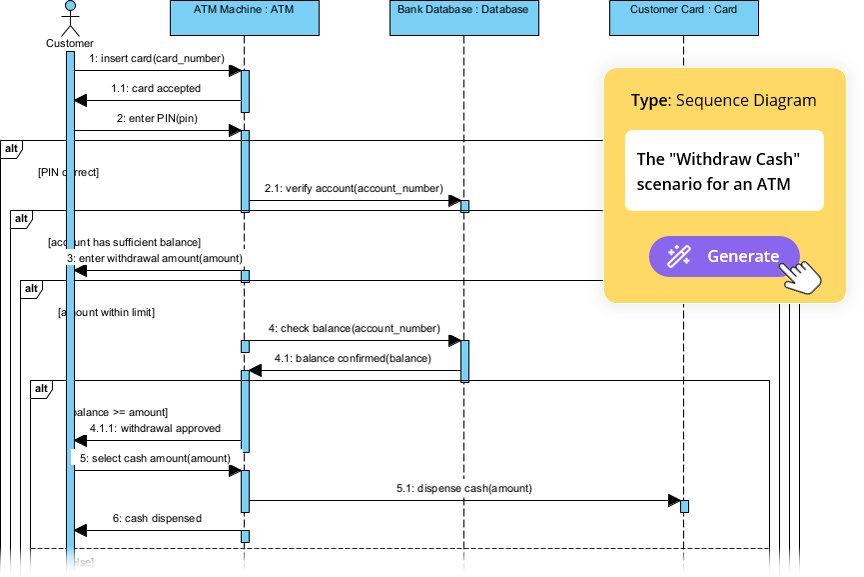
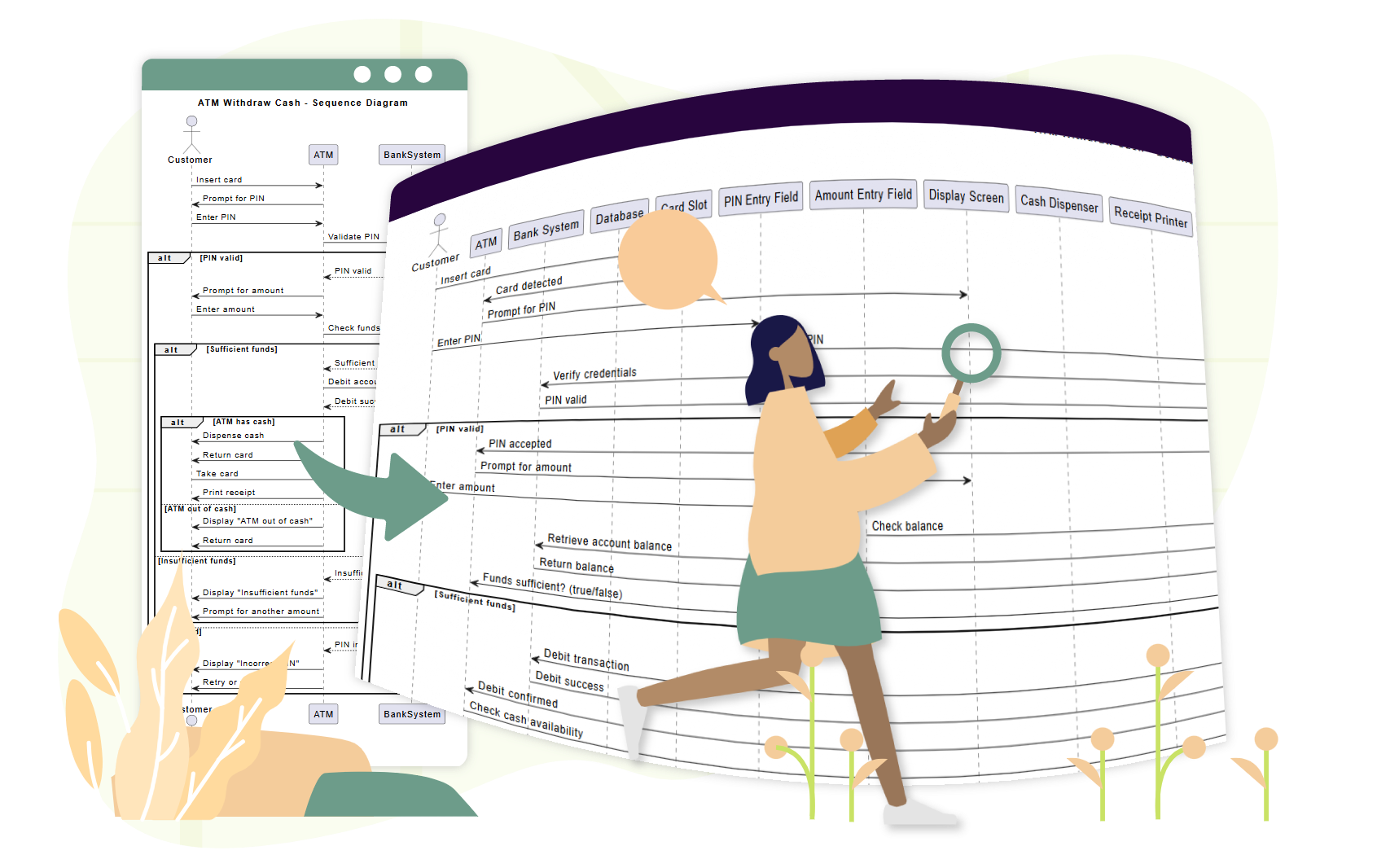
📌 Contoh 2: Kasus Penggunaan – “Pelanggan Menarik Uang dari ATM”

Teks Kasus Penggunaan:

Sebagai pelanggan, saya ingin menarik uang dari ATM agar dapat mengakses uang saya. Jika saldo tidak mencukupi, saya ingin diberi notifikasi.

Langkah 1: Mengidentifikasi Peserta

  • AktorPelanggan

  • ObjekATMPembaca KartuServer BankPengeluarkan Uang

Langkah 2: Alur Utama

  1. Pelanggan → ATM: Memasukkan kartu

  2. ATM → Pembaca Kartu: Membaca kartu

  3. ATM → Pelanggan: Meminta PIN

  4. Pelanggan → ATM: Memasukkan PIN

  5. ATM → Server Bank: Memvalidasi PIN

  6. Server Bank → ATM: Mengonfirmasi valid

  7. ATM → Pelanggan: Meminta jumlah

  8. Pelanggan → ATM: Memasukkan jumlah

  9. ATM → Server Bank: Memeriksa saldo

  10. Server Bank → ATM: Mengembalikan saldo

  11. ATM → Penarik Tunai: Mencairkan uang tunai

  12. ATM → Pelanggan: Menampilkan opsi kwitansi

Langkah 3: Tambahkan Fragmen

  • ulang: Untuk percobaan ulang setelah PIN salah

  • opsi: Untuk pencetakan kwitansi

  • alternatif: Untuk “dana tidak mencukupi” vs. “sukses”

🔗 Lihat bagaimana AI menangani ini: Sederhanakan Alur Kerja yang Kompleks dengan Alat Diagram Urutan AI


📌 Contoh 3: Kasus Penggunaan – “Pelanggan Menyelesaikan Check-out E-Commerce”

Teks Kasus Penggunaan:

Sebagai pelanggan, saya ingin menambahkan barang ke keranjang saya, melanjutkan ke proses checkout, dan menyelesaikan pembayaran agar saya bisa menerima pesanan saya.

Langkah 1: Peserta

  • PelangganKeranjang BelanjaGerbang PembayaranSistem PersediaanKonfirmasi Pesanan

Langkah 2: Alur dengan Paralelisme

  1. Pelanggan → KeranjangBelanja: Menambahkan item →ulanguntuk beberapa item

  2. KeranjangBelanja → Pelanggan: Menampilkan total

  3. Pelanggan → GerbangPembayaran: Memulai pembayaran

  4. Pelanggan → SistemInventaris: Meminta pengecekan stok

  5. GerbangPembayaran → Bank: Memproses pembayaran →pardengan pengecekan inventaris

  6. SistemInventaris → GerbangPembayaran: Mengonfirmasi ketersediaan

  7. GerbangPembayaran → Keranjang Belanja: Mengonfirmasi pesanan

  8. Keranjang Belanja → Konfirmasi Pesanan: Mengirim konfirmasi

✅ Gunakan par fragmen untuk menunjukkan pemrosesan bersamaan.

🔗 Lihat tutorial lengkap: Menguasai Diagram Urutan dengan Chatbot AI: Studi Kasus E-commerce


🤖 Bagaimana Generator Diagram Urutan AI Visual Paradigm Membantu Tim

Alat pemodelan tradisional mengharuskan pengguna untuk menyeret lifeline secara manual, menggambar pesan, dan menempatkan fragmen—memakan waktu dan rentan terhadap kesalahan.

AI Diagram Generation Guide: Instantly Create System Models with Visual Paradigm's AI - Visual Paradigm Guides

Visual Paradigm’s Alat berbasis AI menghilangkan hambatan ini, terutama untuk tim yang menggunakan pendekatan berbasis kasus penggunaan.

✨ 1. Chatbot AI: Hasilkan Diagram dari Teks Kasus Penggunaan dalam Hitungan Detik

Alih-alih menggambar secara manual, jelaskan kasus penggunaan Anda dalam bahasa Inggris sederhana:

📝 Prompt:
“Hasilkan diagram urutan untuk pengguna masuk dengan nama pengguna/kata sandi, termasuk penanganan kesalahan dan coba lagi setelah 3 percobaan gagal.”

AI:

  • Mengidentifikasi aktor dan objek

  • Memetakan alur kasus penggunaan ke lifeline dan pesan

  • Menerapkan altloop, dan opt fragmen secara otomatis

  • Menghasilkan diagram yang bersih dan profesional dalam dibawah 10 detik

🔗 Coba sekarang: Diagram Urutan UML Berbasis AI


✨ 2. Alat Penyempurna Diagram Urutan AI: Ubah Kerangka Awal menjadi Model Profesional

Bahkan jika Anda memulai dengan sketsa kasar, maka Alat Penyempurna Diagram Urutan AI meningkatkannya:

  • Menambahkan batang aktivasi di tempat yang dibutuhkan

  • Menyarankan penggunaan fragmen yang benar (altlooppar)

  • Menerapkan pola desain (contoh: MVC: Tampilan → Kontroler → Model)

  • Mendeteksi jalur kesalahan yang hilang dan kasus-kasus tepi

  • Meningkatkan keterbacaan dan konsistensi

🔗 Pelajari cara: Tutorial Lengkap: Menggunakan Alat Pemantapan Diagram Urutan AI


✨ 3. Dari Deskripsi Kasus Penggunaan ke Diagram: Tanpa Penerjemahan Manual

Tidak perlu lagi menerjemahkan teks kasus penggunaan menjadi diagram secara manual.

AI secara otomatis mengubah kasus penggunaan teks menjadi diagram urutan yang akurat, mengurangi:

  • Usaha manual

  • Kesalahan pemahaman

  • Ketidakkonsistenan

🔗 Lihat dalam aksi: Pemantapan Diagram Urutan Berbasis AI dari Deskripsi Kasus Penggunaan


✨ 4. Pemantapan Iteratif dengan AI Percakapan

Ingin memperbaiki diagram Anda? Cukup berbicara dengan AI:

  • “Tambahkan opsi ‘Lupa Kata Sandi’ setelah 3 percobaan login gagal.”

  • “Ubah ‘Pengguna’ menjadi ‘Pelanggan’.”

  • “Tampilkan pesan kesalahan dalam warna merah.”

Setiap permintaan memperbarui diagram secara real-time—tidak perlu menggambar ulang, tidak ada frustrasi.

🔗 Jelajahi antarmuka: Antarmuka Alat Pemantapan Diagram Urutan AI


✨ 5. Kolaborasi Tim yang Mudah

  • Pihak yang tidak teknis (pengelola produk, klien) dapat berkontribusi melalui bahasa alami.

  • Pengembang dapat menyempurnakan diagram dengan cepat selama sprint.

  • Pengujicoba dapat menggunakan diagram untuk menulis kasus pengujian.

  • Desainer dapat memvalidasi alur sebelum pemrograman.

✅ Ideal untuk tim agile menggunakan cerita pengguna dan kasus penggunaan.


🚀 Mengapa Tim Suka AI Visual Paradigm untuk Pemodelan Kasus Penggunaan

Manfaat Dampak
⏱️ Kecepatan Hasilkan diagram dalam hitungan detik alih-alih jam
🧠 Batasan Keterampilan Rendah Tidak perlu keahlian UML untuk memulai
🔄 Desain Iteratif Sempurnakan diagram secara real time melalui obrolan
🛠️ Pengurangan Kesalahan AI menangkap alur yang hilang, fragmen yang tidak valid
📦 Ekspor & Bagikan Ekspor ke PNG, SVG, PDF, atau sisipkan di Confluence/Notion
🤝 Kolaborasi Semua orang dapat berkontribusi, bahkan anggota non-teknis

📚 Sumber Daya Terbaik untuk Pemula dan Tim

Sumber Daya URL
Diagram Urutan UML Berbasis AI https://blog.visual-paradigm.com/generate-uml-sequence-diagrams-instantly-with-ai/
Alat Pemantapan Diagram Urutan Berbasis AI https://www.visual-paradigm.com/features/ai-sequence-diagram-refinement-tool/
Tutorial Lengkap: Menggunakan Alat Pemantapan Diagram Urutan Berbasis AI https://www.archimetric.com/comprehensive-tutorial-using-the-ai-sequence-diagram-refinement-tool/
Pemantapan Diagram Urutan Berbasis AI dari Deskripsi Kasus Penggunaan https://www.cybermedian.com/refining-sequence-diagrams-from-use-case-descriptions-using-visual-paradigms-ai-sequence-diagram-refinement-tool/
Sederhanakan Alur Kerja yang Kompleks dengan Alat Diagram Urutan Berbasis AI https://www.cybermedian.com/🚀-simplify-complex-workflows-with-visual-paradigm-ai-sequence-diagram-tool/
Antarmuka Alat Pemantapan Diagram Urutan Berbasis AI https://ai.visual-paradigm.com/tool/sequence-diagram-refinement-tool/
Tutorial Pemula: Buat Diagram Urutan Profesional dalam Hitungan Menit https://www.anifuzion.com/beginners-tutorial-create-your-first-professional-sequence-diagram-in-minutes-using-visual-paradigm-ai-chatbot/
Dari Sederhana ke Canggih: Evolusi Pemodelan Berbasis AI https://guides.visual-paradigm.com/from-simple-to-sophisticated-what-is-the-ai-powered-sequence-diagram-refinement-tool/
Menguasai Diagram Urutan dengan Chatbot Berbasis AI: Studi Kasus E-commerce https://www.archimetric.com/mastering-sequence-diagrams-with-visual-paradigm-ai-chatbot-a-beginners-tutorial-with-a-real-world-e-commerce-case-study/
Contoh Diagram Urutan Berbasis AI: Inisiasi Putar Streaming Video https://chat.visual-paradigm.com/ai-diagram-example/ai-sequence-diagram-video-streaming-playback/

✅ Tips Akhir untuk Tim yang Menggunakan Desain Berbasis Kasus Penggunaan

  1. Mulailah dengan kasus penggunaan yang jelas – tentukan tujuan pengguna terlebih dahulu.

  2. Gunakan diagram urutan untuk memvalidasi alur sebelum melakukan pemrograman.

  3. Libatkan pemangku kepentingan sejak awal – gunakan diagram untuk mendapatkan masukan.

  4. Manfaatkan AI untuk mengurangi pekerjaan manual – biarkan alat melakukan pekerjaan beratnya.

  5. Jaga agar diagram tetap diperbarui – perbarui sesuai perkembangan kebutuhan.


🎁 Mulai Secara Gratis

Anda tidak perlu lisensi berbayar untuk merasakan kekuatan pemodelan berbasis AI.


📌 Kesimpulan

pendekatan yang didorong oleh kasus penggunaan adalah fondasi dari desain perangkat lunak yang berpusat pada pengguna. diagram urutan UML menghidupkan kasus penggunaan tersebut—menunjukkan siapa yang melakukan apa, kapan, dan bagaimana.

Dengan Pembuat Diagram Urutan AI Visual Paradigm, tim dapat:

  • Menghasilkan diagram dari bahasa sehari-hari

  • Memperbaikinya secara real time

  • Memastikan konsistensi dan akurasi

  • Berkolaborasi lintas peran

🚀 Dari kasus penggunaan ke diagram dalam hitungan detik—tidak perlu keahlian UML.

👉 Mulai hari ini dengan edisi komunitas gratis dan ubah alur kerja pemodelan tim Anda.


🌟 Masa depan desain sistem bukan hanya visual—tetapi cerdas.
Biarkan AI menjadi mitra pemodelan Anda.

Beyond the Sketch: Why Casual AI Fails at Professional Visual Modeling (and How Visual Paradigm Fixes It)

The Era of AI in Software Architecture

In the rapidly evolving landscape of software engineering and enterprise architecture, the ability to transform abstract requirements into precise, actionable designs is a critical skill. General-purpose Large Language Models (LLMs) like ChatGPT and Claude have revolutionized how we brainstorm and generate text. However, when it comes to professional visual modeling, these tools often fall short. They produce what can best be described as “sketches”—rough approximations that lack the rigor of engineered blueprints.


This comprehensive guide explores the significant gap between casual AI diagramming and professional needs, and how the Visual Paradigm (VP) AI ecosystem bridges this divide by delivering standards-aware, persistent, and iterative diagramming capabilities.

1. The “Sketch Artist” Problem: Limitations of Casual AI LLMs

Casual AI tools treat diagramming primarily as an extension of text generation. When prompted to create a diagram, they typically output code in formats like Mermaid or PlantUML. While impressive for quick visualizations, this approach lacks the depth required for professional engineering contexts.

No Native Rendering or Editing Engine

LLMs generate text-based syntax (e.g., Mermaid flowchart code) but offer no built-in viewer or editor for high-quality vector graphics (SVG). Users are forced to paste code into external renderers, instantly losing interactivity. If a change is needed, the user must request a full regeneration of the code, often resulting in a completely different layout.

Semantic Inaccuracies and Standard Violations

Generic models frequently misinterpret strict modeling standards like UML or ArchiMate. Common errors include:

  • Confusing aggregation (shared ownership) with composition (exclusive ownership).
  • Drawing invalid inheritance arrows or relationship directions.
  • Creating bidirectional associations where unidirectional ones are technically correct.

While the results may look aesthetically pleasing, they fail as engineering artifacts because they do not adhere to the semantic rules that govern system architecture.

Lack of Persistent State

Perhaps the most frustrating limitation is the lack of memory regarding visual structure. Each prompt regenerates the diagram from scratch. For example, asking an LLM to “add error handling to this sequence diagram” often breaks the existing layout, disconnects connectors, or forgets prior elements entirely. There is no persistent state to track the evolution of the model.

2. Real-World Risks of Relying on Casual AI Diagramming

Using general LLMs for serious architectural work introduces risks that can undermine project quality and timeline.

The Design-Implementation Gap

Vague or semantically incorrect visuals lead to misaligned code. Development teams waste valuable time in meetings trying to clarify the intent behind a diagram that lacks precision. A “pretty picture” that is technically wrong is worse than no diagram at all.

Syntax Dependency

Ironically, using “AI-assisted” tools like ChatGPT for diagrams often requires the user to learn specialized syntax (Mermaid/PlantUML) to manually fix errors. This creates an expertise barrier that negates the efficiency gains of using AI.

Workflow Isolation

Diagrams generated by LLMs are static images or code snippets. They are disconnected from version control, collaboration platforms, and downstream tasks like code generation or database schema creation. They exist in a silo, unable to evolve with the project.

3. How Visual Paradigm AI Delivers Professional-Grade Modeling

Visual Paradigm has transformed diagramming into a conversational, standards-driven, and integrated process. Unlike text-based LLMs, VP AI understands the underlying meta-models of UML 2.5,ArchiMate3, C4, BPMN, and SysML, producing compliant and editable models.

Persistent Structure with “Diagram Touch-Up” Technology

Visual Paradigm maintains diagrams as living objects rather than disposable scripts. Users can issue natural language commands to update specific parts of a diagram without triggering a full regeneration.

For example, a user can command: “Add a two-factor authentication step after login” or “Rename the Customer actor to User.” The system instantly adjusts the layout, connectors, and semantics while preserving the integrity of the rest of the model. This eliminates the broken links and layout chaos common in casual tools.

Standards-Compliant Intelligence

Trained on formal notations, VP AI actively enforces rules, ensuring:

  • Correct multiplicity in associations.
  • Proper use of stereotypes.
  • Valid ArchiMate viewpoints (e.g., Capability Maps, Technology Usage).

This results in technically sound blueprints that can be trusted by developers and architects alike.

4. Bridging Requirements to Design: Advanced AI Workflows

Visual Paradigm goes beyond simple generation by providing structured applications that guide users from abstract ideas to concrete designs.

AI-Powered Textual Analysis

This feature analyzes unstructured text—such as requirements documents or user stories—to extract candidate classes, attributes, operations, and relationships. It can generate an initial class diagram automatically based on the analysis.
AI Diagram Generator | Visual Paradigm

Example Scenario: Input a description like “An e-commerce platform allows customers to browse products, add to cart, checkout with payment gateway, and track orders.” The AI identifies classes (Customer, Product, Cart, Order, PaymentGateway), attributes (price, quantity), and associations (Customer places Order).

The 10-Step AI Wizard

For complex diagrams like UML Class models, VP offers a guided wizard. This tool leads users through a logical progression: Define Purpose → Scope → Classes → Attributes → Relationships → Operations → Review → Generate. This human-in-the-loop approach validates the design at every step, preventing the “one-shot” errors common in prompt-based generation.

5. Comparison: Casual LLMs vs. Visual Paradigm AI

Feature Casual LLMs (ChatGPT, Claude) Visual Paradigm AI
Output Format Text-based code (Mermaid, PlantUML) Editable Native Models & Vector Graphics
State & Persistence None (Regenerates from scratch) Persistent (Supports incremental updates)
Standards Compliance Low (Hallucinates syntax/rules) High (Enforces UML/BPMN/ArchiMate rules)
Editability Requires manual code edits Conversational UI & Drag-and-Drop
Integration Isolated Snippets Full Lifecycle (Code Gen, DB Schema, Teamwork)

Conclusion: From Manual Chiseling to Intelligent Engineering

Traditional diagramming often feels like chiseling marble—slow, error-prone, and irreversible. Casual AI LLMs improved the speed of sketching but remain limited by their inability to produce consistent, persistent, and engineered visuals.

Visual Paradigm AI acts like a high-precision 3D printer for software architecture. It allows users to input plain English specifications and receive standards-compliant, editable structures. It supports conversational iteration and drives implementation directly through code generation and database integration.

AI Diagram Generation Guide: Instantly Create System Models with Visual  Paradigm's AI - Visual Paradigm Guides

For software architects, enterprise teams, and developers tired of regenerating broken Mermaid snippets, Visual Paradigm represents the next evolution: intelligent modeling that respects standards, preserves intent, and accelerates delivery.

Transforming Process Optimization: A Comprehensive Guide to AI Value Stream Mapping

Introduction to Modern Process Mapping

Value Stream Mapping(VSM) has long been recognized as a cornerstone of Lean methodology. It provides organizations with essential visual insights into process efficiency, material flows, and information exchanges. However, the traditional approach to creating and analyzing these maps has historically been a manual, labor-intensive effort involving whiteboards, sticky notes, and static drawing software. This manual process often creates a barrier to entry, preventing teams from rapidly iterating on their workflow improvements.

The landscape of process optimization is shifting with the introduction of AI-powered tools. Specifically, the emergence of theAI Value Stream Mapping Editorrepresents a significant leap forward. This technology allows practitioners to generate complete, data-rich Value Stream Maps simply by describing a process in natural language. By transitioning from manual drafting to intelligent automation, businesses can move from raw ideas to actionable insights in minutes rather than hours.

What is AI-Powered Value Stream Mapping?

The AI Value Stream Mapping (VSM) Editor is not merely a drawing tool; it is a sophisticated, intelligent platform designed to visualize, analyze, and optimize workflows. At its core, it utilizes natural language processing (NLP) to transform simple text descriptions of processes into full-fledged, editable diagrams. This capability democratizes access to Lean tools, allowing users with varying levels of technical expertise to create professional-grade maps.

Beyond visualization, these tools incorporate diagramming engines that allow for granular refinement. Users can adjust process steps, edit data points, and rearrange flows using intuitive drag-and-drop interfaces. The integration of an AI analyst further elevates the tool, acting as a virtual consultant that examines VSM data to generate insightful reports, uncover bottlenecks, and suggest strategic improvements automatically.

Key Features of the AI VSM Editor

To truly revolutionize process optimization, modern VSM tools combine automation with deep analytical capabilities. Below are the critical features that define this technology:

1. Text-to-Diagram Generation

The most immediate benefit of AI VSM tools is the ability to generate a map from plain English. Users describe their workflow—detailing the sequence of operations, inventory points, and information flows—and the VSM generator instantly creates a detailed diagram. This eliminates the “blank canvas” paralysis and provides an immediate structure to work with.

2. Automated Timeline and Metric Calculation

Manual calculation of Lean metrics is prone to human error. AI-driven editors automate this entirely. As users modify the map, the tool automatically calculates critical metrics in real-time, including:

  • Total Lead Time: The total time it takes for a process to be completed from start to finish.
  • Value-Added Time (VAT): The portion of time spent on activities that actually add value to the customer.
  • Process Efficiency Percentage: A derived metric indicating how streamlined the workflow is.

3. AI-Powered Analysis and Reporting

Perhaps the most transformative feature is the built-in AI consultant. Users can request an analysis of their current state map. The AI reviews the data structure, timelines, and flow to generate a professional report. This report highlights key findings, identifies performance metrics, and offers strategic recommendations to eliminate waste and improve throughput.

4. High-Fidelity Export Options

For a VSM to be effective, it must be communicable. The tool facilitates the export of finished maps as high-resolution PNG images. This ensures that findings can be easily integrated into management reports, stakeholder presentations, or team discussions without loss of visual quality.

Target Audience and Use Cases

AI-powered process mapping is versatile, catering to a wide array of professionals involved in organizational efficiency. The table below outlines who benefits most and how:

Role Primary Benefit
Operations Managers Identify and eliminate waste (Muda) in production lines to reduce costs and improve speed.
Process Improvement Consultants Rapidly create and analyze VSMs for clients, delivering value faster during engagements.
Software Development Teams Apply Lean principles to DevOps and Agile workflows to streamline CI/CD pipelines.
Business Analysts Map complex customer journeys and internal business processes to enhance user experience.

From Visualization to Actionable Insight

The ultimate goal of Value Stream Mapping is not the map itself, but the optimization it enables. By leveraging AI, organizations can stop spending time drawing and start spending time analyzing. The automated insights provided by these tools allow teams to focus on high-level strategy rather than low-level formatting.

Whether the goal is to reduce cycle time in a manufacturing plant or streamline a customer service ticket system, AI Value Stream Mapping provides the clarity required to make data-driven decisions. It bridges the gap between the current state and the future state, ensuring that process improvement is continuous, accurate, and efficient.

Automating Database Normalization: A Step-by-Step Guide Using Visual Paradigm AI DB Modeler

Introduction to AI-Driven Normalization

Database normalization is the critical process of organizing data to ensure integrity and eliminate redundancy. While traditionally a complex and error-prone task, modern tools have evolved to automate this “heavy lifting.” The Visual Paradigm AI DB Modeler acts as an intelligent bridge, transforming abstract concepts into technically optimized, production-ready implementations.
Desktop AI Assistant

To understand the value of this tool, consider the analogy of manufacturing a car. If a Class Diagram is the initial sketch and an Entity Relationship Diagram (ERD) is the mechanical blueprint, then normalization is the process of tuning the engine to ensure there are no loose bolts or unnecessary weight. The AI DB Modeler serves as the “automated factory” that executes this tuning for maximum efficiency. This tutorial guides you through the process of using the AI DB Modeler to normalize your database schema effectively.

Doc Composer

Step 1: Accessing the Guided Workflow

The AI DB Modeler operates using a specialized 7-step guided workflow. Normalization takes center stage at Step 5. Before reaching this stage, the tool allows you to input high-level conceptual classes. From there, it uses intelligent algorithms to prepare the structure for optimization, allowing users to move from concepts to tables without manual effort.

Step 2: Progressing Through Normal Forms

Once you reach the normalization phase, the AI iteratively optimizes the database schema through three primary stages of architectural maturity. This stepwise progression ensures that your database meets industry standards for reliability.

Achieving First Normal Form (1NF)

The first level of optimization focuses on the atomic nature of your data. The AI analyzes your schema to ensure that:

  • Each table cell contains a single, atomic value.
  • Every record within the table is unique.

Advancing to Second Normal Form (2NF)

Building upon the structure of 1NF, the AI performs further analysis to establish strong relationships between keys and attributes. In this step, the tool ensures that all non-key attributes are fully functional and dependent on the primary key, effectively removing partial dependencies.

Finalizing with Third Normal Form (3NF)

To reach the standard level of professional optimization, the AI advances the schema to 3NF. This involves ensuring that all attributes are dependent only on the primary key. By doing so, the tool removes transitive dependencies, which are a common source of data anomalies.

Step 3: Reviewing Automated Error Detection

Throughout the normalization process, the AI DB Modeler employs intelligent algorithms to detect design flaws that often plague poorly designed systems. It specifically looks for anomalies that could lead to:

  • Update errors
  • Insertion errors
  • Deletion errors

By automating this detection, the tool eliminates the manual burden of hunting for potential integrity issues, ensuring a robust foundation for your applications.

Step 4: Understanding the Architectural Changes

One of the distinct features of the AI DB Modeler is its transparency. Unlike traditional tools that simply reorganize tables in the background, this tool functions as an educational resource.

For every change made during the 1NF, 2NF, and 3NF steps, the AI provides educational rationales and explanations. These insights help users understand the specific architectural shifts required to reduce redundancy, serving as a valuable learning tool for mastering best practices in database design.

Step 5: Validating via the Interactive Playground

After the AI has optimized the schema to 3NF, the workflow moves to Step 6, where you can verify the design before actual deployment. The tool offers a unique interactive playground for final validation.

Feature Description
Live Testing Users can launch an in-browser database instance based on their chosen normalization level (Initial, 1NF, 2NF, or 3NF).
Realistic Data Seeding The environment is populated with realistic, AI-generated sample data, including INSERT statements and DML scripts.

This environment allows you to test queries and verify performance against the normalized structure immediately. By interacting with seeded data, you can confirm that the schema handles information correctly and efficiently, ensuring the “engine” is tuned perfectly before the car hits the road.

Comprehensive Guide to ERD Levels: Conceptual, Logical, and Physical Models

The Importance of Architectural Maturity in Database Design

Entity Relationship Diagrams (ERDs) serves as the backbone of effective system architecture. They are not static illustrations but are developed at three distinct stages of architectural maturity. Each stage serves a unique purpose within the database design lifecycle, catering to specific audiences ranging from stakeholders to database administrators. While all three levels involve entities, attributes, and relationships, the depth of detail and the technical specificity vary significantly between them.

To truly understand the progression of these models, it is helpful to use a construction analogy. Think of building a house: a Conceptual ERD is the architect’s initial sketch showing the general location of rooms like the kitchen and living room. The Logical ERD is the detailed floor plan specifying dimensions and furniture placement, though it does not yet dictate the materials. Finally, the Physical ERD acts as the engineering blueprint, specifying the exact plumbing, electrical wiring, and the specific brand of concrete for the foundation.

Engineering Interface

1. Conceptual ERD: The Business View

The Conceptual ERD represents the highest level of abstraction. It provides a strategic view of the business objects and their relationships, devoid of technical clutter.

Purpose and Focus

This model is primarily utilized for requirements gathering and visualizing the overall system architecture. Its main goal is to facilitate communication between technical teams and non-technical stakeholders. It focuses on defining what entities exist—such as “Student,” “Product,” or “Order”—rather than how these entities will be implemented in a database table.

Level of Detail

Conceptual models typically lack technical constraints. For example, many-to-many relationships are often depicted simply as relationships without the complexity of cardinality or join tables. Uniquely, this level may utilize generalization, such as defining “Triangle” as a sub-type of “Shape,” a concept that is abstracted away in later physical implementations.

2. Logical ERD: The Detailed View

Moving down the maturity scale, the Logical ERD serves as an enriched version of the conceptual model, bridging the gap between abstract business needs and concrete technical implementation.

Purpose and Focus

The logical model transforms high-level requirements into operational and transactional entities. While it defines explicit columns for each entity, it remains strictly independent of a specific Database Management System (DBMS). It does not matter at this stage whether the final database will be in Oracle, MySQL, or SQL Server.

Level of Detail

Unlike the conceptual model, the logical ERD includes attributes for every entity. However, it stops short of specifying technical minutiae like data types (e.g., integer vs. float) or specific field lengths.

3. Physical ERD: The Technical Blueprint

The Physical ERD represents the final, actionable technical design of a relational database. It is the schema that will be deployed.

Purpose and Focus

This model serves as the blueprint for creating the database schema within a specific DBMS. It elaborates on the logical model by assigning specific data types, lengths, and constraints (such as varchar(255), int, or nullable).

Level of Detail

The physical ERD is highly detailed. It defines precise Primary Keys (PK) and Foreign Keys (FK) to strictly enforce relationships. Furthermore, it must account for the specific naming conventions, reserved words, and limitations of the target DBMS.

Comparative Analysis of ERD Models

To summarize the distinctions between these architectural levels, the following table outlines the features typically supported across the different models:

Feature Conceptual Logical Physical
Entity Names Yes Yes Yes
Relationships Yes Yes Yes
Columns/Attributes Optional/No Yes Yes
Data Types No Optional Yes
Primary Keys No Yes Yes
Foreign Keys No Yes Yes

Streamlining Design with Visual Paradigm and AI

Creating these models manually and ensuring they remain consistent can be labor-intensive. Modern tools like Visual Paradigm leverage automation and Artificial Intelligence to streamline the transition between these levels of maturity.

ERD modeler

Model Transformation and Traceability

Visual Paradigm features a Model Transitor, a tool designed to derive a logical model directly from a conceptual one, and subsequently, a physical model from the logical one. This process maintains automatic traceability, ensuring that changes in the business view are accurately reflected in the technical blueprint.

AI-Powered Generation

Advanced features include AI capabilities that can instantly produce professional ERDs from textual descriptions. The AI automatically infers entities and foreign key constraints, significantly reducing manual setup time.

Desktop AI Assistant

Bi-directional Synchronization

Crucially, the platform supports bi-directional transformation. This ensures that the visual design and the physical implementation stay in sync, preventing the common issue of documentation drifting away from the actual codebase.

Mastering Database Validation with the Interactive SQL Playground

Understanding the Interactive SQL Playground

The Interactive SQL Playground (often called the Live SQL Playground) acts as a critical validation and testing environment within the modern database design lifecycle. It bridges the gap between a conceptual visual model and a fully functional, production-ready database. By allowing users to experiment with their schema in real-time, it ensures that design choices are robust before any code is deployed.

DBModeler AI showing domain class diagram

Think of the Interactive SQL Playground as a virtual flight simulator for pilots. Instead of taking a brand-new, untested airplane (your database schema) directly into the sky (production), you test it in a safe, simulated environment. You can add simulated passengers (AI-generated sample data) and try out various maneuvers (SQL queries) to see how the plane handles the weight and stress before you ever leave the ground.

Key Concepts

To fully utilize the playground, it is essential to understand the foundational concepts that drive its functionality:

  • Schema Validation: The process of verifying the structural integrity and robustness of a database design. This involves ensuring that tables, columns, and relationships function as intended under realistic conditions.
  • DDL (Data Definition Language): SQL commands used to define the database structure, such as CREATE TABLE or ALTER TABLE. The playground uses these to build your schema instantly.
  • DML (Data Manipulation Language): SQL commands used for managing data within the schema, such as SELECT, INSERT, UPDATE, and DELETE. These are used in the playground to test data retrieval and modification.
  • Architectural Debt: The implied cost of future reworking required when a database is designed poorly in the beginning. Identifying flaws in the playground significantly reduces this debt.
  • Normalization Stages (1NF, 2NF, 3NF): The process of organizing data to reduce redundancy. The playground allows you to test different versions of your schema to observe performance implications.

Guidelines: Step-by-Step Validation Tutorial

The Interactive SQL Playground is designed to be Step 6 of a comprehensive 7-step DB Modeler AI workflow, serving as the final quality check. Follow these steps to validate your database effectively.

Step 1: Access the Zero-Setup Environment

Unlike traditional database management systems that require complex local installations, the playground is accessible entirely in-browser. Simply navigate to the playground interface immediately after generating your schema. Because there is no software installation required, you can begin testing instantly.

Step 2: Select Your Schema Version

Before running queries, decide which version of your database schema you wish to test. The playground allows you to launch instances based on different normalization stages:

  • Initial Design: Test your raw, unoptimized concepts.
  • Optimized Versions: Select between 1NF, 2NF, or 3NF versions to compare how strict normalization affects query complexity and performance.

Step 3: Seed with AI-Powered Data

A comprehensive test requires data. Use the built-in AI-Powered Data Simulation to populate your empty tables.

  1. Locate the “Add Records” or “Generate Data” feature within the playground interface.
  2. Specify a batch size (e.g., “Add 10 records”).
  3. Execute the command. The AI will automatically generate realistic, AI-generated sample data relevant to your specific tables (e.g., creating customer names for a “Customers” table rather than random strings).

Step 4: Execute DDL and DML Queries

With a populated database, you can now verify the schema’s behavior.

  • Run Structural Tests: Check if your data types are correct and if the table structures accommodate the data as expected.
  • Run Logic Tests: Execute complex SELECT statements with JOIN clauses to ensure relationships between tables are correctly established.
  • Verify Constraints: Attempt to insert data that violates Primary Key or Foreign Key constraints. The system should reject these entries, confirming that your data integrity rules are active.

Tips and Tricks for Efficient Testing

Maximize the value of your testing sessions with these practical tips:

  • Iterate Rapidly: Take advantage of the “Instant Feedback” loop. If a query feels clunky or a relationship is missing, return to the visual diagram, adjust the model, and reload the playground. This typically takes only minutes and prevents hard-to-fix errors later.
  • Stress Test with Volume: Don’t just add one or two rows. Use the batch generation feature to add significant amounts of data. This helps reveal performance bottlenecks that aren’t visible with a small dataset.
  • Compare Normalization Performance: Run the exact same query against the 2NF and 3NF versions of your schema. This comparison can highlight the trade-off between data redundancy (storage) and query complexity (speed), helping you make an informed architectural decision.
  • Validate Business Logic: Use the playground to simulate specific business scenarios. For example, if your application requires finding all orders placed by a specific user in the last month, write that specific SQL query in the playground to ensure the schema supports it efficiently.

Mastering Database Normalization with Visual Paradigm AI DB Modeler

Database normalization is a critical process in system design, ensuring that data is organized efficiently to reduce redundancy and improve integrity. Traditionally, moving a schema from a raw concept to the Third Normal Form (3NF) required significant manual effort and deep theoretical knowledge. However, the Visual Paradigm AI DB Modeler has revolutionized this approach by integrating normalization into an automated workflow. This guide explores how to leverage this tool to achieve an optimized database structure seamlessly.

ERD modeler

Key Concepts

To effectively use the AI DB Modeler, it is essential to understand the foundational definitions that drive the tool’s logic. The AI focuses on three primary stages of architectural maturity.

Engineering Interface

1. First Normal Form (1NF)

The foundational stage of normalization. 1NF ensures that the table structure is flat and atomic. In this state, each table cell contains a single value rather than a list or set of data. Furthermore, it mandates that every record within the table is unique, eliminating duplicate rows at the most basic level.

2. Second Normal Form (2NF)

Building upon the strict rules of 1NF, the Second Normal Form addresses the relationship between columns. It requires that all non-key attributes are fully functional and dependent on the primary key. This stage eliminates partial dependencies, which often occur in tables with composite primary keys where a column relies on only part of the key.

3. Third Normal Form (3NF)

This is the standard target for most production-grade relational databases. 3NF ensures that all attributes are only dependent on the primary key. It specifically targets and removes transitive dependencies (where Column A relies on Column B, and Column B relies on the Primary Key). Achieving 3NF results in a high degree of architectural maturity, minimizing data redundancy and preventing update anomalies.

Guidelines: The Automated Normalization Workflow

Visual Paradigm AI DB Modeler incorporates normalization specifically within Step 5 of its automated 7-step workflow. Follow these guidelines to navigate the process and maximize the utility of the AI’s suggestions.

Step 1: Initiate the AI Workflow

Begin by inputting your initial project requirements or raw schema ideas into the AI DB Modeler. The tool will guide you through the initial phases of entity discovery and relationship mapping. Proceed through the early steps until you reach the optimization phase.

Step 2: Analyze the 1NF Transformation

When the workflow reaches Step 5, the AI effectively takes over the role of a database architect. It first analyzes your entities to ensure they meet 1NF standards. Watch for the AI to decompose complex fields into atomic values. For example, if you had a single field for “Address,” the AI might suggest breaking it down into Street, City, and Zip Code to ensure atomicity.

Step 3: Review 2NF and 3NF Refinements

The tool iteratively applies rules to progress from 1NF to 3NF. During this phase, you will observe the AI restructuring tables to handle dependencies correctly:

  • It will identify non-key attributes that do not depend on the full primary key and move them to separate tables (2NF).
  • It will detect attributes that depend on other non-key attributes and isolate them to eliminate transitive dependencies (3NF).

Step 4: Consult the Educational Rationales

One of the most powerful features of the Visual Paradigm AI DB Modeler is its transparency. As it modifies your schema, it provides educational rationales. Do not skip this text. The AI explains the reasoning behind every structural change, detailing how the specific optimization eliminates data redundancy or ensures data integrity. Reading these rationales is crucial for verifying that the AI understands the business context of your data.

Step 5: Validate in the SQL Playground

Once the AI claims the schema has reached 3NF, do not immediately export the SQL. Utilize the built-in interactive SQL playground. The tool seeds the new schema with realistic sample data.

Run test queries to verify performance and logic. This step allows you to confirm that the normalization process hasn’t made data retrieval overly complex for your specific use case before you commit to deployment.

Tips and Tricks

Maximize your efficiency with these best practices when using the AI DB Modeler.

Desktop AI Assistant

  • Verify Context Over Syntax: While the AI is excellent at applying normalization rules, it may not know your specific business domain quirks. Always cross-reference the “Educational Rationales” with your business logic. If the AI splits a table in a way that hurts your application’s read performance, you may need to denormalize slightly.
  • Use the Sample Data: The sample data generated in the SQL playground is not just for show. Use it to check for edge cases, such as how null values are handled in your newly normalized foreign keys.
  • Iterate on Prompts: If the initial schema generation in Steps 1-4 is too vague, the normalization in Step 5 will be less effective. Be descriptive in your initial prompts to ensure the AI starts with a robust conceptual model.