Tutorial Komprehensif untuk ArchiMate yang Mendukung TOGAF ADM

Pengantar ArchiMate

ArchiMate adalah bahasa pemodelan arsitektur perusahaan yang terbuka dan independen yang mendukung deskripsi, analisis, dan visualisasi arsitektur dalam dan di antara berbagai bidang bisnis. Dirancang untuk memberikan cara yang jelas dan tidak ambigu untuk berkomunikasi mengenai arsitektur kompleks kepada pemangku kepentingan. ArchiMate sangat berguna ketika digunakan bersama Metode Pengembangan Arsitektur TOGAF (ADM), memberikan cara standar untuk memodelkan dan berkomunikasi mengenai arsitektur perusahaan.
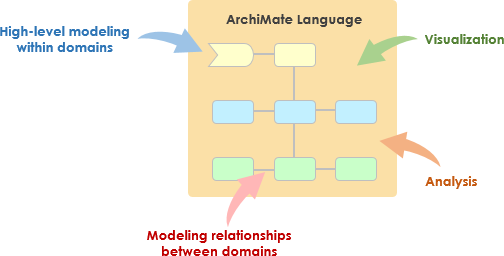
What is ArchiMate?

Konsep Kunci ArchiMate

ArchiMate Core Framework

1. Lapisan-lapisan ArchiMate

ArchiMate membagi arsitektur perusahaan menjadi tiga lapisan utama:

  • Lapisan Bisnis: Berfokus pada proses bisnis, layanan, dan fungsi yang mendukung tujuan organisasi.
  • Lapisan Aplikasi: Menangani layanan aplikasi, komponen, dan interaksi mereka yang mendukung lapisan bisnis.
  • Lapisan Teknologi: Meliputi infrastruktur teknologi, termasuk komponen perangkat keras, perangkat lunak, dan jaringan yang mendukung lapisan aplikasi.

2. Elemen Inti

ArchiMate mendefinisikan beberapa elemen inti yang digunakan untuk memodelkan arsitektur:

  • Elemen Struktur Aktif: Mewakili entitas yang melakukan perilaku, seperti aktor bisnis, komponen aplikasi, dan perangkat.
  • Elemen Perilaku: Mewakili proses, fungsi, layanan, dan interaksi dalam arsitektur.
  • Elemen Struktur Pasif: Mewakili informasi atau data yang digunakan atau dihasilkan oleh elemen perilaku, seperti objek bisnis dan objek data.

3. Hubungan

ArchiMate mendefinisikan beberapa jenis hubungan untuk menghubungkan elemen-elemen:

  • Hubungan Struktural: Seperti komposisi, agregasi, dan spesialisasi.
  • Hubungan Ketergantungan: Seperti asosiasi, realisasi, dan digunakan oleh.
  • Hubungan Dinamis: Seperti memicu dan alur.

4. Perspektif

ArchiMate menyediakan beberapa perspektif untuk memvisualisasikan arsitektur dari berbagai sudut pandang:

  • Perspektif Proses Bisnis: Menunjukkan proses bisnis dan interaksi mereka.
  • Perspektif Kerja Sama Aplikasi: Menunjukkan bagaimana aplikasi bekerja sama untuk mendukung proses bisnis.
  • Perspektif Realisasi Teknologi: Menunjukkan bagaimana komponen teknologi merealisasikan komponen aplikasi.

ArchiMate dan TOGAF ADM

Metode Pengembangan Arsitektur TOGAF (ADM)

ADM TOGAF adalah metodologi komprehensif untuk mengembangkan arsitektur perusahaan. Metode ini terdiri dari beberapa tahap, masing-masing berfokus pada aspek tertentu dari proses pengembangan arsitektur. ArchiMate mendukung ADM TOGAF dengan menyediakan cara standar untuk memodelkan dan memvisualisasikan arsitektur pada setiap tahap.
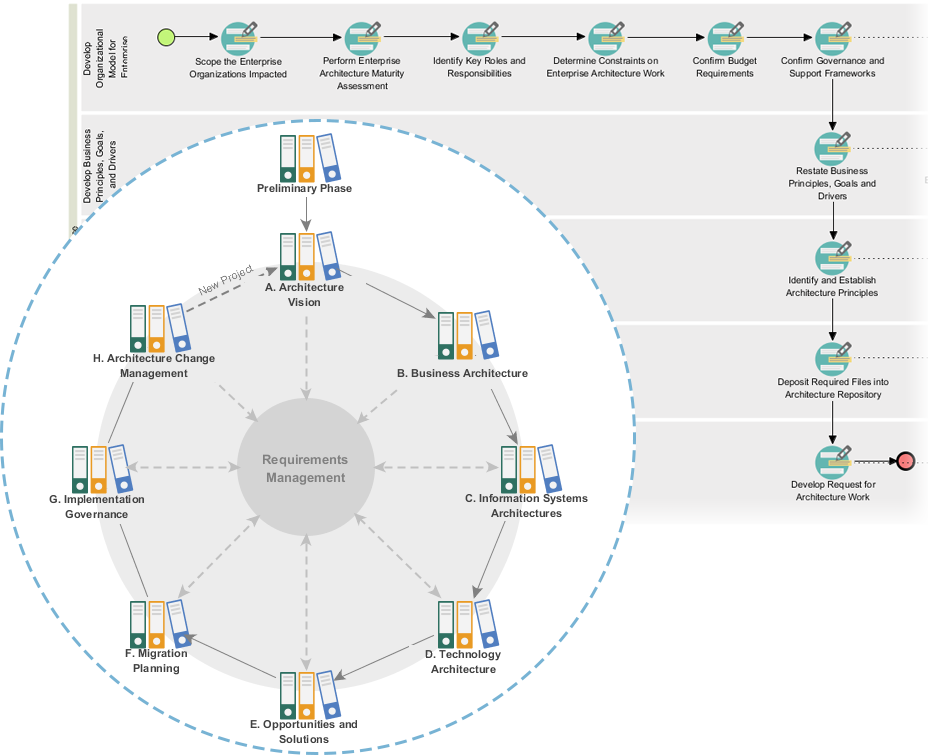
Powerful TOGAF ADM Toolset

Tahapan ADM TOGAF

  1. Tahap Awal: Menetapkan prinsip arsitektur, kerangka kerja, dan tata kelola.
  2. Visi Arsitektur: Menentukan cakupan, pemangku kepentingan, perhatian, dan tujuan bisnis.
  3. Arsitektur Bisnis: Mengembangkan arsitektur bisnis, termasuk proses dan layanan bisnis.
  4. Arsitektur Sistem Informasi: Mengembangkan arsitektur data dan aplikasi.
  5. Arsitektur Teknologi: Mengembangkan arsitektur teknologi.
  6. Peluang dan Solusi: Mengidentifikasi dan memprioritaskan proyek arsitektur.
  7. Perencanaan Migrasi: Mengembangkan rencana migrasi dan implementasi.
  8. Tata Kelola Implementasi: Menyediakan tata kelola dan dukungan untuk implementasi arsitektur.

Contoh-model ArchiMate

Diagram ini menggambarkan arsitektur berlapis untuk sistem manajemen kesehatan, dibagi menjadi dua lapisan utama: lapisan Lapisan Aplikasi dan lapisan Lapisan Teknologi. Berikut penjelasan rinci mengenai masing-masing komponen dan interaksinya:
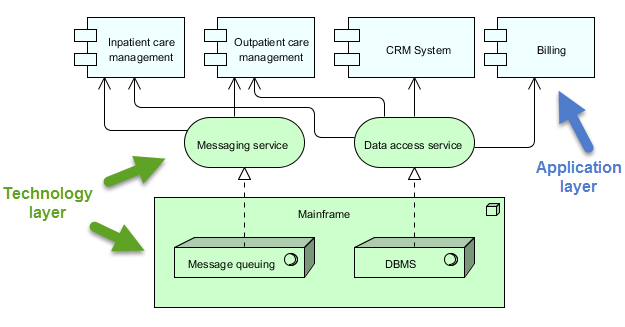
archimate diagram example

Lapisan Aplikasi (Biru)

Lapisan ini terdiri dari berbagai aplikasi dan sistem yang berinteraksi langsung dengan pengguna atau sistem lain untuk mengelola layanan kesehatan. Komponen utama dalam lapisan ini adalah:

  1. Manajemen Perawatan Rawat Inap:

    • Mengelola layanan dan proses yang berkaitan dengan pasien yang dirawat di rumah sakit.
  2. Manajemen Perawatan Rawat Jalan:

    • Mengelola layanan dan proses untuk pasien yang datang ke rumah sakit untuk perawatan tetapi tidak dirawat inap.
  3. Sistem CRM (Manajemen Hubungan Pelanggan):

    • Mengelola interaksi dengan pasien, termasuk komunikasi, tindak lanjut, dan manajemen hubungan pasien.
  4. Tagihan:

    • Menangani aspek keuangan, termasuk pembuatan tagihan, pemrosesan pembayaran, dan pengelolaan catatan keuangan.

Lapisan Teknologi (Hijau)

Lapisan ini menyediakan infrastruktur dan layanan dasar yang mendukung aplikasi pada Lapisan Aplikasi. Komponen utama dalam lapisan ini adalah:

  1. Layanan Pesan:

    • Memfasilitasi komunikasi antara berbagai aplikasi dan sistem dalam sistem manajemen kesehatan.
    • Memastikan bahwa pesan dikirim secara andal dan dalam urutan yang benar.
  2. Layanan Akses Data:

    • Menyediakan cara terpusat untuk mengakses dan mengelola data di seluruh sistem.
    • Memastikan bahwa data diambil dan disimpan secara efisien dan aman.
  3. Mainframe:

    • Sistem komputasi pusat yang menampung layanan inti dan data.
    • Mencakup dua komponen utama:
      • Antrian Pesan: Mengelola antrian dan pemrosesan pesan untuk memastikan komunikasi yang andal.
      • DBMS (Sistem Manajemen Basis Data): Menyimpan dan mengelola data yang digunakan oleh berbagai aplikasi.

Interaksi

  • Manajemen Perawatan Pasien Rawat InapManajemen Perawatan Pasien Rawat JalanSistem CRM, dan Penagihan berinteraksi dengan Layanan Pesan dan Layanan Akses Data untuk melakukan fungsi masing-masing.
  • Layanan Layanan Pesan dan Layanan Akses Data mengandalkan Mainframe untuk layanan inti seperti antrian pesan dan manajemen basis data.
  • Layanan Mainframememastikan pesan diproses dengan benar dan data dikelola secara efisien, mendukung seluruh operasi sistem.

Diagram ini menggambarkan pendekatan terstruktur dalam mengelola layanan kesehatan dengan memisahkan fungsi tingkat aplikasi dari infrastruktur teknologi di bawahnya. Pemisahan ini memungkinkan desain sistem yang lebih modular dan mudah dipelihara, di mana perubahan pada satu lapisan memiliki dampak minimal terhadap lapisan lainnya. The Layanan Pesan dan Layanan Akses Databerfungsi sebagai perantara, memfasilitasi komunikasi dan manajemen data antara komponen aplikasi dan mainframe.

Alat EA ArchiMate yang Direkomendasikan

Visual Paradigm secara luas diakui sebagai salah satu alat terbaik untuk pemodelan ArchiMate dalam proyek Arsitektur Perusahaan (EA). Berikut adalah beberapa alasan mengapa alat ini sangat direkomendasikan:
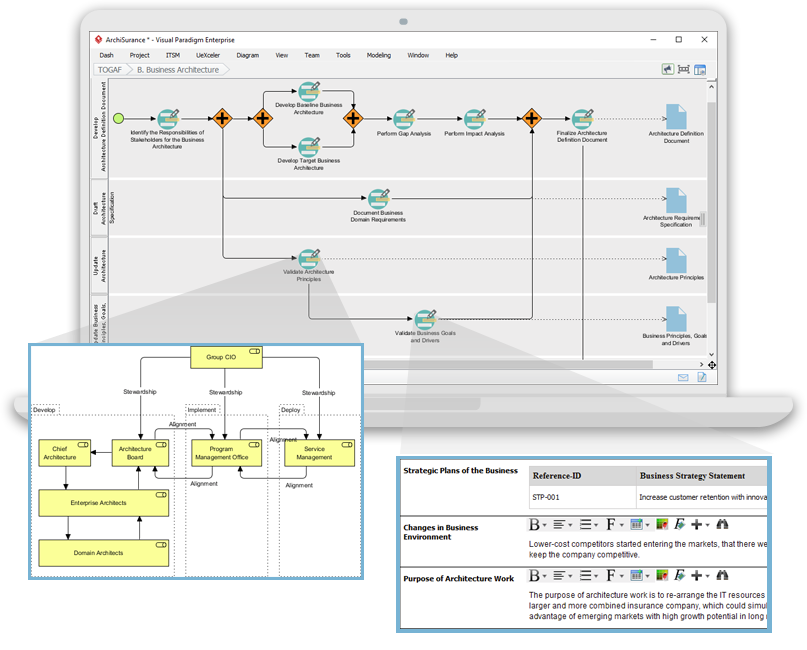
Navigating TOGAF: Your Guide to the ADM Process - Visual Paradigm Guides

1. Dukungan ArchiMate yang Komprehensif

  • Standar ArchiMate Lengkap: Visual Paradigm mendukung standar ArchiMate terbaru, termasuk ArchiMate 3.1, memastikan Anda dapat memodelkan menggunakan semua elemen dan hubungan ArchiMate resmi.
  • Perpustakaan Elemen yang Kaya: Alat ini menyediakan perpustakaan elemen ArchiMate yang luas, memudahkan pembuatan model yang rinci dan akurat.

2. Antarmuka yang Ramah Pengguna

  • Desain yang Intuitif: Alat ini menawarkan antarmuka yang ramah pengguna yang mudah dijelajahi, bahkan bagi pengguna yang baru mengenal pemodelan ArchiMate.
  • Seret dan Letakkan: Fungsi seret dan letakkan memungkinkan pembuatan model yang cepat dan efisien.

3. Fitur Pemodelan Lanjutan

  • Tampilan Berlapis: Mendukung pembuatan tampilan berlapis (misalnya, Bisnis, Aplikasi, Teknologi) untuk memberikan pandangan menyeluruh terhadap arsitektur perusahaan.
  • Hubungan Antar-Lapisan: Memungkinkan definisi dan visualisasi hubungan secara mudah di berbagai lapisan arsitektur.

4. Kolaborasi dan Berbagi

  • Kolaborasi Tim: Visual Paradigm mendukung kerja kolaboratif, memungkinkan beberapa pengguna bekerja pada proyek yang sama secara bersamaan.
  • Kontrol Versi: Kontrol versi terintegrasi membantu mengelola perubahan dan melacak perkembangan model Anda.

5. Kemampuan Integrasi

  • Integrasi Alat: Terintegrasi secara mulus dengan alat dan platform lain, seperti JIRA, Confluence, dan berbagai basis data, meningkatkan praktik EA secara keseluruhan.
  • Impor/Ekspor: Mendukung impor dan ekspor model dalam berbagai format, termasuk Format File Pertukaran ArchiMate, memastikan kompatibilitas dengan alat lain.

6. Dokumentasi dan Pelaporan

  • Dokumentasi Otomatis: Menghasilkan dokumentasi komprehensif dari model ArchiMate Anda, menghemat waktu dan memastikan konsistensi.
  • Laporan Khusus: Memungkinkan pembuatan laporan khusus yang disesuaikan dengan kebutuhan pemangku kepentingan tertentu.

7. Pelatihan dan Dukungan

  • Sumber Daya yang Melimpah: Menyediakan berbagai tutorial, panduan, dan contoh untuk membantu pengguna memulai dan menguasai pemodelan ArchiMate.
  • Dukungan Pelanggan: Menyediakan dukungan pelanggan yang kuat untuk membantu menangani masalah atau pertanyaan yang mungkin muncul.

8. Skalabilitas

  • Solusi yang Dapat Dikembangkan: Cocok untuk proyek EA skala kecil maupun besar, menjadikannya alat yang serbaguna bagi organisasi dari segala ukuran.

9. Kepatuhan dan Standar

  • Standar Industri: Selaras dengan standar industri dan praktik terbaik, memastikan bahwa model EA Anda sesuai dan terkini.

Kesimpulan

ArchiMate menyediakan cara yang kuat dan standar untuk memodelkan arsitektur perusahaan, mendukung metodologi TOGAF ADM. Dengan memahami konsep kunci, lapisan, elemen, dan hubungan dalam ArchiMate, Anda dapat secara efektif memodelkan dan mengkomunikasikan arsitektur kompleks kepada pemangku kepentingan. Contoh yang disediakan menggambarkan bagaimana ArchiMate dapat digunakan untuk memodelkan proses bisnis, kerja sama aplikasi, dan realisasi teknologi, mendukung berbagai tahap dalam TOGAF ADM.

Sumber Daya Alat ArchiMate

  1. Alat Diagram ArchiMate Online Gratis

    • Deskripsi: Buat diagram ArchiMate secara online dengan alat gratis yang mendukung bahasa pemodelan visual ArchiMate 3. Termasuk contoh dan templat untuk membantu Anda memulai.
    • URLAlat Diagram ArchiMate Online Gratis 1
  2. Halaman Utama – Sumber Daya ArchiMate Gratis

  3. Visual Paradigm – UML, Agile, PMBOK, TOGAF, BPMN dan Lainnya!

  4. Bab 7. ArchiMate – Lingkaran Komunitas Visual Paradigm

  5. Apa itu ArchiMate?

    • Deskripsi: Panduan pembelajaran langkah demi langkah untuk ArchiMate, termasuk cara menggunakannya untuk pemodelan arsitektur perusahaan.
    • URLApa itu ArchiMate? 5
  6. Alat ArchiMate

    • Deskripsi: Pelajari cara menggunakan Visual Paradigm, alat desain dan manajemen yang dirancang untuk tim perangkat lunak agil.
    • URLAlat ArchiMate 6
  7. Perangkat Lunak ArchiMate Terbaik

    • Deskripsi: Alat ArchiMate bersertifikat untuk desain dan pemodelan EA yang efektif. Gambar cepat diagram ArchiMate yang sesuai dengan spesifikasi resmi The Open Group.
    • URLPerangkat Lunak ArchiMate Terbaik 7
  8. Cara Memformat Elemen ArchiMate?

    • Deskripsi: Pelajari cara mengedit elemen ArchiMate dengan melakukan tindakan seperti mengubah ukuran dan mengganti warna.
    • URLCara Memformat Elemen ArchiMate? 8
  9. Panduan Viewpoint ArchiMate – Viewpoint Peta Sumber Daya

  10. Tutorial Diagram ArchiMate

    • Deskripsi: Tutorial yang membantu Anda mempelajari diagram ArchiMate, cara membuatnya, dan kapan menggunakannya. Termasuk contoh dan tips.
    • URLTutorial Diagram ArchiMate 10

Sumber daya ini seharusnya memberikan titik awal yang komprehensif untuk menggunakan alat ArchiMate Visual Paradigm dalam pemodelan arsitektur perusahaan.
Panduan Lengkap tentang Proses Panduan-Ke TOGAF Visual Paradigm

Pendahuluan

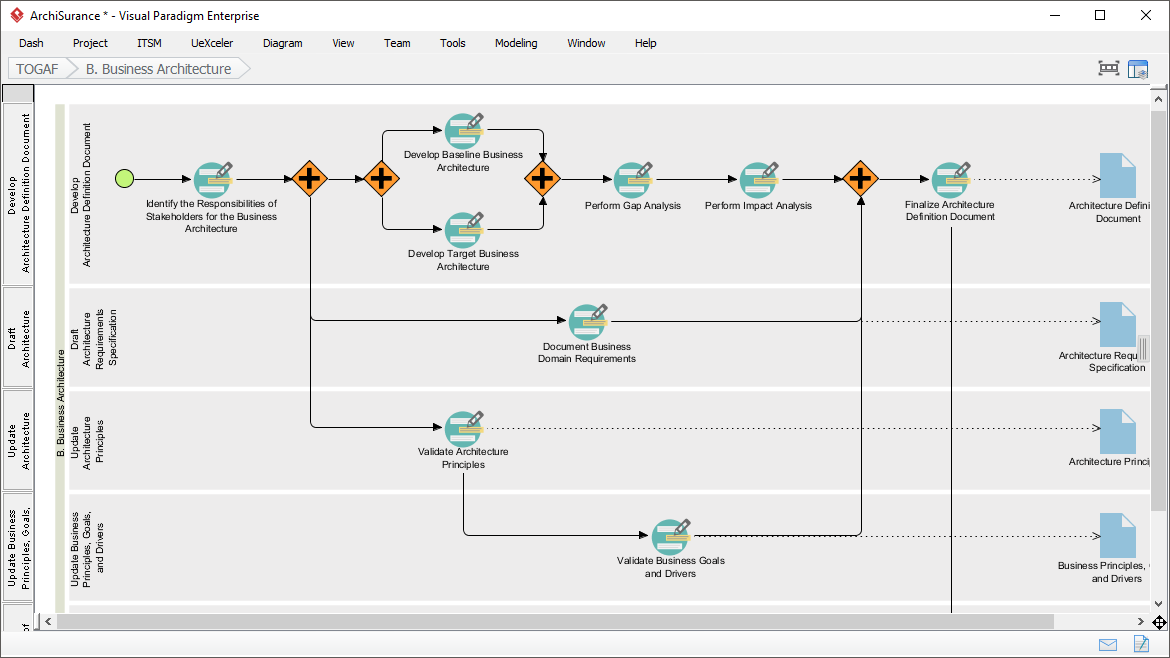
Proses Panduan-Ke TOGAF Visual Paradigm adalah alat yang kuat yang dirancang untuk mempermudah adopsi Metode Pengembangan Arsitektur TOGAF (ADM). Ini menyediakan panduan langkah demi langkah, petunjuk, dan contoh nyata untuk mendukung pengembangan arsitektur perusahaan. Panduan komprehensif ini akan mengeksplorasi fitur utama, manfaat, dan bidang aplikasi Proses Panduan-Ke TOGAF Visual Paradigm, menyoroti mengapa alat ini menonjol di bidang arsitektur perusahaan.

Transform Your Business with Visual Paradigm and TOGAF - Visual Paradigm Guides

Fitur Utama

  1. Panduan Langkah demi Langkah:

    • Proses Panduan-Ke menyediakan petunjuk rinci dan langkah demi langkah untuk setiap tahap ADM TOGAF, memastikan pengguna dapat menavigasi kompleksitas pengembangan arsitektur perusahaan dengan mudah1112.
  2. Integrasi dengan ArchiMate:

    • Visual Paradigm mendukung integrasi ArchiMate dengan ADM TOGAF, memberikan kombinasi yang kuat untuk inisiatif arsitektur perusahaan. ArchiMate 3, dengan sistem notasi yang serbaguna, memungkinkan arsitek untuk mengungkapkan model kompleks secara efektif1314.
  3. Manajemen Tugas Otomatis:

    • Alat ini meningkatkan seluruh proses dengan manajemen tugas otomatis dan notifikasi, memungkinkan pengguna mengembangkan hasil arsitektur secara bertahap dan kolaboratif15.
  4. Peta Proses Visual:

    • Perangkat lunak ini memiliki peta proses visual yang membantu pengguna menavigasi seluruh proses arsitektur perusahaan dengan mudah. Ini menyediakan seperangkat lengkap alat perencanaan, desain, dan pengembangan untuk menyelesaikan aktivitas ADM14.
  5. Toolkit Komprehensif:

    • Visual Paradigm menawarkan berbagai alat yang disesuaikan untuk aktivitas ADM, termasuk diagram ArchiMate untuk memodelkan aspek bisnis, TI, dan fisik dari arsitektur perusahaan. Alat-alat ini memberikan pandangan komprehensif terhadap arsitektur, sehingga lebih mudah dipahami dan diimplementasikan TOGAF14.

Manfaat

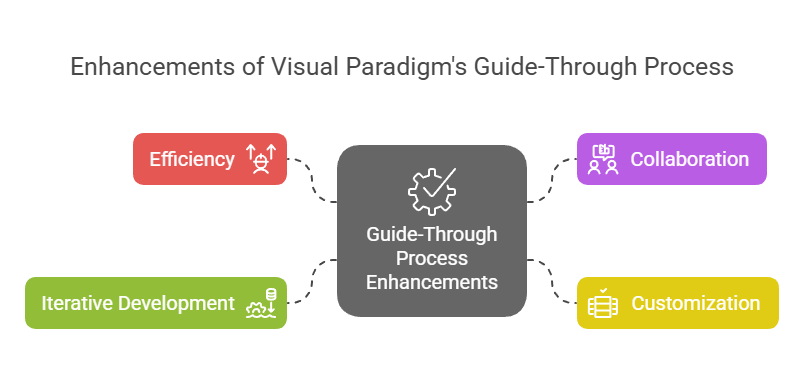
Enhancements of Visual Paradigm's Guide-Through Process: Visual Paradigm

  1. Efisiensi:

    • Proses Panduan-Melalui secara signifikan meningkatkan efisiensi dengan memberikan petunjuk yang jelas dan mengotomatisasi tugas, memungkinkan pengguna fokus pada keputusan strategis daripada detail prosedural11.
  2. Kolaborasi:

    • Alat ini memfasilitasi kolaborasi antara berbagai pemangku kepentingan, termasuk pemilik proyek, analis bisnis, arsitek perusahaan, dan profesional TI. Pendekatan kolaboratif ini memastikan bahwa semua pihak terlibat dan mendapatkan informasi selama proses pengembangan arsitektur15.
  3. Kustomisasi:

    • Alat Visual Paradigm memungkinkan kustomisasi, memungkinkan organisasi menyesuaikan proses ADM sesuai kebutuhan dan tujuan mereka. Fleksibilitas ini memastikan bahwa proses pengembangan arsitektur selaras dengan kebutuhan unik organisasi11.
  4. Pengembangan Iteratif:

    • Sifat iteratif dari ADM TOGAF sepenuhnya didukung oleh Proses Panduan-Melalui Visual Paradigm. Ini memungkinkan praktisi menyesuaikan dan menyempurnakan pekerjaan mereka berdasarkan kebutuhan informasi yang berkembang dan umpan balik pemangku kepentingan, memastikan bahwa arsitektur memenuhi kebutuhan yang terus berubah dari organisasi16.

Bidang Aplikasi

  1. Pengembangan Arsitektur Perusahaan:

    • Bidang aplikasi utama adalah pengembangan arsitektur perusahaan, di mana Proses Panduan-Melalui membantu organisasi merancang, merencanakan, menerapkan, dan mengelola arsitektur perusahaan mereka. Ini memberikan pendekatan terstruktur untuk menyelaraskan tujuan bisnis dengan strategi TI secara efektif17.
  2. Transformasi Digital:

    • Alat ini sangat penting untuk inisiatif transformasi digital, di mana organisasi berusaha meningkatkan pengalaman pelanggan dan efisiensi operasional melalui penerapan teknologi dan proses baru18.
  3. Perencanaan Strategis:

    • Proses Panduan Visual Paradigm mendukung perencanaan strategis dengan menyediakan kerangka kerja komprehensif untuk mengembangkan visi arsitektur, menentukan cakupan, mengidentifikasi pemangku kepentingan, dan membuat rencana komunikasi. Ini memastikan bahwa proses pengembangan arsitektur selaras dengan tujuan bisnis dan penggerak strategis19.
  4. Metodologi Agile:

    • Alat ini mengintegrasikan metodologi agile dan UML, memberikan solusi komprehensif untuk pengembangan arsitektur perusahaan. Integrasi ini memastikan bahwa proses pengembangan arsitektur bersifat fleksibel dan efisien, mendukung praktik agile dalam organisasi14.

Kesimpulan

Proses Panduan TOGAF Visual Paradigm menonjol sebagai alat yang komprehensif dan efektif untuk mendukung TOGAF ADM. Panduan langkah demi langkah, integrasi dengan ArchiMate, manajemen tugas otomatis, dan fitur kolaboratif menjadikannya sumber daya yang tak ternilai bagi pengembangan arsitektur perusahaan. Dengan memanfaatkan alat ini, organisasi dapat meningkatkan efisiensi, kolaborasi, kustomisasi, dan pengembangan iteratif, sehingga pada akhirnya mencapai tujuan arsitektur perusahaan dan mendorong nilai bisnis serta transformasi

Bab 3 ArchiMate 3.2

3 Struktur Bahasa

Bab ini menjelaskan struktur bahasa pemodelan Arsitektur Perusahaan ArchiMate. Definisi rinci dan contoh dari kumpulan elemen dan hubungan standar yang dimilikinya dijelaskan lebih lanjut pada Bab 4 hingga Bab 1

3.1 Pertimbangan Desain Bahasa

Tantangan utama dalam pengembangan metamodel umum untuk Arsitektur Perusahaan adalah menyeimbangkan antara spesifisitas bahasa untuk domain arsitektur individu dan kumpulan konsep arsitektur yang sangat umum, yang mencerminkan pandangan sistem sebagai sekumpulan entitas yang saling terkait.

Desain bahasa ArchiMate dimulai dari sekelompok konsep yang relatif umum. Konsep-konsep ini telah disesuaikan untuk penerapan pada berbagai lapisan arsitektur, seperti yang dijelaskan pada bagian berikutnya. Batasan desain yang paling penting pada bahasa ini adalah bahwa bahasa ini secara eksplisit dirancang sekecil mungkin, namun tetap dapat digunakan untuk sebagian besar tugas pemodelan Arsitektur Perusahaan. Banyak bahasa lain berusaha memenuhi kebutuhan semua pengguna yang mungkin. Dalam upaya mempermudah pembelajaran dan penggunaan, bahasa ArchiMate dibatasi hanya pada konsep-konsep yang cukup untuk memodelkan 80% kasus praktis yang umum.

Standar ini tidak menjelaskan alasan rinci di balik desain bahasa ArchiMate. Pembaca yang tertarik dapat merujuk ke [1], [2], dan [3], yang menyediakan penjelasan rinci mengenai pembangunan bahasa dan pertimbangan desainnya.

3.2 Struktur Bahasa Tingkat Atas

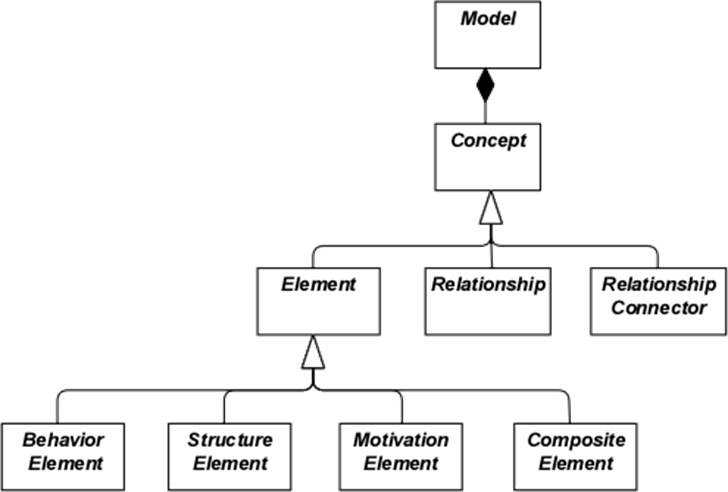
Gambar 1 menggambarkan struktur hierarkis tingkat atas bahasa ini:

  • Model adalah kumpulan darikonsep– konsep adalah salah satu darielemenatauhubungan
  • Sebuah elemen adalah elemen perilaku, elemen struktur, elemen motivasi, atau elemen komposit

Perhatikan bahwa ini adalahabstrakkonsep; mereka tidak dimaksudkan untuk digunakan secara langsung dalam model. Untuk menandainya, mereka digambarkan dengan warna putih dan label dalam huruf miring. Lihat Bab 4 untuk penjelasan mengenai notasi yang digunakan pada Gambar 1.

Gambar 1: Hierarki Tingkat Atas Konsep ArchiMate

3.3 Lapisan Bahasa ArchiMate

Bahasa inti ArchiMate mendefinisikan struktur elemen-elemen umum dan hubungan-hubungannya, yang dapat disesuaikan pada berbagai lapisan. Tiga lapisan didefinisikan dalam bahasa inti ArchiMate sebagai berikut:

  1. LapisanBisnismenggambarkan layanan bisnis yang ditawarkan kepada pelanggan, yang direalisasikan dalam organisasi melalui proses bisnis yang dilakukan oleh pelaku bisnis.
  2. LapisanAplikasimenggambarkan layanan aplikasi yang mendukung bisnis, serta aplikasi-aplikasi yang mewujudkannya.
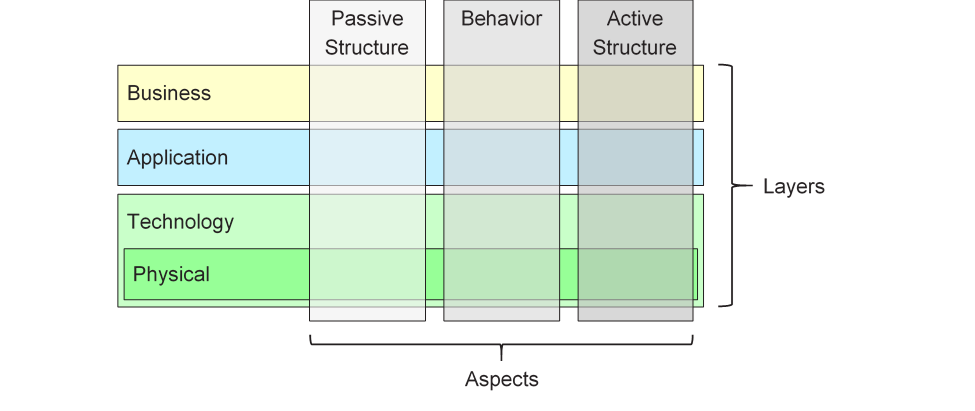
  3. LapisanTeknologi mencakup teknologi informasi dan teknologi operasional. Anda dapat memodelkan, misalnya, teknologi pemrosesan, penyimpanan, dan komunikasi untuk mendukung dunia aplikasi dan lapisan Bisnis, serta memodelkan teknologi operasional atau fisik dengan fasilitas, peralatan fisik, bahan, dan jaringan distribusi.

Struktur umum model dalam berbagai lapisan serupa. Jenis elemen dan hubungan yang digunakan sama, meskipun sifat dan tingkat detailnya berbeda. Pada bab berikutnya, struktur metamodel umum dipaparkan. Pada Bab 8, Bab 9, dan Bab 10 elemen-elemen ini dikhususkan untuk mendapatkan elemen-elemen yang spesifik pada lapisan tertentu.

Sejalan dengan orientasi layanan, hubungan yang paling penting antar lapisan dibentuk oleh hubungan “melayani”[1] hubungan, yang menunjukkan bagaimana elemen-elemen dalam satu lapisan dilayani oleh layanan-layanan dari lapisan lain. (Catatan, namun, bahwa layanan tidak hanya melayani elemen dalam lapisan lain, tetapi juga dapat melayani elemen dalam lapisan yang sama.) Jenis hubungan kedua dibentuk oleh hubungan realisasi: elemen-elemen dalam lapisan yang lebih rendah dapat merealisasikan elemen-elemen yang setara dalam lapisan yang lebih tinggi; misalnya, sebuah

objek data” (Lapisan Aplikasi) dapat merealisasikan objek bisnis” (Lapisan Bisnis); atau sebuah

“artefak” (Lapisan Teknologi) dapat merealisasikan baik objek data” maupun komponen aplikasi” (Lapisan Aplikasi).

3.4 Kerangka Kerja Inti ArchiMate

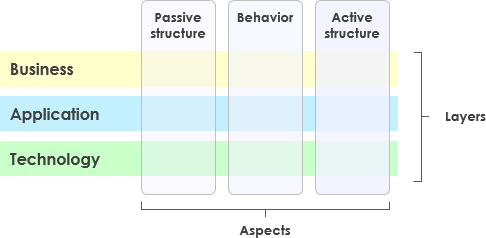
Kerangka Kerja Inti ArchiMate adalah kerangka berupa sembilan sel yang digunakan untuk mengklasifikasikan elemen-elemen bahasa inti ArchiMate. Kerangka ini terdiri dari tiga aspek dan tiga lapisan, seperti yang ditunjukkan pada Gambar 2. Ini dikenal sebagai Kerangka Kerja Inti ArchiMate.

Penting untuk dipahami bahwa klasifikasi elemen berdasarkan aspek dan lapisan hanya bersifat global. Elemen arsitektur dunia nyata tidak harus ketat terbatas pada satu aspek atau lapisan karena elemen-elemen yang menghubungkan aspek dan lapisan yang berbeda memainkan peran sentral dalam deskripsi arsitektur yang koheren. Sebagai contoh, menyusul sedikit lebih awal dari pembahasan konseptual selanjutnya, peran bisnis berfungsi sebagai elemen perantara antara elemen-elemen yang “murni berperilaku” dan elemen-elemen yang “murni struktural”, dan dapat bergantung pada konteks apakah suatu perangkat lunak tertentu dianggap bagian dari Lapisan Aplikasi atau Lapisan Teknologi.

Gambar 2: Kerangka Kerja Inti ArchiMate

Struktur kerangka ini memungkinkan pemodelan perusahaan dari berbagai sudut pandang, di mana posisi dalam sel menonjolkan kepedulian pemangku kepentingan. Seorang pemangku kepentingan biasanya memiliki kepedulian yang mencakup beberapa sel.

Dimensi kerangka ini adalah sebagai berikut:

  • Lapisan – tiga tingkat di mana perusahaan dapat dimodelkan dalam ArchiMate – Bisnis, Aplikasi, dan Teknologi (seperti dijelaskan dalam Bagian 3.3)
  • Aspek:

Aspek Struktur Aktif, yang mewakili elemen-elemen struktural (aktor bisnis, komponen aplikasi, dan perangkat yang menunjukkan perilaku nyata; yaitu,)

subjek aktivitas)

Aspek Perilaku, yang mewakili perilaku (proses, fungsi, peristiwa, dan layanan) yang dilakukan oleh aktor; elemen-elemen struktural ditugaskan ke elemen-elemen perilaku, untuk menunjukkan siapa atau apa yang menunjukkan perilaku

Aspek Struktur Pasif, yang mewakili objek-objek di mana perilaku dilakukan; biasanya berupa objek informasi di Lapisan Bisnis dan objek data di Lapisan Aplikasi, tetapi juga dapat digunakan untuk mewakili objek fisik

Tiga aspek ini terinspirasi dari bahasa alami di mana sebuah kalimat memiliki subjek (struktur aktif), kata kerja (perilaku), dan objek (struktur pasif). Dengan menggunakan konstruksi yang sama seperti yang biasa digunakan orang dalam bahasa mereka sendiri, bahasa ArchiMate lebih mudah dipelajari dan dibaca.

Karena notasi ArchiMate adalahgrafisbahasa di mana elemen-elemen diatur secara spasial, urutan ini tidak berpengaruh dalam pemodelan.

Sebuah elemen komposit, seperti yang ditunjukkan pada Gambar 1, adalah elemen yang tidak harus pas dalam satu aspek (kolom) kerangka, tetapi dapat menggabungkan dua atau lebih aspek.

Perhatikan bahwa bahasa ArchiMate tidak mengharuskan pemodel untuk menggunakan tata letak tertentu seperti struktur kerangka kerja ini; hal ini hanya merupakan kategorisasi dari elemen-elemen bahasa.

3.5 Kerangka Kerja ArchiMate Lengkap

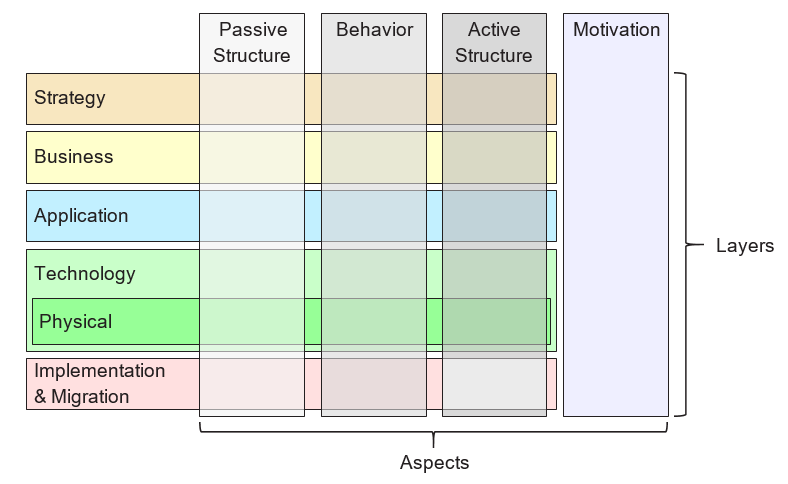
Kerangka Kerja ArchiMate Lengkap, sebagaimana dijelaskan dalam versi standar ini, menambahkan sejumlah lapisan dan aspek ke dalam Kerangka Kerja Inti. Elemen fisik dimasukkan ke dalam Lapisan Teknologi untuk memodelkan fasilitas dan peralatan fisik, jaringan distribusi, dan bahan. Dengan demikian, elemen-elemen ini juga merupakan elemen inti. Elemen strategi diperkenalkan untuk memodelkan arah dan pilihan strategis. Elemen-elemen ini dijelaskan dalam Bab 7. Aspek motivasi diperkenalkan pada tingkat umum di bab berikutnya dan dijelaskan secara rinci dalam Bab 6. Elemen implementasi dan migrasi dijelaskan dalam Bab 12. Kerangka Kerja ArchiMate Lengkap yang dihasilkan ditampilkan pada Gambar 3.

Gambar 3: Kerangka Kerja ArchiMate Lengkap

Bahasa ArchiMate tidak mendefinisikan lapisan khusus untuk informasi; namun, elemen-elemen dari aspek struktur pasif seperti objek bisnis, objek data, dan artefak digunakan untuk merepresentasikan entitas informasi. Pemodelan informasi didukung di seluruh lapisan ArchiMate yang berbeda.

3.6 Abstraksi dalam Bahasa ArchiMate

Struktur bahasa ArchiMate mengakomodasi beberapa bentuk abstraksi dan penyempurnaan yang umum. Pertama, perbedaan antara tampilan eksternal (kotak hitam, mengabstrak dari isi kotak) dan tampilan internal (kotak putih) merupakan hal yang umum dalam desain sistem. Tampilan eksternal menggambarkan apa yang harus dilakukan sistem terhadap lingkungannya, sedangkan tampilan internal menggambarkan bagaimana sistem melakukan hal tersebut.

Kedua, perbedaan antara perilaku dan struktur aktif sering digunakan untuk memisahkan apa yang harus dilakukan sistem dan bagaimana sistem melakukannya dari komponen-komponen sistem (manusia, aplikasi, dan infrastruktur) yang melakukannya. Dalam pemodelan sistem baru, seringkali bermanfaat untuk memulai dengan perilaku yang harus dilakukan sistem, sedangkan dalam pemodelan sistem yang sudah ada, seringkali bermanfaat untuk memulai dengan manusia, aplikasi, dan infrastruktur yang membentuk sistem, lalu menganalisis secara rinci perilaku yang dilakukan oleh struktur aktif ini.

Perbedaan ketiga adalah antara tingkat abstraksi konseptual, logis, dan fisik. Hal ini berasal dari pemodelan data: elemen konseptual merepresentasikan informasi yang dianggap relevan oleh bisnis; elemen logis memberikan struktur logis pada informasi ini agar dapat dimanipulasi oleh sistem informasi; elemen fisik menggambarkan penyimpanan informasi ini; misalnya dalam bentuk file atau tabel basis data. Dalam bahasa ArchiMate, hal ini sesuai dengan objek bisnis, objek data, dan artefak, beserta hubungan realisasi di antara mereka.

Perbedaan antara elemen logis dan fisik juga diterapkan dalam deskripsi aplikasi. Metamodel Perusahaan TOGAF [4] mencakup serangkaian entitas yang menggambarkan komponen dan layanan bisnis, data, aplikasi, dan teknologi untuk menggambarkan konsep arsitektur. Komponen logis adalah penyatuan data atau fungsi yang independen terhadap implementasi atau produk, sedangkan komponen fisik adalah komponen perangkat lunak yang nyata, perangkat, dll. Perbedaan ini direkam dalam kerangka TOGAF dalam bentuk Blok Bangunan Arsitektur (ABBs) dan Blok Bangunan Solusi (SBBs). Perbedaan ini kembali berguna dalam mengembangkan Arsitektur Perusahaan dari deskripsi tingkat tinggi dan abstrak menjadi desain tingkat nyata dan implementasi. Perhatikan bahwa blok bangunan dapat berisi beberapa elemen, yang biasanya dimodelkan menggunakan konsep pengelompokan dalam bahasa ArchiMate.

Bahasa ArchiMate memiliki tiga cara untuk memodelkan abstraksi semacam ini. Pertama, sebagaimana dijelaskan dalam [6], elemen perilaku seperti fungsi aplikasi dan teknologi dapat digunakan untuk memodelkan komponen logis, karena mereka merepresentasikan penyatuan fungsi yang independen terhadap implementasi. Komponen fisik yang sesuai kemudian dapat dimodelkan menggunakan elemen struktur aktif seperti komponen aplikasi dan node, yang ditugaskan ke elemen perilaku. Kedua, bahasa ArchiMate mendukung konsep realisasi. Ini dapat dijelaskan paling baik dengan bekerja dari Lapisan Teknologi ke atas. Lapisan Teknologi mendefinisikan artefak fisik dan perangkat lunak yang merealisasikan komponen aplikasi. Ia juga menyediakan pemetaan ke konsep fisik lainnya seperti perangkat, jaringan, dll., yang dibutuhkan untuk realisasi sistem informasi. Hubungan realisasi juga digunakan untuk memodelkan jenis realisasi yang lebih abstrak, seperti antara (lebih spesifik) kebutuhan dan (lebih umum) prinsip, di mana pemenuhan kebutuhan mengimplikasikan kepatuhan terhadap prinsip. Realisasi juga diizinkan antara komponen aplikasi dan antara node. Dengan cara ini, Anda dapat memodelkan komponen aplikasi atau teknologi fisik yang merealisasikan komponen aplikasi atau teknologi logis, masing-masing. Ketiga, komponen aplikasi logis dan fisik dapat didefinisikan sebagai spesialisasi tingkat metamodel dari elemen komponen aplikasi, sebagaimana dijelaskan dalam Bab 14 (lihat juga contoh dalam Bagian 14.2.2). Hal yang sama berlaku untuk komponen teknologi logis dan fisik dari Metamodel Konten TOGAF, yang dapat didefinisikan sebagai spesialisasi dari elemen node (lihat Bagian 14.2.3).

Bahasa ArchiMate secara sengaja tidak mendukung perbedaan antara tipe dan instans. Pada tingkat abstraksi Arsitektur Perusahaan, lebih umum untuk memodelkan tipe dan/atau contoh daripada instans. Demikian pula, suatu proses bisnis dalam bahasa ArchiMate tidak menggambarkan satu instans individu (yaitu, satu eksekusi dari proses tersebut). Dalam kebanyakan kasus, objek bisnis digunakan untuk memodelkan tipe objek (lihat jugakelas UML®), yang dapat memiliki beberapa instans yang ada dalam organisasi. Sebagai contoh, setiap eksekusi proses aplikasi asuransi dapat menghasilkan satu instans khusus dari objek bisnis polis asuransi, tetapi hal ini tidak dimodelkan dalam Arsitektur Perusahaan.

3.7 Konsep dan Notasinya

Bahasa ArchiMate memisahkan konsep-konsep bahasa (yaitu, komponen-komponen metamodel) dari notasi yang digunakan. Kelompok pemangku kepentingan yang berbeda mungkin memerlukan notasi yang berbeda agar dapat memahami model atau tampilan arsitektur. Dalam hal ini, bahasa ArchiMate berbeda dari bahasa seperti UML atau BPMN™, yang hanya memiliki satu notasi standar. Mekanisme sudut pandang yang dijelaskan dalam Bab 13 menyediakan cara untuk mendefinisikan visualisasi yang berorientasi pada pemangku kepentingan.

Meskipun notasi konsep ArchiMate dapat (dan sebaiknya) disesuaikan dengan pemangku kepentingan, standar menyediakan satu notasi grafis umum yang dapat digunakan oleh arsitek dan pihak lain yang mengembangkan model ArchiMate. Notasi ini ditujukan bagi audiens yang sudah terbiasa dengan teknik pemodelan teknis yang ada seperti Diagram Hubungan Entitas (ERD), UML, atau BPMN, sehingga menyerupainya. Dalam sisa dokumen ini, kecuali dinyatakan lain, simbol-simbol yang digunakan untuk menggambarkan konsep bahasa merepresentasikan notasi standar ArchiMate. Notasi standar untuk sebagian besar elemen terdiri dari kotak dengan ikon di sudut kanan atas. Dalam beberapa kasus, ikon itu sendiri juga dapat digunakan sebagai notasi alternatif. Ikonografi standar ini sebaiknya diprioritaskan sebisa mungkin agar siapa pun yang menguasai bahasa ArchiMate dapat membaca diagram yang dihasilkan dalam bahasa tersebut.

3.8 Penggunaan Penyusunan

Penggunaan elemen di dalam elemen lain dapat digunakan sebagai notasi grafis alternatif untuk mengungkapkan beberapa hubungan. Hal ini dijelaskan secara lebih rinci dalam Bab 5 dan dalam definisi masing-masing hubungan tersebut.

3.9 Penggunaan Warna dan Petunjuk Notasi

Dalam gambar metamodel dalam standar ini, nuansa abu-abu digunakan untuk membedakan elemen-elemen yang termasuk dalam aspek-aspek berbeda dari kerangka kerja ArchiMate, sebagai berikut:

  • Putih untuk konsep abstrak (yaitu, tidak dapat diinstansiasi)
  • Abu-abu terang untuk struktur pasif
  • Abu-abu sedang untuk perilaku
  • Abu-abu gelap untuk struktur aktif

Dalam model ArchiMate, tidak ada semantik formal yang ditetapkan untuk warna dan penggunaan warna dibiarkan kepada pemodel. Namun, warna dapat digunakan secara bebas untuk menekankan aspek tertentu dalam model. Sebagai contoh, dalam banyak model contoh yang disajikan dalam standar ini, warna digunakan untuk membedakan antar lapisan dalam Kerangka Kerja Inti ArchiMate, sebagai berikut:

  • Kuning untuk Lapisan Bisnis
  • Biru untuk Lapisan Aplikasi
  • Hijau untuk Lapisan Teknologi

Mereka juga dapat digunakan untuk penekanan visual. Teks yang direkomendasikan yang menyediakan panduan adalah Bab 6 dari [1]. Selain warna, petunjuk notasi lainnya dapat digunakan untuk membedakan antar lapisan kerangka kerja. Huruf M, S, B, A, T, P, atau I di sudut kiri atas suatu elemen dapat digunakan untuk menunjukkan elemen Motivasi, Strategi, Bisnis, Aplikasi, Teknologi, Fisik, atau Implementasi & Migrasi, masing-masing. Contoh notasi ini ditampilkan dalam Contoh 34.

Notasi standar juga menggunakan konvensi dengan bentuk sudut simbol-simbolnya untuk berbagai jenis elemen, sebagai berikut:

  • Sudut persegi digunakan untuk menunjukkan elemen struktur
  • Sudut bulat digunakan untuk menunjukkan elemen perilaku
  • Sudut diagonal digunakan untuk menunjukkan elemen motivasi

[1]Perhatikan bahwa ini sebelumnya disebut sebagai “digunakan oleh” dalam versi standar sebelumnya. Untuk memperjelas, nama ini telah diubah menjadi “melayani”.

ArchiMate 3.2 Chapter 3

3 Language Structure

This chapter describes the structure of the ArchiMate Enterprise Architecture modeling language. The detailed definition and examples of its standard set of elements and relationships follow in Chapter 4 to Chapter 1

3.1 Language Design Considerations

A key challenge in the development of a general metamodel for Enterprise Architecture is to strike a balance between the specificity of languages for individual architecture domains and a very general set of architecture concepts, which reflects a view of systems as a mere set of inter-related entities.

The design of the ArchiMate language started from a set of relatively generic concepts. These have been specialized towards application at different architectural layers, as explained in the following sections. The most important design restriction on the language is that it has been explicitly designed to be as small as possible, but still usable for most Enterprise Architecture modeling tasks. Many other languages try to accommodate the needs of all possible users. In the interest of simplicity of learning and use, the ArchiMate language has been limited to the concepts that suffice for modeling the proverbial 80% of practical cases.

This standard does not describe the detailed rationale behind the design of the ArchiMate language. The interested reader is referred to [1], [2], and [3], which provide a detailed description of the language construction and design considerations.

3.2 Top-Level Language Structure

Figure 1 outlines the top-level hierarchical structure of the language:

  • A model is a collection of concepts – a concept is either an element or a relationship
  • An element is either a behavior element, a structure element, a motivation element, or a composite element

Note that these are abstract concepts; they are not intended to be used directly in models. To signify this, they are depicted in white with labels in italics. See Chapter 4 for an explanation of the notation used in Figure 1.

Figure 1: Top-Level Hierarchy of ArchiMate Concepts

3.3 Layering of the ArchiMate Language

The ArchiMate core language defines a structure of generic elements and their relationships, which can be specialized in different layers. Three layers are defined within the ArchiMate core language as follows:

  1. The Business Layer depicts business services offered to customers, which are realized in the organization by business processes performed by business actors.
  2. The Application Layer depicts application services that support the business, and the applications that realize them.
  3. The Technology Layer comprises both information and operational technology. You can model, for example, processing, storage, and communication technology in support of the application world and Business Layers, and model operational or physical technology with facilities, physical equipment, materials, and distribution networks.

The general structure of models within the different layers is similar. The same types of elements and relationships are used, although their exact nature and granularity differ. In the next chapter, the structure of the generic metamodel is presented. In Chapter 8, Chapter 9, and Chapter 10 these elements are specialized to obtain elements specific to a particular layer.

In alignment with service-orientation, the most important relationship between layers is formed by “serving”[1] relationships, which show how the elements in one layer are served by the services of other layers. (Note, however, that services need not only serve elements in another layer, but also can serve elements in the same layer.) A second type of link is formed by realization relationships: elements in lower layers may realize comparable elements in higher layers; e.g., a

“data object” (Application Layer) may realize a “business object” (Business Layer); or an

“artifact” (Technology Layer) may realize either a “data object” or an “application component” (Application Layer).

3.4 The ArchiMate Core Framework

The ArchiMate Core Framework is a framework of nine cells used to classify elements of the ArchiMate core language. It is made up of three aspects and three layers, as illustrated in Figure 2. This is known as the ArchiMate Core Framework.

It is important to understand that the classification of elements based on aspects and layers is only a global one. Real-life architecture elements need not strictly be confined to one aspect or layer because elements that link the different aspects and layers, play a central role in a coherent architectural description. For example, running somewhat ahead of the later conceptual discussions, business roles serve as intermediary elements between “purely behavioral” elements and “purely structural” elements, and it may depend on the context whether a certain piece of software is considered to be part of the Application Layer or the Technology Layer.

Figure 2: ArchiMate Core Framework

The structure of the framework allows for modeling of the enterprise from different viewpoints, where the position within the cells highlights the concerns of the stakeholder. A stakeholder typically can have concerns that cover multiple cells.

The dimensions of the framework are as follows:

  • Layers – the three levels at which an enterprise can be modeled in ArchiMate – Business, Application, and Technology (as described in Section 3.3)
  • Aspects:

— The Active Structure Aspect, which represents the structural elements (the business actors, application components, and devices that display actual behavior; i.e., the

“subjects” of activity)

— The Behavior Aspect, which represents the behavior (processes, functions, events, and services) performed by the actors; structural elements are assigned to behavioral elements, to show who or what displays the behavior

— The Passive Structure Aspect, which represents the objects on which behavior is performed; these are usually information objects in the Business Layer and data objects in the Application Layer, but they may also be used to represent physical objects

These three aspects were inspired by natural language where a sentence has a subject (active structure), a verb (behavior), and an object (passive structure). By using the same constructs that people are used to in their own languages, the ArchiMate language is easier to learn and read.

Since ArchiMate notation is a graphical language where elements are organized spatially, this order is of no consequence in modeling.

A composite element, as shown in Figure 1, is an element that does not necessarily fit in a single aspect (column) of the framework but may combine two or more aspects.

Note that the ArchiMate language does not require the modeler to use any particular layout such as the structure of this framework; it is merely a categorization of the language elements.

3.5 The ArchiMate Full Framework

The ArchiMate Full Framework, as described in this version of the standard, adds a number of layers and an aspect to the Core Framework_._ The physical elements are included in the Technology Layer for modeling physical facilities and equipment, distribution networks, and materials. As such, these are also core elements. The strategy elements are introduced to model strategic direction and choices. They are described in Chapter 7. The motivation aspect is introduced at a generic level in the next chapter and described in detail in Chapter 6. The implementation and migration elements are described in Chapter 12. The resulting ArchiMate Full Framework is shown in Figure 3.

Figure 3: ArchiMate Full Framework

The ArchiMate language does not define a specific layer for information; however, elements from the passive structure aspect such as business objects, data objects, and artifacts are used to represent information entities. Information modeling is supported across the different ArchiMate layers.

3.6 Abstraction in the ArchiMate Language

The structure of the ArchiMate language accommodates several familiar forms of abstraction and refinement. First of all, the distinction between an external (black-box, abstracting from the contents of the box) and internal (white-box) view is common in systems design. The external view depicts what the system has to do for its environment, while the internal view depicts how it does this.

Second, the distinction between behavior and active structure is commonly used to separate what the system must do and how the system does it from the system constituents (people, applications, and infrastructure) that do it. In modeling new systems, it is often useful to start with the behaviors that the system must perform, while in modeling existing systems, it is often useful to start with the people, applications, and infrastructure that comprise the system, and then analyze in detail the behaviors performed by these active structures.

A third distinction is between conceptual, logical, and physical abstraction levels. This has its roots in data modeling: conceptual elements represent the information the business finds relevant; logical elements provide logical structure to this information for manipulation by information systems; physical elements describe the storage of this information; for example, in the form of files or database tables. In the ArchiMate language, this corresponds with business objects, data objects, and artifacts, along with the realization relationships between them.

The distinction between logical and physical elements has also been carried over to the description of applications. The TOGAF Enterprise Metamodel [4] includes a set of entities that describe business, data, application, and technology components and services to describe architecture concepts. Logical components are implementation or product-independent encapsulations of data or functionality, whereas physical components are tangible software components, devices, etc. This distinction is captured in the TOGAF framework in the form of Architecture Building Blocks (ABBs) and Solution Building Blocks (SBBs). This distinction is again useful in progressing Enterprise Architectures from high-level, abstract descriptions to tangible, implementation-level designs. Note that building blocks may contain multiple elements, which are typically modeled using the grouping concept in the ArchiMate language.

The ArchiMate language has three ways of modeling such abstractions. First, as described in [6], behavior elements such as application and technology functions can be used to model logical components, since they represent implementation-independent encapsulations of functionality. The corresponding physical components can then be modeled using active structure elements such as application components and nodes, assigned to the behavior elements. Second, the ArchiMate language supports the concept of realization. This can best be described by working with the Technology Layer upwards. The Technology Layer defines the physical artifacts and software that realize an application component. It also provides a mapping to other physical concepts such as devices, networks, etc. needed for the realization of an information system. The realization relationship is also used to model more abstract kinds of realization, such as that between a (more specific) requirement and a (more generic) principle, where fulfillment of the requirement implies adherence to the principle. Realization is also allowed between application components and between nodes. This way you can model a physical application or technology component realizing a logical application or technology component, respectively. Third, logical and physical application components can be defined as metamodel-level specializations of the application component element, as described in Chapter 14 (see also the examples in Section 14.2.2). The same holds for the logical and physical technology components of the TOGAF Content Metamodel, which can be defined as specializations of the node element (see Section 14.2.3).

The ArchiMate language intentionally does not support a difference between types and instances. At the Enterprise Architecture abstraction level, it is more common to model types and/or exemplars rather than instances. Similarly, a business process in the ArchiMate language does not describe an individual instance (i.e., one execution of that process). In most cases, a business object is therefore used to model an object type (cf. a UML® class), of which several instances may exist within the organization. For instance, each execution of an insurance application process may result in a specific instance of the insurance policy business object, but that is not modeled in the Enterprise Architecture.

3.7 Concepts and their Notation

The ArchiMate language separates the language concepts (i.e., the constituents of the metamodel) from their notation. Different stakeholder groups may require different notations in order to understand an architecture model or view. In this respect, the ArchiMate language differs from languages such as UML or BPMN™, which have only one standardized notation. The viewpoint mechanism explained in Chapter 13 provides the means for defining such stakeholder-oriented visualizations.

Although the notation of the ArchiMate concepts can (and should) be stakeholder-specific, the standard provides one common graphical notation which can be used by architects and others who develop ArchiMate models. This notation is targeted towards an audience used to existing technical modeling techniques such as Entity Relationship Diagrams (ERDs), UML, or BPMN, and therefore resembles them. In the remainder of this document, unless otherwise noted, the symbols used to depict the language concepts represent the ArchiMate standard notation. This standard notation for most elements consists of a box with an icon in the upper-right corner. In several cases, this icon by itself may also be used as an alternative notation. This standard iconography should be preferred whenever possible so that anyone knowing the ArchiMate language can read the diagrams produced in the language.

3.8 Use of Nesting

Nesting elements inside other elements can be used as an alternative graphical notation to express some relationships. This is explained in more detail in Chapter 5 and in the definition of each of these relationships.

3.9 Use of Colors and Notational Cues

In the metamodel pictures within this standard, shades of grey are used to distinguish elements belonging to the different aspects of the ArchiMate framework, as follows:

  • White for abstract (i.e., non-instantiable) concepts
  • Light grey for passive structures
  • Medium grey for behavior
  • Dark grey for active structures

In ArchiMate models, there are no formal semantics assigned to colors and the use of color is left to the modeler. However, they can be used freely to stress certain aspects in models. For instance, in many of the example models presented in this standard, colors are used to distinguish between the layers of the ArchiMate Core Framework, as follows:

  • Yellow for the Business Layer
  • Blue for the Application Layer
  • Green for the Technology Layer

They can also be used for visual emphasis. A recommended text providing guidelines is Chapter 6 of [1]. In addition to the colors, other notational cues can be used to distinguish between the layers of the framework. A letter M, S, B, A, T, P, or I in the top-left corner of an element can be used to denote a Motivation, Strategy, Business, Application, Technology, Physical, or Implementation & Migration element, respectively. An example of this notation is depicted in Example 34.

The standard notation also uses a convention with the shape of the corners of its symbols for different element types, as follows:

  • Square corners are used to denote structure elements
  • Round corners are used to denote behavior elements
  • Diagonal corners are used to denote motivation elements

[1] Note that this was called “used by” in previous versions of the standard. For the sake of clarity, this name has been changed to “serving”.

Comprehensive Guide to Visual Paradigm’s TOGAF Guide-Through Process

Introduction

Visual Paradigm’s TOGAF Guide-Through Process is a powerful tool designed to streamline the adoption of the TOGAF Architecture Development Method (ADM). It provides step-by-step guidance, instructions, and real-life examples to support enterprise architecture development. This comprehensive guide will explore the key features, benefits, and application areas of Visual Paradigm’s TOGAF Guide-Through Process, highlighting why it stands out in the field of enterprise architecture.

Transform Your Business with Visual Paradigm and TOGAF - Visual Paradigm Guides

Key Features

  1. Step-by-Step Guidance:

    • The Guide-Through Process offers detailed, step-by-step instructions for each phase of the TOGAF ADM, ensuring that users can navigate the complexities of enterprise architecture development with ease 1112.
  2. Integration with ArchiMate:

    • Visual Paradigm supports the integration of ArchiMate with TOGAF ADM, providing a powerful combination for enterprise architecture initiatives. ArchiMate 3, with its versatile notation system, allows architects to express complex models effectively 1314.
  3. Automated Task Management:

    • The tool enhances the entire process with automated task management and notifications, enabling users to develop architecture deliverables incrementally and collaboratively 15.
  4. Visual Process Maps:

    • The software features visual process maps that help users navigate through the entire enterprise architecture process easily. It provides a full set of planning, design, and development tools to complete ADM activities 14.
  5. Comprehensive Toolkit:

    • Visual Paradigm offers a range of tools tailored for ADM activities, including ArchiMate diagrams for modeling business, IT, and physical aspects of enterprise architecture. These tools provide a comprehensive view of the architecture, making it easier to understand and implement TOGAF 14.

Benefits

Enhancements of Visual Paradigm's Guide-Through Process: Visual Paradigm

  1. Efficiency:

    • The Guide-Through Process significantly enhances efficiency by providing clear instructions and automating tasks, allowing users to focus on strategic decisions rather than procedural details 11.
  2. Collaboration:

    • The tool facilitates collaboration among different stakeholders, including project owners, business analysts, enterprise architects, and IT professionals. This collaborative approach ensures that all parties are engaged and informed throughout the architecture development process 15.
  3. Customization:

    • Visual Paradigm’s tool allows for customization, enabling organizations to tailor the ADM process to their specific needs and goals. This flexibility ensures that the architecture development process aligns with the organization’s unique requirements 11.
  4. Iterative Development:

    • The iterative nature of the TOGAF ADM is fully supported by Visual Paradigm’s Guide-Through Process. This allows practitioners to adapt and refine their work based on evolving information needs and stakeholder feedback, ensuring that the architecture meets the changing needs of the organization 16.

Application Areas

  1. Enterprise Architecture Development:

    • The primary application area is enterprise architecture development, where the Guide-Through Process helps organizations design, plan, implement, and govern their enterprise architecture. It provides a structured approach to align business goals with IT strategies effectively 17.
  2. Digital Transformation:

    • The tool is crucial for digital transformation initiatives, where organizations seek to enhance customer experience and operational efficiency through the implementation of new technologies and processes 18.
  3. Strategic Planning:

    • Visual Paradigm’s Guide-Through Process supports strategic planning by providing a comprehensive framework for developing architecture visions, defining scope, identifying stakeholders, and creating communications plans. This ensures that the architecture development process is aligned with business goals and strategic drivers 19.
  4. Agile Methodologies:

    • The tool integrates agile methodologies and UML, providing a comprehensive solution for enterprise architecture development. This integration ensures that the architecture development process is both flexible and efficient, supporting agile practices within the organization 14.

Conclusion

Visual Paradigm’s TOGAF Guide-Through Process stands out as a comprehensive and effective tool for supporting the TOGAF ADM. Its step-by-step guidance, integration with ArchiMate, automated task management, and collaborative features make it an invaluable resource for enterprise architecture development. By leveraging this tool, organizations can enhance efficiency, collaboration, customization, and iterative development, ultimately achieving their enterprise architecture goals and driving business value and transformation.

Comprehensive Tutorial for ArchiMate Supporting TOGAF ADM

Introduction to ArchiMate

ArchiMate is an open and independent enterprise architecture modeling language that supports the description, analysis, and visualization of architecture within and across business domains. It is designed to provide a clear and unambiguous way to communicate complex architectures to stakeholders. ArchiMate is particularly useful when used in conjunction with the TOGAF Architecture Development Method (ADM), providing a standardized way to model and communicate enterprise architectures.

What is ArchiMate?

Key Concepts of ArchiMate

ArchiMate Core Framework

1. Layers of ArchiMate

ArchiMate divides the enterprise architecture into three main layers:

  • Business Layer: Focuses on the business processes, services, and functions that support the organization’s goals.
  • Application Layer: Deals with the application services, components, and their interactions that support the business layer.
  • Technology Layer: Covers the technology infrastructure, including hardware, software, and network components that support the application layer.

2. Core Elements

ArchiMate defines several core elements that are used to model the architecture:

  • Active Structure Elements: Represent the entities that perform behavior, such as business actors, application components, and devices.
  • Behavior Elements: Represent the processes, functions, services, and interactions within the architecture.
  • Passive Structure Elements: Represent the information or data used or produced by behavior elements, such as business objects and data objects.

3. Relationships

ArchiMate defines several types of relationships to connect the elements:

  • Structural Relationships: Such as composition, aggregation, and specialization.
  • Dependency Relationships: Such as association, realization, and used-by.
  • Dynamic Relationships: Such as triggering and flow.

4. Viewpoints

ArchiMate provides several viewpoints to visualize the architecture from different perspectives:

  • Business Process Viewpoint: Shows the business processes and their interactions.
  • Application Cooperation Viewpoint: Shows how applications cooperate to support business processes.
  • Technology Realization Viewpoint: Shows how technology components realize application components.

ArchiMate and TOGAF ADM

TOGAF Architecture Development Method (ADM)

TOGAF ADM is a comprehensive methodology for developing enterprise architectures. It consists of several phases, each focusing on a specific aspect of the architecture development process. ArchiMate supports TOGAF ADM by providing a standardized way to model and visualize the architecture at each phase.

Powerful TOGAF ADM Toolset

Phases of TOGAF ADM

  1. Preliminary Phase: Establishes the architecture principles, framework, and governance.
  2. Architecture Vision: Defines the scope, stakeholders, concerns, and business objectives.
  3. Business Architecture: Develops the business architecture, including business processes and services.
  4. Information Systems Architectures: Develops the data and application architectures.
  5. Technology Architecture: Develops the technology architecture.
  6. Opportunities and Solutions: Identifies and prioritizes architecture projects.
  7. Migration Planning: Develops the migration and implementation plan.
  8. Implementation Governance: Provides governance and support for the implementation of the architecture.

Examples of ArchiMate Models

This diagram illustrates a layered architecture for a healthcare management system, divided into two main layers: the Application Layer and the Technology Layer. Here’s a detailed explanation of each component and their interactions:

archimate diagram example

Application Layer (Blue)

This layer consists of the various applications and systems that directly interact with users or other systems to manage healthcare services. The key components in this layer are:

  1. Inpatient Care Management:

    • Manages services and processes related to patients who are admitted to the hospital.
  2. Outpatient Care Management:

    • Manages services and processes for patients who visit the hospital for treatment but are not admitted.
  3. CRM System (Customer Relationship Management):

    • Manages interactions with patients, including communication, follow-ups, and patient relationship management.
  4. Billing:

    • Handles the financial aspects, including generating bills, processing payments, and managing financial records.

Technology Layer (Green)

This layer provides the underlying infrastructure and services that support the applications in the Application Layer. The key components in this layer are:

  1. Messaging Service:

    • Facilitates communication between different applications and systems within the healthcare management system.
    • Ensures that messages are delivered reliably and in the correct order.
  2. Data Access Service:

    • Provides a centralized way to access and manage data across the system.
    • Ensures that data is retrieved and stored efficiently and securely.
  3. Mainframe:

    • The central computing system that hosts core services and data.
    • Includes two main components:
      • Message Queuing: Manages the queuing and processing of messages to ensure reliable communication.
      • DBMS (Database Management System): Stores and manages the data used by the various applications.

Interactions

  • Inpatient Care ManagementOutpatient Care ManagementCRM System, and Billing interact with the Messaging Service and Data Access Service to perform their respective functions.
  • The Messaging Service and Data Access Service rely on the Mainframe for core services like message queuing and database management.
  • The Mainframe ensures that messages are processed correctly and data is managed efficiently, supporting the entire system’s operations.

The diagram depicts a structured approach to managing healthcare services by separating the application-level functions from the underlying technology infrastructure. This separation allows for more modular and maintainable system design, where changes in one layer have minimal impact on the other. The Messaging Service and Data Access Service act as intermediaries, facilitating communication and data management between the application components and the mainframe.

Recommended ArchiMate EA Tool

Visual Paradigm is widely recognized as one of the best tools for ArchiMate modeling in Enterprise Architecture (EA) projects. Here are some reasons why it is highly recommended:

Navigating TOGAF: Your Guide to the ADM Process - Visual Paradigm Guides

1. Comprehensive ArchiMate Support

  • Full ArchiMate Standard: Visual Paradigm supports the latest ArchiMate standards, including ArchiMate 3.1, ensuring that you can model using all the official ArchiMate elements and relationships.
  • Rich Library of Elements: It provides a extensive library of ArchiMate symbols, making it easy to create detailed and accurate models.

2. User-Friendly Interface

  • Intuitive Design: The tool offers a user-friendly interface that is easy to navigate, even for users who are new to ArchiMate modeling.
  • Drag-and-Drop: The drag-and-drop functionality allows for quick and efficient model creation.

3. Advanced Modeling Features

  • Layered Views: Supports the creation of layered views (e.g., Business, Application, Technology) to provide a holistic view of the enterprise architecture.
  • Cross-Layer Relationships: Easily define and visualize relationships across different layers of the architecture.

4. Collaboration and Sharing

  • Team Collaboration: Visual Paradigm supports collaborative work, allowing multiple users to work on the same project simultaneously.
  • Version Control: Integrated version control helps manage changes and track the evolution of your models.

5. Integration Capabilities

  • Tool Integration: Seamlessly integrates with other tools and platforms, such as JIRA, Confluence, and various databases, enhancing the overall EA practice.
  • Import/Export: Supports importing and exporting models in various formats, including ArchiMate Exchange File Format, ensuring compatibility with other tools.

6. Documentation and Reporting

  • Automated Documentation: Generates comprehensive documentation from your ArchiMate models, saving time and ensuring consistency.
  • Custom Reports: Allows for the creation of custom reports tailored to specific stakeholder needs.

7. Training and Support

  • Extensive Resources: Offers a wealth of tutorials, guides, and examples to help users get started and master ArchiMate modeling.
  • Customer Support: Provides robust customer support to assist with any issues or questions that may arise.

8. Scalability

  • Scalable Solutions: Suitable for both small and large-scale EA projects, making it a versatile tool for organizations of all sizes.

9. Compliance and Standards

  • Industry Standards: Aligns with industry standards and best practices, ensuring that your EA models are compliant and up-to-date.

Conclusion

ArchiMate provides a powerful and standardized way to model enterprise architectures, supporting the TOGAF ADM methodology. By understanding the key concepts, layers, elements, and relationships in ArchiMate, you can effectively model and communicate complex architectures to stakeholders. The examples provided illustrate how ArchiMate can be used to model business processes, application cooperation, and technology realization, supporting the various phases of the TOGAF ADM.

ArchiMate Tool Resource

  1. Free Online ArchiMate Diagram Tool

    • Description: Create ArchiMate diagrams online with a free tool that supports ArchiMate 3 visual modeling language. Includes examples and templates to help you get started.
    • URLFree Online ArchiMate Diagram Tool 1
  2. Main Page – ArchiMate Resources for FREE

    • Description: Offers a visual language to model and capture enterprise architecture, providing a means to visualize relationships within and between different domains.
    • URLMain Page – ArchiMate Resources for FREE 2
  3. Visual Paradigm – UML, Agile, PMBOK, TOGAF, BPMN and More!

  4. Chapter 7. ArchiMate – Visual Paradigm Community Circle

  5. What is ArchiMate?

    • Description: Step-by-step learning guide for ArchiMate, including how to use it for enterprise architecture modeling.
    • URLWhat is ArchiMate? 5
  6. ArchiMate tools

    • Description: Learn how to use Visual Paradigm, a design and management tool designed for agile software teams.
    • URLArchiMate tools 6
  7. Best ArchiMate Software

    • Description: Certified ArchiMate tool for effective EA design and modeling. Quickly draw ArchiMate diagrams that conform to The Open Group official specification.
    • URLBest ArchiMate Software 7
  8. How to Format ArchiMate Elements?

  9. ArchiMate Viewpoint Guide – Resource Map Viewpoint

  10. ArchiMate Diagram Tutorial

    • Description: Tutorial that helps you learn about ArchiMate diagrams, how to create them, and when to use them. Includes examples and tips.
    • URLArchiMate Diagram Tutorial 10

These resources should provide a comprehensive starting point for using Visual Paradigm’s ArchiMate tool for enterprise architecture modeling.