Membuat Pernyataan Masalah yang Jelas dan Tepat untuk Pengembangan Perangkat Lunak

Use Visual Paradigm’s AI-powered tool to craft clear, structured problem statements for software projects with templates and real-time feedback.

Kesulitan menyampaikan tantangan utama yang ingin diatasi oleh proyek perangkat lunak Anda? The Pembuat Deskripsi Masalah dari Visual Paradigmadalah alat berbasis AI yang paling canggih untuk mengubah kekacauan awal proyek Anda menjadi narasi yang jelas, fokus, dan menarik. Solusi inovatif ini memberdayakan manajer proyek, analis bisnis, dan pemilik produk untuk menentukan ‘mengapa’ di balik pekerjaan mereka dengan kecepatan dan ketepatan yang tak tertandingi. Dengan memanfaatkan perpustakaan template terstruktur dan umpan balik AI secara real-time, alat ini memastikan pernyataan masalah Anda tidak hanya ditulis, tetapi juga dioptimalkan untuk dampak maksimal sejak hari pertama. Ini adalah senjata rahasia untuk meluncurkan proyek dengan fokus tajam dan menyiapkan panggung kesuksesan.

Poin-Poin Utama:

  • Gunakan pendekatan berbasis template untuk memastikan pernyataan masalah Anda komprehensif dan terstruktur.

  • Isi variabel tertentu untuk menyesuaikan deskripsi dengan proyek unik Anda.

  • Dapatkan umpan balik AI instan untuk menyempurnakan pernyataan masalah Anda agar lebih jelas dan efektif.

  • Mulai proyek apa pun dengan pemahaman yang kuat dan jelas mengenai inti permasalahan.

Langkah 1: Pilih Template Anda – Pondasi dari Pernyataan Masalah yang Kuat

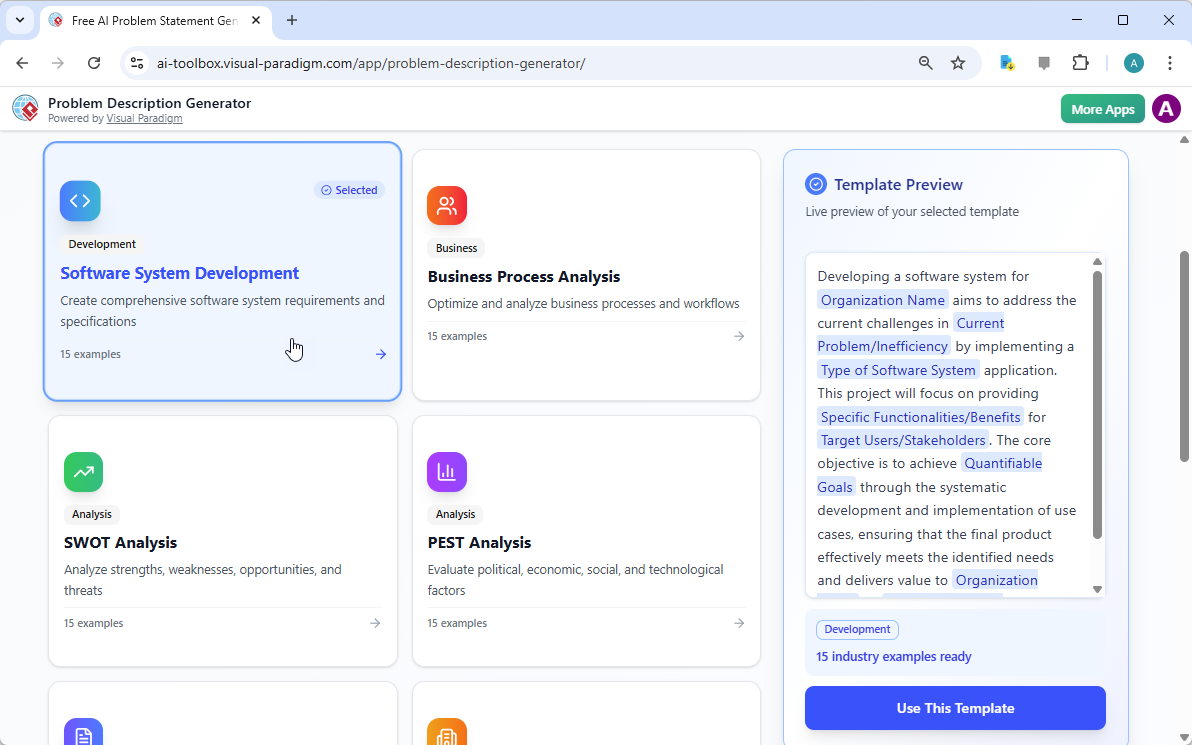
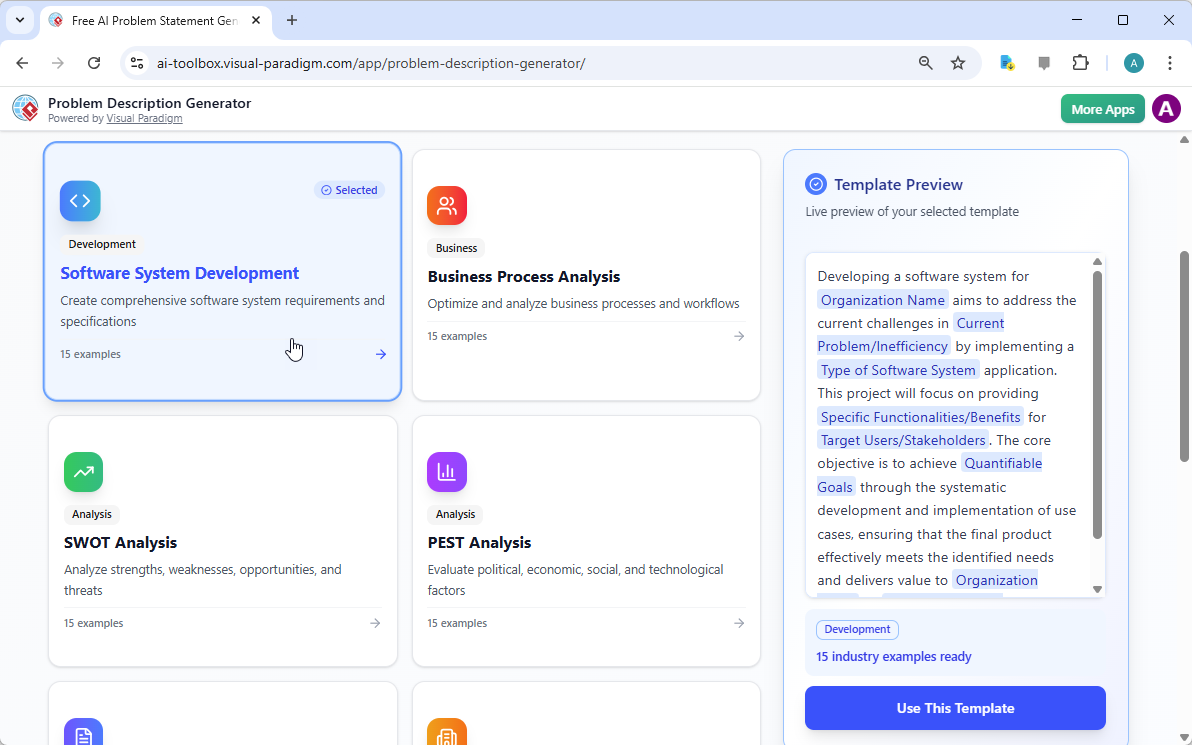
Setiap proyek hebat dimulai dengan fondasi yang kuat, dan untuk pernyataan masalah, fondasi tersebut adalah template yang tepat. Langkah pertama dalam menggunakan Pembuat Deskripsi Masalah Berbasis AI adalah memilih template yang sesuai sempurna dengan sifat proyek Anda. Seperti yang ditunjukkan pada

This is a screenshot of Visual Paradigm's AI Powered Problem Description Generator. It shows the first step, which involves c

, antarmuka menampilkan dashboard yang bersih dan intuitif dengan berbagai template untuk kebutuhan bisnis yang berbeda. Baik Anda sedang menghadapi inisiatif pengembangan perangkat lunak, mengoptimalkan proses bisnis, atau melakukan analisis strategis seperti analisis SWOT atau PEST, Anda dapat menemukan template khusus. Template “Pengembangan Sistem Perangkat Lunak”, misalnya, dirancang khusus untuk membantu Anda membuat persyaratan dan spesifikasi sistem perangkat lunak yang komprehensif. Dengan memilih template yang tepat, Anda langsung menetapkan struktur profesional yang memandu Anda untuk mencakup semua aspek penting dari masalah, memastikan tidak ada detail penting yang terlewat. Langkah ini sangat penting karena menentukan nada dan kerangka untuk seluruh deskripsi masalah, membuat langkah selanjutnya jauh lebih efisien dan efektif.

Langkah 2: Isi Variabel – Sesuaikan Narasi Anda

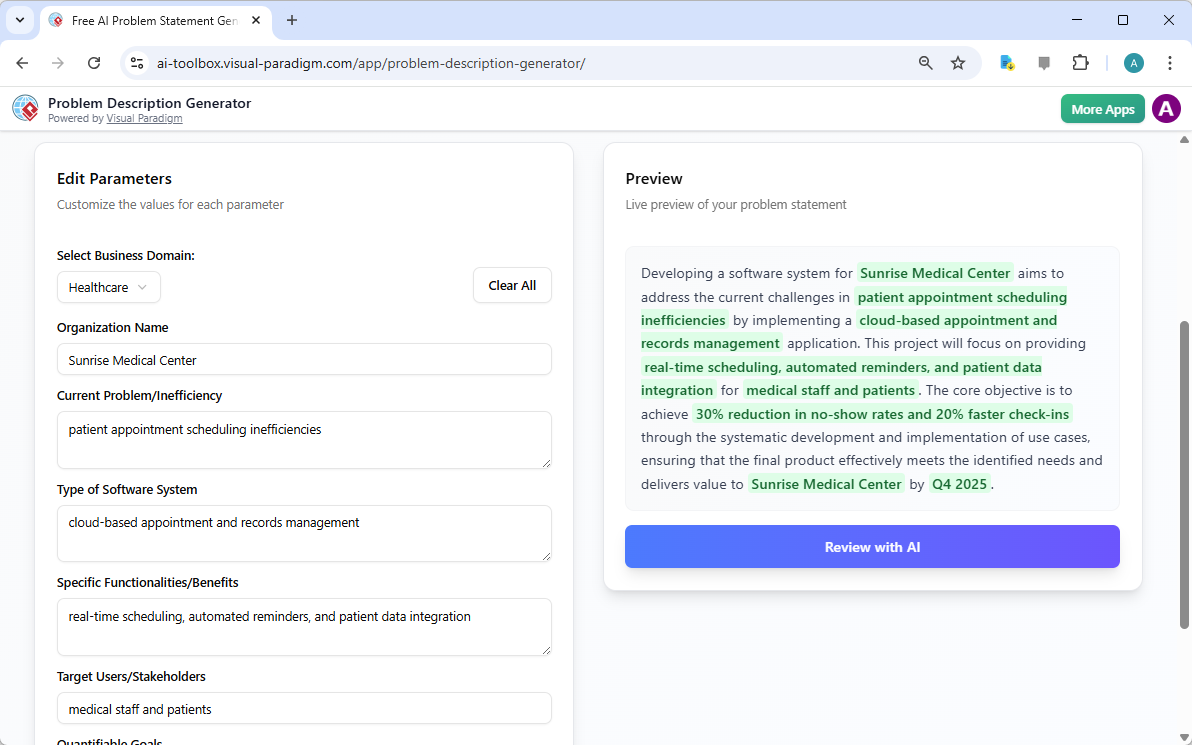
Setelah Anda memilih template Anda, keajaibannya terjadi di bagian ‘Edit Parameter’.

This is a screenshot of Visual Paradigm's AI Powered Problem Description Generator. It shows the second step, which involves

secara jelas menggambarkan langkah kedua ini. Di sebelah kiri, Anda akan diberikan formulir yang diisi dengan bidang-bidang tertentu, seperti ‘Nama Organisasi’, ‘Masalah Saat Ini/Inefisiensi’, dan ‘Jenis Sistem Perangkat Lunak’. Di sinilah Anda memasukkan DNA unik proyek Anda. Saat Anda mengetik detailnya, pratinjau real-time alat di sisi kanan secara dinamis diperbarui, menunjukkan secara tepat bagaimana variabel yang Anda isi akan terlihat dalam deskripsi masalah akhir. Pratinjau langsung ini sangat kuat. Ini memungkinkan Anda melihat narasi yang dibentuk oleh input Anda, mengidentifikasi frasa yang canggung, dan melakukan penyesuaian secara langsung. Variabel-variabel tersebut ditandai dengan warna hijau, sehingga mudah untuk melihat konten apa yang sedang dimasukkan ke dalam template. Proses ini bukan hanya tentang mengisi bagian kosong; ini tentang membentuk sebuah cerita yang koheren yang dengan jelas menjelaskan masalah, dampaknya, dan hasil yang diinginkan. Kemampuan melihat deskripsi Anda berkembang secara real-time adalah perubahan besar bagi kejelasan dan kepercayaan diri.

Langkah 3: Tinjau dengan AI – Editor Ahli Instan Anda

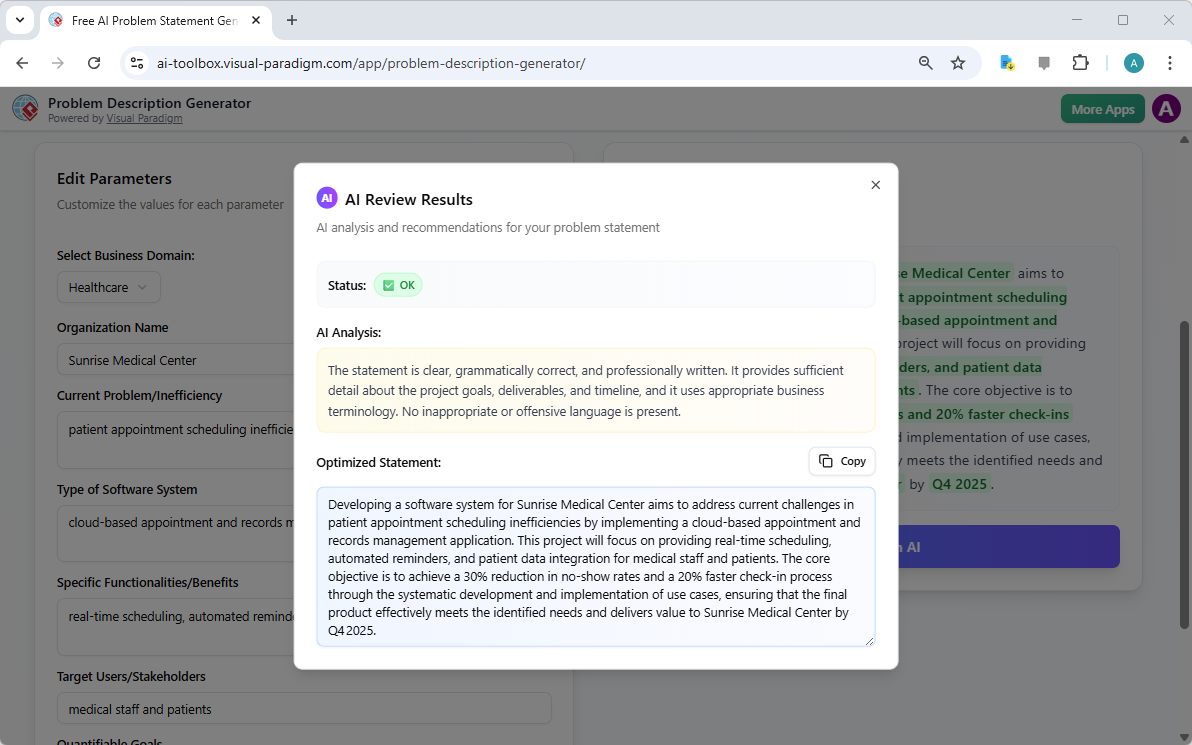
Langkah terakhir, dan mungkin yang paling kuat, adalah tinjauan oleh AI. Setelah Anda mengisi semua variabel dan merasa puas dengan pratinjau real-time, Anda dapat mengklik tombol ‘Tinjau dengan AI’.

This is a screenshot of Visual Paradigm's AI Powered Problem Description Generator. Once the details are filled in, you can c

menggambarkan momen ini secara sempurna. Jendela modal muncul, menampilkan analisis mendalam terhadap pernyataan masalah yang Anda hasilkan. AI tidak hanya memeriksa tata bahasa; ia mengevaluasi pernyataan tersebut dari segi kejelasan, kelengkapan, alur logis, dan penggunaan istilah bisnis yang tepat. Alat ini memberikan status yang jelas (seperti ‘OK’) dan analisis AI yang rinci yang menyoroti kekuatan serta menyarankan perbaikan. Misalnya, AI bisa memastikan bahwa pernyataan Anda jelas dan ditulis secara profesional, atau bisa saja menyarankan cara yang lebih berdampak untuk merumuskan tujuan utama. Umpan balik instan dan objektif ini berfungsi seperti editor ahli virtual, membantu Anda menyempurnakan pernyataan masalah agar tidak hanya benar, tetapi juga sangat efektif dalam menyampaikan tujuan proyek. Langkah akhir ini memastikan bahwa pernyataan masalah Anda siap untuk dibagikan kepada pemangku kepentingan, pengembang, atau klien dengan keyakinan.

Buka Potensi Proyek Anda

Menentukan masalah sering kali merupakan bagian tersulit dari setiap inisiatif. Pernyataan masalah yang samar atau buruk disampaikan dapat menyebabkan pemborosan usaha, solusi yang tidak selaras, dan pada akhirnya kegagalan proyek. Pembuat Deskripsi Masalah dari Visual Paradigm menyelesaikan tantangan mendasar ini. Alat ini menggabungkan kekuatan template terstruktur dengan kecerdasan buatan untuk menciptakan alur kerja yang efisien dan efektif. Dengan mengikuti tiga langkah sederhana—pilih template, isi variabel, dan tinjau dengan AI—Anda dapat mengubah ide awal proyek Anda menjadi pernyataan masalah yang jelas, menarik, dan profesional dalam hitungan menit. Alat ini bukan sekadar kemudahan; ini adalah keunggulan strategis yang memastikan proyek Anda dimulai dengan langkah yang tepat. Berhenti menebak dan mulai mendefinisikan dengan percaya diri.Coba Pembuat Deskripsi Masalah Berbasis AI sekarang dan rasakan perbedaannya.

Tautan Terkait

Dari Masalah ke Laporan: Bagaimana AI Memandu Perjalanan Use Case Anda

Discover how AI guides your use case journey from problem to report with Visual Paradigm’s intelligent development assistant.

Bayangkan Anda seorang manajer proyek yang ditugaskan untuk meluncurkan platform kursus online baru. Tantangan pertama adalah menggambarkan masalah dengan jelas, lalu menerjemahkannya menjadi sistem yang fungsional. Di sinilah Asisten Pengembangan Berbasis Use Case, sebuah alat berbasis AI dari Visual Paradigm, masuk ke dalam proses. Alat ini tidak hanya membantu Anda menulis dokumen; ia memandu Anda melalui alur kerja yang lengkap dan terstruktur untuk mengubah ide yang samar menjadi rencana proyek yang rinci dan dapat dijalankan. Proses ini begitu intuitif, seolah-olah Anda memiliki seorang analis bisnis berpengalaman dan arsitek teknis yang bekerja berdampingan dengan Anda. Penjelajahan mendalam ini mengungkap fitur inti dari alat yang kuat ini, menggunakan contoh nyata platform kursus online untuk menunjukkan bagaimana alat ini menyederhanakan seluruh siklus hidup use case.

Ringkasan Cepat: Poin-Poin Utama dari Asisten Pengembangan Berbasis Use Case

  • Mulailah dengan pernyataan masalah yang jelas untuk menentukan tujuan inti proyek.

  • Gunakan AI untuk secara otomatis menghasilkan daftar use case dan aktor kandidat.

  • Visualisasikan fungsi sistem dengan Diagram Use Case dan Diagram Aktivitas.

  • Prioritaskan fitur menggunakan metode MoSCoW terstruktur untuk fokus pada pekerjaan bernilai tinggi.

  • Hasilkan deskripsi use case yang rinci dan skenario uji Gherkin yang dapat dieksekusi.

  • Buat laporan komprehensif untuk menyampaikan cakupan dan rencana proyek.

  • Lacak kemajuan dan pertahankan satu sumber kebenaran dengan dashboard pusat.

Langkah 1: Mendefinisikan Masalah dengan AI

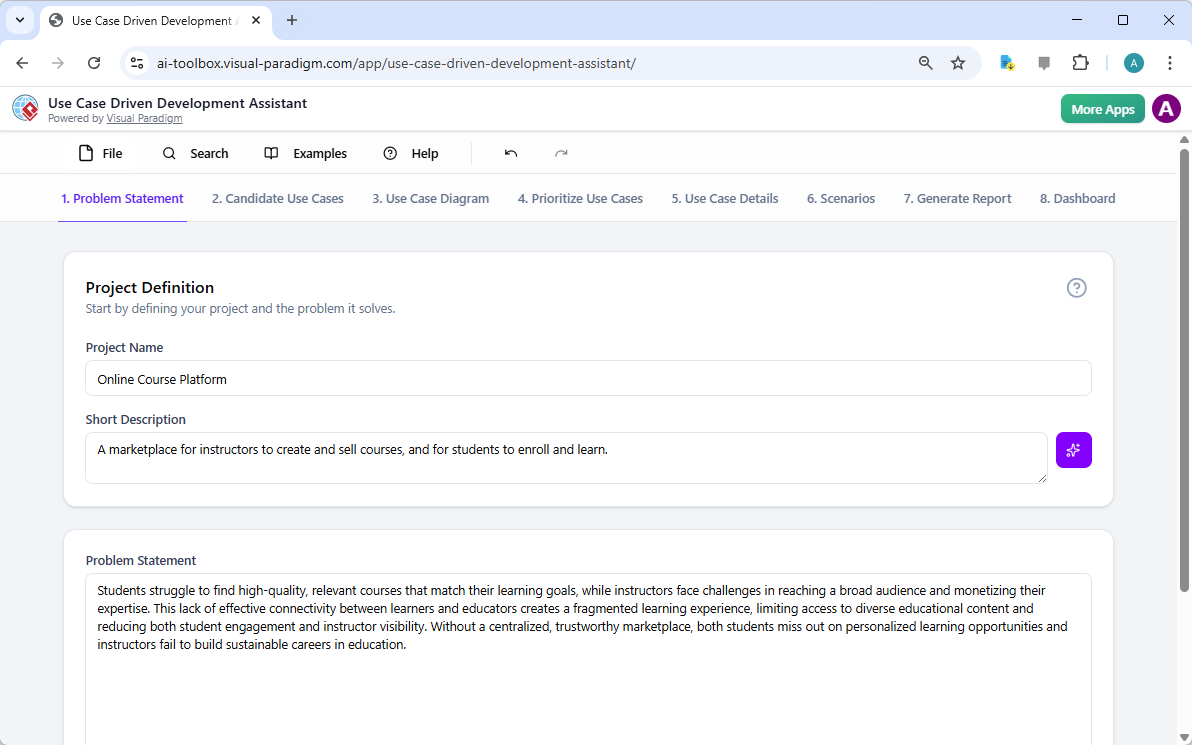
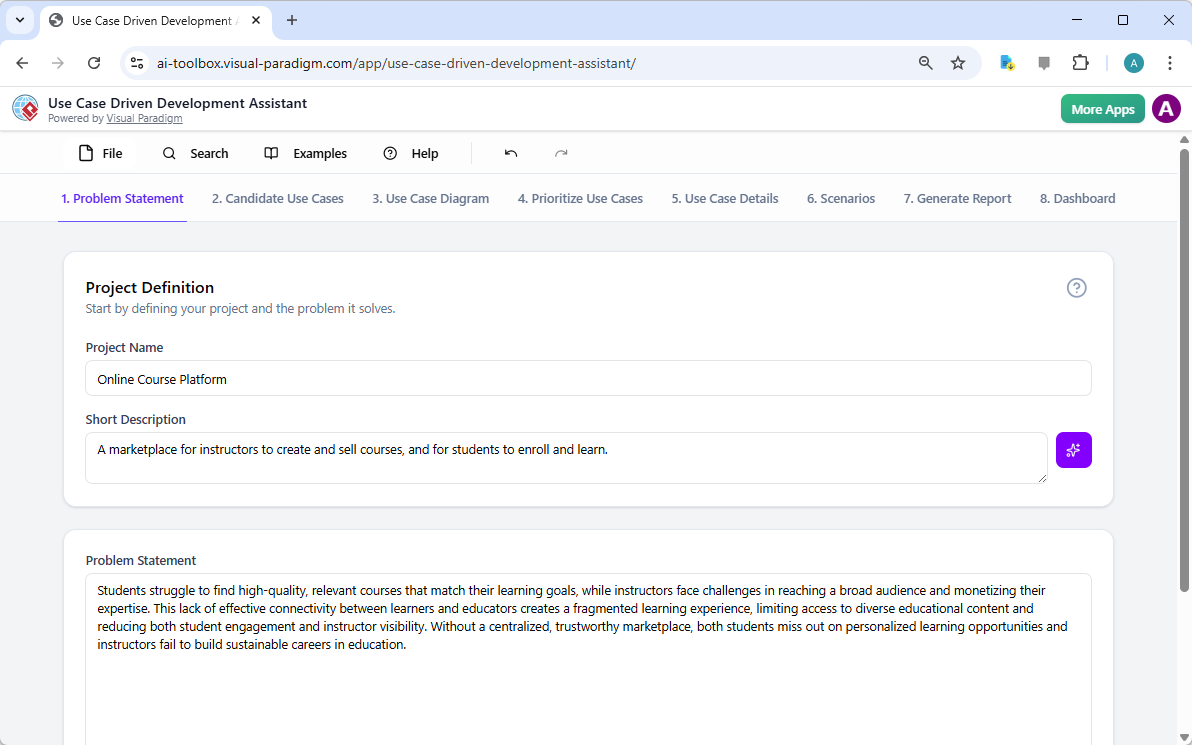
Setiap proyek yang sukses dimulai dengan pemahaman yang jelas tentang masalah yang ingin dipecahkan. Perjalanan bersama Asisten Pengembangan Berbasis Use Case dimulai di tab “Pernyataan Masalah”. Di sini, Anda memasukkan nama proyek dan deskripsi singkat. AI kemudian memanfaatkan informasi ini untuk menghasilkan pernyataan masalah yang komprehensif. Seperti terlihat pada Gambar 1, alat ini telah mengambil nama proyek “Platform Kursus Online” dan deskripsi singkat “Sebuah pasar bagi instruktur untuk membuat dan menjual kursus, serta bagi siswa untuk mendaftar dan belajar” untuk menghasilkan narasi yang rinci. Narasi ini mengidentifikasi masalah inti: siswa kesulitan menemukan kursus yang relevan, sementara instruktur menghadapi tantangan dalam menjangkau audiens yang luas dan menghasilkan uang dari keahlian mereka. Pernyataan masalah yang dihasilkan AI ini menjadi dasar proyek, memastikan semua anggota tim memiliki pemahaman yang seragam sejak awal.

This is a screenshot of Visual Paradigm's AI Powered Use Case Driven Development Assistant. we are now in step 1. It shows th

Langkah 2: Mengidentifikasi Use Case dengan Bantuan AI

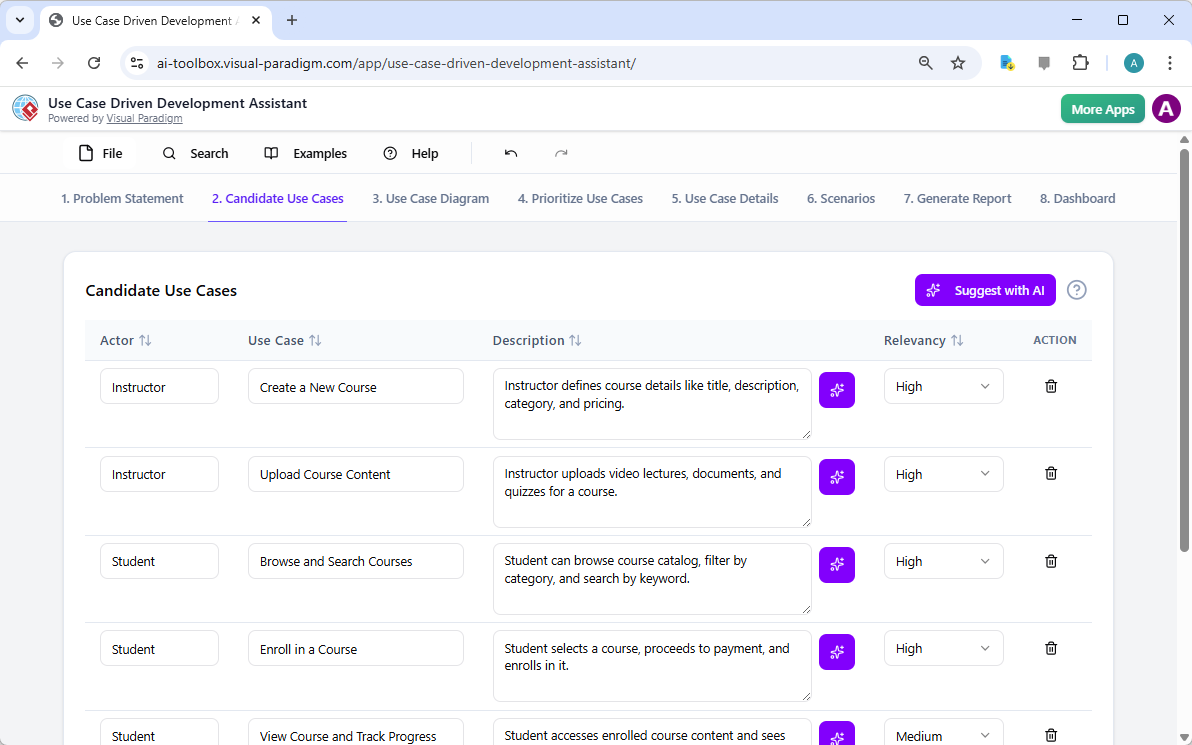
Setelah masalah didefinisikan, langkah logis berikutnya adalah mengidentifikasi fungsi utama yang harus disediakan sistem. Tab “Use Case Kandidat” dari asisten, seperti terlihat pada Gambar 2, mengotomatisasi proses ini. Setelah menganalisis pernyataan masalah, AI mengusulkan daftar use case, masing-masing terkait dengan seorang aktor (seperti Instruktur, Siswa, atau Admin). Untuk platform kursus online kami, AI mengusulkan use case seperti “Buat Kursus Baru”, “Unggah Konten Kursus”, “Telusuri dan Cari Kursus”, dan “Daftar ke Kursus”. Daftar ini memberikan dasar yang kuat, menghemat waktu dan usaha yang seharusnya digunakan dalam sesi brainstorming. Anda kemudian dapat menyempurnakan saran ini, menambahkan yang baru, atau menghapus yang tidak relevan untuk menciptakan daftar komprehensif tentang fungsi sistem.

This is a screenshot of Visual Paradigm's AI Powered Use Case Driven Development Assistant. We are now in step 2. It shows a

Langkah 3: Memvisualisasikan Sistem dengan Diagram Use Case

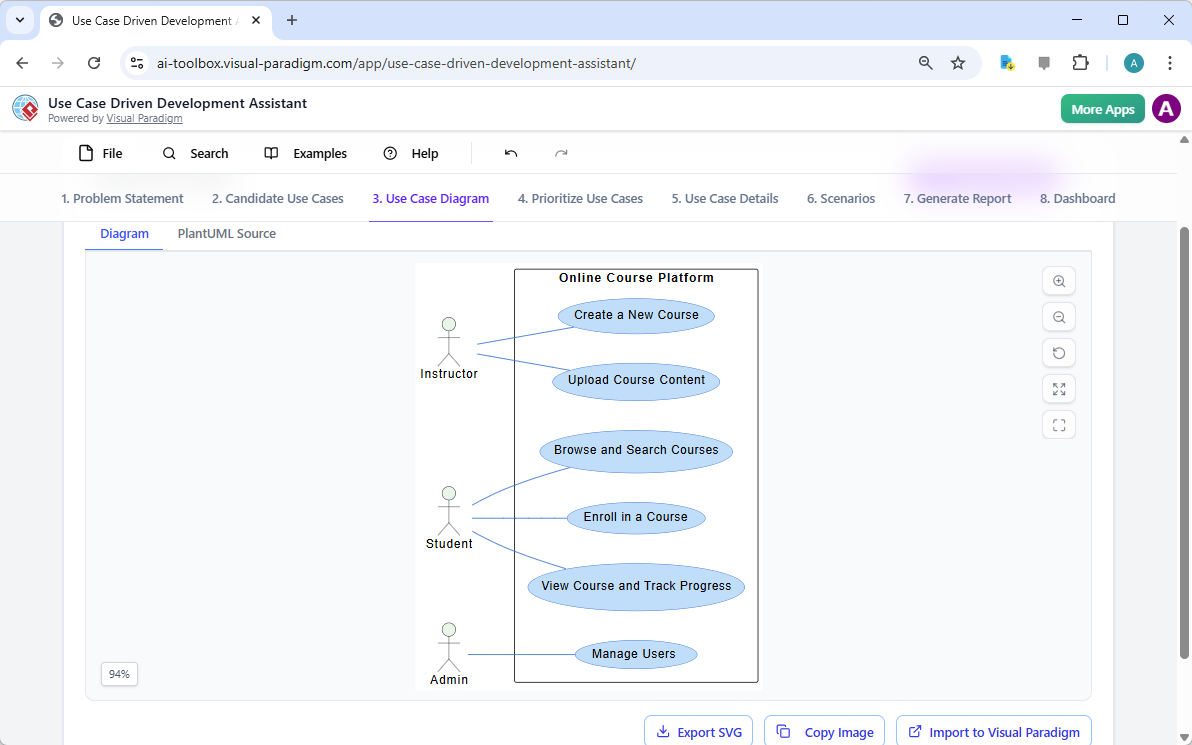
Setelah mengidentifikasi use case, sangat penting untuk memvisualisasikan bagaimana mereka berinteraksi dengan aktor sistem. Tab “Diagram Use Case” yang digambarkan dalam Gambar 3, mengambil daftar use case dan aktor serta secara otomatis menghasilkan representasi grafis yang jelas. Diagram ini menunjukkan hubungan antara aktor (Instruktur, Siswa, Admin) dan fungsi sistem (Buat Kursus Baru, dll). Generasi berbasis AI memastikan diagram ini akurat dan diformat secara profesional. Bantuan visual ini sangat berharga untuk komunikasi, memungkinkan para pemangku kepentingan, pengembang, dan desainer untuk memahami cepat cakupan dan fungsi sistem tanpa harus membaca dokumen yang penuh teks.

This is a screenshot of Visual Paradigm's AI Powered Use Case Driven Development Assistant. We are now in step 3. It shows a

Langkah 4: Memrioritaskan Fitur untuk Dampak Maksimal

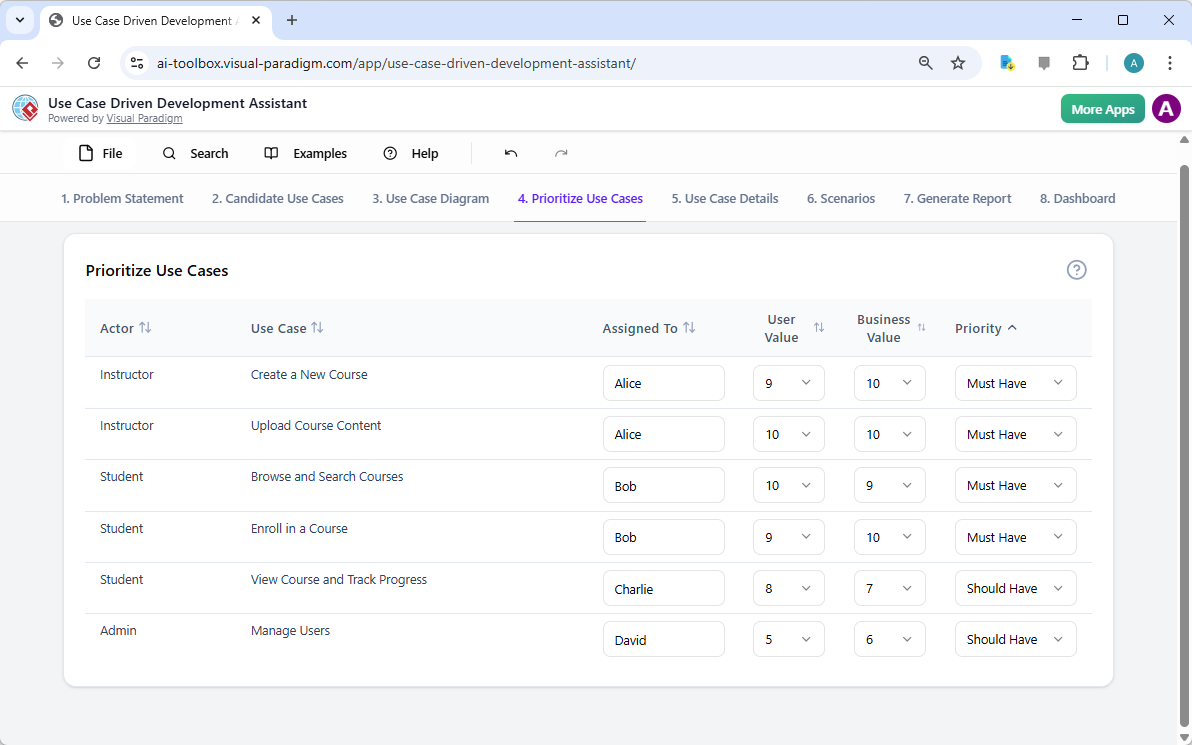
Tidak semua use case sama. Keberhasilan suatu proyek sering kali bergantung pada fokus pada fitur-fitur paling kritis terlebih dahulu. Tab “Memrioritaskan Use Case”, seperti yang ditampilkan pada Gambar 4, menyediakan kerangka kerja yang kuat untuk hal ini. Ini memungkinkan Anda menetapkan nilai pengguna dan nilai bisnis (pada skala 0-10) untuk setiap kasus penggunaan, lalu menerapkan metode prioritas MoSCoW (Harus Ada, Harus Dibutuhkan, Bisa Ada, Tidak Akan Ada). Dalam contoh kami, AI telah membantu mengidentifikasi bahwa fitur “Buat Kursus Baru” dan “Unggah Konten Kursus” adalah fitur “Harus Ada”, karena sangat penting bagi fungsi inti platform. Prioritas yang terstruktur ini memastikan tim pengembangan fokus pada memberikan nilai tertinggi bagi pengguna dan bisnis, menghindari pemborosan usaha pada fitur dengan prioritas rendah.

This is a screenshot of Visual Paradigm's AI Powered Use Case Driven Development Assistant. We are now in step 4. It shows th

Langkah 5: Mendetailkan Kasus Penggunaan dan Menghasilkan Diagram Aktivitas

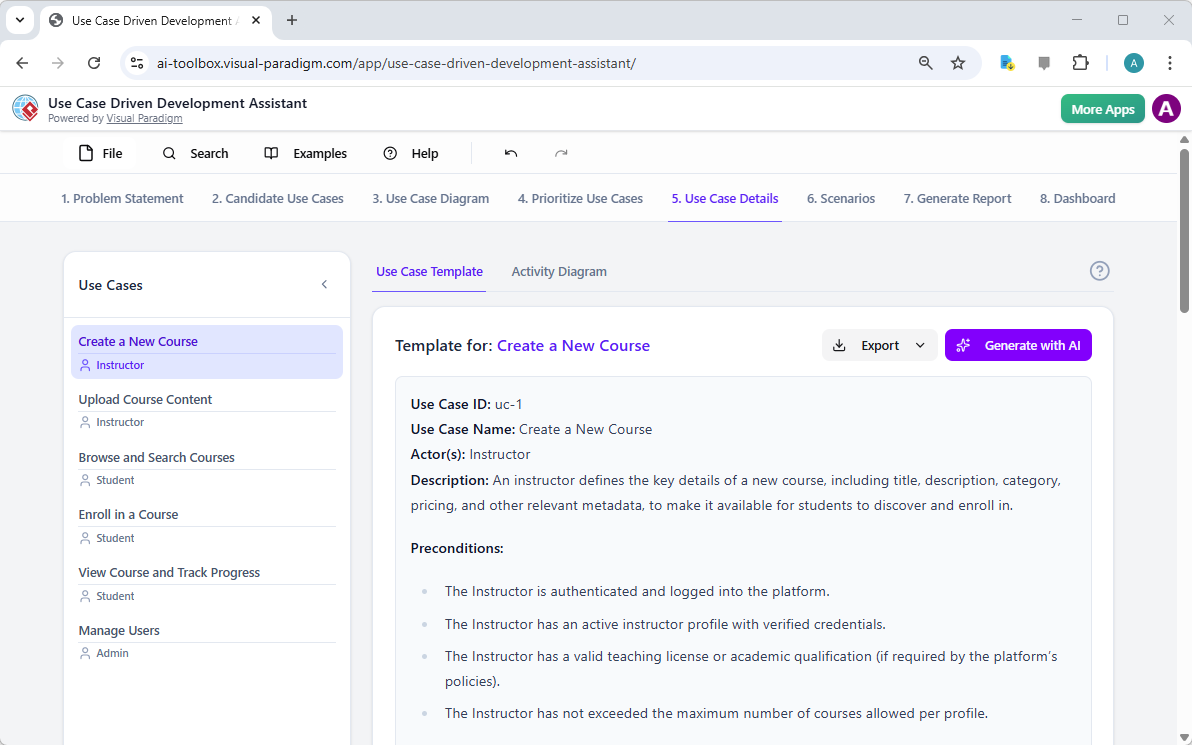
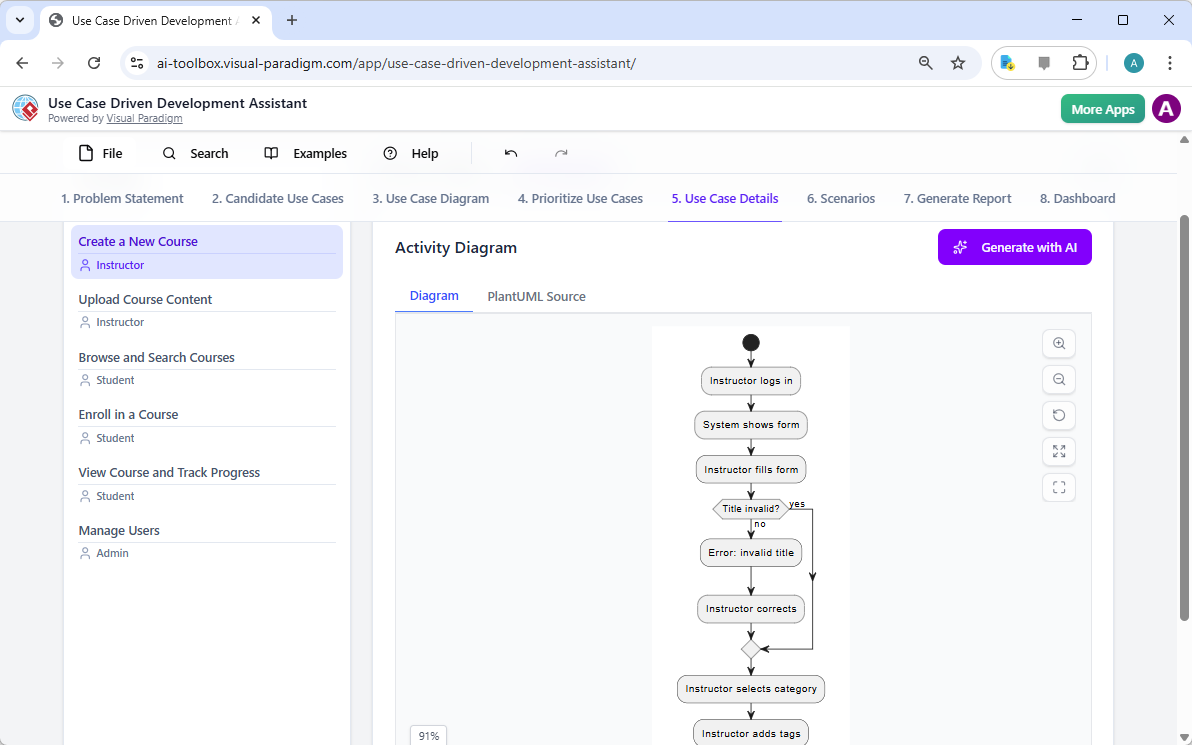
Dengan tampilan tingkat tinggi yang telah ditetapkan, langkah berikutnya adalah memperdalam detail setiap kasus penggunaan. Tab “Detail Kasus Penggunaan”, seperti yang ditampilkan di Gambar 5, memungkinkan Anda membuat templat komprehensif untuk kasus penggunaan yang dipilih. AI dapat menghasilkan deskripsi rinci, termasuk prasyarat, alur utama, dan alur alternatif. Untuk kasus penggunaan “Buat Kursus Baru”, AI menyediakan templat terstruktur yang menguraikan langkah-langkah yang diperlukan. Untuk memperjelas pemahaman lebih lanjut, asisten dapat menghasilkan “Diagram Aktivitas” untuk kasus penggunaan yang sama, seperti yang terlihat di Gambar 6. Diagram ini secara visual memetakan alur kerja langkah demi langkah, menunjukkan urutan tindakan dari instruktur masuk hingga kursus disimpan. Tingkat detail ini sangat penting bagi tim pengembang dan tim QA.

This is a screenshot of Visual Paradigm's AI Powered Use Case Driven Development Assistant. We are now in step 5. It shows thThis is a screenshot of Visual Paradigm's AI Powered Use Case Driven Development Assistant. We are still in step 5. It shows

Langkah 6: Menghasilkan Skenario Uji dan Diagram Urutan

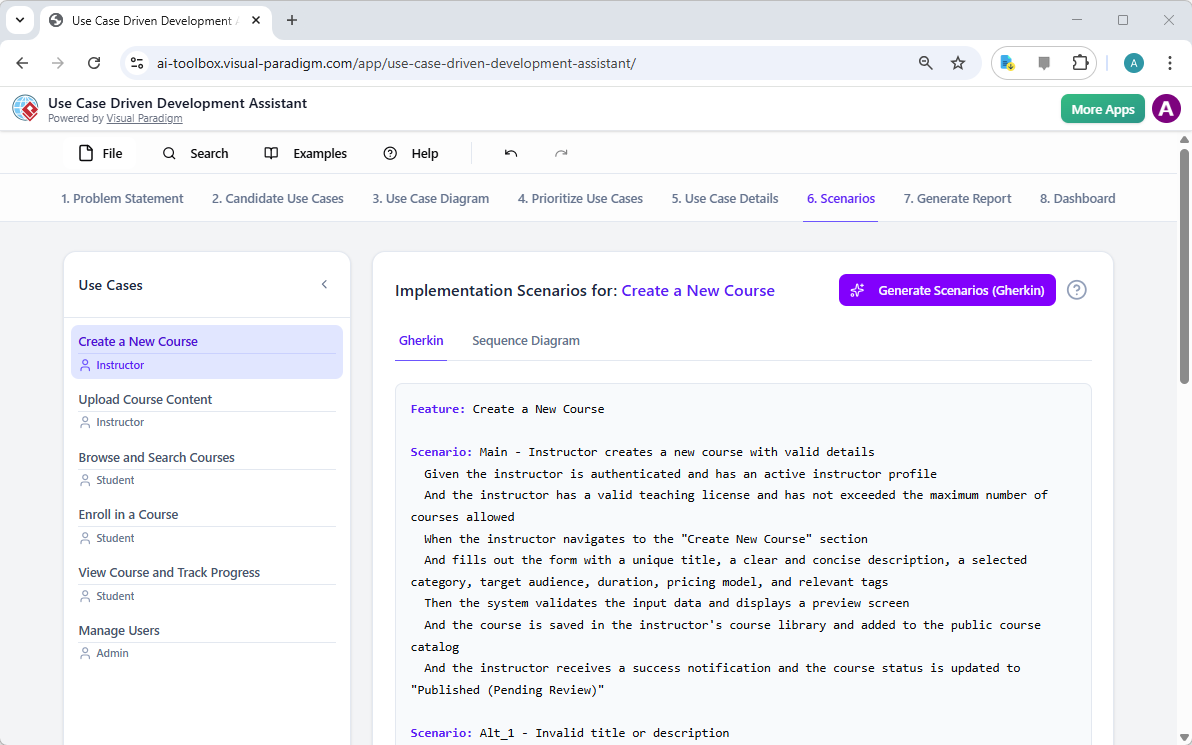
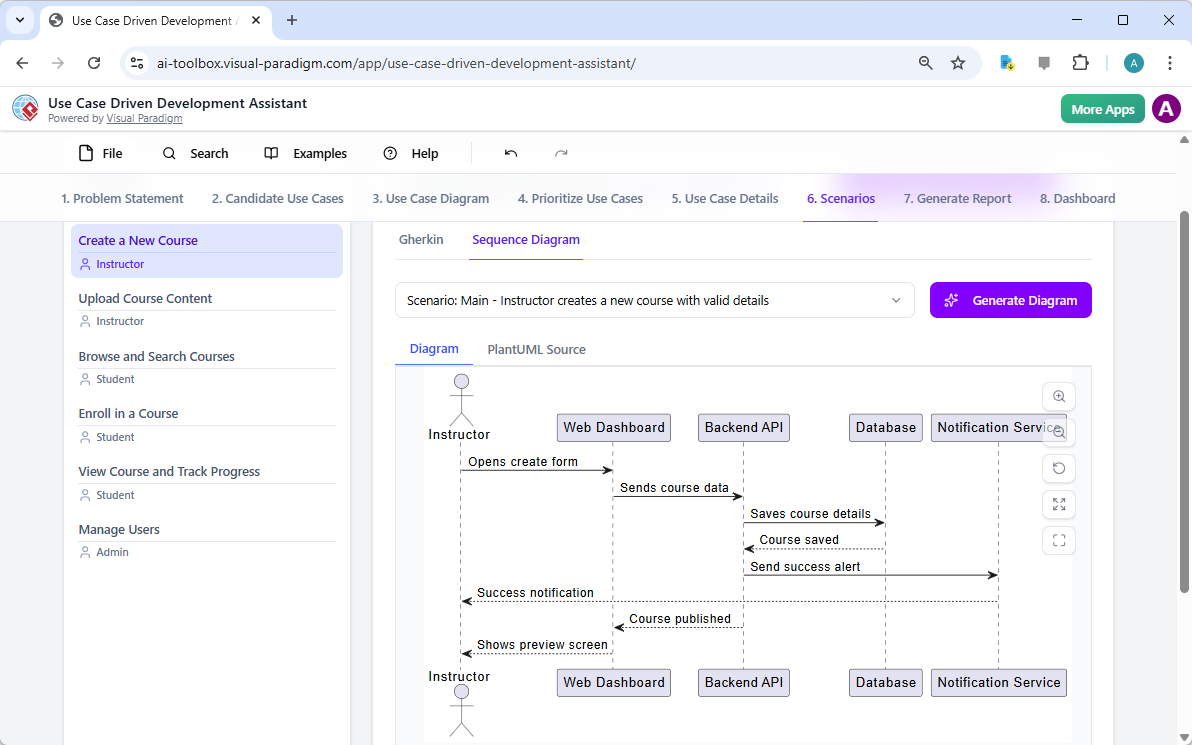
Bagi tim pengembangan, langkah kritis berikutnya adalah membuat skenario yang dapat diuji. Tab “Skenario”, seperti yang ditampilkan di Gambar 7, memungkinkan Anda menghasilkan skenario Gherkin yang dapat dieksekusi langsung dari deskripsi kasus penggunaan Anda. Skenario ini, ditulis dalam format bahasa sehari-hari (Diberikan-Jika-Maka), sangat ideal untuk pengujian otomatis. AI dapat menghasilkan skenario utama dan skenario alternatif, seperti salah satu untuk judul yang tidak valid. Untuk memperjelas cara kerja internal sistem, asisten dapat menghasilkan “Diagram Urutan“, seperti yang terlihat di Gambar 8. Diagram ini menunjukkan interaksi antara instruktur, dasbor web, API backend, basis data, dan layanan pemberitahuan, memberikan gambaran jelas mengenai arsitektur sistem dan alur data.

This is a screenshot of Visual Paradigm's AI Powered Use Case Driven Development Assistant. We are in step 6. It shows the AIThis is a screenshot of Visual Paradigm's AI Powered Use Case Driven Development Assistant. We are still in step 6. It shows

Langkah 7: Membuat Laporan Proyek yang Komprehensif

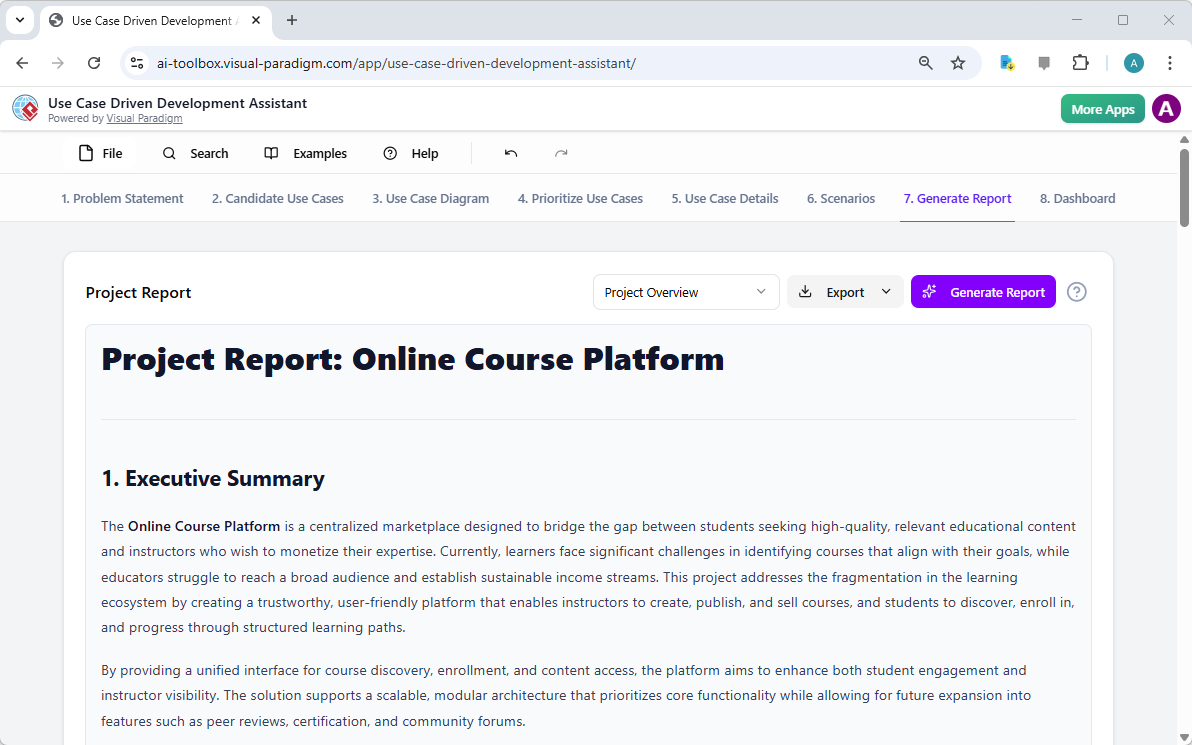
Sepanjang proses pengembangan, sangat penting untuk menyampaikan status dan rencana proyek kepada berbagai pemangku kepentingan. Tab “Hasilkan Laporan”, seperti yang ditampilkan di Gambar 9, memudahkan hal ini. Anda dapat menghasilkan berbagai jenis laporan, seperti “Gambaran Umum Proyek”, “Rencana Implementasi”, “Rencana Pengujian QA”, atau “Daftar Tugas Pengembang”. Laporan-laporan ini dihasilkan dengan bantuan AI, memastikan konsistensi dan kelengkapan. Sebagai contoh, laporan “Gambaran Umum Proyek” merangkum seluruh proyek, termasuk ringkasan eksekutif, fitur utama, dan alasan di balik prioritas. Sumber tunggal ini memastikan semua pihak selaras dan terinformasi.

This is a screenshot of Visual Paradigm's AI Powered Use Case Driven Development Assistant. We are in step 7. It shows a repo

Langkah 8: Melacak Kemajuan dengan Dashboard

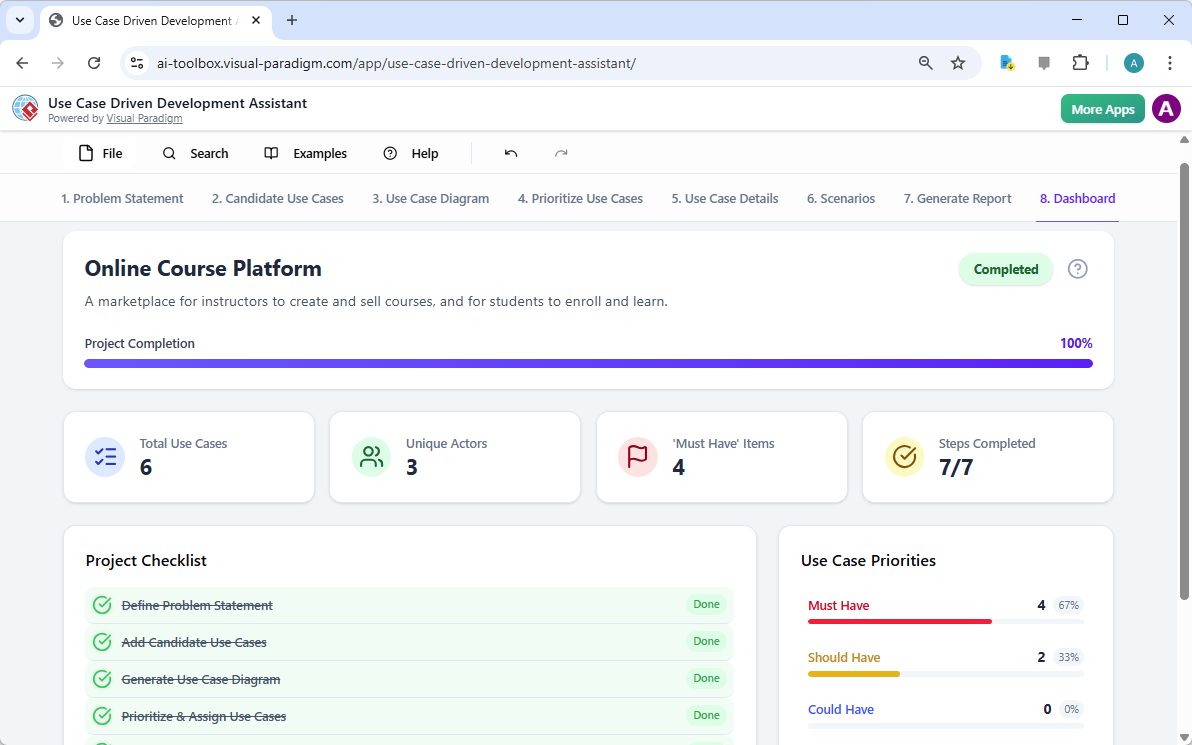
Akhirnya, perjalanan ini berakhir pada “Dashboard”, seperti yang terlihat di Gambar 10. Pusat utama ini memberikan gambaran tingkat tinggi mengenai status proyek. Ini menampilkan persentase penyelesaian proyek, jumlah total kasus penggunaan, dan jumlah item “Harus Ada”. Daftar periksa proyek memungkinkan Anda melacak kemajuan Anda, dengan setiap langkah yang selesai ditandai sebagai “Selesai”. Visibilitas real-time terhadap kesehatan proyek ini sangat berharga bagi manajer proyek dan kepala tim, memungkinkan mereka mengidentifikasi hambatan dan memastikan proyek tetap berjalan sesuai rencana.

This is a screenshot of Visual Paradigm's AI Powered Use Case Driven Development Assistant. We are in step 8. It shows the da

Asisten Pengembangan Berbasis Kasus Penggunaan lebih dari sekadar alat; ini adalah alur kerja komprehensif yang membawa kejelasan dan efisiensi ke proses pengembangan perangkat lunak. Dengan memanfaatkan AI di setiap tahap—mulai dari mendefinisikan masalah hingga menghasilkan laporan—alat ini membantu tim beralih dari kebutuhan ke implementasi lebih cepat dan dengan akurasi yang lebih tinggi. Hasilnya adalah proyek yang terstruktur dengan baik, terdokumentasi dengan baik, dan selaras dengan tujuan bisnis serta kebutuhan pengguna. Jika Anda ingin menyederhanakan proses pengembangan kasus penggunaan Anda, alat berbasis AI ini adalah solusi yang kuat.

Siap melihat bagaimana Asisten Pengembangan Berbasis Kasus Penggunaandapat mengubah proyek Anda berikutnya? Coba sekarang.

Tautan Terkait

Pemodelan kasus penggunaan adalah teknik rekayasa perangkat lunak dasar yang digunakan untuk menangkap kebutuhan fungsional dengan memvisualisasikan interaksi antara eksternal aktor dan fungsi internal suatu sistem. Platform modern kini mengintegrasikan otomasi berbasis AI untuk menyempurnakan diagram, menghasilkan deskripsi kasus penggunaan, dan mengubah model menjadi kasus uji atau diagram aktivitas untuk menjaga konsistensi desain dan pelacakan. Alat canggih seperti editor Alur Kejadian dan Penganalisis Skenario memungkinkan tim pengembangan untuk memvalidasi dan mendokumentasikan urutan kejadian terstruktur untuk meningkatkan kejelasan sistem secara keseluruhan.

  1. Apa Itu Diagram Kasus Penggunaan? – Panduan Lengkap tentang Pemodelan UML: Tinjauan mendalam yang mencakup elemen-elemen penting komponen, tujuan, dan praktik terbaik untuk pemodelan kebutuhan.

  2. Tutorial Diagram Kasus Penggunaan Langkah demi Langkah – Dari Pemula hingga Ahli: Sumber daya praktis yang memandu pengguna melalui teknik dasar hingga teknik lanjutan untuk membuat diagram kasus penggunaan yang efektif.

  3. Semua yang Perlu Anda Ketahui tentang Pemodelan Kasus Penggunaan: Penjelajahan komprehensif tentang prinsip dan aplikasipemodelan kasus penggunaan dalam desain sistem.

  4. Visual Paradigm – Fitur Deskripsi Kasus Penggunaan: Detail alat khusus yang digunakan untuk mendokumentasikan interaksi pengguna secara tepat dan perilaku sistem yang terstruktur.

  5. Menguasai Diagram Kasus Pengguna yang Didorong AI dengan Visual Paradigm: Tutorial tentang memanfaatkan AI untuk membuat diagram cerdas dan dinamis untuk sistem perangkat lunak modern.

  6. Panduan Penggunaan Editor Alur Peristiwa di Visual Paradigm: Petunjuk langkah demi langkah untuk mendokumentasikan urutan peristiwa yang terstruktur dalam sebuah skenario kasus pengguna.

  7. Memecahkan Skenario dengan Analyzer Skenario Kasus Pengguna: Panduan tentang menggunakan analyzer untuk memeriksa dan memperbaiki alur interaksi untuk meningkatkan kejelasan sistem.

  8. Mengubah Kasus Pengguna menjadi Diagram Aktivitas – Transformasi Berbasis AI: Sumber daya yang menjelaskan konversi otomatis dari kasus pengguna menjadi alur kerja sistem yang rinci.

  9. Menghasilkan Skenario dan Kasus Uji dari Diagram Kasus Pengguna Menggunakan AI: Penjelajahan tentang bagaimana alat AI mengotomatisasi pembuatan prosedur uji yang didorong kebutuhan.

  10. Galeri Diagram Kasus Pengguna – Templat & Contoh: Koleksi yang dipilih secara khusus dari contoh dunia nyata untuk inspirasi, pembelajaran, dan prototipe cepat.

From Problem to Report: How AI Guides Your Use Case Journey

Discover how AI guides your use case journey from problem to report with Visual Paradigm’s intelligent development assistant.

Imagine you’re a project manager tasked with launching a new online course platform. The first challenge is to articulate the problem clearly and then translate it into a functional system. This is where the Use Case Driven Development Assistant, an AI-powered tool from Visual Paradigm, steps in. It doesn’t just help you write documents; it guides you through a complete, structured workflow to transform a vague idea into a detailed, actionable project plan. The process is so intuitive, it feels like having a seasoned business analyst and a technical architect working side-by-side with you. This deep dive explores the core features of this powerful tool, using a real-world example of an online course platform to show how it streamlines the entire use case lifecycle.

Quick Summary: Key Takeaways from the Use Case Driven Development Assistant

  • Start with a clear problem statement to define the project’s core objective.

  • Use AI to automatically generate a list of candidate use cases and actors.

  • Visualize system functionality with AI-generated Use Case and Activity Diagrams.

  • Prioritize features using a structured MoSCoW method to focus on high-value work.

  • Generate detailed use case descriptions and executable Gherkin test scenarios.

  • Create comprehensive reports to communicate project scope and plans.

  • Track progress and maintain a single source of truth with a central dashboard.

Step 1: Defining the Problem with AI

Every successful project begins with a clear understanding of the problem it aims to solve. The journey with the Use Case Driven Development Assistant starts in the “Problem Statement” tab. Here, you input a project name and a short description. The AI then leverages this information to generate a comprehensive problem statement. As seen in Image 1, the tool has taken the project name “Online Course Platform” and the short description “A marketplace for instructors to create and sell courses, and for students to enroll and learn” to produce a detailed narrative. This narrative identifies the core pain points: students struggle to find relevant courses, while instructors face challenges in reaching a broad audience and monetizing their expertise. This AI-generated problem statement serves as the project’s foundation, ensuring everyone on the team shares a unified understanding from the very beginning.

This is a screenshot of Visual Paradigm's AI Powered Use Case Driven Development Assistant. we are now in step 1. It shows th

Step 2: Identifying Use Cases with AI Assistance

Once the problem is defined, the next logical step is to identify the key functionalities the system must provide. The assistant’s “Candidate Use Cases” tab, shown in Image 2, automates this process. After analyzing the problem statement, the AI suggests a list of use cases, each associated with an actor (like Instructor, Student, or Admin). For our online course platform, the AI proposes use cases such as “Create a New Course,” “Upload Course Content,” “Browse and Search Courses,” and “Enroll in a Course.” This list provides a solid starting point, saving significant time and effort that would otherwise be spent on brainstorming sessions. You can then refine these suggestions, add new ones, or delete irrelevant ones to create a comprehensive list of system functionalities.

This is a screenshot of Visual Paradigm's AI Powered Use Case Driven Development Assistant. We are now in step 2. It shows a

Step 3: Visualizing the System with a Use Case Diagram

After identifying the use cases, it’s crucial to visualize how they interact with the system’s actors. The “Use Case Diagram” tab, illustrated in Image 3, takes the list of use cases and actors and automatically generates a clear, graphical representation. This diagram shows the relationships between the actors (Instructor, Student, Admin) and the system’s functions (Create a New Course, etc.). The AI-powered generation ensures that the diagram is accurate and professionally formatted. This visual aid is invaluable for communication, allowing stakeholders, developers, and designers to quickly grasp the system’s scope and functionality without wading through text-heavy documents.

This is a screenshot of Visual Paradigm's AI Powered Use Case Driven Development Assistant. We are now in step 3. It shows a

Step 4: Prioritizing Features for Maximum Impact

Not all use cases are created equal. A project’s success often hinges on focusing on the most critical features first. The “Prioritize Use Cases” tab, as shown in Image 4, provides a powerful framework for this. It allows you to assign a user value and business value (on a scale of 0-10) to each use case and then apply the MoSCoW prioritization method (Must Have, Should Have, Could Have, Won’t Have). In our example, the AI has helped identify that “Create a New Course” and “Upload Course Content” are “Must Have” features, as they are essential for the platform’s core function. This structured prioritization ensures that the development team focuses on delivering the highest value to users and the business, avoiding wasted effort on low-priority features.

This is a screenshot of Visual Paradigm's AI Powered Use Case Driven Development Assistant. We are now in step 4. It shows th

Step 5: Detailing Use Cases and Generating Activity Diagrams

With the high-level view established, the next step is to dive into the details of each use case. The “Use Case Details” tab, shown in Image 5, allows you to create a comprehensive template for a selected use case. The AI can generate a detailed description, including pre-conditions, main flow, and alternative flows. For the “Create a New Course” use case, the AI provides a structured template that outlines the necessary steps. To further enhance understanding, the assistant can generate an “Activity Diagram” for the same use case, as seen in Image 6. This diagram visually maps out the step-by-step workflow, showing the sequence of actions from the instructor logging in to the course being saved. This level of detail is essential for both developers and QA teams.

This is a screenshot of Visual Paradigm's AI Powered Use Case Driven Development Assistant. We are now in step 5. It shows thThis is a screenshot of Visual Paradigm's AI Powered Use Case Driven Development Assistant. We are still in step 5. It shows

Step 6: Generating Test Scenarios and Sequence Diagrams

For a development team, the next critical step is to create testable scenarios. The “Scenarios” tab, shown in Image 7, allows you to generate executable Gherkin scenarios directly from your use case descriptions. These scenarios, written in a plain-language format (Given-When-Then), are perfect for automated testing. The AI can generate a main scenario and alternative scenarios, such as one for an invalid title. To further clarify the system’s internal workings, the assistant can generate a “Sequence Diagram,” as seen in Image 8. This diagram shows the interaction between the instructor, the web dashboard, the backend API, the database, and the notification service, providing a clear picture of the system’s architecture and data flow.

This is a screenshot of Visual Paradigm's AI Powered Use Case Driven Development Assistant. We are in step 6. It shows the AIThis is a screenshot of Visual Paradigm's AI Powered Use Case Driven Development Assistant. We are still in step 6. It shows

Step 7: Creating Comprehensive Project Reports

Throughout the development process, it’s essential to communicate the project’s status and plans to various stakeholders. The “Generate Report” tab, as shown in Image 9, makes this easy. You can generate a variety of reports, such as a “Project Overview,” “Implementation Plan,” “QA Test Plan,” or a “Developer Task List.” These reports are generated with AI assistance, ensuring they are consistent and comprehensive. For example, the “Project Overview” report summarizes the entire project, including the executive summary, key features, and the rationale behind the prioritization. This single source of truth ensures everyone is aligned and informed.

This is a screenshot of Visual Paradigm's AI Powered Use Case Driven Development Assistant. We are in step 7. It shows a repo

Step 8: Tracking Progress with the Dashboard

Finally, the journey culminates in the “Dashboard,” as seen in Image 10. This central hub provides a high-level overview of the project’s status. It shows the project completion percentage, the total number of use cases, and the number of “Must Have” items. The project checklist allows you to track your progress, with each completed step marked as “Done.” This real-time visibility into the project’s health is invaluable for project managers and team leads, enabling them to identify bottlenecks and ensure the project stays on track.

This is a screenshot of Visual Paradigm's AI Powered Use Case Driven Development Assistant. We are in step 8. It shows the da

The Use Case Driven Development Assistant is more than just a tool; it’s a comprehensive workflow that brings clarity and efficiency to the software development process. By leveraging AI at every stage—from defining the problem to generating reports—it helps teams move from requirements to implementation faster and with greater accuracy. The result is a well-structured, well-documented project that is aligned with business goals and user needs. If you’re looking to streamline your use case development process, this AI-powered tool is a powerful solution.

Ready to see how the Use Case Driven Development Assistant can transform your next project? Try it now.

Related Links

Use case modeling is a fundamental software engineering technique used to capture functional requirements by visualizing the interactions between external actors and a system’s internal functions. Modern platforms now incorporate AI-powered automation to refine diagrams, generate comprehensive use case descriptions, and convert models into test cases or activity diagrams to maintain design consistency and traceability. Advanced tools like the Flow of Events editor and Scenario Analyzer allow development teams to validate and document structured event sequences to improve overall system clarity.

  1. What Is a Use Case Diagram? – A Complete Guide to UML Modeling: An in-depth overview covering essential components, purposes, and best practices for requirements modeling.

  2. Step-by-Step Use Case Diagram Tutorial – From Beginner to Pro: A practical resource that guides users through foundational to advanced techniques for creating effective use case diagrams.

  3. All You Need to Know About Use Case Modeling: A comprehensive exploration of the principles and applications of use case modeling in system design.

  4. Visual Paradigm – Use Case Description Features: Details specialized tools used to precisely document user interactions and structured system behavior.

  5. Mastering AI-Driven Use Case Diagrams with Visual Paradigm: A tutorial on leveraging AI to create intelligent, dynamic diagrams for modern software systems.

  6. Guide to Using the Flow of Events Editor in Visual Paradigm: Step-by-step instructions for documenting structured event sequences within a use case scenario.

  7. Unraveling Scenarios with the Use Case Scenario Analyzer: A guide on using analyzers to examine and refine interaction flows for increased system clarity.

  8. Convert Use Case to Activity Diagram – AI-Powered Transformation: A resource explaining the automated conversion of use cases into detailed system workflows.

  9. Generating Scenarios and Test Cases from Use Case Diagrams Using AI: An exploration of how AI tools automate the creation of requirement-driven test procedures.

  10. Use Case Diagram Gallery – Templates & Examples: A curated collection of real-world examples for inspiration, learning, and rapid prototyping.

Crafting a Crystal-Clear Problem Statement for Software Development

Use Visual Paradigm’s AI-powered tool to craft clear, structured problem statements for software projects with templates and real-time feedback.

Struggling to articulate the core challenge your software project aims to solve? The Problem Description Generator from Visual Paradigm is the ultimate AI-powered tool to transform your project’s initial chaos into a clear, focused, and compelling narrative. This innovative solution empowers project managers, business analysts, and product owners to define the “why” behind their work with unprecedented speed and precision. By leveraging a library of structured templates and real-time AI feedback, this tool ensures your problem statement is not just written, but optimized for maximum impact from day one. It’s the secret weapon for launching projects with laser focus and setting the stage for success.

Key Takeaways:

  • Use a template-driven approach to ensure your problem statement is comprehensive and structured.

  • Fill in specific variables to customize the description for your unique project.

  • Get instant AI feedback to refine your problem statement for clarity and effectiveness.

  • Start any project with a solid, well-articulated understanding of the core issue.

Step 1: Choose Your Template – The Foundation of a Strong Problem Statement

Every great project begins with a solid foundation, and for a problem statement, that foundation is the right template. The first step in using the AI-Powered Problem Description Generator is to select a template that perfectly aligns with your project’s nature. As shown in

This is a screenshot of Visual Paradigm's AI Powered Problem Description Generator. It shows the first step, which involves c

, the interface presents a clean, intuitive dashboard with a variety of templates for different business needs. Whether you’re tackling a software development initiative, optimizing a business process, or conducting a strategic analysis like a SWOT or PEST analysis, you can find a dedicated template. The “Software System Development” template, for instance, is specifically designed to help you create comprehensive software system requirements and specifications. By selecting the correct template, you immediately establish a professional structure that guides you to cover all critical aspects of the problem, ensuring no vital detail is overlooked. This step is crucial because it sets the tone and framework for the entire problem description, making the subsequent steps much more efficient and effective.

Step 2: Fill in the Variables – Customize Your Narrative

Once you’ve chosen your template, the magic happens in the “Edit Parameters” section.

This is a screenshot of Visual Paradigm's AI Powered Problem Description Generator. It shows the second step, which involves

vividly illustrates this second step. On the left, you’re presented with a form filled with specific fields, such as “Organization Name,” “Current Problem/Inefficiency,” and “Type of Software System.” This is where you inject your project’s unique DNA. As you type in the details, the tool’s real-time preview on the right side dynamically updates, showing you exactly how your filled-in variables will look in the final problem description. This live preview is incredibly powerful. It allows you to see the narrative form your inputs are creating, spot any awkward phrasing, and make adjustments on the fly. The variables are highlighted in green, making it easy to see exactly what content is being inserted into the template. This process is not just about filling blanks; it’s about shaping a coherent story that clearly explains the problem, its impact, and the desired outcome. The ability to see your description evolve in real-time is a game-changer for clarity and confidence.

Step 3: Review with AI – Your Instant Expert Editor

The final, and arguably most powerful, step is the AI review. After you’ve filled in all the variables and are satisfied with the live preview, you can click the “Review with AI” button.

This is a screenshot of Visual Paradigm's AI Powered Problem Description Generator. Once the details are filled in, you can c

captures this moment perfectly. A modal window appears, presenting a detailed analysis of your generated problem statement. The AI doesn’t just check for grammar; it evaluates the statement for clarity, completeness, logical flow, and the use of appropriate business terminology. It provides a clear “Status” (like “OK”) and a detailed “AI Analysis” that highlights strengths and suggests improvements. For example, the AI might confirm that your statement is clear and professionally written, or it might suggest a more impactful way to phrase a key objective. This instant, objective feedback acts as a virtual expert editor, helping you refine your problem statement to ensure it is not only correct but also highly effective in communicating the project’s purpose. This final step ensures that your problem statement is ready to be shared with stakeholders, developers, or clients with confidence.

Unlock Your Project’s Potential

Defining a problem is often the hardest part of any initiative. A vague or poorly articulated problem statement can lead to wasted effort, misaligned solutions, and ultimately, project failure. The Problem Description Generator from Visual Paradigm solves this fundamental challenge. It combines the power of structured templates with the intelligence of AI to create a workflow that is both efficient and effective. By following the three simple steps—choose a template, fill in the variables, and review with AI—you can transform your initial project idea into a clear, compelling, and professional problem statement in minutes. This tool is not just a convenience; it’s a strategic advantage that ensures your project starts on the right foot. Stop guessing and start defining with confidence. Try the AI-Powered Problem Description Generator now and experience the difference it makes.

Related Links