Tutorial Komprehensif untuk ArchiMate yang Mendukung TOGAF ADM

Pengantar ArchiMate

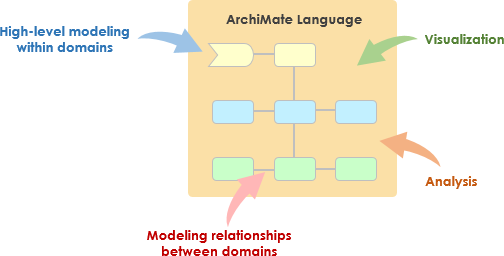
ArchiMate adalah bahasa pemodelan arsitektur perusahaan yang terbuka dan independen yang mendukung deskripsi, analisis, dan visualisasi arsitektur dalam dan di antara berbagai bidang bisnis. Dirancang untuk memberikan cara yang jelas dan tidak ambigu untuk berkomunikasi mengenai arsitektur kompleks kepada pemangku kepentingan. ArchiMate sangat berguna ketika digunakan bersama Metode Pengembangan Arsitektur TOGAF (ADM), memberikan cara standar untuk memodelkan dan berkomunikasi mengenai arsitektur perusahaan.
What is ArchiMate?

Konsep Kunci ArchiMate

ArchiMate Core Framework

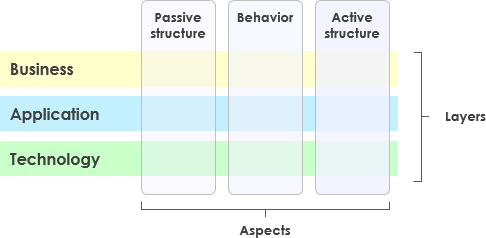
1. Lapisan-lapisan ArchiMate

ArchiMate membagi arsitektur perusahaan menjadi tiga lapisan utama:

  • Lapisan Bisnis: Berfokus pada proses bisnis, layanan, dan fungsi yang mendukung tujuan organisasi.
  • Lapisan Aplikasi: Menangani layanan aplikasi, komponen, dan interaksi mereka yang mendukung lapisan bisnis.
  • Lapisan Teknologi: Meliputi infrastruktur teknologi, termasuk komponen perangkat keras, perangkat lunak, dan jaringan yang mendukung lapisan aplikasi.

2. Elemen Inti

ArchiMate mendefinisikan beberapa elemen inti yang digunakan untuk memodelkan arsitektur:

  • Elemen Struktur Aktif: Mewakili entitas yang melakukan perilaku, seperti aktor bisnis, komponen aplikasi, dan perangkat.
  • Elemen Perilaku: Mewakili proses, fungsi, layanan, dan interaksi dalam arsitektur.
  • Elemen Struktur Pasif: Mewakili informasi atau data yang digunakan atau dihasilkan oleh elemen perilaku, seperti objek bisnis dan objek data.

3. Hubungan

ArchiMate mendefinisikan beberapa jenis hubungan untuk menghubungkan elemen-elemen:

  • Hubungan Struktural: Seperti komposisi, agregasi, dan spesialisasi.
  • Hubungan Ketergantungan: Seperti asosiasi, realisasi, dan digunakan oleh.
  • Hubungan Dinamis: Seperti memicu dan alur.

4. Perspektif

ArchiMate menyediakan beberapa perspektif untuk memvisualisasikan arsitektur dari berbagai sudut pandang:

  • Perspektif Proses Bisnis: Menunjukkan proses bisnis dan interaksi mereka.
  • Perspektif Kerja Sama Aplikasi: Menunjukkan bagaimana aplikasi bekerja sama untuk mendukung proses bisnis.
  • Perspektif Realisasi Teknologi: Menunjukkan bagaimana komponen teknologi merealisasikan komponen aplikasi.

ArchiMate dan TOGAF ADM

Metode Pengembangan Arsitektur TOGAF (ADM)

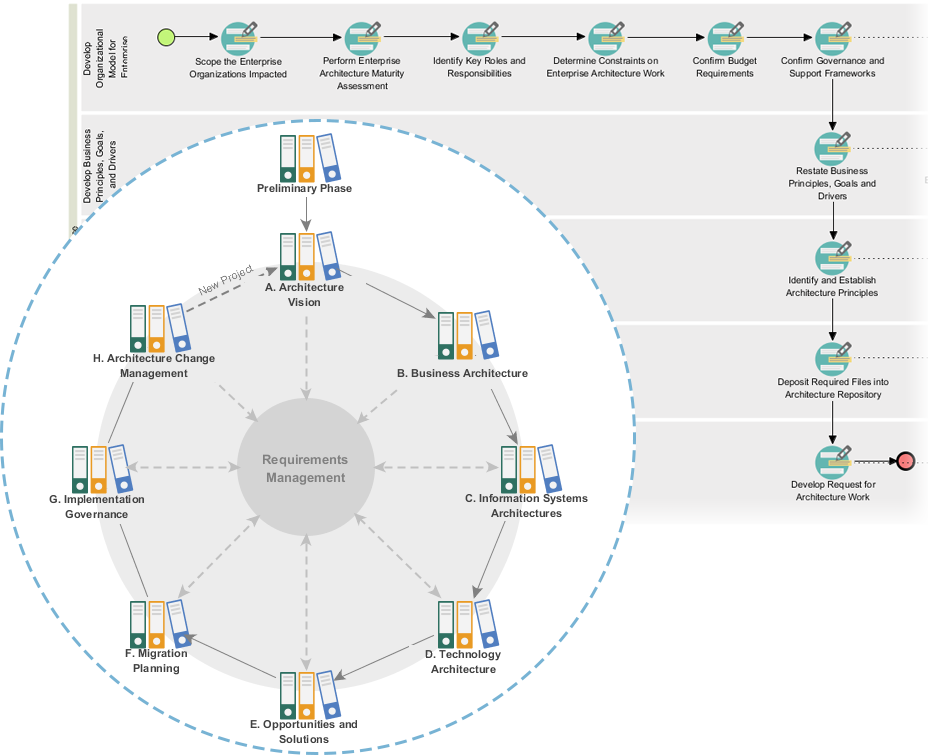
ADM TOGAF adalah metodologi komprehensif untuk mengembangkan arsitektur perusahaan. Metode ini terdiri dari beberapa tahap, masing-masing berfokus pada aspek tertentu dari proses pengembangan arsitektur. ArchiMate mendukung ADM TOGAF dengan menyediakan cara standar untuk memodelkan dan memvisualisasikan arsitektur pada setiap tahap.
Powerful TOGAF ADM Toolset

Tahapan ADM TOGAF

  1. Tahap Awal: Menetapkan prinsip arsitektur, kerangka kerja, dan tata kelola.
  2. Visi Arsitektur: Menentukan cakupan, pemangku kepentingan, perhatian, dan tujuan bisnis.
  3. Arsitektur Bisnis: Mengembangkan arsitektur bisnis, termasuk proses dan layanan bisnis.
  4. Arsitektur Sistem Informasi: Mengembangkan arsitektur data dan aplikasi.
  5. Arsitektur Teknologi: Mengembangkan arsitektur teknologi.
  6. Peluang dan Solusi: Mengidentifikasi dan memprioritaskan proyek arsitektur.
  7. Perencanaan Migrasi: Mengembangkan rencana migrasi dan implementasi.
  8. Tata Kelola Implementasi: Menyediakan tata kelola dan dukungan untuk implementasi arsitektur.

Contoh-model ArchiMate

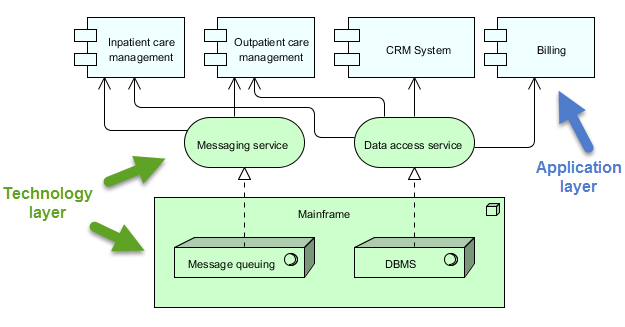
Diagram ini menggambarkan arsitektur berlapis untuk sistem manajemen kesehatan, dibagi menjadi dua lapisan utama: lapisan Lapisan Aplikasi dan lapisan Lapisan Teknologi. Berikut penjelasan rinci mengenai masing-masing komponen dan interaksinya:
archimate diagram example

Lapisan Aplikasi (Biru)

Lapisan ini terdiri dari berbagai aplikasi dan sistem yang berinteraksi langsung dengan pengguna atau sistem lain untuk mengelola layanan kesehatan. Komponen utama dalam lapisan ini adalah:

  1. Manajemen Perawatan Rawat Inap:

    • Mengelola layanan dan proses yang berkaitan dengan pasien yang dirawat di rumah sakit.
  2. Manajemen Perawatan Rawat Jalan:

    • Mengelola layanan dan proses untuk pasien yang datang ke rumah sakit untuk perawatan tetapi tidak dirawat inap.
  3. Sistem CRM (Manajemen Hubungan Pelanggan):

    • Mengelola interaksi dengan pasien, termasuk komunikasi, tindak lanjut, dan manajemen hubungan pasien.
  4. Tagihan:

    • Menangani aspek keuangan, termasuk pembuatan tagihan, pemrosesan pembayaran, dan pengelolaan catatan keuangan.

Lapisan Teknologi (Hijau)

Lapisan ini menyediakan infrastruktur dan layanan dasar yang mendukung aplikasi pada Lapisan Aplikasi. Komponen utama dalam lapisan ini adalah:

  1. Layanan Pesan:

    • Memfasilitasi komunikasi antara berbagai aplikasi dan sistem dalam sistem manajemen kesehatan.
    • Memastikan bahwa pesan dikirim secara andal dan dalam urutan yang benar.
  2. Layanan Akses Data:

    • Menyediakan cara terpusat untuk mengakses dan mengelola data di seluruh sistem.
    • Memastikan bahwa data diambil dan disimpan secara efisien dan aman.
  3. Mainframe:

    • Sistem komputasi pusat yang menampung layanan inti dan data.
    • Mencakup dua komponen utama:
      • Antrian Pesan: Mengelola antrian dan pemrosesan pesan untuk memastikan komunikasi yang andal.
      • DBMS (Sistem Manajemen Basis Data): Menyimpan dan mengelola data yang digunakan oleh berbagai aplikasi.

Interaksi

  • Manajemen Perawatan Pasien Rawat InapManajemen Perawatan Pasien Rawat JalanSistem CRM, dan Penagihan berinteraksi dengan Layanan Pesan dan Layanan Akses Data untuk melakukan fungsi masing-masing.
  • Layanan Layanan Pesan dan Layanan Akses Data mengandalkan Mainframe untuk layanan inti seperti antrian pesan dan manajemen basis data.
  • Layanan Mainframememastikan pesan diproses dengan benar dan data dikelola secara efisien, mendukung seluruh operasi sistem.

Diagram ini menggambarkan pendekatan terstruktur dalam mengelola layanan kesehatan dengan memisahkan fungsi tingkat aplikasi dari infrastruktur teknologi di bawahnya. Pemisahan ini memungkinkan desain sistem yang lebih modular dan mudah dipelihara, di mana perubahan pada satu lapisan memiliki dampak minimal terhadap lapisan lainnya. The Layanan Pesan dan Layanan Akses Databerfungsi sebagai perantara, memfasilitasi komunikasi dan manajemen data antara komponen aplikasi dan mainframe.

Alat EA ArchiMate yang Direkomendasikan

Visual Paradigm secara luas diakui sebagai salah satu alat terbaik untuk pemodelan ArchiMate dalam proyek Arsitektur Perusahaan (EA). Berikut adalah beberapa alasan mengapa alat ini sangat direkomendasikan:
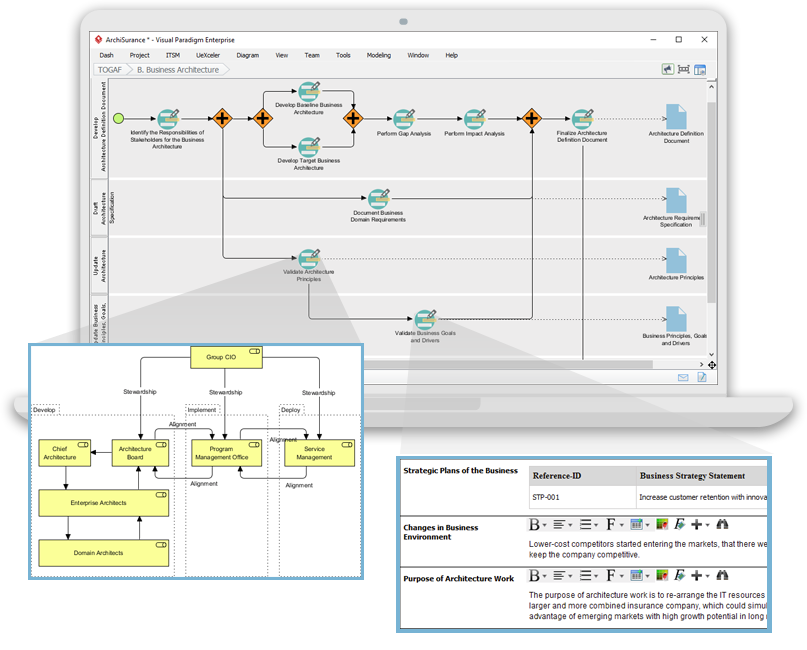
Navigating TOGAF: Your Guide to the ADM Process - Visual Paradigm Guides

1. Dukungan ArchiMate yang Komprehensif

  • Standar ArchiMate Lengkap: Visual Paradigm mendukung standar ArchiMate terbaru, termasuk ArchiMate 3.1, memastikan Anda dapat memodelkan menggunakan semua elemen dan hubungan ArchiMate resmi.
  • Perpustakaan Elemen yang Kaya: Alat ini menyediakan perpustakaan elemen ArchiMate yang luas, memudahkan pembuatan model yang rinci dan akurat.

2. Antarmuka yang Ramah Pengguna

  • Desain yang Intuitif: Alat ini menawarkan antarmuka yang ramah pengguna yang mudah dijelajahi, bahkan bagi pengguna yang baru mengenal pemodelan ArchiMate.
  • Seret dan Letakkan: Fungsi seret dan letakkan memungkinkan pembuatan model yang cepat dan efisien.

3. Fitur Pemodelan Lanjutan

  • Tampilan Berlapis: Mendukung pembuatan tampilan berlapis (misalnya, Bisnis, Aplikasi, Teknologi) untuk memberikan pandangan menyeluruh terhadap arsitektur perusahaan.
  • Hubungan Antar-Lapisan: Memungkinkan definisi dan visualisasi hubungan secara mudah di berbagai lapisan arsitektur.

4. Kolaborasi dan Berbagi

  • Kolaborasi Tim: Visual Paradigm mendukung kerja kolaboratif, memungkinkan beberapa pengguna bekerja pada proyek yang sama secara bersamaan.
  • Kontrol Versi: Kontrol versi terintegrasi membantu mengelola perubahan dan melacak perkembangan model Anda.

5. Kemampuan Integrasi

  • Integrasi Alat: Terintegrasi secara mulus dengan alat dan platform lain, seperti JIRA, Confluence, dan berbagai basis data, meningkatkan praktik EA secara keseluruhan.
  • Impor/Ekspor: Mendukung impor dan ekspor model dalam berbagai format, termasuk Format File Pertukaran ArchiMate, memastikan kompatibilitas dengan alat lain.

6. Dokumentasi dan Pelaporan

  • Dokumentasi Otomatis: Menghasilkan dokumentasi komprehensif dari model ArchiMate Anda, menghemat waktu dan memastikan konsistensi.
  • Laporan Khusus: Memungkinkan pembuatan laporan khusus yang disesuaikan dengan kebutuhan pemangku kepentingan tertentu.

7. Pelatihan dan Dukungan

  • Sumber Daya yang Melimpah: Menyediakan berbagai tutorial, panduan, dan contoh untuk membantu pengguna memulai dan menguasai pemodelan ArchiMate.
  • Dukungan Pelanggan: Menyediakan dukungan pelanggan yang kuat untuk membantu menangani masalah atau pertanyaan yang mungkin muncul.

8. Skalabilitas

  • Solusi yang Dapat Dikembangkan: Cocok untuk proyek EA skala kecil maupun besar, menjadikannya alat yang serbaguna bagi organisasi dari segala ukuran.

9. Kepatuhan dan Standar

  • Standar Industri: Selaras dengan standar industri dan praktik terbaik, memastikan bahwa model EA Anda sesuai dan terkini.

Kesimpulan

ArchiMate menyediakan cara yang kuat dan standar untuk memodelkan arsitektur perusahaan, mendukung metodologi TOGAF ADM. Dengan memahami konsep kunci, lapisan, elemen, dan hubungan dalam ArchiMate, Anda dapat secara efektif memodelkan dan mengkomunikasikan arsitektur kompleks kepada pemangku kepentingan. Contoh yang disediakan menggambarkan bagaimana ArchiMate dapat digunakan untuk memodelkan proses bisnis, kerja sama aplikasi, dan realisasi teknologi, mendukung berbagai tahap dalam TOGAF ADM.

Sumber Daya Alat ArchiMate

  1. Alat Diagram ArchiMate Online Gratis

    • Deskripsi: Buat diagram ArchiMate secara online dengan alat gratis yang mendukung bahasa pemodelan visual ArchiMate 3. Termasuk contoh dan templat untuk membantu Anda memulai.
    • URLAlat Diagram ArchiMate Online Gratis 1
  2. Halaman Utama – Sumber Daya ArchiMate Gratis

  3. Visual Paradigm – UML, Agile, PMBOK, TOGAF, BPMN dan Lainnya!

  4. Bab 7. ArchiMate – Lingkaran Komunitas Visual Paradigm

  5. Apa itu ArchiMate?

    • Deskripsi: Panduan pembelajaran langkah demi langkah untuk ArchiMate, termasuk cara menggunakannya untuk pemodelan arsitektur perusahaan.
    • URLApa itu ArchiMate? 5
  6. Alat ArchiMate

    • Deskripsi: Pelajari cara menggunakan Visual Paradigm, alat desain dan manajemen yang dirancang untuk tim perangkat lunak agil.
    • URLAlat ArchiMate 6
  7. Perangkat Lunak ArchiMate Terbaik

    • Deskripsi: Alat ArchiMate bersertifikat untuk desain dan pemodelan EA yang efektif. Gambar cepat diagram ArchiMate yang sesuai dengan spesifikasi resmi The Open Group.
    • URLPerangkat Lunak ArchiMate Terbaik 7
  8. Cara Memformat Elemen ArchiMate?

    • Deskripsi: Pelajari cara mengedit elemen ArchiMate dengan melakukan tindakan seperti mengubah ukuran dan mengganti warna.
    • URLCara Memformat Elemen ArchiMate? 8
  9. Panduan Viewpoint ArchiMate – Viewpoint Peta Sumber Daya

  10. Tutorial Diagram ArchiMate

    • Deskripsi: Tutorial yang membantu Anda mempelajari diagram ArchiMate, cara membuatnya, dan kapan menggunakannya. Termasuk contoh dan tips.
    • URLTutorial Diagram ArchiMate 10

Sumber daya ini seharusnya memberikan titik awal yang komprehensif untuk menggunakan alat ArchiMate Visual Paradigm dalam pemodelan arsitektur perusahaan.
Panduan Lengkap tentang Proses Panduan-Ke TOGAF Visual Paradigm

Pendahuluan

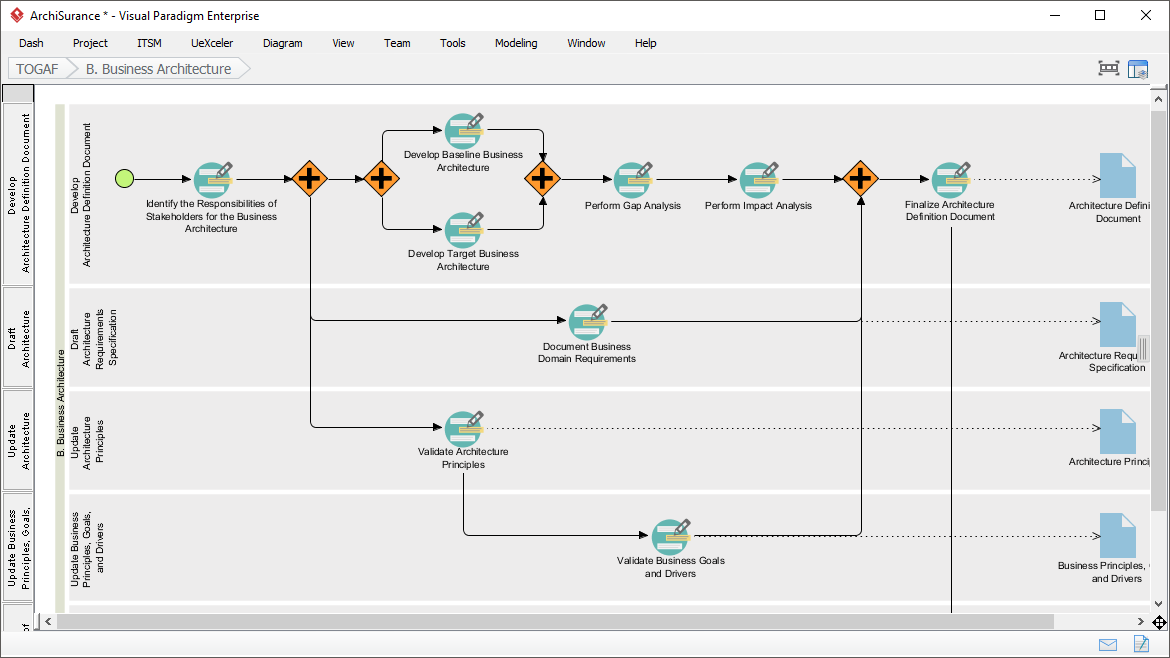
Proses Panduan-Ke TOGAF Visual Paradigm adalah alat yang kuat yang dirancang untuk mempermudah adopsi Metode Pengembangan Arsitektur TOGAF (ADM). Ini menyediakan panduan langkah demi langkah, petunjuk, dan contoh nyata untuk mendukung pengembangan arsitektur perusahaan. Panduan komprehensif ini akan mengeksplorasi fitur utama, manfaat, dan bidang aplikasi Proses Panduan-Ke TOGAF Visual Paradigm, menyoroti mengapa alat ini menonjol di bidang arsitektur perusahaan.

Transform Your Business with Visual Paradigm and TOGAF - Visual Paradigm Guides

Fitur Utama

  1. Panduan Langkah demi Langkah:

    • Proses Panduan-Ke menyediakan petunjuk rinci dan langkah demi langkah untuk setiap tahap ADM TOGAF, memastikan pengguna dapat menavigasi kompleksitas pengembangan arsitektur perusahaan dengan mudah1112.
  2. Integrasi dengan ArchiMate:

    • Visual Paradigm mendukung integrasi ArchiMate dengan ADM TOGAF, memberikan kombinasi yang kuat untuk inisiatif arsitektur perusahaan. ArchiMate 3, dengan sistem notasi yang serbaguna, memungkinkan arsitek untuk mengungkapkan model kompleks secara efektif1314.
  3. Manajemen Tugas Otomatis:

    • Alat ini meningkatkan seluruh proses dengan manajemen tugas otomatis dan notifikasi, memungkinkan pengguna mengembangkan hasil arsitektur secara bertahap dan kolaboratif15.
  4. Peta Proses Visual:

    • Perangkat lunak ini memiliki peta proses visual yang membantu pengguna menavigasi seluruh proses arsitektur perusahaan dengan mudah. Ini menyediakan seperangkat lengkap alat perencanaan, desain, dan pengembangan untuk menyelesaikan aktivitas ADM14.
  5. Toolkit Komprehensif:

    • Visual Paradigm menawarkan berbagai alat yang disesuaikan untuk aktivitas ADM, termasuk diagram ArchiMate untuk memodelkan aspek bisnis, TI, dan fisik dari arsitektur perusahaan. Alat-alat ini memberikan pandangan komprehensif terhadap arsitektur, sehingga lebih mudah dipahami dan diimplementasikan TOGAF14.

Manfaat

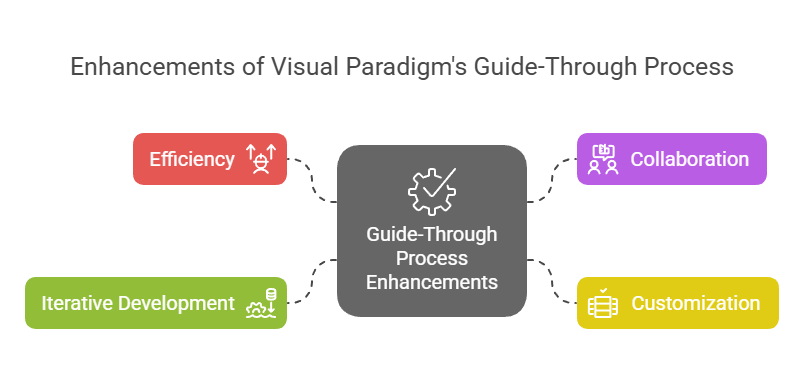
Enhancements of Visual Paradigm's Guide-Through Process: Visual Paradigm

  1. Efisiensi:

    • Proses Panduan-Melalui secara signifikan meningkatkan efisiensi dengan memberikan petunjuk yang jelas dan mengotomatisasi tugas, memungkinkan pengguna fokus pada keputusan strategis daripada detail prosedural11.
  2. Kolaborasi:

    • Alat ini memfasilitasi kolaborasi antara berbagai pemangku kepentingan, termasuk pemilik proyek, analis bisnis, arsitek perusahaan, dan profesional TI. Pendekatan kolaboratif ini memastikan bahwa semua pihak terlibat dan mendapatkan informasi selama proses pengembangan arsitektur15.
  3. Kustomisasi:

    • Alat Visual Paradigm memungkinkan kustomisasi, memungkinkan organisasi menyesuaikan proses ADM sesuai kebutuhan dan tujuan mereka. Fleksibilitas ini memastikan bahwa proses pengembangan arsitektur selaras dengan kebutuhan unik organisasi11.
  4. Pengembangan Iteratif:

    • Sifat iteratif dari ADM TOGAF sepenuhnya didukung oleh Proses Panduan-Melalui Visual Paradigm. Ini memungkinkan praktisi menyesuaikan dan menyempurnakan pekerjaan mereka berdasarkan kebutuhan informasi yang berkembang dan umpan balik pemangku kepentingan, memastikan bahwa arsitektur memenuhi kebutuhan yang terus berubah dari organisasi16.

Bidang Aplikasi

  1. Pengembangan Arsitektur Perusahaan:

    • Bidang aplikasi utama adalah pengembangan arsitektur perusahaan, di mana Proses Panduan-Melalui membantu organisasi merancang, merencanakan, menerapkan, dan mengelola arsitektur perusahaan mereka. Ini memberikan pendekatan terstruktur untuk menyelaraskan tujuan bisnis dengan strategi TI secara efektif17.
  2. Transformasi Digital:

    • Alat ini sangat penting untuk inisiatif transformasi digital, di mana organisasi berusaha meningkatkan pengalaman pelanggan dan efisiensi operasional melalui penerapan teknologi dan proses baru18.
  3. Perencanaan Strategis:

    • Proses Panduan Visual Paradigm mendukung perencanaan strategis dengan menyediakan kerangka kerja komprehensif untuk mengembangkan visi arsitektur, menentukan cakupan, mengidentifikasi pemangku kepentingan, dan membuat rencana komunikasi. Ini memastikan bahwa proses pengembangan arsitektur selaras dengan tujuan bisnis dan penggerak strategis19.
  4. Metodologi Agile:

    • Alat ini mengintegrasikan metodologi agile dan UML, memberikan solusi komprehensif untuk pengembangan arsitektur perusahaan. Integrasi ini memastikan bahwa proses pengembangan arsitektur bersifat fleksibel dan efisien, mendukung praktik agile dalam organisasi14.

Kesimpulan

Proses Panduan TOGAF Visual Paradigm menonjol sebagai alat yang komprehensif dan efektif untuk mendukung TOGAF ADM. Panduan langkah demi langkah, integrasi dengan ArchiMate, manajemen tugas otomatis, dan fitur kolaboratif menjadikannya sumber daya yang tak ternilai bagi pengembangan arsitektur perusahaan. Dengan memanfaatkan alat ini, organisasi dapat meningkatkan efisiensi, kolaborasi, kustomisasi, dan pengembangan iteratif, sehingga pada akhirnya mencapai tujuan arsitektur perusahaan dan mendorong nilai bisnis serta transformasi

Comprehensive Guide to Visual Paradigm’s TOGAF Guide-Through Process

Introduction

Visual Paradigm’s TOGAF Guide-Through Process is a powerful tool designed to streamline the adoption of the TOGAF Architecture Development Method (ADM). It provides step-by-step guidance, instructions, and real-life examples to support enterprise architecture development. This comprehensive guide will explore the key features, benefits, and application areas of Visual Paradigm’s TOGAF Guide-Through Process, highlighting why it stands out in the field of enterprise architecture.

Transform Your Business with Visual Paradigm and TOGAF - Visual Paradigm Guides

Key Features

  1. Step-by-Step Guidance:

    • The Guide-Through Process offers detailed, step-by-step instructions for each phase of the TOGAF ADM, ensuring that users can navigate the complexities of enterprise architecture development with ease 1112.
  2. Integration with ArchiMate:

    • Visual Paradigm supports the integration of ArchiMate with TOGAF ADM, providing a powerful combination for enterprise architecture initiatives. ArchiMate 3, with its versatile notation system, allows architects to express complex models effectively 1314.
  3. Automated Task Management:

    • The tool enhances the entire process with automated task management and notifications, enabling users to develop architecture deliverables incrementally and collaboratively 15.
  4. Visual Process Maps:

    • The software features visual process maps that help users navigate through the entire enterprise architecture process easily. It provides a full set of planning, design, and development tools to complete ADM activities 14.
  5. Comprehensive Toolkit:

    • Visual Paradigm offers a range of tools tailored for ADM activities, including ArchiMate diagrams for modeling business, IT, and physical aspects of enterprise architecture. These tools provide a comprehensive view of the architecture, making it easier to understand and implement TOGAF 14.

Benefits

Enhancements of Visual Paradigm's Guide-Through Process: Visual Paradigm

  1. Efficiency:

    • The Guide-Through Process significantly enhances efficiency by providing clear instructions and automating tasks, allowing users to focus on strategic decisions rather than procedural details 11.
  2. Collaboration:

    • The tool facilitates collaboration among different stakeholders, including project owners, business analysts, enterprise architects, and IT professionals. This collaborative approach ensures that all parties are engaged and informed throughout the architecture development process 15.
  3. Customization:

    • Visual Paradigm’s tool allows for customization, enabling organizations to tailor the ADM process to their specific needs and goals. This flexibility ensures that the architecture development process aligns with the organization’s unique requirements 11.
  4. Iterative Development:

    • The iterative nature of the TOGAF ADM is fully supported by Visual Paradigm’s Guide-Through Process. This allows practitioners to adapt and refine their work based on evolving information needs and stakeholder feedback, ensuring that the architecture meets the changing needs of the organization 16.

Application Areas

  1. Enterprise Architecture Development:

    • The primary application area is enterprise architecture development, where the Guide-Through Process helps organizations design, plan, implement, and govern their enterprise architecture. It provides a structured approach to align business goals with IT strategies effectively 17.
  2. Digital Transformation:

    • The tool is crucial for digital transformation initiatives, where organizations seek to enhance customer experience and operational efficiency through the implementation of new technologies and processes 18.
  3. Strategic Planning:

    • Visual Paradigm’s Guide-Through Process supports strategic planning by providing a comprehensive framework for developing architecture visions, defining scope, identifying stakeholders, and creating communications plans. This ensures that the architecture development process is aligned with business goals and strategic drivers 19.
  4. Agile Methodologies:

    • The tool integrates agile methodologies and UML, providing a comprehensive solution for enterprise architecture development. This integration ensures that the architecture development process is both flexible and efficient, supporting agile practices within the organization 14.

Conclusion

Visual Paradigm’s TOGAF Guide-Through Process stands out as a comprehensive and effective tool for supporting the TOGAF ADM. Its step-by-step guidance, integration with ArchiMate, automated task management, and collaborative features make it an invaluable resource for enterprise architecture development. By leveraging this tool, organizations can enhance efficiency, collaboration, customization, and iterative development, ultimately achieving their enterprise architecture goals and driving business value and transformation.

Comprehensive Tutorial for ArchiMate Supporting TOGAF ADM

Introduction to ArchiMate

ArchiMate is an open and independent enterprise architecture modeling language that supports the description, analysis, and visualization of architecture within and across business domains. It is designed to provide a clear and unambiguous way to communicate complex architectures to stakeholders. ArchiMate is particularly useful when used in conjunction with the TOGAF Architecture Development Method (ADM), providing a standardized way to model and communicate enterprise architectures.

What is ArchiMate?

Key Concepts of ArchiMate

ArchiMate Core Framework

1. Layers of ArchiMate

ArchiMate divides the enterprise architecture into three main layers:

  • Business Layer: Focuses on the business processes, services, and functions that support the organization’s goals.
  • Application Layer: Deals with the application services, components, and their interactions that support the business layer.
  • Technology Layer: Covers the technology infrastructure, including hardware, software, and network components that support the application layer.

2. Core Elements

ArchiMate defines several core elements that are used to model the architecture:

  • Active Structure Elements: Represent the entities that perform behavior, such as business actors, application components, and devices.
  • Behavior Elements: Represent the processes, functions, services, and interactions within the architecture.
  • Passive Structure Elements: Represent the information or data used or produced by behavior elements, such as business objects and data objects.

3. Relationships

ArchiMate defines several types of relationships to connect the elements:

  • Structural Relationships: Such as composition, aggregation, and specialization.
  • Dependency Relationships: Such as association, realization, and used-by.
  • Dynamic Relationships: Such as triggering and flow.

4. Viewpoints

ArchiMate provides several viewpoints to visualize the architecture from different perspectives:

  • Business Process Viewpoint: Shows the business processes and their interactions.
  • Application Cooperation Viewpoint: Shows how applications cooperate to support business processes.
  • Technology Realization Viewpoint: Shows how technology components realize application components.

ArchiMate and TOGAF ADM

TOGAF Architecture Development Method (ADM)

TOGAF ADM is a comprehensive methodology for developing enterprise architectures. It consists of several phases, each focusing on a specific aspect of the architecture development process. ArchiMate supports TOGAF ADM by providing a standardized way to model and visualize the architecture at each phase.

Powerful TOGAF ADM Toolset

Phases of TOGAF ADM

  1. Preliminary Phase: Establishes the architecture principles, framework, and governance.
  2. Architecture Vision: Defines the scope, stakeholders, concerns, and business objectives.
  3. Business Architecture: Develops the business architecture, including business processes and services.
  4. Information Systems Architectures: Develops the data and application architectures.
  5. Technology Architecture: Develops the technology architecture.
  6. Opportunities and Solutions: Identifies and prioritizes architecture projects.
  7. Migration Planning: Develops the migration and implementation plan.
  8. Implementation Governance: Provides governance and support for the implementation of the architecture.

Examples of ArchiMate Models

This diagram illustrates a layered architecture for a healthcare management system, divided into two main layers: the Application Layer and the Technology Layer. Here’s a detailed explanation of each component and their interactions:

archimate diagram example

Application Layer (Blue)

This layer consists of the various applications and systems that directly interact with users or other systems to manage healthcare services. The key components in this layer are:

  1. Inpatient Care Management:

    • Manages services and processes related to patients who are admitted to the hospital.
  2. Outpatient Care Management:

    • Manages services and processes for patients who visit the hospital for treatment but are not admitted.
  3. CRM System (Customer Relationship Management):

    • Manages interactions with patients, including communication, follow-ups, and patient relationship management.
  4. Billing:

    • Handles the financial aspects, including generating bills, processing payments, and managing financial records.

Technology Layer (Green)

This layer provides the underlying infrastructure and services that support the applications in the Application Layer. The key components in this layer are:

  1. Messaging Service:

    • Facilitates communication between different applications and systems within the healthcare management system.
    • Ensures that messages are delivered reliably and in the correct order.
  2. Data Access Service:

    • Provides a centralized way to access and manage data across the system.
    • Ensures that data is retrieved and stored efficiently and securely.
  3. Mainframe:

    • The central computing system that hosts core services and data.
    • Includes two main components:
      • Message Queuing: Manages the queuing and processing of messages to ensure reliable communication.
      • DBMS (Database Management System): Stores and manages the data used by the various applications.

Interactions

  • Inpatient Care ManagementOutpatient Care ManagementCRM System, and Billing interact with the Messaging Service and Data Access Service to perform their respective functions.
  • The Messaging Service and Data Access Service rely on the Mainframe for core services like message queuing and database management.
  • The Mainframe ensures that messages are processed correctly and data is managed efficiently, supporting the entire system’s operations.

The diagram depicts a structured approach to managing healthcare services by separating the application-level functions from the underlying technology infrastructure. This separation allows for more modular and maintainable system design, where changes in one layer have minimal impact on the other. The Messaging Service and Data Access Service act as intermediaries, facilitating communication and data management between the application components and the mainframe.

Recommended ArchiMate EA Tool

Visual Paradigm is widely recognized as one of the best tools for ArchiMate modeling in Enterprise Architecture (EA) projects. Here are some reasons why it is highly recommended:

Navigating TOGAF: Your Guide to the ADM Process - Visual Paradigm Guides

1. Comprehensive ArchiMate Support

  • Full ArchiMate Standard: Visual Paradigm supports the latest ArchiMate standards, including ArchiMate 3.1, ensuring that you can model using all the official ArchiMate elements and relationships.
  • Rich Library of Elements: It provides a extensive library of ArchiMate symbols, making it easy to create detailed and accurate models.

2. User-Friendly Interface

  • Intuitive Design: The tool offers a user-friendly interface that is easy to navigate, even for users who are new to ArchiMate modeling.
  • Drag-and-Drop: The drag-and-drop functionality allows for quick and efficient model creation.

3. Advanced Modeling Features

  • Layered Views: Supports the creation of layered views (e.g., Business, Application, Technology) to provide a holistic view of the enterprise architecture.
  • Cross-Layer Relationships: Easily define and visualize relationships across different layers of the architecture.

4. Collaboration and Sharing

  • Team Collaboration: Visual Paradigm supports collaborative work, allowing multiple users to work on the same project simultaneously.
  • Version Control: Integrated version control helps manage changes and track the evolution of your models.

5. Integration Capabilities

  • Tool Integration: Seamlessly integrates with other tools and platforms, such as JIRA, Confluence, and various databases, enhancing the overall EA practice.
  • Import/Export: Supports importing and exporting models in various formats, including ArchiMate Exchange File Format, ensuring compatibility with other tools.

6. Documentation and Reporting

  • Automated Documentation: Generates comprehensive documentation from your ArchiMate models, saving time and ensuring consistency.
  • Custom Reports: Allows for the creation of custom reports tailored to specific stakeholder needs.

7. Training and Support

  • Extensive Resources: Offers a wealth of tutorials, guides, and examples to help users get started and master ArchiMate modeling.
  • Customer Support: Provides robust customer support to assist with any issues or questions that may arise.

8. Scalability

  • Scalable Solutions: Suitable for both small and large-scale EA projects, making it a versatile tool for organizations of all sizes.

9. Compliance and Standards

  • Industry Standards: Aligns with industry standards and best practices, ensuring that your EA models are compliant and up-to-date.

Conclusion

ArchiMate provides a powerful and standardized way to model enterprise architectures, supporting the TOGAF ADM methodology. By understanding the key concepts, layers, elements, and relationships in ArchiMate, you can effectively model and communicate complex architectures to stakeholders. The examples provided illustrate how ArchiMate can be used to model business processes, application cooperation, and technology realization, supporting the various phases of the TOGAF ADM.

ArchiMate Tool Resource

  1. Free Online ArchiMate Diagram Tool

    • Description: Create ArchiMate diagrams online with a free tool that supports ArchiMate 3 visual modeling language. Includes examples and templates to help you get started.
    • URLFree Online ArchiMate Diagram Tool 1
  2. Main Page – ArchiMate Resources for FREE

    • Description: Offers a visual language to model and capture enterprise architecture, providing a means to visualize relationships within and between different domains.
    • URLMain Page – ArchiMate Resources for FREE 2
  3. Visual Paradigm – UML, Agile, PMBOK, TOGAF, BPMN and More!

  4. Chapter 7. ArchiMate – Visual Paradigm Community Circle

  5. What is ArchiMate?

    • Description: Step-by-step learning guide for ArchiMate, including how to use it for enterprise architecture modeling.
    • URLWhat is ArchiMate? 5
  6. ArchiMate tools

    • Description: Learn how to use Visual Paradigm, a design and management tool designed for agile software teams.
    • URLArchiMate tools 6
  7. Best ArchiMate Software

    • Description: Certified ArchiMate tool for effective EA design and modeling. Quickly draw ArchiMate diagrams that conform to The Open Group official specification.
    • URLBest ArchiMate Software 7
  8. How to Format ArchiMate Elements?

  9. ArchiMate Viewpoint Guide – Resource Map Viewpoint

  10. ArchiMate Diagram Tutorial

    • Description: Tutorial that helps you learn about ArchiMate diagrams, how to create them, and when to use them. Includes examples and tips.
    • URLArchiMate Diagram Tutorial 10

These resources should provide a comprehensive starting point for using Visual Paradigm’s ArchiMate tool for enterprise architecture modeling.