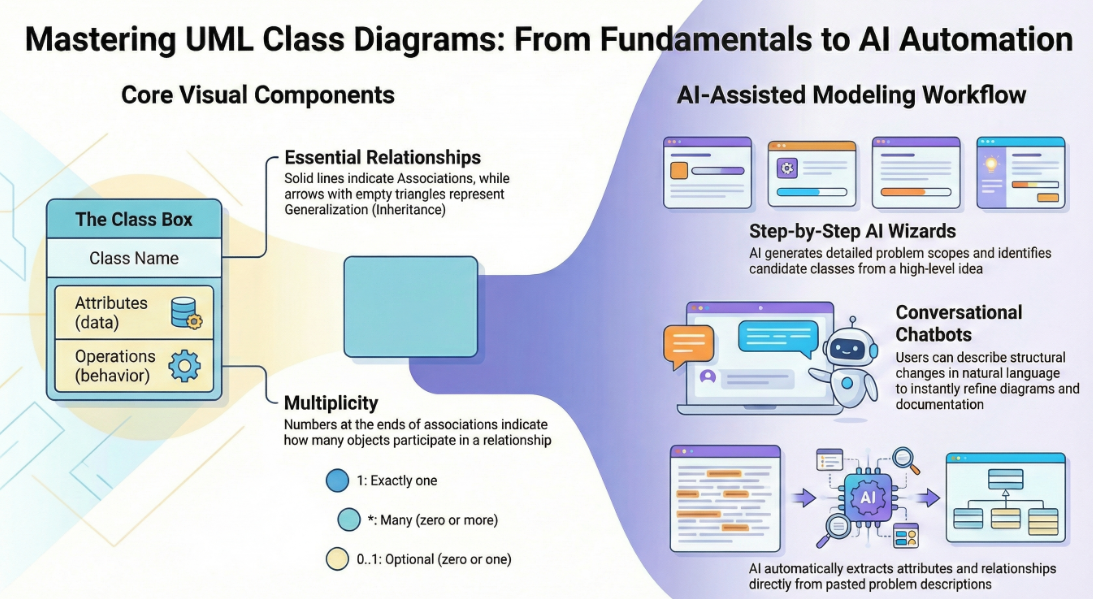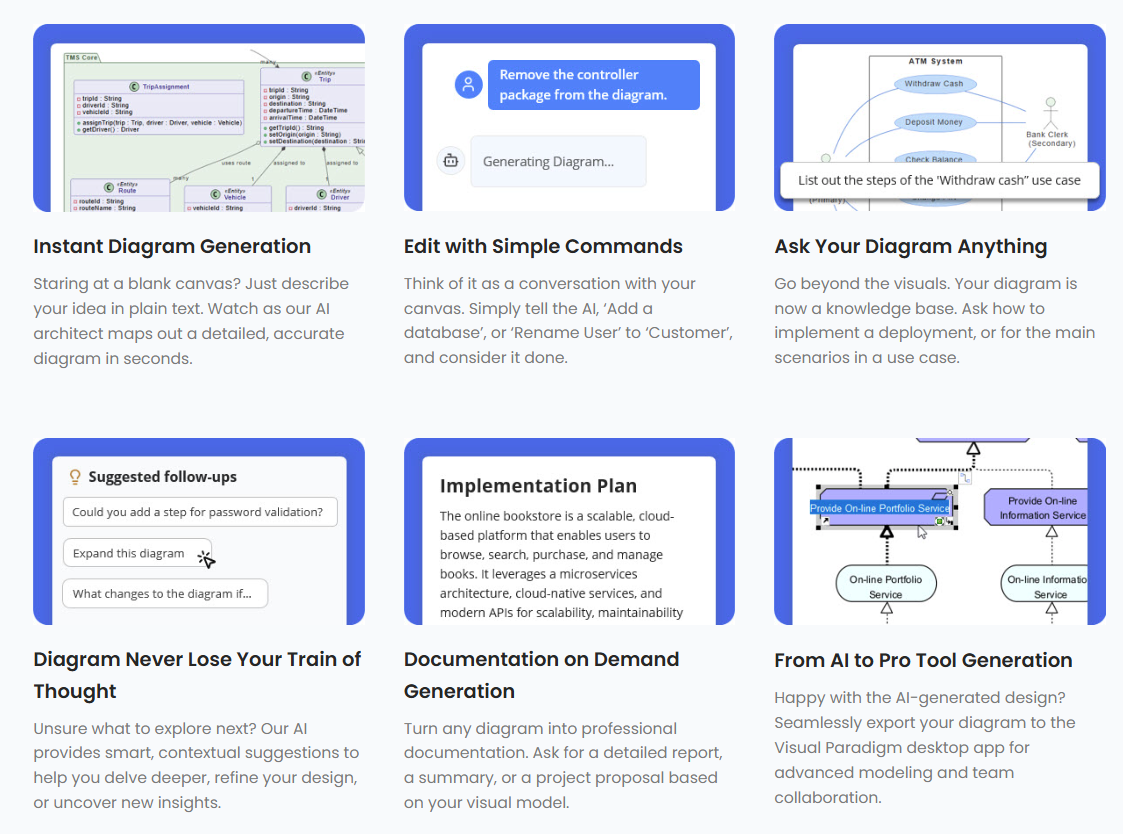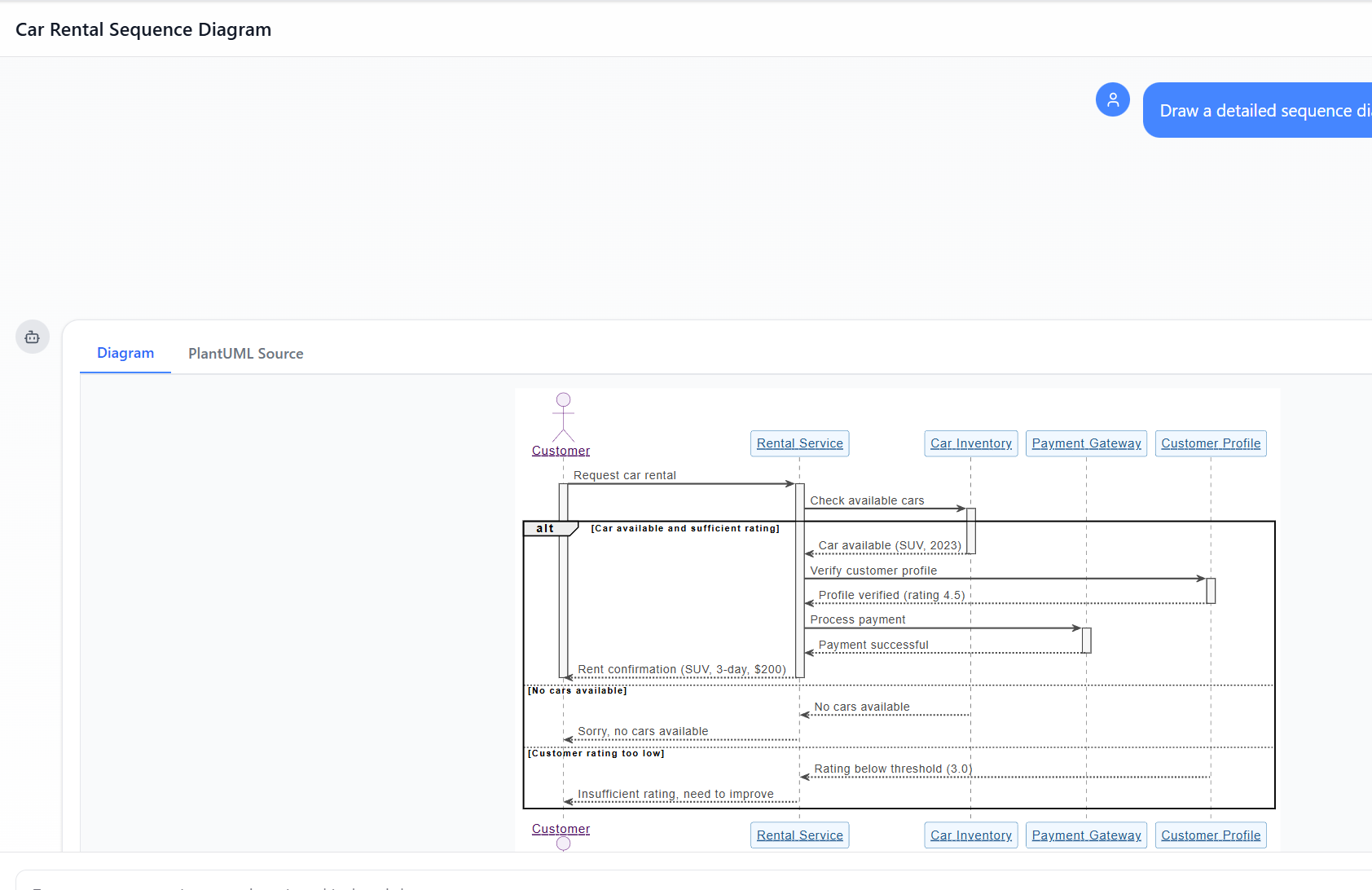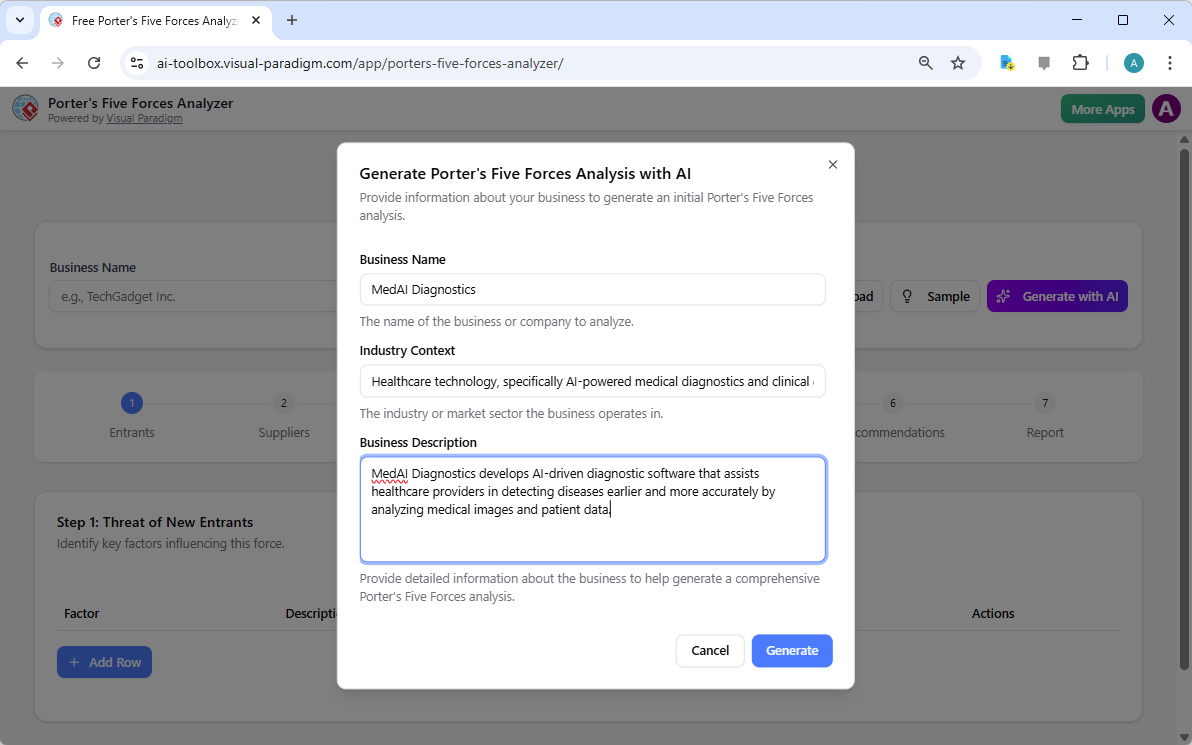
スケッチを超えて:なぜカジュアルなAI LLMは視覚的モデリングに失敗するのか、そしてVisual Paradigmがそのギャップをどう埋めるか

現代のソフトウェア工学の分野において、抽象的なアイデアから具体的なシステム設計へと移行することは、しばしば「地図のない迷路」を解くような感覚である。一般化された大規模言語モデル(LLM)は初期のコンテンツ作成を革命的に変革したが、プロフェッショナルな視覚的モデリングに応用すると著しく不足している。本稿では、カジュアルなAI図表生成における欠落している要素と、Visual Paradigm(VP)AIエコシステムがこれらの課題を、アーキテクチャ的成功のための高速エンジンに変える方法を紹介する。

1. 「スケッチアーティスト」問題:カジュアルなAI LLMに何が欠けているのか

一般化されたLLMが図表作成において根本的な制限を受ける理由は、テキスト生成標準化された視覚的モデリングの違いに由来する。資料は一般化されたLLMを「スケッチアーティスト」と評価しており、プロフェッショナルなエンジニアリングに必要な「建築基準」「CADシステム」が欠けていると述べている。

  • レンダリングエンジンの欠如:一般化されたLLMは主にテキストの処理と生成を目的として設計されている。MermaidやPlantUMLなどの「図表作成コード」を生成することはできるが、SVGのような高品質で編集可能なベクターグラフィックスに変換するための組み込みレンダリングエンジンが欠けている。
  • 意味的・標準規則違反:汎用的なAIモデルはしばしば「美しいスケッチ」を生成するが、それらは正式なモデリングの技術的ルールを違反しており、しばしば「集約」「合成」「多態性」などの複雑な技術用語を誤解するため、機能的なエンジニアリング資産ではなく、装飾的な図面に終わってしまう。「集約」「合成」、または「多態性」結果として、機能的なエンジニアリング資産ではなく装飾的な図面となる。
  • 状態管理の欠如:カジュアルなLLMは持続的な視覚的構造を持ちません。ユーザーがテキストベースのAIに単一の詳細を変更するよう依頼すると、モデルはしばしば全体の図を再生成する必要があるこれにより、接続線の断絶、レイアウトのずれ、または以前の詳細の完全な喪失が生じます。

2. カジュアルなAI図面作成における問題点

カジュアルなAI生成に頼ることは、プロジェクトの整合性を損なう可能性のあるいくつかのリスクをもたらします:

  • 「設計と実装のギャップ」:厳密な視覚的ブループリントがなければ、論理は「散らばり」かつ「曖昧」のままとなり、コードが「混乱した状態」になることや、共有理解が得られない会議が終わるケースがよくあります。
  • 構文に関する専門知識の壁:AIが原始コードを生成した場合、ユーザーはその特定の構文(例:PlantUML)について深い技術的専門知識を備えていなければ手動での修正ができないため、「簡単な」AIツールの目的が達成できなくなります。
  • ワークフローからの隔離:一般的なLLMからのテキストスニペットは実際のエンジニアリングプロセスから隔離されており、手動でのコピー&ペーストを必要とし、バージョン管理や他のモデルタイプとの統合も提供しません。
  • 「ワンショット」プロンプトの失敗:一度のプロンプトでは、詳細なシステムについてユーザーの要件の100%を満たすことはめったにありません。初期のアイデアはしばしば「散らばっている」状態であり、ユーザーは最初のドラフトを見てから、ロードバランサー、エラー処理ステートなど重要な詳細を忘れていたことに気づくことがよくあります。

3. Visual Paradigm AIがプロフェッショナルな整合性を実現する方法

Visual Paradigm AIは、モデリングを「労力がかかる図面作成作業」から直感的で会話型かつ自動化されたワークフロー.

A. 「図面の修正」機能と持続的構造

一般的なツールとは異なり、VP AIは図を持続的オブジェクトとして維持します。独自の「図面の修正」技術を通じて、ユーザーは「二段階認証のステップを追加する」や「このエイクターの名前を変更する」などの会話形式の命令を発行でき、AIは視覚的構造を即座に更新しつつ、レイアウトの整合性を維持.

B. 標準化された知能

Visual Paradigm AI は確立されたモデル化基準に独自に訓練されていますUML 2.5、ArchiMate 3、C4を含む。それは意味的ルールと構造言葉の背後にあるものであり、関係性や命名規則が技術的に妥当な構築用のブループリントであることを保証します。

C. 専門的なステップベースの分析

要件と設計のギャップを埋めるために、エコシステムは体系的なアプリを提供します:

  • AI駆動のテキスト分析:自動的に抽出します候補となるドメインクラス、属性、関係性非構造化された問題記述から描かれる前に1本の線も引かれる前までに。
  • 10ステップAIウィザード:ユーザーを論理的な手順(目的の定義から操作の特定まで)に導き、「人間がループ内にいる」検証「ワンショット」AI生成でよく見られる誤りを防ぎます。

D. コンサルタントとしてのアーキテクチャ的レビュー

単なる生成を超えて、AIは体系的な設計アシスタントとして機能します。既存の設計を分析して単一障害点、論理的なギャップ、または業界標準のパターン(例:MVC(モデル・ビュー・コントローラ))を提案し、システム品質を向上させます。

E. スムーズなエコシステム統合

AI生成されたモデルは機能的なアーティファクト単なる孤立した画像ではなく、エコシステムにインポート可能です。Visual Paradigm デスクトップ版またはオンライン版 高度な編集、バージョン管理、およびコード工学(データベース生成およびHibernate ORM統合を含む)、視覚的な設計がソフトウェア実装を直接駆動することを保証します。

結論:手作業による彫刻から3Dプリンティングへ

伝統的なモデリングは大理石の像を手で彫る作業に似ている、すべての刻みが高リスクの手作業です。一方で、Visual Paradigm AIは高級な3Dプリンターを使用するようなものです:英語で仕様を提示すると、システムは正確に技術的に妥当な構造を構築し、あなたが戦略的な設計意思決定に集中できるようにします。戦略、ビジネスモデリング、技術設計を統合した1つのAI強化プラットフォームにより、Visual Paradigmは「白紙のキャンバス」問題を解消し、すべてのステークホルダーが同じ概念的基準.

投稿日: カテゴリー AI

問題からレポートへ:AIがUse Caseの旅をどう導くか

Discover how AI guides your use case journey from problem to report with Visual Paradigm’s intelligent development assistant.

新しいオンラインコースプラットフォームの立ち上げを担当するプロジェクトマネージャーだと想像してください。最初の課題は、問題を明確に表現し、それを機能的なシステムに変換することです。ここがUse Case駆動型開発アシスタントVisual Paradigm社のAI搭載ツールが登場します。単に文書作成を助けるだけでなく、曖昧なアイデアを詳細で実行可能なプロジェクト計画に変換するための完全で構造化されたワークフローをガイドします。このプロセスは非常に直感的で、経験豊富なビジネスアナリストと技術アーキテクトが一緒に働いているかのように感じられます。この詳細な解説では、実際のオンラインコースプラットフォームの事例を用いて、この強力なツールがUse Caseライフサイクル全体をどのように簡素化するかを紹介します。

要約:Use Case駆動型開発アシスタントの主なポイント

  • プロジェクトの核心的な目的を明確にするために、明確な問題文から始めましょう。

  • AIを活用して、候補となるUse Caseとアクターのリストを自動生成します。

  • AI生成のUse Caseとアクティビティ図.

  • 構造化されたMoSCoW法を用いて機能を優先順位付けし、高価値の作業に集中します。

  • 詳細なUse Caseの記述と実行可能なGherkinテストシナリオを生成します。

  • プロジェクトの範囲と計画を伝えるための包括的なレポートを作成します。

  • 中央ダッシュボードを活用して進捗を追跡し、単一の真実の源を維持します。

ステップ1:AIを活用した問題の定義

すべての成功するプロジェクトは、解決しようとしている問題を明確に理解することから始まります。Use Case駆動型開発アシスタントとの旅は「問題文」タブから始まります。ここではプロジェクト名と簡単な説明を入力します。AIはこの情報をもとに包括的な問題文を生成します。図1このツールはプロジェクト名「オンラインコースプラットフォーム」と簡単な説明「インストラクターがコースを作成・販売し、学生が登録して学べるマーケットプレイス」をもとに詳細な物語を生成しました。この物語は核心的な課題を明らかにしています:学生は関連するコースを見つけるのが困難であり、インストラクターは広範なオーディエンスに届くことや専門知識を収益化することに課題を抱えています。このAI生成の問題文はプロジェクトの基盤となり、チーム全員が最初から統一した理解を持つことを保証します。

This is a screenshot of Visual Paradigm's AI Powered Use Case Driven Development Assistant. we are now in step 1. It shows th

ステップ2:AIアシスタントを活用したUse Caseの特定

問題が定義されると、次に自然なステップとして、システムが提供すべき主要な機能を特定することです。アシスタントの「候補Use Case」タブ(図2)はこのプロセスを自動化します。問題文を分析した後、AIは各アクター(インストラクター、学生、管理者など)に関連付けられたUse Caseのリストを提案します。今回のオンラインコースプラットフォームの場合、AIは「新しいコースを作成する」「コースコンテンツをアップロードする」「コースを閲覧・検索する」「コースに登録する」などのUse Caseを提案しています。このリストはしっかりとした出発点となり、ブレインストーミング会議に費やす時間と労力を大幅に節約します。その後、これらの提案を精査し、新しいものを追加したり、不要なものを削除したりして、システム機能の包括的なリストを作成できます。

This is a screenshot of Visual Paradigm's AI Powered Use Case Driven Development Assistant. We are now in step 2. It shows a

ステップ3:Use Case図を用いたシステムの可視化

Use Caseを特定した後は、それらがシステムのアクターとどのように相互作用するかを可視化することが重要です。「Use Case図」タブは、図3)に示されるように、Use Caseとアクターのリストをもとに、明確でグラフィカルな表現を自動生成します。この図は、アクター(インストラクター、学生、管理者)とシステムの機能(新しいコースを作成するなど)の関係を示しています。AIによる生成により、図は正確でプロフェッショナルなフォーマットになっています。この視覚的補助は、ステークホルダー、開発者、デザイナーがテキスト中心の文書を読まなくても、システムの範囲や機能を迅速に理解できるため、非常に価値があります。

This is a screenshot of Visual Paradigm's AI Powered Use Case Driven Development Assistant. We are now in step 3. It shows a

ステップ4:最大の影響をもたらす機能の優先順位付け

すべてのUse Caseが同等というわけではありません。プロジェクトの成功は、最も重要な機能を最初に注力することにかかっていることが多いです。「Use Caseの優先順位付け」タブ(画像4、これは強力なフレームワークを提供します。各ユースケースに対してユーザー価値とビジネス価値(0〜10のスケール)を割り当て、その後MoSCoW優先順位付け法(必須、重要、望ましい、保留)を適用できます。例として、AIは「新しいコースを作成する」および「コースコンテンツをアップロードする」が、プラットフォームのコア機能にとって不可欠であるため、「必須」機能であることを明らかにしました。この構造的な優先順位付けにより、開発チームはユーザーおよびビジネスに最大の価値を提供することに集中でき、低優先度の機能に無駄な努力を費やすことを防ぎます。

This is a screenshot of Visual Paradigm's AI Powered Use Case Driven Development Assistant. We are now in step 4. It shows th

ステップ5:ユースケースの詳細化とアクティビティ図の生成

高レベルのビューを確立した後、次のステップは各ユースケースの詳細に深く入り込むことです。「ユースケース詳細」タブは、画像5、選択されたユースケース用の包括的なテンプレートを作成できます。AIは事前条件、主な流れ、代替フローを含む詳細な記述を生成できます。たとえば「新しいコースを作成する」ユースケースの場合、AIは必要な手順を明確に示す構造化されたテンプレートを提供します。理解をさらに深めるために、アシスタントは同じユースケース用に「アクティビティ図」を生成でき、画像6のように表示されます。この図は、インストラクターがログインしてからコースが保存されるまでのステップバイステップのワークフローを視覚的に示しています。このような詳細は、開発者およびQAチームにとって不可欠です。

This is a screenshot of Visual Paradigm's AI Powered Use Case Driven Development Assistant. We are now in step 5. It shows thThis is a screenshot of Visual Paradigm's AI Powered Use Case Driven Development Assistant. We are still in step 5. It shows

ステップ6:テストシナリオとシーケンス図の生成

開発チームにとって、次の重要なステップはテスト可能なシナリオを作成することです。「シナリオ」タブは、画像7、ユースケースの記述から直接実行可能なGherkinシナリオを生成できます。これらのシナリオは、平易な言語(与えられた条件・実行する操作・期待される結果)で記述されており、自動テストに最適です。AIは主なシナリオと、無効なタイトルの場合の代替シナリオなどを生成できます。システムの内部動作をさらに明確にするために、アシスタントは「シーケンス図」を生成でき、画像8のように表示されます。この図は、インストラクター、Webダッシュボード、バックエンドAPI、データベース、通知サービスの間の相互作用を示しており、システムのアーキテクチャとデータフローを明確に描いています。

This is a screenshot of Visual Paradigm's AI Powered Use Case Driven Development Assistant. We are in step 6. It shows the AIThis is a screenshot of Visual Paradigm's AI Powered Use Case Driven Development Assistant. We are still in step 6. It shows

ステップ7:包括的なプロジェクトレポートの作成

開発プロセス全体を通じて、さまざまなステークホルダーにプロジェクトの状況と計画を伝えることが不可欠です。「レポートの生成」タブは、画像9のように表示され、これを容易にします。プロジェクト概要、実装計画、QAテスト計画、開発者タスクリストなど、さまざまなレポートを生成できます。これらのレポートはAIの支援を受けて作成されるため、一貫性と包括性が保証されます。たとえば、「プロジェクト概要」レポートは、経営層向け要約、主要機能、優先順位付けの根拠などを含むプロジェクト全体を要約しています。この単一の信頼できる情報源により、すべての関係者が一致した理解を持ち、情報が共有されます。

This is a screenshot of Visual Paradigm's AI Powered Use Case Driven Development Assistant. We are in step 7. It shows a repo

ステップ8:ダッシュボードによる進捗の追跡

最後に、このプロセスは「ダッシュボード」で完結します。画像10。この中央ハブは、プロジェクトの状況を高レベルで把握できるようにします。プロジェクトの完了率、ユースケースの総数、および「必須」項目の数を表示します。プロジェクトチェックリストにより、各ステップが完了すると「完了」にマークされ、進捗を追跡できます。プロジェクトの健全性に関するリアルタイムの可視化は、プロジェクトマネージャーやチームリーダーにとって非常に貴重であり、ボトルネックを特定し、プロジェクトが計画通りに進むように保証できます。

This is a screenshot of Visual Paradigm's AI Powered Use Case Driven Development Assistant. We are in step 8. It shows the da

ユースケース駆動型開発アシスタントは単なるツール以上の存在です。ソフトウェア開発プロセスに明確さと効率をもたらす包括的なワークフローです。問題定義からレポート生成まで、AIを各段階で活用することで、チームが要件から実装へと迅速かつ正確に移行できるように支援します。その結果、ビジネス目標とユーザーのニーズに合致した、構造的で詳細に文書化されたプロジェクトが生まれます。ユースケース開発プロセスを効率化したいのであれば、このAI駆動のツールは強力な解決策です。

どうすれば次のプロジェクトを変革できるか、実際に見てみませんか?ユースケース駆動型開発アシスタントが次のプロジェクトをどのように変革できるか?今すぐ試してみましょう.

関連リンク

ユースケースモデリングは、機能要件を把握するために使用される基本的なソフトウェア工学技術です機能要件外部のアクターとシステムの内部機能の相互作用を可視化することで。現代のプラットフォームは現在、AI駆動の自動化図の最適化、包括的なユースケース記述を作成し、モデルをテストケースやアクティビティ図に変換して、設計の一貫性とトレーサビリティを維持する。高度なツールとして、イベントフロー編集ツールシナリオアナライザー開発チームが構造化されたイベントシーケンスを検証および文書化し、全体的なシステムの明確性を向上させることを可能にする。

  1. ユースケース図とは何か? – UMLモデリングの完全ガイド:基本的なコンポーネント、目的、およびベストプラクティス要件モデリングのためのもの。

  2. ステップバイステップのユースケース図チュートリアル – 初心者からプロまで:ユーザーを基礎から応用技術まで効果的なユースケース図を作成するためのもの。

  3. ユースケースモデリングについて知っておくべきすべて:ユースケースモデリングの原則と応用システム設計におけるユースケースモデリングのもの。

  4. Visual Paradigm – ユースケース記述機能: 専門的なツールの詳細。ユーザーのインタラクションを正確に記録するために使用される。ユーザーのインタラクションを正確に記録する そして構造化されたシステムの挙動。

  5. Visual ParadigmによるAI駆動型ユースケース図の習得: AIを活用して作成するためのチュートリアル。インテリジェントでダイナミックな図 現代のソフトウェアシステム向け。

  6. Visual Paradigmのイベントフロー編集ツールの使い方ガイド: ドキュメント化のためのステップバイステップの説明。構造化されたイベントの順序 ユースケースシナリオ内での。

  7. ユースケースシナリオアナライザーによるシナリオの解明: アナライザーを使用して検査および。インタラクションフローを最適化する システムの明確さを高めるために。

  8. ユースケースをアクティビティ図に変換する – AI駆動の変換: その説明を提供するリソース。自動変換 ユースケースを詳細なシステムワークフローに変換する。

  9. AIを用いたユースケース図からシナリオとテストケースの生成: AIツールが作成を自動化する方法についての探求。要件駆動型のテスト手順.

  10. ユースケース図ギャラリー – テンプレートと例: 選りすぐりのコレクション。実際の例 インスピレーション、学習、および迅速なプロトタイピングのために。

ユースケース駆動開発におけるUMLシーケンス図の包括的ガイド:何であるか、なぜ重要か、どのように作成するか、そしてAIがそれを簡単にすること

現代のソフトウェア開発において、ユースケース駆動設計は効果的なシステムモデリングの基盤です。実際のシナリオを通じて、ユーザーの目的システムの振る舞いを捉えることに注力しています。このアプローチの中心には、UMLシーケンス図—ユースケースを実際の動きとして可視化する強力な視覚的ツールで、オブジェクトが時間とともにどのように相互作用するかを示します.

Online Sequence Diagram Tool

この包括的なガイドは、初心者およびチームが次を理解したい場合に設計されています:

  • シーケンス図とは何か、なぜ重要なのか

  • どのようにユースケース駆動アプローチを使って作成するかユースケース駆動アプローチ

  • 重要な概念と実際の例

  • どのようにVisual ParadigmのAIシーケンス図生成ツールが全体のプロセスを加速する——モデリングをより速く、よりスマートで、より協働的に行えるようにします。


🎯 ユースケース駆動アプローチとは何か?

あるユースケース駆動アプローチはシステム設計をユーザーの目的を中心に据えます。各ユースケースは、ユーザー(アクター)とシステムとの間で、意味のある成果を得るために行われる特定の相互作用を記述します。

例:
「顧客として、注文履歴を確認できるように、アカウントにログインしたい。」

ユースケースは単なる文書化ではなく、機能のための設計図、そしてシーケンス図は、そのユースケースがリアルタイムでどのように展開されるかを可視化する理想的な方法です。


🧩 ユースケース駆動開発においてシーケンス図を使う理由は?

シーケンス図はユースケースモデリングを支援するのに特に適しており、それは以下の通りです:

✅ 動的なフローを示す相互作用の
✅ メッセージのタイミングと順序を強調するメッセージの
✅ オブジェクト間の責任を明確にするオブジェクト間の
✅ エッジケースを明らかにする(例:無効な入力、タイムアウトなど)
✅ 設計およびテスト段階でのユースケースの検証を支援するユースケースの検証を設計およびテスト段階で
✅ 開発者、テスト担当者、ステークホルダー間のコミュニケーションを改善する開発者、テスト担当者、ステークホルダー間の

🔍 シーケンス図がなければ、ユースケースは抽象的なままになる可能性がある。それらがあることで、実行可能な設計図となる。実行可能な設計図.


📌 UMLシーケンス図のキーパラメータ(初心者向け)

ユースケースに飛び込む前に、基本的な構成要素を習得しましょう:

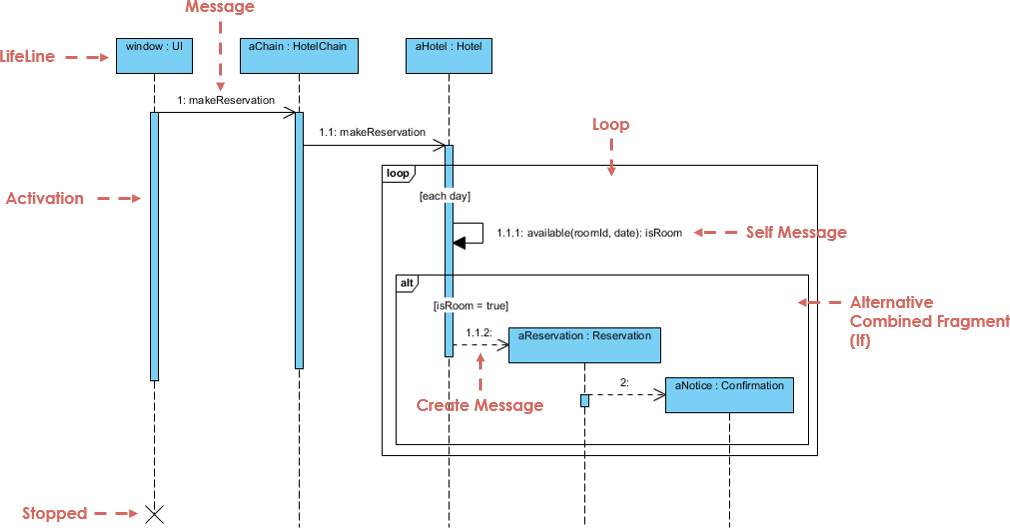
Sequence Diagram Example

要素 説明 視覚
ライフライン 縦方向の破線で、オブジェクトまたはアクターを表す。時間の経過に伴う存在を示す。 ───────────────
メッセージ ライフラインの間の水平矢印。通信を示す。
  • 同期 実線の矢印で先端が塗りつぶされている。呼び出し元は応答を待つ。
  • 非同期 実線の矢印で先端が空洞。待たない。
  • 返信 破線の矢印(応答)。
  • 自己メッセージ 同じライフラインに戻る矢印(内部処理)。
活性バー ライフライン上の細い長方形で、オブジェクトがアクティブなタイミングを示す。 ▯▯▯
結合断片 制御論理を表すボックス:
  • alt 選択肢(if/else) alt: 成功 / 失敗
  • オプション オプション(発生する場合もあれば、発生しない場合もある) opt: 証明書を印刷
  • ループ 繰り返し(例:whileループ) loop: 3回再試行
  • 並列 並列実行 par: 支払いと在庫を確認
作成/削除 作成ライフラインの終端にあるメッセージまたは「X」 create: ユーザーまたはX

💡 ヒント:常に から始めましょうユースケース、次に それをシーケンス図にマッピングする.


🔄 ユースケースからシーケンス図を作成する方法(ステップバイステップ)

実際に、 を使って現実世界の例を確認しましょうユースケース駆動型アプローチ.

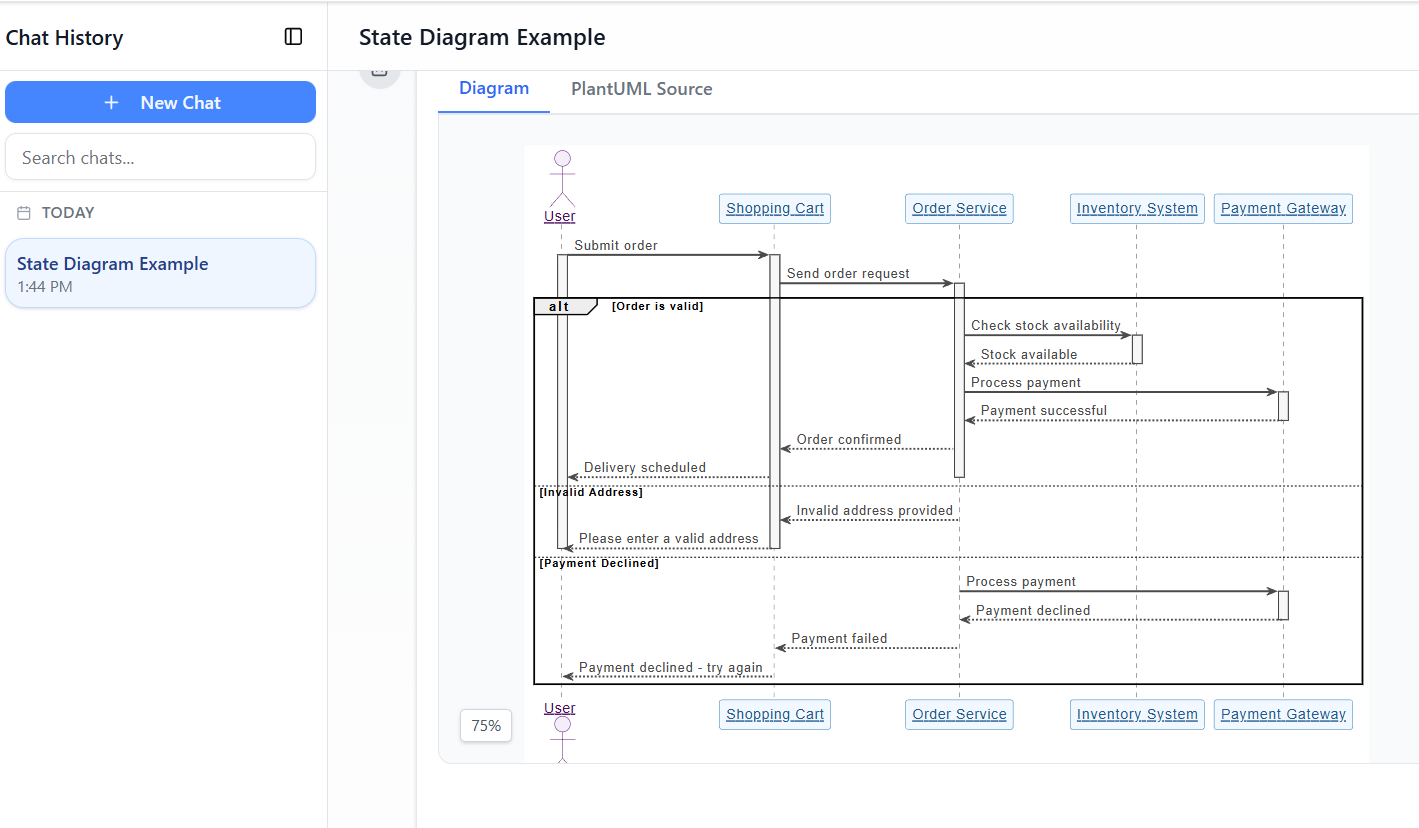
Free AI Sequence Diagram Refinement Tool - Visual Paradigm AI


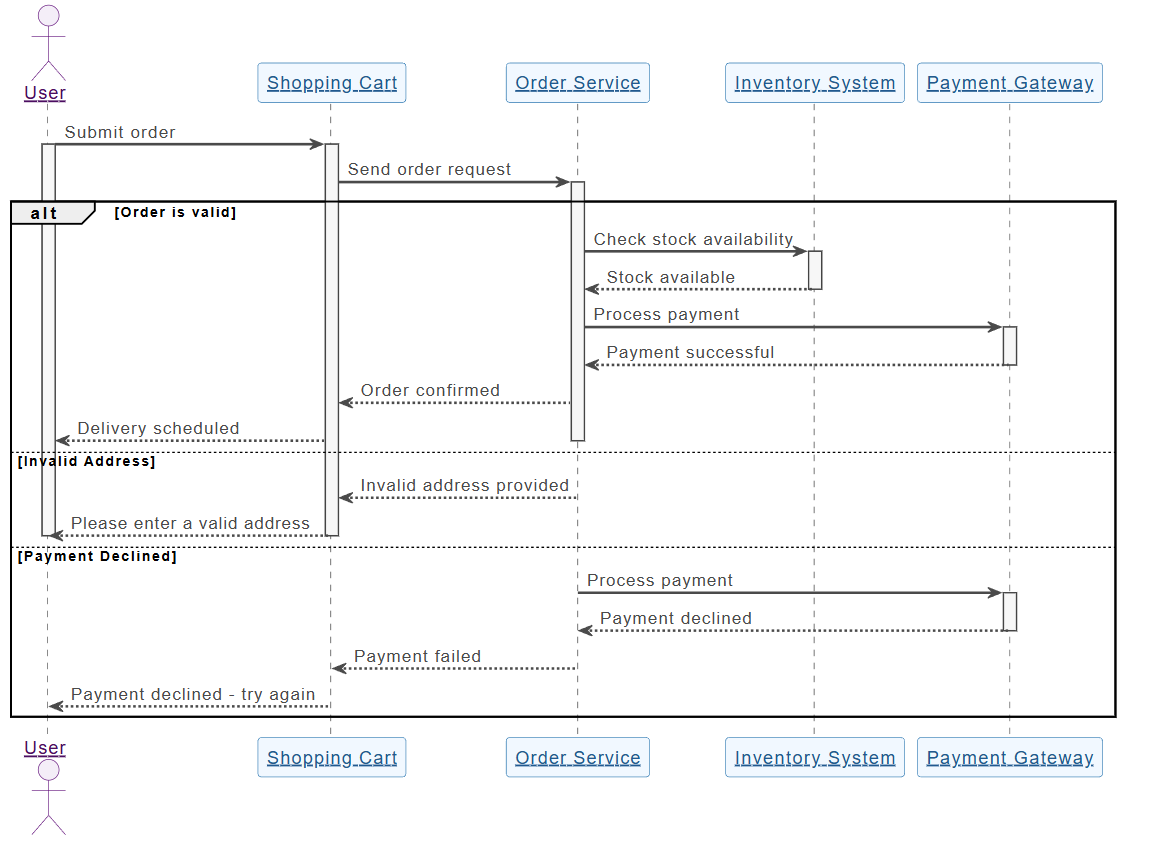
📌 例:ユースケース – 「ユーザーがシステムにログインする」

ユースケースのテキスト:

ユーザーとして、自分のプロフィールにアクセスできるように、ユーザー名とパスワードを使ってアカウントにログインしたい。

ステップ1:アクターとオブジェクトの特定

  • アクターユーザー

  • オブジェクトログインビューログインコントローラデータベース

ステップ2:メインフローの定義

  1. ユーザー → ログインビュー: ユーザー名/パスワードを入力

  2. ログインビュー → ログインコントローラ: 認証情報を送信

  3. ログインコントローラ → データベース: ユーザーが存在するか確認

  4. データベース → ログインコントローラ: 結果を返却

  5. ログインコントローラ → LoginView: 成功/失敗を送信

  6. LoginView → ユーザー: メッセージを表示

ステップ3:結合された断片を使用して制御論理を追加

次のものを使用する:alt断片を表示するために:

  • 成功パス: 「ログイン成功」

  • 失敗パス: 「無効な資格情報」

✅ これは使用ケース内の意思決定ポイントを捉えています。

ステップ4:アクティベーションバーを追加

  • 次のものにアクティベーションバーを追加:LoginControllerおよびDatabase処理時間の表示

ステップ5:最終図

これで完全な、使用ケースに合わせたシーケンス図が完成しました。これは実際のシステム動作を反映しています。

🔗 実際の動作を見る:AI駆動のUMLシーケンス図


📌 例2:ユースケース – 「顧客がATMから現金を引き出す」

ユースケースの説明:

顧客として、自分のお金を引き出せるようにATMから現金を引き出したい。残高が不足している場合は、通知を受けたい。

ステップ1:参加者を特定する

  • アクター顧客

  • オブジェクトATMカードリーダー銀行サーバー現金出金装置

ステップ2:メインフロー

  1. 顧客 → ATM: カードを挿入

  2. ATM → カードリーダー: カードを読み取り

  3. ATM → 顧客: PINの入力を促す

  4. 顧客 → ATM: PINを入力

  5. ATM → 銀行サーバー: PINを検証

  6. 銀行サーバー → ATM: 有効であることを確認

  7. ATM → 顧客: 金額の入力を促す

  8. 顧客 → ATM: 金額を入力

  9. ATM → 銀行サーバー: 残高を確認

  10. 銀行サーバー → ATM: 残高を返す

  11. ATM → 現金自動出金機: 現金を出金する

  12. ATM → 顧客: 明細書の選択肢を表示する

ステップ3:断片を追加する

  • ループ: 間違ったPIN後の再試行用

  • オプション: 明細書印刷用

  • 代替: 「残高不足」対「成功」用

🔗 AIがこれをどう処理するかを見る:AIシーケンス図ツールで複雑なワークフローを簡素化する


📌 例3:ユースケース – 「顧客がEC購入を完了する」

ユースケースの本文:

顧客として、買い物かごに商品を追加し、チェックアウトを進め、支払いを完了して注文を受け取りたい。

ステップ1:参加者

  • 顧客ショッピングカート決済ゲートウェイ在庫管理システム注文確認

ステップ2:並列処理を含むフロー

  1. 顧客 → ショッピングカート: 商品を追加 →ループ複数の商品用

  2. ショッピングカート → 顧客: 合計を表示

  3. 顧客 → 決済ゲートウェイ: 支払いを開始

  4. 顧客 → 在庫システム: 在庫確認を要求

  5. 決済ゲートウェイ → 銀行: 支払いを処理 →パラ在庫確認付き

  6. 在庫システム → 決済ゲートウェイ: 在庫の可用性を確認

  7. 決済ゲートウェイ → ショッピングカート: 注文を確認

  8. ショッピングカート → 注文確認: 確認を送信

✅ 使用するpar フラグメント 並行処理を示すために

🔗 完全なチュートリアルを見る:AIチャットボットでシーケンス図をマスターする:ECケーススタディ


🤖 Visual ParadigmのAIシーケンス図ジェネレータがチームをどう支援するか

従来のモデリングツールは、ユーザーがライフラインを手動でドラッグし、メッセージを描画し、フラグメントを配置する必要がある—時間のかかる上にミスも起こりやすい。

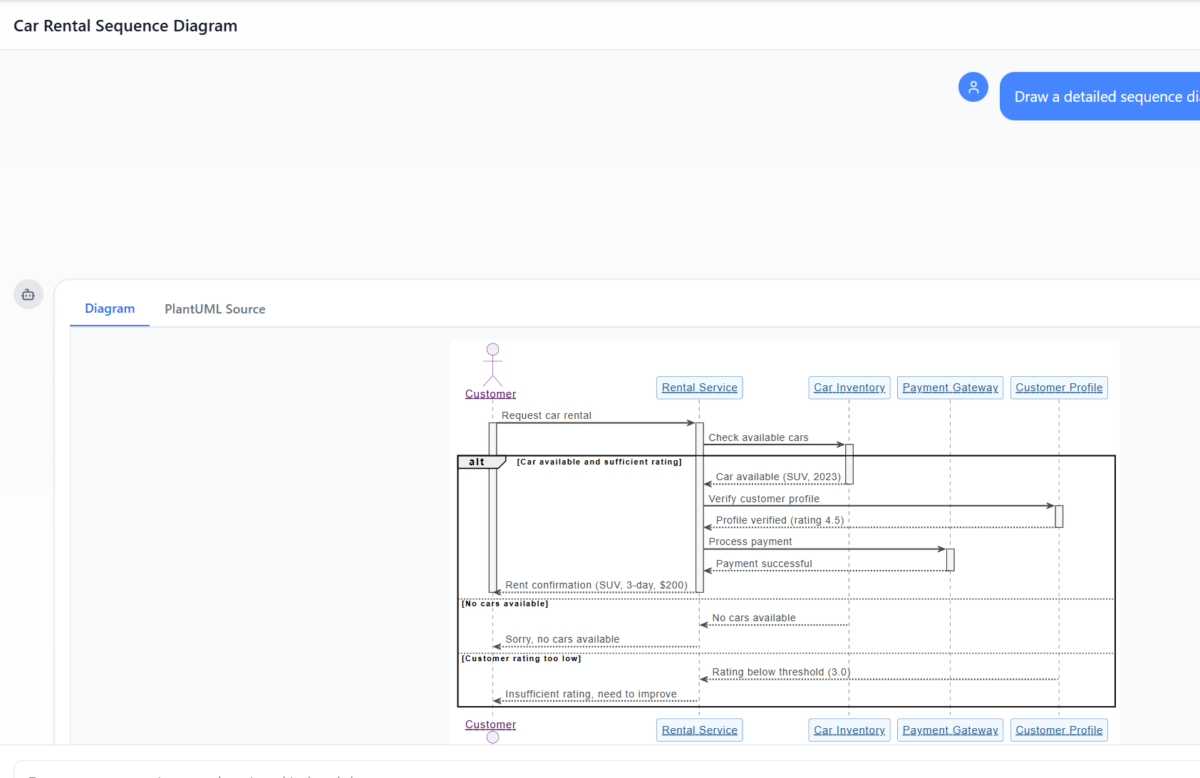
AI Diagram Generation Guide: Instantly Create System Models with Visual Paradigm's AI - Visual Paradigm Guides

Visual ParadigmのAI駆動のツール これらのボトルネックを解消し、特にユースケース駆動アプローチ.

✨ 1. AIチャットボット:ユースケーステキストから数秒で図を生成

手で描く代わりに、ユースケースを平易な英語で記述する:

📝 プロンプト:
「ユーザーがユーザー名/パスワードでログインするためのシーケンス図を生成し、エラー処理と3回の失敗後の再試行を含める。」

AIの処理:

  • アクターとオブジェクトを特定

  • ユースケースのフローをライフラインとメッセージにマッピング

  • 適用するaltloop、およびoptフラグメントを自動で追加

  • クリーンでプロフェッショナルな図を出力10秒未満で

🔗 今すぐ試してみる:AI駆動のUMLシーケンス図


✨ 2. AIシーケンス図の最適化ツール:ドラフトをプロフェッショナルなモデルに変換

粗いスケッチから始めても、AIシーケンス図の最適化ツールがそれを向上させます:

  • 追加します:アクティビティバー必要な場所に

  • 提案します:正しいフラグメントの使用法 (altlooppar)

  • 強制します:デザインパターン(例:MVC:View → Controller → Model)

  • 欠落しているエラーパスやエッジケースを検出

  • 可読性と一貫性を向上

🔗 方法を学ぶ:包括的なチュートリアル:AIシーケンス図の精緻化ツールの使い方


✨ 3. Use Case記述から図へ:手動翻訳ゼロ

手作業でUse Caseのテキストを図に変換する必要はもうありません。

AIテキスト形式のUse Caseを正確なシーケンス図に自動変換、以下を削減:

  • 手作業の負担

  • 誤解

  • 不整合

🔗 実際の動作を見る:Use Case記述からAI駆動のシーケンス図の精緻化


✨ 4. 会話型AIによる反復的精緻化

図を改善したいですか?AIとチャットするだけです:

  • 「3回のログイン失敗後に『パスワードを忘れた場合』のオプションを追加。」

  • 「『User』を『Customer』に変更。」

  • 「エラーメッセージを赤色で表示。」

各プロンプトで図がリアルタイムで更新されます—再描画もストレスもありません。

🔗 インターフェースを探索:AIシーケンス図精緻化ツールのインターフェース


✨ 5. チーム協働を簡単に

  • 非技術系のステークホルダー(プロダクトマネージャー、クライアント)は自然言語で貢献できます。

  • 開発者はスプリント中に図を迅速に精緻化できます。

  • テスト担当者図を用いてテストケースを記述できます。

  • デザイナーコーディング前にフローを検証できます。

✅ 理想的な用途:アジャイルチームユーザーストーリーとユースケースを使用して。


🚀 チームがVisual ParadigmのAIによるユースケースモデリングを愛する理由

利点 影響
⏱️ スピード 数秒で図を生成可能。数時間かかるのではなく。
🧠 低いスキル障壁 開始にはUMLの専門知識は不要
🔄 反復的設計 チャットを通じてリアルタイムで図を改善
🛠️ エラー削減 AIが欠落しているフロー、無効な断片を検出
📦 エクスポートと共有 PNG、SVG、PDFにエクスポート、またはConfluence/Notionに埋め込み可能
🤝 協働 誰もが貢献でき、技術的な知識のないメンバーも含む

📚 初心者およびチーム向けのトップリソース

リソース URL
AI駆動のUMLシーケンス図 https://blog.visual-paradigm.com/generate-uml-sequence-diagrams-instantly-with-ai/
AI駆動のシーケンス図の最適化ツール https://www.visual-paradigm.com/features/ai-sequence-diagram-refinement-tool/
包括的なチュートリアル:AIシーケンス図最適化ツールの使い方 https://www.archimetric.com/comprehensive-tutorial-using-the-ai-sequence-diagram-refinement-tool/
ユースケース記述からのAI駆動のシーケンス図の最適化 https://www.cybermedian.com/refining-sequence-diagrams-from-use-case-descriptions-using-visual-paradigms-ai-sequence-diagram-refinement-tool/
AIシーケンス図ツールで複雑なワークフローを簡素化 https://www.cybermedian.com/🚀-simplify-complex-workflows-with-visual-paradigm-ai-sequence-diagram-tool/
AIシーケンス図最適化ツールのインターフェース https://ai.visual-paradigm.com/tool/sequence-diagram-refinement-tool/
初心者向けチュートリアル:数分でプロフェッショナルなシーケンス図を作成 https://www.anifuzion.com/beginners-tutorial-create-your-first-professional-sequence-diagram-in-minutes-using-visual-paradigm-ai-chatbot/
シンプルから洗練へ:AI駆動のモデリングの進化 https://guides.visual-paradigm.com/from-simple-to-sophisticated-what-is-the-ai-powered-sequence-diagram-refinement-tool/
AIチャットボットでシーケンス図をマスター:eコマースの事例研究 https://www.archimetric.com/mastering-sequence-diagrams-with-visual-paradigm-ai-chatbot-a-beginners-tutorial-with-a-real-world-e-commerce-case-study/
AIシーケンス図の例:動画ストリーミング再生の開始 https://chat.visual-paradigm.com/ai-diagram-example/ai-sequence-diagram-video-streaming-playback/

✅ ユースケース駆動設計を採用するチームへの最終アドバイス

  1. 明確なユースケースから始めましょう – まずユーザーの目的を定義してください。

  2. シーケンス図を使って検証しましょう コード化する前にフローを確認します。

  3. ステークホルダーを早期に参加させましょう – 図を使ってフィードバックを収集しましょう。

  4. AIを活用して手作業を減らしましょう – ツールに重い作業を任せましょう。

  5. 図を最新の状態に保ちましょう – 要件が変化するたびに見直しを行いましょう。


🎁 無料で始める

AI駆動のモデリングの力を体験するには有料ライセンスは必要ありません。


📌 結論

ユースケース駆動型のアプローチ はユーザー中心のソフトウェア設計の基盤です。 UMLシーケンス図 それらのユースケースを具現化します—誰がいつ何をどのように行うかを示します 誰がいつ何をどのように行うか.

With Visual ParadigmのAIシーケンス図生成ツール、チームは次のようにできます:

  • 自然言語から図を生成する

  • リアルタイムで改善する

  • 一貫性と正確性を確保する

  • 役割を超えて協働する

🚀 ユースケースから図まで数秒で—UMLの専門知識は不要です。

👉 今日から始めましょう 以下の 無料のコミュニティエディション そしてチームのモデリングワークフローを変革しましょう。


🌟 システム設計の未来は視覚的であるだけでなく、知能的でもあります。
AIをあなたのモデリングパートナーとしてください。

ソーシャルメディアプラットフォームのデータベース設計:Visual ParadigmにおけるAI駆動のERD生成

Learn how to use Visual Paradigm’s AI to instantly generate professional ER diagrams for a social media platform database from simple text prompts.

正直に言えば、白紙からデータベース設計を始めるのは恐ろしい作業です。経験豊富なソフトウェアアーキテクトであろうと、データモデリングを学んでいる学生であろうと、エンティティを手動で描き、属性を定義し、関係線を配置する作業には大きな労力が要されます。ここがそのポイントです。AI駆動のエンティティ関係図(ERD)生成ゲームを変える。たった一つのプロジェクトのアイデアを説明するだけで——たとえば「ソーシャルメディアプラットフォーム」というようなもの——次のように使用できます。Visual Paradigm Desktop自然言語を即座にプロフェッショナルで標準準拠のデータモデルに変換できます。

この機能は単にプロセスを高速化することにとどまらず、ビジネス要件と技術的スキーマの間のギャップを埋めることにあります。この詳細な解説では、この「知能型データベース設計ツール」を使って、単なるテキストプロンプトからユーザー、投稿、コメントを含む完全に構造化されたデータベース図を数秒で作成する方法を紹介します。知能型データベース設計ツール.

要約:主なポイント

  • テキストからモデルへの効率性:平易な英語の記述を即座に複雑なER図に変換する。
  • 知能型検出:AIはエンティティ、属性、主キー、関係を自動的に特定する。
  • 標準表記:業界標準のER表記規則(クロウズフットなど)に従った図を生成する。
  • 完全に編集可能:結果はネイティブなVisual Paradigm図であり、さらに精緻化やSQL生成に使用可能。

ステップ1:自然言語による範囲の定義

このプロセスは単純なコンセプトから始まります。SQLの構文を知らなくても、数十個のボックスを手動でドラッグアンドドロップする必要もありません。代わりに、ツール内の「AI図生成」機能にアクセスします。下のワークフローに示すように、単に「エンティティ関係図」を出力先として選択するだけでよいのです。その力はプロンプトにあります。

私たちの例では、ソーシャルネットワークのバックエンドを可視化したかったので、次のようなプロンプトを入力しました:「ソーシャルメディアプラットフォームのデータベース構造を説明するER図を可視化する」。この平易なテキストだけで、AIはドメイン要件を理解でき、ソーシャルプラットフォームには通常、ユーザー、コンテンツ、相互作用、通知が必要であると推論します。

This is a screenshot of Visual Paradigm (aka. Visual Paradigm Desktop). It is now showing the use of AI diagram generation to

ステップ2:AI生成データモデルの分析

「OK」を押すと、AIはテキストを分析して主要なエンティティ(テーブル)とそれらの関連を特定します。ただランダムにボックスをキャンバス上に配置するのではなく、知能型関係および基数検出データ論理を構造化します。数秒のうちに、手作業で何時間もかけて設計したかのような完全な図が提示されます。

以下の結果を見てください。AIはソーシャルメディアアプリに最適なスキーマを正しく生成しています。それはユーザー 標準的な属性を持つエンティティで、例えば ユーザー名, メールアドレス、および パスワード。これはユーザーを「投稿」エンティティ(1対多の関係)と論理的に接続しており、1人のユーザーが多数の投稿を作成することを認識しています。さらに、コメント, いいね、および 通知エンティティを追加して詳細を明確にしました。外部キー(例:投稿ID, 著者ID)と適切なデータ型(例:varchar, clob、および integer.

This is the screenshot of Visual Paradigm Desktop. It shows a Entity Relationship Diagram generated by AI, based on the descr

なぜこのAI機能がモデラーにとって必須なのか

AI搭載のデータベースモデリングツール」を使う魅力は、レイアウトと構成の重い作業を自動で処理してくれる点にあります。生成された図を確認すると、エンティティが交差する線を最小限に抑えるように配置されており、データ構造が読みやすく、検証しやすくなっています。

自動属性およびキーの割り当て

AIがエンティティごとに自動的にプライマリキー(PK)を割り当てていることに注目してください。鍵のアイコンで表されています。また、データ型についても賢い推測を行い、投稿の「content」には「clob」(文字列大型オブジェクト)を割り当てました。これは投稿が長くなる可能性があることを認識しているためです。一方、「username」は標準の「varchar(50)」のままにしています。clob(文字列大型オブジェクト)を投稿の「content」に割り当てました。これは投稿が長くなる可能性があることを認識しているためです。一方、「username」は標準のvarchar(50)これにより、概念段階で各カラムのプロパティを手動で設定する手間が省けます。

静的画像から機能的なプロジェクトへ

単純な画像生成とは異なり、ここでの出力は完全に編集可能なネイティブ図です。後で「投稿」に「カテゴリ」も追加する必要があると判断した場合、図のエディタを使って簡単にその属性を追加できます。この実装へのスムーズな移行により、この図をもとにMySQL、PostgreSQL、Oracle用のDDLスクリプトを生成でき、一連のワークフローでざっくりとしたアイデアから物理的なデータベーススキーマへと移行できます。

自分だけのAI ERDの作成方法

この使いやすいERD作成ツールを使ってみますか?以下の簡単なワークフローで、上記の結果を再現できます:

  1. Visual Paradigmを起動する: 新しいプロジェクトまたは既存のプロジェクトを開く。
  2. AIツールを開く:以下の場所に移動するツール > AI図の生成.
  3. 図の種類を選択:ドロップダウンメニューから「エンティティ関係図」を選択する。
  4. 説明を入力:システムの明確な説明を入力してください(例:「本、会員、貸出を備えた図書館システム」)。
  5. 生成:OKをクリックし、図が表示されるのを確認してください。
  6. 調整:必要に応じて、エディタを使って関係を調整したり、特定の制約を追加したりしてください。

結論

Visual ParadigmのAIエンティティ関係図生成は、データモデリングのアプローチを変革します。『ソーシャルメディアプラットフォーム』についての簡単な一文を、包括的で技術的に正確なERDに変換することで、データベース設計への入り口の障壁を低減します。新しいアプリケーションのプロトタイピングや既存システムのドキュメント作成のいずれにおいても、このツールは即座に堅牢でプロフェッショナルな出発点を提供します。

1つずつボックスを描くのをやめましょう。今日からAI支援によるモデリングの高速さを体験してください。

Visual Paradigm Desktopをダウンロードして、今すぐAI図作成を試してみましょう


関連リンク

Visual Paradigmは包括的なツールセットを提供していますERD(エンティティ関係図)ツール従来のビジュアルエディタと、AI駆動の自動化。これらのツールは、チェン記法を含むさまざまな記法をサポートしており、概念モデリングから物理的データベース実装へのスムーズな移行を可能にしますおよびリバースエンジニアリング。

  1. Visual Paradigm ERDツール – オンラインでエンティティ関係図を作成:直感的なドラッグアンドドロップ設計を可能にするウェブベースのツールです。
  2. ERDツールによるデータベース設計 – Visual Paradigmガイド:データモデリングのベストプラクティスを活用してスケーラブルで堅牢なデータベースを構築することに注力するアーキテクト向けのリソースです。
  3. DBModeler AI:インテリジェントなデータベースモデリングツール:AI駆動のアプリケーションで、自動データベースモデリング、スキーマ生成、およびライブSQLテストを目的として設計されています。
  4. 無料ERDツール – Visual Paradigmでオンラインでデータベースを設計:インストール不要のブラウザベースのソリューションで、プロフェッショナルなエンティティ関係図を無料で作成できます。
  5. チェン記法ERDエディタ – 高度なエンティティ関係モデリング:完全なサポートを提供する専用エディタで、エンティティ、属性、関係、および基数正確なチェン記法を使用して。
  6. データベース設計のためのVisual Paradigm ERDツール – 完全なソリューション:開発者およびアーキテクト向けの包括的なツールで、モデル化、可視化、生成高い効率でデータベースを生成。
  7. AI図表生成ツールに新しい図表タイプを追加:DFDとERD:このリリースでは、自然言語のプロンプトからERDを即座に生成できる能力AIを使用して。
  8. Visual Paradigmによるエンティティ関係モデルの簡素化:モデル化プロセスを初期コンセプトから最終的なデータベース展開まで簡素化する方法について詳述した記事初期コンセプトから最終的なデータベース展開.
  9. データモデリング入門:ERD、コード生成、リバースエンジニアリング:図表作成とリバースエンジニアリングの基本的なライフサイクルをカバーする入門ガイド図表作成とリバースエンジニアリングデータベース。
  10. エンティティ関係図(ERD)とは何か? – Visual Paradigmガイド:ERDの核心的な要素と重要性について説明するガイドコンポーネントと意義データベース設計の広い文脈におけるERDの意義。

From Problem to Report: How AI Guides Your Use Case Journey

Discover how AI guides your use case journey from problem to report with Visual Paradigm’s intelligent development assistant.

Imagine you’re a project manager tasked with launching a new online course platform. The first challenge is to articulate the problem clearly and then translate it into a functional system. This is where the Use Case Driven Development Assistant, an AI-powered tool from Visual Paradigm, steps in. It doesn’t just help you write documents; it guides you through a complete, structured workflow to transform a vague idea into a detailed, actionable project plan. The process is so intuitive, it feels like having a seasoned business analyst and a technical architect working side-by-side with you. This deep dive explores the core features of this powerful tool, using a real-world example of an online course platform to show how it streamlines the entire use case lifecycle.

Quick Summary: Key Takeaways from the Use Case Driven Development Assistant

  • Start with a clear problem statement to define the project’s core objective.

  • Use AI to automatically generate a list of candidate use cases and actors.

  • Visualize system functionality with AI-generated Use Case and Activity Diagrams.

  • Prioritize features using a structured MoSCoW method to focus on high-value work.

  • Generate detailed use case descriptions and executable Gherkin test scenarios.

  • Create comprehensive reports to communicate project scope and plans.

  • Track progress and maintain a single source of truth with a central dashboard.

Step 1: Defining the Problem with AI

Every successful project begins with a clear understanding of the problem it aims to solve. The journey with the Use Case Driven Development Assistant starts in the “Problem Statement” tab. Here, you input a project name and a short description. The AI then leverages this information to generate a comprehensive problem statement. As seen in Image 1, the tool has taken the project name “Online Course Platform” and the short description “A marketplace for instructors to create and sell courses, and for students to enroll and learn” to produce a detailed narrative. This narrative identifies the core pain points: students struggle to find relevant courses, while instructors face challenges in reaching a broad audience and monetizing their expertise. This AI-generated problem statement serves as the project’s foundation, ensuring everyone on the team shares a unified understanding from the very beginning.

This is a screenshot of Visual Paradigm's AI Powered Use Case Driven Development Assistant. we are now in step 1. It shows th

Step 2: Identifying Use Cases with AI Assistance

Once the problem is defined, the next logical step is to identify the key functionalities the system must provide. The assistant’s “Candidate Use Cases” tab, shown in Image 2, automates this process. After analyzing the problem statement, the AI suggests a list of use cases, each associated with an actor (like Instructor, Student, or Admin). For our online course platform, the AI proposes use cases such as “Create a New Course,” “Upload Course Content,” “Browse and Search Courses,” and “Enroll in a Course.” This list provides a solid starting point, saving significant time and effort that would otherwise be spent on brainstorming sessions. You can then refine these suggestions, add new ones, or delete irrelevant ones to create a comprehensive list of system functionalities.

This is a screenshot of Visual Paradigm's AI Powered Use Case Driven Development Assistant. We are now in step 2. It shows a

Step 3: Visualizing the System with a Use Case Diagram

After identifying the use cases, it’s crucial to visualize how they interact with the system’s actors. The “Use Case Diagram” tab, illustrated in Image 3, takes the list of use cases and actors and automatically generates a clear, graphical representation. This diagram shows the relationships between the actors (Instructor, Student, Admin) and the system’s functions (Create a New Course, etc.). The AI-powered generation ensures that the diagram is accurate and professionally formatted. This visual aid is invaluable for communication, allowing stakeholders, developers, and designers to quickly grasp the system’s scope and functionality without wading through text-heavy documents.

This is a screenshot of Visual Paradigm's AI Powered Use Case Driven Development Assistant. We are now in step 3. It shows a

Step 4: Prioritizing Features for Maximum Impact

Not all use cases are created equal. A project’s success often hinges on focusing on the most critical features first. The “Prioritize Use Cases” tab, as shown in Image 4, provides a powerful framework for this. It allows you to assign a user value and business value (on a scale of 0-10) to each use case and then apply the MoSCoW prioritization method (Must Have, Should Have, Could Have, Won’t Have). In our example, the AI has helped identify that “Create a New Course” and “Upload Course Content” are “Must Have” features, as they are essential for the platform’s core function. This structured prioritization ensures that the development team focuses on delivering the highest value to users and the business, avoiding wasted effort on low-priority features.

This is a screenshot of Visual Paradigm's AI Powered Use Case Driven Development Assistant. We are now in step 4. It shows th

Step 5: Detailing Use Cases and Generating Activity Diagrams

With the high-level view established, the next step is to dive into the details of each use case. The “Use Case Details” tab, shown in Image 5, allows you to create a comprehensive template for a selected use case. The AI can generate a detailed description, including pre-conditions, main flow, and alternative flows. For the “Create a New Course” use case, the AI provides a structured template that outlines the necessary steps. To further enhance understanding, the assistant can generate an “Activity Diagram” for the same use case, as seen in Image 6. This diagram visually maps out the step-by-step workflow, showing the sequence of actions from the instructor logging in to the course being saved. This level of detail is essential for both developers and QA teams.

This is a screenshot of Visual Paradigm's AI Powered Use Case Driven Development Assistant. We are now in step 5. It shows thThis is a screenshot of Visual Paradigm's AI Powered Use Case Driven Development Assistant. We are still in step 5. It shows

Step 6: Generating Test Scenarios and Sequence Diagrams

For a development team, the next critical step is to create testable scenarios. The “Scenarios” tab, shown in Image 7, allows you to generate executable Gherkin scenarios directly from your use case descriptions. These scenarios, written in a plain-language format (Given-When-Then), are perfect for automated testing. The AI can generate a main scenario and alternative scenarios, such as one for an invalid title. To further clarify the system’s internal workings, the assistant can generate a “Sequence Diagram,” as seen in Image 8. This diagram shows the interaction between the instructor, the web dashboard, the backend API, the database, and the notification service, providing a clear picture of the system’s architecture and data flow.

This is a screenshot of Visual Paradigm's AI Powered Use Case Driven Development Assistant. We are in step 6. It shows the AIThis is a screenshot of Visual Paradigm's AI Powered Use Case Driven Development Assistant. We are still in step 6. It shows

Step 7: Creating Comprehensive Project Reports

Throughout the development process, it’s essential to communicate the project’s status and plans to various stakeholders. The “Generate Report” tab, as shown in Image 9, makes this easy. You can generate a variety of reports, such as a “Project Overview,” “Implementation Plan,” “QA Test Plan,” or a “Developer Task List.” These reports are generated with AI assistance, ensuring they are consistent and comprehensive. For example, the “Project Overview” report summarizes the entire project, including the executive summary, key features, and the rationale behind the prioritization. This single source of truth ensures everyone is aligned and informed.

This is a screenshot of Visual Paradigm's AI Powered Use Case Driven Development Assistant. We are in step 7. It shows a repo

Step 8: Tracking Progress with the Dashboard

Finally, the journey culminates in the “Dashboard,” as seen in Image 10. This central hub provides a high-level overview of the project’s status. It shows the project completion percentage, the total number of use cases, and the number of “Must Have” items. The project checklist allows you to track your progress, with each completed step marked as “Done.” This real-time visibility into the project’s health is invaluable for project managers and team leads, enabling them to identify bottlenecks and ensure the project stays on track.

This is a screenshot of Visual Paradigm's AI Powered Use Case Driven Development Assistant. We are in step 8. It shows the da

The Use Case Driven Development Assistant is more than just a tool; it’s a comprehensive workflow that brings clarity and efficiency to the software development process. By leveraging AI at every stage—from defining the problem to generating reports—it helps teams move from requirements to implementation faster and with greater accuracy. The result is a well-structured, well-documented project that is aligned with business goals and user needs. If you’re looking to streamline your use case development process, this AI-powered tool is a powerful solution.

Ready to see how the Use Case Driven Development Assistant can transform your next project? Try it now.

Related Links

Use case modeling is a fundamental software engineering technique used to capture functional requirements by visualizing the interactions between external actors and a system’s internal functions. Modern platforms now incorporate AI-powered automation to refine diagrams, generate comprehensive use case descriptions, and convert models into test cases or activity diagrams to maintain design consistency and traceability. Advanced tools like the Flow of Events editor and Scenario Analyzer allow development teams to validate and document structured event sequences to improve overall system clarity.

  1. What Is a Use Case Diagram? – A Complete Guide to UML Modeling: An in-depth overview covering essential components, purposes, and best practices for requirements modeling.

  2. Step-by-Step Use Case Diagram Tutorial – From Beginner to Pro: A practical resource that guides users through foundational to advanced techniques for creating effective use case diagrams.

  3. All You Need to Know About Use Case Modeling: A comprehensive exploration of the principles and applications of use case modeling in system design.

  4. Visual Paradigm – Use Case Description Features: Details specialized tools used to precisely document user interactions and structured system behavior.

  5. Mastering AI-Driven Use Case Diagrams with Visual Paradigm: A tutorial on leveraging AI to create intelligent, dynamic diagrams for modern software systems.

  6. Guide to Using the Flow of Events Editor in Visual Paradigm: Step-by-step instructions for documenting structured event sequences within a use case scenario.

  7. Unraveling Scenarios with the Use Case Scenario Analyzer: A guide on using analyzers to examine and refine interaction flows for increased system clarity.

  8. Convert Use Case to Activity Diagram – AI-Powered Transformation: A resource explaining the automated conversion of use cases into detailed system workflows.

  9. Generating Scenarios and Test Cases from Use Case Diagrams Using AI: An exploration of how AI tools automate the creation of requirement-driven test procedures.

  10. Use Case Diagram Gallery – Templates & Examples: A curated collection of real-world examples for inspiration, learning, and rapid prototyping.

Beyond the Sketch: Why Casual AI LLMs Fail at Visual Modeling and How Visual Paradigm Bridges the Gap

In the modern software engineering landscape, the transition from abstract ideas to concrete system designs often feels like solving a “maze without a map”. While general Large Language Models (LLMs) have revolutionized initial content creation, they fall significantly short when applied to professional visual modeling. This article explores the missing elements of casual AI diagram generation and how the Visual Paradigm (VP) AI ecosystem transforms these challenges into a high-speed engine for architectural success.

1. The “Sketch Artist” Problem: What is Missing in Casual AI LLMs

The fundamental limitation of general LLMs in diagramming stems from the difference between textual generation and standardized visual modeling. The sources characterize general LLMs as “sketch artists” who lack the “building codes” and “CAD systems” necessary for professional engineering.

  • Lack of Rendering Engines: General LLMs are primarily designed to process and produce text. While they can generate “diagramming code” (such as Mermaid or PlantUML), they lack built-in rendering engines to convert that code into high-quality, editable vector graphics like SVG.
  • Semantic and Standard Violations: Generic AI models often produce “pretty sketches” that violate the technical rules of formal modeling. They frequently misinterpret complex technical jargon such as “aggregation,” “composition,” or “polymorphism,” resulting in decorative drawings rather than functional engineering artifacts.
  • Absence of State Management: Casual LLMs lack a persistent visual structure. If a user asks a text-based AI to change a single detail, the model often has to regenerate the entire diagram, leading to broken connectors, misaligned layouts, or the total loss of previous details.

2. Problems Encountered in Casual AI Diagramming

Relying on casual AI generation introduces several risks that can compromise project integrity:

  • The “Design-Implementation Gap”: Without a rigorous visual blueprint, logic remains “scattered” and “vague,” often leading to code that is a “mess” and meetings that end without shared understanding.
  • Syntax Expertise Barriers: If an AI generates raw code, the user must possess deep technical expertise in that specific syntax (e.g., PlantUML) to make manual modifications, defeating the purpose of an “easy” AI tool.
  • Isolation from Workflow: Text snippets from general LLMs are isolated from the actual engineering process, requiring manual copy-pasting and offering no version control or integration with other model types.
  • The Failure of “One-Shot” Prompts: A single prompt is rarely sufficient to fit 100% of a user’s requirements for a detailed system. Initial ideas are often “scattered,” and users frequently realize they missed critical details—like load balancers or error-handling states—only after seeing a first draft.

3. How Visual Paradigm AI Achieves Professional Integrity

Visual Paradigm AI addresses these legacy issues by transforming modeling from a “labor-intensive drawing chore” into an intuitive, conversational, and automated workflow.

A. “Diagram Touch-Up” and Persistent Structure

Unlike generic tools, VP AI maintains the diagram as a persistent object. Through proprietary “Diagram Touch-Up” technology, users can issue conversational commands like “add a two-factor authentication step” or “rename this actor,” and the AI updates the visual structure immediately while maintaining layout integrity.

B. Standardized Intelligence

Visual Paradigm AI is uniquely trained on established modeling standards, including UML 2.5, ArchiMate 3, and C4. It understands the semantic rules and structure behind words, ensuring that relationships and naming conventions are technically valid blueprints ready for construction.

C. Specialized Step-Based Analysis

To bridge the gap between requirements and design, the ecosystem provides systematic apps:

  • AI-Powered Textual Analysis: Automatically extracts candidate domain classes, attributes, and relationships from unstructured problem descriptions before a single line is drawn.
  • 10-Step AI Wizard: Guides users through a logical sequence—from defining purpose to identifying operations—ensuring “human-in-the-loop” validation to prevent the errors common in “one-shot” AI generation.

D. Architectural Critique as a Consultant

Beyond simple generation, the AI acts as a systematic design assistant. It can analyze existing designs to identify single points of failure, logic gaps, or suggest industry-standard patterns like MVC (Model-View-Controller) to improve system quality.

E. Seamless Ecosystem Integration

AI-generated models are functional artifacts, not isolated images. They can be imported into the Visual Paradigm Desktop or Online suites for advanced editing, versioning, and code engineering (including database generation and Hibernate ORM integration), ensuring the visual design directly drives the software implementation.

Conclusion: From Hand-Chiseling to 3D Printing

Traditional modeling is like hand-chiseling a marble statue, where every stroke is a high-risk manual effort. In contrast, Visual Paradigm AI is like using a high-end 3D printer: you provide the specifications in plain English, and the system precisely builds a technically sound structure, allowing you to focus on strategic design decisions. By unifying strategy, business modeling, and technical design into a single AI-enhanced platform, Visual Paradigm eliminates the “blank canvas” problem and ensures all stakeholders work from the same conceptual baseline.

投稿日: カテゴリー AI

Beyond the Sketch: Why Casual AI LLMs Fail at Visual Modeling and How Visual Paradigm Bridges the Gap

In today’s fast-paced software engineering and enterprise architecture world, turning abstract requirements into precise, actionable designs remains challenging. General-purpose Large Language Models (LLMs) excel at brainstorming and text generation but struggle with professional visual modeling. They produce “sketches” rather than engineered blueprints. Visual Paradigm’s AI-powered ecosystem changes this by delivering standards-aware, persistent, and iterative diagramming that accelerates architectural work from idea to implementation.

1. The “Sketch Artist” Problem: Limitations of Casual AI LLMs

Casual AI tools (e.g., ChatGPT, Claude) treat diagramming as an extension of text generation. They output code in formats like Mermaid or PlantUML, but lack depth for professional use.

Key limitations include:

  • No Native Rendering or Editing Engine LLMs generate text-based syntax (e.g., Mermaid flowchart code), but offer no built-in viewer or editor for high-quality vector graphics (SVG). Users paste code into external renderers, losing interactivity. Changes require full regeneration.
  • Semantic Inaccuracies and Standard Violations Generic models misinterpret UML/ArchiMate concepts. For example, they confuse aggregation (shared ownership) with composition (exclusive ownership), or draw invalid inheritance arrows. Results look attractive but fail as engineering artifacts—e.g., a class diagram might show bidirectional associations where unidirectional is correct.
  • Lack of Persistent State and Incremental Updates Each prompt regenerates the diagram from scratch. Asking “add error handling to this sequence diagram” often breaks layouts, loses connectors, or forgets prior elements. No memory of visual structure exists.

Example: Prompting ChatGPT for a “UML class diagram of an online banking system with accounts, transactions, and two-factor authentication” yields Mermaid code. Adding “include fraud detection module” regenerates everything—potentially rearranging classes, dropping associations, or introducing syntax errors.

These issues create “pretty pictures” instead of maintainable models.

2. Real-World Problems When Relying on Casual AI Diagramming

Using general LLMs introduces risks that undermine project quality:

  • The Design-Implementation Gap Vague or incorrect visuals lead to misaligned code. Teams waste time in meetings clarifying intent because diagrams lack precision.
  • Syntax Dependency and Expertise Barrier Editing Mermaid/PlantUML requires learning specialized syntax—ironic for “AI-assisted” tools. Non-experts struggle with manual fixes.
  • Workflow Isolation Diagrams are static images or code snippets, disconnected from version control, collaboration, or downstream tasks (e.g., code generation, database schemas).
  • “One-Shot” Prompt Failure Complex systems need iteration. Users spot omissions (e.g., missing load balancers, caching layers, or exception flows) only after the first output, but regeneration discards progress.

Example: In system design interviews or early architecture sessions, developers use ChatGPT to generate C4 model diagrams via Mermaid. Initial outputs miss key boundaries or relationships. Iterative prompting yields inconsistent versions, frustrating teams and delaying decisions.

3. How Visual Paradigm AI Delivers Professional-Grade Modeling

Visual Paradigm transforms diagramming into a conversational, standards-driven, and integrated process. Its AI understands UML 2.5, ArchiMate 3, C4, BPMN, SysML, and more, producing compliant, editable models.

A. Persistent Structure with “Diagram Touch-Up” Technology

VP maintains diagrams as living objects. Users issue natural language commands to update specific parts without regeneration.

  • Conversational edits: “Add two-factor authentication step after login” or “Rename Customer actor to User” instantly adjust layout, connectors, and semantics while preserving integrity.

This eliminates broken links and layout chaos common in casual tools.

B. Standards-Compliant Intelligence

Trained on formal notations, VP AI enforces rules:

  • Correct multiplicity in associations
  • Proper use of stereotypes
  • Valid ArchiMate viewpoints (e.g., Capability Map, Technology Usage)

Diagrams are technically sound “blueprints” rather than approximations.

C. Systematic Step-Based Analysis and Guidance

VP provides structured apps to bridge requirements to design:

  • AI-Powered Textual Analysis — Analyzes unstructured text (e.g., requirements docs, user stories) to extract candidate classes, attributes, operations, and relationships. It generates initial class diagrams automatically.

    Example: Input a description: “An e-commerce platform allows customers to browse products, add to cart, checkout with payment gateway, and track orders.” AI identifies classes (Customer, Product, Cart, Order, PaymentGateway), attributes (e.g., price, quantity), and associations (Customer places Order).

  • 10-Step AI Wizard (for UML class diagrams and similar) — Guides users logically: define purpose → scope → classes → attributes → relationships → operations → review → generate. Human-in-the-loop validation prevents one-shot errors.

D. AI as Architectural Consultant

Beyond generation, VP AI critiques designs:

  • Detects single points of failure
  • Identifies logic gaps
  • Suggests patterns (e.g., MVC, Repository, Observer)

It acts as an expert reviewer.

E. Seamless Integration into Professional Workflows

Models are not isolated images:

  • Fully editable in Visual Paradigm Desktop/Online
  • Support versioning and collaboration
  • Enable code engineering (e.g., generate Java/Hibernate ORM, database schemas)
  • Export/import across tools

This closes the loop from design to code.

Example: Generate an ArchiMate viewpoint for “Technology Layer” via prompt: “Create ArchiMate diagram for cloud-based microservices architecture with AWS components.” AI produces a compliant diagram. Use “Diagram Touch-Up” to add security controls. Export to desktop for team review and code gen.

Conclusion: From Manual Chiseling to AI-Powered 3D Printing

Traditional diagramming feels like chiseling marble—slow, error-prone, and irreversible. Casual AI LLMs improve speed but remain “sketch artists” producing inconsistent, non-persistent visuals.

Visual Paradigm AI is like a high-precision 3D printer: input plain English specifications, receive standards-compliant, editable structures, iterate conversationally, and drive implementation directly. By unifying business, enterprise, and technical modeling in one AI-enhanced platform, it eliminates the blank-canvas paralysis and ensures stakeholders share a precise, actionable baseline.

For software architects, enterprise teams, and developers tired of regenerating broken Mermaid snippets, Visual Paradigm represents the next evolution: intelligent modeling that respects standards, preserves intent, and accelerates delivery.

投稿日: カテゴリー AI

Mastering UML Deployment Diagrams: A Hybrid Approach with Visual Paradigm AI

In the fast-paced world of software architecture, the ability to accurately document system infrastructure is crucial. For years, architects have relied on manual drafting to create UML Deployment Diagrams—a process known for its precision but also its tediousness. However, the landscape has shifted in 2026. With the integration of Artificial Intelligence into tools like Visual Paradigm, the workflow has evolved from purely manual dragging and dropping to a sophisticated conversation with AI.

Deployment Diagram for Embedded System

This guide explores the strengths and weaknesses of both traditional manual modeling and AI-powered generation, ultimately advocating for a hybrid approach. By mixing the speed of AI with the precision of human oversight, architects can achieve results that are both rapid and professional.

UML Component Diagram: A Definitive Guide to Designing Modular Software  with AI - AI Chatbot

The Traditional Approach: Manual Modeling

For many teams, the classic approach remains the default. This involves opening the editor, selecting the Deployment Diagram type, and building the infrastructure topology from a blank canvas.

The Manual Workflow

Creating a diagram manually is a granular process involving several specific steps:

  • Node Placement: Architects manually drag 3D node boxes onto the canvas to represent servers, devices, execution environments, or cloud resources such as <<AWS EC2>> or <<Kubernetes Cluster>>.
  • Artifact Management: Files like .war, .jar, or database schemas are explicitly placed onto nodes to show where code is deployed.
  • Connection Drawing: Communication paths are drawn using solid lines, requiring manual selection of stereotypes like <<HTTP>> or <<TCP/IP>>.
  • Visual Organization: The user must manually align shapes, color-code security zones, and manage nested nodes for VPCs or data centers.

Strengths of the Old School

Despite being labor-intensive, manual modeling has persisted because it offers total control. Every decision regarding layout and stereotypes is deliberate, forcing the architect to think deeply about topology, performance bottlenecks, and failover strategies. It is particularly effective for the final polish required for compliance documents or high-stakes architecture reviews.

The Pain Points

However, the downsides are significant, especially for complex cloud deployments:

  • Time Intensity: A realistic setup involving load balancers, auto-scaling groups, databases, and CDNs can take 45 to 90 minutes for a first draft.
  • Iteration Fatigue: Minor changes, such as adding a firewall or changing a protocol, often require tedious dragging, reconnecting, and realigning of elements.
  • Onboarding Issues: Junior developers often struggle with the strict syntax of UML notation, leading to inconsistencies.

The AI Revolution: Fast Prototyping with Guardrails

Visual Paradigm’s AI chatbot and diagram generator have introduced a paradigm shift. Instead of drawing, the architect describes the system in plain English, and the tool generates the visual representation.

How AI Modeling Works

The process is conversational and iterative:

  1. Description: The user provides a text prompt, such as: “Generate a UML Deployment Diagram for a microservices e-commerce platform on AWS with an Internet-facing ALB, EC2 instances, RDS PostgreSQL, and S3.”
  2. Generation: The AI produces a complete diagram in seconds, correctly identifying nodes, artifacts, and relationships.
  3. Refinement: The user iterates via chat commands like “Add a bastion host in a public subnet” or “Make the database highly available with read replicas.”

Why Architects Are Adopting AI

The immediate benefit is blazing speed. A draft that previously took nearly an hour can now be generated in under two minutes. Furthermore, the AI adheres to semantic correctness, ensuring proper UML rules are followed regarding node versus execution environment distinctions. It also serves as a knowledge booster, offering suggestions for high availability or security when prompted.

However, AI is not without limitations. The layout prioritizes correctness over aesthetics, often requiring cleanup. Additionally, highly bespoke elements or custom hardware icons may be missed, and there is a risk of over-reliance where subtle errors in dependency direction might go unnoticed if not reviewed.

The Winning Strategy: The Hybrid Approach

The most effective workflow today is not choosing between manual and AI, but blending them. This Hybrid Approach leverages the best of both worlds to maximize productivity and quality.

Phase 1: AI for the Heavy Lifting (80-90%)

Start every project with the AI tools. Use natural language to describe your infrastructure. This phase is dedicated to speed, exploration, and establishing the semantic structure of the diagram. It allows for rapid “what-if” scenarios and creates a solid foundation without the drudgery of dragging initial shapes.

Phase 2: Manual for the Final Mile (10-20%)

Once the AI draft is ready, export it into the full Visual Paradigm editor. This is where human expertise shines. Architects should:

  • Fine-tune the layout for readability.
  • Add custom notes, constraints, and specific visual cues (icons/swimlanes).
  • Adjust colors to match corporate branding or specific architectural standards.
  • Ensure the diagram effectively communicates the narrative required for stakeholders.

Phase 3: The Iterative Loop

When major structural changes occur—such as a migration to multi-cloud or the addition of a new security zone—architects can jump back to the AI chat for quick regeneration, then polish manually again. This is significantly faster than redrawing complex diagrams from scratch.

Comparison: Manual vs. AI vs. Hybrid

Feature Manual Modeling AI-Powered Hybrid Approach
Speed Slow (45+ mins) Instant (< 2 mins) Fast (5-10 mins)
Control High (Pixel perfect) Moderate (Prompt-based) Maximum (Best of both)
Consistency Variable (Human error) High (Rule-based) High (AI draft + Human check)
Flexibility Low (Hard to refactor) High (Regenerate instantly) High (Iterative flow)

Conclusion: Elevation, Not Replacement

The introduction ofAI into deployment diagramming does not render the architect’s skills obsolete; rather, it elevates them. Traditional manual skills provide the necessary foundation for precision and review, while AI provides unprecedented speed and accessibility.

In 2026, the competitive advantage lies in the deliberate mix of these methods. By using AI as an accelerator and applying human judgment for refinement, architects can produce higher-quality documentation in a fraction of the time. If you are still dragging every node manually, it is time to embrace the hybrid future.

Deployment Diagram Archives - AI Chatbot

Visual Paradigm AI Powered Deployment Diagram Resource

The following articles and resources provide detailed information on using AI-powered tools to create and manage deployment diagrams within the Visual Paradigm platform:

投稿日: カテゴリー AI

Visual Paradigm AI Package Diagram Generator: Text to UML Packages

You’re architecting a new content management system, staring at layers, modules, and dependencies — presentation, business rules, persistence, security — but the high-level structure stays fuzzy. Manually creating packages, subpackages, and dependency arrows feels like overkill for a first draft. Enter Visual Paradigm’s AI Package Diagram Generator: describe your system in plain words, and get a clean, standards-compliant UML package diagram in seconds. It’s the fast lane from mental model to visual blueprint.

Why This AI Changes Software Architecture

  • Natural language → full UML package diagram instantly
  • Auto-identifies packages, subpackages, dependencies, and stereotypes
  • Handles layered, modular, and microservices-style structures
  • Fully editable native model — refine, add notes, merge packages
  • Desktop precision + browser chatbot for rapid iteration

1. Desktop: Prompt → Structured Architecture

In Visual Paradigm Desktop:

Tools → AI Diagram Generation → select “Package Diagram” → describe your system:

“Generate a UML Package Diagram for a content management system with Presentation Layer (Web UI, Mobile App), Business Logic Layer (Content Service, User Management, Workflow Engine), Data Access Layer (Repository, Audit Logging), and show dependencies between layers.”

The input dialog keeps it simple and focused:

Visual Paradigm Desktop AI Package Diagram generation prompt interface

AI builds:

  • Top-level packages: Presentation Layer, Business Logic Layer, Data Access Layer
  • Subpackages: Web UI, Mobile App, Content Service, Repository
  • Clear dependency arrows (dashed) showing flow between layers

Resulting content management system package diagram — logical, layered, and ready for review:

AI-generated UML Package Diagram for Content Management System

Immediately edit: add security package, adjust dependencies, or integrate with class diagrams.

2. Chatbot: Conversational Architecture on the Go

For quick sketches or remote brainstorming, open the Visual Paradigm AI Chatbot:

“Create UML Package Diagram for a banking system: Core Banking Services, Account Management, Customer Management, Transaction Processing, Compliance & Auditing.”

The chatbot generates it live — packages, subpackages, and dependencies appear instantly. Example output for a banking system:

AI-generated UML Package Diagram for Banking System via Chatbot

Refine in conversation: “Add Payment Gateway package with dependency to Transaction Processing.” Instant update. Perfect for early design sessions or teaching UML.

Why Package Diagrams + AI Matter in 2026

Good architecture starts with clear boundaries. Package diagrams show modularity, layers, and dependencies before a single line of code is written. Manual creation slows you down; AI removes the friction.

Use cases that shine:

  • Layered enterprise apps
  • Microservices boundaries
  • Teaching modular design
  • Quick refactoring planning

Change scope mid-discussion? Regenerate. New module needed? Add it. That speed keeps architecture agile and team communication sharp.

Ready to Visualize Your System Structure?

Visual Paradigm’s AI Package Diagram Generator turns vague ideas into professional UML packages fast — whether for CMS, banking, e-commerce, or any modular system.

  • Download Visual Paradigm Desktop → Full modeling power: Get Desktop Now
  • Try AI Chatbot Online → Instant architecture sketches: Start Chatting

Stop wrestling with boxes and arrows. Start designing smarter — today.

Related Links

These articles explain how artificial intelligence is applied to UML package diagrams to automate the logical grouping of system elements, enabling developers to instantly generate architectural structures from natural language prompts to better manage software dependencies and system scalability.

  1. AI Diagram Generator Now Supports Package Diagrams in Visual Paradigm: This article details the release of new features that allow for the AI-powered generation of package diagrams to improve software architecture visualization.
  2. Generate UML Package Diagrams Instantly with Visual Paradigm AI: This guide focuses on utilizing AI-driven tools to create professional UML package diagrams with minimal manual effort.
  3. Interactive UML Package Diagram Generator: This resource provides access to an interactive tool for creating and editing package diagrams in real time through a conversational AI interface.
  4. UML Package Diagram: A Definitive Guide to Structuring Your Codebase with AI: This comprehensive guide explains how AI assists in structuring codebases, managing complex dependencies, and maintaining architectural integrity.
  5. Generating UML Package Diagrams from Text Prompts: This article explores how to transform raw ideas and textual prompts into detailed UML package diagrams using advanced AI modeling features.
  6. UML Package Diagram Tutorial Using Visual Paradigm: This tutorial provides a step-by-step approach to using package diagrams to structure software components and visualize their relationships effectively.
  7. Features of Package Diagram Software – Visual Paradigm Online: This overview highlights the online tools available for collaborative package diagram management, including version control and real-time editing.
  8. What is a Package Diagram in UML? – Visual Paradigm Guide: This foundational resource introduces the role of package diagrams in organizing complex software systems through logical grouping.
  9. Modeling Software Architecture with UML Package Diagrams: This article discusses best practices for using package diagrams to organize and communicate the modular structure of a system’s architecture.
  10. Package Diagram Examples & Templates – Visual Paradigm Gallery: This gallery offers a collection of real-world templates and examples to inspire and accelerate modular software design.

Creating a Professional Resume in Minutes with AI-Powered Site Builder

Discover how Visual Paradigm’s AI-powered site builder creates professional resumes in seconds from simple text prompts.

Visual Paradigm’s AI-Powered Site Builder is revolutionizing the way professionals create their online presence, from landing pages to comprehensive portfolios. The tool’s core strength lies in its ability to transform a simple text prompt into a fully designed, multi-section website in seconds. This capability is vividly demonstrated in the provided image, which showcases a professional resume generated from the prompt “Resume for a senior marketing manager with 10 years experience.” The result is a polished, modern digital profile for “Alex Johnson,” complete with a professional headshot, a compelling summary, contact information, and a section for skills and expertise. This is not just a template; it is a dynamic, AI-generated webpage that can be customized and published instantly. For professionals seeking a modern, professional online identity, this AI-powered site builder offers a powerful solution that eliminates the traditional barriers of design and development.

At the heart of this transformation is the AI Generator, a feature that allows users to define their website’s purpose with a simple text description. The user inputs a clear prompt, and the AI instantly constructs a complete page layout. The generated content, as seen in the image, is not generic; it is tailored to the specific role and experience level mentioned in the prompt. This intelligent approach ensures that the initial draft is highly relevant, providing a strong foundation for further personalization. The process is intuitive and efficient, allowing users to focus on refining their content rather than struggling with the mechanics of design. This powerful combination of AI and a visual, block-based editor makes the creation of professional websites accessible to anyone, regardless of their technical skills.

This is a screenshot of Visual Paradigm's AI-Powered Site Builder. It shows the web page generated from the prompt 'Resume fo

How the AI-Powered Site Builder Works

The process of creating a website with the AI-Powered Site Builder is designed to be as simple as possible, leveraging the power of artificial intelligence to handle the most complex part of the process: the initial design. The workflow begins with the user defining their goal in a text box. The AI then analyzes this prompt and generates a complete, multi-section webpage. This is not a simple template; the AI understands the context and creates a layout that is appropriate for the content. For instance, a resume prompt generates a page with a professional header, a profile section, a detailed bio, and a skills section, all arranged in a visually appealing and logical manner. This eliminates the “blank page” problem that often hinders the creative process.

From Prompt to Publication: A Seamless Workflow

Once the AI has generated the initial design, the user is presented with a fully interactive, visual editor. The interface, as seen in the image, features a central canvas where the website is displayed and a sidebar with tools and options. The user can then begin to customize the site. Clicking on any element, such as the “Senior Marketing Manager” title or the “Results-driven marketing professional” text, opens a properties panel. This panel allows for direct editing of the text, uploading of images, and adjustment of styles. This “what you see is what you get” (WYSIWYG) experience ensures that changes are immediate and visible. The user can then add more blocks, such as a “Skills & Expertise” section or a “Contact” form, by dragging and dropping them from the sidebar. The entire process is designed to be intuitive and efficient, allowing users to build a professional website in minutes.

Key Benefits of the AI-Powered Site Builder

The AI-Powered Site Builder offers several significant advantages for users who need a professional website quickly and easily. The most prominent benefit is speed. Instead of spending hours or days designing a site from scratch, users can go from a simple idea to a fully designed, functional website in a matter of minutes. This is made possible by the AI’s ability to generate a complete layout and content based on a single prompt. This efficiency is particularly valuable for professionals who need to update their online presence frequently or for businesses that require new landing pages for marketing campaigns.

Accessibility and Professionalism

Another major benefit is accessibility. The tool requires no coding knowledge, making it accessible to a broad audience. The visual, block-based editor allows users to build complex pages by simply dragging and dropping pre-designed components, such as hero sections, galleries, and pricing tables. This approach democratizes web design, empowering entrepreneurs, freelancers, and small business owners to create professional websites without hiring a developer. The AI-generated content is also built on modern design principles, ensuring that the final product looks polished and professional right out of the box. Users can then customize the site to perfectly match their brand and personal style, giving them full control over the final outcome.

Practical Applications and Use Cases

The versatility of the AI-Powered Site Builder makes it suitable for a wide range of applications. The image of the resume demonstrates one powerful use case: creating a professional online profile for a job seeker. This tool is ideal for anyone looking to build a personal portfolio, a business website, or a marketing landing page. For example, a freelance graphic designer could use the tool to create a portfolio site showcasing their best work. A startup founder could generate a landing page for a new product launch. A small business owner could build a simple website to attract local customers. The AI generator can be prompted with a description of the desired site, and it will create a tailored layout. The user then has the freedom to customize every detail, from the text and images to the color scheme and overall structure.

Creating a Multi-Page Website

While the image shows a single-page resume, the tool’s capabilities extend beyond a single page. Users can create multi-page websites by adding new pages to their project. For instance, a professional might create a main “Home” page with a resume and a separate “About” page with a detailed biography. The “Pages” tab in the sidebar allows users to manage all pages within a single project, making it easy to structure a complete website. This feature is essential for creating a comprehensive online presence that can guide visitors through a narrative, from a brief introduction to a detailed portfolio.

Conclusion

The AI-Powered Site Builder from Visual Paradigm represents a significant leap forward in website creation. It empowers users to generate professional, responsive websites quickly and easily, without requiring any technical skills. The tool’s ability to transform a simple text prompt into a fully designed, multi-section webpage is a testament to the power of AI in simplifying complex tasks. The example of the senior marketing manager’s resume demonstrates the tool’s effectiveness in creating a polished and professional digital profile. For anyone looking to establish a strong online presence, this tool offers a fast, efficient, and accessible solution.

Ready to create your own professional website? Try the AI-Powered Site Builder today and see how quickly you can turn your ideas into a live, professional website.

Try Now

Related Links