TOGAF ADM をサポートする ArchiMate の包括的チュートリアル

ArchiMate について

ArchiMate は、ビジネスドメイン内および across でアーキテクチャの記述、分析、可視化を支援するオープンで独立した企業アーキテクチャモデリング言語です。複雑なアーキテクチャをステークホルダーに明確かつ曖昧のない方法で伝えることを目的として設計されています。ArchiMate は、TOGAF アーキテクチャ開発手法(ADM)と併用する場合特に有用であり、企業アーキテクチャをモデル化および伝達するための標準化された方法を提供します。
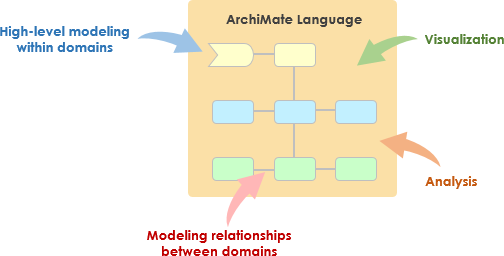
What is ArchiMate?

ArchiMate の主要な概念

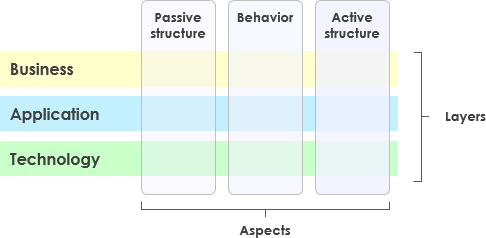
ArchiMate Core Framework

1. ArchiMate のレイヤー

ArchiMate は企業アーキテクチャを3つの主要なレイヤーに分類する:

  • ビジネスレイヤー:組織の目標を支援するビジネスプロセス、サービス、機能に焦点を当てる。
  • アプリケーションレイヤー:ビジネスレイヤーを支援するアプリケーションサービス、コンポーネント、およびそれらの相互作用を扱う。
  • テクノロジー・レイヤー:アプリケーションレイヤーを支援するハードウェア、ソフトウェア、ネットワークコンポーネントを含むテクノロジーインフラをカバーする。

2. コア要素

ArchiMate は、アーキテクチャをモデル化するために使用されるいくつかのコア要素を定義している:

  • アクティブ構造要素:行動を実行するエンティティを表す。ビジネスアクター、アプリケーションコンポーネント、デバイスなど。
  • 行動要素:アーキテクチャ内のプロセス、機能、サービス、相互作用を表す。
  • パッシブ構造要素:行動要素によって使用または生成される情報やデータを表す。ビジネスオブジェクトやデータオブジェクトなど。

3. 関係

ArchiMate は、要素を接続するためのいくつかの種類の関係を定義している:

  • 構造的関係:コンポジション、集約、特殊化など。
  • 依存関係:関連、実現、使用されるなど。
  • 動的関係: たとえば、トリガーとフロー。

4. 視点

ArchiMateは、異なる視点からアーキテクチャを可視化するための複数の視点を提供しています:

  • ビジネスプロセス視点: ビジネスプロセスとその相互作用を示します。
  • アプリケーション協働視点: アプリケーションがビジネスプロセスを支援するためにどのように協働するかを示します。
  • 技術実現視点: 技術コンポーネントがアプリケーションコンポーネントをどのように実現するかを示します。

ArchiMateとTOGAF ADM

TOGAFアーキテクチャ開発手法(ADM)

TOGAF ADMは、企業アーキテクチャを構築するための包括的な手法です。複数の段階から構成されており、それぞれがアーキテクチャ開発プロセスの特定の側面に焦点を当てています。ArchiMateは、各段階でアーキテクチャをモデル化および可視化するための標準化された方法を提供することで、TOGAF ADMを支援しています。
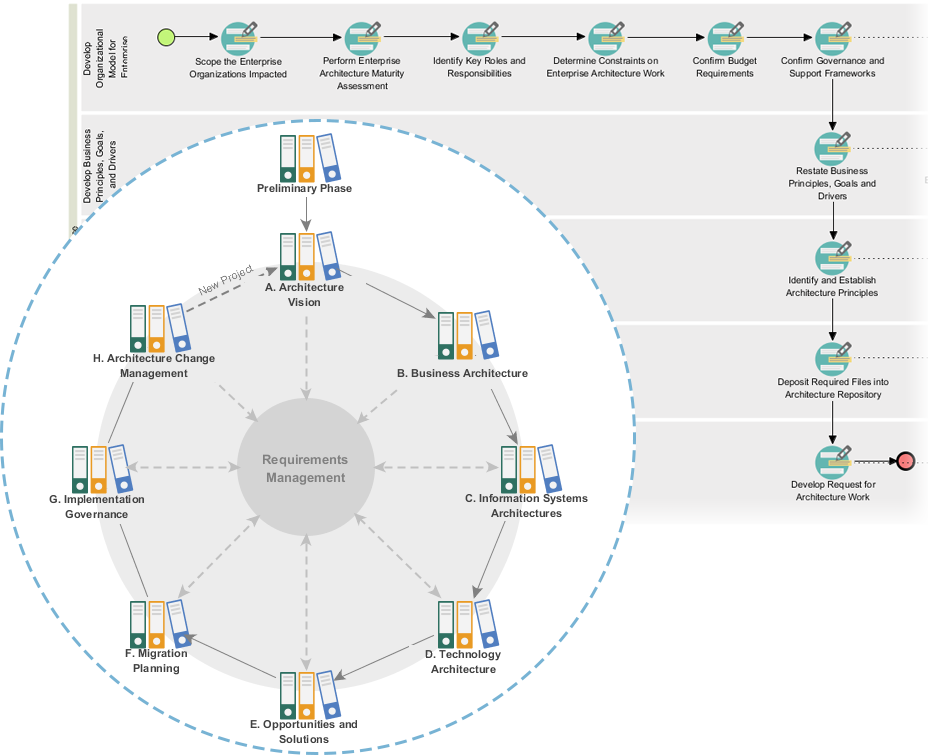
Powerful TOGAF ADM Toolset

TOGAF ADMの段階

  1. 準備段階: アーキテクチャの原則、フレームワーク、ガバナンスを確立します。
  2. アーキテクチャビジョン: 範囲、ステークホルダー、関心事、およびビジネス目標を定義します。
  3. ビジネスアーキテクチャ: ビジネスプロセスやサービスを含むビジネスアーキテクチャを開発します。
  4. 情報システムアーキテクチャ: データアーキテクチャおよびアプリケーションアーキテクチャを開発します。
  5. 技術アーキテクチャ: 技術アーキテクチャを開発します。
  6. 機会と解決策: アーキテクチャプロジェクトを特定し、優先順位を付けています。
  7. 移行計画: 移行および実装計画を開発します。
  8. 実装ガバナンス: アーキテクチャの実装に対するガバナンスと支援を提供します。

ArchiMateモデルの例

この図は、医療管理システムのレイヤードアーキテクチャを示しており、主に2つのレイヤーに分かれています:アプリケーションレイヤー および テクノロジーレイヤー。各コンポーネントおよびそれらの相互作用について詳しく説明します:
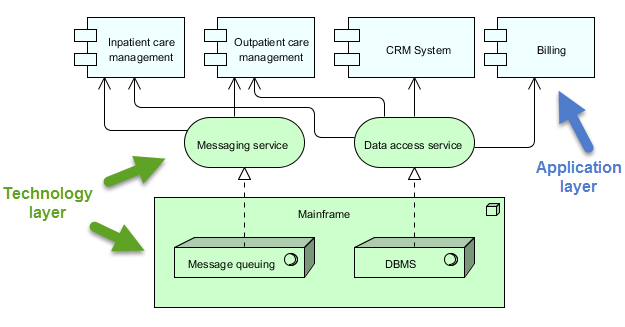
archimate diagram example

アプリケーションレイヤー(青)

このレイヤーは、医療サービスを管理するためにユーザーまたは他のシステムと直接やり取りするさまざまなアプリケーションやシステムで構成されています。このレイヤーの主要なコンポーネントは以下の通りです:

  1. 入院患者ケア管理:

    • 病院に入院している患者に関連するサービスおよびプロセスを管理します。
  2. 外来患者ケア管理:

    • 入院せずに治療のために病院を訪れる患者のサービスおよびプロセスを管理します。
  3. CRMシステム(顧客関係管理):

    • 患者とのやり取りを管理し、コミュニケーション、フォローアップ、患者関係の管理を含みます。
  4. 請求:

    • 財務関連の業務を処理し、請求書の作成、支払い処理、財務記録の管理を含みます。

テクノロジーレイヤー(緑)

このレイヤーは、アプリケーションレイヤーのアプリケーションを支える基盤インフラおよびサービスを提供します。このレイヤーの主要なコンポーネントは以下の通りです:

  1. メッセージングサービス:

    • 医療管理システム内の異なるアプリケーションおよびシステム間の通信を促進します。
    • メッセージが信頼性を持って、正しい順序で届くことを保証します。
  2. データアクセスサービス:

    • システム全体にわたってデータにアクセスおよび管理するための集中化された方法を提供します。
    • データの取得および保存が効率的かつ安全に行われることを保証します。
  3. メインフレーム:

    • コアサービスおよびデータをホストする中央コンピューティングシステム。
    • 以下の2つの主要なコンポーネントを含む:
      • メッセージキューイング:メッセージのキューイングおよび処理を管理し、信頼性の高い通信を確保する。
      • DBMS(データベース管理システム):さまざまなアプリケーションで使用されるデータを格納および管理する。

相互作用

  • 入院患者ケア管理外来患者ケア管理CRMシステム、および請求は、以下のものと相互作用するメッセージングサービスおよびデータアクセスサービスそれぞれの機能を実行するために。
  • このメッセージングサービスおよびデータアクセスサービスは以下のものに依存するメインフレームコアサービス(メッセージキューイングやデータベース管理など)を提供する。
  • このメインフレームメッセージが正しく処理され、データが効率的に管理されることを保証し、システム全体の運用を支援します。

この図は、アプリケーションレベルの機能と基盤となる技術インフラストラクチャを分離することで、医療サービスを構造的に管理するアプローチを示しています。この分離により、モジュール性と保守性の高いシステム設計が可能となり、一方のレイヤーでの変更が他方への影響を最小限に抑えることができます。メッセージングサービス および データアクセスサービスこれらは中間役を果たし、アプリケーションコンポーネントとメインフレームの間での通信およびデータ管理を促進します。

推奨されるArchiMate EAツール

Visual Paradigmは、エンタープライズアーキテクチャ(EA)プロジェクトにおけるArchiMateモデリングの最良のツールの一つとして広く認識されています。以下に、それが強く推奨される理由を示します:
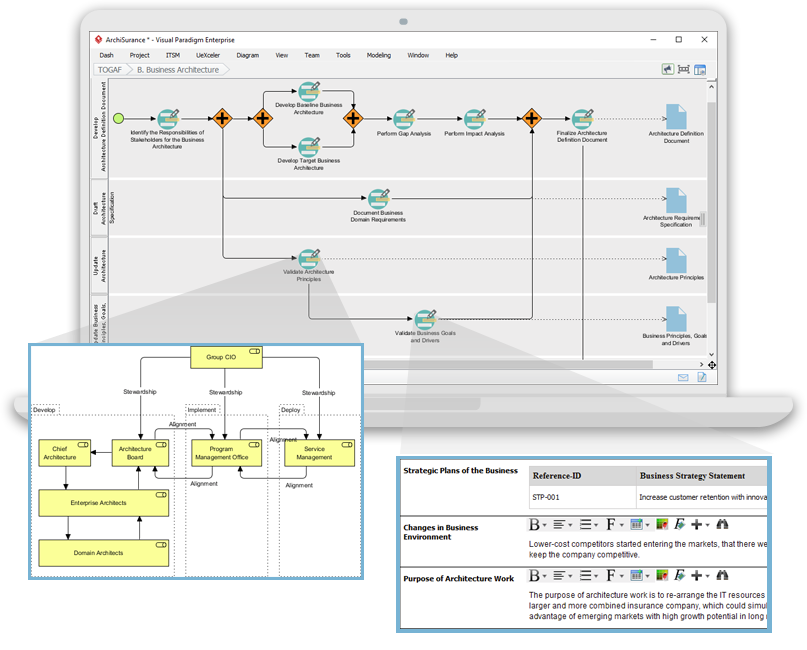
Navigating TOGAF: Your Guide to the ADM Process - Visual Paradigm Guides

1. 包括的なArchiMateサポート

  • 完全なArchiMate標準:Visual Paradigmは最新のArchiMate標準、ArchiMate 3.1をサポートしており、公式のArchiMate要素および関係性をすべて使用してモデリングできるようにしています。
  • 豊富な要素ライブラリ:豊富なArchiMate記号のライブラリを提供しており、詳細で正確なモデル作成が容易になります。

2. 使いやすいインターフェース

  • 直感的なデザイン:ユーザーが直感的に操作できる使いやすいインターフェースを提供しており、ArchiMateモデリングに初めて触れるユーザーにも扱いやすいです。
  • ドラッグアンドドロップ:ドラッグアンドドロップ機能により、迅速かつ効率的なモデル作成が可能になります。

3. 高度なモデリング機能

  • レイヤードビュー:ビジネス、アプリケーション、テクノロジーなど、レイヤードビューの作成をサポートし、エンタープライズアーキテクチャの包括的な視点を提供します。
  • レイヤー間の関係:アーキテクチャの異なるレイヤー間の関係を簡単に定義および可視化できます。

4. 協働と共有

  • チーム協働:Visual Paradigmは協働作業をサポートしており、複数のユーザーが同時に同じプロジェクトに取り組むことができます。
  • バージョン管理:統合されたバージョン管理により、変更の管理とモデルの進化の追跡が可能になります。

5. 統合機能

  • ツール統合:JIRA、Confluence、さまざまなデータベースなど、他のツールやプラットフォームとシームレスに統合され、全体のEA実践を強化します。
  • インポート/エクスポート:ArchiMate交換ファイル形式を含むさまざまなフォーマットでのモデルのインポートおよびエクスポートをサポートし、他のツールとの互換性を確保します。

6. ドキュメント作成とレポート作成

  • 自動ドキュメント作成:ArchiMateモデルから包括的なドキュメントを自動生成し、時間の節約と一貫性の確保を実現します。
  • カスタムレポート:特定のステークホルダーのニーズに合わせたカスタムレポートの作成を可能にします。

7. トレーニングとサポート

  • 豊富なリソース:ユーザーが始めやすく、ArchiMateモデリングを習得できるよう、多数のチュートリアル、ガイド、例を提供します。
  • カスタマーサポート:発生する可能性のあるあらゆる問題や質問に対応する強力なカスタマーサポートを提供します。

8. スケーラビリティ

  • スケーラブルなソリューション:小規模および大規模なEAプロジェクトの両方に適しており、あらゆる規模の組織にとって汎用的なツールです。

9. コンプライアンスと標準

  • 業界標準:業界標準およびベストプラクティスに準拠しており、EAモデルのコンプライアンスと最新性を確保します。

結論

ArchiMateは、TOGAF ADMメソドロジーを支援する強力で標準化された企業アーキテクチャのモデリング方法を提供します。ArchiMateの主要なコンセプト、レイヤー、要素、関係性を理解することで、ステークホルダーに対して複雑なアーキテクチャを効果的にモデリングおよび伝達できます。提示された例は、ArchiMateがビジネスプロセス、アプリケーション連携、テクノロジー実現をモデリングするのにどのように使用できるかを示しており、TOGAF ADMのさまざまなフェーズを支援します。

ArchiMateツールリソース

  1. 無料オンラインArchiMate図作成ツール

    • 説明: ArchiMate 3の視覚的モデリング言語をサポートする無料のツールで、オンラインでArchiMate図を作成できます。始めやすくなるように例やテンプレートも用意されています。
    • URL無料オンラインArchiMate図作成ツール 1
  2. メインページ – 無料のArchiMateリソース

  3. Visual Paradigm – UML、アジャイル、PMBOK、TOGAF、BPMNなど

  4. 第7章. ArchiMate – Visual Paradigmコミュニティサークル

  5. ArchiMateとは何か?

    • 説明: ArchiMateのステップバイステップ学習ガイドで、企業アーキテクチャモデリングにどのように使用するかを含んでいます。
    • URLArchiMateとは何ですか? 5
  6. ArchiMateツール

    • 説明: アジャイルソフトウェアチーム向けに設計された設計および管理ツールであるVisual Paradigmの使い方を学びます。
    • URLArchiMateツール 6
  7. 最高のArchiMateソフトウェア

    • 説明: 効果的なEA設計およびモデリング向けの認定ArchiMateツール。The Open Groupの公式仕様に準拠したArchiMate図を迅速に作成できます。
    • URL最高のArchiMateソフトウェア 7
  8. ArchiMate要素のフォーマット方法は?

  9. ArchiMate Viewpointガイド – リソースマップViewpoint

  10. ArchiMate ダイアグラム チュートリアル

これらのリソースは、企業アーキテクチャモデリングにVisual ParadigmのArchiMateツールを使用するための包括的な出発点を提供するはずです。
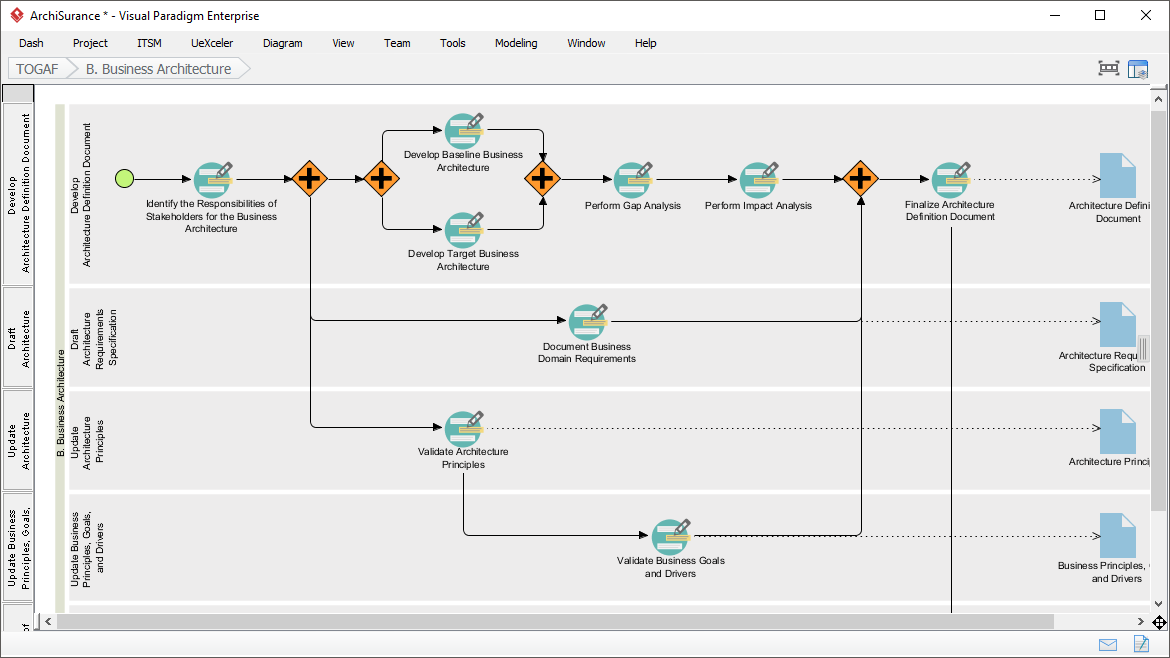
Visual ParadigmのTOGAFガイド・スルー・プロセスに関する包括的ガイド

はじめに

Visual ParadigmのTOGAFガイド・スルー・プロセスは、TOGAFアーキテクチャ開発手法(ADM)の導入をスムーズにするために設計された強力なツールです。段階的なガイド、手順、実際の事例を提供し、企業アーキテクチャの開発を支援します。この包括的なガイドでは、Visual ParadigmのTOGAFガイド・スルー・プロセスの主な機能、利点、適用分野を検討し、企業アーキテクチャ分野でどのように際立っているかを強調します。

Transform Your Business with Visual Paradigm and TOGAF - Visual Paradigm Guides

主な機能

  1. 段階的なガイド:

    • ガイド・スルー・プロセスは、TOGAF ADMの各段階に対して詳細な段階的な手順を提供し、ユーザーが企業アーキテクチャ開発の複雑さを容易に乗り越えられるようにします。1112.
  2. ArchiMateとの統合:

    • Visual ParadigmはArchiMateとTOGAF ADMの統合をサポートしており、企業アーキテクチャの取り組みに強力な組み合わせを提供します。多様な表記体系を持つArchiMate 3により、アーキテクトは複雑なモデルを効果的に表現できます。1314.
  3. タスク管理の自動化:

    • このツールは、タスク管理と通知の自動化により、全体のプロセスを強化し、ユーザーがアーキテクチャの成果物を段階的かつ共同で開発できるようにします。15.
  4. 視覚的プロセスマップ:

    • ソフトウェアは、ユーザーが企業アーキテクチャプロセス全体を簡単にナビゲートできる視覚的プロセスマップを備えています。ADM活動を完了するための包括的な計画、設計、開発ツールを提供します。14.
  5. 包括的なツールキット:

    • Visual Paradigmは、企業アーキテクチャのビジネス、IT、物理的側面をモデル化するためのArchiMate図を含む、ADM活動に特化したさまざまなツールを提供しています。これらのツールにより、アーキテクチャの包括的な視点が得られ、TOGAFの理解と実装が容易になります。14.

利点

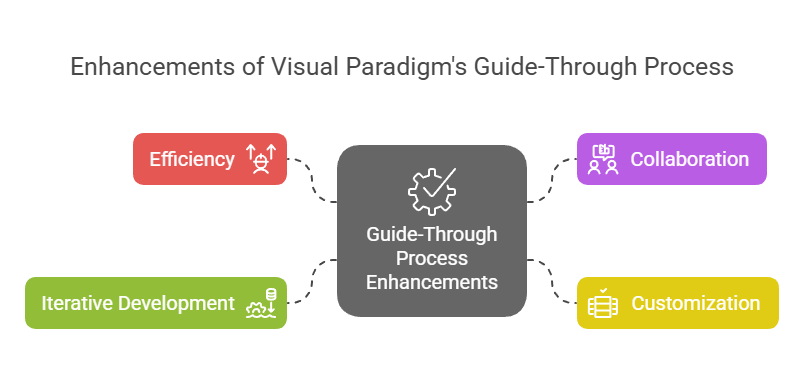
Enhancements of Visual Paradigm's Guide-Through Process: Visual Paradigm

  1. 効率性:

    • ガイド・スルー・プロセスは明確な指示を提供し、タスクを自動化することで、効率を著しく向上させます。これにより、ユーザーは手続き的な詳細に注力するのではなく、戦略的決定に集中できます。11.
  2. 協働:

    • このツールは、プロジェクトオーナー、ビジネスアナリスト、エンタープライズアーキテクト、IT専門家など、さまざまなステークホルダー間の協働を促進します。この協働アプローチにより、アーキテクチャ開発プロセス全体を通じて、すべての関係者が関与し、情報が共有されます。15.
  3. カスタマイズ:

    • Visual Paradigmのツールはカスタマイズを可能にし、組織がADMプロセスを自らの特定のニーズや目標に合わせて調整できるようにします。この柔軟性により、アーキテクチャ開発プロセスが組織の独自の要件と一致することが保証されます。11.
  4. 反復的開発:

    • TOGAF ADMの反復的な性質は、Visual Paradigmのガイド・スルー・プロセスによって完全にサポートされています。これにより、実務者は情報のニーズやステークホルダーからのフィードバックの変化に基づいて、作業を適応・改善でき、アーキテクチャが組織の変化するニーズを満たすことを確保できます。16.

適用分野

  1. エンタープライズアーキテクチャ開発:

    • 主な適用分野はエンタープライズアーキテクチャ開発であり、ガイド・スルー・プロセスは組織がエンタープライズアーキテクチャを設計・計画・実装・運用するのを支援します。ビジネス目標とIT戦略を効果的に一致させるための構造化されたアプローチを提供します。17.
  2. デジタル変革:

    • このツールは、新しい技術やプロセスの導入を通じて顧客体験や運用効率を向上させようとする組織のデジタル変革イニシアチブにとって不可欠です18.
  3. 戦略計画:

    • Visual Paradigmのガイド・スルー・プロセスは、アーキテクチャビジョンの策定、範囲の定義、ステークホルダーの特定、コミュニケーション計画の作成といった包括的なフレームワークを提供することで、戦略計画を支援します。これにより、アーキテクチャ開発プロセスがビジネス目標や戦略的要因と整合されることが保証されます19.
  4. アジャイル手法:

    • このツールはアジャイル手法とUMLを統合し、企業アーキテクチャ開発の包括的なソリューションを提供します。この統合により、アーキテクチャ開発プロセスが柔軟かつ効率的になり、組織内のアジャイル実践を支援します14.

結論

Visual ParadigmのTOGAFガイド・スルー・プロセスは、TOGAF ADMを支援する包括的で効果的なツールとして際立っています。段階的なガイダンス、ArchiMateとの統合、タスクの自動管理、共同作業機能といった特徴により、企業アーキテクチャ開発にとって貴重なリソースとなっています。このツールを活用することで、組織は効率性、協働性、カスタマイズ性、反復的開発を向上させ、最終的に企業アーキテクチャの目標を達成し、ビジネス価値と変革を推進できます

ArchiMate 3.2 第3章

3 言語構造

本章では、ArchiMateエンタープライズアーキテクチャモデリング言語の構造について説明する。その標準的な要素および関係の詳細な定義と例は、第4章から第1章に続く。

3.1 言語設計に関する考慮事項

エンタープライズアーキテクチャのための一般的なメタモデルを開発する際の重要な課題は、個別のアーキテクチャ分野向けの言語の特異性と、システムを単なる相互関係のあるエンティティの集合として捉えるような、非常に一般的なアーキテクチャ概念のセットとの間でバランスを取ることである。

ArchiMate言語の設計は、比較的汎用的な概念の集合から出発した。これらの概念は、次の節で説明するように、異なるアーキテクチャ層での適用に向けて特化されている。言語に課せられた最も重要な設計制約は、可能な限り小さくする一方で、エンタープライズアーキテクチャモデリングの大多数のタスクに使用可能であるようにすることである。他の多くの言語は、すべてのユーザーのニーズを満たそうとしている。学習と使用の簡便さを重視して、ArchiMate言語は、実用的なケースの80%をモデル化するのに十分な概念に限定されている。

本規格は、ArchiMate言語の設計の詳細な根拠を説明していない。関心のある読者は、[1]、[2]、[3]を参照されたい。これらは、言語構築および設計に関する詳細な記述を提供している。

3.2 上位レベルの言語構造

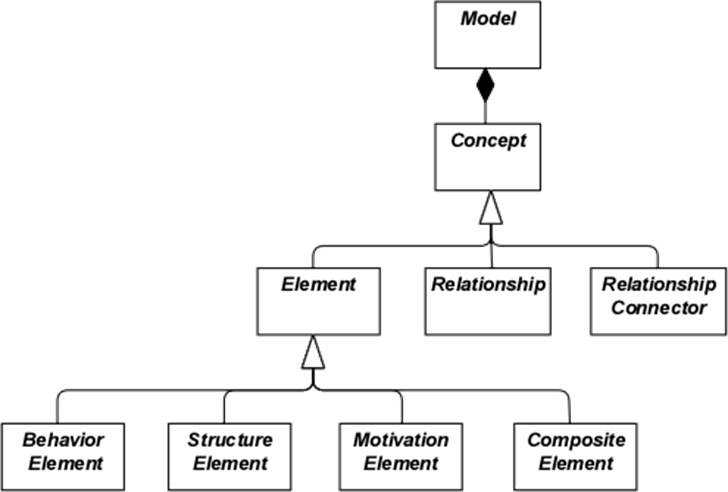
図1は、言語の上位レベルの階層構造を示している:

  • モデルとは、概念 - 概念とは、要素または関係
  • 要素とは、行動要素、構造要素、動機要素、または複合要素のいずれかである。

これらの概念は抽象的概念である。モデル内で直接使用することを意図していない。これを示すために、白い枠で囲み、ラベルは斜体で表示されている。図1で使用されている記法の説明は、第4章を参照のこと。

図1:ArchiMate概念の上位階層

3.3 ArchiMate言語のレイヤー構造

ArchiMateコア言語は、汎用的な要素とその関係の構造を定義しており、これらは異なるレイヤーで特化可能である。ArchiMateコア言語内には以下の3つのレイヤーが定義されている。

  1. ビジネスレイヤー」は、顧客に提供されるビジネスサービスを示しており、これらはビジネスアクターによるビジネスプロセスによって組織内で実現される。
  2. アプリケーションレイヤー」は、ビジネスを支援するアプリケーションサービスおよびそれらを実現するアプリケーションを示す。
  3. テクノロジー・レイヤー情報技術と運用技術の両方を含みます。たとえば、アプリケーション世界およびビジネス層を支援するための処理、ストレージ、通信技術をモデル化でき、施設、物理的設備、材料、および配送ネットワークを用いて運用技術または物理的技術をモデル化できます。

異なるレイヤー内のモデルの一般的な構造は類似しています。同じ種類の要素と関係が使用されますが、その正確な性質や粒度は異なります。次の章では、汎用メタモデルの構造が提示されます。第8章、第9章、第10章では、これらの要素を特定のレイヤーに特化させることで、特定のレイヤーに特有の要素を取得します。

サービス指向に合わせて、レイヤー間で最も重要な関係は「サービス提供」関係によって形成されます。[1]関係であり、あるレイヤーの要素が他のレイヤーのサービスによってどのように提供されているかを示します。(ただし、サービスは他のレイヤーの要素にのみ提供されるわけではないため、同じレイヤー内の要素にも提供できる点に注意してください。)第二の種類のリンクは実現関係によって形成されます。下位レイヤーの要素は、上位レイヤーの同等の要素を実現する可能性があります。たとえば、

「データオブジェクト」(アプリケーションレイヤー)が「ビジネスオブジェクト」(ビジネスレイヤー)を実現する可能性がある。あるいは、

「アーティファクト」(技術レイヤー)が「データオブジェクト」または「アプリケーションコンポーネント」(アプリケーションレイヤー)のいずれかを実現する可能性がある。

3.4 ArchiMateコアフレームワーク

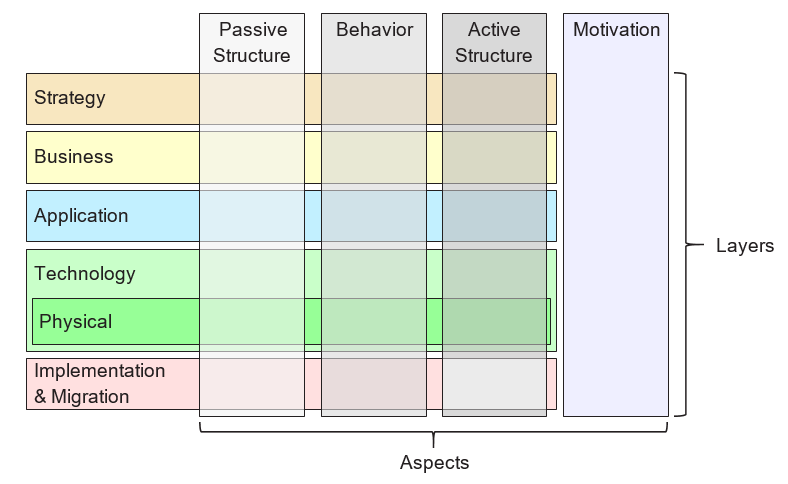
ArchiMateコアフレームワークは、ArchiMateコア言語の要素を分類するために使用される9つのセルから構成されるフレームワークです。図2に示すように、3つの側面と3つのレイヤーから構成されています。これをArchiMateコアフレームワークと呼びます。

側面とレイヤーに基づく要素の分類はあくまで全体的なものであることを理解することが重要です。現実のアーキテクチャ要素は、必ずしも1つの側面やレイヤーに厳密に限定される必要はありません。異なる側面やレイヤーをつなぐ要素は、整合的なアーキテクチャ記述において中心的な役割を果たすからです。たとえば、後の概念的議論の前に進んで述べると、ビジネスロールは「純粋に行動的」な要素と「純粋に構造的」な要素の間の仲介要素として機能し、あるソフトウェアがアプリケーションレイヤーか技術レイヤーの一部と見なされるかどうかは、文脈によって異なります。

図2:ArchiMateコアフレームワーク

このフレームワークの構造により、ステークホルダーの関心を強調するさまざまな視点から企業をモデル化できます。ステークホルダーは通常、複数のセルにわたる関心を持つことができます。

このフレームワークの次元は以下の通りです:

  • レイヤー – ArchiMateで企業をモデル化できる3つのレベル – ビジネス、アプリケーション、技術(3.3節で説明)
  • 側面:

アクティブ構造側面、これは構造的要素(実際の行動を示すビジネスアクター、アプリケーションコンポーネント、デバイス)を表します。すなわち、

「行動の主体」

行動側面、これはアクターによって行われる行動(プロセス、機能、イベント、サービス)を表します。構造的要素は行動的要素に割り当てられ、誰または何が行動を示しているかを示します。

パッシブ構造側面、これは行動が行われる対象を表します。これらは通常、ビジネスレイヤーの情報オブジェクトおよびアプリケーションレイヤーのデータオブジェクトですが、物理的オブジェクトを表すためにも使用できます。

この3つの側面は、文に主語(アクティブ構造)、動詞(行動)、目的語(パッシブ構造)がある自然言語にインスパイアされています。人々が自分の言語で慣れている構造を使用することで、ArchiMate言語は学びやすく、読みやすくなります。

ArchiMate表記は図式的言語であり、要素が空間的に配置されるため、この順序はモデル化において重要ではありません。

図1に示すように、複合要素とは、フレームワークの単一の側面(列)に必ずしも当てはまらない要素であり、2つ以上の側面を組み合わせる可能性があります。

ArchiMate言語は、モデル作成者がこのフレームワークの構造のような特定のレイアウトを使用することを要求しないことに注意してください。これは、言語要素の分類にすぎません。

3.5 ArchiMateフルフレームワーク

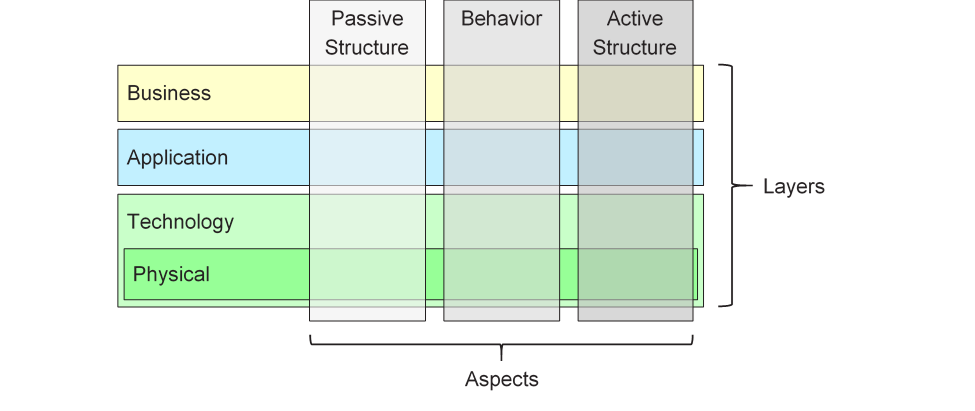
この標準のこのバージョンで説明されているArchiMateフルフレームワークは、コアフレームワークに複数のレイヤーとアスペクトを追加しています。物理的要素は、物理施設や設備、配布ネットワーク、素材をモデル化するためにテクノロジー層に含まれます。これにより、これらもコア要素となります。戦略的要素は、戦略的方針や選択をモデル化するために導入されています。これらは第7章で説明されています。動機に関するアスペクトは次の章で一般的なレベルで導入され、第6章で詳細に説明されています。実装および移行要素は第12章で説明されています。その結果としてのArchiMateフルフレームワークは図3に示されています。

図3:ArchiMateフルフレームワーク

ArchiMate言語は情報用の特定のレイヤーを定義していませんが、ビジネスオブジェクト、データオブジェクト、アーティファクトなどの受動的構造アスペクトの要素が、情報エンティティを表すために使用されます。情報モデル化は、ArchiMateの異なるレイヤーでサポートされています。

3.6 ArchiMate言語における抽象化

ArchiMate言語の構造は、いくつかの一般的な抽象化および精緻化の形式を扱うことができます。まず、外部(ブラックボックス、箱の中身を抽象化)と内部(ホワイトボックス)の視点の区別は、システム設計において一般的です。外部視点は、システムが環境に対して行うべきことを示し、内部視点は、それがどのように行われるかを示します。

第二に、行動とアクティブ構造の区別は、システムが行うべきこととその方法を、それを実行するシステム構成要素(人、アプリケーション、インフラ)から分離するために一般的に使用されます。新しいシステムをモデル化する際には、システムが実行すべき行動から始めると便利なことが多く、既存のシステムをモデル化する際には、システムを構成する人、アプリケーション、インフラから始め、その後、これらのアクティブ構造が実行する行動を詳細に分析すると便利です。

第三の区別は、概念的、論理的、物理的抽象レベルの違いです。これはデータモデリングに由来しています。概念的要素は、ビジネスが関心を持つ情報を表します。論理的要素は、情報システムによる操作を可能にするために、この情報を論理的に構造化します。物理的要素は、この情報の保存方法を記述します。たとえば、ファイルやデータベーステーブルの形式で。ArchiMate言語では、これに対応してビジネスオブジェクト、データオブジェクト、アーティファクト、およびそれらの間の実現関係が使用されます。

論理的要素と物理的要素の区別は、アプリケーションの記述にも適用されています。TOGAFエンタープライズメタモデル[4]は、ビジネス、データ、アプリケーション、テクノロジーのコンポーネントおよびサービスを記述して、アーキテクチャ概念を表現するためのエンティティのセットを含んでいます。論理的コンポーネントは、実装や製品に依存しないデータまたは機能のカプセル化であり、物理的コンポーネントは、実際のソフトウェアコンポーネント、デバイスなどです。この区別は、TOGAFフレームワークではアーキテクチャビルディングブロック(ABB)とソリューションビルディングブロック(SBB)の形で捉えられています。この区別は、エンタープライズアーキテクチャを高レベルの抽象的記述から、実際の実装レベルの設計へと進める際にも有用です。ビルディングブロックには複数の要素が含まれる可能性があることに注意してください。これらは通常、ArchiMate言語のグループ化概念を使用してモデル化されます。

ArchiMate言語は、このような抽象化をモデル化するための3つの方法を持っています。第一に、[6]で説明されているように、アプリケーション機能やテクノロジー機能などの行動要素を使用して論理的コンポーネントをモデル化できます。なぜなら、これらは実装に依存しない機能のカプセル化を表しているからです。対応する物理的コンポーネントは、行動要素に割り当てられたアクティブ構造要素(アプリケーションコンポーネントやノードなど)を使用してモデル化できます。第二に、ArchiMate言語は実現の概念をサポートしています。これは、テクノロジー層から上へと進んで説明するのが最も適切です。テクノロジー層は、アプリケーションコンポーネントを実現する物理的アーティファクトやソフトウェアを定義します。また、情報システムの実現に必要なデバイス、ネットワークなどの他の物理的概念へのマッピングも提供します。実現関係は、より抽象的な実現、たとえば(より具体的な)要件と(より一般的な)原則との間の実現などもモデル化するために使用されます。要件の満足は原則の遵守を意味するため、その関係が成立します。実現は、アプリケーションコンポーネント間およびノード間でも許容されます。これにより、物理的アプリケーションまたはテクノロジー・コンポーネントが論理的アプリケーションまたはテクノロジー・コンポーネントを実現することをモデル化できます。第三に、論理的および物理的アプリケーションコンポーネントは、第14章で説明されているように、アプリケーションコンポーネント要素のメタモデルレベルでの特殊化として定義できます(14.2.2節の例も参照)。TOGAFコンテンツメタモデルの論理的および物理的テクノロジー・コンポーネントについても同様に、ノード要素の特殊化として定義できます(14.2.3節を参照)。

ArchiMate言語は意図的に、型とインスタンスの違いをサポートしていません。エンタープライズアーキテクチャの抽象レベルでは、インスタンスよりも型や例(エクセムプラ)をモデル化することが一般的です。同様に、ArchiMate言語におけるビジネスプロセスは、個別のインスタンス(つまり、そのプロセスの1回の実行)を記述するものではありません。ほとんどの場合、ビジネスオブジェクトはオブジェクト型(cf.UML®クラス)、その組織内に複数のインスタンスが存在する可能性があります。たとえば、保険申請プロセスの各実行は、保険契約ビジネスオブジェクトの特定のインスタンスを生成する可能性がありますが、これはエンタープライズアーキテクチャではモデル化されません。

3.7 概念とその表記法

ArchiMate言語は、言語概念(すなわちメタモデルの構成要素)とその表記法を分離しています。異なるステークホルダー群は、アーキテクチャモデルやビューを理解するために、異なる表記法を必要とする場合があります。この点で、ArchiMate言語はUMLやBPMN™のように、唯一の標準化された表記法を持つ言語とは異なります。第13章で説明されているビューのメカニズムが、このようなステークホルダー指向の可視化を定義する手段を提供します。

ArchiMate概念の表記法は(そして、すべきである)、ステークホルダーに特化したものである可能性がありますが、標準は、アーキテクトやArchiMateモデルを開発する他の人々が使用できる共通のグラフィカル表記を提供しています。この表記法は、エンティティ関係図(ERD)、UML、BPMNなどの既存の技術的モデリング技法に慣れている対象者を対象としており、それらに似ています。この文書の残りの部分では、特に断りのない限り、言語概念を表すために使用される記号は、ArchiMate標準表記を表します。ほとんどの要素に対する標準表記は、右上にアイコンを含むボックスです。いくつかのケースでは、このアイコン単体も代替表記として使用できます。可能な限り、この標準的なアイコン表記を優先するべきです。これにより、ArchiMate言語を知っている誰もが、この言語で作成された図を読み取ることができます。

3.8 ネスティングの使用

要素を他の要素の中にネストすることで、関係を表現するための代替的なグラフィカル表記として使用できます。これは第5章およびこれらの関係の定義で詳しく説明されています。

3.9 色と表記的ヒントの使用

この標準内のメタモデル図では、グレーの濃淡を使って、ArchiMateフレームワークの異なるアスペクトに属する要素を区別しています。以下の通りです:

  • 白色:抽象的(すなわち、インスタンス化できない)概念
  • 薄いグレー:受動的構造
  • 中程度のグレー:行動
  • 濃いグレー:アクティブ構造

ArchiMateモデルでは、色に正式な意味合いは割り当てられておらず、色の使用はモデル作成者に任されています。しかし、モデル内の特定の側面を強調するために自由に使用できます。たとえば、この標準で提示されている多くの例モデルでは、色がArchiMateコアフレームワークのレイヤーを区別するために使用されています。以下の通りです:

  • 黄色:ビジネス層
  • 青色:アプリケーション層
  • 緑色:テクノロジー層

また、視覚的な強調にも使用できます。ガイドラインを提供する推奨テキストは[1]の第6章です。色に加えて、他の表記的ヒントを使用して、フレームワークのレイヤーを区別できます。要素の左上隅にM、S、B、A、T、P、またはIという文字を配置することで、それぞれ動機、戦略、ビジネス、アプリケーション、テクノロジー、物理、実装および移行要素を示すことができます。この表記法の例は、例34に示されています。

標準的な表記法は、異なる要素タイプに対して、記号の角の形状に関する慣例を使用しています。以下の通りです:

  • 角が四角形のものは、構造要素を示すために使用されます
  • 角が丸いものは、行動要素を示すために使用されます
  • 角が斜めのものは、動機要素を示すために使用されます

[1]以前のバージョンでは「使用される」呼ばれていました。明確さを図るため、この名称は「提供する」に変更されました。

投稿日: カテゴリー ArchiMate

ArchiMate 3.2 Chapter 3

3 Language Structure

This chapter describes the structure of the ArchiMate Enterprise Architecture modeling language. The detailed definition and examples of its standard set of elements and relationships follow in Chapter 4 to Chapter 1

3.1 Language Design Considerations

A key challenge in the development of a general metamodel for Enterprise Architecture is to strike a balance between the specificity of languages for individual architecture domains and a very general set of architecture concepts, which reflects a view of systems as a mere set of inter-related entities.

The design of the ArchiMate language started from a set of relatively generic concepts. These have been specialized towards application at different architectural layers, as explained in the following sections. The most important design restriction on the language is that it has been explicitly designed to be as small as possible, but still usable for most Enterprise Architecture modeling tasks. Many other languages try to accommodate the needs of all possible users. In the interest of simplicity of learning and use, the ArchiMate language has been limited to the concepts that suffice for modeling the proverbial 80% of practical cases.

This standard does not describe the detailed rationale behind the design of the ArchiMate language. The interested reader is referred to [1], [2], and [3], which provide a detailed description of the language construction and design considerations.

3.2 Top-Level Language Structure

Figure 1 outlines the top-level hierarchical structure of the language:

  • A model is a collection of concepts – a concept is either an element or a relationship
  • An element is either a behavior element, a structure element, a motivation element, or a composite element

Note that these are abstract concepts; they are not intended to be used directly in models. To signify this, they are depicted in white with labels in italics. See Chapter 4 for an explanation of the notation used in Figure 1.

Figure 1: Top-Level Hierarchy of ArchiMate Concepts

3.3 Layering of the ArchiMate Language

The ArchiMate core language defines a structure of generic elements and their relationships, which can be specialized in different layers. Three layers are defined within the ArchiMate core language as follows:

  1. The Business Layer depicts business services offered to customers, which are realized in the organization by business processes performed by business actors.
  2. The Application Layer depicts application services that support the business, and the applications that realize them.
  3. The Technology Layer comprises both information and operational technology. You can model, for example, processing, storage, and communication technology in support of the application world and Business Layers, and model operational or physical technology with facilities, physical equipment, materials, and distribution networks.

The general structure of models within the different layers is similar. The same types of elements and relationships are used, although their exact nature and granularity differ. In the next chapter, the structure of the generic metamodel is presented. In Chapter 8, Chapter 9, and Chapter 10 these elements are specialized to obtain elements specific to a particular layer.

In alignment with service-orientation, the most important relationship between layers is formed by “serving”[1] relationships, which show how the elements in one layer are served by the services of other layers. (Note, however, that services need not only serve elements in another layer, but also can serve elements in the same layer.) A second type of link is formed by realization relationships: elements in lower layers may realize comparable elements in higher layers; e.g., a

“data object” (Application Layer) may realize a “business object” (Business Layer); or an

“artifact” (Technology Layer) may realize either a “data object” or an “application component” (Application Layer).

3.4 The ArchiMate Core Framework

The ArchiMate Core Framework is a framework of nine cells used to classify elements of the ArchiMate core language. It is made up of three aspects and three layers, as illustrated in Figure 2. This is known as the ArchiMate Core Framework.

It is important to understand that the classification of elements based on aspects and layers is only a global one. Real-life architecture elements need not strictly be confined to one aspect or layer because elements that link the different aspects and layers, play a central role in a coherent architectural description. For example, running somewhat ahead of the later conceptual discussions, business roles serve as intermediary elements between “purely behavioral” elements and “purely structural” elements, and it may depend on the context whether a certain piece of software is considered to be part of the Application Layer or the Technology Layer.

Figure 2: ArchiMate Core Framework

The structure of the framework allows for modeling of the enterprise from different viewpoints, where the position within the cells highlights the concerns of the stakeholder. A stakeholder typically can have concerns that cover multiple cells.

The dimensions of the framework are as follows:

  • Layers – the three levels at which an enterprise can be modeled in ArchiMate – Business, Application, and Technology (as described in Section 3.3)
  • Aspects:

— The Active Structure Aspect, which represents the structural elements (the business actors, application components, and devices that display actual behavior; i.e., the

“subjects” of activity)

— The Behavior Aspect, which represents the behavior (processes, functions, events, and services) performed by the actors; structural elements are assigned to behavioral elements, to show who or what displays the behavior

— The Passive Structure Aspect, which represents the objects on which behavior is performed; these are usually information objects in the Business Layer and data objects in the Application Layer, but they may also be used to represent physical objects

These three aspects were inspired by natural language where a sentence has a subject (active structure), a verb (behavior), and an object (passive structure). By using the same constructs that people are used to in their own languages, the ArchiMate language is easier to learn and read.

Since ArchiMate notation is a graphical language where elements are organized spatially, this order is of no consequence in modeling.

A composite element, as shown in Figure 1, is an element that does not necessarily fit in a single aspect (column) of the framework but may combine two or more aspects.

Note that the ArchiMate language does not require the modeler to use any particular layout such as the structure of this framework; it is merely a categorization of the language elements.

3.5 The ArchiMate Full Framework

The ArchiMate Full Framework, as described in this version of the standard, adds a number of layers and an aspect to the Core Framework_._ The physical elements are included in the Technology Layer for modeling physical facilities and equipment, distribution networks, and materials. As such, these are also core elements. The strategy elements are introduced to model strategic direction and choices. They are described in Chapter 7. The motivation aspect is introduced at a generic level in the next chapter and described in detail in Chapter 6. The implementation and migration elements are described in Chapter 12. The resulting ArchiMate Full Framework is shown in Figure 3.

Figure 3: ArchiMate Full Framework

The ArchiMate language does not define a specific layer for information; however, elements from the passive structure aspect such as business objects, data objects, and artifacts are used to represent information entities. Information modeling is supported across the different ArchiMate layers.

3.6 Abstraction in the ArchiMate Language

The structure of the ArchiMate language accommodates several familiar forms of abstraction and refinement. First of all, the distinction between an external (black-box, abstracting from the contents of the box) and internal (white-box) view is common in systems design. The external view depicts what the system has to do for its environment, while the internal view depicts how it does this.

Second, the distinction between behavior and active structure is commonly used to separate what the system must do and how the system does it from the system constituents (people, applications, and infrastructure) that do it. In modeling new systems, it is often useful to start with the behaviors that the system must perform, while in modeling existing systems, it is often useful to start with the people, applications, and infrastructure that comprise the system, and then analyze in detail the behaviors performed by these active structures.

A third distinction is between conceptual, logical, and physical abstraction levels. This has its roots in data modeling: conceptual elements represent the information the business finds relevant; logical elements provide logical structure to this information for manipulation by information systems; physical elements describe the storage of this information; for example, in the form of files or database tables. In the ArchiMate language, this corresponds with business objects, data objects, and artifacts, along with the realization relationships between them.

The distinction between logical and physical elements has also been carried over to the description of applications. The TOGAF Enterprise Metamodel [4] includes a set of entities that describe business, data, application, and technology components and services to describe architecture concepts. Logical components are implementation or product-independent encapsulations of data or functionality, whereas physical components are tangible software components, devices, etc. This distinction is captured in the TOGAF framework in the form of Architecture Building Blocks (ABBs) and Solution Building Blocks (SBBs). This distinction is again useful in progressing Enterprise Architectures from high-level, abstract descriptions to tangible, implementation-level designs. Note that building blocks may contain multiple elements, which are typically modeled using the grouping concept in the ArchiMate language.

The ArchiMate language has three ways of modeling such abstractions. First, as described in [6], behavior elements such as application and technology functions can be used to model logical components, since they represent implementation-independent encapsulations of functionality. The corresponding physical components can then be modeled using active structure elements such as application components and nodes, assigned to the behavior elements. Second, the ArchiMate language supports the concept of realization. This can best be described by working with the Technology Layer upwards. The Technology Layer defines the physical artifacts and software that realize an application component. It also provides a mapping to other physical concepts such as devices, networks, etc. needed for the realization of an information system. The realization relationship is also used to model more abstract kinds of realization, such as that between a (more specific) requirement and a (more generic) principle, where fulfillment of the requirement implies adherence to the principle. Realization is also allowed between application components and between nodes. This way you can model a physical application or technology component realizing a logical application or technology component, respectively. Third, logical and physical application components can be defined as metamodel-level specializations of the application component element, as described in Chapter 14 (see also the examples in Section 14.2.2). The same holds for the logical and physical technology components of the TOGAF Content Metamodel, which can be defined as specializations of the node element (see Section 14.2.3).

The ArchiMate language intentionally does not support a difference between types and instances. At the Enterprise Architecture abstraction level, it is more common to model types and/or exemplars rather than instances. Similarly, a business process in the ArchiMate language does not describe an individual instance (i.e., one execution of that process). In most cases, a business object is therefore used to model an object type (cf. a UML® class), of which several instances may exist within the organization. For instance, each execution of an insurance application process may result in a specific instance of the insurance policy business object, but that is not modeled in the Enterprise Architecture.

3.7 Concepts and their Notation

The ArchiMate language separates the language concepts (i.e., the constituents of the metamodel) from their notation. Different stakeholder groups may require different notations in order to understand an architecture model or view. In this respect, the ArchiMate language differs from languages such as UML or BPMN™, which have only one standardized notation. The viewpoint mechanism explained in Chapter 13 provides the means for defining such stakeholder-oriented visualizations.

Although the notation of the ArchiMate concepts can (and should) be stakeholder-specific, the standard provides one common graphical notation which can be used by architects and others who develop ArchiMate models. This notation is targeted towards an audience used to existing technical modeling techniques such as Entity Relationship Diagrams (ERDs), UML, or BPMN, and therefore resembles them. In the remainder of this document, unless otherwise noted, the symbols used to depict the language concepts represent the ArchiMate standard notation. This standard notation for most elements consists of a box with an icon in the upper-right corner. In several cases, this icon by itself may also be used as an alternative notation. This standard iconography should be preferred whenever possible so that anyone knowing the ArchiMate language can read the diagrams produced in the language.

3.8 Use of Nesting

Nesting elements inside other elements can be used as an alternative graphical notation to express some relationships. This is explained in more detail in Chapter 5 and in the definition of each of these relationships.

3.9 Use of Colors and Notational Cues

In the metamodel pictures within this standard, shades of grey are used to distinguish elements belonging to the different aspects of the ArchiMate framework, as follows:

  • White for abstract (i.e., non-instantiable) concepts
  • Light grey for passive structures
  • Medium grey for behavior
  • Dark grey for active structures

In ArchiMate models, there are no formal semantics assigned to colors and the use of color is left to the modeler. However, they can be used freely to stress certain aspects in models. For instance, in many of the example models presented in this standard, colors are used to distinguish between the layers of the ArchiMate Core Framework, as follows:

  • Yellow for the Business Layer
  • Blue for the Application Layer
  • Green for the Technology Layer

They can also be used for visual emphasis. A recommended text providing guidelines is Chapter 6 of [1]. In addition to the colors, other notational cues can be used to distinguish between the layers of the framework. A letter M, S, B, A, T, P, or I in the top-left corner of an element can be used to denote a Motivation, Strategy, Business, Application, Technology, Physical, or Implementation & Migration element, respectively. An example of this notation is depicted in Example 34.

The standard notation also uses a convention with the shape of the corners of its symbols for different element types, as follows:

  • Square corners are used to denote structure elements
  • Round corners are used to denote behavior elements
  • Diagonal corners are used to denote motivation elements

[1] Note that this was called “used by” in previous versions of the standard. For the sake of clarity, this name has been changed to “serving”.

投稿日: カテゴリー ArchiMate

Comprehensive Guide to Visual Paradigm’s TOGAF Guide-Through Process

Introduction

Visual Paradigm’s TOGAF Guide-Through Process is a powerful tool designed to streamline the adoption of the TOGAF Architecture Development Method (ADM). It provides step-by-step guidance, instructions, and real-life examples to support enterprise architecture development. This comprehensive guide will explore the key features, benefits, and application areas of Visual Paradigm’s TOGAF Guide-Through Process, highlighting why it stands out in the field of enterprise architecture.

Transform Your Business with Visual Paradigm and TOGAF - Visual Paradigm Guides

Key Features

  1. Step-by-Step Guidance:

    • The Guide-Through Process offers detailed, step-by-step instructions for each phase of the TOGAF ADM, ensuring that users can navigate the complexities of enterprise architecture development with ease 1112.
  2. Integration with ArchiMate:

    • Visual Paradigm supports the integration of ArchiMate with TOGAF ADM, providing a powerful combination for enterprise architecture initiatives. ArchiMate 3, with its versatile notation system, allows architects to express complex models effectively 1314.
  3. Automated Task Management:

    • The tool enhances the entire process with automated task management and notifications, enabling users to develop architecture deliverables incrementally and collaboratively 15.
  4. Visual Process Maps:

    • The software features visual process maps that help users navigate through the entire enterprise architecture process easily. It provides a full set of planning, design, and development tools to complete ADM activities 14.
  5. Comprehensive Toolkit:

    • Visual Paradigm offers a range of tools tailored for ADM activities, including ArchiMate diagrams for modeling business, IT, and physical aspects of enterprise architecture. These tools provide a comprehensive view of the architecture, making it easier to understand and implement TOGAF 14.

Benefits

Enhancements of Visual Paradigm's Guide-Through Process: Visual Paradigm

  1. Efficiency:

    • The Guide-Through Process significantly enhances efficiency by providing clear instructions and automating tasks, allowing users to focus on strategic decisions rather than procedural details 11.
  2. Collaboration:

    • The tool facilitates collaboration among different stakeholders, including project owners, business analysts, enterprise architects, and IT professionals. This collaborative approach ensures that all parties are engaged and informed throughout the architecture development process 15.
  3. Customization:

    • Visual Paradigm’s tool allows for customization, enabling organizations to tailor the ADM process to their specific needs and goals. This flexibility ensures that the architecture development process aligns with the organization’s unique requirements 11.
  4. Iterative Development:

    • The iterative nature of the TOGAF ADM is fully supported by Visual Paradigm’s Guide-Through Process. This allows practitioners to adapt and refine their work based on evolving information needs and stakeholder feedback, ensuring that the architecture meets the changing needs of the organization 16.

Application Areas

  1. Enterprise Architecture Development:

    • The primary application area is enterprise architecture development, where the Guide-Through Process helps organizations design, plan, implement, and govern their enterprise architecture. It provides a structured approach to align business goals with IT strategies effectively 17.
  2. Digital Transformation:

    • The tool is crucial for digital transformation initiatives, where organizations seek to enhance customer experience and operational efficiency through the implementation of new technologies and processes 18.
  3. Strategic Planning:

    • Visual Paradigm’s Guide-Through Process supports strategic planning by providing a comprehensive framework for developing architecture visions, defining scope, identifying stakeholders, and creating communications plans. This ensures that the architecture development process is aligned with business goals and strategic drivers 19.
  4. Agile Methodologies:

    • The tool integrates agile methodologies and UML, providing a comprehensive solution for enterprise architecture development. This integration ensures that the architecture development process is both flexible and efficient, supporting agile practices within the organization 14.

Conclusion

Visual Paradigm’s TOGAF Guide-Through Process stands out as a comprehensive and effective tool for supporting the TOGAF ADM. Its step-by-step guidance, integration with ArchiMate, automated task management, and collaborative features make it an invaluable resource for enterprise architecture development. By leveraging this tool, organizations can enhance efficiency, collaboration, customization, and iterative development, ultimately achieving their enterprise architecture goals and driving business value and transformation.

Comprehensive Tutorial for ArchiMate Supporting TOGAF ADM

Introduction to ArchiMate

ArchiMate is an open and independent enterprise architecture modeling language that supports the description, analysis, and visualization of architecture within and across business domains. It is designed to provide a clear and unambiguous way to communicate complex architectures to stakeholders. ArchiMate is particularly useful when used in conjunction with the TOGAF Architecture Development Method (ADM), providing a standardized way to model and communicate enterprise architectures.

What is ArchiMate?

Key Concepts of ArchiMate

ArchiMate Core Framework

1. Layers of ArchiMate

ArchiMate divides the enterprise architecture into three main layers:

  • Business Layer: Focuses on the business processes, services, and functions that support the organization’s goals.
  • Application Layer: Deals with the application services, components, and their interactions that support the business layer.
  • Technology Layer: Covers the technology infrastructure, including hardware, software, and network components that support the application layer.

2. Core Elements

ArchiMate defines several core elements that are used to model the architecture:

  • Active Structure Elements: Represent the entities that perform behavior, such as business actors, application components, and devices.
  • Behavior Elements: Represent the processes, functions, services, and interactions within the architecture.
  • Passive Structure Elements: Represent the information or data used or produced by behavior elements, such as business objects and data objects.

3. Relationships

ArchiMate defines several types of relationships to connect the elements:

  • Structural Relationships: Such as composition, aggregation, and specialization.
  • Dependency Relationships: Such as association, realization, and used-by.
  • Dynamic Relationships: Such as triggering and flow.

4. Viewpoints

ArchiMate provides several viewpoints to visualize the architecture from different perspectives:

  • Business Process Viewpoint: Shows the business processes and their interactions.
  • Application Cooperation Viewpoint: Shows how applications cooperate to support business processes.
  • Technology Realization Viewpoint: Shows how technology components realize application components.

ArchiMate and TOGAF ADM

TOGAF Architecture Development Method (ADM)

TOGAF ADM is a comprehensive methodology for developing enterprise architectures. It consists of several phases, each focusing on a specific aspect of the architecture development process. ArchiMate supports TOGAF ADM by providing a standardized way to model and visualize the architecture at each phase.

Powerful TOGAF ADM Toolset

Phases of TOGAF ADM

  1. Preliminary Phase: Establishes the architecture principles, framework, and governance.
  2. Architecture Vision: Defines the scope, stakeholders, concerns, and business objectives.
  3. Business Architecture: Develops the business architecture, including business processes and services.
  4. Information Systems Architectures: Develops the data and application architectures.
  5. Technology Architecture: Develops the technology architecture.
  6. Opportunities and Solutions: Identifies and prioritizes architecture projects.
  7. Migration Planning: Develops the migration and implementation plan.
  8. Implementation Governance: Provides governance and support for the implementation of the architecture.

Examples of ArchiMate Models

This diagram illustrates a layered architecture for a healthcare management system, divided into two main layers: the Application Layer and the Technology Layer. Here’s a detailed explanation of each component and their interactions:

archimate diagram example

Application Layer (Blue)

This layer consists of the various applications and systems that directly interact with users or other systems to manage healthcare services. The key components in this layer are:

  1. Inpatient Care Management:

    • Manages services and processes related to patients who are admitted to the hospital.
  2. Outpatient Care Management:

    • Manages services and processes for patients who visit the hospital for treatment but are not admitted.
  3. CRM System (Customer Relationship Management):

    • Manages interactions with patients, including communication, follow-ups, and patient relationship management.
  4. Billing:

    • Handles the financial aspects, including generating bills, processing payments, and managing financial records.

Technology Layer (Green)

This layer provides the underlying infrastructure and services that support the applications in the Application Layer. The key components in this layer are:

  1. Messaging Service:

    • Facilitates communication between different applications and systems within the healthcare management system.
    • Ensures that messages are delivered reliably and in the correct order.
  2. Data Access Service:

    • Provides a centralized way to access and manage data across the system.
    • Ensures that data is retrieved and stored efficiently and securely.
  3. Mainframe:

    • The central computing system that hosts core services and data.
    • Includes two main components:
      • Message Queuing: Manages the queuing and processing of messages to ensure reliable communication.
      • DBMS (Database Management System): Stores and manages the data used by the various applications.

Interactions

  • Inpatient Care ManagementOutpatient Care ManagementCRM System, and Billing interact with the Messaging Service and Data Access Service to perform their respective functions.
  • The Messaging Service and Data Access Service rely on the Mainframe for core services like message queuing and database management.
  • The Mainframe ensures that messages are processed correctly and data is managed efficiently, supporting the entire system’s operations.

The diagram depicts a structured approach to managing healthcare services by separating the application-level functions from the underlying technology infrastructure. This separation allows for more modular and maintainable system design, where changes in one layer have minimal impact on the other. The Messaging Service and Data Access Service act as intermediaries, facilitating communication and data management between the application components and the mainframe.

Recommended ArchiMate EA Tool

Visual Paradigm is widely recognized as one of the best tools for ArchiMate modeling in Enterprise Architecture (EA) projects. Here are some reasons why it is highly recommended:

Navigating TOGAF: Your Guide to the ADM Process - Visual Paradigm Guides

1. Comprehensive ArchiMate Support

  • Full ArchiMate Standard: Visual Paradigm supports the latest ArchiMate standards, including ArchiMate 3.1, ensuring that you can model using all the official ArchiMate elements and relationships.
  • Rich Library of Elements: It provides a extensive library of ArchiMate symbols, making it easy to create detailed and accurate models.

2. User-Friendly Interface

  • Intuitive Design: The tool offers a user-friendly interface that is easy to navigate, even for users who are new to ArchiMate modeling.
  • Drag-and-Drop: The drag-and-drop functionality allows for quick and efficient model creation.

3. Advanced Modeling Features

  • Layered Views: Supports the creation of layered views (e.g., Business, Application, Technology) to provide a holistic view of the enterprise architecture.
  • Cross-Layer Relationships: Easily define and visualize relationships across different layers of the architecture.

4. Collaboration and Sharing

  • Team Collaboration: Visual Paradigm supports collaborative work, allowing multiple users to work on the same project simultaneously.
  • Version Control: Integrated version control helps manage changes and track the evolution of your models.

5. Integration Capabilities

  • Tool Integration: Seamlessly integrates with other tools and platforms, such as JIRA, Confluence, and various databases, enhancing the overall EA practice.
  • Import/Export: Supports importing and exporting models in various formats, including ArchiMate Exchange File Format, ensuring compatibility with other tools.

6. Documentation and Reporting

  • Automated Documentation: Generates comprehensive documentation from your ArchiMate models, saving time and ensuring consistency.
  • Custom Reports: Allows for the creation of custom reports tailored to specific stakeholder needs.

7. Training and Support

  • Extensive Resources: Offers a wealth of tutorials, guides, and examples to help users get started and master ArchiMate modeling.
  • Customer Support: Provides robust customer support to assist with any issues or questions that may arise.

8. Scalability

  • Scalable Solutions: Suitable for both small and large-scale EA projects, making it a versatile tool for organizations of all sizes.

9. Compliance and Standards

  • Industry Standards: Aligns with industry standards and best practices, ensuring that your EA models are compliant and up-to-date.

Conclusion

ArchiMate provides a powerful and standardized way to model enterprise architectures, supporting the TOGAF ADM methodology. By understanding the key concepts, layers, elements, and relationships in ArchiMate, you can effectively model and communicate complex architectures to stakeholders. The examples provided illustrate how ArchiMate can be used to model business processes, application cooperation, and technology realization, supporting the various phases of the TOGAF ADM.

ArchiMate Tool Resource

  1. Free Online ArchiMate Diagram Tool

    • Description: Create ArchiMate diagrams online with a free tool that supports ArchiMate 3 visual modeling language. Includes examples and templates to help you get started.
    • URLFree Online ArchiMate Diagram Tool 1
  2. Main Page – ArchiMate Resources for FREE

    • Description: Offers a visual language to model and capture enterprise architecture, providing a means to visualize relationships within and between different domains.
    • URLMain Page – ArchiMate Resources for FREE 2
  3. Visual Paradigm – UML, Agile, PMBOK, TOGAF, BPMN and More!

  4. Chapter 7. ArchiMate – Visual Paradigm Community Circle

  5. What is ArchiMate?

    • Description: Step-by-step learning guide for ArchiMate, including how to use it for enterprise architecture modeling.
    • URLWhat is ArchiMate? 5
  6. ArchiMate tools

    • Description: Learn how to use Visual Paradigm, a design and management tool designed for agile software teams.
    • URLArchiMate tools 6
  7. Best ArchiMate Software

    • Description: Certified ArchiMate tool for effective EA design and modeling. Quickly draw ArchiMate diagrams that conform to The Open Group official specification.
    • URLBest ArchiMate Software 7
  8. How to Format ArchiMate Elements?

  9. ArchiMate Viewpoint Guide – Resource Map Viewpoint

  10. ArchiMate Diagram Tutorial

    • Description: Tutorial that helps you learn about ArchiMate diagrams, how to create them, and when to use them. Includes examples and tips.
    • URLArchiMate Diagram Tutorial 10

These resources should provide a comprehensive starting point for using Visual Paradigm’s ArchiMate tool for enterprise architecture modeling.