ビジネス戦略の可視化:AIを活用したCATインフォグラフィックの作成

Visual Paradigm’s AI tool transforms business strategies into engaging CAT infographics, simplifying complex narratives into clear visual stories.

Visual ParadigmのAI搭載インフォグラフィックデザイナーは、複雑なビジネスストーリーを魅力的な視覚的物語に変換するためのプロフェッショナルツールです。このアプリケーションは、CAT(課題、アプローチ、勝利)のような3段階フレームワークに基づいて、数分でコンテンツ豊富で構造的なインフォグラフィックを生成できます。プロセスは簡単な入力から始まります:トピックと選択された分析タイプ。AIはこの情報を分析し、関連性のあるコンテンツで視覚的に魅力的なインフォグラフィックを自動生成することで、手動でのデザインの必要性を排除します。市場の競合を打ち破るといった戦略的インサイトを明確かつ効果的に伝える必要がある専門家にとって最適です。直感的なインターフェースと強力なAI機能により、3段階分析を提示する必要があるすべての人にとって不可欠なアセットです。

プロフェッショナルなインフォグラフィックをゼロから作成することは、しばしば時間のかかるプロセスです。デザインスキルだけでなく、主題に対する深い理解が、情報を効果的に構造化するために必要です。Three Aspects Infographic Designerは、コアコンテンツ生成を自動化することで、これらの課題に対処します。ユーザーは視覚的プレゼンテーションの構築に時間をかけるのではなく、メッセージの洗練に集中できます。ツールのAIエンジンは、3つの側面それぞれに適したコンテンツを生成し、あらゆる分析の強力な出発点を提供します。このアプローチは、複雑なアイデアを迅速かつ明確に伝える必要があるビジネス戦略家、プロダクトマネージャー、マーケティング専門家にとって特に有益です。AIを活用することで、ユーザーは洗練されたプロフェッショナルなビジュアルを生み出し、コミュニケーションを強化し、成果をもたらすことができます。

クイックサマリー

  • 3段階インフォグラフィックを作成するためのAI搭載ツール。

  • CAT(課題、アプローチ、勝利)のようなフレームワークのコンテンツを生成。

  • 50種類以上のカスタマイズ可能なスタイルとアニメーションから選択。

  • インフォグラフィックを保存・共有・プロフェッショナルにプレゼンテーション。

Three Aspects Infographic Designerの仕組み

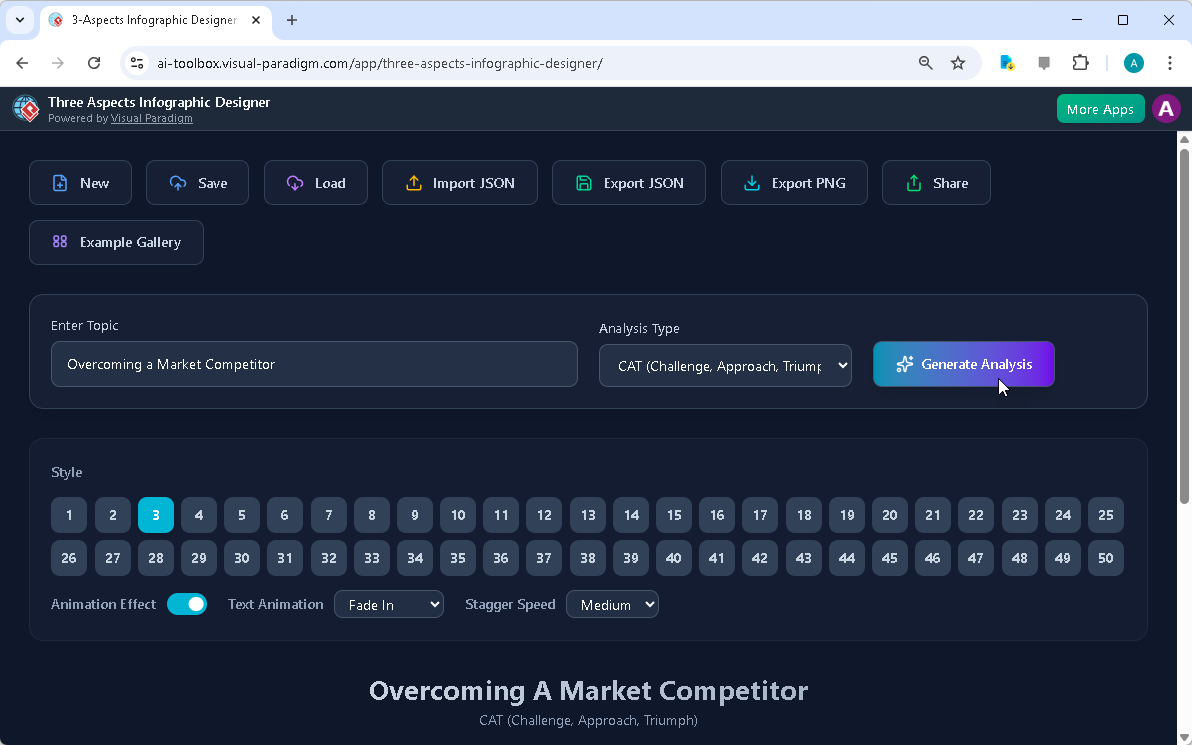
Three Aspects Infographic Designerのワークフローは、スピードとシンプルさを重視して設計されています。プロセスはメインインターフェースで始まり、ユーザーはトピックを入力し、分析タイプを選択します。以下の通りです:
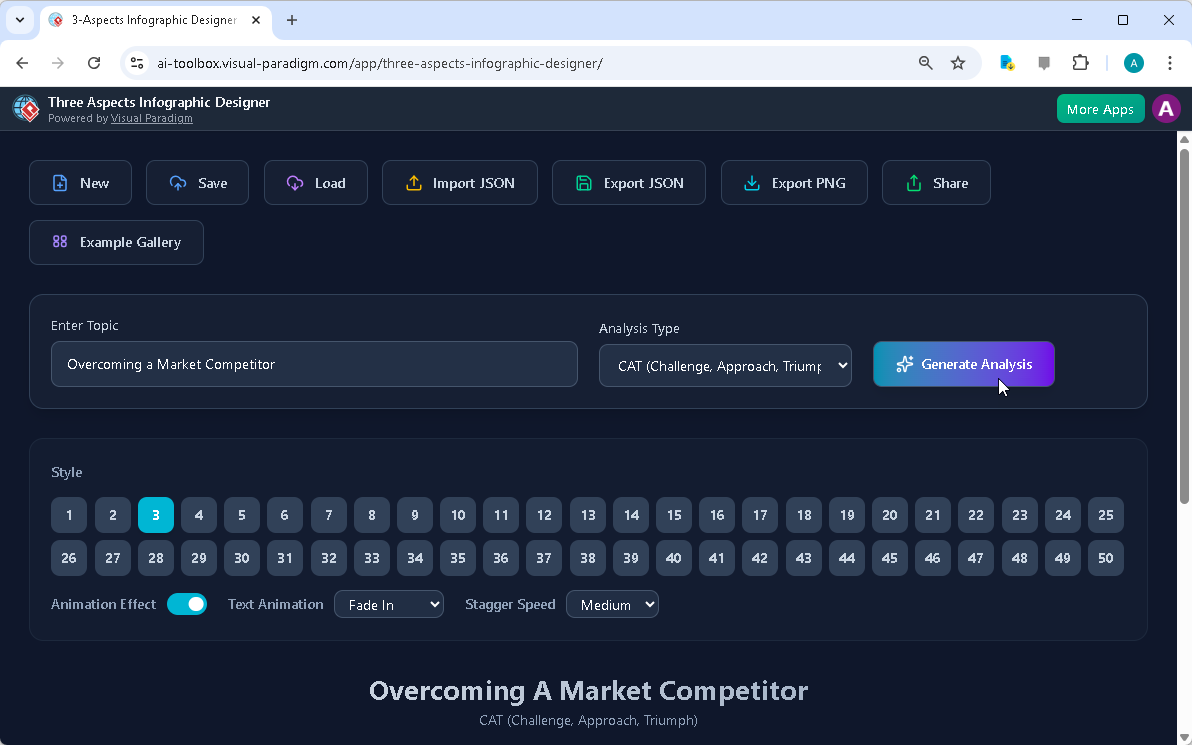
Visual Paradigm’s AI-Powered Three Aspects Infographic Designer's landing screen, where users begin by entering a brief descr

ユーザーは「市場の競合を打ち破る」というトピックを入力し、「CAT(課題、アプローチ、勝利)」フレームワークを選択しました。この初期ステップは重要で、AIが3つの異なる側面に適した関連コンテンツを生成するように導きます。AIはトピックと選択されたフレームワークを分析し、包括的な分析を生成し、関連性があり構造的なコンテンツでインフォグラフィックを埋めます。この自動化により、プロフェッショナルな品質のビジュアルを作成するための時間と労力が大幅に削減されます。

AIがコンテンツを生成した後、ユーザーは自分の特定のニーズに合わせてインフォグラフィックをカスタマイズできます。インターフェースには、さまざまなビジュアルスタイルやテキストアニメーションを含むカスタマイズオプションが用意されています。ユーザーは3つの側面を、自分の聴衆やプレゼンテーションスタイルに最適な方法で提示できる50種類以上の異なるレイアウトから選択できます。「フェードイン」や「スライドアップ」などのアニメーション効果は、エンゲージメントを高めるために調整可能です。このレベルのコントロールにより、ユーザーはインフォグラフィックの視覚的インパクトと効果を微調整できます。デザインインターフェース内でコンテンツを直接編集できる機能により、最終的な製品がユーザーのインサイトやデータを正確に反映することが保証されます。

プロフェッショナルなCATインフォグラフィックの作成

Three Aspects Infographic Designerは、戦略分析向けの構造的でプロフェッショナルなビジュアルを作成する点で優れています。CAT(課題、アプローチ、勝利)フレームワークは、ビジネスの旅を要約する強力なツールです。以下の通りです:
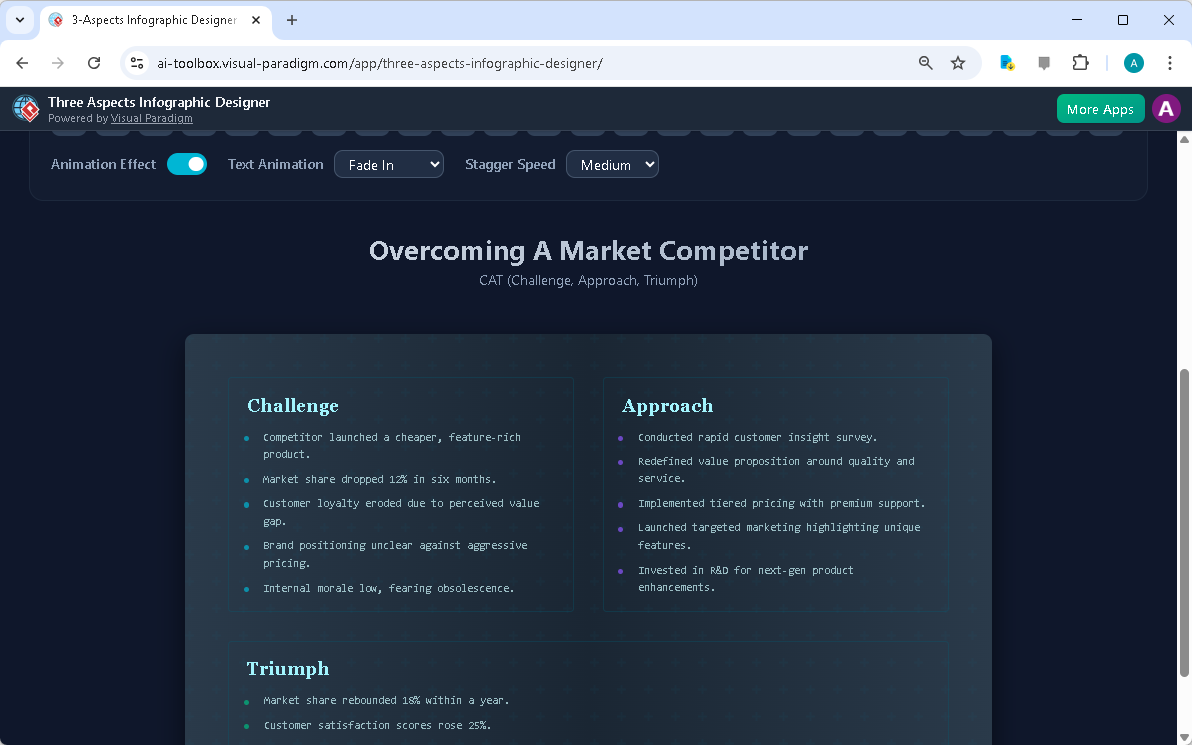
This is the screenshot of Visual Paradigm’s AI-Powered Three Aspects Infographic Designer. In the previous step the user has

このツールは、ビジネス戦略の3つの主要な段階を明確に区別する、洗練された整理されたインフォグラフィックを生成します。「課題」セクションでは問題を強調し、「アプローチ」セクションでは解決策を詳細に記述し、「勝利」セクションでは成果を提示します。この構造により、ステークホルダーがストーリーと戦略の影響を簡単に理解できるようになります。AIによって生成されたコンテンツは堅実な基盤を提供し、ユーザーは具体的なデータやインサイト、企業固有の詳細を追加して洗練できます。

カスタマイズはデザイナーの重要な機能です。ユーザーはレイアウトを調整し、異なるカラースキームを選択し、さまざまなテキストアニメーションを適用して、インフォグラフィックをより魅力的にできます。異なるスタイルをプレビューできる機能により、コンテンツに最適な視覚的表現を見つけることができます。たとえば、よりフォーマルなプレゼンテーションでは洗練されたミニマリストなレイアウトを使用する一方で、クリエイティブなピッチにはよりダイナミックでカラフルなデザインが効果的です。また、ツールはプロジェクトをクラウドに保存できるため、作業が安全で、あらゆるデバイスからアクセス可能になります。クラウドベースのプロジェクト管理はコラボレーションに不可欠であり、ユーザーがどこからでもインフォグラフィックの作業を進められることを保証します。

あなたのインサイトを共有・プレゼンテーション

インフォグラフィックが完成すると、他の人と共有するのは簡単なプロセスです。Three Aspects Infographic Designerには、以下の通り「共有」機能が専用で搭載されています:
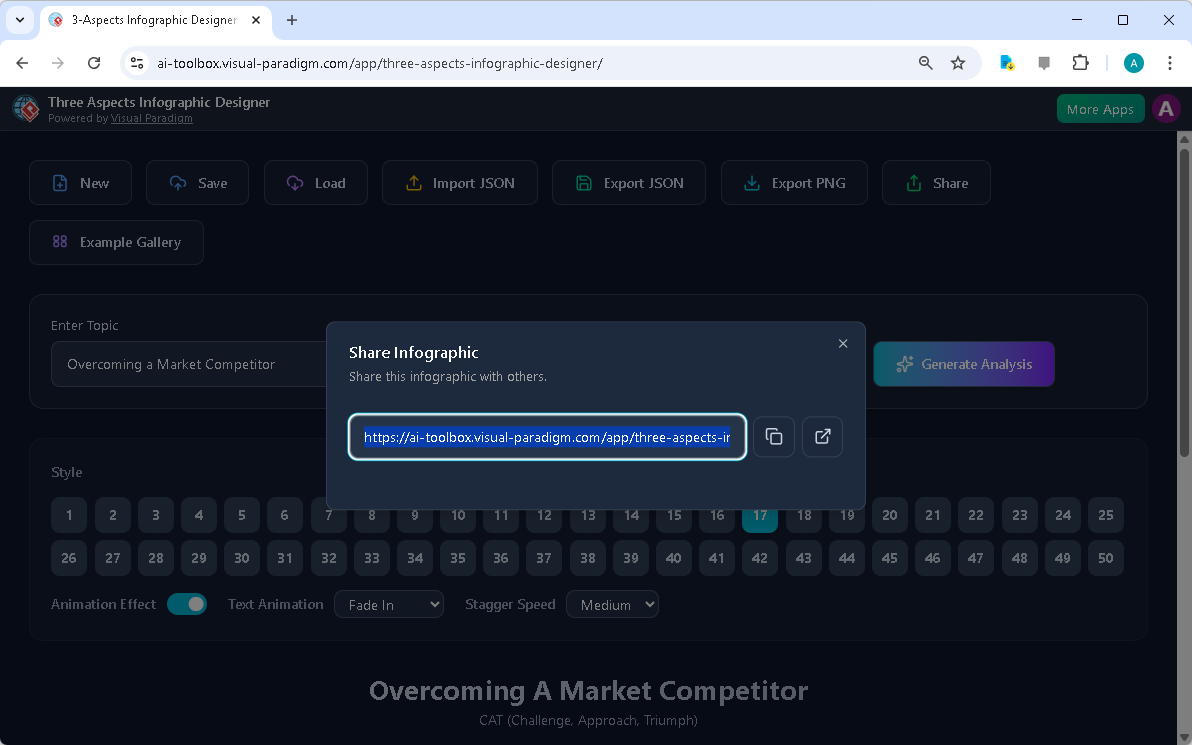
This is the screenshot of Visual Paradigm’s AI-Powered Three Aspects Infographic Designer. It shows the share screen - user c

ユーザーは独自のURLを生成し、同僚、クライアント、ステークホルダーとインフォグラフィックを共有できます。このリンクは、読み取り専用の「ビューアーモード」でインフォグラフィックを開くため、受信者が編集できない状態でコンテンツを閲覧できます。これはプレゼンテーションに特に役立ち、インサイトをクリーンでプロフェッショナルなインターフェースで共有できるためです。共有リンクは簡単にコピーでき、メールやメッセージングプラットフォームを通じて送信できるため、広範なオーディエンスにインフォグラフィックを配布しやすくなります。

インフォグラフィックを共有することは、単にリンクを送るだけではありません。それは効果的なコミュニケーションを可能にするためのものです。インフォグラフィックの視覚的性質により、複雑な情報をより理解しやすく、記憶に残りやすいものにします。3段階の分析を明確で構造的なフォーマットで提示することで、デザイナーはユーザーが戦略的思考をより効果的に伝えるのを助けます。これにより、より良い意思決定、改善されたコラボレーション、強力なビジネス成果がもたらされる可能性があります。ワンクリックでプロフェッショナルでアニメーション付きのインフォグラフィックを共有できる機能により、ユーザーは魅力的な方法で自分のインサイトを提示しやすくなります。

結論

Visual ParadigmのAI搭載Three Aspects Infographic Designerは、3段階分析を伝える必要があるすべての人にとって強力なツールです。コンテンツ生成プロセスを自動化することで、ユーザーはメッセージの洗練や視覚的に魅力的なプレゼンテーションの作成に集中できます。直感的なインターフェース、豊富なカスタマイズオプション、スムーズな共有機能により、ビジネス戦略家、プロダクトマネージャー、マーケティング専門家にとって不可欠なアセットです。新しい製品のローンチ分析、四半期のビジネスレビューのプレゼンテーション、戦略計画の提示など、あらゆる場面で、このツールはあなたのインサイトを効果的に伝えるプロフェッショナルなインフォグラフィックの作成をサポートします。

関連リンク

複雑なアイデアを明確で視覚的な物語に変える準備はできていますか?今すぐThree Aspects Infographic Designerを試して、コミュニケーションをどのように革新できるかをご覧ください。

  • AI 5-アスペクトインフォグラフィックデザイナー & ジェネレーター: AI搭載の5要素インフォグラフィックデザイナー。5要素インフォグラフィックデザイナーは、複雑な戦略、モデル、または変革ロードマップに適した包括的でアニメーション付きの5部構成ビジュアルの作成をサポートします。

  • AI搭載の6要素インフォグラフィックデザイナー: AI搭載の6要素インフォグラフィックデザイナー。複雑な戦略を瞬時に印象的なビジュアルに変換します。6要素インフォグラフィックデザイナーは、複雑な戦略的コミュニケーションに最適化された魅力的な6部構成インフォグラフィックの作成を体系的に行うプロセスを案内します。

  • 8要素インフォグラフィックデザイナー | AI搭載戦略的…: 8要素インフォグラフィックデザイナー。8要因のフレームワークを簡単に明確で説得力のあるインフォグラフィックに変換できます。AI搭載のこのツールは、8Pや8Cなどのモデル、およびカスタムの8要素分析をサポートし、レイアウトや詳細のすべてを完全に編集できる制御権を提供します。

  • AIでマッキンゼー7Sインフォグラフィックを作成 | Visual Paradigm: Visual Paradigmの7要素インフォグラフィックデザイナーは、複雑な情報を可視化する必要があるすべての人にとって究極のツールです。組織の変革の分析、製品戦略の策定、あるいは学術研究を行う際でも、このAI搭載ソフトウェアにより、迅速かつ簡単、そしてプロフェッショナルに作業が可能になります。
AI搭載のサイトビルダーで数分でプロフェッショナルな履歴書を作成

Discover how Visual Paradigm’s AI-powered site builder creates professional resumes in seconds from simple text prompts.

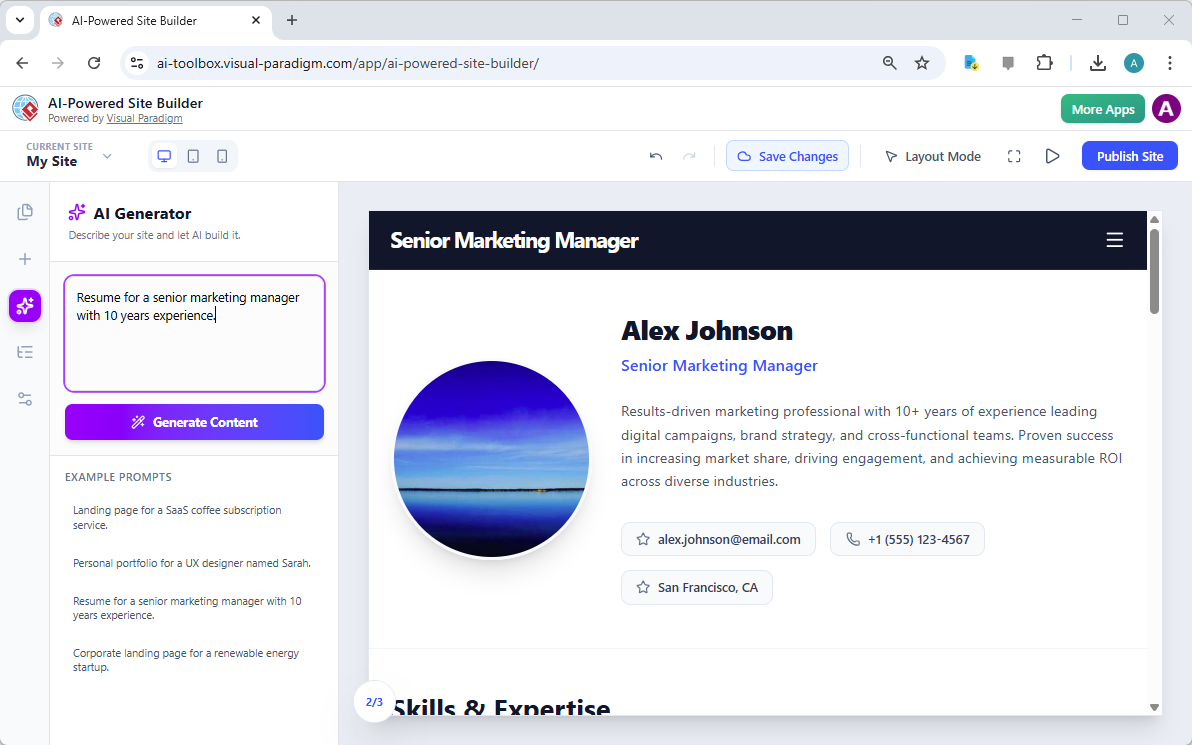
Visual ParadigmのAI搭載サイトビルダーは、専門家がオンラインでの存在感を構築する方法を革新しています。ランディングページから包括的なポートフォリオまで、あらゆる用途に対応可能です。このツールの核となる強みは、単純なテキストプロンプトを数秒で完全に設計されたマルチセクションのウェブサイトに変換できる点にあります。提供された画像がその能力を明確に示しており、『10年間の経験を持つ上級マーケティングマネージャーの履歴書』というプロンプトから生成されたプロフェッショナルな履歴書が紹介されています。その結果は、『アレックス・ジョンソン』の洗練された現代的なデジタルプロフィールとして、プロフェッショナルな写真、説得力のある要約、連絡先情報、スキルと専門知識のセクションを備えています。これは単なるテンプレートではなく、カスタマイズ可能で即座に公開可能な動的なAI生成ページです。現代的でプロフェッショナルなオンラインアイデンティティを求める専門家にとって、このAI搭載サイトビルダーは、従来のデザインと開発の障壁を克服する強力なソリューションを提供しています。

この変革の中心にあるのはAIジェネレーターという機能で、ユーザーが簡単なテキスト記述でウェブサイトの目的を定義できる点にあります。ユーザーが明確なプロンプトを入力すると、AIは即座に完全なページレイアウトを構築します。画像に示されているように、生成されたコンテンツは汎用的なものではなく、プロンプトに記載された特定の役割や経験レベルに合わせてカスタマイズされています。この知的なアプローチにより、初期のドラフトが非常に関連性が高く、さらなるカスタマイズのための強固な基盤を提供します。プロセスは直感的で効率的であり、ユーザーはデザインのメカニズムに悩むのではなく、コンテンツの精緻化に集中できます。AIと視覚的でブロックベースのエディターのこの強力な組み合わせにより、技術的なスキルにかかわらず、誰もがプロフェッショナルなウェブサイトを作成できるようになります。

This is a screenshot of Visual Paradigm's AI-Powered Site Builder. It shows the web page generated from the prompt 'Resume fo

AI搭載サイトビルダーの仕組み

AI搭載サイトビルダーでウェブサイトを作成するプロセスは、可能な限りシンプルになるように設計されています。人工知能の力を活用して、最も複雑な部分である初期デザインを処理します。ワークフローは、ユーザーがテキストボックスで自分の目標を定義することから始まります。AIはそのプロンプトを分析し、完全でマルチセクションのウェブページを生成します。これは単なるテンプレートではなく、AIが文脈を理解し、コンテンツに適したレイアウトを構築します。たとえば、履歴書のプロンプトは、プロフェッショナルなヘッダー、プロフィールセクション、詳細な自己紹介、スキルセクションを備えたページを生成し、視覚的に魅力的で論理的な順序で配置されます。これにより、創造プロセスを妨げる「白紙のページ」問題が解消されます。

プロンプトから公開まで:シームレスなワークフロー

AIが初期デザインを生成すると、ユーザーは完全にインタラクティブなビジュアルエディターにアクセスできます。画像に示されているように、インターフェースは中央にウェブサイトが表示されるキャンバスと、ツールやオプションが配置されたサイドバーで構成されています。ユーザーはこの時点でサイトのカスタマイズを開始できます。たとえば「上級マーケティングマネージャー」のタイトルや「成果志向のマーケティング専門家」というテキストをクリックすると、プロパティパネルが開きます。このパネルでは、テキストの直接編集、画像のアップロード、スタイルの調整が可能です。『見た通りに表示される』(WYSIWYG)体験により、変更が即座に反映され、視覚的に確認できます。その後、サイドバーから「スキルと専門知識」セクションや「お問い合わせ」フォームなどのブロックをドラッグ&ドロップして追加できます。全体のプロセスは直感的で効率的であり、ユーザーが数分でプロフェッショナルなウェブサイトを構築できるようになっています。

AI搭載サイトビルダーの主な利点

AI搭載サイトビルダーは、迅速かつ簡単にプロフェッショナルなウェブサイトを必要とするユーザーに、いくつかの大きな利点を提供します。最も顕著な利点はスピードです。何時間も何日もかけてサイトをゼロから設計するのではなく、ユーザーは単なるアイデアから数分で完全に設計され、機能的なウェブサイトへと移行できます。これはAIが単一のプロンプトに基づいて完全なレイアウトとコンテンツを生成できる能力によって実現されています。この効率性は、頻繁にオンライン存在を更新する必要がある専門家や、マーケティングキャンペーン用に新しいランディングページを必要とする企業にとって特に価値があります。

アクセシビリティとプロフェッショナリズム

もう一つの大きな利点はアクセシビリティです。このツールはコーディング知識を必要としないため、広範なユーザーに利用可能です。視覚的でブロックベースのエディターにより、ユーザーは「ヘッダー領域」「ギャラリー」「価格表」などの事前に設計されたコンポーネントをドラッグ&ドロップするだけで、複雑なページを構築できます。このアプローチにより、ウェブデザインが民主化され、起業家やフリーランス、中小企業オーナーが開発者を雇わずにプロフェッショナルなウェブサイトを作成できるようになります。AI生成コンテンツも現代的なデザイン原則に基づいて構築されており、完成品がすぐに洗練され、プロフェッショナルな印象を与えるようになっています。ユーザーはその後、ブランドや個人スタイルに完全に合った形にサイトをカスタマイズでき、最終的な成果物に対する完全なコントロールを手に入れられます。

実用的な応用と使用例

AI搭載サイトビルダーの多様性は、幅広い用途に適していることを示しています。履歴書の画像は、求職者向けのプロフェッショナルなオンラインプロフィールを作成するという強力な使用例を示しています。このツールは、個人のポートフォリオ、ビジネスウェブサイト、マーケティング用ランディングページを構築したい人にとって理想的です。たとえば、フリーランスのグラフィックデザイナーは、最高の作品を紹介するポートフォリオサイトを作成できます。スタートアップの創業者は、新製品のリリース用ランディングページを生成できます。中小企業オーナーは、地域の顧客を惹きつけるシンプルなウェブサイトを構築できます。AIジェネレーターは、希望するサイトの説明をプロンプトとして入力することで、カスタマイズされたレイアウトを生成します。ユーザーはその後、テキストや画像、カラースキーム、全体的な構造に至るまで、すべての詳細を自由にカスタマイズできます。

マルチページウェブサイトの作成

画像には単一ページの履歴書が示されていますが、このツールの機能は単一ページにとどまりません。ユーザーはプロジェクトに新しいページを追加することで、マルチページウェブサイトを作成できます。たとえば、専門家は履歴書を含むメインの「ホーム」ページと、詳細な自己紹介を含む別々の「プロフィール」ページを作成できます。サイドバーの「ページ」タブを使えば、1つのプロジェクト内のすべてのページを管理でき、完全なウェブサイトを構築しやすくなります。この機能は、訪問者が短い紹介から詳細なポートフォリオへと導かれる物語を伝える包括的なオンライン存在を構築する上で不可欠です。

結論

Visual ParadigmのAI搭載サイトビルダーは、ウェブサイト作成において大きな飛躍を示しています。技術的なスキルを必要とせずに、ユーザーが迅速かつ簡単にプロフェッショナルでレスポンシブなウェブサイトを生成できるようになります。単純なテキストプロンプトを完全に設計されたマルチセクションのウェブページに変換できるこのツールの能力は、AIが複雑なタスクを簡素化する力の証です。上級マーケティングマネージャーの履歴書の例は、このツールが洗練され、プロフェッショナルなデジタルプロフィールを構築する上でどれほど効果的かを示しています。オンライン存在を確立したいすべての人にとって、このツールは迅速で効率的かつアクセスしやすいソリューションを提供しています。

自分だけのプロフェッショナルなウェブサイトを作成する準備はできましたか?今日からAI搭載サイトビルダーを試して、アイデアをライブでプロフェッショナルなウェブサイトに迅速に変える方法を体験してください。

今すぐ試す

関連リンク

  • AI搭載ウェブサイトビルダーをご紹介:数分で素晴らしいウェブサイトを作成:Visual Paradigmの新しいAIウェブサイトビルダーを発見しましょう。希望するウェブサイトの内容を説明してください。AIが素晴らしい完全機能のサイトを生成します。直感的なドラッグ&ドロップエディターでカスタマイズできます。今すぐ試してみましょう!

  • AI搭載サイトビルダー – Visual Paradigm:AI搭載サイトビルダーは、人工知能の助けを借りて、プロフェッショナルなウェブサイトを設計・構築・公開できる現代的で視覚的なウェブサイトエディターです。このスタジオはブロックベースのシステムで構成されており、ヘッダー領域、ギャラリー、価格表などの事前に設計されたコンポーネントを配置することでページを構築できます。

  • AI搭載サイトビルダー – ai.visual-paradigm.com:アイデアを瞬時にライブウェブサイトに変換しましょう。私たちのAI搭載ブロックベースエディターを使って、コードを1行も書かずに、レスポンシブなサイトを設計・カスタマイズ・公開できます。

  • AIウェブサイトビルダー:数分で素晴らしいサイトを作成:Page Editorは、モジュール型でセクションベースのデザインを核とする、ダイナミックでワンストップのウェブサイト作成プラットフォームです。ウェブ開発のための視覚的インターフェースであり、ブラウザ上で直接マルチページサイトをドラッグ&ドロップ、編集、公開できます。

  • AI搭載サイトビルダー – ai-toolbox.visual-paradigm.com:AI搭載サイトビルダーで即座にウェブサイトを構築・デプロイできます。コンテンツを自動生成し、デザインをカスタマイズ、オンライン公開が可能です。迅速なデプロイが可能な無料のAIウェブサイトビルダー。

  • Visual Paradigm Annotatorでウェブリサーチのスキルを習得 | 無料の注釈ツール:Visual Paradigm Annotatorで任意のウェブサイト上で直接共同作業 · AI搭載のウェブサイトビルダーを紹介:数分で美しいウェブサイトを作成 ·..

Creating a Professional Resume in Minutes with AI-Powered Site Builder

Discover how Visual Paradigm’s AI-powered site builder creates professional resumes in seconds from simple text prompts.

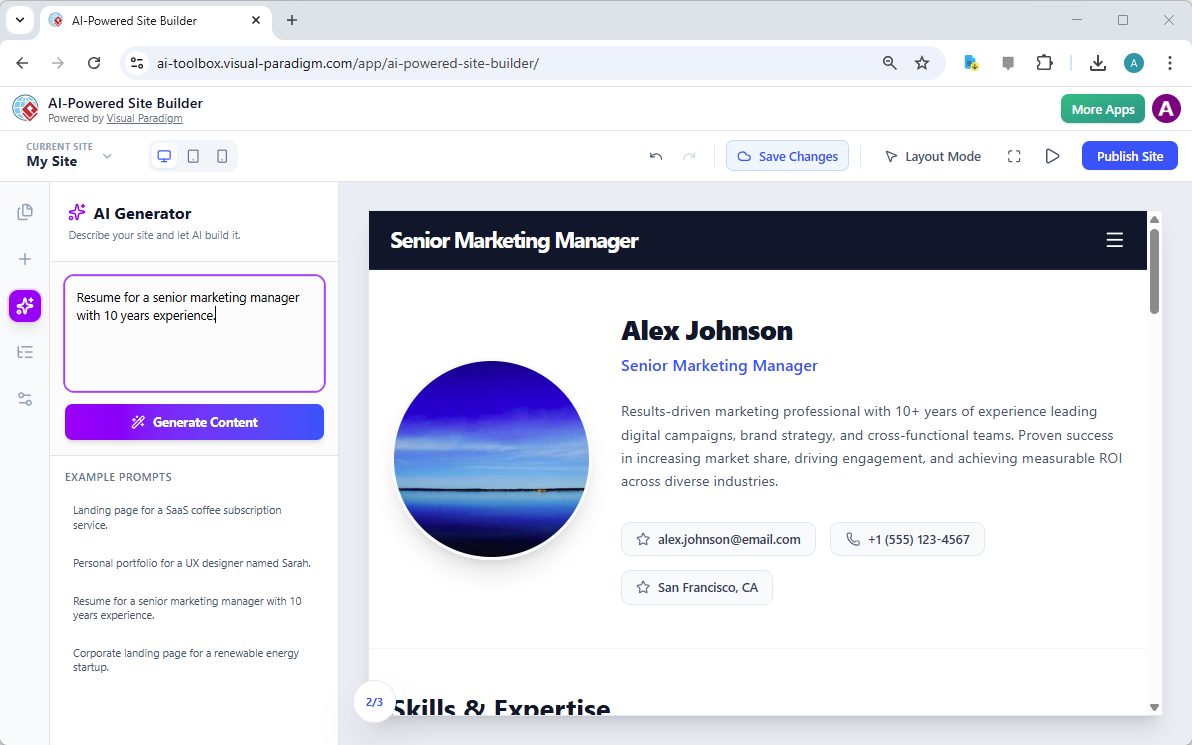
Visual Paradigm’s AI-Powered Site Builder is revolutionizing the way professionals create their online presence, from landing pages to comprehensive portfolios. The tool’s core strength lies in its ability to transform a simple text prompt into a fully designed, multi-section website in seconds. This capability is vividly demonstrated in the provided image, which showcases a professional resume generated from the prompt “Resume for a senior marketing manager with 10 years experience.” The result is a polished, modern digital profile for “Alex Johnson,” complete with a professional headshot, a compelling summary, contact information, and a section for skills and expertise. This is not just a template; it is a dynamic, AI-generated webpage that can be customized and published instantly. For professionals seeking a modern, professional online identity, this AI-powered site builder offers a powerful solution that eliminates the traditional barriers of design and development.

At the heart of this transformation is the AI Generator, a feature that allows users to define their website’s purpose with a simple text description. The user inputs a clear prompt, and the AI instantly constructs a complete page layout. The generated content, as seen in the image, is not generic; it is tailored to the specific role and experience level mentioned in the prompt. This intelligent approach ensures that the initial draft is highly relevant, providing a strong foundation for further personalization. The process is intuitive and efficient, allowing users to focus on refining their content rather than struggling with the mechanics of design. This powerful combination of AI and a visual, block-based editor makes the creation of professional websites accessible to anyone, regardless of their technical skills.

This is a screenshot of Visual Paradigm's AI-Powered Site Builder. It shows the web page generated from the prompt 'Resume fo

How the AI-Powered Site Builder Works

The process of creating a website with the AI-Powered Site Builder is designed to be as simple as possible, leveraging the power of artificial intelligence to handle the most complex part of the process: the initial design. The workflow begins with the user defining their goal in a text box. The AI then analyzes this prompt and generates a complete, multi-section webpage. This is not a simple template; the AI understands the context and creates a layout that is appropriate for the content. For instance, a resume prompt generates a page with a professional header, a profile section, a detailed bio, and a skills section, all arranged in a visually appealing and logical manner. This eliminates the “blank page” problem that often hinders the creative process.

From Prompt to Publication: A Seamless Workflow

Once the AI has generated the initial design, the user is presented with a fully interactive, visual editor. The interface, as seen in the image, features a central canvas where the website is displayed and a sidebar with tools and options. The user can then begin to customize the site. Clicking on any element, such as the “Senior Marketing Manager” title or the “Results-driven marketing professional” text, opens a properties panel. This panel allows for direct editing of the text, uploading of images, and adjustment of styles. This “what you see is what you get” (WYSIWYG) experience ensures that changes are immediate and visible. The user can then add more blocks, such as a “Skills & Expertise” section or a “Contact” form, by dragging and dropping them from the sidebar. The entire process is designed to be intuitive and efficient, allowing users to build a professional website in minutes.

Key Benefits of the AI-Powered Site Builder

The AI-Powered Site Builder offers several significant advantages for users who need a professional website quickly and easily. The most prominent benefit is speed. Instead of spending hours or days designing a site from scratch, users can go from a simple idea to a fully designed, functional website in a matter of minutes. This is made possible by the AI’s ability to generate a complete layout and content based on a single prompt. This efficiency is particularly valuable for professionals who need to update their online presence frequently or for businesses that require new landing pages for marketing campaigns.

Accessibility and Professionalism

Another major benefit is accessibility. The tool requires no coding knowledge, making it accessible to a broad audience. The visual, block-based editor allows users to build complex pages by simply dragging and dropping pre-designed components, such as hero sections, galleries, and pricing tables. This approach democratizes web design, empowering entrepreneurs, freelancers, and small business owners to create professional websites without hiring a developer. The AI-generated content is also built on modern design principles, ensuring that the final product looks polished and professional right out of the box. Users can then customize the site to perfectly match their brand and personal style, giving them full control over the final outcome.

Practical Applications and Use Cases

The versatility of the AI-Powered Site Builder makes it suitable for a wide range of applications. The image of the resume demonstrates one powerful use case: creating a professional online profile for a job seeker. This tool is ideal for anyone looking to build a personal portfolio, a business website, or a marketing landing page. For example, a freelance graphic designer could use the tool to create a portfolio site showcasing their best work. A startup founder could generate a landing page for a new product launch. A small business owner could build a simple website to attract local customers. The AI generator can be prompted with a description of the desired site, and it will create a tailored layout. The user then has the freedom to customize every detail, from the text and images to the color scheme and overall structure.

Creating a Multi-Page Website

While the image shows a single-page resume, the tool’s capabilities extend beyond a single page. Users can create multi-page websites by adding new pages to their project. For instance, a professional might create a main “Home” page with a resume and a separate “About” page with a detailed biography. The “Pages” tab in the sidebar allows users to manage all pages within a single project, making it easy to structure a complete website. This feature is essential for creating a comprehensive online presence that can guide visitors through a narrative, from a brief introduction to a detailed portfolio.

Conclusion

The AI-Powered Site Builder from Visual Paradigm represents a significant leap forward in website creation. It empowers users to generate professional, responsive websites quickly and easily, without requiring any technical skills. The tool’s ability to transform a simple text prompt into a fully designed, multi-section webpage is a testament to the power of AI in simplifying complex tasks. The example of the senior marketing manager’s resume demonstrates the tool’s effectiveness in creating a polished and professional digital profile. For anyone looking to establish a strong online presence, this tool offers a fast, efficient, and accessible solution.

Ready to create your own professional website? Try the AI-Powered Site Builder today and see how quickly you can turn your ideas into a live, professional website.

Try Now

Related Links

Visualizing Business Strategy: Creating a CAT Infographic with AI

Visual Paradigm’s AI tool transforms business strategies into engaging CAT infographics, simplifying complex narratives into clear visual stories.

Visual Paradigm’s AI-Powered Infographic Designer is a professional tool for transforming complex business narratives into compelling visual stories. This application enables users to generate content-rich, structured infographics based on a three-part framework, such as CAT (Challenge, Approach, Triumph), in minutes. The process begins with a simple input: a topic and a chosen analysis type. The AI then analyzes this information and populates a visually engaging infographic with relevant content, eliminating the need for manual design. This tool is ideal for professionals seeking to communicate strategic insights, such as overcoming a market competitor, with clarity and impact. Its intuitive interface and powerful AI capabilities make it an essential asset for anyone who needs to present a three-part analysis.

Creating a professional infographic from scratch is often a time-consuming process. It requires not only design skills but also a deep understanding of the subject matter to structure the information effectively. The Three Aspects Infographic Designer addresses these challenges by automating the core content generation. Users can focus on refining the message rather than crafting the visual presentation. The tool’s AI engine generates relevant content for each of the three aspects, providing a strong starting point for any analysis. This approach is particularly beneficial for business strategists, product managers, and marketing professionals who need to convey complex ideas quickly and clearly. By leveraging AI, the designer empowers users to create polished, professional visuals that enhance communication and drive results.

Quick Summary

  • AI-Powered tool for creating 3-part infographics.

  • Generate content for frameworks like CAT (Challenge, Approach, Triumph).

  • Choose from 50+ customizable styles and animations.

  • Save, share, and present your infographics professionally.

How the Three Aspects Infographic Designer Works

The workflow of the Three Aspects Infographic Designer is designed for speed and simplicity. The process begins on the main interface, where users enter a topic and select an analysis type. As shown in:

Visual Paradigm’s AI-Powered Three Aspects Infographic Designer's landing screen, where users begin by entering a brief descr

The user has input the topic “Overcoming a Market Competitor” and selected the “CAT (Challenge, Approach, Triumph)” framework. This initial step is crucial, as it guides the AI to generate relevant content for each of the three distinct aspects. The AI analyzes the topic and the selected framework to produce a comprehensive analysis, populating the infographic with content that is both relevant and structured. This automation significantly reduces the time and effort required to create a professional-quality visual.

Once the AI generates the content, users can customize the infographic to fit their specific needs. The interface provides a range of customization options, including various visual styles and text animations. Users can select from 50+ different layouts to present the three aspects in a way that best suits their audience and presentation style. The animation effects, such as “Fade In” or “Slide Up,” can be adjusted to enhance engagement. This level of control allows users to fine-tune the visual appeal and impact of their infographic. The ability to edit the content directly within the design interface ensures that the final product accurately reflects the user’s insights and data.

Creating a Professional CAT Infographic

The Three Aspects Infographic Designer excels at creating structured, professional visuals for strategic analysis. The CAT (Challenge, Approach, Triumph) framework is a powerful tool for summarizing a business journey. As demonstrated in:

This is the screenshot of Visual Paradigm’s AI-Powered Three Aspects Infographic Designer. In the previous step the user has

The tool generates a clean, well-organized infographic that clearly delineates the three key stages of a business strategy. The “Challenge” section highlights the problem, the “Approach” section details the solution, and the “Triumph” section showcases the results. This structure makes it easy for stakeholders to understand the narrative and the impact of the strategy. The AI-generated content provides a solid foundation, which users can then refine to add specific data, insights, or company-specific details.

Customization is a key feature of the designer. Users can adjust the layout, choose different color schemes, and apply various text animations to make the infographic more engaging. The ability to preview different styles allows users to find the best visual representation for their content. For example, a more formal presentation might use a clean, minimalist layout, while a creative pitch could benefit from a more dynamic and colorful design. The tool also allows users to save their projects to the cloud, ensuring that their work is secure and accessible from any device. This cloud-based project management is essential for collaboration and ensures that users can work on their infographics from anywhere.

Sharing and Presenting Your Insights

Once an infographic is complete, sharing it with others is a simple process. The Three Aspects Infographic Designer includes a dedicated “Share” function, as shown in:

This is the screenshot of Visual Paradigm’s AI-Powered Three Aspects Infographic Designer. It shows the share screen - user c

Users can generate a unique URL to share their infographic with colleagues, clients, or stakeholders. This link opens the infographic in a read-only “viewer mode,” which ensures that the recipient can view the content without the ability to edit it. This is particularly useful for presentations, as it provides a clean, professional interface for sharing insights. The shared link can be easily copied and sent via email or messaging platforms, making it simple to distribute the infographic to a wide audience.

Sharing an infographic is more than just sending a link; it’s about enabling effective communication. The visual nature of the infographic makes complex information more digestible and memorable. By presenting a three-part analysis in a clear, structured format, the designer helps users communicate their strategic thinking more effectively. This can lead to better decision-making, improved collaboration, and stronger business outcomes. The ability to share a professional, animated infographic with a single click makes it easy for users to present their insights in a compelling way.

Conclusion

Visual Paradigm’s AI-Powered Three Aspects Infographic Designer is a powerful tool for anyone who needs to communicate a three-part analysis. By automating the content generation process, it allows users to focus on refining their message and creating a visually appealing presentation. The tool’s intuitive interface, extensive customization options, and seamless sharing capabilities make it an essential asset for business strategists, product managers, and marketing professionals. Whether you are analyzing a new product launch, presenting a quarterly business review, or outlining a strategic plan, this tool can help you create a professional infographic that effectively communicates your insights.

Related Links

Ready to transform your complex ideas into clear, visual stories? Try the Three Aspects Infographic Designer today and see how it can revolutionize your communication.

  • AI 5- Aspects Infographic Designer & Generator: AI -Powered 5- Aspects Infographic Designer .The 5- Aspects Infographic Designer guides you through creating comprehensive, animated five-part visuals suitable for complex strategies, models, or transformation roadmaps.

  • AI -Powered 6- Aspects Infographic Designer: AI -Powered 6- Aspects Infographic Designer . Transform Complex Strategies into Stunning Visuals Instantly.The 6- Aspects Infographic Designer leads you through a methodical process for designing compelling six-part infographics tailored to complex strategic communication.

  • 8-Aspects Infographic Designer | AI-Powered Strategic …: 8- Aspects Infographic Designer Effortlessly turn 8-factor frameworks into clear, compelling infographics . Powered by AI , this tool supports models like 8P, 8C, and custom 8- aspect analyses, giving you complete control to edit every layout and detail.

  • Create McKinsey 7S Infographics with AI | Visual Paradigm: The Seven Aspects Infographic Designer from Visual Paradigm is the ultimate tool for anyone who needs to visualize complex information. Whether you’re analyzing organizational change, developing a product strategy, or conducting academic research, this AI -powered software makes it fast, easy, and professional.