Visual Paradigm Online の Fliplify を活用した美しいフリップブック作成の包括的チュートリアル

はじめに

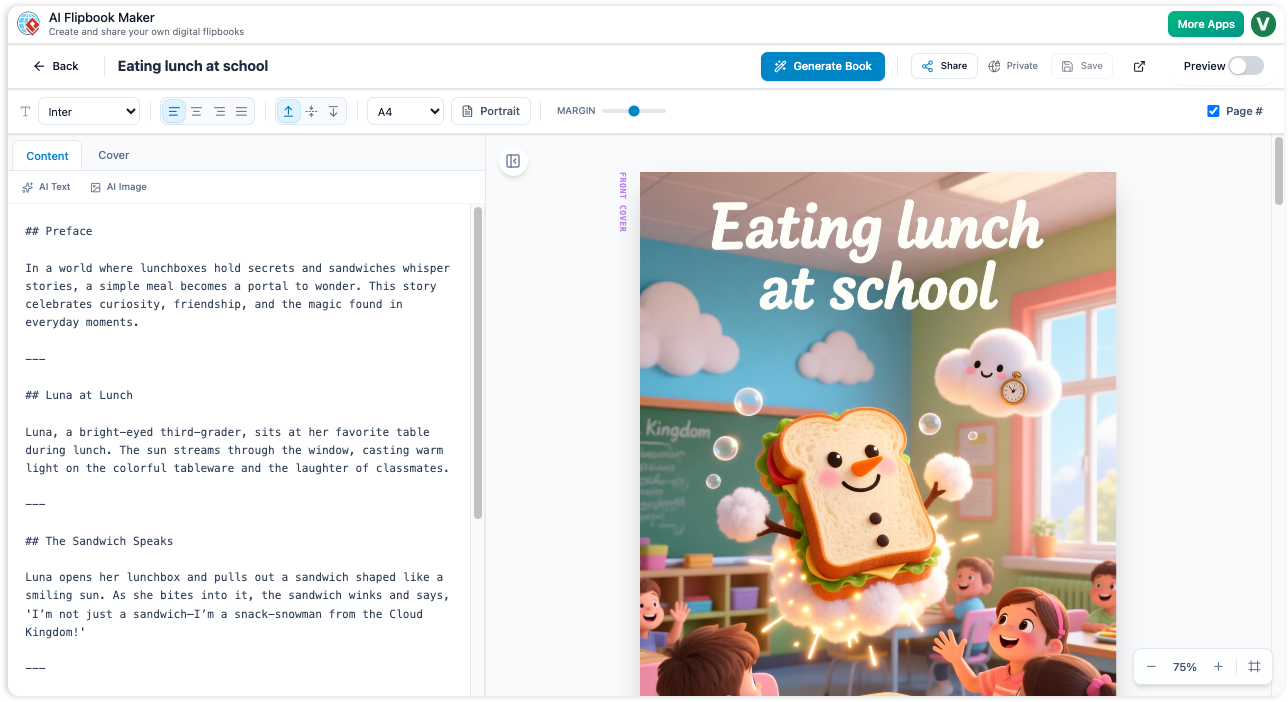
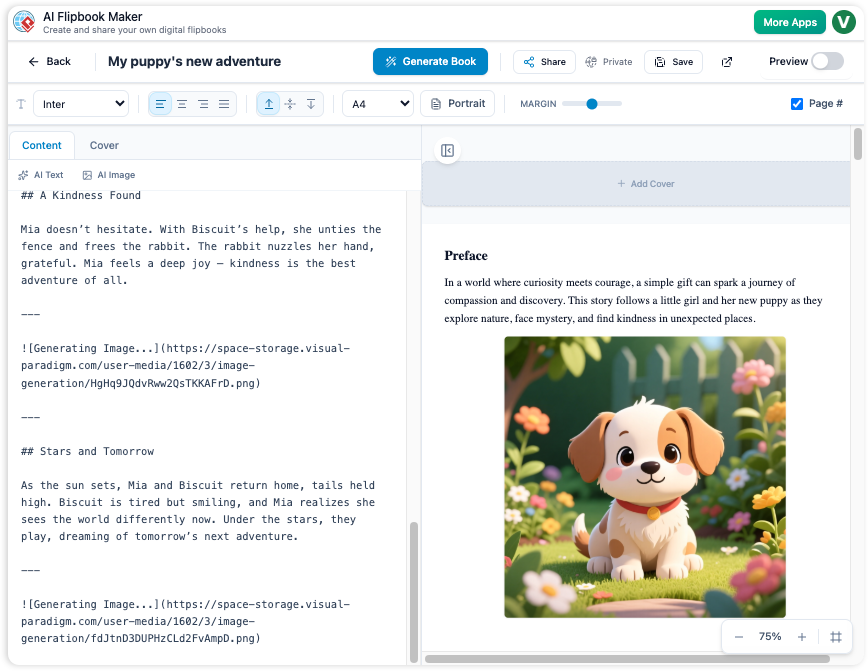
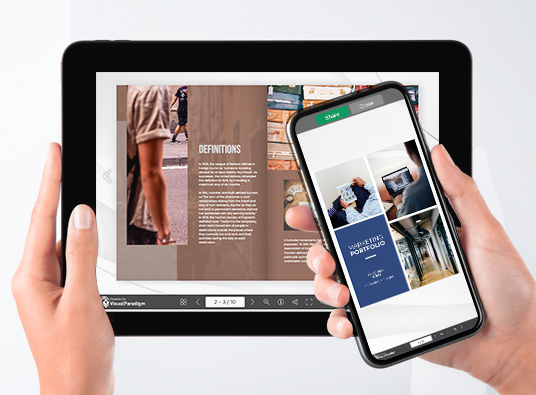
Fliplify は Visual Paradigm Online の一部として、ユーザーが魅力的なデジタルフリップブックやスライドショーを作成できるように設計された強力なツールです。新規作成でも、既存のコンテンツのアップロードでも、Fliplify はスムーズで使いやすい体験を提供します。このチュートリアルでは、美しいフリップブックの作成プロセスをガイドし、主な機能、応用分野、Fliplify が他と異なる点を紹介します。

なぜ Fliplify を選ぶべきか?

  1. 使いやすいインターフェース:

    • Fliplify は直感的で使いやすいインターフェースを提供しており、ユーザーが広範な技術的知識なしにプロフェッショナルな外観のフリップブックを作成できるようにします。24.
  2. 多様なコンテンツ作成:

    • ユーザーは PDF や PowerPoint などさまざまなソースからフリップブックを作成できます。この柔軟性により、幅広いコンテンツを魅力的なフリップブックに変換できます。24.
  3. カスタマイズオプション:

    • Fliplify はユーザーがフリップブックのレイアウトやデザイン、インタラクティブ要素など、すべての側面をカスタマイズできるようにします。これにより、特定のニーズに合わせた洗練されたプロフェッショナルなプレゼンテーションが実現します。24.
  4. インタラクティブ要素:

    • このツールでは、注釈や強調、コメントなどのインタラクティブ要素を追加でき、コンテンツへの関与や理解を高めます。25.
  5. シームレスな統合:

    • Fliplify は Visual Paradigm Online の他の機能とシームレスに統合され、すべてのクリエイティブニーズに対応する包括的なツールセットを提供します。この統合により、スムーズで生産的な体験が確保されます。26.

応用分野

  1. ビジネスプレゼンテーション:

    • 視聴者を引きつける魅力的なインタラクティブなビジネスプレゼンテーションを作成し、重要なメッセージを効果的に伝える。
  2. 教育コンテンツ:

    • 視覚的に魅力的でインタラクティブな教育教材を開発し、学生の学習体験を向上させる。
  3. マーケティング資料:

    • 目を引くようにデザインされたデジタルパンフレット、製品カタログ、その他のマーケティング資料を作成し、潜在顧客を惹きつける。
  4. 個人プロジェクト:

    • Fliplifyを、写真アルバムや旅行日記、あるいはインタラクティブで視覚的に魅力的な形式が利するその他のコンテンツ作成といった個人プロジェクトに活用する。

Fliplifyの特徴

  1. 包括的なツールキット:

    • Fliplifyは、フリップブックの作成、編集、公開に必要な強力なツールセットを提供しています。基本的なデザイン要素から高度なカスタマイズオプションまで、美しいフリップブックを作成するために必要なすべてが揃っています。26.
  2. 使いやすい:

    • このプラットフォームは使いやすさを重視しており、直感的なインターフェースにより、ユーザーは複雑なソフトウェアのインストールの手間なく、クリエイティブなプロジェクトに集中できる。24.
  3. 高品質な出力:

    • Fliplifyは、公開されるフリップブックが高品質であることを保証しており、プロフェッショナルなデザインとインタラクティブな要素により、ユーザー体験を向上させます。24.
  4. カスタマーサポート:

    • Visual Paradigm Onlineは優れたカスタマーサポートを提供しており、フリップブック機能を使用する際のユーザーのあらゆる問題や質問に対して支援しています27.

機能一覧

  1. カスタマイズ可能なテンプレート:

    • フリップブックプロジェクトを始めるために、さまざまなカスタマイズ可能なテンプレートから選択できます。これらのテンプレートはデザインの基盤を提供し、特定のニーズに合わせて簡単にカスタマイズできるようにします26.
  2. インタラクティブな注釈:

    • フリップブックに注釈、強調表示、コメントを追加して、関与度と理解を高めます。これらのインタラクティブな要素により、コンテンツがよりダイナミックでパーソナライズされたものになります25.
  3. 複数のファイル形式対応:

    • PDF、PowerPoint、eBook、スプレッドシートなど、さまざまなファイル形式をフリップブックに変換できます。この柔軟性により、幅広いコンテンツを魅力的なフリップブックに変換できます27.
  4. 高度なデザインツール:

    • 高度なデザインツールを活用して、フリップブックのレイアウト、デザイン、インタラクティブ要素をカスタマイズできます。これらのツールにより、洗練されたプロフェッショナルなプレゼンテーションが実現します26.
  5. Visual Paradigm Onlineとのシームレスな統合:

    • FliplifyはVisual Paradigm Onlineの他の機能とシームレスに統合され、すべてのクリエイティブニーズに対応する包括的なツールセットを提供します。この統合により、スムーズで生産的な体験が確保されます26.

結論

Visual Paradigm Online の Fliplify は、素晴らしいフリップブックを作成するための強力で使いやすいツールとして際立っています。直感的なインターフェース、多様なコンテンツ作成オプション、高度なデザインツールを備え、Fliplify は魅力的でインタラクティブなフリップブックを作成するために必要なすべてを提供します。ビジネスプレゼンテーション、教育用コンテンツ、マーケティング資料、または個人プロジェクトのいずれにも、Fliplify はスムーズで生産的な体験を提供し、すべてのフリップブックのニーズに最適な選択肢です。

Visual ParadigmのAniFuzionとFliplifyを使って素晴らしいアニメーションフリップブックを作るための包括的チュートリアル

はじめに

アニメーションフリップブックを作成することは、アニメーションの魅力とフリップブックのインタラクティブな体験を組み合わせたものです。Visual ParadigmのAniFuzionとFliplifyは、この目的をスムーズに達成できるツールを提供しており、ユーザーが目を引く魅力的なコンテンツを作成できるようにします。このチュートリアルでは、アニメーションフリップブックの作成プロセスをステップバイステップで紹介し、これらのツールがなぜ優れた選択肢であるか、そしてコンテンツをより魅力的で魅力的にする方法を強調します。

なぜVisual ParadigmのAniFuzionとFliplifyを選ぶべきなのか?

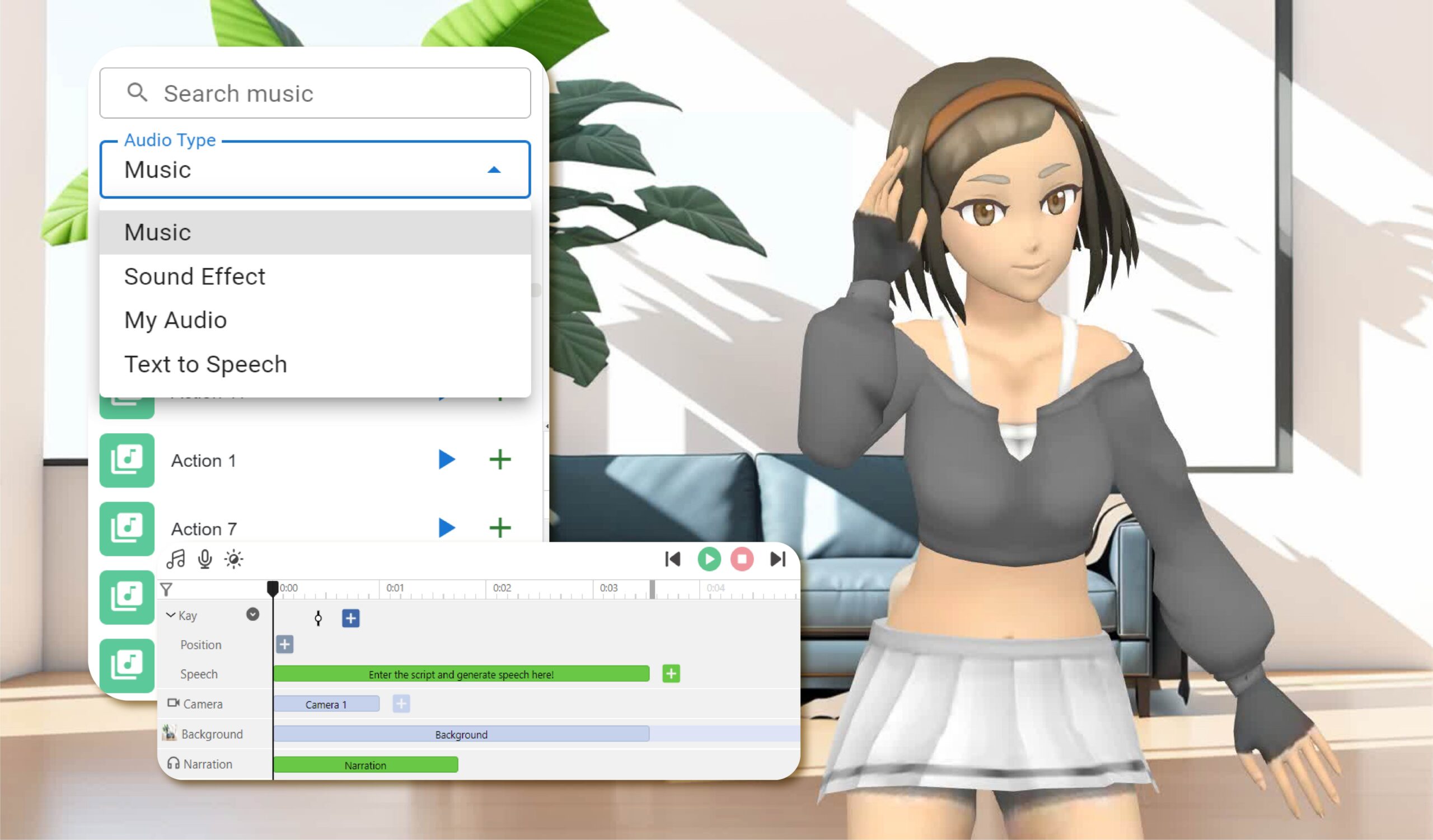
Elevate Your Animations with Sound in AniFuzion - AniFuzion

  1. 使いやすいインターフェース:

    • AniFuzionとFliplifyの両方とも、技術的な専門知識にかかわらず、ユーザーがプロフェッショナルな品質のアニメーションやフリップブックを作成しやすい直感的なインターフェースを提供しています2024.
  2. 包括的なツールキット:

    • これらのツールは、2Dおよび3Dアニメーション、カスタマイズ可能なテンプレート、インタラクティブな要素など、幅広い機能を提供しており、ユーザーが魅力的なコンテンツを作成するために必要なすべてのものを確保しています2126.
  3. シームレスな統合:

    • AniFuzionとFliplifyは、互いにシームレスに統合され、Visual Paradigm Onlineの他の機能とも連携し、すべてのクリエイティブニーズに対応する包括的なツールセットを構成しています2126.
  4. 高品質な出力:

    • これらのツールは、仕上げがしっかりし、プロフェッショナルな外観を持つアニメーションやフリップブックを高品質な出力として保証しており、観客を引きつけることができます2024.
  5. カスタマーサポート:

    • Visual Paradigmは優れたカスタマーサポートを提供しており、ツールを使用する際のあらゆる問題や質問に対してユーザーを支援しています27.

アニメーション付きのフリップブックがコンテンツを魅力的で魅力的にする方法

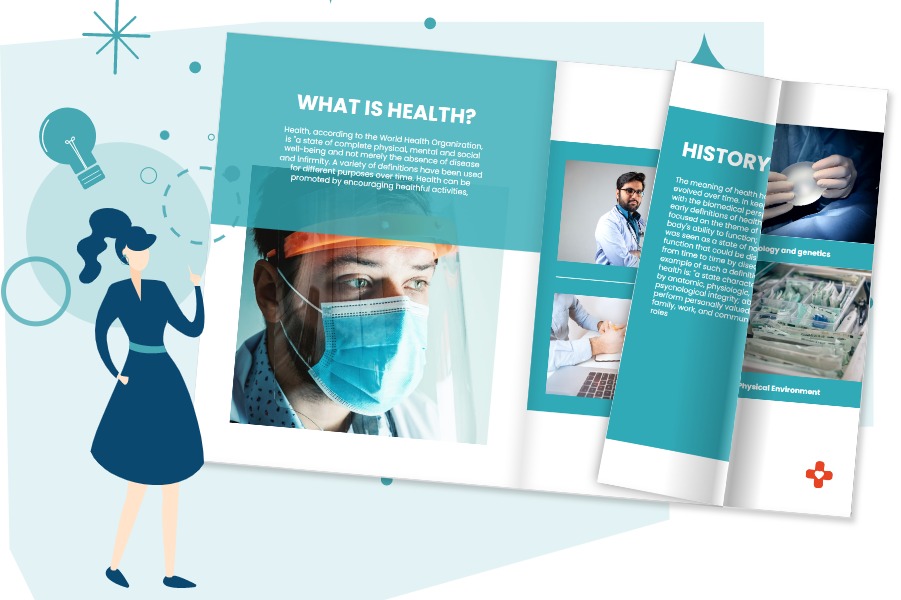
Flipping Book Animation Software - Visual Paradigm Blog

  1. 視覚的インパクト:

    • アニメーション付きのフリップブックはアニメーションの視覚的インパクトとフリップブックのインタラクティブな体験を融合させ、コンテンツをより魅力的で視覚的に引き立てる20.
  2. インタラクティブな体験:

    • フリップブックのインタラクティブな性質により、ユーザーはよりダイナミックな方法でコンテンツと関与でき、理解力と記憶力が向上します25.
  3. 物語の表現:

    • アニメーション付きのフリップブックは、アニメーションを活用して登場人物や場面を生き生きと表現することで、ユーザーがより説得力のある物語を伝えることを可能にします21.
  4. 汎用性:

    • アニメーション付きのフリップブックは、教育用コンテンツやビジネスプレゼンテーションからマーケティング資料、個人プロジェクトまで、幅広い用途に使用できます2426.

チュートリアル:AniFuzionとFliplifyを使ってアニメーション付きフリップブックを作成する方法

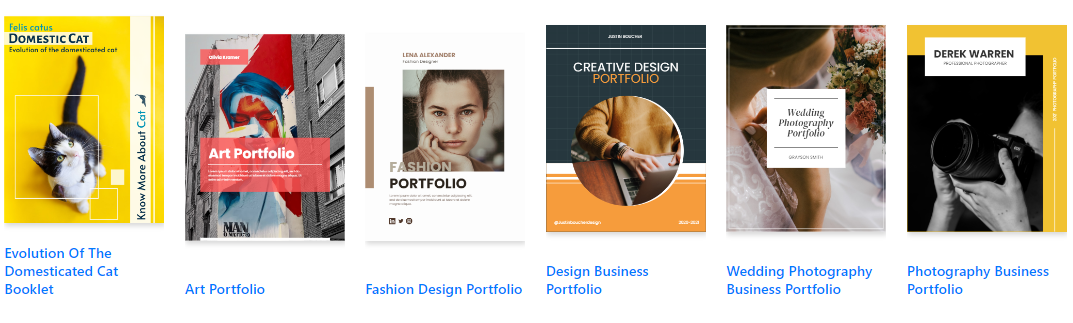
Visual Paradigm Flipbook Maker: Elevate Your Digital Presence with Dynamic and Engaging Flipbooks - Visual Paradigm Blog

ステップ1:AniFuzionでアニメーションを作成する
  1. 登録してログインする:

    • Visual Paradigm Onlineアカウントを登録し、ログインしてAniFuzionにアクセスしてください。
  2. テンプレートを選択するか、ゼロから開始する:

    • 利用可能なテンプレートを閲覧するか、ゼロから開始するを選択してください。テンプレートはアニメーションの基盤を提供しますが、ゼロから始めることでより多くのカスタマイズが可能です21.
  3. アニメーションをデザインする:

    • 直感的なインターフェースを使ってアニメーションをデザインしてください。キャラクター、シーン、小物を追加し、外観や動作をカスタマイズしてください。2Dおよび3Dアニメーション機能を活用して、あなたのビジョンを現実のものにしましょう20.
  4. インタラクティブな要素を追加する:

    • 注釈、強調表示、コメントなどのインタラクティブな要素を取り入れて、関与度と理解を高めましょう25.
  5. プレビューとエクスポート:

    • アニメーションをプレビューして、期待に応じているか確認してください。満足したら、希望の形式でアニメーションをエクスポートしてください20.
ステップ2:Fliplifyでフリップブックを作成する
  1. アニメーションをアップロードする:

    • Visual Paradigm OnlineにログインしてFliplifyにアクセスしてください。エクスポートしたアニメーションをアップロードし、フリップブックのコンテンツとして使用してください24.
  2. テンプレートを選択するか、ゼロから開始する:

    • 利用可能なフリップブックテンプレートを閲覧するか、ゼロから開始するを選択してください。テンプレートはフリップブックの基盤を提供しますが、ゼロから始めることでより多くのカスタマイズが可能です26.
  3. あなたのフリップブックをデザインする:

    • 直感的なインターフェースを使ってフリップブックをデザインしましょう。ページを追加し、レイアウトをカスタマイズし、注釈や強調表示などのインタラクティブな要素を組み込みます。24.
  4. アニメーションをフリップブックに統合する:

    • アニメーションをフリップブックに統合し、他のコンテンツとスムーズに流れることを確認してください。Fliplifyのインタラクティブ機能を活用して、アニメーションの参加意識と理解を高めましょう。25.
  5. プレビューと公開:

    • フリップブックをプレビューして、期待に応じているか確認してください。満足したら、フリップブックを公開し、あなたの audience と共有しましょう。24.

結論

Visual ParadigmのAniFuzionとFliplifyを活用してアニメーションフリップブックを作成することは、コンテンツをより魅力的で魅力的にする強力な方法です。使いやすいインターフェース、包括的なツールキット、シームレスな統合、高品質な出力により、これらのツールは魅力的なアニメーションフリップブックを作成するために必要なすべてを提供します。教育用コンテンツ、ビジネスプレゼンテーション、マーケティング資料、または個人プロジェクトのいずれにおいても、AniFuzionとFliplifyはスムーズで生産的な体験を提供し、すべてのクリエイティブニーズに最適な選択です。

フリップブックの作成と美しい仮想本棚への整理のための包括的ガイド

はじめに

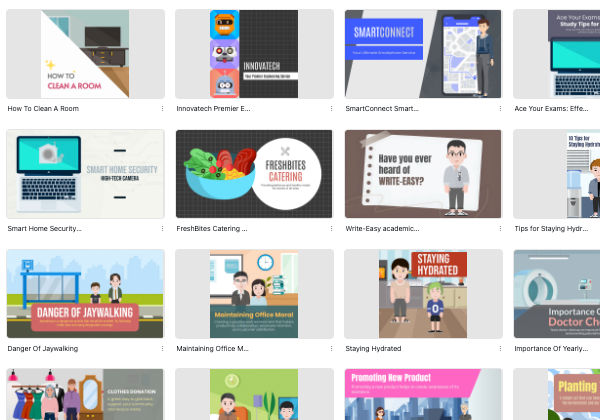
Visual Paradigm Onlineでフリップブックを作成することは、コンテンツをシームレスかつ魅力的に提示する方法です。教育用教材、ビジネスプレゼンテーション、または個人プロジェクトの設計において、Visual Paradigmのツールは、アイデアを具現化するための包括的な機能を提供します。このガイドでは、フリップブックの作成、2Dおよび3Dアニメーションの統合、テキスト読み上げ(TTS)、AI音声の活用、そしてそれらを美しい仮想本棚に整理するプロセスをステップバイステップで説明します。

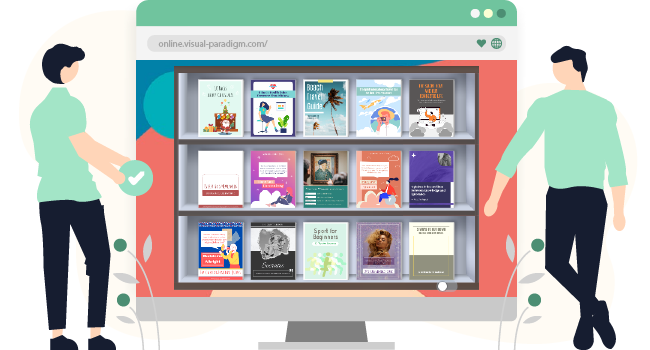
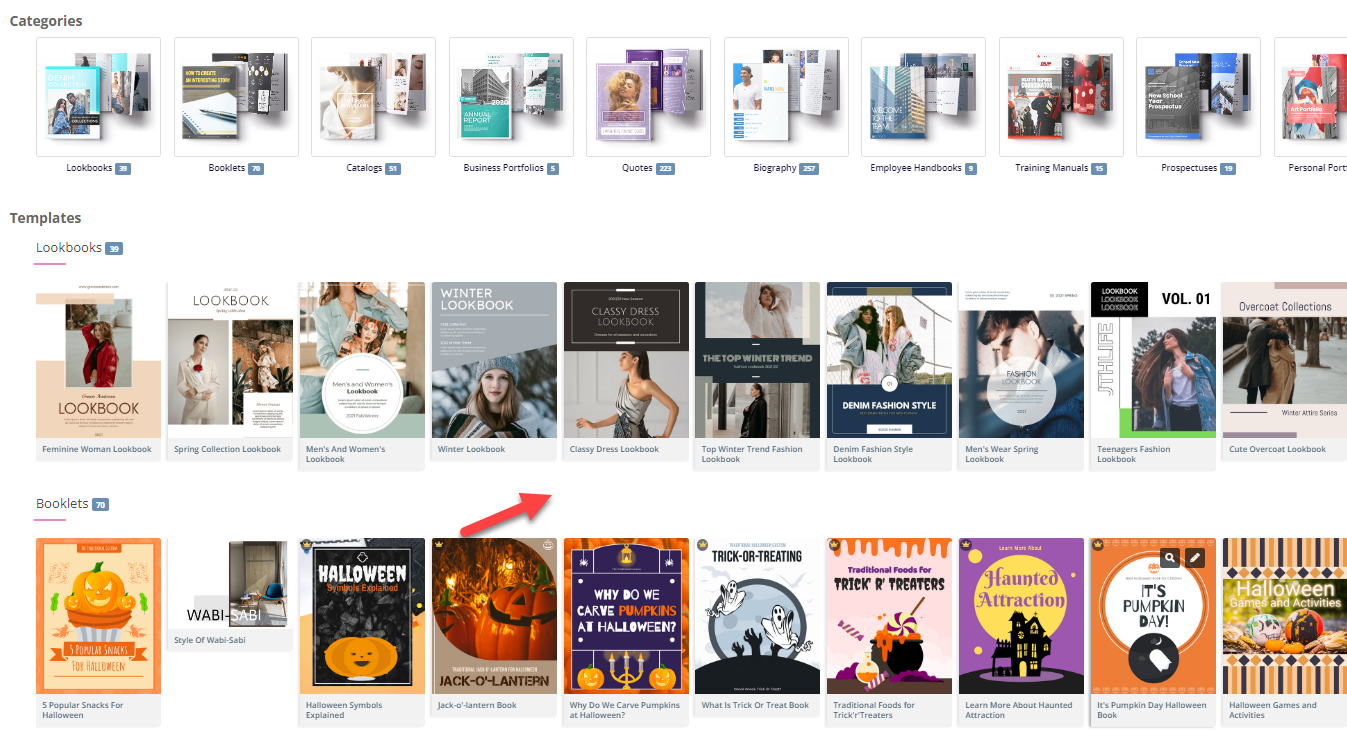
Fliplify:Visual Paradigm Online的翻页书设计大师| 學習EA, Agile & UML 和使用Visual Paradigm 技能- 點部落

ステップ1:Visual Paradigm Onlineの使い始め

  1. アカウント登録とログイン:

    • 以下のサイトにアクセスしてくださいVisual Paradigm Onlineウェブサイトにアクセスし、まだアカウントをお持ちでない場合は登録してください。
    • ログインして、フリップブック作成用のFliplifyやアニメーション追加用のAniFuzionを含むツール一式にアクセスしてください。
  2. ダッシュボードの探索:

    • ダッシュボードに慣れ親しんでください。ここではさまざまなツールや機能にアクセスできます。
    • Fliplifyセクションに移動して、フリップブックの作成を開始してください。

Make Your Flipbook Stand Out with AniFuzion - Fliplify

ステップ2:Fliplifyによるフリップブックの作成

  1. テンプレートを選択するか、ゼロから始める:

    • 利用可能なフリップブックテンプレートを確認するか、ゼロから始めることを選択してください。テンプレートはデザインの基盤を提供しますが、ゼロから始めることでより多くのカスタマイズが可能です。26.
  2. フリップブックのデザイン:

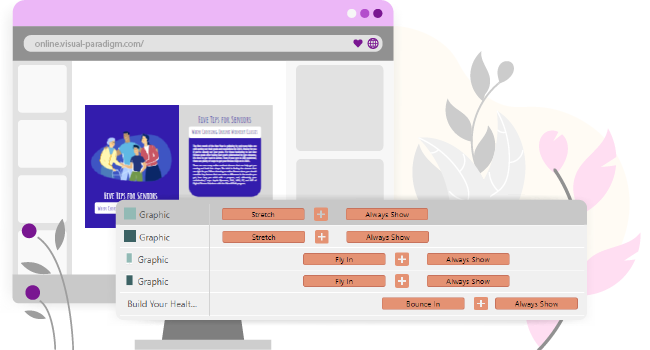
    • 直感的なインターフェースを使ってフリップブックをデザインしてください。ページを追加し、レイアウトをカスタマイズし、注釈、強調表示、コメントなどのインタラクティブな要素を組み込みます。24.
    • 高度なデザインツールを活用して、洗練されたプロフェッショナルなプレゼンテーションを実現してください。
  3. 2Dおよび3Dアニメーションの統合:

    • AniFuzionを使って2Dおよび3Dアニメーションを作成するかインポートしてください。これらのアニメーションは、フリップブックにスムーズに統合され、参加意識や視覚的インパクトを高めます。20.
    • アニメーションが他のコンテンツとスムーズに流れることを確認し、Fliplifyのインタラクティブ機能を活用して理解を促進してください。25.

Visual Paradigm Online: Revolutionizing Digital Content Creation - Cybermedian

  1. テキスト読み上げ(TTS)およびAI人間音声を追加する:

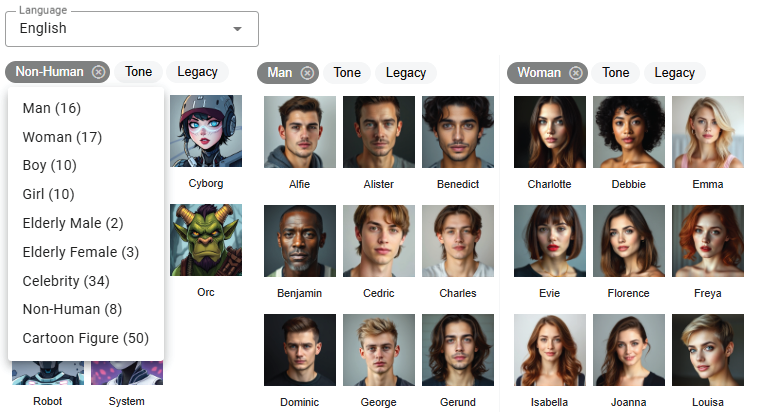
    • TTSおよびAI人間音声を活用して、あなたのフリップブックをナレーションします。この機能により、インタラクティブ体験が向上し、コンテンツがより魅力的でアクセスしやすくなります。20.
    • フリップブックのトーンやスタイルに合わせて、音声設定をカスタマイズしてください。

Bring Your Characters to Life with Enhanced TTS Support - Visual Paradigm  News

  1. プレビューと公開:

    • フリップブックをプレビューし、期待に応じているか確認してください。必要に応じてデザインやコンテンツを調整してください。
    • 満足がいったら、フリップブックを公開し、あなたのオーディエンスと共有してください。24.

ステップ3:フリップブックを仮想書棚に整理する

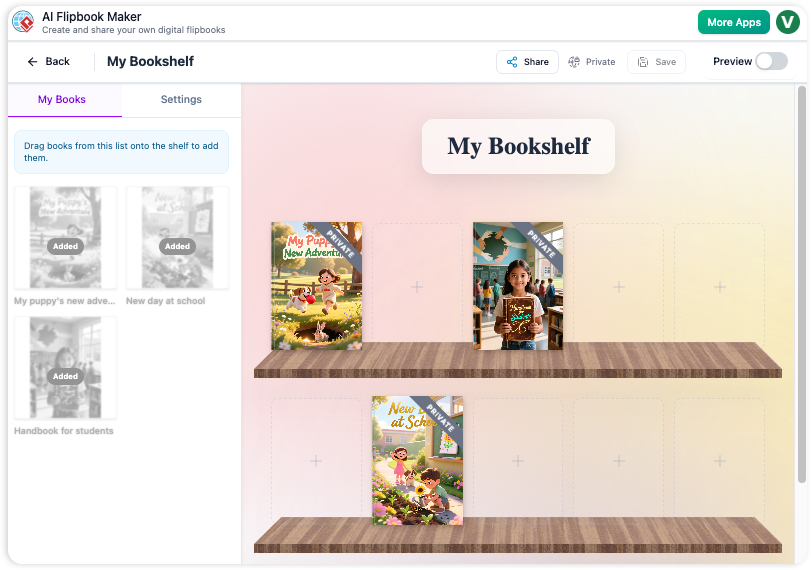
  1. 仮想書棚を作成する:

    • Visual Paradigm Onlineの仮想書棚機能に移動してください。
    • 新しい書棚を作成し、ブランドや個人のスタイルに合わせて外観をカスタマイズしてください。
  2. 書棚にフリップブックを追加する:

    • 公開したフリップブックを仮想書棚に追加してください。カテゴリーやトピック、またはコンテンツに適した他の基準に基づいて整理してください。
    • 各フリップブックのサムネイルと説明をカスタマイズして、視覚的に魅力的で情報豊かなものにしましょう。
  3. 書棚のレイアウトをカスタマイズする:

    • フリップブックを視覚的に魅力的な配置で書棚に並べてください。レイアウトツールを使用して、フリップブックの配置や間隔を調整してください。
    • 関連コンテンツや追加リソースへのリンクなどのインタラクティブ要素を追加して、ユーザー体験を向上させましょう。
  4. あなたの仮想書棚を共有する:

    • リンクを提供するか、ウェブサイトに埋め込むことで、あなたの仮想書棚をオーディエンスと共有しましょう。
    • ソーシャルメディア、メールニュースレター、その他のマーケティングチャネルを通じて書棚を広く宣伝し、より多くの人々に届けるようにしましょう。

ステップ4:インタラクティブ機能によるエンゲージメントの向上

  1. インタラクティブな注釈:

    • フリップブックに注釈、強調表示、コメントを追加して、エンゲージメントと理解を高めましょう。これらのインタラクティブな要素により、コンテンツはよりダイナミックでパーソナライズされたものになります。25.
  2. クイズとアンケート:

    • フリップブック内にクイズやアンケートを組み込んで、オーディエンスを引きつけ、フィードバックを収集しましょう。この機能は教育コンテンツやビジネスプレゼンテーションにおいて特に有用です。
  3. マルチメディアの統合:

    • 動画、画像、音声クリップなどのマルチメディア要素を統合して、フリップブックの視覚的インパクトとエンゲージメントを高めましょう。
    • Fliplifyのインタラクティブ機能を活用して、マルチメディア要素が他のコンテンツとスムーズに統合されていることを確認し、理解を深めましょう。25.

How to Add Voice to Characters by Text-to-Speech with Perfect Lip Sync-  AniFuzion


結論

Visual Paradigm Onlineでフリップブックを作成し、美しい仮想書棚に整理することで、コンテンツを魅力的でインタラクティブな形で提示する強力な方法です。2Dおよび3Dアニメーション、TTS、AI音声など、さまざまな機能を活用することで、フリップブックの視覚的インパクトとエンゲージメントを高められます。教育コンテンツ、ビジネスプレゼンテーション、個人プロジェクトのいずれにおいても、Visual Paradigmのツールはアイデアを具現化し、オーディエンスを引きつける包括的な機能を提供しています。

包括的なチュートリアル:Visual Paradigm Onlineを使って、数クリックでPDFを素晴らしいフリップブックに変換する方法

はじめに

今日のデジタル時代において、コンテンツを魅力的でインタラクティブな形で提示することは、視聴者の注意を引きつけ、維持するために不可欠です。この目的を達成する有効な方法の一つが、従来のPDF文書を動的なフリップブックに変換することです。Visual Paradigm Onlineは、Fliplifyというツールを用いて、この変換を強力かつ使いやすい形で実現できます。この包括的なチュートリアルでは、数クリックでPDFを素晴らしいフリップブックに変換するプロセスを丁寧に紹介し、Visual Paradigm Onlineの主な機能と利点を強調します。教育用資料、ビジネスプレゼンテーション、あるいは個人プロジェクトの作成にかかわらず、このガイドを通じてフリップブックのすべての可能性を活かし、あなたのコンテンツを際立たせることができます。

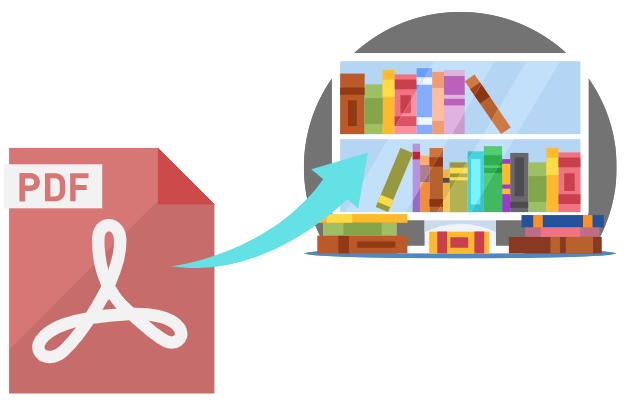
Can I turn my PDF into a Flipbook? - Visual Paradigm Blog

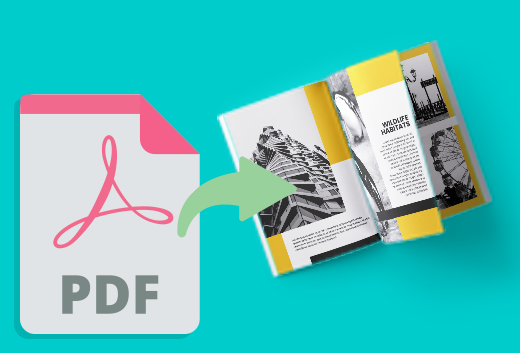
PDFを魅力的なフリップブックに変換することで、コンテンツのプレゼンテーション力とインタラクティブ性を大幅に向上させることができます。Visual Paradigm Onlineは、強力なFliplifyツールを活用して、このプロセスをスムーズかつ使いやすい形で実現できます。このチュートリアルでは、数クリックでPDFをフリップブックに変換する手順を紹介し、Visual Paradigm Onlineを使用する際の主な機能と利点を強調します。

Transform Your PDFs into Engaging Flipbooks with Our Powerful Tools - Visual Paradigm Blog

ステップ1:Visual Paradigm Onlineの使い始め

  1. アカウント登録とログイン:

    • 以下のサイトにアクセスしてくださいVisual Paradigm Onlineのウェブサイトにアクセスし、まだアカウントをお持ちでない場合は登録してください。
    • ログインして、フリップブック作成用のFliplifyを含むツール一式にアクセスしてください。
  2. Fliplifyへ移動する:

    • ログイン後、ダッシュボードからFliplifyセクションに移動してください。ここがPDFをフリップブックに変換する場所です。

ステップ2:PDFのアップロード

  1. PDFをアップロードする:

    • 「フリップブックを作成」ボタンをクリックし、PDFのアップロードを選択してください。
    • フリップブックに変換したいPDFファイルを、お使いのコンピュータまたはクラウドストレージから選択してください。
  2. PDFの処理:

    • Visual Paradigm Onlineは、アップロードされたPDFを自動的に処理し、フリップブック形式に変換します。このプロセスはPDFのサイズによって異なりますが、通常数秒で完了します。

ステップ3:フリップブックのカスタマイズ

  1. テンプレートを選択する:

    • 利用可能なフリップブックテンプレートを確認し、コンテンツに最も適したものを選択してください。テンプレートはデザインの基盤を提供し、簡単にカスタマイズできるようにします。26.

Flipping into the Future: The Magic of Flipbooks with Animation Capability  - Visual Paradigm Blog

  1. レイアウトをカスタマイズする:

    • 直感的なインターフェースを使って、あなたのフリップブックのレイアウトをカスタマイズしましょう。ページのレイアウトを調整し、注釈や強調表示、コメントなどのインタラクティブな要素を追加して、参加感を高めましょう。24.
  2. インタラクティブな要素を追加する:

    • リンク、動画、音声クリップなどのインタラクティブな要素を組み込んで、フリップブックをより魅力的にしましょう。これらの要素はドラッグアンドドロップインターフェースを使って簡単に追加できます。25.
  3. アニメーションを統合する(オプション):

    • フリップブックにアニメーションを追加したい場合は、Visual ParadigmのAniFuzionツールを使って2Dや3Dアニメーションを作成またはインポートできます。これらのアニメーションはフリップブックにスムーズに統合され、視覚的な魅力を高めます。20.

ステップ4:テキスト読み上げ(TTS)とAI人間音声の追加

  1. TTSを有効化する:

    • テキスト読み上げ(TTS)を活用して、フリップブックをナレーションで読み上げましょう。この機能により、インタラクティブな体験が向上し、コンテンツがより魅力的でアクセスしやすくなります。20.
  2. AI人間音声をカスタマイズする:

    • AI人間音声をフリップブックのトーンやスタイルに合わせてカスタマイズしましょう。自然でプロフェッショナルなナレーションになるように、音声設定を調整してください。

ステップ5:フリップブックのプレビューと公開

  1. フリップブックをプレビューする:

    • フリップブックをプレビューして、期待に応じているか確認しましょう。レイアウト、インタラクティブな要素、アニメーションを確認し、すべてが適切な位置にあるか確認してください。
  2. フリップブックを公開する:

    • 満足したら、「公開」ボタンをクリックして、フリップブックをライブ状態にします。リンクを提供するか、ウェブサイトに埋め込むことで、あなたのオーディエンスとフリップブックを共有できます。24.

ステップ6:フリップブックの整理

  1. 仮想の本棚を作成する:

    • Visual Paradigm Onlineの仮想本棚機能に移動します。
    • 新しい本棚を作成し、ブランドや個人のスタイルに合わせて外観をカスタマイズします。
  2. フリップブックを本棚に追加する:

    • 公開したフリップブックを仮想本棚に追加します。カテゴリーやトピック、またはコンテンツに適した他の基準に基づいて整理します。
    • 各フリップブックのサムネイルと説明をカスタマイズして、視覚的に魅力的で情報豊かなものにします。
  3. 仮想本棚を共有する:

    • リンクを提供するか、ウェブサイトに埋め込むことで、仮想本棚をあなたの audience と共有します。
    • ソーシャルメディア、メールニュースレター、その他のマーケティングチャネルを通じて本棚を広く宣伝し、より多くの人に届ける。

Flipping Book Animation Software - Visual Paradigm Blog

結論

Visual Paradigm Onlineを使ってPDFを素晴らしいフリップブックに変換することは、コンテンツを提示するための簡単で魅力的な方法です。カスタマイズ可能なテンプレート、インタラクティブな要素、アニメーション、テキスト読み上げ(TTS)、AI音声など、さまざまな機能を活用することで、目を引く魅力的なフリップブックを作成できます。教育用コンテンツ、ビジネスプレゼンテーション、個人プロジェクトのいずれにも、Visual Paradigmのツールはアイデアを具現化し、観客を引きつけるための包括的な機能を提供しています。このチュートリアルに従えば、静的なPDFを動的でインタラクティブなフリップブックに簡単に変換でき、コンテンツのプレゼンテーションと参加度を向上させることができます。

Visual ParadigmのAIポーターの5フォース分析器で市場を制する

Dominate your market with Visual Paradigm’s AI Porter’s Five Forces Analyzer. Generate fast, professional industry reports with actionable strategic insights.

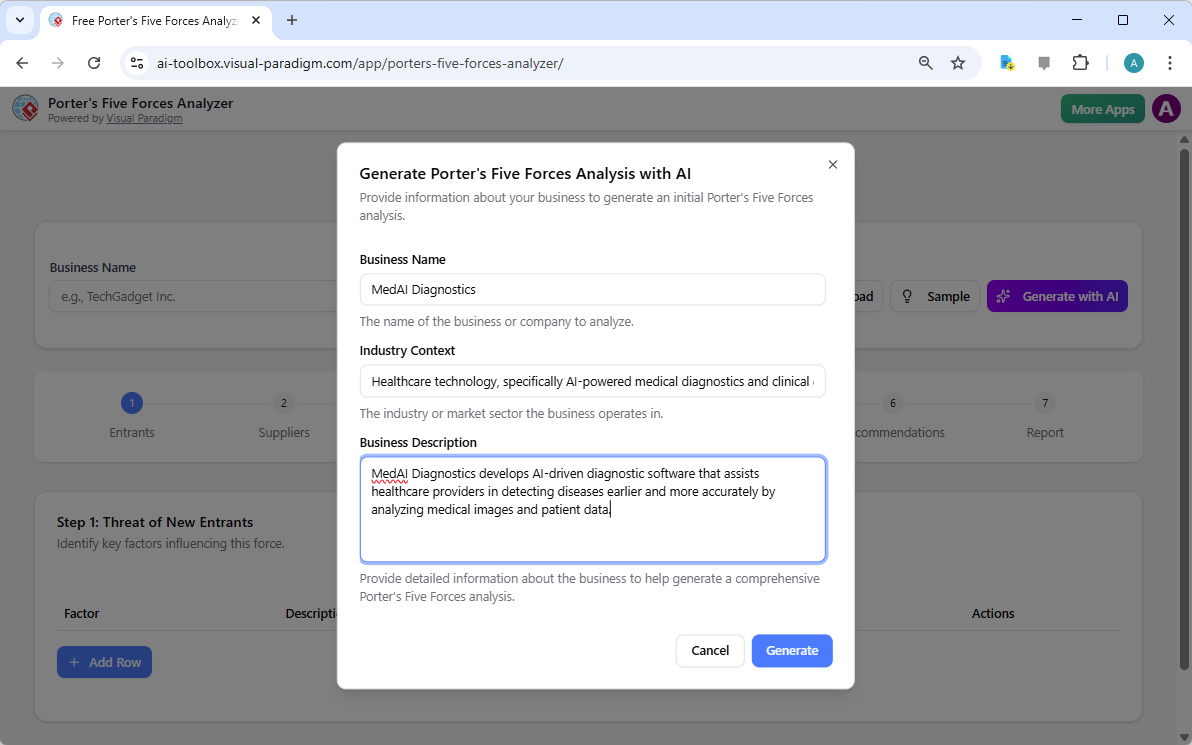
業界の秘密を解き明け、競合を出し抜くためにAI搭載ポーターの5フォース分析器 Visual Paradigmより!今日の急速に変化するビジネス環境において、利益に影響を与える構造的要因を理解することは単なる優位性ではなく、生存のための必須条件です。起業家であれ熟練の戦略家であれ、このプロフェッショナルな業界分析ツールあなたが勝利するための判断を下すために必要な明確さを提供します。ランディング画面は、単にあなたのビジネスを説明するだけで、あなたに役立つ高レベルの戦略的エンジンを起動するスムーズな体験をあなたに招待します!

初期設定の例からわかるように、ユーザーは企業名や業界の文脈(例:最先端の医療診断企業)といった具体的な情報を入力することで、カスタマイズされた分析結果を得られます。このインテリジェントなインターフェースは、あなたの個人的なコンサルタントとして、原始的なデータと実行可能な知見の間の溝を埋めます。

Visual Paradigm’s AI-Powered Porter's Five Forces Analysis Tool landing screen, where users begin by entering a brief busines

すべての企業がAI搭載の戦略的優位性を必要とする理由

手作業による業界調査は、数日間の過酷な調査を要する場合があります。しかし、Visual Paradigmの使いやすい戦略計画ソフトウェアを使えば、数秒で包括的なドラフトを作成できます!このツールは単に事実を列挙するだけではなく、あなたの特定の市場ニッチにおける競争の激しさを解釈し、面倒なデータ入力に時間を費やすのではなく、高レベルの検証に集中できるようにします。これはスピードと正確さを重視する人にとって究極の最良の業界分析ツールです。

主な利点の要約

  • 瞬間的な分析:高度なAI支援を活用して、数分で完全な5フォースレポートを生成します。

  • 構造化された7段階ロジック:検証漏れのない、実績のあるプロフェッショナルなワークフローに従います。

  • 完全なプライバシー:機密な戦略データをローカルに.jsonファイルとして保存—クラウドストレージは不要です!

  • 実行可能な知見:理論を超えて、具体的な戦略的アドバイスを、あなたのビジネスに合わせてカスタマイズします。

  • プロフェッショナルな出力:ステークホルダー向けプレゼンテーションや取締役会議に最適な高品質なレポートを生成します。

ステップ1:新規参入者の脅威に直面する

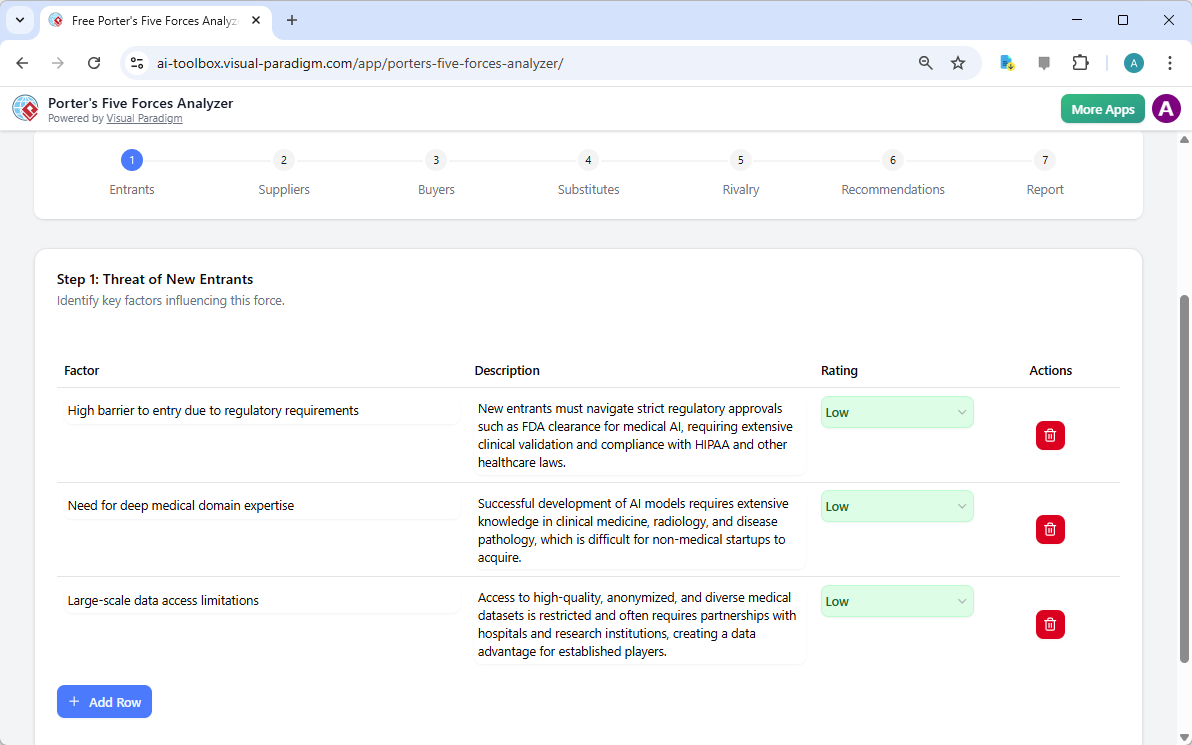
堅実な分析の第一歩は、新規参入者が自社の領域にどれほど簡単に参入できるかを評価することです。AI搭載ポーターの5フォース分析器を使用することで、規制要件、資本コスト、専門分野の知識の必要性といった重要な参入障壁を特定できます。AI医療企業の例では、このツールはFDA認可や深い医療知識が既存企業にとって強力な防衛壁となることを強調しています。

これらの要因を低、中、高のいずれかに評価することで、市場の防御性を即座に視覚的に把握できます。このオンライン戦略ツール新しい競合が一夜にして現れても、予期せぬ打撃を受けることなく済むことを保証します!

The screenshot of Step 1 of Visual Paradigm AI-Powered Porter's Five Forces Analysis Tool. - Professional online diagram make

ステップ2:サプライヤーの交渉力の評価

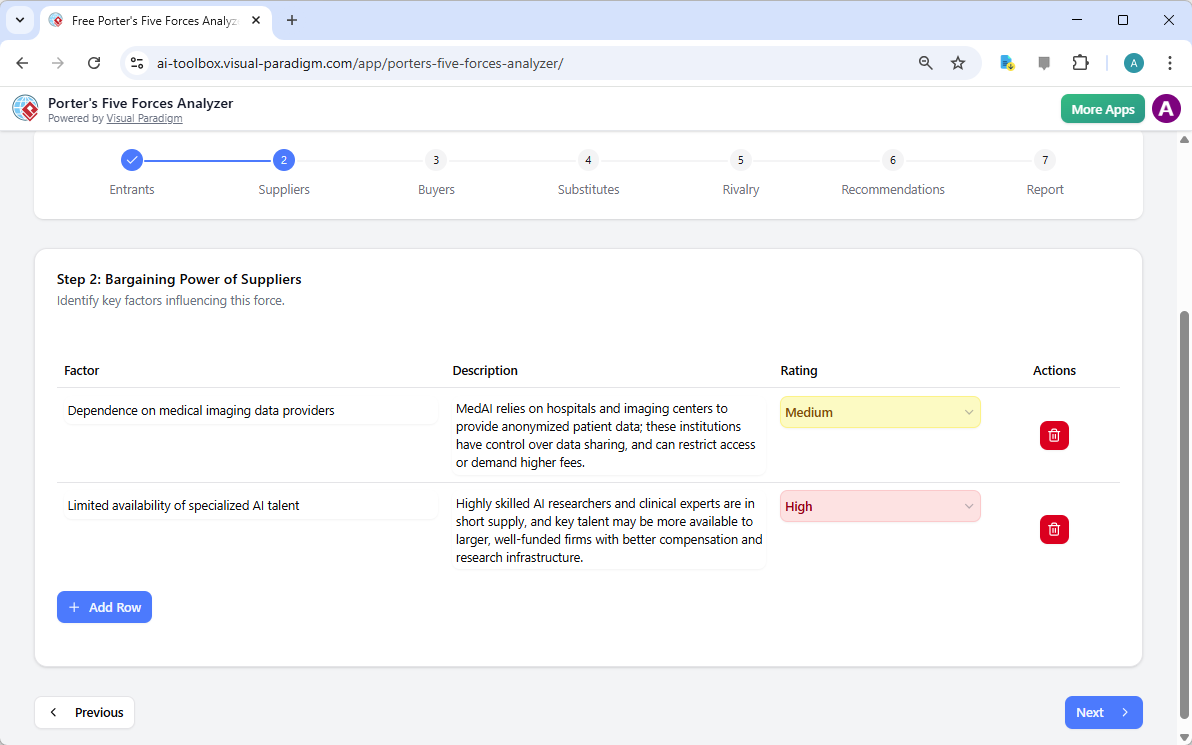
サプライヤーがあなたの利益を圧迫しているでしょうか?ワークフローのステップ2はサプライヤーの交渉力に注目します。このセクションでは、専門的なAI人材や独自のデータ提供者など、少数の主要な供給者に過度に依存していないかを確認できます。これらのボトルネックを早期に特定することで、多様化戦略重大な問題になる前に策定できます。

インタラクティブな動的テーブルを使用すれば、カスタム行を追加し、AIが生成した提案を調整できます。これにより、サプライチェーンの「現場の現実」を正確に反映した分析が可能になります。戦略的マネジメントをシンプルかつ効果的に実現できます!

The screenshot of Step 2 of the Visual Paradigm  AI-Powered Porter's Five Forces Analysis Tool. - Professional online diagram

ステップ3:買い手の交渉力の習得

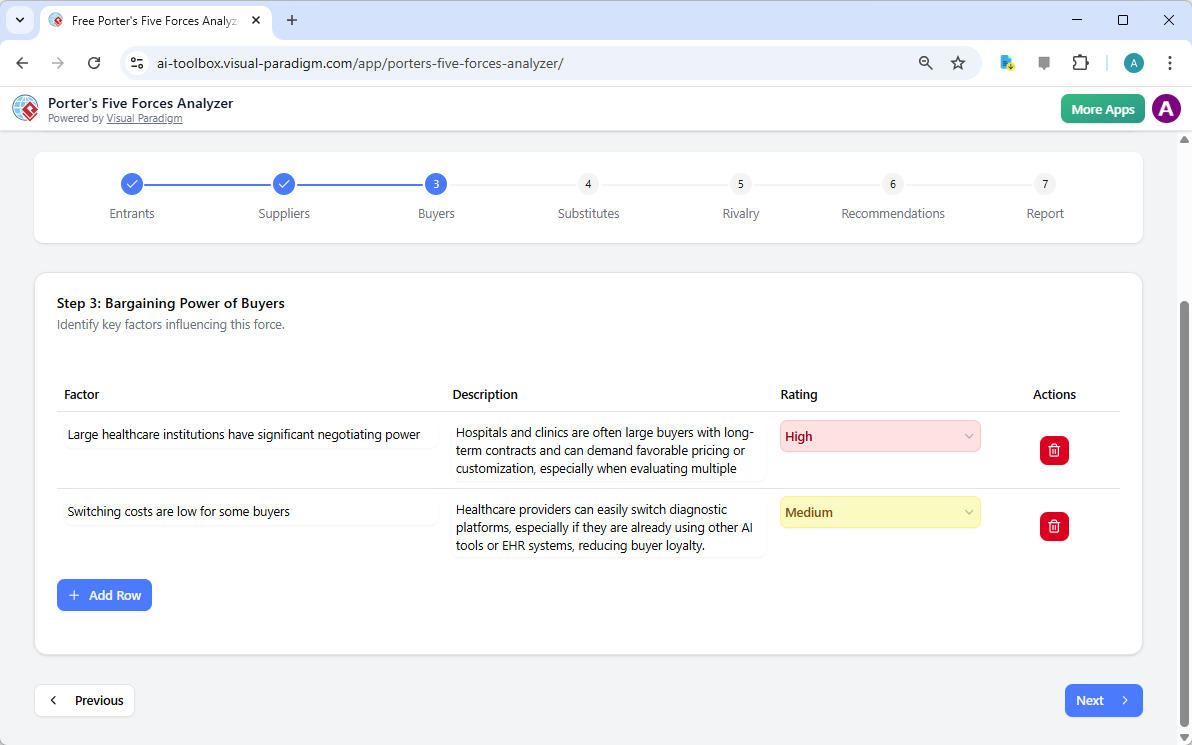
顧客はあなたの命綱ですが、価格を引き下げる力は大きな脅威となる可能性があります。ステップ3では、最高のAI搭載ポーターの5フォース分析ツール買い手の交渉力を分析します。医療技術企業の場合、大規模な医療機関の交渉力や、ブランド忠誠心を低下させる可能性のある低い切り替えコストを検討するかもしれません。

これらのダイナミクスを理解することは、価格戦略にとって不可欠です。買い手の交渉力が高いと認識できれば、製品を不可欠なものにする差別化と付加価値サービスに注力できます。

The screenshot of Step 3 of the Visual Paradigm  AI-Powered Porter's Five Forces Analysis Tool. - Professional online diagram

ステップ4:代替製品の脅威の特定

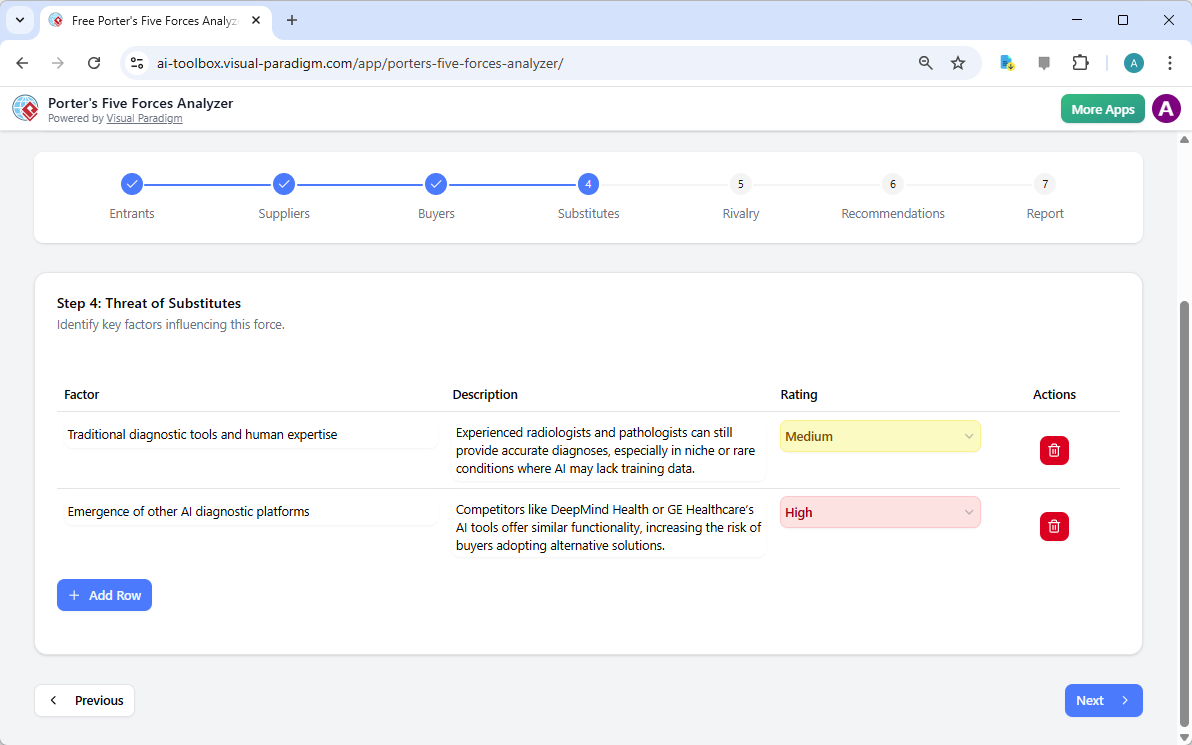
競争は常に直接のライバルから来るわけではありません。時には、同じ問題をまったく異なる方法で解決する存在から来る場合もあります。ステップ4では、代替製品の脅威を特定する手順を案内します。AIと対峙する従来の人的専門性や、まったく新しい技術が競合として現れる場合でも、このツールは全体像を捉えることを保証します。

これらの代替品の強度を評価することで、マーケティングやR&Dの努力を最も注視すべき脅威に集中できます。このプロフェッショナルグレードの分析ソフトウェアがあれば、市場の変化に対して常に一歩先を行くことができます!

The screenshot of Step 4 of the Visual Paradigm  AI-Powered Porter's Five Forces Analysis Tool. - Professional online diagram

ステップ5:既存競合間の競争の対応

フレームワークの最後の要因は既存競合間の競争です。これはしばしば最も強いプレッシャーを感じる場所であり、価格戦争、攻撃的な広告、急速なイノベーションが特徴です。このツールは、競合の数と業界成長率を評価するよう促し、市場全体の熱さを判断します。

AI医療のような混雑した分野では、「イノベーションレース」を理解することは不可欠です。このステップにより、競争がそれほど激しくない「ブルーオーシャン」の機会を見つけるために、競争状況を可視化できます。

The screenshot of Step 5 of the Visual Paradigm  AI-Powered Porter's Five Forces Analysis Tool. - Professional online diagram

ステップ6:成功する戦略的提案の策定

分析の質は、その結果として生じる行動次第です!ステップ6では、AI駆動のポーターの5フォース分析ツールが魔法が起こる場所です。前段階で収集したデータに基づき、AIは強力な戦略的提案を提示します。具体的には、特定の資格取得、戦略的提携の構築、または階層的な価格設定モデルの導入などにより、市場シェアを拡大する可能性があります。

ここでは、洞察を成功へのロードマップに変換します。これらの提案は、自社の独自のビジョンやリソース能力に完全に合わせて編集可能です。

The screenshot of Step 6 of the Visual Paradigm  AI-Powered Porter's Five Forces Analysis Tool - Professional online diagram

ステップ7:プロフェッショナルな最終レポートの作成

あなたの努力の結晶は統合された最終レポートです。ステップ7では、すべての要因、影響度評価、および提案を、プロフェッショナルで読みやすい形式に統合します。この文書は投資家を納得させ、チームの方向性を一致させるものです。経営層向け要約と各要因の詳細な分析を含み、業界の魅力を360度の視点から完全に把握できます。

このレポートは直接印刷したり、PDFとして保存したりでき、ステークホルダーと簡単に共有したり、公式なビジネス計画に組み込むことも非常に簡単です。真剣なビジネスプロフェッショナルにとって、究極の成果物です!

The screenshot of Step 7 of the Visual Paradigm  AI-Powered Porter's Five Forces Analysis Tool, displaying the automatically

今日から戦略をマスターしましょう!

競争の運命を握る最適な時期は、今まさにです。Visual ParadigmのAI駆動のポーターの5フォース分析ツールは、あらゆる業界で成功するための洞察を提供するように設計されています。隠れた脅威の特定から未利用の機会の活用まで、このツールはあなたが戦略的優位性への入り口です。成功を運任せにしないでください。業界分析の最高基準に基づいて意思決定をしましょう!

あなたのビジネスが競争環境においてどこに位置するかを確認したいですか?この使いやすい戦略計画ツールを活用して、業界に関する知識を、今すぐ守りやすい競争優位性に変換しましょう!

AI駆動の戦略の力を体験しましょう:

今すぐポーターの5フォース分析ツールを試してみましょう!

私たちの革新的な戦略ツールについてさらに詳しくお知りになりたい方はこちら

関連リンク

Dominate Your Market with Visual Paradigm’s AI Porter’s Five Forces Analyzer

Dominate your market with Visual Paradigm’s AI Porter’s Five Forces Analyzer. Generate fast, professional industry reports with actionable strategic insights.

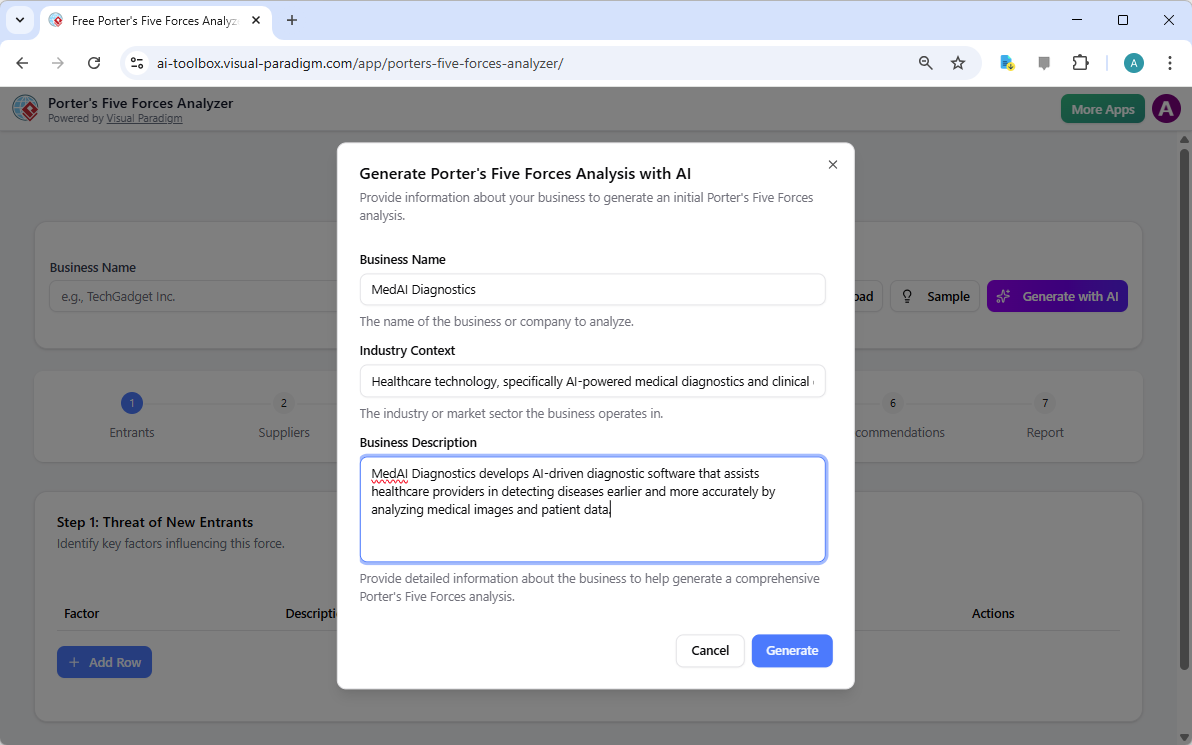
Unlock the secrets of your industry and outmaneuver the competition with the AI-powered Porter’s Five Forces Analyzer from Visual Paradigm! In today’s fast-paced business environment, understanding the structural forces that shape your profitability isn’t just an advantage—it’s a necessity for survival. Whether you are a startup founder or a seasoned strategist, this professional industry analysis tool provides the clarity you need to make winning decisions. The landing screen invites you into a seamless experience where you simply describe your business to ignite a high-level strategic engine that works for you!

As seen in the initial setup, users can input specific details like business name and industry context—such as a cutting-edge medical diagnostics firm—to receive a tailored analysis. This intelligent interface acts as your personal consultant, bridging the gap between raw data and actionable intelligence.

Visual Paradigm’s AI-Powered Porter's Five Forces Analysis Tool landing screen, where users begin by entering a brief busines

Why Every Business Needs an AI-Powered Strategic Edge

Conducting a manual industry study can take days of grueling research. However, with Visual Paradigm’s easy-to-use strategic planning software, you can generate a comprehensive draft in seconds! This tool doesn’t just list facts; it interprets the competitive intensity of your specific market niche, allowing you to focus on high-level validation rather than tedious data entry. It is the ultimate best industry analysis tool for those who value both speed and precision.

Quick Summary of Key Benefits

  • Lightning-Fast Analysis: Generate a full Five Forces report in minutes using advanced AI assistance.

  • Structured 7-Step Logic: Follow a proven, professional workflow that leaves no stone unturned.

  • Total Privacy: Save your sensitive strategic data locally as .json files—no cloud storage required!

  • Actionable Intelligence: Move beyond theory with specific strategic recommendations tailored to your business.

  • Professional Output: Produce high-quality reports perfect for stakeholder presentations and board meetings.

Step 1: Confronting the Threat of New Entrants

The first step in any robust analysis is evaluating how easy it is for new players to enter your territory. Using the AI-powered Porter’s Five Forces Analyzer, you can identify critical barriers to entry such as regulatory requirements, capital costs, and the need for specialized domain expertise. In the example of an AI medical firm, the tool highlights how FDA clearances and deep medical knowledge act as powerful shields for established players.

By rating these factors as Low, Medium, or High, you gain an immediate visual representation of your market’s defensibility. This online strategic tool ensures that you are never blindsided by a new competitor appearing overnight!

The screenshot of Step 1 of Visual Paradigm AI-Powered Porter's Five Forces Analysis Tool. - Professional online diagram make

Step 2: Evaluating the Bargaining Power of Suppliers

Are your suppliers squeezing your margins? Step 2 of the workflow focuses on the Bargaining Power of Suppliers. This section helps you identify if your business is overly dependent on a few key providers, such as specialized AI talent or unique data providers. Identifying these bottlenecks early allows you to develop diversification strategies before they become critical issues.

The interactive dynamic tables allow you to add custom rows and refine AI-generated suggestions, ensuring the analysis reflects the “on-the-ground” reality of your supply chain. It’s strategic management made simple and effective!

The screenshot of Step 2 of the Visual Paradigm  AI-Powered Porter's Five Forces Analysis Tool. - Professional online diagram

Step 3: Mastering the Bargaining Power of Buyers

Your customers are your lifeblood, but their power to drive down prices can be a major threat. In Step 3, the best AI-powered Porter’s Five Forces Analyzer examines the Bargaining Power of Buyers. For a medical tech company, this might involve analyzing the negotiating leverage of large healthcare institutions or the low switching costs that might reduce brand loyalty.

Understanding these dynamics is crucial for your pricing strategy. By recognizing when buyer power is high, you can shift your focus toward differentiation and value-added services that make your product indispensable.

The screenshot of Step 3 of the Visual Paradigm  AI-Powered Porter's Five Forces Analysis Tool. - Professional online diagram

Step 4: Identifying the Threat of Substitute Products

Competition doesn’t always come from direct rivals; sometimes, it comes from entirely different ways of solving the same problem. Step 4 guides you through identifying the Threat of Substitutes. Whether it’s traditional human expertise competing against AI or a completely new technology, this tool ensures you are looking at the big picture.

Rating the intensity of these substitutes helps you prioritize which threats need the most attention in your marketing and R&D efforts. With this professional-grade analysis software, you’ll always stay one step ahead of market shifts!

The screenshot of Step 4 of the Visual Paradigm  AI-Powered Porter's Five Forces Analysis Tool. - Professional online diagram

Step 5: Navigating Rivalry Among Existing Competitors

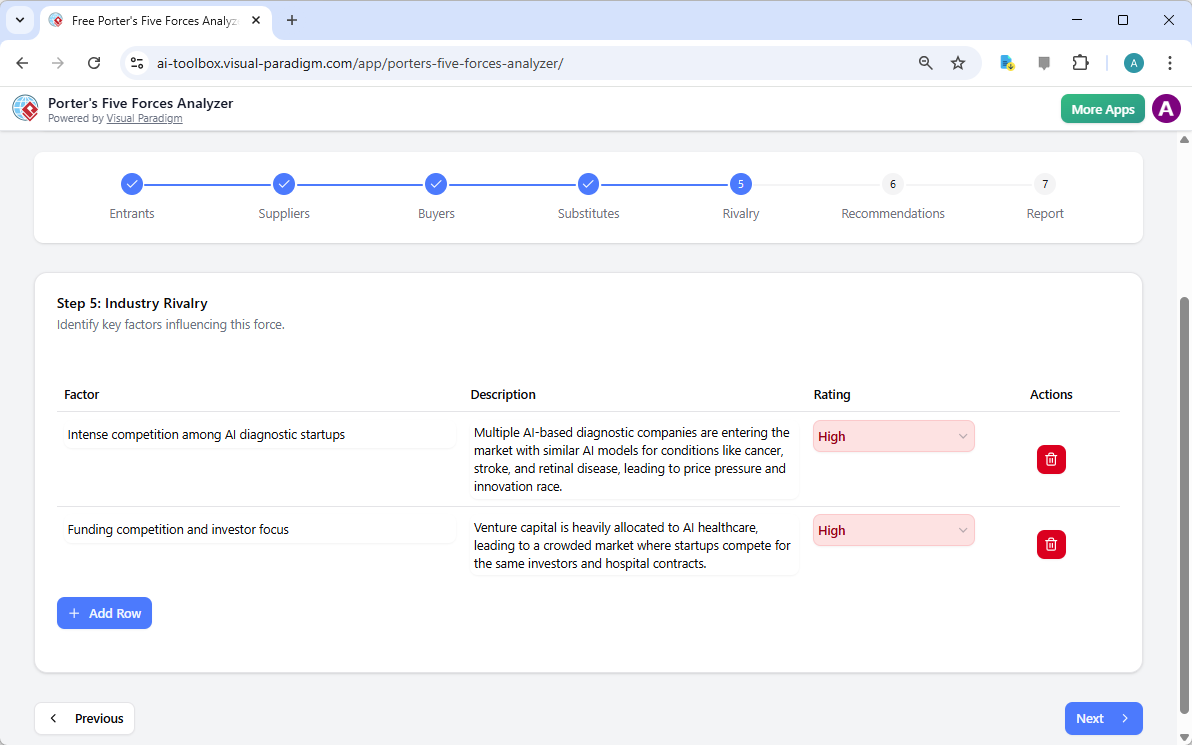
The final force in the framework is the Rivalry Among Existing Competitors. This is often where the most intense pressure is felt, characterized by price wars, aggressive advertising, and rapid innovation. The tool prompts you to assess the number of competitors and the rate of industry growth to determine the overall heat of the market.

In a crowded field like AI healthcare, understanding the “innovation race” is vital. This step helps you visualize the competitive landscape so you can find “Blue Ocean” opportunities where rivalry is less intense.

The screenshot of Step 5 of the Visual Paradigm  AI-Powered Porter's Five Forces Analysis Tool. - Professional online diagram

Step 6: Developing Winning Strategic Recommendations

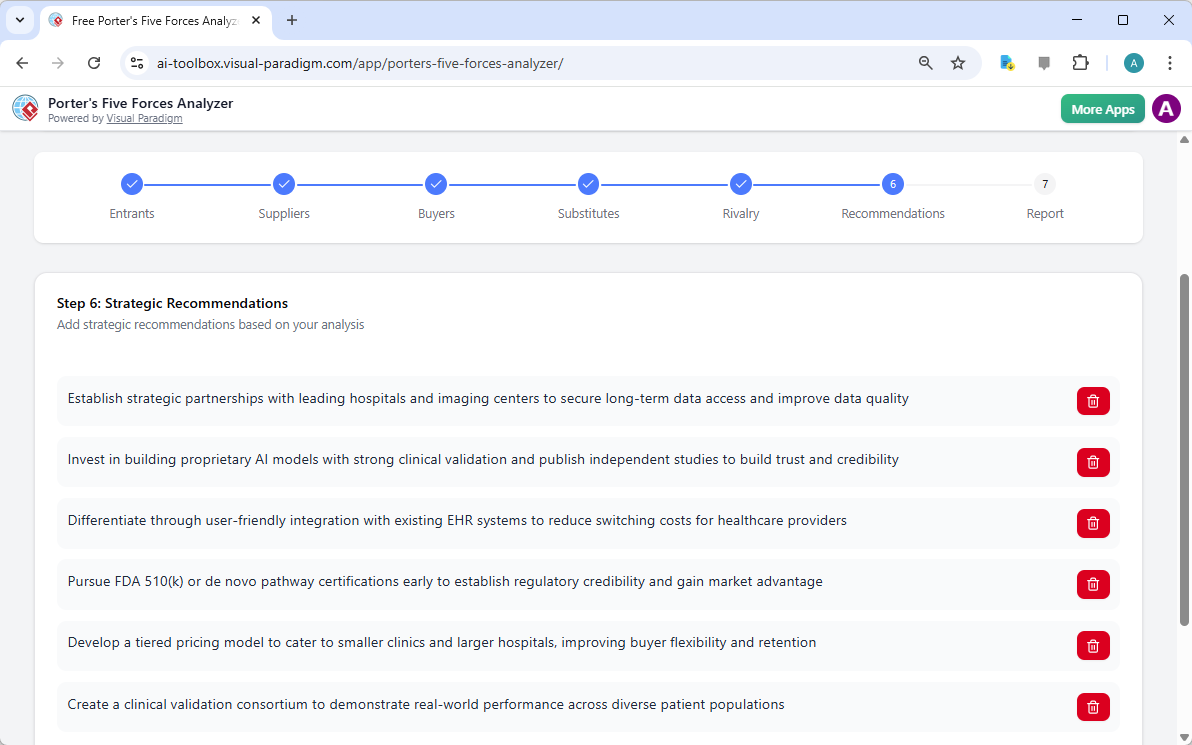
An analysis is only as good as the actions it inspires! Step 6 of the AI-powered Porter’s Five Forces Analyzer is where the magic happens. Based on the data gathered in the previous steps, the AI suggests powerful strategic recommendations. These might include pursuing specific certifications, forming strategic partnerships, or creating tiered pricing models to capture more market share.

This is where you transform insights into a roadmap for success. You can edit these recommendations to align perfectly with your company’s unique vision and resource capabilities.

The screenshot of Step 6 of the Visual Paradigm  AI-Powered Porter's Five Forces Analysis Tool - Professional online diagram

Step 7: Generating Your Professional Final Report

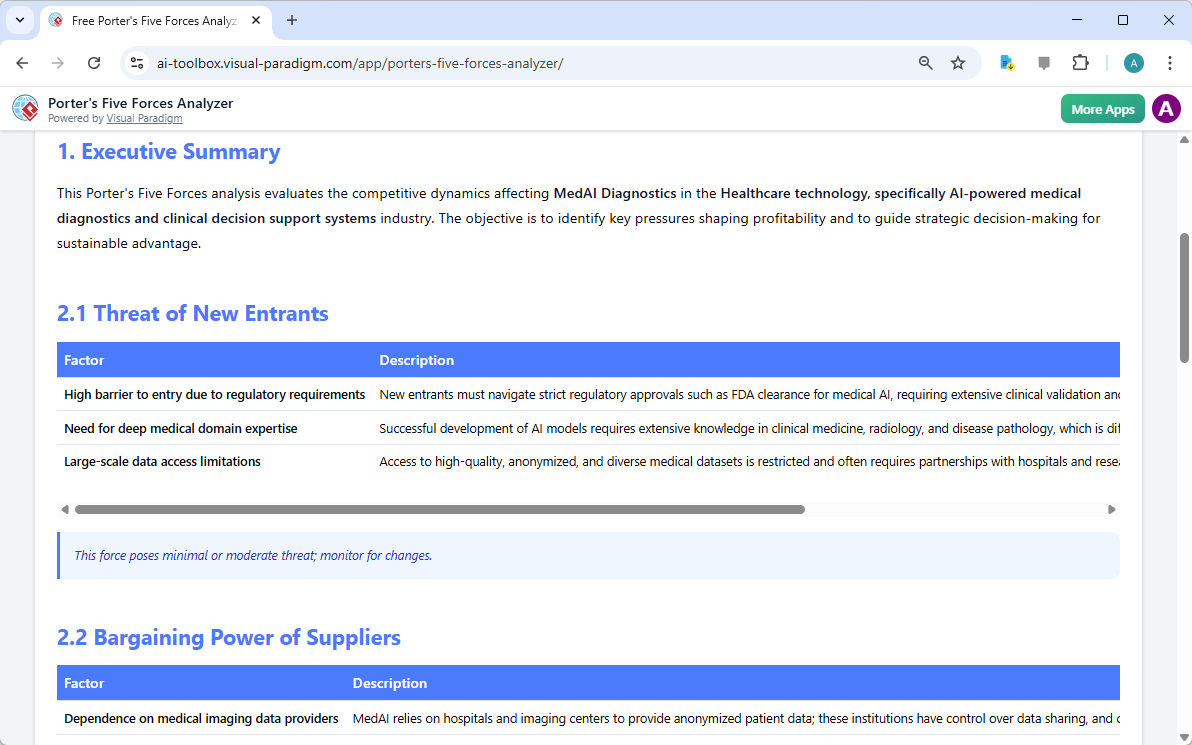
The culmination of your hard work is a consolidated final report. Step 7 gathers every factor, impact rating, and recommendation into a professional, easy-to-read format. This is the document that wins over investors and aligns your team. It includes an executive summary and a detailed breakdown of each force, providing a complete 360-degree view of your industry’s attractiveness.

You can print this report directly or save it as a PDF, making it incredibly easy to share with stakeholders or include in your formal business plan. It’s the ultimate deliverable for any serious business professional!

The screenshot of Step 7 of the Visual Paradigm  AI-Powered Porter's Five Forces Analysis Tool, displaying the automatically

Master Your Strategy Today!

There has never been a better time to take control of your competitive destiny. Visual Paradigm’s AI-powered Porter’s Five Forces Analyzer is designed to empower you with the insights needed to thrive in any industry. From identifying hidden threats to capitalizing on untapped opportunities, this tool is your gateway to strategic excellence. Don’t leave your success to chance—base your decisions on the gold standard of industry analysis!

Ready to see where your business stands in the competitive landscape? Use this easy-to-use strategic planning tool to transform your industry knowledge into a defensible competitive advantage right now!

Experience the power of AI-driven strategy:

Try the Porter’s Five Forces Analyzer Now!

Learn more about our innovative strategic tools.

Related Links

Comprehensive Tutorial: Convert a PDF to a Wonderful Flipbook in a Few Clicks Using Visual Paradigm Online

Introduction

In today’s digital age, presenting content in an engaging and interactive manner is crucial for capturing and retaining audience attention. One effective way to achieve this is by converting traditional PDF documents into dynamic flipbooks. Visual Paradigm Online offers a powerful and user-friendly solution for this transformation with its Fliplify tool. This comprehensive tutorial will guide you through the process of converting a PDF to a wonderful flipbook in just a few clicks, highlighting the key features and benefits of using Visual Paradigm Online. Whether you are creating educational materials, business presentations, or personal projects, this guide will help you leverage the full potential of flipbooks to make your content stand out.

Can I turn my PDF into a Flipbook? - Visual Paradigm Blog

Converting a PDF to an engaging flipbook can significantly enhance the presentation and interactivity of your content. Visual Paradigm Online offers a seamless and user-friendly way to achieve this with its powerful Fliplify tool. This tutorial will guide you through the process of converting a PDF to a flipbook in just a few clicks, highlighting the key features and benefits of using Visual Paradigm Online.

Transform Your PDFs into Engaging Flipbooks with Our Powerful Tools - Visual Paradigm Blog

Step 1: Getting Started with Visual Paradigm Online

  1. Sign Up and Log In:

    • Visit the Visual Paradigm Online website and sign up for an account if you don’t already have one.
    • Log in to access the suite of tools, including Fliplify for creating flipbooks.
  2. Navigate to Fliplify:

    • Once logged in, navigate to the Fliplify section from the dashboard. This is where you will convert your PDF into a flipbook.

Step 2: Uploading Your PDF

  1. Upload the PDF:

    • Click on the “Create Flipbook” button and select the option to upload a PDF.
    • Choose the PDF file from your computer or cloud storage that you want to convert into a flipbook.
  2. Processing the PDF:

    • Visual Paradigm Online will automatically process the uploaded PDF and convert it into a flipbook format. This process typically takes just a few moments, depending on the size of the PDF.

Step 3: Customizing Your Flipbook

  1. Choose a Template:

    • Browse through the available flipbook templates and select one that best suits your content. Templates provide a foundation for your design, allowing for easy customization 26.

Flipping into the Future: The Magic of Flipbooks with Animation Capability  - Visual Paradigm Blog

  1. Customize the Layout:

    • Use the intuitive interface to customize the layout of your flipbook. Adjust the page layout, add interactive elements like annotations, highlights, and comments to enhance engagement 24.
  2. Add Interactive Elements:

    • Incorporate interactive elements such as links, videos, and audio clips to make your flipbook more engaging. These elements can be easily added using the drag-and-drop interface 25.
  3. Integrate Animations (Optional):

    • If you want to enhance your flipbook with animations, you can use Visual Paradigm’s AniFuzion tool to create or import 2D and 3D animations. These animations can be seamlessly integrated into your flipbook to add visual appeal 20.

Step 4: Adding Text-to-Speech (TTS) and AI Human Voices

  1. Enable TTS:

    • Incorporate Text-to-Speech (TTS) to narrate your flipbook. This feature enhances the interactive experience, making the content more engaging and accessible 20.
  2. Customize AI Human Voices:

    • Customize the AI human voices to match the tone and style of your flipbook. Adjust the voice settings to ensure a natural and professional narration.

Step 5: Previewing and Publishing Your Flipbook

  1. Preview the Flipbook:

    • Preview your flipbook to ensure it meets your expectations. Check the layout, interactive elements, and animations to make sure everything is in place.
  2. Publish the Flipbook:

    • Once satisfied, click on the “Publish” button to make your flipbook live. You can share the flipbook with your audience by providing a link or embedding it on your website 24.

Step 6: Organizing Your Flipbooks

  1. Create a Virtual Bookshelf:

    • Navigate to the virtual bookshelf feature in Visual Paradigm Online.
    • Create a new bookshelf and customize its appearance to match your branding or personal style.
  2. Add Flipbooks to the Bookshelf:

    • Add your published flipbooks to the virtual bookshelf. Organize them by category, topic, or any other criteria that make sense for your content.
    • Customize the thumbnails and descriptions of each flipbook to make them visually appealing and informative.
  3. Share Your Virtual Bookshelf:

    • Share your virtual bookshelf with your audience by providing a link or embedding it on your website.
    • Promote your bookshelf through social media, email newsletters, and other marketing channels to reach a wider audience.

Flipping Book Animation Software - Visual Paradigm Blog

Conclusion

Converting a PDF to a wonderful flipbook using Visual Paradigm Online is a straightforward and engaging way to present your content. With features like customizable templates, interactive elements, animations, text-to-speech (TTS), and AI human voices, you can create captivating flipbooks that stand out. Whether for educational content, business presentations, or personal projects, Visual Paradigm’s tools offer a comprehensive suite of features to bring your ideas to life and captivate your audience. By following this tutorial, you can transform your static PDFs into dynamic and interactive flipbooks, enhancing the presentation and engagement of your content with ease.

Comprehensive Guide to Creating Flipbooks and Organizing Them into a Beautiful Virtual Bookshelf

Introduction

Creating flipbooks with Visual Paradigm Online is a seamless and engaging way to present your content. Whether you’re designing educational materials, business presentations, or personal projects, Visual Paradigm’s tools offer a comprehensive suite of features to bring your ideas to life. This guide will walk you through the process of creating flipbooks, incorporating 2D and 3D animations, text-to-speech (TTS), and AI human voices, and organizing them into a beautiful virtual bookshelf.

Fliplify:Visual Paradigm Online的翻页书设计大师| 學習EA, Agile & UML 和使用Visual Paradigm 技能- 點部落

Step 1: Getting Started with Visual Paradigm Online

  1. Sign Up and Log In:

    • Visit the Visual Paradigm Online website and sign up for an account if you don’t already have one.
    • Log in to access the suite of tools, including Fliplify for creating flipbooks and AniFuzion for adding animations.
  2. Explore the Dashboard:

    • Familiarize yourself with the dashboard, which provides access to various tools and features.
    • Navigate to the Fliplify section to start creating your flipbook.

Make Your Flipbook Stand Out with AniFuzion - Fliplify

Step 2: Creating a Flipbook with Fliplify

  1. Choose a Template or Start from Scratch:

    • Browse through the available flipbook templates or choose to start from scratch. Templates provide a foundation for your design, while starting from scratch allows for more customization 26.
  2. Design Your Flipbook:

    • Use the intuitive interface to design your flipbook. Add pages, customize the layout, and incorporate interactive elements such as annotations, highlights, and comments 24.
    • Utilize the advanced design tools to ensure a polished and professional presentation.
  3. Integrate 2D and 3D Animations:

    • Use AniFuzion to create or import 2D and 3D animations. These animations can be seamlessly integrated into your flipbook to enhance engagement and visual appeal 20.
    • Ensure that the animations flow seamlessly with the rest of the content, using the interactive features of Fliplify to enhance comprehension 25.

Visual Paradigm Online: Revolutionizing Digital Content Creation - Cybermedian

  1. Add Text-to-Speech (TTS) and AI Human Voices:

    • Incorporate TTS and AI human voices to narrate your flipbook. This feature enhances the interactive experience, making the content more engaging and accessible 20.
    • Customize the voice settings to match the tone and style of your flipbook.

Bring Your Characters to Life with Enhanced TTS Support - Visual Paradigm  News

  1. Preview and Publish:

    • Preview your flipbook to ensure it meets your expectations. Make any necessary adjustments to the design and content.
    • Once satisfied, publish the flipbook and share it with your audience 24.

Step 3: Organizing Flipbooks into a Virtual Bookshelf

  1. Create a Virtual Bookshelf:

    • Navigate to the virtual bookshelf feature in Visual Paradigm Online.
    • Create a new bookshelf and customize its appearance to match your branding or personal style.
  2. Add Flipbooks to the Bookshelf:

    • Add your published flipbooks to the virtual bookshelf. Organize them by category, topic, or any other criteria that make sense for your content.
    • Customize the thumbnails and descriptions of each flipbook to make them visually appealing and informative.
  3. Customize the Bookshelf Layout:

    • Arrange the flipbooks on the bookshelf in a visually appealing manner. Use the layout tools to adjust the positioning and spacing of the flipbooks.
    • Add interactive elements, such as links to related content or additional resources, to enhance the user experience.
  4. Share Your Virtual Bookshelf:

    • Share your virtual bookshelf with your audience by providing a link or embedding it on your website.
    • Promote your bookshelf through social media, email newsletters, and other marketing channels to reach a wider audience.

Step 4: Enhancing Engagement with Interactive Features

  1. Interactive Annotations:

    • Add annotations, highlights, and comments to your flipbooks to enhance engagement and comprehension. These interactive elements make the content more dynamic and personalized 25.
  2. Quizzes and Polls:

    • Incorporate quizzes and polls within your flipbooks to engage your audience and gather feedback. This feature is particularly useful for educational content and business presentations.
  3. Multimedia Integration:

    • Integrate multimedia elements, such as videos, images, and audio clips, to enhance the visual appeal and engagement of your flipbooks.
    • Ensure that the multimedia elements are seamlessly integrated with the rest of the content, using the interactive features of Fliplify to enhance comprehension 25.

How to Add Voice to Characters by Text-to-Speech with Perfect Lip Sync-  AniFuzion


Conclusion

Creating flipbooks with Visual Paradigm Online and organizing them into a beautiful virtual bookshelf is a powerful way to present your content engagingly and interactively. With features like 2D and 3D animations, TTS, and AI human voices, you can enhance the visual appeal and engagement of your flipbooks. Whether for educational content, business presentations, or personal projects, Visual Paradigm’s tools offer a comprehensive suite of features to bring your ideas to life and captivate your audience.

Comprehensive Tutorial for Creating Wonderful Animation Flipbooks with Visual Paradigm’s AniFuzion and Fliplify

Introduction

Creating an animation flipbook combines the engaging nature of animations with the interactive experience of flipbooks. Visual Paradigm’s AniFuzion and Fliplify tools offer a seamless way to achieve this, allowing users to create captivating content that stands out. This tutorial will guide you through the process of creating an animation flipbook, highlighting why these tools are an excellent choice and how they can make your content more attractive and engaging.

Why Choose Visual Paradigm’s AniFuzion and Fliplify?

Elevate Your Animations with Sound in AniFuzion - AniFuzion

  1. User-Friendly Interface:

    • Both AniFuzion and Fliplify provide intuitive interfaces that make it easy for users, regardless of their technical expertise, to create professional-quality animations and flipbooks 2024.
  2. Comprehensive Toolkit:

    • These tools offer a wide range of features, including 2D and 3D animation, customizable templates, and interactive elements, ensuring that users have everything they need to create engaging content 2126.
  3. Seamless Integration:

    • AniFuzion and Fliplify integrate seamlessly with each other and with other features of Visual Paradigm Online, creating a comprehensive suite for all your creative needs 2126.
  4. High-Quality Output:

    • The tools ensure that the final output is of high quality, with polished and professional-looking animations and flipbooks that captivate audiences 2024.
  5. Customer Support:

    • Visual Paradigm provides excellent customer support, assisting users with any issues or questions they may have while using the tools 27.

How Animated Flipbooks Make Content Attractive and Engaging

Flipping Book Animation Software - Visual Paradigm Blog

  1. Visual Appeal:

    • Animated flipbooks combine the visual appeal of animations with the interactive experience of flipbooks, making the content more engaging and visually appealing 20.
  2. Interactive Experience:

    • The interactive nature of flipbooks allows users to engage with the content in a more dynamic way, enhancing comprehension and retention 25.
  3. Storytelling:

    • Animated flipbooks enable users to tell stories in a more compelling way, using animations to bring characters and scenes to life 21.
  4. Versatility:

    • Animated flipbooks can be used for a wide range of purposes, from educational content and business presentations to marketing materials and personal projects 2426.

Tutorial: Creating an Animation Flipbook with AniFuzion and Fliplify

Visual Paradigm Flipbook Maker: Elevate Your Digital Presence with Dynamic and Engaging Flipbooks - Visual Paradigm Blog

Step 1: Create Animations with AniFuzion
  1. Sign Up and Log In:

    • Sign up for a Visual Paradigm Online account and log in to access AniFuzion.
  2. Choose a Template or Start from Scratch:

    • Browse through the available templates or choose to start from scratch. Templates provide a foundation for your animation, while starting from scratch allows for more customization 21.
  3. Design Your Animation:

    • Use the intuitive interface to design your animation. Add characters, scenes, and props, and customize their appearance and actions. Utilize the 2D and 3D animation features to bring your vision to life 20.
  4. Add Interactive Elements:

    • Incorporate interactive elements, such as annotations, highlights, and comments, to enhance engagement and comprehension 25.
  5. Preview and Export:

    • Preview your animation to ensure it meets your expectations. Once satisfied, export the animation in the desired format 20.
Step 2: Create a Flipbook with Fliplify
  1. Upload Your Animation:

    • Log in to Visual Paradigm Online and access Fliplify. Upload your exported animation to use as content for your flipbook 24.
  2. Choose a Template or Start from Scratch:

    • Browse through the available flipbook templates or choose to start from scratch. Templates provide a foundation for your flipbook, while starting from scratch allows for more customization 26.
  3. Design Your Flipbook:

    • Use the intuitive interface to design your flipbook. Add pages, customize the layout, and incorporate interactive elements, such as annotations and highlights 24.
  4. Integrate Your Animation:

    • Integrate your animation into the flipbook, ensuring that it flows seamlessly with the rest of the content. Utilize the interactive features of Fliplify to enhance the engagement and comprehension of the animation 25.
  5. Preview and Publish:

    • Preview your flipbook to ensure it meets your expectations. Once satisfied, publish the flipbook and share it with your audience 24.

Conclusion

Creating an animation flipbook with Visual Paradigm’s AniFuzion and Fliplify is a powerful way to make your content more attractive and engaging. With their user-friendly interfaces, comprehensive toolkits, seamless integration, and high-quality output, these tools provide everything needed to create captivating animation flipbooks. Whether for educational content, business presentations, marketing materials, or personal projects, AniFuzion and Fliplify offer a seamless and productive experience, making them an ideal choice for all your creative needs.

Comprehensive Tutorial for Creating Stunning Flipbooks with Fliplify of Visual Paradigm Online

Introduction

Fliplify, part of Visual Paradigm Online, is a powerful tool designed to help users create captivating digital flipbooks and slideshows. Whether you are starting from scratch or uploading existing content, Fliplify offers a seamless and user-friendly experience. This tutorial will guide you through the process of creating stunning flipbooks, highlighting the key features, application areas, and reasons why Fliplify stands out.

Why Choose Fliplify?

  1. User-Friendly Interface:

    • Fliplify provides an intuitive and user-friendly interface that makes it easy for users to create professional-looking flipbooks without the need for extensive technical knowledge 24.
  2. Versatile Content Creation:

    • Users can craft flipbooks from various sources, including PDFs, PowerPoints, and more. This versatility allows for a wide range of content to be transformed into engaging flipbooks 24.
  3. Customization Options:

    • Fliplify empowers users to customize every aspect of their flipbooks, from layout and design to interactive elements. This ensures a polished and professional presentation tailored to specific needs 24.
  4. Interactive Elements:

    • The tool allows for the addition of interactive elements, such as annotations, highlights, and comments, enhancing the engagement and comprehension of the content 25.
  5. Seamless Integration:

    • Fliplify seamlessly integrates with other features of Visual Paradigm Online, creating a comprehensive suite for all your creative needs. This integration ensures a smooth and productive experience 26.

Application Areas

  1. Business Presentations:

    • Create engaging and interactive business presentations that captivate audiences and effectively communicate key messages.
  2. Educational Content:

    • Develop educational materials that are visually appealing and interactive, enhancing the learning experience for students.
  3. Marketing Materials:

    • Design digital brochures, product catalogs, and other marketing materials that stand out and engage potential customers.
  4. Personal Projects:

    • Use Fliplify for personal projects, such as creating photo albums, travel journals, or any other content that benefits from an interactive and visually appealing format.

Why Fliplify Stands Out

  1. Comprehensive Toolkit:

    • Fliplify offers a robust set of tools for creating, editing, and publishing flipbooks. From basic design elements to advanced customization options, Fliplify provides everything needed to create stunning flipbooks 26.
  2. Easy to Use:

    • The platform is designed to be easy to use, with a straightforward interface that allows users to focus on their creative projects without the hassle of complex software installations 24.
  3. High-Quality Output:

    • Fliplify ensures that the published flipbooks are of high quality, with professional-looking designs and interactive elements that enhance the user experience 24.
  4. Customer Support:

    • Visual Paradigm Online provides excellent customer support, assisting users with any issues or questions they may have while using the Flipbook feature 27.

Feature List

  1. Customizable Templates:

    • Choose from a variety of customizable templates to start your flipbook project. These templates provide a foundation for your design, allowing for easy customization to fit your specific needs 26.
  2. Interactive Annotations:

    • Add annotations, highlights, and comments to your flipbooks to enhance engagement and comprehension. These interactive elements make the content more dynamic and personalized 25.
  3. Multiple File Format Support:

    • Convert various file types into flipbooks, including PDFs, PowerPoints, eBooks, and spreadsheets. This versatility allows for a wide range of content to be transformed into engaging flipbooks 27.
  4. Advanced Design Tools:

    • Utilize advanced design tools to customize the layout, design, and interactive elements of your flipbooks. These tools ensure a polished and professional presentation 26.
  5. Seamless Integration with Visual Paradigm Online:

    • Fliplify integrates seamlessly with other features of Visual Paradigm Online, creating a comprehensive suite for all your creative needs. This integration ensures a smooth and productive experience 26.

Conclusion

Fliplify of Visual Paradigm Online stands out as a powerful and user-friendly tool for creating stunning flipbooks. With its intuitive interface, versatile content creation options, and advanced design tools, Fliplify provides everything needed to create engaging and interactive flipbooks. Whether for business presentations, educational content, marketing materials, or personal projects, Fliplify offers a seamless and productive experience, making it an ideal choice for all your flipbook needs.