ソフトウェア開発における明確な問題提起の作成

Use Visual Paradigm’s AI-powered tool to craft clear, structured problem statements for software projects with templates and real-time feedback.

あなたのソフトウェアプロジェクトが解決しようとしている核心的な課題を明確に表現できていますか?問題記述生成ツールからVisual Paradigmこれは、プロジェクトの初期の混沌を明確で集中力のある、説得力のある物語に変える究極のAI駆動型ツールです。この革新的なソリューションは、プロジェクトマネージャー、ビジネスアナリスト、プロダクトオーナーが、作業の「なぜ」を前例のないスピードと正確さで定義できるように支援します。構造化されたテンプレートのライブラリとリアルタイムのAIフィードバックを活用することで、問題提起が単に書かれるだけでなく、初日から最大のインパクトを発揮できるよう最適化されます。プロジェクトを正確にスタートさせ、成功の基盤を築くための秘訣です。

主なポイント:

  • テンプレート駆動型のアプローチを使用して、問題提起が包括的で構造的であることを確認する。

  • 特定の変数を入力して、独自のプロジェクトに合わせた記述をカスタマイズする。

  • 即時のAIフィードバックを得て、問題提起の明確さと効果を高める。

  • どんなプロジェクトでも、核心的な問題についてしっかりとした、明確な理解から始める。

ステップ1:テンプレートを選択する – 強力な問題提起の基盤

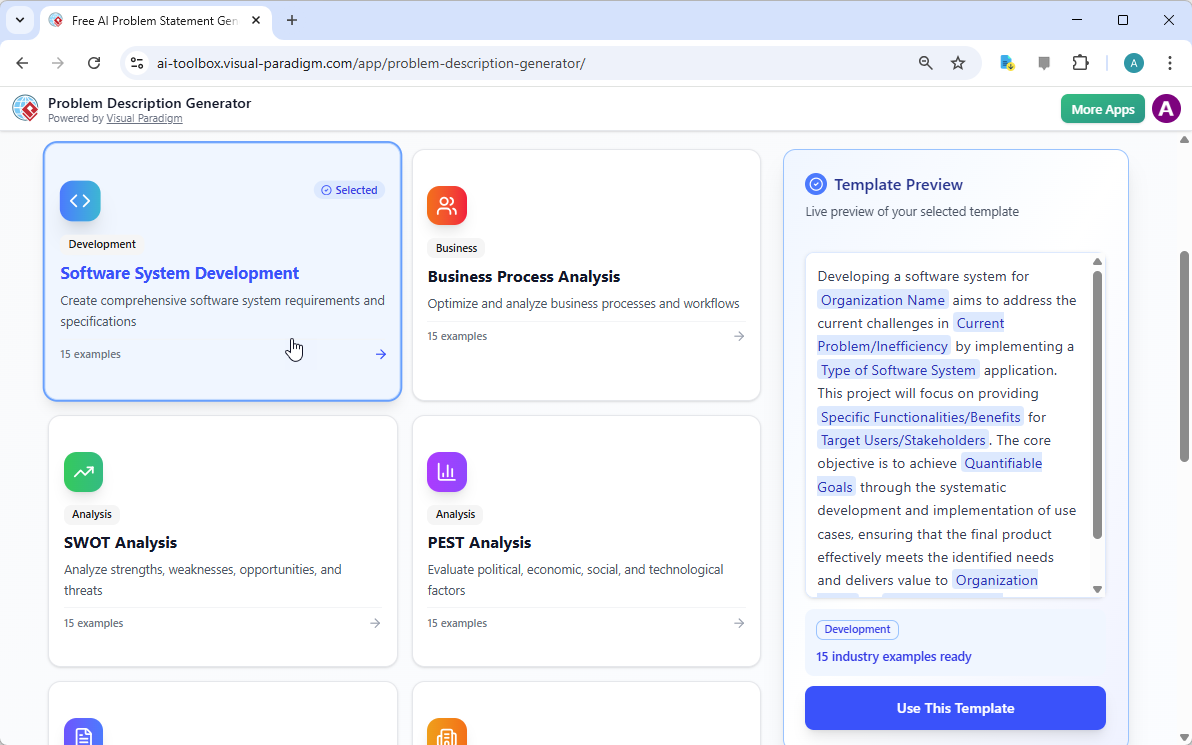
すべての偉大なプロジェクトは堅固な基盤から始まります。問題提起の場合、その基盤とは適切なテンプレートです。AI駆動型問題記述生成ツールを使用する最初のステップは、プロジェクトの性質に完全に合致するテンプレートを選択することです。

This is a screenshot of Visual Paradigm's AI Powered Problem Description Generator. It shows the first step, which involves c

、インターフェースは、さまざまなビジネスニーズに応じた多様なテンプレートを備えたクリーンで直感的なダッシュボードを提示します。ソフトウェア開発の取り組み、ビジネスプロセスの最適化、SWOT分析やPEST分析などの戦略的分析に取り組んでいる場合でも、それぞれに特化したテンプレートが見つかります。たとえば、「ソフトウェアシステム開発」テンプレートは、包括的なソフトウェアシステム要件と仕様を作成するのを支援するように特別に設計されています。正しいテンプレートを選択することで、すぐに専門的な構造を確立でき、問題のすべての重要な側面をカバーするよう導いてくれます。重要な詳細を見逃すことを防ぎます。このステップは非常に重要です。なぜなら、全体の問題記述のトーンと枠組みを決定するからです。これにより、次のステップがはるかに効率的かつ効果的になります。

ステップ2:変数を入力する – ナラティブをカスタマイズする

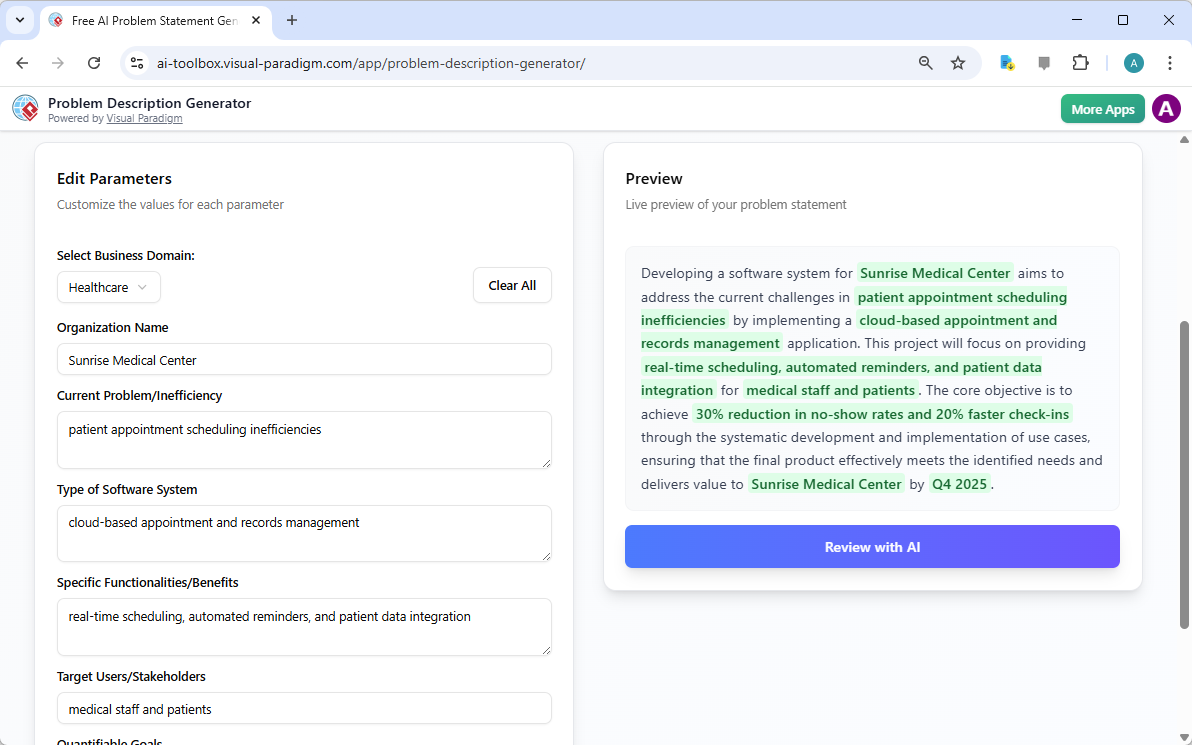
テンプレートを選択したら、魔法は「パラメータの編集」セクションで起こります。

This is a screenshot of Visual Paradigm's AI Powered Problem Description Generator. It shows the second step, which involves

はこの第二ステップを非常に明確に示しています。左側には、「組織名」、「現在の問題/非効率性」、「ソフトウェアシステムの種類」などの特定のフィールドが記入されたフォームが提示されます。ここが、プロジェクトの独自のDNAを注入する場所です。詳細を入力するたびに、右側のリアルタイムプレビューが動的に更新され、最終的な問題記述にどのように表示されるかを正確に確認できます。このライブプレビューは非常に強力です。入力内容がどのような物語を形成しているかを確認でき、不自然な表現を発見し、即座に修正できます。変数は緑色で強調表示されているため、テンプレートにどのコンテンツが挿入されているかを簡単に把握できます。このプロセスは単に空欄を埋めるだけではなく、問題、その影響、望ましい結果を明確に説明する一貫性のある物語を構築することです。リアルタイムで記述が進化する様子を確認できることは、明確さと自信の向上に革命的な効果をもたらします。

ステップ3:AIによるレビュー – 即時専門編集者

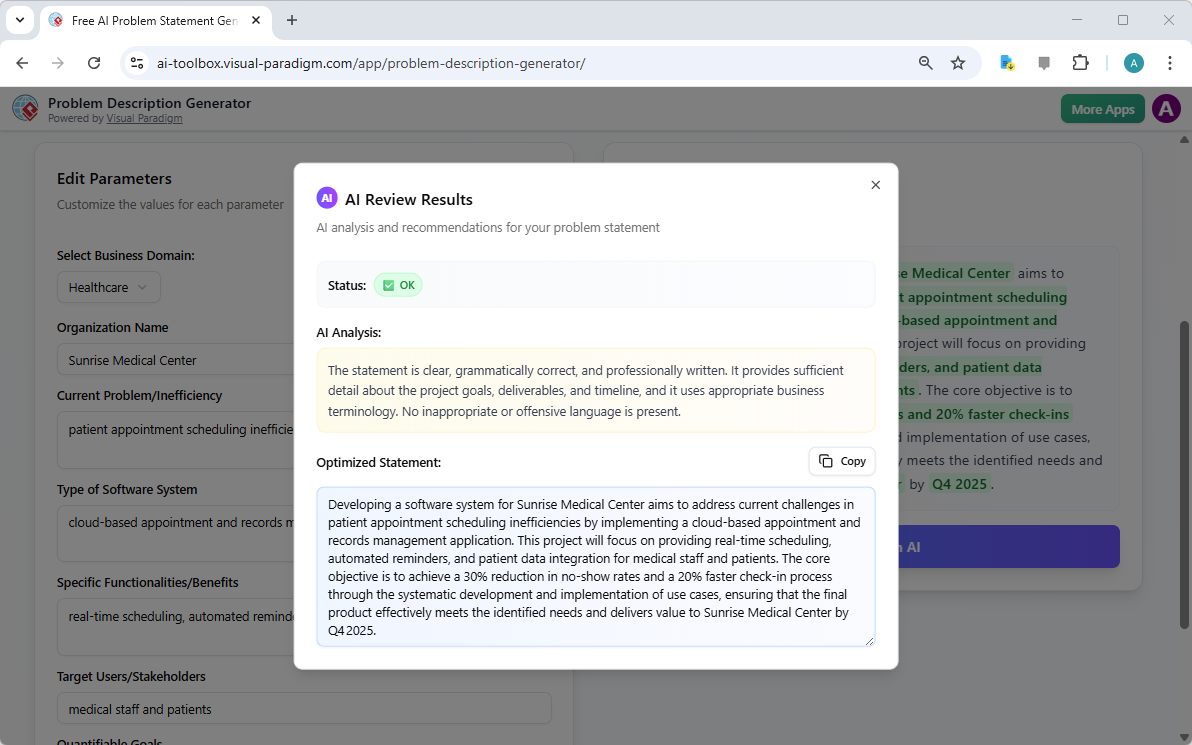
最終段階であり、おそらく最も強力なステップがAIによるレビューです。すべての変数を入力し、ライブプレビューに満足したら、「AIによるレビュー」ボタンをクリックできます。

This is a screenshot of Visual Paradigm's AI Powered Problem Description Generator. Once the details are filled in, you can c

はこの瞬間を完璧に捉えています。モーダルウィンドウが表示され、生成された問題提起の詳細な分析が提示されます。AIは文法チェックだけでなく、明確さ、完全性、論理的な流れ、適切なビジネス用語の使用を評価します。明確な「ステータス」(例:「OK」)と詳細な「AI分析」を提供し、強みを強調するとともに改善点を提案します。たとえば、AIはあなたの記述が明確でプロフェッショナルに書かれていることを確認するか、重要な目的をより効果的な表現に変えるよう提案するかもしれません。この即時で客観的なフィードバックは、仮想の専門編集者として機能し、問題提起が正確であるだけでなく、プロジェクトの目的を非常に効果的に伝えるように仕上げるのを支援します。この最終ステップにより、ステークホルダー、開発者、クライアントに自信を持って問題提起を共有できる状態になります。

プロジェクトの潜在能力を解き放つ

問題を定義することは、あらゆるイニシアチブにおいて最も難しい部分です。曖昧または不十分に表現された問題提起は、無駄な努力、方向性のずれ、最終的にはプロジェクトの失敗を招くことがあります。Visual Paradigmの問題記述生成ツールは、この根本的な課題を解決します。構造化されたテンプレートの力とAIの知性を組み合わせることで、効率的かつ効果的なワークフローを実現します。3つの簡単なステップ——テンプレートを選択し、変数を入力し、AIでレビューする——に従うだけで、初期のプロジェクトアイデアを数分で明確で説得力があり、プロフェッショナルな問題提起に変えることができます。このツールは単なる便利さではなく、プロジェクトが正しい足場からスタートできる戦略的優位性を提供します。推測をやめ、自信を持って定義を始めましょう。今すぐAI駆動型問題記述生成ツールを試してみましょうそして、その違いを体感してください。

関連リンク

問題からレポートへ:AIがUse Caseの旅をどう導くか

Discover how AI guides your use case journey from problem to report with Visual Paradigm’s intelligent development assistant.

新しいオンラインコースプラットフォームの立ち上げを担当するプロジェクトマネージャーだと想像してください。最初の課題は、問題を明確に表現し、それを機能的なシステムに変換することです。ここがUse Case駆動型開発アシスタントVisual Paradigm社のAI搭載ツールが登場します。単に文書作成を助けるだけでなく、曖昧なアイデアを詳細で実行可能なプロジェクト計画に変換するための完全で構造化されたワークフローをガイドします。このプロセスは非常に直感的で、経験豊富なビジネスアナリストと技術アーキテクトが一緒に働いているかのように感じられます。この詳細な解説では、実際のオンラインコースプラットフォームの事例を用いて、この強力なツールがUse Caseライフサイクル全体をどのように簡素化するかを紹介します。

要約:Use Case駆動型開発アシスタントの主なポイント

  • プロジェクトの核心的な目的を明確にするために、明確な問題文から始めましょう。

  • AIを活用して、候補となるUse Caseとアクターのリストを自動生成します。

  • AI生成のUse Caseとアクティビティ図.

  • 構造化されたMoSCoW法を用いて機能を優先順位付けし、高価値の作業に集中します。

  • 詳細なUse Caseの記述と実行可能なGherkinテストシナリオを生成します。

  • プロジェクトの範囲と計画を伝えるための包括的なレポートを作成します。

  • 中央ダッシュボードを活用して進捗を追跡し、単一の真実の源を維持します。

ステップ1:AIを活用した問題の定義

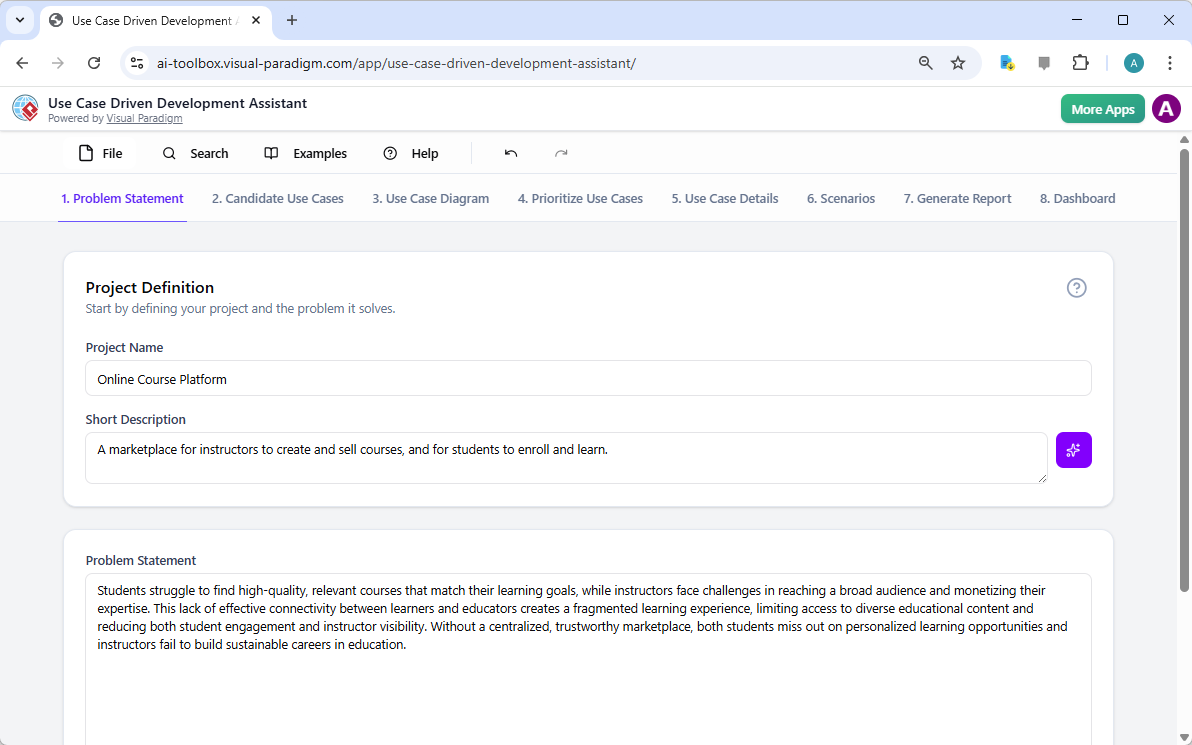
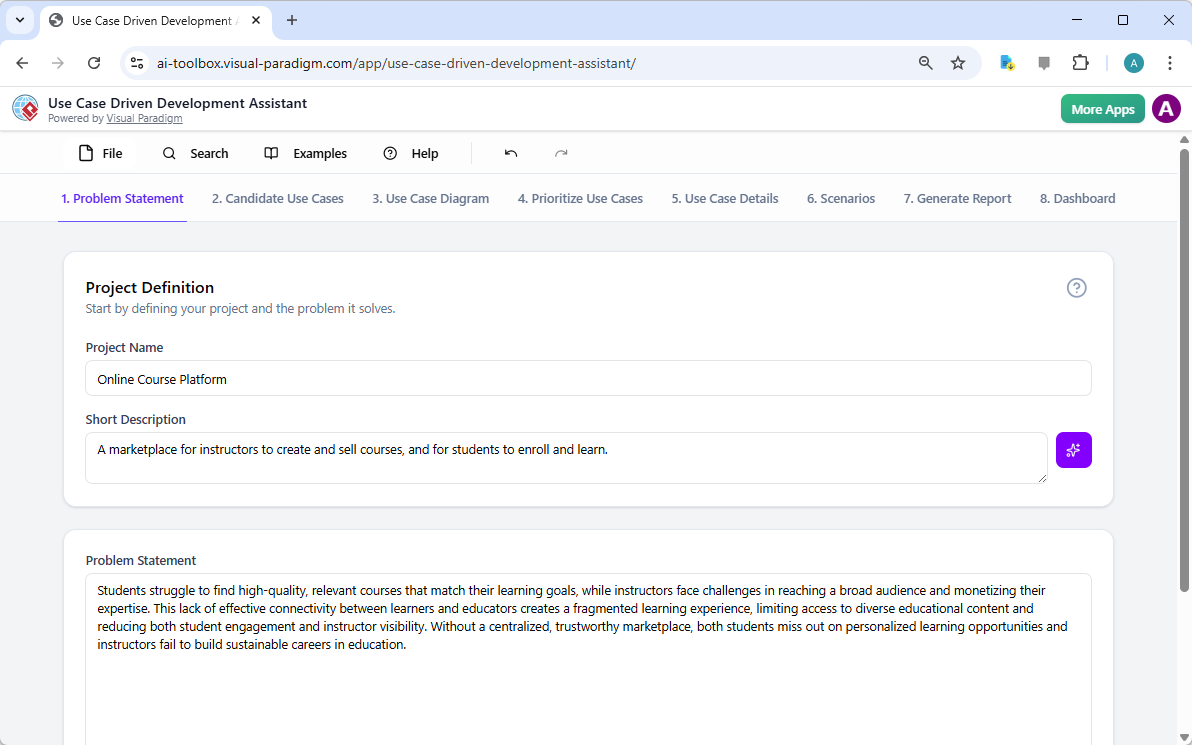
すべての成功するプロジェクトは、解決しようとしている問題を明確に理解することから始まります。Use Case駆動型開発アシスタントとの旅は「問題文」タブから始まります。ここではプロジェクト名と簡単な説明を入力します。AIはこの情報をもとに包括的な問題文を生成します。図1このツールはプロジェクト名「オンラインコースプラットフォーム」と簡単な説明「インストラクターがコースを作成・販売し、学生が登録して学べるマーケットプレイス」をもとに詳細な物語を生成しました。この物語は核心的な課題を明らかにしています:学生は関連するコースを見つけるのが困難であり、インストラクターは広範なオーディエンスに届くことや専門知識を収益化することに課題を抱えています。このAI生成の問題文はプロジェクトの基盤となり、チーム全員が最初から統一した理解を持つことを保証します。

This is a screenshot of Visual Paradigm's AI Powered Use Case Driven Development Assistant. we are now in step 1. It shows th

ステップ2:AIアシスタントを活用したUse Caseの特定

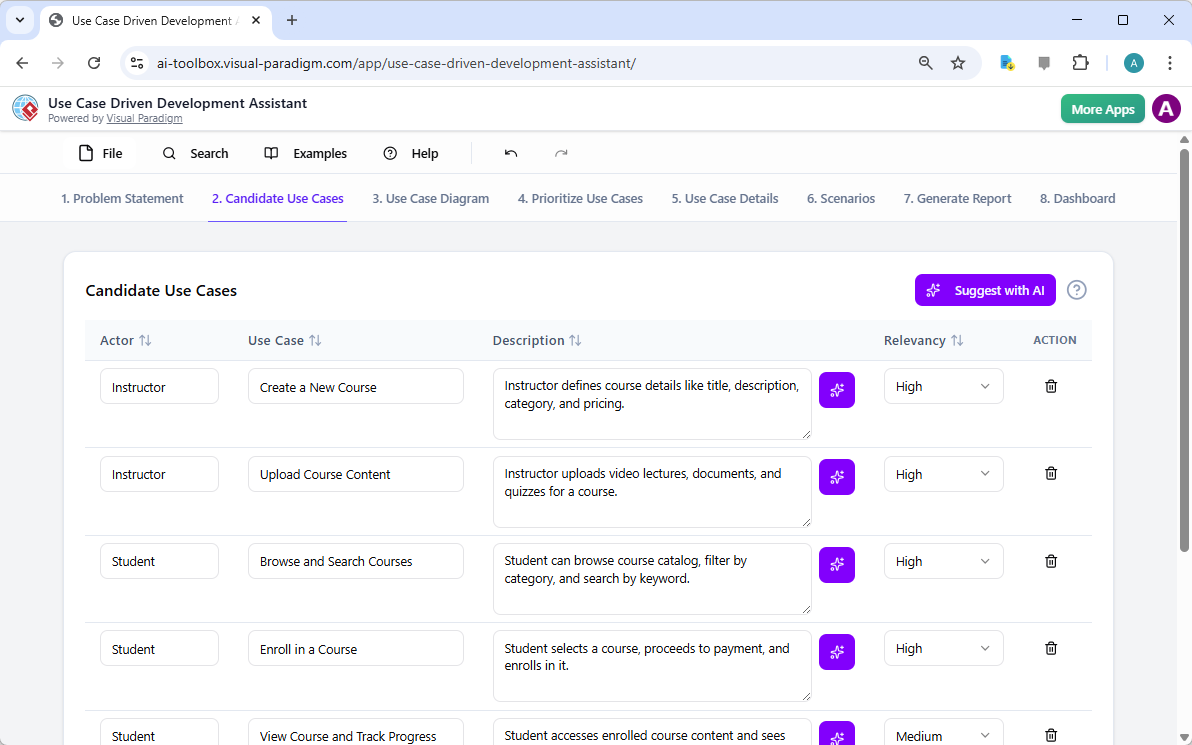
問題が定義されると、次に自然なステップとして、システムが提供すべき主要な機能を特定することです。アシスタントの「候補Use Case」タブ(図2)はこのプロセスを自動化します。問題文を分析した後、AIは各アクター(インストラクター、学生、管理者など)に関連付けられたUse Caseのリストを提案します。今回のオンラインコースプラットフォームの場合、AIは「新しいコースを作成する」「コースコンテンツをアップロードする」「コースを閲覧・検索する」「コースに登録する」などのUse Caseを提案しています。このリストはしっかりとした出発点となり、ブレインストーミング会議に費やす時間と労力を大幅に節約します。その後、これらの提案を精査し、新しいものを追加したり、不要なものを削除したりして、システム機能の包括的なリストを作成できます。

This is a screenshot of Visual Paradigm's AI Powered Use Case Driven Development Assistant. We are now in step 2. It shows a

ステップ3:Use Case図を用いたシステムの可視化

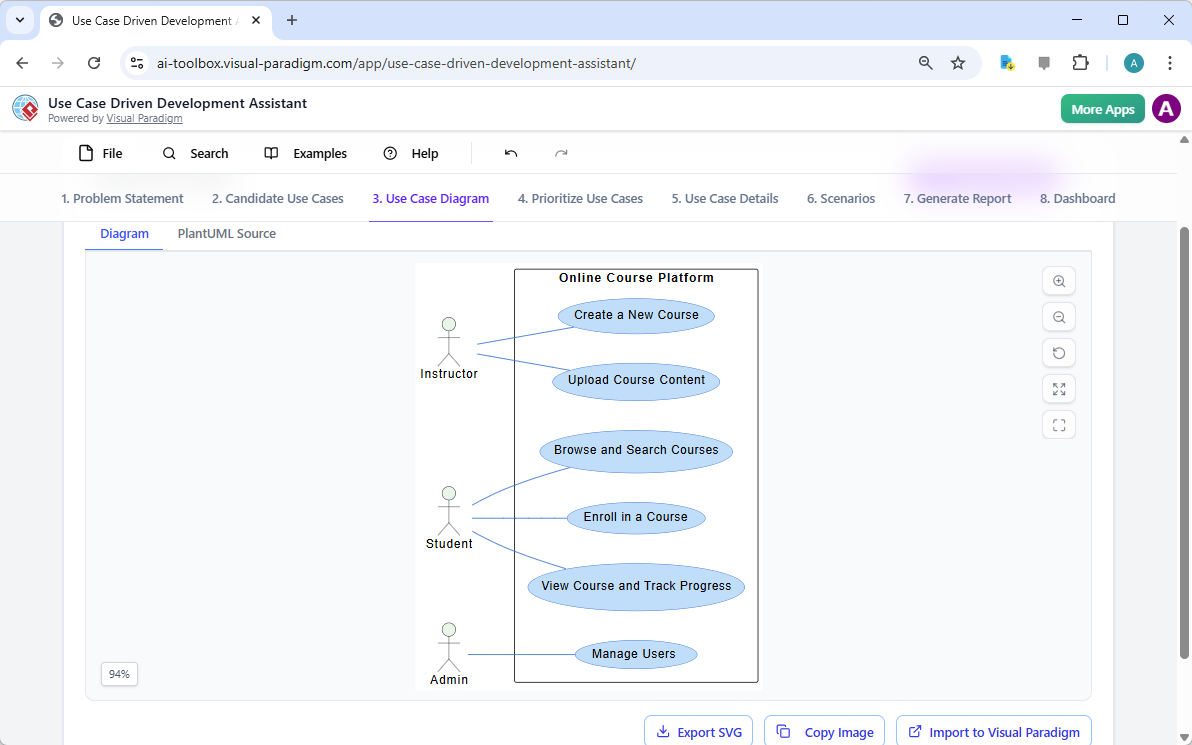
Use Caseを特定した後は、それらがシステムのアクターとどのように相互作用するかを可視化することが重要です。「Use Case図」タブは、図3)に示されるように、Use Caseとアクターのリストをもとに、明確でグラフィカルな表現を自動生成します。この図は、アクター(インストラクター、学生、管理者)とシステムの機能(新しいコースを作成するなど)の関係を示しています。AIによる生成により、図は正確でプロフェッショナルなフォーマットになっています。この視覚的補助は、ステークホルダー、開発者、デザイナーがテキスト中心の文書を読まなくても、システムの範囲や機能を迅速に理解できるため、非常に価値があります。

This is a screenshot of Visual Paradigm's AI Powered Use Case Driven Development Assistant. We are now in step 3. It shows a

ステップ4:最大の影響をもたらす機能の優先順位付け

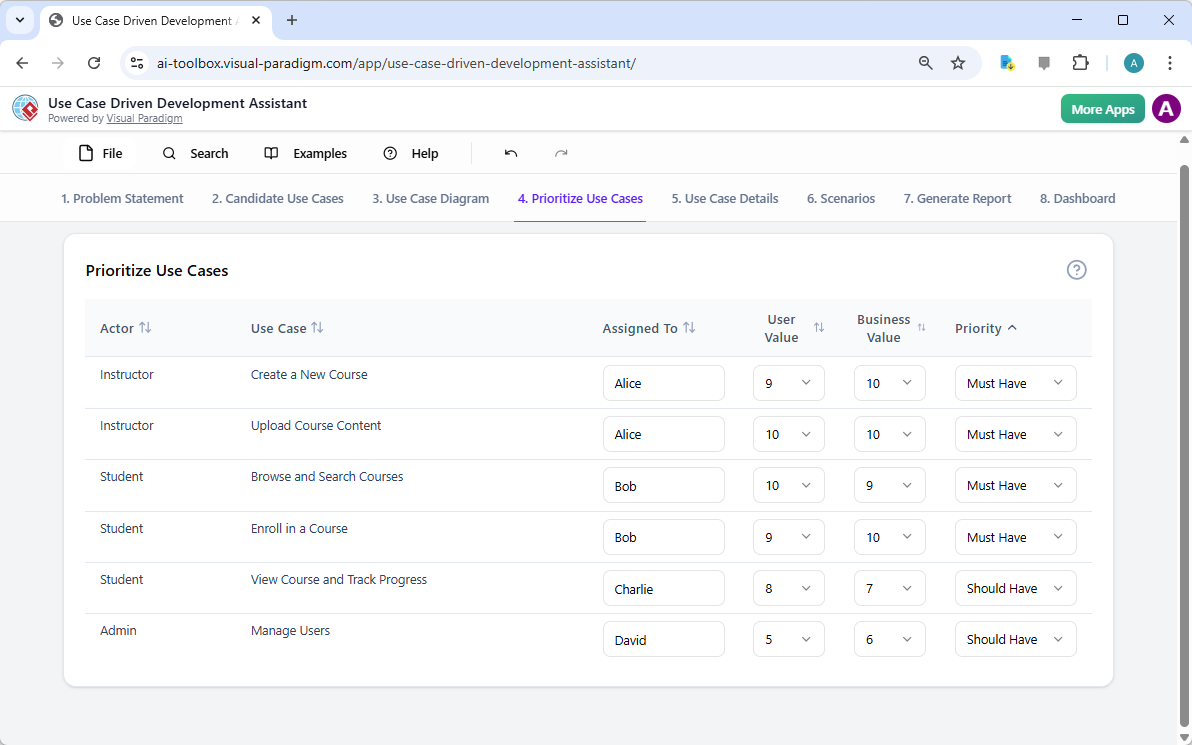
すべてのUse Caseが同等というわけではありません。プロジェクトの成功は、最も重要な機能を最初に注力することにかかっていることが多いです。「Use Caseの優先順位付け」タブ(画像4、これは強力なフレームワークを提供します。各ユースケースに対してユーザー価値とビジネス価値(0〜10のスケール)を割り当て、その後MoSCoW優先順位付け法(必須、重要、望ましい、保留)を適用できます。例として、AIは「新しいコースを作成する」および「コースコンテンツをアップロードする」が、プラットフォームのコア機能にとって不可欠であるため、「必須」機能であることを明らかにしました。この構造的な優先順位付けにより、開発チームはユーザーおよびビジネスに最大の価値を提供することに集中でき、低優先度の機能に無駄な努力を費やすことを防ぎます。

This is a screenshot of Visual Paradigm's AI Powered Use Case Driven Development Assistant. We are now in step 4. It shows th

ステップ5:ユースケースの詳細化とアクティビティ図の生成

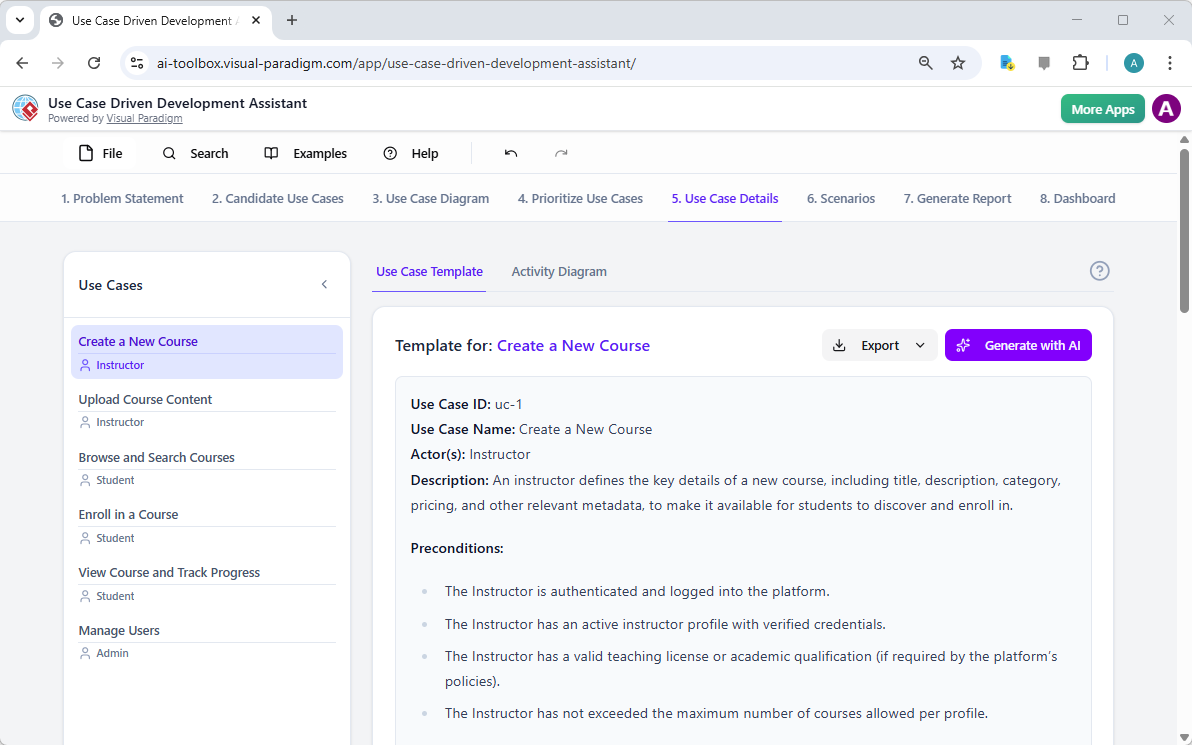
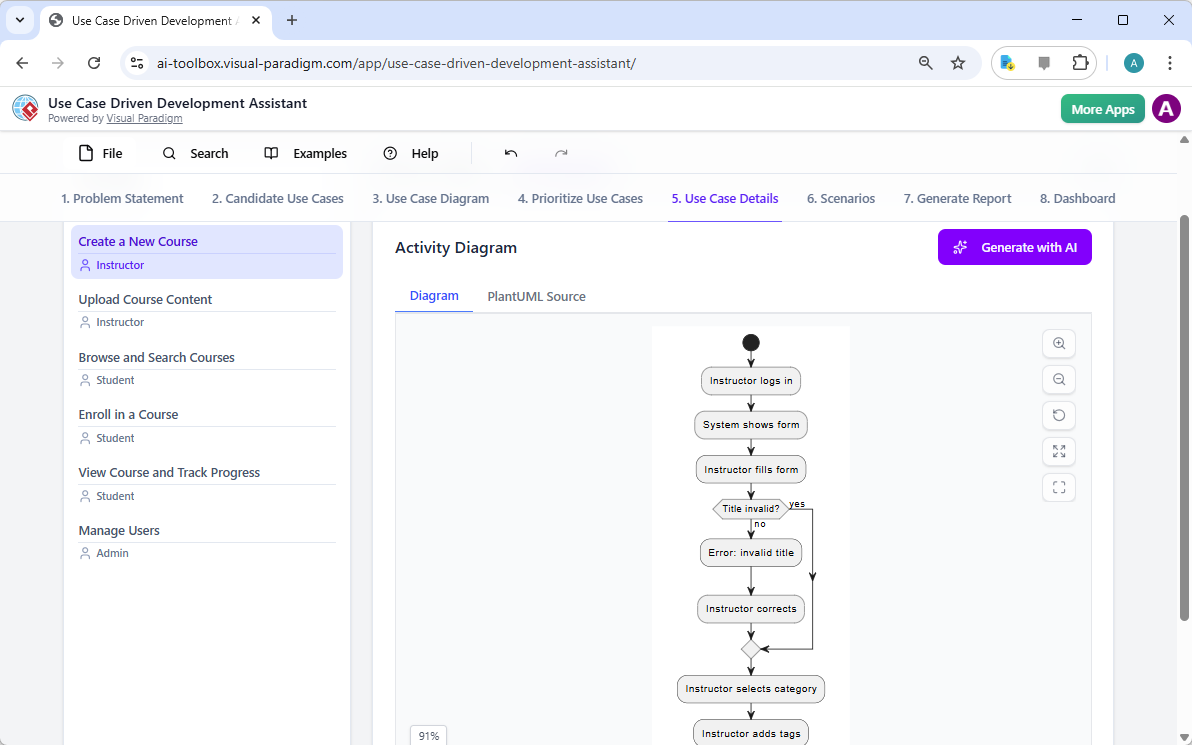
高レベルのビューを確立した後、次のステップは各ユースケースの詳細に深く入り込むことです。「ユースケース詳細」タブは、画像5、選択されたユースケース用の包括的なテンプレートを作成できます。AIは事前条件、主な流れ、代替フローを含む詳細な記述を生成できます。たとえば「新しいコースを作成する」ユースケースの場合、AIは必要な手順を明確に示す構造化されたテンプレートを提供します。理解をさらに深めるために、アシスタントは同じユースケース用に「アクティビティ図」を生成でき、画像6のように表示されます。この図は、インストラクターがログインしてからコースが保存されるまでのステップバイステップのワークフローを視覚的に示しています。このような詳細は、開発者およびQAチームにとって不可欠です。

This is a screenshot of Visual Paradigm's AI Powered Use Case Driven Development Assistant. We are now in step 5. It shows thThis is a screenshot of Visual Paradigm's AI Powered Use Case Driven Development Assistant. We are still in step 5. It shows

ステップ6:テストシナリオとシーケンス図の生成

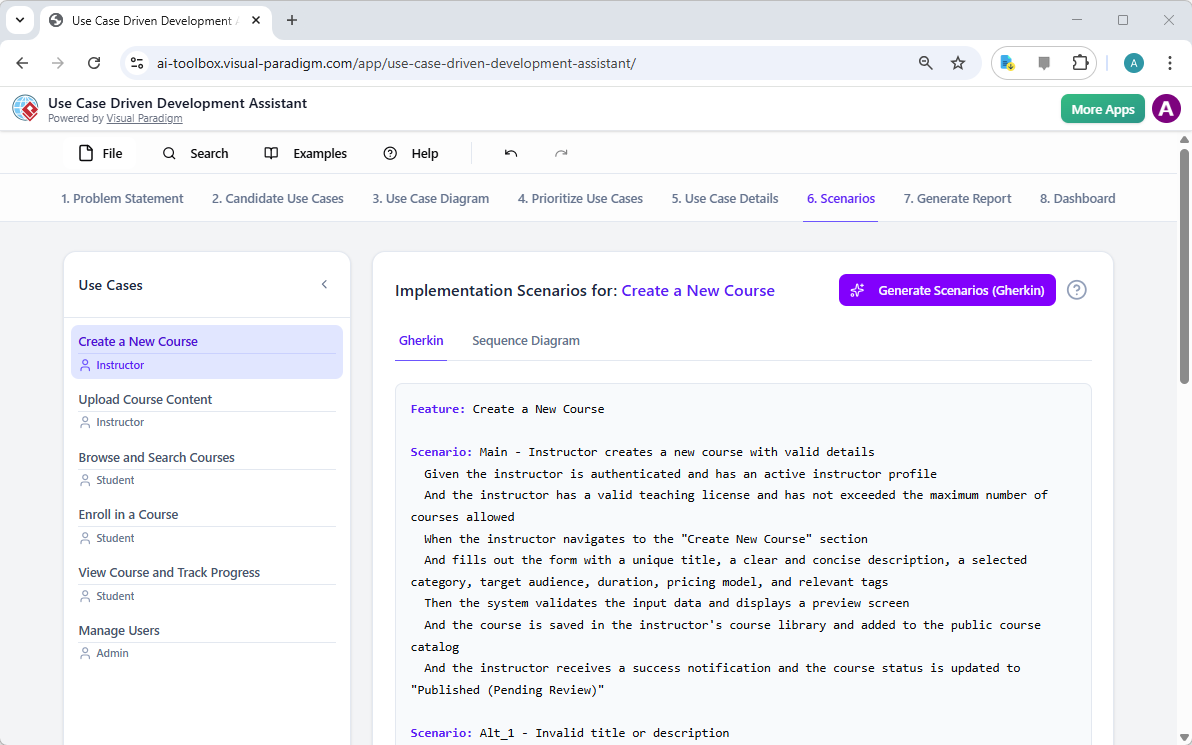
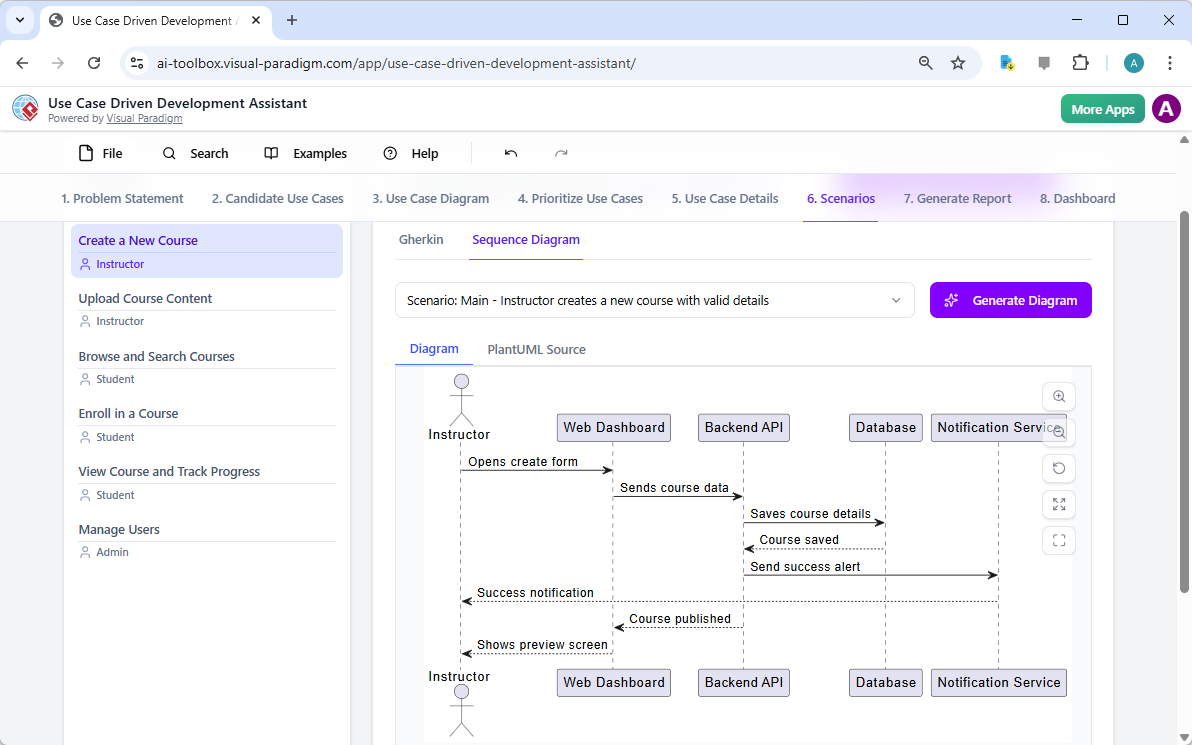
開発チームにとって、次の重要なステップはテスト可能なシナリオを作成することです。「シナリオ」タブは、画像7、ユースケースの記述から直接実行可能なGherkinシナリオを生成できます。これらのシナリオは、平易な言語(与えられた条件・実行する操作・期待される結果)で記述されており、自動テストに最適です。AIは主なシナリオと、無効なタイトルの場合の代替シナリオなどを生成できます。システムの内部動作をさらに明確にするために、アシスタントは「シーケンス図」を生成でき、画像8のように表示されます。この図は、インストラクター、Webダッシュボード、バックエンドAPI、データベース、通知サービスの間の相互作用を示しており、システムのアーキテクチャとデータフローを明確に描いています。

This is a screenshot of Visual Paradigm's AI Powered Use Case Driven Development Assistant. We are in step 6. It shows the AIThis is a screenshot of Visual Paradigm's AI Powered Use Case Driven Development Assistant. We are still in step 6. It shows

ステップ7:包括的なプロジェクトレポートの作成

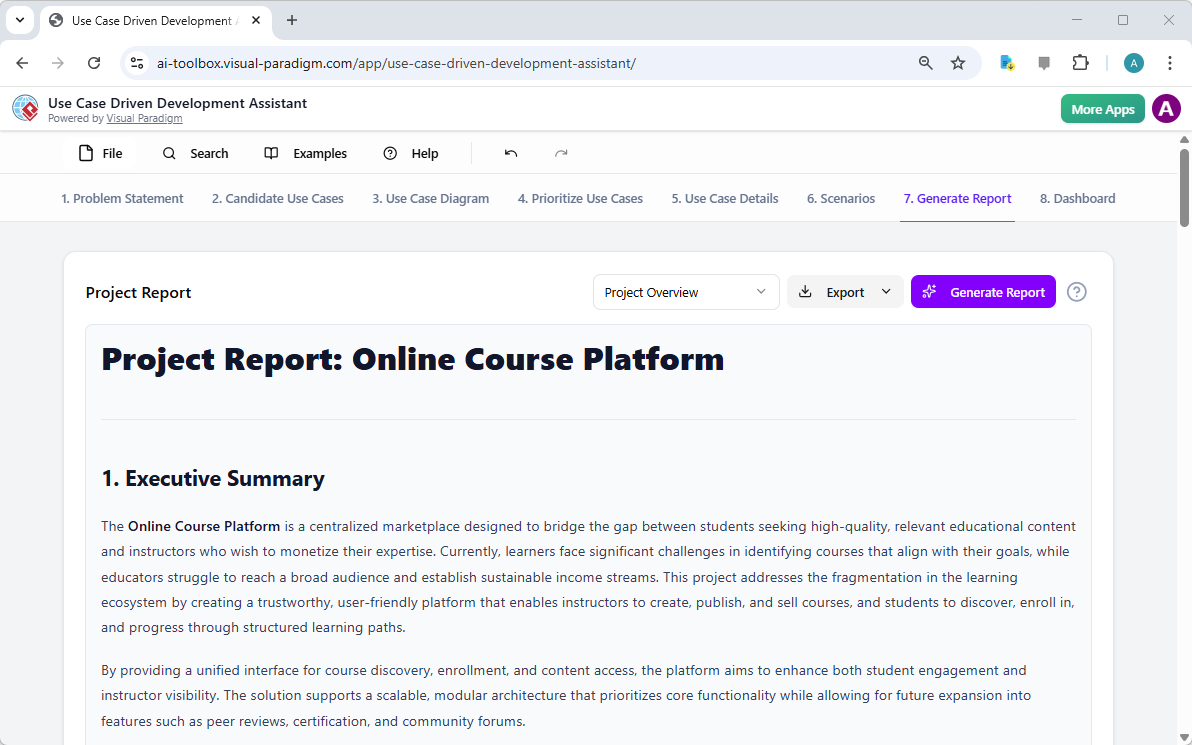
開発プロセス全体を通じて、さまざまなステークホルダーにプロジェクトの状況と計画を伝えることが不可欠です。「レポートの生成」タブは、画像9のように表示され、これを容易にします。プロジェクト概要、実装計画、QAテスト計画、開発者タスクリストなど、さまざまなレポートを生成できます。これらのレポートはAIの支援を受けて作成されるため、一貫性と包括性が保証されます。たとえば、「プロジェクト概要」レポートは、経営層向け要約、主要機能、優先順位付けの根拠などを含むプロジェクト全体を要約しています。この単一の信頼できる情報源により、すべての関係者が一致した理解を持ち、情報が共有されます。

This is a screenshot of Visual Paradigm's AI Powered Use Case Driven Development Assistant. We are in step 7. It shows a repo

ステップ8:ダッシュボードによる進捗の追跡

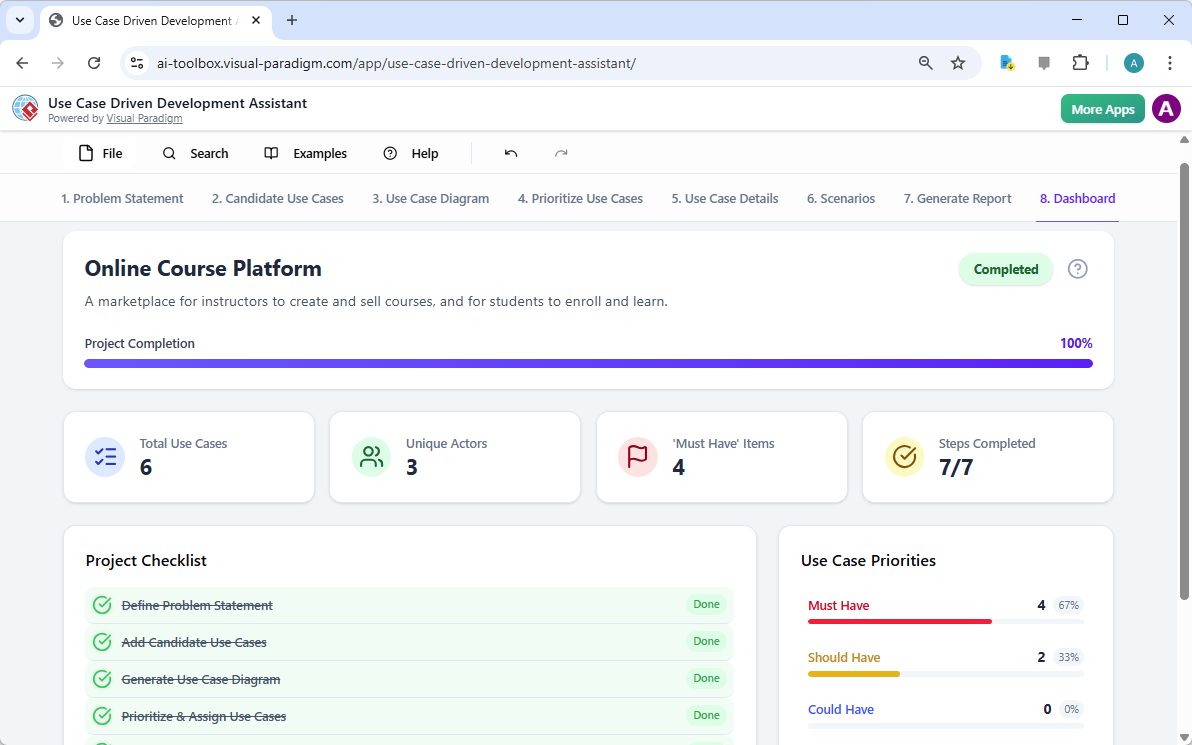
最後に、このプロセスは「ダッシュボード」で完結します。画像10。この中央ハブは、プロジェクトの状況を高レベルで把握できるようにします。プロジェクトの完了率、ユースケースの総数、および「必須」項目の数を表示します。プロジェクトチェックリストにより、各ステップが完了すると「完了」にマークされ、進捗を追跡できます。プロジェクトの健全性に関するリアルタイムの可視化は、プロジェクトマネージャーやチームリーダーにとって非常に貴重であり、ボトルネックを特定し、プロジェクトが計画通りに進むように保証できます。

This is a screenshot of Visual Paradigm's AI Powered Use Case Driven Development Assistant. We are in step 8. It shows the da

ユースケース駆動型開発アシスタントは単なるツール以上の存在です。ソフトウェア開発プロセスに明確さと効率をもたらす包括的なワークフローです。問題定義からレポート生成まで、AIを各段階で活用することで、チームが要件から実装へと迅速かつ正確に移行できるように支援します。その結果、ビジネス目標とユーザーのニーズに合致した、構造的で詳細に文書化されたプロジェクトが生まれます。ユースケース開発プロセスを効率化したいのであれば、このAI駆動のツールは強力な解決策です。

どうすれば次のプロジェクトを変革できるか、実際に見てみませんか?ユースケース駆動型開発アシスタントが次のプロジェクトをどのように変革できるか?今すぐ試してみましょう.

関連リンク

ユースケースモデリングは、機能要件を把握するために使用される基本的なソフトウェア工学技術です機能要件外部のアクターとシステムの内部機能の相互作用を可視化することで。現代のプラットフォームは現在、AI駆動の自動化図の最適化、包括的なユースケース記述を作成し、モデルをテストケースやアクティビティ図に変換して、設計の一貫性とトレーサビリティを維持する。高度なツールとして、イベントフロー編集ツールシナリオアナライザー開発チームが構造化されたイベントシーケンスを検証および文書化し、全体的なシステムの明確性を向上させることを可能にする。

  1. ユースケース図とは何か? – UMLモデリングの完全ガイド:基本的なコンポーネント、目的、およびベストプラクティス要件モデリングのためのもの。

  2. ステップバイステップのユースケース図チュートリアル – 初心者からプロまで:ユーザーを基礎から応用技術まで効果的なユースケース図を作成するためのもの。

  3. ユースケースモデリングについて知っておくべきすべて:ユースケースモデリングの原則と応用システム設計におけるユースケースモデリングのもの。

  4. Visual Paradigm – ユースケース記述機能: 専門的なツールの詳細。ユーザーのインタラクションを正確に記録するために使用される。ユーザーのインタラクションを正確に記録する そして構造化されたシステムの挙動。

  5. Visual ParadigmによるAI駆動型ユースケース図の習得: AIを活用して作成するためのチュートリアル。インテリジェントでダイナミックな図 現代のソフトウェアシステム向け。

  6. Visual Paradigmのイベントフロー編集ツールの使い方ガイド: ドキュメント化のためのステップバイステップの説明。構造化されたイベントの順序 ユースケースシナリオ内での。

  7. ユースケースシナリオアナライザーによるシナリオの解明: アナライザーを使用して検査および。インタラクションフローを最適化する システムの明確さを高めるために。

  8. ユースケースをアクティビティ図に変換する – AI駆動の変換: その説明を提供するリソース。自動変換 ユースケースを詳細なシステムワークフローに変換する。

  9. AIを用いたユースケース図からシナリオとテストケースの生成: AIツールが作成を自動化する方法についての探求。要件駆動型のテスト手順.

  10. ユースケース図ギャラリー – テンプレートと例: 選りすぐりのコレクション。実際の例 インスピレーション、学習、および迅速なプロトタイピングのために。

From Problem to Report: How AI Guides Your Use Case Journey

Discover how AI guides your use case journey from problem to report with Visual Paradigm’s intelligent development assistant.

Imagine you’re a project manager tasked with launching a new online course platform. The first challenge is to articulate the problem clearly and then translate it into a functional system. This is where the Use Case Driven Development Assistant, an AI-powered tool from Visual Paradigm, steps in. It doesn’t just help you write documents; it guides you through a complete, structured workflow to transform a vague idea into a detailed, actionable project plan. The process is so intuitive, it feels like having a seasoned business analyst and a technical architect working side-by-side with you. This deep dive explores the core features of this powerful tool, using a real-world example of an online course platform to show how it streamlines the entire use case lifecycle.

Quick Summary: Key Takeaways from the Use Case Driven Development Assistant

  • Start with a clear problem statement to define the project’s core objective.

  • Use AI to automatically generate a list of candidate use cases and actors.

  • Visualize system functionality with AI-generated Use Case and Activity Diagrams.

  • Prioritize features using a structured MoSCoW method to focus on high-value work.

  • Generate detailed use case descriptions and executable Gherkin test scenarios.

  • Create comprehensive reports to communicate project scope and plans.

  • Track progress and maintain a single source of truth with a central dashboard.

Step 1: Defining the Problem with AI

Every successful project begins with a clear understanding of the problem it aims to solve. The journey with the Use Case Driven Development Assistant starts in the “Problem Statement” tab. Here, you input a project name and a short description. The AI then leverages this information to generate a comprehensive problem statement. As seen in Image 1, the tool has taken the project name “Online Course Platform” and the short description “A marketplace for instructors to create and sell courses, and for students to enroll and learn” to produce a detailed narrative. This narrative identifies the core pain points: students struggle to find relevant courses, while instructors face challenges in reaching a broad audience and monetizing their expertise. This AI-generated problem statement serves as the project’s foundation, ensuring everyone on the team shares a unified understanding from the very beginning.

This is a screenshot of Visual Paradigm's AI Powered Use Case Driven Development Assistant. we are now in step 1. It shows th

Step 2: Identifying Use Cases with AI Assistance

Once the problem is defined, the next logical step is to identify the key functionalities the system must provide. The assistant’s “Candidate Use Cases” tab, shown in Image 2, automates this process. After analyzing the problem statement, the AI suggests a list of use cases, each associated with an actor (like Instructor, Student, or Admin). For our online course platform, the AI proposes use cases such as “Create a New Course,” “Upload Course Content,” “Browse and Search Courses,” and “Enroll in a Course.” This list provides a solid starting point, saving significant time and effort that would otherwise be spent on brainstorming sessions. You can then refine these suggestions, add new ones, or delete irrelevant ones to create a comprehensive list of system functionalities.

This is a screenshot of Visual Paradigm's AI Powered Use Case Driven Development Assistant. We are now in step 2. It shows a

Step 3: Visualizing the System with a Use Case Diagram

After identifying the use cases, it’s crucial to visualize how they interact with the system’s actors. The “Use Case Diagram” tab, illustrated in Image 3, takes the list of use cases and actors and automatically generates a clear, graphical representation. This diagram shows the relationships between the actors (Instructor, Student, Admin) and the system’s functions (Create a New Course, etc.). The AI-powered generation ensures that the diagram is accurate and professionally formatted. This visual aid is invaluable for communication, allowing stakeholders, developers, and designers to quickly grasp the system’s scope and functionality without wading through text-heavy documents.

This is a screenshot of Visual Paradigm's AI Powered Use Case Driven Development Assistant. We are now in step 3. It shows a

Step 4: Prioritizing Features for Maximum Impact

Not all use cases are created equal. A project’s success often hinges on focusing on the most critical features first. The “Prioritize Use Cases” tab, as shown in Image 4, provides a powerful framework for this. It allows you to assign a user value and business value (on a scale of 0-10) to each use case and then apply the MoSCoW prioritization method (Must Have, Should Have, Could Have, Won’t Have). In our example, the AI has helped identify that “Create a New Course” and “Upload Course Content” are “Must Have” features, as they are essential for the platform’s core function. This structured prioritization ensures that the development team focuses on delivering the highest value to users and the business, avoiding wasted effort on low-priority features.

This is a screenshot of Visual Paradigm's AI Powered Use Case Driven Development Assistant. We are now in step 4. It shows th

Step 5: Detailing Use Cases and Generating Activity Diagrams

With the high-level view established, the next step is to dive into the details of each use case. The “Use Case Details” tab, shown in Image 5, allows you to create a comprehensive template for a selected use case. The AI can generate a detailed description, including pre-conditions, main flow, and alternative flows. For the “Create a New Course” use case, the AI provides a structured template that outlines the necessary steps. To further enhance understanding, the assistant can generate an “Activity Diagram” for the same use case, as seen in Image 6. This diagram visually maps out the step-by-step workflow, showing the sequence of actions from the instructor logging in to the course being saved. This level of detail is essential for both developers and QA teams.

This is a screenshot of Visual Paradigm's AI Powered Use Case Driven Development Assistant. We are now in step 5. It shows thThis is a screenshot of Visual Paradigm's AI Powered Use Case Driven Development Assistant. We are still in step 5. It shows

Step 6: Generating Test Scenarios and Sequence Diagrams

For a development team, the next critical step is to create testable scenarios. The “Scenarios” tab, shown in Image 7, allows you to generate executable Gherkin scenarios directly from your use case descriptions. These scenarios, written in a plain-language format (Given-When-Then), are perfect for automated testing. The AI can generate a main scenario and alternative scenarios, such as one for an invalid title. To further clarify the system’s internal workings, the assistant can generate a “Sequence Diagram,” as seen in Image 8. This diagram shows the interaction between the instructor, the web dashboard, the backend API, the database, and the notification service, providing a clear picture of the system’s architecture and data flow.

This is a screenshot of Visual Paradigm's AI Powered Use Case Driven Development Assistant. We are in step 6. It shows the AIThis is a screenshot of Visual Paradigm's AI Powered Use Case Driven Development Assistant. We are still in step 6. It shows

Step 7: Creating Comprehensive Project Reports

Throughout the development process, it’s essential to communicate the project’s status and plans to various stakeholders. The “Generate Report” tab, as shown in Image 9, makes this easy. You can generate a variety of reports, such as a “Project Overview,” “Implementation Plan,” “QA Test Plan,” or a “Developer Task List.” These reports are generated with AI assistance, ensuring they are consistent and comprehensive. For example, the “Project Overview” report summarizes the entire project, including the executive summary, key features, and the rationale behind the prioritization. This single source of truth ensures everyone is aligned and informed.

This is a screenshot of Visual Paradigm's AI Powered Use Case Driven Development Assistant. We are in step 7. It shows a repo

Step 8: Tracking Progress with the Dashboard

Finally, the journey culminates in the “Dashboard,” as seen in Image 10. This central hub provides a high-level overview of the project’s status. It shows the project completion percentage, the total number of use cases, and the number of “Must Have” items. The project checklist allows you to track your progress, with each completed step marked as “Done.” This real-time visibility into the project’s health is invaluable for project managers and team leads, enabling them to identify bottlenecks and ensure the project stays on track.

This is a screenshot of Visual Paradigm's AI Powered Use Case Driven Development Assistant. We are in step 8. It shows the da

The Use Case Driven Development Assistant is more than just a tool; it’s a comprehensive workflow that brings clarity and efficiency to the software development process. By leveraging AI at every stage—from defining the problem to generating reports—it helps teams move from requirements to implementation faster and with greater accuracy. The result is a well-structured, well-documented project that is aligned with business goals and user needs. If you’re looking to streamline your use case development process, this AI-powered tool is a powerful solution.

Ready to see how the Use Case Driven Development Assistant can transform your next project? Try it now.

Related Links

Use case modeling is a fundamental software engineering technique used to capture functional requirements by visualizing the interactions between external actors and a system’s internal functions. Modern platforms now incorporate AI-powered automation to refine diagrams, generate comprehensive use case descriptions, and convert models into test cases or activity diagrams to maintain design consistency and traceability. Advanced tools like the Flow of Events editor and Scenario Analyzer allow development teams to validate and document structured event sequences to improve overall system clarity.

  1. What Is a Use Case Diagram? – A Complete Guide to UML Modeling: An in-depth overview covering essential components, purposes, and best practices for requirements modeling.

  2. Step-by-Step Use Case Diagram Tutorial – From Beginner to Pro: A practical resource that guides users through foundational to advanced techniques for creating effective use case diagrams.

  3. All You Need to Know About Use Case Modeling: A comprehensive exploration of the principles and applications of use case modeling in system design.

  4. Visual Paradigm – Use Case Description Features: Details specialized tools used to precisely document user interactions and structured system behavior.

  5. Mastering AI-Driven Use Case Diagrams with Visual Paradigm: A tutorial on leveraging AI to create intelligent, dynamic diagrams for modern software systems.

  6. Guide to Using the Flow of Events Editor in Visual Paradigm: Step-by-step instructions for documenting structured event sequences within a use case scenario.

  7. Unraveling Scenarios with the Use Case Scenario Analyzer: A guide on using analyzers to examine and refine interaction flows for increased system clarity.

  8. Convert Use Case to Activity Diagram – AI-Powered Transformation: A resource explaining the automated conversion of use cases into detailed system workflows.

  9. Generating Scenarios and Test Cases from Use Case Diagrams Using AI: An exploration of how AI tools automate the creation of requirement-driven test procedures.

  10. Use Case Diagram Gallery – Templates & Examples: A curated collection of real-world examples for inspiration, learning, and rapid prototyping.

Crafting a Crystal-Clear Problem Statement for Software Development

Use Visual Paradigm’s AI-powered tool to craft clear, structured problem statements for software projects with templates and real-time feedback.

Struggling to articulate the core challenge your software project aims to solve? The Problem Description Generator from Visual Paradigm is the ultimate AI-powered tool to transform your project’s initial chaos into a clear, focused, and compelling narrative. This innovative solution empowers project managers, business analysts, and product owners to define the “why” behind their work with unprecedented speed and precision. By leveraging a library of structured templates and real-time AI feedback, this tool ensures your problem statement is not just written, but optimized for maximum impact from day one. It’s the secret weapon for launching projects with laser focus and setting the stage for success.

Key Takeaways:

  • Use a template-driven approach to ensure your problem statement is comprehensive and structured.

  • Fill in specific variables to customize the description for your unique project.

  • Get instant AI feedback to refine your problem statement for clarity and effectiveness.

  • Start any project with a solid, well-articulated understanding of the core issue.

Step 1: Choose Your Template – The Foundation of a Strong Problem Statement

Every great project begins with a solid foundation, and for a problem statement, that foundation is the right template. The first step in using the AI-Powered Problem Description Generator is to select a template that perfectly aligns with your project’s nature. As shown in

This is a screenshot of Visual Paradigm's AI Powered Problem Description Generator. It shows the first step, which involves c

, the interface presents a clean, intuitive dashboard with a variety of templates for different business needs. Whether you’re tackling a software development initiative, optimizing a business process, or conducting a strategic analysis like a SWOT or PEST analysis, you can find a dedicated template. The “Software System Development” template, for instance, is specifically designed to help you create comprehensive software system requirements and specifications. By selecting the correct template, you immediately establish a professional structure that guides you to cover all critical aspects of the problem, ensuring no vital detail is overlooked. This step is crucial because it sets the tone and framework for the entire problem description, making the subsequent steps much more efficient and effective.

Step 2: Fill in the Variables – Customize Your Narrative

Once you’ve chosen your template, the magic happens in the “Edit Parameters” section.

This is a screenshot of Visual Paradigm's AI Powered Problem Description Generator. It shows the second step, which involves

vividly illustrates this second step. On the left, you’re presented with a form filled with specific fields, such as “Organization Name,” “Current Problem/Inefficiency,” and “Type of Software System.” This is where you inject your project’s unique DNA. As you type in the details, the tool’s real-time preview on the right side dynamically updates, showing you exactly how your filled-in variables will look in the final problem description. This live preview is incredibly powerful. It allows you to see the narrative form your inputs are creating, spot any awkward phrasing, and make adjustments on the fly. The variables are highlighted in green, making it easy to see exactly what content is being inserted into the template. This process is not just about filling blanks; it’s about shaping a coherent story that clearly explains the problem, its impact, and the desired outcome. The ability to see your description evolve in real-time is a game-changer for clarity and confidence.

Step 3: Review with AI – Your Instant Expert Editor

The final, and arguably most powerful, step is the AI review. After you’ve filled in all the variables and are satisfied with the live preview, you can click the “Review with AI” button.

This is a screenshot of Visual Paradigm's AI Powered Problem Description Generator. Once the details are filled in, you can c

captures this moment perfectly. A modal window appears, presenting a detailed analysis of your generated problem statement. The AI doesn’t just check for grammar; it evaluates the statement for clarity, completeness, logical flow, and the use of appropriate business terminology. It provides a clear “Status” (like “OK”) and a detailed “AI Analysis” that highlights strengths and suggests improvements. For example, the AI might confirm that your statement is clear and professionally written, or it might suggest a more impactful way to phrase a key objective. This instant, objective feedback acts as a virtual expert editor, helping you refine your problem statement to ensure it is not only correct but also highly effective in communicating the project’s purpose. This final step ensures that your problem statement is ready to be shared with stakeholders, developers, or clients with confidence.

Unlock Your Project’s Potential

Defining a problem is often the hardest part of any initiative. A vague or poorly articulated problem statement can lead to wasted effort, misaligned solutions, and ultimately, project failure. The Problem Description Generator from Visual Paradigm solves this fundamental challenge. It combines the power of structured templates with the intelligence of AI to create a workflow that is both efficient and effective. By following the three simple steps—choose a template, fill in the variables, and review with AI—you can transform your initial project idea into a clear, compelling, and professional problem statement in minutes. This tool is not just a convenience; it’s a strategic advantage that ensures your project starts on the right foot. Stop guessing and start defining with confidence. Try the AI-Powered Problem Description Generator now and experience the difference it makes.

Related Links