UMLアクティビティ図の包括的ガイド:手動モデリングからAI駆動の自然言語生成まで

序論:現代のソフトウェア開発におけるUMLアクティビティ図の進化する役割

UMLアクティビティ図は、統一モデリング言語(UML)における行動モデリングの最も強力で表現力豊かな形式の一つを表しています。クラス図やコンポーネント図などの静的構造図とは異なり、アクティビティ図は動的動作システムの動作—プロセスがどのように展開され、意思決定が行われ、ワークフローが時間とともに進行するかを対象としています。

当初は、ビジネスプロセスやソフトウェアワークフローを形式的でありながら直感的な方法でモデル化する手段として考案されたUMLアクティビティ図は、高レベルのビジネス要件と詳細なシステム論理の間のギャップを埋める基盤的なツールへと進化しました。今日では、要件分析、ユーザーエクスペリエンス設計、プロセス自動化、さらにはアルゴリズム的ワークフロー仕様の分野において不可欠な存在となっています。

UMLアクティビティ図のコアコンセプトと構造的意味論

その基盤において、アクティビティ図はフローに基づく表現アクション、意思決定、イベントの順序を表すものです。明確な記号語彙を用いて、プロセス要素を視覚的に明確かつ意味的に厳密に表現します。


初期ノード(●)ワークフローの開始点を示します。黒い実心円であり、図の左上に通常表示され、プロセスの開始位置(たとえばユーザーによる予約の開始やシステムがリクエストを受け取るなど)を示します。

  • アクションノード(丸角長方形)実行可能なタスクやアクティビティを表します。ユーザーの操作(例:「部屋タイプを選択」)やシステムの処理(例:「チェックイン日を検証」)が含まれます。各アクションは、全体のプロセスに貢献する離散的なステップです。
  • 制御フロー(矢印 →)有向辺は実行の順序を表します。これらのフローにより、ステップの実行順序が決定され、線形進行、条件分岐、並列実行が可能になります。
  • 決定ノード(◇)ダイヤモンドは条件に基づく分岐論理を表します。たとえば「チェックイン日がチェックアウト日より前か?」という質問が、有効または無効な入力に対するパスを引き起こします。ガード(辺に記述されたブール式)は、フローの方向に影響を与える正確な条件を提供します。
  • マージノード(◇)分岐後の複数の流入フローを再統合します。単純なプロセスではしばしば暗黙的ですが、複数の並列または条件付きパスが単一のフローに再統合される場合(例:複数の選択肢を含むフォームを顧客が提出した後など)に特に重要です。
  • フォークおよびジョインノード(水平バー)並行プロセスのモデリングを可能にします。フォークは単一のフローを並列のサブプロセスに分割します(例:支払いの検証と部屋の予約を同時に実行)。一方、ジョインはそれらを統合された結果に同期します。これらは分散システムや複雑なトランザクションワークフローにおいて特に重要です。
  • 終了ノード(⊙)円形の黒い点がアクティビティの終了を示します。これは完了、システムの応答、または失敗を表すことがあります。プロセスの終了が文脈によって明らかである場合、終了ノードを省略することもあります。
  • スイムレーンまたはパーティション垂直または水平のレーンは、責任または役割(例:「ユーザー」、「システム」、「決済ゲートウェイ」)ごとにワークフローを分割します。これにより、複雑なシステムにおける可読性が向上し、プロセスの所有権に関するステークホルダー間の整合性が図れます。
  • オブジェクトノード、ピン、例外フローオブジェクトは、作成、変更、破棄が可能なデータやエンティティ(例:「予約オブジェクト」)を表します。ピンはアクション間でのパラメータの渡しを可能にします。例外フロー(通常、破線で表示)は、無効な入力、ネットワーク障害、システムエラーなどのエラー状態をモデル化します。

これらの要素は任意ではありません。UML 2.5仕様で正式に定義されており、プロセスモデリングにおける明確性、正確性、トレーサビリティを確保するように設計されています。その結果、単なる視覚的スケッチではなく、形式化された行動仕様 設計レビュー、テスト、さらにはコード生成にも使用できる。

UMLの活動図の例

以下に、UML活動図の表記法、提供された例の構造と要素をガイドとして使用します。順を追って各部分を説明し、標準的なUML記号と規則に合わせて対応させます。

What is Activity Diagram?上記のシンプルな活動図は、活動図で最もよく使われる要素を捉えています——ユーザー登録、注文処理、予約システムなど、多くの現実世界のプロセスにとって優れた代表例です。

1. 初期ノード(開始)

  • 記号:(塗りつぶされた黒い円)
  • 意味:全体の活動/プロセスの開始点。
  • 図中の位置:上部の前条件を満たした後にフローが開始される場所。

2. アクション/活動ノード

  • 記号:角が丸い長方形(時折、カプセル型または角が丸い長方形として表示される)
  • 意味:システムまたはアクターが実行する単一のステップ、タスク、操作、または計算を表す。
  • 図中の内容:
    • ステップ1, ステップ2, ステップ3
    • ステップ4.1およびステップ4.2(並行ステップ)
  • 一般的なラベル:「入力の検証」、「支払い処理」、「メール送信」などの動詞表現

3. 制御フロー(矢印)

  • 記号:実線矢印 →(場合によっては矢印の先端が開いている)
  • 意味:一つのアクションから次のアクションへの実行順序を示す。
  • 図中の表現:ステップをつなぐすべての実線矢印。
  • 破線矢印(—-→)は、たまにアクターの入力やデータフローを非公式に示すために使われることがあるが、標準のUMLでは制御フローには実線、オブジェクトフローには破線または点線を使用することを推奨している。

4. 決定ノード(分岐/条件)

  • 記号:(菱形)
  • 意味:条件(はい/いいえ、真/偽、または複数のガード)に基づく分岐点を表す。
  • ガード:出力辺上に四角括弧 [条件] で記述する。
  • 図中の表現:
    • 最初の「True?」→ [Yes] で基本フローへ、[No] で代替/拡張フローへ。
    • 2番目の(代替フローの戻り)でメインパスに再結合する。

5. マージノード

  • 記号:また、(菱形)— 決定ノードと同じ形状だが、流入するフローを再結合するために使用する。
  • 意味:複数の流入パスを一つの流出パスに同期させる(条件は不要)。
  • 図中の表現:代替フローがメインパスに戻った後の下側の

注意:簡単な図では、決定とマージの両方に同じ菱形を再利用することがあるが、厳密にはこれらは別々である(決定は1つの流入/複数の流出、マージは複数の流入/1つの流出)。

6. フォークノード(並列/並行処理用)

  • 記号:太い水平バー(一部のツールでは垂直)
  • 意味:単一のフローを、独立して実行可能な複数の並行(並列)フローに分割する。
  • 図における:下のバーステップ3が以下に分岐するステップ4.1およびステップ4.2.

7. ジョインノード(同期)

  • 記号:太い水平バー(フォークと同じだが、結合に使用)
  • 意味:すべての並行して流入するすべてのフローが完了するのを待ってから次に進む。
  • 図における:再結合する下のバーステップ4.1およびステップ4.2最終ノードへ進む前に。

8. 最終ノード(アクティビティ終了)

  • 記号: (ブルーザイ:内側が塗りつぶされた円)または時折「」 円の中
  • 意味:すべての活動の終了点 — プロセスが完了すると、すべてのフローがここに集約される。
  • あなたの図では、下部の 後条件の後。

(一部の図では、別個のフロー終了 ノード を使って、全体の活動を終了せずに特定のパスのみを終了するが、あなたの例では完全な活動終了を使用している。)

追加の一般的な要素(あなたのスケッチにはないが頻繁に見られる)

  • スイムレーン/パーティション:垂直または水平のレーンで、アクター/役割(例:顧客|システム|決済ゲートウェイ)をラベル付けし、各アクションを誰が実行するかを示す。
  • オブジェクトノード/ピン:データのやり取りを表す矩形(例:アクション間を流れている注文オブジェクト)。
  • ガード条件:[はい]、[いいえ]、[年齢 > 18]、[支払い成功]など。
  • メモ:折り返しのある角を持つ小さな矩形で、説明を記載する。

ソフトウェアおよびビジネス環境における主な応用分野

アクティビティ図は、手順的動作、ユーザーのインタラクション、条件付き論理がプロセスの中心となる状況で特に効果的である。複数の経路やエラー条件を含むエンドツーエンドのワークフローをモデル化する際、その価値はさらに高まる。

1. ビジネスプロセスモデリング

組織は、社員のオンボーディング、注文の履行、請求書処理、カスタマーサポートのエスカレーションなどの内部ワークフローを可視化するためにアクティビティ図を使用する。初期のリクエストから最終的な解決まで各段階を可視化することで、チームはボトルネック、重複、コンプライアンスリスクを特定できる。

2. ユースケースの拡張と詳細化

ユースケース図は「システムが何をするか」を記述する。一方、アクティビティ図は「どのように」するかを説明する。たとえば、「部屋を予約する」というユースケースは、以下の詳細なアクティビティフローに拡張できる:

  • ユーザーが部屋タイプを選択
  • システムが日付を検証
  • チェックインはチェックアウトより前に必要
  • 無効な場合、ユーザーに日付の修正を促す
  • 有効な場合、部屋の空き状況を確認する
  • 部屋の予約は承認または拒否される
  • ユーザーはメールによる確認を受け取る

この詳細さにより、開発開始前に正確な見積もり、リスクの特定、機能検証が可能になる

3. システムワークフローとフロー制御設計

ログインフローからチェックアウトパイプラインまで、アクティビティ図はソフトウェアシステムの内部論理をモデル化する上で不可欠である。例として:

  • 多要素認証を備えたログインプロセス
  • 決済ゲートウェイ統合を備えたECチェックアウト
  • 医師の空き状況確認を伴う予約スケジューリング
  • サイズ検証と再試行ロジックを含む動画アップロードワークフロー

4. アルゴリズムおよび制御論理の表現

ループベースの検証、反復的な再試行、条件付きしきい値など、複雑なソフトウェア論理はアクティビティ図を用いて効果的にモデル化できる。たとえば、動画アップロードプロセスは:

  1. アップロードを試行する
  2. 失敗した場合(サイズまたはネットワークによる)は、遅延を伴って再試行する
  3. 3回の再試行後に失敗した場合、ユーザーに通知する

このようなワークフローは平文では記述が難しいが、ループ、判断ポイント、例外分岐を通じてアクティビティ図では自然に表現できる

5. 要件の検証とギャップ分析

コーディング開始前に、アクティビティ図は検証ツールとして機能する。ステークホルダーがすべての必要な手順、エッジケース、エラー経路が考慮されているかを確認できる。欠落した遷移、未処理の例外、曖昧なループは早期に発見でき、実装段階での高コストの再作業の可能性を低減する

プロセスモデリングにおけるAI革命:テキストからUMLまで数秒で

歴史的に、UMLアクティビティ図を作成するにはUML構文の専門知識、モデリングツール(例:Visual Paradigm、Lucidchart、Enterprise Architect)への精通、反復的な修正が必要だった。このプロセスは時間のかかるものであり、特に複雑な条件論理や並列プロセスを扱う場合、一貫性の欠如を引き起こしがちだった

今日、自然言語処理(NLP)UML生成ツールと統合することで、チームがワークフローを概念化し、可視化する方法が変化した。Visual ParadigmのAIアクティビティ図ジェネレータなど、Visual ParadigmのAIアクティビティ図ジェネレータ—会話型チャットインターフェースを通じて利用可能(chat.visual-paradigm.com)—ユーザーが平文でプロセスを説明すると、数秒で完全に準拠したUMLアクティビティ図を提供する

AIワークフローの動作方法

AI駆動の生成プロセスは、構造的でマルチステージの解釈パイプラインに従う

  1. 意図の解析: システムはユーザー入力を分析し、アクション、条件、意思決定ポイント、結果などの主要な要素を抽出します。ドメイン固有のビジネス言語で訓練されたNLPモデルを使用して、意味的意味を解釈します。
  2. 要素のマッピング: 各テキストステップがUML要素にマッピングされます。たとえば、「ユーザーが部屋タイプを選択する」は、「ユーザーが部屋タイプを選択する」とラベル付けされた丸みを帯びた長方形になります。
  3. フローの構築: コントロールフローは順序および条件付き文から推論されます。たとえば、「チェックイン日がチェックアウト日より後である場合、エラーを表示」という文は、ガード条件付きの意思決定ノードと2つの出力パスを生成します。
  4. レイアウト最適化: AIは要素を最適な可読性になるように配置します—間隔、フロー方向、視覚的階層をバランスさせることで、図が直感的でわかりやすくなるようにします。
  5. 検証と強化: 生成された図はUML基準と照合されます。AIはすべてのフローが適切に接続されていること、すべての意思決定にガード条件があること、必要に応じてマージポイントが正しく適用されていることを確認します。

このプロセスは単なる自動化にとどまらない。それは新たなレベルの文脈知能をもたらす。AIは図を生成するだけでなく、ビジネスの意図を解釈し、一般的な境界ケースを予測し、完全性と堅牢性を確保するために改善を提案する。

実用例:ホテル予約システム

以下のプロンプトを検討してください:

「ホテル予約システムにおける『部屋予約』プロセスのアクティビティ図を生成してください。ユーザーは部屋タイプを選択し、チェックイン日とチェックアウト日を入力します。システムは日付の妥当性(チェックイン日がチェックアウト日より前であること)を検証し、部屋の空き状況を確認し、成功した場合は確認メールを送信します。日付が無効または空室がない場合は、エラーメッセージを表示し、ユーザーに入力を修正するよう促します。」
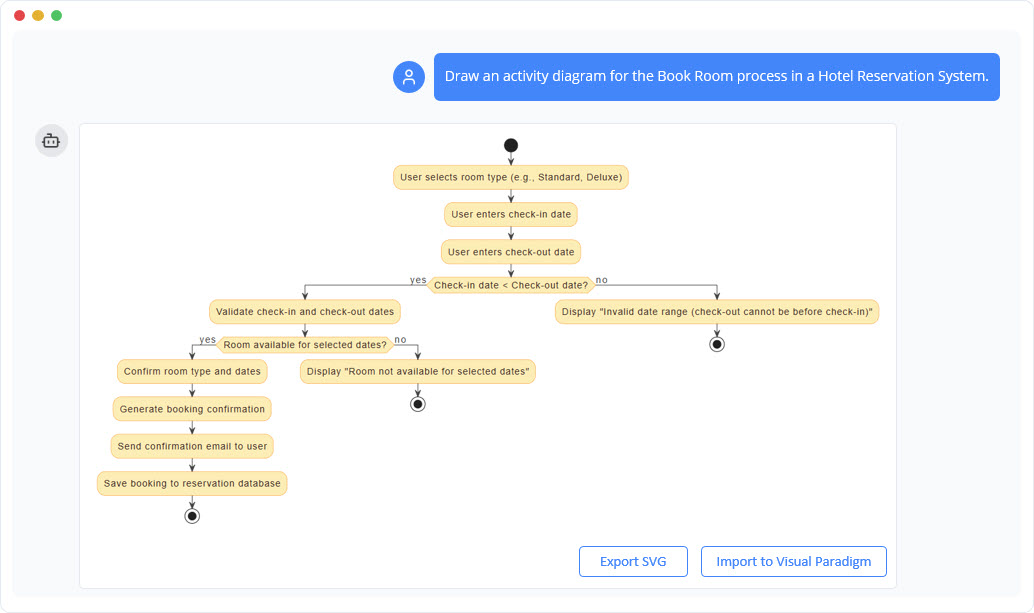
Example of using ai chatbot to generate activity diagram.

AIが生成した図には以下の要素が含まれます:

  • 開始を示す初期ノード
  • ユーザー入力とシステム検証のためのアクションノード
  • ガード条件付きの意思決定ノード:「チェックイン日 < チェックアウト日?」
  • 2つの出力分岐:有効な日付の場合(空き状況確認へ継続)、無効な日付の場合(入力へ戻る)
  • 部屋の空き状況確認へのフロー、条件付きの結果
  • 成功ルートはメール確認とデータベース保存へとつながる
  • 失敗ルートはエラーメッセージと入力に戻るを含む
  • 成功および失敗の結果を示す最終ノード
  • オプションのスイムレーン:ユーザー対システム

この例は、AIが自然言語を十分な正確さで解釈でき、構造的に整合的で標準準拠の図を生成できることを示しており、現実のビジネス論理を正確に反映していることを示しています。

AI駆動型図の生成の利点

AIを活用したツールをアクティビティ図作成に導入することで、技術的、運用的、組織的領域において大きな利点が得られます:

  • スピードと効率: 完全なアクティビティ図は10秒未満で生成され、従来のツールでは数時間にわたる手作業が必要でした。
  • 低いスキル障壁: 事前のUML経験は不要です。ビジネスアナリストやプロダクトオーナー、技術的背景のないステークホルダーも、自然言語を通じてプロセスモデリングに貢献できます。
  • 高い正確性: AIは一貫した構文、適切なフロー接続、欠落した判断やマージのない状態を保証することで、人的ミスを低減します。
  • 強化された協働: チームは会話形式でのフィードバックを通じて図を段階的に改善できます—たとえば「無効な日付入力後に再試行するループを追加」や「支払いモジュール用のスイムレーンを含める」など。
  • 早期リスク検出: AIはフローの接続不足、ガードの欠落、バランスの取れていない決定木などの潜在的な問題を検出することで、事前の改善を可能にします。
  • スケーラビリティ: チームはモデリングの基本を再学習せずに、予約、キャンセル、返金など複数のプロセスを迅速にプロトタイピングできます。

制限事項と考慮点

強力ではあるが、AI生成図は万能ではない。以下のような可能性がある:

  • 暗黙の仮定やドメイン固有のルール(例:部屋のキャンセルポリシー)を無視する可能性がある
  • 粒度の低い状態で複雑な決定木を過度に単純化する
  • 論理的には正確だが、専門家のレビューなしでは文脈的に誤解を招く図を生成する

したがって、AIは協働アシスタントと見なすべきであり、人間の判断の代替ではない。最終的な図は、完全性とビジネスルールへの忠実性を確保するために、ドメイン専門家によるレビューと検証が必要である。

将来の方向性とソフトウェア開発への影響

AIをUMLモデリングに統合することは、ソフトウェアチームがプロセスを概念化し設計する方法に画期的な変化をもたらす。生成型AIが進化するにつれ、以下のようなさらなる進歩が期待できる:

  • ユーザーストーリーからの自律的図生成: 「ゲストとして、2泊分の部屋を予約したい」といったユーザーストーリーを、直接完全なアクティビティフローに変換する。
  • 要件に合わせて進化するライブ図: 要件の変更に伴って自動的に更新される図—たとえばユースケースの変更や新しいビジネスルールの導入によってトリガーされる。
  • コードやテストケースとの連携: AIシステムが初期図を生成し、その後、制御フローに基づいてスタブコードやテストシナリオを自動生成する。
  • コードから図、図からコードへの自動マッピング: 設計と実装の間で双方向の流れを実現し、仕様と実行のギャップを縮小する。

この進化は、会話型デザインパラダイムステークホルダーが自然言語を通じてシステムとやり取りし、システムがリアルタイムで視覚的で形式化されたモデルを返す場面において。

結論:プロセスモデリングの未来は会話型である

UMLアクティビティ図は、ソフトウェアおよびビジネスプロセスモデリングの基盤のままです。その構造的で形式的なアプローチにより、複雑で条件付きのワークフローにおける明確さが保証されます——特にステークホルダーとのコミュニケーションや技術的設計と連携して使用される場合に特に顕著です。

しかし、AIを活用した自然言語生成の登場により、これらの図表へのアクセスが民主化されました。かつては数時間にわたるモデリング作業やUMLの知識、専用ツールが必要だったものが、今やシンプルな会話形式のプロンプトによって数分で実現可能になっています。

チームがこの技術を継続的に採用する中で、設計プロセスはより包括的で、迅速かつ正確なものになります。図表作成の未来は、描くことではなく、会話すること.

記事とリソース

ソフトウェアアーキテクチャの簡素化:AIアシスト型UMLクラス図生成ツールの詳細な解説

システムモデリングは堅牢なソフトウェア開発の基盤であるが、正確な統合モデリング言語(UML)図を作成する際の障壁は高くなる傾向がある。オブジェクト指向設計(OOD)の概念に苦戦している学生であろうと、迅速なプロトタイプを描きたい経験豊富なアーキテクトであろうと、構文や構造の複雑さは恐ろしいものである。ここに登場するのがAIアシスト型UMLクラス図生成ツール、ガイド付き学習と人工知能を組み合わせてこのプロセスを明確にするためのインタラクティブなツールである。

本レビューでは、この教育用ツールがテキストから図へのワークフローをどのように変革するかを検証し、初心者から専門家まで、プロフェッショナルなシステム設計を誰もが利用可能にする方法を明らかにする。

AIアシスト型UMLクラス図生成ツールとは何か?

AIアシスト型UMLクラス図生成ツールは、単なる描画キャンバス以上のものである。構造的なUMLクラス図の作成をユーザーに導くためのインタラクティブなウィザードである。従来のドラッグアンドドロップ型エディタが前提知識を仮定するのに対し、このツールはモデリングプロセスを論理的な10ステップのワークフロー.

に分解する。その主な哲学は「実践によって学ぶ」である。ユーザーがステップを進む中で(スコープの定義から最終設計の分析まで)、AIによる支援が提供される。このAIは説明文の生成、潜在的なクラスの特定、属性の提案、さらには最終的なアーキテクチャの批判まで行える。その結果、テキスト入力をプロフェッショナルなPlantUML図へとスムーズに変換される。

このツールは誰を対象としているのか?

この生成ツールの多様性は、テクノロジー業界および学術界の幅広いユーザーにとって貴重な資産となる。

  • 学生:実践的な方法を提供し、構文エラーに悩まされることなくオブジェクト指向設計の原則を学ぶことができる。
  • 将来のソフトウェア開発者:ソフトウェアアーキテクチャの核心的な要素を理解するための実践の場となる。ソフトウェアアーキテクチャ.
  • 教育者およびチューター:教師は、リアルタイムでシステムモデリングの概念やベストプラクティスを示すために使用できる。
  • ソフトウェアエンジニアおよびアーキテクト:専門家は、新しいアイデアのためのドラフト図を迅速に作成したり、既存のレガシーシステムを文書化するためにこのツールを利用できる。

目立つコア機能

1. ガイド付き10ステップウィザード

アプリケーションの核となるのはその線形ウィザードです。ユーザーを作成のすべての段階に導き、重要なコンポーネントが見逃されないことを保証します。この構造的なアプローチにより、初心者にとって「安全網」が提供され、モデリングという複雑な作業が扱いやすくなります。まるで専門のチューターのようであり、適切なタイミングでユーザーに特定の情報を求めます。

2. AI駆動の生成と分析

作家のブロックを克服することは、このツールの最大の強みの一つです。重要な段階で、ユーザーは「AI生成」ボタンをクリックしてコンテンツを自動的に作成できます。AIは以下のことができます:

3. 実時間でのPlantUMLレンダリング

テキストを図として利用するツールの力を理解するユーザーのために、生成ツールは実時間での可視化を提供します。ウィザードでクラス、属性、関係性が定義されるたびに、対応するPlantUMLコードをバックグラウンドで生成します。これにより、ユーザーは図を即座にプレビューでき、ソースコードにアクセスできるため、技術文書作成において非常に貴重です。

4. 統合された教育コンテンツ

ウィザードの各ステップには専用の教育テキストが付随しています。これにより、ユーザーが「どうやって」ツールを使うかだけでなく、「なぜ」その特定の操作を行うのかを理解できるようになります。どうやってツールを使うかだけでなく、なぜその特定の操作を行っているのかを理解できるようになります。重要なオブジェクト指向の原則を強化し、設計プロセスを継続的な学習体験に変えるのです。

仕組み:ワークフローの概要

このツールは設計プロセスを論理的な順序に構造化しています。新規図の作成時に典型的なワークフローは以下の通りです:

  1. 目的と範囲の定義:ユーザーはシステムの説明から始めます(例:「図書管理システム」)。AIはこの記述を補完するのを支援できます。
  2. クラスの特定:スコープに基づいて、ユーザーは主要なエンティティをリストアップします。AIは、説明からクラスとして扱うべき名詞を提案できます。
  3. 詳細の追加(属性と操作):ユーザーはクラスに特定のデータフィールドやメソッドを追加します。
  4. 関係の定義:ユーザーは関連、継承、または集約を使ってクラスを接続します。
  5. 検証:組み込みのチェックリストにより、図が論理的で完全であることを確認できます。
  6. 生成と分析:最終ステップでは、レンダリングされた図を表示し、AI分析レポート設計品質をレビューするための依頼を行います。

技術的な柔軟性:保存、読み込み、エクスポート

現代のツールには現代的なデータのポータビリティが必要です。AIアシストUMLクラス図ジェネレータは、プロジェクトを管理するためのいくつかの強力なオプションを提供しています:

  • クラウド保存/読み込み:ユーザーはプロジェクトをクラウドに保存し、どこからでもアクセスできます。
  • JSONエクスポート:プロジェクト全体の状態をJSONファイルとしてダウンロードでき、ローカルのバックアップやオフライン利用が可能になります。
  • PlantUMLエクスポート:最終出力は、.pumlファイルとしてエクスポートできます。これにより、図を他のドキュメンテーションシステムに統合したり、PlantUMLをサポートする任意のIDEで編集したりできます。

重要な概念と用語

このツールを最大限に活用するには、ウィザード内で使用される用語を理解することが役立ちます。アプリケーションはこれらの用語の文脈を提供していますが、ここに簡単な参照を示します:

用語 定義
クラス オブジェクトを作成するための設計図であり、システム内の主要なエンティティを表す(例:「顧客」)。
属性 クラスのプロパティまたはデータフィールド(例:学籍番号).
操作 クラスが実行できる行動や動作で、通常はメソッドと呼ばれる(例:calculateTotal()).
関係 クラス間の接続で、関連や継承などが含まれる。
可視性 アクセスレベルを定義する:公開(+)、非公開(-)、保護(#).
PlantUML ツールが視覚的な図を描画するために使用するテキストベースのスクリプト言語。

利点とメリット

AIアシスト型UMLクラス図生成ツールを使用することで、手動による図作成と比べていくつかの明確な利点が得られる:

  • 作業の高速化:AI機能により、テンプレートテキストの生成が自動化され、図の作成にかかる時間が大幅に削減される。
  • 設計品質の向上:検証チェックリストとAI分析レポートの組み合わせにより、ユーザーは論理的な誤りや設計上の欠陥を発見でき、そうでなければ気づかなかった可能性がある。
  • UMLの理解の促進:ユーザーを段階的に導くことで、複雑なモデル言語に伴う不安を解消する。
  • 標準化された出力:PlantUMLコードを生成するため、出力は標準化され、明確で、簡単にバージョン管理できる。

結論

AIアシスト型UMLクラス図生成ツールは、教育的理論と実践的な応用の間のギャップを埋める。構造化されたウィザードとAIの生成機能を組み合わせることで、学生が学び、専門家が迅速に反復できるユニークな環境を提供する。新しいソフトウェアのアイデアを記録したい場合や、オブジェクト指向アーキテクチャをより深く理解したい場合にも、このツールは包括的で使いやすいソリューションを提供する。

スプリント準備の習得:アジャイルバックログリファインヤーの包括的レビュー

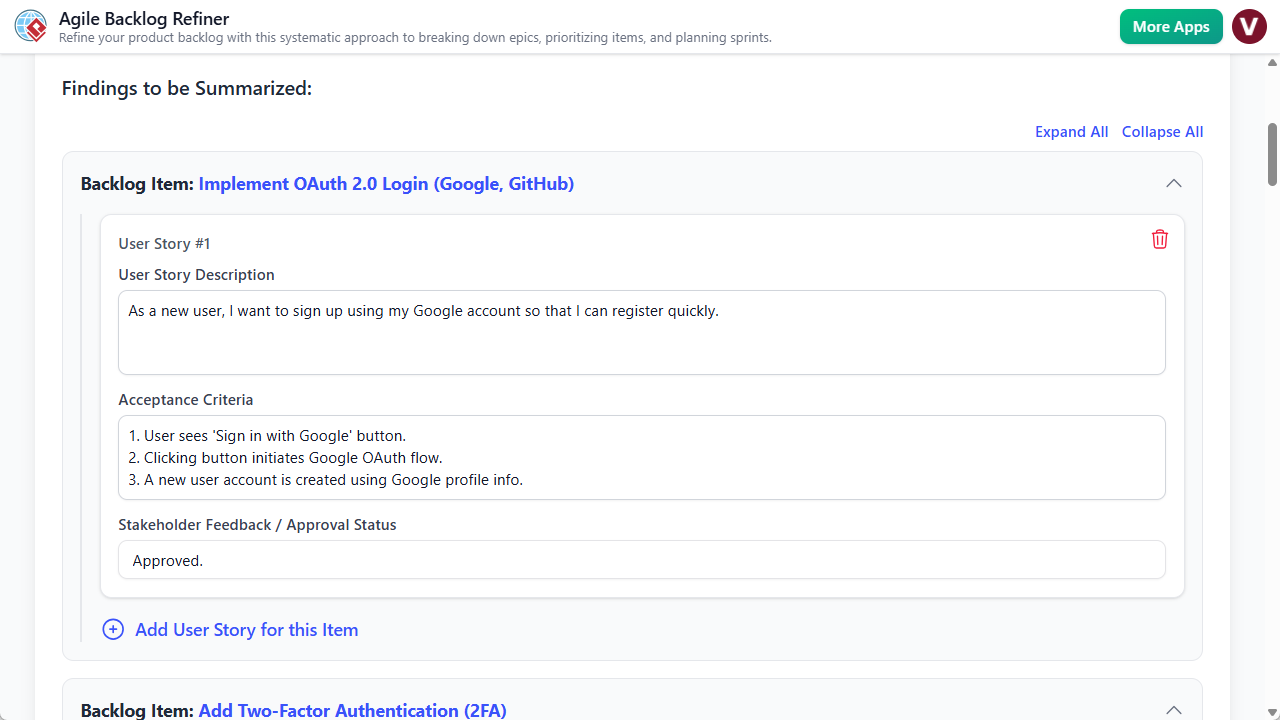
ソフトウェア開発の急速な進化する世界では、高レベルのプロジェクト目標と開発準備完了のバックログとの間にあるギャップが、チームが最も苦労する場所であることが多い。バックログの精査(以前はグルーミングと呼ばれていた)は必須であるが、適切な構造がなければ時間と労力がかかり、混乱を招くことがある。アジャイルバックログリファインヤーは、構造化された7ステップのウィザードと知能的なAI自動化を組み合わせることで、この問題を解決することを目指している。本レビューでは、このツールがビジネス要件を実行可能なエピック、ユーザーストーリー、およびスプリント計画.

Ai Powered Backlog Refinement Tool

アジャイルバックログリファインヤーとは何か?

アジャイルバックログリファインヤーは、プロダクトオーナー、スクラムマスター、開発チームがバックログ精査の全ライフサイクルをサポートするように設計された専用のWebアプリケーションである。タスクがすでに定義済みであると仮定する一般的なプロジェクト管理ボードとは異なり、このツールは作成および定義フェーズに焦点を当てる。これは、単一のプロジェクト目標を、優先順位付けされたユーザーストーリーユーザーストーリー、リスク評価、およびスプリント計画のドラフトを含む包括的なレポートに変換する知的なアシスタントとして機能する。

このツールは、細かい制御が可能なマニュアルモードと、簡単な記述から完全な精査計画を生成するAI支援モードの2つの主要な運用モードで動作する。出力は、ステークホルダーと開発者双方にとっての唯一の真実のソースとなる統合レポートである。

主な機能と特徴

1. AI駆動のバックログ生成

このツールの目立つ特徴は、人工知能バックログ作成の重い作業を担う能力にある。単に高レベルのプロジェクト記述(例:「注文履歴付きのユーザープロフィールページを作成する」)を入力するだけで、AIエンジンが全体のワークフローにわたってデータを埋め込む。エピックの作成、それらを具体的なユーザーストーリーに分解、受入基準の作成、さらには優先順位の提案まで行う。この機能により、準備時間は大幅に短縮され、プロダクトオーナーは白紙の状態からではなく、しっかりとしたドラフトからスタートできる。

2. 7ステップのガイド付きウィザード

アジャイル計画における重要な側面が見逃されないようにするため、アプリケーションは7つの明確なステップからなるベストプラクティスのワークフローを強制する。

  • 準備:状況の整備と目標の設定。
  • エピックの分解:大きな作業を分解する。
  • PBIsの優先順位付け:MoSCoWなどの手法を用いて項目を順位付けする。
  • ストーリーの精査: 詳細を追加し、受入基準.
  • リスク評価:早期に潜在的な課題を特定する。
  • 最終化と計画: スプリント構造の作成.
  • 最終レポート:出力文書の生成。

インターフェース上部にある視覚的なステッパーが進捗を追跡し、ステップが完了するごとに緑色に変わります。このゲーム化された要素により達成感が得られ、体系的な進捗が確保されます。

3. 構造化されたフォーム入力

ユーザーインターフェースは明確で構造化されたフォームを中心に設計されています。手動でデータを入力する場合でも、AIの提案を編集する場合でも、エピック、ユーザーストーリー、リスク定義のための特定のフィールドが用意されています。この構造はデジタルワークシートの役割を果たし、適切なタイミングに適切な情報を求めることで、バックログの品質と一貫性を直接的に向上させます。

4. 非常に柔軟なデータ管理

アジャイルチームの多様なセキュリティ要件を認識し、このツールは二重の保存メカニズムを提供しています。ユーザーはプロジェクトをクラウドに保存して、異なる場所からのアクセスを可能にするか、またはプロジェクト全体の状態をローカルな.jsonファイルとしてエクスポートできます。後者は、厳格なデータプライバシー要件があるチームや、計画会議を手動でバージョン管理したいチームにとって特に有用です。

対象ユーザーと利用シーン

アジャイルバックログリファインは、ソフトウェア開発ライフサイクル内の特定の役割に合わせて設計されています:

  • プロダクトオーナーおよびマネージャー:バックログ精査会議の準備資料として機能し、会議に参加する際に明確で優先順位付けされた作業リストを持ち込むことを保証します。
  • スクラムマスター:このツールはファシリテーションの支援として機能し、チームの集中を保ち、リスク評価など頻繁に省略されがちなステップがカバーされることを確保します。
  • 開発チーム:開発者は、明確に書かれたユーザーストーリーや定義された受入基準の恩恵を受け、実行時の曖昧さを軽減できます。

実用的なワークフローシナリオ

AI支援によるスプリント計画

新しい機能用のバックログを迅速に構築する必要があるチームには、AIワークフローが最適です。チームは一パラグラフの説明を合意し、「AIで生成」プロンプトに入力することで、完全に構造化された計画を受け取れます。その後、会議の焦点は執筆レビュー、チームは優先順位を調整し、見積もりその特定の状況に基づいて。

マニュアルディープダイブ精査

細かい人間による監視を必要とする複雑な機能については、ユーザーはAIを回避できます。空のプロジェクトから始め、プロダクトオーナーはステップ2でエピックを手動で入力し、ステップ3で製品バックログ項目(PBIs)に分解し、ステップ4で受容基準を細かく定義できます。このモードは、技術的要件に対する厳格な管理に最適です。

制限事項と考慮事項

アジャイルバックログリファインヤーは強力な計画支援ツールですが、期待を適切に管理するために、以下の制限事項を理解しておく必要があります:

  • 直接統合なし: このツールは精査された計画を作成しますが、自動的にJiraと同期しません、Trello、またはAzure DevOpsと同期しません。ユーザーは最終的なストーリーを手動で主要なイシュートラッカーに移行する必要があります。
  • 単一ユーザー中心: このアプリケーションはファシリテーター(例:プロダクトオーナー)が会議を主導することを想定しています。複数のチームメンバーが同時に入力するリアルタイム共同編集はサポートしていません。
  • AIの記憶: AIはすべての生成リクエストを新しいセッションとして扱います。過去のプロジェクトや長期的な組織的文脈を記憶しません。

結論

アジャイルバックログリファインヤーは、抽象的なアイデアと具体的な開発作業の間のギャップを埋める助けとなります。構造化された7段階のプロセスを強制し、AIを活用して「白紙状態の不安」を解消することで、チームはより生産的な会議を実施し、高品質な文書を作成できます。イシュートラッカーとの直接統合がないことでワークフローに手動ステップが追加されるものの、明確さ、リスク評価、効率的な計画の向上という価値により、アジャイルツールキットに貴重な追加となります。

Model Canvasレビュー:AIによる戦略立案の革新

現代の戦略立案入門

現代のビジネスの複雑な環境において、戦略を立案し、可視化し、伝える能力は極めて重要である。起業家として破壊的イノベーションを描いている場合でも、企業の戦略立案者が市場リスクを分析している場合でも、使用するフレームワークが重要となる。ここに登場するModel Canvas、多目的でVisual ParadigmAI駆動のモデルキャンバススタジオ戦略文書作成の方法を根本から変革するように設計されている。静的テンプレートや断片的なホワイトボードアプリとは異なり、Model Canvasは高度なマルチレイヤーAIアシスタントをワークフローに直接統合しており、単一のアイデアを数秒で包括的なビジネス計画に変換する可能性を約束している。

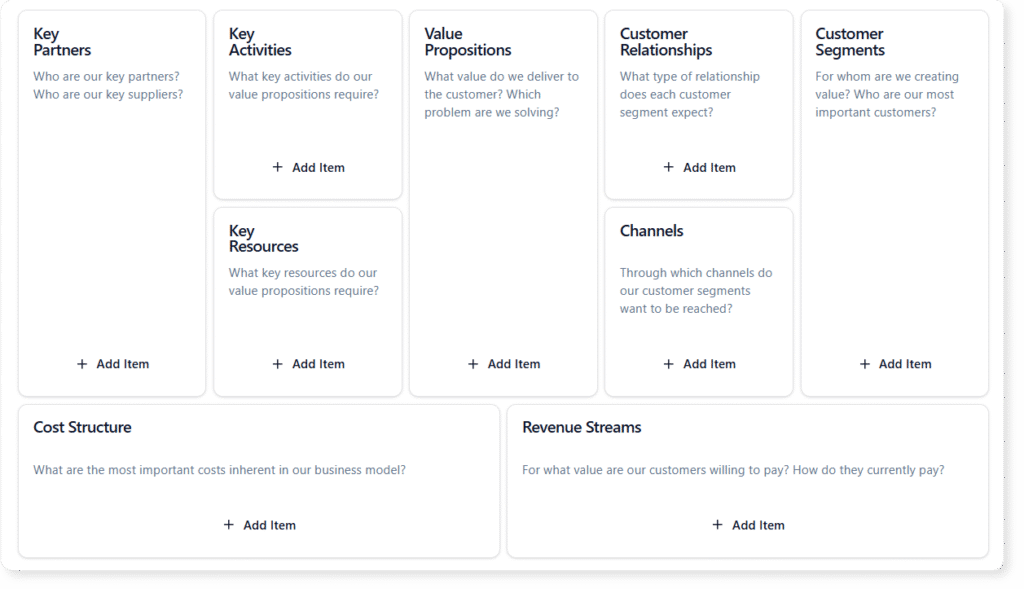
Layouts of blank Business Model Canvas

Model Canvas Toolとは何か?

その本質は、Visual Paradigm Model Canvas Toolが包括的な戦略テンプレートのセットである。ユーザーがさまざまなビジネスキャンバスを作成・分析・管理できるデジタルスタジオとして機能する。人気のあるビジネスモデルキャンバスを基盤としているが、そのライブラリはリーンキャンバス、SWOT分析, PESTLE、プロダクトマネージャーやアジャイルコーチが使用する数十のその他のフレームワークまでをカバーしている。

このツールの特徴は、コンテンツ作成における「ハイブリッド」アプローチにある。ユーザーは手動でブレインストーミングを行うことができる——インターフェースを構造化されたデジタルホワイトボードとして使用するか、あるいは内蔵されたAIを活用して重い作業を担わせる。この柔軟性により、学生がフレームワークを学ぶ教育的用途にも、スピードと深さが求められるプロフェッショナルな環境にも適している。

エンジン:AIアシスタンスの3段階

Model Canvasの目立つ特徴は、人工知能の統合であり、単なるテキスト生成ツールではなく、戦略的パートナーとして機能する。アプリケーションはAIアシスタンスを、計画プロセスの異なる段階に対応する3つの明確な段階に分けて提供している。

Tier 1:完全なキャンバス生成

この機能は「ゼロからワン」の段階を想定している。ユーザーは高レベルのトピックや単純なビジネスアイデアを提供する——たとえば「レアな室内植物向けのサブスクリプションボックスサービス」など。その後AIは完全に埋められたキャンバスを生成する。すべてのセクションに関連するステッカーを埋め込み、数秒で詳細な初稿を作成する。この機能により、白紙のページに対する不安を解消し、即座に改善可能な素材を提供する。

Tier 2:文脈に応じた提案

戦略立案はしばしば障壁に直面する。価値提案は明確でも、主要なパートナーシップを定義するのが難しい場合がある。Tier 2の支援により、ユーザーは特定のセクションに対してターゲットされた提案をリクエストできる。AIは全体のキャンバスの文脈を分析し、一貫性を確保した上で、そのブロックに特化した新しいアイデアのリストを提示する。まるで賢い同僚に「ここに何が欠けているんだろう?」と尋ねているような感覚である。

Tier 3:深層的な戦略分析

高レベルの意思決定にとって最も価値のある機能は、専用の「AI分析」タブです。キャンバスにデータが入力されると、AIは深掘り分析を実行し、静的なデータを動的なインサイトに変換できます。主な機能は以下の通りです:

  • エレベーターピッチ生成:ビジネスモデル全体を魅力的な物語に要約する。
  • SWOT分析:モデルに内在する強みと弱みを特定する。
  • リスク評価:潜在的な失敗要因を強調する。
  • マーケティング戦略:顧客セグメントに基づいた市場投入戦略を提案する。

ユーザー体験とコア機能

AIに加えて、本アプリケーションは使いやすさとプロフェッショナルな管理を重視して構築されています。

マルチキャンバススイッチャー

本アプリケーションは、マルチキャンバススイッチャーを備えることで、「万能型」の罠を回避しています。このライブラリにより、ユーザーはタスクに応じて異なるフレームワークを切り替えることができます。製品マネージャーは開発用にプロダクトキャンバスを始め、市場検証用にリーンキャンバスに切り替えるなど、同じエコシステム内で柔軟に対応できます。

ダブルビューイングモード

包括的な思考と集中した作業の両方をサポートするため、Model Canvasは2つの主要な表示モードを提供しています。キャンバスビューは全体のグリッドを表示し、ユーザーが関係性や「全体像」を把握できるようにします。一方、フォーカスモードは単一のセクションに焦点を当て、邪魔な要素を排除します。これは、たとえば「顧客セグメント」のような特定のカテゴリについてすべての項目を網羅的にリストアップすることを目的としたブレインストーミング会議で特に有用です。

プロジェクト管理と共有

Model Canvasはクラウドの利便性とローカル制御の間の橋渡しを果たします。プロジェクトはクラウドに保存して複数デバイスからアクセス可能にしたり、プライバシーを確保するためにローカルファイルとしてエクスポートできます。共有は読み取り専用リンクを通じて管理され、ステークホルダー、投資家、アドバイザーが誤った編集のリスクなく戦略を閲覧できます。これにより、潜在的な投資家に洗練された「実現可能性チェック」を送るのに最適なツールとなります。

ターゲットユーザー

Model Canvasの多様な使い勝手は、幅広い専門家にとって貴重な資産です:

  • 起業家:スタートアップの迅速なプロトタイピングおよびビジネスモデルの転換に適しています。
  • プロダクトマネージャー:カスタマージャーニーと競合分析のマッピングに適しています。
  • アジャイルコーチ:チームの方向性統一を促進するため、Team Canvasなどのフレームワークに適しています。
  • ビジネス学生:教育用のサンドボックスとして戦略フレームワークを学ぶ.

制限事項と考慮事項

Model Canvasは強力なツールですが、利用者がそのワークフローに適しているかを確認するために、いくつかの制限事項に注意が必要です:

  • 単一ユーザー向け:このツールは個人利用を想定しています。現在、リアルタイムでの共同編集(Google Docsのようなもの)はサポートしておらず、チームが同じキャンバスを同時に作業することはできません。
  • インターネット依存:すべてのAI機能およびクラウドストレージ機能にアクセスするには、安定したインターネット接続が必要です。
  • 固定レイアウト:キャンバステンプレートは事前に定義されています。ユーザーはカスタムのキャンバスレイアウトを作成したり、既存のテンプレートの構造を変更することはできません。

結論

Model Canvasはデジタル戦略立案において重要な一歩を踏み出しています。実証済みのビジネスフレームワークの膨大なライブラリと、多層的なAIアシスタントを組み合わせることで、戦略における2つの最大の課題、すなわちスタートの難しさと深掘りの難しさを解決します。新しい事業のピッチ作成から既存企業のSWOT分析まで、Model Canvasはプロセスをより速く、鋭く、プロフェッショナルに仕上げるための構造と知性を提供します。

Visual ParadigmにおけるAI駆動型モデリングへのアップグレード:包括的なガイド

はじめに

ソフトウェアアーキテクチャおよびビジネスプロセスモデリングの分野は、顕著な変化を迎えています。長年にわたり、専門家たちは従来の手動による図面作成においてVisual Paradigm—正確な制御、ドラッグアンドドロップの操作、および関係の手動定義を特徴とする方法です。効果的ではありますが、複雑なシステムの初期設計段階では時間のかかる場合があります。

2026年現在、AI駆動型の生成型モデリングはVisual Paradigmユーザーにとって生産性の飛躍をもたらします。この変化により、作業フローは機械的なプロセスから対話的で意図に基づくインタラクションへと移行します。図形を手動で配置する代わりに、ユーザーは自然言語でアイデアを説明でき、AIが図を即座に生成・精査・分析できます。

この包括的なガイドでは、このアップグレードをどのように進めればよいかを解説し、従来のアプローチとAIアプローチの主な違い、切り替えの利点、そしてAIをモデリング実践に統合するためのステップバイステップのワークフローを示します。

比較:従来型 vs. AI生成型モデリング

このアップグレードの規模を理解するためには、従来のワークフローのメカニズムと新しいAI駆動型の機能を比較することが不可欠です。従来の方法は細かい制御を提供しますが、AIモデリングはスピード、解釈、自動化に重点を置いています。

機能 従来型モデリング AI生成型モデリング
入力方法 デスクトップ/オンラインエディタを介した手動操作(ドラッグアンドドロップ、接続ポイント)。 自然言語によるプロンプト(例:「図書館システムのクラス図を作成してください」)。
主な焦点 高い精度、最終的な仕上げ、および厳格な規格準拠(UML 2.5、BPMN)。 迅速なプロトタイピング、認知負荷の低減、初期構造の処理。
スピード 時間のかかるものであり、特に大規模なモデルやゼロから作成する場合に顕著。 数秒で複雑な図を即座に生成。
精査プロセス 手動での反復とレイアウトの調整。 会話形式による精緻化(例:「UserとAdminの継承を追加」)。
対応している記法 UML、BPMN、ArchiMateなどへの完全対応 UML、C4モデル、ArchiMate、SysML、ERD、マインドマップなどを含む広範な対応
スキル要件 記法の構文およびツールのメカニズムに関する深い知識を必要とする。 導入のハードルを下げる;構文の自動化により既存のスキルを強化する。

重要なのは、AIは伝統的なスキルを置き換えるものではなく、それを強化するものであるUML記法やアーキテクチャパターンを理解している専門家が、これらのツールを最も効果的に活用できる。なぜなら、誤りを迅速に発見でき、優れたプロンプトを構築でき、出力を効果的に検証できるからである。

アップグレードの理由?専門家としてのメリット

採用するAI生成型モデリングにおいてVisual Paradigmこれはトレンドに追いつくことだけではなく、ワークフローの効率性と出力品質の実質的な向上を意味する。ユーザーのフィードバックとプラットフォームの機能に基づき、以下の利点が専門家たちのアップグレードを後押ししている:

  • 並外れたスピード:数秒で複雑な図を生成できる能力は、プロジェクトの初期段階を根本から変える。このスピードは、キックオフミーティングやブレインストーミング、迅速なプロトタイピングにおいて非常に貴重である。
  • 生産性の向上:AIはテンプレート作業を自動化する。たとえば、テキストベースの要件文書からクラスや関係性を即座に抽出できるため、アーキテクトは上位レベルの設計意思決定に集中できる。
  • 反復的コラボレーション:チャット形式のインターフェースは「モデリングパートナー」として機能する。共同作業のセッション中にリアルタイムでの微調整が可能となり、変更要求を口頭で行い、AIが即座に実装できる。
  • 一貫性と標準化:AIはUMLやBPMNのルールを尊重するように訓練されている。人間の監視は依然として必要だが、AIは基本的な検証を処理し、命名規則や標準的な関係性が初期段階から正しく適用されることを保証する。
  • シームレスな統合:Visual Paradigmの最も強力な特徴の一つは、AI生成された図が静的な画像ではないことである。これらは直接Visual Paradigmプロジェクトにエクスポートでき、コード生成、Hibernate/JPAによるオブジェクトリレーショナルマッピング(ORM)、シミュレーション、およびラウンドトリップエンジニアリングに利用できる。

ユーザーは一貫して報告している初期モデリングが5~10倍速くなる特に大規模なアーキテクチャを扱う場合や、非構造化された要件を視覚的モデルに変換する場合に顕著である。

ステップバイステップガイド:Visual ParadigmにおけるAIへの移行

ワークフローのアップグレードには、複雑な移行作業や基本機能用の新しいサブスクリプションプランの必要はありません。AI機能は最近のバージョン(18.0以降)に統合されています。VP Onlineこのガイドに従って、移行を開始してください。

1. AIツールへのアクセス

AI機能へのアクセス方法は複数あり、さまざまなワークフローの好みに合わせて設計されています:

  • AIチャットボット:これは生成作業の主要な入口です。特定のVisual Paradigmサブドメイン(例:chat.visual-paradigm.com)で利用可能なブラウザベースのツールです。単体で使用可能ですが、プロジェクトにリンクしています。
  • デスクトップおよびオンライン統合:Visual Paradigmインターフェース内で、ツール > AIチャットボットまたはツール > AI図。また、AIツールボックスにもこれらの機能が含まれている場合があります。
  • ライセンス:基本的な利用には無料トライアルが利用可能です。ただし、Proまたはエンタープライズアカウントでログインすると、無制限の生成や高度なエクスポートオプションなど、高度な機能が利用可能になります。

2. シンプルから始める:最初のプロンプト

新しい意図駆動型プロセスに慣れさせるために、身近な図の種類から始めましょう。最初の試みで複雑になりすぎないようにしましょう。

例のプロンプト: 「User、Product、Cart、Orderを含むオンラインショッピングカートシステムのUMLクラス図を生成してください。」

このプロンプトを送信すると、AIはクラス、属性、操作、関連を生成し、しばしばクリーンな自動レイアウトを適用します。ここから、会話形式での微調整を練習できます:

  • 「CartとProductの関連に多重度1..*を追加してください。」
  • 「Orderが新しいクラスPaymentから継承するようにしてください。」
  • 「重複する線を避けるようにレイアウトを改善してください。」

3. テキスト解析の活用

プロフェッショナルにとって最も強力な機能の一つがAI駆動型テキスト解析。要件文書を手動で解析する代わりに、テキストを直接AIに送信できます。

ワークフロー:要件文書の一部をチャットボットに貼り付けます。
プロンプト: 「この要件テキストを分析し、記述されたエンティティと関係に基づいてクラス図を生成してください。」

AIはドメイン上のエンティティと関係を自動的に特定し、非構造化テキストの構造化された視覚的表現を提供します。

4. ループ処理とプロフェッショナルな精緻化

ベースモデルが生成されると、ワークフローは反復へと移行します。モデルの範囲や有用性を拡大するために、後続のコマンドを使用してください:

  • 行動モデル化: 「これらのクラスに基づいて、チェックアウトプロセスのシーケンス図を追加してください。」
  • ドキュメント作成: 「このモデルからドキュメントを生成してください。」
  • 相互運用性: 「この図をPlantUMLにエクスポートしてください。」

重要なのは、AIで生成された結果を従来のエディタに戻してインポートすることです。これにより、微調整や厳密な検証、コード生成などの高度な機能の活用が可能になります。

5. 高度なワークフロー

企業レベルのユーザー向けに、AIツールは基本的なUMLを越えて拡張されています:

  • DBModeler AI:データベース設計に使用してください。アプリケーションのデータ要件を記述すると、ツールは正規化されたエンティティ関係図(ERD)と対応するクラス図を生成します。
  • ユースケースモデル化スタジオ:この機能は完全なフロー生成を処理します。目標文から始めると、AIはユースケース、図、さらにはテストケースも生成します。
  • C4アーキテクチャ:高レベルのソフトウェアアーキテクチャでは、レイヤードビューを要求してください。例:「マイクロサービスベースのバンキングアプリ用のC4コンポーネント図を作成してください。」

スムーズな移行のためのベストプラクティス

Visual ParadigmにおけるAIの効果を最大化するため、以下のベストプラクティスを検討してください:

  1. プロンプトを明確に:曖昧さは一般的な結果をもたらします。初期のプロンプトには図の種類、主要なエンティティ、具体的な関係を必ず含めてください。
  2. 人間によるループ内検証:常にAIの出力を確認してください。基数、スタイリス、制約がプロジェクト要件に合致しているか確認してください。AIはスピードのためのツールであり、アーキテクチャ的責任の代替ではありません。
  3. ハイブリッドワークフロー:最も効果的な専門家は、AIのドラフトをメインプロジェクトにエクスポートしてアプローチを統合します。創造の「重労働」にはAIを使い、最終的な精密化には従来のツールを使用します。
  4. 従来の知識を保持する: UMLおよびモデル化理論に対する理解が、効果的なプロンプトを作成し、AIの論理における微細な誤りを発見できるようにしている。

実際の例

AI生成が特に優れた具体的なシナリオを以下に示す。これらは一般的なプロフェッショナルの質問に一致している。

  • UMLクラス図:問題の説明(例:ホテル予約システム)を貼り付け、AIがクラス、属性、メソッド、関係性を即座に抽出する様子を観察してください。
  • C4アーキテクチャ:プロンプト入力「eコマースプラットフォームのC4モデル(コンテキスト+コンテナ+コンポーネント)を生成してほしい」一度のインタラクションで階層的なビューを生成でき、設定にかかる時間を数時間も節約できる。
  • 状態機械:ライフサイクルを説明してください。たとえば、「3Dプリンタのプロセス用のUML状態機械を作成してください:アイドル → 印刷中 → 一時停止 → エラー処理」複雑な論理フローを可視化するために使用する。
  • データベース設計:DBModeler AIを活用して、アプリケーションの要件の記述を完全正規化されたERDに変換する。

ユーザー体験と証言(2025–2026年)

Visual Paradigmコミュニティ内でのこれらの機能への反応は、圧倒的に肯定的である。ブログ、チュートリアル、プラットフォームの証言からのフィードバックは、実際の現場での影響を強調している。

マリア・トンプソン、ソリューションアーキテクト:「以前はシステムコンテキストの図を何時間もかけて描いていた。今ではAIが図を描くのを任せ、アーキテクチャの意思決定に集中できるようになった。プロジェクトの初期段階のアプローチがまったく変わった。」

ダニエル・リベラ、プロジェクトマネージャー:「図を1つのコマンドでレポートに変換できるため、レビュー時に数時間の時間を節約できる。ワークフローがはるかに効率的になった。」

チュートリアル利用者や開発者は同様の意見を述べている。初心者は「専門家と会話しているような」体験を好む。これは、分岐論理を含む複雑なシーケンス図の作成を導いてくれる。経験豊富なユーザーは、反復的な精緻化の機能を称賛しており、モデルを生成し、レビューし、「エラー処理を追加」と命令することで、5分未満で完璧な図に到達できることを指摘している。合意された見解は、初期ドラフト作成において80~90%の時間短縮であり、ツールの感覚はソフトウェアよりも「知識豊富な同僚」に近い。

結論

Visual ParadigmにおけるAI駆動型モデリングへの移行は、あらゆるソフトウェア専門家にとって戦略的なアップグレードである。生成型AIの高速性と従来の編集ツールの正確性を組み合わせることで、迅速かつ堅牢なワークフローを実現できる。シンプルな図書館システムから複雑なマイクロサービスアーキテクチャまで、AIツールは、手動での図面作成に時間をかけるのではなく、高付加価値の設計意思決定に集中できる基盤を提供する。

Upgrading to AI-Powered Modeling in Visual Paradigm: A Comprehensive Guide

Introduction

The landscape of software architecture and business process modeling is undergoing a significant transformation. For years, professionals have relied on traditional manual diagramming within Visual Paradigm—a method characterized by precise control, drag-and-drop mechanics, and manual definition of relationships. While effective, this approach can be time-intensive, particularly during the initial drafting phases of complex systems.

As of 2026, the transition to AI-powered generative modeling marks a major productivity leap for Visual Paradigm users. This shift moves the workflow from a mechanical process to a conversational, intent-driven interaction. Instead of manually placing shapes, users can now describe ideas in natural language, allowing the AI to generate, refine, and analyze diagrams instantly.

This comprehensive guide explores how to navigate this upgrade, detailing the key differences between traditional and AI approaches, the benefits of making the switch, and a step-by-step workflow for integrating AI into your modeling practices.

Comparison: Traditional vs. AI-Generative Modeling

To understand the magnitude of this upgrade, it is essential to compare the mechanics of the traditional workflow against the new AI-driven capabilities. While traditional methods offer granular control, AI modeling focuses on speed, interpretation, and automation.

Feature Traditional Modeling AI-Generative Modeling
Input Method Manual interaction via desktop/online editor (drag-and-drop, connection points). Natural language prompts (e.g., “Create a class diagram for a library system”).
Primary Focus High precision, final refinements, and strict standards compliance (UML 2.5, BPMN). Rapid prototyping, reducing cognitive load, and handling initial structures.
Speed Time-intensive, especially for large models or starting from scratch. Instant generation of complex diagrams in seconds.
Refinement Process Manual iteration and layout adjustments. Conversational refinement (e.g., “Add inheritance between User and Admin”).
Supported Notations Full support for UML, BPMN, ArchiMate, etc. Extensive support including UML, C4 models, ArchiMate, SysML, ERDs, and Mind Maps.
Skill Requirement Requires deep knowledge of notation syntax and tool mechanics. Lowers barrier to entry; amplifies existing skills by automating syntax.

It is important to note that AI does not replace traditional skills; it amplifies them. Professionals who understand UML notations and architectural patterns are best positioned to use these tools, as they can spot inaccuracies faster, craft superior prompts, and validate outputs effectively.

Why Upgrade? The Professional Benefits

Adopting AI-generative modeling in Visual Paradigm is not just about keeping up with trends; it is about tangible improvements in workflow efficiency and output quality. Based on user feedback and platform capabilities, the following benefits are driving professionals to upgrade:

  • Unmatched Speed: The ability to generate complex diagrams in seconds rather than hours transforms the early stages of a project. This speed is invaluable for kickoff meetings, brainstorming sessions, and rapid prototyping.
  • Productivity Boost: AI automates the boilerplate work. For example, extracting classes and relationships from a text-based requirements document can be done instantly, freeing architects to focus on high-level design decisions.
  • Iterative Collaboration: The chat-like interface acts as a “modeling partner.” It allows for real-time tweaks during collaborative sessions, where changes can be requested verbally and implemented immediately by the AI.
  • Consistency & Standards: The AI is trained to respect UML and BPMN rules. While human oversight is still required, the AI handles basic validation, ensuring that naming conventions and standard relationships are applied correctly from the start.
  • Seamless Integration: One of the strongest features of Visual Paradigm is that AI-generated diagrams are not static images. They can be exported directly into Visual Paradigm projects for code generation, Object-Relational Mapping (ORM) with Hibernate/JPA, simulation, and round-trip engineering.

Users consistently report 5–10x faster initial modeling, particularly when dealing with large-scale architectures or translating unstructured requirements into visual models.

Step-by-Step Guide: Transitioning to AI in Visual Paradigm

Upgrading your workflow does not require a complex migration or a new subscription tier for basic features. AI capabilities are integrated into recent versions (18.0+) and VP Online. Follow this guide to begin your transition.

1. Accessing the AI Tools

There are multiple entry points to the AI features, designed to fit different workflow preferences:

  • The AI Chatbot: This is the primary entry point for generative work. It is a browser-based tool available at specific Visual Paradigm subdomains (e.g., chat.visual-paradigm.com). It works as a standalone tool but links to your projects.
  • Desktop & Online Integration: Within the Visual Paradigm interface, navigate to Tools > AI Chatbot or Tools > AI Diagram. You may also find these features in the AI toolbox.
  • Licensing: A free tier is often available for basic usage. However, logging in with a Pro or Enterprise account unlocks advanced capabilities, such as unlimited generations and advanced export options.

2. Starting Simple: The First Prompt

To acclimate to the new intent-driven process, start with familiar diagram types. Avoid over-complicating your first attempt.

Example Prompt: “Generate a UML class diagram for an online shopping cart system including User, Product, Cart, and Order.”

Upon submitting this prompt, the AI will produce classes, attributes, operations, and associations, often applying a clean auto-layout. From here, you can practice conversational refinement:

  • “Add multiplicity 1..* to the association between Cart and Product.”
  • “Make Order inherit from a new class called Payment.”
  • “Improve the layout to avoid overlapping lines.”

3. Leveraging Textual Analysis

One of the most powerful features for professionals is the AI-Powered Textual Analysis. Instead of manually parsing a requirements document, you can feed the text directly to the AI.

Workflow: Paste a segment of a requirements document into the chatbot.
Prompt: “Analyze this requirements text and generate a class diagram based on the entities and relationships described.”

The AI will identify domain entities and relationships automatically, providing a structured visual representation of the unstructured text.

4. Iteration and Professional Refinement

Once the base model is generated, the workflow shifts to iteration. Use follow-up commands to expand the model’s scope or utility:

  • Behavioral Modeling: “Add a sequence diagram for the checkout process based on these classes.”
  • Documentation: “Generate documentation from this model.”
  • Interoperability: “Export this diagram to PlantUML.”

Crucially, you should import the AI-generated result back into the traditional editor. This allows for fine-tuning, strict validation, and utilization of advanced features like code generation.

5. Advanced Workflows

For enterprise-level users, the AI tools extend beyond basic UML:

  • DBModeler AI: Use this for database design. Describe your application’s data needs, and the tool will generate a normalized Entity-Relationship Diagram (ERD) and corresponding class diagram.
  • Use Case Modeling Studio: This feature handles full flow generation. You can start with a goal statement, and the AI will generate use cases, diagrams, and even test cases.
  • C4 Architecture: For high-level software architecture, prompt for layered views. Example: “Create a C4 component diagram for a microservices-based banking app.”

Best Practices for a Smooth Transition

To maximize the efficacy of AI in Visual Paradigm, consider the following best practices:

  1. Be Specific in Prompts: Ambiguity leads to generic results. Always include the diagram type, key entities, and specific relationships in your initial prompt.
  2. Human-in-the-Loop Validation: Always review AI outputs. Check cardinalities, stereotypes, and constraints against project requirements. The AI is a tool for speed, not a replacement for architectural responsibility.
  3. Hybrid Workflow: The most effective professionals export AI drafts into the main project to blend approaches. Use AI for the “heavy lifting” of creation and traditional tools for the precision of finalization.
  4. Retain Traditional Knowledge: Your understanding of UML and modeling theory is what allows you to craft effective prompts and catch subtle errors in the AI’s logic.

Practical Examples

Here are specific scenarios where AI generation excels, matching common professional queries:

  • UML Class Diagrams: Paste a problem description (e.g., a hotel reservation system) and watch the AI extract classes, attributes, methods, and relationships instantly.
  • C4 Architecture: Prompting “Generate C4 model (Context + Containers + Components) for an e-commerce platform” yields layered views from a single interaction, saving hours of setup time.
  • State Machines: Describe a lifecycle, such as “Create a UML state machine for a 3D printer process: idle → printing → paused → error handling,” to visualize complex logic flows.
  • Database Design: Using DBModeler AI to convert a description of application needs into a fully normalized ERD.

User Experiences & Testimonials (2025–2026)

The reception of these features within the Visual Paradigm community has been overwhelmingly positive. Feedback from blogs, tutorials, and platform testimonials highlights the real-world impact:

Maria Thompson, Solution Architect: “I used to spend hours sketching system contexts. Now I focus on architecture decisions while AI handles the drawing. It has completely changed how I approach the initial phases of a project.”

Daniel Rivera, Project Manager: “Turning diagrams into reports with one command saves hours during reviews—the workflow is much more efficient.”

Tutorial users and developers echo these sentiments. Beginners appreciate the “chat with an expert” feel, which guides them through creating complex sequence diagrams with branching logic. Experienced users praise the iterative refinement capabilities, noting that they can generate a model, review it, command “add error handling,” and arrive at a perfect diagram in under five minutes. The consensus indicates an 80–90% time saving on initial drafts, with the tool feeling less like software and more like a “knowledgeable colleague.”

Conclusion

Transitioning to AI-powered modeling in Visual Paradigm is a strategic upgrade for any software professional. By combining the speed of generative AI with the precision of traditional editing tools, users can achieve a workflow that is both rapid and robust. Whether you are modeling a simple library system or a complex microservices architecture, the AI tools provide a foundation that lets you focus on high-value design decisions rather than manual drawing.

Model Canvas Review: Revolutionizing Strategic Planning with AI

Introduction to Modern Strategic Planning

In the complex landscape of modern business, the ability to formulate, visualize, and communicate strategy is paramount. Whether you are a startup founder sketching a disruption or a corporate planner analyzing market risks, the frameworks you use matter. Enter Model Canvas, a versatile, Visual Paradigm AI-powered model canvas studio designed to transform how we approach strategic documentation. Unlike static templates or disjointed whiteboard apps, Model Canvas integrates a sophisticated multi-layered AI assistant directly into the workflow, promising to turn a single idea into a comprehensive business plan in seconds.

Layouts of blank Business Model Canvas

What is Model Canvas Tool?

At its core, Visual Paradigm Model Canvas Tool is a comprehensive suite of strategic templates. It acts as a digital studio where users can create, analyze, and manage a wide variety of business canvases. While it anchors on the popular Business Model Canvas, its library extends to Lean Canvas, SWOT Analysis, PESTLE, and dozens of other frameworks used by product managers and agile coaches.

The tool distinguishes itself through its “hybrid” approach to content creation. Users can brainstorm manually—using the interface like a structured digital whiteboard—or they can leverage the built-in AI to handle the heavy lifting. This flexibility makes it suitable for both educational purposes, where students learn the frameworks, and professional environments, where speed and depth are critical.

The Engine: Three Tiers of AI Assistance

The standout feature of Model Canvas is its integration of Artificial Intelligence, which functions not just as a text generator, but as a strategic partner. The application breaks down AI assistance into three distinct tiers, catering to different stages of the planning process.

Tier 1: Full Canvas Generation

This feature is designed for the “Zero to One” phase. Users provide a high-level topic or a simple business idea—for example, “A subscription box service for rare, indoor plants.” The AI then generates a completely filled-in canvas. It populates every section with relevant sticky notes, effectively creating a detailed first draft in seconds. This functionality eliminates the intimidation of a blank page and provides immediate material for refinement.

Tier 2: Context-Aware Suggestions

Strategic planning often hits roadblocks. You might have a clear Value Proposition but struggle to define Key Partnerships. With Tier 2 assistance, users can request targeted suggestions for specific sections. The AI analyzes the context of the entire canvas to ensure consistency and offers a list of new ideas specifically for that block. It feels akin to asking a smart colleague, “What am I missing here?”

Tier 3: In-Depth Strategic Analysis

Perhaps the most valuable feature for high-level decision-making is the specialized “AI Analysis” tab. Once a canvas is populated, the AI can perform deep-dive operations, transforming static data into dynamic insights. Capabilities include:

  • Elevator Pitch Generation: Summarizing the entire business model into a compelling narrative.
  • SWOT Extraction: Identifying strengths and weaknesses implicit in the model.
  • Risk Assessment: Highlighting potential points of failure.
  • Marketing Strategy: Suggesting go-to-market approaches based on customer segments.

User Experience and Core Features

Beyond the AI, the application is built with a focus on usability and professional management.

Multi-Canvas Switcher

The application avoids the “one-size-fits-all” trap by including a Multi-Canvas Switcher. This library allows users to toggle between different frameworks depending on the task at hand. A product manager might start with a Product Canvas for development and switch to a Lean Canvas for market validation, all within the same ecosystem.

Dual Viewing Modes

To support both holistic thinking and deep focus, Model Canvas offers two primary viewing modes. Canvas View displays the entire grid, allowing users to see connections and the “big picture.” Conversely, Focus Mode isolates a single section, removing distractions. This is particularly useful during brainstorming sessions where the goal is to exhaustively list items for a specific category, such as “Customer Segments.”

Project Management and Sharing

Model Canvas creates a bridge between cloud convenience and local control. Projects can be saved to the cloud for access across devices or exported as local files for privacy. Sharing is handled through read-only links, allowing stakeholders, investors, or advisors to view the strategy without the risk of accidental edits. This makes it an excellent tool for sending a polished “viability check” to a potential investor.

Target Audience

The versatility of Model Canvas makes it an asset for a broad spectrum of professionals:

  • Entrepreneurs: For rapid prototyping of startups and pivoting business models.
  • Product Managers: For mapping customer journeys and competitive analysis.
  • Agile Coaches: For facilitating team alignment via frameworks like the Team Canvas.
  • Business Students: As an educational sandbox to learn strategic frameworks.

Limitations and Considerations

While Model Canvas is a robust tool, potential users should be aware of certain constraints to ensure it fits their workflow:

  • Single-User Focus: The tool is designed for individual use. It does not currently support real-time collaborative editing (like Google Docs), meaning teams cannot work on the same canvas simultaneously.
  • Internet Dependency: An active internet connection is required to access all AI features and cloud storage capabilities.
  • Fixed Layouts: The canvas templates are pre-defined. Users cannot create custom canvas layouts or modify the structure of existing templates.

Conclusion

Model Canvas represents a significant step forward in digital strategic planning. By combining a vast library of proven business frameworks with a multi-layered AI assistant, it solves the two biggest problems in strategy: getting started and going deep. Whether you are generating a pitch for a new venture or conducting a SWOT analysis for an established corporation, Model Canvas provides the structure and intelligence to make the process faster, sharper, and more professional.

Mastering Sprint Preparation: A Comprehensive Review of the Agile Backlog Refiner

In the fast-paced world of software development, the gap between a high-level project goal and a development-ready backlog is often where teams struggle the most. Backlog refinement—formerly known as grooming—is essential, yet it can be time-consuming and chaotic without the right structure. The Agile Backlog Refiner aims to solve this problem by combining a structured 7-step wizard with intelligent AI automation. In this review, we explore how this tool facilitates the translation of business requirements into actionable epics, user stories, and sprint plans.

Ai Powered Backlog Refinement Tool

What is the Agile Backlog Refiner?

The Agile Backlog Refiner is a specialized web application designed to guide Product Owners, Scrum Masters, and development teams through the entire lifecycle of backlog refinement. Unlike generic project management boards that assume you already have your tasks defined, this tool focuses on the creation and definition phase. It functions as an intelligent assistant that helps transform a single project goal into a comprehensive report containing prioritized user stories, risk assessments, and a draft sprint plan.

The tool operates on two main modalities: a manual mode for granular control and an AI-assisted mode that generates a complete refinement plan from a simple description. The output is a consolidated report that serves as a single source of truth for stakeholders and developers alike.

Key Features and Capabilities

1. AI-Powered Backlog Generation

The standout feature of this tool is its ability to utilize Artificial Intelligence to perform the heavy lifting of backlog creation. By simply entering a high-level project description (e.g., “Create a user profile page with order history”), the AI engine populates data across the entire workflow. It drafts epics, decomposes them into specific user stories, writes acceptance criteria, and even suggests priorities. This feature massively accelerates preparation time, allowing Product Owners to start with a solid draft rather than a blank page.

2. The 7-Step Guided Wizard

To ensure no critical aspect of agile planning is overlooked, the application enforces a best-practice workflow consisting of seven distinct steps:

  • Preparation: Setting the stage and goals.
  • Decompose Epics: Breaking down large bodies of work.
  • Prioritize PBIs: Using methods like MoSCoW to rank items.
  • Refine Stories: Adding detail and acceptance criteria.
  • Risk Assessment: Identifying potential pitfalls early.
  • Finalize & Plan: Drafting the sprint structure.
  • Final Report: Generating the output document.

A visual stepper at the top of the interface tracks progress, turning green as steps are completed. This gamified element provides a sense of accomplishment and ensures methodical progress.

3. Structured Form-Based Input

The user interface is designed around clear, structured forms. Whether you are manually entering data or editing AI suggestions, the tool provides specific fields for Epics, User Stories, and Risk definitions. This structure acts as a digital worksheet, prompting the user for the right information at the right time, which directly improves the quality and consistency of the backlog.

4. Flexible Data Management

Recognizing the diverse security needs of agile teams, the tool offers dual saving mechanisms. Users can save projects to the cloud for accessibility across different locations or export the entire project state as a local .json file. The latter is particularly useful for teams with strict data privacy requirements or for those who wish to version-control their planning sessions manually.

Target Audience and Use Cases

The Agile Backlog Refiner is tailored for specific roles within the software development lifecycle:

  • Product Owners & Managers: It serves as a preparation deck for backlog refinement sessions, ensuring they enter meetings with a clear, prioritized list of work.
  • Scrum Masters: The tool acts as a facilitation aid, keeping the team focused and ensuring that often-skipped steps, like risk assessment, are covered.
  • Development Teams: Developers benefit from the clarity of well-written user stories and defined acceptance criteria, which reduces ambiguity during execution.

Practical Workflow Scenarios

AI-Assisted Sprint Planning

For teams needing to quickly spin up a backlog for a new feature, the AI workflow is ideal. The team can agree on a one-paragraph description, input it into the “Generate with AI” prompt, and receive a fully structured plan. The session then shifts from writing to reviewing, where the team tweaks priorities and estimates based on their specific context.

Manual Deep-Dive Refinement

For complex features requiring granular human oversight, users can bypass the AI. Starting with a blank project, a Product Owner can manually input an Epic in Step 2, decompose it into Product Backlog Items (PBIs) in Step 3, and meticulously define acceptance criteria in Step 4. This mode is excellent for maintaining strict control over technical requirements.

Limitations and Considerations

While the Agile Backlog Refiner is a powerful planning aid, potential users should be aware of certain limitations to manage expectations:

  • No Direct Integration: The tool creates a refined plan, but it does not automatically sync with Jira, Trello, or Azure DevOps. Users must manually transfer the final stories into their primary issue tracker.
  • Single-User Focus: The application is designed for a facilitator (e.g., the Product Owner) to drive the session. It does not support real-time collaborative editing where multiple team members type simultaneously.
  • AI Memory: The AI treats every generation request as a new session; it does not retain memory of previous projects or long-term organizational context.

Conclusion

The Agile Backlog Refiner helps bridge the gap between abstract ideas and concrete development tasks. By enforcing a structured 7-step process and leveraging AI to eliminate the “blank page syndrome,” it allows teams to run more productive meetings and produce higher-quality documentation. While the lack of direct integration with issue trackers adds a manual step to the workflow, the value gained in clarity, risk assessment, and efficient planning makes it a worthy addition to the Agile toolkit.

Simplifying Software Architecture: A Deep Dive into the AI-Assisted UML Class Diagram Generator

System modeling is a cornerstone of robust software development, yet the barrier to entry for creating accurate Unified Modeling Language (UML) diagrams can often feel high. Whether you are a student grappling with Object-Oriented Design (OOD) concepts or a seasoned architect looking to draft a quick prototype, the complexity of syntax and structure can be daunting. Enter the AI-Assisted UML Class Diagram Generator, an interactive tool designed to demystify this process through a blend of guided learning and artificial intelligence.

In this review, we explore how this educational tool transforms the text-to-diagram workflow, making professional system design accessible to everyone from novices to experts.

What is the AI-Assisted UML Class Diagram Generator?

The AI-Assisted UML Class Diagram Generator is more than just a drawing canvas; it is an interactive wizard designed to guide users through the creation of structured UML class diagrams. Unlike traditional drag-and-drop editors that assume prior knowledge, this tool breaks the modeling process down into a logical 10-step workflow.

Its primary philosophy is “Learn by Doing.” As users navigate through the steps—from defining the scope to analyzing the final design—they are supported by AI-powered assistance. This AI can generate descriptions, identify potential classes, suggest attributes, and even critique the final architecture. The result is a seamless transformation of text-based inputs into professional PlantUML diagrams.

Who Is This Tool Designed For?

The versatility of the generator makes it a valuable asset for a wide range of users in the tech industry and academia:

  • Students: It provides a hands-on method to learn the principles of object-oriented design without getting bogged down by syntax errors.
  • Aspiring Software Developers: It serves as a practice ground for understanding the core components of software architecture.
  • Educators and Tutors: Teachers can use it to demonstrate system modeling concepts and best practices in real-time.
  • Software Engineers & Architects: Professionals can utilize the tool to rapidly create draft diagrams for new ideas or document existing legacy systems.

Core Features That Stand Out

1. The Guided 10-Step Wizard

The heart of the application is its linear wizard. It walks the user through every stage of creation, ensuring no critical component is overlooked. This structured approach provides a “safety net” for beginners, making the complex task of modeling feel manageable. It acts almost like an expert tutor, prompting the user for specific information at the right time.

2. AI-Powered Generation and Analysis

Combating writer’s block is one of the tool’s strongest suits. At key stages, users can click an “AI Generate” button to automatically draft content. The AI can:

3. Real-Time PlantUML Rendering

For those who appreciate the power of text-as-diagram tools, the generator offers real-time visualization. As classes, attributes, and relationships are defined in the wizard, the tool generates the corresponding PlantUML code in the background. This allows users to instantly preview their diagram and access the source code, which is invaluable for technical documentation.

4. Integrated Educational Content

Each step of the wizard is accompanied by dedicated educational text. This ensures that the user understands not just how to use the tool, but why they are performing specific actions. It reinforces key object-oriented principles, turning the design process into a continuous learning experience.

How It Works: A Workflow Overview

The tool structures the design process into a logical sequence. Here is what a typical workflow looks like when creating a new diagram:

  1. Define Purpose and Scope: The user starts by describing the system (e.g., “A Library Management System“). The AI can assist in fleshing out this description.
  2. Identify Classes: Based on the scope, the user lists the main entities. The AI can suggest nouns from the description that should be treated as classes.
  3. Add Details (Attributes & Operations): The user adds specific data fields and methods to the classes.
  4. Define Relationships: The user connects classes using associations, inheritance, or aggregations.
  5. Validation: A built-in checklist helps ensure the diagram is logical and complete.
  6. Generation & Analysis: The final steps involve viewing the rendered diagram and requesting an AI analysis report to review the design quality.

Technical flexibility: Save, Load, and Export

Modern tools require modern data portability. The AI-Assisted UML Class Diagram Generator offers several robust options for managing projects:

  • Cloud Save/Load: Users can save their projects to the cloud and access them from anywhere.
  • JSON Export: The entire project state can be downloaded as a JSON file, allowing for local backups and offline use.
  • PlantUML Export: The final output can be exported as a .puml file. This allows the diagram to be integrated into other documentation systems or edited in any IDE that supports PlantUML.

Important Concepts and Terminology

To fully utilize the tool, it helps to understand the terminology used within the wizard. The application provides context for these terms, but here is a quick reference:

Term Definition
Class A blueprint for creating objects, representing a main entity in the system (e.g., “Customer”).
Attribute A property or data field of a class (e.g., studentId).
Operation A behavior or action a class can perform, often called a method (e.g., calculateTotal()).
Relationship A connection between classes, such as Association or Inheritance.
Visibility Defines access levels: Public (+), Private (-), or Protected (#).
PlantUML The text-based scripting language used by the tool to render the visual diagrams.

Pros and Benefits

Using the AI-Assisted UML Class Diagram Generator offers several distinct advantages over manual diagramming:

  • Accelerated Workflow: The AI features automate the generation of boilerplate text, significantly reducing the time required to draft a diagram.
  • Improved Design Quality: The combination of a validation checklist and an AI analysis report helps users spot logical errors and design flaws that might otherwise go unnoticed.
  • Demystification of UML: By guiding the user step-by-step, the tool removes the intimidation factor associated with complex modeling languages.
  • Standardized Output: Because it generates PlantUML code, the output is standardized, clean, and easily version-controlled.

Conclusion

The AI-Assisted UML Class Diagram Generator bridges the gap between educational theory and practical application. By combining a structured wizard with the generative capabilities of AI, it provides a unique environment where students can learn and professionals can iterate quickly. Whether you are looking to document a new software idea or simply want to better understand object-oriented architecture, this tool offers a comprehensive, user-friendly solution.