チュートリアル:UMLとBPMNの比較 ― 主な概念と例

はじめに

統一モデリング言語(UML)とビジネスプロセスモデル化記法(BPMN)は、ソフトウェア開発およびビジネスプロセス管理で広く使われる2つのモデリング言語です。両者ともプロセスの可視化と文書化を目的としていますが、システム設計の異なる側面に焦点を当てており、それぞれ異なる目的を持っています。本チュートリアルでは、UMLとBPMNを比較し、その主要な概念や違いを強調するとともに、使用例を示してその適用場面を説明します。

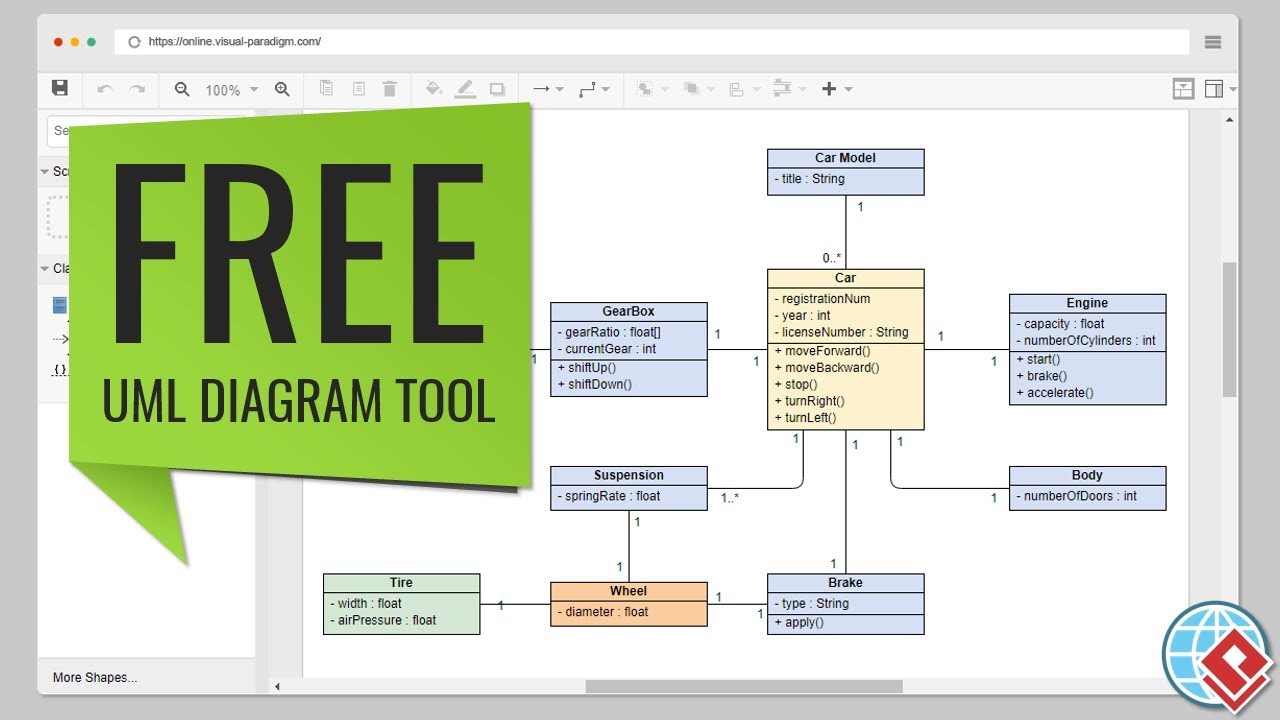
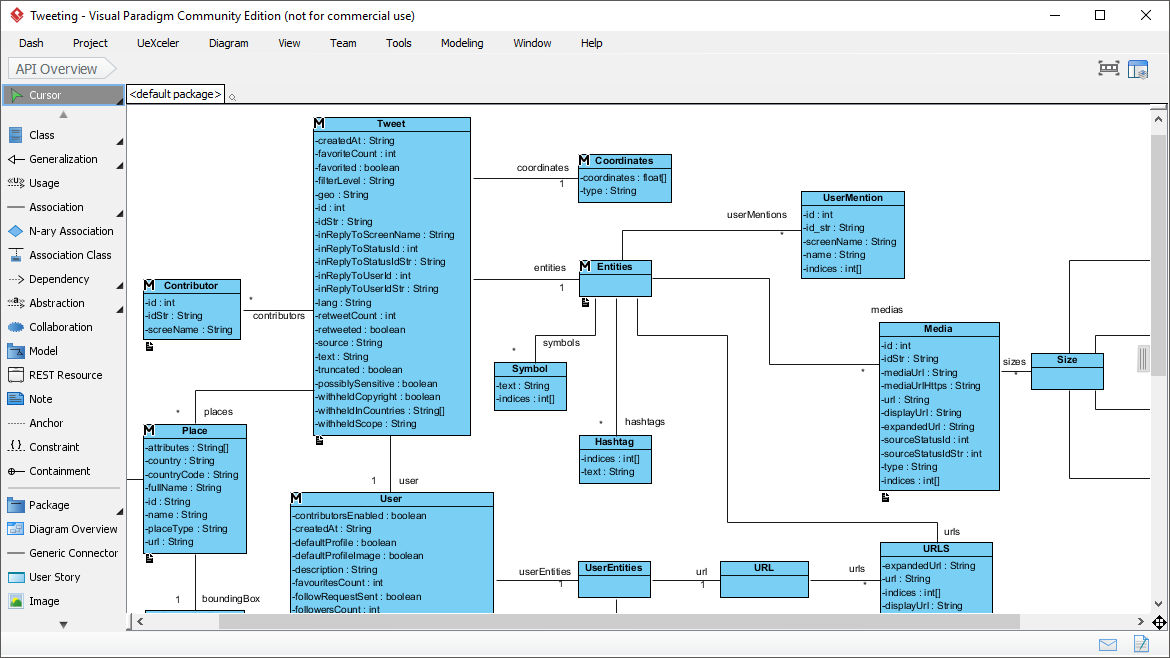
Free Online UML Tool - Visual Paradigm

主な概念

統一モデリング言語(UML)

UMLは、主にソフトウェア工学で使用される標準化されたモデリング言語であり、ソフトウェアシステムのアーティファクトを指定、可視化、構築、文書化するために用いられます。システムの構造と振る舞いを表現するための図のセットを提供しています。

UMLの主要な図

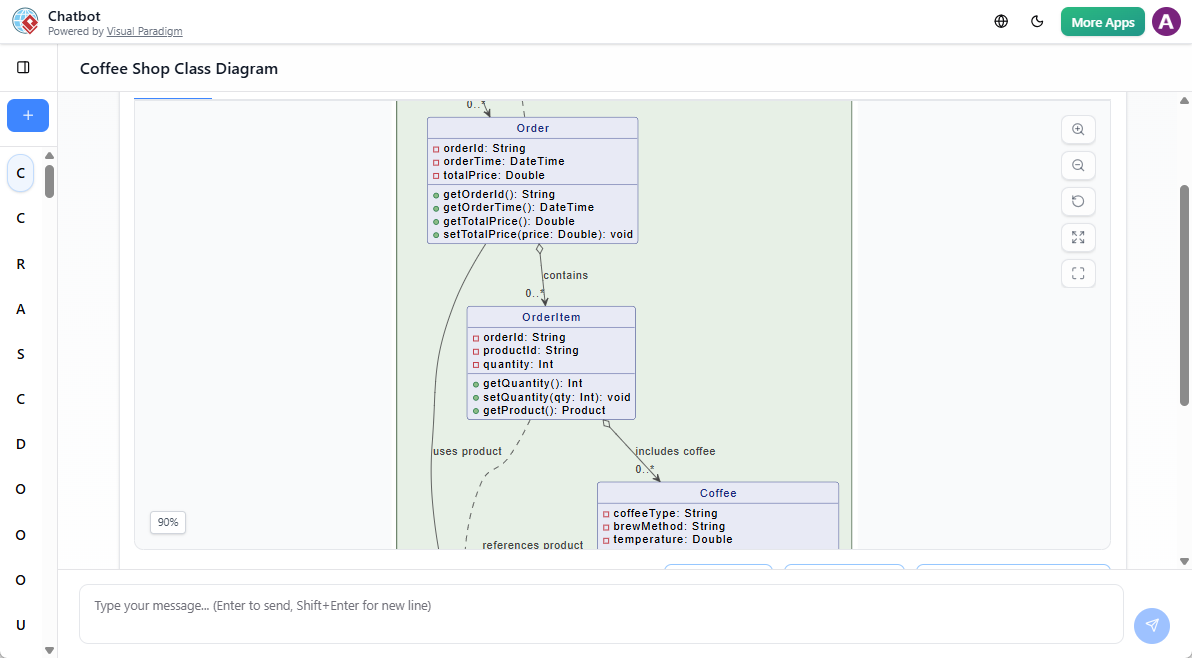
  1. クラス図

    • システムのクラス、属性、メソッド、およびクラス間の関係を示すことで、システムの静的構造を表します。
    • 例:図書管理システムのクラス図で、以下のクラスを示す書籍会員、および貸出.
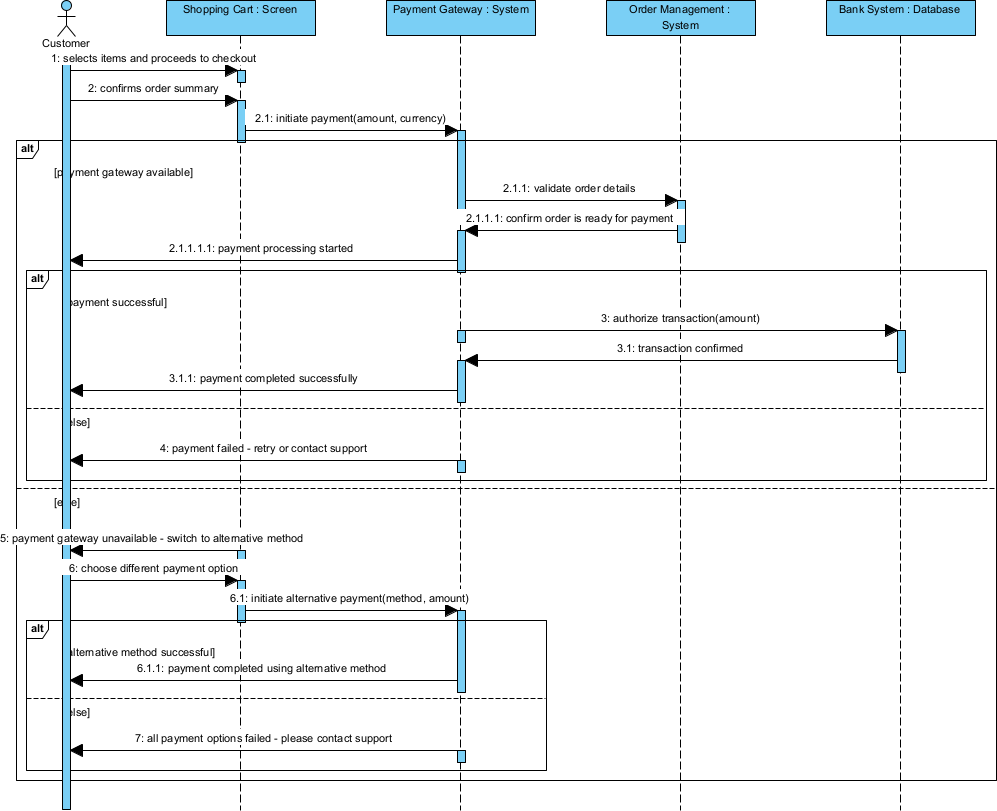
  2. シーケンス図

    • ユースケースの特定のシナリオにおけるオブジェクト間の相互作用を示し、交換されるメッセージの順序に注目します。
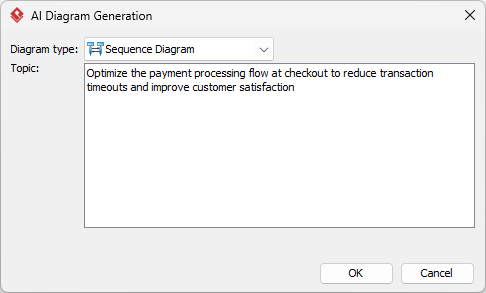
    • 例:精算オンラインショッピングシステムにおけるユースケース。
  3. ユースケース図

    • ユーザー(アクター)とシステムの相互作用を示すことによって、システムの機能要件を捉える。
    • 例:オンラインショッピングシステムのユースケース図で、以下のユースケースを示す。商品を閲覧するカートに追加する、およびチェックアウト.
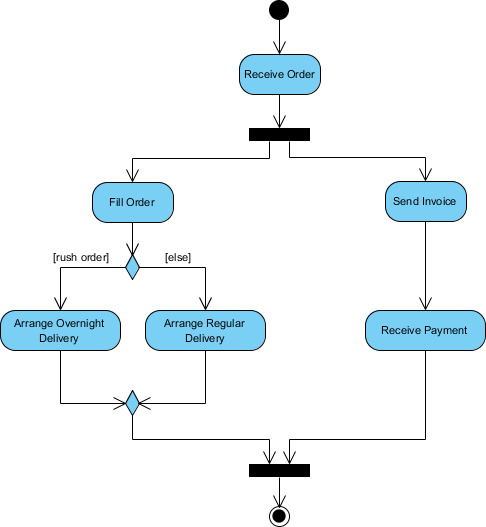
  4. アクティビティ図

    • 活動の順序と制御の流れを示すことによって、システムのワークフローをモデル化する。
    • 例:オンラインショッピングシステムにおける注文処理ワークフローのアクティビティ図。

ビジネスプロセスモデルと表記法(BPMN)

BPMNは、ワークフローにおけるビジネスプロセスを指定するためのグラフィカルな表現である。ビジネスアナリストから技術開発者に至るまで、すべてのビジネス関係者が理解できるように設計されている。

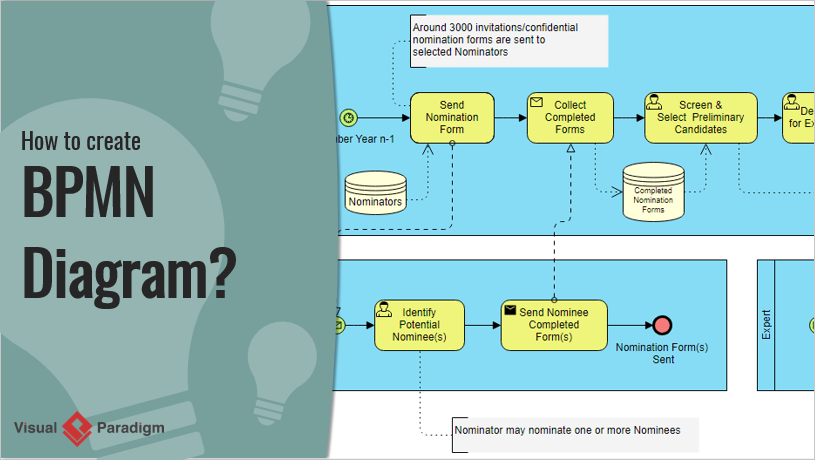
How to Create BPMN Diagram? Visual Paradigm

BPMNの主要な要素

  1. イベント

    • プロセス中に起こるものを表すもので、開始イベント、終了イベント、中間イベントなどが含まれる。
    • 例:顧客が注文をしたことでトリガーされる開始イベント。
  2. アクティビティ

    • プロセス内で実行される作業を表す。アクティビティはタスクまたはサブプロセスであることができる。
    • 例:タスクとしての 支払い処理 注文の履行プロセスにおけるもの。
  3. ゲートウェイ

    • プロセスの流れを制御し、経路の分岐、分岐、合流、結合を決定する。
    • 例:支払い状況に基づいて、 注文の出荷 または 注文のキャンセル 支払い状況に基づいて決定するゲートウェイ。
  4. フロー・オブジェクト

    • イベント、アクティビティ、ゲートウェイを含み、シーケンスフローで接続されて実行順序を定義する。
    • 例: 支払い処理 から 注文の出荷.

UMLとBPMN:主な違い

  1. 目的

    • UML:主にソフトウェア設計および開発に使用され、ソフトウェアシステムの構造と動作に焦点を当てる。
    • BPMN:ビジネスプロセス管理に使用され、ビジネスプロセス内のワークフローと相互作用に焦点を当てる。
  2. 対象者

    • UML:ソフトウェア開発者、アーキテクト、エンジニアを対象としている。
    • BPMN:ビジネスアナリスト、プロセスオーナー、ビジネス運用に関与するステークホルダーを対象としている。
  3. 範囲

    • UML:ソフトウェアシステムのさまざまな側面、構造、動作、相互作用をカバーする広範な図を提供する。
    • BPMN:ビジネスプロセスに特化しており、ワークフローと相互作用の詳細な表現を提供する。
  4. 複雑さ

    • UML:図や表記法の多様性により複雑になりがちで、ソフトウェア工学の概念に対する深い理解を必要とする。
    • BPMN:一般的にシンプルで直感的であり、非技術的なステークホルダーにも理解しやすいように設計されている。

例1:オンラインショッピングシステム

UMLユースケース図

  • アクター:顧客、管理者
  • ユースケース:商品を閲覧する、カートに追加する、チェックアウトする、在庫を管理する
  • 説明: カスタマーとオンラインショッピングシステム間の相互作用を示し、主要な機能を強調しています。

BPMNプロセス図

  • イベント: 開始 (カスタマーが注文を提出), 終了 (注文が発送)
  • 活動: 支払い処理、注文準備、発送
  • ゲートウェイ: 支払い状況を確認するための判断ゲートウェイ
  • 説明: 支払いから発送までの注文処理のワークフローを、明確な判断ポイントとともに示しています。

例2: ライブラリ管理システム

UMLクラス図

  • クラス: 書籍、会員、貸出
  • 関係: 会員が書籍を借りる、貸出は会員と書籍を関連付ける
  • 説明: ライブラリ管理システムの静的構造を表し、主要なエンティティ間の関係を示しています。

BPMNプロセス図

  • イベント: 開始 (会員が書籍を依頼), 終了 (書籍の返却)
  • アクティビティ: 在庫確認、書籍発行、リマインダー送信
  • ゲートウェイ: 書籍の在庫状況を確認するための決定ゲートウェイ
  • 説明: 書籍の貸し出しのワークフロー(依頼から返却まで)を示し、在庫状況の確認のための判断ポイントを含む。

UMLとBPMNの主な違い

以下は、UMLとBPMNの主な違いを強調した比較表である。

機能 UML(統合モデル化言語) BPMN(ビジネスプロセスモデルおよび表記法)
目的 主にソフトウェア設計および開発に使用され、ソフトウェアシステムの構造と動作に焦点を当てる。 ビジネスプロセス管理に使用され、ビジネスプロセス内のワークフローおよび相互作用に焦点を当てる。
対象者 ソフトウェア開発者、アーキテクト、エンジニアを対象としている。 ビジネスアナリスト、プロセスオーナー、ビジネス運営に関与するステークホルダーを対象としている。
範囲 ソフトウェアシステムの構造、動作、相互作用など、さまざまな側面をカバーする広範な図を扱います。 ビジネスプロセスに特化しており、ワークフローと相互作用を詳細に表現します。
複雑さ 図や表記法の多様性により複雑になることがあり、ソフトウェア工学の概念に対する深い理解が求められます。 一般的にシンプルで直感的であり、技術的でないステークホルダーにも理解しやすいように設計されています。
主要な図/要素 – クラス図
– シーケンス図
– ユースケース図
– 活動図
– 状態機械図
– コンポーネント図
– イベント(開始、終了、中間)
– 活動(タスク、サブプロセス)
– ゲートウェイ(決定、並行、イベントベース)
– フロー要素(シーケンスフロー、メッセージフロー)
使用例 – ソフトウェアアーキテクチャ設計
– システム動作のモデリング
– 要件分析
– オブジェクト指向設計
– ビジネスプロセスマッピング
– ワークフロー自動化
– プロセス改善
– ビジネスとITの整合性
統合 ソフトウェア開発ツールやIDEと頻繁に統合される。 ビジネスプロセス管理ツールやエンタープライズアーキテクチャツールと頻繁に統合される。
標準化 オブジェクト管理グループ(OMG)によって標準化されている。 オブジェクト管理グループ(OMG)によって標準化されている。
柔軟性 さまざまな図を用いてシステムの異なる側面をモデル化できる非常に柔軟な仕組み。 ビジネスプロセスに重点を置いているが、特定のニーズに応じて追加の記法で拡張可能。
可視化 システムのアーキテクチャと動作の包括的な視点を提供する。 ビジネスプロセスとワークフローの明確で直感的な視点を提供する。

この表は、UMLとBPMNの主な違いを要約しており、ソフトウェア開発およびビジネスプロセス管理におけるそれぞれの強みと用途を理解するのに役立ちます。

推奨されるUMLおよびBPMNツール

Visual Paradigmは、包括的な機能と両方のモデリング言語のシームレスな統合により、UMLとBPMNの両方を使用する際に強く推奨されます。以下は、Visual Paradigmが際立つ主な理由です:

  1. 包括的なモデル化サポート: Visual Paradigm は UML、BPMN、ERD、DFD などを含む幅広いモデル化標準をサポートしています。これにより、さまざまなソフトウェア開発およびビジネスプロセス管理プロジェクトに適した多目的なツールとなります910.

  2. 統合環境: このツールは、UML および BPMN モデリングをアジャイル開発ツール、プロジェクト管理図、コード工学機能と統合したワンストップソリューションを提供します。この統合により、プロジェクトの管理が容易になり、設計から実装へのスムーズな移行が保証されます911.

  3. 使いやすさ: Visual Paradigm は直感的で使いやすいインターフェースを提供しており、初心者から経験者まで誰もが利用しやすいです。自動拡張プール、スマートコネクタ補正、拡張可能なサブプロセスといった機能を備えており、モデル作成プロセスを簡素化します11.

  4. コード工学: このツールはコード生成およびリバースエンジニアリングをサポートすることで、UML設計モデルとソースコードの間のギャップを埋めます。この機能は、設計と実装の整合性を保つのに開発者にとって有益です10.

  5. 共同作業機能: Visual Paradigm はリアルタイムおよび非同期でのチーム協働をサポートしており、複数のチームメンバーが同時に同じプロジェクトに取り組むことが可能です。この機能は、継続的なコミュニケーションと協働を必要とするアジャイルチームにとって不可欠です9.

  6. 高品質なドキュメント作成: このツールは、ドキュメンテーションおよびステークホルダーとのコミュニケーションに不可欠な高品質なプロセス文書やレポートの作成を可能にします。この機能により、プロジェクトの進捗状況や設計意思決定に関する明確で簡潔な記録を維持できます。10.

  7. 業界での評価: Visual Paradigmは主要企業から信頼されており、主要なIT賞を受賞しています。業界独自のTOGAF ADMライフサイクルツールおよびその他のエンタープライズアーキテクチャツールにより、プロフェッショナルな用途において信頼できる選択肢となっています。9.

  8. コストパフォーマンス: Visual Paradigmは、UML、BPMNおよびその他の重要な図をサポートする非常にコストパフォーマンスの高い可視化モデリングツールセットを提供しています。これにより、機能を犠牲にすることなく、小さなチームや個人ユーザー、学生にとっても利用しやすくなっています。10.

  9. チュートリアルとサポート: Visual Paradigmは、UMLおよびBPMNモデリングの導入を支援するさまざまな無料のチュートリアルやリソースを提供しています。これらのリソースにはステップバイステップのガイド、動画、ドキュメントが含まれており、ユーザーがプロジェクトに効果的にツールを使用できるようにしています。1213.

結論として、Visual Paradigmの包括的な機能、使いやすさ、協働機能、および業界での評価は、ソフトウェア開発およびビジネスプロセス管理のプロジェクトにUMLおよびBPMNモデリングを統合したいチームにとって理想的な選択肢です。

結論

UMLとBPMNは、システム設計およびプロセス管理の分野で異なる目的を果たしています。UMLはソフトウェア開発に最適であり、ソフトウェアシステムの構造と動作をモデル化するための包括的な図を提供します。一方、BPMNはビジネスプロセス管理に特化しており、ビジネスプロセス内のワークフローと相互作用を明確で直感的に可視化する方法を提供します。UMLとBPMNの主要な概念および違いを理解することで、特定のニーズに合った適切なツールを選択でき、プロジェクトにおける効果的なコミュニケーションとドキュメンテーションを確保できます。

統合モデル化言語(UML)の包括的ガイド

UML入門

統合モデル化言語(UML)は、システムの設計を可視化するための統合された図のセットで構成される標準化されたモデル化言語です。UMLは、ソフトウェアシステムのアーティファクトを指定、可視化、構築、文書化するためにソフトウェア工学で広く使用されています。UMLは、アクター、プロセス、活動、論理的グループ、注釈など、システムのアーキテクチャのブループリントを標準的な方法で可視化する手段を提供します。

Free UML Tool

主要な概念

1. モデル

UMLにおけるモデルは、システムまたはその一部の簡略化された表現です。これにより、システムの設計や構造を理解し、伝えるのに役立ちます。

2. 

UML図は、システムのアーキテクチャを図式化したものです。主に構造図と振る舞い図の2つのタイプに分類されます。

3. 要素

UML要素は、モデルを作成するために使用される基本的な構成要素です。クラス、オブジェクト、インターフェース、コンポーネント、ノード、ユースケース、アクターなどがあります。

4. 関係

UMLにおける関係は、要素どうしがどのようにつながっているかを定義します。一般的な関係には、関連、一般化、依存関係、実装があります。

5. 表記法

UMLは、異なる要素や関係を表現するために標準的な表記法のセットを使用します。これらの表記法は、一貫性があり、理解しやすい図を作成するのに役立ちます。

図の種類

UMLには14種類の図があり、主に構造図と振る舞い図の2つのカテゴリに分けられます。

Overview of the 14 UML Diagram Types

構造図

  1. クラス図

    • システムのクラス、属性、メソッド、およびクラス間の関係を示すことで、システムの静的構造を表します。
    • 例:図書館管理システムのクラス図で、以下のクラスを示す例書籍会員、および貸出.
  2. オブジェクト図

    • 特定の時点におけるシステムの詳細な状態のスナップショットを示す。
    • 例:以下のインスタンスを表すオブジェクト図書籍および会員図書館システム内のクラス。
  3. コンポーネント図

    • コンポーネント間の構成と依存関係を示す。
    • 例:Webアプリケーションのコンポーネント図で、以下のコンポーネントを示すUIビジネスロジック、およびデータベース.
  4. デプロイメント図

    • アーティファクトがノード上に物理的に配置されている状態を示す。
    • 例:Webアプリケーションのデプロイメント図で、サーバー、データベース、およびそれらの相互作用を示す。
  5. パッケージ図

    • モデルの要素をグループ化し、複雑なシステムの構造化と管理の手段を提供する。
    • 例:ソフトウェアプロジェクトのパッケージ図で、以下のパッケージを示すUIサービス、およびデータアクセス.
  6. プロファイル図

    • 標準的な拡張メカニズムを使用してUMLモデルをカスタマイズします。
    • 例:医療や金融などの特定の分野向けにUMLを拡張するプロファイル図。

振る舞い図

  1. ユースケース図

    • ユーザー(アクター)とシステムの相互作用を示すことによって、システムの機能要件を捉えます。
    • 例:オンラインショッピングシステムのユースケース図で、以下のユースケースを示す。商品を閲覧するカートに追加する、およびチェックアウト.
  2. シーケンス図

    • ユースケースの特定のシナリオにおけるオブジェクトの相互作用を示し、交換されるメッセージの順序に注目します。
    • 例:オンラインショッピングシステムにおけるチェックアウトユースケースのシーケンス図。
  3. コミュニケーション図

    • オブジェクト間の構造的関係およびそれらが交換するメッセージに注目します。
    • 例:オンラインショッピングシステムにおけるチェックアウトユースケースのコミュニケーション図で、以下のオブジェクト間の相互作用を示す。顧客注文、および支払いオブジェクト間の相互作用を示す。
  4. 状態機械図

    • オブジェクトの状態およびイベントによる状態間の遷移を表します。
    • 例:オンラインショッピングシステムにおける 注文オブジェクトの状態遷移図。
  5. アクティビティ図

    • アクティビティの順序と制御の流れを示すことによって、システムのワークフローをモデル化する。
    • 例:オンラインショッピングシステムにおける 注文処理ワークフローのアクティビティ図。
  6. 相互作用概要図

    • システムの異なる部分間の相互作用を高レベルで概要として提供する。
    • 例:オンラインショッピングシステムにおける 注文処理ワークフローにおいて、以下の部分間の相互作用を示す。顧客注文、および 支払いコンポーネント。
  7. タイミング図

    • 時間を表す単一の軸上で、オブジェクト間の相互作用を示す。
    • 例:オンラインショッピングシステムにおける 注文処理ワークフローにおいて、以下のオブジェクト間の相互作用のタイミングを示す。顧客注文、および 支払いオブジェクト。

応用分野

UMLは、以下の分野や産業で広く使用されています:

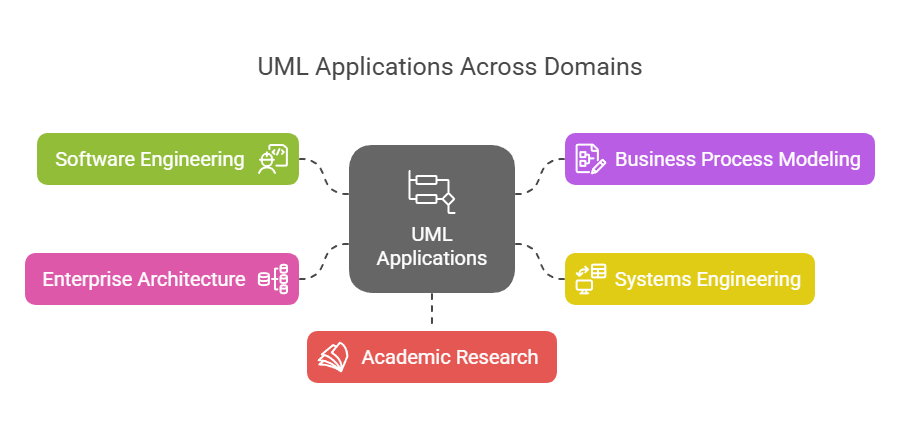
UML Applications Areas - Visual Paradigm

  1. ソフトウェア工学

    • ソフトウェア設計およびアーキテクチャ
    • 要件分析および仕様定義
    • システムモデリングおよび文書化
  2. ビジネスプロセスモデリング

    • ワークフロー分析および最適化
    • ビジネスプロセス再設計
  3. システム工学

    • ハードウェアとソフトウェアの共同設計
    • 組み込みシステム開発
  4. エンタープライズアーキテクチャ

    • 企業全体のシステム統合
    • IT戦略および計画
  5. 学術研究

    • 形式的手法および検証
    • ソフトウェア工学教育

例1:図書管理システム

  • クラス図

    • クラス:書籍会員貸出
    • 関係:会員貸し出しを行う貸出関係者会員および
  • ユースケース図

    • アクター:図書館員会員
    • ユースケース:本の貸し出し本の返却カタログ検索
  • シーケンス図

    • シナリオ:本の貸し出し
    • オブジェクト:会員図書館員貸出
    • メッセージ:会員貸し出しを依頼する書籍図書館員在庫を確認し、貸出が作成される

例2:オンラインショッピングシステム

  • クラス図

    • クラス:顧客商品注文支払い
    • 関係:顧客が注文を注文注文を含む商品支払いが処理する注文
  • ユースケース図

    • アクター:顧客管理者
    • ユースケース:製品を閲覧するカートに追加するチェックアウト在庫を管理する
  • アクティビティ図

    • ワークフロー:注文処理
    • 活動:顧客が注文を提出する注文が検証される支払いが処理される注文が発送される

結論

UMLは、ソフトウェアシステムのアーティファクトを可視化、仕様化、構築、文書化するのに役立つ強力で多用途なモデリング言語です。幅広い図の種類と標準化された表記法により、ソフトウェアエンジニア、ビジネスアナリスト、システムアーキテクトにとって不可欠なツールとなっています。UMLの主要な概念、図の種類、適用分野を理解することで、複雑なシステムの設計とコミュニケーションを効果的に実現できます。

Visual Paradigmは、包括的な機能とアジャイル手法とのシームレスな統合により、ITソフトウェア開発チームにとって最適なUMLツールとして強く推奨されます。以下は、Visual Paradigmが際立つ主な理由です:

  1. 包括的なモデリングサポート:Visual ParadigmはUML、SysML、BPMN、ERD、DFD、ArchiMateなど、幅広いモデリング標準をサポートしています。これにより、さまざまな種類のソフトウェア開発プロジェクトに適した多用途なツールとなります。123.

  2. アジャイル統合: Visual Paradigmはアジャイルなソフトウェア開発プロセスを支援するように設計されています。UMLモデリングをスクラムやカンバンなどのアジャイル手法と統合し、チームがコミュニケーションや文書作成をサポートするために必要なときにUML図を作成できるようにすることで、アジャイル性を損なうことなく対応できます。45.

  3. 共同作業機能: このツールはリアルタイムおよび非同期のチーム協働をサポートしており、複数のチームメンバーが同時に同じプロジェクトに取り組めるようにします。この機能は、継続的なコミュニケーションと協働を必要とするアジャイルチームにとって不可欠です。15.

  4. コード工学機能: Visual Paradigmはコード生成およびリバースエンジニアリングの機能を提供しており、開発プロセスを著しく高速化できます。ORMやRESTなどのさまざまな技術をサポートしており、設計から実装への移行を容易にします。16.

  5. 使いやすいインターフェース: このツールは直感的で使いやすいインターフェースを提供しており、複雑な図の作成や管理を効率的に行うのに役立ちます。また、ワイヤーフレーミングやストーリーボード作成、プロトタイピングなどの機能も備えており、UXデザインには不可欠です。15.

  6. IDEとの統合: Visual Paradigmは主要な統合開発環境(IDE)とシームレスに統合され、分析から設計および実装へのスムーズな移行を確保します。この統合により、ソフトウェア開発ライフサイクルのすべての段階での作業負荷が軽減されます。7.

  7. レポート作成と文書化: このツールはPDF、Word、HTMLなどさまざまな形式でプロフェッショナルなレポートの作成が可能です。この機能は文書化やステークホルダーとのコミュニケーションに役立ちます。8.

  8. 業界の評価:Visual Paradigmは、政府機関、大手企業、教育機関を含む数百万のユーザーから信頼されています。主要なIT賞を受賞しており、業界における信頼性と効果性がさらに裏付けられています。5.

結論として、Visual Paradigmの包括的な機能、アジールインテグレーション、協働機能、および業界の評価は、UMLモデリングおよびソフトウェア開発プロセスを向上させたいITソフトウェア開発チームにとって理想的な選択肢です。

UMLアクティビティ図の包括的ガイド:主要なコンセプトと例

はじめに

ソフトウェア開発およびシステムモデリングの分野において、UML(統合モデリング言語)アクティビティ図は、システム内のプロセスのワークフローを可視化する上で重要な役割を果たします。これらの図は、特定の目標を達成するために関与する活動、意思決定、および相互作用の順序を明確で構造的な方法で表現します。UML(統合モデリング言語)アクティビティ図は、システムのワークフローをモデリングする強力なツールであり、特定の目標を達成するために関与する活動、意思決定、およびプロセスの順序を示します。本ガイドでは、UMLアクティビティ図の主要なコンセプトをカバーし、例を提示し、ITソフトウェア開発に最適なツールとしてVisual Paradigmを推奨します。

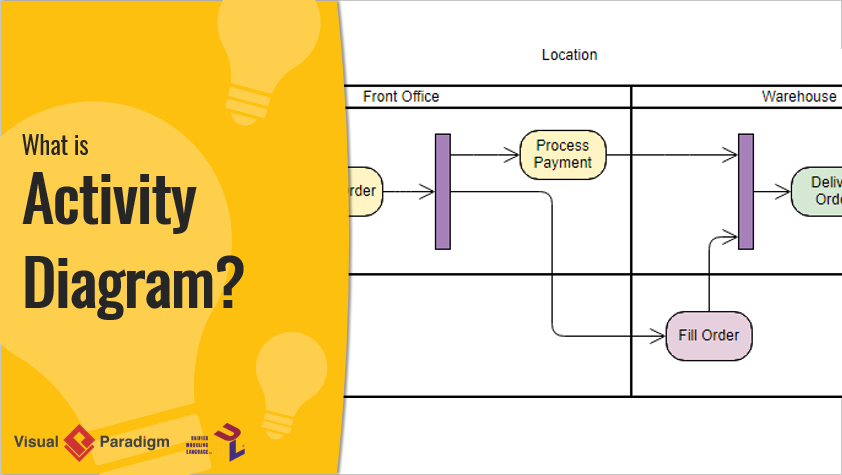
What is Activity Diagram?

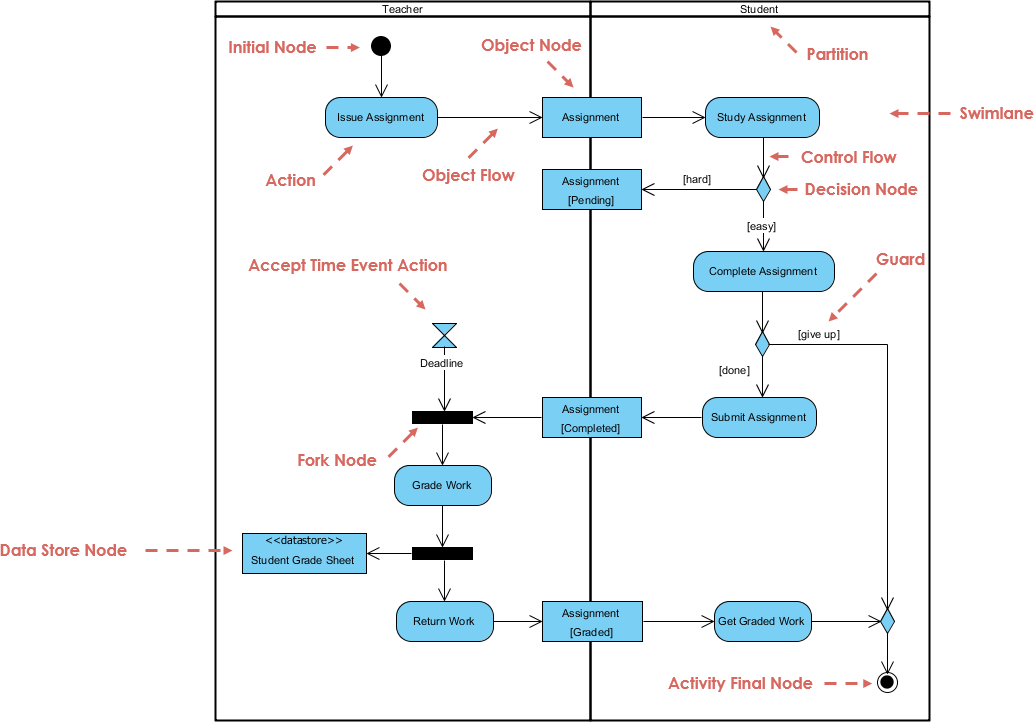
本記事では、教師と生徒の両方が関与する課題のライフサイクル(発行から採点・返却まで)を詳細な例を用いて説明することで、UMLアクティビティ図の複雑な点に迫ります。図の主要な構成要素とワークフローを分解することで、UMLアクティビティ図が複雑なプロセスを効果的にモデリングする方法を包括的に理解できるようにします。経験豊富な開発者であろうとUMLに初めて触れる方であろうと、このガイドを通じてアクティビティ図の基礎から応用的な概念までを習得でき、自信を持って自らのプロジェクトに活用できるようになります。

UMLアクティビティ図の主要なコンセプト

What is Activity Diagram?

  1. アクティビティ:

    • システム内で実行されるアクションやタスクを表す。
    • 丸みを帯びた長方形として描かれる。
  2. アクション:

    • アクティビティ図における最も基本的な作業単位。
    • 角が丸い長方形として表される。
  3. 制御フロー:

    • アクティビティが実行される順序を示す。
    • アクティビティをつなぐ実線矢印で表される。
  4. 決定ノード:

    • 制御の流れが条件に基づいて分岐するポイントを表す。
    • 菱形として描かれる。
  5. フォークノードとジョインノード:

    • フォークノードは単一のフローを複数の並行フローに分割する。
    • ジョインノードは複数のフローを再び単一のフローに統合する。
    • 両方とも水平なバーとして描かれる。
  6. 初期ノードと終了ノード:

    • 初期ノードはワークフローの開始を表す。
    • 終了ノードはワークフローの終了を表す。
    • 両方とも黒い円として描かれており、初期ノードには出力矢印があり、最終ノードには入力矢印がある。
  7. オブジェクトフロー:

    • 活動間のオブジェクトの流れを示す。
    • 破線の矢印で表される。

UMLアクティビティ図の例

アクティビティ図は、教師と生徒の相互作用を伴い、課題の発行から採点および返却までのライフサイクル管理という問題をモデル化する。問題の主な側面には以下が含まれる:

  1. 課題の発行と学習:

    • 教師が課題を発行し、生徒がそれを学習する。
    • 生徒が課題の難易度に対して抱く認識は、それを完了するためのアプローチに影響を与える。
  2. 課題の完了と提出:

    • 生徒は課題を完了し、教師に提出する。
    • 生徒は特定の条件に基づいて、課題を放棄する可能性がある。
  3. 締切の管理:

    • 教師は課題提出の締切を設定する。
    • ワークフローは締切を考慮し、それに応じて進行する。
  4. 採点と返却:

    • 教師は提出された課題を採点し、成績を保存する。
    • 採点された課題は生徒に返却される。
  5. 並行する活動:

    • 図は、課題の採点や成績の保存といった並行する活動を、フォークノードとジョインノードを用いてモデル化する。

主要な構成要素とワークフロー

  1. 初期ノード:

    • プロセスは以下のものから始まる:初期ノード黒い円で表される。これはワークフローの開始を示している。
  2. 課題の発行(教員):

    • 教員が課題を発行し、その行動によって表される「課題の発行」.
    • あるオブジェクトノード(課題)が作成され、課題オブジェクトが生成されたことを示している。
  3. 課題(オブジェクトフロー):

    • 課題オブジェクトが教員から学生へと流れ、その流れはオブジェクトフロー矢印によって表される。
  4. 課題の学習(学生):

    • 学生は課題を受け取り、それを学習を開始する。その行動は「課題の学習」.
    • この行動は学生のスイムレーンに含まれており、学生の責任であることを示している。
  5. 判断ノード(制御フロー):

    • 学生は課題が難しいか易しいかを判断し、その判断は判断ノード(ダイアモンド型)によって表される。
    • 判断の内容によって、制御フローは二つの経路に分岐する:
      • [難しい]:課題が難しい場合、学生は勉強を続けます。
      • [簡単]:課題が簡単な場合、学生は課題を完了するように進みます。
  6. 課題の完了(学生):

    • 学生が課題を完了し、アクションによって表されます「課題の完了」.
    • ガード 条件 [あきらめる] 学生が課題を提出するか、あきらめるかを決定します。
  7. 課題の提出(学生):

    • 学生が課題を完了した場合、それを提出します。アクションによって表されます「課題の提出」.
    • 課題オブジェクトが教員に戻る。これは オブジェクトフロー 矢印によって表されます。
  8. 時間イベントの受領アクション(教員):

    • 教員が課題の締切を設定し、 時間イベントの受領アクション (砂時計の記号)。
    • 締切が到達した場合、ワークフローは フォークノード.
  9. フォークノード:

    • The フォークノード (太い水平バー) はワークフローを2つの並行パスに分割する:
      • 成績付け (教員):教員が提出された課題を評価し、アクション 「成績付け」.
      • データストアノード:評価された課題はデータストアに保存され、ノード データストアノード (<<datastore>> 学生成績表)。
  10. 課題返却 (教員):

    • 教員が評価済みの課題を学生に返却し、アクション 「課題返却」.
    • 課題オブジェクトが学生に戻る。これは オブジェクトフロー矢印によって表される。
  11. 成績取得 (学生):

    • 学生が評価済みの課題を受け取り、アクション 「成績取得」.
  12. アクティビティ最終ノード:

    • プロセスは アクティビティ最終ノードによって表され、ワークフローの完了を示す。

このUMLアクティビティ図は、課題の管理プロセスのワークフローを効果的にモデル化しており、教師と生徒の間の相互作用、意思決定ポイント、および関連する並行処理を強調しています。課題のライフサイクル(発行から採点・返却まで)を明確な視覚的表現で示しており、プロセスの理解と管理を容易にします。

ITソフトウェア開発におけるVisual Paradigmの推奨

上記の例はUMLアクティビティ図の基本を示していますが、Visual Paradigmはソフトウェア開発に対してより包括的で視覚的なアプローチを提供しています。以下に、なぜVisual ParadigmがITソフトウェア開発に理想的なツールであるかを説明します:

  1. 包括的なUMLサポート:

    • Visual Paradigmは、アクティビティ図、クラス図、シーケンス図などを含む、すべてのUML図をサポートしています。
    • UML図の作成、編集、管理に役立つ豊富なツールと機能を提供しています。
  2. 使いやすいインターフェース:

    • 直感的なドラッグアンドドロップインターフェースにより、UML図の作成や編集が簡単にできます。
    • ツールは、図を特定のニーズに合わせてカスタマイズできる幅広いオプションを提供しています。
  3. 他のツールとの統合:

    • Visual Paradigmは、IDEやバージョン管理システム、プロジェクト管理ツールなど、他の開発ツールとシームレスに統合されています。
    • この統合により、スムーズなワークフローが確保され、生産性が向上します。
  4. 共同作業機能:

    • Visual Paradigmは共同作業をサポートしており、複数のユーザーが同時に同じプロジェクトに取り組むことができます。
    • ツールにはバージョン管理、チーム協働、リアルタイム更新の機能が含まれています。
  5. 高度なモデル化機能:

    • Visual Paradigmは、アジャイル手法、エンタープライズアーキテクチャ、システムモデリングなどのサポートを含む、高度なモデル化機能を提供しています。
    • 複雑なシステムやワークフローをモデル化するための包括的な機能群を提供しています。
  6. 豊富なドキュメントとサポート:

    • Visual Paradigmは、ユーザーがツールを始められるように、豊富なドキュメント、チュートリアル、サポートリソースを提供しています。
    • ビデオチュートリアル、ガイド、例などを含む多様な学習リソースを提供しています。

結論

UMLアクティビティ図は、特定の目標を達成するために必要な活動、意思決定、プロセスの順序を示すシステムのワークフローをモデル化する強力なツールです。提示された例は、UMLアクティビティ図を作成する基本を示しています。しかし、より包括的で視覚的なソフトウェア開発アプローチを求める場合、Visual Paradigmは理想的なツールです。包括的なUMLサポート、使いやすいインターフェース、他のツールとの統合、共同作業機能、高度なモデル化機能、豊富なドキュメントとサポートを備えているため、UML図の作成、管理、共同作業を効果的に行うために必要なすべてを提供しています。初心者であろうと経験豊富な開発者であろうと、Visual Paradigmはソフトウェア開発プロジェクトを実現するために必要なツールとサポートを提供しています。

UMLにおけるクラス図の包括的ガイド

はじめに

クラス図は、UMLの静的図の一種であり、クラス、属性、操作、オブジェクト間の関係を可視化することで、システムの構造を示すものです。オブジェクト指向ソフトウェア設計のための設計図として機能し、システムのアーキテクチャを明確かつ簡潔に理解し、文書化する手段を提供します。

目的と機能

システム構造の可視化

クラス図は、異なるクラスがどのように相互作用し、互いに関係しているかを示すことで、開発者がシステムの構造を理解し、文書化するのを助けます。この可視化された表現は、堅牢で保守性の高いソフトウェアシステムを設計する上で不可欠です。

ソフトウェアのモデリング

クラス図は、ソフトウェアを高い抽象度でモデリングできるようにし、開発者がソースコードに深く立ち入ることなく設計に集中できるようにします。この抽象化により、開発プロセスの初期段階で潜在的な問題を特定しやすくなります。

オブジェクト指向設計

クラス図はオブジェクト指向モデリングの基盤です。システムの構成要素とそれらの相互作用を明示することで、カプセル化、継承、ポリモーフィズムといったオブジェクト指向の原則を実装しやすくします。

データモデリング

クラス図はデータモデリングにも利用できます。システム内のデータの構造と関係を表現するのに役立ちます。特にデータベース設計において、エンティティとその関係を明確に定義する必要があるため、非常に有用です。

コードの設計図

クラス図は、ソフトウェアアプリケーションの実行可能なコードを構築するための設計図として機能します。開発者が明確な道筋を把握できるようにし、実装が設計されたアーキテクチャと整合するように保証します。

主要な構成要素

クラス

クラスは、3つのセクションに分けられた長方形で表されます:

  1. クラス名:上部のセクションにはクラス名が含まれます。
  2. 属性:中央のセクションには、クラスの状態を定義する属性またはデータメンバがリストアップされます。
  3. 操作(メソッド):下部のセクションには、クラスが実行できる操作または関数がリストアップされます。

関係

クラス間の関係は、線と記号を使って示されます:

  1. 一般化:継承を表し、あるクラス(サブクラス)が別のクラス(スーパークラス)の属性や操作を継承することを示します。サブクラスからスーパークラスを向いた空心の矢印で表現されます。
  2. 集約:あるクラスが別のクラスのインスタンスを含むことを示しますが、含まれるクラスは独立して存在できる点が特徴です。含むクラスに接続された線の端に空心の菱形で表現されます。
  3. 合成: 包含されるクラスが包含クラスなしでは存在できない、より強い集約の形式。包含クラスに接続された線の端に塗りつぶされた菱形で表される。
  4. 関連: 2つのクラス間の関係を表し、一方のクラスがもう一方のクラスを使用または相互作用することを示す。2つのクラスを結ぶ実線で表される。

PlantUMLを用いた例図

基本的なクラス図

集約と構成を含む図

関連を含む図

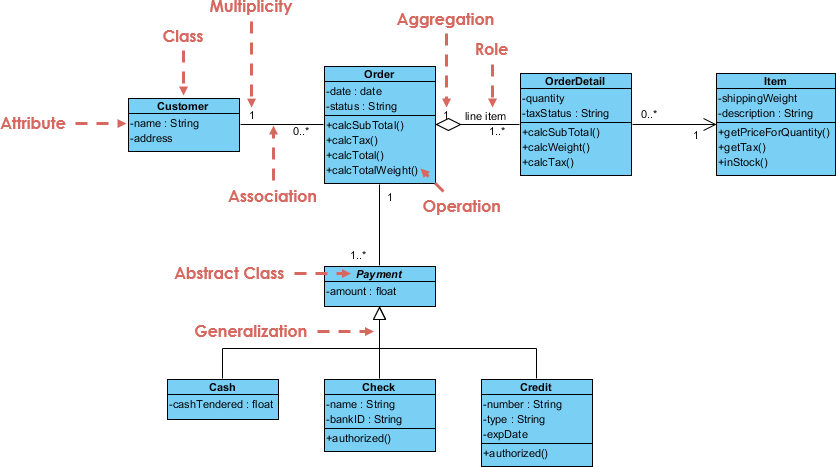
例 – 注文システム

SDE | Uml Class Diagrams

主要な要素

  1. クラス:

    • 顧客: 注文を行う顧客を表す。
      • 属性:名前 (文字列), 住所 (文字列)。
    • 注文: 顧客が行った注文を表す。
      • 属性:日付 (日付), 状態 (文字列)。
      • 操作:小計を計算()税額を計算()calcTotal()calcTotalWeight().
    • 注文詳細: 注文内の各アイテムの詳細を表します。
      • 属性:数量(整数)、税状態(文字列)。
      • 操作:calcSubTotal()calcWeight()calcTax().
    • アイテム: 注文中のアイテムを表します。
      • 属性:配送重量(浮動小数点数)、説明(文字列)。
      • 操作:getPriceForQuantity()getTax()inStock().
    • 支払い (抽象クラス): 注文の支払いを表します。
      • 属性: 金額 (浮動小数点数).
    • 現金: 支払いのサブクラスで、現金支払いを表します。
      • 属性: 支払った現金 (浮動小数点数).
    • 振込: 支払いのサブクラスで、振込支払いを表します。
      • 属性: 名前 (文字列), 銀行ID (文字列), 承認済み (論理値).
    • クレジット: 支払いのサブクラスで、クレジットカード支払いを表します。
      • 属性: 番号 (文字列), 種類 (文字列), 有効期限 (日付), 承認済み (論理型).
  2. 関係:

    • 関連:
      • 顧客 と 注文: 顧客は複数の注文を出すことができます(0..* 注文側の多重性).
      • 注文 と 注文明細: 注文には複数の注文明細を含めることができます(1..* 注文明細側の多重性).
      • 注文明細 と 商品: 各注文明細は1つの商品に関連しています(1 商品側の多重性).
    • 集約:
      • 注文 と 注文明細: 注文明細は注文の一部であることを示しますが、注文明細は独立して存在できます。
    • 一般化:
      • 支払いおよびそのサブクラス(現金振込クレジット):継承を示し、現金、振込、クレジットは支払いの特定の種類であることを意味する。
    • 役割:
      • 注文明細および商品:役割明細項目は、注文の文脈における注文明細の具体的な役割を示す。
  3. 多重性:

    • あるクラスのインスタンスが、別のクラスの単一のインスタンスと関連付けられる数を示す。たとえば、顧客は複数の注文を出すことができる(0..*).
  4. 抽象クラス:

    • 支払い:抽象クラスとしてマークされており、直接インスタンス化できず、他の支払いタイプの基底クラスとして機能する。

説明

  • 顧客:注文を出す主体を表し、名前や住所などの基本的な属性を持つ。
  • 注文: 注文自体を表し、日付や状態などの属性と、小計、税額、合計、合計重量を計算するための操作を含む。
  • 注文詳細: 注文内の各商品の詳細を表し、数量や税の状態を含み、小計、重量、税額を計算するための操作を備える。
  • 商品: 注文される商品を表し、配送重量や説明などの属性と、数量に対する価格、税額、在庫状態を取得するための操作を備える。
  • 支払い: 注文の支払いを表す抽象クラスで、金額を表す属性を持つ。異なる支払い方法に対応するサブクラスを有する。
    • 現金: 現金払いを表し、提示された現金額を表す属性を持つ。
    • 振込: 振込払いを表し、名前、銀行ID、承認状態などの属性を持つ。
    • クレジット: クレジットカード払いを表し、カード番号、種別、有効期限、承認状態などの属性を持つ。

この図は注文処理システム内の構造と関係を効果的に捉えており、異なるコンポーネントがどのように相互作用するかを明確な視覚的表現で示している。

結論

クラス図はUMLモデリングにおける重要なツールであり、システムのアーキテクチャを明確かつ構造的に表現する手段を提供する。主要なコンポーネントと関係を理解することで、開発者は堅牢で保守性の高いソフトウェア設計を構築できる。PlantUMLなどのツールを活用することで、これらの図を簡単に可視化し、チームメンバー間で共有でき、協働を促進し、システム構造に対する一貫した理解を確保できる。

参考文献

  1. Visual Paradigm Online Free Edition:

    • Visual Paradigm Online (VP Online) Free Editionは、クラス図、その他のUML図、ER図ツール、組織図ツールをサポートする無料のオンライン描画ソフトウェアである。シンプルだが強力なエディタを備えており、クラス図を迅速かつ簡単に作成できる。図や形状の作成数に制限なく無制限にアクセスでき、広告なし。個人的および非営利目的での使用に限り、作成した図の所有権がユーザーに帰属する。エディタには、ドラッグで形状を作成、クラスの属性や操作のインライン編集、さまざまなフォーマットツールが含まれる。また、印刷やエクスポート、さまざまな形式(PNG、JPG、SVG、GIF、PDF)での共有も可能。123.
  2. 印象的な描画機能:

    • Visual Paradigm Onlineは、図の品質を向上させるための高度なフォーマットオプションを提供する。整列ガイドを使用して形状を正確に配置し、図形や線のフォーマットオプション、フォントスタイル、回転可能な形状、埋め込み画像やURL、影効果などを用いてクラス図を装飾できる。このツールはクロスプラットフォーム対応(Windows、Mac、Linux)であり、任意のウェブブラウザからアクセス可能。また、Google Driveとの統合により、図の保存やアクセスをスムーズに行える。23.
  3. 包括的な図作成オプション:

    • Visual Paradigm Onlineは、UML図(クラス図、ユースケース図、シーケンス図、アクティビティ図、ステート図、コンポーネント図、デプロイメント図)、ERDツール、組織図、フロアプランデザイナー、ITIL、ビジネスコンセプト図を含む幅広い図の種類をサポートしています。このツールは使いやすく、ドラッグアンドドロップ機能とスナップするスマートな接続線を備えており、40種類以上の接続線タイプやさまざまなペイントオプションを含む豊富なフォーマットオプションも提供しています。45.
  4. 学習とカスタマイズ:

    • Visual Paradigmは、クラス図の作成と管理に便利なプラットフォームを提供しており、ソフトウェア開発者やエンジニアにとって最適な選択です。色、フォント、レイアウトの変更により、クラス図をカスタマイズできます。また、関連、継承、依存関係などのクラス間の関係を構築することも可能です。Visual Paradigmは、システムの静的構造、すなわちシステムのクラス、その属性、メソッド、およびそれらの間の関係を表現するための強力なUMLモデリングツールです。67.
  5. コミュニティとサポート:

    • Visual Paradigm Community Editionは、すべてのUML図の種類をサポートする無料のUMLソフトウェアです。ユーザーがUMLをより早く、より簡単に、より迅速に学べるように設計されています。直感的な操作で、自分だけのクラス図を簡単に作成できます。Visual Paradigmは、中小企業、フォーチュン500企業、大学、政府機関を含む32万人以上の専門家や組織から信頼されており、次世代のIT開発者を、職場で必要な専門スキルを備えた状態で育成するために使用されています。89.

これらの参考情報は、クラス図の作成にVisual Paradigmを使用する際の包括的な機能と利点を強調しており、個人およびプロフェッショナルな用途において推奨されるツールであることを示しています。

Visual Paradigm AI パッケージ図生成ツール:テキストからUMLパッケージへ

あなたは新しいコンテンツ管理システムの設計を進め、レイヤー、モジュール、依存関係——プレゼンテーション、ビジネスルール、永続化、セキュリティ——に目を向けていますが、上位構造はまだ不明瞭です。初稿のためにパッケージやサブパッケージ、依存関係の矢印を手動で作成するのは過剰に感じられます。Visual ParadigmのAIが登場します。パッケージ図生成ツール:システムを平易な言葉で説明するだけで、数秒でクリーンで標準準拠のUMLパッケージ図が得られます。心の中のモデルから視覚的なブループリントへと迅速に移行できる道です。

なぜこのAIがソフトウェアアーキテクチャを変えるのか

  • 自然言語 → 即座に完全なUMLパッケージ図
  • パッケージ、サブパッケージ、依存関係、ステレオタイプを自動認識
  • レイヤード構造、モジュール構造、マイクロサービス型構造を対応可能
  • 完全に編集可能なネイティブモデル — 精緻化、ノートの追加、パッケージの統合が可能
  • デスクトップの正確さ+ブラウザ内チャットボットによる迅速な反復

1. デスクトップ:プロンプト → 構造化されたアーキテクチャ

Visual Paradigm デスクトップで:

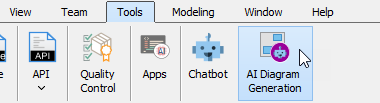
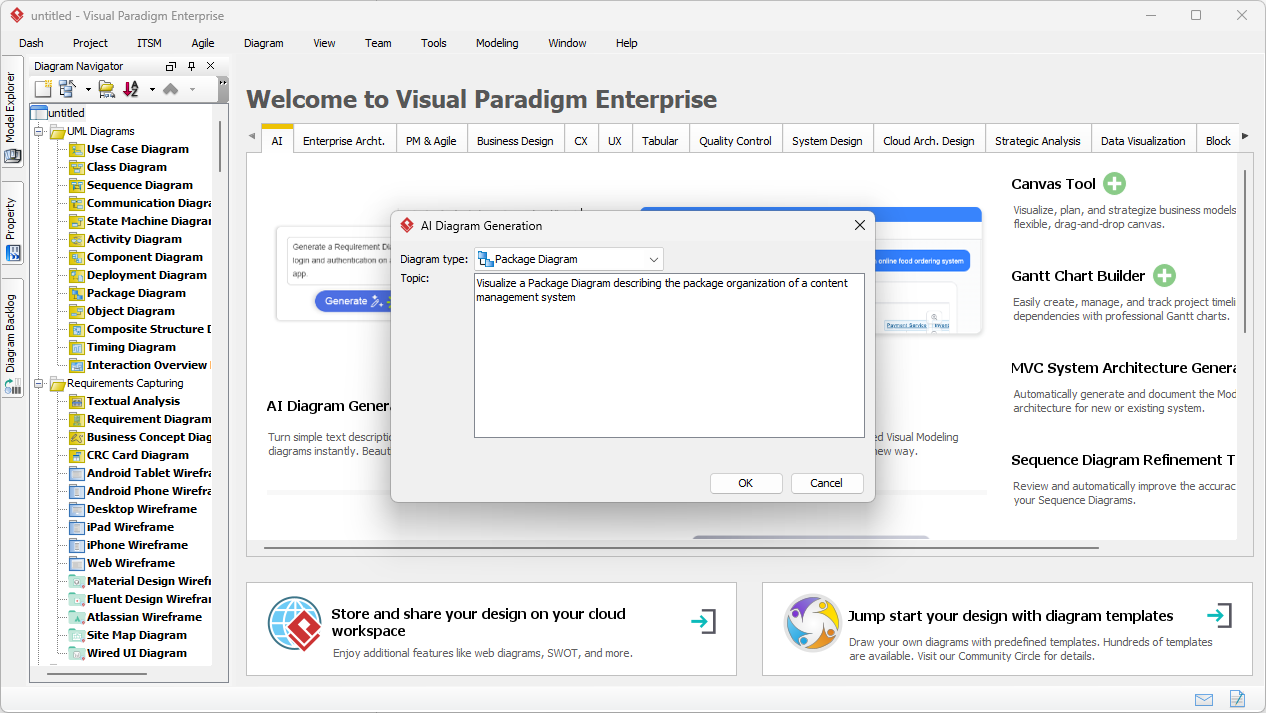
ツール → AI図生成 → 「パッケージ図」を選択 → システムを説明:

「次のコンテンツ管理システムのUMLパッケージ図を生成してほしい:プレゼンテーションレイヤー(Web UI、モバイルアプリ)、ビジネスロジックレイヤー(コンテンツサービス、ユーザー管理、ワークフローインジン)、データアクセスレイヤー(リポジトリ、監査ログ)を含み、各レイヤー間の依存関係を示してほしい。」

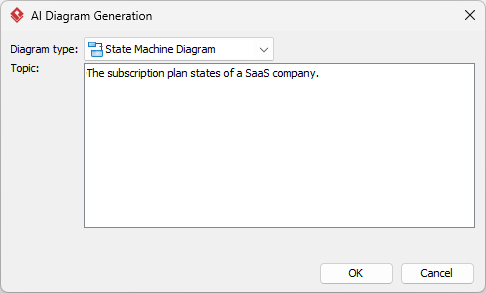
入力ダイアログはシンプルで焦点を絞ったままです:

Visual Paradigm Desktop AI Package Diagram generation prompt interface

AIが構築する内容:

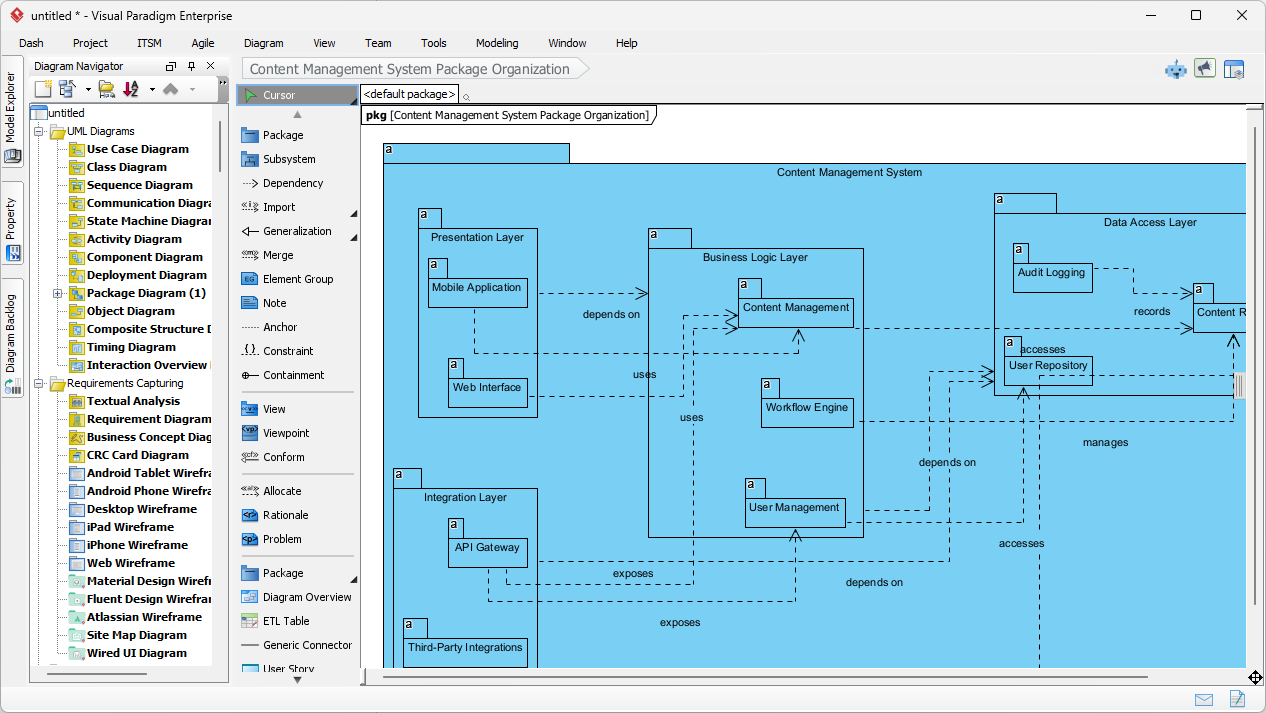
  • トップレベルのパッケージ:プレゼンテーションレイヤー、ビジネスロジックレイヤー、データアクセスレイヤー
  • サブパッケージ:Web UI、モバイルアプリ、コンテンツサービス、リポジトリ
  • 明確な依存関係の矢印(破線)でレイヤー間の流れを示す

生成されたコンテンツ管理システムのパッケージ図 — 論理的でレイヤード構造、レビュー準備完了:

AI-generated UML Package Diagram for Content Management System

すぐに編集可能:セキュリティパッケージの追加、依存関係の調整、またはクラス図との統合が可能。

2. チャットボット:現場で会話形式のアーキテクチャ設計

素早いスケッチやリモートでのブレインストーミングの際は、Visual Paradigm AIチャットボット:

「銀行システムのUMLパッケージ図を作成:コアバンキングサービス、アカウント管理、顧客管理、取引処理、コンプライアンスおよび監査。」

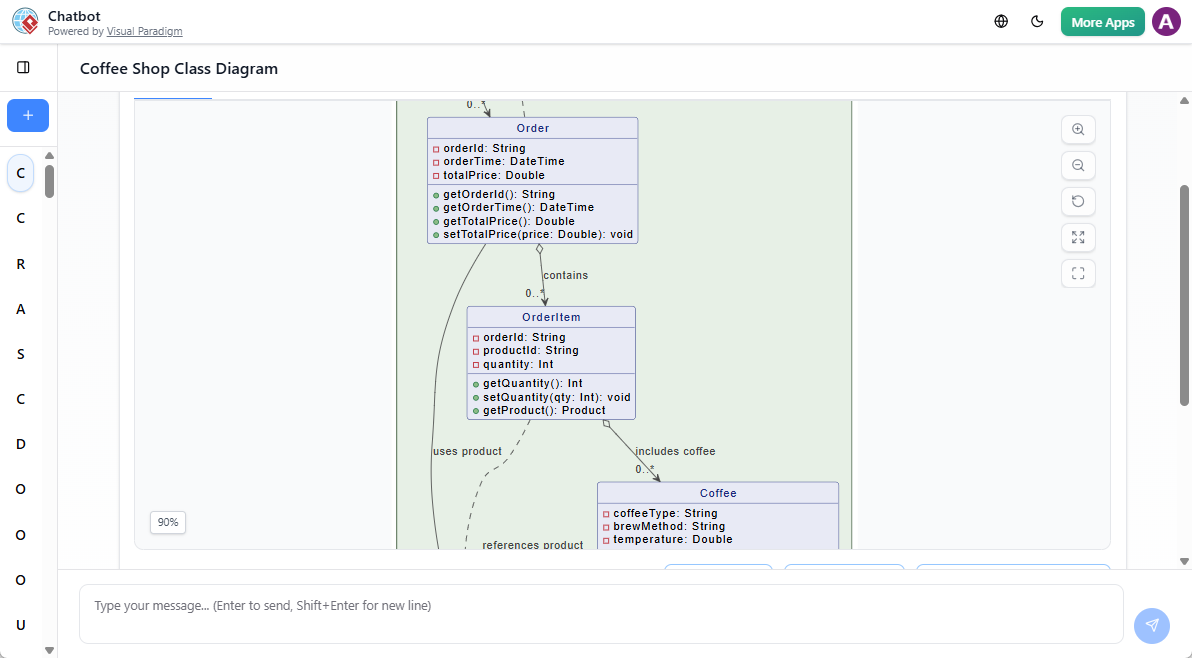
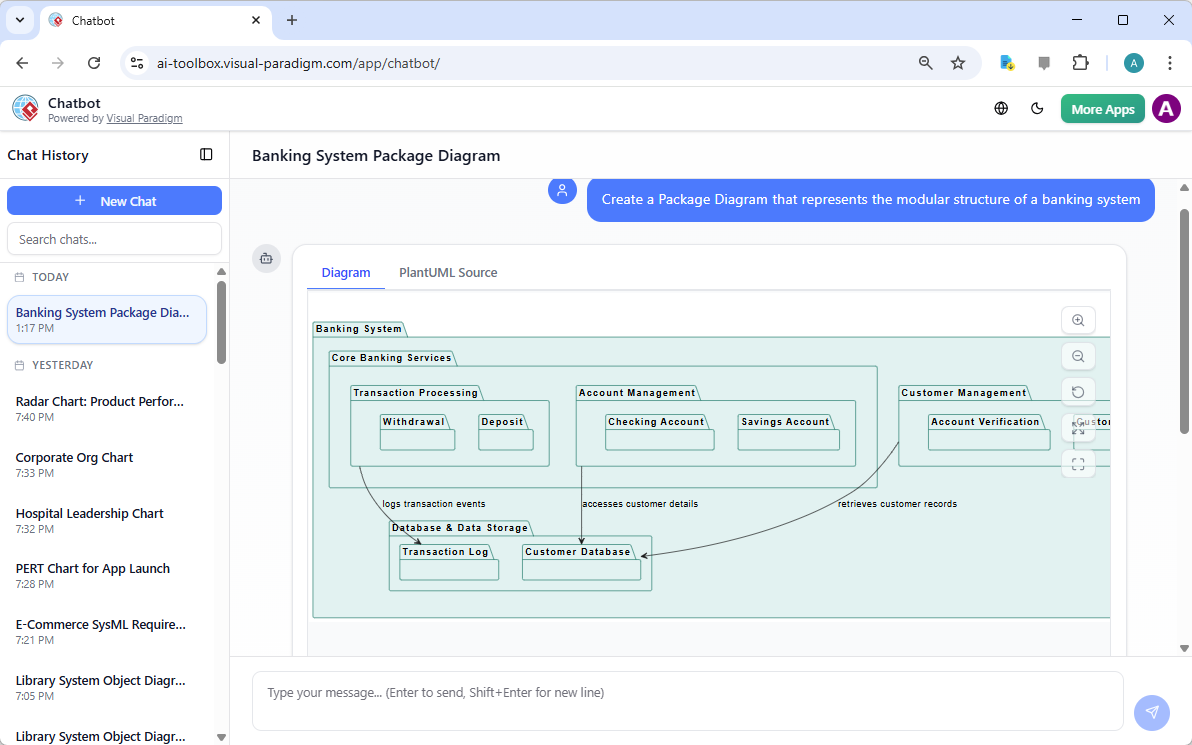
チャットボットはリアルタイムで生成します——パッケージ、サブパッケージ、依存関係が即座に表示されます。銀行システムの例としての出力:

AI-generated UML Package Diagram for Banking System via Chatbot

会話の中で修正:「取引処理への依存関係を持つ決済ゲートウェイパッケージを追加。」即座に更新されます。初期設計会議やUMLの教育に最適です。

2026年にパッケージ図とAIが重要な理由

良いアーキテクチャは明確な境界から始まります。パッケージ図は、1行のコードを書く前からモジュール性、レイヤー、依存関係を示します。手動での作成は遅く、AIによってその障壁が取り除かれます。

特に効果を発揮するユースケース:

  • レイヤード型エンタープライズアプリ
  • マイクロサービスの境界
  • モジュール設計の教育
  • 迅速なリファクタリング計画

議論中に範囲を変更する必要がある?再生成する。新しいモジュールが必要?追加する。そのスピードがアーキテクチャの柔軟性とチーム間のコミュニケーションの明確さを保ちます。

システム構造を可視化する準備はできていますか?

Visual ParadigmのAIパッケージ図ジェネレーター曖昧なアイデアを、CMS、銀行、EC、あるいは任意のモジュール型システム向けのプロフェッショナルなUMLパッケージへ迅速に変換します。

箱と矢印との戦いをやめ、今日からよりスマートに設計を始めましょう。

関連リンク

これらの記事では、人工知能UMLパッケージ図システム要素の論理的グループ化を自動化するために活用され、開発者が自然言語のプロンプトから即座にアーキテクチャ構造を生成し、ソフトウェア依存関係およびシステムのスケーラビリティ.

  1. AI図生成ツールがVisual Paradigmでパッケージ図をサポートするようになりました:この記事では、AIを活用したパッケージ図の生成機能の新機能リリースについて説明しており、ソフトウェアアーキテクチャの可視化を向上させます。
  2. Visual Paradigm AIで即座にUMLパッケージ図を生成:このガイドでは、AI駆動のツールを活用して、最小限の手動作業でプロフェッショナルなUMLパッケージ図を作成する方法に焦点を当てています。
  3. インタラクティブなUMLパッケージ図生成ツール:このリソースでは、会話型AIインターフェースを通じて、リアルタイムでパッケージ図の作成と編集が可能なインタラクティブなツールへのアクセスを提供しています。
  4. UMLパッケージ図:AIを活用したコードベースの構造化の決定版ガイド:この包括的なガイドでは、AIがコードベースの構造化、複雑な依存関係の管理、アーキテクチャの整合性の維持にどのように役立つかを説明しています。
  5. テキストプロンプトからUMLパッケージ図を生成する:この記事では、高度なAIモデリング機能を活用して、原始的なアイデアやテキストプロンプトを詳細なUMLパッケージ図に変換する方法を探ります。
  6. Visual Paradigmを用いたUMLパッケージ図チュートリアル:このチュートリアルでは、パッケージ図を活用してソフトウェアコンポーネントを構造化し、その関係性を効果的に可視化するためのステップバイステップのアプローチを提供します。
  7. パッケージ図ソフトウェアの機能 – Visual Paradigm Online:この概要では、バージョン管理やリアルタイム編集を含む、共同でパッケージ図を管理できるオンラインツールについて紹介しています。
  8. UMLにおけるパッケージ図とは何か? – Visual Paradigmガイド:この基盤的なリソースでは、論理的なグループ化を通じて複雑なソフトウェアシステムを整理するパッケージ図の役割を紹介しています。
  9. UMLパッケージ図を用いたソフトウェアアーキテクチャのモデリング:この記事では、システムアーキテクチャのモジュール構造を整理し、伝えるためにパッケージ図を使用する際のベストプラクティスについて議論しています。
  10. パッケージ図の例とテンプレート – Visual Paradigmギャラリー:このギャラリーでは、実際の事例やテンプレートのコレクションを提供し、モジュール型ソフトウェア設計のインスピレーションとスピードアップを支援します。

問題からレポートへ:AIがUse Caseの旅をどう導くか

Discover how AI guides your use case journey from problem to report with Visual Paradigm’s intelligent development assistant.

新しいオンラインコースプラットフォームの立ち上げを担当するプロジェクトマネージャーだと想像してください。最初の課題は、問題を明確に表現し、それを機能的なシステムに変換することです。ここがUse Case駆動型開発アシスタントVisual Paradigm社のAI搭載ツールが登場します。単に文書作成を助けるだけでなく、曖昧なアイデアを詳細で実行可能なプロジェクト計画に変換するための完全で構造化されたワークフローをガイドします。このプロセスは非常に直感的で、経験豊富なビジネスアナリストと技術アーキテクトが一緒に働いているかのように感じられます。この詳細な解説では、実際のオンラインコースプラットフォームの事例を用いて、この強力なツールがUse Caseライフサイクル全体をどのように簡素化するかを紹介します。

要約:Use Case駆動型開発アシスタントの主なポイント

  • プロジェクトの核心的な目的を明確にするために、明確な問題文から始めましょう。

  • AIを活用して、候補となるUse Caseとアクターのリストを自動生成します。

  • AI生成のUse Caseとアクティビティ図.

  • 構造化されたMoSCoW法を用いて機能を優先順位付けし、高価値の作業に集中します。

  • 詳細なUse Caseの記述と実行可能なGherkinテストシナリオを生成します。

  • プロジェクトの範囲と計画を伝えるための包括的なレポートを作成します。

  • 中央ダッシュボードを活用して進捗を追跡し、単一の真実の源を維持します。

ステップ1:AIを活用した問題の定義

すべての成功するプロジェクトは、解決しようとしている問題を明確に理解することから始まります。Use Case駆動型開発アシスタントとの旅は「問題文」タブから始まります。ここではプロジェクト名と簡単な説明を入力します。AIはこの情報をもとに包括的な問題文を生成します。図1このツールはプロジェクト名「オンラインコースプラットフォーム」と簡単な説明「インストラクターがコースを作成・販売し、学生が登録して学べるマーケットプレイス」をもとに詳細な物語を生成しました。この物語は核心的な課題を明らかにしています:学生は関連するコースを見つけるのが困難であり、インストラクターは広範なオーディエンスに届くことや専門知識を収益化することに課題を抱えています。このAI生成の問題文はプロジェクトの基盤となり、チーム全員が最初から統一した理解を持つことを保証します。

This is a screenshot of Visual Paradigm's AI Powered Use Case Driven Development Assistant. we are now in step 1. It shows th

ステップ2:AIアシスタントを活用したUse Caseの特定

問題が定義されると、次に自然なステップとして、システムが提供すべき主要な機能を特定することです。アシスタントの「候補Use Case」タブ(図2)はこのプロセスを自動化します。問題文を分析した後、AIは各アクター(インストラクター、学生、管理者など)に関連付けられたUse Caseのリストを提案します。今回のオンラインコースプラットフォームの場合、AIは「新しいコースを作成する」「コースコンテンツをアップロードする」「コースを閲覧・検索する」「コースに登録する」などのUse Caseを提案しています。このリストはしっかりとした出発点となり、ブレインストーミング会議に費やす時間と労力を大幅に節約します。その後、これらの提案を精査し、新しいものを追加したり、不要なものを削除したりして、システム機能の包括的なリストを作成できます。
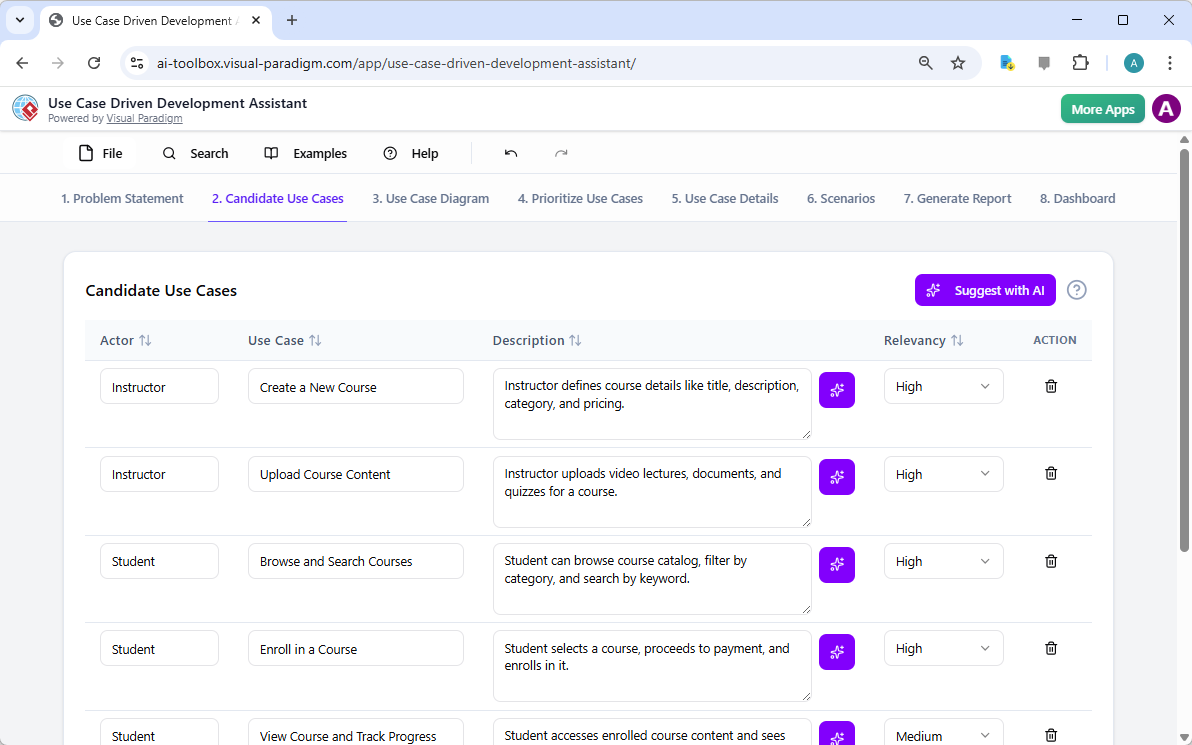
This is a screenshot of Visual Paradigm's AI Powered Use Case Driven Development Assistant. We are now in step 2. It shows a

ステップ3:Use Case図を用いたシステムの可視化

Use Caseを特定した後は、それらがシステムのアクターとどのように相互作用するかを可視化することが重要です。「Use Case図」タブは、図3)に示されるように、Use Caseとアクターのリストをもとに、明確でグラフィカルな表現を自動生成します。この図は、アクター(インストラクター、学生、管理者)とシステムの機能(新しいコースを作成するなど)の関係を示しています。AIによる生成により、図は正確でプロフェッショナルなフォーマットになっています。この視覚的補助は、ステークホルダー、開発者、デザイナーがテキスト中心の文書を読まなくても、システムの範囲や機能を迅速に理解できるため、非常に価値があります。
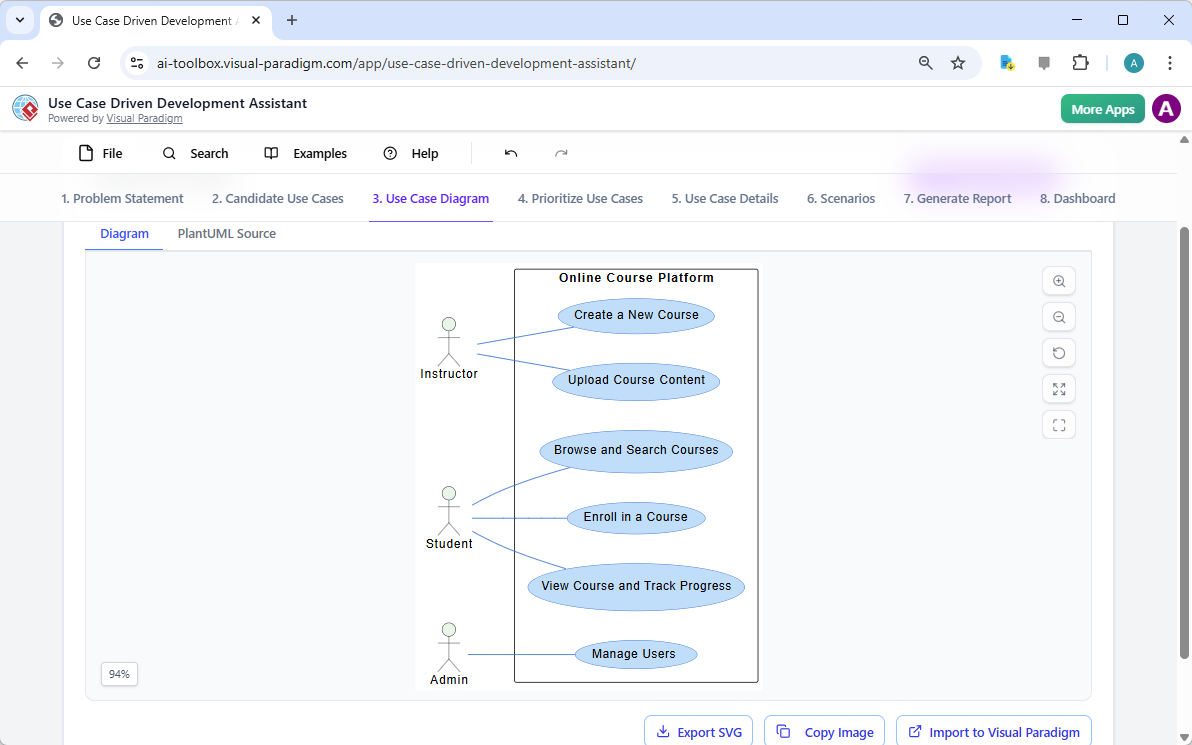
This is a screenshot of Visual Paradigm's AI Powered Use Case Driven Development Assistant. We are now in step 3. It shows a

ステップ4:最大の影響をもたらす機能の優先順位付け

すべてのUse Caseが同等というわけではありません。プロジェクトの成功は、最も重要な機能を最初に注力することにかかっていることが多いです。「Use Caseの優先順位付け」タブ(画像4、これは強力なフレームワークを提供します。各ユースケースに対してユーザー価値とビジネス価値(0〜10のスケール)を割り当て、その後MoSCoW優先順位付け法(必須、重要、望ましい、保留)を適用できます。例として、AIは「新しいコースを作成する」および「コースコンテンツをアップロードする」が、プラットフォームのコア機能にとって不可欠であるため、「必須」機能であることを明らかにしました。この構造的な優先順位付けにより、開発チームはユーザーおよびビジネスに最大の価値を提供することに集中でき、低優先度の機能に無駄な努力を費やすことを防ぎます。
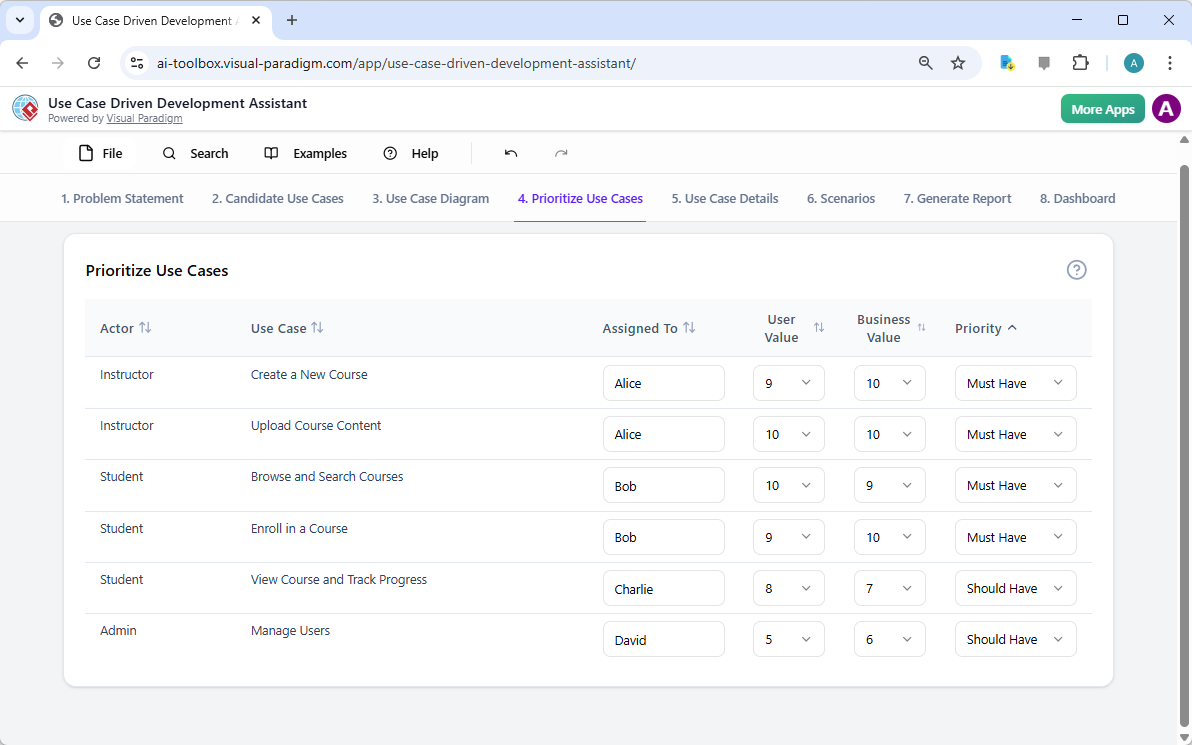
This is a screenshot of Visual Paradigm's AI Powered Use Case Driven Development Assistant. We are now in step 4. It shows th

ステップ5:ユースケースの詳細化とアクティビティ図の生成

高レベルのビューを確立した後、次のステップは各ユースケースの詳細に深く入り込むことです。「ユースケース詳細」タブは、画像5、選択されたユースケース用の包括的なテンプレートを作成できます。AIは事前条件、主な流れ、代替フローを含む詳細な記述を生成できます。たとえば「新しいコースを作成する」ユースケースの場合、AIは必要な手順を明確に示す構造化されたテンプレートを提供します。理解をさらに深めるために、アシスタントは同じユースケース用に「アクティビティ図」を生成でき、画像6のように表示されます。この図は、インストラクターがログインしてからコースが保存されるまでのステップバイステップのワークフローを視覚的に示しています。このような詳細は、開発者およびQAチームにとって不可欠です。
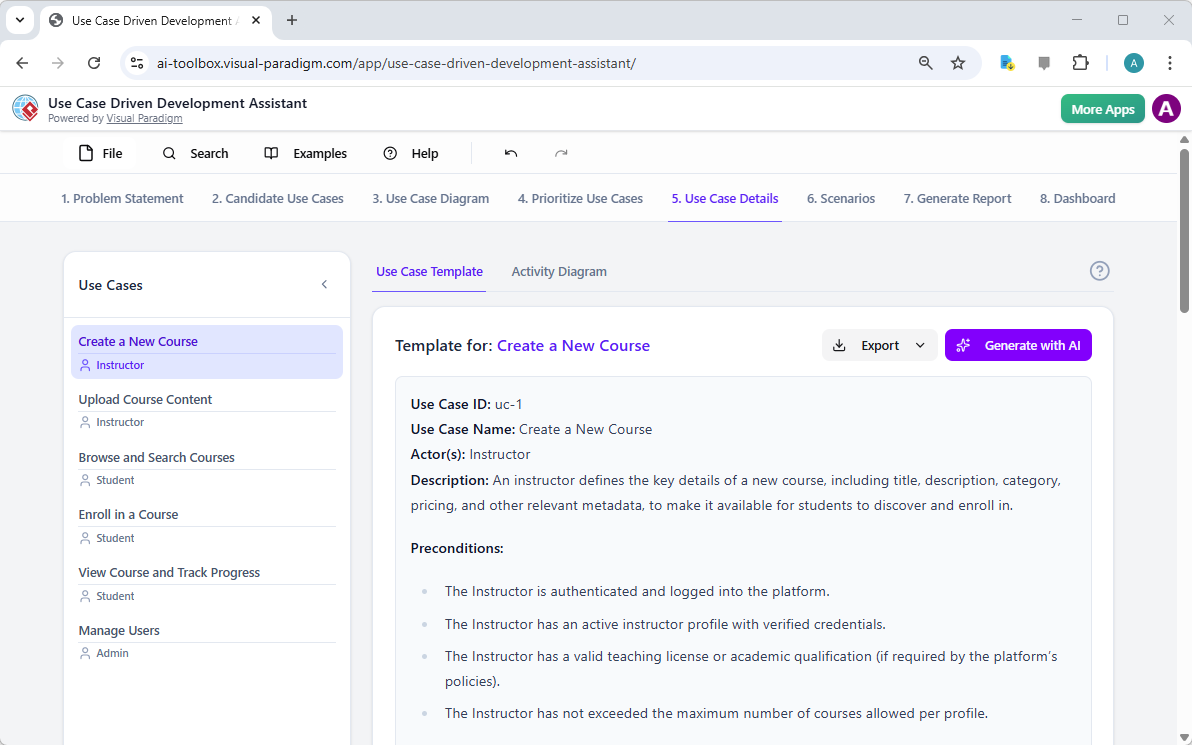
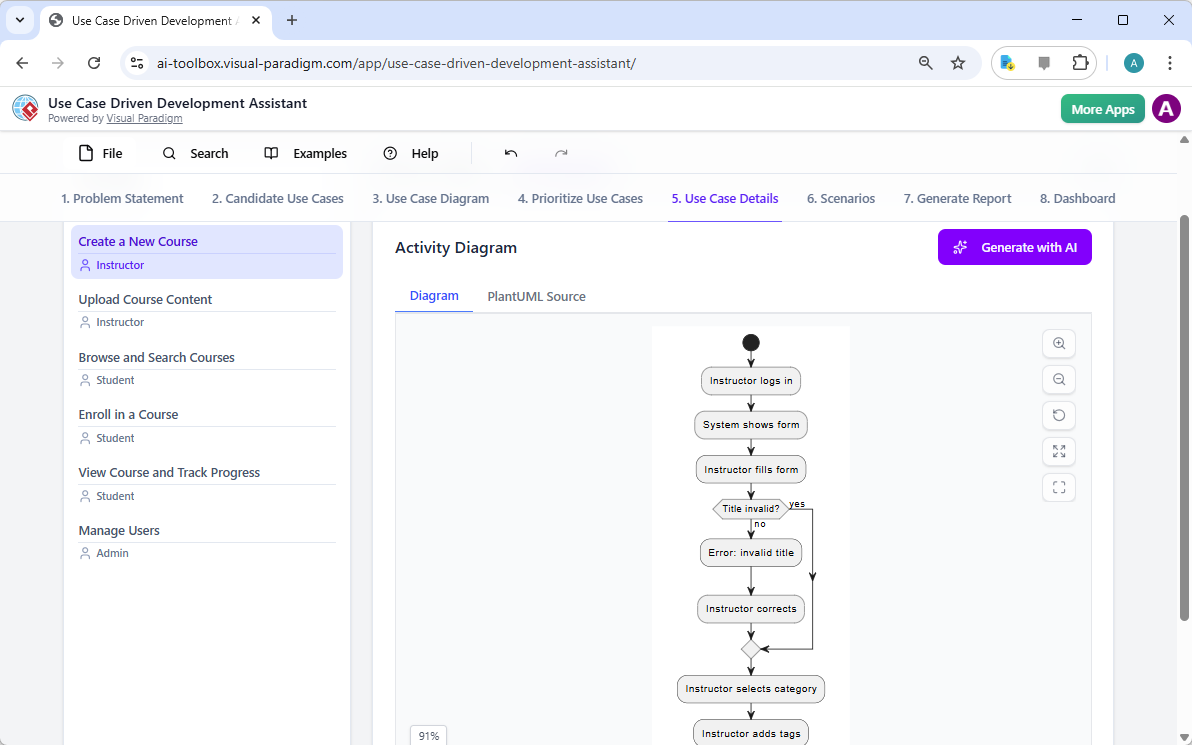
This is a screenshot of Visual Paradigm's AI Powered Use Case Driven Development Assistant. We are now in step 5. It shows thThis is a screenshot of Visual Paradigm's AI Powered Use Case Driven Development Assistant. We are still in step 5. It shows

ステップ6:テストシナリオとシーケンス図の生成

開発チームにとって、次の重要なステップはテスト可能なシナリオを作成することです。「シナリオ」タブは、画像7、ユースケースの記述から直接実行可能なGherkinシナリオを生成できます。これらのシナリオは、平易な言語(与えられた条件・実行する操作・期待される結果)で記述されており、自動テストに最適です。AIは主なシナリオと、無効なタイトルの場合の代替シナリオなどを生成できます。システムの内部動作をさらに明確にするために、アシスタントは「シーケンス図」を生成でき、画像8のように表示されます。この図は、インストラクター、Webダッシュボード、バックエンドAPI、データベース、通知サービスの間の相互作用を示しており、システムのアーキテクチャとデータフローを明確に描いています。
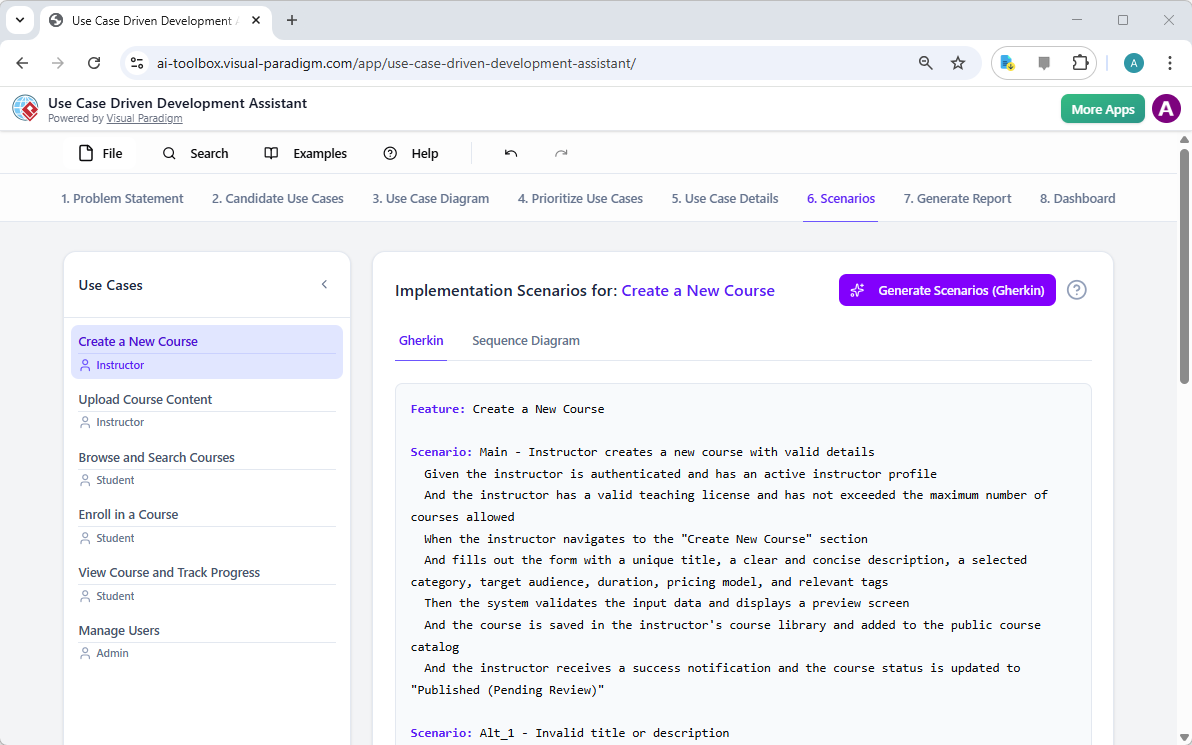
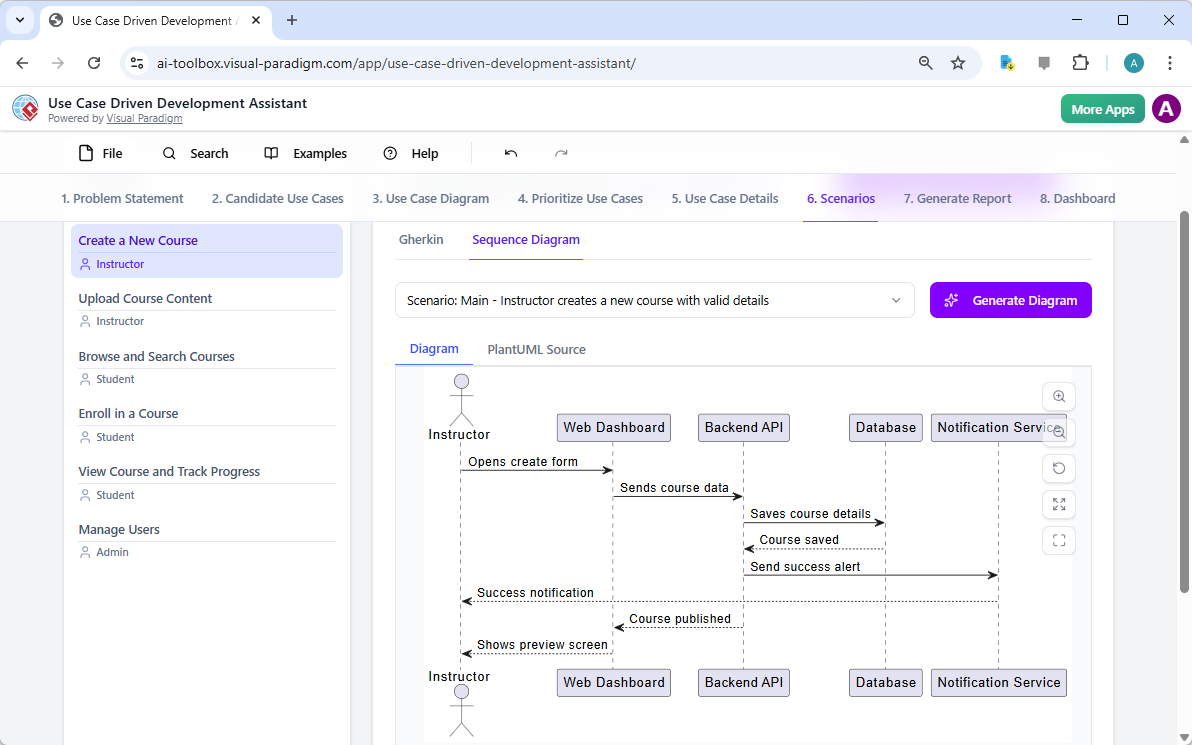
This is a screenshot of Visual Paradigm's AI Powered Use Case Driven Development Assistant. We are in step 6. It shows the AIThis is a screenshot of Visual Paradigm's AI Powered Use Case Driven Development Assistant. We are still in step 6. It shows

ステップ7:包括的なプロジェクトレポートの作成

開発プロセス全体を通じて、さまざまなステークホルダーにプロジェクトの状況と計画を伝えることが不可欠です。「レポートの生成」タブは、画像9のように表示され、これを容易にします。プロジェクト概要、実装計画、QAテスト計画、開発者タスクリストなど、さまざまなレポートを生成できます。これらのレポートはAIの支援を受けて作成されるため、一貫性と包括性が保証されます。たとえば、「プロジェクト概要」レポートは、経営層向け要約、主要機能、優先順位付けの根拠などを含むプロジェクト全体を要約しています。この単一の信頼できる情報源により、すべての関係者が一致した理解を持ち、情報が共有されます。

This is a screenshot of Visual Paradigm's AI Powered Use Case Driven Development Assistant. We are in step 7. It shows a repo

ステップ8:ダッシュボードによる進捗の追跡

最後に、このプロセスは「ダッシュボード」で完結します。画像10。この中央ハブは、プロジェクトの状況を高レベルで把握できるようにします。プロジェクトの完了率、ユースケースの総数、および「必須」項目の数を表示します。プロジェクトチェックリストにより、各ステップが完了すると「完了」にマークされ、進捗を追跡できます。プロジェクトの健全性に関するリアルタイムの可視化は、プロジェクトマネージャーやチームリーダーにとって非常に貴重であり、ボトルネックを特定し、プロジェクトが計画通りに進むように保証できます。
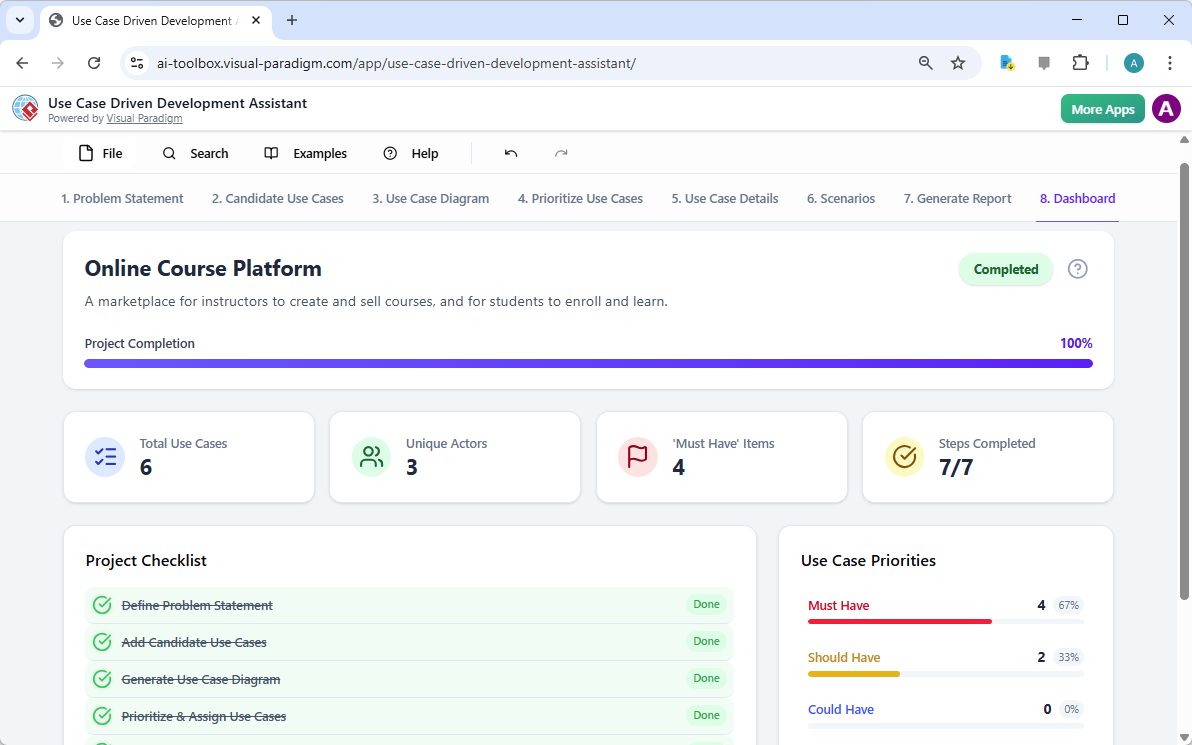
This is a screenshot of Visual Paradigm's AI Powered Use Case Driven Development Assistant. We are in step 8. It shows the da

ユースケース駆動型開発アシスタントは単なるツール以上の存在です。ソフトウェア開発プロセスに明確さと効率をもたらす包括的なワークフローです。問題定義からレポート生成まで、AIを各段階で活用することで、チームが要件から実装へと迅速かつ正確に移行できるように支援します。その結果、ビジネス目標とユーザーのニーズに合致した、構造的で詳細に文書化されたプロジェクトが生まれます。ユースケース開発プロセスを効率化したいのであれば、このAI駆動のツールは強力な解決策です。

どうすれば次のプロジェクトを変革できるか、実際に見てみませんか?ユースケース駆動型開発アシスタントが次のプロジェクトをどのように変革できるか?今すぐ試してみましょう.

関連リンク

ユースケースモデリングは、機能要件を把握するために使用される基本的なソフトウェア工学技術です機能要件外部のアクターとシステムの内部機能の相互作用を可視化することで。現代のプラットフォームは現在、AI駆動の自動化図の最適化、包括的なユースケース記述を作成し、モデルをテストケースやアクティビティ図に変換して、設計の一貫性とトレーサビリティを維持する。高度なツールとして、イベントフロー編集ツールシナリオアナライザー開発チームが構造化されたイベントシーケンスを検証および文書化し、全体的なシステムの明確性を向上させることを可能にする。

  1. ユースケース図とは何か? – UMLモデリングの完全ガイド:基本的なコンポーネント、目的、およびベストプラクティス要件モデリングのためのもの。

  2. ステップバイステップのユースケース図チュートリアル – 初心者からプロまで:ユーザーを基礎から応用技術まで効果的なユースケース図を作成するためのもの。

  3. ユースケースモデリングについて知っておくべきすべて:ユースケースモデリングの原則と応用システム設計におけるユースケースモデリングのもの。

  4. Visual Paradigm – ユースケース記述機能: 専門的なツールの詳細。ユーザーのインタラクションを正確に記録するために使用される。ユーザーのインタラクションを正確に記録する そして構造化されたシステムの挙動。

  5. Visual ParadigmによるAI駆動型ユースケース図の習得: AIを活用して作成するためのチュートリアル。インテリジェントでダイナミックな図 現代のソフトウェアシステム向け。

  6. Visual Paradigmのイベントフロー編集ツールの使い方ガイド: ドキュメント化のためのステップバイステップの説明。構造化されたイベントの順序 ユースケースシナリオ内での。

  7. ユースケースシナリオアナライザーによるシナリオの解明: アナライザーを使用して検査および。インタラクションフローを最適化する システムの明確さを高めるために。

  8. ユースケースをアクティビティ図に変換する – AI駆動の変換: その説明を提供するリソース。自動変換 ユースケースを詳細なシステムワークフローに変換する。

  9. AIを用いたユースケース図からシナリオとテストケースの生成: AIツールが作成を自動化する方法についての探求。要件駆動型のテスト手順.

  10. ユースケース図ギャラリー – テンプレートと例: 選りすぐりのコレクション。実際の例 インスピレーション、学習、および迅速なプロトタイピングのために。

From Problem to Report: How AI Guides Your Use Case Journey

Discover how AI guides your use case journey from problem to report with Visual Paradigm’s intelligent development assistant.

Imagine you’re a project manager tasked with launching a new online course platform. The first challenge is to articulate the problem clearly and then translate it into a functional system. This is where the Use Case Driven Development Assistant, an AI-powered tool from Visual Paradigm, steps in. It doesn’t just help you write documents; it guides you through a complete, structured workflow to transform a vague idea into a detailed, actionable project plan. The process is so intuitive, it feels like having a seasoned business analyst and a technical architect working side-by-side with you. This deep dive explores the core features of this powerful tool, using a real-world example of an online course platform to show how it streamlines the entire use case lifecycle.

Quick Summary: Key Takeaways from the Use Case Driven Development Assistant

  • Start with a clear problem statement to define the project’s core objective.

  • Use AI to automatically generate a list of candidate use cases and actors.

  • Visualize system functionality with AI-generated Use Case and Activity Diagrams.

  • Prioritize features using a structured MoSCoW method to focus on high-value work.

  • Generate detailed use case descriptions and executable Gherkin test scenarios.

  • Create comprehensive reports to communicate project scope and plans.

  • Track progress and maintain a single source of truth with a central dashboard.

Step 1: Defining the Problem with AI

Every successful project begins with a clear understanding of the problem it aims to solve. The journey with the Use Case Driven Development Assistant starts in the “Problem Statement” tab. Here, you input a project name and a short description. The AI then leverages this information to generate a comprehensive problem statement. As seen in Image 1, the tool has taken the project name “Online Course Platform” and the short description “A marketplace for instructors to create and sell courses, and for students to enroll and learn” to produce a detailed narrative. This narrative identifies the core pain points: students struggle to find relevant courses, while instructors face challenges in reaching a broad audience and monetizing their expertise. This AI-generated problem statement serves as the project’s foundation, ensuring everyone on the team shares a unified understanding from the very beginning.

This is a screenshot of Visual Paradigm's AI Powered Use Case Driven Development Assistant. we are now in step 1. It shows th

Step 2: Identifying Use Cases with AI Assistance

Once the problem is defined, the next logical step is to identify the key functionalities the system must provide. The assistant’s “Candidate Use Cases” tab, shown in Image 2, automates this process. After analyzing the problem statement, the AI suggests a list of use cases, each associated with an actor (like Instructor, Student, or Admin). For our online course platform, the AI proposes use cases such as “Create a New Course,” “Upload Course Content,” “Browse and Search Courses,” and “Enroll in a Course.” This list provides a solid starting point, saving significant time and effort that would otherwise be spent on brainstorming sessions. You can then refine these suggestions, add new ones, or delete irrelevant ones to create a comprehensive list of system functionalities.

This is a screenshot of Visual Paradigm's AI Powered Use Case Driven Development Assistant. We are now in step 2. It shows a

Step 3: Visualizing the System with a Use Case Diagram

After identifying the use cases, it’s crucial to visualize how they interact with the system’s actors. The “Use Case Diagram” tab, illustrated in Image 3, takes the list of use cases and actors and automatically generates a clear, graphical representation. This diagram shows the relationships between the actors (Instructor, Student, Admin) and the system’s functions (Create a New Course, etc.). The AI-powered generation ensures that the diagram is accurate and professionally formatted. This visual aid is invaluable for communication, allowing stakeholders, developers, and designers to quickly grasp the system’s scope and functionality without wading through text-heavy documents.

This is a screenshot of Visual Paradigm's AI Powered Use Case Driven Development Assistant. We are now in step 3. It shows a

Step 4: Prioritizing Features for Maximum Impact

Not all use cases are created equal. A project’s success often hinges on focusing on the most critical features first. The “Prioritize Use Cases” tab, as shown in Image 4, provides a powerful framework for this. It allows you to assign a user value and business value (on a scale of 0-10) to each use case and then apply the MoSCoW prioritization method (Must Have, Should Have, Could Have, Won’t Have). In our example, the AI has helped identify that “Create a New Course” and “Upload Course Content” are “Must Have” features, as they are essential for the platform’s core function. This structured prioritization ensures that the development team focuses on delivering the highest value to users and the business, avoiding wasted effort on low-priority features.

This is a screenshot of Visual Paradigm's AI Powered Use Case Driven Development Assistant. We are now in step 4. It shows th

Step 5: Detailing Use Cases and Generating Activity Diagrams

With the high-level view established, the next step is to dive into the details of each use case. The “Use Case Details” tab, shown in Image 5, allows you to create a comprehensive template for a selected use case. The AI can generate a detailed description, including pre-conditions, main flow, and alternative flows. For the “Create a New Course” use case, the AI provides a structured template that outlines the necessary steps. To further enhance understanding, the assistant can generate an “Activity Diagram” for the same use case, as seen in Image 6. This diagram visually maps out the step-by-step workflow, showing the sequence of actions from the instructor logging in to the course being saved. This level of detail is essential for both developers and QA teams.

This is a screenshot of Visual Paradigm's AI Powered Use Case Driven Development Assistant. We are now in step 5. It shows thThis is a screenshot of Visual Paradigm's AI Powered Use Case Driven Development Assistant. We are still in step 5. It shows

Step 6: Generating Test Scenarios and Sequence Diagrams

For a development team, the next critical step is to create testable scenarios. The “Scenarios” tab, shown in Image 7, allows you to generate executable Gherkin scenarios directly from your use case descriptions. These scenarios, written in a plain-language format (Given-When-Then), are perfect for automated testing. The AI can generate a main scenario and alternative scenarios, such as one for an invalid title. To further clarify the system’s internal workings, the assistant can generate a “Sequence Diagram,” as seen in Image 8. This diagram shows the interaction between the instructor, the web dashboard, the backend API, the database, and the notification service, providing a clear picture of the system’s architecture and data flow.

This is a screenshot of Visual Paradigm's AI Powered Use Case Driven Development Assistant. We are in step 6. It shows the AIThis is a screenshot of Visual Paradigm's AI Powered Use Case Driven Development Assistant. We are still in step 6. It shows

Step 7: Creating Comprehensive Project Reports

Throughout the development process, it’s essential to communicate the project’s status and plans to various stakeholders. The “Generate Report” tab, as shown in Image 9, makes this easy. You can generate a variety of reports, such as a “Project Overview,” “Implementation Plan,” “QA Test Plan,” or a “Developer Task List.” These reports are generated with AI assistance, ensuring they are consistent and comprehensive. For example, the “Project Overview” report summarizes the entire project, including the executive summary, key features, and the rationale behind the prioritization. This single source of truth ensures everyone is aligned and informed.

This is a screenshot of Visual Paradigm's AI Powered Use Case Driven Development Assistant. We are in step 7. It shows a repo

Step 8: Tracking Progress with the Dashboard

Finally, the journey culminates in the “Dashboard,” as seen in Image 10. This central hub provides a high-level overview of the project’s status. It shows the project completion percentage, the total number of use cases, and the number of “Must Have” items. The project checklist allows you to track your progress, with each completed step marked as “Done.” This real-time visibility into the project’s health is invaluable for project managers and team leads, enabling them to identify bottlenecks and ensure the project stays on track.

This is a screenshot of Visual Paradigm's AI Powered Use Case Driven Development Assistant. We are in step 8. It shows the da

The Use Case Driven Development Assistant is more than just a tool; it’s a comprehensive workflow that brings clarity and efficiency to the software development process. By leveraging AI at every stage—from defining the problem to generating reports—it helps teams move from requirements to implementation faster and with greater accuracy. The result is a well-structured, well-documented project that is aligned with business goals and user needs. If you’re looking to streamline your use case development process, this AI-powered tool is a powerful solution.

Ready to see how the Use Case Driven Development Assistant can transform your next project? Try it now.

Related Links

Use case modeling is a fundamental software engineering technique used to capture functional requirements by visualizing the interactions between external actors and a system’s internal functions. Modern platforms now incorporate AI-powered automation to refine diagrams, generate comprehensive use case descriptions, and convert models into test cases or activity diagrams to maintain design consistency and traceability. Advanced tools like the Flow of Events editor and Scenario Analyzer allow development teams to validate and document structured event sequences to improve overall system clarity.

  1. What Is a Use Case Diagram? – A Complete Guide to UML Modeling: An in-depth overview covering essential components, purposes, and best practices for requirements modeling.

  2. Step-by-Step Use Case Diagram Tutorial – From Beginner to Pro: A practical resource that guides users through foundational to advanced techniques for creating effective use case diagrams.

  3. All You Need to Know About Use Case Modeling: A comprehensive exploration of the principles and applications of use case modeling in system design.

  4. Visual Paradigm – Use Case Description Features: Details specialized tools used to precisely document user interactions and structured system behavior.

  5. Mastering AI-Driven Use Case Diagrams with Visual Paradigm: A tutorial on leveraging AI to create intelligent, dynamic diagrams for modern software systems.

  6. Guide to Using the Flow of Events Editor in Visual Paradigm: Step-by-step instructions for documenting structured event sequences within a use case scenario.

  7. Unraveling Scenarios with the Use Case Scenario Analyzer: A guide on using analyzers to examine and refine interaction flows for increased system clarity.

  8. Convert Use Case to Activity Diagram – AI-Powered Transformation: A resource explaining the automated conversion of use cases into detailed system workflows.

  9. Generating Scenarios and Test Cases from Use Case Diagrams Using AI: An exploration of how AI tools automate the creation of requirement-driven test procedures.

  10. Use Case Diagram Gallery – Templates & Examples: A curated collection of real-world examples for inspiration, learning, and rapid prototyping.

Visual Paradigm AI Package Diagram Generator: Text to UML Packages

You’re architecting a new content management system, staring at layers, modules, and dependencies — presentation, business rules, persistence, security — but the high-level structure stays fuzzy. Manually creating packages, subpackages, and dependency arrows feels like overkill for a first draft. Enter Visual Paradigm’s AI Package Diagram Generator: describe your system in plain words, and get a clean, standards-compliant UML package diagram in seconds. It’s the fast lane from mental model to visual blueprint.

Why This AI Changes Software Architecture

  • Natural language → full UML package diagram instantly
  • Auto-identifies packages, subpackages, dependencies, and stereotypes
  • Handles layered, modular, and microservices-style structures
  • Fully editable native model — refine, add notes, merge packages
  • Desktop precision + browser chatbot for rapid iteration

1. Desktop: Prompt → Structured Architecture

In Visual Paradigm Desktop:

Tools → AI Diagram Generation → select “Package Diagram” → describe your system:

“Generate a UML Package Diagram for a content management system with Presentation Layer (Web UI, Mobile App), Business Logic Layer (Content Service, User Management, Workflow Engine), Data Access Layer (Repository, Audit Logging), and show dependencies between layers.”

The input dialog keeps it simple and focused:

Visual Paradigm Desktop AI Package Diagram generation prompt interface

AI builds:

  • Top-level packages: Presentation Layer, Business Logic Layer, Data Access Layer
  • Subpackages: Web UI, Mobile App, Content Service, Repository
  • Clear dependency arrows (dashed) showing flow between layers

Resulting content management system package diagram — logical, layered, and ready for review:

AI-generated UML Package Diagram for Content Management System

Immediately edit: add security package, adjust dependencies, or integrate with class diagrams.

2. Chatbot: Conversational Architecture on the Go

For quick sketches or remote brainstorming, open the Visual Paradigm AI Chatbot:

“Create UML Package Diagram for a banking system: Core Banking Services, Account Management, Customer Management, Transaction Processing, Compliance & Auditing.”

The chatbot generates it live — packages, subpackages, and dependencies appear instantly. Example output for a banking system:

AI-generated UML Package Diagram for Banking System via Chatbot

Refine in conversation: “Add Payment Gateway package with dependency to Transaction Processing.” Instant update. Perfect for early design sessions or teaching UML.

Why Package Diagrams + AI Matter in 2026

Good architecture starts with clear boundaries. Package diagrams show modularity, layers, and dependencies before a single line of code is written. Manual creation slows you down; AI removes the friction.

Use cases that shine:

  • Layered enterprise apps
  • Microservices boundaries
  • Teaching modular design
  • Quick refactoring planning

Change scope mid-discussion? Regenerate. New module needed? Add it. That speed keeps architecture agile and team communication sharp.

Ready to Visualize Your System Structure?

Visual Paradigm’s AI Package Diagram Generator turns vague ideas into professional UML packages fast — whether for CMS, banking, e-commerce, or any modular system.

  • Download Visual Paradigm Desktop → Full modeling power: Get Desktop Now
  • Try AI Chatbot Online → Instant architecture sketches: Start Chatting

Stop wrestling with boxes and arrows. Start designing smarter — today.

Related Links

These articles explain how artificial intelligence is applied to UML package diagrams to automate the logical grouping of system elements, enabling developers to instantly generate architectural structures from natural language prompts to better manage software dependencies and system scalability.

  1. AI Diagram Generator Now Supports Package Diagrams in Visual Paradigm: This article details the release of new features that allow for the AI-powered generation of package diagrams to improve software architecture visualization.
  2. Generate UML Package Diagrams Instantly with Visual Paradigm AI: This guide focuses on utilizing AI-driven tools to create professional UML package diagrams with minimal manual effort.
  3. Interactive UML Package Diagram Generator: This resource provides access to an interactive tool for creating and editing package diagrams in real time through a conversational AI interface.
  4. UML Package Diagram: A Definitive Guide to Structuring Your Codebase with AI: This comprehensive guide explains how AI assists in structuring codebases, managing complex dependencies, and maintaining architectural integrity.
  5. Generating UML Package Diagrams from Text Prompts: This article explores how to transform raw ideas and textual prompts into detailed UML package diagrams using advanced AI modeling features.
  6. UML Package Diagram Tutorial Using Visual Paradigm: This tutorial provides a step-by-step approach to using package diagrams to structure software components and visualize their relationships effectively.
  7. Features of Package Diagram Software – Visual Paradigm Online: This overview highlights the online tools available for collaborative package diagram management, including version control and real-time editing.
  8. What is a Package Diagram in UML? – Visual Paradigm Guide: This foundational resource introduces the role of package diagrams in organizing complex software systems through logical grouping.
  9. Modeling Software Architecture with UML Package Diagrams: This article discusses best practices for using package diagrams to organize and communicate the modular structure of a system’s architecture.
  10. Package Diagram Examples & Templates – Visual Paradigm Gallery: This gallery offers a collection of real-world templates and examples to inspire and accelerate modular software design.

Comprehensive Guide to Class Diagrams in UML

Introduction

A class diagram is a static type of Unified Modeling Language (UML) diagram that visually represents the structure of a system by showing its classes, attributes, operations, and relationships between objects. It serves as a blueprint for object-oriented software design, providing a clear and concise way to understand and document the architecture of a system.

Purpose and Functionality

Visualizing System Structure

Class diagrams help developers understand and document the structure of a system by showing how different classes interact and relate to each other. This visual representation is crucial for designing robust and maintainable software systems.

Modeling Software

Class diagrams enable the modeling of software at a high level of abstraction, allowing developers to focus on the design without delving into the source code. This abstraction helps in identifying potential issues early in the development process.

Object-Oriented Design

Class diagrams are fundamental to object-oriented modeling. They outline the building blocks of a system and their interactions, making it easier to implement object-oriented principles such as encapsulation, inheritance, and polymorphism.

Data Modeling

Class diagrams can also be used for data modeling, representing the structure and relationships of data within a system. This is particularly useful in database design, where entities and their relationships need to be clearly defined.

Blueprint for Code

Class diagrams serve as a blueprint for constructing executable code for software applications. They provide a clear roadmap for developers, ensuring that the implementation aligns with the designed architecture.

Key Components

Classes

Classes are represented by rectangles divided into three sections:

  1. Class Name: The top section contains the name of the class.
  2. Attributes: The middle section lists the attributes or data members that define the state of the class.
  3. Operations (Methods): The bottom section lists the operations or functions that the class can perform.

Relationships

Relationships between classes are shown using lines and symbols:

  1. Generalization: Represents inheritance, where a class (subclass) inherits attributes and operations from another class (superclass). It is depicted by a hollow arrowhead pointing from the subclass to the superclass.
  2. Aggregation: Indicates that one class contains instances of another class, but the contained class can exist independently. It is depicted by a hollow diamond at the end of the line connected to the containing class.
  3. Composition: A stronger form of aggregation where the contained class cannot exist without the containing class. It is depicted by a filled diamond at the end of the line connected to the containing class.
  4. Association: Represents a relationship between two classes, indicating that one class uses or interacts with another. It is depicted by a solid line connecting the two classes.

Example Diagrams using PlantUML

Basic Class Diagram

Diagram with Aggregation and Composition

Diagram with Association

Example –  Order system

SDE | Uml Class Diagrams

Key Elements

  1. Classes:

    • Customer: Represents the customer placing the order.
      • Attributes: name (String), address (String).
    • Order: Represents the order placed by the customer.
      • Attributes: date (Date), status (String).
      • Operations: calcSubTotal()calcTax()calcTotal()calcTotalWeight().
    • OrderDetail: Represents the details of each item in the order.
      • Attributes: quantity (int), taxStatus (String).
      • Operations: calcSubTotal()calcWeight()calcTax().
    • Item: Represents the items being ordered.
      • Attributes: shippingWeight (float), description (String).
      • Operations: getPriceForQuantity()getTax()inStock().
    • Payment (Abstract Class): Represents the payment for the order.
      • Attributes: amount (float).
    • Cash: Subclass of Payment, represents cash payments.
      • Attributes: cashTendered (float).
    • Check: Subclass of Payment, represents check payments.
      • Attributes: name (String), bankID (String), isAuthorized (boolean).
    • Credit: Subclass of Payment, represents credit card payments.
      • Attributes: number (String), type (String), expDate (Date), isAuthorized (boolean).
  2. Relationships:

    • Association:
      • Customer and Order: A customer can place multiple orders (0..* multiplicity on the Order side).
      • Order and OrderDetail: An order can have multiple order details (1..* multiplicity on the OrderDetail side).
      • OrderDetail and Item: Each order detail is associated with one item (1 multiplicity on the Item side).
    • Aggregation:
      • Order and OrderDetail: Indicates that OrderDetail is a part of Order, but OrderDetail can exist independently.
    • Generalization:
      • Payment and its subclasses (CashCheckCredit): Indicates inheritance, where Cash, Check, and Credit are specific types of Payment.
    • Role:
      • OrderDetail and Item: The role line item indicates the specific role of OrderDetail in the context of an Order.
  3. Multiplicity:

    • Indicates the number of instances of one class that can be associated with a single instance of another class. For example, a Customer can place multiple Orders (0..*).
  4. Abstract Class:

    • Payment: Marked as an abstract class, meaning it cannot be instantiated directly and serves as a base class for other payment types.

Explanation

  • Customer: Represents the entity placing the order, with basic attributes like name and address.
  • Order: Represents the order itself, with attributes like date and status, and operations to calculate subtotal, tax, total, and total weight.
  • OrderDetail: Represents the details of each item in the order, including quantity and tax status, with operations to calculate subtotal, weight, and tax.
  • Item: Represents the items being ordered, with attributes like shipping weight and description, and operations to get price for quantity, tax, and stock status.
  • Payment: An abstract class representing the payment for the order, with an attribute for the amount. It has subclasses for different payment methods:
    • Cash: Represents cash payments with an attribute for the cash tendered.
    • Check: Represents check payments with attributes for the name, bank ID, and authorization status.
    • Credit: Represents credit card payments with attributes for the card number, type, expiration date, and authorization status.

The diagram effectively captures the structure and relationships within an order processing system, providing a clear visual representation of how different components interact.

Conclusion

Class diagrams are an essential tool in UML modeling, providing a clear and structured way to represent the architecture of a system. By understanding the key components and relationships, developers can create robust and maintainable software designs. Using tools like PlantUML, these diagrams can be easily visualized and shared among team members, enhancing collaboration and ensuring a consistent understanding of the system’s structure.

References

  1. Visual Paradigm Online Free Edition:

    • Visual Paradigm Online (VP Online) Free Edition is a free online drawing software that supports Class Diagrams, other UML diagrams, ERD tools, and Organization Chart tools. It features a simple yet powerful editor that allows you to create Class Diagrams quickly and easily. The tool offers unlimited access with no restrictions on the number of diagrams or shapes you can create, and it is ad-free. You own the diagrams you create for personal and non-commercial use. The editor includes features such as drag-to-create shapes, inline editing of class attributes and operations, and a variety of formatting tools. You can also print, export, and share your work in different formats (PNG, JPG, SVG, GIF, PDF) 123.
  2. Impressive Drawing Features:

    • Visual Paradigm Online provides advanced formatting options to enhance your diagrams. You can position shapes precisely using alignment guides and format your Class Diagrams with shape and line formatting options, font styles, rotatable shapes, embedded images and URLs, and shadow effects. The tool is cross-platform compatible (Windows, Mac, Linux) and can be accessed through any web browser. It also supports Google Drive integration for seamless saving and accessing of your diagrams 23.
  3. Comprehensive Diagramming Options:

    • Visual Paradigm Online supports a wide range of diagram types, including UML diagrams (class, use case, sequence, activity, state, component, and deployment diagrams), ERD tools, Organization Charts, Floor Plan Designers, ITIL, and Business Concept Diagrams. The tool is designed to be easy to use, with drag-and-drop functionality and smart connectors that snap into place. It also offers a rich set of formatting options, including over 40 connector types and various paint options 45.
  4. Learning and Customization:

    • Visual Paradigm provides an easy-to-use platform for creating and managing class diagrams, making it an excellent choice for software developers and engineers. You can customize your class diagrams by changing colors, fonts, and layout. The tool also supports creating relationships between classes, such as associations, inheritance, and dependencies. Visual Paradigm is a powerful UML modeling tool that helps in representing the static structure of a system, including the system’s classes, their attributes, methods, and the relationships between them 67.
  5. Community and Support:

    • Visual Paradigm Community Edition is a free UML software that supports all UML diagram types. It is designed to help users learn UML faster, easier, and quicker. The tool is intuitive and allows you to create your own Class Diagrams with ease. Visual Paradigm is trusted by over 320,000 professionals and organizations, including small businesses, Fortune 500 companies, universities, and government sectors. It is used to prepare the next generation of IT developers with the specialized skills needed for the workspace 89.

These references highlight the comprehensive features and benefits of using Visual Paradigm for creating class diagrams, making it a recommended tool for both individual and professional use.

Comprehensive Guide to UML Activity Diagrams: Key Concepts and Examples

Introduction

In the realm of software development and system modeling, UML (Unified Modeling Language) activity diagrams play a crucial role in visualizing the workflow of processes within a system. These diagrams provide a clear and structured way to represent the sequence of activities, decisions, and interactions involved in achieving specific goals. UML (Unified Modeling Language) activity diagrams are a powerful tool for modeling the workflow of a system, illustrating the sequence of activities, decisions, and processes involved in achieving a specific goal. This guide will cover the key concepts of UML activity diagrams, provide examples, and recommend Visual Paradigm as an ideal tool for IT software development.

What is Activity Diagram?

This article delves into the intricacies of UML activity diagrams, using a detailed example to illustrate the lifecycle of an assignment, from issuance to grading and return, involving both a teacher and a student. By breaking down the key components and workflow of the diagram, we aim to provide a comprehensive understanding of how UML activity diagrams can be used to model complex processes effectively. Whether you are a seasoned developer or new to UML, this guide will help you grasp the fundamentals and advanced concepts of activity diagrams, enabling you to apply them to your own projects with confidence.

Key Concepts of UML Activity Diagrams

What is Activity Diagram?

  1. Activities:

    • Represent actions or tasks performed within the system.
    • Depicted as rounded rectangles.
  2. Actions:

    • The most basic unit of work in an activity diagram.
    • Represented as rectangles with rounded corners.
  3. Control Flow:

    • Shows the sequence in which activities are performed.
    • Represented by solid arrows connecting activities.
  4. Decision Nodes:

    • Represent points where the flow of control can branch based on conditions.
    • Depicted as diamonds.
  5. Fork and Join Nodes:

    • Fork nodes split a single flow into multiple concurrent flows.
    • Join nodes merge multiple flows back into a single flow.
    • Both are depicted as horizontal bars.
  6. Initial and Final Nodes:

    • Initial node represents the start of the workflow.
    • Final node represents the end of the workflow.
    • Both are depicted as black circles, with the initial node having an outgoing arrow and the final node having an incoming arrow.
  7. Object Flow:

    • Shows the flow of objects between activities.
    • Represented by dashed arrows.

Examples of UML Activity Diagrams

The activity diagram models the problem of managing the lifecycle of an assignment, from issuance to grading and return, involving interactions between a teacher and a student. The key aspects of the problem include:

  1. Assignment Issuance and Study:

    • The teacher issues an assignment, and the student studies it.
    • The student’s perception of the assignment’s difficulty influences their approach to completing it.
  2. Assignment Completion and Submission:

    • The student completes the assignment and submits it to the teacher.
    • The student may decide to give up on the assignment based on certain conditions.
  3. Deadline Management:

    • The teacher sets a deadline for the assignment submission.
    • The workflow accounts for the deadline and proceeds accordingly.
  4. Grading and Return:

    • The teacher grades the submitted assignment and stores the grades.
    • The graded assignment is returned to the student.
  5. Concurrent Activities:

    • The diagram models concurrent activities, such as grading the assignment and storing the grades, using fork and join nodes.

Key Components and Workflow

  1. Initial Node:

    • The process begins with the Initial Node, represented by a black circle. This indicates the start of the workflow.
  2. Issue Assignment (Teacher):

    • The teacher issues the assignment, represented by the action “Issue Assignment”.
    • An Object Node (Assignment) is created, indicating that an assignment object is generated.
  3. Assignment (Object Flow):

    • The assignment object flows from the teacher to the student, represented by the Object Flow arrow.
  4. Study Assignment (Student):

    • The student receives the assignment and begins studying it, represented by the action “Study Assignment”.
    • This action is within the Student swimlane, indicating that it is the student’s responsibility.
  5. Decision Node (Control Flow):

    • The student decides whether the assignment is hard or easy, represented by the Decision Node (diamond shape).
    • Depending on the decision, the control flow branches into two paths:
      • [hard]: If the assignment is hard, the student continues to study.
      • [easy]: If the assignment is easy, the student proceeds to complete the assignment.
  6. Complete Assignment (Student):

    • The student completes the assignment, represented by the action “Complete Assignment”.
    • Guard condition [give up] determines whether the student submits the assignment or gives up.
  7. Submit Assignment (Student):

    • If the student completes the assignment, they submit it, represented by the action “Submit Assignment”.
    • The assignment object flows back to the teacher, represented by the Object Flow arrow.
  8. Accept Time Event Action (Teacher):

    • The teacher sets a deadline for the assignment, represented by the Accept Time Event Action (hourglass symbol).
    • If the deadline is reached, the workflow proceeds to the Fork Node.
  9. Fork Node:

    • The Fork Node (thick horizontal bar) splits the workflow into two concurrent paths:
      • Grade Work (Teacher): The teacher grades the submitted assignment, represented by the action “Grade Work”.
      • Data Store Node: The graded assignment is stored in a datastore, represented by the Data Store Node (<<datastore>> Student Grade Sheet).
  10. Return Work (Teacher):

    • The teacher returns the graded work to the student, represented by the action “Return Work”.
    • The assignment object flows back to the student, represented by the Object Flow arrow.
  11. Get Graded Work (Student):

    • The student receives the graded work, represented by the action “Get Graded Work”.
  12. Activity Final Node:

    • The process ends with the Activity Final Node, represented by a black circle with a border, indicating the completion of the workflow.

This UML activity diagram effectively models the workflow of managing an assignment, highlighting the interactions between the teacher and the student, the decision points, and the concurrent activities involved. It provides a clear visual representation of the assignment lifecycle, from issuance to grading and return, making it easier to understand and manage the process.

Recommending Visual Paradigm for IT Software Development

While the examples above illustrate the basics of UML activity diagrams, Visual Paradigm offers a more comprehensive and visual approach to software development. Here’s why Visual Paradigm is an ideal tool for IT software development:

  1. Comprehensive UML Support:

    • Visual Paradigm supports all types of UML diagrams, including activity diagrams, class diagrams, sequence diagrams, and more.
    • It provides a rich set of tools and features for creating, editing, and managing UML diagrams.
  2. User-Friendly Interface:

    • The intuitive drag-and-drop interface makes it easy to create and modify UML diagrams.
    • The tool offers a wide range of customization options to tailor diagrams to specific needs.
  3. Integration with Other Tools:

    • Visual Paradigm integrates seamlessly with other development tools, such as IDEs, version control systems, and project management tools.
    • This integration ensures a smooth workflow and enhances productivity.
  4. Collaboration Features:

    • Visual Paradigm supports collaborative work, allowing multiple users to work on the same project simultaneously.
    • The tool includes features for version control, team collaboration, and real-time updates.
  5. Advanced Modeling Capabilities:

    • Visual Paradigm offers advanced modeling capabilities, including support for agile methodologies, enterprise architecture, and system modeling.
    • The tool provides a comprehensive suite of features for modeling complex systems and workflows.
  6. Extensive Documentation and Support:

    • Visual Paradigm provides extensive documentation, tutorials, and support resources to help users get started and master the tool.
    • The tool offers a range of learning resources, including video tutorials, guides, and examples.

Conclusion

UML activity diagrams are a powerful tool for modeling the workflow of a system, illustrating the sequence of activities, decisions, and processes involved in achieving a specific goal. The examples provided demonstrate the basics of creating UML activity diagrams. However, for a more comprehensive and visual approach to software development, Visual Paradigm is an ideal tool. With its comprehensive UML support, user-friendly interface, integration with other tools, collaboration features, advanced modeling capabilities, and extensive documentation and support, Visual Paradigm provides everything needed to create, manage, and collaborate on UML diagrams effectively. Whether you are a beginner or an experienced developer, Visual Paradigm offers the tools and support needed to bring your software development projects to life.