Automatyzacja normalizacji bazy danych: Przewodnik krok po kroku z użyciem modelera bazy danych AI Visual Paradigm

Wprowadzenie do normalizacji sterowanej sztuczną inteligencją

Normalizacja bazy danych to kluczowy proces organizowania danych w celuzapewnienia integralności i eliminacji nadmiarowości. Choć tradycyjnie jest to skomplikowane i podatne na błędy zadanie, nowoczesne narzędzia ewoluowały w kierunku automatyzacji tej „ciężkiej pracy”. Modeler bazy danych AI Visual Paradigm działa jak inteligentny most, przekształcając abstrakcyjne koncepcje w technicznie zoptymalizowane, gotowe do wdrożenia implementacje.
Desktop AI Assistant

Aby zrozumieć wartość tego narzędzia, rozważ analogię produkcji samochodu. JeśliDiagram klas to początkowy szkic, aDiagram relacji encji (ERD) to projekt mechaniczny, tonormalizacjato proces dopasowania silnika, aby nie było luźnych śrub ani nadmiarowej masy. Modeler bazy danych AI działa jak „fabryka automatyczna”, która wykonuje to dopasowanie w celu maksymalnej efektywności. Ten samouczek prowadzi Cię przez proces używania modelera bazy danych AI w celu skutecznej normalizacji schematu bazy danych.

Doc Composer

Krok 1: Dostęp do przewodnika krok po kroku

Modeler bazy danych AI działa przy użyciu specjalistycznego przewodnika krok po kroku składającego się z 7 krokówprzewodnika krok po kroku. Normalizacja zajmuje centrum uwagi wKroku 5. Zanim osiągniesz ten etap, narzędzie pozwala Ci wprowadzić pojęciowe klasy najwyższego poziomu. Następnie wykorzystuje inteligentne algorytmy do przygotowania struktury do optymalizacji, umożliwiając użytkownikom przejście od koncepcji do tabel bez konieczności ręcznej pracy.

Krok 2: Przechodzenie przez formy normalne

Gdy osiągniesz fazę normalizacji, AI iteracyjnie optymalizujeschemat bazy danychpoprzez trzy główne etapy dojrzałości architektonicznej. Ta krok po kroku postępująca optymalizacja zapewnia, że Twoja baza danych spełnia standardy branżowe pod względem niezawodności.

Osiąganie pierwszej formy normalnej (1NF)

Pierwszy poziom optymalizacji skupia się na atomowej naturze Twoich danych. AI analizuje Twój schemat, aby upewnić się, że:

  • Każde pole tabeli zawiera pojedynczą, atomową wartość.
  • Każdy rekord w tabeli jest unikalny.

Przechodzenie do drugiej formy normalnej (2NF)

Opierając się na strukturze 1NF, AI przeprowadza dalszą analizę, aby ustalić silne relacje między kluczami a atrybutami. W tym kroku narzędzie zapewnia, że wszystkie atrybuty niekluczowe są pełnymi funkcjonalnie i zależne od klucza głównego, efektywnie usuwając zależności częściowe.

Zakończenie trzecią formą normalną (3NF)

Aby osiągnąć standardowy poziom profesjonalnej optymalizacji, AI prowadzi schemat do 3NF. Obejmuje to zapewnienie, że wszystkie atrybuty są zależnetylko na kluczu głównym. Dzięki temu narzędzie usuwa zależności przechodnie, które są częstym źródłem anomalii danych.

Krok 3: Przeglądanie automatycznego wykrywania błędów

W trakcie całego procesu normalizacji AI DB Modeler wykorzystujeinteligentne algorytmy do wykrywania błędów projektowych, które często atakują słabo zaprojektowane systemy. Szczególnie szuka anomalii, które mogą prowadzić do:

  • Błędy aktualizacji
  • Błędy wstawiania
  • Błędy usuwania

Automatyzując to wykrywanie, narzędzie eliminuje obciążenie ręczne związane z poszukiwaniem potencjalnych problemów integralności, zapewniając solidne podstawy dla Twoich aplikacji.

Krok 4: Zrozumienie zmian architektonicznych

Jedną z charakterystycznych cech AI DB Modeler jest jego przejrzystość. W przeciwieństwie do tradycyjnych narzędzi, które po prostu przekształcają tabele na wstępie, to narzędzie działa jako zasób edukacyjny.

Dla każdej zmiany dokonanej w trakcie kroków 1NF, 2NF i 3NF, AI dostarczaedytoryczne uzasadnienia i wyjaśnienia. Te wgląd pomagają użytkownikom zrozumieć konkretne zmiany architektoniczne wymagane do zmniejszenia nadmiarowości, działając jako cenny narzędzie do opanowania najlepszych praktyk w zakresieprojektowania baz danych.

Krok 5: Weryfikacja za pomocą interaktywnego playgroundu

Po tym, jak AI zoptymalizuje schemat do 3NF, przepływ pracy przechodzi doKroku 6, gdzie możesz zweryfikować projekt przed rzeczywistymwdrożeniem. Narzędzie oferuje unikalny interaktywny playground do końcowej weryfikacji.

Funkcja Opis
Testowanie na żywo Użytkownicy mogą uruchomić instancję bazy danych w przeglądarce opartą na wybranym poziomie normalizacji (Początkowy, 1NF, 2NF lub 3NF).
Realistyczne zasiewanie danych Środowisko jest wypełnionerealistycznymi, wygenerowanymi przez AI danymi przykładowymi, w tym instrukcje INSERT i skrypty DML.

Ten środowisko pozwala na testowanie zapytań i sprawdzanie wydajności w stosunku do struktury znormalizowanej od razu. Poprzez interakcję z danymi początkowymi możesz potwierdzić, że schemat poprawnie i efektywnie obsługuje informacje, zapewniając, że „silnik” jest idealnie dopasowany, zanim samochód wjechał na drogę.

Przekształcanie optymalizacji procesów: Kompleksowy przewodnik po mapowaniu strumieni wartości z wykorzystaniem sztucznej inteligencji

Wprowadzenie do nowoczesnego mapowania procesów

Mapowanie strumieni wartości(VSM) od dawna uznawane jest za fundament metodologii Lean. Pozwala organizacjom na kluczowe wizualne zrozumienie efektywności procesów, przepływów materiałów i wymiany informacji. Jednak tradycyjny sposób tworzenia i analizy tych map od zawsze był ręcznym, pracochłonnym procesem, obejmującym tablice, notesy i statyczne oprogramowanie do rysowania. Ten ręczny proces często tworzy barierę wejścia, uniemożliwiając zespołom szybkie iterowanie nad ulepszaniem swoich przepływów pracy.

Landscape optymalizacji procesów zmienia się dzięki wprowadzeniu narzędzi wspomaganych sztuczną inteligencją. W szczególności pojawienie sięEdytora mapowania strumieni wartości z wykorzystaniem sztucznej inteligencjioznacza znaczący postęp naprzód. Ta technologia pozwala praktykom generować kompletną, bogatą w dane mapę strumieni wartości, wystarczy tylko opisać proces językiem naturalnym. Przechodząc od ręcznego rysowania do inteligentnej automatyzacji, firmy mogą przechodzić od surowych pomysłów do wykonalnych wskazówek w ciągu minut, a nie godzin.

Co to jest mapowanie strumieni wartości wspomagane sztuczną inteligencją?

Ponadtomapowanie strumieni wartości z wykorzystaniem sztucznej inteligencji (VSM) Edytor to nie tylko narzędzie do rysowania; to zaawansowana, inteligentna platforma zaprojektowana do wizualizacji, analizy i optymalizacji przepływów pracy. W jego centrum leży przetwarzanie języka naturalnego (NLP), które przekształca proste opisy procesów w kompletną, edytowalną grafikę. Ta możliwość demokratyzuje dostęp do narzędzi Lean, pozwalając użytkownikom o różnym poziomie kompetencji technicznych tworzyć profesjonalne mapy.

Poza wizualizacją te narzędzia zawierają silniki do tworzenia diagramów, które pozwalają na szczegółowe dopasowanie. Użytkownicy mogą dostosować kroki procesu, edytować punkty danych i przestawiać przepływy za pomocą intuicyjnych interfejsów typu „przeciągnij i upuść”. Zintegrowany analizator oparty na sztucznej inteligencji dalej podnosi poziom narzędzia, działając jak wirtualny konsultant, który analizuje dane VSM, generuje istotne raporty, odkrywa zatory i automatycznie proponuje strategiczne ulepszenia.

Kluczowe funkcje edytora AI VSM

Aby naprawdę przeobrazić optymalizację procesów, nowoczesne narzędzia VSM łączą automatyzację z głębokimi możliwościami analitycznymi. Poniżej znajdują się kluczowe cechy definiujące tę technologię:

1. Generowanie diagramu z tekstu

Najbardziej natychmiastową korzyścią narzędzi AI VSM jest możliwość generowania mapy z prostego języka angielskiego. Użytkownicy opisują swój przepływ pracy — szczegółowo wskazując kolejność operacji, punkty zapasów i przepływy informacji — a generator VSM natychmiast tworzy szczegółowy diagram. To eliminuje „paraliż pustej płótna” i zapewnia od razu strukturę do pracy.

2. Automatyczne obliczanie harmonogramu i metryk

Ręczne obliczanie metryk Lean jest podatne na błędy ludzkie. Edytory oparte na sztucznej inteligencji całkowicie automatyzują ten proces. Podczas modyfikowania mapy narzędzie automatycznie oblicza kluczowe metryki w czasie rzeczywistym, w tym:

  • Całkowity czas oczekiwania: Całkowity czas potrzebny na zakończenie procesu od początku do końca.
  • Czas dodania wartości (VAT): Czas poświęcony na działania, które rzeczywiście dodają wartość klientowi.
  • Procent efektywności procesu: Metryka pochodna wskazująca, jak zoptymalizowany jest przepływ pracy.

3. Analiza i raportowanie wspomagane sztuczną inteligencją

Prawdopodobnie najbardziej przełomową cechą jest wbudowany konsultant oparty na sztucznej inteligencji. Użytkownicy mogą poprosić o analizę swojej bieżącej mapy stanu. AI przegląda strukturę danych, harmonogramy i przepływy, aby wygenerować profesjonalny raport. Ten raport wyróżnia kluczowe wnioski, identyfikuje metryki wydajności i oferuje strategiczne rekomendacje w celu eliminacji strat i poprawy przepustowości.

4. Opcje eksportu o wysokiej jakości

Aby mapa VSM była skuteczna, musi być przekazywalna. Narzędzie ułatwia eksport gotowych map jako obrazów PNG o wysokiej rozdzielczości. Zapewnia to, że wyniki mogą być łatwo zintegrowane w raportach menedżerskich, prezentacjach dla stakeholderów lub dyskusjach zespołowych bez utraty jakości wizualnej.

Docelowa grupa odbiorców i przypadki użycia

Mapowanie procesów wspomagane sztuczną inteligencją jest elastyczne i przeznaczone dla szerokiej gamy specjalistów zajmujących się efektywnością organizacji. Poniższa tabela przedstawia, kto korzysta najbardziej i jak:

Rola Główna korzyść
Menadżerowie operacji Identyfikuj i eliminuj straty (Muda) na liniach produkcyjnych, aby zmniejszyć koszty i poprawić prędkość.
Konsultanci ds. poprawy procesów Szybko twórz i analizuj VSM dla klientów, dostarczając wartość szybciej podczas współpracy.
Zespoły rozwoju oprogramowania Stosuj zasady Lean do prac DevOps i Agile, aby zoptymalizować przepływy CI/CD.
Analitycy biznesowi Mapuj skomplikowane przebiegi klientów i wewnętrzne procesy biznesowe, aby poprawić doświadczenie użytkownika.

Od wizualizacji do wykorzystywalnych wskazówek

Ostatecznym celem Mapowanie strumieni wartościnie jest samo mapa, ale optymalizacja, którą umożliwia. Wykorzystując AI, organizacje mogą przestać poświęcać czas na rysowanie i zacząć poświęcać czas na analizę. Automatyczne wskazówki dostarczane przez te narzędzia pozwalają zespołom skupić się na strategii najwyższego poziomu, a nie na szczegółach formatowania.

Niezależnie od tego, czy celem jest skrócenie czasu cyklu w zakładzie produkcyjnym, czy zoptymalizowanie systemu zgłaszania zapytań obsługi klienta, Mapowanie strumieni wartości z wykorzystaniem AI zapewnia jasność potrzebną do podejmowania decyzji opartych na danych. Łączy luki między stanem obecnym a przyszłym, zapewniając ciągłą, dokładną i efektywną poprawę procesów.

Poza szkicem: Dlaczego AI casual nie radzi sobie z profesjonalnym modelowaniem wizualnym (i jak Visual Paradigm to naprawia)

Era AI w architekturze oprogramowania

W szybko się zmieniającej przestrzeniinżynierii oprogramowaniai architekturze przedsiębiorstw, umiejętność przekształcania abstrakcyjnych wymagań w precyzyjne, działające projekty jest kluczową umiejętnością. Ogólnego przeznaczenia modele językowe (LLM) takie jak ChatGPT i Claude przełomowo zmieniły sposób, w jaki przeprowadzamy sztuczne myślenie i generujemy tekst. Jednak w zakresie profesjonalnego modelowania wizualnego te narzędzia często zawodzą. Tworzą to, co najlepiej można nazwać „szkicami” – przybliżeniami, które brakuje rygoru inżynierskich projektów.


Ten kompleksowy przewodnik bada istotny dystans między casualnym modelowaniem AI a potrzebami profesjonalnymi, oraz jakVisual Paradigm (VP) ekosystem AImostkuję tę przerwę, oferując możliwości modelowania zgodne z normami, utrwalające i iteracyjne.

1. Problem „Artysty szkiców”: ograniczenia casualnych modeli językowych AI

Casualne narzędzia AI traktują modelowanie przede wszystkim jako rozszerzenie generowania tekstu. Gdy zostają poproszone o stworzenie diagramu, zazwyczaj wypisują kod w formatach takich jakMermaid lubPlantUML. Choć imponujące dla szybkich wizualizacji, ten podejście brakuje głębi wymaganej w kontekstach inżynierskich.

Brak wbudowanego silnika renderowania i edycji

LLM generują syntaktykę opartą na tekście (np. kod wykresu Mermaid), ale nie oferują wbudowanego przeglądarki ani edytora do wysokiej jakości grafik wektorowych (SVG). Użytkownicy są zmuszeni wklejać kod do zewnętrznych narzędzi renderujących, natychmiast tracąc interaktywność. W przypadku potrzeby zmiany użytkownik musi żądać ponownego wygenerowania całego kodu, często prowadząc do zupełnie innego układu.

Błędy semantyczne i naruszenia standardów

Modeli ogólnego przeznaczenia często niepoprawnie interpretują ścisłe standardy modelowania, takie jak UML lub ArchiMate. Typowe błędy obejmują:

  • Pomylenieagregacji (udział wspólny) zkompozycji (własność wyłączna).
  • Rysowanie nieprawidłowych strzałek dziedziczenia lub kierunków relacji.
  • Tworzenie dwukierunkowych powiązań, gdzie jednokierunkowe są technicznie poprawne.

Choć wyniki mogą wyglądać estetycznie, nie spełniają roli artefaktów inżynierskich, ponieważ nie przestrzegają zasad semantycznych, które kierują architekturą systemu.

Brak stanu utrwalonego

Prawdopodobnie najbardziej frustrującym ograniczeniem jest brak pamięci dotyczącej struktury wizualnej. Każdy prompt generuje diagram od nowa. Na przykład, poproszenie LLM o „dodanie obsługi błędów do tego diagramu sekwencji” często niszczy istniejący układ, rozłącza połączenia lub całkowicie zapomina o poprzednich elementach. Nie ma trwałego stanu, który śledziłby ewolucję modelu.

2. Prawdziwe ryzyka opierania się na przypadkowym diagramowaniu z wykorzystaniem sztucznej inteligencji

Wykorzystywanie ogólnych modeli językowych do poważnej pracy architektonicznej wiąże się z ryzykami, które mogą pogorszyć jakość projektu i jego terminarz.

Luka między projektowaniem a realizacją

Nieprecyzyjne lub semantycznie niepoprawne wizualizacje prowadzą do niezgodnego kodu. Zespoły programistyczne tracą cenne godziny w spotkaniach, próbując wyjaśnić intencję za diagramem, który brakuje precyzji. „Piękny obrazek”, który jest technicznie błędny, jest gorszy niż żaden diagram.

Zależność od składni

Ironicznie, korzystanie z narzędzi wspomaganych przez AI, takich jak ChatGPT, do tworzenia diagramów często wymaga od użytkownika nauki specjalistycznej składni (Mermaid/PlantUML), aby ręcznie naprawić błędy. Tworzy to barierę wiedzy, która anulowuje korzyści z efektywności wynikające z wykorzystania AI.

Odseparowanie procesu pracy

Diagramy generowane przez modele językowe są statycznymi obrazami lub fragmentami kodu. Nie są połączone z kontrolą wersji, platformami współpracy ani zadań końcowych, takich jak generowanie kodu lub tworzenie schematów bazy danych. Istnieją w izolacji, niezdolne do ewolucji wraz z projektem.

3. Jak Visual Paradigm AI zapewnia modelowanie o poziomie profesjonalnym

Visual Paradigm przekształcił diagramowanie w konwersacyjny, oparty na standardach i zintegrowanyproces. W przeciwieństwie do modeli językowych opartych na tekście, VP AI rozumie podstawowe meta-modele UML 2.5,ArchiMate3, C4, BPMN, oraz SysML, tworząc zgodne i edytowalne modele.

Trwała struktura z technologią „Dokładania diagramu”

Visual Paradigmutrzymuje diagramy jako żywe obiektyzamiast jednorazowych skryptów. Użytkownicy mogą wysyłać polecenia w języku naturalnym, aby zaktualizować konkretne części diagramu, nie wywołując pełnej regeneracji.

Na przykład użytkownik może wydać polecenie: „Dodaj krok uwierzytelniania dwustopniowego po zalogowaniu się” lub „Zmień nazwę aktora Customer na User.“System natychmiast dostosowuje układ, połączenia i semantykę, zachowując integralność reszty modelu. Usuwa uszkodzone linki i zamieszanie układu, które są typowe w narzędziach przytulnych.

Inteligencja zgodna z normami

Wytrenowana na formalnych notacjach, VP AI aktywnie stosuje zasady, zapewniając:

  • Poprawna wielokrotność w relacjach.
  • Poprawne użycie stereotypów.
  • Poprawne punkty widzenia ArchiMate (np. mapy możliwości, użycie technologii).

W rezultacie powstają technicznie poprawne szkice, na które mogą polegać zarówno deweloperzy, jak i architekci.

4. Łączenie wymagań z projektem: zaawansowane przepływy AI

Visual Paradigm idzie dalej niż prosta generacja, oferując zorganizowane aplikacje, które prowadzą użytkowników od abstrakcyjnych pomysłów do konkretnych projektów.

Analiza tekstowa z wykorzystaniem AI

Ta funkcja analizuje teksty nieuporządkowane — takie jak dokumenty wymagań lub historie użytkownika — w celu wyodrębnienia kandydatów do klas, atrybutów, operacji i relacji. Może automatycznie generować początkowy diagram klas na podstawie analizy.
AI Diagram Generator | Visual Paradigm

Przykładowy scenariusz: Wprowadź opis, np.„Platforma e-commerce pozwala klientom przeglądać produkty, dodawać do koszyka, dokonywać zakupu za pomocą bramki płatności i śledzić zamówienia.“ AI identyfikuje klasy (Klient, Produkt, Koszyk, Zamówienie, BramkaPłatności), atrybuty (cena, ilość) i relacje (Klient składa Zamówienie).

10-krokowy kreator AI

Dla złożonych diagramów takich jakUML Modele klas, VP oferuje kreator z instrukcjami. Ten narzędzie prowadzi użytkownika przez logiczny przebieg: Zdefiniuj cel → Zakres → Klasy → Atrybuty → Relacje → Operacje → Przegląd → Generuj. Ten podejście z udziałem człowieka weryfikuje projekt na każdym etapie, zapobiegając błędom „jednokrotnego strzału”, które są typowe w generowaniu opartym na promptach.

5. Porównanie: przytulne LLM vs. AI Visual Paradigm

Funkcja Przytulne LLM (ChatGPT, Claude) AI Visual Paradigm
Format wyjściowy Kod oparty na tekście (Mermaid, PlantUML) Edytowalne modele natywne i grafika wektorowa
Stan i trwałość Brak (generuje od nowa) Trwałe (obsługuje aktualizacje inkrementalne)
Zgodność z normami Niski (wyobraża sobie składnię/reguły) Wysoki (zachowuje zasady UML/BPMN/ArchiMate)
Edytowalność Wymaga ręcznych edycji kodu Interfejs rozmowy i przeciąganie i upuszczanie
Integracja Izolowane fragmenty Pełny cykl życia (generowanie kodu, schemat bazy danych, współpraca)

Wnioski: od ręcznego wykrawania do inteligentnej inżynierii

Tradycyjne rysowanie schematów często wydaje się jak wykrawanie marmuru — wolne, podatne na błędy i nieodwracalne. Zwykłe modele językowe AI poprawiły szybkość rysowania, ale nadal są ograniczone przez ich niemożliwość tworzenia spójnych, trwałych i wytworzonych wizualnie elementów.

Visual Paradigm AI działa jak precyzyjny drukarka 3D dla architektury oprogramowania. Umożliwia użytkownikom wprowadzanie specyfikacji w języku potocznym i otrzymywanie zgodnych z normami, edytowalnych struktur. Obsługuje iterację rozmowową i bezpośrednio wspomaga wdrożenie poprzez generowanie kodu i integrację z bazą danych.

AI Diagram Generation Guide: Instantly Create System Models with Visual  Paradigm's AI - Visual Paradigm Guides

Dla architektów oprogramowania, zespołów korporacyjnych i programistów zmęczonych ponownym generowaniem uszkodzonych fragmentów Mermaid, Visual Paradigm oznacza następny etap rozwoju: inteligentne modelowanie, które szanuje normy, zachowuje intencję i przyspiesza wdrażanie.

Kompleksowy przewodnik po diagramach sekwencji UML w projektowaniu opartym na przypadkach użycia: co, dlaczego, jak i jak AI ułatwia to zadanie

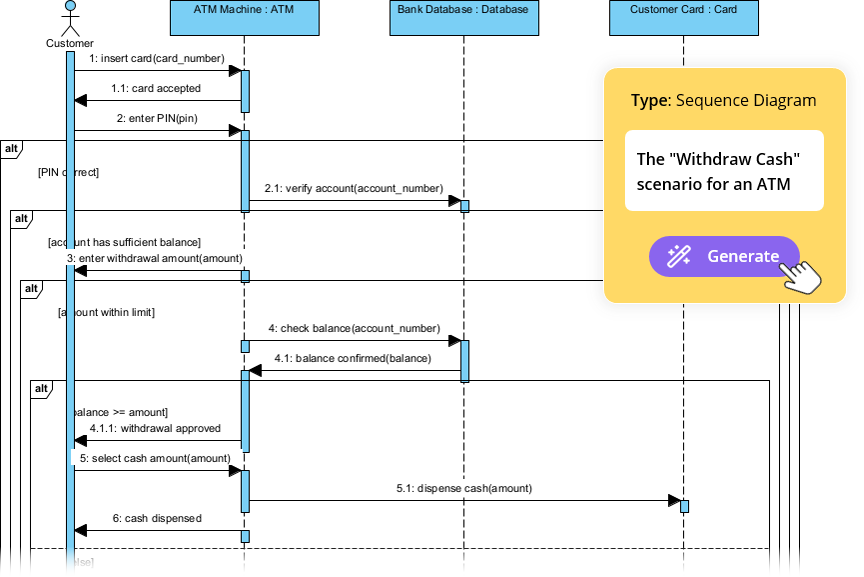
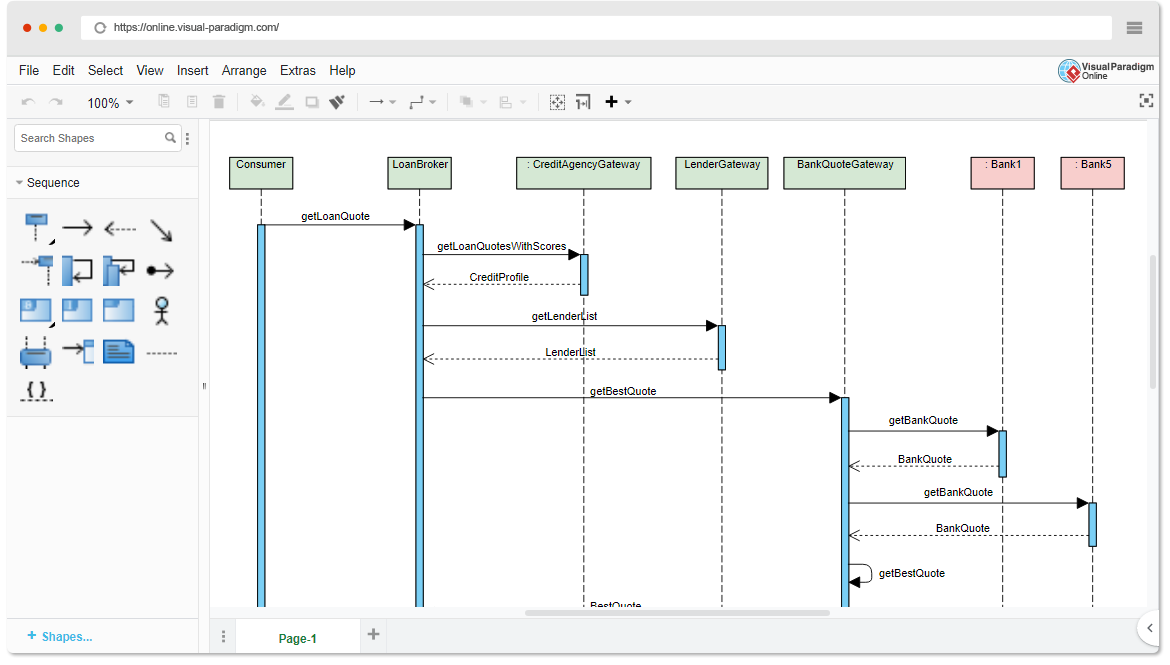
W nowoczesnej metodologii tworzenia oprogramowaniaprojektowanie oparte na przypadkach użyciajest fundamentem skutecznego modelowania systemów. Skupia się na zapisywaniucelów użytkownikaizachowań systemupoprzez scenariusze z życia codziennego. W centrum tego podejścia leżydiagram sekwencji UML—potężne narzędzie wizualne, które ożywia przypadki użycia, pokazującjak obiekty współdziałają w czasie.

Online Sequence Diagram Tool

Ten kompleksowy przewodnik został stworzony dlapoczątkujących i zespołów, którzy chcą zrozumieć:

  • Co to są diagramy sekwencji i dlaczego mają znaczenie

  • Jak je tworzyć za pomocą podejściaoparte na przypadkach użycia

  • Kluczowe koncepcje i przykłady z życia

  • JakGenerator diagramów sekwencji AI firmy Visual Paradigmprzyspiesza cały proces — sprawiając, że modelowanie jest szybsze, inteligentniejsze i bardziej wspólne.


🎯 Co to jest podejście oparte na przypadkach użycia?

Podejścieoparte na przypadkach użyciaskupia projektowanie systemu wokółcelów użytkownika. Każdy przypadek użycia opisuje konkretną interakcję między użytkownikiem (aktorem) a systemem w celu osiągnięcia znaczącego wyniku.

Przykład:
„Jako klient, chcę zalogować się do swojego konta, aby móc zobaczyć historię moich zamówień.”

Przypadki użycia to nie tylko dokumentacja — toszkice funkcjonalności, adiagramy sekwencjisą idealnym sposobem wizualizacji tego, jak te przypadki użycia rozgrywają się w czasie rzeczywistym.


🧩 Dlaczego używać diagramów sekwencji w rozwoju opartym na przypadkach użycia?

Diagramy sekwencji są wyjątkowo odpowiednie do wspierania modelowania przypadków użycia, ponieważ pozwalają na:

✅ Pokazują dynamiczny przepływinterakcji
✅ Wyróżniają czas i kolejnośćwiadomości
✅ Ujednolisz odpowiedzialnościmiędzy obiektami
✅ Wykrywają przypadki graniczne(np. nieprawidłowe dane wejściowe, przekroczenie czasu)
✅ Wspierają weryfikacjęprzypadków użycia podczas projektowania i testowania
✅ Ulepszają komunikacjęmiędzy programistami, testerami i stakeholderami

🔍 Bez diagramów sekwencji przypadki użycia mogą pozostawać abstrakcyjne. Z ich pomocą stają sięwykonywalnymi szkicami.


📌 Kluczowe koncepcje diagramów sekwencji UML (dla początkujących)

Zanim przejdziemy do przypadków użycia, opanujmy podstawowe elementy budowlane:

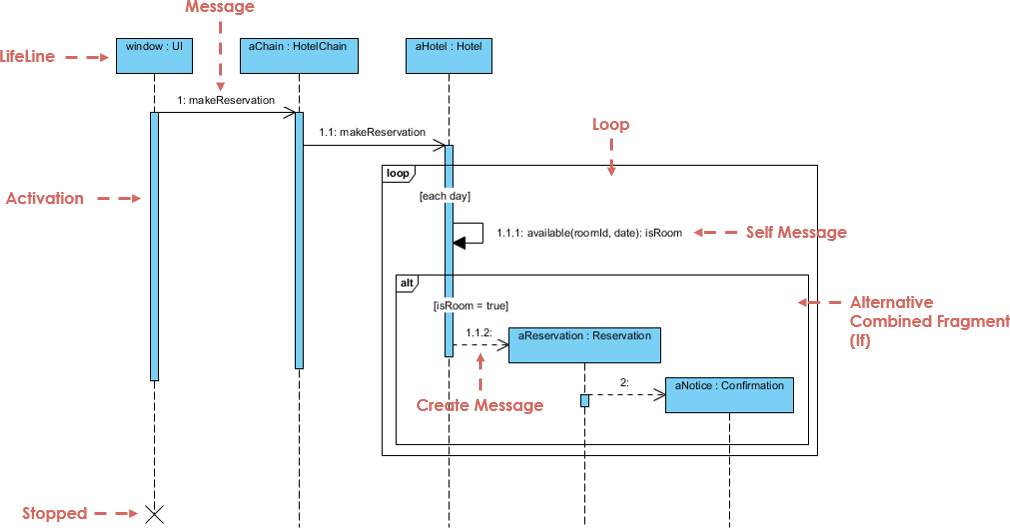
Sequence Diagram Example

Element Opis Wizualny
Linie życia Pionowe linie kreskowane reprezentujące obiekty lub aktory. Pokazuje istnienie w czasie. ───────────────
Komunikaty Poziome strzałki między liniami życia. Pokazują komunikację.
  • Synchroniczny Pełna strzałka z zatopionym końcem. Wywołujący oczekuje odpowiedzi.
  • Asynchroniczny Pełna strzałka z otwartym końcem. Brak oczekiwania.
  • Zwracanie Przerywana strzałka (odpowiedź).
  • Komunikat własny Strzałka zwracająca się do tej samej linii życia (przetwarzanie wewnętrzne).
Paski aktywacji Cienkie prostokąty na liniach życia pokazujące, kiedy obiekt jest aktywny. ▯▯▯
Złożone fragmenty Prostokąty reprezentujące logikę sterowania:
  • alt Alternatywy (jeśli/else) alt: sukces / porażka
  • opcjonalnie Opcjonalnie (może się zdarzyć, a może nie) opcjonalnie: wydrukuj paragon
  • pętla Powtarzanie (np. pętla while) pętla: spróbuj ponownie 3 razy
  • równolegle Wykonywanie równoległe równolegle: sprawdź płatność i stan magazynowy
Tworzenie/Usuwanie utwórzwiadomość lub „X” na końcu linii życia utwórz: UżytkowniklubX

💡 Wskazówka: Zawsze zacznij odprzypadek użycia, a następnieprzypisz go do diagramu sekwencji.


🔄 Jak stworzyć diagram sekwencji na podstawie przypadku użycia (krok po kroku)

Przejdźmy przez przykład z życia wzięty, korzystając zmetody opartej na przypadkach użycia.

Free AI Sequence Diagram Refinement Tool - Visual Paradigm AI


📌 Przykład: Przypadek użycia – „Użytkownik loguje się do systemu”

Tekst przypadku użycia:

Jako użytkownik chcę zalogować się do swojego konta przy użyciu nazwy użytkownika i hasła, aby mieć dostęp do swojego profilu.

Krok 1: Zidentyfikuj aktorów i obiekty

  • AktorUżytkownik

  • ObiektyWyświetlaczLogowaniaControllerLogowaniaBazaDanych

Krok 2: Zdefiniuj główny przepływ

  1. Użytkownik → WyświetlaczLogowania: Wpisuje nazwę użytkownika/hasło

  2. WyświetlaczLogowania → ControllerLogowania: Wysyła dane uwierzytelniające

  3. ControllerLogowania → BazaDanych: Sprawdza, czy użytkownik istnieje

  4. BazaDanych → ControllerLogowania: Zwraca wynik

  5. ControllerLogowania → Wyświetlacz logowania: Wysyła sukces/porażkę

  6. Wyświetlacz logowania → Użytkownik: Wyświetla komunikat

Krok 3: Dodaj logikę sterowania za pomocą połączonych fragmentów

Użyj alt fragment aby pokazać:

  • Ścieżka sukcesu: „Logowanie powiodło się”

  • Ścieżka porażki: „Nieprawidłowe dane logowania”

✅ To uchwyca punkt decyzyjny w przypadku użycia.

Krok 4: Dodaj paski aktywacji

  • Dodaj paski aktywacji do LoginController i Baza danych aby pokazać czas przetwarzania.

Krok 5: Ostateczny diagram

Teraz masz kompletny, diagram sekwencji zgodny z przypadkiem użycia odzwierciedlający rzeczywiste zachowanie systemu.

🔗 Zobacz to w działaniu: Diagramy sekwencji UML zasilane AI


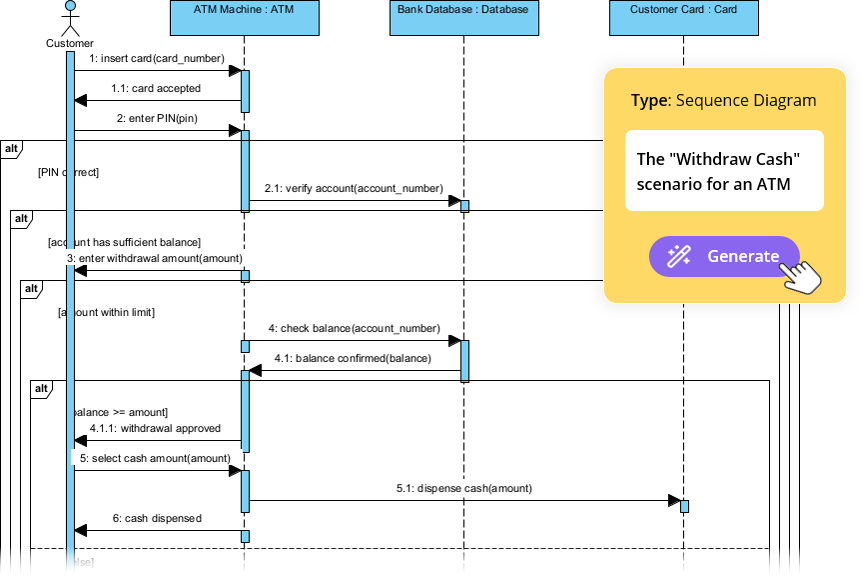
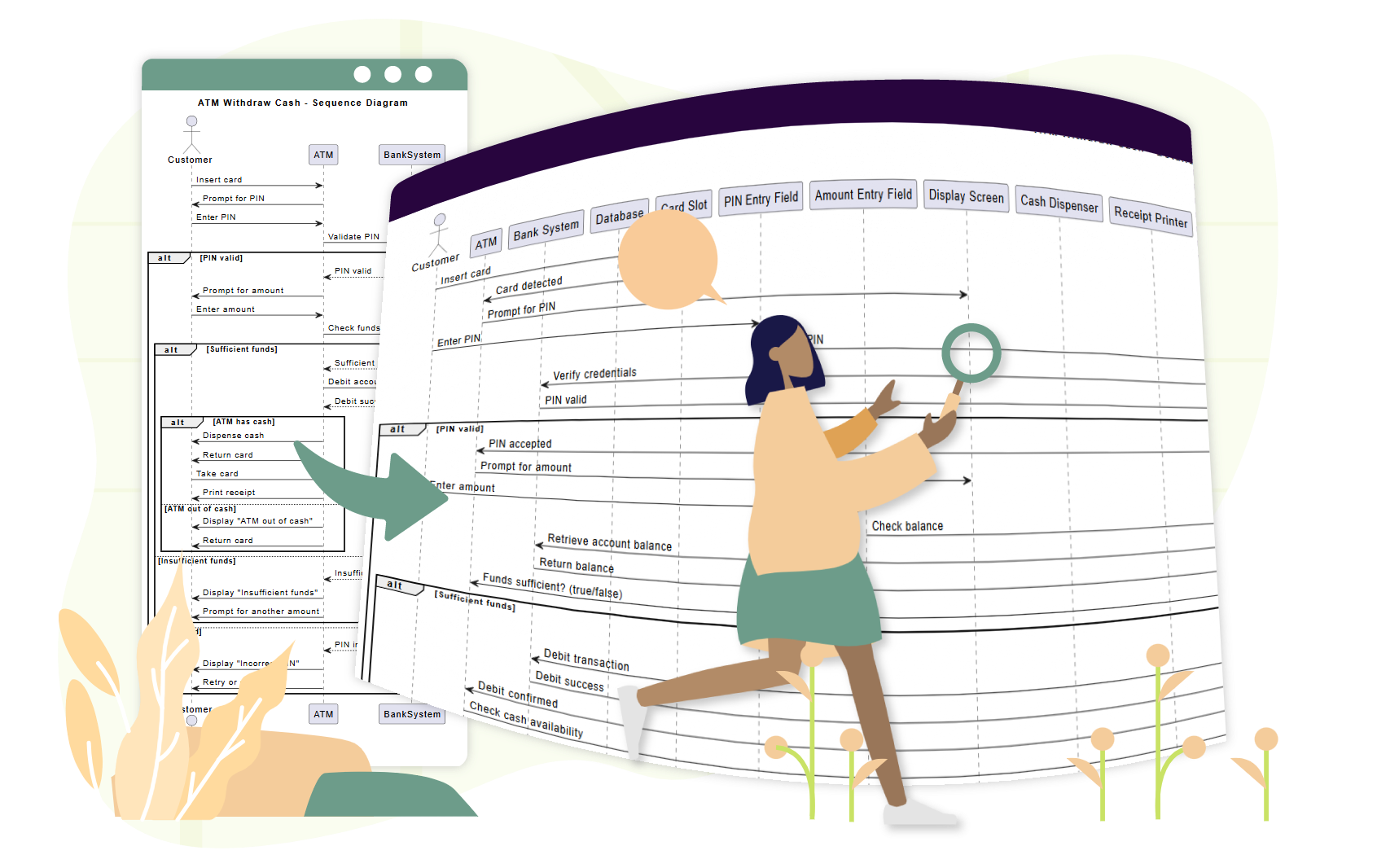
📌 Przykład 2: Przypadek użycia – „Klient wypłaca gotówkę z bankomatu”

Tekst przypadku użycia:

Jako klient, chcę wypłacić gotówkę z bankomatu, aby mieć dostęp do swoich środków. Jeśli saldo jest niewystarczające, chcę zostać poinformowany.

Krok 1: Zidentyfikuj uczestników

  • UczestnikKlient

  • ObiektyBankomatCzytnik kartSerwer bankowyWydawca gotówki

Krok 2: Główny przebieg

  1. Klient → Bankomat: Wkłada kartę

  2. Bankomat → Czytnik kart: Czyta kartę

  3. Bankomat → Klient: Wymaga wpisania kodu PIN

  4. Klient → Bankomat: Wprowadza PIN

  5. Bankomat → Serwer bankowy: Weryfikuje PIN

  6. Serwer bankowy → Bankomat: Potwierdza poprawność

  7. Bankomat → Klient: Prosi o kwotę

  8. Klient → Bankomat: Wprowadza kwotę

  9. Bankomat → Serwer bankowy: Sprawdza stan konta

  10. Serwer bankowy → Bankomat: Zwraca stan konta

  11. Bankomat → Wydawca gotówki: Wydaje gotówkę

  12. Bankomat → Klient: Pokazuje opcję paragonu

Krok 3: Dodaj fragmenty

  • pętla: Dla prób ponownego wpisania PIN po błędzie

  • opcja: Dla drukowania paragonu

  • alternatywa: Dla „niewystarczające środki” w porównaniu do „sukces”

🔗 Zobacz, jak AI radzi sobie z tym: Uprość skomplikowane przepływy pracy za pomocą narzędzia do diagramów sekwencji z AI


📌 Przykład 3: Przypadek użycia – „Klient dokonuje płatności w sklepie internetowym”

Tekst przypadku użycia:

Jako klient chcę dodać przedmioty do koszyka, przejść do kasy i zakończyć płatność, aby otrzymać moje zamówienie.

Krok 1: Uczestnicy

  • KlientKoszyk zakupowyBrama płatnościSystem magazynowyPotwierdzenie zamówienia

Krok 2: Przepływ z równoległością

  1. Klient → Koszyk zakupowy: Dodaje przedmiot(y) →pętladla wielu przedmiotów

  2. Koszyk zakupowy → Klient: Pokazuje sumę

  3. Klient → Brama płatności: Inicjuje płatność

  4. Klient → System magazynowy: Prosi o sprawdzenie stanu

  5. Brama płatności → Bank: Przetwarza płatność →parz kontrolą stanu

  6. System magazynowy → Brama płatności: Potwierdza dostępność

  7. Brama płatności → Koszyk zakupów: Potwierdza zamówienie

  8. Koszyk zakupów → Potwierdzenie zamówienia: Wysyła potwierdzenie

✅ Użyj par fragment aby pokazać przetwarzanie równoległe.

🔗 Zobacz pełny tutorial: Opanowanie diagramów sekwencji za pomocą czatbotu z AI: Studium przypadku e-commerce


🤖 Jak generator diagramów sekwencji z AI firmy Visual Paradigm pomaga zespołom

Tradycyjne narzędzia modelowania wymagają od użytkowników ręcznego przeciągania linii życia, rysowania wiadomości i umieszczania fragmentów — proces czasochłonny i podatny na błędy.

AI Diagram Generation Guide: Instantly Create System Models with Visual Paradigm's AI - Visual Paradigm Guides

Narzędzia firmy Visual Paradigm narzędzia zasilane AI usuwa te wąskie gardła, szczególnie dla zespołów korzystających z metodyki opartej na przypadkach użycia.

✨ 1. Czatbot z AI: generuj diagramy z tekstu przypadku użycia w ciągu sekund

Zamiast rysować ręcznie, opisz swój przypadek użycia po prostu po angielsku:

📝 Prompt:
„Wygeneruj diagram sekwencji dla użytkownika logującego się przy użyciu nazwy użytkownika i hasła, w tym obsługi błędów i ponownej próby po 3 nieudanych próbach.”

AI:

  • Identyfikuje aktorów i obiekty

  • Mapuje przepływ przypadku użycia na linie życia i wiadomości

  • Zastosowuje altpetla, i opt fragmenty automatycznie

  • Wydaje czysty, profesjonalny diagram w w mniej niż 10 sekund

🔗 Spróbuj: Wykresy sekwencji UML zasilane AI


✨ 2. Narzędzie do doskonalenia wykresów sekwencji AI: przekształć szkice w profesjonalne modele

Nawet jeśli zaczniesz od szkicu, to Narzędzie do doskonalenia wykresów sekwencji AI doskonalą go:

  • Dodaje paski aktywacji w odpowiednich miejscach

  • Sugestuje poprawne użycie fragmentów (altpetlapar)

  • Wymusza szablony projektowe (np. MVC: Widok → Kontroler → Model)

  • Wykrywa brakujące ścieżki błędów i przypadki graniczne

  • Poprawia czytelność i spójność

🔗 Dowiedz się jak: Kompletny przewodnik: Korzystanie z narzędzia do poprawy diagramów sekwencji z AI


✨ 3. Od opisów przypadków użycia do diagramów: zerowa ręczna konwersja

Nie ma już potrzeby ręcznej konwersji tekstu przypadków użycia na diagramy.

AI automatycznie konwertuje przypadki użycia w formie tekstu na dokładne diagramy sekwencji, redukując:

  • Wydatek ręczny

  • Nieporozumienie

  • Niespójności

🔗 Zobacz w działaniu: Poprawa diagramów sekwencji z AI na podstawie opisów przypadków użycia


✨ 4. Iteracyjna poprawa za pomocą rozmownego AI

Chcesz poprawić swój diagram? Po prostu porozmawiaj z AI:

  • „Dodaj opcję „Zapomniałem hasła” po 3 nieudanych próbach logowania.”

  • „Zmień „Użytkownik” na „Klient”.”

  • „Pokaż komunikat o błędzie na czerwono.”

Każdy prompt aktualizuje diagram w czasie rzeczywistym — bez ponownego rysowania, bez frustracji.

🔗 Eksploruj interfejs: Interfejs narzędzia do poprawy diagramów sekwencji z AI


✨ 5. Łatwa współpraca w zespole

  • Stakeholderzy niebędący specjalistami technicznymi (managerzy produktu, klienci) mogą przyczyniać się za pomocą języka naturalnego.

  • Programiści mogą szybko poprawiać diagramy podczas sprintów.

  • Testery może używać diagramów do tworzenia przypadków testowych.

  • Dizajnerzy może weryfikować przebiegi przed kodowaniem.

✅ Idealne dlazespoły agilne używając historii użytkownika i przypadków użycia.


🚀 Dlaczego zespoły kochają AI Visual Paradigm do modelowania przypadków użycia

Zysk Wpływ
⏱️ Szybkość Generuj diagramy w sekundach zamiast godzin
🧠 Niskie progi umiejętności Nie potrzebujesz ekspertyzy w UML, by zacząć
🔄 Iteracyjny projekt Doskonal diagramy w czasie rzeczywistym przez czat
🛠️ Zmniejszenie błędów AI wykrywa brakujące przebiegi, nieprawidłowe fragmenty
📦 Eksport i udostępnianie Eksport do PNG, SVG, PDF lub osadzenie w Confluence/Notion
🤝 Współpraca Wszyscy mogą przyczyniać się, nawet członkowie niebędący technicznymi

📚 Najlepsze zasoby dla początkujących i zespołów

Zasób URL
Wykresy sekwencji UML z wykorzystaniem AI https://blog.visual-paradigm.com/generate-uml-sequence-diagrams-instantly-with-ai/
Narzędzie do doskonalenia wykresów sekwencji z wykorzystaniem AI https://www.visual-paradigm.com/features/ai-sequence-diagram-refinement-tool/
Kompletny przewodnik: korzystanie z narzędzia do doskonalenia wykresów sekwencji z wykorzystaniem AI https://www.archimetric.com/comprehensive-tutorial-using-the-ai-sequence-diagram-refinement-tool/
Doskonalenie wykresów sekwencji z wykorzystaniem AI na podstawie opisów przypadków użycia https://www.cybermedian.com/refining-sequence-diagrams-from-use-case-descriptions-using-visual-paradigms-ai-sequence-diagram-refinement-tool/
Uprość złożone przepływy pracy za pomocą narzędzia do wykresów sekwencji z wykorzystaniem AI https://www.cybermedian.com/🚀-simplify-complex-workflows-with-visual-paradigm-ai-sequence-diagram-tool/
Interfejs narzędzia do doskonalenia wykresów sekwencji z wykorzystaniem AI https://ai.visual-paradigm.com/tool/sequence-diagram-refinement-tool/
Przewodnik dla początkujących: tworzenie profesjonalnych wykresów sekwencji w ciągu minut https://www.anifuzion.com/beginners-tutorial-create-your-first-professional-sequence-diagram-in-minutes-using-visual-paradigm-ai-chatbot/
Od prostego do zaawansowanego: ewolucja modelowania z wykorzystaniem AI https://guides.visual-paradigm.com/from-simple-to-sophisticated-what-is-the-ai-powered-sequence-diagram-refinement-tool/
Opanowanie wykresów sekwencji za pomocą czatbotu z wykorzystaniem AI: studium przypadku e-commerce https://www.archimetric.com/mastering-sequence-diagrams-with-visual-paradigm-ai-chatbot-a-beginners-tutorial-with-a-real-world-e-commerce-case-study/
Przykład wykresu sekwencji z wykorzystaniem AI: uruchomienie odtwarzania strumieniowego wideo https://chat.visual-paradigm.com/ai-diagram-example/ai-sequence-diagram-video-streaming-playback/

✅ Ostateczne porady dla zespołów korzystających z projektowania opartego na przypadkach użycia

  1. Zacznij od jasnego przypadku użycia – najpierw określ cel użytkownika.

  2. Użyj wykresów sekwencji do weryfikacji przepływu przed kodowaniem.

  3. Zaangażuj stakeholderów na wczesnym etapie – użyj wykresów do uzyskiwania opinii.

  4. Wykorzystaj AI, aby zmniejszyć pracę ręczną – pozwól narzędziu wykonywać ciężką pracę.

  5. Utrzymuj wykresy aktualne – aktualizuj je wraz z rozwojem wymagań.


🎁 Zaczynaj bezpłatnie

Nie potrzebujesz płatnej licencji, aby poznać moc modelowania opartego na AI.


📌 Wnioski

kierowany przypadkami użycia podejście jest podstawą projektowania oprogramowania zorientowanego na użytkownika. Diagramy sekwencji UML przybliżają te przypadki użycia—pokazując kto co robi, kiedy i jak.

Generator diagramów sekwencji AI Visual Paradigm, zespoły mogą:

  • Twórz diagramy z języka potocznego

  • Doskonal ich w czasie rzeczywistym

  • Zapewnij spójność i poprawność

  • Współpracuj między rolami

🚀 Od przypadku użycia do diagramu w sekundę — nie potrzebujesz specjalistycznej wiedzy z zakresu UML.

👉 Rozpocznij dziś z bezpłatną wersją społecznościową i przekształć proces modelowania zespołu.


🌟 Przyszłość projektowania systemów to nie tylko wizualna — to inteligentna.
Niech AI będzie Twoim partnerem modelowania.

Beyond the Sketch: Why Casual AI Fails at Professional Visual Modeling (and How Visual Paradigm Fixes It)

The Era of AI in Software Architecture

In the rapidly evolving landscape of software engineering and enterprise architecture, the ability to transform abstract requirements into precise, actionable designs is a critical skill. General-purpose Large Language Models (LLMs) like ChatGPT and Claude have revolutionized how we brainstorm and generate text. However, when it comes to professional visual modeling, these tools often fall short. They produce what can best be described as “sketches”—rough approximations that lack the rigor of engineered blueprints.


This comprehensive guide explores the significant gap between casual AI diagramming and professional needs, and how the Visual Paradigm (VP) AI ecosystem bridges this divide by delivering standards-aware, persistent, and iterative diagramming capabilities.

1. The “Sketch Artist” Problem: Limitations of Casual AI LLMs

Casual AI tools treat diagramming primarily as an extension of text generation. When prompted to create a diagram, they typically output code in formats like Mermaid or PlantUML. While impressive for quick visualizations, this approach lacks the depth required for professional engineering contexts.

No Native Rendering or Editing Engine

LLMs generate text-based syntax (e.g., Mermaid flowchart code) but offer no built-in viewer or editor for high-quality vector graphics (SVG). Users are forced to paste code into external renderers, instantly losing interactivity. If a change is needed, the user must request a full regeneration of the code, often resulting in a completely different layout.

Semantic Inaccuracies and Standard Violations

Generic models frequently misinterpret strict modeling standards like UML or ArchiMate. Common errors include:

  • Confusing aggregation (shared ownership) with composition (exclusive ownership).
  • Drawing invalid inheritance arrows or relationship directions.
  • Creating bidirectional associations where unidirectional ones are technically correct.

While the results may look aesthetically pleasing, they fail as engineering artifacts because they do not adhere to the semantic rules that govern system architecture.

Lack of Persistent State

Perhaps the most frustrating limitation is the lack of memory regarding visual structure. Each prompt regenerates the diagram from scratch. For example, asking an LLM to “add error handling to this sequence diagram” often breaks the existing layout, disconnects connectors, or forgets prior elements entirely. There is no persistent state to track the evolution of the model.

2. Real-World Risks of Relying on Casual AI Diagramming

Using general LLMs for serious architectural work introduces risks that can undermine project quality and timeline.

The Design-Implementation Gap

Vague or semantically incorrect visuals lead to misaligned code. Development teams waste valuable time in meetings trying to clarify the intent behind a diagram that lacks precision. A “pretty picture” that is technically wrong is worse than no diagram at all.

Syntax Dependency

Ironically, using “AI-assisted” tools like ChatGPT for diagrams often requires the user to learn specialized syntax (Mermaid/PlantUML) to manually fix errors. This creates an expertise barrier that negates the efficiency gains of using AI.

Workflow Isolation

Diagrams generated by LLMs are static images or code snippets. They are disconnected from version control, collaboration platforms, and downstream tasks like code generation or database schema creation. They exist in a silo, unable to evolve with the project.

3. How Visual Paradigm AI Delivers Professional-Grade Modeling

Visual Paradigm has transformed diagramming into a conversational, standards-driven, and integrated process. Unlike text-based LLMs, VP AI understands the underlying meta-models of UML 2.5,ArchiMate3, C4, BPMN, and SysML, producing compliant and editable models.

Persistent Structure with “Diagram Touch-Up” Technology

Visual Paradigm maintains diagrams as living objects rather than disposable scripts. Users can issue natural language commands to update specific parts of a diagram without triggering a full regeneration.

For example, a user can command: “Add a two-factor authentication step after login” or “Rename the Customer actor to User.” The system instantly adjusts the layout, connectors, and semantics while preserving the integrity of the rest of the model. This eliminates the broken links and layout chaos common in casual tools.

Standards-Compliant Intelligence

Trained on formal notations, VP AI actively enforces rules, ensuring:

  • Correct multiplicity in associations.
  • Proper use of stereotypes.
  • Valid ArchiMate viewpoints (e.g., Capability Maps, Technology Usage).

This results in technically sound blueprints that can be trusted by developers and architects alike.

4. Bridging Requirements to Design: Advanced AI Workflows

Visual Paradigm goes beyond simple generation by providing structured applications that guide users from abstract ideas to concrete designs.

AI-Powered Textual Analysis

This feature analyzes unstructured text—such as requirements documents or user stories—to extract candidate classes, attributes, operations, and relationships. It can generate an initial class diagram automatically based on the analysis.
AI Diagram Generator | Visual Paradigm

Example Scenario: Input a description like “An e-commerce platform allows customers to browse products, add to cart, checkout with payment gateway, and track orders.” The AI identifies classes (Customer, Product, Cart, Order, PaymentGateway), attributes (price, quantity), and associations (Customer places Order).

The 10-Step AI Wizard

For complex diagrams like UML Class models, VP offers a guided wizard. This tool leads users through a logical progression: Define Purpose → Scope → Classes → Attributes → Relationships → Operations → Review → Generate. This human-in-the-loop approach validates the design at every step, preventing the “one-shot” errors common in prompt-based generation.

5. Comparison: Casual LLMs vs. Visual Paradigm AI

Feature Casual LLMs (ChatGPT, Claude) Visual Paradigm AI
Output Format Text-based code (Mermaid, PlantUML) Editable Native Models & Vector Graphics
State & Persistence None (Regenerates from scratch) Persistent (Supports incremental updates)
Standards Compliance Low (Hallucinates syntax/rules) High (Enforces UML/BPMN/ArchiMate rules)
Editability Requires manual code edits Conversational UI & Drag-and-Drop
Integration Isolated Snippets Full Lifecycle (Code Gen, DB Schema, Teamwork)

Conclusion: From Manual Chiseling to Intelligent Engineering

Traditional diagramming often feels like chiseling marble—slow, error-prone, and irreversible. Casual AI LLMs improved the speed of sketching but remain limited by their inability to produce consistent, persistent, and engineered visuals.

Visual Paradigm AI acts like a high-precision 3D printer for software architecture. It allows users to input plain English specifications and receive standards-compliant, editable structures. It supports conversational iteration and drives implementation directly through code generation and database integration.

AI Diagram Generation Guide: Instantly Create System Models with Visual  Paradigm's AI - Visual Paradigm Guides

For software architects, enterprise teams, and developers tired of regenerating broken Mermaid snippets, Visual Paradigm represents the next evolution: intelligent modeling that respects standards, preserves intent, and accelerates delivery.

Transforming Process Optimization: A Comprehensive Guide to AI Value Stream Mapping

Introduction to Modern Process Mapping

Value Stream Mapping(VSM) has long been recognized as a cornerstone of Lean methodology. It provides organizations with essential visual insights into process efficiency, material flows, and information exchanges. However, the traditional approach to creating and analyzing these maps has historically been a manual, labor-intensive effort involving whiteboards, sticky notes, and static drawing software. This manual process often creates a barrier to entry, preventing teams from rapidly iterating on their workflow improvements.

The landscape of process optimization is shifting with the introduction of AI-powered tools. Specifically, the emergence of theAI Value Stream Mapping Editorrepresents a significant leap forward. This technology allows practitioners to generate complete, data-rich Value Stream Maps simply by describing a process in natural language. By transitioning from manual drafting to intelligent automation, businesses can move from raw ideas to actionable insights in minutes rather than hours.

What is AI-Powered Value Stream Mapping?

The AI Value Stream Mapping (VSM) Editor is not merely a drawing tool; it is a sophisticated, intelligent platform designed to visualize, analyze, and optimize workflows. At its core, it utilizes natural language processing (NLP) to transform simple text descriptions of processes into full-fledged, editable diagrams. This capability democratizes access to Lean tools, allowing users with varying levels of technical expertise to create professional-grade maps.

Beyond visualization, these tools incorporate diagramming engines that allow for granular refinement. Users can adjust process steps, edit data points, and rearrange flows using intuitive drag-and-drop interfaces. The integration of an AI analyst further elevates the tool, acting as a virtual consultant that examines VSM data to generate insightful reports, uncover bottlenecks, and suggest strategic improvements automatically.

Key Features of the AI VSM Editor

To truly revolutionize process optimization, modern VSM tools combine automation with deep analytical capabilities. Below are the critical features that define this technology:

1. Text-to-Diagram Generation

The most immediate benefit of AI VSM tools is the ability to generate a map from plain English. Users describe their workflow—detailing the sequence of operations, inventory points, and information flows—and the VSM generator instantly creates a detailed diagram. This eliminates the “blank canvas” paralysis and provides an immediate structure to work with.

2. Automated Timeline and Metric Calculation

Manual calculation of Lean metrics is prone to human error. AI-driven editors automate this entirely. As users modify the map, the tool automatically calculates critical metrics in real-time, including:

  • Total Lead Time: The total time it takes for a process to be completed from start to finish.
  • Value-Added Time (VAT): The portion of time spent on activities that actually add value to the customer.
  • Process Efficiency Percentage: A derived metric indicating how streamlined the workflow is.

3. AI-Powered Analysis and Reporting

Perhaps the most transformative feature is the built-in AI consultant. Users can request an analysis of their current state map. The AI reviews the data structure, timelines, and flow to generate a professional report. This report highlights key findings, identifies performance metrics, and offers strategic recommendations to eliminate waste and improve throughput.

4. High-Fidelity Export Options

For a VSM to be effective, it must be communicable. The tool facilitates the export of finished maps as high-resolution PNG images. This ensures that findings can be easily integrated into management reports, stakeholder presentations, or team discussions without loss of visual quality.

Target Audience and Use Cases

AI-powered process mapping is versatile, catering to a wide array of professionals involved in organizational efficiency. The table below outlines who benefits most and how:

Role Primary Benefit
Operations Managers Identify and eliminate waste (Muda) in production lines to reduce costs and improve speed.
Process Improvement Consultants Rapidly create and analyze VSMs for clients, delivering value faster during engagements.
Software Development Teams Apply Lean principles to DevOps and Agile workflows to streamline CI/CD pipelines.
Business Analysts Map complex customer journeys and internal business processes to enhance user experience.

From Visualization to Actionable Insight

The ultimate goal of Value Stream Mapping is not the map itself, but the optimization it enables. By leveraging AI, organizations can stop spending time drawing and start spending time analyzing. The automated insights provided by these tools allow teams to focus on high-level strategy rather than low-level formatting.

Whether the goal is to reduce cycle time in a manufacturing plant or streamline a customer service ticket system, AI Value Stream Mapping provides the clarity required to make data-driven decisions. It bridges the gap between the current state and the future state, ensuring that process improvement is continuous, accurate, and efficient.

Automating Database Normalization: A Step-by-Step Guide Using Visual Paradigm AI DB Modeler

Introduction to AI-Driven Normalization

Database normalization is the critical process of organizing data to ensure integrity and eliminate redundancy. While traditionally a complex and error-prone task, modern tools have evolved to automate this “heavy lifting.” The Visual Paradigm AI DB Modeler acts as an intelligent bridge, transforming abstract concepts into technically optimized, production-ready implementations.
Desktop AI Assistant

To understand the value of this tool, consider the analogy of manufacturing a car. If a Class Diagram is the initial sketch and an Entity Relationship Diagram (ERD) is the mechanical blueprint, then normalization is the process of tuning the engine to ensure there are no loose bolts or unnecessary weight. The AI DB Modeler serves as the “automated factory” that executes this tuning for maximum efficiency. This tutorial guides you through the process of using the AI DB Modeler to normalize your database schema effectively.

Doc Composer

Step 1: Accessing the Guided Workflow

The AI DB Modeler operates using a specialized 7-step guided workflow. Normalization takes center stage at Step 5. Before reaching this stage, the tool allows you to input high-level conceptual classes. From there, it uses intelligent algorithms to prepare the structure for optimization, allowing users to move from concepts to tables without manual effort.

Step 2: Progressing Through Normal Forms

Once you reach the normalization phase, the AI iteratively optimizes the database schema through three primary stages of architectural maturity. This stepwise progression ensures that your database meets industry standards for reliability.

Achieving First Normal Form (1NF)

The first level of optimization focuses on the atomic nature of your data. The AI analyzes your schema to ensure that:

  • Each table cell contains a single, atomic value.
  • Every record within the table is unique.

Advancing to Second Normal Form (2NF)

Building upon the structure of 1NF, the AI performs further analysis to establish strong relationships between keys and attributes. In this step, the tool ensures that all non-key attributes are fully functional and dependent on the primary key, effectively removing partial dependencies.

Finalizing with Third Normal Form (3NF)

To reach the standard level of professional optimization, the AI advances the schema to 3NF. This involves ensuring that all attributes are dependent only on the primary key. By doing so, the tool removes transitive dependencies, which are a common source of data anomalies.

Step 3: Reviewing Automated Error Detection

Throughout the normalization process, the AI DB Modeler employs intelligent algorithms to detect design flaws that often plague poorly designed systems. It specifically looks for anomalies that could lead to:

  • Update errors
  • Insertion errors
  • Deletion errors

By automating this detection, the tool eliminates the manual burden of hunting for potential integrity issues, ensuring a robust foundation for your applications.

Step 4: Understanding the Architectural Changes

One of the distinct features of the AI DB Modeler is its transparency. Unlike traditional tools that simply reorganize tables in the background, this tool functions as an educational resource.

For every change made during the 1NF, 2NF, and 3NF steps, the AI provides educational rationales and explanations. These insights help users understand the specific architectural shifts required to reduce redundancy, serving as a valuable learning tool for mastering best practices in database design.

Step 5: Validating via the Interactive Playground

After the AI has optimized the schema to 3NF, the workflow moves to Step 6, where you can verify the design before actual deployment. The tool offers a unique interactive playground for final validation.

Feature Description
Live Testing Users can launch an in-browser database instance based on their chosen normalization level (Initial, 1NF, 2NF, or 3NF).
Realistic Data Seeding The environment is populated with realistic, AI-generated sample data, including INSERT statements and DML scripts.

This environment allows you to test queries and verify performance against the normalized structure immediately. By interacting with seeded data, you can confirm that the schema handles information correctly and efficiently, ensuring the “engine” is tuned perfectly before the car hits the road.

Comprehensive Guide to ERD Levels: Conceptual, Logical, and Physical Models

The Importance of Architectural Maturity in Database Design

Entity Relationship Diagrams (ERDs) serves as the backbone of effective system architecture. They are not static illustrations but are developed at three distinct stages of architectural maturity. Each stage serves a unique purpose within the database design lifecycle, catering to specific audiences ranging from stakeholders to database administrators. While all three levels involve entities, attributes, and relationships, the depth of detail and the technical specificity vary significantly between them.

To truly understand the progression of these models, it is helpful to use a construction analogy. Think of building a house: a Conceptual ERD is the architect’s initial sketch showing the general location of rooms like the kitchen and living room. The Logical ERD is the detailed floor plan specifying dimensions and furniture placement, though it does not yet dictate the materials. Finally, the Physical ERD acts as the engineering blueprint, specifying the exact plumbing, electrical wiring, and the specific brand of concrete for the foundation.

Engineering Interface

1. Conceptual ERD: The Business View

The Conceptual ERD represents the highest level of abstraction. It provides a strategic view of the business objects and their relationships, devoid of technical clutter.

Purpose and Focus

This model is primarily utilized for requirements gathering and visualizing the overall system architecture. Its main goal is to facilitate communication between technical teams and non-technical stakeholders. It focuses on defining what entities exist—such as “Student,” “Product,” or “Order”—rather than how these entities will be implemented in a database table.

Level of Detail

Conceptual models typically lack technical constraints. For example, many-to-many relationships are often depicted simply as relationships without the complexity of cardinality or join tables. Uniquely, this level may utilize generalization, such as defining “Triangle” as a sub-type of “Shape,” a concept that is abstracted away in later physical implementations.

2. Logical ERD: The Detailed View

Moving down the maturity scale, the Logical ERD serves as an enriched version of the conceptual model, bridging the gap between abstract business needs and concrete technical implementation.

Purpose and Focus

The logical model transforms high-level requirements into operational and transactional entities. While it defines explicit columns for each entity, it remains strictly independent of a specific Database Management System (DBMS). It does not matter at this stage whether the final database will be in Oracle, MySQL, or SQL Server.

Level of Detail

Unlike the conceptual model, the logical ERD includes attributes for every entity. However, it stops short of specifying technical minutiae like data types (e.g., integer vs. float) or specific field lengths.

3. Physical ERD: The Technical Blueprint

The Physical ERD represents the final, actionable technical design of a relational database. It is the schema that will be deployed.

Purpose and Focus

This model serves as the blueprint for creating the database schema within a specific DBMS. It elaborates on the logical model by assigning specific data types, lengths, and constraints (such as varchar(255), int, or nullable).

Level of Detail

The physical ERD is highly detailed. It defines precise Primary Keys (PK) and Foreign Keys (FK) to strictly enforce relationships. Furthermore, it must account for the specific naming conventions, reserved words, and limitations of the target DBMS.

Comparative Analysis of ERD Models

To summarize the distinctions between these architectural levels, the following table outlines the features typically supported across the different models:

Feature Conceptual Logical Physical
Entity Names Yes Yes Yes
Relationships Yes Yes Yes
Columns/Attributes Optional/No Yes Yes
Data Types No Optional Yes
Primary Keys No Yes Yes
Foreign Keys No Yes Yes

Streamlining Design with Visual Paradigm and AI

Creating these models manually and ensuring they remain consistent can be labor-intensive. Modern tools like Visual Paradigm leverage automation and Artificial Intelligence to streamline the transition between these levels of maturity.

ERD modeler

Model Transformation and Traceability

Visual Paradigm features a Model Transitor, a tool designed to derive a logical model directly from a conceptual one, and subsequently, a physical model from the logical one. This process maintains automatic traceability, ensuring that changes in the business view are accurately reflected in the technical blueprint.

AI-Powered Generation

Advanced features include AI capabilities that can instantly produce professional ERDs from textual descriptions. The AI automatically infers entities and foreign key constraints, significantly reducing manual setup time.

Desktop AI Assistant

Bi-directional Synchronization

Crucially, the platform supports bi-directional transformation. This ensures that the visual design and the physical implementation stay in sync, preventing the common issue of documentation drifting away from the actual codebase.

Mastering Database Validation with the Interactive SQL Playground

Understanding the Interactive SQL Playground

The Interactive SQL Playground (often called the Live SQL Playground) acts as a critical validation and testing environment within the modern database design lifecycle. It bridges the gap between a conceptual visual model and a fully functional, production-ready database. By allowing users to experiment with their schema in real-time, it ensures that design choices are robust before any code is deployed.

DBModeler AI showing domain class diagram

Think of the Interactive SQL Playground as a virtual flight simulator for pilots. Instead of taking a brand-new, untested airplane (your database schema) directly into the sky (production), you test it in a safe, simulated environment. You can add simulated passengers (AI-generated sample data) and try out various maneuvers (SQL queries) to see how the plane handles the weight and stress before you ever leave the ground.

Key Concepts

To fully utilize the playground, it is essential to understand the foundational concepts that drive its functionality:

  • Schema Validation: The process of verifying the structural integrity and robustness of a database design. This involves ensuring that tables, columns, and relationships function as intended under realistic conditions.
  • DDL (Data Definition Language): SQL commands used to define the database structure, such as CREATE TABLE or ALTER TABLE. The playground uses these to build your schema instantly.
  • DML (Data Manipulation Language): SQL commands used for managing data within the schema, such as SELECT, INSERT, UPDATE, and DELETE. These are used in the playground to test data retrieval and modification.
  • Architectural Debt: The implied cost of future reworking required when a database is designed poorly in the beginning. Identifying flaws in the playground significantly reduces this debt.
  • Normalization Stages (1NF, 2NF, 3NF): The process of organizing data to reduce redundancy. The playground allows you to test different versions of your schema to observe performance implications.

Guidelines: Step-by-Step Validation Tutorial

The Interactive SQL Playground is designed to be Step 6 of a comprehensive 7-step DB Modeler AI workflow, serving as the final quality check. Follow these steps to validate your database effectively.

Step 1: Access the Zero-Setup Environment

Unlike traditional database management systems that require complex local installations, the playground is accessible entirely in-browser. Simply navigate to the playground interface immediately after generating your schema. Because there is no software installation required, you can begin testing instantly.

Step 2: Select Your Schema Version

Before running queries, decide which version of your database schema you wish to test. The playground allows you to launch instances based on different normalization stages:

  • Initial Design: Test your raw, unoptimized concepts.
  • Optimized Versions: Select between 1NF, 2NF, or 3NF versions to compare how strict normalization affects query complexity and performance.

Step 3: Seed with AI-Powered Data

A comprehensive test requires data. Use the built-in AI-Powered Data Simulation to populate your empty tables.

  1. Locate the “Add Records” or “Generate Data” feature within the playground interface.
  2. Specify a batch size (e.g., “Add 10 records”).
  3. Execute the command. The AI will automatically generate realistic, AI-generated sample data relevant to your specific tables (e.g., creating customer names for a “Customers” table rather than random strings).

Step 4: Execute DDL and DML Queries

With a populated database, you can now verify the schema’s behavior.

  • Run Structural Tests: Check if your data types are correct and if the table structures accommodate the data as expected.
  • Run Logic Tests: Execute complex SELECT statements with JOIN clauses to ensure relationships between tables are correctly established.
  • Verify Constraints: Attempt to insert data that violates Primary Key or Foreign Key constraints. The system should reject these entries, confirming that your data integrity rules are active.

Tips and Tricks for Efficient Testing

Maximize the value of your testing sessions with these practical tips:

  • Iterate Rapidly: Take advantage of the “Instant Feedback” loop. If a query feels clunky or a relationship is missing, return to the visual diagram, adjust the model, and reload the playground. This typically takes only minutes and prevents hard-to-fix errors later.
  • Stress Test with Volume: Don’t just add one or two rows. Use the batch generation feature to add significant amounts of data. This helps reveal performance bottlenecks that aren’t visible with a small dataset.
  • Compare Normalization Performance: Run the exact same query against the 2NF and 3NF versions of your schema. This comparison can highlight the trade-off between data redundancy (storage) and query complexity (speed), helping you make an informed architectural decision.
  • Validate Business Logic: Use the playground to simulate specific business scenarios. For example, if your application requires finding all orders placed by a specific user in the last month, write that specific SQL query in the playground to ensure the schema supports it efficiently.

Mastering Database Normalization with Visual Paradigm AI DB Modeler

Database normalization is a critical process in system design, ensuring that data is organized efficiently to reduce redundancy and improve integrity. Traditionally, moving a schema from a raw concept to the Third Normal Form (3NF) required significant manual effort and deep theoretical knowledge. However, the Visual Paradigm AI DB Modeler has revolutionized this approach by integrating normalization into an automated workflow. This guide explores how to leverage this tool to achieve an optimized database structure seamlessly.

ERD modeler

Key Concepts

To effectively use the AI DB Modeler, it is essential to understand the foundational definitions that drive the tool’s logic. The AI focuses on three primary stages of architectural maturity.

Engineering Interface

1. First Normal Form (1NF)

The foundational stage of normalization. 1NF ensures that the table structure is flat and atomic. In this state, each table cell contains a single value rather than a list or set of data. Furthermore, it mandates that every record within the table is unique, eliminating duplicate rows at the most basic level.

2. Second Normal Form (2NF)

Building upon the strict rules of 1NF, the Second Normal Form addresses the relationship between columns. It requires that all non-key attributes are fully functional and dependent on the primary key. This stage eliminates partial dependencies, which often occur in tables with composite primary keys where a column relies on only part of the key.

3. Third Normal Form (3NF)

This is the standard target for most production-grade relational databases. 3NF ensures that all attributes are only dependent on the primary key. It specifically targets and removes transitive dependencies (where Column A relies on Column B, and Column B relies on the Primary Key). Achieving 3NF results in a high degree of architectural maturity, minimizing data redundancy and preventing update anomalies.

Guidelines: The Automated Normalization Workflow

Visual Paradigm AI DB Modeler incorporates normalization specifically within Step 5 of its automated 7-step workflow. Follow these guidelines to navigate the process and maximize the utility of the AI’s suggestions.

Step 1: Initiate the AI Workflow

Begin by inputting your initial project requirements or raw schema ideas into the AI DB Modeler. The tool will guide you through the initial phases of entity discovery and relationship mapping. Proceed through the early steps until you reach the optimization phase.

Step 2: Analyze the 1NF Transformation

When the workflow reaches Step 5, the AI effectively takes over the role of a database architect. It first analyzes your entities to ensure they meet 1NF standards. Watch for the AI to decompose complex fields into atomic values. For example, if you had a single field for “Address,” the AI might suggest breaking it down into Street, City, and Zip Code to ensure atomicity.

Step 3: Review 2NF and 3NF Refinements

The tool iteratively applies rules to progress from 1NF to 3NF. During this phase, you will observe the AI restructuring tables to handle dependencies correctly:

  • It will identify non-key attributes that do not depend on the full primary key and move them to separate tables (2NF).
  • It will detect attributes that depend on other non-key attributes and isolate them to eliminate transitive dependencies (3NF).

Step 4: Consult the Educational Rationales

One of the most powerful features of the Visual Paradigm AI DB Modeler is its transparency. As it modifies your schema, it provides educational rationales. Do not skip this text. The AI explains the reasoning behind every structural change, detailing how the specific optimization eliminates data redundancy or ensures data integrity. Reading these rationales is crucial for verifying that the AI understands the business context of your data.

Step 5: Validate in the SQL Playground

Once the AI claims the schema has reached 3NF, do not immediately export the SQL. Utilize the built-in interactive SQL playground. The tool seeds the new schema with realistic sample data.

Run test queries to verify performance and logic. This step allows you to confirm that the normalization process hasn’t made data retrieval overly complex for your specific use case before you commit to deployment.

Tips and Tricks

Maximize your efficiency with these best practices when using the AI DB Modeler.

Desktop AI Assistant

  • Verify Context Over Syntax: While the AI is excellent at applying normalization rules, it may not know your specific business domain quirks. Always cross-reference the “Educational Rationales” with your business logic. If the AI splits a table in a way that hurts your application’s read performance, you may need to denormalize slightly.
  • Use the Sample Data: The sample data generated in the SQL playground is not just for show. Use it to check for edge cases, such as how null values are handled in your newly normalized foreign keys.
  • Iterate on Prompts: If the initial schema generation in Steps 1-4 is too vague, the normalization in Step 5 will be less effective. Be descriptive in your initial prompts to ensure the AI starts with a robust conceptual model.