Kompletny tutorial do ArchiMate wspierający TOGAF ADM

Wprowadzenie do ArchiMate

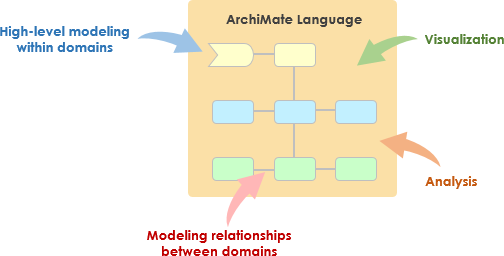
ArchiMate to otwarta i niezależna język modelowania architektury przedsiębiorstwa, która wspiera opisywanie, analizę i wizualizację architektury wewnątrz i między dziedzinami biznesowymi. Jest zaprojektowana w taki sposób, aby zapewnić jasny i jednoznaczny sposób komunikowania złożonych architektur dla interesariuszy. ArchiMate jest szczególnie przydatna w połączeniu z Metodą Rozwoju Architektury TOGAF (ADM), zapewniając standardowy sposób modelowania i komunikowania architektur przedsiębiorstwa.
What is ArchiMate?

Kluczowe koncepcje ArchiMate

ArchiMate Core Framework

1. Warstwy ArchiMate

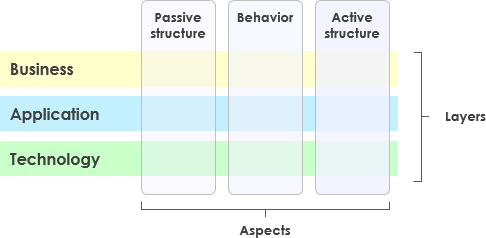
ArchiMate dzieli architekturę przedsiębiorstwa na trzy główne warstwy:

  • Warstwa biznesowa: Skupia się na procesach biznesowych, usługach i funkcjach wspierających cele organizacji.
  • Warstwa aplikacji: Dotyczy usług aplikacji, komponentów i ich wzajemnych interakcji wspierających warstwę biznesową.
  • Warstwa technologiczna: Dotyczy infrastruktury technologicznej, w tym sprzętu, oprogramowania i komponentów sieciowych wspierających warstwę aplikacji.

2. Podstawowe elementy

ArchiMate definiuje kilka podstawowych elementów używanych do modelowania architektury:

  • Elementy struktury aktywne: Reprezentują jednostki, które wykonywają zachowania, takie jak aktorzy biznesowi, komponenty aplikacji i urządzenia.
  • Elementy zachowania: Reprezentują procesy, funkcje, usługi i interakcje wewnątrz architektury.
  • Elementy struktury pasywne: Reprezentują informacje lub dane używane lub tworzone przez elementy zachowania, takie jak obiekty biznesowe i obiekty danych.

3. Relacje

ArchiMate definiuje kilka typów relacji łączących elementy:

  • Relacje strukturalne: Takie jak złożenie, agregacja i specjalizacja.
  • Relacje zależności: Takie jak asocjacja, realizacja i używane przez.
  • Relacje dynamiczne: Na przykład wyzwalanie i przepływ.

4. Punkty widzenia

ArchiMate oferuje kilka punktów widzenia do wizualizacji architektury z różnych perspektyw:

  • Punkt widzenia procesów biznesowych: Pokazuje procesy biznesowe i ich wzajemne oddziaływania.
  • Punkt widzenia współpracy aplikacji: Pokazuje, jak aplikacje współpracują w celu wspierania procesów biznesowych.
  • Punkt widzenia realizacji technologicznej: Pokazuje, jak elementy technologiczne realizują elementy aplikacji.

ArchiMate i TOGAF ADM

Metoda rozwoju architektury TOGAF (ADM)

TOGAF ADM to kompleksowa metodyka tworzenia architektur przedsiębiorstw. Składa się z kilku faz, z których każda skupia się na konkretnym aspekcie procesu tworzenia architektury. ArchiMate wspiera TOGAF ADM, oferując znormalizowany sposób modelowania i wizualizacji architektury w każdej fazie.
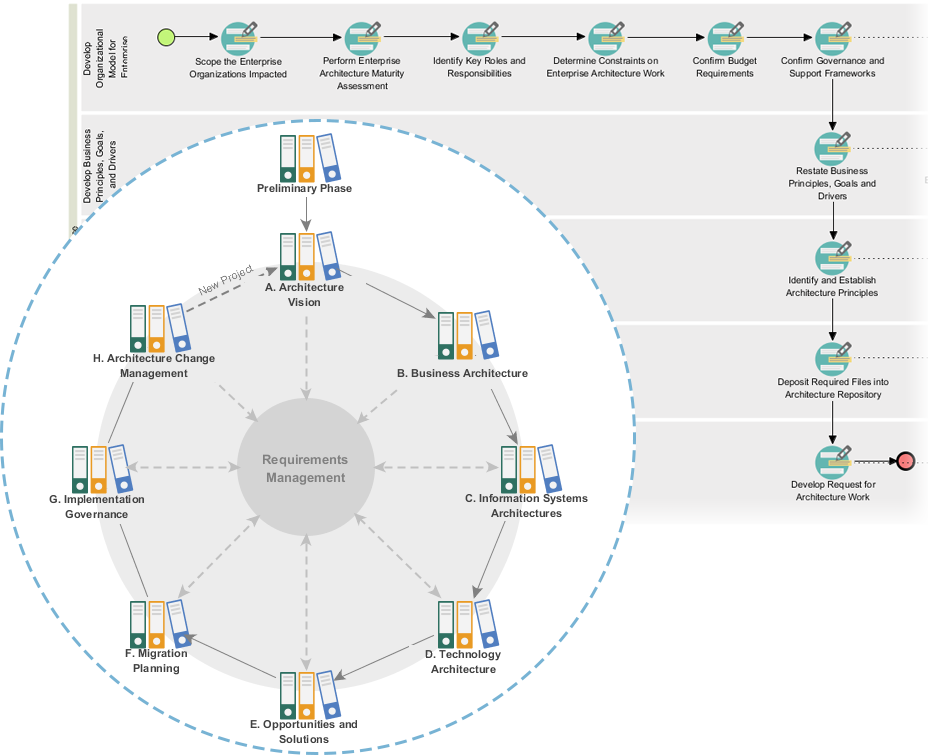
Powerful TOGAF ADM Toolset

Fazy TOGAF ADM

  1. Faza wstępna: Ustala zasady architektury, ramy pracy i zarządzanie.
  2. Wizja architektury: Określa zakres, interesariuszy, kwestie i cele biznesowe.
  3. Architektura biznesowa: Tworzy architekturę biznesową, w tym procesy i usługi biznesowe.
  4. Architektury systemów informacyjnych: Tworzy architektury danych i aplikacji.
  5. Architektura technologiczna: Tworzy architekturę technologiczną.
  6. Okazje i rozwiązania: Identyfikuje i priorytaryzuje projekty architektury.
  7. Planowanie migracji: Tworzy plan migracji i wdrożenia.
  8. Zarządzanie wdrożeniem: Zapewnia zarządzanie i wsparcie w realizacji architektury.

Przykłady modeli ArchiMate

Ten diagram ilustruje architekturę warstwową systemu zarządzania opieką zdrowotną, podzieloną na dwie główne warstwy: warstwę Warstwa aplikacji oraz warstwę Warstwę technologiczną. Oto szczegółowe wyjaśnienie każdego komponentu oraz ich wzajemnych interakcji:
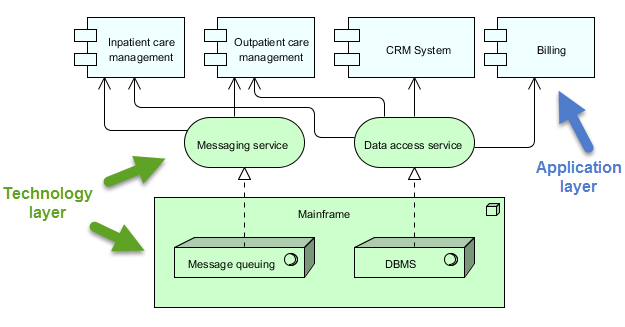
archimate diagram example

Warstwa aplikacji (niebieska)

Ta warstwa składa się z różnych aplikacji i systemów, które bezpośrednio współdziałają z użytkownikami lub innymi systemami w celu zarządzania usługami opieki zdrowotnej. Kluczowe komponenty w tej warstwie to:

  1. Zarządzanie opieką stacjonarną:

    • Zarządza usługami i procesami dotyczącymi pacjentów, którzy są przyjęci do szpitala.
  2. Zarządzanie opieką ambulatoryjną:

    • Zarządza usługami i procesami dla pacjentów, którzy odwiedzają szpital w celu leczenia, ale nie są przyjęci.
  3. System CRM (Zarządzanie relacjami z klientami):

    • Zarządza interakcjami z pacjentami, w tym komunikacją, kontaktami powtórnymi oraz zarządzaniem relacjami z pacjentami.
  4. Faktury:

    • Zajmuje się aspektami finansowymi, w tym wykonywaniem faktur, przetwarzaniem płatności oraz zarządzaniem rekordami finansowymi.

Warstwa technologiczna (zielona)

Ta warstwa zapewnia podstawową infrastrukturę i usługi wspierające aplikacje w warstwie aplikacji. Kluczowe komponenty w tej warstwie to:

  1. Usługa komunikacji:

    • Ułatwia komunikację między różnymi aplikacjami i systemami w ramach systemu zarządzania opieką zdrowotną.
    • Gwarantuje, że wiadomości są przekazywane wiarygodnie i w poprawnej kolejności.
  2. Usługa dostępu do danych:

    • Zapewnia centralny sposób dostępu i zarządzania danymi w całym systemie.
    • Gwarantuje, że dane są pobierane i przechowywane efektywnie i bezpiecznie.
  3. Mainframe:

    • Główny system obliczeniowy, który hostuje podstawowe usługi i dane.
    • Zawiera dwa główne komponenty:
      • Kolejkowanie wiadomości: Zarządza kolejkowaniem i przetwarzaniem wiadomości w celu zapewnienia niezawodnej komunikacji.
      • DBMS (System zarządzania bazami danych): Przechowuje i zarządza danymi używanymi przez różne aplikacje.

Interakcje

  • Zarządzanie opieką stacjonarnąZarządzanie opieką ambulatoryjnąSystem CRM, i Faktury współdziałają z Usługa komunikacji i Usługa dostępu do danych w celu wykonywania swoich odpowiednich funkcji.
  • Ponadto Usługa komunikacji i Usługa dostępu do danych opierają się na Mainframe w celu obsługi podstawowych usług, takich jak kolejkowanie wiadomości i zarządzanie bazami danych.
  • Ponadto Mainframezapewnia poprawne przetwarzanie wiadomości i efektywne zarządzanie danymi, wspierając całą operację systemu.

Diagram przedstawia strukturalny podejście do zarządzania usługami medycznymi poprzez rozdzielenie funkcji poziomu aplikacji od podstawowej infrastruktury technologicznej. To rozdzielenie pozwala na bardziej modułową i utrzymywalną architekturę systemu, w której zmiany w jednym warstwie mają minimalny wpływ na drugą. Usługa komunikatów i Usługa dostępu do danych działają jako pośrednicy, ułatwiając komunikację i zarządzanie danymi między składnikami aplikacji a głównym komputerem.

Zalecany narzędzie ArchiMate do architektury przedsiębiorstwa

Visual Paradigm jest szeroko uznawany za jedno z najlepszych narzędzi do modelowania ArchiMate w projektach architektury przedsiębiorstwa (EA). Oto kilka powodów, dla których jest bardzo zalecane:
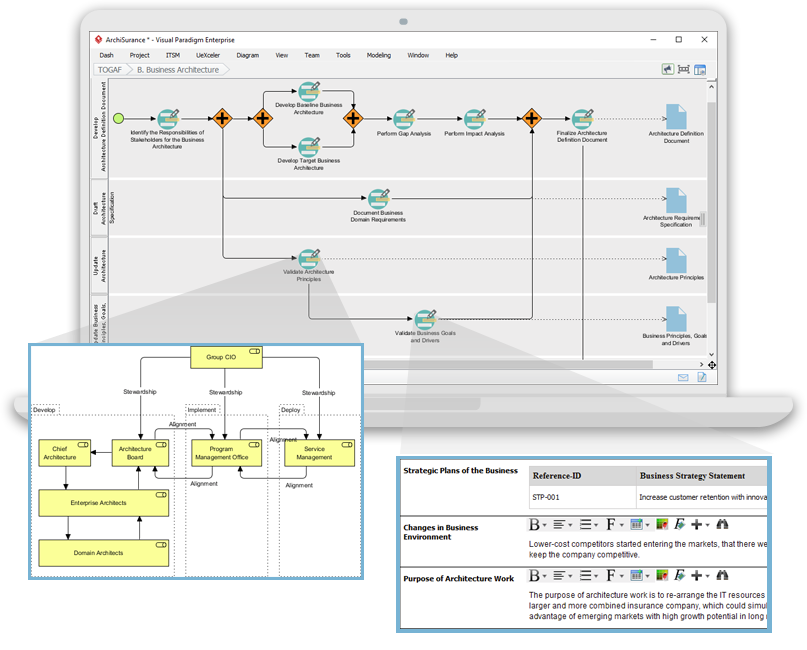
Navigating TOGAF: Your Guide to the ADM Process - Visual Paradigm Guides

1. Kompleksowa obsługa ArchiMate

  • Pełna specyfikacja ArchiMate: Visual Paradigm obsługuje najnowsze standardy ArchiMate, w tym ArchiMate 3.1, zapewniając możliwość modelowania za pomocą wszystkich oficjalnych elementów i relacji ArchiMate.
  • Bogata biblioteka elementów: Dostarcza obszerną bibliotekę symboli ArchiMate, ułatwiając tworzenie szczegółowych i dokładnych modeli.

2. Przyjazny interfejs użytkownika

  • Intuicyjny projekt: Narzędzie oferuje przyjazny interfejs użytkownika, który jest łatwy w nawigacji, nawet dla użytkowników nowych w modelowaniu ArchiMate.
  • Przeciągnij i upuść: Funkcja przeciągania i upuszczania umożliwia szybkie i efektywne tworzenie modeli.

3. Zaawansowane funkcje modelowania

  • Widoki warstwowe: Obsługuje tworzenie widoków warstwowych (np. Biznes, Aplikacja, Technologia), aby zapewnić kompleksowy obraz architektury przedsiębiorstwa.
  • Relacje między warstwami: Łatwo definiować i wizualizować relacje między różnymi warstwami architektury.

4. Współpraca i udostępnianie

  • Współpraca zespołu: Visual Paradigm obsługuje pracę zespołową, umożliwiając wielu użytkownikom jednoczesną pracę nad tym samym projektem.
  • Kontrola wersji: Zintegrowana kontrola wersji pomaga zarządzać zmianami i śledzić ewolucję Twoich modeli.

5. Możliwości integracji

  • Integracja z narzędziami: Bezproblemowo integruje się z innymi narzędziami i platformami, takimi jak JIRA, Confluence i różne bazy danych, poprawiając ogólną praktykę architektury przedsiębiorstwa.
  • Import/Eksport: Obsługuje import i eksport modeli w różnych formatach, w tym ArchiMate Exchange File Format, zapewniając zgodność z innymi narzędziami.

6. Dokumentacja i raportowanie

  • Automatyczna dokumentacja: Generuje kompleksową dokumentację na podstawie Twoich modeli ArchiMate, oszczędzając czas i zapewniając spójność.
  • Dostosowane raporty: Pozwala tworzyć dostosowane raporty dopasowane do potrzeb konkretnych stakeholderów.

7. Szkolenia i wsparcie

  • Obszerna baza zasobów: Oferuje bogatą gamę samouczków, przewodników i przykładów, które pomogą użytkownikom rozpocząć pracę i opanować modelowanie ArchiMate.
  • Wsparcie klienta: Oferuje solidne wsparcie klienta, aby pomóc w rozwiązaniu wszelkich problemów lub pytań, które mogą się pojawić.

8. Skalowalność

  • Rozwiązywalne rozwiązania: Przydatne zarówno dla małych, jak i dużych projektów architektury przedsiębiorstwa, co czyni je elastycznym narzędziem dla organizacji wszystkich rozmiarów.

9. Zgodność i standardy

  • Standardy branżowe: Zgodne z standardami branżowymi i najlepszymi praktykami, zapewniając zgodność i aktualność Twoich modeli architektury przedsiębiorstwa.

Wnioski

ArchiMate oferuje potężny i standardowy sposób modelowania architektur przedsiębiorstw, wspierając metodologię TOGAF ADM. Zrozumienie kluczowych koncepcji, warstw, elementów i relacji w ArchiMate pozwala skutecznie modelować i komunikować złożone architektury dla stakeholderów. Podane przykłady ilustrują, jak ArchiMate może być wykorzystywany do modelowania procesów biznesowych, współpracy aplikacji i realizacji technologii, wspierając różne fazy metodologii TOGAF ADM.

Zasób narzędzi ArchiMate

  1. Bezpłatny narzędzie online do tworzenia diagramów ArchiMate

  2. Strona główna – Zasoby ArchiMate bezpłatnie

  3. Visual Paradigm – UML, Agile, PMBOK, TOGAF, BPMN i wiele więcej!

  4. Rozdział 7. ArchiMate – Koło społeczności Visual Paradigm

  5. Co to jest ArchiMate?

    • Opis: Poradnik krok po kroku do nauki ArchiMate, w tym sposób korzystania z niego do modelowania architektury przedsiębiorstwa.
    • URLCo to jest ArchiMate? 5
  6. Narzędzia ArchiMate

    • Opis: Dowiedz się, jak korzystać z Visual Paradigm, narzędzia do projektowania i zarządzania przeznaczonego dla zespołów agilnych w tworzeniu oprogramowania.
    • URLNarzędzia ArchiMate 6
  7. Najlepsze oprogramowanie ArchiMate

    • Opis: Zatwierdzone narzędzie ArchiMate do skutecznego projektowania i modelowania architektury przedsiębiorstwa. Szybko rysuj diagramy ArchiMate zgodne z oficjalnym specyfikacją The Open Group.
    • URLNajlepsze oprogramowanie ArchiMate 7
  8. Jak sformatować elementy ArchiMate?

  9. Przewodnik po punktach widzenia ArchiMate – punkt widzenia mapy zasobów

  10. Poradnik diagramów ArchiMate

    • Opis: Poradnik pomagający nauczyć się diagramów ArchiMate, jak je tworzyć i kiedy ich używać. Zawiera przykłady i wskazówki.
    • URLPoradnik diagramów ArchiMate 10

Te zasoby powinny stanowić kompletny punkt wyjścia do korzystania z narzędzia ArchiMate firmy Visual Paradigm do modelowania architektury przedsiębiorstwa.
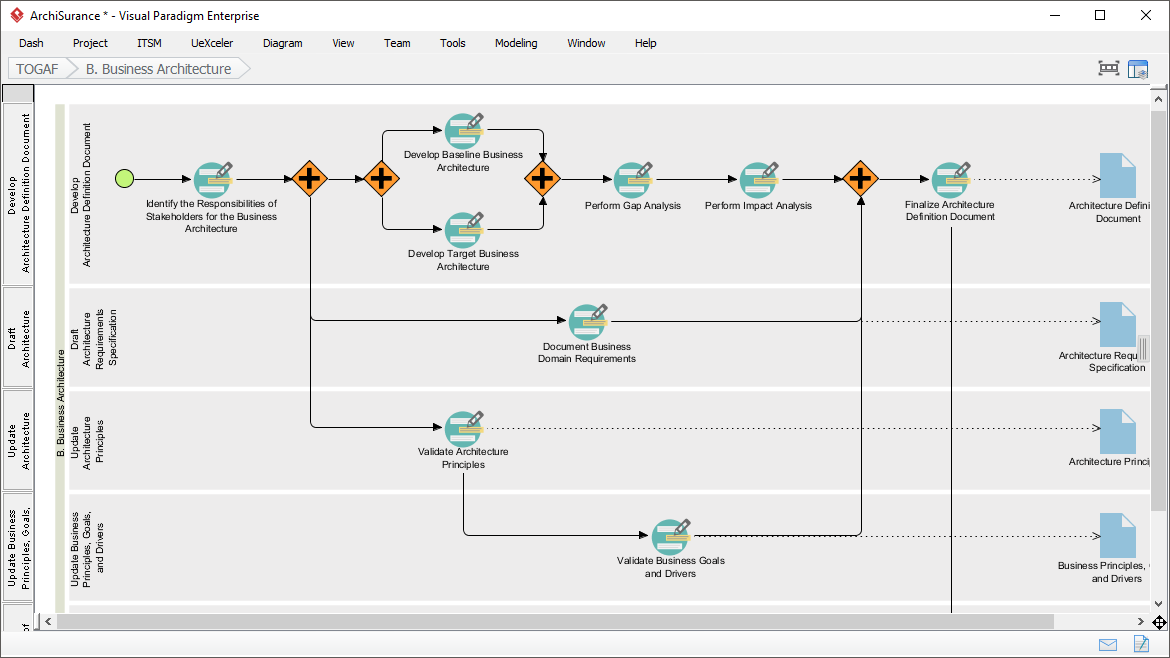
Kompleksowy przewodnik po procesie Visual Paradigm’s TOGAF Guide-Through

Wprowadzenie

Proces Visual Paradigm’s TOGAF Guide-Through to potężne narzędzie zaprojektowane w celu ułatwienia wdrożenia Metody Rozwoju Architektury TOGAF (ADM). Zapewnia krok po kroku przewodnik, instrukcje oraz przykłady z życia, wspierając rozwój architektury przedsiębiorstwa. Niniejszy kompleksowy przewodnik omówi kluczowe cechy, korzyści i obszary zastosowania procesu Visual Paradigm’s TOGAF Guide-Through, wyróżniając, dlaczego wyróżnia się on w dziedzinie architektury przedsiębiorstwa.

Transform Your Business with Visual Paradigm and TOGAF - Visual Paradigm Guides

Główne cechy

  1. Krok po kroku:

    • Proces Guide-Through oferuje szczegółowe, krok po kroku instrukcje dla każdej fazy metody TOGAF ADM, zapewniając użytkownikom łatwe poruszanie się po złożonościach rozwoju architektury przedsiębiorstwa1112.
  2. Integracja z ArchiMate:

    • Visual Paradigm wspiera integrację ArchiMate z TOGAF ADM, oferując potężną kombinację dla inicjatyw architektury przedsiębiorstwa. ArchiMate 3 z jego zróżnicowanym systemem notacji pozwala architektom efektywnie wyrażać złożone modele1314.
  3. Zautomatyzowane zarządzanie zadaniami:

    • Narzędzie ulepsza cały proces poprzez zautomatyzowane zarządzanie zadaniami i powiadomieniami, umożliwiając użytkownikom rozwój dostarczanych elementów architektury stopniowo i w sposób współdziałający15.
  4. Wizualne mapy procesów:

    • Oprogramowanie zawiera wizualne mapy procesów, które pomagają użytkownikom łatwo poruszać się przez cały proces architektury przedsiębiorstwa. Oferuje kompletny zestaw narzędzi do planowania, projektowania i rozwoju w celu zakończenia działań ADM14.
  5. Kompletny zestaw narzędzi:

    • Visual Paradigm oferuje szereg narzędzi dostosowanych do działań ADM, w tym diagramy ArchiMate do modelowania aspektów biznesowych, IT i fizycznych architektury przedsiębiorstwa. Te narzędzia zapewniają kompleksowy obraz architektury, ułatwiając jej zrozumienie i wdrożenie TOGAF14.

Zalety

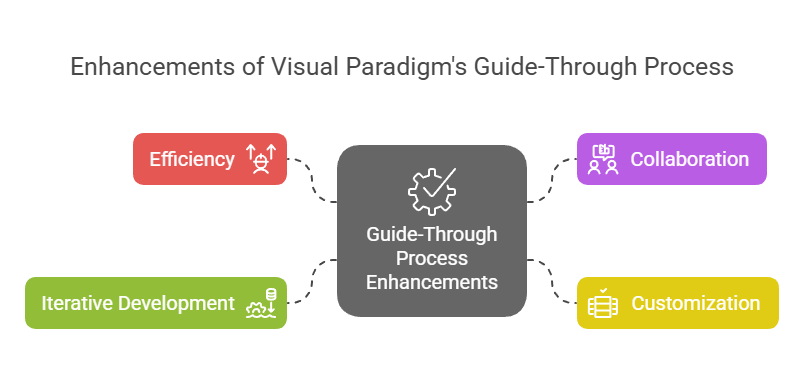
Enhancements of Visual Paradigm's Guide-Through Process: Visual Paradigm

  1. Efektywność:

    • Proces Przewodnika znacząco zwiększa efektywność poprzez dostarczanie jasnych instrukcji i automatyzację zadań, pozwalając użytkownikom skupić się na decyzjach strategicznych zamiast na szczegółach procedur11.
  2. Współpraca:

    • Narzędzie ułatwia współpracę między różnymi stakeholderami, w tym właścicielami projektów, analitykami biznesowymi, architektami przedsiębiorstw i specjalistami IT. Ten podejście wspólne zapewnia zaangażowanie i informowanie wszystkich stron na przestrzeni całego procesu tworzenia architektury15.
  3. Dostosowanie:

    • Narzędzie Visual Paradigm umożliwia dostosowanie, umożliwiając organizacjom dopasowanie procesu ADM do ich specyficznych potrzeb i celów. Ta elastyczność zapewnia, że proces tworzenia architektury jest zgodny z unikalnymi wymaganiami organizacji11.
  4. Rozwój iteracyjny:

    • Iteracyjny charakter TOGAF ADM jest w pełni wspierany przez proces Przewodnika Visual Paradigm. Pozwala to specjalistom dostosować i doskonalić swoją pracę na podstawie zmieniających się potrzeb informacyjnych i opinii stakeholderów, zapewniając, że architektura odpowiada zmieniającym się potrzebom organizacji16.

Obszary zastosowania

  1. Rozwój architektury przedsiębiorstwa:

    • Głównym obszarem zastosowania jest rozwój architektury przedsiębiorstwa, gdzie proces Przewodnika pomaga organizacjom projektować, planować, wdrażać i zarządzać swoją architekturą przedsiębiorstwa. Zapewnia strukturalne podejście do skutecznego dopasowania celów biznesowych do strategii IT17.
  2. Transformacja cyfrowa:

    • Narzędzie jest kluczowe dla inicjatyw transformacji cyfrowej, w których organizacje dążą do poprawy doświadczenia klienta i efektywności operacyjnej poprzez wdrażanie nowych technologii i procesów18.
  3. Planowanie strategiczne:

    • Przewodnik Visual Paradigm wspiera planowanie strategiczne, oferując kompleksowy framework do tworzenia wizji architektury, definiowania zakresu, identyfikowania stakeholderów oraz tworzenia planów komunikacji. Zapewnia to zgodność procesu rozwoju architektury z celami biznesowymi i strategicznymi kierunkami19.
  4. Metodyki agilne:

    • Narzędzie integruje metodyki agilne i UML, oferując kompleksowe rozwiązanie do rozwoju architektury przedsiębiorstwa. Ta integracja zapewnia, że proces rozwoju architektury jest zarówno elastyczny, jak i efektywny, wspierając praktyki agilne w organizacji14.

Wnioski

Przewodnik Visual Paradigm TOGAF wyróżnia się jako kompleksowe i skuteczne narzędzie wspierające TOGAF ADM. Krok po kroku prowadząca instrukcja, integracja z ArchiMate, automatyczne zarządzanie zadaniami i funkcje współpracy czynią go niezastąpionym zasobem w rozwoju architektury przedsiębiorstwa. Wykorzystując to narzędzie, organizacje mogą zwiększyć efektywność, współpracę, personalizację i rozwój iteracyjny, a w efekcie osiągnąć cele architektury przedsiębiorstwa i wspierać wartość biznesową oraz transformację

Rozdział 3 ArchiMate 3.2

3 Struktura języka

Ten rozdział opisuje strukturę języka modelowania architektury przedsiębiorstwa ArchiMate. Szczegółowe definicje i przykłady standardowego zestawu elementów i relacji znajdują się w rozdziałach 4 do 1

3.1 Rozważania dotyczące projektowania języka

Głównym wyzwaniem w procesie tworzenia ogólnego metamodelu architektury przedsiębiorstwa jest znalezienie odpowiedniego kompromisu między szczegółowością języków dla poszczególnych dziedzin architektury a bardzo ogólnym zestawem pojęć architektonicznych, które odzwierciedlają perspektywę systemów jako prostego zbioru wzajemnie powiązanych jednostek.

Projektowanie języka ArchiMate rozpoczęło się od zestawu względnie ogólnych pojęć. Zostały one dostosowane do zastosowania na różnych poziomach architektonicznych, jak wyjaśniono w kolejnych sekcjach. Najważniejszym ograniczeniem projektowym języka jest jego celowe zaprojektowanie jako możliwie najmniejszego, ale nadal użytecznego do większości zadań modelowania architektury przedsiębiorstwa. Wiele innych języków stara się uwzględnić potrzeby wszystkich możliwych użytkowników. W interesie uproszczenia nauki i użytkowania język ArchiMate został ograniczony do pojęć wystarczających do modelowania typowych 80% przypadków praktycznych.
Ten standard nie opisuje szczegółowych rozważań dotyczących projektowania języka ArchiMate. Ciekawych czytelników prosimy o odniesienie się do [1], [2] i [3], które zawierają szczegółowe opisy budowy języka i rozważań projektowych.

3.2 Struktura najwyższego poziomu języka

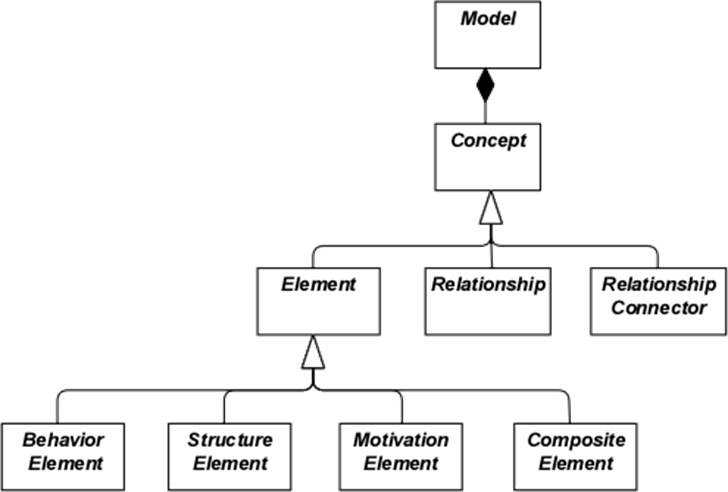
Rysunek 1 przedstawia hierarchiczną strukturę najwyższego poziomu języka:

  • Model to zbiór pojęć – pojęcie to albo element albo relacja
  • Element to albo element zachowania, element struktury, element motywacji, albo element złożony

Zauważ, że są to abstrakcyjne pojęcia; nie są przeznaczone do bezpośredniego użycia w modelach. Aby to oznaczyć, są przedstawione w białym kolorze z etykietami w kursywie. Zobacz rozdział 4, aby uzyskać wyjaśnienie notacji użytej na rysunku 1.

Rysunek 1: Hierarchia najwyższego poziomu pojęć ArchiMate

3.3 Warstwowanie języka ArchiMate

Język podstawowy ArchiMate definiuje strukturę ogólnych elementów i ich relacji, które mogą być specjalizowane na różnych poziomach. W języku podstawowym ArchiMate zdefiniowano trzy warstwy, jak poniżej:

  1. Warstwa Biznesowa przedstawia usługi biznesowe oferowane klientom, które są realizowane w organizacji za pomocą procesów biznesowych wykonywanych przez aktorów biznesowych.
  2. Warstwa Aplikacyjna przedstawia usługi aplikacyjne wspierające biznes oraz aplikacje, które je realizują.
  3. Warstwa Technologicznaobejmuje zarówno technologię informacyjną, jak i operacyjną. Można na przykład modelować technologię przetwarzania, przechowywania i komunikacji wspierającą świat aplikacji i warstwy biznesowe, a także modelować technologię operacyjną lub fizyczną za pomocą obiektów, sprzętu fizycznego, materiałów i sieci dystrybucyjnych.

Ogólna struktura modeli w różnych warstwach jest podobna. Używane są te same typy elementów i relacji, choć ich dokładna natura i szczegółowość się różnią. W następnej rozdziale przedstawiona jest struktura ogólnego metamodelu. W rozdziałach 8, 9 i 10 te elementy są specjalizowane, aby uzyskać elementy charakterystyczne dla konkretnej warstwy.

Zgodnie z koncepcją orientacji na usługi, najważniejszą relacją między warstwami jest relacja „obsługi”[1]relacje, które pokazują, jak elementy w jednej warstwie są obsługiwane przez usługi innych warstw. (Zauważ jednak, że usługi nie muszą obsługiwać tylko elementów w innej warstwie, ale mogą również obsługiwać elementy w tej samej warstwie.) Drugim typem połączenia są relacje realizacji: elementy w niższych warstwach mogą realizować odpowiednie elementy w wyższych warstwach; np. obiekt

„obiekt danych” (warstwa aplikacji) może realizować „obiekt biznesowy” (warstwa biznesowa); albo

„artefakt” (warstwa technologiczna) może realizować albo „obiekt danych”, albo „komponent aplikacji” (warstwa aplikacji).

3.4 Podstawowy framework ArchiMate

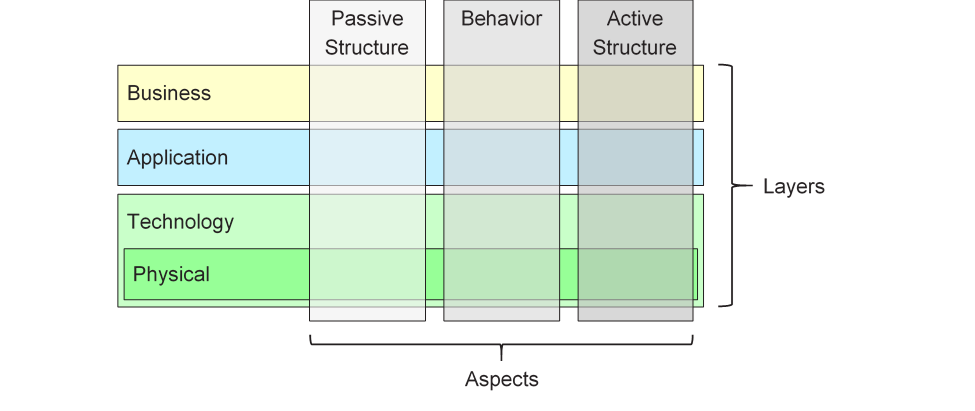
Podstawowy framework ArchiMate to framework składający się z dziewięciu komórek używanych do kategoryzowania elementów języka podstawowego ArchiMate. Składa się on z trzech aspektów i trzech warstw, jak pokazano na rysunku 2. Jest to znany jako podstawowy framework ArchiMate.

Ważne jest zrozumienie, że kategoryzacja elementów na podstawie aspektów i warstw jest tylko ogólna. Elementy architektury z rzeczywistego świata nie muszą być ściśle ograniczone do jednego aspektu lub warstwy, ponieważ elementy łączące różne aspekty i warstwy odgrywają kluczową rolę w spójnym opisie architektury. Na przykład, wyprzedzając późniejsze rozważania koncepcyjne, role biznesowe pełnią funkcję pośredniczącą między elementami „wyłącznie behawioralnymi” a elementami „wyłącznie strukturalnymi”, a to, czy dany fragment oprogramowania jest uznawany za część warstwy aplikacji czy warstwy technologicznej, może zależeć od kontekstu.

Rysunek 2: Podstawowy framework ArchiMate

Struktura frameworku pozwala na modelowanie przedsiębiorstwa z różnych punktów widzenia, gdzie położenie w komórkach podkreśla interesy stakeholdera. Stakeholder zazwyczaj może mieć interesy obejmujące wiele komórek.

Wymiary frameworku są następujące:

  • Warstwy – trzy poziomy, na których przedsiębiorstwo może być modelowane w ArchiMate – Biznes, Aplikacja i Technologia (jak opisano w sekcji 3.3)
  • Aspekty:

Aspekt struktury aktywnej, który reprezentuje elementy strukturalne (aktorów biznesowych, komponentów aplikacji i urządzeń, które wykazują rzeczywistą działalność; tzn.

„podmioty” działalności)

Aspekt behawioralny, który reprezentuje zachowanie (procesy, funkcje, zdarzenia i usługi) wykonywane przez aktorów; elementy strukturalne są przypisywane do elementów behawioralnych, aby pokazać, kto lub co wykazuje dane zachowanie

Aspekt struktury pasywnej, który reprezentuje obiekty, na których wykonywane jest zachowanie; są to zazwyczaj obiekty informacyjne w warstwie biznesowej i obiekty danych w warstwie aplikacji, ale mogą również służyć do reprezentowania obiektów fizycznych

Te trzy aspekty zostały inspirowane językiem naturalnym, w którym zdanie ma podmiot (strukturę aktywną), czasownik (zachowanie) i dopełnienie (strukturę pasywną). Używając tych samych konstrukcji, do których ludzie są przyzwyczajeni w swoich językach, język ArchiMate jest łatwiejszy do nauki i czytania.

Ponieważ notacja ArchiMate tograficznajęzyk, w którym elementy są organizowane przestrzennie, ten porządek nie ma znaczenia podczas modelowania.

Element złożony, jak pokazano na rysunku 1, to element, który niekoniecznie pasuje do jednego aspektu (kolumny) frameworku, ale może łączyć dwa lub więcej aspektów.

Zauważ, że język ArchiMate nie wymaga od modelera używania jakiegokolwiek konkretnego układu, takiego jak struktura tego frameworku; jest on jedynie kategoryzacją elementów języka.

3.5 Pełny framework ArchiMate

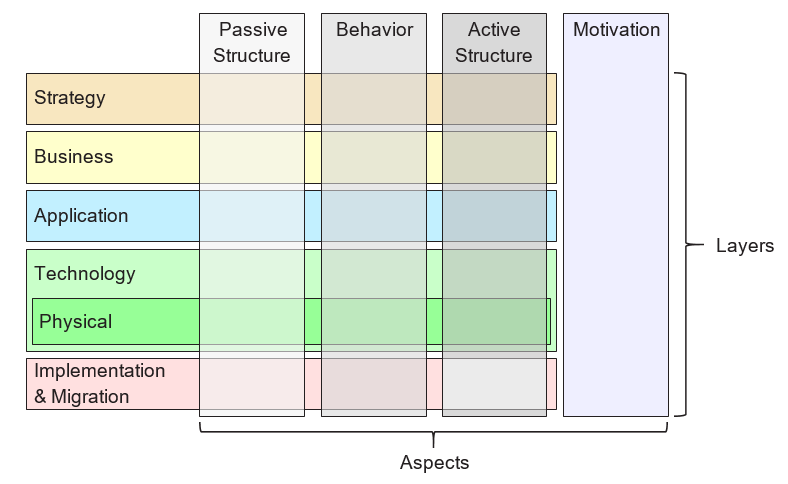
Pełny framework ArchiMate, jak opisano w tej wersji standardu, dodaje kilka warstw i aspektu do frameworku podstawowego. Elementy fizyczne są uwzględnione w warstwie technologicznej w celu modelowania obiektów fizycznych, sprzętu, sieci dystrybucyjnej i materiałów. W związku z tym są to również elementy podstawowe. Elementy strategii wprowadzono w celu modelowania kierunków i wyborów strategicznych. Są one opisane w rozdziale 7. Aspekt motywacji jest wprowadzony na poziomie ogólnym w następnym rozdziale i szczegółowo opisany w rozdziale 6. Elementy implementacji i migracji są opisane w rozdziale 12. Ostateczny framework ArchiMate Full przedstawiono na rysunku 3.

Rysunek 3: Pełny framework ArchiMate

Język ArchiMate nie definiuje specjalnej warstwy dla informacji; jednak elementy z aspektu struktury biernych, takie jak obiekty biznesowe, obiekty danych i artefakty, są używane do reprezentowania jednostek informacji. Modelowanie informacji jest wspierane na różnych warstwach ArchiMate.

3.6 Abstrakcja w języku ArchiMate

Struktura języka ArchiMate umożliwia kilka znanych form abstrakcji i wzbogacenia. Po pierwsze, rozróżnienie między widokiem zewnętrznym (czarna skrzynka, abstrahującym od zawartości skrzynki) a wewnętrznym (biała skrzynka) jest powszechne w projektowaniu systemów. Widok zewnętrzny przedstawia, co system musi wykonać dla swojego środowiska, podczas gdy widok wewnętrzny przedstawia, jak to robi.

Po drugie, rozróżnienie między zachowaniem a strukturą aktywną jest często używane do oddzielenia tego, co system musi wykonywać, i sposobu, w jaki to robi, od składników systemu (osób, aplikacji i infrastruktury), które to robią. W modelowaniu nowych systemów często wygodnie jest zacząć od zachowań, które system musi wykonywać, podczas gdy w modelowaniu istniejących systemów często wygodnie jest zacząć od osób, aplikacji i infrastruktury, które tworzą system, a następnie szczegółowo przeanalizować zachowania wykonywane przez te struktury aktywne.

Trzecie rozróżnienie dotyczy poziomów abstrakcji konceptualnej, logicznej i fizycznej. Ma swoje korzenie w modelowaniu danych: elementy konceptualne reprezentują informacje, które są istotne dla biznesu; elementy logiczne zapewniają strukturę logiczną tej informacji do jej manipulacji przez systemy informacyjne; elementy fizyczne opisują przechowywanie tej informacji, np. w formie plików lub tabel bazy danych. W języku ArchiMate odpowiada to obiektom biznesowym, obiektom danych i artefaktom, razem z relacjami realizacji między nimi.

Rozróżnienie między elementami logicznymi a fizycznymi zostało również przeniesione do opisu aplikacji. Metamodel przedsiębiorstwa TOGAF [4] zawiera zestaw encji opisujących komponenty i usługi biznesowe, danych, aplikacji i technologii w celu opisania koncepcji architektury. Elementy logiczne to niezależne od implementacji lub produktu zamknięcia danych lub funkcjonalności, podczas gdy elementy fizyczne to tangible komponenty oprogramowania, urządzenia itp. To rozróżnienie jest ujęte w ramach TOGAF w postaci Bloków Budowlanych Architektury (ABB) i Bloków Budowlanych Rozwiązań (SBB). To rozróżnienie znów jest przydatne w przejściu od ogólnych, abstrakcyjnych opisów architektury do konkretnych, poziomu implementacji projektów. Zauważ, że bloki budowlane mogą zawierać wiele elementów, które zazwyczaj są modelowane za pomocą pojęcia grupowania w języku ArchiMate.

Język ArchiMate ma trzy sposoby modelowania takich abstrakcji. Po pierwsze, jak opisano w [6], elementy zachowania, takie jak funkcje aplikacji i technologii, mogą być używane do modelowania komponentów logicznych, ponieważ reprezentują niezależne od implementacji zamknięcia funkcjonalności. Odpowiadające komponenty fizyczne mogą następnie być modelowane za pomocą elementów struktury aktywnej, takich jak komponenty aplikacji i węzły, przypisane do elementów zachowania. Po drugie, język ArchiMate wspiera pojęcie realizacji. Najlepiej można to wyjaśnić, pracując od warstwy technologicznej w górę. Warstwa technologiczna definiuje artefakty fizyczne i oprogramowanie, które realizują komponent aplikacji. Dostarcza również mapowanie do innych pojęć fizycznych, takich jak urządzenia, sieci itp., potrzebnych do realizacji systemu informacyjnego. Relacja realizacji jest również używana do modelowania bardziej abstrakcyjnych form realizacji, takich jak między (bardziej szczegółowym) wymaganiem a (bardziej ogólnym) zasadą, gdzie spełnienie wymagania oznacza zgodność z zasadą. Realizacja jest również dozwolona między komponentami aplikacji i między węzłami. W ten sposób można modelować fizyczny komponent aplikacji lub technologii realizujący komponent logiczny aplikacji lub technologii, odpowiednio. Po trzecie, komponenty logiczne i fizyczne aplikacji mogą być zdefiniowane jako specjalizacje poziomu metamodelu elementu komponentu aplikacji, jak opisano w rozdziale 14 (patrz również przykłady w sekcji 14.2.2). To samo dotyczy komponentów logicznych i fizycznych technologii w metamodelu zawartości TOGAF, które mogą być zdefiniowane jako specjalizacje elementu węzła (patrz sekcja 14.2.3).

Język ArchiMate świadomie nie wspiera różnicy między typami a instancjami. Na poziomie abstrakcji architektury przedsiębiorstwa częściej modeluje się typy i/lub przykłady, a nie instancje. Podobnie, proces biznesowy w języku ArchiMate nie opisuje pojedynczej instancji (tj. jednego wykonania tego procesu). W większości przypadków do modelowania typu obiektu (“cf.” klasa UML®) używany jest obiekt biznesowy, którego w organizacji może istnieć wiele instancji. Na przykład każde wykonanie procesu aplikacji ubezpieczeniowej może prowadzić do konkretnej instancji obiektu biznesowego polisy ubezpieczeniowej, ale nie jest to modelowane w architekturze przedsiębiorstwa.patrzklasa UML®), której w organizacji może istnieć kilka instancji. Na przykład każde wykonanie procesu aplikacji ubezpieczeniowej może prowadzić do konkretnej instancji obiektu biznesowego polisy ubezpieczeniowej, ale nie jest to modelowane w architekturze przedsiębiorstwa.

3.7 Pojęcia i ich notacja

Język ArchiMate rozdziela pojęcia języka (tj. składniki metamodelu) od ich notacji. Różne grupy interesariuszy mogą wymagać różnych notacji, aby zrozumieć model lub widok architektury. W tym względzie język ArchiMate różni się od języków takich jak UML lub BPMN™, które mają tylko jedną znormalizowaną notację. Mechanizm perspektywy wyjaśniony w rozdziale 13 zapewnia środki do definiowania takich wizualizacji skierowanych do interesariuszy.

Chociaż notacja pojęć ArchiMate może (i powinna) być dostosowana do interesariuszy, standard dostarcza jednej wspólny notacji graficznej, którą mogą używać architekci i inni tworzący modele ArchiMate. Notacja ta jest skierowana do odbiorców przyzwyczajonych do istniejących technik modelowania technicznego, takich jak diagramy relacji encji (ERD), UML lub BPMN, dlatego przypomina je. W dalszej części tego dokumentu, chyba że zaznaczono inaczej, symbole używane do przedstawienia pojęć języka reprezentują standardową notację ArchiMate. Standardowa notacja dla większości elementów składa się z prostokąta z ikoną w prawym górnym rogu. W kilku przypadkach ikona samodzielnie może być używana jako alternatywna notacja. Standardową ikonografię należy preferować, gdy to możliwe, aby każdy znający język ArchiMate mógł odczytać diagramy tworzone w tym języku.

3.8 Użycie zagnieżdżania

Zagnieżdżanie elementów w innych elementach może być używane jako alternatywna notacja graficzna do wyrażania niektórych relacji. Jest to szczegółowo wyjaśnione w rozdziale 5 oraz w definicji każdej z tych relacji.

3.9 Użycie kolorów i podpowiedzi notacyjnych

Na obrazach metamodelu w tym standardzie używane są odcienie szarości, aby odróżnić elementy należące do różnych aspektów frameworku ArchiMate, następująco:

  • Biały dla pojęć abstrakcyjnych (tj. niemogących być instancjami)
  • Słaby szary dla struktur biernych
  • Średni szary dla zachowań
  • Ciemny szary dla struktur aktywnych

W modelach ArchiMate nie przypisuje się formalnych semantyk kolorów, a ich użycie pozostawia się modelerowi. Można jednak swobodnie używać kolorów, aby podkreślić pewne aspekty w modelach. Na przykład w wielu modelach przykładów przedstawionych w tym standardzie kolory są używane do odróżnienia warstw frameworku podstawowego ArchiMate, następująco:

  • Żółty dla warstwy biznesowej
  • Niebieski dla warstwy aplikacji
  • Zielony dla warstwy technologicznej

Można również używać ich do podkreślenia wizualnego. Zalecanym tekstem zawierającym wytyczne jest rozdział 6 [1]. Oprócz kolorów, można używać innych podpowiedzi notacyjnych do odróżnienia warstw frameworku. Litera M, S, B, A, T, P lub I w lewym górnym rogu elementu może oznaczać element motywacji, strategii, biznesowy, aplikacji, technologiczny, fizyczny lub implementacji i migracji, odpowiednio. Przykład tej notacji przedstawiono na przykładzie 34.

Standardowa notacja używa również konwencji dotyczącej kształtu narożników symboli dla różnych typów elementów, jak poniżej:

  • Narożniki kwadratowe są używane do oznaczania elementów strukturalnych
  • Narożniki okrągłe są używane do oznaczania elementów zachowania
  • Narożniki skośne są używane do oznaczania elementów motywacji

[1]Zauważ, że w poprzednich wersjach standardu nazywano to „używane przez”. W celu jasności nazwa została zmieniona na „obsługujące”.

ArchiMate 3.2 Chapter 3

3 Language Structure

This chapter describes the structure of the ArchiMate Enterprise Architecture modeling language. The detailed definition and examples of its standard set of elements and relationships follow in Chapter 4 to Chapter 1

3.1 Language Design Considerations

A key challenge in the development of a general metamodel for Enterprise Architecture is to strike a balance between the specificity of languages for individual architecture domains and a very general set of architecture concepts, which reflects a view of systems as a mere set of inter-related entities.

The design of the ArchiMate language started from a set of relatively generic concepts. These have been specialized towards application at different architectural layers, as explained in the following sections. The most important design restriction on the language is that it has been explicitly designed to be as small as possible, but still usable for most Enterprise Architecture modeling tasks. Many other languages try to accommodate the needs of all possible users. In the interest of simplicity of learning and use, the ArchiMate language has been limited to the concepts that suffice for modeling the proverbial 80% of practical cases.

This standard does not describe the detailed rationale behind the design of the ArchiMate language. The interested reader is referred to [1], [2], and [3], which provide a detailed description of the language construction and design considerations.

3.2 Top-Level Language Structure

Figure 1 outlines the top-level hierarchical structure of the language:

  • A model is a collection of concepts – a concept is either an element or a relationship
  • An element is either a behavior element, a structure element, a motivation element, or a composite element

Note that these are abstract concepts; they are not intended to be used directly in models. To signify this, they are depicted in white with labels in italics. See Chapter 4 for an explanation of the notation used in Figure 1.

Figure 1: Top-Level Hierarchy of ArchiMate Concepts

3.3 Layering of the ArchiMate Language

The ArchiMate core language defines a structure of generic elements and their relationships, which can be specialized in different layers. Three layers are defined within the ArchiMate core language as follows:

  1. The Business Layer depicts business services offered to customers, which are realized in the organization by business processes performed by business actors.
  2. The Application Layer depicts application services that support the business, and the applications that realize them.
  3. The Technology Layer comprises both information and operational technology. You can model, for example, processing, storage, and communication technology in support of the application world and Business Layers, and model operational or physical technology with facilities, physical equipment, materials, and distribution networks.

The general structure of models within the different layers is similar. The same types of elements and relationships are used, although their exact nature and granularity differ. In the next chapter, the structure of the generic metamodel is presented. In Chapter 8, Chapter 9, and Chapter 10 these elements are specialized to obtain elements specific to a particular layer.

In alignment with service-orientation, the most important relationship between layers is formed by “serving”[1] relationships, which show how the elements in one layer are served by the services of other layers. (Note, however, that services need not only serve elements in another layer, but also can serve elements in the same layer.) A second type of link is formed by realization relationships: elements in lower layers may realize comparable elements in higher layers; e.g., a

“data object” (Application Layer) may realize a “business object” (Business Layer); or an

“artifact” (Technology Layer) may realize either a “data object” or an “application component” (Application Layer).

3.4 The ArchiMate Core Framework

The ArchiMate Core Framework is a framework of nine cells used to classify elements of the ArchiMate core language. It is made up of three aspects and three layers, as illustrated in Figure 2. This is known as the ArchiMate Core Framework.

It is important to understand that the classification of elements based on aspects and layers is only a global one. Real-life architecture elements need not strictly be confined to one aspect or layer because elements that link the different aspects and layers, play a central role in a coherent architectural description. For example, running somewhat ahead of the later conceptual discussions, business roles serve as intermediary elements between “purely behavioral” elements and “purely structural” elements, and it may depend on the context whether a certain piece of software is considered to be part of the Application Layer or the Technology Layer.

Figure 2: ArchiMate Core Framework

The structure of the framework allows for modeling of the enterprise from different viewpoints, where the position within the cells highlights the concerns of the stakeholder. A stakeholder typically can have concerns that cover multiple cells.

The dimensions of the framework are as follows:

  • Layers – the three levels at which an enterprise can be modeled in ArchiMate – Business, Application, and Technology (as described in Section 3.3)
  • Aspects:

— The Active Structure Aspect, which represents the structural elements (the business actors, application components, and devices that display actual behavior; i.e., the

“subjects” of activity)

— The Behavior Aspect, which represents the behavior (processes, functions, events, and services) performed by the actors; structural elements are assigned to behavioral elements, to show who or what displays the behavior

— The Passive Structure Aspect, which represents the objects on which behavior is performed; these are usually information objects in the Business Layer and data objects in the Application Layer, but they may also be used to represent physical objects

These three aspects were inspired by natural language where a sentence has a subject (active structure), a verb (behavior), and an object (passive structure). By using the same constructs that people are used to in their own languages, the ArchiMate language is easier to learn and read.

Since ArchiMate notation is a graphical language where elements are organized spatially, this order is of no consequence in modeling.

A composite element, as shown in Figure 1, is an element that does not necessarily fit in a single aspect (column) of the framework but may combine two or more aspects.

Note that the ArchiMate language does not require the modeler to use any particular layout such as the structure of this framework; it is merely a categorization of the language elements.

3.5 The ArchiMate Full Framework

The ArchiMate Full Framework, as described in this version of the standard, adds a number of layers and an aspect to the Core Framework_._ The physical elements are included in the Technology Layer for modeling physical facilities and equipment, distribution networks, and materials. As such, these are also core elements. The strategy elements are introduced to model strategic direction and choices. They are described in Chapter 7. The motivation aspect is introduced at a generic level in the next chapter and described in detail in Chapter 6. The implementation and migration elements are described in Chapter 12. The resulting ArchiMate Full Framework is shown in Figure 3.

Figure 3: ArchiMate Full Framework

The ArchiMate language does not define a specific layer for information; however, elements from the passive structure aspect such as business objects, data objects, and artifacts are used to represent information entities. Information modeling is supported across the different ArchiMate layers.

3.6 Abstraction in the ArchiMate Language

The structure of the ArchiMate language accommodates several familiar forms of abstraction and refinement. First of all, the distinction between an external (black-box, abstracting from the contents of the box) and internal (white-box) view is common in systems design. The external view depicts what the system has to do for its environment, while the internal view depicts how it does this.

Second, the distinction between behavior and active structure is commonly used to separate what the system must do and how the system does it from the system constituents (people, applications, and infrastructure) that do it. In modeling new systems, it is often useful to start with the behaviors that the system must perform, while in modeling existing systems, it is often useful to start with the people, applications, and infrastructure that comprise the system, and then analyze in detail the behaviors performed by these active structures.

A third distinction is between conceptual, logical, and physical abstraction levels. This has its roots in data modeling: conceptual elements represent the information the business finds relevant; logical elements provide logical structure to this information for manipulation by information systems; physical elements describe the storage of this information; for example, in the form of files or database tables. In the ArchiMate language, this corresponds with business objects, data objects, and artifacts, along with the realization relationships between them.

The distinction between logical and physical elements has also been carried over to the description of applications. The TOGAF Enterprise Metamodel [4] includes a set of entities that describe business, data, application, and technology components and services to describe architecture concepts. Logical components are implementation or product-independent encapsulations of data or functionality, whereas physical components are tangible software components, devices, etc. This distinction is captured in the TOGAF framework in the form of Architecture Building Blocks (ABBs) and Solution Building Blocks (SBBs). This distinction is again useful in progressing Enterprise Architectures from high-level, abstract descriptions to tangible, implementation-level designs. Note that building blocks may contain multiple elements, which are typically modeled using the grouping concept in the ArchiMate language.

The ArchiMate language has three ways of modeling such abstractions. First, as described in [6], behavior elements such as application and technology functions can be used to model logical components, since they represent implementation-independent encapsulations of functionality. The corresponding physical components can then be modeled using active structure elements such as application components and nodes, assigned to the behavior elements. Second, the ArchiMate language supports the concept of realization. This can best be described by working with the Technology Layer upwards. The Technology Layer defines the physical artifacts and software that realize an application component. It also provides a mapping to other physical concepts such as devices, networks, etc. needed for the realization of an information system. The realization relationship is also used to model more abstract kinds of realization, such as that between a (more specific) requirement and a (more generic) principle, where fulfillment of the requirement implies adherence to the principle. Realization is also allowed between application components and between nodes. This way you can model a physical application or technology component realizing a logical application or technology component, respectively. Third, logical and physical application components can be defined as metamodel-level specializations of the application component element, as described in Chapter 14 (see also the examples in Section 14.2.2). The same holds for the logical and physical technology components of the TOGAF Content Metamodel, which can be defined as specializations of the node element (see Section 14.2.3).

The ArchiMate language intentionally does not support a difference between types and instances. At the Enterprise Architecture abstraction level, it is more common to model types and/or exemplars rather than instances. Similarly, a business process in the ArchiMate language does not describe an individual instance (i.e., one execution of that process). In most cases, a business object is therefore used to model an object type (cf. a UML® class), of which several instances may exist within the organization. For instance, each execution of an insurance application process may result in a specific instance of the insurance policy business object, but that is not modeled in the Enterprise Architecture.

3.7 Concepts and their Notation

The ArchiMate language separates the language concepts (i.e., the constituents of the metamodel) from their notation. Different stakeholder groups may require different notations in order to understand an architecture model or view. In this respect, the ArchiMate language differs from languages such as UML or BPMN™, which have only one standardized notation. The viewpoint mechanism explained in Chapter 13 provides the means for defining such stakeholder-oriented visualizations.

Although the notation of the ArchiMate concepts can (and should) be stakeholder-specific, the standard provides one common graphical notation which can be used by architects and others who develop ArchiMate models. This notation is targeted towards an audience used to existing technical modeling techniques such as Entity Relationship Diagrams (ERDs), UML, or BPMN, and therefore resembles them. In the remainder of this document, unless otherwise noted, the symbols used to depict the language concepts represent the ArchiMate standard notation. This standard notation for most elements consists of a box with an icon in the upper-right corner. In several cases, this icon by itself may also be used as an alternative notation. This standard iconography should be preferred whenever possible so that anyone knowing the ArchiMate language can read the diagrams produced in the language.

3.8 Use of Nesting

Nesting elements inside other elements can be used as an alternative graphical notation to express some relationships. This is explained in more detail in Chapter 5 and in the definition of each of these relationships.

3.9 Use of Colors and Notational Cues

In the metamodel pictures within this standard, shades of grey are used to distinguish elements belonging to the different aspects of the ArchiMate framework, as follows:

  • White for abstract (i.e., non-instantiable) concepts
  • Light grey for passive structures
  • Medium grey for behavior
  • Dark grey for active structures

In ArchiMate models, there are no formal semantics assigned to colors and the use of color is left to the modeler. However, they can be used freely to stress certain aspects in models. For instance, in many of the example models presented in this standard, colors are used to distinguish between the layers of the ArchiMate Core Framework, as follows:

  • Yellow for the Business Layer
  • Blue for the Application Layer
  • Green for the Technology Layer

They can also be used for visual emphasis. A recommended text providing guidelines is Chapter 6 of [1]. In addition to the colors, other notational cues can be used to distinguish between the layers of the framework. A letter M, S, B, A, T, P, or I in the top-left corner of an element can be used to denote a Motivation, Strategy, Business, Application, Technology, Physical, or Implementation & Migration element, respectively. An example of this notation is depicted in Example 34.

The standard notation also uses a convention with the shape of the corners of its symbols for different element types, as follows:

  • Square corners are used to denote structure elements
  • Round corners are used to denote behavior elements
  • Diagonal corners are used to denote motivation elements

[1] Note that this was called “used by” in previous versions of the standard. For the sake of clarity, this name has been changed to “serving”.

Comprehensive Guide to Visual Paradigm’s TOGAF Guide-Through Process

Introduction

Visual Paradigm’s TOGAF Guide-Through Process is a powerful tool designed to streamline the adoption of the TOGAF Architecture Development Method (ADM). It provides step-by-step guidance, instructions, and real-life examples to support enterprise architecture development. This comprehensive guide will explore the key features, benefits, and application areas of Visual Paradigm’s TOGAF Guide-Through Process, highlighting why it stands out in the field of enterprise architecture.

Transform Your Business with Visual Paradigm and TOGAF - Visual Paradigm Guides

Key Features

  1. Step-by-Step Guidance:

    • The Guide-Through Process offers detailed, step-by-step instructions for each phase of the TOGAF ADM, ensuring that users can navigate the complexities of enterprise architecture development with ease 1112.
  2. Integration with ArchiMate:

    • Visual Paradigm supports the integration of ArchiMate with TOGAF ADM, providing a powerful combination for enterprise architecture initiatives. ArchiMate 3, with its versatile notation system, allows architects to express complex models effectively 1314.
  3. Automated Task Management:

    • The tool enhances the entire process with automated task management and notifications, enabling users to develop architecture deliverables incrementally and collaboratively 15.
  4. Visual Process Maps:

    • The software features visual process maps that help users navigate through the entire enterprise architecture process easily. It provides a full set of planning, design, and development tools to complete ADM activities 14.
  5. Comprehensive Toolkit:

    • Visual Paradigm offers a range of tools tailored for ADM activities, including ArchiMate diagrams for modeling business, IT, and physical aspects of enterprise architecture. These tools provide a comprehensive view of the architecture, making it easier to understand and implement TOGAF 14.

Benefits

Enhancements of Visual Paradigm's Guide-Through Process: Visual Paradigm

  1. Efficiency:

    • The Guide-Through Process significantly enhances efficiency by providing clear instructions and automating tasks, allowing users to focus on strategic decisions rather than procedural details 11.
  2. Collaboration:

    • The tool facilitates collaboration among different stakeholders, including project owners, business analysts, enterprise architects, and IT professionals. This collaborative approach ensures that all parties are engaged and informed throughout the architecture development process 15.
  3. Customization:

    • Visual Paradigm’s tool allows for customization, enabling organizations to tailor the ADM process to their specific needs and goals. This flexibility ensures that the architecture development process aligns with the organization’s unique requirements 11.
  4. Iterative Development:

    • The iterative nature of the TOGAF ADM is fully supported by Visual Paradigm’s Guide-Through Process. This allows practitioners to adapt and refine their work based on evolving information needs and stakeholder feedback, ensuring that the architecture meets the changing needs of the organization 16.

Application Areas

  1. Enterprise Architecture Development:

    • The primary application area is enterprise architecture development, where the Guide-Through Process helps organizations design, plan, implement, and govern their enterprise architecture. It provides a structured approach to align business goals with IT strategies effectively 17.
  2. Digital Transformation:

    • The tool is crucial for digital transformation initiatives, where organizations seek to enhance customer experience and operational efficiency through the implementation of new technologies and processes 18.
  3. Strategic Planning:

    • Visual Paradigm’s Guide-Through Process supports strategic planning by providing a comprehensive framework for developing architecture visions, defining scope, identifying stakeholders, and creating communications plans. This ensures that the architecture development process is aligned with business goals and strategic drivers 19.
  4. Agile Methodologies:

    • The tool integrates agile methodologies and UML, providing a comprehensive solution for enterprise architecture development. This integration ensures that the architecture development process is both flexible and efficient, supporting agile practices within the organization 14.

Conclusion

Visual Paradigm’s TOGAF Guide-Through Process stands out as a comprehensive and effective tool for supporting the TOGAF ADM. Its step-by-step guidance, integration with ArchiMate, automated task management, and collaborative features make it an invaluable resource for enterprise architecture development. By leveraging this tool, organizations can enhance efficiency, collaboration, customization, and iterative development, ultimately achieving their enterprise architecture goals and driving business value and transformation.

Comprehensive Tutorial for ArchiMate Supporting TOGAF ADM

Introduction to ArchiMate

ArchiMate is an open and independent enterprise architecture modeling language that supports the description, analysis, and visualization of architecture within and across business domains. It is designed to provide a clear and unambiguous way to communicate complex architectures to stakeholders. ArchiMate is particularly useful when used in conjunction with the TOGAF Architecture Development Method (ADM), providing a standardized way to model and communicate enterprise architectures.

What is ArchiMate?

Key Concepts of ArchiMate

ArchiMate Core Framework

1. Layers of ArchiMate

ArchiMate divides the enterprise architecture into three main layers:

  • Business Layer: Focuses on the business processes, services, and functions that support the organization’s goals.
  • Application Layer: Deals with the application services, components, and their interactions that support the business layer.
  • Technology Layer: Covers the technology infrastructure, including hardware, software, and network components that support the application layer.

2. Core Elements

ArchiMate defines several core elements that are used to model the architecture:

  • Active Structure Elements: Represent the entities that perform behavior, such as business actors, application components, and devices.
  • Behavior Elements: Represent the processes, functions, services, and interactions within the architecture.
  • Passive Structure Elements: Represent the information or data used or produced by behavior elements, such as business objects and data objects.

3. Relationships

ArchiMate defines several types of relationships to connect the elements:

  • Structural Relationships: Such as composition, aggregation, and specialization.
  • Dependency Relationships: Such as association, realization, and used-by.
  • Dynamic Relationships: Such as triggering and flow.

4. Viewpoints

ArchiMate provides several viewpoints to visualize the architecture from different perspectives:

  • Business Process Viewpoint: Shows the business processes and their interactions.
  • Application Cooperation Viewpoint: Shows how applications cooperate to support business processes.
  • Technology Realization Viewpoint: Shows how technology components realize application components.

ArchiMate and TOGAF ADM

TOGAF Architecture Development Method (ADM)

TOGAF ADM is a comprehensive methodology for developing enterprise architectures. It consists of several phases, each focusing on a specific aspect of the architecture development process. ArchiMate supports TOGAF ADM by providing a standardized way to model and visualize the architecture at each phase.

Powerful TOGAF ADM Toolset

Phases of TOGAF ADM

  1. Preliminary Phase: Establishes the architecture principles, framework, and governance.
  2. Architecture Vision: Defines the scope, stakeholders, concerns, and business objectives.
  3. Business Architecture: Develops the business architecture, including business processes and services.
  4. Information Systems Architectures: Develops the data and application architectures.
  5. Technology Architecture: Develops the technology architecture.
  6. Opportunities and Solutions: Identifies and prioritizes architecture projects.
  7. Migration Planning: Develops the migration and implementation plan.
  8. Implementation Governance: Provides governance and support for the implementation of the architecture.

Examples of ArchiMate Models

This diagram illustrates a layered architecture for a healthcare management system, divided into two main layers: the Application Layer and the Technology Layer. Here’s a detailed explanation of each component and their interactions:

archimate diagram example

Application Layer (Blue)

This layer consists of the various applications and systems that directly interact with users or other systems to manage healthcare services. The key components in this layer are:

  1. Inpatient Care Management:

    • Manages services and processes related to patients who are admitted to the hospital.
  2. Outpatient Care Management:

    • Manages services and processes for patients who visit the hospital for treatment but are not admitted.
  3. CRM System (Customer Relationship Management):

    • Manages interactions with patients, including communication, follow-ups, and patient relationship management.
  4. Billing:

    • Handles the financial aspects, including generating bills, processing payments, and managing financial records.

Technology Layer (Green)

This layer provides the underlying infrastructure and services that support the applications in the Application Layer. The key components in this layer are:

  1. Messaging Service:

    • Facilitates communication between different applications and systems within the healthcare management system.
    • Ensures that messages are delivered reliably and in the correct order.
  2. Data Access Service:

    • Provides a centralized way to access and manage data across the system.
    • Ensures that data is retrieved and stored efficiently and securely.
  3. Mainframe:

    • The central computing system that hosts core services and data.
    • Includes two main components:
      • Message Queuing: Manages the queuing and processing of messages to ensure reliable communication.
      • DBMS (Database Management System): Stores and manages the data used by the various applications.

Interactions

  • Inpatient Care ManagementOutpatient Care ManagementCRM System, and Billing interact with the Messaging Service and Data Access Service to perform their respective functions.
  • The Messaging Service and Data Access Service rely on the Mainframe for core services like message queuing and database management.
  • The Mainframe ensures that messages are processed correctly and data is managed efficiently, supporting the entire system’s operations.

The diagram depicts a structured approach to managing healthcare services by separating the application-level functions from the underlying technology infrastructure. This separation allows for more modular and maintainable system design, where changes in one layer have minimal impact on the other. The Messaging Service and Data Access Service act as intermediaries, facilitating communication and data management between the application components and the mainframe.

Recommended ArchiMate EA Tool

Visual Paradigm is widely recognized as one of the best tools for ArchiMate modeling in Enterprise Architecture (EA) projects. Here are some reasons why it is highly recommended:

Navigating TOGAF: Your Guide to the ADM Process - Visual Paradigm Guides

1. Comprehensive ArchiMate Support

  • Full ArchiMate Standard: Visual Paradigm supports the latest ArchiMate standards, including ArchiMate 3.1, ensuring that you can model using all the official ArchiMate elements and relationships.
  • Rich Library of Elements: It provides a extensive library of ArchiMate symbols, making it easy to create detailed and accurate models.

2. User-Friendly Interface

  • Intuitive Design: The tool offers a user-friendly interface that is easy to navigate, even for users who are new to ArchiMate modeling.
  • Drag-and-Drop: The drag-and-drop functionality allows for quick and efficient model creation.

3. Advanced Modeling Features

  • Layered Views: Supports the creation of layered views (e.g., Business, Application, Technology) to provide a holistic view of the enterprise architecture.
  • Cross-Layer Relationships: Easily define and visualize relationships across different layers of the architecture.

4. Collaboration and Sharing

  • Team Collaboration: Visual Paradigm supports collaborative work, allowing multiple users to work on the same project simultaneously.
  • Version Control: Integrated version control helps manage changes and track the evolution of your models.

5. Integration Capabilities

  • Tool Integration: Seamlessly integrates with other tools and platforms, such as JIRA, Confluence, and various databases, enhancing the overall EA practice.
  • Import/Export: Supports importing and exporting models in various formats, including ArchiMate Exchange File Format, ensuring compatibility with other tools.

6. Documentation and Reporting

  • Automated Documentation: Generates comprehensive documentation from your ArchiMate models, saving time and ensuring consistency.
  • Custom Reports: Allows for the creation of custom reports tailored to specific stakeholder needs.

7. Training and Support

  • Extensive Resources: Offers a wealth of tutorials, guides, and examples to help users get started and master ArchiMate modeling.
  • Customer Support: Provides robust customer support to assist with any issues or questions that may arise.

8. Scalability

  • Scalable Solutions: Suitable for both small and large-scale EA projects, making it a versatile tool for organizations of all sizes.

9. Compliance and Standards

  • Industry Standards: Aligns with industry standards and best practices, ensuring that your EA models are compliant and up-to-date.

Conclusion

ArchiMate provides a powerful and standardized way to model enterprise architectures, supporting the TOGAF ADM methodology. By understanding the key concepts, layers, elements, and relationships in ArchiMate, you can effectively model and communicate complex architectures to stakeholders. The examples provided illustrate how ArchiMate can be used to model business processes, application cooperation, and technology realization, supporting the various phases of the TOGAF ADM.

ArchiMate Tool Resource

  1. Free Online ArchiMate Diagram Tool

    • Description: Create ArchiMate diagrams online with a free tool that supports ArchiMate 3 visual modeling language. Includes examples and templates to help you get started.
    • URLFree Online ArchiMate Diagram Tool 1
  2. Main Page – ArchiMate Resources for FREE

    • Description: Offers a visual language to model and capture enterprise architecture, providing a means to visualize relationships within and between different domains.
    • URLMain Page – ArchiMate Resources for FREE 2
  3. Visual Paradigm – UML, Agile, PMBOK, TOGAF, BPMN and More!

  4. Chapter 7. ArchiMate – Visual Paradigm Community Circle

  5. What is ArchiMate?

    • Description: Step-by-step learning guide for ArchiMate, including how to use it for enterprise architecture modeling.
    • URLWhat is ArchiMate? 5
  6. ArchiMate tools

    • Description: Learn how to use Visual Paradigm, a design and management tool designed for agile software teams.
    • URLArchiMate tools 6
  7. Best ArchiMate Software

    • Description: Certified ArchiMate tool for effective EA design and modeling. Quickly draw ArchiMate diagrams that conform to The Open Group official specification.
    • URLBest ArchiMate Software 7
  8. How to Format ArchiMate Elements?

  9. ArchiMate Viewpoint Guide – Resource Map Viewpoint

  10. ArchiMate Diagram Tutorial

    • Description: Tutorial that helps you learn about ArchiMate diagrams, how to create them, and when to use them. Includes examples and tips.
    • URLArchiMate Diagram Tutorial 10

These resources should provide a comprehensive starting point for using Visual Paradigm’s ArchiMate tool for enterprise architecture modeling.