Tworzenie jasnego i precyzyjnego sformułowania problemu w projektowaniu oprogramowania

Use Visual Paradigm’s AI-powered tool to craft clear, structured problem statements for software projects with templates and real-time feedback.

Zmagasz się z wyrażeniem podstawowego wyzwania, które ma rozwiązać Twój projekt oprogramowania? Generator opisu problemu od Visual Paradigmto najpotężniejszy narzędzie oparte na AI, które przekształca początkowy chaos Twojego projektu w jasną, skupioną i przekonującą narrację. To innowacyjne rozwiązanie pozwala menedżerom projektów, analitykom biznesowym i właścicielom produktów zdefiniować „dlaczego” ich pracy z niezwykłą szybkością i precyzją. Korzystając z biblioteki strukturalnych szablonów i natychmiastowej analizy AI, to narzędzie gwarantuje, że Twoje sformułowanie problemu nie tylko jest napisane, ale również zoptymalizowane pod kątem maksymalnego wpływu od samego początku. To tajny atut do uruchamiania projektów z precyzyjnym skupieniem i tworzenia podstaw do sukcesu.

Kluczowe wnioski:

  • Użyj podejścia opartego na szablonach, aby upewnić się, że Twoje sformułowanie problemu jest kompleksowe i dobrze zorganizowane.

  • Wypełnij konkretne zmienne, aby dostosować opis do unikalnego projektu.

  • Otrzymaj natychmiastową analizę AI, aby dopasować Twoje sformułowanie problemu pod kątem przejrzystości i skuteczności.

  • Rozpocznij każdy projekt z solidnym i precyzyjnie sformułowaniem podstawowego problemu.

Krok 1: Wybierz szablon – podstawa silnego sformułowania problemu

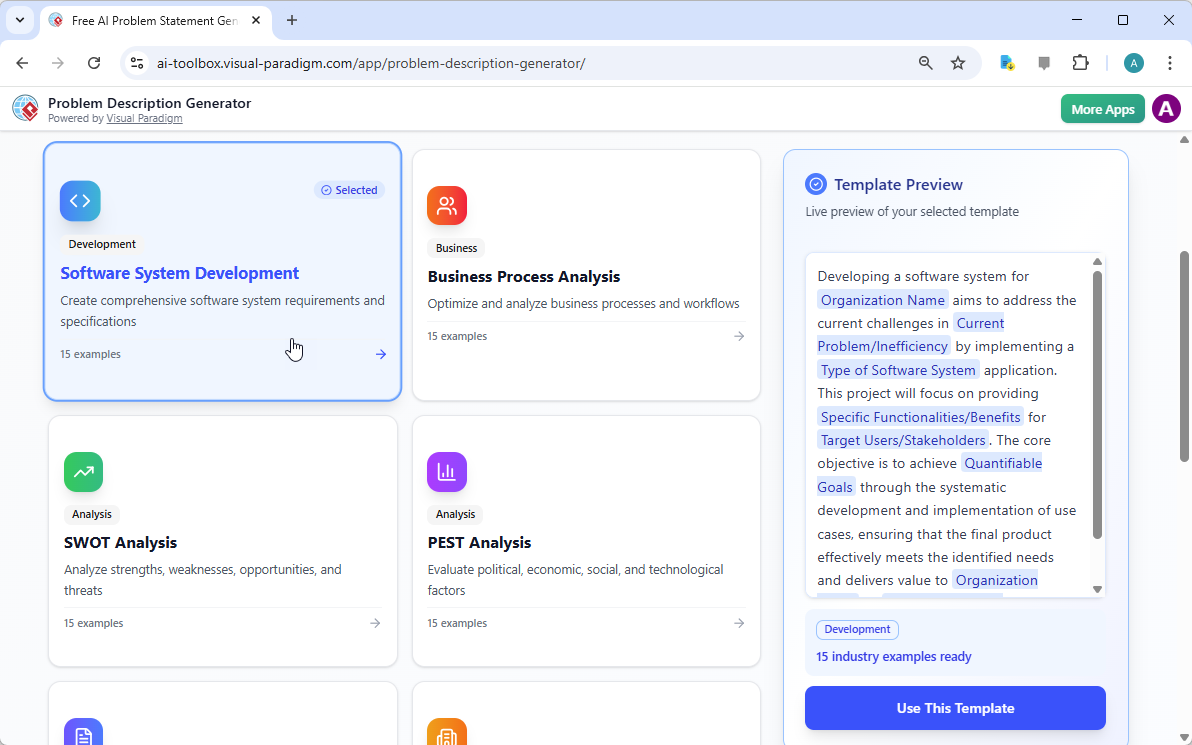
Każdy świetny projekt zaczyna się od solidnej podstawy, a dla sformułowania problemu tą podstawą jest odpowiedni szablon. Pierwszym krokiem w korzystaniu z generatora opisu problemu opartego na AI jest wybór szablonu, który idealnie pasuje do charakteru Twojego projektu. Jak pokazano na

This is a screenshot of Visual Paradigm's AI Powered Problem Description Generator. It shows the first step, which involves c

, interfejs prezentuje czysty i intuicyjny pulpity z różnorodnymi szablonami dla różnych potrzeb biznesowych. Niezależnie od tego, czy rozwiązuje się inicjatywę w zakresie rozwoju oprogramowania, optymalizację procesu biznesowego, czy przeprowadza analizę strategiczną, taką jak analiza SWOT lub PEST, możesz znaleźć odpowiedni szablon. Szablon „Rozwój systemu oprogramowania” na przykład został specjalnie stworzony, aby pomóc Ci stworzyć kompleksowe wymagania i specyfikacje systemu oprogramowania. Wybierając odpowiedni szablon, od razu tworzysz profesjonalną strukturę, która prowadzi Cię do omówienia wszystkich kluczowych aspektów problemu, zapewniając, że żaden istotny szczegół nie zostanie pominięty. Ten krok jest kluczowy, ponieważ ustala ton i strukturę całego opisu problemu, co czyni kolejne kroki znacznie bardziej efektywnymi i skutecznymi.

Krok 2: Wypełnij zmienne – dostosuj swoją narrację

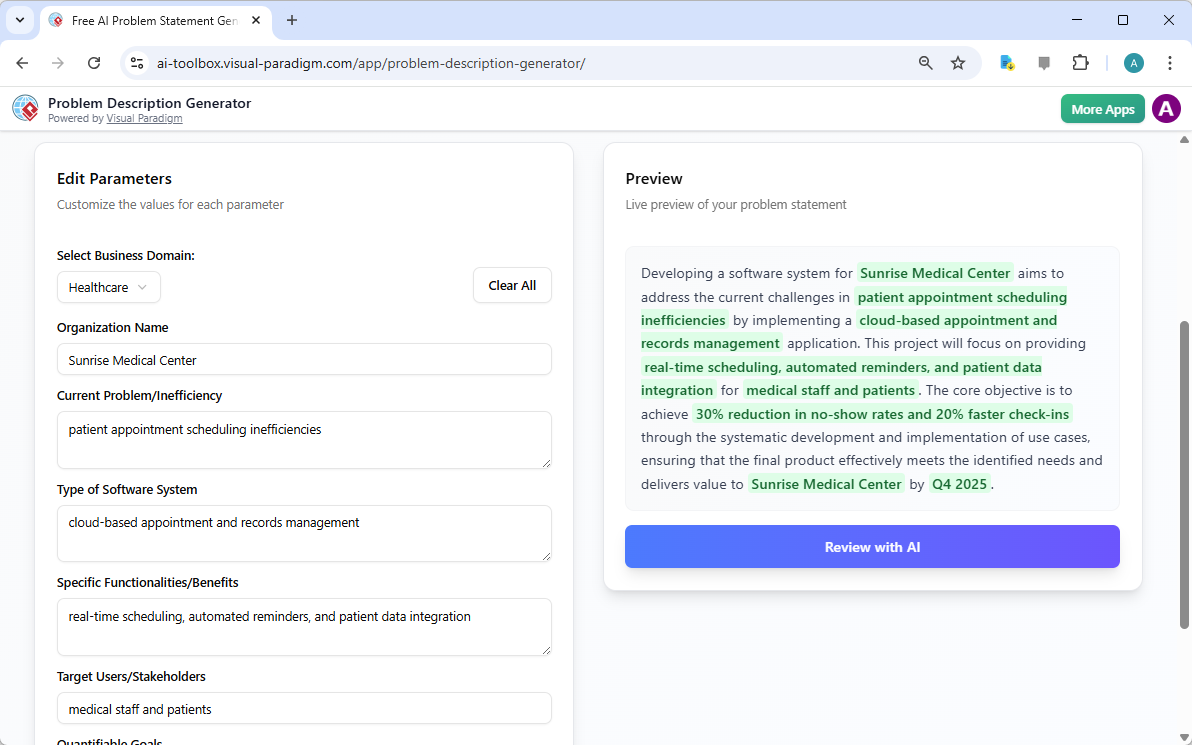
Po wybraniu szablonu magia dzieje się w sekcji „Edytuj parametry”.

This is a screenshot of Visual Paradigm's AI Powered Problem Description Generator. It shows the second step, which involves

jasno ilustruje ten drugi krok. Po lewej stronie widzisz formularz wypełniony konkretnymi polami, takimi jak „Nazwa organizacji”, „Obecny problem/niewydajność” i „Typ systemu oprogramowania”. To właśnie tutaj wstrzykujesz unikalną DNA Twojego projektu. W miarę jak wpisujesz szczegóły, podgląd w czasie rzeczywistym po prawej stronie dynamicznie się aktualizuje, pokazując Ci dokładnie, jak wyglądać będą wypełnione zmienne w końcowym opisie problemu. Ten podgląd w czasie rzeczywistym jest niezwykle potężny. Pozwala Ci zobaczyć narrację, którą tworzą Twoje wpisy, zauważyć niezgrabne sformułowania i natychmiast dokonać poprawek. Zmienne są wyróżnione na zielono, co ułatwia zrozumienie, jakie treści są wstawiane do szablonu. Ten proces nie ogranicza się tylko do wypełniania pustych pól – to tworzenie spójnej historii, która jasno wyjaśnia problem, jego skutki i oczekiwany wynik. Możliwość obserwowania, jak opis się rozwija w czasie rzeczywistym, to przełom dla przejrzystości i pewności siebie.

Krok 3: Przejrzyj z AI – Twój natychmiastowy ekspert redaktorski

Ostatni, a może nawet najpotężniejszy krok, to przegląd z AI. Po wypełnieniu wszystkich zmiennych i zadowoleniu się z podglądu w czasie rzeczywistym możesz kliknąć przycisk „Przejrzyj z AI”.

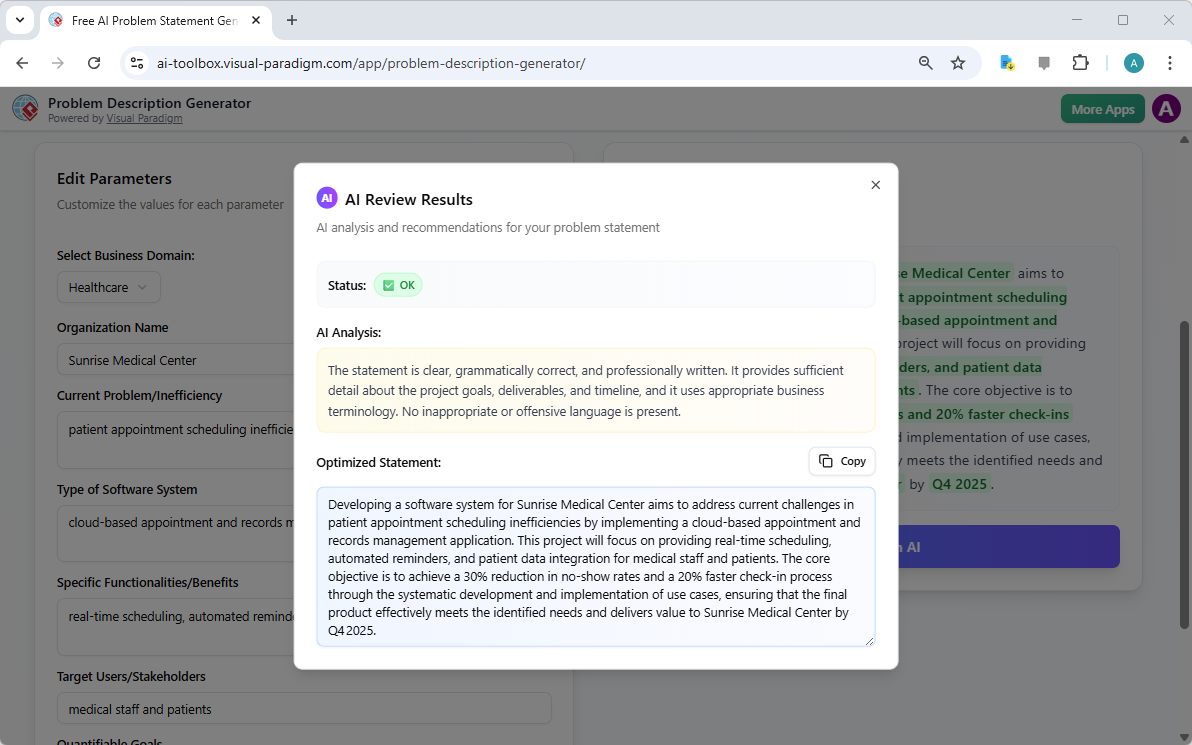
This is a screenshot of Visual Paradigm's AI Powered Problem Description Generator. Once the details are filled in, you can c

doskonale oddaje ten moment. Pojawia się okno modalne, które przedstawia szczegółową analizę Twojego wygenerowanego sformułowania problemu. AI nie tylko sprawdza gramatykę, ale ocenia stwierdzenie pod kątem przejrzystości, kompletności, logicznego przepływu i używania odpowiednich terminów biznesowych. Podaje jasny „Status” (np. „OK”) oraz szczegółową „Analizę AI”, która wyróżnia zalety i sugeruje poprawki. Na przykład AI może potwierdzić, że Twoje stwierdzenie jest jasne i profesjonalnie napisane, albo zaproponować bardziej wpływowe sformułowanie kluczowego celu. Ta natychmiastowa i obiektywna analiza działa jak wirtualny ekspert redaktorski, pomagając Ci dopasować sformułowanie problemu, aby było nie tylko poprawne, ale także bardzo skuteczne w przekazywaniu celu projektu. Ten ostatni krok gwarantuje, że Twoje sformułowanie problemu jest gotowe do udostępnienia stakeholderom, programistom lub klientom z pełnym zaufaniem.

Otwórz potencjał swojego projektu

Sformułowanie problemu to często najtrudniejszy element każdej inicjatywy. Wątpliwe lub słabo sformułowane sformułowanie problemu może prowadzić do marnotrawstwa wysiłku, niezgodnych rozwiązań i na końcu do porażki projektu. Generator opisu problemu od Visual Paradigm rozwiązuje ten podstawowy problem. Łączy siłę strukturalnych szablonów z inteligencją AI, tworząc proces, który jest zarówno efektywny, jak i skuteczny. Korzystając z trzech prostych kroków – wybierz szablon, wypełnij zmienne i przejrzyj z AI – możesz w ciągu kilku minut przekształcić początkową ideę projektu w jasne, przekonujące i profesjonalne sformułowanie problemu. To narzędzie to nie tylko wygoda, ale strategiczna przewaga, która zapewnia, że Twój projekt zaczyna się od właściwego punktu. Przestań zgadywać i zacznij definiować z pewnością siebie.Wypróbuj generator opisu problemu oparty na AI już teraz i poczuj różnicę, którą robi.

Linki powiązane

Od problemu do raportu: Jak AI prowadzi Cię przez podróż przypadku użycia

Discover how AI guides your use case journey from problem to report with Visual Paradigm’s intelligent development assistant.

Wyobraź sobie, że jesteś menedżerem projektu odpowiedzialnym za uruchomienie nowej platformy kursów online. Pierwszym wyzwaniem jest jasne sformułowanie problemu, a następnie jego przekształcenie w funkcjonalny system. Tutaj zaczyna się Asystent do rozwoju opartego na przypadkach użycia, narzędzie zasilane sztuczną inteligencją od Visual Paradigm, wchodzi w grę. Nie tylko pomaga Ci pisać dokumenty, ale prowadzi Cię przez kompletny, strukturalny proces przekształcania niejasnej idei w szczegółowy, wykonalny plan projektu. Proces jest tak intuicyjny, jakbyś miał obok siebie doświadczonego analityka biznesowego i architekta technicznego. Ten szczegółowy przegląd pozwala poznać podstawowe funkcje tego potężnego narzędzia, wykorzystując rzeczywisty przykład platformy kursów online, aby pokazać, jak ułatwia ono cały cykl życia przypadków użycia.

Szybki podsumowanie: Kluczowe wnioski z Asystenta do rozwoju opartego na przypadkach użycia

  • Zacznij od jasnego sformułowania problemu, aby określić podstawowy cel projektu.

  • Wykorzystaj AI do automatycznego generowania listy kandydatów do przypadków użycia i aktorów.

  • Wizualizuj funkcjonalność systemu za pomocą diagramów przypadków użycia i Diagramów czynności.

  • Priorytetyzuj funkcje za pomocą strukturalnej metody MoSCoW, aby skupić się na pracach o wysokim znaczeniu.

  • Generuj szczegółowe opisy przypadków użycia i wykonywalne scenariusze testów Gherkin.

  • Twórz kompleksowe raporty, aby przekazywać zakres i plany projektu.

  • Śledź postępy i utrzymuj jedno jedyne źródło prawdy za pomocą centralnego pulpitu.

Krok 1: Definiowanie problemu za pomocą AI

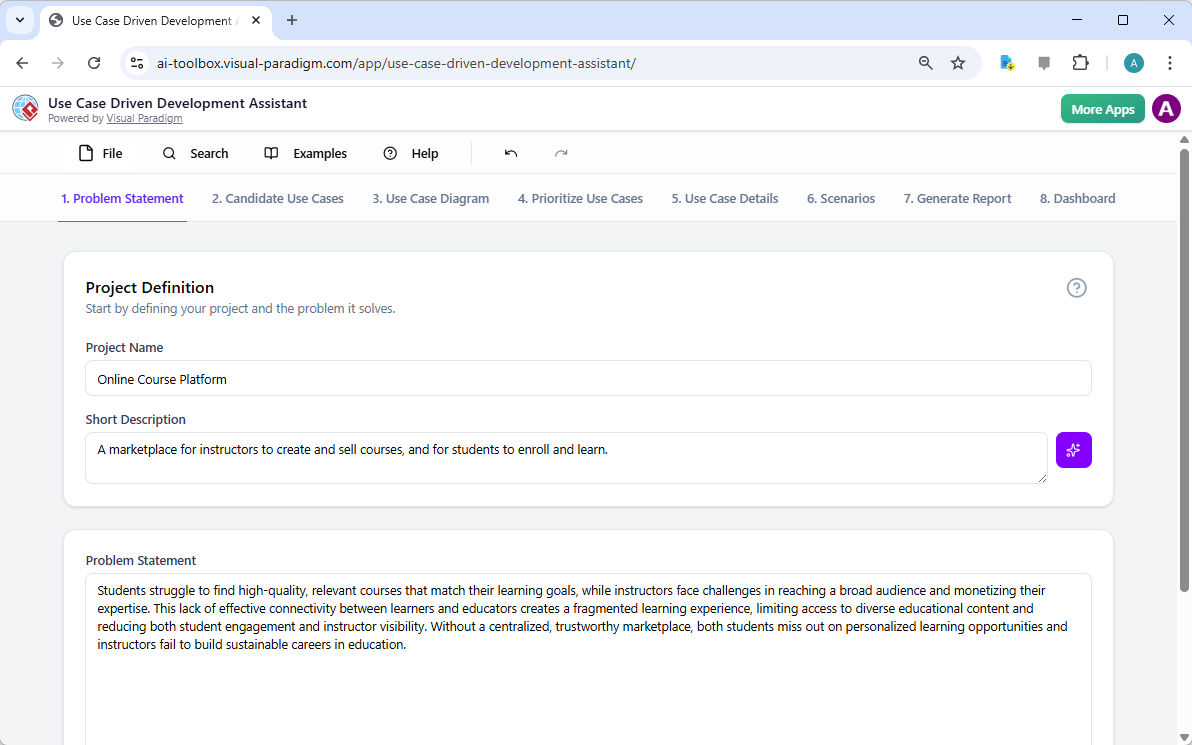
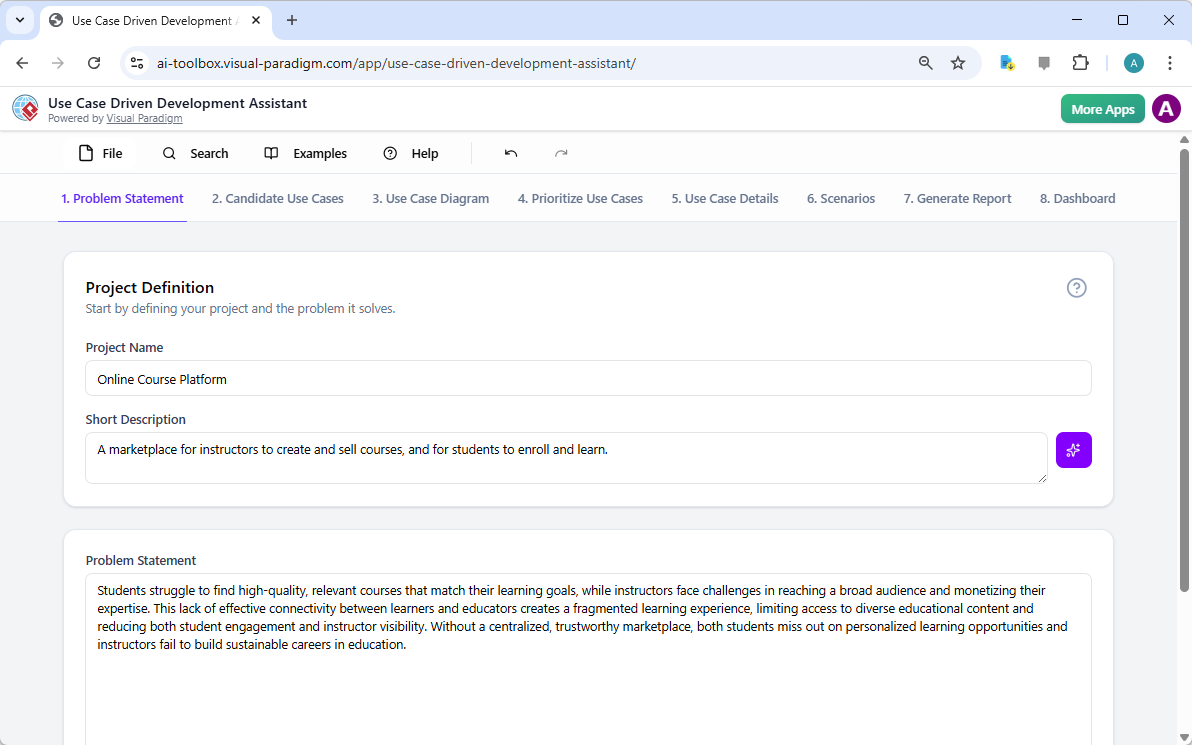
Każdy sukces projektu zaczyna się od jasnego zrozumienia problemu, który ma zostać rozwiązany. Droga z Asystentem do rozwoju opartego na przypadkach użycia zaczyna się na karcie „Sformułowanie problemu”. Tutaj wpisujesz nazwę projektu i krótki opis. Następnie AI wykorzystuje te informacje do wygenerowania kompleksowego sformułowania problemu. Jak widać w Obraz 1, narzędzie wykorzystało nazwę projektu „Platforma kursów online” i krótki opis „Rynek dla instruktorów do tworzenia i sprzedawania kursów, oraz dla uczniów do zapisywania się i uczęszczania” w celu wygenerowania szczegółowej narracji. Ta narracja identyfikuje kluczowe problemy: uczniowie mają trudności z znalezieniem odpowiednich kursów, podczas gdy instruktorzy napotykają trudności z dotarciem do szerokiego odbiorcy i monetizacją swojej wiedzy. To AI-generowane sformułowanie problemu stanowi fundament projektu, zapewniając, że wszyscy członkowie zespołu mają jednolite zrozumienie od samego początku.

This is a screenshot of Visual Paradigm's AI Powered Use Case Driven Development Assistant. we are now in step 1. It shows th

Krok 2: Identyfikacja przypadków użycia z pomocą AI

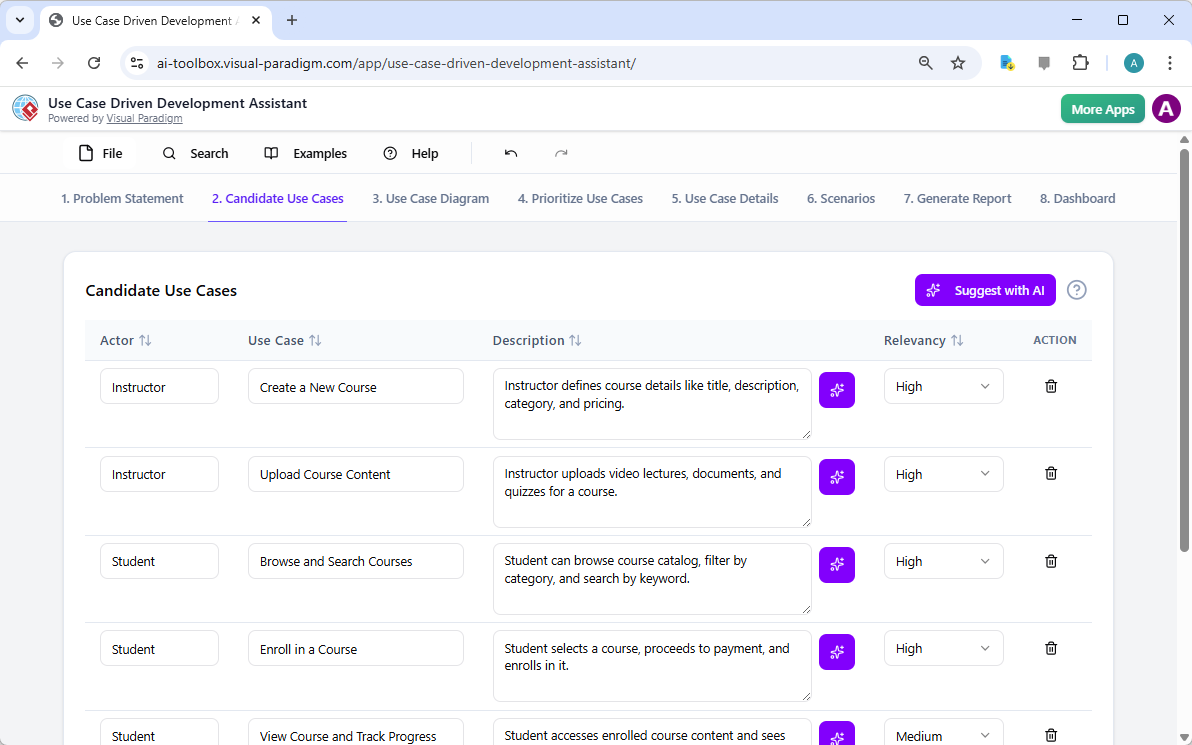
Po zdefiniowaniu problemu kolejnym logicznym krokiem jest identyfikacja kluczowych funkcjonalności, które system musi zapewnić. Karta „Kandydatów do przypadków użycia” asystenta, pokazana w Obraz 2, automatyzuje ten proces. Po analizie sformułowania problemu AI proponuje listę przypadków użycia, każdy powiązany z aktorem (np. Instruktor, Uczeń lub Administrator). Dla naszej platformy kursów online AI proponuje przypadki użycia takie jak „Utwórz nowy kurs”, „Prześlij zawartość kursu”, „Przeglądaj i wyszukuj kursy” oraz „Zapisz się na kurs”. Ta lista stanowi solidny punkt wyjścia, oszczędzając znaczną ilość czasu i wysiłku, które inaczej zużylibyśmy na sesje mózgowego sztormu. Możesz następnie dopasować te propozycje, dodać nowe lub usunąć nieaktualne, aby stworzyć kompletną listę funkcjonalności systemu.

This is a screenshot of Visual Paradigm's AI Powered Use Case Driven Development Assistant. We are now in step 2. It shows a

Krok 3: Wizualizacja systemu za pomocą diagramu przypadków użycia

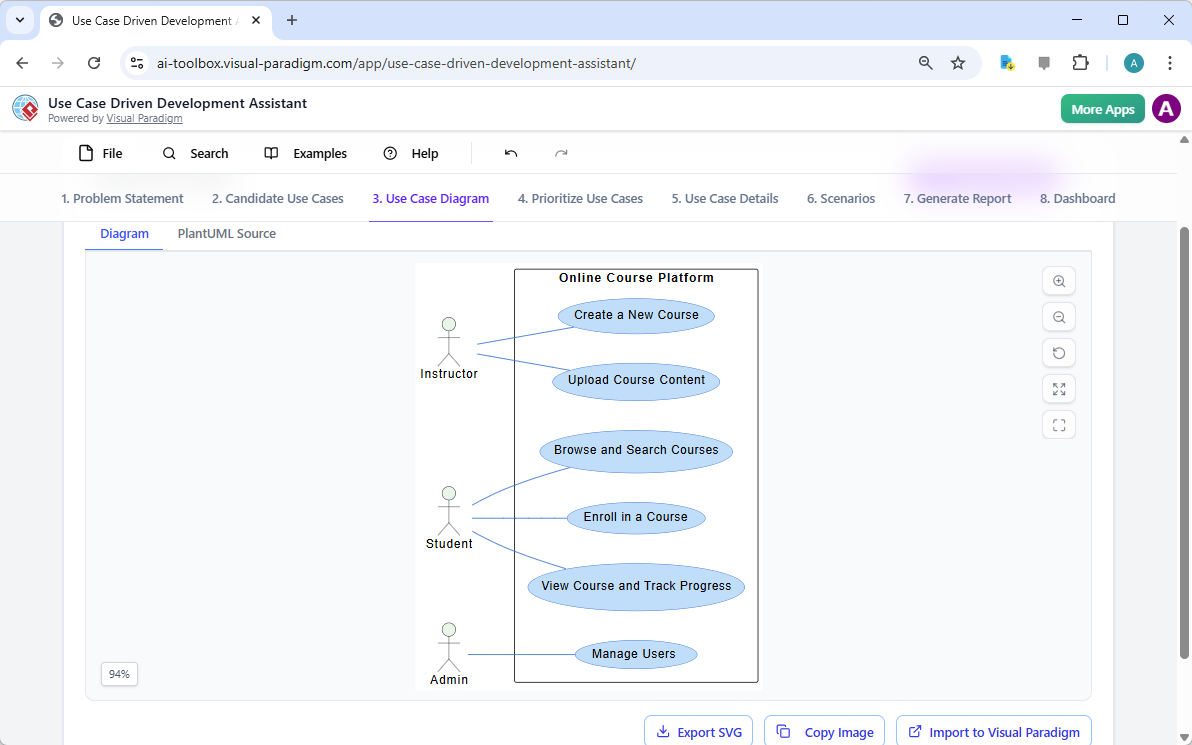
Po zidentyfikowaniu przypadków użycia, kluczowe jest wizualizowanie, jak oddziałują one z aktorami systemu. Karta „Diagram przypadków użycia”, przedstawiona na Obraz 3, pobiera listę przypadków użycia i aktorów i automatycznie generuje jasny, graficzny obraz. Ten diagram pokazuje relacje między aktorami (Instruktor, Uczeń, Administrator) a funkcjami systemu (Utwórz nowy kurs itd.). Generowanie za pomocą AI zapewnia dokładność i profesjonalne formatowanie. Ten element wizualny jest nieoceniony w komunikacji, pozwalając stakeholderom, programistom i projektantom szybko zrozumieć zakres i funkcjonalność systemu, nie wnikając w gęste dokumenty tekstowe.

This is a screenshot of Visual Paradigm's AI Powered Use Case Driven Development Assistant. We are now in step 3. It shows a

Krok 4: Priorytetyzacja funkcji w celu maksymalnego wpływu

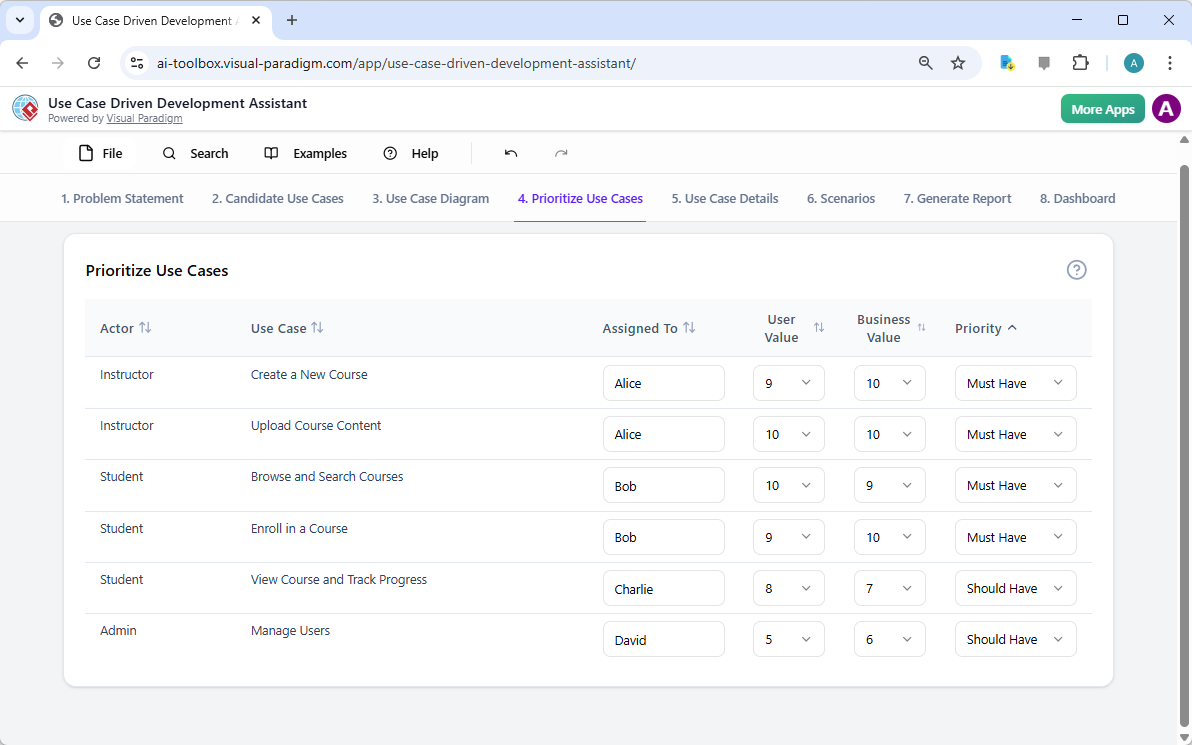
Nie wszystkie przypadki użycia są równe. Sukces projektu często zależy od skupienia się najpierw na najważniejszych funkcjach. Karta „Priorytetyzacja przypadków użycia”, jak pokazano w Obraz 4, zapewnia potężny framework do tego. Pozwala przypisać wartość użytkownika i wartość biznesową (w skali 0–10) do każdego przypadku użycia, a następnie zastosować metodę priorytetyzacji MoSCoW (Muszą mieć, Powinny mieć, Mogą mieć, Nie będą mieć). W naszym przykładzie AI pomógł zidentyfikować, że funkcje „Utwórz nowy kurs” i „Prześlij zawartość kursu” to funkcje „Muszą mieć”, ponieważ są one istotne dla podstawowej funkcjonalności platformy. Ta strukturalna priorytetyzacja zapewnia, że zespół deweloperski skupia się na dostarczaniu najwyższej wartości dla użytkowników i biznesu, unikając marnowania wysiłku na funkcjach o niskim priorytecie.

This is a screenshot of Visual Paradigm's AI Powered Use Case Driven Development Assistant. We are now in step 4. It shows th

Krok 5: Szczegółowe opisywanie przypadków użycia i generowanie diagramów działań

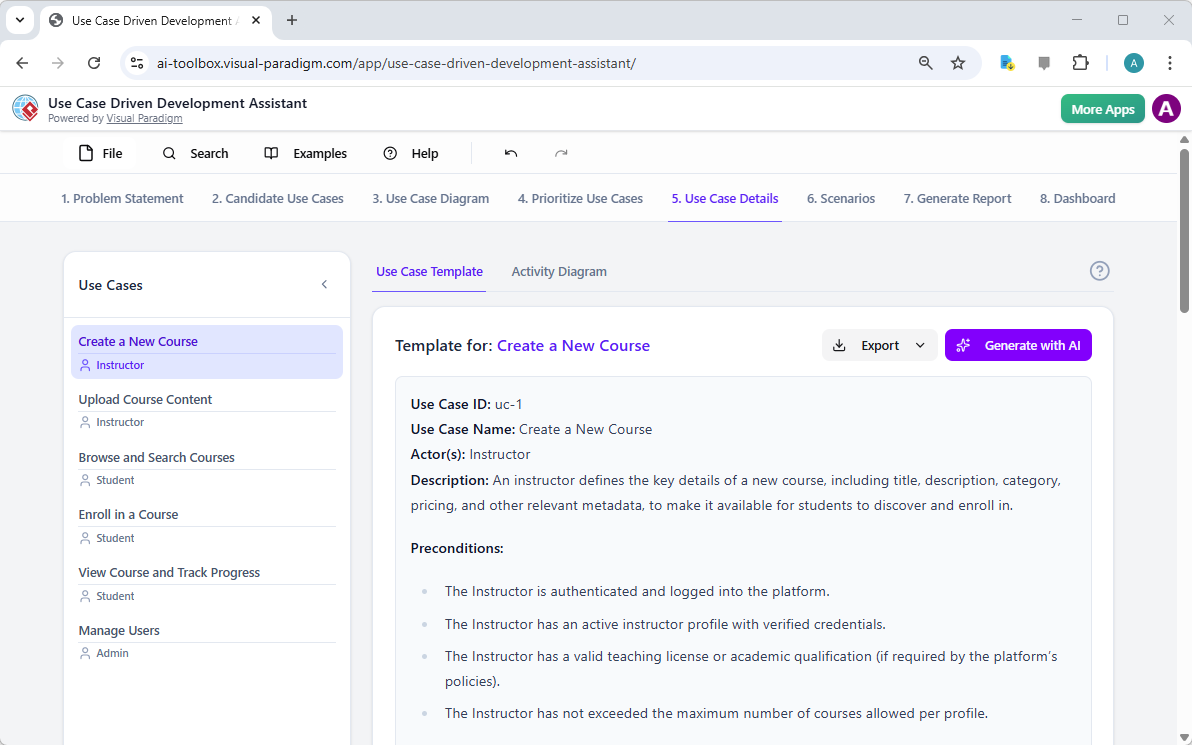
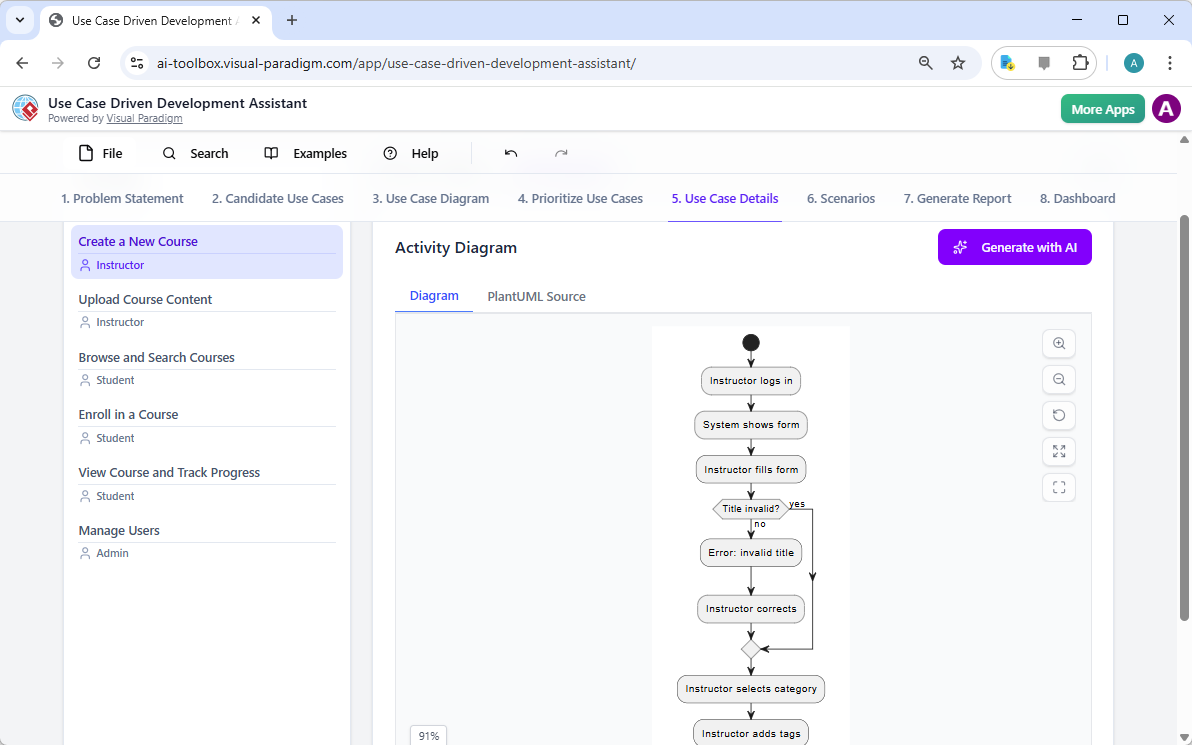
Po ustaleniu ogólnego obrazu kolejnym krokiem jest szczegółowe omówienie każdego przypadku użycia. Kartka „Szczegóły przypadku użycia”, pokazana w Obraz 5, pozwala stworzyć kompletny szablon dla wybranego przypadku użycia. AI może wygenerować szczegółowe opisy, w tym warunki wstępne, główny przebieg i alternatywne przebiegi. Dla przypadku użycia „Utwórz nowy kurs” AI dostarcza strukturalny szablon, który przedstawia konieczne kroki. Aby dalej ułatwić zrozumienie, asystent może wygenerować „Diagram działania” dla tego samego przypadku użycia, jak pokazano w Obraz 6. Ten diagram wizualnie przedstawia krok po kroku przebieg działania, pokazując sekwencję czynności od zalogowania się nauczyciela po zapisanie kursu. Taki poziom szczegółowości jest kluczowy zarówno dla programistów, jak i zespołów testowych.

This is a screenshot of Visual Paradigm's AI Powered Use Case Driven Development Assistant. We are now in step 5. It shows thThis is a screenshot of Visual Paradigm's AI Powered Use Case Driven Development Assistant. We are still in step 5. It shows

Krok 6: Generowanie scenariuszy testowych i diagramów sekwencji

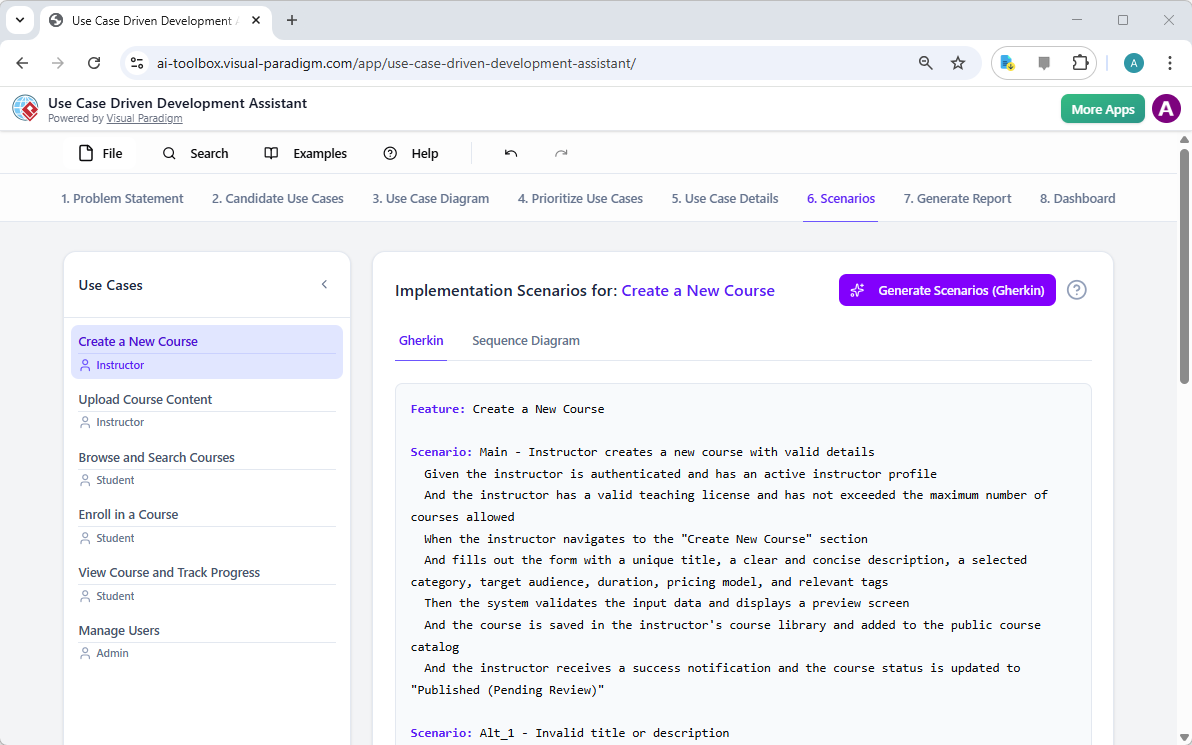
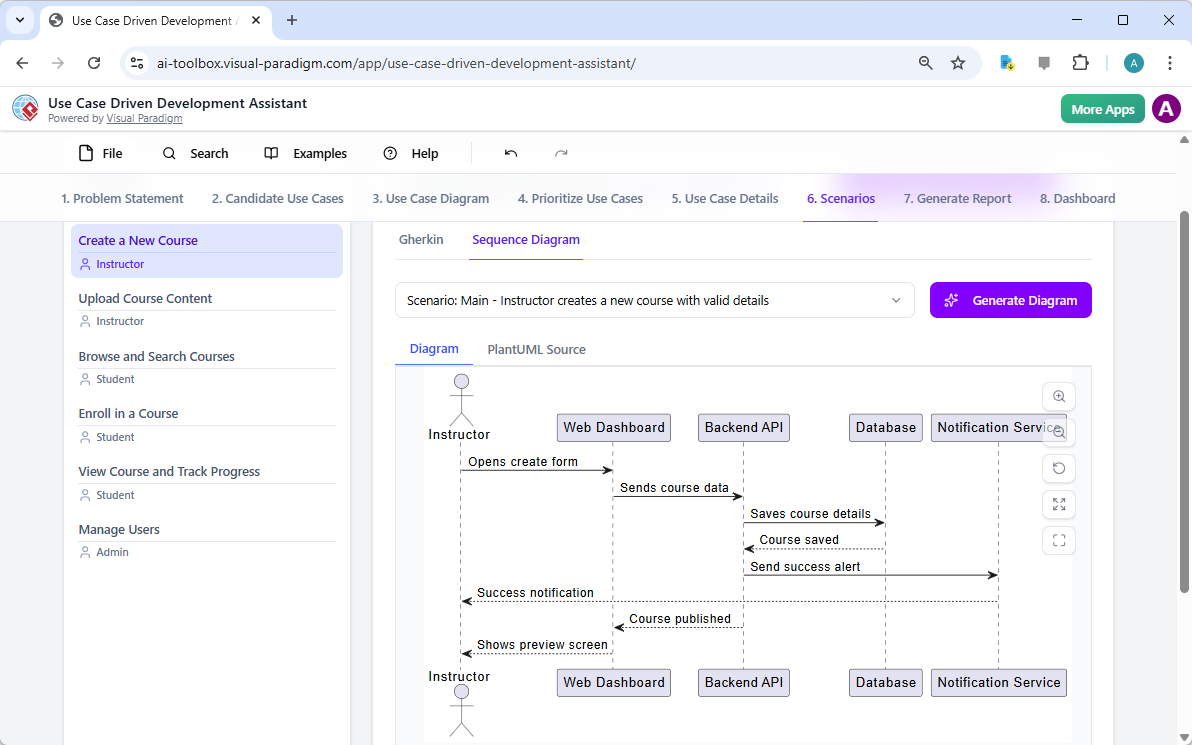
Dla zespołu deweloperskiego kolejnym krytycznym krokiem jest stworzenie testowalnych scenariuszy. Karta „Scenariusze”, pokazana w Obraz 7, pozwala generować wykonywalne scenariusze Gherkin bezpośrednio z opisów przypadków użycia. Te scenariusze, napisane w języku potocznym (Dane-When-Then), są idealne do testów automatycznych. AI może wygenerować główny scenariusz oraz scenariusze alternatywne, np. dla niepoprawnego tytułu. Aby dalej wyjaśnić wewnętrzną pracę systemu, asystent może wygenerować „Diagram sekwencji”, jak pokazano w Obraz 8. Ten diagram pokazuje interakcję między nauczycielem, panelem internetowym, interfejsem API serwera backend, bazą danych i usługą powiadomień, dając jasny obraz architektury systemu i przepływu danych.

This is a screenshot of Visual Paradigm's AI Powered Use Case Driven Development Assistant. We are in step 6. It shows the AIThis is a screenshot of Visual Paradigm's AI Powered Use Case Driven Development Assistant. We are still in step 6. It shows

Krok 7: Tworzenie kompleksowych raportów projektowych

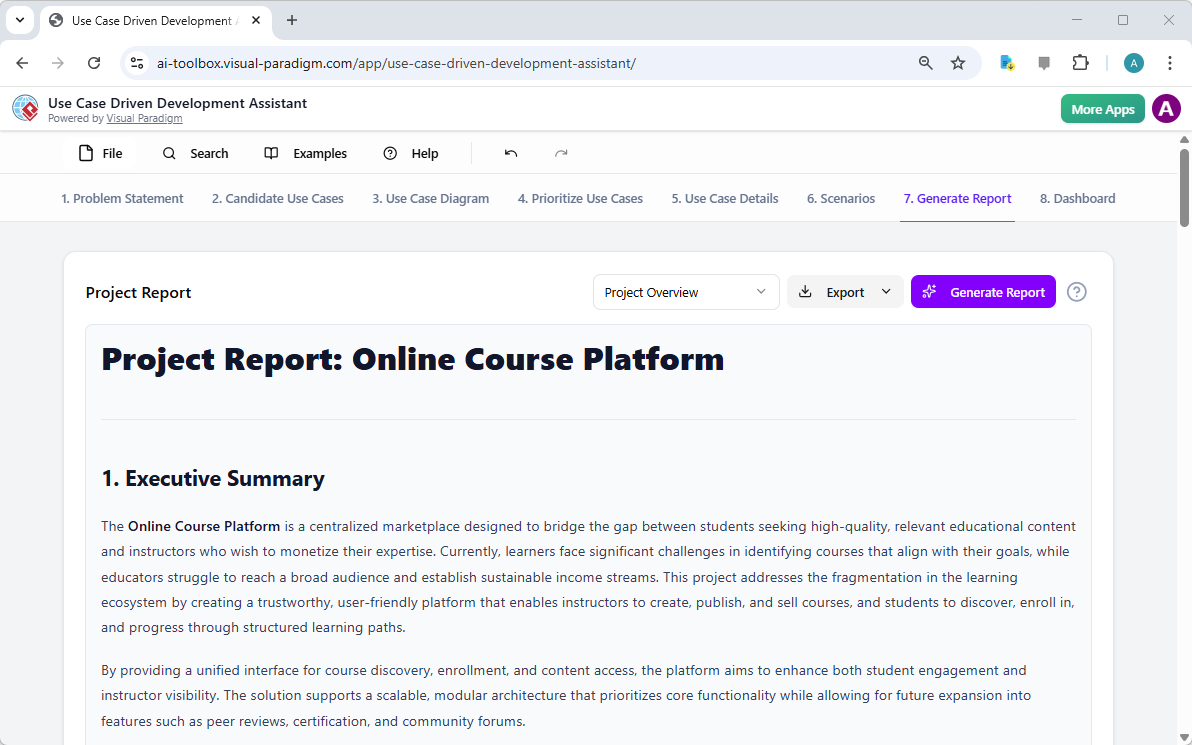
W trakcie całego procesu rozwoju jest kluczowe komunikowanie postępu projektu i jego planów dla różnych stakeholderów. Karta „Generuj raport”, jak pokazano w Obraz 9, ułatwia to. Możesz generować różne raporty, takie jak „Przegląd projektu”, „Plan wdrożenia”, „Plan testów QA” lub „Lista zadań dla programistów”. Te raporty są generowane z pomocą AI, zapewniając ich spójność i kompleksowość. Na przykład raport „Przegląd projektu” podsumowuje cały projekt, w tym podsumowanie dla kierownictwa, kluczowe funkcje oraz uzasadnienie priorytetyzacji. Jeden, jedyny źródło informacji zapewnia, że wszyscy są zgodni i poinformowani.

This is a screenshot of Visual Paradigm's AI Powered Use Case Driven Development Assistant. We are in step 7. It shows a repo

Krok 8: Śledzenie postępu za pomocą pulpitu

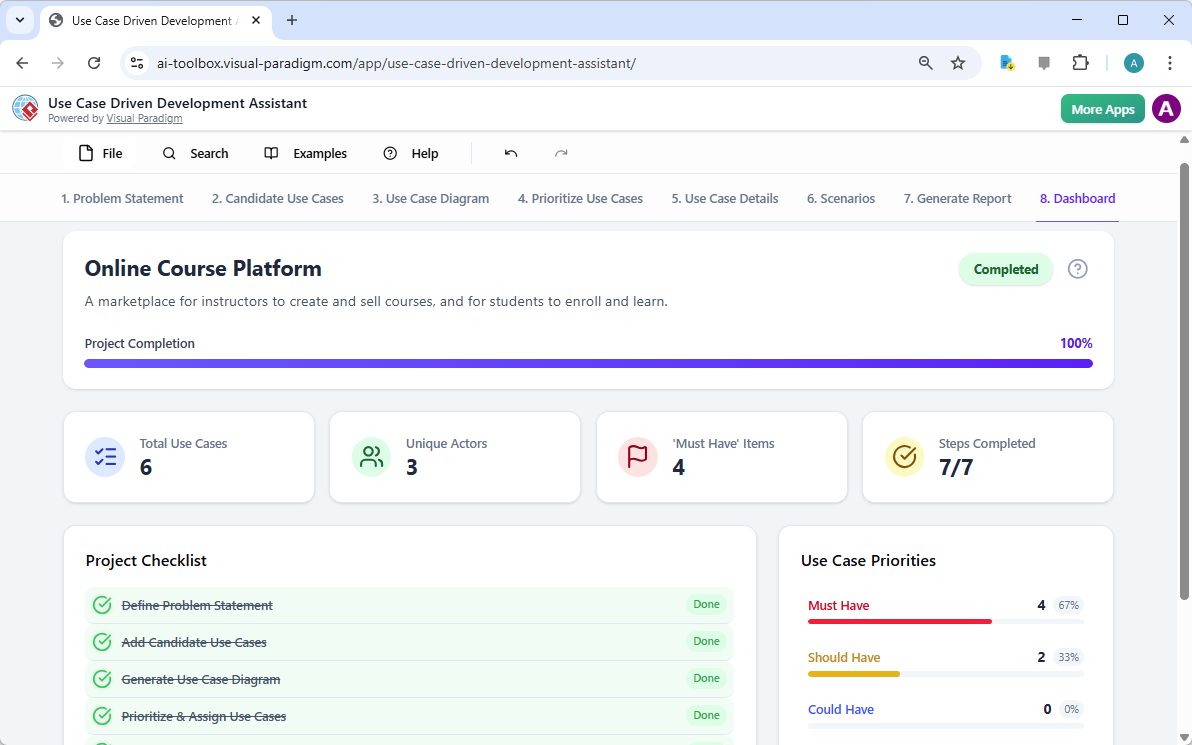
Na końcu podróż kończy się na „Pulpicie”, jak pokazano w Obraz 10. Ten centralny punkt zapewnia ogólny przegląd stanu projektu. Pokazuje procent ukończenia projektu, całkowitą liczbę przypadków użycia oraz liczbę elementów „Muszą mieć”. Lista kontrolna projektu pozwala śledzić postęp, przy czym każdy ukończony krok oznaczony jest jako „Zrobione”. Ta rzeczywista wizualizacja stanu projektu jest nieoceniona dla menedżerów projektów i liderów zespołów, umożliwiając identyfikację węzłów zatorów i zapewnienie, że projekt pozostaje na właściwym torze.

This is a screenshot of Visual Paradigm's AI Powered Use Case Driven Development Assistant. We are in step 8. It shows the da

Asystent do rozwoju opartego na przypadkach użycia to więcej niż tylko narzędzie; to kompleksowy przepływ pracy, który wprowadza przejrzystość i efektywność w procesie tworzenia oprogramowania. Wykorzystując AI na każdym etapie – od definiowania problemu po generowanie raportów – pomaga zespołom szybciej i dokładniej przechodzić od wymagań do wdrożenia. Wynikiem jest dobrze zorganizowany, dobrze dokumentowany projekt zgodny z celami biznesowymi i potrzebami użytkowników. Jeśli szukasz sposobu na zoptymalizowanie procesu tworzenia przypadków użycia, to narzędzie wspomagane przez AI to potężne rozwiązanie.

Gotowy zobaczyć, jak Asystent do rozwoju opartego na przypadkach użycia może przekształcić Twój następny projekt? Wypróbuj teraz.

Linki powiązane

Modelowanie przypadków użycia to podstawowa technika inżynierii oprogramowania używana do zapisywania wymagań funkcjonalnych poprzez wizualizację interakcji między zewnętrznymi aktorami a wewnętrznymi funkcjami systemu. Nowoczesne platformy teraz wykorzystują automatyzację opartą na technologii AI w celu dopracowania diagramów, generowania kompleksowych opisów przypadków użycia, a konwersji modeli na przypadki testowe lub diagramy aktywności w celu utrzymania spójności projektu i śledzenia. Zaawansowane narzędzia takie jak edytor przebiegu zdarzeń i analizator scenariuszy pozwalają zespołom programistycznym na weryfikację i dokumentowanie uporządkowanych sekwencji zdarzeń w celu poprawy ogólnej przejrzystości systemu.

  1. Co to jest diagram przypadków użycia? – Kompletny przewodnik po modelowaniu UML: szczegółowy przegląd obejmujący kluczowe elementy, cele i najlepsze praktyki do modelowania wymagań.

  2. Poradnik krok po kroku – Diagramy przypadków użycia – od początkującego do eksperta: praktyczny zasób, który prowadzi użytkowników przez podstawowe do zaawansowanych technik tworzenia skutecznych diagramów przypadków użycia.

  3. Wszystko, co musisz wiedzieć o modelowaniu przypadków użycia: kompleksowe omówienie zasad i zastosowańmodelowania przypadków użycia w projektowaniu systemów.

  4. Visual Paradigm – Funkcje opisu przypadków użycia: Szczegóły specjalistycznych narzędzi używanych do precyzyjnego dokumentowania interakcji użytkownikai zorganizowanego zachowania systemu.

  5. Opanowanie diagramów przypadków użycia sterowanych AI za pomocą Visual Paradigm: Poradnik dotyczący wykorzystania AI do tworzenia inteligentnych, dynamicznych diagramówdla nowoczesnych systemów oprogramowania.

  6. Przewodnik po używaniu edytora przebiegu zdarzeń w Visual Paradigm: Krok po kroku instrukcje dokumentowania zorganizowanych sekwencji zdarzeńw ramach scenariusza przypadku użycia.

  7. Rozwijanie scenariuszy za pomocą analizatora scenariuszy przypadków użycia: Przewodnik dotyczący używania analizatorów do badania i doskonalenia przepływów interakcjiw celu zwiększenia przejrzystości systemu.

  8. Konwersja przypadku użycia na diagram działania – przekształcenie wspomagane AI: Zasób wyjaśniający automatyczną konwersjęprzypadków użycia na szczegółowe przepływy systemowe.

  9. Generowanie scenariuszy i przypadków testowych z diagramów przypadków użycia za pomocą AI: Przegląd, jak narzędzia AI automatyzują tworzenie procedur testowych opartych na wymaganiach.

  10. Galeria diagramów przypadków użycia – szablony i przykłady: Wybór przykładów z rzeczywistego światado inspirowania, nauki i szybkiego prototypowania.

From Problem to Report: How AI Guides Your Use Case Journey

Discover how AI guides your use case journey from problem to report with Visual Paradigm’s intelligent development assistant.

Imagine you’re a project manager tasked with launching a new online course platform. The first challenge is to articulate the problem clearly and then translate it into a functional system. This is where the Use Case Driven Development Assistant, an AI-powered tool from Visual Paradigm, steps in. It doesn’t just help you write documents; it guides you through a complete, structured workflow to transform a vague idea into a detailed, actionable project plan. The process is so intuitive, it feels like having a seasoned business analyst and a technical architect working side-by-side with you. This deep dive explores the core features of this powerful tool, using a real-world example of an online course platform to show how it streamlines the entire use case lifecycle.

Quick Summary: Key Takeaways from the Use Case Driven Development Assistant

  • Start with a clear problem statement to define the project’s core objective.

  • Use AI to automatically generate a list of candidate use cases and actors.

  • Visualize system functionality with AI-generated Use Case and Activity Diagrams.

  • Prioritize features using a structured MoSCoW method to focus on high-value work.

  • Generate detailed use case descriptions and executable Gherkin test scenarios.

  • Create comprehensive reports to communicate project scope and plans.

  • Track progress and maintain a single source of truth with a central dashboard.

Step 1: Defining the Problem with AI

Every successful project begins with a clear understanding of the problem it aims to solve. The journey with the Use Case Driven Development Assistant starts in the “Problem Statement” tab. Here, you input a project name and a short description. The AI then leverages this information to generate a comprehensive problem statement. As seen in Image 1, the tool has taken the project name “Online Course Platform” and the short description “A marketplace for instructors to create and sell courses, and for students to enroll and learn” to produce a detailed narrative. This narrative identifies the core pain points: students struggle to find relevant courses, while instructors face challenges in reaching a broad audience and monetizing their expertise. This AI-generated problem statement serves as the project’s foundation, ensuring everyone on the team shares a unified understanding from the very beginning.

This is a screenshot of Visual Paradigm's AI Powered Use Case Driven Development Assistant. we are now in step 1. It shows th

Step 2: Identifying Use Cases with AI Assistance

Once the problem is defined, the next logical step is to identify the key functionalities the system must provide. The assistant’s “Candidate Use Cases” tab, shown in Image 2, automates this process. After analyzing the problem statement, the AI suggests a list of use cases, each associated with an actor (like Instructor, Student, or Admin). For our online course platform, the AI proposes use cases such as “Create a New Course,” “Upload Course Content,” “Browse and Search Courses,” and “Enroll in a Course.” This list provides a solid starting point, saving significant time and effort that would otherwise be spent on brainstorming sessions. You can then refine these suggestions, add new ones, or delete irrelevant ones to create a comprehensive list of system functionalities.

This is a screenshot of Visual Paradigm's AI Powered Use Case Driven Development Assistant. We are now in step 2. It shows a

Step 3: Visualizing the System with a Use Case Diagram

After identifying the use cases, it’s crucial to visualize how they interact with the system’s actors. The “Use Case Diagram” tab, illustrated in Image 3, takes the list of use cases and actors and automatically generates a clear, graphical representation. This diagram shows the relationships between the actors (Instructor, Student, Admin) and the system’s functions (Create a New Course, etc.). The AI-powered generation ensures that the diagram is accurate and professionally formatted. This visual aid is invaluable for communication, allowing stakeholders, developers, and designers to quickly grasp the system’s scope and functionality without wading through text-heavy documents.

This is a screenshot of Visual Paradigm's AI Powered Use Case Driven Development Assistant. We are now in step 3. It shows a

Step 4: Prioritizing Features for Maximum Impact

Not all use cases are created equal. A project’s success often hinges on focusing on the most critical features first. The “Prioritize Use Cases” tab, as shown in Image 4, provides a powerful framework for this. It allows you to assign a user value and business value (on a scale of 0-10) to each use case and then apply the MoSCoW prioritization method (Must Have, Should Have, Could Have, Won’t Have). In our example, the AI has helped identify that “Create a New Course” and “Upload Course Content” are “Must Have” features, as they are essential for the platform’s core function. This structured prioritization ensures that the development team focuses on delivering the highest value to users and the business, avoiding wasted effort on low-priority features.

This is a screenshot of Visual Paradigm's AI Powered Use Case Driven Development Assistant. We are now in step 4. It shows th

Step 5: Detailing Use Cases and Generating Activity Diagrams

With the high-level view established, the next step is to dive into the details of each use case. The “Use Case Details” tab, shown in Image 5, allows you to create a comprehensive template for a selected use case. The AI can generate a detailed description, including pre-conditions, main flow, and alternative flows. For the “Create a New Course” use case, the AI provides a structured template that outlines the necessary steps. To further enhance understanding, the assistant can generate an “Activity Diagram” for the same use case, as seen in Image 6. This diagram visually maps out the step-by-step workflow, showing the sequence of actions from the instructor logging in to the course being saved. This level of detail is essential for both developers and QA teams.

This is a screenshot of Visual Paradigm's AI Powered Use Case Driven Development Assistant. We are now in step 5. It shows thThis is a screenshot of Visual Paradigm's AI Powered Use Case Driven Development Assistant. We are still in step 5. It shows

Step 6: Generating Test Scenarios and Sequence Diagrams

For a development team, the next critical step is to create testable scenarios. The “Scenarios” tab, shown in Image 7, allows you to generate executable Gherkin scenarios directly from your use case descriptions. These scenarios, written in a plain-language format (Given-When-Then), are perfect for automated testing. The AI can generate a main scenario and alternative scenarios, such as one for an invalid title. To further clarify the system’s internal workings, the assistant can generate a “Sequence Diagram,” as seen in Image 8. This diagram shows the interaction between the instructor, the web dashboard, the backend API, the database, and the notification service, providing a clear picture of the system’s architecture and data flow.

This is a screenshot of Visual Paradigm's AI Powered Use Case Driven Development Assistant. We are in step 6. It shows the AIThis is a screenshot of Visual Paradigm's AI Powered Use Case Driven Development Assistant. We are still in step 6. It shows

Step 7: Creating Comprehensive Project Reports

Throughout the development process, it’s essential to communicate the project’s status and plans to various stakeholders. The “Generate Report” tab, as shown in Image 9, makes this easy. You can generate a variety of reports, such as a “Project Overview,” “Implementation Plan,” “QA Test Plan,” or a “Developer Task List.” These reports are generated with AI assistance, ensuring they are consistent and comprehensive. For example, the “Project Overview” report summarizes the entire project, including the executive summary, key features, and the rationale behind the prioritization. This single source of truth ensures everyone is aligned and informed.

This is a screenshot of Visual Paradigm's AI Powered Use Case Driven Development Assistant. We are in step 7. It shows a repo

Step 8: Tracking Progress with the Dashboard

Finally, the journey culminates in the “Dashboard,” as seen in Image 10. This central hub provides a high-level overview of the project’s status. It shows the project completion percentage, the total number of use cases, and the number of “Must Have” items. The project checklist allows you to track your progress, with each completed step marked as “Done.” This real-time visibility into the project’s health is invaluable for project managers and team leads, enabling them to identify bottlenecks and ensure the project stays on track.

This is a screenshot of Visual Paradigm's AI Powered Use Case Driven Development Assistant. We are in step 8. It shows the da

The Use Case Driven Development Assistant is more than just a tool; it’s a comprehensive workflow that brings clarity and efficiency to the software development process. By leveraging AI at every stage—from defining the problem to generating reports—it helps teams move from requirements to implementation faster and with greater accuracy. The result is a well-structured, well-documented project that is aligned with business goals and user needs. If you’re looking to streamline your use case development process, this AI-powered tool is a powerful solution.

Ready to see how the Use Case Driven Development Assistant can transform your next project? Try it now.

Related Links

Use case modeling is a fundamental software engineering technique used to capture functional requirements by visualizing the interactions between external actors and a system’s internal functions. Modern platforms now incorporate AI-powered automation to refine diagrams, generate comprehensive use case descriptions, and convert models into test cases or activity diagrams to maintain design consistency and traceability. Advanced tools like the Flow of Events editor and Scenario Analyzer allow development teams to validate and document structured event sequences to improve overall system clarity.

  1. What Is a Use Case Diagram? – A Complete Guide to UML Modeling: An in-depth overview covering essential components, purposes, and best practices for requirements modeling.

  2. Step-by-Step Use Case Diagram Tutorial – From Beginner to Pro: A practical resource that guides users through foundational to advanced techniques for creating effective use case diagrams.

  3. All You Need to Know About Use Case Modeling: A comprehensive exploration of the principles and applications of use case modeling in system design.

  4. Visual Paradigm – Use Case Description Features: Details specialized tools used to precisely document user interactions and structured system behavior.

  5. Mastering AI-Driven Use Case Diagrams with Visual Paradigm: A tutorial on leveraging AI to create intelligent, dynamic diagrams for modern software systems.

  6. Guide to Using the Flow of Events Editor in Visual Paradigm: Step-by-step instructions for documenting structured event sequences within a use case scenario.

  7. Unraveling Scenarios with the Use Case Scenario Analyzer: A guide on using analyzers to examine and refine interaction flows for increased system clarity.

  8. Convert Use Case to Activity Diagram – AI-Powered Transformation: A resource explaining the automated conversion of use cases into detailed system workflows.

  9. Generating Scenarios and Test Cases from Use Case Diagrams Using AI: An exploration of how AI tools automate the creation of requirement-driven test procedures.

  10. Use Case Diagram Gallery – Templates & Examples: A curated collection of real-world examples for inspiration, learning, and rapid prototyping.

Crafting a Crystal-Clear Problem Statement for Software Development

Use Visual Paradigm’s AI-powered tool to craft clear, structured problem statements for software projects with templates and real-time feedback.

Struggling to articulate the core challenge your software project aims to solve? The Problem Description Generator from Visual Paradigm is the ultimate AI-powered tool to transform your project’s initial chaos into a clear, focused, and compelling narrative. This innovative solution empowers project managers, business analysts, and product owners to define the “why” behind their work with unprecedented speed and precision. By leveraging a library of structured templates and real-time AI feedback, this tool ensures your problem statement is not just written, but optimized for maximum impact from day one. It’s the secret weapon for launching projects with laser focus and setting the stage for success.

Key Takeaways:

  • Use a template-driven approach to ensure your problem statement is comprehensive and structured.

  • Fill in specific variables to customize the description for your unique project.

  • Get instant AI feedback to refine your problem statement for clarity and effectiveness.

  • Start any project with a solid, well-articulated understanding of the core issue.

Step 1: Choose Your Template – The Foundation of a Strong Problem Statement

Every great project begins with a solid foundation, and for a problem statement, that foundation is the right template. The first step in using the AI-Powered Problem Description Generator is to select a template that perfectly aligns with your project’s nature. As shown in

This is a screenshot of Visual Paradigm's AI Powered Problem Description Generator. It shows the first step, which involves c

, the interface presents a clean, intuitive dashboard with a variety of templates for different business needs. Whether you’re tackling a software development initiative, optimizing a business process, or conducting a strategic analysis like a SWOT or PEST analysis, you can find a dedicated template. The “Software System Development” template, for instance, is specifically designed to help you create comprehensive software system requirements and specifications. By selecting the correct template, you immediately establish a professional structure that guides you to cover all critical aspects of the problem, ensuring no vital detail is overlooked. This step is crucial because it sets the tone and framework for the entire problem description, making the subsequent steps much more efficient and effective.

Step 2: Fill in the Variables – Customize Your Narrative

Once you’ve chosen your template, the magic happens in the “Edit Parameters” section.

This is a screenshot of Visual Paradigm's AI Powered Problem Description Generator. It shows the second step, which involves

vividly illustrates this second step. On the left, you’re presented with a form filled with specific fields, such as “Organization Name,” “Current Problem/Inefficiency,” and “Type of Software System.” This is where you inject your project’s unique DNA. As you type in the details, the tool’s real-time preview on the right side dynamically updates, showing you exactly how your filled-in variables will look in the final problem description. This live preview is incredibly powerful. It allows you to see the narrative form your inputs are creating, spot any awkward phrasing, and make adjustments on the fly. The variables are highlighted in green, making it easy to see exactly what content is being inserted into the template. This process is not just about filling blanks; it’s about shaping a coherent story that clearly explains the problem, its impact, and the desired outcome. The ability to see your description evolve in real-time is a game-changer for clarity and confidence.

Step 3: Review with AI – Your Instant Expert Editor

The final, and arguably most powerful, step is the AI review. After you’ve filled in all the variables and are satisfied with the live preview, you can click the “Review with AI” button.

This is a screenshot of Visual Paradigm's AI Powered Problem Description Generator. Once the details are filled in, you can c

captures this moment perfectly. A modal window appears, presenting a detailed analysis of your generated problem statement. The AI doesn’t just check for grammar; it evaluates the statement for clarity, completeness, logical flow, and the use of appropriate business terminology. It provides a clear “Status” (like “OK”) and a detailed “AI Analysis” that highlights strengths and suggests improvements. For example, the AI might confirm that your statement is clear and professionally written, or it might suggest a more impactful way to phrase a key objective. This instant, objective feedback acts as a virtual expert editor, helping you refine your problem statement to ensure it is not only correct but also highly effective in communicating the project’s purpose. This final step ensures that your problem statement is ready to be shared with stakeholders, developers, or clients with confidence.

Unlock Your Project’s Potential

Defining a problem is often the hardest part of any initiative. A vague or poorly articulated problem statement can lead to wasted effort, misaligned solutions, and ultimately, project failure. The Problem Description Generator from Visual Paradigm solves this fundamental challenge. It combines the power of structured templates with the intelligence of AI to create a workflow that is both efficient and effective. By following the three simple steps—choose a template, fill in the variables, and review with AI—you can transform your initial project idea into a clear, compelling, and professional problem statement in minutes. This tool is not just a convenience; it’s a strategic advantage that ensures your project starts on the right foot. Stop guessing and start defining with confidence. Try the AI-Powered Problem Description Generator now and experience the difference it makes.

Related Links