Creating a Mindful Animated Story with AniFuzion

Discover how AniFuzion lets you create calming, professional animations for mindfulness without design skills or expensive software.

Imagine crafting a calming, engaging animated story that guides viewers through a journey of mindfulness—without needing design skills or expensive software. That’s exactly what Visual Paradigm‘s Animation Maker, also known as AniFuzion, enables. This online tool lets you create professional-quality 2D and 3D animations, animated flipbooks, and text effects effortlessly. With its intuitive drag-and-drop interface and AI-powered features, AniFuzion makes animation accessible to everyone, from educators to marketers. The image shows a sample animation from the tool: a 3D character in a soft, pastel environment with the text “Meet Mindful Moments,” illustrating how easily you can bring soothing, visual narratives to life. Whether you’re making a wellness video or a calming presentation, AniFuzion delivers stunning results in minutes.

Why AniFuzion is Your Go-To Animation Tool

Animation Maker (AniFuzion) is designed to simplify the creative process. It removes the complexity of traditional animation software, allowing you to focus on storytelling. The tool integrates seamlessly into your workflow, requiring no installations or downloads—just a browser and an internet connection. This makes it ideal for users who want to create content quickly and efficiently. The image demonstrates a clean, visually appealing animation, showing how AniFuzion helps you achieve professional results with minimal effort. You don’t need to be a designer or animator to produce content that captivates audiences.

  1. Easy to Use: The drag-and-drop interface lets you arrange characters, props, and effects like pieces in a puzzle.

  2. AI-Powered Features: Generate voiceovers with AI text-to-speech and automatic lip-sync to make characters speak naturally.

  3. Ready-Made Assets: Access thousands of 3D characters, actions, and scenes to jumpstart your project.

  4. Multiple Output Options: Export as MP4 videos or share interactive flipbooks via links and embeds.

These features make AniFuzion a powerful, all-in-one solution for creating animated content. Whether you’re teaching mindfulness techniques or promoting a wellness product, the tool provides everything you need to bring your ideas to life.

This is a screenshot of Visual Paradigm's Animation Maker - Professional online diagram maker tool

How to Create Your First Mindful Animation

Getting started with AniFuzion is simple. Follow these steps to create your own mindful animation, just like the one shown in the image:

  1. Start a New Project: Log in to Visual Paradigm Online and click “New Animation” to open a blank canvas.

  2. Add a Character: From the characters library, drag a 3D character onto the canvas. Customize its appearance using the properties panel.

  3. Apply Actions: Choose a pre-built motion, such as a gentle wave or a calming gesture, to animate your character.

  4. Include Audio: Use the AI text-to-speech feature to generate a voiceover. The tool automatically syncs the character’s mouth movements to the audio.

  5. Enhance the Scene: Add a soft background, props, and text animations to create a serene atmosphere.

  6. Preview and Export: Watch your animation in real-time, make any adjustments, and export it as an MP4 or share it as an interactive flipbook.

This workflow allows you to produce high-quality animations quickly, even if you’re a beginner. The tool’s intuitive design ensures that you can focus on creativity, not technical challenges.

Key Features That Make AniFuzion Stand Out

Several features make AniFuzion a top choice for animation creation. The tool combines simplicity with powerful capabilities, ensuring that your content stands out. Here are some of the most valuable features:

  • Extensive 3D Character Library: Choose from a wide range of customizable characters to match your theme.

  • Pre-Built Actions: Access over 2,000 dynamic motions, including gestures and poses, to animate your characters effortlessly.

  • AI Text-to-Speech: Generate voiceovers with various accents and emotions, eliminating the need for external voice actors.

  • Automatic Lipsync: Ensure your character’s mouth movements match the audio perfectly, adding realism to your animations.

  • Shape Effects and Animation Presets: Apply pre-defined animations to text and objects for quick visual impact.

  • Ready-to-Use Scenes and Templates: Start with pre-designed environments to save time and enhance creativity.

These features work together to streamline the animation process, making it faster and more enjoyable. You can focus on the story you want to tell, knowing that the technical details are handled for you.

Who Can Benefit from AniFuzion?

AniFuzion is designed for a wide range of users who want to create engaging visual content. Here’s who can benefit the most:

  • Educators: Create interactive lessons and presentations to captivate students and enhance learning.

  • Marketers: Develop promotional videos, product demos, and social media clips to boost audience engagement.

  • Business Professionals: Build onboarding materials, training modules, and internal communications for better clarity and retention.

  • Content Creators: Produce YouTube videos, explainer animations, and personal storytelling projects.

  • Beginners and Hobbyists: Experiment with 3D characters and effects for fun or small-scale projects.

Regardless of your background, AniFuzion empowers you to communicate ideas visually and effectively. The tool’s versatility makes it suitable for various applications, from personal projects to commercial videos.

Final Thoughts

Visual Paradigm’s Animation Maker (AniFuzion) is a game-changer for anyone looking to create dynamic, engaging animations. With its intuitive interface, AI-powered features, and extensive asset library, it makes animation accessible to everyone. The image of the “Mindful Moments” animation shows how easily you can create professional-quality content that resonates with your audience. Whether you’re an educator, marketer, or content creator, AniFuzion provides the tools you need to bring your ideas to life.

Ready to create your own animated story? Try AniFuzion today and start making impactful content in minutes.

Related Links

Visual Paradigm’s Anifuzion suite is a comprehensive animation maker designed to create professional-grade 2D and 3D animations, motion graphics, and explainer videos through an intuitive, browser-based interface. These tools empower users of all skill levels to bring ideas to life with AI-driven features, such as a TTS Voice Generator, facilitating rapid content creation for marketing, education, and business presentations.

  1. Visual Paradigm Animation – Create Professional Animations with Ease: An overview of the platform used to create 2D/3D animations and motion graphics using intuitive tools and templates.

  2. Mastering Anifuzion: A Comprehensive Guide to Creating Professional Animations: A deep dive into core features and advanced techniques for producing high-quality, professional-grade animations.

  3. Animated Video Maker: Comprehensive Guide to Visual Paradigm Anifuzion: A complete guide for using Anifuzion as a powerful tool for creating animated videos from concept to final output.

  4. Bring Your Ideas to Life with Visual Paradigm Anifuzion 3D Video Maker: A resource detailing how to create immersive 3D videos with customizable characters and motions online.

  5. 2D Animation Maker – Create Animated Videos Online: A dedicated tool for creating vibrant 2D animations without coding, featuring expressive character families.

  6. Create Motion Graphics Videos with Visual Paradigm: Focuses on designing dynamic motion graphics using customizable templates for corporate and marketing use.

  7. Comprehensive Guide to AniFuzion: The Animated Video Tool by Visual Paradigm Online: Explores AniFuzion’s capabilities, including its AI-powered features and integration for digital storytelling.

  8. Comprehensive Guide to Using Visual Paradigm Online’s Anifuzion: A detailed walkthrough for integrating the animation maker into a seamless production workflow.

  9. Anifuzion Feature Overview: Advanced Animation Capabilities: An interactive overview of key features such as motion retargeting and interactive animation production.

  10. Introducing Animated Explainer by Visual Paradigm: An announcement of the tool designed to simplify complex concepts through engaging, dynamic visual narratives.

Transforming Process Optimization: A Comprehensive Guide to AI Value Stream Mapping

Introduction to Modern Process Mapping

Value Stream Mapping(VSM) has long been recognized as a cornerstone of Lean methodology. It provides organizations with essential visual insights into process efficiency, material flows, and information exchanges. However, the traditional approach to creating and analyzing these maps has historically been a manual, labor-intensive effort involving whiteboards, sticky notes, and static drawing software. This manual process often creates a barrier to entry, preventing teams from rapidly iterating on their workflow improvements.

The landscape of process optimization is shifting with the introduction of AI-powered tools. Specifically, the emergence of theAI Value Stream Mapping Editorrepresents a significant leap forward. This technology allows practitioners to generate complete, data-rich Value Stream Maps simply by describing a process in natural language. By transitioning from manual drafting to intelligent automation, businesses can move from raw ideas to actionable insights in minutes rather than hours.

What is AI-Powered Value Stream Mapping?

The AI Value Stream Mapping (VSM) Editor is not merely a drawing tool; it is a sophisticated, intelligent platform designed to visualize, analyze, and optimize workflows. At its core, it utilizes natural language processing (NLP) to transform simple text descriptions of processes into full-fledged, editable diagrams. This capability democratizes access to Lean tools, allowing users with varying levels of technical expertise to create professional-grade maps.

Beyond visualization, these tools incorporate diagramming engines that allow for granular refinement. Users can adjust process steps, edit data points, and rearrange flows using intuitive drag-and-drop interfaces. The integration of an AI analyst further elevates the tool, acting as a virtual consultant that examines VSM data to generate insightful reports, uncover bottlenecks, and suggest strategic improvements automatically.

Key Features of the AI VSM Editor

To truly revolutionize process optimization, modern VSM tools combine automation with deep analytical capabilities. Below are the critical features that define this technology:

1. Text-to-Diagram Generation

The most immediate benefit of AI VSM tools is the ability to generate a map from plain English. Users describe their workflow—detailing the sequence of operations, inventory points, and information flows—and the VSM generator instantly creates a detailed diagram. This eliminates the “blank canvas” paralysis and provides an immediate structure to work with.

2. Automated Timeline and Metric Calculation

Manual calculation of Lean metrics is prone to human error. AI-driven editors automate this entirely. As users modify the map, the tool automatically calculates critical metrics in real-time, including:

  • Total Lead Time: The total time it takes for a process to be completed from start to finish.
  • Value-Added Time (VAT): The portion of time spent on activities that actually add value to the customer.
  • Process Efficiency Percentage: A derived metric indicating how streamlined the workflow is.

3. AI-Powered Analysis and Reporting

Perhaps the most transformative feature is the built-in AI consultant. Users can request an analysis of their current state map. The AI reviews the data structure, timelines, and flow to generate a professional report. This report highlights key findings, identifies performance metrics, and offers strategic recommendations to eliminate waste and improve throughput.

4. High-Fidelity Export Options

For a VSM to be effective, it must be communicable. The tool facilitates the export of finished maps as high-resolution PNG images. This ensures that findings can be easily integrated into management reports, stakeholder presentations, or team discussions without loss of visual quality.

Target Audience and Use Cases

AI-powered process mapping is versatile, catering to a wide array of professionals involved in organizational efficiency. The table below outlines who benefits most and how:

Role Primary Benefit
Operations Managers Identify and eliminate waste (Muda) in production lines to reduce costs and improve speed.
Process Improvement Consultants Rapidly create and analyze VSMs for clients, delivering value faster during engagements.
Software Development Teams Apply Lean principles to DevOps and Agile workflows to streamline CI/CD pipelines.
Business Analysts Map complex customer journeys and internal business processes to enhance user experience.

From Visualization to Actionable Insight

The ultimate goal of Value Stream Mapping is not the map itself, but the optimization it enables. By leveraging AI, organizations can stop spending time drawing and start spending time analyzing. The automated insights provided by these tools allow teams to focus on high-level strategy rather than low-level formatting.

Whether the goal is to reduce cycle time in a manufacturing plant or streamline a customer service ticket system, AI Value Stream Mapping provides the clarity required to make data-driven decisions. It bridges the gap between the current state and the future state, ensuring that process improvement is continuous, accurate, and efficient.

Mastering UML Deployment Diagrams: A Hybrid Approach with Visual Paradigm AI

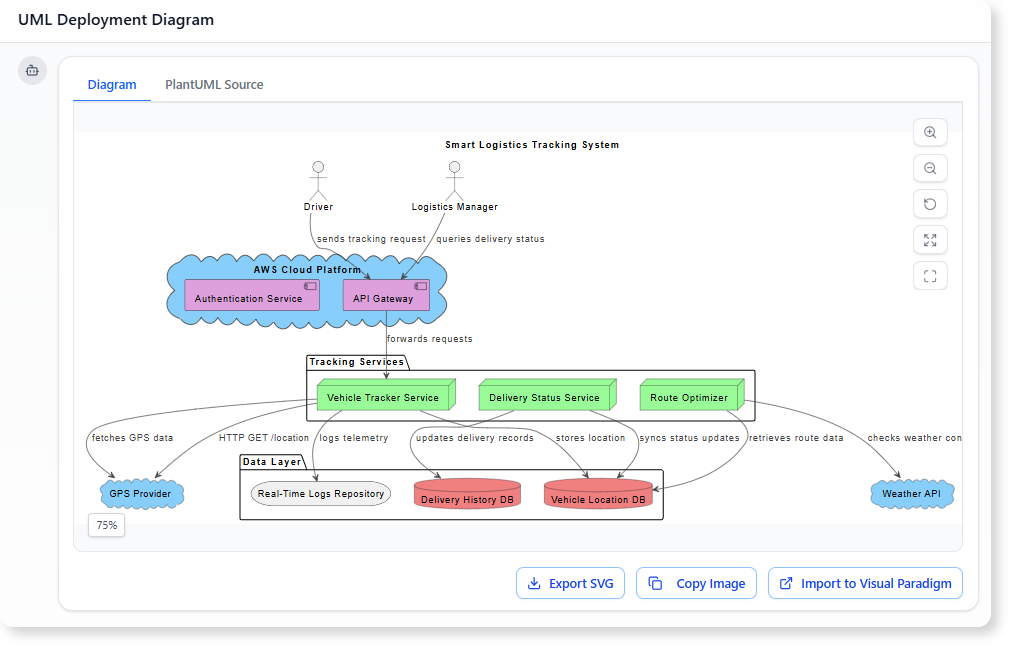
In the fast-paced world of software architecture, the ability to accurately document system infrastructure is crucial. For years, architects have relied on manual drafting to create UML Deployment Diagrams—a process known for its precision but also its tediousness. However, the landscape has shifted in 2026. With the integration of Artificial Intelligence into tools like Visual Paradigm, the workflow has evolved from purely manual dragging and dropping to a sophisticated conversation with AI.

Deployment Diagram for Embedded System

This guide explores the strengths and weaknesses of both traditional manual modeling and AI-powered generation, ultimately advocating for a hybrid approach. By mixing the speed of AI with the precision of human oversight, architects can achieve results that are both rapid and professional.

UML Component Diagram: A Definitive Guide to Designing Modular Software  with AI - AI Chatbot

The Traditional Approach: Manual Modeling

For many teams, the classic approach remains the default. This involves opening the editor, selecting the Deployment Diagram type, and building the infrastructure topology from a blank canvas.

The Manual Workflow

Creating a diagram manually is a granular process involving several specific steps:

  • Node Placement: Architects manually drag 3D node boxes onto the canvas to represent servers, devices, execution environments, or cloud resources such as <<AWS EC2>> or <<Kubernetes Cluster>>.
  • Artifact Management: Files like .war, .jar, or database schemas are explicitly placed onto nodes to show where code is deployed.
  • Connection Drawing: Communication paths are drawn using solid lines, requiring manual selection of stereotypes like <<HTTP>> or <<TCP/IP>>.
  • Visual Organization: The user must manually align shapes, color-code security zones, and manage nested nodes for VPCs or data centers.

Strengths of the Old School

Despite being labor-intensive, manual modeling has persisted because it offers total control. Every decision regarding layout and stereotypes is deliberate, forcing the architect to think deeply about topology, performance bottlenecks, and failover strategies. It is particularly effective for the final polish required for compliance documents or high-stakes architecture reviews.

The Pain Points

However, the downsides are significant, especially for complex cloud deployments:

  • Time Intensity: A realistic setup involving load balancers, auto-scaling groups, databases, and CDNs can take 45 to 90 minutes for a first draft.
  • Iteration Fatigue: Minor changes, such as adding a firewall or changing a protocol, often require tedious dragging, reconnecting, and realigning of elements.
  • Onboarding Issues: Junior developers often struggle with the strict syntax of UML notation, leading to inconsistencies.

The AI Revolution: Fast Prototyping with Guardrails

Visual Paradigm’s AI chatbot and diagram generator have introduced a paradigm shift. Instead of drawing, the architect describes the system in plain English, and the tool generates the visual representation.

How AI Modeling Works

The process is conversational and iterative:

  1. Description: The user provides a text prompt, such as: “Generate a UML Deployment Diagram for a microservices e-commerce platform on AWS with an Internet-facing ALB, EC2 instances, RDS PostgreSQL, and S3.”
  2. Generation: The AI produces a complete diagram in seconds, correctly identifying nodes, artifacts, and relationships.
  3. Refinement: The user iterates via chat commands like “Add a bastion host in a public subnet” or “Make the database highly available with read replicas.”

Why Architects Are Adopting AI

The immediate benefit is blazing speed. A draft that previously took nearly an hour can now be generated in under two minutes. Furthermore, the AI adheres to semantic correctness, ensuring proper UML rules are followed regarding node versus execution environment distinctions. It also serves as a knowledge booster, offering suggestions for high availability or security when prompted.

However, AI is not without limitations. The layout prioritizes correctness over aesthetics, often requiring cleanup. Additionally, highly bespoke elements or custom hardware icons may be missed, and there is a risk of over-reliance where subtle errors in dependency direction might go unnoticed if not reviewed.

The Winning Strategy: The Hybrid Approach

The most effective workflow today is not choosing between manual and AI, but blending them. This Hybrid Approach leverages the best of both worlds to maximize productivity and quality.

Phase 1: AI for the Heavy Lifting (80-90%)

Start every project with the AI tools. Use natural language to describe your infrastructure. This phase is dedicated to speed, exploration, and establishing the semantic structure of the diagram. It allows for rapid “what-if” scenarios and creates a solid foundation without the drudgery of dragging initial shapes.

Phase 2: Manual for the Final Mile (10-20%)

Once the AI draft is ready, export it into the full Visual Paradigm editor. This is where human expertise shines. Architects should:

  • Fine-tune the layout for readability.
  • Add custom notes, constraints, and specific visual cues (icons/swimlanes).
  • Adjust colors to match corporate branding or specific architectural standards.
  • Ensure the diagram effectively communicates the narrative required for stakeholders.

Phase 3: The Iterative Loop

When major structural changes occur—such as a migration to multi-cloud or the addition of a new security zone—architects can jump back to the AI chat for quick regeneration, then polish manually again. This is significantly faster than redrawing complex diagrams from scratch.

Comparison: Manual vs. AI vs. Hybrid

Feature Manual Modeling AI-Powered Hybrid Approach
Speed Slow (45+ mins) Instant (< 2 mins) Fast (5-10 mins)
Control High (Pixel perfect) Moderate (Prompt-based) Maximum (Best of both)
Consistency Variable (Human error) High (Rule-based) High (AI draft + Human check)
Flexibility Low (Hard to refactor) High (Regenerate instantly) High (Iterative flow)

Conclusion: Elevation, Not Replacement

The introduction ofAI into deployment diagramming does not render the architect’s skills obsolete; rather, it elevates them. Traditional manual skills provide the necessary foundation for precision and review, while AI provides unprecedented speed and accessibility.

In 2026, the competitive advantage lies in the deliberate mix of these methods. By using AI as an accelerator and applying human judgment for refinement, architects can produce higher-quality documentation in a fraction of the time. If you are still dragging every node manually, it is time to embrace the hybrid future.

Deployment Diagram Archives - AI Chatbot

Visual Paradigm AI Powered Deployment Diagram Resource

The following articles and resources provide detailed information on using AI-powered tools to create and manage deployment diagrams within the Visual Paradigm platform:

發佈日期: 分類 AI

Animating a Bee Lesson: How AniFuzion Makes Teaching Fun

Discover AniFuzion, an easy-to-use online animation tool that helps educators and creators make engaging 2D and 3D animations with AI features.

Imagine a classroom where the chalkboard isn’t just a flat green rectangle, but a dynamic stage where a 3D bee zooms across the screen, buzzing with life. A teacher stands beside it, gesturing as if explaining the intricacies of pollination, but the real star of the show is the animated character and the engaging visuals. This isn’t a scene from a futuristic classroom—it’s a reality made possible by Visual Paradigm’s Animation Maker, also known as AniFuzion. This online tool is revolutionizing how educators and creators bring ideas to life, transforming static content into vibrant, interactive experiences. With its intuitive drag-and-drop interface and powerful AI features, AniFuzion allows anyone to craft compelling animations without needing a background in design or animation. Whether you’re a teacher looking to captivate students or a marketer aiming to boost engagement, AniFuzion is the go-to **online animation tool** that turns imagination into action.

Quick Summary

  • What it is: AniFuzion is a browser-based animation tool that lets users create 2D and 3D animations easily.

  • Key Features: Drag-and-drop interface, 3D character library, AI text-to-speech, automatic lipsync, and pre-built actions.

  • Who it’s for: Educators, marketers, business professionals, and content creators who want to create engaging visual content.

  • How it works: Simply drag characters and props onto the canvas, apply actions, add voiceovers, and export as video or interactive flipbook.

The image you see captures the essence of AniFuzion’s power. It shows a 3D animated character—a teacher—standing in a classroom setting, complete with a green chalkboard and a detailed 3D bee. This isn’t just a simple illustration; it’s a fully animated scene, showcasing how AniFuzion can turn a mundane lesson into an immersive experience. The teacher character is posed naturally, with one hand extended as if in the middle of an explanation, while the bee, with its detailed wings and stripes, appears to be in mid-flight. This level of detail and realism is made possible by AniFuzion’s extensive 3D character library and pre-built actions, which allow users to create lifelike animations without the need for complex software or design skills.

This is a screenshot of Visual Paradigm's animation tool - Professional online diagram maker tool

But what makes AniFuzion truly stand out is its user-friendly approach. The drag-and-drop interface means you don’t need to be a tech whiz to create professional-quality animations. Simply select a character from the library, drag it onto the canvas, and choose a pre-built action—like walking or waving—from the motion library. The tool handles the rest, ensuring smooth and realistic movements. This ease of use is a game-changer for educators who may not have the time or resources to learn complex animation software. Instead of spending hours on technical details, they can focus on crafting engaging content that captures students’ attention.

Another standout feature is the AI-powered text-to-speech and automatic lipsync. For those creating educational videos or presentations, this means you can input your script, choose a voice with the desired accent and emotion, and have the character’s mouth move in perfect sync with the audio. This not only saves time but also adds a layer of realism that makes the content more engaging and memorable. The result is a professional-grade video that feels like it was produced by a team of experts, but was actually created by a single user in a matter of minutes.

AniFuzion also offers a wide range of customization options. You can tweak the appearance of your characters by changing colors, textures, and even body parts. This allows for a high degree of personalization, ensuring that your animations reflect your unique style and message. Whether you’re creating a fun explainer video for a marketing campaign or a serious training module for your team, AniFuzion provides the tools to make your content stand out.

The versatility of AniFuzion extends beyond just animations. It can also be used to create interactive flipbooks, which are perfect for presentations or storytelling. These flipbooks can be shared via hyperlinks, embed codes, or social media, making it easy to distribute your content to a wide audience. Whether you’re looking to enhance your teaching, boost your marketing efforts, or simply create something fun, AniFuzion offers a powerful and accessible solution.

In conclusion, AniFuzion is more than just an animation tool—it’s a creative powerhouse that empowers users to bring their ideas to life. With its intuitive interface, rich feature set, and AI capabilities, it’s the perfect **online animation tool** for anyone looking to create engaging, dynamic content. So why wait? Dive into the world of animation with AniFuzion and start creating your own captivating stories today. Try AniFuzion now.

Related Links

Creating a Cinematic Space Journey: An AniFuzion Animation Guide

Learn how AniFuzion enables users to create professional 2D/3D animations with AI-powered tools for storytelling and engagement.

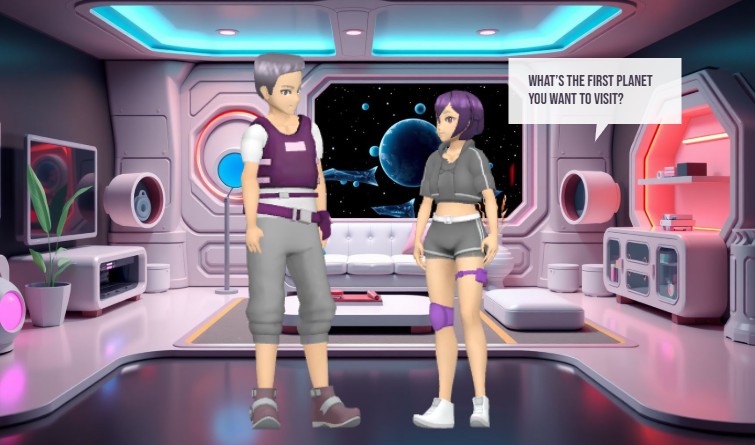
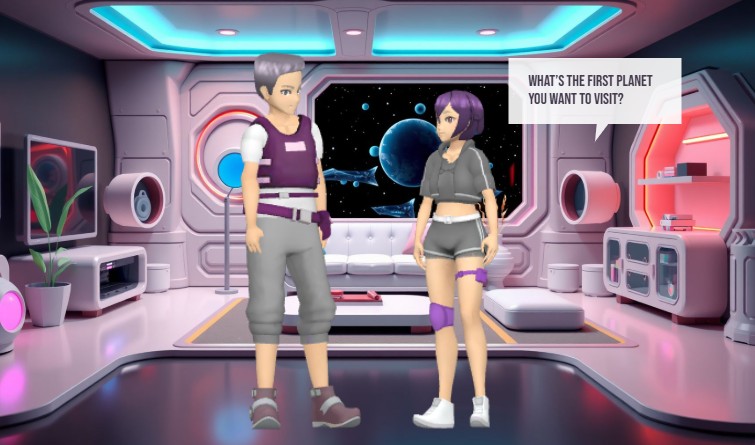
Visual Paradigm’s Animation Maker, known as AniFuzion, enables users to create professional-grade 2D and 3D animations without design expertise. This online tool streamlines the process of producing engaging videos, interactive flipbooks, and animated content through a drag-and-drop interface, AI-powered text-to-speech, and automatic lip-sync. The image showcases a dynamic 3D scene set in a futuristic space station, featuring two characters in conversation. This example demonstrates how AniFuzion can be used to build immersive narratives with customizable characters, detailed environments, and real-time audio integration. The software’s capabilities allow users to generate polished animations quickly, making it a powerful solution for educators, marketers, and content creators.

Users can leverage AniFuzion to produce content that captures attention and enhances communication. The tool supports a wide range of applications, from educational explainer videos to marketing campaigns. Its intuitive design reduces the complexity of animation, allowing users to focus on storytelling rather than technical execution. The integration of AI features, such as text-to-speech and automatic lip-sync, ensures that dialogue flows naturally, adding realism to character interactions. This makes AniFuzion ideal for creating content that is both visually appealing and functionally effective.

Key Features of AniFuzion

AniFuzion offers a suite of features designed to simplify the animation creation process. The drag-and-drop interface allows users to easily arrange characters, props, and effects on a canvas, making it accessible for beginners. The extensive 3D character library includes thousands of customizable figures, enabling users to create unique avatars that fit their narrative needs. Pre-built actions and motion libraries provide over 2,000 dynamic movements, allowing users to animate characters with minimal effort.

AI-driven tools further enhance the animation experience. The AI text-to-speech feature converts scripts into high-quality audio with various accents and emotional tones. Automatic lip-sync ensures that character mouth movements align perfectly with spoken dialogue, creating a more immersive experience. Users can also apply shape effects and animation presets to text and objects, adding visual interest with minimal effort.

Ready-to-use scenes, props, and templates allow users to build environments rapidly, reducing the time spent on world-building. The software supports multiple export options, including MP4 videos and interactive flipbooks, making it easy to share content across various platforms. These features collectively enable users to create professional-quality animations efficiently.

How to Use AniFuzion: Core Workflows

Creating animations with AniFuzion involves a straightforward process. Users begin by signing up for a Visual Paradigm Online account and navigating to the Animation Maker. From there, they can start a new project and select a template or create a blank canvas. The first step is to add a character from the library and customize its appearance using the properties panel. Users can adjust colors, textures, and body parts to match their vision.

Next, users can apply pre-built actions to the character, such as walking or waving, to create movement. The timeline allows users to set the duration and sequence of these actions. Audio can be added using the AI text-to-speech tool, which generates voiceovers with automatic lip-sync. This ensures that dialogue is synchronized with character movements, enhancing realism.

Users can further enrich their animations by adding backgrounds, props, and text with animation presets. These elements can be arranged on the canvas and animated with simple clicks. Once the animation is complete, users can preview it to ensure everything flows smoothly. Finally, the animation can be exported as an MP4 file or shared as an interactive flipbook.

Advanced Techniques and Tips

For users looking to push the boundaries of their animations, AniFuzion offers advanced techniques. Rigging allows users to adjust a character’s skeleton for more realistic movements. Motion retargeting enables the transfer of motions between characters, ensuring consistency across different figures. Users can also create custom actions using keyframing, allowing for unique animations tailored to their narrative.

When building complex scenes, users should consider the performance of their animations. Simplifying the scene by reducing the number of effects or props can improve playback speed. Ensuring that the browser is up to date and closing other tabs can also enhance performance. Users can test their animations on different devices to ensure compatibility and smooth playback.

Another tip is to use the built-in audio library to add background music or sound effects. These elements can enhance the mood and atmosphere of the animation, making it more engaging. Users can upload their own audio files or select from the library, adjusting volume and timing to sync with visual elements.

Quick Summary

  • AniFuzion is an online animation tool that enables users to create 2D and 3D animations without design expertise.

  • Features include a drag-and-drop interface, an extensive 3D character library, and AI-powered text-to-speech and lip-sync.

  • Users can create professional-quality animations quickly, making it ideal for educators, marketers, and content creators.

  • Core workflows involve adding characters, applying actions, adding audio, and exporting the final product.

  • Advanced techniques include rigging, motion retargeting, and custom actions for more realistic animations.

This is a screenshot of the Visual Paradigm's animation maker. - Professional online diagram maker tool

Visual Paradigm’s Animation Maker, AniFuzion, empowers users to create engaging and professional animations with ease. The tool’s intuitive interface and powerful features make it accessible for beginners while offering advanced capabilities for experienced users. By leveraging AI-driven tools and a vast library of assets, users can produce high-quality content quickly and efficiently. Whether creating educational videos, marketing campaigns, or interactive stories, AniFuzion provides the tools needed to bring ideas to life. Try AniFuzion today and discover how it can transform your creative process.

Explore the possibilities of AniFuzion and start creating your own animations now. Visit Visual Paradigm’s Animation Maker to learn more and begin your journey.

Related Links

Creating a Professional Resume in Minutes with AI-Powered Site Builder

Discover how Visual Paradigm’s AI-powered site builder creates professional resumes in seconds from simple text prompts.

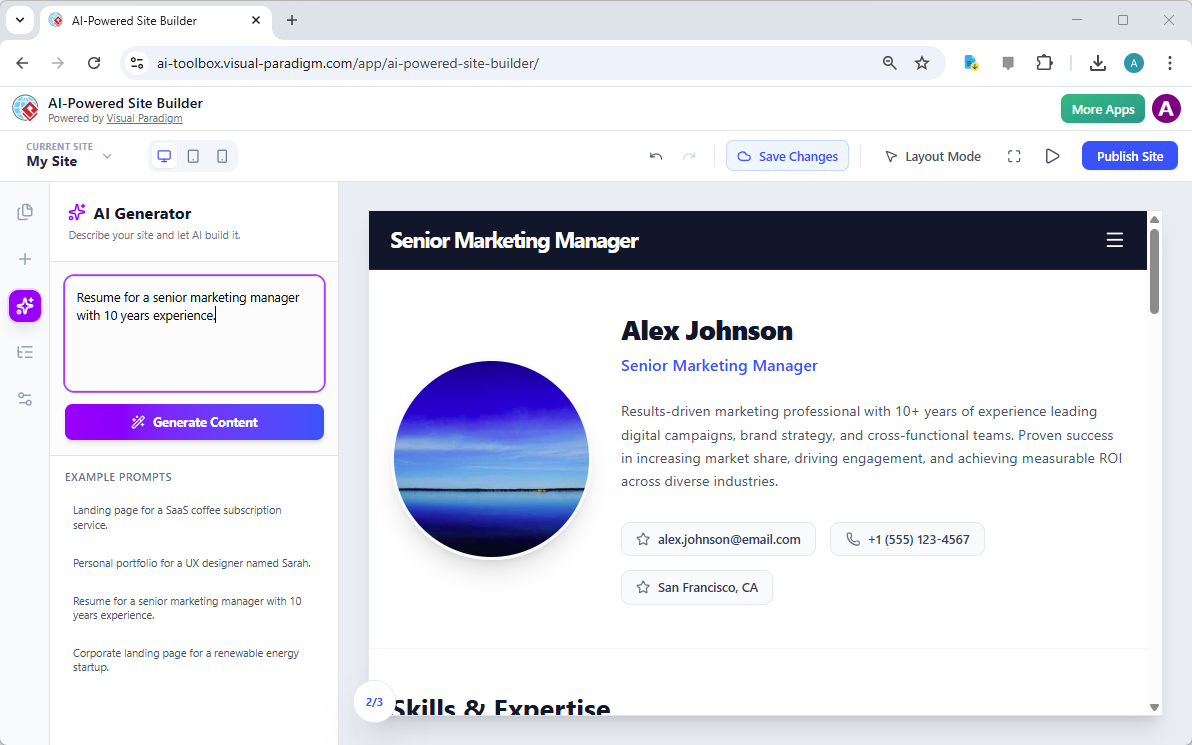
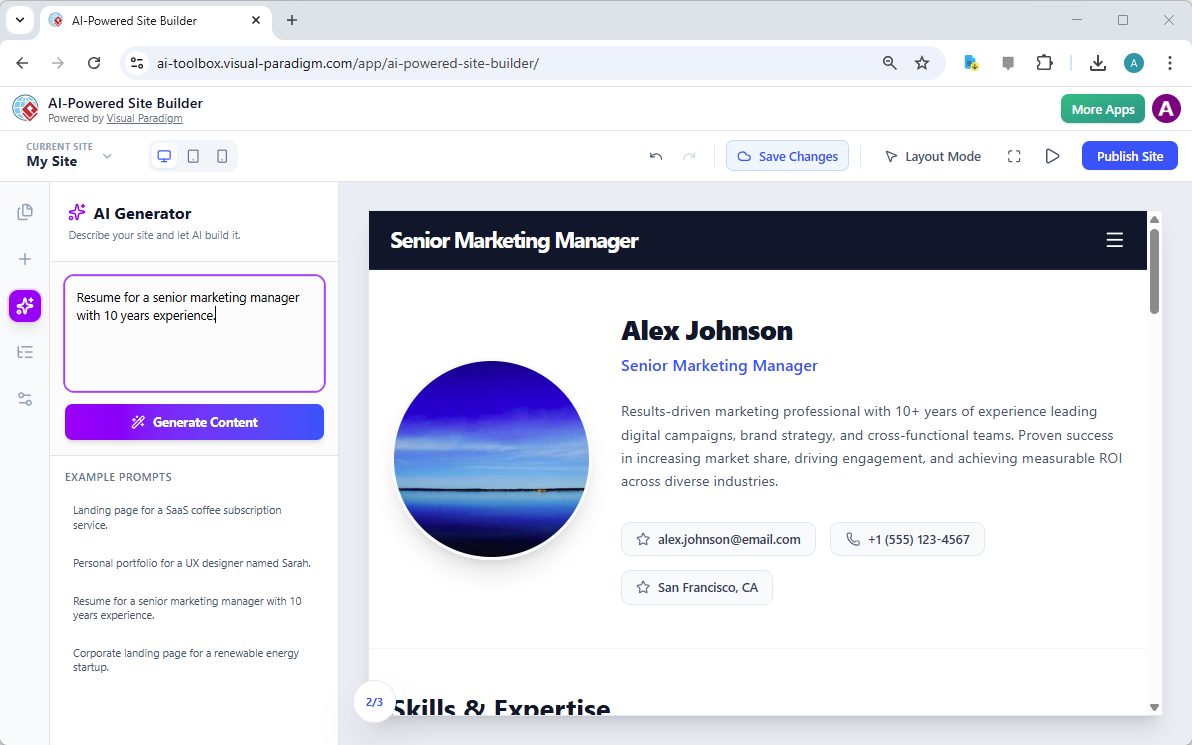
Visual Paradigm’s AI-Powered Site Builder is revolutionizing the way professionals create their online presence, from landing pages to comprehensive portfolios. The tool’s core strength lies in its ability to transform a simple text prompt into a fully designed, multi-section website in seconds. This capability is vividly demonstrated in the provided image, which showcases a professional resume generated from the prompt “Resume for a senior marketing manager with 10 years experience.” The result is a polished, modern digital profile for “Alex Johnson,” complete with a professional headshot, a compelling summary, contact information, and a section for skills and expertise. This is not just a template; it is a dynamic, AI-generated webpage that can be customized and published instantly. For professionals seeking a modern, professional online identity, this AI-powered site builder offers a powerful solution that eliminates the traditional barriers of design and development.

At the heart of this transformation is the AI Generator, a feature that allows users to define their website’s purpose with a simple text description. The user inputs a clear prompt, and the AI instantly constructs a complete page layout. The generated content, as seen in the image, is not generic; it is tailored to the specific role and experience level mentioned in the prompt. This intelligent approach ensures that the initial draft is highly relevant, providing a strong foundation for further personalization. The process is intuitive and efficient, allowing users to focus on refining their content rather than struggling with the mechanics of design. This powerful combination of AI and a visual, block-based editor makes the creation of professional websites accessible to anyone, regardless of their technical skills.

This is a screenshot of Visual Paradigm's AI-Powered Site Builder. It shows the web page generated from the prompt 'Resume fo

How the AI-Powered Site Builder Works

The process of creating a website with the AI-Powered Site Builder is designed to be as simple as possible, leveraging the power of artificial intelligence to handle the most complex part of the process: the initial design. The workflow begins with the user defining their goal in a text box. The AI then analyzes this prompt and generates a complete, multi-section webpage. This is not a simple template; the AI understands the context and creates a layout that is appropriate for the content. For instance, a resume prompt generates a page with a professional header, a profile section, a detailed bio, and a skills section, all arranged in a visually appealing and logical manner. This eliminates the “blank page” problem that often hinders the creative process.

From Prompt to Publication: A Seamless Workflow

Once the AI has generated the initial design, the user is presented with a fully interactive, visual editor. The interface, as seen in the image, features a central canvas where the website is displayed and a sidebar with tools and options. The user can then begin to customize the site. Clicking on any element, such as the “Senior Marketing Manager” title or the “Results-driven marketing professional” text, opens a properties panel. This panel allows for direct editing of the text, uploading of images, and adjustment of styles. This “what you see is what you get” (WYSIWYG) experience ensures that changes are immediate and visible. The user can then add more blocks, such as a “Skills & Expertise” section or a “Contact” form, by dragging and dropping them from the sidebar. The entire process is designed to be intuitive and efficient, allowing users to build a professional website in minutes.

Key Benefits of the AI-Powered Site Builder

The AI-Powered Site Builder offers several significant advantages for users who need a professional website quickly and easily. The most prominent benefit is speed. Instead of spending hours or days designing a site from scratch, users can go from a simple idea to a fully designed, functional website in a matter of minutes. This is made possible by the AI’s ability to generate a complete layout and content based on a single prompt. This efficiency is particularly valuable for professionals who need to update their online presence frequently or for businesses that require new landing pages for marketing campaigns.

Accessibility and Professionalism

Another major benefit is accessibility. The tool requires no coding knowledge, making it accessible to a broad audience. The visual, block-based editor allows users to build complex pages by simply dragging and dropping pre-designed components, such as hero sections, galleries, and pricing tables. This approach democratizes web design, empowering entrepreneurs, freelancers, and small business owners to create professional websites without hiring a developer. The AI-generated content is also built on modern design principles, ensuring that the final product looks polished and professional right out of the box. Users can then customize the site to perfectly match their brand and personal style, giving them full control over the final outcome.

Practical Applications and Use Cases

The versatility of the AI-Powered Site Builder makes it suitable for a wide range of applications. The image of the resume demonstrates one powerful use case: creating a professional online profile for a job seeker. This tool is ideal for anyone looking to build a personal portfolio, a business website, or a marketing landing page. For example, a freelance graphic designer could use the tool to create a portfolio site showcasing their best work. A startup founder could generate a landing page for a new product launch. A small business owner could build a simple website to attract local customers. The AI generator can be prompted with a description of the desired site, and it will create a tailored layout. The user then has the freedom to customize every detail, from the text and images to the color scheme and overall structure.

Creating a Multi-Page Website

While the image shows a single-page resume, the tool’s capabilities extend beyond a single page. Users can create multi-page websites by adding new pages to their project. For instance, a professional might create a main “Home” page with a resume and a separate “About” page with a detailed biography. The “Pages” tab in the sidebar allows users to manage all pages within a single project, making it easy to structure a complete website. This feature is essential for creating a comprehensive online presence that can guide visitors through a narrative, from a brief introduction to a detailed portfolio.

Conclusion

The AI-Powered Site Builder from Visual Paradigm represents a significant leap forward in website creation. It empowers users to generate professional, responsive websites quickly and easily, without requiring any technical skills. The tool’s ability to transform a simple text prompt into a fully designed, multi-section webpage is a testament to the power of AI in simplifying complex tasks. The example of the senior marketing manager’s resume demonstrates the tool’s effectiveness in creating a polished and professional digital profile. For anyone looking to establish a strong online presence, this tool offers a fast, efficient, and accessible solution.

Ready to create your own professional website? Try the AI-Powered Site Builder today and see how quickly you can turn your ideas into a live, professional website.

Try Now

Related Links

Optimizing Employee Engagement Platform Rollouts with Visual Paradigm’s AI-Powered Stakeholder Management Tool

Optimize employee engagement platform rollouts using Visual Paradigm’s AI tool. A 7-step guide to stakeholder management and organizational change.

Successful organizational change, such as the implementation of a company-wide digital engagement platform, depends less on the technology itself and more on the human dynamics surrounding it. Utilizing a professional stakeholder management software is no longer optional for project leaders who aim to minimize resistance and maximize adoption. Visual Paradigm’s AI-powered stakeholder management tool offers a systematic, 7-step methodology to navigate these complex interpersonal landscapes. By automating the identification and analysis phases, project managers can move from abstract concepts to actionable engagement strategies in a matter of minutes, ensuring that every individual—from executive sponsors to union representatives—is appropriately managed.

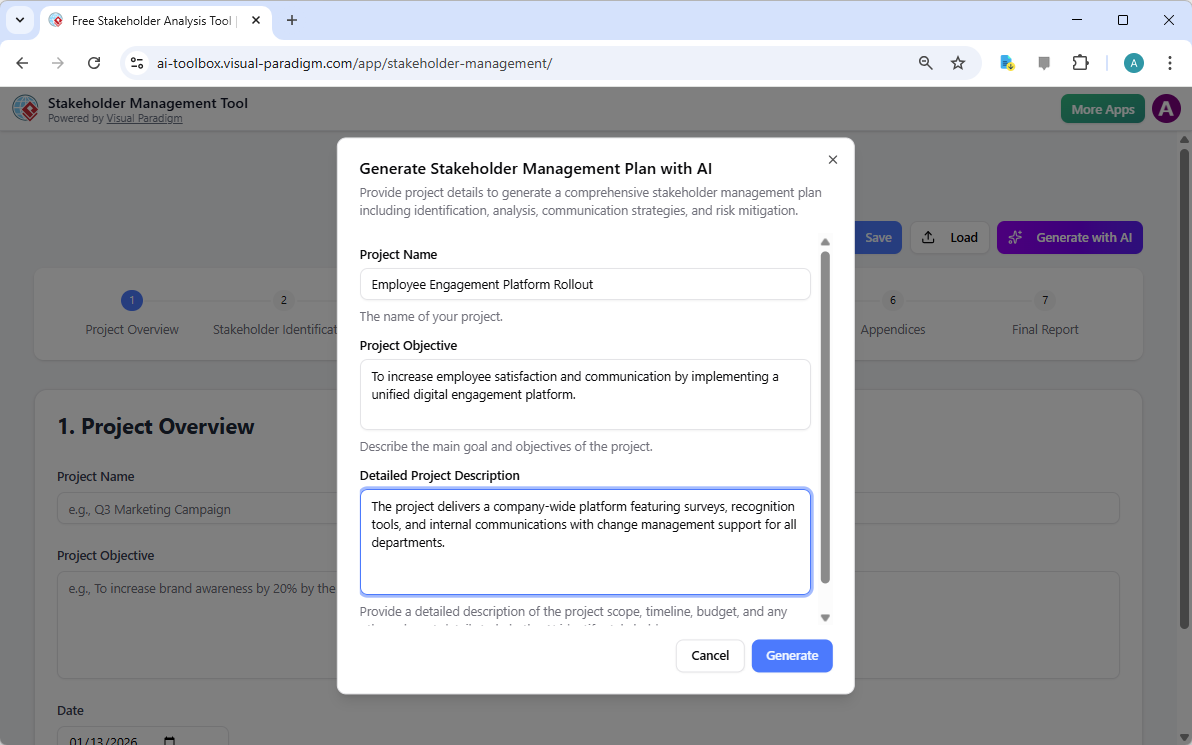
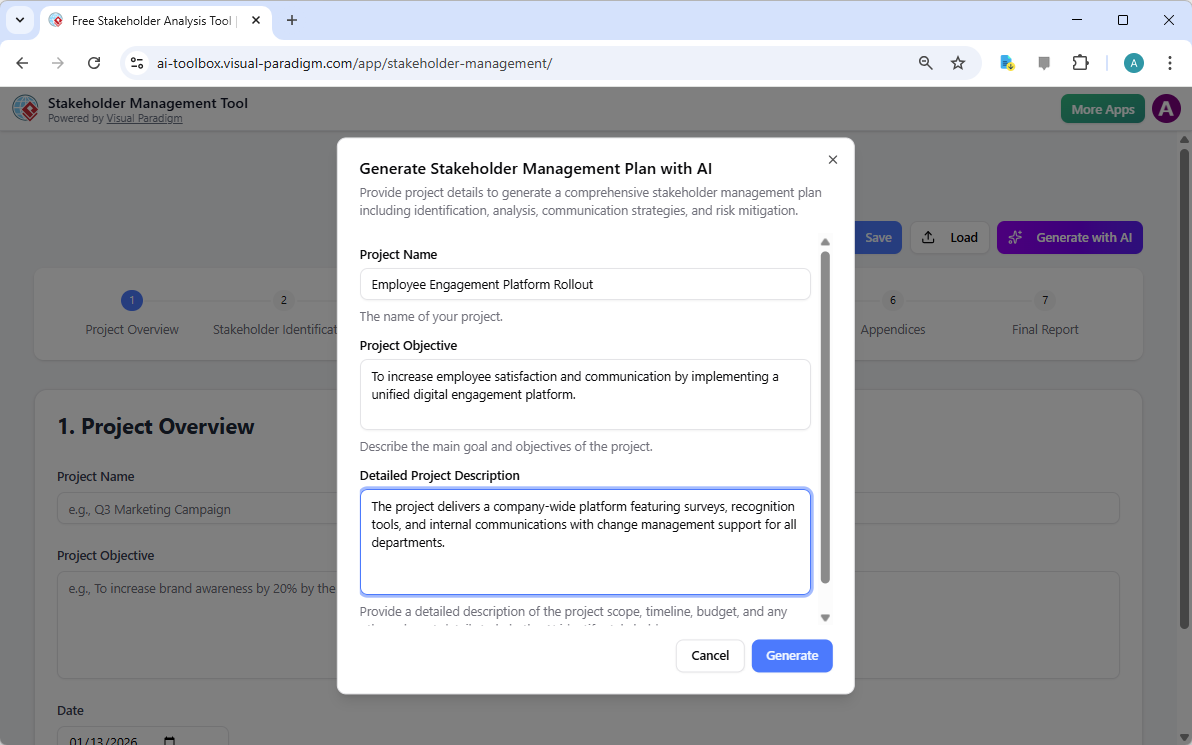
The process begins with the contextualization of the project. Within the interface, the user defines the scope, objectives, and specific nuances of the initiative. For instance, in an “Employee Engagement Platform Rollout,” the tool prompts the user to describe the platform’s features, such as surveys and recognition tools, and the necessity for change management support. This initial input serves as the foundational data for the artificial intelligence to generate a tailored management plan.

This is the screenshot of Visual Paradigm's AI-Powered Stakeholder Management Tool. It is now at AI generation screen, where

A Structured Approach to Project Governance

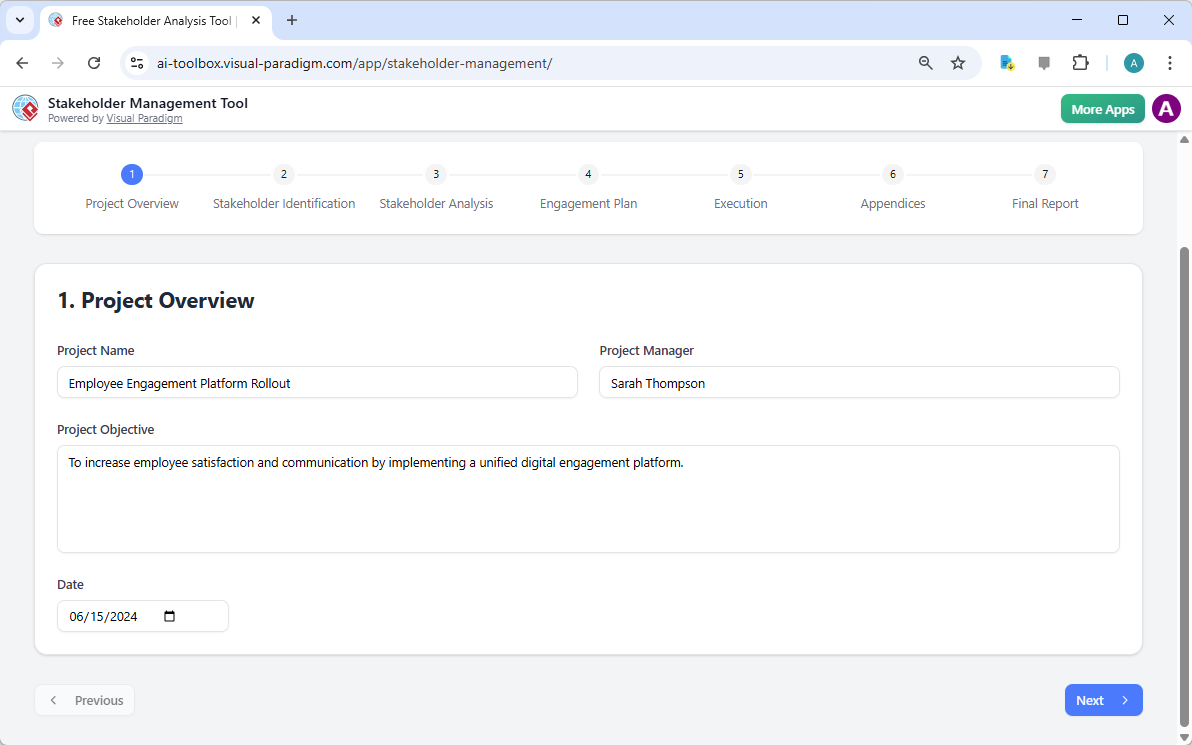
Precision in project documentation is the hallmark of a disciplined manager. The first step of the workflow, the Project Overview, ensures that all foundational data is captured before moving into complex analysis. This step records the project name, the objective, and the designated manager, providing a clear reference point for all subsequent strategic decisions. It is essential to establish these parameters early to maintain alignment throughout the project lifecycle.

This is the screenshot of Visual Paradigm's AI-Powered Stakeholder Management Tool. The initial data is generated by AI and i

Key Takeaways for Effective Stakeholder Management

  • Systematic 7-Step Workflow: Guides users from initial identification through to execution and final reporting.

  • AI-Driven Strategy Generation: Quickly produces a comprehensive draft of stakeholders, interests, and engagement levels based on project context.

  • Privacy-Centric Data Handling: All project data is saved locally as .json files, ensuring sensitive organizational information remains off the cloud.

  • Dynamic Communication Planning: Facilitates the creation of tailored messaging schedules and risk mitigation strategies.

  • Professional Reporting: Generates a consolidated summary suitable for executive review and team alignment.

Identifying and Categorizing the Human Element

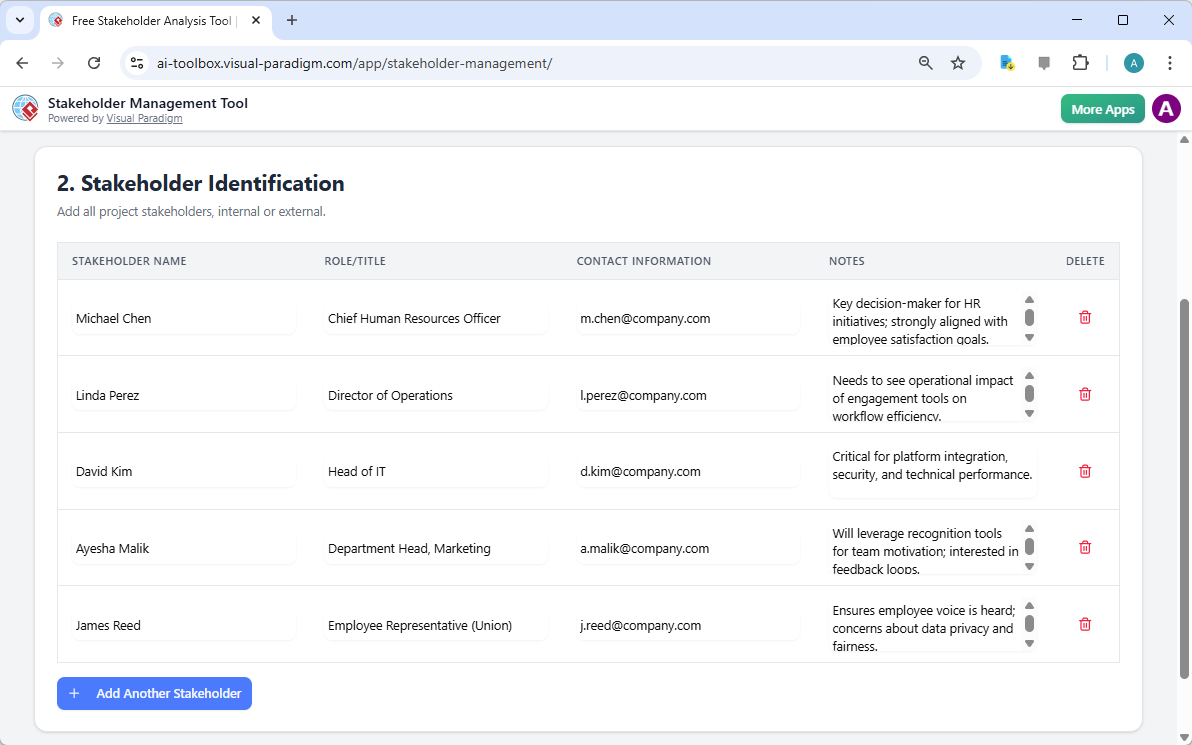
Once the project parameters are set, the next critical phase is Stakeholder Identification. This step involves listing every individual or group that may affect or be affected by the initiative. In the context of an engagement platform, this includes roles such as the Chief Human Resources Officer, the Director of Operations, and Department Heads. An easy-to-use stakeholder management app must allow for detailed profiling, including contact information and specific notes regarding each person’s unique perspective or concerns.

This is the screenshot of Visual Paradigm's AI-Powered Stakeholder Management Tool. It is now at step 2 - Professional online

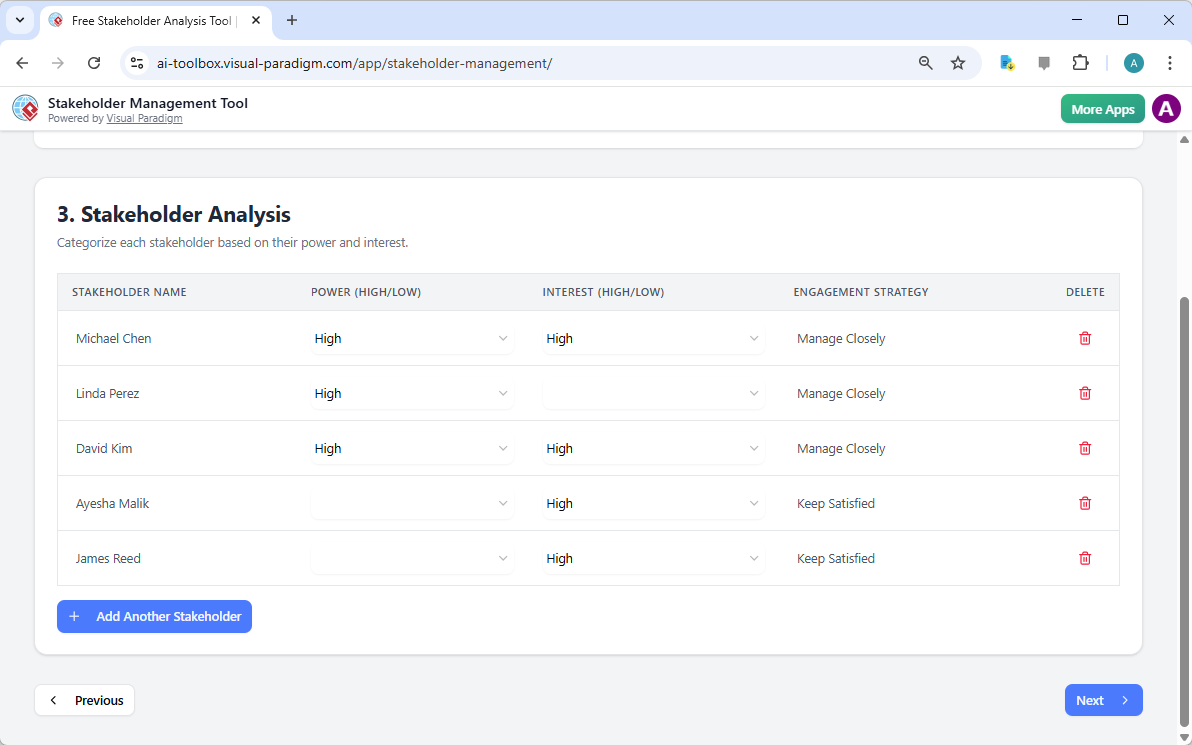
Identification alone is insufficient; one must apply a rigorous Stakeholder Analysis to prioritize engagement efforts. This is typically achieved by evaluating two primary variables: Power (Influence) and Interest. Stakeholders with high power and high interest, such as the Head of IT or the CHRO, require “close management,” whereas those with lower influence may simply need to be “kept satisfied” or “informed.” This categorization ensures that limited communication resources are allocated where they will have the most significant impact on project success.

This is the screenshot of Visual Paradigm's AI-Powered Stakeholder Management Tool. It is now at step 3 - Professional online

Strategic Engagement and Risk Mitigation

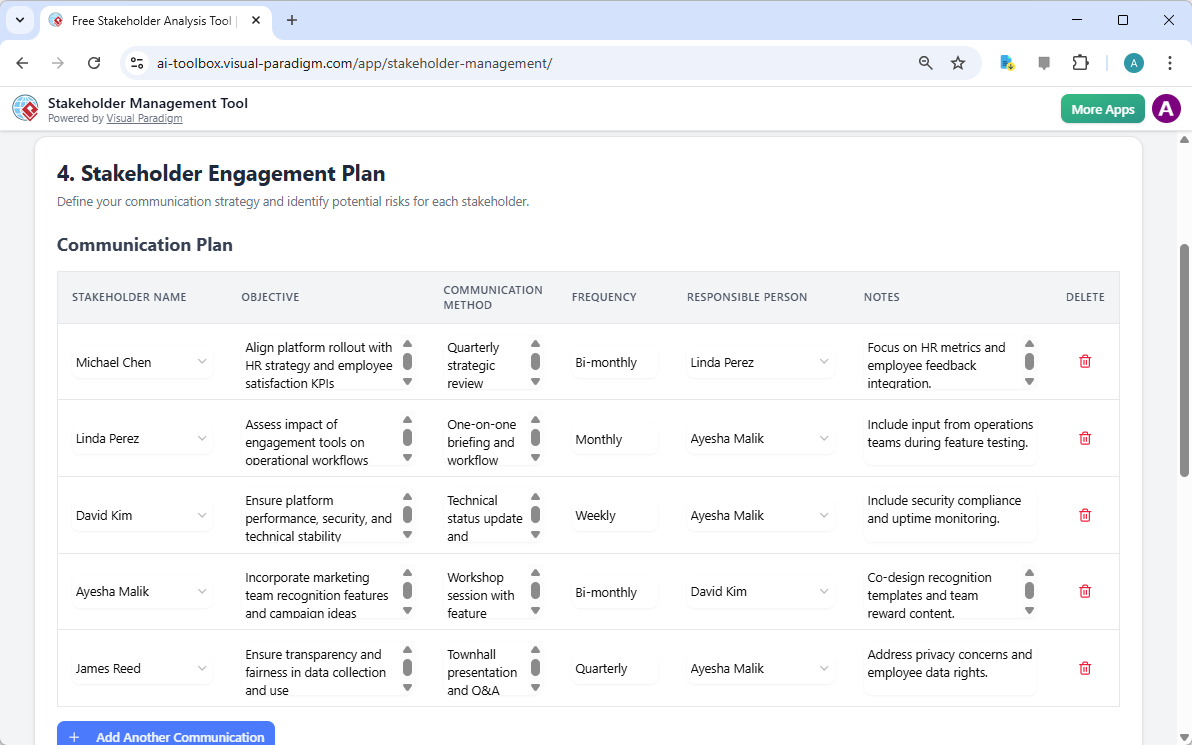
With the analysis complete, the focus shifts to the Stakeholder Engagement Plan. This is where strategic intent is converted into a tactical communication plan. Each stakeholder is assigned a specific communication objective, a preferred method (such as quarterly reviews or town halls), and a frequency. This level of detail prevents communication gaps that often lead to project delays. For example, a Technical Status Update might be scheduled weekly for the IT department to ensure platform stability, while a broader Town Hall might occur quarterly for the general employee population.

This is the screenshot of Visual Paradigm's AI-Powered Stakeholder Management Tool. It is now at the upper part of step 4 - P

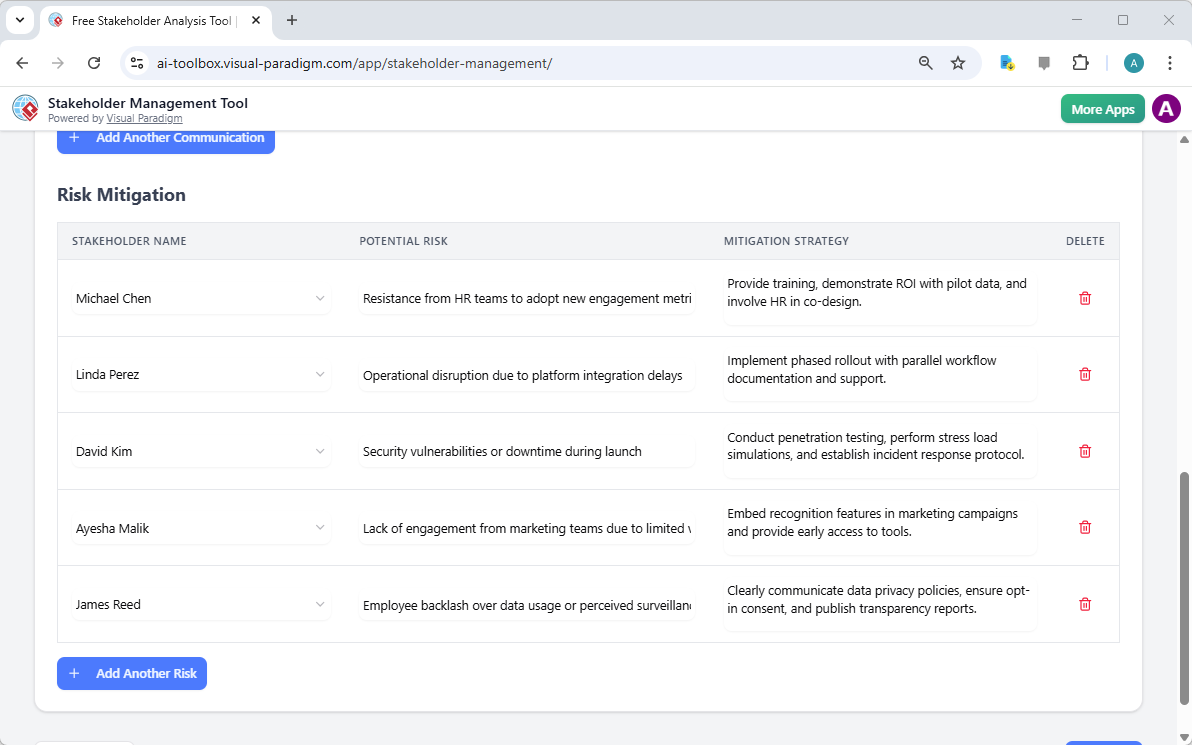
Furthermore, a proactive approach requires the identification of potential risks and the development of mitigation strategies. Resistance is a natural byproduct of change; however, it can be managed. If the AI identifies a risk such as “employee backlash over data usage,” the tool allows the manager to document a specific mitigation strategy, such as publishing transparency reports or clearly communicating data privacy policies. This forward-thinking approach is what distinguishes a professional stakeholder management software from a simple spreadsheet.

This is the screenshot of Visual Paradigm's AI-Powered Stakeholder Management Tool. It is now at the lower part of step 4 - P

Tracking Execution and Ensuring Accountability

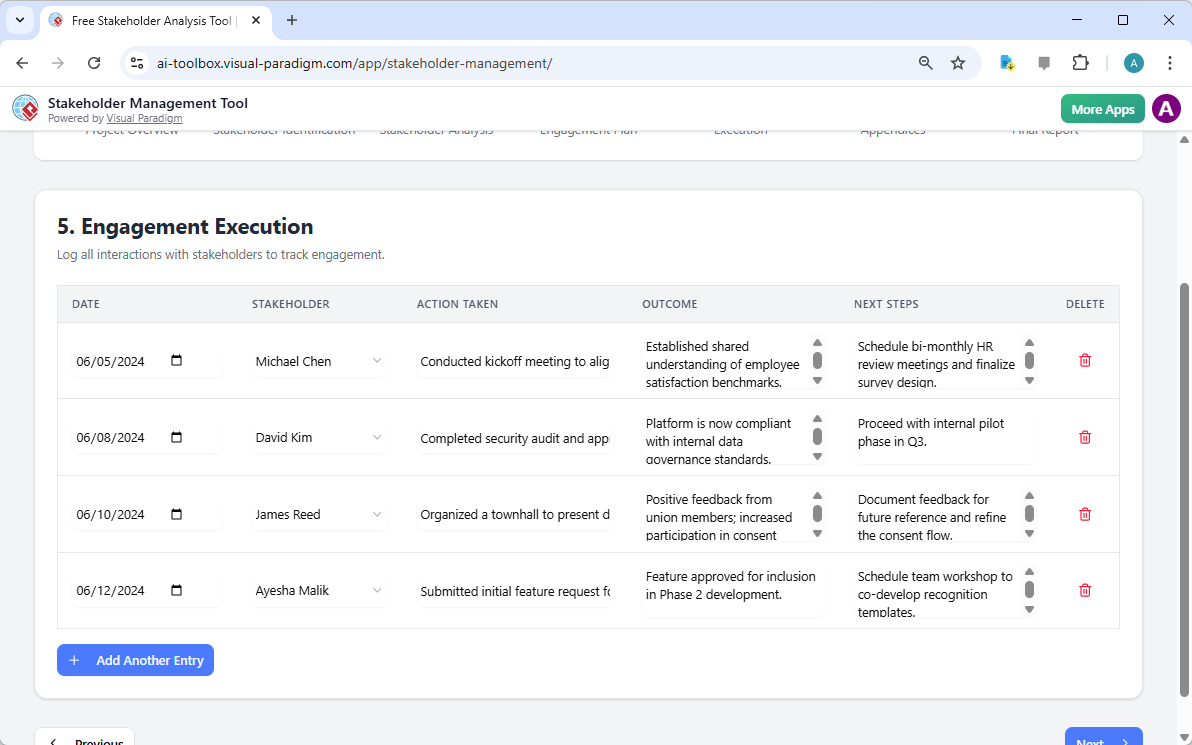
Strategy remains theoretical until it is executed. The Engagement Execution step serves as a ledger for all interactions. By logging the date, the stakeholder involved, the action taken, and the resulting outcome, project managers maintain a transparent audit trail of their engagement efforts. This historical record is invaluable for adjusting strategies mid-project if a particular stakeholder’s sentiment shifts or if unexpected obstacles arise during the rollout.

This is the screenshot of Visual Paradigm's AI-Powered Stakeholder Management Tool. It is now at step 5 - Professional online

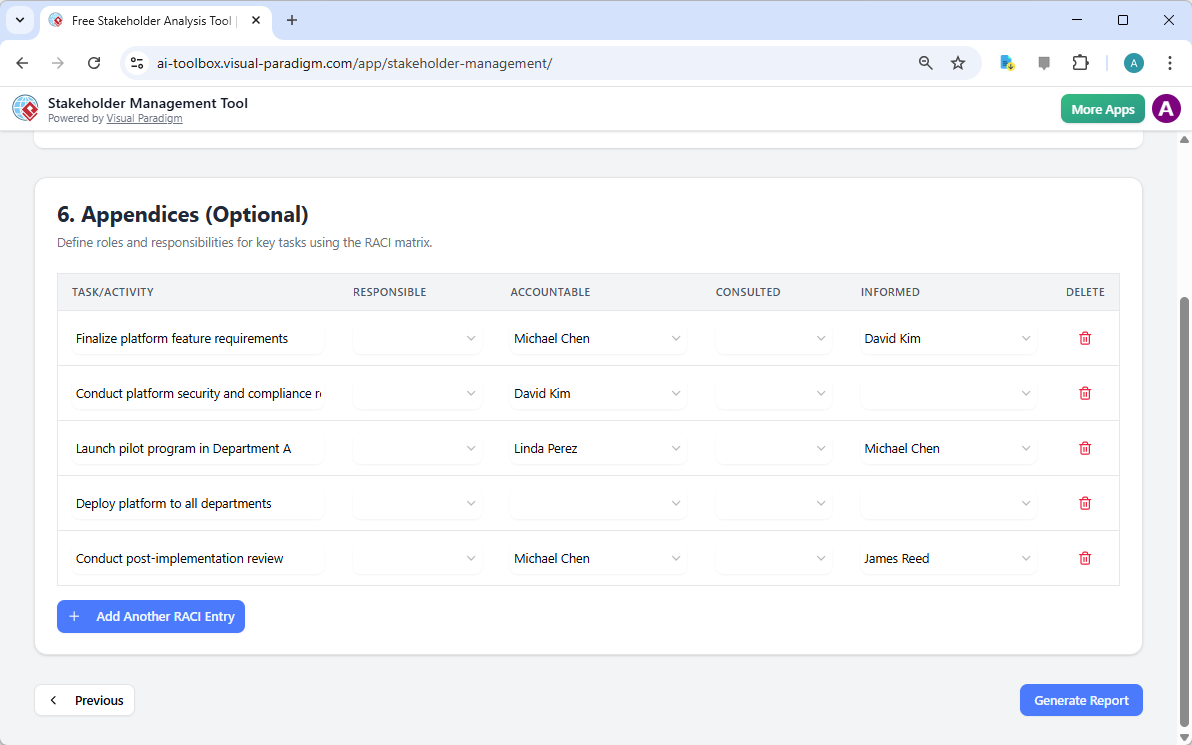
To ensure that these tasks are not merely recorded but effectively managed, the tool includes an Appendices section featuring a RACI matrix (Responsible, Accountable, Consulted, Informed). In the rollout of an engagement platform, it is vital to know exactly who is “Accountable” for finalizing platform requirements versus who merely needs to be “Informed” of the pilot program launch. Defining these roles eliminates ambiguity and prevents the “diffusion of responsibility” that often plagues large-scale corporate initiatives.

This is the screenshot of Visual Paradigm's AI-Powered Stakeholder Management Tool. It is now at step 6 - Professional online

Consolidating Intelligence into a Final Report

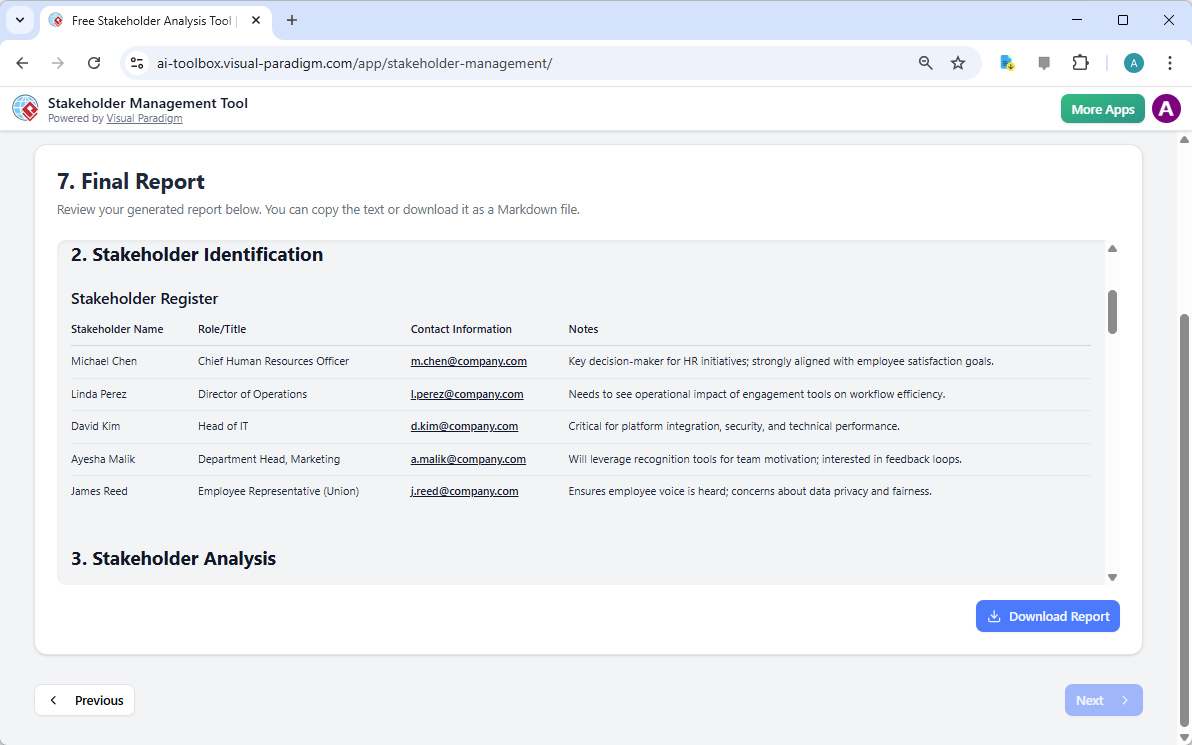
The culmination of this 7-step process is the Final Report. This document consolidates every identification, analysis, communication schedule, and execution log into a professional, easy-to-read format. It serves as the definitive source of truth for the project’s stakeholder strategy. Because this best online stakeholder management app prioritizes data sovereignty, the final report can be printed or saved as a PDF from your browser, while the underlying data remains securely stored on your local machine.

This is the screenshot of Visual Paradigm's AI-Powered Stakeholder Management Tool. It is now at step 7. A report is produced

In summary, navigating the complexities of organizational change requires more than just intuition; it requires a structured methodology supported by intelligent tools. Visual Paradigm’s AI-powered stakeholder management tool streamlines the most labor-intensive aspects of project governance, allowing leaders to focus on what truly matters: building relationships and driving results. By following a guided 7-step workflow, you ensure that no stakeholder is overlooked and every risk is addressed before it becomes a crisis.

Ready to Master Your Stakeholder Relationships?

Effective management begins with the right framework. Whether you are a project manager, a business analyst, or a change leader, the ability to rapidly generate and execute a stakeholder engagement plan is a critical competency. We invite you to experience the efficiency of an AI-driven approach firsthand.

To begin your project:

  1. Access the tool via the Try Now link below.

  2. Enter your project name and objective in the “Project Overview.”

  3. Use the “Generate with AI” feature to produce your initial identification and analysis.

  4. Refine the data and save your progress locally to maintain full privacy.

Learn more about the methodology: Visual Paradigm Stakeholder Management Guide

Start your project today: Try the AI-Powered Stakeholder Management Tool Now

Related Links

From Concept to Live Site: A Comprehensive Guide to AI Website Builders

The evolution of web development has reached a pivotal moment where the barrier to entry for creating professional digital presence has virtually vanished. Modern AI-powered builders have redefined the workflow, shifting the focus from code syntax to creative vision. This guide explores the sophisticated process behind AI website generation, detailing how raw concepts are transformed into fully hosted, responsive websites through a streamlined, four-stage workflow.

AI-Powered website builder

1. The Power of Natural Language Generation

The traditional starting point of web design—a blank canvas and a cursor—has been replaced by an intelligent conversational interface. The process initiates with a single natural language description. Users input a brief overview of their business, brand vision, or project goals, and the AI engine interprets this semantic data to construct a foundational architecture.

Generating a website using Visual Paradigm's AI Powered Website Builder

Instead of manually selecting templates, the AI performs several complex tasks simultaneously:

  • Custom Layout Design: The system analyzes the industry context implies by the prompt to apply appropriate aesthetics, handling technical design elements such as typography, color theory, and whitespace management automatically.
  • Structural Generation: In a single iteration, the AI creates a multi-page hierarchy, populating the site with essential sections such as “About,” “Services,” and “Contact” pages tailored to the user’s specific domain.
  • Contextual Content Creation: Advanced Large Language Models (LLMs) draft human-like copy and compelling headlines, effectively eliminating “writer’s block” by providing immediate, brand-relevant text.
  • Visual Asset Selection: The engine queries asset libraries to select and insert high-quality imagery that aligns with the context of the user’s description.
  • Drag and drop-website creator

2. The “Digital LEGO” Customization Phase

While the AI creates the initial 90% of the website, the remaining 10% is reserved for specific brand alignment and user preference. This phase utilizes a No-Code Interface that empowers users to refine the AI-generated output without requiring knowledge of HTML, CSS, or JavaScript. The interface operates on a “what you see is what you get” (WYSIWYG) principle.

Block-Based Modular Editing

The editor functions similarly to digital building blocks. Users can manipulate the layout using a drag-and-drop mechanism, rearranging pre-designed components—such as Hero headers, image galleries, and pricing tables—with the ease of assembling LEGO bricks. This modular approach ensures that design consistency is maintained even when sections are moved.

AI-Assisted Content Refinement

To further streamline the editing process, a “Magic Wand” tool is integrated directly into the text editor. This allows users to instantly iterate on the AI’s initial draft. With a click, text can be shortened, elaborated upon, or shifted in tone (e.g., from formal to casual), ensuring the voice of the website matches the brand identity perfectly.

3. Pre-Launch Quality Assurance

Before a website becomes public, it must undergo rigorous checks to ensure functionality and visual integrity across devices. The AI builder automates much of this Quality Assurance (QA) phase to prevent common deployment errors.

Key features of this stage include:

  • Responsive View Toggles: Users can instantly switch the editor viewport between desktop, tablet, and mobile configurations. This ensures that the layout responds correctly to different screen sizes and that user experience (UX) remains consistent for all visitors.
  • Intelligent Checklists: A “Ready to Publish” guide acts as an automated project manager, scanning the site for missing links, placeholder text, or incomplete sections, effectively preventing premature launches.

4. Frictionless Deployment and Hosting

The final hurdle in traditional web development—server management and DNS configuration—is completely abstracted in this workflow. The system offers a one-click solution that bridges the gap between the editor and the live web.

Immediate Infrastructure Access

Upon clicking publish, the static assets and content are pushed to high-speed servers. This eliminates the need for users to configure external hosting providers or manage FTP credentials. The result is immediate availability via a unique, shareable URL (e.g., yourname.visual-paradigm.com/sitename).

Iterative Updates

The platform supports a continuous delivery model. Users can continue to experiment with new layouts or content updates in the editor without affecting the live site. Once changes are finalized, the “Re-publish” feature instantly syncs the new version to the live URL, ensuring controlled and risk-free updates.

Summary

Utilizing an AI website builder is comparable to using a GPS for a road trip. In the past, travelers had to map out every turn, monitor the engine, and navigate manually. Today, you simply input the destination. The system handles the complex navigation, routing, and mechanics, leaving the user with the sole task of enjoying the journey and selecting the scenic stops along the way.

發佈日期: 分類 AI

A Comprehensive Guide to Visual Paradigm’s Hybrid Database Engineering Ecosystem

Visual Paradigm offers a unified database engineering ecosystem designed to bridge the gap between abstract business requirements and production-ready implementation. By combining traditional technical rigor with the speed of generative AI, the platform accelerates development while ensuring strict data integrity. This guide explores how these distinct feature sets work in tandem to optimize the database lifecycle.

1. AI-Powered Features: The Innovation Hub

The AI capabilities within Visual Paradigm are engineered to eliminate “blank canvas” syndrome and manage the complex logic inherent in database design. These tools serve as the creative engine of the ecosystem.

Instant Text-to-ERD Generation

One of the most immediate benefits of the AI suite is the ability to bypass manual drawing tools during the ideation phase. Users can describe data requirements in plain English, and the AI Diagram Generator instantly produces a structurally sound Entity-Relationship Diagram (ERD). This generation includes relevant entities, attributes, and relationships, providing an immediate starting point for development.

The 7-Step DB Modeler Journey

For a more structured approach, the specialized web application guides users through a comprehensive lifecycle. This process ensures no step is overlooked:

  • Problem Input: Users input requirements using natural language.
  • Domain Model: The AI generates a conceptual view.
  • ER Diagram: The model evolves into logical and physical representations.
  • Schema Generation: The system produces PostgreSQL DDL automatically.
  • Intelligent Normalization: The structure is optimized for data integrity.
  • Live Testing: Users can validate the design immediately.
  • Final Documentation: Comprehensive records are generated for stakeholders.

Intelligent Normalization

A critical feature for database efficiency is the AI’s ability to automate the progression from First Normal Form (1NF) to Third Normal Form (3NF). This process optimizes the schema to eliminate redundancy. Unlike static validation tools, the AI provides educational rationales for every structural change, helping designers understand the “why” behind best practices.

Conversational Co-Pilot and Interactive Playground

Available in both cloud and desktop environments, the Conversational Co-Pilot allows for conversational editing. Users can refine diagrams with commands such as “Add payment gateway” or ask analytical questions about use cases. Furthermore, once a schema is generated, the Interactive SQL Playground seeds a live, in-browser database with realistic sample data. This allows developers to validate queries and performance before deployment without requiring local installation.

2. Traditional Database Engineering: The Foundation

While AI accelerates creation, the traditional features of Visual Paradigm provide the “deep engineering” tools required to maintain and deploy enterprise-grade systems.

Multi-Level ERD Architecture

Visual Paradigm supports three stages of architectural maturity to satisfy different stakeholders:

  • Conceptual: Focuses on high-level business objects.
  • Logical: Defines columns and relationships independent of a specific DBMS.
  • Physical: detailed technical blueprints tailored for specific DBMS platforms like MySQL or Oracle.

Model Transitor & Traceability

To prevent disjointed documentation, the Model Transitor tool maintains automatic synchronization and traceability between conceptual, logical, and physical models. This ensures that changes made in the high-level business view are accurately reflected in the technical implementation, preventing scope creep and implementation errors.

Round-Trip Engineering

The platform excels in keeping the model and the actual database in sync through robust engineering cycles:

  • Forward Engineering: Generates initialization and patch scripts (DDL) to create or update database schemas while preserving existing data.
  • Reverse Engineering: Imports existing legacy databases via JDBC or DDL files directly into visual ERDs for analysis and revision.

Advanced Management Tools

For complex implementations, the platform supports specialized database elements including Stored Procedures, Triggers, and Database Views. It also includes Table Record Editors for manual entry of specific sample data.

3. The Synergy: How They Work Together

The true power of Visual Paradigm lies in the seamless integration of these two worlds, moving effectively from a “sketch” to a “system”.

Prototyping to Production

The workflow typically begins with the AI Chatbot or DB Modeler providing a rapid prototype from textual ideas. The user then imports this model into the Desktop environment to perform heavy-duty engineering tasks, such as generating Hibernate ORM code or synchronizing the database design with UML Class Diagrams.

Automation Meets Control

AI handles the “heavy lifting” of layout via the Smart Sweeper and normalization logic. Concurrently, traditional tools allow for inline shape editing and fine-grained control over specific data types, lengths, and constraints, ensuring the final product meets exact specifications.

Unified Workspace

Users with a desktop license and an active maintenance plan benefit from hybrid access. This allows cloud-based AI applications to be launched directly within the desktop interface, ensuring that visual designs, AI-generated insights, and physical database code stay in perfect synchronization.

Analogy for Understanding

To visualize this ecosystem, think of building a high-performance database like manufacturing a custom car in an automated factory. The AI acts as the intelligent design assistant that takes your verbal description to draw the initial sketch and calculate the most efficient engine tuning (normalization). The traditional features represent the mechanical engineering floor, providing the heavy machinery to build the actual engine, test stress loads, and manufacture the final product to meet strict legal safety codes.

發佈日期: 分類 AI

Bridging the Gap: Why Traditional Features Are Critical for AI-Powered Visual Modeling

In the rapidly evolving landscape of software engineering, Artificial Intelligence has emerged as a powerful catalyst for efficiency. However, a significant gap remains between the generative capabilities of general AI and the rigorous demands of professional systems development. Visual Paradigm addresses this challenge by integrating AI-powered outputs with traditional visual modeling features. This synergy is essential to ensuring that AI-generated diagrams transition from simple prototypes into rigorous, production-ready engineering models.

Without the foundational support of traditional modeling tools, AI-generated diagrams risk becoming “toy cases”—static visualizations that lack the technical depth, editability, and traceability required for real-world software development. This guide explores why traditional features are the critical backbone of AI modeling and how they transform raw ideas into actionable blueprints.

1. Moving Beyond Static Images to Editable Blueprints

A primary limitation of general AI tools, such as standard Large Language Models (LLMs), is their tendency to produce static text or non-interactive images. While these outputs may look correct superficially, they often lack utility in a dynamic development environment. In contrast, Visual Paradigm’s AI generates native, fully editable models.

Real-world requirements are rarely finalized in a single prompt. If a user cannot manually refine the AI’s output using traditional modeling tools—such as moving shapes, renaming elements, or changing styles—the AI result remains restricted by the AI’s initial interpretation. Traditional features empower the user to take ownership of the design.

  • Example: A user might generate a Chen ERD using AI to get a head start. Using traditional drag-and-drop ease and inline shape editing, they can manually add double rectangles for weak entities or adjust specific cardinality labels that require human business logic, effectively polishing the rough draft into a final specification.

2. Standards Compliance and Technical Rigor

AI is excellent at interpreting intent and generating creative solutions, but it can struggle with the strict symbolic standards required for professional documentation. Professional engineering requires “textbook-perfect” notation to ensure clarity across distributed teams. Traditional modeling features are the safeguards that enforce these rules.

Traditional support ensures that AI-generated drafts adhere to specific standards like Gane-Sarson, Yourdon & Coad, or ArchiMate. This prevents the “hallucination” of non-standard symbols that might confuse developers or stakeholders.

  • Example: While the AI may suggest the general flow of an Online Food Ordering System, the traditional Data Flow Diagram (DFD) tool ensures that information flows correctly between customers and platforms using standardized symbols that a developer can actually use for coding.

3. Model Traceability and Lifecycle Management

One of the most important traditional features available in robust modeling suites is the Model Transitor, which maintains synchronization between different levels of abstraction. Without traceability, a conceptual model generated by AI has no formal link to the logical or physical models used for implementation.

This lack of connection is often what relegates an AI output to the status of a “toy.” If a model cannot be evolved into an actual database schema without manual reconstruction, its value is limited to brainstorming. Traditional features allow for the derivation of models, keeping various layers of the architecture in sync.

  • Example: A user can generate a Conceptual ERD via AI, then use traditional features to derive a Logical ERD and finally a Physical ERD. This keeps all three in perfect sync so that changes in the business view are automatically tracked through to the technical blueprint.

4. Round-Trip Engineering: Code and Database Integration

The ultimate test of a technical diagram is its utility in the build process. Traditional “deep engineering” features like Forward and Reverse Engineering allow AI designs to interact with real codebases. A diagram is only useful if it can be turned into a system, and traditional features bridge the gap between abstract design and executable code.

These features allow AI-generated ERDs to be converted into specific DDL statements (such as for PostgreSQL) or used to patch existing legacy databases while keeping data intact. This moves the workflow from “drawing pictures” to “architecting systems.”

  • Example: After the AI DB Modeler generates a normalized schema for a Hospital Management System, traditional engineering tools allow the user to Reverse Engineer an existing legacy database into the diagram. This allows for a direct comparison between the AI’s optimized version and the current production environment.

5. Advanced Organizational Tools for Complex Models

As systems grow in scope, AI-generated diagrams can become cluttered and unwieldy. An AI might generate 50 entities for a massive enterprise system, resulting in an unreadable “messy” diagram. Traditional features like Sub-Diagrams and the Smart Sweeper are necessary to manage this complexity.

Traditional tools allow users to break massive diagrams into manageable sub-views or use automated layout tools to align shapes instantly, ensuring readability and maintainability over the project’s lifespan.

Summary: The Difference Between a Sketch and a Blueprint

To understand the synergy between AI and traditional modeling, consider the following analogy:

Using a general AI for modeling is like having a knowledgeable friend describe a house to you; they can tell you where the rooms go, but they can’t give you a blueprint the city will approve. Using Visual Paradigm’s integrated system is like having a certified architect and an automated robot builder working in tandem. The AI draws the initial sketch, but the traditional features provide the legal blueprints, ensure the plumbing meets code (normalization), and provide the actual machinery to build the house (code generation).

發佈日期: 分類 AI