A Comprehensive Guide to Visual Paradigm AI DB Modeler

In the modern era of software engineering, bridging the gap between abstract business requirements and concrete technical implementation remains one of the most significant challenges. The Visual Paradigm AI DB Modeler addresses this by transforming database design into a structured, automated engineering process. By leveraging artificial intelligence, this tool facilitates the journey from plain language concepts to production-ready SQL schemas, emphasizing “architectural maturity” at every stage of the lifecycle.

The Core Philosophy: A 7-Step Guided Workflow

Unlike traditional modeling tools that require manual drag-and-drop from the start, the AI DB Modeler utilizes a linear, seven-step workflow. This process ensures that data integrity, relationship logic, and physical constraints are handled systematically.

Phase 1: Requirement Analysis and Conceptual Modeling

The design process begins with understanding the user’s intent. This phase focuses on high-level abstraction before diving into technical details.

  • Step 1: Problem Input: Users interact with the system using natural language. By inputting a simple description, such as “Design a hospital management system,” the AI analyzes the request and expands it into a comprehensive set of technical requirements, ensuring no critical functionality is overlooked.
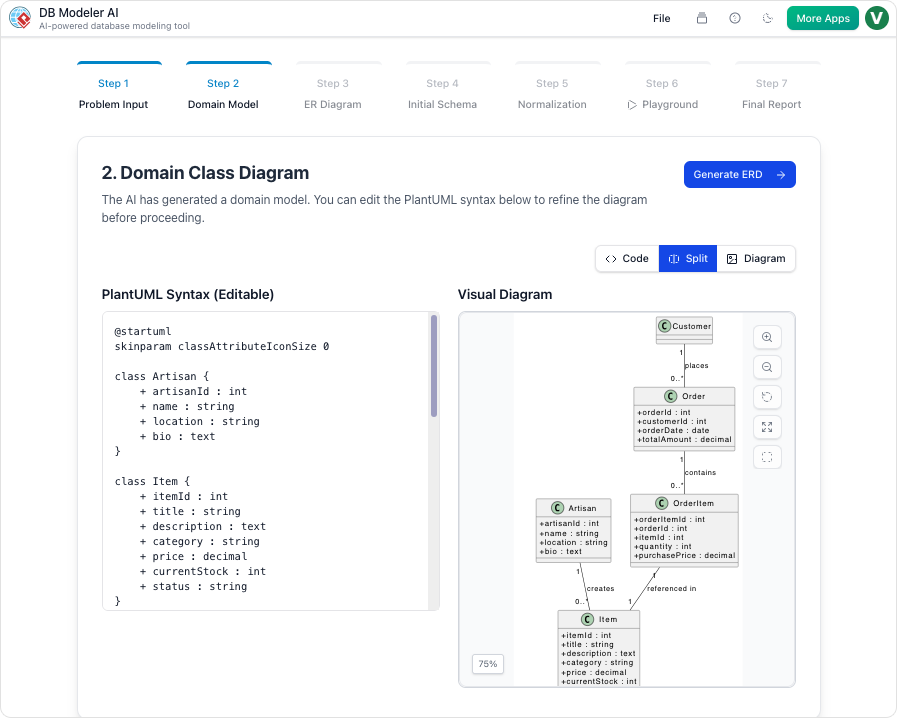
  • Step 2: Domain Class Diagram: Once requirements are established, the AI translates them into a visual blueprint known as the Domain Model Diagram. This is rendered using editable PlantUML syntax, which allows architects to visualize objects and attributes instantly without the need for manual drawing.

Phase 2: Logical and Physical Design Automation

Moving from concept to execution requires rigorous structural definition. The tool automates the “heavy lifting” of database architecture during this phase.

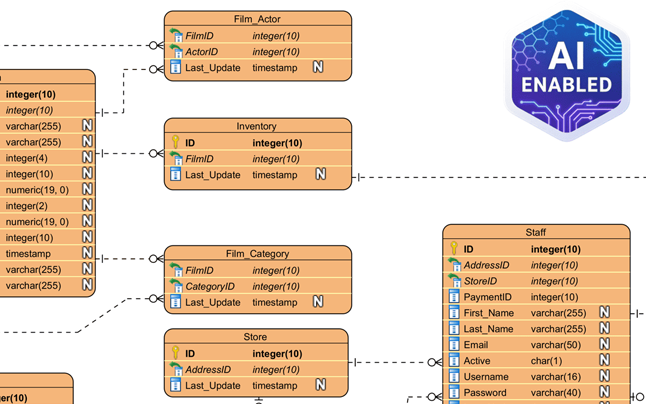
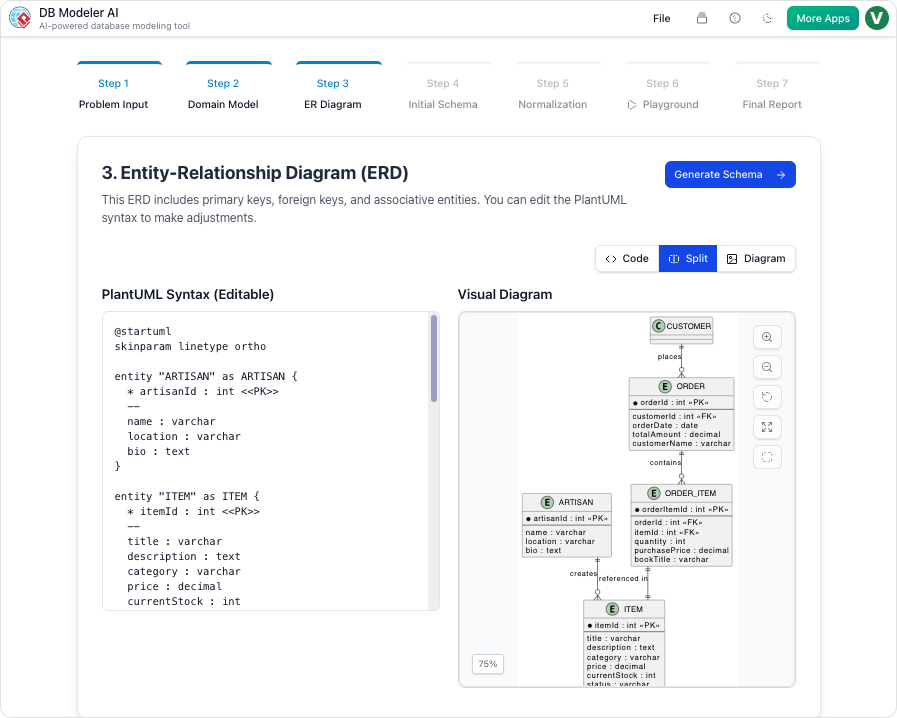
  • Step 3: ER Diagram Creation: The conceptual model is converted into a database-specific Entity-Relationship Diagram (ERD). Crucially, the AI automatically defines the relationships between entities, handling Primary Keys (PKs), Foreign Keys (FKs), and complex cardinalities (such as 1:1, 1:N, or M:N) to ensure referential integrity.
  • Step 4: Initial Schema Generation: With the logical structure in place, the tool translates the visual ERD into executable SQL DDL statements. These scripts are compatible with PostgreSQL and include all necessary table definitions, column types, and constraints.

Phase 3: Optimization and Educational Guidance

One of the standout features of the AI DB Modeler is its approach to database normalization, a process often considered complex and error-prone for human designers.

  • Step 5: Intelligent Normalization: The AI acts as an expert DBA, guiding the schema through First (1NF), Second (2NF), and Third Normal Forms (3NF). This process eliminates data redundancy and anomalies.
  • Educational Rationales: The tool does more than just fix the schema; it educates the user. It provides detailed explanations for every structural change made during the normalization process, offering transparency on how data integrity is being preserved.

Phase 4: Validation and Documentation

Before any code is deployed to a production environment, the design must be rigorously tested and documented.

  • Step 6: Interactive SQL Playground: The tool features an in-browser SQL client for immediate validation. To make this testing meaningful, the environment is automatically seeded with realistic, AI-generated sample data. This allows users to run queries, verify performance, and test logic without installing local software.
  • Step 7: Final Report and Export: The lifecycle concludes with the generation of a professional report. Available in PDF, JSON, or Markdown formats, this documentation includes diagrams, SQL scripts, and design rationales, making it ideal for project hand-offs or archiving.

Advanced Assistance Features

Beyond the core workflow, the platform includes several auxiliary features designed to streamline the user experience and enhance collaboration.

  • Conversational Refinement: Users can utilize an integrated AI Chatbot to modify diagrams using natural language commands. Instructions like “Add payment gateway” or “Rename Customer to Buyer” are executed instantly.
  • Model Traceability: The platform ensures consistency across the entire project. It maintains automatic synchronization between conceptual, logical, and physical models, so a change at the abstract level is immediately reflected in the SQL code.
  • Multi-Language Support: To support global teams, the AI is capable of processing prompts and generating diagram content in over 40 languages.

Understanding the Process: An Analogy

To fully grasp the capabilities of the AI DB Modeler, it is helpful to visualize it as an automated car factory.

When you provide a high-level description of the car you want, you are completing Step 1. The AI then draws an artist’s sketch of the vehicle (Step 2) before engineering detailed mechanical blueprints that show how every part connects (Step 3). Next, it writes the manufacturing code for the assembly robots (Step 4) and fine-tunes the engine to ensure maximum fuel efficiency (Step 5). Finally, before the car is built, the system allows you to take it for a “virtual test drive” with simulated passengers to ensure it runs perfectly (Step 6).

Conclusion

The Visual Paradigm AI DB Modeler represents a shift in how databases are architected. By automating the transition from requirements to normalized SQL schemas, it reduces the technical barrier to entry while ensuring that the final output adheres to strict industry standards for data integrity and performance.

發佈日期: 分類 AI

A Comprehensive Guide to the Visual Paradigm AI Al-in-One Visual Modeling Platform

The landscape of visual modeling and technical diagramming has undergone a significant transformation with the introduction of the Visual Paradigm AI ecosystem. Moving beyond traditional manual drafting, this platform has evolved into a comprehensive, AI-powered environment. It seamlessly integrates generative AI across desktop applications, web-based tools, and specialized assistants, designed to convert simple natural language prompts into professional, fully editable models in mere seconds.

This guide explores the structure of this ecosystem, detailing its four primary engagement methods and the specific benefits it offers to developers, architects, and business analysts.

The Four Pillars of the AI Ecosystem

The Visual Paradigm ecosystem bridges the gap between abstract ideas and technical implementation through four distinct but interconnected components.

1. AI-Powered Desktop (Embedded Generator)

At the heart of the ecosystem is the flagship desktop application, which now features an embedded AI Diagram Generator. This tool is engineered to accelerate enterprise-grade modeling directly within the user’s primary workspace.

  • Instant Technical Diagrams: Users can generate complex models by describing requirements in plain English. The system supports high-level diagrams such as Data Flow Diagrams (DFD), Chen Notation ERDs, and SysML Internal Block Diagrams.
  • Standards Compliance: Unlike generic image generators, this tool ensures that results are structurally sound and compliant with strict industry standards (such as Gane-Sarson or Yourdon & Coad notations). This allows professionals to focus on system logic rather than the manual placement of shapes.

2. AI Chatbot (The Conversational Co-Pilot)

The AI Chatbot serves as a versatile, conversational assistant designed for rapid prototyping and iterative refinement. It acts as a real-time consultant for your modeling needs.

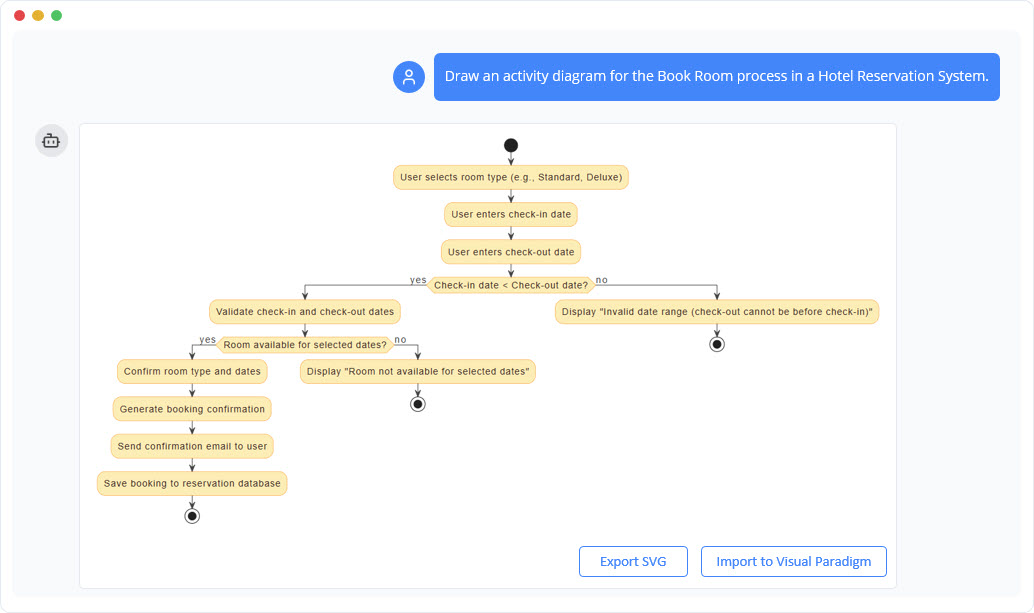
  • Conversational Editing: The chatbot’s core strength lies in its ability to refine diagrams through dialogue. Users can simply “talk” to the model—for example, instructing it to “Add a payment gateway”—to add elements or refactor relationships without manual dragging and dropping.
  • Extensive Versatility: It supports a vast array of over 40 diagram types. This includes technical schemas like UML (Class, Sequence, Activity), SysML, and ArchiMate, as well as strategic business frameworks like SWOT or PESTLE analysis.
  • Analytical Insights: Beyond drawing, the chatbot can analyze the model, answering questions about use cases or generating automated project summaries.

3. Specialized AI Web Applications

For specific, high-complexity tasks, Visual Paradigm Online offers domain-specific web applications that guide users through rigorous technical processes.

  • DB Modeler AI: This tool transforms natural language into production-ready SQL schemas via a 7-step guided workflow. It uniquely features intelligent normalization, optimizing databases from 1NF to 3NF while providing educational rationales for every change. It also includes an interactive SQL playground seeded with AI-generated data for immediate testing.
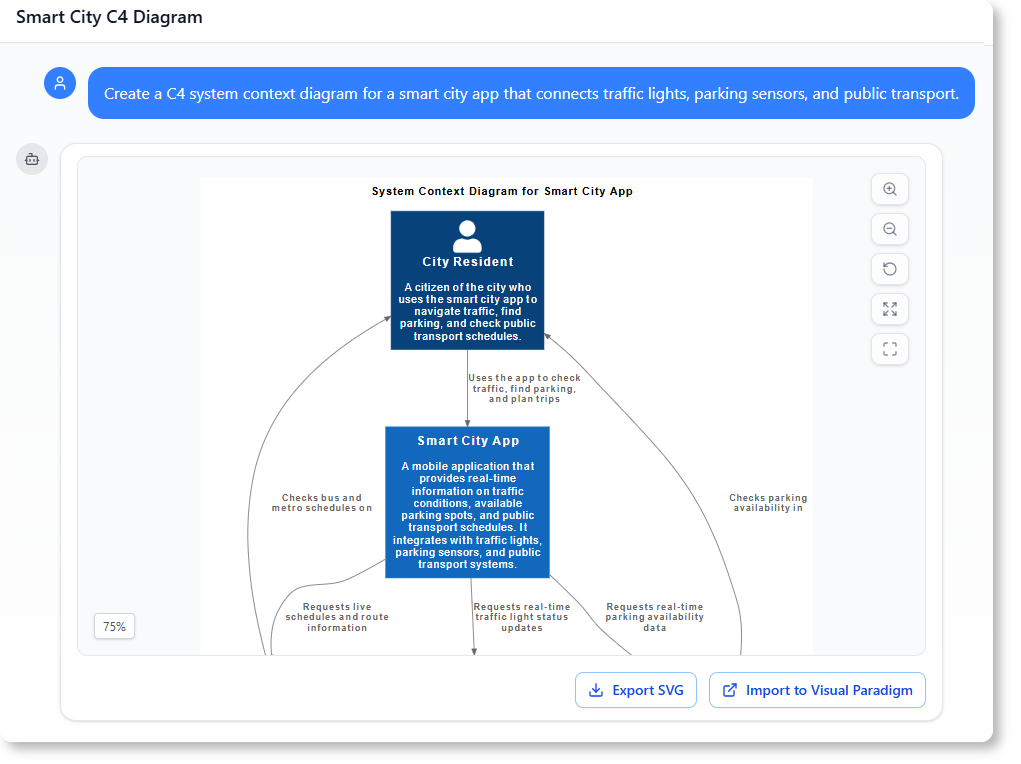
  • AI C4 Studio: This application automates the creation of C4 views (Context, Container, and Component diagrams) using PlantUML rendering, streamlining the visualization of software architecture.
  • Use Case to Activity Diagram Generator: This tool intelligently parses narrative requirements to visualize UML activity workflows, ensuring a clear translation from text to process.

4. Unified Hybrid Workflow

The ecosystem is designed to offer the best of both worlds: the speed of the cloud and the depth of desktop engineering.

  • Integrated Access: Users can launch specialized web apps and the AI Chatbot directly from the desktop environment.
  • Seamless Import: Diagrams prototyped in the cloud can be imported directly into the desktop workspace. Once imported, they can be used for advanced engineering tasks, such as code generation, reverse engineering, and version control.
  • Global Accessibility: To support international teams, the AI supports over 40 languages, ensuring that both the interface and the generated content feel native to the user.

Why Choose Visual Paradigm AI?

Adopting the Visual Paradigm AI ecosystem represents a shift from manual drawing to an automated engineering process. It is akin to having a certified architect and an automated construction crew at your disposal. Below are the primary benefits of this approach.

Instant Productivity and Speed

The most immediate advantage is the elimination of the “blank canvas” syndrome. The AI jumpstarts the design process, moving from a concept to a complete visualization in seconds.

  • No Manual Drawing: The platform removes the tedious aspects of diagramming, such as shape selection, layout adjustments, and spacing.
  • Focus on Logic: Through conversational editing, users can focus on the high-level logic of the system rather than the mechanics of the software.

Architectural Rigor and Data Integrity

Visual Paradigm distinguishes itself from general generative AI by ensuring technical accuracy and adherence to standards.

  • Intelligent Normalization: In database design, the AI automatically optimizes schemas and explains the architectural shifts necessary to eliminate redundancy.
  • Textbook-Perfect Notations: Whether utilizing ArchiMate or Chen Notation, the AI ensures that all symbols and relationships meet strict professional standards.
  • Traceability: The system maintains synchronization between conceptual, logical, and physical models, allowing for seamless navigation through the design’s evolution.

Live Validation and Testing

A standout feature of the ecosystem is the ability to validate designs before any implementation code is written.

  • Interactive SQL Playground: Users can test their database schemas in a live, in-browser environment without local software installation.
  • Realistic Data Seeding: The AI populates models with realistic sample data, enabling users to run custom queries and verify performance under simulated real-world conditions.

Conclusion

The Visual Paradigm AI ecosystem acts as a highly skilled architectural firm. The AI Chatbot serves as the lead consultant for brainstorming, the AI-Powered Desktop acts as the drafting department producing instant blueprints, and the Specialized Web Apps function as structural engineers ensuring code compliance. By combining these tools, Visual Paradigm offers a superior solution for developers and architects seeking to enhance productivity, ensure data integrity, and validate their systems with precision.

發佈日期: 分類 AI

How to Choose the Right Visual Paradigm AI Tool: A Comprehensive Guide

Navigating the Visual Paradigm AI Ecosystem

Choosing the right product within the Visual Paradigm AI ecosystem is a strategic decision that depends heavily on a user’s specific workflow requirements. The spectrum of tools ranges from rapid, conversational prototyping to deep, enterprise-grade engineering. To select the optimal tool, users must consider three primary factors: the technical depth required for the task, the specific domain of the project (such as database design versus high-level system architecture), and the preferred working environment (cloud-based flexibility versus desktop power).

This guide breaks down the distinct roles of the Visual Paradigm AI suite to help you match the right tool to your engineering needs.

1. The Engineer’s Workbench: Visual Paradigm Desktop

For professionals requiring “deep engineering” and rigorous control over complex systems, Visual Paradigm proposes the Desktop application. This tool is the heavyweight champion of the ecosystem, designed for environments where precision and legacy integration are paramount.

Best For

The Desktop client is the ideal choice for enterprise architects and software developers who need offline capabilities, code engineering, and extensive forward/reverse engineering of legacy systems. It bridges the gap between conceptual modeling and implementation.

AI Feature Integration

Far from being a legacy tool, the desktop version has evolved to embed a powerful AI Diagram Generator. This feature allows users to instantly create 11 specialized diagram types. Supported diagrams include:

Hybrid Access

Visual Paradigm Desktop offers a hybrid experience. Users with a Professional or Enterprise license and an active maintenance plan can access cloud-based AI tools, such as the DB Modeler AI and AI Chatbot, directly within the desktop interface, ensuring that heavy engineering does not come at the cost of modern AI conveniences.

2. The Conversational Co-Pilot: AI Chatbot

The AI Chatbot serves as the ideal starting point for users facing “blank canvas” syndrome. It is designed to move a user from a raw idea to a visual model with unprecedented speed, acting as a collaborative partner.

AI Chatbot | Diagramming & Modeling with Visual Paradigm

Best For

This tool is recommended for the rapid prototyping of a “vast universe” of diagrams. It excels in generating general software and business models, including:

Key Capabilities: Interactive Refinement

The Chatbot’s defining strength lies in interactive refinement. Unlike static generators, it allows users to “talk” to their diagrams. Through natural language commands, users can add elements, rename classes, or refactor relationships without ever touching a manual drawing tool.

Analytical Insights

Beyond visual generation, the Chatbot is proposed for users who need to analyze their models. It can answer technical questions regarding the diagram (e.g., “What are the main use cases?”) and generate professional documentation on demand, making it a powerful tool for clarity and communication.

3. The End-to-End Specialist: DB Modeler AI

For users specifically interested in database development, Visual Paradigm proposes the DB Modeler AI. This is a specialized web application designed to strictly bridge the gap between requirements gathering and production-ready SQL code.

ERD modeler

Best For

This tool is tailored for developers, students, and architects starting a new database project who require a technically sound, optimized schema from the ground up.

The 7-Step Workflow

DB Modeler AI is the only choice for users requiring Intelligent Normalization. It guides the user through a structured workflow that progresses from 1NF to 3NF, providing educational rationales for every structural decision made by the AI.

Validation and Testing

A critical feature of the DB Modeler is the ability to test designs immediately. It includes an Interactive SQL Playground seeded with realistic, AI-generated sample data, allowing developers to query and validate their schema before deploying it.

4. Specialized Web Studios

When a user’s interest is limited to a specific niche, Visual Paradigm proposes specialized “Studios” that focus on single-purpose efficiency.

The Ultimate Guide to C4 Model Visualization with Visual Paradigm's AI  Tools - ArchiMetric

  • AI C4 Studio: Recommended for software architects who need to generate Context, Container, and Component views specifically using PlantUML syntax.
  • Use Case to Activity Diagram Generator: Proposed for analysts who need to transform narrative textual requirements into functional UML activity workflows.
  • AI-Powered Markmap Studio: Targeted at users who need to instantly turn scattered thoughts into structured mind maps during brainstorming sessions.

Comparative Selection Guide

To summarize the ecosystem, the following table matches common use cases with the recommended Visual Paradigm product:

Use Case Recommended Product
New Database Project DB Modeler AI
Quick UML/Business Prototyping AI Chatbot
Enterprise Architecture / Offline Work VP Desktop (w/ AI integration)
Architecture Documentation (C4) AI C4 Studio
Requirements to Workflow Use Case to Activity Diagram Generator

Conceptualizing the Difference: A Construction Analogy

Choosing between these tools is comparable to selecting the right assistance for a construction project. Understanding the nature of your “building” helps determine which tool is required:

  • The AI Chatbot is the Expert Consultant: Imagine a consultant standing next to you. You sketch ideas on a napkin together, and when you ask them to “move that wall,” they do it instantly. It is collaborative, fast, and flexible.
  • The DB Modeler AI is the High-End Engineering Simulator: This tool ensures the infrastructure—the plumbing and electrical work (data structure)—meets every building code (normalization) before you break ground. It focuses on structural integrity and compliance.
  • The VP Desktop AI is the Automated Factory: This is where the heavy machinery lives. It is used to actually build the final structure, manage massive complexity, and sync the design with real-world materials through reverse and forward engineering.
發佈日期: 分類 AI

Visual Paradigm AI Ecosystem: A Comprehensive Guide to Intelligent Modeling

The Evolution of Visual Modeling

Visual Paradigm has evolved far beyond traditional diagramming tools, establishing itself as a comprehensive AI-powered visual modeling ecosystem. By integrating generative AI across its desktop application, web-based tools, and specialized assistants, the platform has fundamentally changed how architects, developers, and business analysts approach design.

This ecosystem blends the robustness of traditional desktop modeling with the speed and innovation of cloud-based AI. The result is a workflow that accelerates diagram creation, database design, and software architecture visualization—transforming simple text prompts into professional, editable models in seconds. This guide explores the four primary ways to engage with Visual Paradigm’s AI capabilities.

1. The AI-Powered Desktop: Enterprise-Grade Acceleration

For users requiring deep, offline modeling capabilities, the Visual Paradigm flagship desktop application now embeds powerful AI features directly into the familiar workspace. This integration is designed for enterprise architects and software developers who need to generate complex structures instantly without sacrificing the advanced editing tools of a desktop environment.

From Text to Technical Diagrams

The core of this update is the AI Diagram Generator. Users can describe systems, architectures, or requirements in natural language, and the AI produces presentation-ready drafts complete with accurate relationships and elements. This feature supports a vast array of technical standards, including:

  • C4 Model Hierarchies: Generating System Context, Containers, and Component diagrams.
  • UML & SysML: Creating standard software and systems engineering models.
  • ArchiMate: Developing enterprise architecture viewpoints.

Once generated, these diagrams are not static images. They are fully editable models that can be refined using the desktop’s advanced features, such as code engineering, reverse engineering, and collaborative team tools. Users with active maintenance (particularly Professional or Enterprise editions) gain the added benefit of accessing cloud AI features directly within this environment.

2. The AI-Powered Chatbot: A Conversational Assistant

The Visual Paradigm AI Chatbot represents a shift toward conversational modeling. Accessible via the web or integrated into the desktop app, this tool acts as a dedicated assistant that overcomes the “blank canvas” syndrome common in the early stages of design.

By interpreting plain English prompts, the chatbot can generate complete diagrams across dozens of standards. It is particularly effective for:

  • Software Engineering: UML Sequence, Use Case, and Class diagrams.
  • Business Strategy: SWOT analysis, PESTLE, and Business Canvas models.
  • System & Enterprise Modeling: SysML and ArchiMate diagrams.

Iterative Refinement and Documentation

The chatbot’s strength lies in its interactive nature. Users can refine diagrams through follow-up commands, ask the AI for contextual suggestions, and request on-demand professional documentation or reports based on the generated models. Furthermore, the workflow supports direct export to the desktop app, allowing teams to move from a quick chat-based prototype to a rigorous engineering model seamlessly.

3. VP Online Suite: Specialized AI Web Applications

Visual Paradigm Online offers a suite of specialized, zero-install web applications designed for browser-based, collaborative workflows. These tools focus on specific domains, providing guided processes that streamline complex technical tasks.

AI DB Modeler (DBModeler AI)

This tool is invaluable for developers bootstrapping databases or students learning relational design. It transforms natural language descriptions into production-ready schemas. Key capabilities include:

  • Domain Modeling: Utilizing PlantUML for initial structure.
  • ER Diagram Generation: Automatically defining keys and relationships.
  • SQL Output: Generating SQL scripts and providing an interactive playground with AI-generated test data.

AI C4 Studio

Targeting software architects, the AI C4 Studio automatically generates complete C4 views—including Context, Container, and Component diagrams—from text prompts. It utilizes PlantUML rendering to ensure outputs are editable and shareable, facilitating rapid iteration and better architecture communication among teams.

4. Unified Access: The Hybrid Workflow

One of the ecosystem’s most significant advantages is the seamless integration between web and desktop environments. Visual Paradigm ensures that the speed of web AI does not come at the cost of the desktop’s depth.

With a compatible license (Professional/Enterprise edition plus VP Online subscription), users can launch all AI-powered web apps—including the Chatbot, DB Modeler, and C4 Studio—directly from within the Visual Paradigm Desktop application. This hybrid approach allows for a fluid workflow where:

  1. Prototyping occurs via AI generation in the cloud.
  2. Synchronization brings models effortlessly into the desktop workspace.
  3. Refinement takes place using heavy-duty desktop tools for version control, code generation, and reporting.

Summary of AI Capabilities

Feature Primary Use Case Key Benefit
AI Desktop Deep Engineering & Architecture Combines AI speed with advanced code/reverse engineering tools.
AI Chatbot Brainstorming & Quick Prototypes Conversational interface that cures “blank canvas” syndrome.
VP Online Web Apps Collaborative, Domain-Specific Tasks Zero-install tools for DB design and C4 modeling with PlantUML support.

Whether you are a solo developer prototyping a new idea, or an enterprise architect managing complex systems, Visual Paradigm’s AI ecosystem provides the flexibility to generate, refine, and document models faster and more intuitively than ever before.

發佈日期: 分類 AI

Automating Database Normalization: A Step-by-Step Guide Using Visual Paradigm AI DB Modeler

Introduction to AI-Driven Normalization

Database normalization is the critical process of organizing data to ensure integrity and eliminate redundancy. While traditionally a complex and error-prone task, modern tools have evolved to automate this “heavy lifting.” The Visual Paradigm AI DB Modeler acts as an intelligent bridge, transforming abstract concepts into technically optimized, production-ready implementations.
Desktop AI Assistant

To understand the value of this tool, consider the analogy of manufacturing a car. If a Class Diagram is the initial sketch and an Entity Relationship Diagram (ERD) is the mechanical blueprint, then normalization is the process of tuning the engine to ensure there are no loose bolts or unnecessary weight. The AI DB Modeler serves as the “automated factory” that executes this tuning for maximum efficiency. This tutorial guides you through the process of using the AI DB Modeler to normalize your database schema effectively.

Doc Composer

Step 1: Accessing the Guided Workflow

The AI DB Modeler operates using a specialized 7-step guided workflow. Normalization takes center stage at Step 5. Before reaching this stage, the tool allows you to input high-level conceptual classes. From there, it uses intelligent algorithms to prepare the structure for optimization, allowing users to move from concepts to tables without manual effort.

Step 2: Progressing Through Normal Forms

Once you reach the normalization phase, the AI iteratively optimizes the database schema through three primary stages of architectural maturity. This stepwise progression ensures that your database meets industry standards for reliability.

Achieving First Normal Form (1NF)

The first level of optimization focuses on the atomic nature of your data. The AI analyzes your schema to ensure that:

  • Each table cell contains a single, atomic value.
  • Every record within the table is unique.

Advancing to Second Normal Form (2NF)

Building upon the structure of 1NF, the AI performs further analysis to establish strong relationships between keys and attributes. In this step, the tool ensures that all non-key attributes are fully functional and dependent on the primary key, effectively removing partial dependencies.

Finalizing with Third Normal Form (3NF)

To reach the standard level of professional optimization, the AI advances the schema to 3NF. This involves ensuring that all attributes are dependent only on the primary key. By doing so, the tool removes transitive dependencies, which are a common source of data anomalies.

Step 3: Reviewing Automated Error Detection

Throughout the normalization process, the AI DB Modeler employs intelligent algorithms to detect design flaws that often plague poorly designed systems. It specifically looks for anomalies that could lead to:

  • Update errors
  • Insertion errors
  • Deletion errors

By automating this detection, the tool eliminates the manual burden of hunting for potential integrity issues, ensuring a robust foundation for your applications.

Step 4: Understanding the Architectural Changes

One of the distinct features of the AI DB Modeler is its transparency. Unlike traditional tools that simply reorganize tables in the background, this tool functions as an educational resource.

For every change made during the 1NF, 2NF, and 3NF steps, the AI provides educational rationales and explanations. These insights help users understand the specific architectural shifts required to reduce redundancy, serving as a valuable learning tool for mastering best practices in database design.

Step 5: Validating via the Interactive Playground

After the AI has optimized the schema to 3NF, the workflow moves to Step 6, where you can verify the design before actual deployment. The tool offers a unique interactive playground for final validation.

Feature Description
Live Testing Users can launch an in-browser database instance based on their chosen normalization level (Initial, 1NF, 2NF, or 3NF).
Realistic Data Seeding The environment is populated with realistic, AI-generated sample data, including INSERT statements and DML scripts.

This environment allows you to test queries and verify performance against the normalized structure immediately. By interacting with seeded data, you can confirm that the schema handles information correctly and efficiently, ensuring the “engine” is tuned perfectly before the car hits the road.

Comprehensive Guide to ERD Levels: Conceptual, Logical, and Physical Models

The Importance of Architectural Maturity in Database Design

Entity Relationship Diagrams (ERDs) serves as the backbone of effective system architecture. They are not static illustrations but are developed at three distinct stages of architectural maturity. Each stage serves a unique purpose within the database design lifecycle, catering to specific audiences ranging from stakeholders to database administrators. While all three levels involve entities, attributes, and relationships, the depth of detail and the technical specificity vary significantly between them.

To truly understand the progression of these models, it is helpful to use a construction analogy. Think of building a house: a Conceptual ERD is the architect’s initial sketch showing the general location of rooms like the kitchen and living room. The Logical ERD is the detailed floor plan specifying dimensions and furniture placement, though it does not yet dictate the materials. Finally, the Physical ERD acts as the engineering blueprint, specifying the exact plumbing, electrical wiring, and the specific brand of concrete for the foundation.

Engineering Interface

1. Conceptual ERD: The Business View

The Conceptual ERD represents the highest level of abstraction. It provides a strategic view of the business objects and their relationships, devoid of technical clutter.

Purpose and Focus

This model is primarily utilized for requirements gathering and visualizing the overall system architecture. Its main goal is to facilitate communication between technical teams and non-technical stakeholders. It focuses on defining what entities exist—such as “Student,” “Product,” or “Order”—rather than how these entities will be implemented in a database table.

Level of Detail

Conceptual models typically lack technical constraints. For example, many-to-many relationships are often depicted simply as relationships without the complexity of cardinality or join tables. Uniquely, this level may utilize generalization, such as defining “Triangle” as a sub-type of “Shape,” a concept that is abstracted away in later physical implementations.

2. Logical ERD: The Detailed View

Moving down the maturity scale, the Logical ERD serves as an enriched version of the conceptual model, bridging the gap between abstract business needs and concrete technical implementation.

Purpose and Focus

The logical model transforms high-level requirements into operational and transactional entities. While it defines explicit columns for each entity, it remains strictly independent of a specific Database Management System (DBMS). It does not matter at this stage whether the final database will be in Oracle, MySQL, or SQL Server.

Level of Detail

Unlike the conceptual model, the logical ERD includes attributes for every entity. However, it stops short of specifying technical minutiae like data types (e.g., integer vs. float) or specific field lengths.

3. Physical ERD: The Technical Blueprint

The Physical ERD represents the final, actionable technical design of a relational database. It is the schema that will be deployed.

Purpose and Focus

This model serves as the blueprint for creating the database schema within a specific DBMS. It elaborates on the logical model by assigning specific data types, lengths, and constraints (such as varchar(255), int, or nullable).

Level of Detail

The physical ERD is highly detailed. It defines precise Primary Keys (PK) and Foreign Keys (FK) to strictly enforce relationships. Furthermore, it must account for the specific naming conventions, reserved words, and limitations of the target DBMS.

Comparative Analysis of ERD Models

To summarize the distinctions between these architectural levels, the following table outlines the features typically supported across the different models:

Feature Conceptual Logical Physical
Entity Names Yes Yes Yes
Relationships Yes Yes Yes
Columns/Attributes Optional/No Yes Yes
Data Types No Optional Yes
Primary Keys No Yes Yes
Foreign Keys No Yes Yes

Streamlining Design with Visual Paradigm and AI

Creating these models manually and ensuring they remain consistent can be labor-intensive. Modern tools like Visual Paradigm leverage automation and Artificial Intelligence to streamline the transition between these levels of maturity.

ERD modeler

Model Transformation and Traceability

Visual Paradigm features a Model Transitor, a tool designed to derive a logical model directly from a conceptual one, and subsequently, a physical model from the logical one. This process maintains automatic traceability, ensuring that changes in the business view are accurately reflected in the technical blueprint.

AI-Powered Generation

Advanced features include AI capabilities that can instantly produce professional ERDs from textual descriptions. The AI automatically infers entities and foreign key constraints, significantly reducing manual setup time.

Desktop AI Assistant

Bi-directional Synchronization

Crucially, the platform supports bi-directional transformation. This ensures that the visual design and the physical implementation stay in sync, preventing the common issue of documentation drifting away from the actual codebase.

Mastering Database Validation with the Interactive SQL Playground

Understanding the Interactive SQL Playground

The Interactive SQL Playground (often called the Live SQL Playground) acts as a critical validation and testing environment within the modern database design lifecycle. It bridges the gap between a conceptual visual model and a fully functional, production-ready database. By allowing users to experiment with their schema in real-time, it ensures that design choices are robust before any code is deployed.

DBModeler AI showing domain class diagram

Think of the Interactive SQL Playground as a virtual flight simulator for pilots. Instead of taking a brand-new, untested airplane (your database schema) directly into the sky (production), you test it in a safe, simulated environment. You can add simulated passengers (AI-generated sample data) and try out various maneuvers (SQL queries) to see how the plane handles the weight and stress before you ever leave the ground.

Key Concepts

To fully utilize the playground, it is essential to understand the foundational concepts that drive its functionality:

  • Schema Validation: The process of verifying the structural integrity and robustness of a database design. This involves ensuring that tables, columns, and relationships function as intended under realistic conditions.
  • DDL (Data Definition Language): SQL commands used to define the database structure, such as CREATE TABLE or ALTER TABLE. The playground uses these to build your schema instantly.
  • DML (Data Manipulation Language): SQL commands used for managing data within the schema, such as SELECT, INSERT, UPDATE, and DELETE. These are used in the playground to test data retrieval and modification.
  • Architectural Debt: The implied cost of future reworking required when a database is designed poorly in the beginning. Identifying flaws in the playground significantly reduces this debt.
  • Normalization Stages (1NF, 2NF, 3NF): The process of organizing data to reduce redundancy. The playground allows you to test different versions of your schema to observe performance implications.

Guidelines: Step-by-Step Validation Tutorial

The Interactive SQL Playground is designed to be Step 6 of a comprehensive 7-step DB Modeler AI workflow, serving as the final quality check. Follow these steps to validate your database effectively.

Step 1: Access the Zero-Setup Environment

Unlike traditional database management systems that require complex local installations, the playground is accessible entirely in-browser. Simply navigate to the playground interface immediately after generating your schema. Because there is no software installation required, you can begin testing instantly.

Step 2: Select Your Schema Version

Before running queries, decide which version of your database schema you wish to test. The playground allows you to launch instances based on different normalization stages:

  • Initial Design: Test your raw, unoptimized concepts.
  • Optimized Versions: Select between 1NF, 2NF, or 3NF versions to compare how strict normalization affects query complexity and performance.

Step 3: Seed with AI-Powered Data

A comprehensive test requires data. Use the built-in AI-Powered Data Simulation to populate your empty tables.

  1. Locate the “Add Records” or “Generate Data” feature within the playground interface.
  2. Specify a batch size (e.g., “Add 10 records”).
  3. Execute the command. The AI will automatically generate realistic, AI-generated sample data relevant to your specific tables (e.g., creating customer names for a “Customers” table rather than random strings).

Step 4: Execute DDL and DML Queries

With a populated database, you can now verify the schema’s behavior.

  • Run Structural Tests: Check if your data types are correct and if the table structures accommodate the data as expected.
  • Run Logic Tests: Execute complex SELECT statements with JOIN clauses to ensure relationships between tables are correctly established.
  • Verify Constraints: Attempt to insert data that violates Primary Key or Foreign Key constraints. The system should reject these entries, confirming that your data integrity rules are active.

Tips and Tricks for Efficient Testing

Maximize the value of your testing sessions with these practical tips:

  • Iterate Rapidly: Take advantage of the “Instant Feedback” loop. If a query feels clunky or a relationship is missing, return to the visual diagram, adjust the model, and reload the playground. This typically takes only minutes and prevents hard-to-fix errors later.
  • Stress Test with Volume: Don’t just add one or two rows. Use the batch generation feature to add significant amounts of data. This helps reveal performance bottlenecks that aren’t visible with a small dataset.
  • Compare Normalization Performance: Run the exact same query against the 2NF and 3NF versions of your schema. This comparison can highlight the trade-off between data redundancy (storage) and query complexity (speed), helping you make an informed architectural decision.
  • Validate Business Logic: Use the playground to simulate specific business scenarios. For example, if your application requires finding all orders placed by a specific user in the last month, write that specific SQL query in the playground to ensure the schema supports it efficiently.

Mastering Database Normalization with Visual Paradigm AI DB Modeler

Database normalization is a critical process in system design, ensuring that data is organized efficiently to reduce redundancy and improve integrity. Traditionally, moving a schema from a raw concept to the Third Normal Form (3NF) required significant manual effort and deep theoretical knowledge. However, the Visual Paradigm AI DB Modeler has revolutionized this approach by integrating normalization into an automated workflow. This guide explores how to leverage this tool to achieve an optimized database structure seamlessly.

ERD modeler

Key Concepts

To effectively use the AI DB Modeler, it is essential to understand the foundational definitions that drive the tool’s logic. The AI focuses on three primary stages of architectural maturity.

Engineering Interface

1. First Normal Form (1NF)

The foundational stage of normalization. 1NF ensures that the table structure is flat and atomic. In this state, each table cell contains a single value rather than a list or set of data. Furthermore, it mandates that every record within the table is unique, eliminating duplicate rows at the most basic level.

2. Second Normal Form (2NF)

Building upon the strict rules of 1NF, the Second Normal Form addresses the relationship between columns. It requires that all non-key attributes are fully functional and dependent on the primary key. This stage eliminates partial dependencies, which often occur in tables with composite primary keys where a column relies on only part of the key.

3. Third Normal Form (3NF)

This is the standard target for most production-grade relational databases. 3NF ensures that all attributes are only dependent on the primary key. It specifically targets and removes transitive dependencies (where Column A relies on Column B, and Column B relies on the Primary Key). Achieving 3NF results in a high degree of architectural maturity, minimizing data redundancy and preventing update anomalies.

Guidelines: The Automated Normalization Workflow

Visual Paradigm AI DB Modeler incorporates normalization specifically within Step 5 of its automated 7-step workflow. Follow these guidelines to navigate the process and maximize the utility of the AI’s suggestions.

Step 1: Initiate the AI Workflow

Begin by inputting your initial project requirements or raw schema ideas into the AI DB Modeler. The tool will guide you through the initial phases of entity discovery and relationship mapping. Proceed through the early steps until you reach the optimization phase.

Step 2: Analyze the 1NF Transformation

When the workflow reaches Step 5, the AI effectively takes over the role of a database architect. It first analyzes your entities to ensure they meet 1NF standards. Watch for the AI to decompose complex fields into atomic values. For example, if you had a single field for “Address,” the AI might suggest breaking it down into Street, City, and Zip Code to ensure atomicity.

Step 3: Review 2NF and 3NF Refinements

The tool iteratively applies rules to progress from 1NF to 3NF. During this phase, you will observe the AI restructuring tables to handle dependencies correctly:

  • It will identify non-key attributes that do not depend on the full primary key and move them to separate tables (2NF).
  • It will detect attributes that depend on other non-key attributes and isolate them to eliminate transitive dependencies (3NF).

Step 4: Consult the Educational Rationales

One of the most powerful features of the Visual Paradigm AI DB Modeler is its transparency. As it modifies your schema, it provides educational rationales. Do not skip this text. The AI explains the reasoning behind every structural change, detailing how the specific optimization eliminates data redundancy or ensures data integrity. Reading these rationales is crucial for verifying that the AI understands the business context of your data.

Step 5: Validate in the SQL Playground

Once the AI claims the schema has reached 3NF, do not immediately export the SQL. Utilize the built-in interactive SQL playground. The tool seeds the new schema with realistic sample data.

Run test queries to verify performance and logic. This step allows you to confirm that the normalization process hasn’t made data retrieval overly complex for your specific use case before you commit to deployment.

Tips and Tricks

Maximize your efficiency with these best practices when using the AI DB Modeler.

Desktop AI Assistant

  • Verify Context Over Syntax: While the AI is excellent at applying normalization rules, it may not know your specific business domain quirks. Always cross-reference the “Educational Rationales” with your business logic. If the AI splits a table in a way that hurts your application’s read performance, you may need to denormalize slightly.
  • Use the Sample Data: The sample data generated in the SQL playground is not just for show. Use it to check for edge cases, such as how null values are handled in your newly normalized foreign keys.
  • Iterate on Prompts: If the initial schema generation in Steps 1-4 is too vague, the normalization in Step 5 will be less effective. Be descriptive in your initial prompts to ensure the AI starts with a robust conceptual model.

Mastering ERD: The 7-Step DB Modeler AI Workflow

In the evolving landscape of software engineering, bridging the gap between abstract business requirements and executable code is a critical challenge. 

ERD modeler

The DB Modeler AI workflow addresses this by implementing a guided 7-step journey. This structured process transforms an initial concept into a fully optimized, production-ready database schema, ensuring that technical execution aligns perfectly with business intent.
DBModeler AI showing ER diagram

The Conceptual Phase: From Text to Visuals

The first stage of the workflow focuses on interpreting user intent and establishing a high-level visual representation of the data structure.

Step 1: Problem Input (Conceptual Input)

The journey begins with the user describing their application or project in plain English. Unlike traditional tools that require immediate technical syntax, DB Modeler AI allows for natural language input. The AI interprets this intent and expands it into comprehensive technical requirements. This step provides the necessary context for identifying core entities and business rules, ensuring that no critical data point is overlooked during the initial scoping.

Step 2: Domain Class Diagram (Conceptual Modeling)

Once the requirements are established, the AI translates the textual data into a high-level visual blueprint known as a Domain Model Diagram. This diagram is rendered using editable PlantUML syntax, offering a flexible environment where users can visualize high-level objects and their attributes. This step is crucial for refining the scope of the database before committing to specific relationships or keys.

The Logical and Physical Design Phase

Moving beyond concepts, the workflow transitions into strict database logic and executable code generation.

Step 3: ER Diagram (Logical Modeling)

In this pivotal step, the tool converts the conceptual domain model into a database-specific Entity-Relationship Diagram (ERD). The AI automatically handles the complexity of defining essential database components. This includes the assignment of Primary Keys (PKs) and Foreign Keys (FKs), as well as the determination of cardinalities such as 1:1, 1:N, or M:N relationships. This transforms the abstract model into a logically sound database structure.

Step 4: Initial Schema Generation (Physical Code Generation)

With the logical model validated, the workflow proceeds to the physical layer. The refined ERD is translated into executable PostgreSQL-compatible SQL DDL statements. This automated process generates the code for all necessary tables, columns, and constraints directly derived from the visual model, eliminating the manual effort typically associated with writing Data Definition Language scripts.

Optimization, Validation, and Documentation

The final phases of the workflow ensure the database is efficient, tested, and well-documented for handover.

Step 5: Intelligent Normalization (Schema Optimization)

A standout feature of the DB Modeler AI workflow is its focus on efficiency. The AI progressively optimizes the schema by advancing it through the First (1NF), Second (2NF), and Third Normal Forms (3NF). Crucially, the tool provides educational rationales for every modification. This helps users understand how data redundancy is eliminated and how data integrity is ensured, turning the optimization process into a learning opportunity.

Step 6: Interactive Playground (Validation & Testing)

Before deployment, verification is essential. Users can experiment with their finalized schema in a live, in-browser SQL client. To facilitate immediate testing, the environment is automatically seeded with realistic, AI-generated sample data. This allows users to run custom queries and verify performance metrics in a sandbox environment effectively simulating real-world usage.

Step 7: Final Report and Export (Documentation)

The conclusion of the workflow is the generation of a professional Final Design Report. Typically formatted in Markdown, this report summarizes the entire design lifecycle. Users can export all diagrams, documentation, and SQL scripts as a polished PDF or JSON package, ready for project hand-off, team review, or long-term archiving.

More ERD Examples Generated by Visual Paradigm AI

Understanding the Process: The Car Factory Analogy

To better understand the distinct value of each step, it is helpful to visualize the workflow as building a custom car in an automated factory. The following table maps the database engineering steps to this manufacturing analogy:

Workflow Step Database Action Car Factory Analogy
Step 1 Problem Input Your initial description of the car you want.
Step 2 Domain Class Diagram The artist’s sketch of the car’s look.
Step 3 ER Diagram The mechanical blueprint of how parts connect.
Step 4 Initial Schema Generation The actual manufacturing code for the machines.
Step 5 Intelligent Normalization Fine-tuning the engine for maximum efficiency.
Step 6 Interactive Playground A test drive on a virtual track with simulated passengers.
Step 7 Final Report and Export The final owner’s manual and the keys to the vehicle.

Visual Paradigm AI Tools Compared: DB Modeler AI vs. AI Chatbot

Introduction to Visual Paradigm’s AI Ecosystem

In the rapidly evolving landscape of system design and database management, the integration of Artificial Intelligence has become a pivotal factor for efficiency. 

Visual Paradigm AI Chatbot for Visual Modeling

Within the Visual Paradigm ecosystem, two tools stand out: the DB Modeler AI and the AI Chatbot. While both leverage generative capabilities to assist developers and architects, they are distinct yet interconnected instruments designed for specific phases of the design lifecycle.

DBModeler AI showing ER diagram

Understanding the nuance between these tools is critical for teams looking to optimize their workflow. While they share a foundation in AI, they differ significantly in their primary goals, structural workflows, and technical depth. This guide explores those differences to help you select the right tool for your project needs.

Primary Differences at a Glance

Before diving into the technical specifications, it is helpful to visualize the core distinctions between the two platforms. The following table outlines how each tool approaches goals, structure, and testing.

Feature DB Modeler AI AI Chatbot
Primary Goal Creating fully normalized, production-ready SQL schemas. Rapid diagram generation and conversational refinement.
Structure A rigid, guided 7-step technical workflow. An open-ended natural language conversation.
Normalization Automated progression from 1NF to 3NF with educational rationales. Focuses on visual structure rather than technical optimization.
Testing Features an interactive SQL playground with AI-generated sample data. Primarily for visual modeling and analysis; no live testing environment.
Versatility Specialized strictly for database design and implementation. Supports a vast universe of diagrams, including UML, SysML, ArchiMate, and business matrices.

DB Modeler AI: The End-to-End Specialist

The DB Modeler AI functions as a specialized web application designed to bridge the gap between abstract business requirements and executable database code. It is engineered for precision and architectural maturity.

The 7-Step Guided Journey

Unlike general-purpose tools, the DB Modeler AI enforces a structured approach. Its most notable feature is a 7-step guided journey that safeguards the integrity of the database design. This workflow ensures that users do not skip critical design phases, leading to a more robust final product.

Stepwise Normalization

One of the most complex tasks in database design is normalization—the process of organizing data to reduce redundancy and improve data integrity. DB Modeler AI automates this often error-prone task. It systematically optimizes a schema from First Normal Form (1NF) up to Third Normal Form (3NF). Uniquely, it provides educational rationales for its decisions, allowing users to understand why a table was split or a relationship modified.

Live Validation and Production Output

The tool goes beyond drawing. It features a Live Validation environment where users can launch an in-browser database. This allows for the immediate execution of DDL (Data Definition Language) and DML (Data Manipulation Language) queries against AI-seeded sample data. Once the design is validated, the system generates specific PostgreSQL-compatible SQL DDL statements, derived directly from the refined Entity-Relationship (ER) diagrams, making the output ready for deployment.

AI Chatbot: The Conversational Co-Pilot

In contrast to the rigid structure of the DB Modeler, the AI Chatbot acts as a broader, cloud-based assistant intended for general visual modeling. It is the tool of choice for rapid prototyping and broad system conceptualization.

Interactive Refinement

The AI Chatbot shines in its ability to interpret natural language commands for visual manipulation. Users can “talk” to their diagrams to facilitate changes that would traditionally require manual dragging and dropping. For example, a user might issue a command like “Rename Customer to Buyer” or “Add a relationship between Order and Inventory,” and the chatbot executes these visual refactors instantly.

Analytical Insights and Best Practices

Beyond generation, the AI Chatbot serves as an analytical engine. Users can query the chatbot regarding the model itself, asking questions such as “What are the main use cases in this diagram?” or requesting design best practices relevant to the current diagram type. This feature turns the tool into a consultant that reviews work in real-time.

Seamless Integration

The AI Chatbot is designed to fit into a wider ecosystem. It is available in the cloud and integrates directly into the Visual Paradigm Desktop environment. This interoperability allows users to generate diagrams via conversation and then import them into the desktop client for granular, manual modeling.

Integration and Use Case Recommendations

While distinct, these tools are often integrated in practice. For instance, the AI Chatbot is frequently utilized within the DB Modeler AI workflow to help users refine specific diagrammatic elements or answer architectural questions during the design process.

When to Use DB Modeler AI

  • Start here when initiating a new database project.
  • Use this tool when the requirement is a technically sound, normalized schema.
  • Choose this for projects requiring immediate SQL generation and data testing capabilities.

When to Use the AI Chatbot

  • Start here to quickly prototype system views.
  • Use this tool for non-database diagrams, such as UML, SysML, or ArchiMate.
  • Choose this for refining existing models through simple natural language commands without strict structural enforcement.

Analogy for Understanding

To summarize the relationship between these two powerful tools, consider a construction analogy:

The DB Modeler AI is comparable to sophisticated architectural software used by structural engineers. It calculates stress loads, blueprints every pipe, and ensures the building meets legal codes and stands upright physically. It is rigid, precise, and output-oriented.

The AI Chatbot is like an expert consultant standing next to you at the drafting table. You can ask them to “move that wall” or “draw a quick sketch of the lobby,” and they do it instantly based on your description. However, while they provide excellent visual guidance and advice, they are not necessarily running the deep structural engineering simulations required for the final blueprint.