支援 TOGAF ADM 的 ArchiMate 完整教程

ArchiMate 簡介

ArchiMate 是一種開放且獨立的企業架構建模語言,可用於描述、分析和可視化跨業務領域的架構。它旨在為利益相關者提供一種清晰且無歧義的方式來溝通複雜的架構。當與 TOGAF 架構開發方法(ADM)結合使用時,ArchiMate 尤為有用,可提供一種標準化的方式來建模和溝通企業架構。
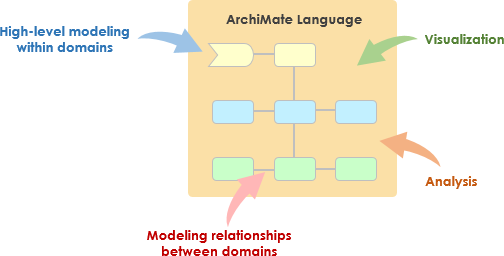
What is ArchiMate?

ArchiMate 的核心概念

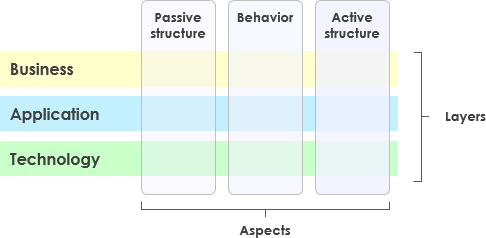
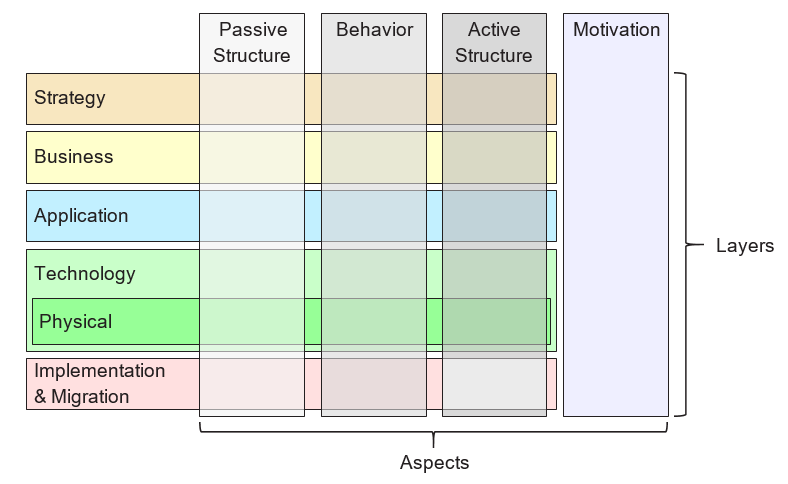
ArchiMate Core Framework

1. ArchiMate 的層級

ArchiMate 將企業架構分為三個主要層級:

  • 業務層:專注於支援組織目標的業務流程、服務和功能。
  • 應用層:處理支援業務層的應用服務、組件及其互動。
  • 技術層:涵蓋技術基礎設施,包括支援應用層的硬體、軟體和網路組件。

2. 核心元素

ArchiMate 定義了若干核心元素,用於建模架構:

  • 主動結構元素:代表執行行為的實體,例如業務參與者、應用組件和裝置。
  • 行為元素:代表架構內的流程、功能、服務和互動。
  • 被動結構元素:代表由行為元素使用或產生的資訊或資料,例如業務物件和資料物件。

3. 關係

ArchiMate 定義了多種關係類型,用於連接各個元素:

  • 結構關係:例如組成、聚合和特殊化。
  • 依賴關係:例如關聯、實現和被使用。
  • 動態關係: 例如觸發和流程。

4. 觀點

ArchiMate 提供多種觀點,以從不同角度呈現架構:

  • 業務流程觀點: 展示業務流程及其互動。
  • 應用合作觀點: 展示應用程式如何合作以支援業務流程。
  • 技術實現觀點: 展示技術元件如何實現應用元件。

ArchiMate 與 TOGAF ADM

TOGAF 架構開發方法(ADM)

TOGAF ADM 是一種全面的企業架構開發方法。它包含多個階段,每個階段專注於架構開發過程的特定方面。ArchiMate 透過提供標準化的方式,在每個階段對架構進行建模與可視化,以支援 TOGAF ADM。
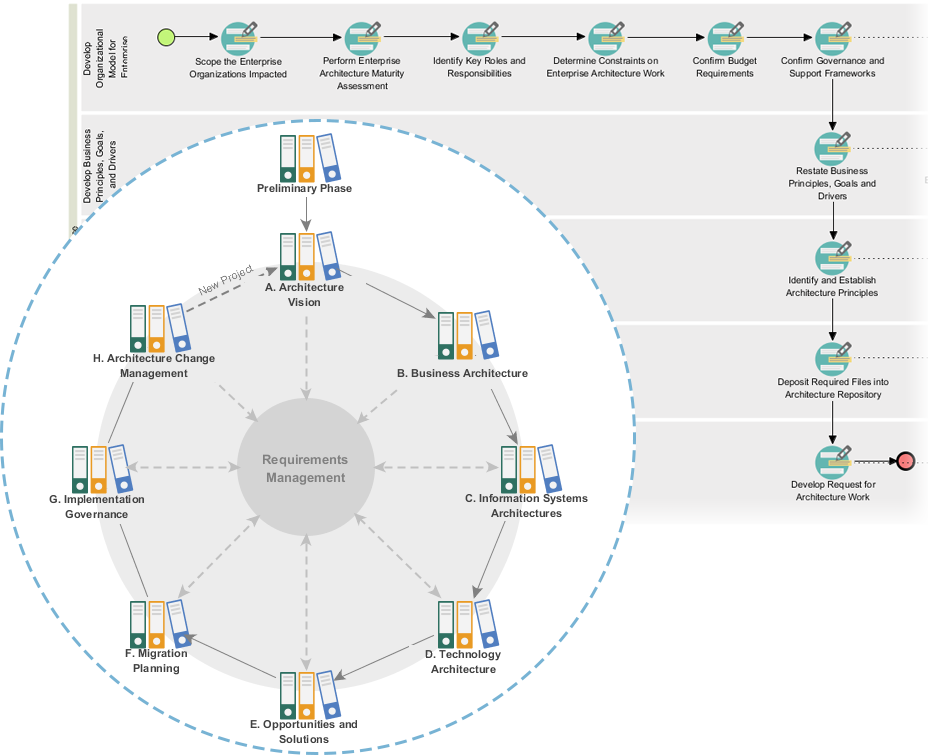
Powerful TOGAF ADM Toolset

TOGAF ADM 的階段

  1. 初步階段: 建立架構原則、架構框架與治理。
  2. 架構願景: 定義範圍、利害關係人、關注事項與業務目標。
  3. 業務架構: 開發業務架構,包括業務流程與服務。
  4. 資訊系統架構: 開發資料與應用架構。
  5. 技術架構: 開發技術架構。
  6. 機會與解決方案: 識別並優先處理架構專案。
  7. 遷移規劃: 制定遷移與實施計畫。
  8. 實施治理: 提供架構實施的治理與支援。

ArchiMate模型範例

此圖示說明了一個醫療管理系統的分層架構,分為兩個主要層級:應用層以及技術層以下是各元件及其互動的詳細說明:
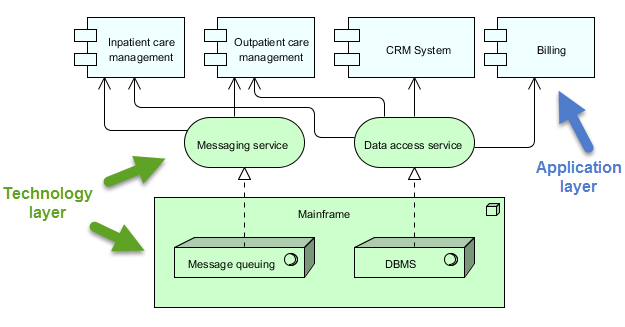
archimate diagram example

應用層(藍色)

此層由各種直接與使用者或其他系統互動以管理醫療服務的應用程式與系統組成。此層的主要元件包括:

  1. 住院照護管理:

    • 管理與住院患者相關的服務與流程。
  2. 門診照護管理:

    • 管理前往醫院接受治療但未住院的患者的服務與流程。
  3. CRM系統(客戶關係管理):

    • 管理與患者的互動,包括溝通、追蹤以及患者關係管理。
  4. 帳單:

    • 處理財務相關事務,包括生成帳單、處理付款以及管理財務紀錄。

技術層(綠色)

此層提供支援應用層中應用程式之基礎架構與服務。此層的主要元件包括:

  1. 訊息服務:

    • 促進醫療管理系統內不同應用程式與系統之間的溝通。
    • 確保訊息能可靠且依正確順序傳遞。
  2. 資料存取服務:

    • 提供一個集中式的資料存取與管理方式,以貫穿整個系統。
    • 確保資料能有效且安全地被存取與儲存。
  3. 主機:

    • 用於主機核心服務和資料的中央運算系統。
    • 包含兩個主要組件:
      • 訊息排隊:管理訊息的排隊與處理,以確保可靠通訊。
      • 資料庫管理系統(DBMS):儲存並管理各應用程式所使用的資料。

互動

  • 住院照護管理門診照護管理客戶關係管理系統,以及計費訊息服務以及資料存取服務以執行各自的功用。
  • 訊息服務以及資料存取服務依賴主機提供核心服務,例如訊息排隊與資料庫管理。
  • 主機確保訊息正確處理且資料有效管理,支援整個系統的運作。

此圖示描述了一種透過將應用層功能與基礎技術基礎設施分離,來管理醫療服務的結構化方法。這種分離使得系統設計更具模組化與可維護性,其中一個層級的變更對另一層級的影響極小。訊息服務資料存取服務作為中介者,促進應用組件與主機之間的通訊與資料管理。

推薦的 ArchiMate EA 工具

Visual Paradigm 廣受認可,被視為企業架構(EA)專案中 ArchiMate 建模的最佳工具之一。以下是它被高度推薦的原因:
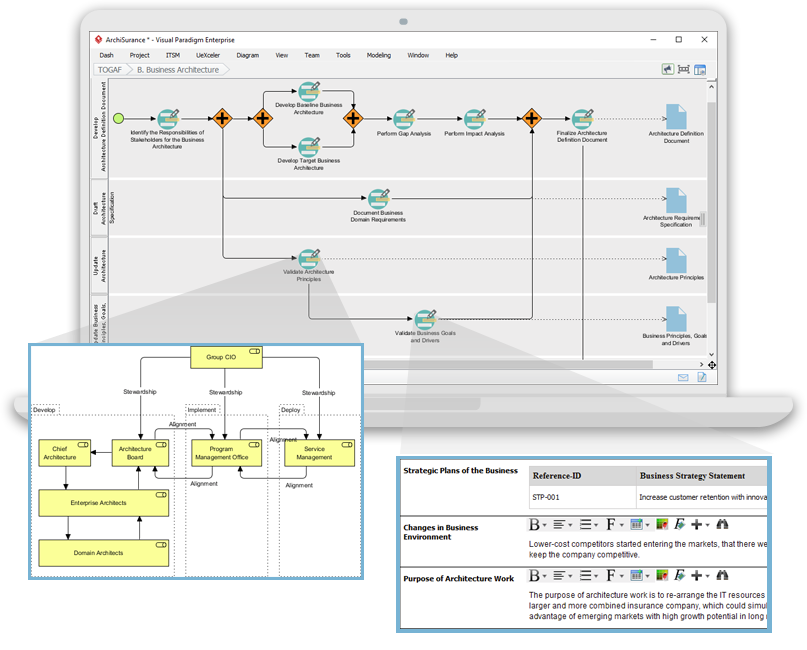
Navigating TOGAF: Your Guide to the ADM Process - Visual Paradigm Guides

1. 全面的 ArchiMate 支援

  • 完整的 ArchiMate 標準:Visual Paradigm 支援最新的 ArchiMate 標準,包括 ArchiMate 3.1,確保您能使用所有官方的 ArchiMate 元素與關係進行建模。
  • 豐富的元素庫:它提供廣泛的 ArchiMate 符號庫,讓您輕鬆建立詳細且精確的模型。

2. 使用者友善介面

  • 直覺設計:該工具提供易於導航的使用者友善介面,即使是初次接觸 ArchiMate 建模的使用者也能輕鬆上手。
  • 拖曳放置:拖曳放置功能可快速且高效地建立模型。

3. 進階建模功能

  • 分層檢視:支援建立分層檢視(例如:業務、應用、技術),以提供企業架構的整體視角。
  • 跨層關係:可輕鬆定義並視覺化架構中不同層級之間的關係。

4. 協作與分享

  • 團隊協作:Visual Paradigm 支援協作工作,允許多個使用者同時在相同專案上進行作業。
  • 版本控制:內建的版本控制功能可協助管理變更並追蹤模型的演進。

5. 整合能力

  • 工具整合:可與其他工具和平台(例如 JIRA、Confluence 和各種資料庫)無縫整合,提升整體企業架構實務。
  • 匯入/匯出:支援以多種格式匯入和匯出模型,包括 ArchiMate 交換檔案格式,確保與其他工具的相容性。

6. 文件編製與報告

  • 自動化文件編製:從您的 ArchiMate 模型自动生成完整文件,節省時間並確保一致性。
  • 自訂報告:允許根據特定利害關係人的需求建立自訂報告。

7. 培訓與支援

  • 豐富的資源:提供大量教學、指南與範例,協助使用者快速上手並精通 ArchiMate 模型設計。
  • 客戶支援:提供強大的客戶支援,協助解決可能出現的任何問題或疑問。

8. 可擴展性

  • 可擴展的解決方案:適用於中小型與大型企業架構專案,是各規模組織的多功能工具。

9. 合規性與標準

  • 產業標準:符合產業標準與最佳實務,確保您的企業架構模型合規且保持最新。

結論

ArchiMate 提供一種強大且標準化的企業架構建模方式,支援 TOGAF ADM 方法論。透過理解 ArchiMate 中的關鍵概念、層級、元素與關係,您能有效建模並向利害關係人傳達複雜的架構。所提供的範例說明了如何運用 ArchiMate 建模業務流程、應用協作與技術實現,以支援 TOGAF ADM 的各個階段。

ArchiMate 工具資源

  1. 免費線上 ArchiMate 圖示工具

    • 描述:使用支援 ArchiMate 3 視覺化模型語言的免費工具,在線上建立 ArchiMate 圖示。內含範例與範本,協助您快速上手。
    • 網址免費線上 ArchiMate 圖示工具 1
  2. 首頁 – 免費的 ArchiMate 資源

    • 描述:提供一種視覺化語言,用於建模與捕捉企業架構,並提供一種方式來視覺化不同領域之間及內部的關係。
    • 網址首頁 – 免費的 ArchiMate 資源 2
  3. Visual Paradigm – UML、敏捷、PMBOK、TOGAF、BPMN 等更多

  4. 第七章. ArchiMate – Visual Paradigm 社群圈

  5. 什麼是 ArchiMate?

    • 描述: 逐步學習指南,介紹如何使用 ArchiMate 進行企業架構建模。
    • 網址什麼是 ArchiMate? 5
  6. ArchiMate 工具

    • 描述: 學習如何使用 Visual Paradigm,這是一款專為敏捷軟體團隊設計的設計與管理工具。
    • 網址ArchiMate 工具 6
  7. 最佳 ArchiMate 軟體

    • 描述: 經認證的 ArchiMate 工具,用於有效的企業架構設計與建模。可快速繪製符合開放組織官方規範的 ArchiMate 圖表。
    • 網址最佳 ArchiMate 軟體 7
  8. 如何格式化 ArchiMate 元素?

  9. ArchiMate 觀點指南 – 資源地圖觀點

  10. ArchiMate 圖示教程

    • 描述: 教程幫助您了解 ArchiMate 圖示、如何創建它們以及何時使用它們。包含範例和技巧。
    • 網址ArchiMate 圖示教程 10

這些資源應能為使用 Visual Paradigm 的 ArchiMate 工具進行企業架構建模提供全面的起點。
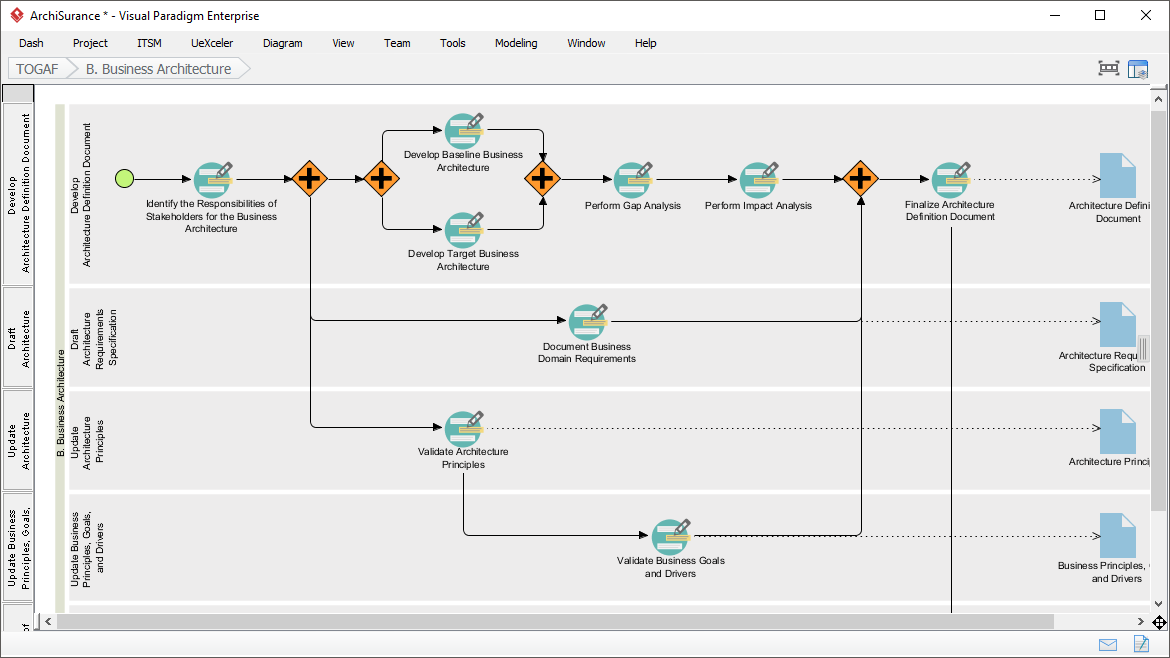
Visual Paradigm 的 TOGAF 導引流程全面指南

簡介

Visual Paradigm 的 TOGAF 導引流程是一項強大的工具,旨在簡化 TOGAF 架構開發方法(ADM)的採用。它提供逐步指導、操作說明和實際案例,以支援企業架構的發展。本全面指南將探討 Visual Paradigm 的 TOGAF 導引流程的關鍵功能、優勢及應用領域,並突出其在企業架構領域中的獨特之處。

Transform Your Business with Visual Paradigm and TOGAF - Visual Paradigm Guides

主要功能

  1. 逐步指導:

    • 導引流程為 TOGAF ADM 的每個階段提供詳細的逐步說明,確保使用者能輕鬆應對企業架構發展的複雜性。1112.
  2. 與 ArchiMate 的整合:

    • Visual Paradigm 支援 ArchiMate 與 TOGAF ADM 的整合,為企業架構計畫提供強大的組合。ArchiMate 3 擁有靈活的符號系統,使架構師能有效表達複雜的模型。1314.
  3. 自動化任務管理:

    • 該工具透過自動化任務管理與通知功能,提升整個流程效率,使使用者能逐步且協作式地開發架構交付成果。15.
  4. 視覺化流程地圖:

    • 該軟體具備視覺化流程地圖,協助使用者輕鬆導航整個企業架構流程。它提供完整的規劃、設計與開發工具,以完成 ADM 活動。14.
  5. 全面工具包:

    • Visual Paradigm 提供一系列專為 ADM 活動設計的工具,包括用於建模企業架構中業務、資訊科技與實體面向的 ArchiMate 圖表。這些工具提供架構的全面視圖,使 TOGAF 的理解與實踐更加容易。14.

優勢

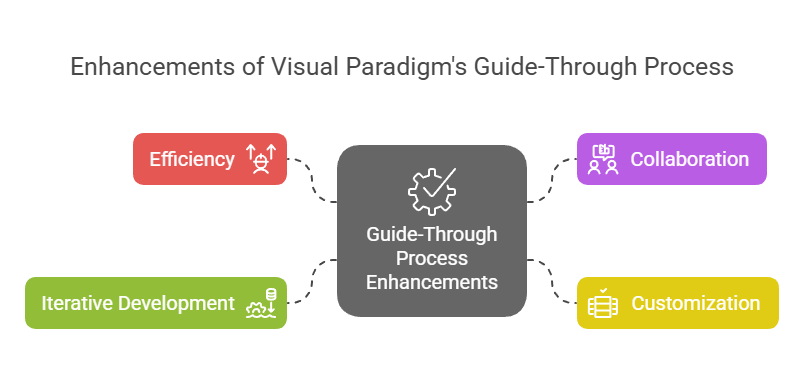
Enhancements of Visual Paradigm's Guide-Through Process: Visual Paradigm

  1. 效率:

    • 導引流程顯著提升了效率,透過提供明確的指示並自動化任務,使使用者能夠專注於戰略決策,而非程序性細節11.
  2. 協作:

    • 該工具促進了不同利益相關者之間的協作,包括專案所有者、業務分析師、企業架構師及IT專業人員。這種協作方式確保所有各方在架構開發過程中始終參與並保持資訊透明15.
  3. 客製化:

    • Visual Paradigm的工具支援客製化,使組織能夠根據自身需求與目標調整ADM流程。這種彈性確保架構開發流程與組織的獨特需求相符11.
  4. 迭代式開發:

    • TOGAF ADM的迭代特性完全由Visual Paradigm的導引流程支援。這使實務人員能夠根據不斷演變的信息需求與利益相關者反饋,調整並優化其工作,確保架構能滿足組織不斷變化的需要16.

應用領域

  1. 企業架構開發:

    • 主要應用領域為企業架構開發,導引流程協助組織設計、規劃、執行與治理其企業架構。它提供一種結構化的方法,有效將業務目標與IT策略對齊17.
  2. 數位轉型:

    • 該工具對於數位轉型計畫至關重要,組織透過實施新技術和流程來提升客戶體驗和營運效率18.
  3. 戰略規劃:

    • Visual Paradigm 的導引流程支援戰略規劃,透過提供一個全面的架構願景發展、定義範圍、識別利害關係人以及制定溝通計畫的架構。這確保架構開發過程與企業目標和戰略動力保持一致19.
  4. 敏捷方法:

    • 該工具整合敏捷方法與 UML,為企業架構開發提供全面的解決方案。此整合確保架構開發過程兼具彈性與效率,支援組織內部的敏捷實踐14.

結論

Visual Paradigm 的 TOGAF 導引流程在支援 TOGAF ADM 方面表現出色,是一套全面且有效的工具。其逐步引導、與 ArchiMate 的整合、自動化任務管理以及協作功能,使其成為企業架構開發的無價資源。透過運用此工具,組織可提升效率、協作、客製化與迭代開發能力,最終達成企業架構目標,推動業務價值與轉型

ArchiMate 3.2 第三章

3 語言結構

本章描述了ArchiMate企業架構建模語言的結構。其標準元素與關係的詳細定義與範例將於第四章至第一章中說明

3.1 語言設計考量

在開發企業架構通用元模型時,一個關鍵挑戰是在單一架構領域語言的具體性與一套極為通用的架構概念之間取得平衡,這種概念反映了將系統視為一組相互關聯實體的觀點。

ArchiMate語言的設計從一組相對通用的概念出發。這些概念已在後續各節中說明,針對不同架構層級進行了具體化。語言最重要的設計限制是,它被明確設計為盡可能簡小,但仍足以應付大多數企業架構建模任務。許多其他語言試圖滿足所有可能使用者的需求。為追求學習與使用的簡便性,ArchiMate語言僅限於足以建模典型80%實際案例的概念。

本標準並未說明ArchiMate語言設計背後的詳細理由。感興趣的讀者可參考[1]、[2]與[3],其中提供了語言建構與設計考量的詳細說明。

3.2 語言的頂層結構

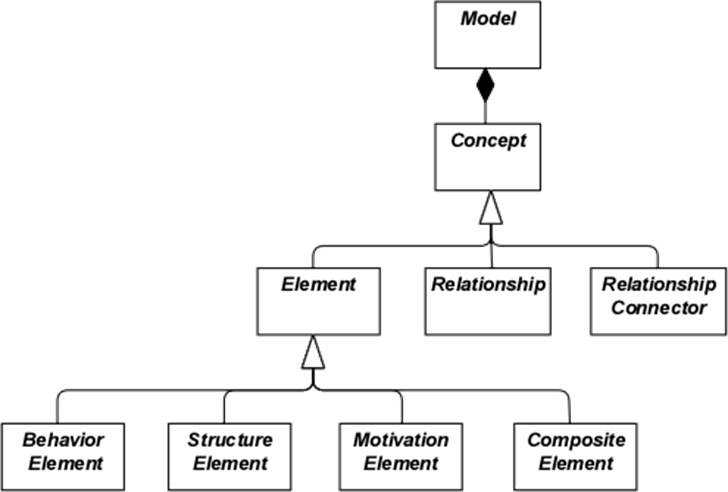
圖1概述了語言的頂層階層結構:

  • 模型是一組概念——概念可為元素關係
  • 元素可為行為元素、結構元素、動機元素或組合元素

請注意,這些是抽象概念;它們並非直接用於模型中。為表示此意,這些概念以白色呈現,標籤使用斜體。請參閱第四章以了解圖1中所用符號的說明。

圖1:ArchiMate概念的頂層階層

3.3 ArchiMate語言的分層

ArchiMate核心語言定義了一組通用元素及其關係的結構,這些可在不同層級中加以具體化。ArchiMate核心語言中定義了三個層級,如下所示:

  1. 業務層描述提供給客戶的業務服務,這些服務由業務實體執行的業務流程在組織中實現。
  2. 應用層描述支援業務的應用服務,以及實現這些服務的應用程式。
  3. 技術層包含資訊科技與作業科技。例如,您可以建模支援應用世界與業務層的處理、儲存與通訊科技,並以設施、實體設備、材料與配送網路來建模作業或實體科技。

不同層級中模型的整體結構類似。使用相同類型的元素與關係,儘管其具體性質與細緻程度有所不同。在下一章中,將介紹通用元模型的結構。在第8章、第9章與第10章中,這些元素將被進一步專化,以獲得特定層級的專屬元素。

配合服務導向原則,層級之間最重要的關係是由「服務」所形成的[1]關係,顯示一個層級中的元素如何由其他層級的服務來支援。(然而請注意,服務不僅可支援其他層級的元素,也能支援同一層級中的元素。)第二種連結由實作關係形成:下層的元素可能實作上層中對應的元素;例如,一個

「資料物件」(應用層)可能實作一個「業務物件」(業務層);或一個

「實體」(科技層)可能實作「資料物件」或「應用元件」(應用層)。

3.4 ArchiMate 核心框架

ArchiMate 核心框架是一個由九個單元組成的框架,用於分類 ArchiMate 核心語言的元素。它由三個面向與三個層級組成,如圖2所示。這被稱為 ArchiMate 核心框架。

重要的是要理解,根據面向與層級對元素進行分類僅是一種整體性的分類方式。現實中的架構元素並不需要嚴格限制於某一面向或層級,因為連接不同面向與層級的元素,在一致的架構描述中扮演著核心角色。例如,提前討論後續的理論概念,業務角色作為「純粹行為性」元素與「純粹結構性」元素之間的中介元素,而某段特定軟體是否被視為應用層或科技層的一部分,可能取決於具體情境。

圖2:ArchiMate 核心框架

該框架的結構允許從不同觀點對企業進行建模,其中單元格中的位置突顯了利害關係人的關注點。利害關係人通常會關心多個單元格。

該框架的維度如下:

  • 層級 – ArchiMate 中企業可建模的三個層級:業務、應用與科技(如第3.3節所述)
  • 面向:

主動結構面向,代表結構性元素(展現實際行為的業務參與者、應用元件與裝置;亦即活動的「主體」)

活動的「主體」)

行為面向,代表由參與者執行的行為(流程、功能、事件與服務);結構性元素被指派給行為性元素,以顯示是誰或什麼展現了行為

被動結構面向,代表行為所作用的對象;這些通常是業務層中的資訊物件與應用層中的資料物件,但也可用來表示實體物件

這三個面向靈感來自自然語言,其中一句話具有主詞(主動結構)、動詞(行為)與受詞(被動結構)。透過使用人們在其母語中熟悉的構造,ArchiMate 語言更易於學習與閱讀。

由於 ArchiMate 記法是一種圖形語言,其中元素以空間方式組織,因此此順序在建模中並無影響。

如圖1所示,一個複合元素是不一定僅適合框架中單一面向(欄位)的元素,而可能結合兩個或更多面向。

請注意,ArchiMate 語言並不要求建模者使用任何特定的佈局,例如本框架的結構;它僅僅是語言元素的分類。

3.5 ArchiMate 完整框架

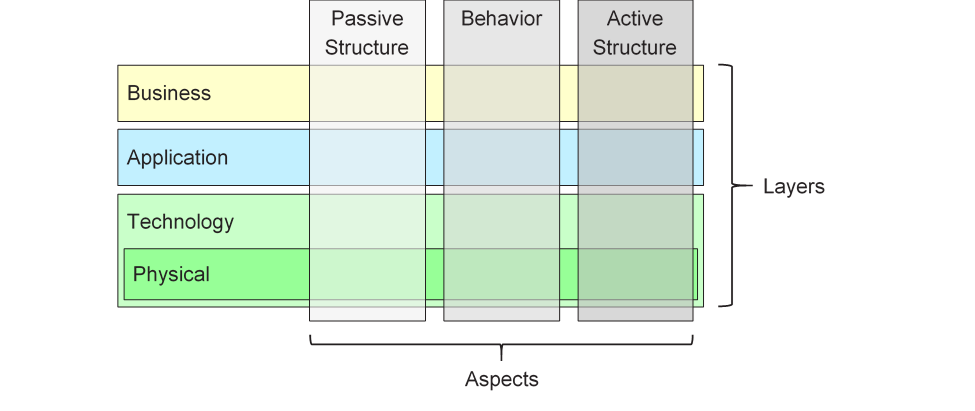
本標準版本所描述的 ArchiMate 完整框架,在核心框架的基礎上增加了若干層與一個方面。物理元素被納入技術層,用於模擬實體設施與設備、分佈網絡及物料。因此,這些元素也屬於核心元素。策略元素用於模擬戰略方向與決策,其內容詳述於第 7 章。動機方面在下一章以通用層級提出,並於第 6 章詳細說明。實施與遷移元素則於第 12 章中描述。由此產生的 ArchiMate 完整框架如圖 3 所示。

圖 3:ArchiMate 完整框架

ArchiMate 語言並未定義專門的資訊層;然而,可使用來自被動結構方面的元素,例如業務物件、資料物件與實體,來表示資訊實體。資訊建模在 ArchiMate 的各層中均受到支援。

3.6 ArchiMate 語言中的抽象

ArchiMate 語言的結構可容納多種熟悉的抽象與精化形式。首先,外部(黑箱,從盒子內容中抽象)與內部(白箱)視圖的區別在系統設計中十分常見。外部視圖描述系統對其環境必須執行的內容,而內部視圖則描述系統如何執行這些內容。

其次,行為與主動結構之間的區別常被用來將系統必須執行的事項及其執行方式,與實際執行這些事項的系統組成部分(人員、應用程式與基礎設施)分開。在建模新系統時,通常從系統必須執行的行為開始較為實用;而在建模現有系統時,則通常從構成系統的人員、應用程式與基礎設施開始,再進一步詳細分析這些主動結構所執行的行為。

第三種區別是概念、邏輯與物理抽象層級之間的差異。此概念源自資料建模:概念元素代表企業認為相關的資訊;邏輯元素為這些資訊提供邏輯結構,以便資訊系統進行操作;物理元素則描述資訊的儲存方式,例如檔案或資料庫表格的形式。在 ArchiMate 語言中,這對應於業務物件、資料物件與實體,以及它們之間的實現關係。

邏輯與物理元素之間的區別也延伸至應用程式的描述。TOGAF 企業元模型 [4] 包含一組實體,用以描述業務、資料、應用程式與技術組件及服務,以闡述架構概念。邏輯組件是資料或功能的實現或產品無關封裝,而物理組件則是具體的軟體組件、裝置等。此區別在 TOGAF 框架中以架構構建模塊(ABBs)與解決方案構建模塊(SBBs)的形式呈現。此區別再次有助於將企業架構從高階抽象描述逐步推進至具體的實現層設計。請注意,構建模塊可能包含多個元素,這些元素通常使用 ArchiMate 語言中的群組概念進行建模。

ArchiMate 語言有三種方式來建模此類抽象。首先,如 [6] 所述,可使用行為元素(如應用程式與技術功能)來建模邏輯組件,因為它們代表與實現無關的功能封裝。相對應的物理組件則可使用主動結構元素(如應用程式組件與節點)來建模,並指派給行為元素。其次,ArchiMate 語言支援「實現」的概念。這可透過自技術層向上推進來最佳說明:技術層定義了實現應用程式組件的實體與軟體,並提供與其他實體概念(如裝置、網路等)的對應關係,以支援資訊系統的實現。實現關係亦可用於模擬更抽象的實現關係,例如介於(較具體)需求與(較通用)原則之間的關係,其中需求的滿足即意味著遵循該原則。實現關係也允許應用程式組件之間或節點之間的關係。如此,可建模物理應用程式或技術組件實現邏輯應用程式或技術組件。第三,邏輯與物理應用程式組件可被定義為應用程式組件元素的元模型層級特化,詳述於第 14 章(另見第 14.2.2 節之範例)。TOGAF 內容元模型中的邏輯與物理技術組件亦同理,可定義為節點元素的特化(見第 14.2.3 節)。

ArchiMate 語言有意不支援類型與實例之間的差異。在企業架構的抽象層級上,通常更常建模的是類型與/或範例,而非實例。同樣地,ArchiMate 語言中的業務流程並非描述單一實例(即該流程的一次執行)。因此,在大多數情況下,會使用業務物件來建模物件類型(參見一個 UML® 類別),組織內可能存在多個實例。例如,每次保險申請流程的執行可能產生保險合約業務物件的一個特定實例,但這並不會在企業架構中進行建模。

3.7 概念及其符號

ArchiMate 語言將語言概念(即元模型的組成部分)與其符號分離。不同利害關係人團體可能需要不同的符號以理解架構模型或視圖。在此方面,ArchiMate 語言與 UML 或 BPMN™ 等語言不同,後者僅有一種標準化符號。第 13 章所說明的觀點機制提供了定義此類利害關係人導向視覺化的方法。

雖然 ArchiMate 概念的符號(應)可依利害關係人而異,但本標準提供一種通用的圖形符號,可供架構師及其他開發 ArchiMate 模型的人使用。此符號針對熟悉現有技術建模技術(如實體關係圖 ERD、UML 或 BPMN)的使用者設計,因此與之類似。在本文其餘部分,除非另有說明,用以呈現語言概念的符號均代表 ArchiMate 標準符號。大多數元素的標準符號由右上角帶有圖示的方框組成。在某些情況下,僅使用圖示本身亦可作為替代符號。應盡可能優先使用此標準圖示,以便任何熟悉 ArchiMate 語言的人皆能理解該語言所產生的圖示。

3.8 嵌套的使用

將元素嵌套於其他元素內部,可用作表達某些關係的替代圖形符號。此概念在第 5 章及各關係的定義中進一步說明。

3.9 顏色與符號提示的使用

在本標準內的元模型圖示中,使用灰色調來區分屬於 ArchiMate 框架不同方面的元素,具體如下:

  • 白色:用於抽象(即不可實例化)概念
  • 淺灰色:用於被動結構
  • 中灰色:用於行為
  • 深灰色:用於主動結構

在 ArchiMate 模型中,顏色並無正式語義,其使用由建模者自行決定。然而,可自由使用顏色以強調模型中的特定方面。例如,在本標準所呈現的許多範例模型中,顏色被用來區分 ArchiMate 核心框架的各層,具體如下:

  • 黃色:用於業務層
  • 藍色:用於應用層
  • 綠色:用於技術層

顏色亦可用於視覺強調。建議參考 [1] 的第 6 章以獲取相關指引。除了顏色外,亦可使用其他符號提示來區分框架的各層。元素左上角的字母 M、S、B、A、T、P 或 I 可分別表示動機、策略、業務、應用、技術、物理或實施與遷移元素。此符號的範例見於範例 34。

標準符號還使用了一種規則,即根據不同元素類型的符號角的形狀來表示,具體如下:

  • 方形角用於表示結構元素
  • 圓形角用於表示行為元素
  • 對角線角用於表示動機元素

[1]注意,此項在標準的先前版本中稱為「被使用」。為確保清晰,此名稱已更改为「服務」。

ArchiMate 3.2 Chapter 3

3 Language Structure

This chapter describes the structure of the ArchiMate Enterprise Architecture modeling language. The detailed definition and examples of its standard set of elements and relationships follow in Chapter 4 to Chapter 1

3.1 Language Design Considerations

A key challenge in the development of a general metamodel for Enterprise Architecture is to strike a balance between the specificity of languages for individual architecture domains and a very general set of architecture concepts, which reflects a view of systems as a mere set of inter-related entities.

The design of the ArchiMate language started from a set of relatively generic concepts. These have been specialized towards application at different architectural layers, as explained in the following sections. The most important design restriction on the language is that it has been explicitly designed to be as small as possible, but still usable for most Enterprise Architecture modeling tasks. Many other languages try to accommodate the needs of all possible users. In the interest of simplicity of learning and use, the ArchiMate language has been limited to the concepts that suffice for modeling the proverbial 80% of practical cases.

This standard does not describe the detailed rationale behind the design of the ArchiMate language. The interested reader is referred to [1], [2], and [3], which provide a detailed description of the language construction and design considerations.

3.2 Top-Level Language Structure

Figure 1 outlines the top-level hierarchical structure of the language:

  • A model is a collection of concepts – a concept is either an element or a relationship
  • An element is either a behavior element, a structure element, a motivation element, or a composite element

Note that these are abstract concepts; they are not intended to be used directly in models. To signify this, they are depicted in white with labels in italics. See Chapter 4 for an explanation of the notation used in Figure 1.

Figure 1: Top-Level Hierarchy of ArchiMate Concepts

3.3 Layering of the ArchiMate Language

The ArchiMate core language defines a structure of generic elements and their relationships, which can be specialized in different layers. Three layers are defined within the ArchiMate core language as follows:

  1. The Business Layer depicts business services offered to customers, which are realized in the organization by business processes performed by business actors.
  2. The Application Layer depicts application services that support the business, and the applications that realize them.
  3. The Technology Layer comprises both information and operational technology. You can model, for example, processing, storage, and communication technology in support of the application world and Business Layers, and model operational or physical technology with facilities, physical equipment, materials, and distribution networks.

The general structure of models within the different layers is similar. The same types of elements and relationships are used, although their exact nature and granularity differ. In the next chapter, the structure of the generic metamodel is presented. In Chapter 8, Chapter 9, and Chapter 10 these elements are specialized to obtain elements specific to a particular layer.

In alignment with service-orientation, the most important relationship between layers is formed by “serving”[1] relationships, which show how the elements in one layer are served by the services of other layers. (Note, however, that services need not only serve elements in another layer, but also can serve elements in the same layer.) A second type of link is formed by realization relationships: elements in lower layers may realize comparable elements in higher layers; e.g., a

“data object” (Application Layer) may realize a “business object” (Business Layer); or an

“artifact” (Technology Layer) may realize either a “data object” or an “application component” (Application Layer).

3.4 The ArchiMate Core Framework

The ArchiMate Core Framework is a framework of nine cells used to classify elements of the ArchiMate core language. It is made up of three aspects and three layers, as illustrated in Figure 2. This is known as the ArchiMate Core Framework.

It is important to understand that the classification of elements based on aspects and layers is only a global one. Real-life architecture elements need not strictly be confined to one aspect or layer because elements that link the different aspects and layers, play a central role in a coherent architectural description. For example, running somewhat ahead of the later conceptual discussions, business roles serve as intermediary elements between “purely behavioral” elements and “purely structural” elements, and it may depend on the context whether a certain piece of software is considered to be part of the Application Layer or the Technology Layer.

Figure 2: ArchiMate Core Framework

The structure of the framework allows for modeling of the enterprise from different viewpoints, where the position within the cells highlights the concerns of the stakeholder. A stakeholder typically can have concerns that cover multiple cells.

The dimensions of the framework are as follows:

  • Layers – the three levels at which an enterprise can be modeled in ArchiMate – Business, Application, and Technology (as described in Section 3.3)
  • Aspects:

— The Active Structure Aspect, which represents the structural elements (the business actors, application components, and devices that display actual behavior; i.e., the

“subjects” of activity)

— The Behavior Aspect, which represents the behavior (processes, functions, events, and services) performed by the actors; structural elements are assigned to behavioral elements, to show who or what displays the behavior

— The Passive Structure Aspect, which represents the objects on which behavior is performed; these are usually information objects in the Business Layer and data objects in the Application Layer, but they may also be used to represent physical objects

These three aspects were inspired by natural language where a sentence has a subject (active structure), a verb (behavior), and an object (passive structure). By using the same constructs that people are used to in their own languages, the ArchiMate language is easier to learn and read.

Since ArchiMate notation is a graphical language where elements are organized spatially, this order is of no consequence in modeling.

A composite element, as shown in Figure 1, is an element that does not necessarily fit in a single aspect (column) of the framework but may combine two or more aspects.

Note that the ArchiMate language does not require the modeler to use any particular layout such as the structure of this framework; it is merely a categorization of the language elements.

3.5 The ArchiMate Full Framework

The ArchiMate Full Framework, as described in this version of the standard, adds a number of layers and an aspect to the Core Framework_._ The physical elements are included in the Technology Layer for modeling physical facilities and equipment, distribution networks, and materials. As such, these are also core elements. The strategy elements are introduced to model strategic direction and choices. They are described in Chapter 7. The motivation aspect is introduced at a generic level in the next chapter and described in detail in Chapter 6. The implementation and migration elements are described in Chapter 12. The resulting ArchiMate Full Framework is shown in Figure 3.

Figure 3: ArchiMate Full Framework

The ArchiMate language does not define a specific layer for information; however, elements from the passive structure aspect such as business objects, data objects, and artifacts are used to represent information entities. Information modeling is supported across the different ArchiMate layers.

3.6 Abstraction in the ArchiMate Language

The structure of the ArchiMate language accommodates several familiar forms of abstraction and refinement. First of all, the distinction between an external (black-box, abstracting from the contents of the box) and internal (white-box) view is common in systems design. The external view depicts what the system has to do for its environment, while the internal view depicts how it does this.

Second, the distinction between behavior and active structure is commonly used to separate what the system must do and how the system does it from the system constituents (people, applications, and infrastructure) that do it. In modeling new systems, it is often useful to start with the behaviors that the system must perform, while in modeling existing systems, it is often useful to start with the people, applications, and infrastructure that comprise the system, and then analyze in detail the behaviors performed by these active structures.

A third distinction is between conceptual, logical, and physical abstraction levels. This has its roots in data modeling: conceptual elements represent the information the business finds relevant; logical elements provide logical structure to this information for manipulation by information systems; physical elements describe the storage of this information; for example, in the form of files or database tables. In the ArchiMate language, this corresponds with business objects, data objects, and artifacts, along with the realization relationships between them.

The distinction between logical and physical elements has also been carried over to the description of applications. The TOGAF Enterprise Metamodel [4] includes a set of entities that describe business, data, application, and technology components and services to describe architecture concepts. Logical components are implementation or product-independent encapsulations of data or functionality, whereas physical components are tangible software components, devices, etc. This distinction is captured in the TOGAF framework in the form of Architecture Building Blocks (ABBs) and Solution Building Blocks (SBBs). This distinction is again useful in progressing Enterprise Architectures from high-level, abstract descriptions to tangible, implementation-level designs. Note that building blocks may contain multiple elements, which are typically modeled using the grouping concept in the ArchiMate language.

The ArchiMate language has three ways of modeling such abstractions. First, as described in [6], behavior elements such as application and technology functions can be used to model logical components, since they represent implementation-independent encapsulations of functionality. The corresponding physical components can then be modeled using active structure elements such as application components and nodes, assigned to the behavior elements. Second, the ArchiMate language supports the concept of realization. This can best be described by working with the Technology Layer upwards. The Technology Layer defines the physical artifacts and software that realize an application component. It also provides a mapping to other physical concepts such as devices, networks, etc. needed for the realization of an information system. The realization relationship is also used to model more abstract kinds of realization, such as that between a (more specific) requirement and a (more generic) principle, where fulfillment of the requirement implies adherence to the principle. Realization is also allowed between application components and between nodes. This way you can model a physical application or technology component realizing a logical application or technology component, respectively. Third, logical and physical application components can be defined as metamodel-level specializations of the application component element, as described in Chapter 14 (see also the examples in Section 14.2.2). The same holds for the logical and physical technology components of the TOGAF Content Metamodel, which can be defined as specializations of the node element (see Section 14.2.3).

The ArchiMate language intentionally does not support a difference between types and instances. At the Enterprise Architecture abstraction level, it is more common to model types and/or exemplars rather than instances. Similarly, a business process in the ArchiMate language does not describe an individual instance (i.e., one execution of that process). In most cases, a business object is therefore used to model an object type (cf. a UML® class), of which several instances may exist within the organization. For instance, each execution of an insurance application process may result in a specific instance of the insurance policy business object, but that is not modeled in the Enterprise Architecture.

3.7 Concepts and their Notation

The ArchiMate language separates the language concepts (i.e., the constituents of the metamodel) from their notation. Different stakeholder groups may require different notations in order to understand an architecture model or view. In this respect, the ArchiMate language differs from languages such as UML or BPMN™, which have only one standardized notation. The viewpoint mechanism explained in Chapter 13 provides the means for defining such stakeholder-oriented visualizations.

Although the notation of the ArchiMate concepts can (and should) be stakeholder-specific, the standard provides one common graphical notation which can be used by architects and others who develop ArchiMate models. This notation is targeted towards an audience used to existing technical modeling techniques such as Entity Relationship Diagrams (ERDs), UML, or BPMN, and therefore resembles them. In the remainder of this document, unless otherwise noted, the symbols used to depict the language concepts represent the ArchiMate standard notation. This standard notation for most elements consists of a box with an icon in the upper-right corner. In several cases, this icon by itself may also be used as an alternative notation. This standard iconography should be preferred whenever possible so that anyone knowing the ArchiMate language can read the diagrams produced in the language.

3.8 Use of Nesting

Nesting elements inside other elements can be used as an alternative graphical notation to express some relationships. This is explained in more detail in Chapter 5 and in the definition of each of these relationships.

3.9 Use of Colors and Notational Cues

In the metamodel pictures within this standard, shades of grey are used to distinguish elements belonging to the different aspects of the ArchiMate framework, as follows:

  • White for abstract (i.e., non-instantiable) concepts
  • Light grey for passive structures
  • Medium grey for behavior
  • Dark grey for active structures

In ArchiMate models, there are no formal semantics assigned to colors and the use of color is left to the modeler. However, they can be used freely to stress certain aspects in models. For instance, in many of the example models presented in this standard, colors are used to distinguish between the layers of the ArchiMate Core Framework, as follows:

  • Yellow for the Business Layer
  • Blue for the Application Layer
  • Green for the Technology Layer

They can also be used for visual emphasis. A recommended text providing guidelines is Chapter 6 of [1]. In addition to the colors, other notational cues can be used to distinguish between the layers of the framework. A letter M, S, B, A, T, P, or I in the top-left corner of an element can be used to denote a Motivation, Strategy, Business, Application, Technology, Physical, or Implementation & Migration element, respectively. An example of this notation is depicted in Example 34.

The standard notation also uses a convention with the shape of the corners of its symbols for different element types, as follows:

  • Square corners are used to denote structure elements
  • Round corners are used to denote behavior elements
  • Diagonal corners are used to denote motivation elements

[1] Note that this was called “used by” in previous versions of the standard. For the sake of clarity, this name has been changed to “serving”.

Comprehensive Guide to Visual Paradigm’s TOGAF Guide-Through Process

Introduction

Visual Paradigm’s TOGAF Guide-Through Process is a powerful tool designed to streamline the adoption of the TOGAF Architecture Development Method (ADM). It provides step-by-step guidance, instructions, and real-life examples to support enterprise architecture development. This comprehensive guide will explore the key features, benefits, and application areas of Visual Paradigm’s TOGAF Guide-Through Process, highlighting why it stands out in the field of enterprise architecture.

Transform Your Business with Visual Paradigm and TOGAF - Visual Paradigm Guides

Key Features

  1. Step-by-Step Guidance:

    • The Guide-Through Process offers detailed, step-by-step instructions for each phase of the TOGAF ADM, ensuring that users can navigate the complexities of enterprise architecture development with ease 1112.
  2. Integration with ArchiMate:

    • Visual Paradigm supports the integration of ArchiMate with TOGAF ADM, providing a powerful combination for enterprise architecture initiatives. ArchiMate 3, with its versatile notation system, allows architects to express complex models effectively 1314.
  3. Automated Task Management:

    • The tool enhances the entire process with automated task management and notifications, enabling users to develop architecture deliverables incrementally and collaboratively 15.
  4. Visual Process Maps:

    • The software features visual process maps that help users navigate through the entire enterprise architecture process easily. It provides a full set of planning, design, and development tools to complete ADM activities 14.
  5. Comprehensive Toolkit:

    • Visual Paradigm offers a range of tools tailored for ADM activities, including ArchiMate diagrams for modeling business, IT, and physical aspects of enterprise architecture. These tools provide a comprehensive view of the architecture, making it easier to understand and implement TOGAF 14.

Benefits

Enhancements of Visual Paradigm's Guide-Through Process: Visual Paradigm

  1. Efficiency:

    • The Guide-Through Process significantly enhances efficiency by providing clear instructions and automating tasks, allowing users to focus on strategic decisions rather than procedural details 11.
  2. Collaboration:

    • The tool facilitates collaboration among different stakeholders, including project owners, business analysts, enterprise architects, and IT professionals. This collaborative approach ensures that all parties are engaged and informed throughout the architecture development process 15.
  3. Customization:

    • Visual Paradigm’s tool allows for customization, enabling organizations to tailor the ADM process to their specific needs and goals. This flexibility ensures that the architecture development process aligns with the organization’s unique requirements 11.
  4. Iterative Development:

    • The iterative nature of the TOGAF ADM is fully supported by Visual Paradigm’s Guide-Through Process. This allows practitioners to adapt and refine their work based on evolving information needs and stakeholder feedback, ensuring that the architecture meets the changing needs of the organization 16.

Application Areas

  1. Enterprise Architecture Development:

    • The primary application area is enterprise architecture development, where the Guide-Through Process helps organizations design, plan, implement, and govern their enterprise architecture. It provides a structured approach to align business goals with IT strategies effectively 17.
  2. Digital Transformation:

    • The tool is crucial for digital transformation initiatives, where organizations seek to enhance customer experience and operational efficiency through the implementation of new technologies and processes 18.
  3. Strategic Planning:

    • Visual Paradigm’s Guide-Through Process supports strategic planning by providing a comprehensive framework for developing architecture visions, defining scope, identifying stakeholders, and creating communications plans. This ensures that the architecture development process is aligned with business goals and strategic drivers 19.
  4. Agile Methodologies:

    • The tool integrates agile methodologies and UML, providing a comprehensive solution for enterprise architecture development. This integration ensures that the architecture development process is both flexible and efficient, supporting agile practices within the organization 14.

Conclusion

Visual Paradigm’s TOGAF Guide-Through Process stands out as a comprehensive and effective tool for supporting the TOGAF ADM. Its step-by-step guidance, integration with ArchiMate, automated task management, and collaborative features make it an invaluable resource for enterprise architecture development. By leveraging this tool, organizations can enhance efficiency, collaboration, customization, and iterative development, ultimately achieving their enterprise architecture goals and driving business value and transformation.

Comprehensive Tutorial for ArchiMate Supporting TOGAF ADM

Introduction to ArchiMate

ArchiMate is an open and independent enterprise architecture modeling language that supports the description, analysis, and visualization of architecture within and across business domains. It is designed to provide a clear and unambiguous way to communicate complex architectures to stakeholders. ArchiMate is particularly useful when used in conjunction with the TOGAF Architecture Development Method (ADM), providing a standardized way to model and communicate enterprise architectures.

What is ArchiMate?

Key Concepts of ArchiMate

ArchiMate Core Framework

1. Layers of ArchiMate

ArchiMate divides the enterprise architecture into three main layers:

  • Business Layer: Focuses on the business processes, services, and functions that support the organization’s goals.
  • Application Layer: Deals with the application services, components, and their interactions that support the business layer.
  • Technology Layer: Covers the technology infrastructure, including hardware, software, and network components that support the application layer.

2. Core Elements

ArchiMate defines several core elements that are used to model the architecture:

  • Active Structure Elements: Represent the entities that perform behavior, such as business actors, application components, and devices.
  • Behavior Elements: Represent the processes, functions, services, and interactions within the architecture.
  • Passive Structure Elements: Represent the information or data used or produced by behavior elements, such as business objects and data objects.

3. Relationships

ArchiMate defines several types of relationships to connect the elements:

  • Structural Relationships: Such as composition, aggregation, and specialization.
  • Dependency Relationships: Such as association, realization, and used-by.
  • Dynamic Relationships: Such as triggering and flow.

4. Viewpoints

ArchiMate provides several viewpoints to visualize the architecture from different perspectives:

  • Business Process Viewpoint: Shows the business processes and their interactions.
  • Application Cooperation Viewpoint: Shows how applications cooperate to support business processes.
  • Technology Realization Viewpoint: Shows how technology components realize application components.

ArchiMate and TOGAF ADM

TOGAF Architecture Development Method (ADM)

TOGAF ADM is a comprehensive methodology for developing enterprise architectures. It consists of several phases, each focusing on a specific aspect of the architecture development process. ArchiMate supports TOGAF ADM by providing a standardized way to model and visualize the architecture at each phase.

Powerful TOGAF ADM Toolset

Phases of TOGAF ADM

  1. Preliminary Phase: Establishes the architecture principles, framework, and governance.
  2. Architecture Vision: Defines the scope, stakeholders, concerns, and business objectives.
  3. Business Architecture: Develops the business architecture, including business processes and services.
  4. Information Systems Architectures: Develops the data and application architectures.
  5. Technology Architecture: Develops the technology architecture.
  6. Opportunities and Solutions: Identifies and prioritizes architecture projects.
  7. Migration Planning: Develops the migration and implementation plan.
  8. Implementation Governance: Provides governance and support for the implementation of the architecture.

Examples of ArchiMate Models

This diagram illustrates a layered architecture for a healthcare management system, divided into two main layers: the Application Layer and the Technology Layer. Here’s a detailed explanation of each component and their interactions:

archimate diagram example

Application Layer (Blue)

This layer consists of the various applications and systems that directly interact with users or other systems to manage healthcare services. The key components in this layer are:

  1. Inpatient Care Management:

    • Manages services and processes related to patients who are admitted to the hospital.
  2. Outpatient Care Management:

    • Manages services and processes for patients who visit the hospital for treatment but are not admitted.
  3. CRM System (Customer Relationship Management):

    • Manages interactions with patients, including communication, follow-ups, and patient relationship management.
  4. Billing:

    • Handles the financial aspects, including generating bills, processing payments, and managing financial records.

Technology Layer (Green)

This layer provides the underlying infrastructure and services that support the applications in the Application Layer. The key components in this layer are:

  1. Messaging Service:

    • Facilitates communication between different applications and systems within the healthcare management system.
    • Ensures that messages are delivered reliably and in the correct order.
  2. Data Access Service:

    • Provides a centralized way to access and manage data across the system.
    • Ensures that data is retrieved and stored efficiently and securely.
  3. Mainframe:

    • The central computing system that hosts core services and data.
    • Includes two main components:
      • Message Queuing: Manages the queuing and processing of messages to ensure reliable communication.
      • DBMS (Database Management System): Stores and manages the data used by the various applications.

Interactions

  • Inpatient Care ManagementOutpatient Care ManagementCRM System, and Billing interact with the Messaging Service and Data Access Service to perform their respective functions.
  • The Messaging Service and Data Access Service rely on the Mainframe for core services like message queuing and database management.
  • The Mainframe ensures that messages are processed correctly and data is managed efficiently, supporting the entire system’s operations.

The diagram depicts a structured approach to managing healthcare services by separating the application-level functions from the underlying technology infrastructure. This separation allows for more modular and maintainable system design, where changes in one layer have minimal impact on the other. The Messaging Service and Data Access Service act as intermediaries, facilitating communication and data management between the application components and the mainframe.

Recommended ArchiMate EA Tool

Visual Paradigm is widely recognized as one of the best tools for ArchiMate modeling in Enterprise Architecture (EA) projects. Here are some reasons why it is highly recommended:

Navigating TOGAF: Your Guide to the ADM Process - Visual Paradigm Guides

1. Comprehensive ArchiMate Support

  • Full ArchiMate Standard: Visual Paradigm supports the latest ArchiMate standards, including ArchiMate 3.1, ensuring that you can model using all the official ArchiMate elements and relationships.
  • Rich Library of Elements: It provides a extensive library of ArchiMate symbols, making it easy to create detailed and accurate models.

2. User-Friendly Interface

  • Intuitive Design: The tool offers a user-friendly interface that is easy to navigate, even for users who are new to ArchiMate modeling.
  • Drag-and-Drop: The drag-and-drop functionality allows for quick and efficient model creation.

3. Advanced Modeling Features

  • Layered Views: Supports the creation of layered views (e.g., Business, Application, Technology) to provide a holistic view of the enterprise architecture.
  • Cross-Layer Relationships: Easily define and visualize relationships across different layers of the architecture.

4. Collaboration and Sharing

  • Team Collaboration: Visual Paradigm supports collaborative work, allowing multiple users to work on the same project simultaneously.
  • Version Control: Integrated version control helps manage changes and track the evolution of your models.

5. Integration Capabilities

  • Tool Integration: Seamlessly integrates with other tools and platforms, such as JIRA, Confluence, and various databases, enhancing the overall EA practice.
  • Import/Export: Supports importing and exporting models in various formats, including ArchiMate Exchange File Format, ensuring compatibility with other tools.

6. Documentation and Reporting

  • Automated Documentation: Generates comprehensive documentation from your ArchiMate models, saving time and ensuring consistency.
  • Custom Reports: Allows for the creation of custom reports tailored to specific stakeholder needs.

7. Training and Support

  • Extensive Resources: Offers a wealth of tutorials, guides, and examples to help users get started and master ArchiMate modeling.
  • Customer Support: Provides robust customer support to assist with any issues or questions that may arise.

8. Scalability

  • Scalable Solutions: Suitable for both small and large-scale EA projects, making it a versatile tool for organizations of all sizes.

9. Compliance and Standards

  • Industry Standards: Aligns with industry standards and best practices, ensuring that your EA models are compliant and up-to-date.

Conclusion

ArchiMate provides a powerful and standardized way to model enterprise architectures, supporting the TOGAF ADM methodology. By understanding the key concepts, layers, elements, and relationships in ArchiMate, you can effectively model and communicate complex architectures to stakeholders. The examples provided illustrate how ArchiMate can be used to model business processes, application cooperation, and technology realization, supporting the various phases of the TOGAF ADM.

ArchiMate Tool Resource

  1. Free Online ArchiMate Diagram Tool

    • Description: Create ArchiMate diagrams online with a free tool that supports ArchiMate 3 visual modeling language. Includes examples and templates to help you get started.
    • URLFree Online ArchiMate Diagram Tool 1
  2. Main Page – ArchiMate Resources for FREE

    • Description: Offers a visual language to model and capture enterprise architecture, providing a means to visualize relationships within and between different domains.
    • URLMain Page – ArchiMate Resources for FREE 2
  3. Visual Paradigm – UML, Agile, PMBOK, TOGAF, BPMN and More!

  4. Chapter 7. ArchiMate – Visual Paradigm Community Circle

  5. What is ArchiMate?

    • Description: Step-by-step learning guide for ArchiMate, including how to use it for enterprise architecture modeling.
    • URLWhat is ArchiMate? 5
  6. ArchiMate tools

    • Description: Learn how to use Visual Paradigm, a design and management tool designed for agile software teams.
    • URLArchiMate tools 6
  7. Best ArchiMate Software

    • Description: Certified ArchiMate tool for effective EA design and modeling. Quickly draw ArchiMate diagrams that conform to The Open Group official specification.
    • URLBest ArchiMate Software 7
  8. How to Format ArchiMate Elements?

  9. ArchiMate Viewpoint Guide – Resource Map Viewpoint

  10. ArchiMate Diagram Tutorial

    • Description: Tutorial that helps you learn about ArchiMate diagrams, how to create them, and when to use them. Includes examples and tips.
    • URLArchiMate Diagram Tutorial 10

These resources should provide a comprehensive starting point for using Visual Paradigm’s ArchiMate tool for enterprise architecture modeling.