實體-關係圖(ERD)建模的完整指南

ERD 仍然是設計關係型資料庫、溝通資料需求以及避免後期高昂重設計的重要工具之一。

1. 什麼是 ERD?我們為什麼要使用它?

一個實體-關係圖(ERD)是一種視覺化模型,用以顯示:

  • 那些事物的事物我們想要儲存的事物(實體)
  • 那些事物的屬性屬性(屬性)
  • 這些事物之間是如何連接(關係)
  • 每個事物可以有多少個被連接(基數 / 多重性)

2025–2026 年的主要用途:

  • 在開發人員、分析師、產品經理與領域專家之間傳達結構
  • 在撰寫 DDL(CREATE TABLE …)之前,作為唯一的真實來源
  • 及早發現邏輯錯誤(重複、遺漏的約束、錯誤的基數)
  • 支援微服務/領域驅動設計的邊界識別
  • 在許多現代工具中自動產生文件

2. 當今使用的核心符號

目前仍積極使用的三大類符號:

符號 受歡迎程度(2025 年) 可讀性 最適合用於 基數符號
烏鴉之腳 最高 非常高 大多數團隊與工具(Lucidchart、dbdiagram、Draw.io、QuickDBD 等) 烏鴉之腳、橫線、圓圈、虛線
中等 中等 學術界,部分概念建模 數字(1、N),菱形較多
IDEF1X 中等 部分政府或舊系統 特定的框中框符號

烏鴉之腳是 2025–2026 年的實際工業標準 → 我們將在本指南中使用它。

3. 基本構建模塊(烏鴉之腳)

概念 符號 描述 範例
強實體 矩形 獨立存在,擁有自己的主鍵 客戶、訂單、產品
弱實體 雙重矩形 存在依賴於所有者實體;部分鍵 + 所有者鍵 = 完整鍵 訂單明細(依賴於訂單)
屬性 橢圓形(連接到實體) 實體的屬性 姓名、價格、電子郵件
主要鍵 底線標示的屬性 唯一識別實體實例 客戶編號、ISBN
多值屬性 雙重橢圓形 可具有多個值(通常會變成獨立的表格) 電話號碼、標籤
衍生屬性 虛線橢圓形 可從其他屬性計算得出 年齡(由出生日期計算)
複合屬性 包含其他橢圓形的橢圓形 由多個子屬性組成的屬性 完整地址 → 街道、城市、郵遞區號

4. 關係與基數(實體關係圖的核心)

關係 = 菱形(在現代極簡風格中,有時僅用一條線表示)

基數回答兩個問題:關係的每一側的關係:

  • 相關實例的最小數量?(0 或 1)
  • 相關實例的最大數量?(1 或多個 = N)
符號(烏鴉足) 最小 最大值 意義(從此側) 常見名稱 範例句子
圓圈(○) 0 可選 一位顧客可能有下零筆訂單
短線( ) 1 必要 一個(恰好)
烏鴉腳(>) 0 N 零或許多 可選的多個 一位顧客可以下多筆訂單
線 + 烏鴉腳(> ) 1 N 一個或多個 強制多個
雙線( ) 1 1 恰好一個

常見模式(書寫為左 → 右):

  • 1:1 || — || 人員 ↔ 护照(目前)
  • 1:0..1 || — ○| 部門 ↔ 管理員(部分部門無管理員)
  • 1:N || — >| 作者 → 書籍
  • 1:0..N || — ○> 客戶 → 訂單
  • M:N >| — >| 學生 ↔ 課程(多對多)

5. 參與約束

  • 完全參與 = 從實體到關係的雙線(每個實例必須 參與)
  • 部分參與 = 單線(部分實例可能不參與)

範例:

  • 每個訂單 必須至少有一個 訂單明細 → 完全參與(雙線)+ 1..N
  • 並非每個客戶 已下訂單訂單 → 部分參與 + 0..N

6. 弱實體與識別關係

弱實體:

  • 無法在沒有其擁有者(強實體)的情況下存在
  • 其主鍵 = 擁有者的主鍵 + 部分鍵(鑑別符)

符號:

  • 雙矩形
  • 識別關係 = 雙菱形粗線
  • 通常為 1:N 的識別關係(擁有者 → 多個弱實體)

經典範例:

訂單包含訂單明細
(雙矩形 + 粗線)
主鍵:order_id 主鍵:(order_id, line_number)

7. 逐步實體關係圖建模流程(2025–2026 實務工作流程)

  1. 深入理解領域 與利害關係人溝通 → 收集名詞與動詞

  2. 列出候選實體(名詞)→ 篩選出需要獨立儲存的現實世界物件

  3. 列出每個實體的屬性 → 標記主鍵(底線標示) → 識別候選鍵/自然鍵 → 發現多值、複合及衍生屬性

  4. 找出關係 (動詞) → 提問:「哪些實體是直接關聯的?」 → 避免傳遞關係(它們通常隱藏了遺漏的實體)

  5. 決定基數與參與度 針對 每個方向 → 使用範本撰寫 4–6 句話:「每個 A 可以/必須與 零/一個/多個 B。” 「每個 B 可以/必須與 零/一個/多個 A.”

  6. 處理 M:N 關係 几乎總是將其轉換為聯結表(弱實體或強實體)。如果關係本身具有屬性,則添加屬性(例如:註冊日期、成績)

  7. 識別弱實體 提問:「這個實體能否在沒有另一個實體的情況下存在?」

  8. 新增超型/子型 (如有需要——繼承)使用圓圈標示 d(互斥)/o(重疊)

  9. 審查常見的異常情況

    • 扇形陷阱/空洞陷阱
    • 太多 M:N 關係且無屬性 → 是否遺漏實體?
    • 重複的關係
    • 遺漏強制參與
    • 僅包含外鍵的實體 → 可能為弱實體
  10. 與利益相關者驗證使用具體範例

8. 現代最佳實務與技巧(2025–2026)

  • 建議使用極簡風格(無菱形——僅使用標示線條)
  • 使用動詞片語於關係線上(例如:放置、包含、教授)
  • 在大型模型中以顏色區分領域/封閉上下文
  • 將邏輯ERD與物理模型分開(資料類型、索引等稍後再加入)
  • 對 .drawio / .dbml / .erd 檔案進行版本控制
  • 使用可產生 SQL / Prisma / TypeORM 資料結構的工具(dbdiagram.io、erdgo、QuickDBD、Diagrams.net + 插件)
  • 對於極大型系統 → 每個封閉上下文使用模組化ERD

快速參考 – 最常見的模式

  • 客戶 1 —— 0..* 訂單
  • 訂單 1 —— 1..* 訂單明細
  • 產品 * —— * 分類 → 解決為關聯表 + 屬性
  • 員工 1 —— 0..1 部門(主管)
  • 部門 1 —— 0..* 員工(成員)
  • 個人 1 —— 0..1 車輛(目前車輛)

推薦的AI ERD 工具

Visual Paradigm 提供完整的生態系用於ERD視覺化建模,結合桌面級工程能力與雲端敏捷性、AI加速及團隊協作功能。這使其適用於個人建模者、敏捷團隊、企業架構師以及從快速原型到複雜遺留系統重構的資料庫專業人員。

該生態系主要由兩個相互補足的主要平台組成:

  • Visual Paradigm Desktop(適用於 Windows、macOS、Linux 的下載型應用程式)——專注於深入且專業的資料庫工程。
  • Visual Paradigm Online(基於瀏覽器,無需安裝)—— 為快速、協作式、AI輔助的圖示繪製而優化。

兩者均支援核心ERD符號(包括烏鴉足符號與陳氏符號)、概念/邏輯/物理層級,以及模型層級間的完整可追溯性。

生態系統在ERD視覺化建模過程中的關鍵協助方式

  1. 直覺且快速的圖示建立
    • 拖放介面搭配以資源為中心的建模(無需不斷切換工具列)。
    • 建立關係時自動產生外鍵欄位。
    • 支援所有標準ERD元素:強/弱實體、識別/非識別關係、多值/衍生/複合屬性、儲存程序、觸發器、檢視、唯一性約束等。
    • 子圖示有助於將大型企業架構分解為邏輯視圖。
  2. 完整生命週期支援:概念 → 邏輯 → 物理
    • 一键推導:從概念模型生成邏輯ERD,從邏輯模型生成物理ERD(透過Model Transitor自動追蹤與導航)。
    • 維持抽象層級間的一致性——某一層的變更可智能地傳播。
  3. AI驅動的加速(在VP Online中尤為強大)
    • 資料庫建模AIAI圖示生成器——以白話英文描述您的資料需求(例如:「我們有下訂單的客戶,訂單包含來自多個類別的產品」),AI將立即生成一個規範化且專業的ERD,包含實體、關係與鍵。
    • AI生成器支援陳氏符號的ERD。
    • 非常適合快速原型設計,或從模糊的業務需求開始時使用。
  4. 資料庫工程與同步
    • 正向工程——為主要資料庫系統(如MySQL、PostgreSQL、Oracle、SQL Server、SQLite、Amazon Redshift等)生成完整且無錯誤的DDL指令碼(或直接建立/更新資料庫)。
    • 反向工程——匯入現有的資料庫,並立即重建視覺化ERD(對遺留系統或文件恢復極為有幫助)。
    • 補丁/差異比對工具——比較模型與即時資料庫,生成差異指令碼,安全地應用變更而不造成資料遺失。
    • 直接在ERD實體中輸入範例資料 → 導出至資料庫以快速初始化。
  5. 團隊協作與版本控制
    • 即時同時編輯(多名使用者同時在相同的實體關係圖上操作)。
    • 內建衝突檢測與智慧化解決。
    • 完整的版本歷史記錄,提交/更新,還原變更。
    • 評論直接在圖形元素上進行評論以提供反饋。
    • 發佈與分享 — 產生網頁連結、嵌入圖形,匯出為 PDF/圖片/HTML 格式,供未取得授權的利害關係人使用。
    • 集中式雲端儲存庫(VPository)讓開發、測試、生產環境中的所有人保持一致。
  6. 整合至更廣泛的模型生態系統
    • 將實體關係圖的實體連結至其他圖表:在資料流程圖、UML 類圖、線框圖、BPMN 流程等中引用資料實體。
    • 產生ORM 程式碼(Hibernate 等)從實體關係圖生成 → 將視覺模型與應用層相連接。
    • 視覺差異比對 — 比較不同版本,或模型與資料庫結構之間的差異。
    • 匯出專業的資料字典/規格,用於文件編製與交接。

快速比較:何時使用生態系統中的哪一部分

需求/情境 推薦平台 實體關係圖情境下的關鍵優勢
深度逆向工程、修補生產資料庫、ORM 生成 桌面端 完整的工程套件、離線作業、進階同步功能
快速草圖、文字驅動的 AI 輔助設計、零設定 線上 AI 生成、瀏覽器存取、輕量級
即時團隊建模會議 線上(或桌面端 + 團隊協作伺服器) 同時編輯、評論、衝突解決
企業規模的模式搭配子模型 桌面版 針對極大型模型提供更佳效能
利害關係人審查與分享 兩者皆可(發佈功能) 網頁連結、嵌入內容、PDF 匯出
免費/非商業用途 社群版(桌面版)或免費的 Visual Paradigm 在線帳戶 完整的 ERD 編輯功能,進階工程功能有限

總而言之,Visual Paradigm 的生態系在 ERD 模型設計的每個階段都消除了障礙——從最初的腦力激盪(AI + 快速拖曳),經過協作式精煉與驗證,到最終的實作與維護(往返工程)。當您的工作流程同時包含視覺化溝通與實際資料庫交付時,此系統尤為強大。

ERD 文章

建模社交媒體平台資料庫:在 Visual Paradigm 中透過 AI 技術生成實體關係圖

Learn how to use Visual Paradigm’s AI to instantly generate professional ER diagrams for a social media platform database from simple text prompts.

坦白說:從一張白紙開始設計資料庫可能是一項令人卻步的任務。無論你是經驗豐富的軟體架構師,還是學習資料模型的學生,手動繪製實體、定義屬性以及規劃關係線都需要投入大量心力。這正是 AI 實體關係圖(ERD)生成 改變遊戲規則。只需描述你的專案構想——例如「社交媒體平台」——你就可以使用 Visual Paradigm Desktop 將自然語言立即轉換為專業且符合標準的資料模型。

此功能不僅僅是加快流程;更是在商業需求與技術架構之間架起橋樑。在本篇深入探討中,我們將說明如何僅用幾秒鐘,透過這個 智慧資料庫設計工具.

快速總結:重點要點

  • 文字轉模型效率: 將簡單的英文描述立即轉換為複雜的實體關係圖。
  • 智慧辨識: AI 可自動辨識實體、屬性、主要鍵與關係。
  • 標準符號: 產生符合業界標準實體關係圖規範(如鴿子腳符號等)的圖表。
  • 完全可編輯: 結果為原生的 Visual Paradigm 圖表,可進一步優化並產生 SQL。

步驟一:透過自然語言定義範圍

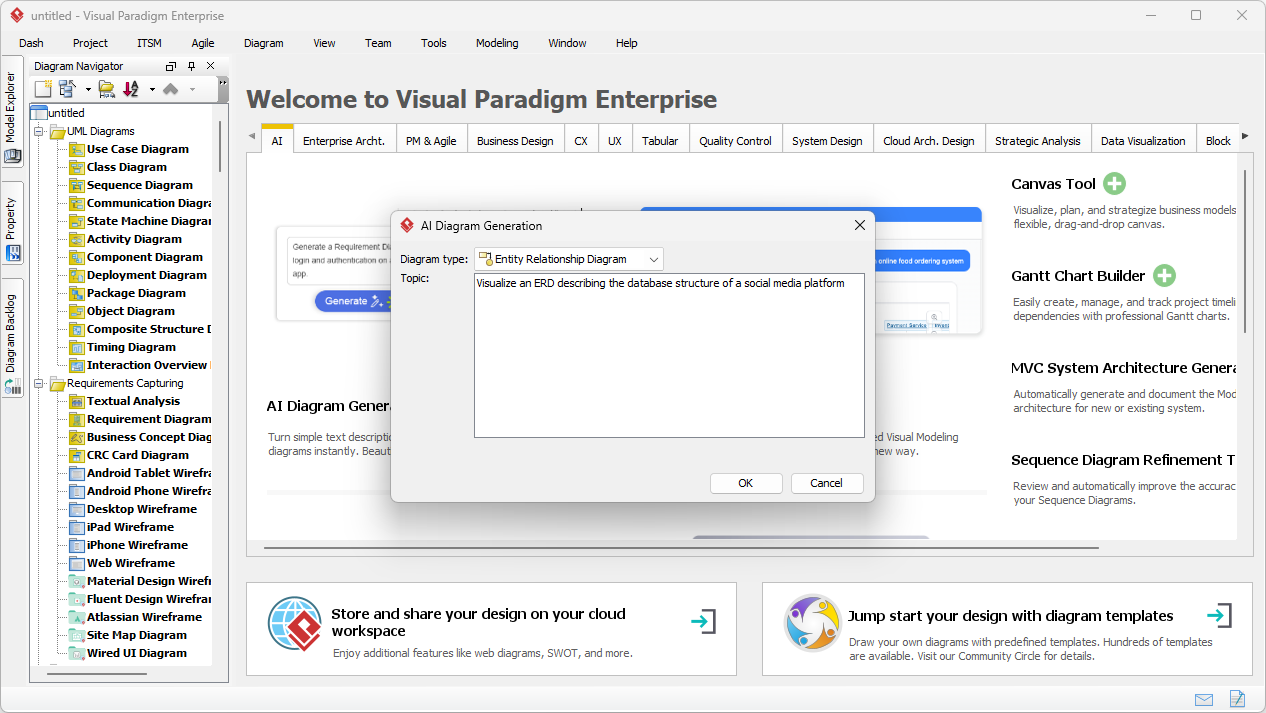
流程從一個簡單的概念開始。你不需要懂 SQL 語法,也不需手動拖曳數十個方框。相反地,你可以使用工具中的 AI 圖表生成 功能。如下方工作流程所示,你只需選擇「實體關係圖」作為目標輸出。真正的關鍵在於提示內容。

在本例中,我們希望呈現社交網路的後端架構。我們輸入了提示:「呈現一個描述社交媒體平台資料庫結構的實體關係圖」。這段純文字已足夠讓 AI 理解領域需求,推斷出社交平台通常需要使用者、內容、互動與通知功能。

This is a screenshot of Visual Paradigm (aka. Visual Paradigm Desktop). It is now showing the use of AI diagram generation to

步驟二:分析 AI 生成的資料模型

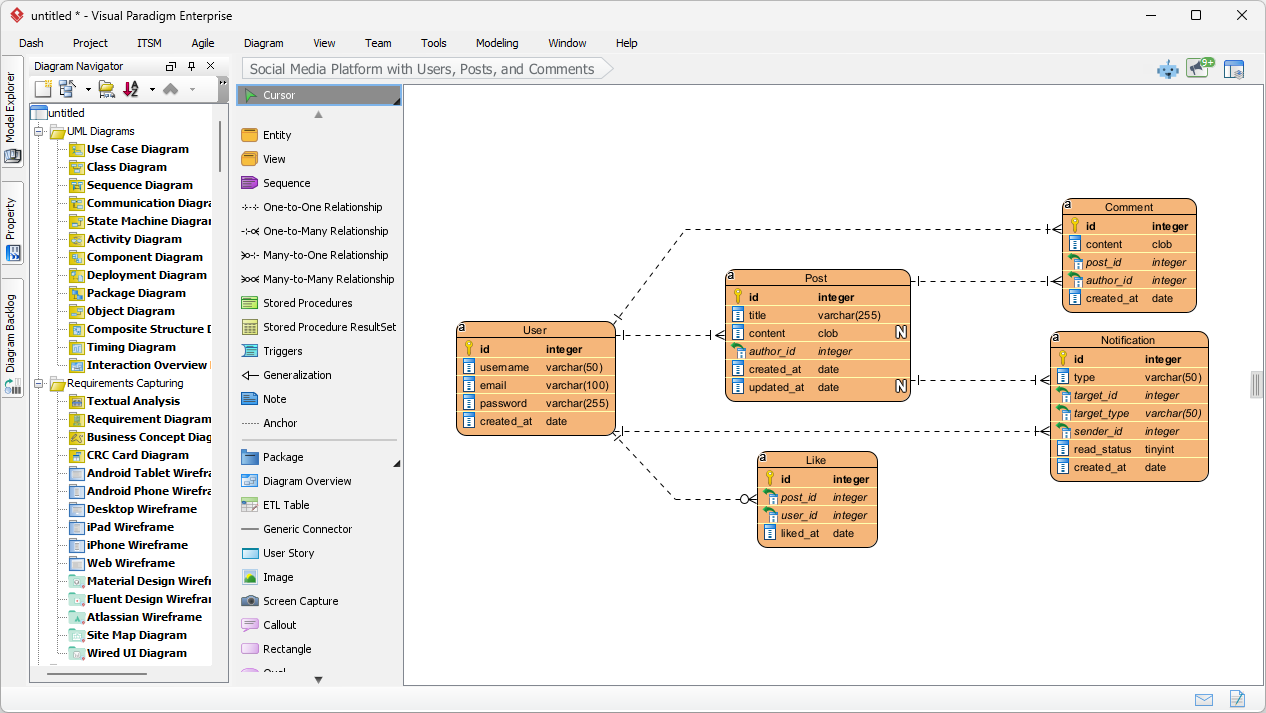
按下「確定」後,AI 會分析你的文字,以辨識核心實體(資料表)及其關聯性。它不會隨意在畫布上放置方框;而是應用 智慧關係與基數辨識 來建構資料邏輯。短短片刻內,你便會看到一份完整的圖表,看起來像是花了數小時手動設計而成。

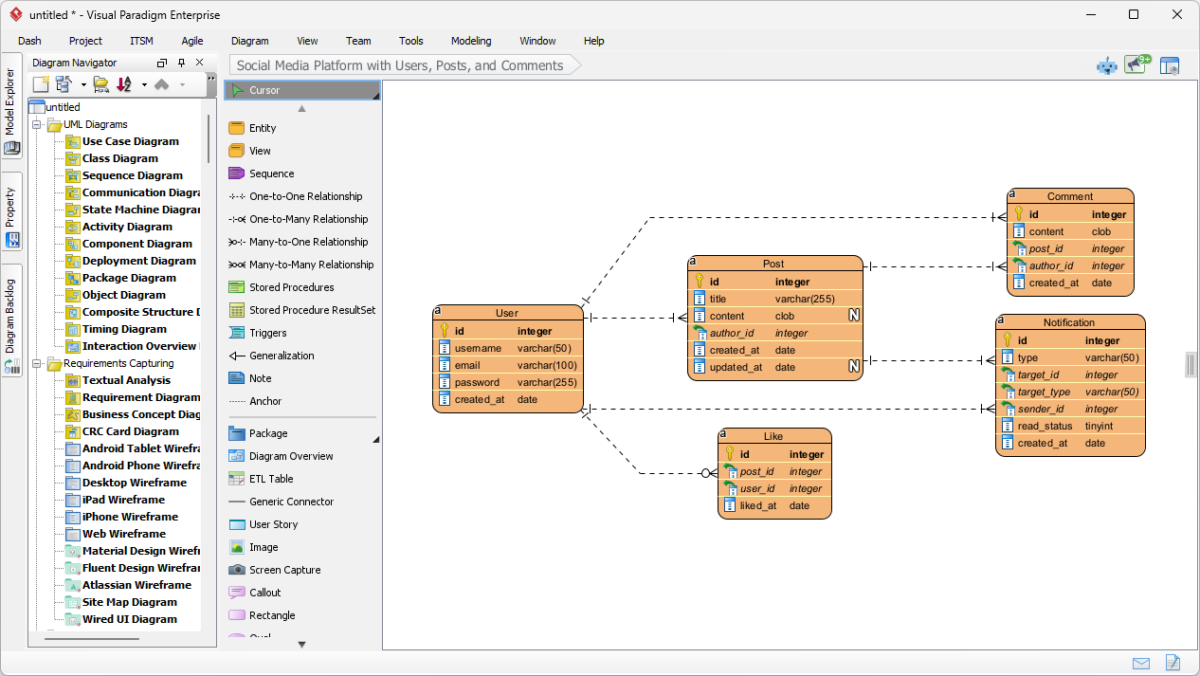
觀察下方結果,你可以看到 AI 成功生成了一個完全適合社交媒體應用的資料結構。它建立了 使用者 具有標準屬性的實體,例如 使用者名稱, 電子郵件,以及 密碼。它在邏輯上將使用者與一個 文章實體(一對多關係),認知到一個使用者會建立多篇文章。它甚至進一步細化了細節,新增了 評論, ,以及 通知實體,並包含外鍵(例如 文章編號, 作者編號),以及適當的資料類型,例如 varchar, clob,以及 整數.

This is the screenshot of Visual Paradigm Desktop. It shows a Entity Relationship Diagram generated by AI, based on the descr

為什麼這個AI功能是模型設計者不可或缺的

使用 由AI驅動的資料庫模型工具其優點在於能處理佈局與組織的繁重工作。如生成的圖示所示,實體被安排以減少線條交叉,使資料結構更易於閱讀與驗證。

自動屬性和鍵分配

請注意,AI 已自動為每個實體分配主鍵(PK),以鑰匙圖示表示。它還對資料類型做出智能猜測——為「文章內容」分配 clob(字元大型物件)類型,因為它知道文章內容可能很長,同時將「使用者名稱」保留為標準的 varchar(50)。這可免除您在概念階段手動設定每一欄屬性的繁瑣工作。

從靜態圖像到功能專案

與簡單的圖像生成器不同,這裡的輸出是一個 完全可編輯的原生圖示。如果您後來決定「文章」也應包含「分類」,只需使用圖示編輯器簡單新增該屬性即可。這種無縫過渡至實作的特性,讓您可將此圖示作為基礎,生成適用於 MySQL、PostgreSQL 或 Oracle 的 DDL 指令碼,從而將一個初步構想快速轉化為實際的資料庫結構,整個流程一氣呵成。

如何建立您自己的 AI ERD

準備好嘗試這個 易於使用的 ERD 建立工具嗎?以下是複製上述結果的簡單工作流程:

  1. 啟動 Visual Paradigm: 開啟一個新專案或現有專案。
  2. 開啟 AI 工具: 導航至 工具 > AI 圖示生成.
  3. 選擇圖示類型: 從下拉式選單中選擇「實體關係圖」。
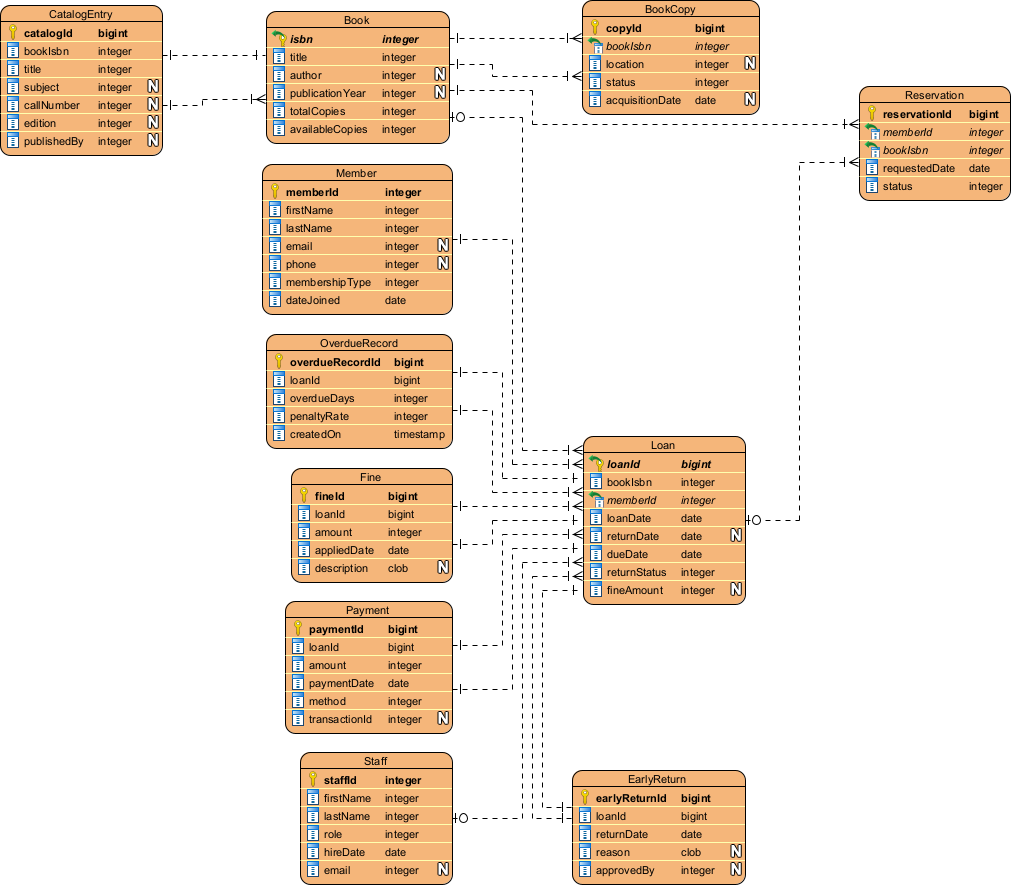
  4. 輸入描述: 輸入您系統的清晰描述(例如:「一個包含書籍、會員與借閱的圖書館系統」)。
  5. 產生: 點選確定,觀看您的圖示自動生成。
  6. 修訂: 使用編輯器調整關係或依需要新增特定限制。

結論

Visual Paradigm 的 AI 實體關係圖生成功能,徹底改變了我們進行資料模型設計的方式。透過將一句關於「社交媒體平台」的簡單描述轉化為完整且技術精確的 ERD,它消除了資料庫設計的入門障礙。無論您是用來原型設計新應用程式,還是記錄現有系統,此工具都能立即提供堅實且專業的起點。

停止一個一個地繪製方框。立即體驗AI輔助建模的速度。

下載 Visual Paradigm 桌面版,立即試用 AI 圖表生成功能


相關連結

Visual Paradigm 提供一套完整的ERD(實體關係圖)工具可透過傳統視覺編輯器與AI驅動的自動化。這些工具支援多種符號系統,例如陳氏符號,並支援從概念建模到實際資料庫實作以及逆向工程。

  1. Visual Paradigm ERD 工具 – 在線建立實體關係圖:一個基於網路的工具,可實現直覺的拖放設計專業資料庫架構設計。
  2. 使用 ERD 工具進行資料庫設計 – Visual Paradigm 使用指南:專為致力於建立可擴展且穩健的資料庫的架構師提供的資源,並運用資料模型設計的最佳實務。
  3. DBModeler AI:智慧型資料庫建模工具:一款由 AI 驅動的應用程式,專為自動化資料庫建模、架構產生與即時 SQL 測試。
  4. 免費 ERD 工具 – 使用 Visual Paradigm 在線設計資料庫:提供免安裝、基於瀏覽器的解決方案,用於建立專業的實體關係圖且完全免費。
  5. 陳氏符號 ERD 編輯器 – 高階實體關係建模:一款專用編輯器,提供完整的支援實體、屬性、關係與基數 使用精確的陳氏符號。
  6. Visual Paradigm 用於資料庫設計的 ERD 工具 – 完整解決方案:一個全面的工具,供開發人員和架構師使用,以建立模型、視覺化並產生資料庫,並具高效率。
  7. AI 圖表產生器新增圖表類型:資料流程圖與實體關係圖:此版本強調能夠產生實體關係圖,可立即從自然語言提示產生利用人工智慧。
  8. 利用 Visual Paradigm 簡化實體關係建模:一篇文章詳細說明如何簡化從初步概念到最終資料庫部署的建模流程初始概念到最終資料庫部署.
  9. 資料模型入門:實體關係圖、程式碼產生與逆向工程:一份入門指南,涵蓋圖表繪製與逆向工程的必要生命週期圖表繪製與逆向工程資料庫。
  10. 什麼是實體關係圖(ERD)? – Visual Paradigm 使用指南:一份說明性指南,涵蓋核心元件與重要性在資料庫設計的廣泛脈絡中,實體關係圖的重要性。

A comprehensive guide to Entity-Relationship Diagram (ERD) modeling

ERDs remain one of the most important tools for designing relational databases, communicating data requirements, and avoiding costly redesigns later.

1. What is an ERD and Why Do We Use It?

An Entity-Relationship Diagram (ERD) is a visual model that shows:

  • The things we want to store (entities)
  • The properties of those things (attributes)
  • How those things are connected (relationships)
  • How many of each thing can be connected (cardinality / multiplicity)

Main purposes in 2025–2026:

  • Communicate structure between developers, analysts, product managers, and domain experts
  • Serve as single source of truth before writing DDL (CREATE TABLE …)
  • Catch logical mistakes early (redundancy, missing constraints, wrong cardinalities)
  • Support microservices / domain-driven design boundary identification
  • Generate documentation automatically in many modern tools

2. Core Notations Used Today

Three main families are still actively used:

Notation Popularity (2025) Readability Best For Symbols for cardinality
Crow’s Foot Highest Very high Most teams, tools (Lucidchart, dbdiagram, Draw.io, QuickDBD, etc.) Crow’s feet, bars, circles, dashes
Chen Medium Medium Academia, some conceptual modeling Numbers (1, N), diamonds heavy
IDEF1X Low Medium Some government / legacy systems Specific box-in-box notation

Crow’s Foot is the de-facto industrial standard in 2025–2026 → we will use it in this guide.

3. Basic Building Blocks (Crow’s Foot)

Concept Symbol Description Example
Strong Entity Rectangle Exists independently, has its own primary key Customer, Order, Product
Weak Entity Double rectangle Existence depends on owner entity; partial key + owner’s key = full key OrderLine (depends on Order)
Attribute Oval (connected to entity) Property of an entity name, price, email
Primary Key Underlined attribute Uniquely identifies entity instance customer_id, isbn
Multivalued Attr Double oval Can have multiple values (usually becomes separate table) phone_numbers, tags
Derived Attr Dashed oval Can be calculated from other attributes age (from birth_date)
Composite Attr Oval containing other ovals Attribute made of several sub-attributes full_address → street, city, zip

4. Relationships & Cardinality (The Heart of ERD)

Relationship = diamond (sometimes just a line in modern minimalist style)

Cardinality answers two questions for each side of the relationship:

  • Minimum number of related instances? (0 or 1)
  • Maximum number of related instances? (1 or many = N)
Symbol (Crow’s Foot) Minimum Maximum Meaning (from this side) Common name Example sentence
Circle (○) 0 Optional Zero A customer may have placed zero orders
Short bar ( ) 1 Mandatory One (exactly)
Crow’s foot (> ) 0 N Zero or many Optional many A customer can place many orders
Bar + crow’s foot (> ) 1 N One or many Mandatory many
Double bar ( ) 1 1 Exactly one

Common patterns (written left → right):

  • 1:1 || — || Person ↔ Passport (current)
  • 1:0..1 || — ○| Department ↔ Manager (some depts have no manager)
  • 1:N || — >| Author → Book
  • 1:0..N || — ○> Customer → Order
  • M:N >| — >| Student ↔ Course (many-to-many)

5. Participation Constraints

  • Total participation = double line from entity to relationship (every instance must participate)
  • Partial participation = single line (some instances may not participate)

Examples:

  • Every Order must have at least one OrderLine → total participation (double line) + 1..N
  • Not every Customer has placed an Order → partial + 0..N

6. Weak Entities & Identifying Relationships

Weak entity:

  • Cannot exist without its owner (strong entity)
  • Its primary key = owner’s PK + partial key (discriminator)

Symbol:

  • Double rectangle
  • Identifying relationship = double diamond or bold line
  • Usually 1:N identifying relationship (owner → many weak entities)

Classic example:

Order contains OrderLine
(double rect + bold line)
PK: order_id PK: (order_id, line_number)

7. Step-by-Step ERD Modeling Process (Practical 2025–2026 Workflow)

  1. Understand the domain deeply Talk to stakeholders → collect nouns & verbs

  2. List candidate entities (nouns) → Filter real-world objects that need to be stored independently

  3. List attributes for each entity → Mark primary keys (underlined) → Identify candidate keys / natural keys → Spot multivalued, composite, derived attributes

  4. Find relationships (verbs) → Ask: “Which entities are directly associated?” → Avoid transitive relationships (they usually hide missing entities)

  5. Determine cardinality & participation for each direction → Write 4–6 sentences using the template: “Each A can/must be associated with zero/one/many B.” “Each B can/must be associated with zero/one/many A.”

  6. Handle M:N relationships Almost always resolve them into junction table (weak or strong entity) Add attributes if the relationship itself has properties (e.g. enrollment_date, grade)

  7. Identify weak entities Ask: “Can this entity exist without the other?”

  8. Add supertype/subtype (if needed — inheritance) Use circle with d (disjoint) / o (overlapping)

  9. Review for common smells

    • Fan trap / chasm trap
    • Too many M:N without attributes → missing entity?
    • Redundant relationships
    • Missing mandatory participation
    • Entities with only foreign keys → probably weak entity
  10. Validate with stakeholders using concrete examples

8. Modern Best Practices & Tips (2025–2026)

  • Prefer minimalist style (no diamonds — just labeled lines)
  • Use verb phrases on relationship lines (places, contains, taught_by)
  • Color-code domains / bounded contexts in large models
  • Keep logical ERD separate from physical (data types, indexes come later)
  • Version control the .drawio / .dbml / .erd file
  • Use tools that can generate SQL / Prisma / TypeORM schema (dbdiagram.io, erdgo, QuickDBD, Diagrams.net + plugins)
  • For very large systems → modular ERDs per bounded context

Quick Reference – Most Common Patterns

  • Customer 1 —— 0..* Order
  • Order 1 —— 1..* OrderLine
  • Product * —— * Category → resolve to junction + attributes
  • Employee 1 —— 0..1 Department (manager)
  • Department 1 —— 0..* Employee (members)
  • Person 1 —— 0..1 Car (current_car)

Recommended AI ERD Tool

Visual Paradigm offers a comprehensive ecosystem for ERD visual modeling, combining desktop-grade engineering power with cloud-based agility, AI acceleration, and team collaboration features. This makes it suitable for individual modelers, agile teams, enterprise architects, and database professionals working on everything from quick prototypes to complex legacy system re-engineering.

The ecosystem primarily consists of two main platforms that complement each other:

  • Visual Paradigm Desktop (downloadable application for Windows, macOS, Linux) — focused on deep, professional database engineering.
  • Visual Paradigm Online (browser-based, no installation required) — optimized for fast, collaborative, AI-assisted diagramming.

Both support core ERD notations (including Crow’s Foot and Chen), conceptual/logical/physical levels, and full traceability between model layers.

Key Ways the Ecosystem Helps in the ERD Visual Modeling Process

  1. Intuitive & Fast Diagram Creation
    • Drag-and-drop interface with resource-centric modeling (no constant toolbar switching).
    • Automatic foreign key column generation when creating relationships.
    • Support for all standard ERD elements: strong/weak entities, identifying/non-identifying relationships, multivalued/derived/composite attributes, stored procedures, triggers, views, unique constraints, etc.
    • Sub-diagrams help break large enterprise schemas into logical views.
  2. Full Lifecycle Support: Conceptual → Logical → Physical
    • One-click derivation: generate logical ERD from conceptual, physical from logical (with automatic traceability and navigation via Model Transitor).
    • Maintain consistency across abstraction levels — changes in one level can propagate intelligently.
  3. AI-Powered Acceleration (especially strong in VP Online)
    • DB Modeler AI and AI Diagram Generator — describe your data requirements in plain English (e.g., “We have customers who place orders containing products from multiple categories”), and the AI instantly generates a normalized, professional ERD complete with entities, relationships, and keys.
    • Supports Chen notation for ERD in the AI generator.
    • Ideal for rapid prototyping or when starting from vague business requirements.
  4. Database Engineering & Synchronization
    • Forward engineering — generate complete, error-free DDL scripts (or directly create/update databases) for major DBMS: MySQL, PostgreSQL, Oracle, SQL Server, SQLite, Amazon Redshift, etc.
    • Reverse engineering — import existing databases and instantly reconstruct visual ERDs (extremely helpful for legacy systems or documentation recovery).
    • Patch / diff tool — compare model vs. live database, generate delta scripts to apply changes safely without data loss.
    • Enter sample data directly in ERD entities → export to database for quick seeding.
  5. Team Collaboration & Versioning
    • Real-time concurrent editing (multiple users on the same ERD simultaneously).
    • Built-in conflict detection and smart resolution.
    • Full revision history, commit/update, revert changes.
    • Commenting directly on diagram elements for feedback.
    • Publish & share — generate web links, embed diagrams, export to PDF/image/HTML for stakeholders who don’t have licenses.
    • Centralized cloud repository (VPository) keeps everyone aligned across dev/test/prod environments.
  6. Integration Across the Broader Modeling Ecosystem
    • Link ERD entities to other diagrams: reference a data entity in DFDs, UML class diagrams, wireframes, BPMN processes, etc.
    • Generate ORM code (Hibernate, etc.) from ERD → bridge visual model to application layer.
    • Visual Diff — compare different versions or model vs. database schema.
    • Export professional data dictionary / specifications for documentation & handover.

Quick Comparison: When to Use Which Part of the Ecosystem

Need / Scenario Recommended Platform Key Strengths in ERD Context
Deep reverse engineering, patching prod DB, ORM generation Desktop Full engineering suite, offline work, advanced synchronization
Quick sketches, AI-assisted design from text, zero setup Online AI generation, browser access, lightweight
Real-time team modeling sessions Online (or Desktop + Teamwork Server) Simultaneous editing, commenting, conflict resolution
Enterprise-scale schemas with sub-models Desktop Better performance for very large models
Stakeholder reviews & sharing Both (publish feature) Web links, embeds, PDF exports
Free / non-commercial use Community Edition (Desktop) or Free VP Online account Full ERD editing, limited advanced engineering

In summary, Visual Paradigm’s ecosystem removes friction at every stage of ERD modeling — from initial brainstorming (AI + quick drag-drop), through collaborative refinement and validation, to final implementation and maintenance (round-trip engineering). It is particularly strong when your workflow involves both visual communication and actual database delivery.

ERD Articles