為軟體開發撰寫清晰明確的問題陳述

Use Visual Paradigm’s AI-powered tool to craft clear, structured problem statements for software projects with templates and real-time feedback.

是否苦於無法清楚表達您的軟體專案所要解決的核心挑戰?問題描述生成器來自Visual Paradigm是終極的AI驅動工具,能將專案初期的混亂轉化為清晰、聚焦且具說服力的敘述。此創新解決方案賦予專案經理、業務分析師與產品負責人前所未有的速度與精準度,明確定義其工作背後的「原因」。透過使用結構化範本庫與即時AI反饋,此工具確保您的問題陳述不僅被撰寫出來,更從第一天起就經過最佳化,以達到最大影響力。這正是讓專案以極致專注啟動,並為成功奠定基礎的秘密武器。

關鍵要點:

  • 採用範本驅動的方法,確保您的問題陳述內容完整且結構清晰。

  • 填入特定變數,以針對您獨特的專案客製化描述內容。

  • 即時獲得AI反饋,以提升問題陳述的清晰度與有效性。

  • 以穩固且清晰的基礎,開始任何專案,掌握核心問題。

步驟一:選擇您的範本——強大問題陳述的基礎

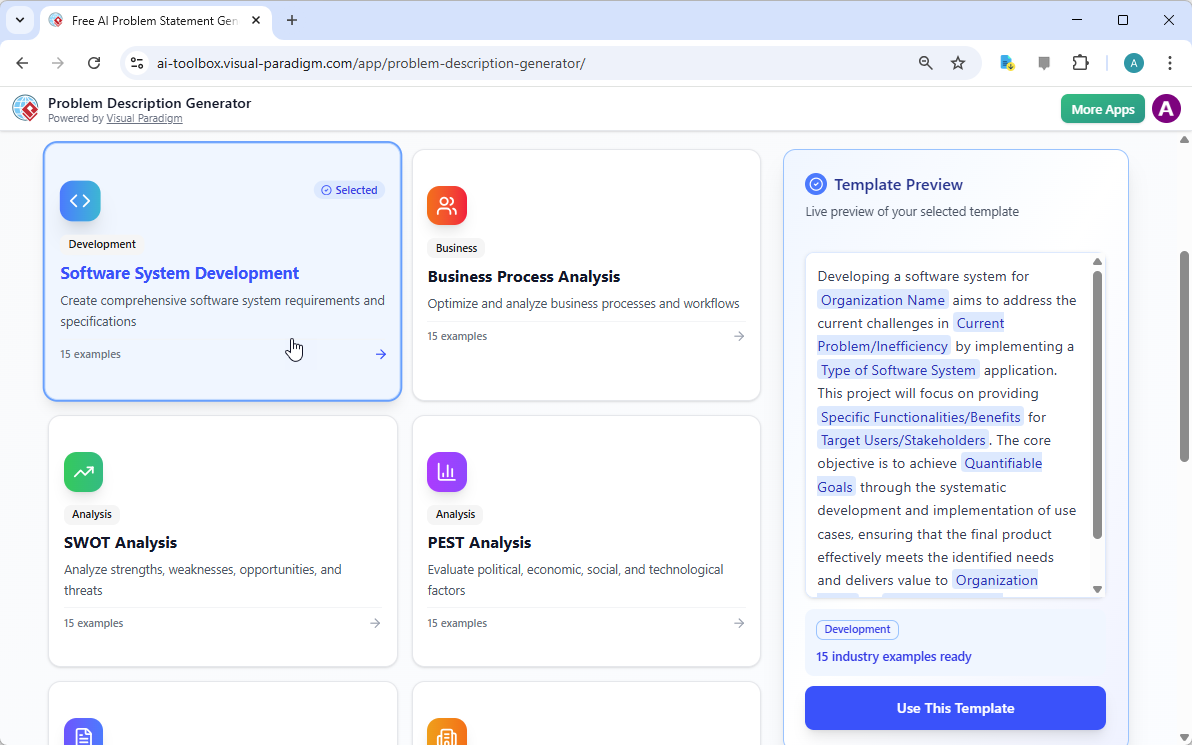
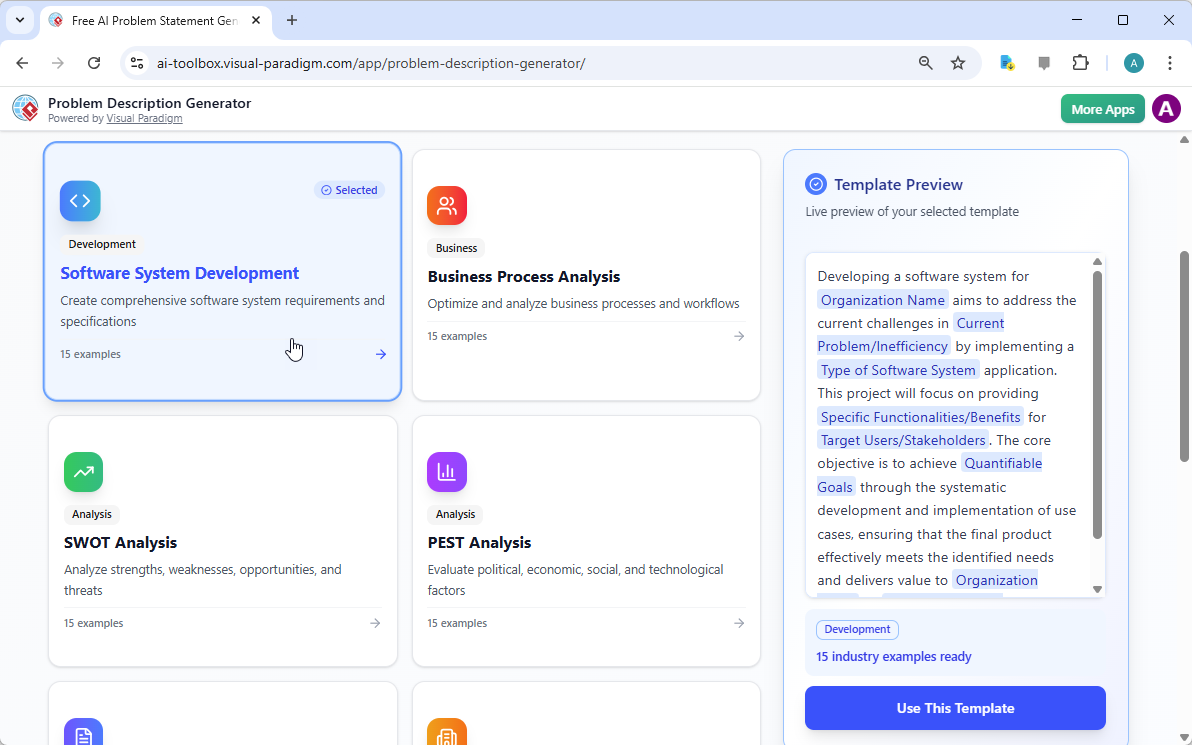
每個偉大的專案都從穩固的基礎開始,而對於問題陳述而言,這基礎正是合適的範本。使用AI驅動問題描述生成器的第一步,是選擇一個與您專案性質完全契合的範本。如圖所示

This is a screenshot of Visual Paradigm's AI Powered Problem Description Generator. It shows the first step, which involves c

介面呈現出一個乾淨且直覺的儀表板,提供多種適用於不同商業需求的範本。無論您正在處理軟體開發計畫、優化商業流程,或進行SWOT或PEST等戰略分析,都能找到專屬的範本。例如「軟體系統開發」範本,專門用於協助您建立完整的軟體系統需求與規格。透過選擇正確的範本,您能立即建立專業的結構,引導您涵蓋問題的所有關鍵面向,確保不會遺漏任何重要細節。這一步至關重要,因為它確立了整個問題描述的基調與架構,使後續步驟更加高效且有效。

步驟二:填入變數——客製化您的敘述

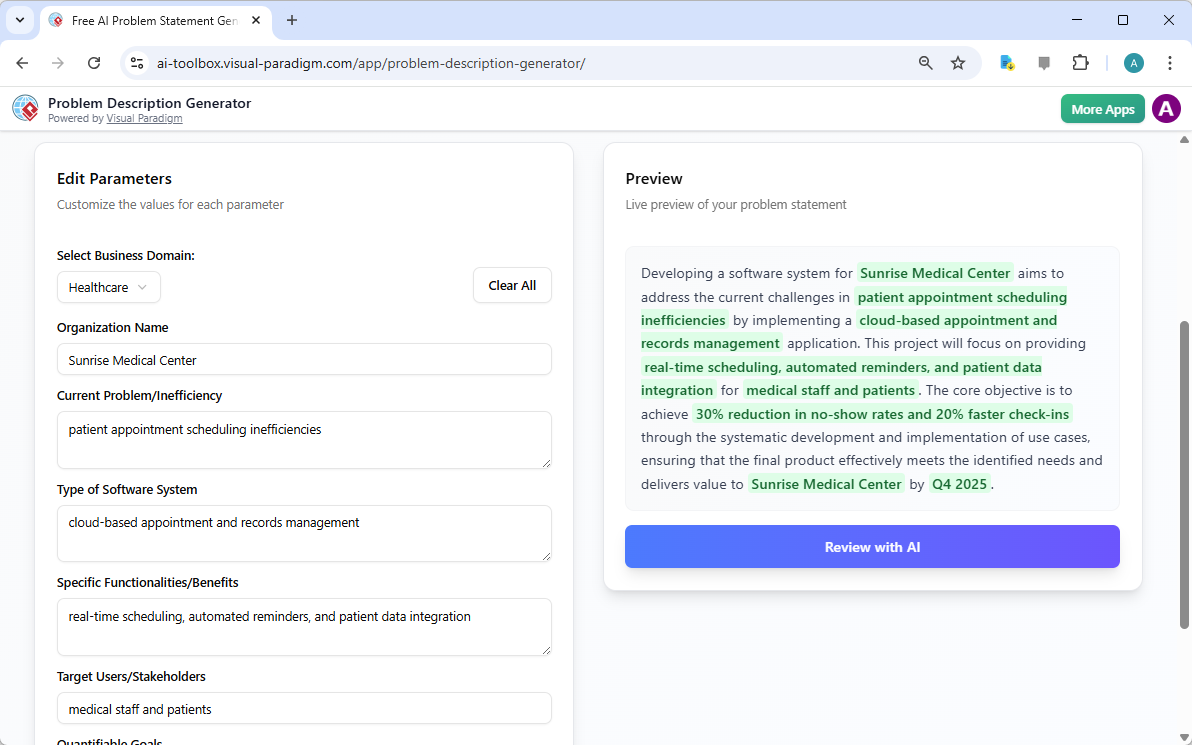
選擇範本後,神奇之處便出現在「編輯參數」區塊。

This is a screenshot of Visual Paradigm's AI Powered Problem Description Generator. It shows the second step, which involves

鮮明地呈現了這第二步。左側顯示一個填滿特定欄位的表單,例如「組織名稱」、「當前問題/低效率」以及「軟體系統類型」。這正是注入您專案獨特DNA的地方。當您輸入細節時,工具右側的即時預覽會動態更新,清楚顯示您填入的變數在最終問題描述中會呈現的樣貌。此即時預覽極具威力,讓您能看見輸入內容所形成的敘述脈絡,察覺任何不自然的語句,並立即調整。變數以綠色標示,讓您輕易看出哪些內容正被插入範本中。此過程不僅是填空,更是塑造一個連貫故事,清楚闡述問題、影響與期望成果。能夠即時看見描述內容的演變,是提升清晰度與信心的關鍵轉折。

步驟三:透過AI審查——您的即時專家編輯

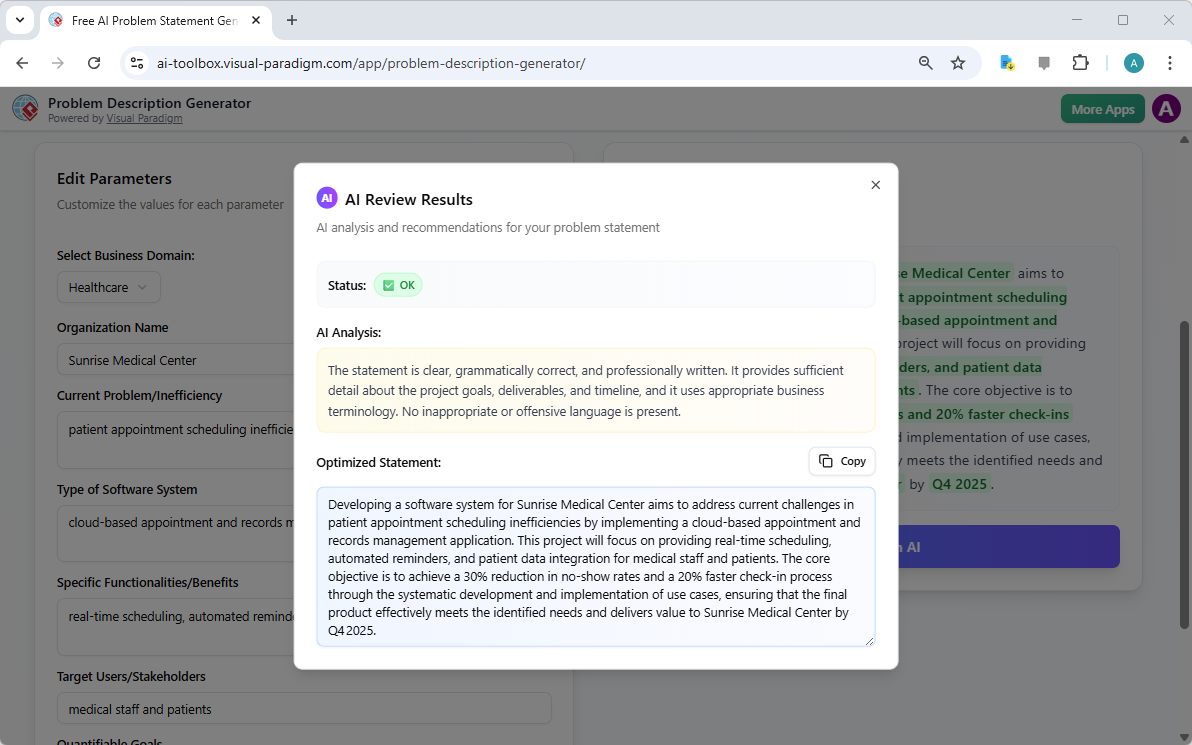
最後一步,也是最具威力的一步,是AI審查。在您填完所有變數並對即時預覽感到滿意後,即可點擊「透過AI審查」按鈕。

This is a screenshot of Visual Paradigm's AI Powered Problem Description Generator. Once the details are filled in, you can c

完美捕捉了這個瞬間。彈出視窗出現,提供您生成的問題陳述的詳細分析。AI不僅檢查語法,更評估陳述的清晰度、完整性、邏輯流程以及商業術語的使用是否恰當。它提供明確的「狀態」(例如「OK」)與詳細的「AI分析」,指出優點並提出改進建議。例如,AI可能確認您的陳述清晰且專業,或建議以更具影響力的方式表達關鍵目標。這項即時且客觀的反饋,如同一位虛擬專家編輯,協助您精煉問題陳述,確保其不僅正確,更能有效傳達專案的宗旨。此最後一步確保您的問題陳述可自信地與利害關係人、開發人員或客戶分享。

釋放專案的潛能

定義問題往往是任何行動中最困難的部分。模糊或表達不清的問題陳述,可能導致資源浪費、解決方案偏離目標,最終導致專案失敗。Visual Paradigm的問題描述生成器解決了這一根本挑戰。它結合結構化範本的力量與AI的智慧,打造出既高效又有效的流程。透過遵循三個簡單步驟——選擇範本、填入變數、透過AI審查——您可在數分鐘內將最初的專案構想轉化為清晰、具說服力且專業的問題陳述。此工具不僅是便利工具,更是戰略優勢,確保您的專案從正確的起點出發。停止猜測,自信地開始定義。立即試用AI驅動的問題描述生成器並親身體驗它帶來的差異。

相關連結

從問題到報告:AI 如何引導您的用例旅程

Discover how AI guides your use case journey from problem to report with Visual Paradigm’s intelligent development assistant.

想像一下,您是一位負責推出新線上課程平台的專案經理。首要挑戰是清楚地闡述問題,然後將其轉化為一個功能性的系統。這正是用例驅動開發助手,這是一款由 Visual Paradigm 推出的 AI 驅動工具,即時介入。它不僅協助您撰寫文件,更引導您完成完整的結構化工作流程,將模糊的想法轉化為詳細且可執行的專案計畫。整個流程極其直覺,彷彿有資深的業務分析師與技術架構師與您並肩作戰。本文深入探討此強大工具的核心功能,並以線上課程平台的實際案例,展示其如何簡化整個用例生命週期。

快速總結:用例驅動開發助手的關鍵收穫

  • 從明確的問題陳述開始,以定義專案的核心目標。

  • 使用 AI 自動產生候選用例與參與者清單。

  • 透過 AI 生成的用例與活動圖.

  • 使用結構化的 MoSCoW 方法來優先排序功能,專注於高價值工作。

  • 產生詳細的用例描述與可執行的 Gherkin 測試情境。

  • 建立完整的報告,以傳達專案範圍與計畫。

  • 透過中央儀表板追蹤進度,並維持單一可信來源。

步驟 1:透過 AI 定義問題

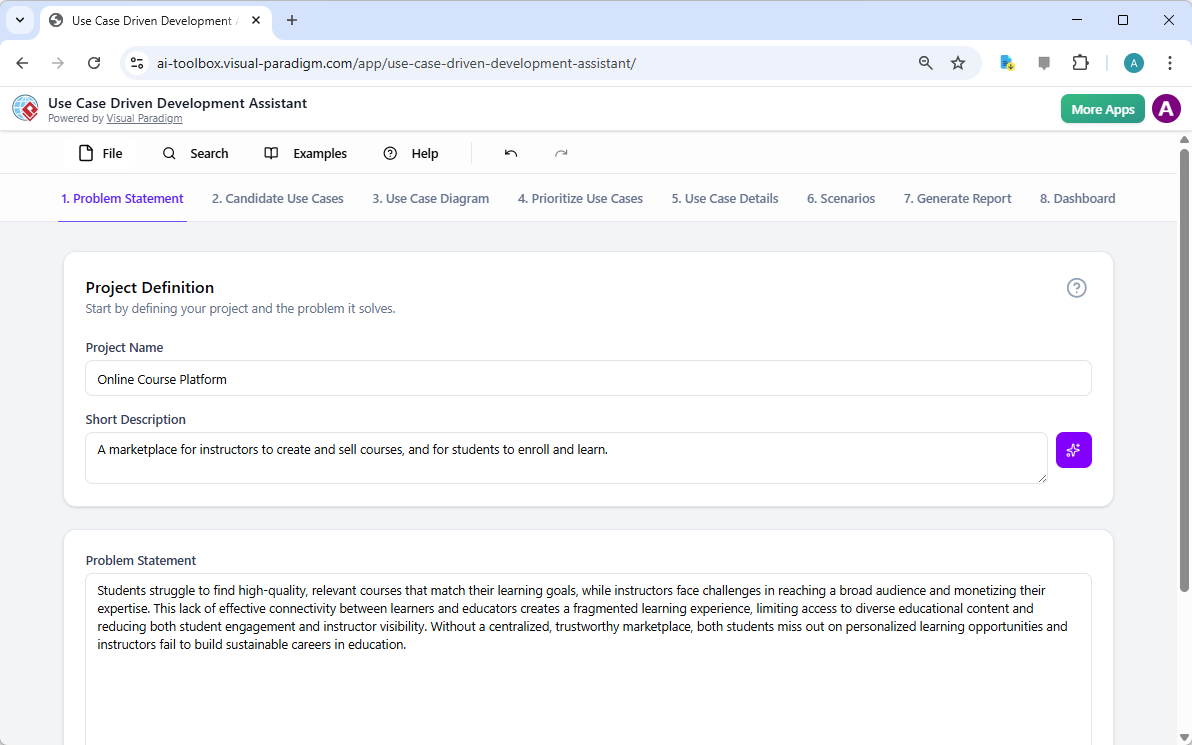
每個成功的專案都始於對其所要解決問題的清晰理解。使用用例驅動開發助手的旅程,從「問題陳述」標籤頁開始。在此處,您輸入專案名稱與簡短描述。AI 隨即利用這些資訊生成一份完整的問題陳述。如圖 1所示,該工具已將專案名稱「線上課程平台」與簡短描述「一個讓講師創建並銷售課程,學生可註冊學習的市場平台」轉化為詳細敘述。該敘述明確指出核心痛點:學生難以找到相關課程,而講師則面臨難以觸及廣泛受眾與將專業知識商品化的挑戰。此由 AI 生成的問題陳述,成為專案的基石,確保團隊成員從一開始就擁有統一的理解。
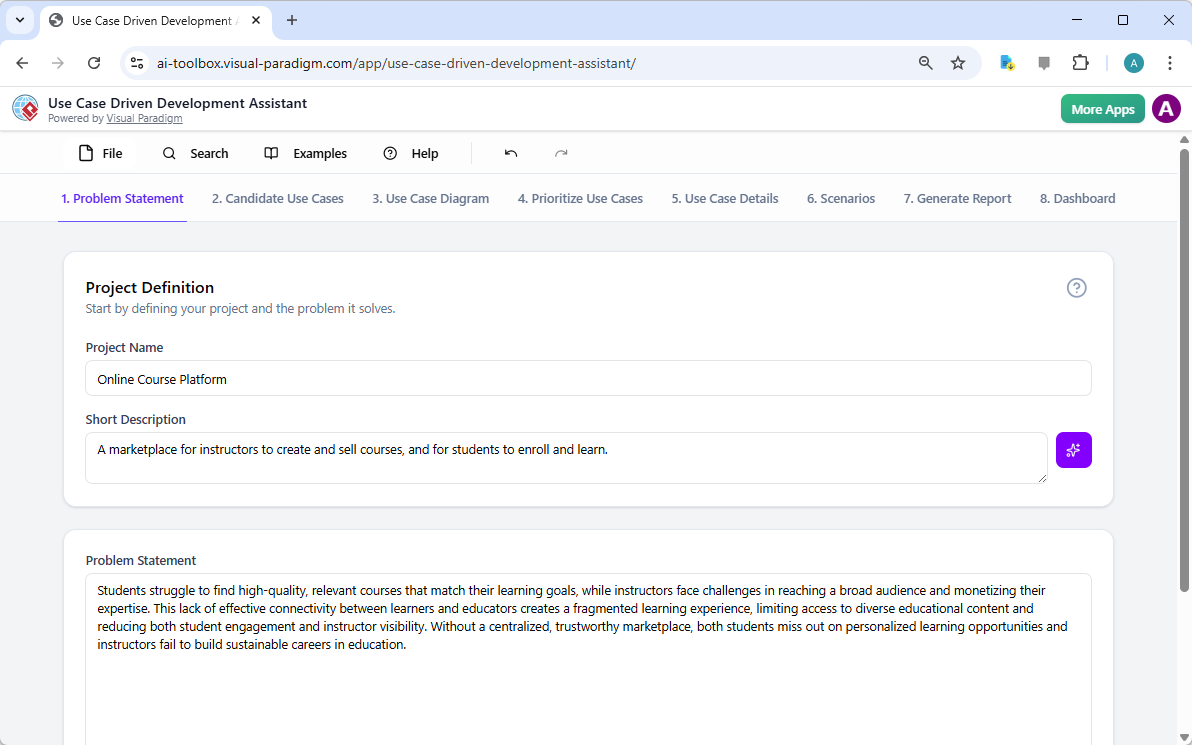
This is a screenshot of Visual Paradigm's AI Powered Use Case Driven Development Assistant. we are now in step 1. It shows th

步驟 2:在 AI 協助下識別用例

問題明確後,下一步便是識別系統必須提供的關鍵功能。助手的「候選用例」標籤頁,如圖 2所示,自動化此流程。在分析問題陳述後,AI 會建議一組用例,每個用例均與參與者(如講師、學生或管理員)關聯。針對我們的線上課程平台,AI 提出的用例包括「建立新課程」、「上傳課程內容」、「瀏覽與搜尋課程」以及「註冊課程」。此清單提供穩固的起點,節省原本需耗費於腦力激盪會議的大量時間與精力。您可進一步優化這些建議,新增或刪除不相關項目,以建立完整的系統功能清單。
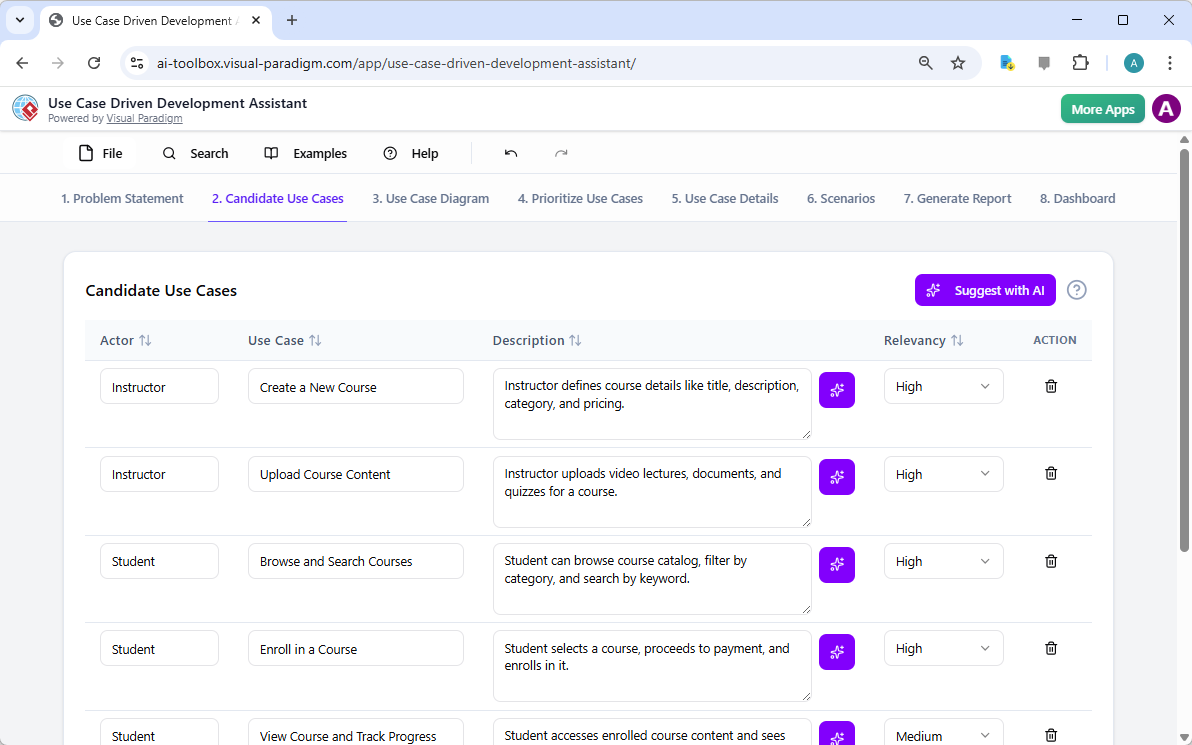
This is a screenshot of Visual Paradigm's AI Powered Use Case Driven Development Assistant. We are now in step 2. It shows a

步驟 3:透過用例圖可視化系統

在識別出用例後,關鍵在於可視化它們與系統參與者的互動方式。「用例圖」標籤頁,如圖 3所示,將用例與參與者清單自動轉化為清晰的圖形化呈現。此圖表展現參與者(講師、學生、管理員)與系統功能(如建立新課程等)之間的關係。由 AI 驅動的生成確保圖表準確且格式專業。此視覺化工具對溝通至關重要,讓利害關係人、開發人員與設計師能迅速掌握系統的範圍與功能,無需閱讀冗長的文件。
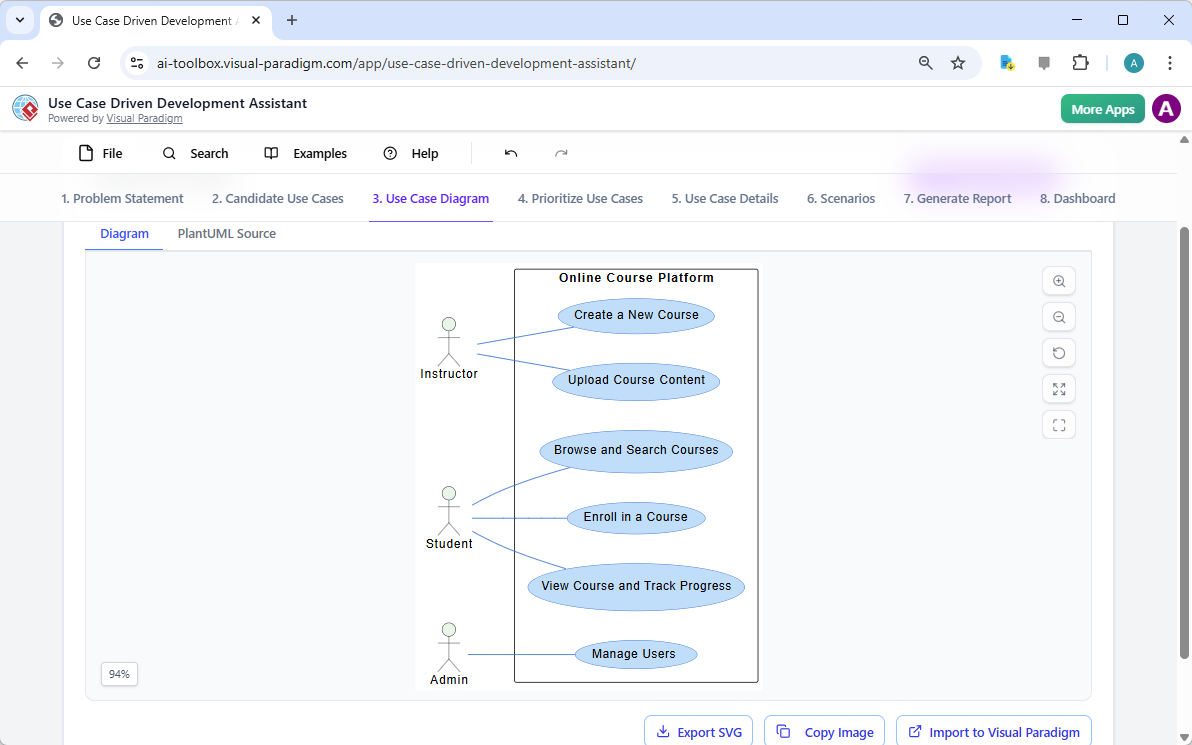
This is a screenshot of Visual Paradigm's AI Powered Use Case Driven Development Assistant. We are now in step 3. It shows a

步驟 4:優先排序功能以達成最大影響

並非所有用例都同等重要。專案的成功往往取決於首先聚焦於最關鍵的功能。如圖像 4,提供了一個強大的框架。它允許您為每個使用案例分配使用者價值和商業價值(在0-10的範圍內),然後應用MoSCoW優先排序方法(必須擁有、應該擁有、可以擁有、不會擁有)。在我們的例子中,AI已幫助識別「建立新課程」和「上傳課程內容」是「必須擁有」的功能,因為它們對平台的核心功能至關重要。這種結構化的優先排序確保開發團隊專注於為使用者和企業提供最高價值,避免在低優先級功能上浪費精力。
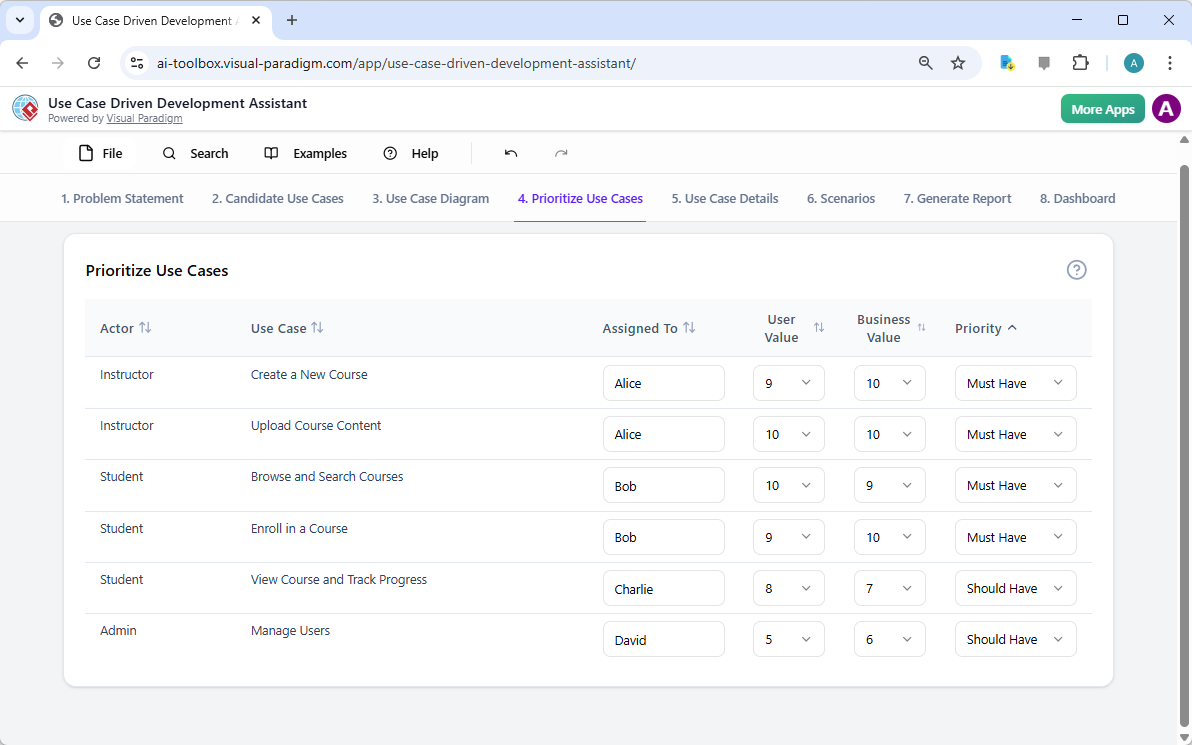
This is a screenshot of Visual Paradigm's AI Powered Use Case Driven Development Assistant. We are now in step 4. It shows th

步驟 5:詳細說明使用案例並生成活動圖

在建立高階視圖後,下一步是深入探討每個使用案例的細節。『使用案例詳情』標籤頁,如圖所示圖像 5,可讓您為所選的使用案例建立完整的範本。AI可生成詳細描述,包括前置條件、主要流程和替代流程。針對「建立新課程」使用案例,AI提供一個結構化範本,明確列出必要步驟。為進一步提升理解,助理可為同一使用案例生成「活動圖」,如圖所示圖像 6。此圖表以視覺方式呈現逐步的工作流程,顯示從講師登入到課程儲存的整個動作序列。這種細節層級對開發人員和品質保證團隊至關重要。
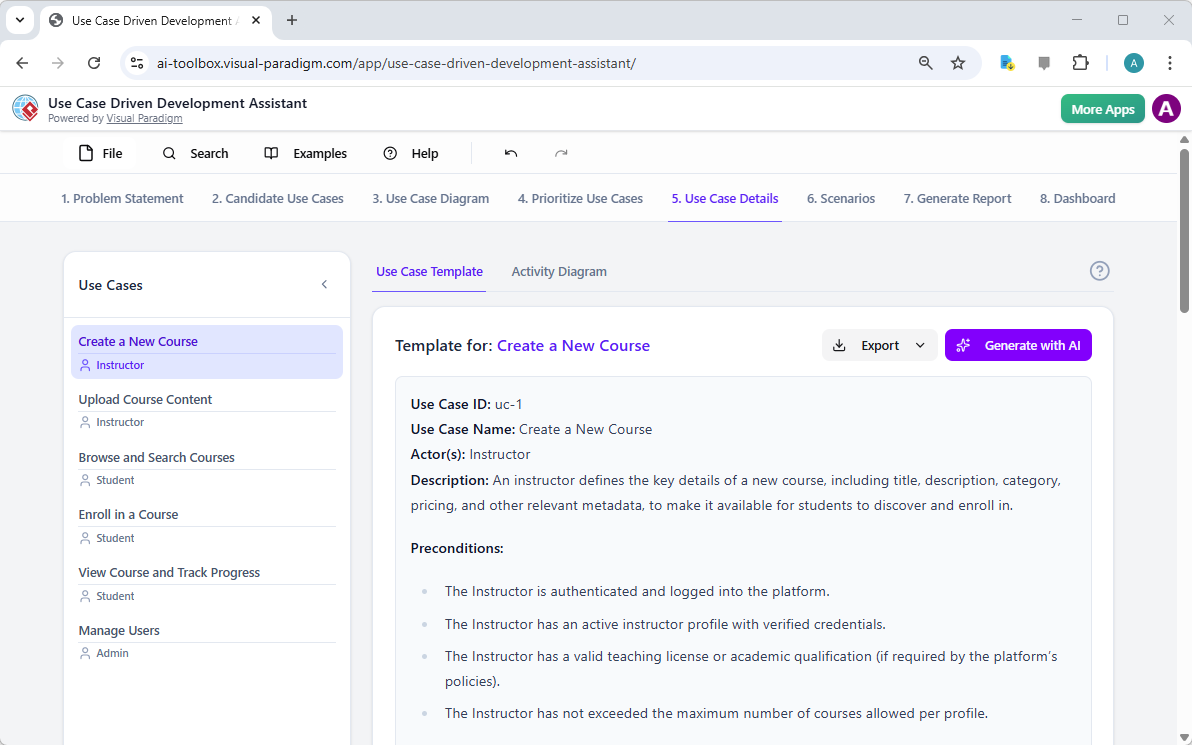
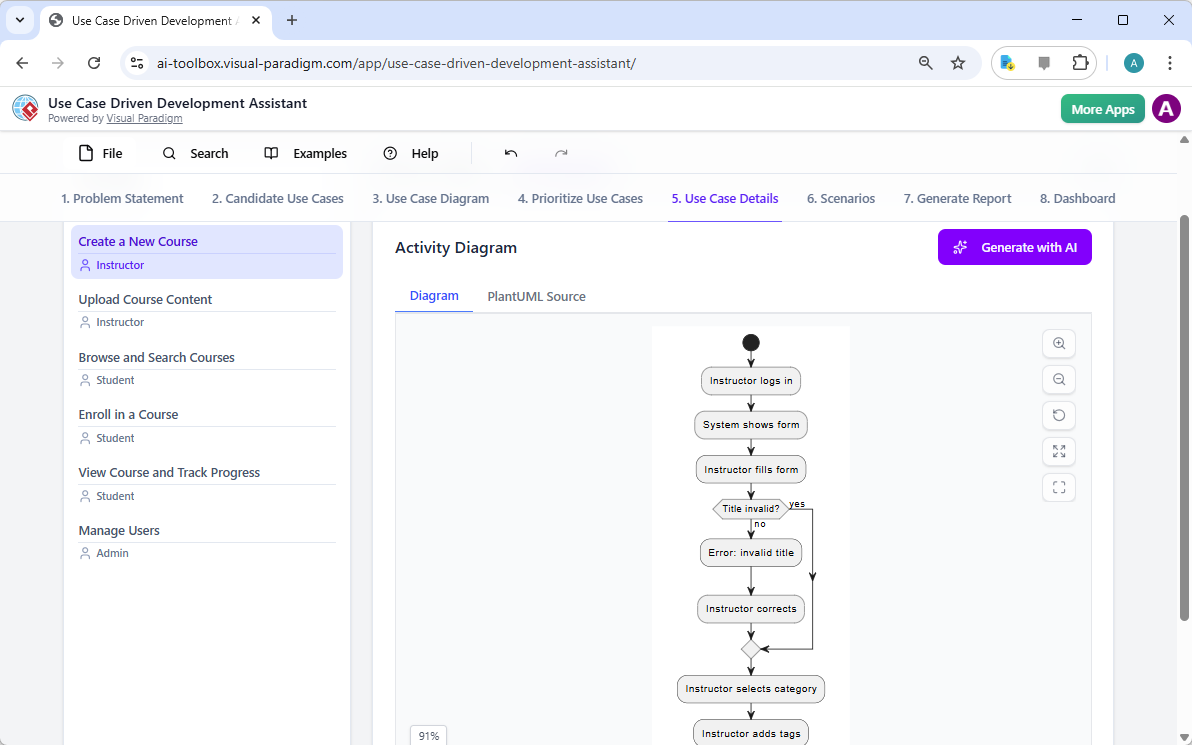
This is a screenshot of Visual Paradigm's AI Powered Use Case Driven Development Assistant. We are now in step 5. It shows thThis is a screenshot of Visual Paradigm's AI Powered Use Case Driven Development Assistant. We are still in step 5. It shows

步驟 6:生成測試情境與序列圖

對開發團隊而言,下一步是建立可測試的情境。『情境』標籤頁,如圖所示圖像 7,可讓您直接從使用案例描述中產生可執行的 Gherkin 情境。這些情境以自然語言格式(給定-當-則)撰寫,非常適合自動化測試。AI可生成主要情境與替代情境,例如針對無效標題的情境。為進一步釐清系統內部運作,助理可生成「序列圖」,如圖所示圖像 8。此圖表顯示講師、網頁儀表板、後端 API、資料庫與通知服務之間的互動,清楚呈現系統架構與資料流。
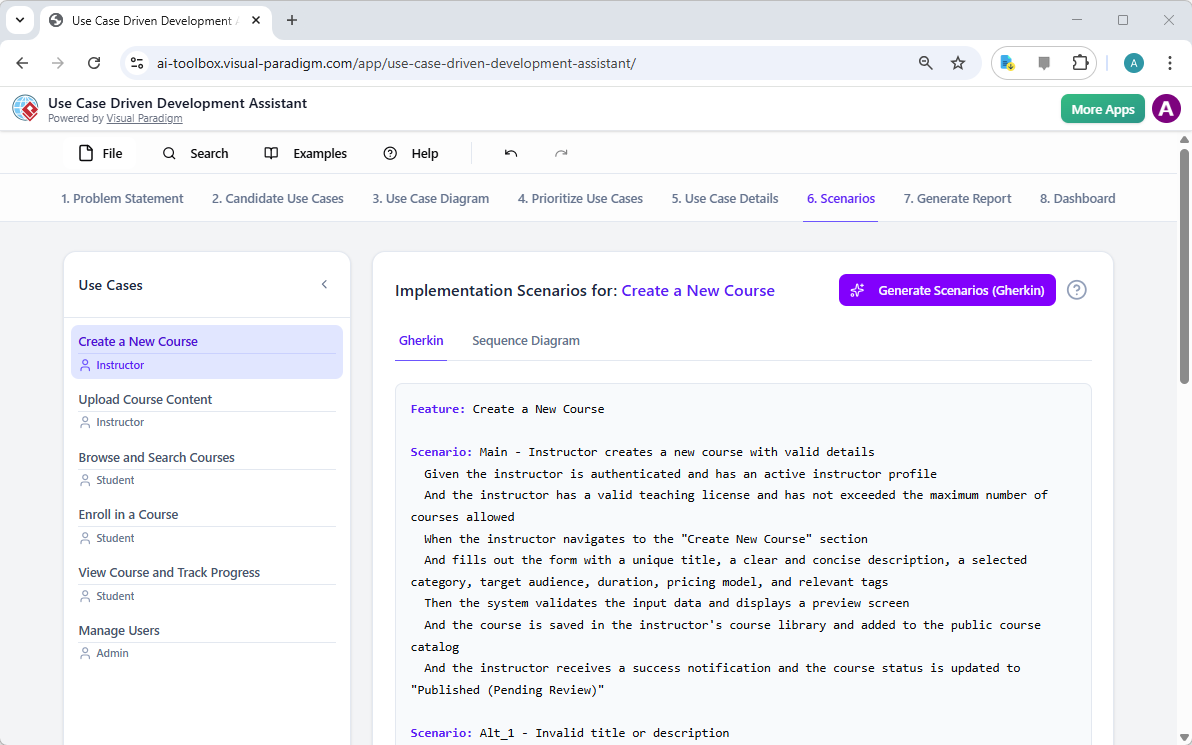
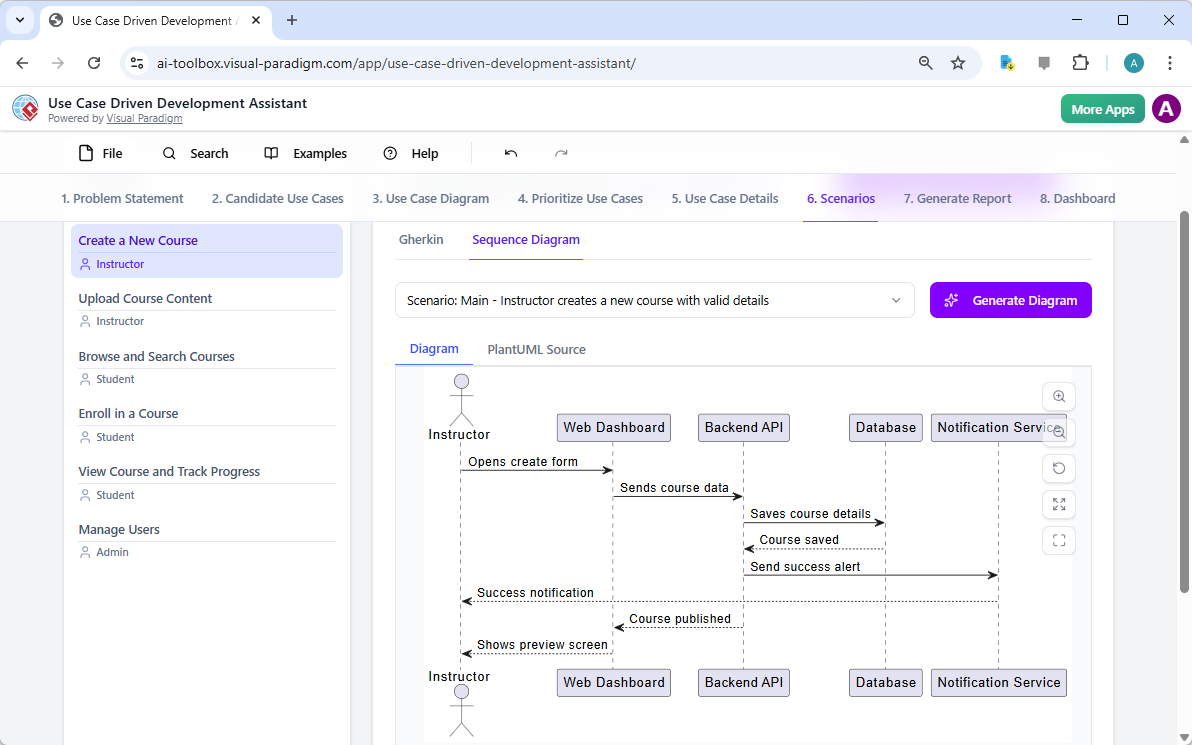
This is a screenshot of Visual Paradigm's AI Powered Use Case Driven Development Assistant. We are in step 6. It shows the AIThis is a screenshot of Visual Paradigm's AI Powered Use Case Driven Development Assistant. We are still in step 6. It shows

步驟 7:建立全面的專案報告

在整個開發過程中,向各類利害關係人溝通專案進度與計畫至關重要。『產生報告』標籤頁,如圖所示圖像 9,讓這變得輕而易舉。您可以產生多種報告,例如「專案概覽」、「執行計畫」、「品質保證測試計畫」或「開發人員任務清單」。這些報告皆由 AI 協助產生,確保內容一致且完整。例如,「專案概覽」報告總結整個專案,包含執行摘要、關鍵功能以及優先排序的 rationale。這份單一來源的資訊確保所有人保持一致並充分了解。
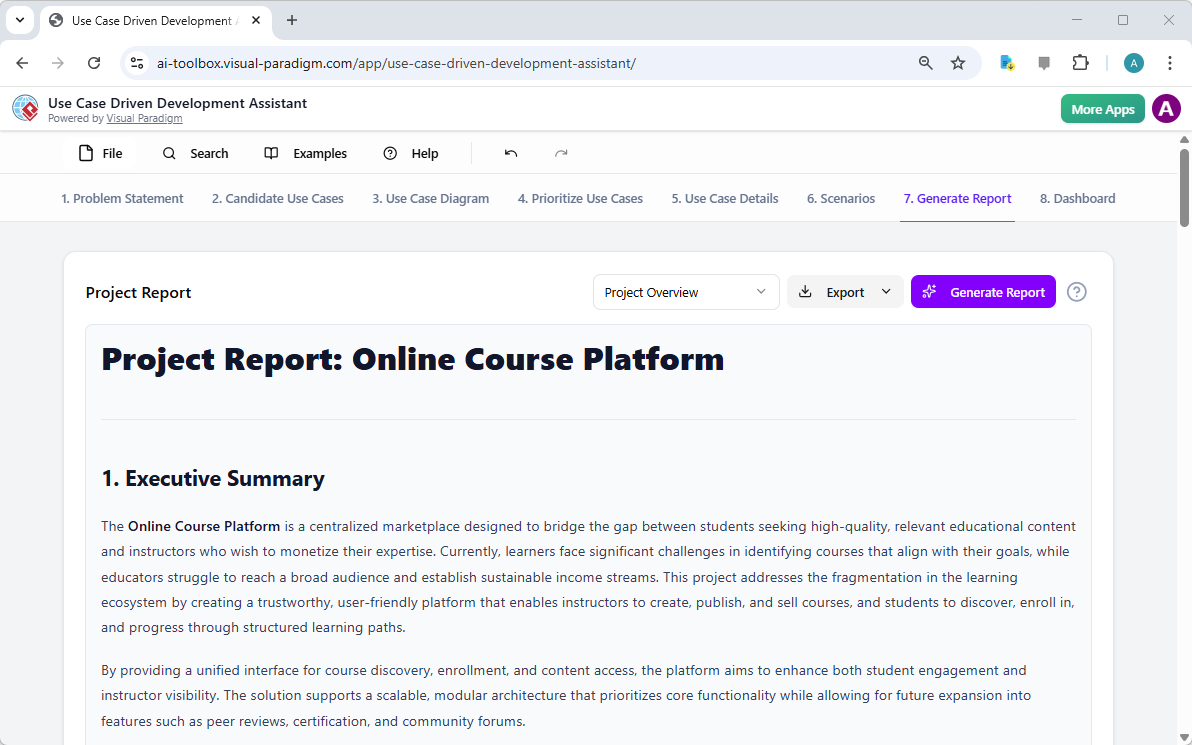
This is a screenshot of Visual Paradigm's AI Powered Use Case Driven Development Assistant. We are in step 7. It shows a repo

步驟 8:透過儀表板追蹤進度

最後,整個流程在「儀表板」中達成終點,如圖所示圖像 10。此中央控制中心提供專案狀態的高階概覽。它顯示專案完成百分比、使用案例總數以及「必須擁有」項目數量。專案清單可讓您追蹤進度,每完成一步即標示為「已完成」。對專案經理與團隊負責人而言,即時掌握專案健康狀況至關重要,有助於識別瓶頸並確保專案按時推進。
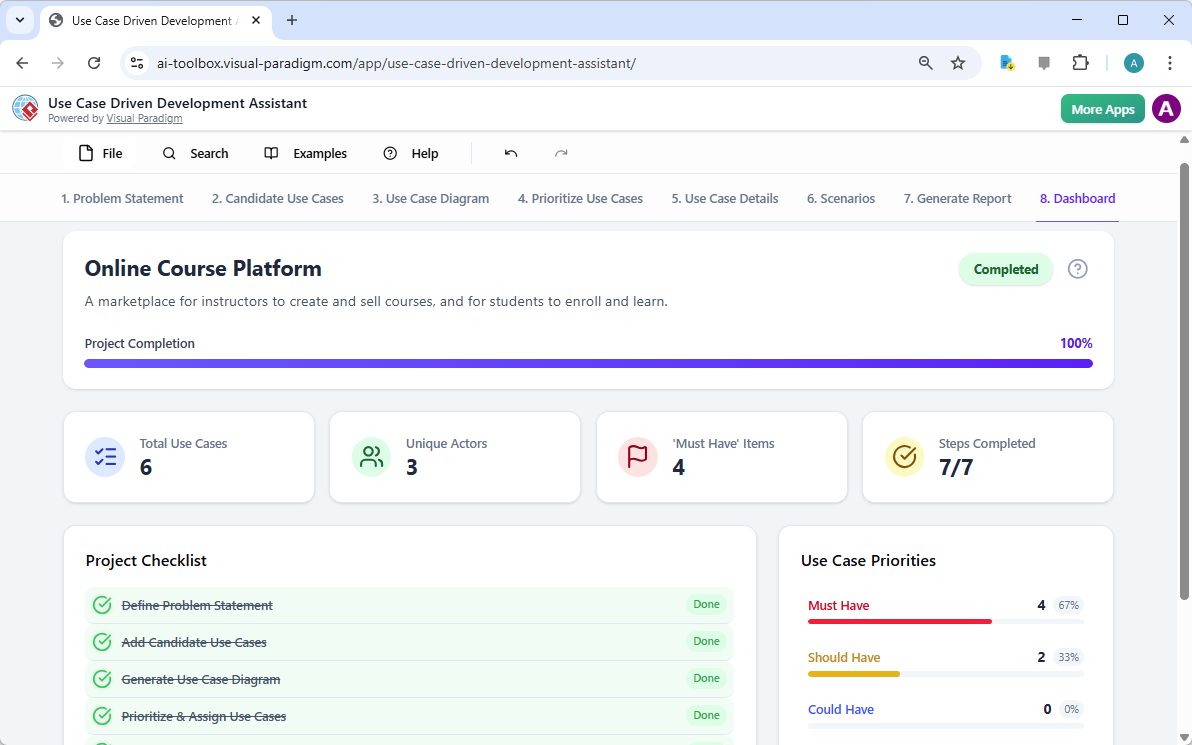
This is a screenshot of Visual Paradigm's AI Powered Use Case Driven Development Assistant. We are in step 8. It shows the da

使用案例驅動的開發助理不僅僅是一項工具;它是一套全面的工作流程,為軟體開發過程帶來清晰與效率。透過在每個階段運用 AI——從定義問題到產生報告——它幫助團隊更快、更準確地從需求轉向實作。結果是一個結構良好、文件完整,且與商業目標和使用者需求一致的專案。若您希望簡化使用案例開發流程,這項由 AI 驅動的工具將是強大的解決方案。

準備好了解「使用案例驅動的開發助理」如何改變您的下一個專案嗎?立即試用.

相關連結

用例建模 是一種基本的軟體工程技術,用於捕捉功能需求 透過視覺化外部參與者 與系統內部功能之間的互動。現代平台現在整合了由人工智慧驅動的自動化 以優化圖表、產生完整的用例描述,並將模型轉換為測試案例或活動圖 以維持設計的一致性與可追溯性。先進的工具如事件流程編輯器情境分析器 使開發團隊能夠驗證並記錄結構化的事件序列,以提升整體系統的清晰度。

  1. 什麼是用例圖?——UML建模完整指南:深入介紹涵蓋關鍵元件、目的與最佳實務 用於需求建模。

  2. 逐步用例圖教學——從入門到專家:實用資源,引導使用者進行基礎到進階技術 以建立有效的用例圖。

  3. 關於用例建模的一切你必須知道:全面探討用例建模的原則與應用 在系統設計中的應用。

  4. Visual Paradigm – 用例描述功能: 詳細說明用於精確記錄使用者互動以及結構化的系統行為。

  5. 精通使用 Visual Paradigm 的 AI 驅動使用案例圖: 介紹如何利用 AI 創建智慧且動態的圖表用於現代軟體系統。

  6. 使用 Visual Paradigm 事件流程編輯器的指南: 逐步說明如何記錄結構化的事件序列於使用案例情境中。

  7. 透過使用案例情境分析器解構情境: 介紹如何使用分析器來檢視與優化互動流程以提升系統清晰度。

  8. 將使用案例轉換為活動圖 – AI 驅動的轉換: 介紹自動轉換將使用案例轉換為詳細的系統工作流程。

  9. 使用 AI 從使用案例圖生成情境與測試案例: 探討如何利用 AI 工具自動化建立以需求為導向的測試流程.

  10. 使用案例圖圖庫 – 模板與範例: 精選的真實世界範例以激發靈感、學習與快速原型設計。
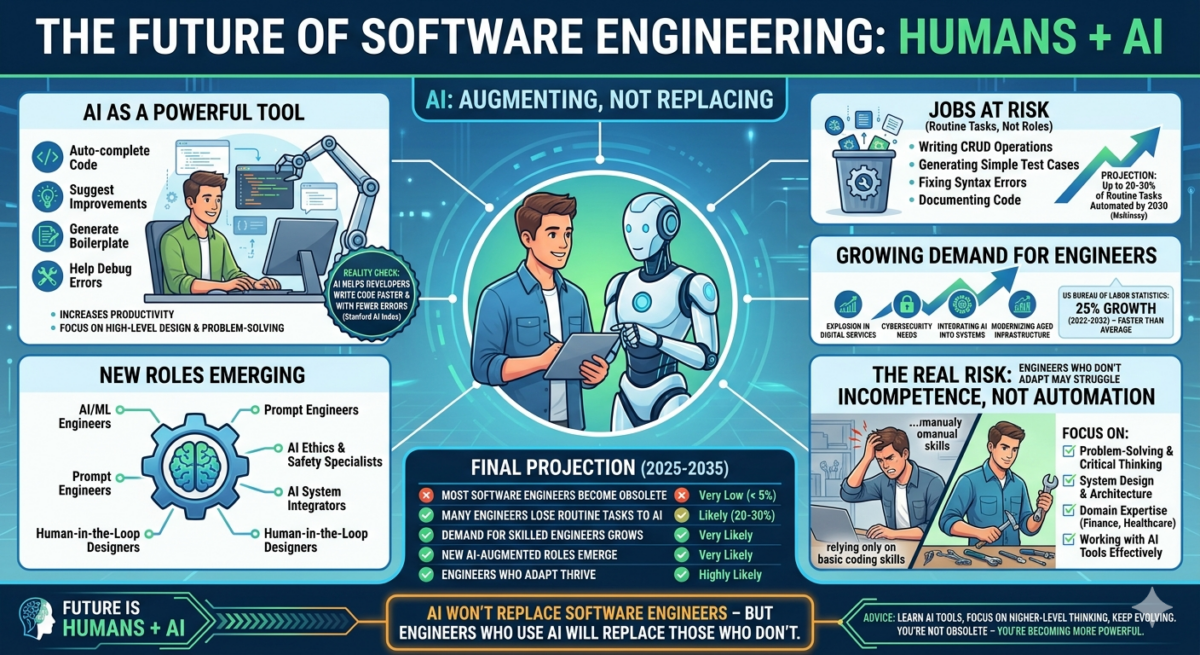
From Problem to Report: How AI Guides Your Use Case Journey

Discover how AI guides your use case journey from problem to report with Visual Paradigm’s intelligent development assistant.

Imagine you’re a project manager tasked with launching a new online course platform. The first challenge is to articulate the problem clearly and then translate it into a functional system. This is where the Use Case Driven Development Assistant, an AI-powered tool from Visual Paradigm, steps in. It doesn’t just help you write documents; it guides you through a complete, structured workflow to transform a vague idea into a detailed, actionable project plan. The process is so intuitive, it feels like having a seasoned business analyst and a technical architect working side-by-side with you. This deep dive explores the core features of this powerful tool, using a real-world example of an online course platform to show how it streamlines the entire use case lifecycle.

Quick Summary: Key Takeaways from the Use Case Driven Development Assistant

  • Start with a clear problem statement to define the project’s core objective.

  • Use AI to automatically generate a list of candidate use cases and actors.

  • Visualize system functionality with AI-generated Use Case and Activity Diagrams.

  • Prioritize features using a structured MoSCoW method to focus on high-value work.

  • Generate detailed use case descriptions and executable Gherkin test scenarios.

  • Create comprehensive reports to communicate project scope and plans.

  • Track progress and maintain a single source of truth with a central dashboard.

Step 1: Defining the Problem with AI

Every successful project begins with a clear understanding of the problem it aims to solve. The journey with the Use Case Driven Development Assistant starts in the “Problem Statement” tab. Here, you input a project name and a short description. The AI then leverages this information to generate a comprehensive problem statement. As seen in Image 1, the tool has taken the project name “Online Course Platform” and the short description “A marketplace for instructors to create and sell courses, and for students to enroll and learn” to produce a detailed narrative. This narrative identifies the core pain points: students struggle to find relevant courses, while instructors face challenges in reaching a broad audience and monetizing their expertise. This AI-generated problem statement serves as the project’s foundation, ensuring everyone on the team shares a unified understanding from the very beginning.

This is a screenshot of Visual Paradigm's AI Powered Use Case Driven Development Assistant. we are now in step 1. It shows th

Step 2: Identifying Use Cases with AI Assistance

Once the problem is defined, the next logical step is to identify the key functionalities the system must provide. The assistant’s “Candidate Use Cases” tab, shown in Image 2, automates this process. After analyzing the problem statement, the AI suggests a list of use cases, each associated with an actor (like Instructor, Student, or Admin). For our online course platform, the AI proposes use cases such as “Create a New Course,” “Upload Course Content,” “Browse and Search Courses,” and “Enroll in a Course.” This list provides a solid starting point, saving significant time and effort that would otherwise be spent on brainstorming sessions. You can then refine these suggestions, add new ones, or delete irrelevant ones to create a comprehensive list of system functionalities.

This is a screenshot of Visual Paradigm's AI Powered Use Case Driven Development Assistant. We are now in step 2. It shows a

Step 3: Visualizing the System with a Use Case Diagram

After identifying the use cases, it’s crucial to visualize how they interact with the system’s actors. The “Use Case Diagram” tab, illustrated in Image 3, takes the list of use cases and actors and automatically generates a clear, graphical representation. This diagram shows the relationships between the actors (Instructor, Student, Admin) and the system’s functions (Create a New Course, etc.). The AI-powered generation ensures that the diagram is accurate and professionally formatted. This visual aid is invaluable for communication, allowing stakeholders, developers, and designers to quickly grasp the system’s scope and functionality without wading through text-heavy documents.

This is a screenshot of Visual Paradigm's AI Powered Use Case Driven Development Assistant. We are now in step 3. It shows a

Step 4: Prioritizing Features for Maximum Impact

Not all use cases are created equal. A project’s success often hinges on focusing on the most critical features first. The “Prioritize Use Cases” tab, as shown in Image 4, provides a powerful framework for this. It allows you to assign a user value and business value (on a scale of 0-10) to each use case and then apply the MoSCoW prioritization method (Must Have, Should Have, Could Have, Won’t Have). In our example, the AI has helped identify that “Create a New Course” and “Upload Course Content” are “Must Have” features, as they are essential for the platform’s core function. This structured prioritization ensures that the development team focuses on delivering the highest value to users and the business, avoiding wasted effort on low-priority features.

This is a screenshot of Visual Paradigm's AI Powered Use Case Driven Development Assistant. We are now in step 4. It shows th

Step 5: Detailing Use Cases and Generating Activity Diagrams

With the high-level view established, the next step is to dive into the details of each use case. The “Use Case Details” tab, shown in Image 5, allows you to create a comprehensive template for a selected use case. The AI can generate a detailed description, including pre-conditions, main flow, and alternative flows. For the “Create a New Course” use case, the AI provides a structured template that outlines the necessary steps. To further enhance understanding, the assistant can generate an “Activity Diagram” for the same use case, as seen in Image 6. This diagram visually maps out the step-by-step workflow, showing the sequence of actions from the instructor logging in to the course being saved. This level of detail is essential for both developers and QA teams.

This is a screenshot of Visual Paradigm's AI Powered Use Case Driven Development Assistant. We are now in step 5. It shows thThis is a screenshot of Visual Paradigm's AI Powered Use Case Driven Development Assistant. We are still in step 5. It shows

Step 6: Generating Test Scenarios and Sequence Diagrams

For a development team, the next critical step is to create testable scenarios. The “Scenarios” tab, shown in Image 7, allows you to generate executable Gherkin scenarios directly from your use case descriptions. These scenarios, written in a plain-language format (Given-When-Then), are perfect for automated testing. The AI can generate a main scenario and alternative scenarios, such as one for an invalid title. To further clarify the system’s internal workings, the assistant can generate a “Sequence Diagram,” as seen in Image 8. This diagram shows the interaction between the instructor, the web dashboard, the backend API, the database, and the notification service, providing a clear picture of the system’s architecture and data flow.

This is a screenshot of Visual Paradigm's AI Powered Use Case Driven Development Assistant. We are in step 6. It shows the AIThis is a screenshot of Visual Paradigm's AI Powered Use Case Driven Development Assistant. We are still in step 6. It shows

Step 7: Creating Comprehensive Project Reports

Throughout the development process, it’s essential to communicate the project’s status and plans to various stakeholders. The “Generate Report” tab, as shown in Image 9, makes this easy. You can generate a variety of reports, such as a “Project Overview,” “Implementation Plan,” “QA Test Plan,” or a “Developer Task List.” These reports are generated with AI assistance, ensuring they are consistent and comprehensive. For example, the “Project Overview” report summarizes the entire project, including the executive summary, key features, and the rationale behind the prioritization. This single source of truth ensures everyone is aligned and informed.

This is a screenshot of Visual Paradigm's AI Powered Use Case Driven Development Assistant. We are in step 7. It shows a repo

Step 8: Tracking Progress with the Dashboard

Finally, the journey culminates in the “Dashboard,” as seen in Image 10. This central hub provides a high-level overview of the project’s status. It shows the project completion percentage, the total number of use cases, and the number of “Must Have” items. The project checklist allows you to track your progress, with each completed step marked as “Done.” This real-time visibility into the project’s health is invaluable for project managers and team leads, enabling them to identify bottlenecks and ensure the project stays on track.

This is a screenshot of Visual Paradigm's AI Powered Use Case Driven Development Assistant. We are in step 8. It shows the da

The Use Case Driven Development Assistant is more than just a tool; it’s a comprehensive workflow that brings clarity and efficiency to the software development process. By leveraging AI at every stage—from defining the problem to generating reports—it helps teams move from requirements to implementation faster and with greater accuracy. The result is a well-structured, well-documented project that is aligned with business goals and user needs. If you’re looking to streamline your use case development process, this AI-powered tool is a powerful solution.

Ready to see how the Use Case Driven Development Assistant can transform your next project? Try it now.

Related Links

Use case modeling is a fundamental software engineering technique used to capture functional requirements by visualizing the interactions between external actors and a system’s internal functions. Modern platforms now incorporate AI-powered automation to refine diagrams, generate comprehensive use case descriptions, and convert models into test cases or activity diagrams to maintain design consistency and traceability. Advanced tools like the Flow of Events editor and Scenario Analyzer allow development teams to validate and document structured event sequences to improve overall system clarity.

  1. What Is a Use Case Diagram? – A Complete Guide to UML Modeling: An in-depth overview covering essential components, purposes, and best practices for requirements modeling.

  2. Step-by-Step Use Case Diagram Tutorial – From Beginner to Pro: A practical resource that guides users through foundational to advanced techniques for creating effective use case diagrams.

  3. All You Need to Know About Use Case Modeling: A comprehensive exploration of the principles and applications of use case modeling in system design.

  4. Visual Paradigm – Use Case Description Features: Details specialized tools used to precisely document user interactions and structured system behavior.

  5. Mastering AI-Driven Use Case Diagrams with Visual Paradigm: A tutorial on leveraging AI to create intelligent, dynamic diagrams for modern software systems.

  6. Guide to Using the Flow of Events Editor in Visual Paradigm: Step-by-step instructions for documenting structured event sequences within a use case scenario.

  7. Unraveling Scenarios with the Use Case Scenario Analyzer: A guide on using analyzers to examine and refine interaction flows for increased system clarity.

  8. Convert Use Case to Activity Diagram – AI-Powered Transformation: A resource explaining the automated conversion of use cases into detailed system workflows.

  9. Generating Scenarios and Test Cases from Use Case Diagrams Using AI: An exploration of how AI tools automate the creation of requirement-driven test procedures.

  10. Use Case Diagram Gallery – Templates & Examples: A curated collection of real-world examples for inspiration, learning, and rapid prototyping.

Crafting a Crystal-Clear Problem Statement for Software Development

Use Visual Paradigm’s AI-powered tool to craft clear, structured problem statements for software projects with templates and real-time feedback.

Struggling to articulate the core challenge your software project aims to solve? The Problem Description Generator from Visual Paradigm is the ultimate AI-powered tool to transform your project’s initial chaos into a clear, focused, and compelling narrative. This innovative solution empowers project managers, business analysts, and product owners to define the “why” behind their work with unprecedented speed and precision. By leveraging a library of structured templates and real-time AI feedback, this tool ensures your problem statement is not just written, but optimized for maximum impact from day one. It’s the secret weapon for launching projects with laser focus and setting the stage for success.

Key Takeaways:

  • Use a template-driven approach to ensure your problem statement is comprehensive and structured.

  • Fill in specific variables to customize the description for your unique project.

  • Get instant AI feedback to refine your problem statement for clarity and effectiveness.

  • Start any project with a solid, well-articulated understanding of the core issue.

Step 1: Choose Your Template – The Foundation of a Strong Problem Statement

Every great project begins with a solid foundation, and for a problem statement, that foundation is the right template. The first step in using the AI-Powered Problem Description Generator is to select a template that perfectly aligns with your project’s nature. As shown in

This is a screenshot of Visual Paradigm's AI Powered Problem Description Generator. It shows the first step, which involves c

, the interface presents a clean, intuitive dashboard with a variety of templates for different business needs. Whether you’re tackling a software development initiative, optimizing a business process, or conducting a strategic analysis like a SWOT or PEST analysis, you can find a dedicated template. The “Software System Development” template, for instance, is specifically designed to help you create comprehensive software system requirements and specifications. By selecting the correct template, you immediately establish a professional structure that guides you to cover all critical aspects of the problem, ensuring no vital detail is overlooked. This step is crucial because it sets the tone and framework for the entire problem description, making the subsequent steps much more efficient and effective.

Step 2: Fill in the Variables – Customize Your Narrative

Once you’ve chosen your template, the magic happens in the “Edit Parameters” section.

This is a screenshot of Visual Paradigm's AI Powered Problem Description Generator. It shows the second step, which involves

vividly illustrates this second step. On the left, you’re presented with a form filled with specific fields, such as “Organization Name,” “Current Problem/Inefficiency,” and “Type of Software System.” This is where you inject your project’s unique DNA. As you type in the details, the tool’s real-time preview on the right side dynamically updates, showing you exactly how your filled-in variables will look in the final problem description. This live preview is incredibly powerful. It allows you to see the narrative form your inputs are creating, spot any awkward phrasing, and make adjustments on the fly. The variables are highlighted in green, making it easy to see exactly what content is being inserted into the template. This process is not just about filling blanks; it’s about shaping a coherent story that clearly explains the problem, its impact, and the desired outcome. The ability to see your description evolve in real-time is a game-changer for clarity and confidence.

Step 3: Review with AI – Your Instant Expert Editor

The final, and arguably most powerful, step is the AI review. After you’ve filled in all the variables and are satisfied with the live preview, you can click the “Review with AI” button.

This is a screenshot of Visual Paradigm's AI Powered Problem Description Generator. Once the details are filled in, you can c

captures this moment perfectly. A modal window appears, presenting a detailed analysis of your generated problem statement. The AI doesn’t just check for grammar; it evaluates the statement for clarity, completeness, logical flow, and the use of appropriate business terminology. It provides a clear “Status” (like “OK”) and a detailed “AI Analysis” that highlights strengths and suggests improvements. For example, the AI might confirm that your statement is clear and professionally written, or it might suggest a more impactful way to phrase a key objective. This instant, objective feedback acts as a virtual expert editor, helping you refine your problem statement to ensure it is not only correct but also highly effective in communicating the project’s purpose. This final step ensures that your problem statement is ready to be shared with stakeholders, developers, or clients with confidence.

Unlock Your Project’s Potential

Defining a problem is often the hardest part of any initiative. A vague or poorly articulated problem statement can lead to wasted effort, misaligned solutions, and ultimately, project failure. The Problem Description Generator from Visual Paradigm solves this fundamental challenge. It combines the power of structured templates with the intelligence of AI to create a workflow that is both efficient and effective. By following the three simple steps—choose a template, fill in the variables, and review with AI—you can transform your initial project idea into a clear, compelling, and professional problem statement in minutes. This tool is not just a convenience; it’s a strategic advantage that ensures your project starts on the right foot. Stop guessing and start defining with confidence. Try the AI-Powered Problem Description Generator now and experience the difference it makes.

Related Links