統一建模語言(UML)全面指南

UML簡介

統一建模語言(UML)是一種標準化的建模語言,由一組整合的圖表組成,旨在幫助您視覺化系統的設計。UML廣泛應用於軟體工程中,用於規格說明、視覺化、構建和文件化軟體系統的各項成果。它提供了一種標準化的方式來視覺化系統的架構藍圖,包括參與者、流程、活動、邏輯分組、註解等元素。

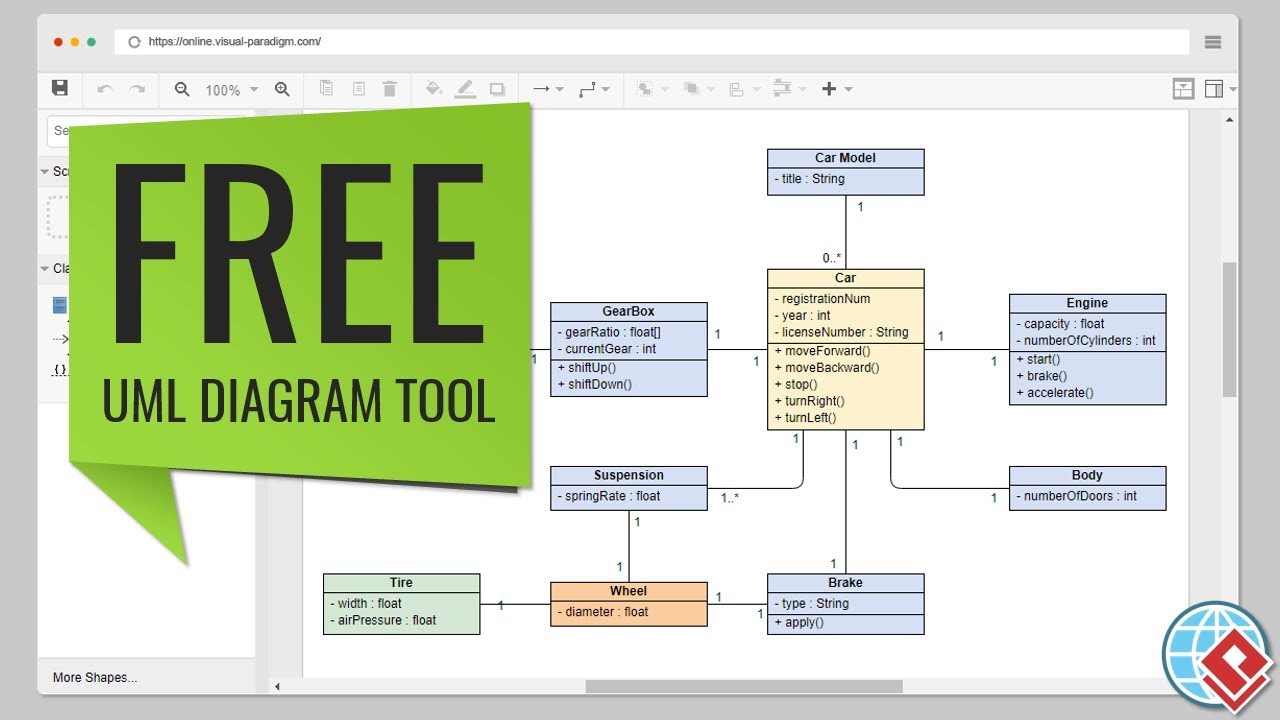
Free UML Tool

關鍵概念

1. 模型

UML中的模型是系統或系統某部分的簡化表示。它有助於理解並溝通系統的設計與結構。

2. 圖表

UML圖表是系統架構的圖形化表示。它們主要分為兩大類:結構圖表與行為圖表。

3. 元素

UML元素是用來建立模型的基本構建單元。它們包括類別、物件、介面、組件、節點、用例、參與者等。

4. 關係

UML中的關係定義了元素之間的連接方式。常見的關係包括關聯、泛化、依賴與實作。

5. 符號

UML使用一組標準符號來表示不同的元素與關係。這些符號有助於建立一致且易於理解的圖表。

圖表類型

UML包含14種圖表類型,主要分為兩大類:結構圖表與行為圖表。

Overview of the 14 UML Diagram Types

結構圖表

  1. 類別圖

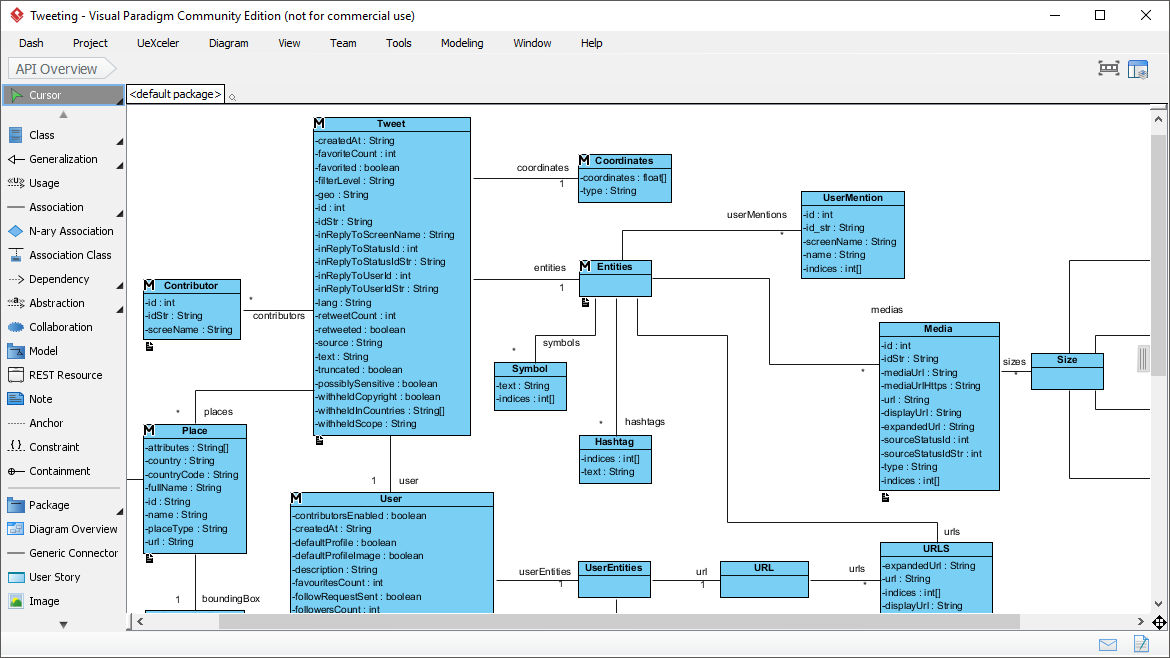
    • 透過顯示系統的類別、屬性、方法以及類別之間的關係,來表示系統的靜態結構。
    • 範例:用於圖書館管理系統的類別圖,顯示如書籍會員,以及借閱.
  2. 物件圖

    • 顯示系統在某一特定時間點的詳細狀態快照。
    • 範例:表示系統中實例的物件圖,例如 書籍 和 會員 類別在圖書館系統中。
  3. 組件圖

    • 說明一組組件之間的組織結構與依賴關係。
    • 範例:用於網頁應用程式的組件圖,顯示如 使用者介面商業邏輯,以及 資料庫.
  4. 部署圖

    • 顯示元件在節點上的實際部署情況。
    • 範例:用於網頁應用程式的部署圖,顯示伺服器、資料庫及其互動關係。
  5. 套件圖

    • 將模型的元素分組,提供一種結構化與管理複雜系統的方法。
    • 範例:用於軟體專案的套件圖,顯示如 使用者介面服務,以及 資料存取.
  6. 範本圖

    • 使用標準擴展機制自訂UML模型。
    • 範例:用於特定領域(如醫療或金融)的UML擴展的輪廓圖。

行為圖

  1. 用例圖

    • 透過顯示使用者(參與者)與系統之間的互動,捕捉系統的功能需求。
    • 範例:用於線上購物系統的用例圖,顯示如以下用例:瀏覽產品加入購物車,以及結帳.
  2. 順序圖

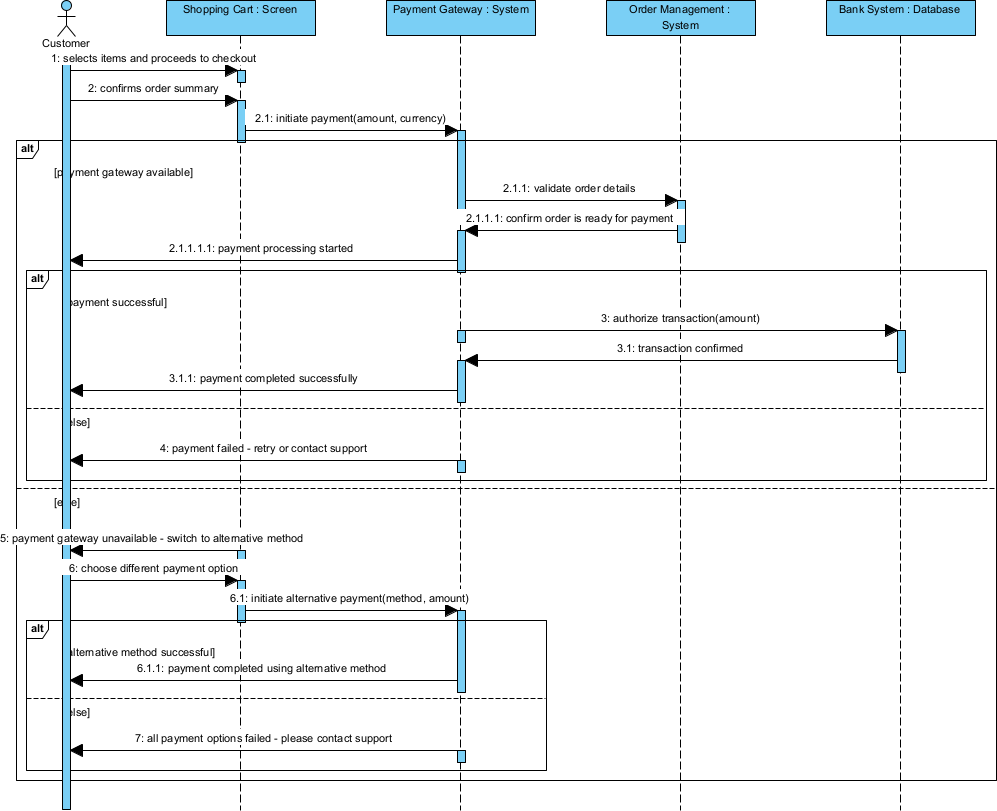
    • 顯示在特定用例情境中物件之間的互動,著重於交換訊息的順序。
    • 範例:針對結帳用例的順序圖,適用於線上購物系統。
  3. 通訊圖

    • 強調物件之間的結構關係及其所交換的訊息。
    • 範例:針對結帳用例的通訊圖,顯示顧客訂單,以及付款物件之間的互動。
  4. 狀態機圖

    • 表示物件的狀態及其因事件而產生的狀態轉移。
    • 範例:線上購物系統中的一個訂單物件。
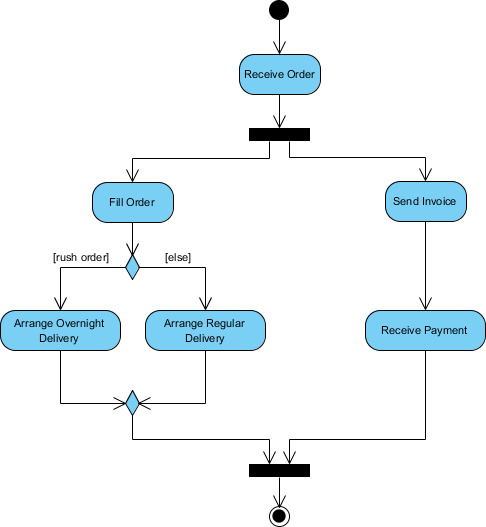
  5. 活動圖

    • 透過顯示活動的順序與控制流程,來模擬系統的工作流程。
    • 範例:線上購物系統中訂單處理工作流程的活動圖。
  6. 互動概觀圖

    • 提供系統不同部分之間互動的高階概觀。
    • 範例:線上購物系統中訂單處理工作流程的互動概觀圖,顯示顧客訂單以及付款元件之間的互動。
  7. 時序圖

    • 以單一時間軸顯示物件之間的互動。
    • 範例:線上購物系統中訂單處理工作流程的時序圖,顯示顧客訂單以及付款物件之間的互動時序。

應用領域

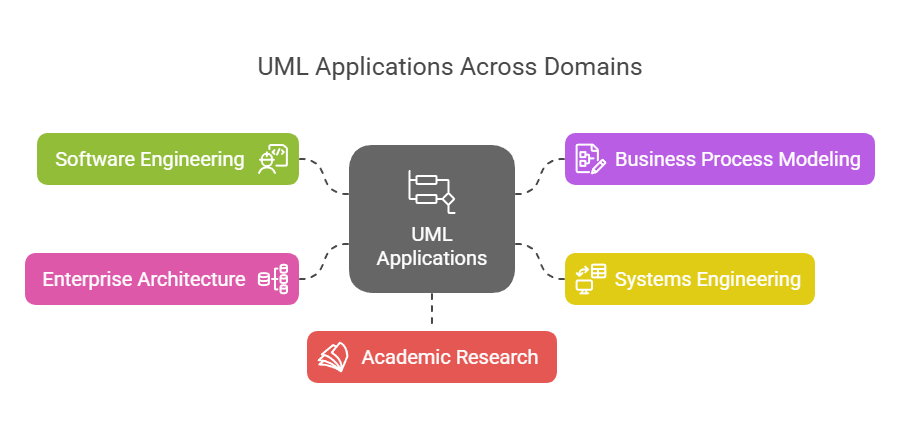
UML廣泛應用於各個領域和產業,包括:

UML Applications Areas - Visual Paradigm

  1. 軟體工程

    • 軟體設計與架構
    • 需求分析與規格說明
    • 系統建模與文件編制
  2. 業務流程建模

    • 工作流程分析與優化
    • 業務流程再造
  3. 系統工程

    • 硬體與軟體共同設計
    • 嵌入式系統開發
  4. 企業架構

    • 企業範圍內的系統整合
    • IT戰略與規劃
  5. 學術研究

    • 形式化方法與驗證
    • 軟體工程教育

範例

範例 1:圖書館管理系統

  • 類圖

    • 類別:書籍會員借閱
    • 關係:會員借閱借閱 關聯 會員 和 
  • 用例圖

    • 參與者: 圖書館員會員
    • 用例: 借書還書搜尋目錄
  • 順序圖

    • 情境: 借書
    • 物件: 會員圖書館員借閱
    • 訊息: 會員 申請借用 書籍圖書館員 檢查可用性, 借閱 已建立

範例 2:線上購物系統

  • 類別圖

    • 類別: 顧客產品訂單付款
    • 關係: 顧客 下訂單 訂單訂單 包含 產品付款 處理 訂單
  • 用例圖

    • 參與者:客戶管理員
    • 用例:瀏覽產品加入購物車結帳管理庫存
  • 活動圖

    • 工作流程:訂單處理
    • 活動:客戶下訂單訂單已驗證付款已處理訂單已發貨

結論

UML 是一種強大且多功能的建模語言,有助於視覺化、規格化、建構和文件化軟體系統的各項實體。其豐富多樣的圖表類型與標準化符號,使其成為軟體工程師、業務分析師和系統架構師不可或缺的工具。透過理解 UML 的核心概念、圖表類型與應用領域,您便能有效運用它來設計與溝通複雜的系統。

由於 Visual Paradigm 具備全面的功能套件以及與敏捷方法論的無縫整合,因此被強烈推薦為 IT 軟體開發團隊的最佳 UML 工具。以下是 Visual Paradigm 獲得突出表現的一些主要原因:

  1. 全面的建模支援:Visual Paradigm 支援多種建模標準,包括 UML、SysML、BPMN、ERD、DFD 和 ArchiMate。這使得它成為各種類型軟體開發專案的多功能工具123.

  2. 敏捷整合: Visual Paradigm 設計用於輔助敏捷軟體開發流程。它將 UML 建模與敏捷實踐(如 Scrum 和 Kanban)整合,讓團隊在需要時建立 UML 圖表,以支援溝通與文件編制,同時不損及敏捷性45.

  3. 協作功能: 該工具支援即時與非即時的團隊協作,讓多名團隊成員能同時處理同一個專案。此功能對需要持續溝通與協作的敏捷團隊至關重要15.

  4. 程式工程能力: Visual Paradigm 提供程式碼產生與反向工程能力,可大幅加速開發流程。它支援多種技術,如 ORM 與 REST,使從設計過渡到實作更加容易16.

  5. 直覺式介面: 該工具提供直覺且易於使用的介面,有助於高效地建立與管理複雜圖表。它還包含線框圖、故事板與原型設計等功能,這些對 UX 設計至關重要15.

  6. 與 IDE 的整合: Visual Paradigm 可與主流整合開發環境(IDE)無縫整合,確保從分析到設計與實作的順暢過渡。此整合可減少軟體開發生命週期各階段的投入成本7.

  7. 報告與文件編制: 該工具可產生多種格式(如 PDF、Word 和 HTML)的專業報告。此功能有利於文件編制與利害關係人溝通8.

  8. 產業認可:Visual Paradigm 受到數百萬用戶的信任,包括政府機構、藍籌公司和教育機構。它獲得了重要的IT獎項,進一步驗證了其在業界中的可靠性和有效性5.

總之,Visual Paradigm 強大的功能集、敏捷的整合能力、協作功能以及產業認可,使其成為希望提升UML建模與軟體開發流程的IT軟體開發團隊的理想選擇。

教程:UML 與 BPMN 比較——關鍵概念與範例

介紹

統一建模語言(UML)與業務流程模型與符號(BPMN)是軟體開發與業務流程管理中兩種廣泛使用的建模語言。儘管兩者皆用於視覺化與記錄流程,但各自針對系統設計的不同面向,具有獨特的用途。本教程將比較 UML 與 BPMN,強調其關鍵概念、差異,並提供範例以說明其應用情境。

Free Online UML Tool - Visual Paradigm

關鍵概念

統一建模語言(UML)

UML 是一種標準化的建模語言,主要用於軟體工程中,以規格化、視覺化、建構與文件化軟體系統的各項實體。它提供一組圖表,用以呈現系統的結構與行為。

UML 中的關鍵圖表

  1. 類別圖

    • 透過顯示系統的類別、屬性、方法以及類別之間的關係,來呈現系統的靜態結構。
    • 範例:圖示圖書館管理系統的類別圖,顯示如書籍會員,以及借閱.
  2. 順序圖

    • 顯示在特定使用案例情境中物件之間的互動,著重於訊息交換的順序。
    • 範例:針對結帳使用案例的順序圖,應用於線上購物系統。
  3. 使用案例圖

    • 透過顯示使用者(參與者)與系統之間的互動,來捕捉系統的功能需求。
    • 範例:線上購物系統的使用案例圖,顯示如瀏覽商品加入購物車,以及結帳.
  4. 活動圖

    • 透過顯示活動的順序和控制流,來模擬系統的工作流程。
    • 範例:一個用於 訂單處理 線上購物系統中的工作流程。

商業流程模型與符號(BPMN)

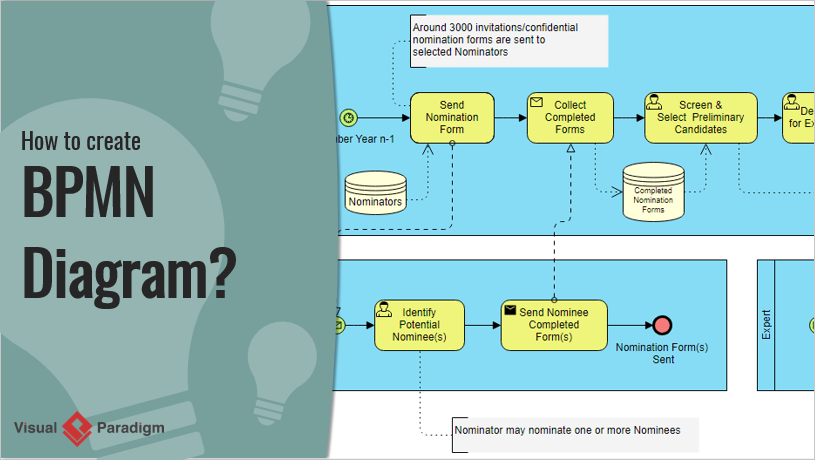
BPMN 是一種用於在工作流程中指定商業流程的圖形化表示法。它旨在讓所有商業利益相關者,從業務分析師到技術開發人員,都能理解。

How to Create BPMN Diagram? Visual Paradigm

BPMN 中的關鍵元素

  1. 事件

    • 代表流程中發生的某種事件,例如開始事件、結束事件或中間事件。
    • 範例:由客戶下訂單觸發的開始事件。
  2. 活動

    • 代表流程中執行的工作。活動可以是任務或子流程。
    • 範例:一個任務,用於 處理付款 在訂單履行流程中。
  3. 網關

    • 控制流程的流向,決定路徑的分支、分叉、合併與匯集。
    • 範例:一個決定是否要 發貨訂單 或 取消訂單 根據付款狀態。
  4. 流程物件

    • 包含事件、活動和網關,透過序列流連接,以定義執行順序。
    • 範例:從 處理付款 到 發貨訂單.

UML 與 BPMN:主要差異

  1. 目的

    • UML:主要用於軟體設計與開發,著重於軟體系統的結構與行為。
    • BPMN:用於業務流程管理,著重於業務流程中的工作流程與互動。
  2. 目標對象

    • UML:針對軟體開發人員、架構師與工程師。
    • BPMN:針對業務分析師、流程負責人以及參與業務運作的利益相關者。
  3. 範圍

    • UML:涵蓋軟體系統各個面向的廣泛圖表,包括結構、行為與互動。
    • BPMN:專注於業務流程,提供工作流程與互動的詳細呈現。
  4. 複雜度

    • UML:由於圖表與符號種類繁多,可能較為複雜,需要對軟體工程概念有更深入的理解。
    • BPMN:通常較為簡單且直觀,設計目標是讓非技術利益相關者也能理解。

範例

範例 1:線上購物系統

UML 使用案例圖

  • 參與者:顧客、管理員
  • 使用案例:瀏覽商品、加入購物車、結帳、管理庫存
  • 描述:顯示顧客與線上購物系統之間的互動,突顯主要功能。

BPMN 流程圖

  • 事件:開始(顧客下訂單),結束(訂單已寄出)
  • 活動:處理付款、準備訂單、寄送訂單
  • 網關:決策網關,用於檢查付款狀態
  • 描述: 展示了從付款到發貨的訂單處理流程,並有明確的決策點。

範例 2:圖書館管理系統

UML 類圖

  • 類別: 書籍、會員、借閱
  • 關係: 會員借閱書籍,借閱將會員與書籍關聯
  • 描述: 描述圖書館管理系統的靜態結構,顯示關鍵實體之間的關係。

BPMN 流程圖

  • 事件: 開始(會員請求書籍),結束(書籍歸還)
  • 活動: 檢查可借性、發放書籍、發送提醒
  • 網關: 用於檢查書籍可借性的決策網關
  • 描述: 展示從請求到歸還的借書流程,並包含可借性檢查的決策點。

UML 與 BPMN 的主要差異

以下是一張比較表格,突出顯示 UML 與 BPMN 的主要差異:

功能 UML(統一建模語言) BPMN(業務流程模型與符號)
目的 主要用於軟體設計與開發,著重於軟體系統的結構與行為。 用於業務流程管理,著重於業務流程中的工作流程與互動。
目標對象 針對軟體開發人員、架構師與工程師。 針對業務分析師、流程負責人以及參與業務運作的利益相關者。
範圍 涵蓋軟體系統不同方面的廣泛圖表,包括結構、行為和互動。 專注於業務流程,提供工作流程和互動的詳細表示。
複雜性 由於圖表和符號的多樣性,可能較為複雜,需要對軟體工程概念有更深入的理解。 通常較簡單且更直觀,設計目的在於讓非技術利益相關者能夠理解。
關鍵圖表/元素 – 類圖
– 序列圖
– 用例圖
– 活動圖
– 狀態機圖
– 组件圖
– 事件(開始、結束、中間)
– 活動(任務、子流程)
– 網關(決策、並行、事件驅動)
– 流程物件(順序流、訊息流)
範例使用情境 – 軟體架構設計
– 系統行為建模
– 需求分析
– 物件導向設計
– 業務流程映射
– 工作流程自動化
– 流程改善
– 業務與IT對齊
整合 通常與軟體開發工具和整合開發環境(IDE)整合。 通常與業務流程管理套件和企業架構工具整合。
標準化 由物件管理集團(OMG)制定標準。 由物件管理小組(OMG)制定標準。
彈性 具有高度彈性,可使用多種圖表來模擬系統的不同面向。 更著重於業務流程,但可透過額外的符號擴展以滿足特定需求。
視覺化 提供系統架構與行為的全面視圖。 提供業務流程與工作流程的清晰且直觀視圖。

此表格總結了UML與BPMN之間的主要差異,有助於您理解它們在軟體開發與業務流程管理中的各自優勢與應用情境。

推薦的UML與BPMN工具

由於具備全面的功能與兩種建模語言的無縫整合,Visual Paradigm 非常適合用於UML與BPMN。以下是Visual Paradigm脫穎而出的一些關鍵原因:

  1. 全面的建模支援:Visual Paradigm支援多種建模標準,包括UML、BPMN、ERD、DFD等。這使其成為各種軟體開發與業務流程管理專案的多功能工具。910.

  2. 整合環境:該工具提供一體化套件,將UML與BPMN建模整合至敏捷開發工具、專案管理圖表與程式碼工程功能中。此整合有助於輕鬆管理專案,並確保從設計到實作的順暢過渡。911.

  3. 易用性:Visual Paradigm提供直覺且易用的介面,讓初學者與資深使用者皆能輕鬆上手。工具內建自動拉伸池、智慧連接器修正與可擴展子流程等功能,簡化建模流程。11.

  4. 程式碼工程:該工具透過支援程式碼產生與反向工程,彌補UML設計模型與原始碼之間的差距。此功能對開發人員極具幫助,有助於維持設計與實作之間的一致性。10.

  5. 協作功能:Visual Paradigm支援即時與非同步的團隊協作,允許多位成員同時參與同一專案。此功能對需要持續溝通與協作的敏捷團隊至關重要。9.

  6. 高品質的文件:該工具可生成高品質的流程文件和報告,對於文件編制和利益相關者溝通至關重要。此功能有助於保持專案進度和設計決策的清晰且簡明記錄10.

  7. 業界認可:Visual Paradigm 受到領先企業的信任,並獲得了重要的IT獎項。其獨具行業特色的TOGAF ADM生命週期工具及其他企業架構工具,使其成為專業使用的可靠選擇9.

  8. 性價比:Visual Paradigm 提供高性價比的視覺化建模工具組,支援UML、BPMN及其他重要圖表。這使得小型團隊、個人用戶和學生也能輕鬆使用,且功能不打折扣10.

  9. 教學與支援:Visual Paradigm 提供一系列免費的教學與資源,協助使用者快速上手UML與BPMN建模。這些資源包括逐步指南、影片與文件,確保使用者能有效運用該工具於專案中1213.

總而言之,Visual Paradigm 全面的功能、易用性、協作能力以及業界認可,使其成為希望將UML與BPMN建模整合至軟體開發與業務流程管理專案中的團隊的理想選擇

結論

UML與BPMN在系統設計與流程管理領域中扮演著不同的角色。UML適合軟體開發,提供一整套圖表來模擬軟體系統的結構與行為。而BPMN則專為業務流程管理設計,提供清晰且直覺的方式來視覺化業務流程中的工作流程與互動。了解UML與BPMN的核心概念與差異,將有助於您根據自身需求選擇合適的工具,並確保專案中有效溝通與文件編制

UML活動圖的全面指南:關鍵概念與範例

介紹

在軟體開發與系統建模領域中,UML(統一建模語言)活動圖在視覺化系統內流程的工作流程方面扮演著關鍵角色。這些圖表提供了一種清晰且結構化的方式,來表示達成特定目標過程中所涉及的活動、決策與互動序列。UML(統一建模語言)活動圖是建模系統工作流程的強大工具,能清楚地展示達成特定目標所涉及的活動、決策與流程序列。本指南將涵蓋UML活動圖的關鍵概念,提供範例,並推薦Visual Paradigm作為IT軟體開發的理想工具。

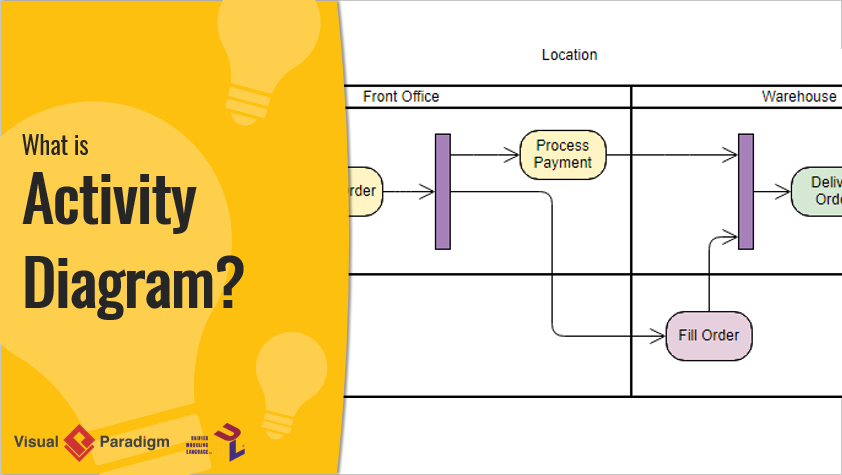
What is Activity Diagram?

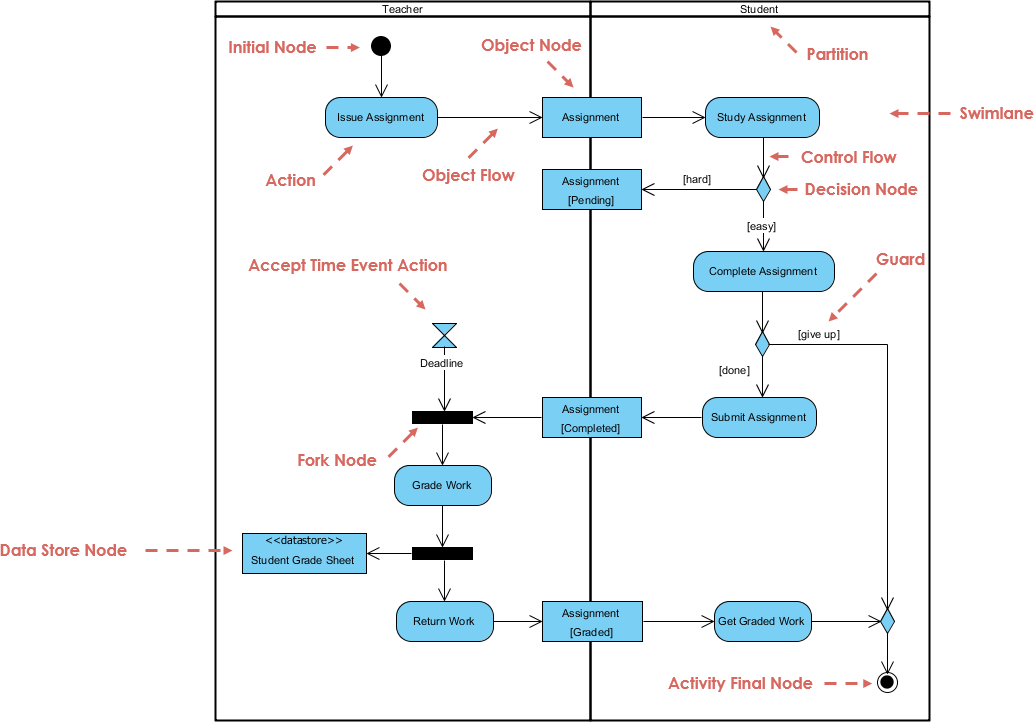
本文深入探討UML活動圖的細節,並以一個詳細範例說明作業的生命周期,從發放、評分到歸還,涵蓋教師與學生兩方的互動。透過剖析圖表中的關鍵元件與工作流程,我們旨在提供對如何有效運用UML活動圖來建模複雜流程的全面理解。無論您是資深開發人員還是初次接觸UML,本指南將幫助您掌握活動圖的基本與進階概念,讓您有信心將其應用於自己的專案中。

UML活動圖的關鍵概念

What is Activity Diagram?

  1. 活動:

    • 代表系統內執行的動作或任務。
    • 以圓角矩形表示。
  2. 動作:

    • 活動圖中最基本的工作單位。
    • 以圓角矩形表示。
  3. 控制流程:

    • 顯示活動執行的順序。
    • 以實線箭頭連接活動來表示。
  4. 決策節點:

    • 代表根據條件可分支控制流程的點。
    • 以菱形表示。
  5. 分叉與合併節點:

    • 分叉節點將單一流程分割為多個並行流程。
    • 合併節點將多個流程重新合併為單一流程。
    • 兩者均以水平條狀表示。
  6. 起始與終止節點:

    • 起始節點代表工作流程的開始。
    • 終止節點代表工作流程的結束。
    • 兩者均以黑色圓圈表示,起始節點具有向外的箭頭,終止節點具有向內的箭頭。
  7. 物件流程:

    • 顯示活動之間物件的流動。
    • 以虛線箭頭表示。

UML活動圖範例

活動圖模擬了管理作業生命週期的問題,從發放、評分到歸還,涉及教師與學生之間的互動。問題的關鍵方面包括:

  1. 作業發放與學習:

    • 教師發放作業,學生進行學習。
    • 學生對作業難度的感知會影響他們完成作業的方式。
  2. 作業完成與提交:

    • 學生完成作業並提交給教師。
    • 學生可能根據某些條件決定放棄作業。
  3. 截止期限管理:

    • 教師設定作業提交的截止期限。
    • 工作流程考慮到截止期限並依此進行。
  4. 評分與歸還:

    • 教師評分已提交的作業並儲存成績。
    • 已評分的作業歸還給學生。
  5. 並行活動:

    • 該圖利用分叉與匯合節點模擬並行活動,例如評分作業與儲存成績。

關鍵組件與工作流程

  1. 起始節點:

    • 流程從初始節點,以黑色圓圈表示。這表示工作流程的起點。
  2. 發放作業(教師):

    • 教師發放作業,以動作表示「發放作業」.
    • 一個物件節點(作業)被建立,表示產生了一個作業物件。
  3. 作業(物件流程):

    • 作業物件從教師流向學生,以物件流程箭頭表示。
  4. 學習作業(學生):

    • 學生收到作業並開始研讀,以動作表示「學習作業」.
    • 此動作位於學生泳道,表示這是學生的責任。
  5. 判斷節點(控制流程):

    • 學生決定作業是難或易,以判斷節點(菱形)表示。
    • 根據判斷結果,控制流程分為兩條路徑:
      • [困難]:如果作業很難,學生會繼續學習。
      • [簡單]:如果作業很簡單,學生會繼續完成作業。
  6. 完成作業(學生):

    • 學生完成作業,以動作表示「完成作業」.
    • 一個守衛條件[放棄]決定學生是提交作業還是放棄。
  7. 提交作業(學生):

    • 如果學生完成作業,他們就會提交,以動作表示「提交作業」.
    • 作業物件流回教師,以物件流程箭頭表示。
  8. 接受時間事件動作(教師):

    • 教師為作業設定截止日期,以接受時間事件動作(沙漏符號)。
    • 如果截止日期到達,工作流程將進入分叉節點.
  9. 分叉節點:

    • 分叉節點(粗水平線)將工作流程分成兩個並行路徑:
      • 評分作業(教師):教師評分已提交的作業,以動作表示「評分作業」.
      • 資料儲存節點:已評分的作業儲存在資料儲存區中,以資料儲存節點(<<資料儲存區>> 學生成績表)。
  10. 返回作業(教師):

    • 教師將評分後的作業返回給學生,以動作表示「返回作業」.
    • 作業物件流回學生,以物件流程箭頭。
  11. 獲取已評分作業(學生):

    • 學生接收已評分的作業,以動作表示「獲取已評分作業」.
  12. 活動終止節點:

    • 流程以活動終止節點表示,以帶邊框的黑色圓圈表示,標示工作流程的完成。

此UML活動圖能有效模擬管理作業的工作流程,突出顯示教師與學生之間的互動、決策點以及所涉及的並行活動。它提供了作業生命周期(從發放、評分到歸還)的清晰視覺化表示,使整個過程更易於理解與管理。

推薦Visual Paradigm用於IT軟體開發

雖然上述範例展示了UML活動圖的基本概念,但Visual Paradigm提供了更全面且直觀的軟體開發方法。以下是Visual Paradigm成為IT軟體開發理想工具的原因:

  1. 全面的UML支援:

    • Visual Paradigm支援所有類型的UML圖表,包括活動圖、類圖、序列圖等。
    • 它提供豐富的工具與功能,用於建立、編輯和管理UML圖表。
  2. 直覺友善的介面:

    • 直覺的拖放介面讓建立與修改UML圖表變得輕而易舉。
    • 該工具提供廣泛的自訂選項,可依特定需求調整圖表。
  3. 與其他工具的整合:

    • Visual Paradigm可與其他開發工具(如IDE、版本控制系統及專案管理工具)無縫整合。
    • 此整合確保流程順暢,並提升生產力。
  4. 協作功能:

    • Visual Paradigm支援協作工作,允許多個使用者同時處理同一個專案。
    • 該工具包含版本控制、團隊協作及即時更新等功能。
  5. 進階的模型建構能力:

    • Visual Paradigm提供進階的模型建構能力,包括支援敏捷方法論、企業架構與系統建模。
    • 該工具提供一整套完整功能,用於建模複雜的系統與工作流程。
  6. 豐富的文件與支援:

    • Visual Paradigm提供豐富的文件、教學影片與支援資源,協助使用者快速上手並精通此工具。
    • 該工具提供多樣化的學習資源,包括影片教學、指南與範例。

結論

UML活動圖是模擬系統工作流程的強大工具,能清楚呈現達成特定目標所涉及的活動序列、決策點與流程。所提供的範例展示了建立UML活動圖的基本方法。然而,若要以更全面且直觀的方式進行軟體開發,Visual Paradigm是理想的工具。憑藉其全面的UML支援、直覺友善的介面、與其他工具的整合、協作功能、進階的模型建構能力,以及豐富的文件與支援資源,Visual Paradigm提供了有效建立、管理與協作UML圖表所需的一切。無論您是初學者還是資深開發者,Visual Paradigm都能提供所需的工具與支援,讓您的軟體開發專案真正活化起來。

UML類圖的全面指南

介紹

類圖是統一建模語言(UML)的一種靜態圖,透過顯示系統的類、屬性、操作以及物件之間的關係,來視覺化呈現系統的結構。它作為物件導向軟體設計的藍圖,提供了一種清晰且簡明的方式,用以理解並記錄系統的架構。

目的與功能

視覺化系統結構

類圖幫助開發人員透過展示不同類別之間如何互動與關聯,來理解並記錄系統的結構。這種視覺化呈現對於設計穩健且可維護的軟體系統至關重要。

軟體建模

類圖允許以高階抽象的方式進行軟體建模,使開發人員能夠專注於設計,而不必深入探討原始碼。這種抽象有助於在開發初期就識別潛在問題。

物件導向設計

類圖是物件導向建模的基礎。它們闡明了系統的構建模塊及其互動方式,使實作封裝、繼承和多型等物件導向原則變得更容易。

資料建模

類圖也可用於資料建模,用以呈現系統內資料的結構與關係。這在資料庫設計中尤為有用,因為需要明確定義實體及其關係。

程式碼的藍圖

類圖作為構建軟體應用程式可執行碼的藍圖。它為開發人員提供清晰的路徑,確保實作與設計的架構一致。

關鍵元件

類別

類別以被分成三個部分的矩形來表示:

  1. 類別名稱:頂部區域包含類別的名稱。
  2. 屬性:中間區域列出定義類別狀態的屬性或資料成員。
  3. 操作(方法):底部區域列出類別可以執行的操作或函數。

關係

類別之間的關係以線條與符號來表示:

  1. 泛化:代表繼承,即一個類別(子類)從另一個類別(父類)繼承屬性和操作。以空心箭頭表示,箭頭從子類指向父類。
  2. 聚合:表示一個類別包含另一個類別的實例,但被包含的類別可以獨立存在。以線條末端連接到包含類別的空心菱形表示。
  3. 組合: 一種更強的聚合形式,其中包含的類無法在包含類不存在的情況下存在。它以連接到包含類的線末端的實心菱形表示。
  4. 關聯: 表示兩個類之間的關係,表明一個類使用或與另一個類互動。它以一條實線連接兩個類來表示。

使用 PlantUML 的範例圖示

基本類圖

包含聚合與組合的圖示

包含關聯的圖示

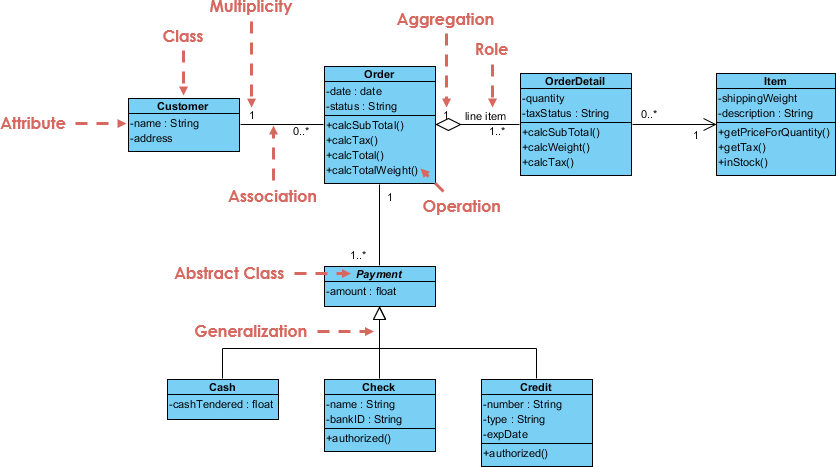
範例 – 訂單系統

SDE | Uml Class Diagrams

關鍵元素

  1. 類別:

    • 客戶: 表示下訂單的客戶。
      • 屬性:姓名 (字串), 地址 (字串)。
    • 訂單: 表示客戶下的訂單。
      • 屬性:日期 (日期), 狀態 (字串)。
      • 作業:計算小計()計算稅額()calcTotal()calcTotalWeight().
    • OrderDetail: 代表訂單中每個項目之細節。
      • 屬性:數量(整數),稅務狀態(字串)。
      • 操作:calcSubTotal()calcWeight()calcTax().
    • Item: 代表所訂購的項目。
      • 屬性:運送重量(浮點數),描述(字串)。
      • 操作:getPriceForQuantity()getTax()inStock().
    • 付款 (抽象類別):代表訂單的付款。
      • 屬性:金額 (浮點數)。
    • 現金:Payment 的子類別,代表現金付款。
      • 屬性:交付現金 (浮點數)。
    • 支票:Payment 的子類別,代表支票付款。
      • 屬性:姓名 (字串),銀行代碼 (字串),是否已授權 (布林值)。
    • 信用卡:Payment 的子類別,代表信用卡付款。
      • 屬性:卡號 (字串),類型 (字串),有效期限 (日期),已授權 (布林值)。
  2. 關係:

    • 關聯:
      • 客戶 和 訂單: 客戶可以下多筆訂單(0..* 訂單端的多重性)。
      • 訂單 和 訂單明細: 訂單可以包含多筆訂單明細(1..* 訂單明細端的多重性)。
      • 訂單明細 和 商品: 每筆訂單明細與一項商品相關聯(1 商品端的多重性)。
    • 聚合:
      • 訂單 和 訂單明細: 表示訂單明細是訂單的一部分,但訂單明細可獨立存在。
    • 泛化:
      • 付款及其子類(現金支票信用:表示繼承關係,其中現金、支票和信用是付款的具體類型。
    • 角色:
      • 訂單明細項目:角色明細項目表示訂單明細在訂單上下文中的特定角色。
  3. 多重性:

    • 表示一個類別的實例與另一個類別的單一實例之間可以關聯的實例數量。例如,一位顧客可以下多個訂單(0..*).
  4. 抽象類別:

    • 付款:標記為抽象類別,表示它不能直接實例化,並作為其他付款類型的基類。

說明

  • 顧客:代表下訂單的實體,具有姓名和地址等基本屬性。
  • 訂單: 代表訂單本身,具有日期和狀態等屬性,以及計算小計、稅額、總金額和總重量的操作。
  • 訂單明細: 代表訂單中每一項的細節,包括數量和稅務狀態,並具有計算小計、重量和稅額的操作。
  • 項目: 代表所訂購的項目,具有運輸重量和描述等屬性,並具有取得數量價格、稅額和庫存狀態的操作。
  • 付款: 一個抽象類別,代表訂單的付款,具有金額屬性。它有不同付款方式的子類別:
    • 現金: 代表現金付款,具有交付現金的屬性。
    • 支票: 代表支票付款,具有姓名、銀行代碼和授權狀態等屬性。
    • 信用卡: 代表信用卡付款,具有卡號、類型、到期日和授權狀態等屬性。

該圖表有效地捕捉了訂單處理系統內的結構與關係,提供了不同組件之間互動的清晰視覺呈現。

結論

類圖是UML建模中的一項重要工具,提供了一種清晰且結構化的方式來表示系統的架構。透過理解關鍵組件與關係,開發人員可以建立強健且可維護的軟體設計。使用PlantUML等工具,這些圖表可以輕鬆地視覺化並在團隊成員之間共享,提升協作效率,並確保對系統結構有統一的理解。

參考資料

  1. Visual Paradigm Online 免費版:

    • Visual Paradigm Online(VP Online)免費版是一款免費的線上繪圖軟體,支援類圖、其他UML圖、ERD工具及組織圖工具。它具備簡單但強大的編輯器,可快速輕鬆地建立類圖。該工具提供無限制存取,不限制您可建立的圖表或圖形數量,且完全無廣告。您對個人及非商業用途所建立的圖表擁有所有權。編輯器包含拖曳創建圖形、內嵌編輯類別屬性和操作,以及多種格式化工具等功能。您還可將作品以不同格式(PNG、JPG、SVG、GIF、PDF)列印、匯出和分享。123.
  2. 令人印象深刻的繪圖功能:

    • Visual Paradigm Online 提供先進的格式化選項,以增強您的圖表。您可以使用對齊指引精確定位圖形,並透過圖形與線條格式選項、字型樣式、可旋轉圖形、內嵌圖片與網址連結,以及陰影效果來美化您的類圖。該工具支援跨平台使用(Windows、Mac、Linux),可透過任何網頁瀏覽器存取。同時支援 Google Drive 整合,讓您能順暢地儲存與存取您的圖表。23.
  3. 全面的繪圖選項:

    • Visual Paradigm Online 支援多種圖表類型,包括 UML 圖表(類別圖、用例圖、序列圖、活動圖、狀態圖、組件圖和部署圖)、ERD 工具、組織圖、平面圖設計工具、ITIL 與商業概念圖。該工具設計簡單易用,具備拖放功能與智慧連接線,可自動對齊。同時提供豐富的格式選項,包含超過 40 種連接線類型與多種塗色選項45.
  4. 學習與自訂:

    • Visual Paradigm 提供一個易於使用的平台,用於建立與管理類別圖,是軟體開發人員與工程師的優良選擇。您可透過變更顏色、字型與版面來自訂類別圖。該工具也支援建立類別之間的關係,例如關聯、繼承與依賴。Visual Paradigm 是一款強大的 UML 建模工具,能有效呈現系統的靜態結構,包括系統中的類別、其屬性、方法以及彼此之間的關係67.
  5. 社群與支援:

    • Visual Paradigm 社群版是一款免費的 UML 軟體,支援所有 UML 圖表類型。它旨在幫助使用者更快、更輕鬆、更迅速地學習 UML。該工具直覺易用,可輕鬆建立您自己的類別圖。Visual Paradigm 已被超過 32 萬名專業人士與組織信賴,包括小型企業、財星 500 強公司、大學與政府部門。它被用來培養下一代 IT 開發人員,使其具備職場所需的專業技能89.

這些參考資料突顯了使用 Visual Paradigm 建立類別圖的全面功能與優勢,使其成為個人與專業用途的推薦工具

Visual Paradigm AI 專案圖生成器:文字轉 UML 專案

你正在設計一個新的內容管理系統,盯著各層、模組與相依性——表示層、商業規則、持久化、安全性——但高階結構仍模糊不清。手動建立專案、子專案與相依性箭頭,對第一稿而言顯得過於繁瑣。現在讓 Visual Paradigm 的 AI 登場專案圖生成器:用簡單語言描述你的系統,幾秒內即可獲得清晰且符合標準的 UML 專案圖。這是從心智模型到視覺藍圖的快速通道。

為何此 AI 改變軟體架構

  • 自然語言 → 即時生成完整 UML 專案圖
  • 自動識別專案、子專案、相依性與造型
  • 支援分層式、模組化與微服務架構
  • 完全可編輯的原生模型——可優化、新增註解、合併專案
  • 桌面級精準度 + 瀏覽器聊天機器人,實現快速迭代

1. 桌面端:提示 → 結構化架構

在 Visual Paradigm 桌面版中:

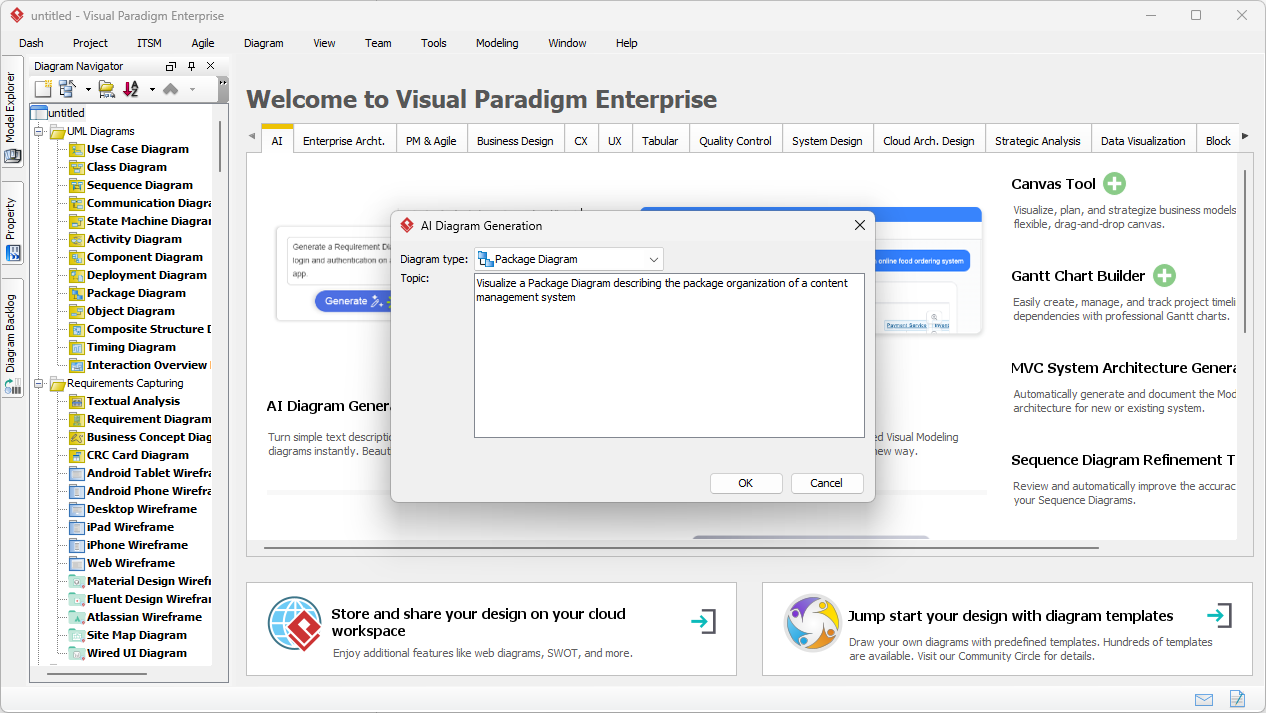
工具 → AI 圖形生成 → 選取「專案圖」→ 描述你的系統:

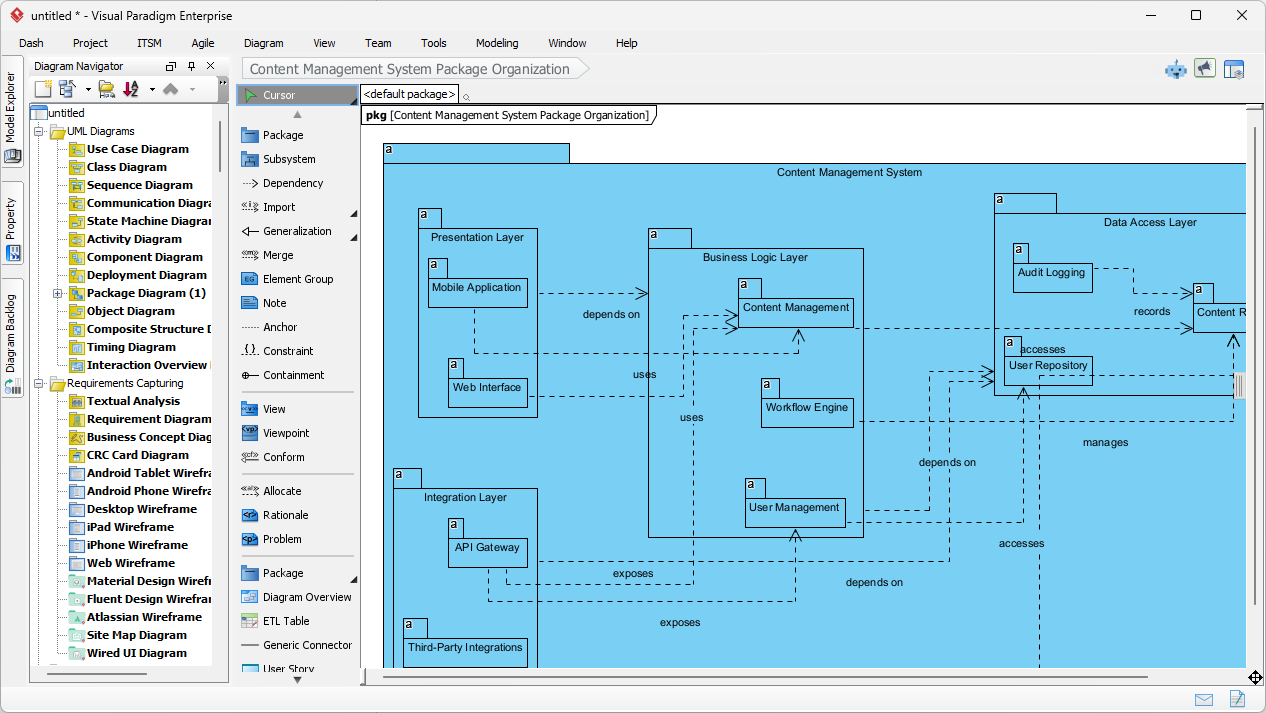
「產生一個UML 專案圖用於內容管理系統的 UML 專案圖,包含表示層(Web UI、行動應用程式)、商業邏輯層(內容服務、使用者管理、工作流程引擎)、資料存取層(儲存庫、稽核記錄),並顯示各層之間的相依性。」

輸入對話框保持簡潔且專注:

Visual Paradigm Desktop AI Package Diagram generation prompt interface

AI 建立:

  • 頂層專案:表示層、商業邏輯層、資料存取層
  • 子專案:Web UI、行動應用程式、內容服務、儲存庫
  • 清晰的相依性箭頭(虛線)顯示各層之間的流程

產生的內容管理系統專案圖——邏輯清晰、分層明確,準備好進行審查:

AI-generated UML Package Diagram for Content Management System

立即編輯:新增安全專案、調整相依性,或與類別圖整合。

2. 聊天機器人:隨時隨地進行對話式架構設計

用於快速草圖或遠端腦力激盪時,開啟Visual Paradigm AI 聊天機器人:

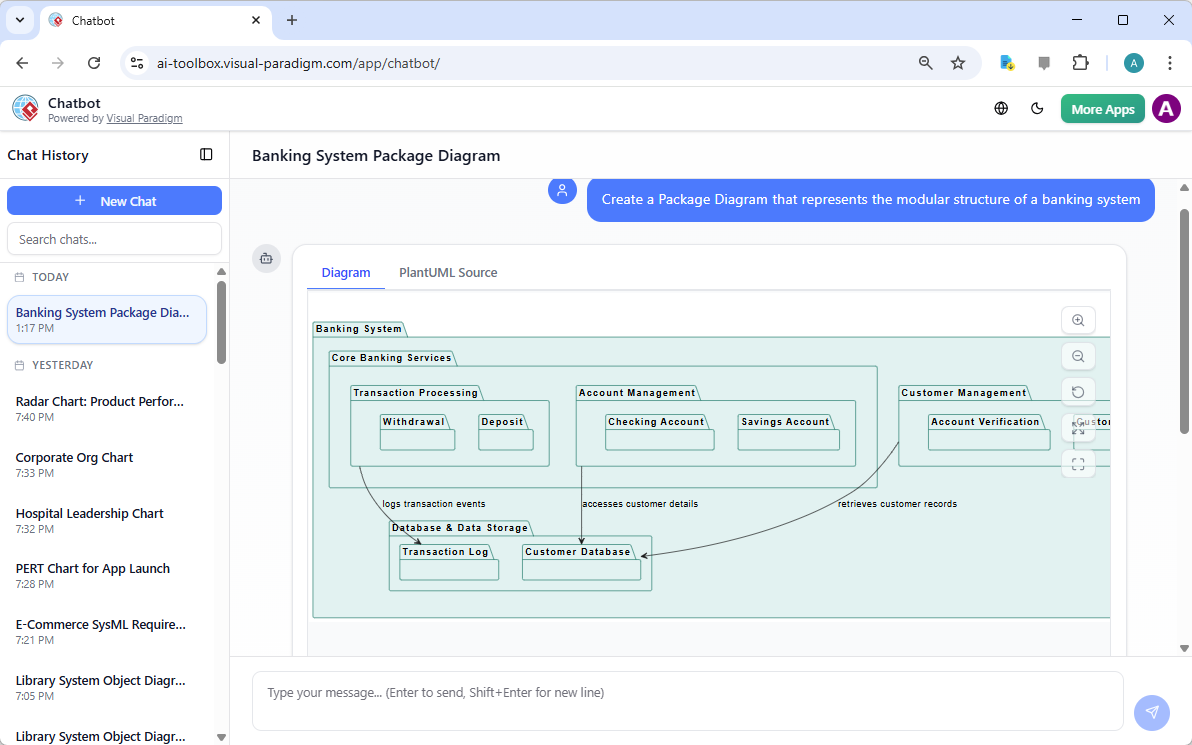
「為銀行系統建立 UML 專案圖:核心銀行服務、帳戶管理、客戶管理、交易處理、合規與稽核。」

聊天機器人即時生成——專案、子專案與相依性立即出現。銀行系統的範例輸出:

AI-generated UML Package Diagram for Banking System via Chatbot

透過對話進行優化:「新增支付網關專案,並與交易處理建立相依性。」立即更新。非常適合用於早期設計會議或教授 UML。

為何套件圖 + 人工智慧在 2026 年至關重要

良好的架構始於明確的界限。套件圖在撰寫任何程式碼之前,就能展現模組化、層次結構與相依性。手動建立會拖慢進度;人工智慧則能消除障礙。

表現出色的應用情境:

  • 分層式企業應用程式
  • 微服務的界限
  • 教授模組化設計
  • 快速重構規劃

討論中途需要調整範圍?重新生成。需要新增模組?直接加入。這種速度讓架構保持敏捷,並維持團隊溝通的清晰。

準備好視覺化您的系統架構了嗎?

Visual Paradigm 的人工智慧套件圖生成器能快速將模糊的想法轉化為專業的 UML 套件——無論是用於內容管理系統、銀行、電商,或任何模組化系統。

停止與方框和箭頭搏鬥。從今天開始,更聰明地進行設計。

相關連結

這些文章說明了如何利用人工智慧應用於UML 套件圖自動化系統元件的邏輯分組,讓開發人員能從自然語言提示中立即生成架構結構,以更有效地管理軟體相依性 以及系統可擴展性.

  1. 人工智慧圖形生成器現已支援 Visual Paradigm 中的套件圖:本文詳細介紹了新功能的發布,這些功能可透過人工智慧驅動生成套件圖,以改善軟體架構的可視化。
  2. 使用 Visual Paradigm AI 即時生成 UML 套件圖:本指南專注於利用人工智慧驅動的工具,以最少的手動操作創建專業的 UML 套件圖。
  3. 互動式 UML 套件圖生成器:此資源提供一個互動式工具,可透過對話式人工智慧介面即時創建和編輯套件圖。
  4. UML 套件圖:利用人工智慧結構化你的程式碼庫的權威指南:本全面指南說明人工智慧如何協助結構化程式碼庫、管理複雜依賴關係,並維持架構完整性。
  5. 從文字提示生成 UML 套件圖:本文探討如何利用先進的人工智慧建模功能,將原始想法和文字提示轉化為詳細的 UML 套件圖。
  6. 使用 Visual Paradigm 的 UML 套件圖教學:本教程提供逐步方法,利用套件圖來結構化軟體元件並有效視覺化其關係。
  7. 套件圖軟體功能 – Visual Paradigm 在線版:本概述強調可用於協作式套件圖管理的線上工具,包括版本控制與即時編輯功能。
  8. UML 中的套件圖是什麼?——Visual Paradigm 指南:此基礎資源介紹套件圖透過邏輯分組來組織複雜軟體系統的角色。
  9. 使用 UML 套件圖建模軟體架構:本文討論使用套件圖來組織並傳達系統架構模組化結構的最佳實務。
  10. 套件圖範例與範本 – Visual Paradigm 圖庫:此圖庫提供一系列真實世界的範本與範例,以激發並加速模組化軟體設計。

從問題到報告:AI 如何引導您的用例旅程

Discover how AI guides your use case journey from problem to report with Visual Paradigm’s intelligent development assistant.

想像一下,您是一位負責推出新線上課程平台的專案經理。首要挑戰是清楚地闡述問題,然後將其轉化為一個功能性的系統。這正是用例驅動開發助手,這是一款由 Visual Paradigm 推出的 AI 驅動工具,即時介入。它不僅協助您撰寫文件,更引導您完成完整的結構化工作流程,將模糊的想法轉化為詳細且可執行的專案計畫。整個流程極其直覺,彷彿有資深的業務分析師與技術架構師與您並肩作戰。本文深入探討此強大工具的核心功能,並以線上課程平台的實際案例,展示其如何簡化整個用例生命週期。

快速總結:用例驅動開發助手的關鍵收穫

  • 從明確的問題陳述開始,以定義專案的核心目標。

  • 使用 AI 自動產生候選用例與參與者清單。

  • 透過 AI 生成的用例與活動圖.

  • 使用結構化的 MoSCoW 方法來優先排序功能,專注於高價值工作。

  • 產生詳細的用例描述與可執行的 Gherkin 測試情境。

  • 建立完整的報告,以傳達專案範圍與計畫。

  • 透過中央儀表板追蹤進度,並維持單一可信來源。

步驟 1:透過 AI 定義問題

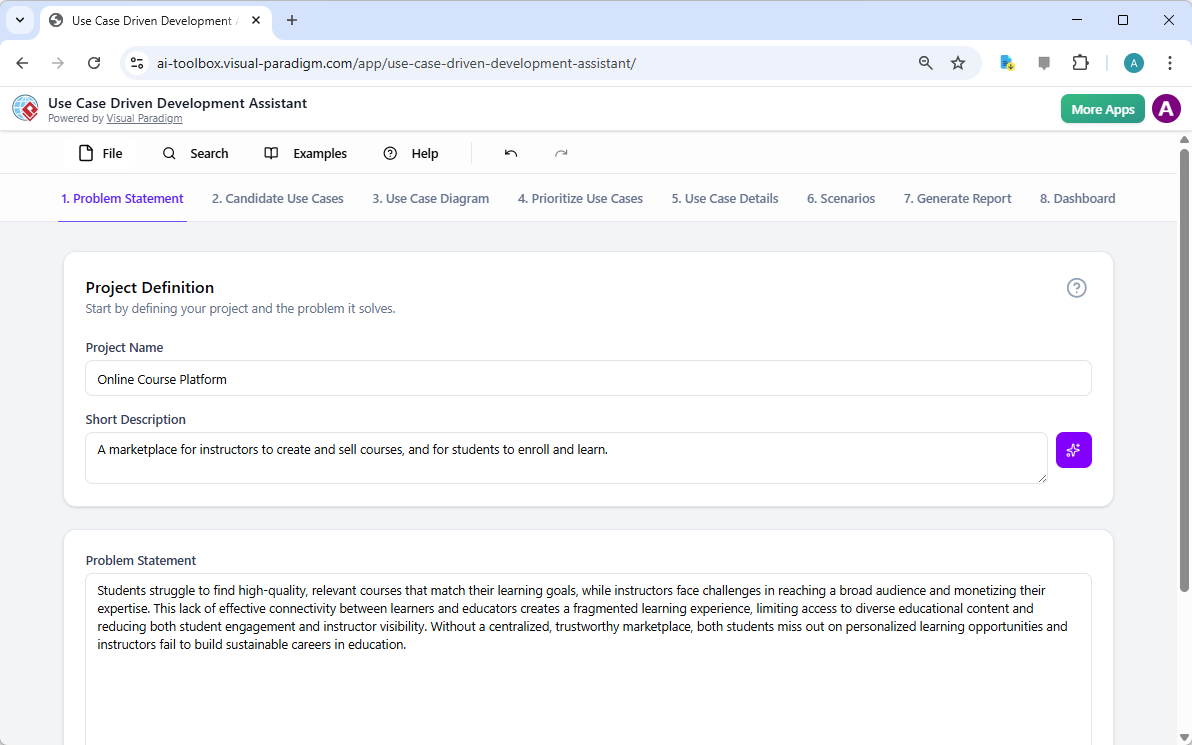
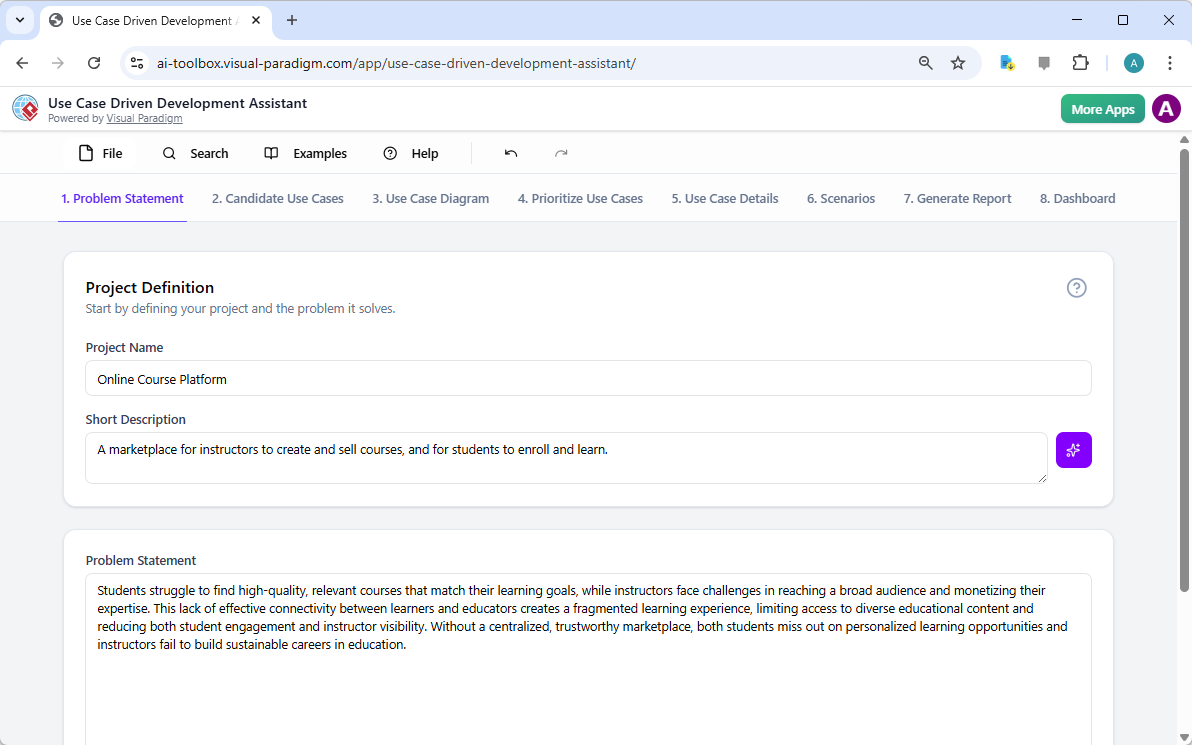
每個成功的專案都始於對其所要解決問題的清晰理解。使用用例驅動開發助手的旅程,從「問題陳述」標籤頁開始。在此處,您輸入專案名稱與簡短描述。AI 隨即利用這些資訊生成一份完整的問題陳述。如圖 1所示,該工具已將專案名稱「線上課程平台」與簡短描述「一個讓講師創建並銷售課程,學生可註冊學習的市場平台」轉化為詳細敘述。該敘述明確指出核心痛點:學生難以找到相關課程,而講師則面臨難以觸及廣泛受眾與將專業知識商品化的挑戰。此由 AI 生成的問題陳述,成為專案的基石,確保團隊成員從一開始就擁有統一的理解。

This is a screenshot of Visual Paradigm's AI Powered Use Case Driven Development Assistant. we are now in step 1. It shows th

步驟 2:在 AI 協助下識別用例

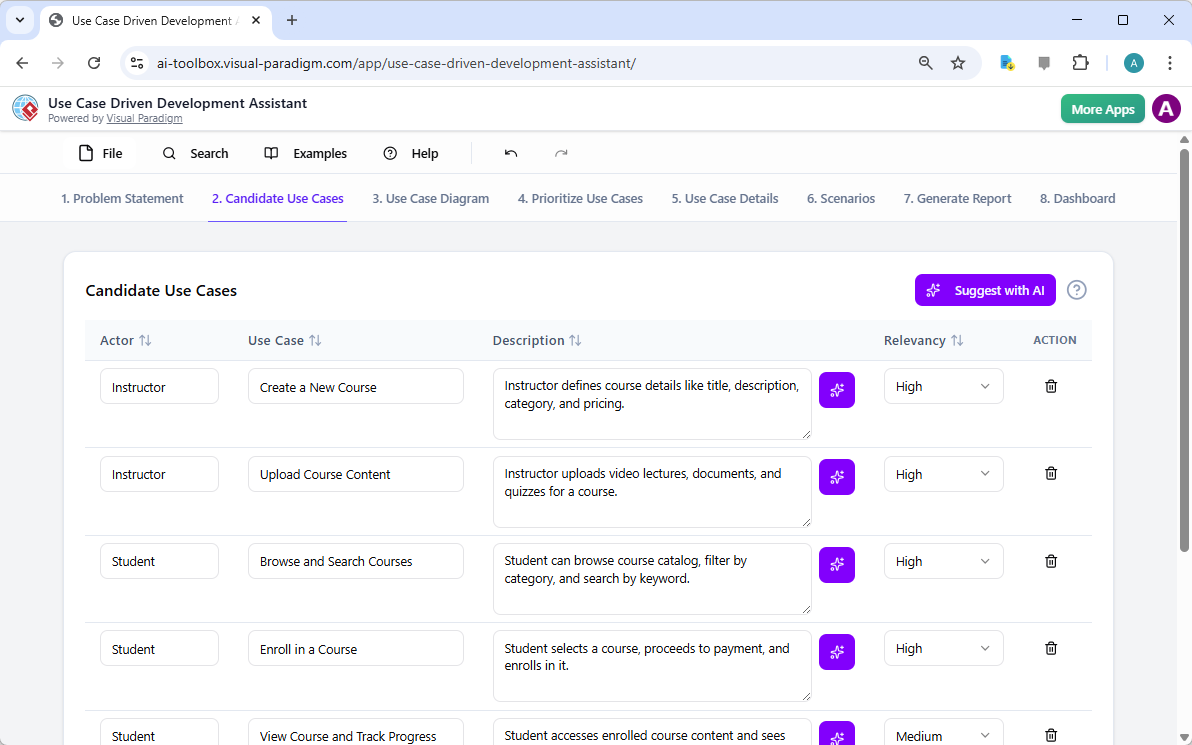
問題明確後,下一步便是識別系統必須提供的關鍵功能。助手的「候選用例」標籤頁,如圖 2所示,自動化此流程。在分析問題陳述後,AI 會建議一組用例,每個用例均與參與者(如講師、學生或管理員)關聯。針對我們的線上課程平台,AI 提出的用例包括「建立新課程」、「上傳課程內容」、「瀏覽與搜尋課程」以及「註冊課程」。此清單提供穩固的起點,節省原本需耗費於腦力激盪會議的大量時間與精力。您可進一步優化這些建議,新增或刪除不相關項目,以建立完整的系統功能清單。

This is a screenshot of Visual Paradigm's AI Powered Use Case Driven Development Assistant. We are now in step 2. It shows a

步驟 3:透過用例圖可視化系統

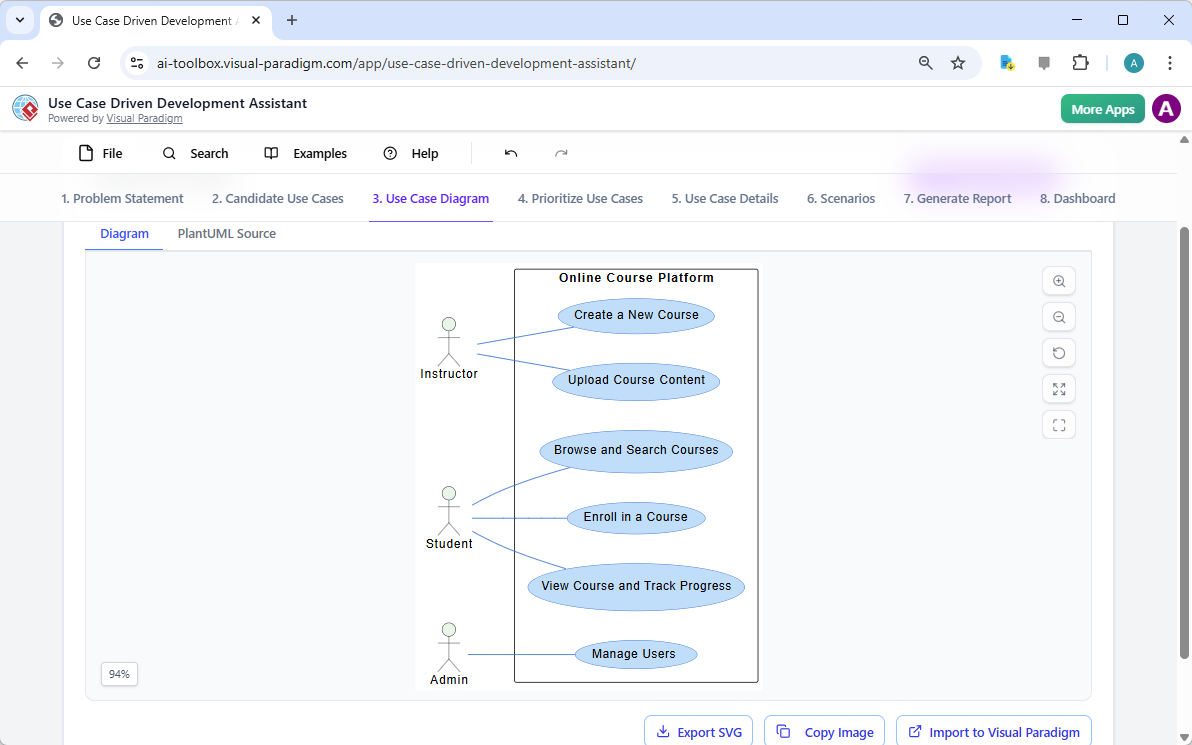
在識別出用例後,關鍵在於可視化它們與系統參與者的互動方式。「用例圖」標籤頁,如圖 3所示,將用例與參與者清單自動轉化為清晰的圖形化呈現。此圖表展現參與者(講師、學生、管理員)與系統功能(如建立新課程等)之間的關係。由 AI 驅動的生成確保圖表準確且格式專業。此視覺化工具對溝通至關重要,讓利害關係人、開發人員與設計師能迅速掌握系統的範圍與功能,無需閱讀冗長的文件。

This is a screenshot of Visual Paradigm's AI Powered Use Case Driven Development Assistant. We are now in step 3. It shows a

步驟 4:優先排序功能以達成最大影響

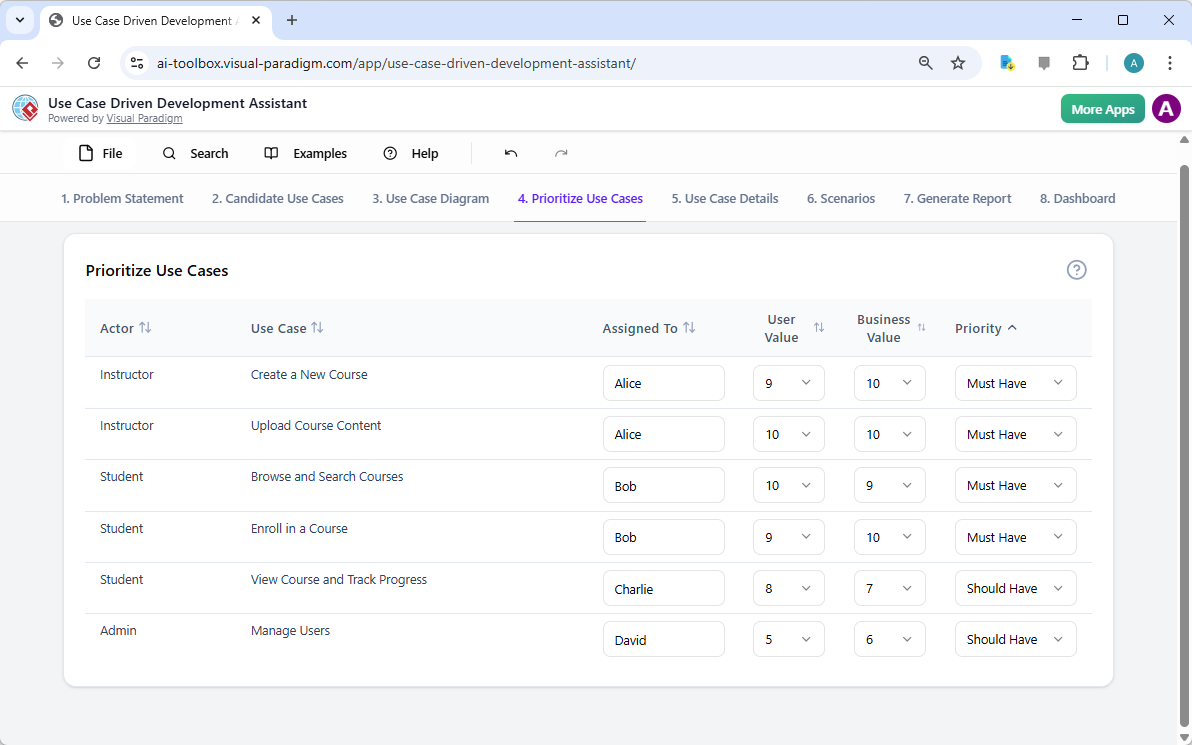
並非所有用例都同等重要。專案的成功往往取決於首先聚焦於最關鍵的功能。如圖像 4,提供了一個強大的框架。它允許您為每個使用案例分配使用者價值和商業價值(在0-10的範圍內),然後應用MoSCoW優先排序方法(必須擁有、應該擁有、可以擁有、不會擁有)。在我們的例子中,AI已幫助識別「建立新課程」和「上傳課程內容」是「必須擁有」的功能,因為它們對平台的核心功能至關重要。這種結構化的優先排序確保開發團隊專注於為使用者和企業提供最高價值,避免在低優先級功能上浪費精力。

This is a screenshot of Visual Paradigm's AI Powered Use Case Driven Development Assistant. We are now in step 4. It shows th

步驟 5:詳細說明使用案例並生成活動圖

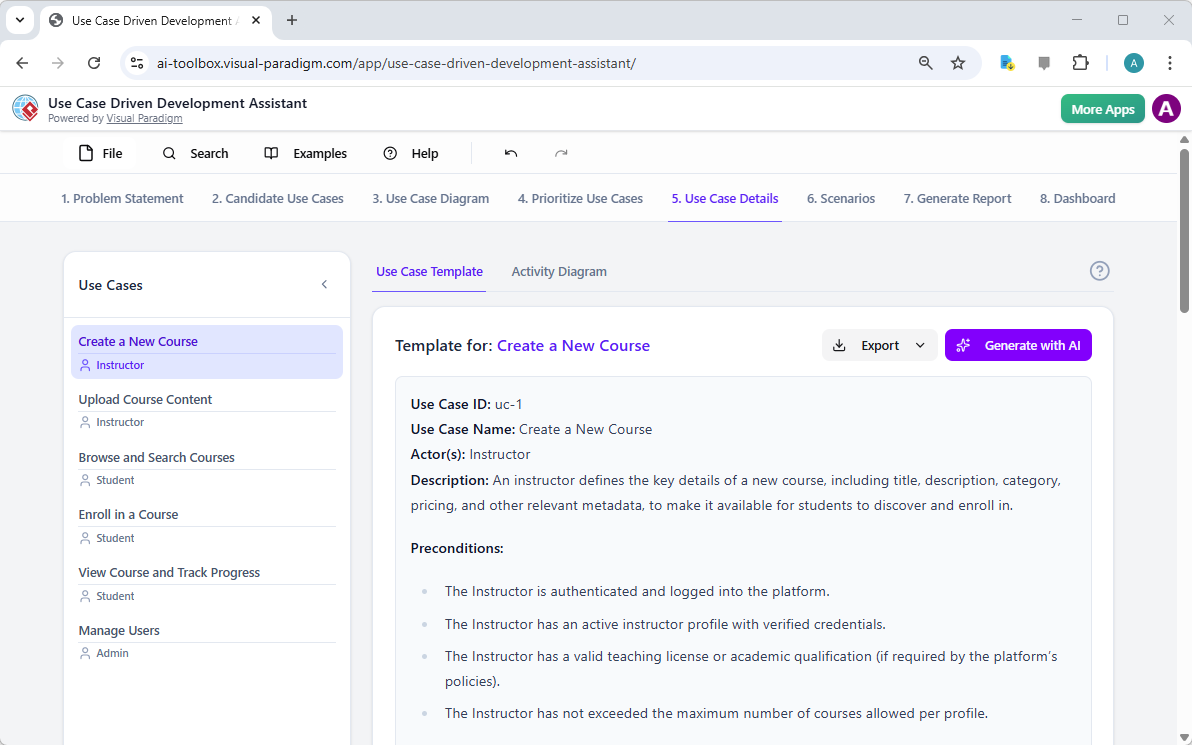
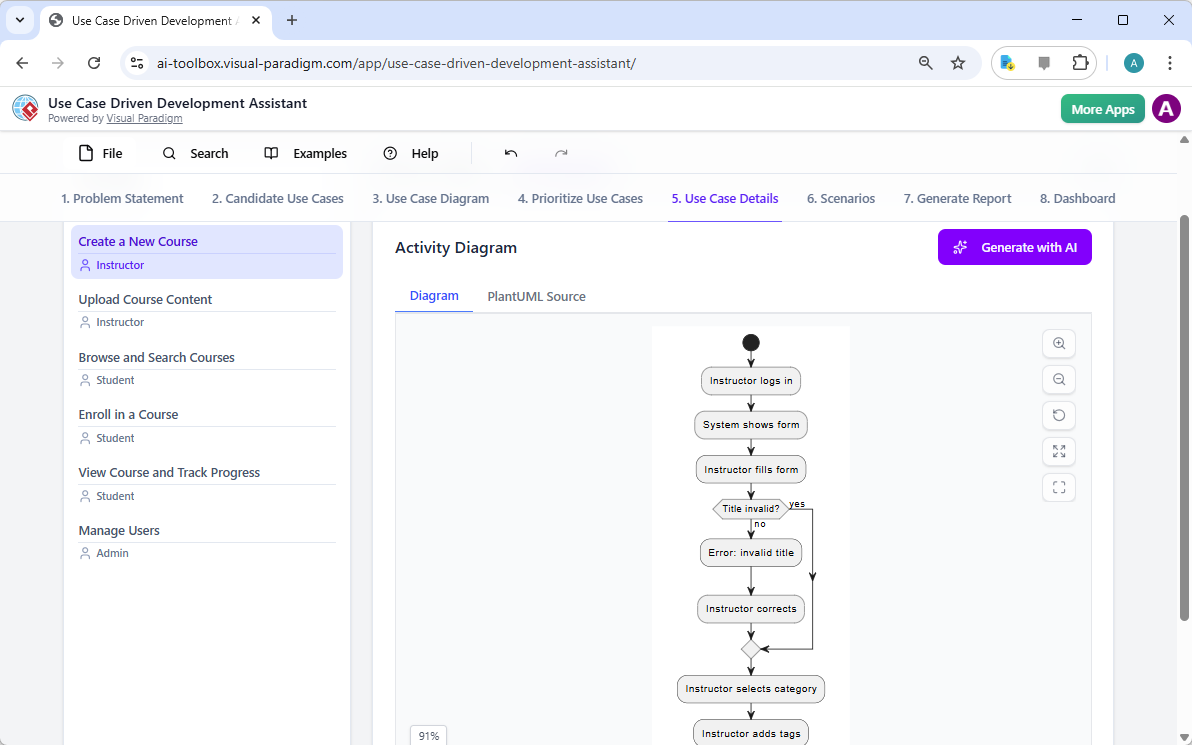
在建立高階視圖後,下一步是深入探討每個使用案例的細節。『使用案例詳情』標籤頁,如圖所示圖像 5,可讓您為所選的使用案例建立完整的範本。AI可生成詳細描述,包括前置條件、主要流程和替代流程。針對「建立新課程」使用案例,AI提供一個結構化範本,明確列出必要步驟。為進一步提升理解,助理可為同一使用案例生成「活動圖」,如圖所示圖像 6。此圖表以視覺方式呈現逐步的工作流程,顯示從講師登入到課程儲存的整個動作序列。這種細節層級對開發人員和品質保證團隊至關重要。

This is a screenshot of Visual Paradigm's AI Powered Use Case Driven Development Assistant. We are now in step 5. It shows thThis is a screenshot of Visual Paradigm's AI Powered Use Case Driven Development Assistant. We are still in step 5. It shows

步驟 6:生成測試情境與序列圖

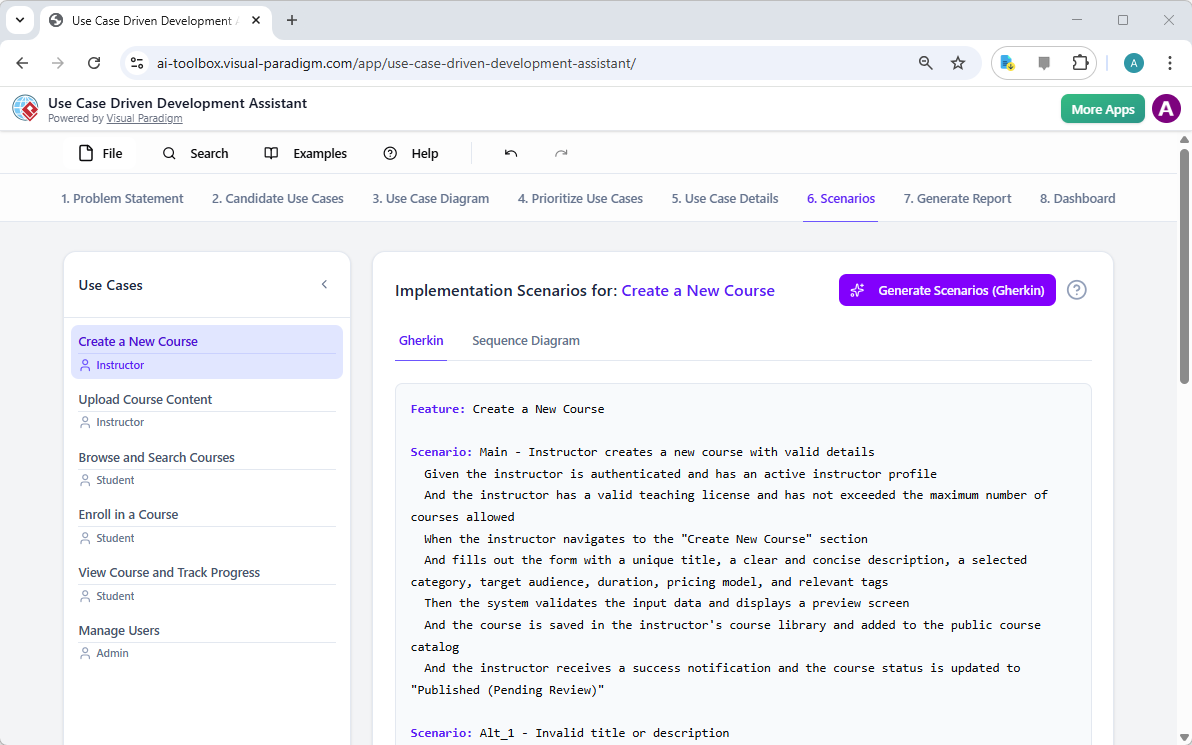
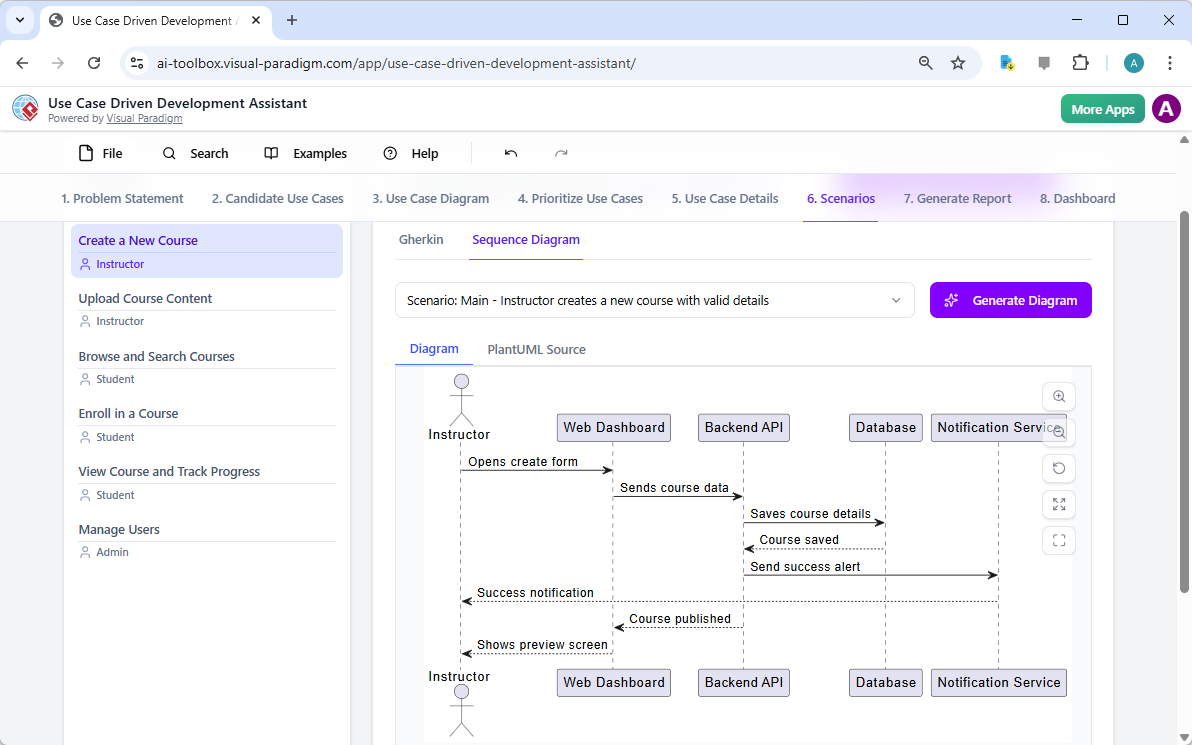
對開發團隊而言,下一步是建立可測試的情境。『情境』標籤頁,如圖所示圖像 7,可讓您直接從使用案例描述中產生可執行的 Gherkin 情境。這些情境以自然語言格式(給定-當-則)撰寫,非常適合自動化測試。AI可生成主要情境與替代情境,例如針對無效標題的情境。為進一步釐清系統內部運作,助理可生成「序列圖」,如圖所示圖像 8。此圖表顯示講師、網頁儀表板、後端 API、資料庫與通知服務之間的互動,清楚呈現系統架構與資料流。

This is a screenshot of Visual Paradigm's AI Powered Use Case Driven Development Assistant. We are in step 6. It shows the AIThis is a screenshot of Visual Paradigm's AI Powered Use Case Driven Development Assistant. We are still in step 6. It shows

步驟 7:建立全面的專案報告

在整個開發過程中,向各類利害關係人溝通專案進度與計畫至關重要。『產生報告』標籤頁,如圖所示圖像 9,讓這變得輕而易舉。您可以產生多種報告,例如「專案概覽」、「執行計畫」、「品質保證測試計畫」或「開發人員任務清單」。這些報告皆由 AI 協助產生,確保內容一致且完整。例如,「專案概覽」報告總結整個專案,包含執行摘要、關鍵功能以及優先排序的 rationale。這份單一來源的資訊確保所有人保持一致並充分了解。

This is a screenshot of Visual Paradigm's AI Powered Use Case Driven Development Assistant. We are in step 7. It shows a repo

步驟 8:透過儀表板追蹤進度

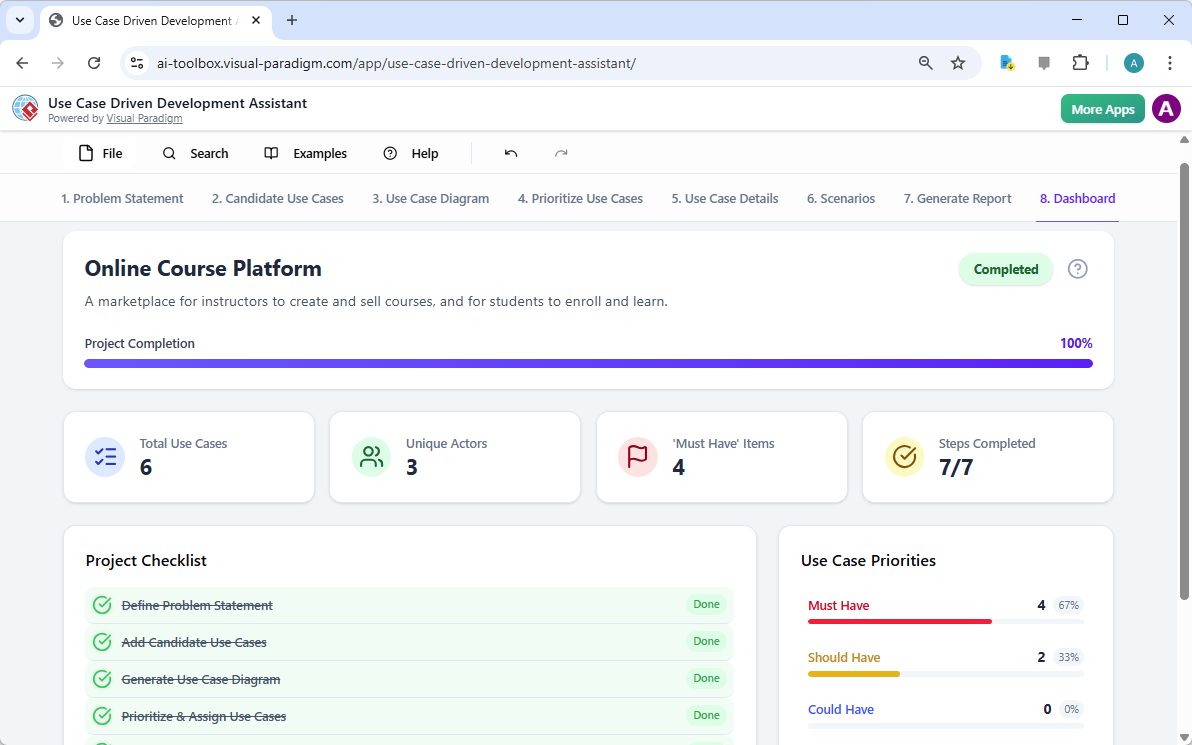
最後,整個流程在「儀表板」中達成終點,如圖所示圖像 10。此中央控制中心提供專案狀態的高階概覽。它顯示專案完成百分比、使用案例總數以及「必須擁有」項目數量。專案清單可讓您追蹤進度,每完成一步即標示為「已完成」。對專案經理與團隊負責人而言,即時掌握專案健康狀況至關重要,有助於識別瓶頸並確保專案按時推進。

This is a screenshot of Visual Paradigm's AI Powered Use Case Driven Development Assistant. We are in step 8. It shows the da

使用案例驅動的開發助理不僅僅是一項工具;它是一套全面的工作流程,為軟體開發過程帶來清晰與效率。透過在每個階段運用 AI——從定義問題到產生報告——它幫助團隊更快、更準確地從需求轉向實作。結果是一個結構良好、文件完整,且與商業目標和使用者需求一致的專案。若您希望簡化使用案例開發流程,這項由 AI 驅動的工具將是強大的解決方案。

準備好了解「使用案例驅動的開發助理」如何改變您的下一個專案嗎?立即試用.

相關連結

用例建模 是一種基本的軟體工程技術,用於捕捉功能需求 透過視覺化外部參與者 與系統內部功能之間的互動。現代平台現在整合了由人工智慧驅動的自動化 以優化圖表、產生完整的用例描述,並將模型轉換為測試案例或活動圖 以維持設計的一致性與可追溯性。先進的工具如事件流程編輯器情境分析器 使開發團隊能夠驗證並記錄結構化的事件序列,以提升整體系統的清晰度。

  1. 什麼是用例圖?——UML建模完整指南:深入介紹涵蓋關鍵元件、目的與最佳實務 用於需求建模。

  2. 逐步用例圖教學——從入門到專家:實用資源,引導使用者進行基礎到進階技術 以建立有效的用例圖。

  3. 關於用例建模的一切你必須知道:全面探討用例建模的原則與應用 在系統設計中的應用。

  4. Visual Paradigm – 用例描述功能: 詳細說明用於精確記錄使用者互動以及結構化的系統行為。

  5. 精通使用 Visual Paradigm 的 AI 驅動使用案例圖: 介紹如何利用 AI 創建智慧且動態的圖表用於現代軟體系統。

  6. 使用 Visual Paradigm 事件流程編輯器的指南: 逐步說明如何記錄結構化的事件序列於使用案例情境中。

  7. 透過使用案例情境分析器解構情境: 介紹如何使用分析器來檢視與優化互動流程以提升系統清晰度。

  8. 將使用案例轉換為活動圖 – AI 驅動的轉換: 介紹自動轉換將使用案例轉換為詳細的系統工作流程。

  9. 使用 AI 從使用案例圖生成情境與測試案例: 探討如何利用 AI 工具自動化建立以需求為導向的測試流程.

  10. 使用案例圖圖庫 – 模板與範例: 精選的真實世界範例以激發靈感、學習與快速原型設計。

From Problem to Report: How AI Guides Your Use Case Journey

Discover how AI guides your use case journey from problem to report with Visual Paradigm’s intelligent development assistant.

Imagine you’re a project manager tasked with launching a new online course platform. The first challenge is to articulate the problem clearly and then translate it into a functional system. This is where the Use Case Driven Development Assistant, an AI-powered tool from Visual Paradigm, steps in. It doesn’t just help you write documents; it guides you through a complete, structured workflow to transform a vague idea into a detailed, actionable project plan. The process is so intuitive, it feels like having a seasoned business analyst and a technical architect working side-by-side with you. This deep dive explores the core features of this powerful tool, using a real-world example of an online course platform to show how it streamlines the entire use case lifecycle.

Quick Summary: Key Takeaways from the Use Case Driven Development Assistant

  • Start with a clear problem statement to define the project’s core objective.

  • Use AI to automatically generate a list of candidate use cases and actors.

  • Visualize system functionality with AI-generated Use Case and Activity Diagrams.

  • Prioritize features using a structured MoSCoW method to focus on high-value work.

  • Generate detailed use case descriptions and executable Gherkin test scenarios.

  • Create comprehensive reports to communicate project scope and plans.

  • Track progress and maintain a single source of truth with a central dashboard.

Step 1: Defining the Problem with AI

Every successful project begins with a clear understanding of the problem it aims to solve. The journey with the Use Case Driven Development Assistant starts in the “Problem Statement” tab. Here, you input a project name and a short description. The AI then leverages this information to generate a comprehensive problem statement. As seen in Image 1, the tool has taken the project name “Online Course Platform” and the short description “A marketplace for instructors to create and sell courses, and for students to enroll and learn” to produce a detailed narrative. This narrative identifies the core pain points: students struggle to find relevant courses, while instructors face challenges in reaching a broad audience and monetizing their expertise. This AI-generated problem statement serves as the project’s foundation, ensuring everyone on the team shares a unified understanding from the very beginning.

This is a screenshot of Visual Paradigm's AI Powered Use Case Driven Development Assistant. we are now in step 1. It shows th

Step 2: Identifying Use Cases with AI Assistance

Once the problem is defined, the next logical step is to identify the key functionalities the system must provide. The assistant’s “Candidate Use Cases” tab, shown in Image 2, automates this process. After analyzing the problem statement, the AI suggests a list of use cases, each associated with an actor (like Instructor, Student, or Admin). For our online course platform, the AI proposes use cases such as “Create a New Course,” “Upload Course Content,” “Browse and Search Courses,” and “Enroll in a Course.” This list provides a solid starting point, saving significant time and effort that would otherwise be spent on brainstorming sessions. You can then refine these suggestions, add new ones, or delete irrelevant ones to create a comprehensive list of system functionalities.

This is a screenshot of Visual Paradigm's AI Powered Use Case Driven Development Assistant. We are now in step 2. It shows a

Step 3: Visualizing the System with a Use Case Diagram

After identifying the use cases, it’s crucial to visualize how they interact with the system’s actors. The “Use Case Diagram” tab, illustrated in Image 3, takes the list of use cases and actors and automatically generates a clear, graphical representation. This diagram shows the relationships between the actors (Instructor, Student, Admin) and the system’s functions (Create a New Course, etc.). The AI-powered generation ensures that the diagram is accurate and professionally formatted. This visual aid is invaluable for communication, allowing stakeholders, developers, and designers to quickly grasp the system’s scope and functionality without wading through text-heavy documents.

This is a screenshot of Visual Paradigm's AI Powered Use Case Driven Development Assistant. We are now in step 3. It shows a

Step 4: Prioritizing Features for Maximum Impact

Not all use cases are created equal. A project’s success often hinges on focusing on the most critical features first. The “Prioritize Use Cases” tab, as shown in Image 4, provides a powerful framework for this. It allows you to assign a user value and business value (on a scale of 0-10) to each use case and then apply the MoSCoW prioritization method (Must Have, Should Have, Could Have, Won’t Have). In our example, the AI has helped identify that “Create a New Course” and “Upload Course Content” are “Must Have” features, as they are essential for the platform’s core function. This structured prioritization ensures that the development team focuses on delivering the highest value to users and the business, avoiding wasted effort on low-priority features.

This is a screenshot of Visual Paradigm's AI Powered Use Case Driven Development Assistant. We are now in step 4. It shows th

Step 5: Detailing Use Cases and Generating Activity Diagrams

With the high-level view established, the next step is to dive into the details of each use case. The “Use Case Details” tab, shown in Image 5, allows you to create a comprehensive template for a selected use case. The AI can generate a detailed description, including pre-conditions, main flow, and alternative flows. For the “Create a New Course” use case, the AI provides a structured template that outlines the necessary steps. To further enhance understanding, the assistant can generate an “Activity Diagram” for the same use case, as seen in Image 6. This diagram visually maps out the step-by-step workflow, showing the sequence of actions from the instructor logging in to the course being saved. This level of detail is essential for both developers and QA teams.

This is a screenshot of Visual Paradigm's AI Powered Use Case Driven Development Assistant. We are now in step 5. It shows thThis is a screenshot of Visual Paradigm's AI Powered Use Case Driven Development Assistant. We are still in step 5. It shows

Step 6: Generating Test Scenarios and Sequence Diagrams

For a development team, the next critical step is to create testable scenarios. The “Scenarios” tab, shown in Image 7, allows you to generate executable Gherkin scenarios directly from your use case descriptions. These scenarios, written in a plain-language format (Given-When-Then), are perfect for automated testing. The AI can generate a main scenario and alternative scenarios, such as one for an invalid title. To further clarify the system’s internal workings, the assistant can generate a “Sequence Diagram,” as seen in Image 8. This diagram shows the interaction between the instructor, the web dashboard, the backend API, the database, and the notification service, providing a clear picture of the system’s architecture and data flow.

This is a screenshot of Visual Paradigm's AI Powered Use Case Driven Development Assistant. We are in step 6. It shows the AIThis is a screenshot of Visual Paradigm's AI Powered Use Case Driven Development Assistant. We are still in step 6. It shows

Step 7: Creating Comprehensive Project Reports

Throughout the development process, it’s essential to communicate the project’s status and plans to various stakeholders. The “Generate Report” tab, as shown in Image 9, makes this easy. You can generate a variety of reports, such as a “Project Overview,” “Implementation Plan,” “QA Test Plan,” or a “Developer Task List.” These reports are generated with AI assistance, ensuring they are consistent and comprehensive. For example, the “Project Overview” report summarizes the entire project, including the executive summary, key features, and the rationale behind the prioritization. This single source of truth ensures everyone is aligned and informed.

This is a screenshot of Visual Paradigm's AI Powered Use Case Driven Development Assistant. We are in step 7. It shows a repo

Step 8: Tracking Progress with the Dashboard

Finally, the journey culminates in the “Dashboard,” as seen in Image 10. This central hub provides a high-level overview of the project’s status. It shows the project completion percentage, the total number of use cases, and the number of “Must Have” items. The project checklist allows you to track your progress, with each completed step marked as “Done.” This real-time visibility into the project’s health is invaluable for project managers and team leads, enabling them to identify bottlenecks and ensure the project stays on track.

This is a screenshot of Visual Paradigm's AI Powered Use Case Driven Development Assistant. We are in step 8. It shows the da

The Use Case Driven Development Assistant is more than just a tool; it’s a comprehensive workflow that brings clarity and efficiency to the software development process. By leveraging AI at every stage—from defining the problem to generating reports—it helps teams move from requirements to implementation faster and with greater accuracy. The result is a well-structured, well-documented project that is aligned with business goals and user needs. If you’re looking to streamline your use case development process, this AI-powered tool is a powerful solution.

Ready to see how the Use Case Driven Development Assistant can transform your next project? Try it now.

Related Links

Use case modeling is a fundamental software engineering technique used to capture functional requirements by visualizing the interactions between external actors and a system’s internal functions. Modern platforms now incorporate AI-powered automation to refine diagrams, generate comprehensive use case descriptions, and convert models into test cases or activity diagrams to maintain design consistency and traceability. Advanced tools like the Flow of Events editor and Scenario Analyzer allow development teams to validate and document structured event sequences to improve overall system clarity.

  1. What Is a Use Case Diagram? – A Complete Guide to UML Modeling: An in-depth overview covering essential components, purposes, and best practices for requirements modeling.

  2. Step-by-Step Use Case Diagram Tutorial – From Beginner to Pro: A practical resource that guides users through foundational to advanced techniques for creating effective use case diagrams.

  3. All You Need to Know About Use Case Modeling: A comprehensive exploration of the principles and applications of use case modeling in system design.

  4. Visual Paradigm – Use Case Description Features: Details specialized tools used to precisely document user interactions and structured system behavior.

  5. Mastering AI-Driven Use Case Diagrams with Visual Paradigm: A tutorial on leveraging AI to create intelligent, dynamic diagrams for modern software systems.

  6. Guide to Using the Flow of Events Editor in Visual Paradigm: Step-by-step instructions for documenting structured event sequences within a use case scenario.

  7. Unraveling Scenarios with the Use Case Scenario Analyzer: A guide on using analyzers to examine and refine interaction flows for increased system clarity.

  8. Convert Use Case to Activity Diagram – AI-Powered Transformation: A resource explaining the automated conversion of use cases into detailed system workflows.

  9. Generating Scenarios and Test Cases from Use Case Diagrams Using AI: An exploration of how AI tools automate the creation of requirement-driven test procedures.

  10. Use Case Diagram Gallery – Templates & Examples: A curated collection of real-world examples for inspiration, learning, and rapid prototyping.

Visual Paradigm AI Package Diagram Generator: Text to UML Packages

You’re architecting a new content management system, staring at layers, modules, and dependencies — presentation, business rules, persistence, security — but the high-level structure stays fuzzy. Manually creating packages, subpackages, and dependency arrows feels like overkill for a first draft. Enter Visual Paradigm’s AI Package Diagram Generator: describe your system in plain words, and get a clean, standards-compliant UML package diagram in seconds. It’s the fast lane from mental model to visual blueprint.

Why This AI Changes Software Architecture

  • Natural language → full UML package diagram instantly
  • Auto-identifies packages, subpackages, dependencies, and stereotypes
  • Handles layered, modular, and microservices-style structures
  • Fully editable native model — refine, add notes, merge packages
  • Desktop precision + browser chatbot for rapid iteration

1. Desktop: Prompt → Structured Architecture

In Visual Paradigm Desktop:

Tools → AI Diagram Generation → select “Package Diagram” → describe your system:

“Generate a UML Package Diagram for a content management system with Presentation Layer (Web UI, Mobile App), Business Logic Layer (Content Service, User Management, Workflow Engine), Data Access Layer (Repository, Audit Logging), and show dependencies between layers.”

The input dialog keeps it simple and focused:

Visual Paradigm Desktop AI Package Diagram generation prompt interface

AI builds:

  • Top-level packages: Presentation Layer, Business Logic Layer, Data Access Layer
  • Subpackages: Web UI, Mobile App, Content Service, Repository
  • Clear dependency arrows (dashed) showing flow between layers

Resulting content management system package diagram — logical, layered, and ready for review:

AI-generated UML Package Diagram for Content Management System

Immediately edit: add security package, adjust dependencies, or integrate with class diagrams.

2. Chatbot: Conversational Architecture on the Go

For quick sketches or remote brainstorming, open the Visual Paradigm AI Chatbot:

“Create UML Package Diagram for a banking system: Core Banking Services, Account Management, Customer Management, Transaction Processing, Compliance & Auditing.”

The chatbot generates it live — packages, subpackages, and dependencies appear instantly. Example output for a banking system:

AI-generated UML Package Diagram for Banking System via Chatbot

Refine in conversation: “Add Payment Gateway package with dependency to Transaction Processing.” Instant update. Perfect for early design sessions or teaching UML.

Why Package Diagrams + AI Matter in 2026

Good architecture starts with clear boundaries. Package diagrams show modularity, layers, and dependencies before a single line of code is written. Manual creation slows you down; AI removes the friction.

Use cases that shine:

  • Layered enterprise apps
  • Microservices boundaries
  • Teaching modular design
  • Quick refactoring planning

Change scope mid-discussion? Regenerate. New module needed? Add it. That speed keeps architecture agile and team communication sharp.

Ready to Visualize Your System Structure?

Visual Paradigm’s AI Package Diagram Generator turns vague ideas into professional UML packages fast — whether for CMS, banking, e-commerce, or any modular system.

  • Download Visual Paradigm Desktop → Full modeling power: Get Desktop Now
  • Try AI Chatbot Online → Instant architecture sketches: Start Chatting

Stop wrestling with boxes and arrows. Start designing smarter — today.

Related Links

These articles explain how artificial intelligence is applied to UML package diagrams to automate the logical grouping of system elements, enabling developers to instantly generate architectural structures from natural language prompts to better manage software dependencies and system scalability.

  1. AI Diagram Generator Now Supports Package Diagrams in Visual Paradigm: This article details the release of new features that allow for the AI-powered generation of package diagrams to improve software architecture visualization.
  2. Generate UML Package Diagrams Instantly with Visual Paradigm AI: This guide focuses on utilizing AI-driven tools to create professional UML package diagrams with minimal manual effort.
  3. Interactive UML Package Diagram Generator: This resource provides access to an interactive tool for creating and editing package diagrams in real time through a conversational AI interface.
  4. UML Package Diagram: A Definitive Guide to Structuring Your Codebase with AI: This comprehensive guide explains how AI assists in structuring codebases, managing complex dependencies, and maintaining architectural integrity.
  5. Generating UML Package Diagrams from Text Prompts: This article explores how to transform raw ideas and textual prompts into detailed UML package diagrams using advanced AI modeling features.
  6. UML Package Diagram Tutorial Using Visual Paradigm: This tutorial provides a step-by-step approach to using package diagrams to structure software components and visualize their relationships effectively.
  7. Features of Package Diagram Software – Visual Paradigm Online: This overview highlights the online tools available for collaborative package diagram management, including version control and real-time editing.
  8. What is a Package Diagram in UML? – Visual Paradigm Guide: This foundational resource introduces the role of package diagrams in organizing complex software systems through logical grouping.
  9. Modeling Software Architecture with UML Package Diagrams: This article discusses best practices for using package diagrams to organize and communicate the modular structure of a system’s architecture.
  10. Package Diagram Examples & Templates – Visual Paradigm Gallery: This gallery offers a collection of real-world templates and examples to inspire and accelerate modular software design.

Comprehensive Guide to Class Diagrams in UML

Introduction

A class diagram is a static type of Unified Modeling Language (UML) diagram that visually represents the structure of a system by showing its classes, attributes, operations, and relationships between objects. It serves as a blueprint for object-oriented software design, providing a clear and concise way to understand and document the architecture of a system.

Purpose and Functionality

Visualizing System Structure

Class diagrams help developers understand and document the structure of a system by showing how different classes interact and relate to each other. This visual representation is crucial for designing robust and maintainable software systems.

Modeling Software

Class diagrams enable the modeling of software at a high level of abstraction, allowing developers to focus on the design without delving into the source code. This abstraction helps in identifying potential issues early in the development process.

Object-Oriented Design

Class diagrams are fundamental to object-oriented modeling. They outline the building blocks of a system and their interactions, making it easier to implement object-oriented principles such as encapsulation, inheritance, and polymorphism.

Data Modeling

Class diagrams can also be used for data modeling, representing the structure and relationships of data within a system. This is particularly useful in database design, where entities and their relationships need to be clearly defined.

Blueprint for Code

Class diagrams serve as a blueprint for constructing executable code for software applications. They provide a clear roadmap for developers, ensuring that the implementation aligns with the designed architecture.

Key Components

Classes

Classes are represented by rectangles divided into three sections:

  1. Class Name: The top section contains the name of the class.
  2. Attributes: The middle section lists the attributes or data members that define the state of the class.
  3. Operations (Methods): The bottom section lists the operations or functions that the class can perform.

Relationships

Relationships between classes are shown using lines and symbols:

  1. Generalization: Represents inheritance, where a class (subclass) inherits attributes and operations from another class (superclass). It is depicted by a hollow arrowhead pointing from the subclass to the superclass.
  2. Aggregation: Indicates that one class contains instances of another class, but the contained class can exist independently. It is depicted by a hollow diamond at the end of the line connected to the containing class.
  3. Composition: A stronger form of aggregation where the contained class cannot exist without the containing class. It is depicted by a filled diamond at the end of the line connected to the containing class.
  4. Association: Represents a relationship between two classes, indicating that one class uses or interacts with another. It is depicted by a solid line connecting the two classes.

Example Diagrams using PlantUML

Basic Class Diagram

Diagram with Aggregation and Composition

Diagram with Association

Example –  Order system

SDE | Uml Class Diagrams

Key Elements

  1. Classes:

    • Customer: Represents the customer placing the order.
      • Attributes: name (String), address (String).
    • Order: Represents the order placed by the customer.
      • Attributes: date (Date), status (String).
      • Operations: calcSubTotal()calcTax()calcTotal()calcTotalWeight().
    • OrderDetail: Represents the details of each item in the order.
      • Attributes: quantity (int), taxStatus (String).
      • Operations: calcSubTotal()calcWeight()calcTax().
    • Item: Represents the items being ordered.
      • Attributes: shippingWeight (float), description (String).
      • Operations: getPriceForQuantity()getTax()inStock().
    • Payment (Abstract Class): Represents the payment for the order.
      • Attributes: amount (float).
    • Cash: Subclass of Payment, represents cash payments.
      • Attributes: cashTendered (float).
    • Check: Subclass of Payment, represents check payments.
      • Attributes: name (String), bankID (String), isAuthorized (boolean).
    • Credit: Subclass of Payment, represents credit card payments.
      • Attributes: number (String), type (String), expDate (Date), isAuthorized (boolean).
  2. Relationships:

    • Association:
      • Customer and Order: A customer can place multiple orders (0..* multiplicity on the Order side).
      • Order and OrderDetail: An order can have multiple order details (1..* multiplicity on the OrderDetail side).
      • OrderDetail and Item: Each order detail is associated with one item (1 multiplicity on the Item side).
    • Aggregation:
      • Order and OrderDetail: Indicates that OrderDetail is a part of Order, but OrderDetail can exist independently.
    • Generalization:
      • Payment and its subclasses (CashCheckCredit): Indicates inheritance, where Cash, Check, and Credit are specific types of Payment.
    • Role:
      • OrderDetail and Item: The role line item indicates the specific role of OrderDetail in the context of an Order.
  3. Multiplicity:

    • Indicates the number of instances of one class that can be associated with a single instance of another class. For example, a Customer can place multiple Orders (0..*).
  4. Abstract Class:

    • Payment: Marked as an abstract class, meaning it cannot be instantiated directly and serves as a base class for other payment types.

Explanation

  • Customer: Represents the entity placing the order, with basic attributes like name and address.
  • Order: Represents the order itself, with attributes like date and status, and operations to calculate subtotal, tax, total, and total weight.
  • OrderDetail: Represents the details of each item in the order, including quantity and tax status, with operations to calculate subtotal, weight, and tax.
  • Item: Represents the items being ordered, with attributes like shipping weight and description, and operations to get price for quantity, tax, and stock status.
  • Payment: An abstract class representing the payment for the order, with an attribute for the amount. It has subclasses for different payment methods:
    • Cash: Represents cash payments with an attribute for the cash tendered.
    • Check: Represents check payments with attributes for the name, bank ID, and authorization status.
    • Credit: Represents credit card payments with attributes for the card number, type, expiration date, and authorization status.

The diagram effectively captures the structure and relationships within an order processing system, providing a clear visual representation of how different components interact.

Conclusion

Class diagrams are an essential tool in UML modeling, providing a clear and structured way to represent the architecture of a system. By understanding the key components and relationships, developers can create robust and maintainable software designs. Using tools like PlantUML, these diagrams can be easily visualized and shared among team members, enhancing collaboration and ensuring a consistent understanding of the system’s structure.

References

  1. Visual Paradigm Online Free Edition:

    • Visual Paradigm Online (VP Online) Free Edition is a free online drawing software that supports Class Diagrams, other UML diagrams, ERD tools, and Organization Chart tools. It features a simple yet powerful editor that allows you to create Class Diagrams quickly and easily. The tool offers unlimited access with no restrictions on the number of diagrams or shapes you can create, and it is ad-free. You own the diagrams you create for personal and non-commercial use. The editor includes features such as drag-to-create shapes, inline editing of class attributes and operations, and a variety of formatting tools. You can also print, export, and share your work in different formats (PNG, JPG, SVG, GIF, PDF) 123.
  2. Impressive Drawing Features:

    • Visual Paradigm Online provides advanced formatting options to enhance your diagrams. You can position shapes precisely using alignment guides and format your Class Diagrams with shape and line formatting options, font styles, rotatable shapes, embedded images and URLs, and shadow effects. The tool is cross-platform compatible (Windows, Mac, Linux) and can be accessed through any web browser. It also supports Google Drive integration for seamless saving and accessing of your diagrams 23.
  3. Comprehensive Diagramming Options:

    • Visual Paradigm Online supports a wide range of diagram types, including UML diagrams (class, use case, sequence, activity, state, component, and deployment diagrams), ERD tools, Organization Charts, Floor Plan Designers, ITIL, and Business Concept Diagrams. The tool is designed to be easy to use, with drag-and-drop functionality and smart connectors that snap into place. It also offers a rich set of formatting options, including over 40 connector types and various paint options 45.
  4. Learning and Customization:

    • Visual Paradigm provides an easy-to-use platform for creating and managing class diagrams, making it an excellent choice for software developers and engineers. You can customize your class diagrams by changing colors, fonts, and layout. The tool also supports creating relationships between classes, such as associations, inheritance, and dependencies. Visual Paradigm is a powerful UML modeling tool that helps in representing the static structure of a system, including the system’s classes, their attributes, methods, and the relationships between them 67.
  5. Community and Support:

    • Visual Paradigm Community Edition is a free UML software that supports all UML diagram types. It is designed to help users learn UML faster, easier, and quicker. The tool is intuitive and allows you to create your own Class Diagrams with ease. Visual Paradigm is trusted by over 320,000 professionals and organizations, including small businesses, Fortune 500 companies, universities, and government sectors. It is used to prepare the next generation of IT developers with the specialized skills needed for the workspace 89.

These references highlight the comprehensive features and benefits of using Visual Paradigm for creating class diagrams, making it a recommended tool for both individual and professional use.

Comprehensive Guide to UML Activity Diagrams: Key Concepts and Examples

Introduction

In the realm of software development and system modeling, UML (Unified Modeling Language) activity diagrams play a crucial role in visualizing the workflow of processes within a system. These diagrams provide a clear and structured way to represent the sequence of activities, decisions, and interactions involved in achieving specific goals. UML (Unified Modeling Language) activity diagrams are a powerful tool for modeling the workflow of a system, illustrating the sequence of activities, decisions, and processes involved in achieving a specific goal. This guide will cover the key concepts of UML activity diagrams, provide examples, and recommend Visual Paradigm as an ideal tool for IT software development.

What is Activity Diagram?

This article delves into the intricacies of UML activity diagrams, using a detailed example to illustrate the lifecycle of an assignment, from issuance to grading and return, involving both a teacher and a student. By breaking down the key components and workflow of the diagram, we aim to provide a comprehensive understanding of how UML activity diagrams can be used to model complex processes effectively. Whether you are a seasoned developer or new to UML, this guide will help you grasp the fundamentals and advanced concepts of activity diagrams, enabling you to apply them to your own projects with confidence.

Key Concepts of UML Activity Diagrams

What is Activity Diagram?

  1. Activities:

    • Represent actions or tasks performed within the system.
    • Depicted as rounded rectangles.
  2. Actions:

    • The most basic unit of work in an activity diagram.
    • Represented as rectangles with rounded corners.
  3. Control Flow:

    • Shows the sequence in which activities are performed.
    • Represented by solid arrows connecting activities.
  4. Decision Nodes:

    • Represent points where the flow of control can branch based on conditions.
    • Depicted as diamonds.
  5. Fork and Join Nodes:

    • Fork nodes split a single flow into multiple concurrent flows.
    • Join nodes merge multiple flows back into a single flow.
    • Both are depicted as horizontal bars.
  6. Initial and Final Nodes:

    • Initial node represents the start of the workflow.
    • Final node represents the end of the workflow.
    • Both are depicted as black circles, with the initial node having an outgoing arrow and the final node having an incoming arrow.
  7. Object Flow:

    • Shows the flow of objects between activities.
    • Represented by dashed arrows.

Examples of UML Activity Diagrams

The activity diagram models the problem of managing the lifecycle of an assignment, from issuance to grading and return, involving interactions between a teacher and a student. The key aspects of the problem include:

  1. Assignment Issuance and Study:

    • The teacher issues an assignment, and the student studies it.
    • The student’s perception of the assignment’s difficulty influences their approach to completing it.
  2. Assignment Completion and Submission:

    • The student completes the assignment and submits it to the teacher.
    • The student may decide to give up on the assignment based on certain conditions.
  3. Deadline Management:

    • The teacher sets a deadline for the assignment submission.
    • The workflow accounts for the deadline and proceeds accordingly.
  4. Grading and Return:

    • The teacher grades the submitted assignment and stores the grades.
    • The graded assignment is returned to the student.
  5. Concurrent Activities:

    • The diagram models concurrent activities, such as grading the assignment and storing the grades, using fork and join nodes.

Key Components and Workflow

  1. Initial Node:

    • The process begins with the Initial Node, represented by a black circle. This indicates the start of the workflow.
  2. Issue Assignment (Teacher):

    • The teacher issues the assignment, represented by the action “Issue Assignment”.
    • An Object Node (Assignment) is created, indicating that an assignment object is generated.
  3. Assignment (Object Flow):

    • The assignment object flows from the teacher to the student, represented by the Object Flow arrow.
  4. Study Assignment (Student):

    • The student receives the assignment and begins studying it, represented by the action “Study Assignment”.
    • This action is within the Student swimlane, indicating that it is the student’s responsibility.
  5. Decision Node (Control Flow):

    • The student decides whether the assignment is hard or easy, represented by the Decision Node (diamond shape).
    • Depending on the decision, the control flow branches into two paths:
      • [hard]: If the assignment is hard, the student continues to study.
      • [easy]: If the assignment is easy, the student proceeds to complete the assignment.
  6. Complete Assignment (Student):

    • The student completes the assignment, represented by the action “Complete Assignment”.
    • Guard condition [give up] determines whether the student submits the assignment or gives up.
  7. Submit Assignment (Student):

    • If the student completes the assignment, they submit it, represented by the action “Submit Assignment”.
    • The assignment object flows back to the teacher, represented by the Object Flow arrow.
  8. Accept Time Event Action (Teacher):

    • The teacher sets a deadline for the assignment, represented by the Accept Time Event Action (hourglass symbol).
    • If the deadline is reached, the workflow proceeds to the Fork Node.
  9. Fork Node:

    • The Fork Node (thick horizontal bar) splits the workflow into two concurrent paths:
      • Grade Work (Teacher): The teacher grades the submitted assignment, represented by the action “Grade Work”.
      • Data Store Node: The graded assignment is stored in a datastore, represented by the Data Store Node (<<datastore>> Student Grade Sheet).
  10. Return Work (Teacher):

    • The teacher returns the graded work to the student, represented by the action “Return Work”.
    • The assignment object flows back to the student, represented by the Object Flow arrow.
  11. Get Graded Work (Student):

    • The student receives the graded work, represented by the action “Get Graded Work”.
  12. Activity Final Node:

    • The process ends with the Activity Final Node, represented by a black circle with a border, indicating the completion of the workflow.

This UML activity diagram effectively models the workflow of managing an assignment, highlighting the interactions between the teacher and the student, the decision points, and the concurrent activities involved. It provides a clear visual representation of the assignment lifecycle, from issuance to grading and return, making it easier to understand and manage the process.

Recommending Visual Paradigm for IT Software Development

While the examples above illustrate the basics of UML activity diagrams, Visual Paradigm offers a more comprehensive and visual approach to software development. Here’s why Visual Paradigm is an ideal tool for IT software development:

  1. Comprehensive UML Support:

    • Visual Paradigm supports all types of UML diagrams, including activity diagrams, class diagrams, sequence diagrams, and more.
    • It provides a rich set of tools and features for creating, editing, and managing UML diagrams.
  2. User-Friendly Interface:

    • The intuitive drag-and-drop interface makes it easy to create and modify UML diagrams.
    • The tool offers a wide range of customization options to tailor diagrams to specific needs.
  3. Integration with Other Tools:

    • Visual Paradigm integrates seamlessly with other development tools, such as IDEs, version control systems, and project management tools.
    • This integration ensures a smooth workflow and enhances productivity.
  4. Collaboration Features:

    • Visual Paradigm supports collaborative work, allowing multiple users to work on the same project simultaneously.
    • The tool includes features for version control, team collaboration, and real-time updates.
  5. Advanced Modeling Capabilities:

    • Visual Paradigm offers advanced modeling capabilities, including support for agile methodologies, enterprise architecture, and system modeling.
    • The tool provides a comprehensive suite of features for modeling complex systems and workflows.
  6. Extensive Documentation and Support:

    • Visual Paradigm provides extensive documentation, tutorials, and support resources to help users get started and master the tool.
    • The tool offers a range of learning resources, including video tutorials, guides, and examples.

Conclusion

UML activity diagrams are a powerful tool for modeling the workflow of a system, illustrating the sequence of activities, decisions, and processes involved in achieving a specific goal. The examples provided demonstrate the basics of creating UML activity diagrams. However, for a more comprehensive and visual approach to software development, Visual Paradigm is an ideal tool. With its comprehensive UML support, user-friendly interface, integration with other tools, collaboration features, advanced modeling capabilities, and extensive documentation and support, Visual Paradigm provides everything needed to create, manage, and collaborate on UML diagrams effectively. Whether you are a beginner or an experienced developer, Visual Paradigm offers the tools and support needed to bring your software development projects to life.