Xây dựng một bản tuyên bố vấn đề rõ ràng và minh bạch cho phát triển phần mềm

Use Visual Paradigm’s AI-powered tool to craft clear, structured problem statements for software projects with templates and real-time feedback.

Đang gặp khó khăn trong việc diễn đạt rõ ràng thách thức cốt lõi mà dự án phần mềm của bạn hướng đến giải quyết? Công cụ Trình tạo mô tả vấn đềtừ Visual Paradigmlà công cụ được hỗ trợ trí tuệ nhân tạo hàng đầu giúp chuyển đổi sự hỗn loạn ban đầu của dự án thành một câu chuyện rõ ràng, tập trung và thuyết phục. Giải pháp đổi mới này trao quyền cho các quản lý dự án, chuyên gia phân tích kinh doanh và chủ sản phẩm xác định ‘lý do tại sao’ đằng sau công việc của họ với tốc độ và độ chính xác chưa từng có. Bằng cách tận dụng thư viện các mẫu có cấu trúc và phản hồi AI thời gian thực, công cụ này đảm bảo rằng tuyên bố vấn đề của bạn không chỉ được viết ra mà còn được tối ưu hóa để tạo tác động tối đa ngay từ ngày đầu tiên. Đây là vũ khí bí mật để khởi động các dự án với sự tập trung sắc bén và tạo nền tảng cho thành công.

Những điểm chính:

  • Sử dụng phương pháp dựa trên mẫu để đảm bảo tuyên bố vấn đề của bạn toàn diện và có cấu trúc.

  • Điền vào các biến cụ thể để tùy chỉnh mô tả phù hợp với dự án riêng của bạn.

  • Nhận phản hồi AI tức thì để tinh chỉnh tuyên bố vấn đề nhằm tăng tính rõ ràng và hiệu quả.

  • Bắt đầu bất kỳ dự án nào với sự hiểu biết vững chắc và rõ ràng về vấn đề cốt lõi.

Bước 1: Chọn mẫu của bạn – Nền tảng cho một tuyên bố vấn đề mạnh mẽ

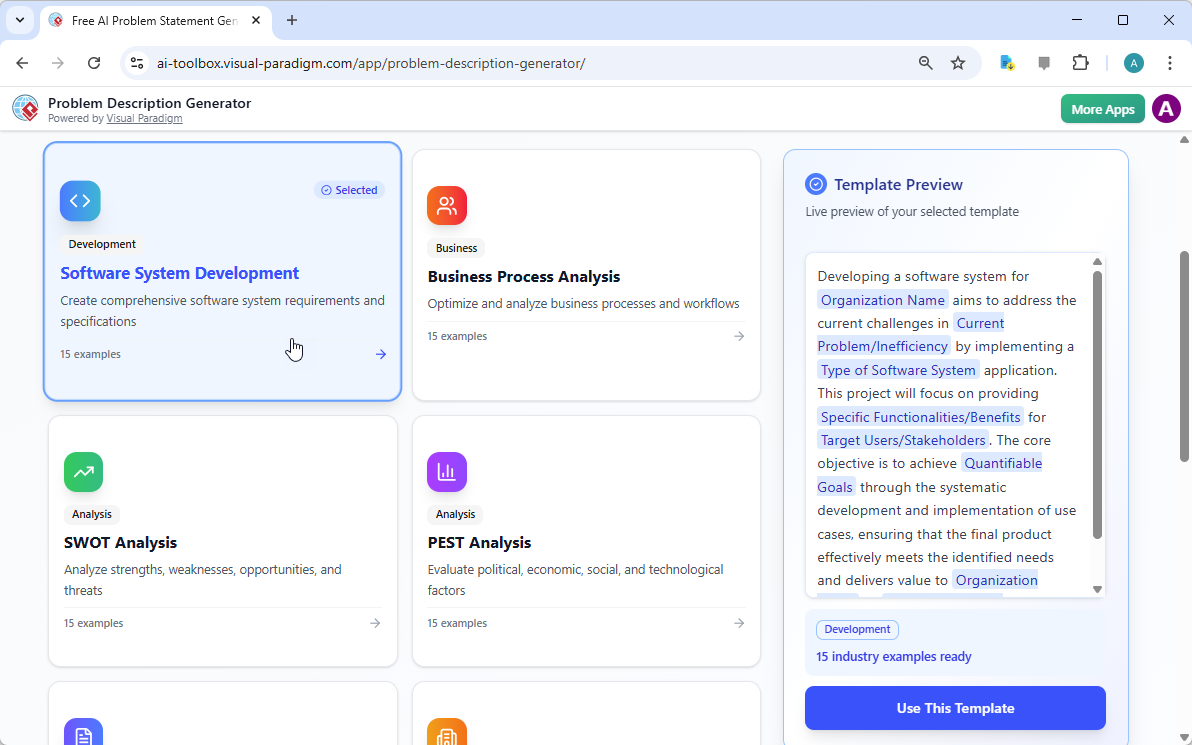
Mọi dự án xuất sắc đều bắt đầu từ một nền tảng vững chắc, và đối với một tuyên bố vấn đề, nền tảng đó chính là mẫu phù hợp. Bước đầu tiên khi sử dụng Trình tạo mô tả vấn đề được hỗ trợ AI là chọn một mẫu phù hợp hoàn hảo với bản chất của dự án của bạn. Như được thể hiện trong
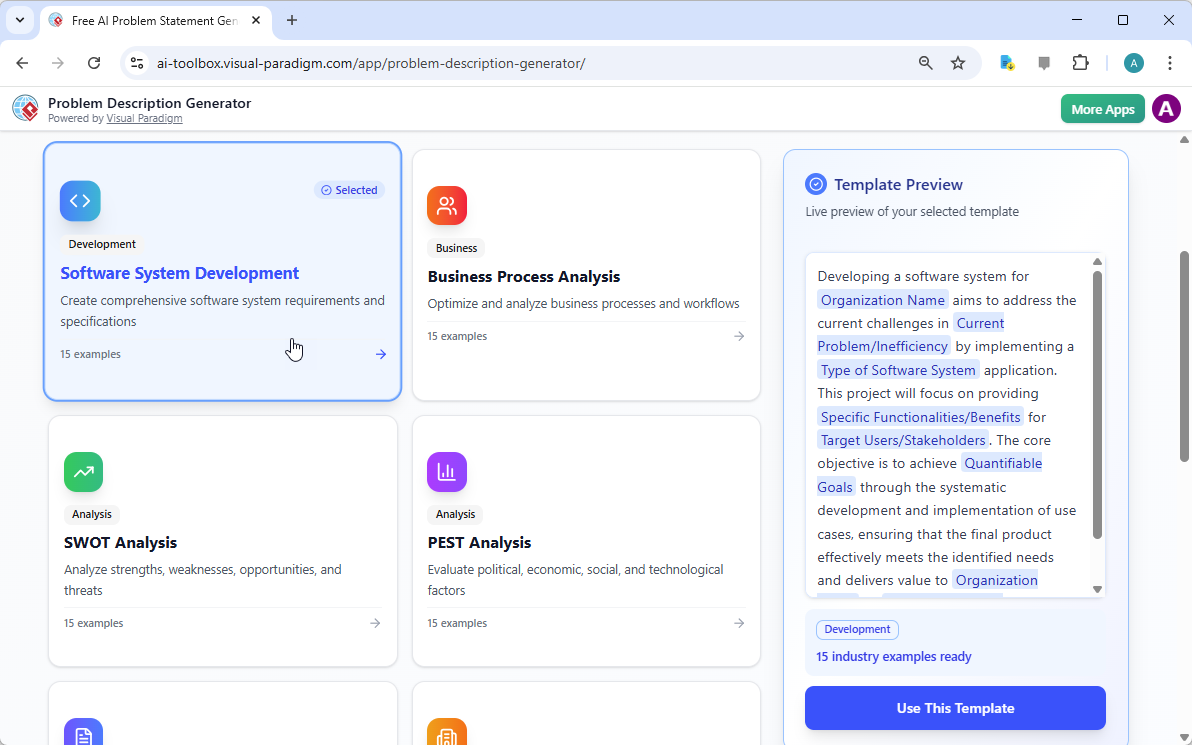
This is a screenshot of Visual Paradigm's AI Powered Problem Description Generator. It shows the first step, which involves c

, giao diện cung cấp bảng điều khiển sạch sẽ, trực quan với nhiều mẫu khác nhau cho các nhu cầu kinh doanh khác nhau. Dù bạn đang giải quyết một sáng kiến phát triển phần mềm, tối ưu hóa quy trình kinh doanh hay thực hiện phân tích chiến lược như phân tích SWOT hoặc PEST, bạn đều có thể tìm thấy một mẫu chuyên biệt. Ví dụ, mẫu “Phát triển Hệ thống Phần mềm” được thiết kế đặc biệt để giúp bạn tạo ra các yêu cầu và thông số kỹ thuật toàn diện cho hệ thống phần mềm. Bằng cách chọn đúng mẫu, bạn ngay lập tức thiết lập một cấu trúc chuyên nghiệp, dẫn dắt bạn bao quát tất cả các khía cạnh quan trọng của vấn đề, đảm bảo không bỏ sót chi tiết nào quan trọng. Bước này cực kỳ quan trọng vì nó đặt tone và khung cho toàn bộ mô tả vấn đề, giúp các bước tiếp theo trở nên hiệu quả và hiệu suất hơn nhiều.

Bước 2: Điền vào các biến – Tùy chỉnh câu chuyện của bạn

Sau khi đã chọn mẫu của bạn, phép màu xảy ra ở phần ‘Chỉnh sửa tham số’.
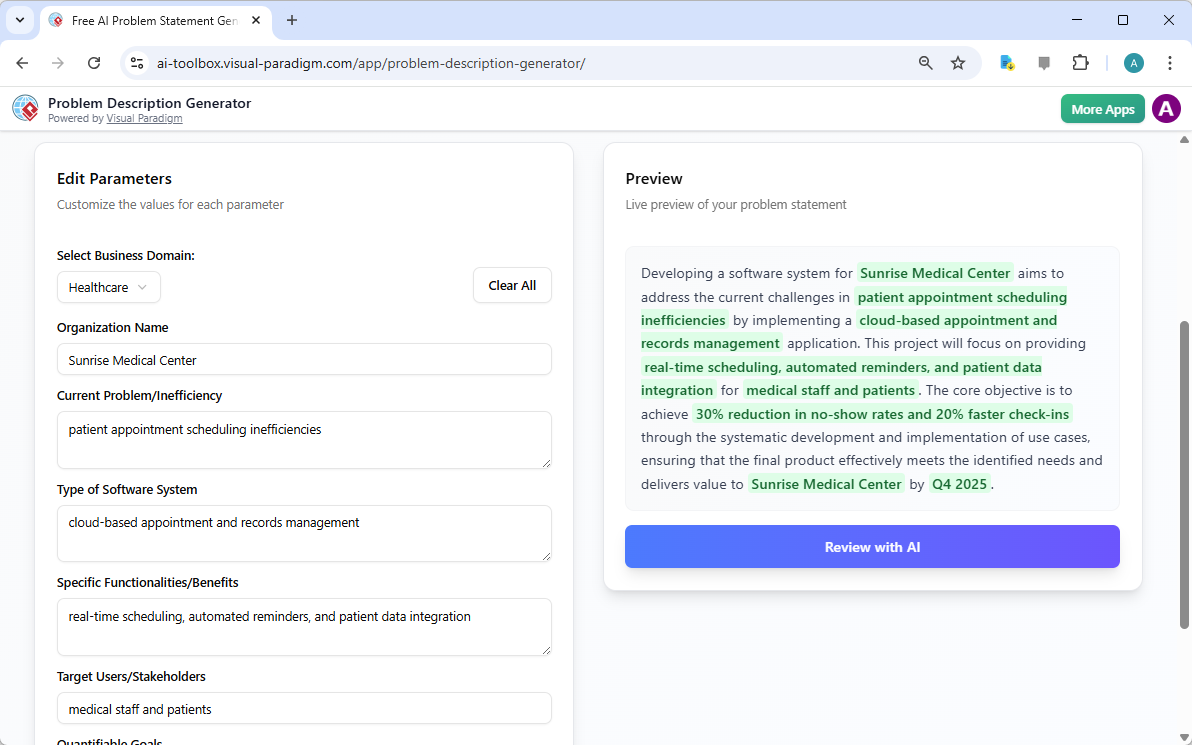
This is a screenshot of Visual Paradigm's AI Powered Problem Description Generator. It shows the second step, which involves

một cách sinh động minh họa bước thứ hai này. Bên trái, bạn sẽ thấy một biểu mẫu chứa đầy các trường cụ thể như ‘Tên tổ chức’, ‘Vấn đề hiện tại/Hiệu suất kém’ và ‘Loại hệ thống phần mềm’. Đây chính là nơi bạn đưa vào DNA độc đáo của dự án. Khi bạn gõ thông tin chi tiết, phần xem trước thời gian thực ở bên phải sẽ cập nhật động, cho bạn thấy chính xác cách các biến đã điền sẽ xuất hiện trong bản mô tả vấn đề cuối cùng. Phần xem trước trực tiếp này cực kỳ mạnh mẽ. Nó giúp bạn nhìn thấy câu chuyện mà đầu vào của bạn đang tạo ra, phát hiện các cách diễn đạt vụng về và điều chỉnh ngay lập tức. Các biến được làm nổi bật bằng màu xanh, giúp bạn dễ dàng nhận biết nội dung nào đang được chèn vào mẫu. Quá trình này không chỉ đơn thuần là điền vào chỗ trống; mà là xây dựng một câu chuyện mạch lạc, giải thích rõ ràng về vấn đề, tác động của nó và kết quả mong muốn. Khả năng theo dõi sự phát triển mô tả của bạn trong thời gian thực là một bước ngoặt giúp tăng tính rõ ràng và sự tự tin.

Bước 3: Kiểm tra bằng AI – Người biên tập chuyên gia tức thì của bạn

Bước cuối cùng, và có lẽ là mạnh mẽ nhất, là kiểm tra bằng AI. Sau khi bạn đã điền đầy đủ các biến và hài lòng với phần xem trước thời gian thực, bạn có thể nhấp vào nút ‘Kiểm tra bằng AI’.
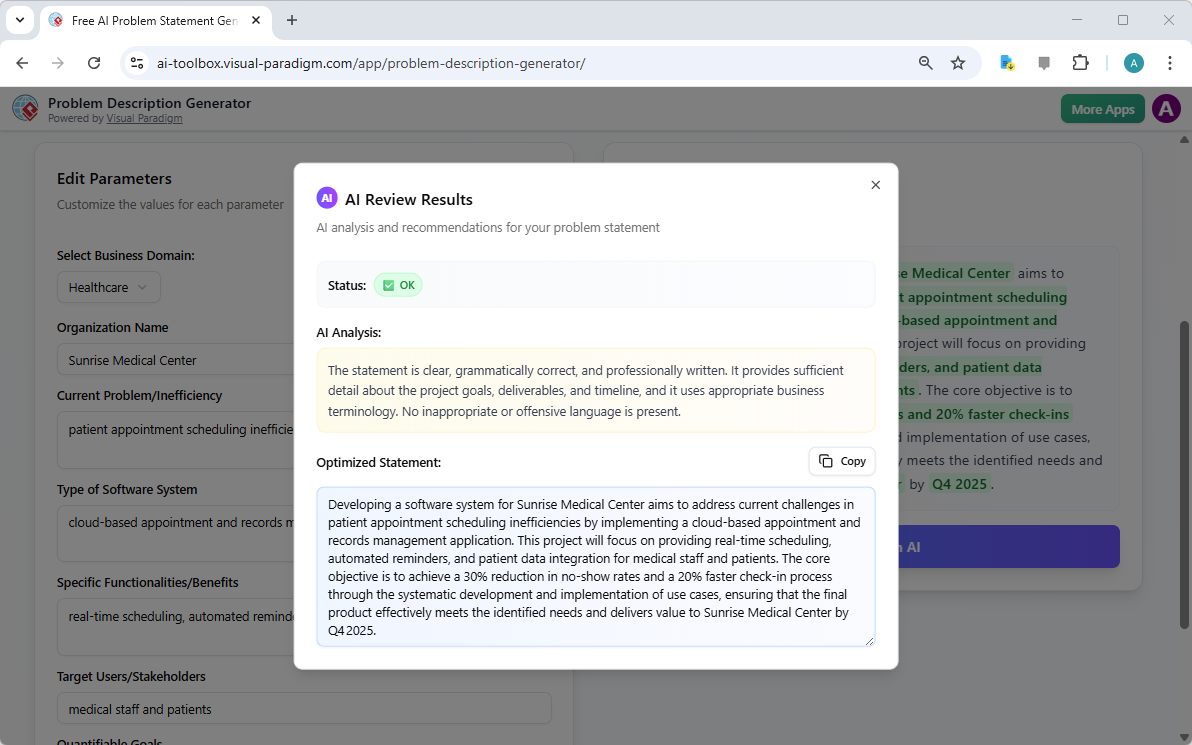
This is a screenshot of Visual Paradigm's AI Powered Problem Description Generator. Once the details are filled in, you can c

ghi lại khoảnh khắc này một cách hoàn hảo. Một cửa sổ bật lên xuất hiện, cung cấp phân tích chi tiết về tuyên bố vấn đề đã được tạo. AI không chỉ kiểm tra ngữ pháp; nó đánh giá tuyên bố về tính rõ ràng, tính đầy đủ, mạch lạc trong lập luận và việc sử dụng từ ngữ kinh doanh phù hợp. Nó cung cấp một trạng thái rõ ràng (ví dụ: ‘Được’) và một phân tích AI chi tiết, nêu bật những điểm mạnh và đề xuất cải thiện. Ví dụ, AI có thể xác nhận rằng tuyên bố của bạn rõ ràng và được viết chuyên nghiệp, hoặc có thể gợi ý cách diễn đạt một mục tiêu quan trọng một cách mạnh mẽ hơn. Phản hồi tức thì và khách quan này hoạt động như một biên tập viên chuyên gia ảo, giúp bạn tinh chỉnh tuyên bố vấn đề để đảm bảo nó không chỉ đúng mà còn cực kỳ hiệu quả trong việc truyền tải mục đích của dự án. Bước cuối cùng này đảm bảo rằng tuyên bố vấn đề của bạn sẵn sàng được chia sẻ với các bên liên quan, nhà phát triển hoặc khách hàng một cách tự tin.

Mở khóa tiềm năng của dự án của bạn

Định nghĩa rõ ràng một vấn đề thường là phần khó nhất trong bất kỳ sáng kiến nào. Một tuyên bố vấn đề mơ hồ hoặc diễn đạt kém có thể dẫn đến lãng phí nỗ lực, giải pháp không phù hợp và cuối cùng là thất bại dự án. Trình tạo mô tả vấn đề từ Visual Paradigm giải quyết thách thức cốt lõi này. Nó kết hợp sức mạnh của các mẫu có cấu trúc với trí tuệ nhân tạo để tạo ra một quy trình vừa hiệu quả vừa hiệu suất. Bằng cách tuân theo ba bước đơn giản – chọn mẫu, điền biến và kiểm tra bằng AI – bạn có thể biến ý tưởng ban đầu của dự án thành một tuyên bố vấn đề rõ ràng, thuyết phục và chuyên nghiệp chỉ trong vài phút. Công cụ này không chỉ là tiện ích; mà còn là lợi thế chiến lược giúp dự án của bạn bắt đầu đúng hướng. Dừng việc suy đoán và bắt đầu định nghĩa một cách tự tin.Thử ngay Trình tạo mô tả vấn đề được hỗ trợ AI và cảm nhận sự khác biệt mà nó mang lại.

Các liên kết liên quan

Tối ưu hóa việc triển khai nền tảng tham gia nhân viên với Công cụ Quản lý Bên liên quan được tích hợp AI của Visual Paradigm

Optimize employee engagement platform rollouts using Visual Paradigm’s AI tool. A 7-step guide to stakeholder management and organizational change.

Sự thay đổi tổ chức thành công, chẳng hạn như việc triển khai một nền tảng tham gia kỹ thuật số trên toàn công ty, phụ thuộc ít vào công nghệ bản thân mà nhiều hơn vào các động lực con người xung quanh nó. Việc sử dụng một phần mềm quản lý bên liên quan chuyên nghiệp không còn là tùy chọn đối với các nhà lãnh đạo dự án nhằm giảm thiểu sự phản đối và tối đa hóa mức độ chấp nhận.Visual Paradigm của công cụ quản lý bên liên quan được tích hợp AI cung cấp một phương pháp hệ thống gồm 7 bước để định hướng trong những môi trường quan hệ phức tạp này. Bằng cách tự động hóa các giai đoạn xác định và phân tích, các nhà quản lý dự án có thể chuyển từ các khái niệm trừu tượng sang các chiến lược tham gia cụ thể chỉ trong vài phút, đảm bảo rằng mỗi cá nhân — từ những nhà tài trợ cấp cao đến đại diện công đoàn — đều được quản lý một cách phù hợp.

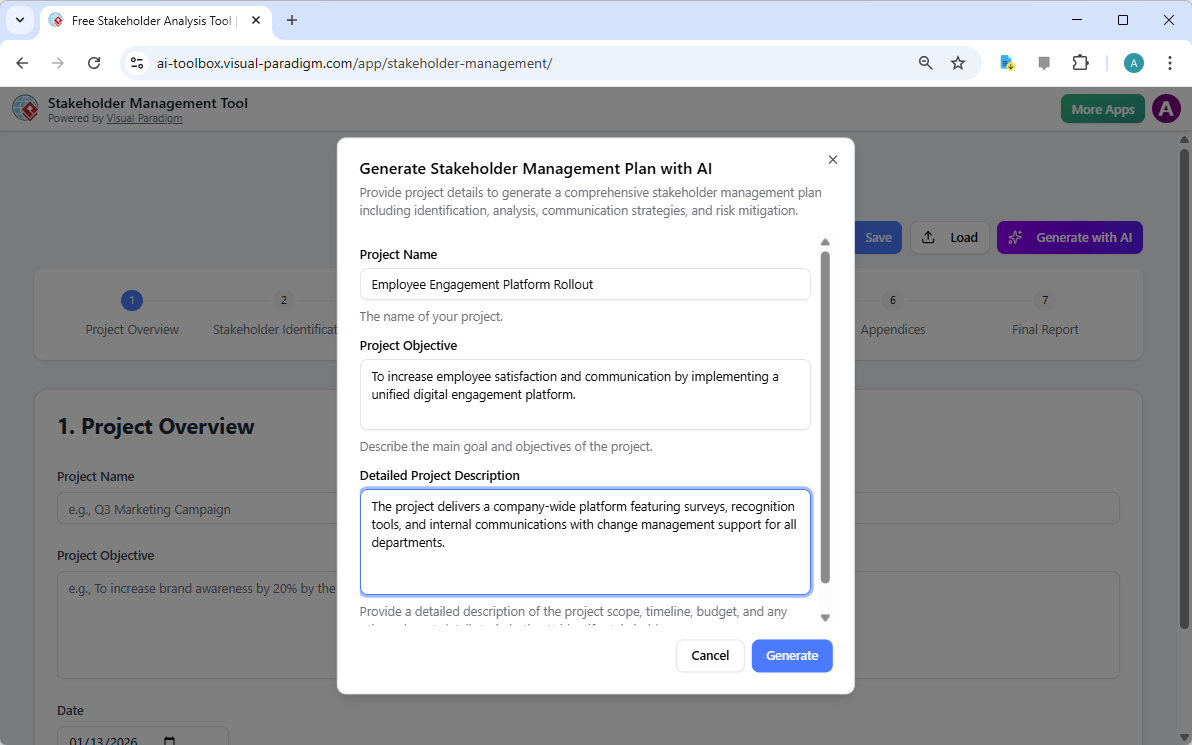
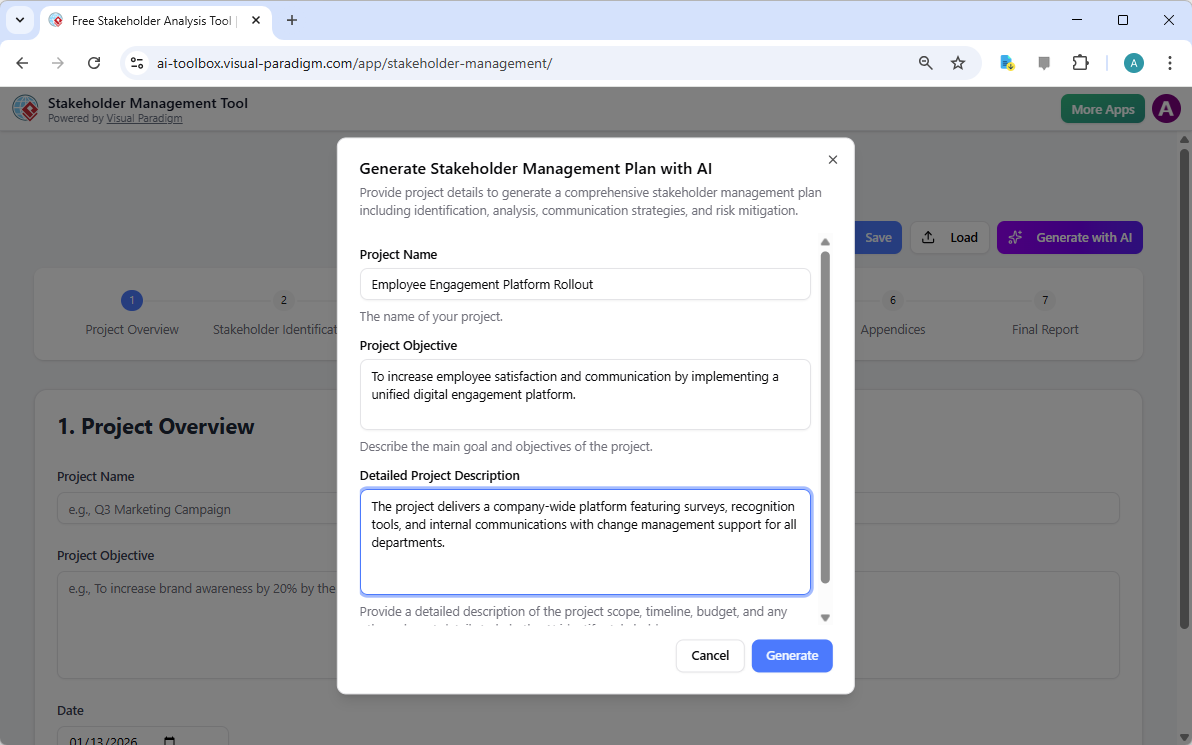
Quy trình bắt đầu bằng việc xác định bối cảnh của dự án. Trong giao diện, người dùng xác định phạm vi, mục tiêu và những nét đặc thù cụ thể của sáng kiến. Ví dụ, trong một “Triển khai nền tảng tham gia nhân viên”, công cụ sẽ yêu cầu người dùng mô tả các tính năng của nền tảng, chẳng hạn như khảo sát và công cụ ghi nhận, cũng như nhu cầu hỗ trợ quản lý thay đổi. Dữ liệu đầu vào này sẽ làm nền tảng cho trí tuệ nhân tạo tạo ra một kế hoạch quản lý được cá nhân hóa.

This is the screenshot of Visual Paradigm's AI-Powered Stakeholder Management Tool. It is now at AI generation screen, where

Một phương pháp có cấu trúc trong quản trị dự án

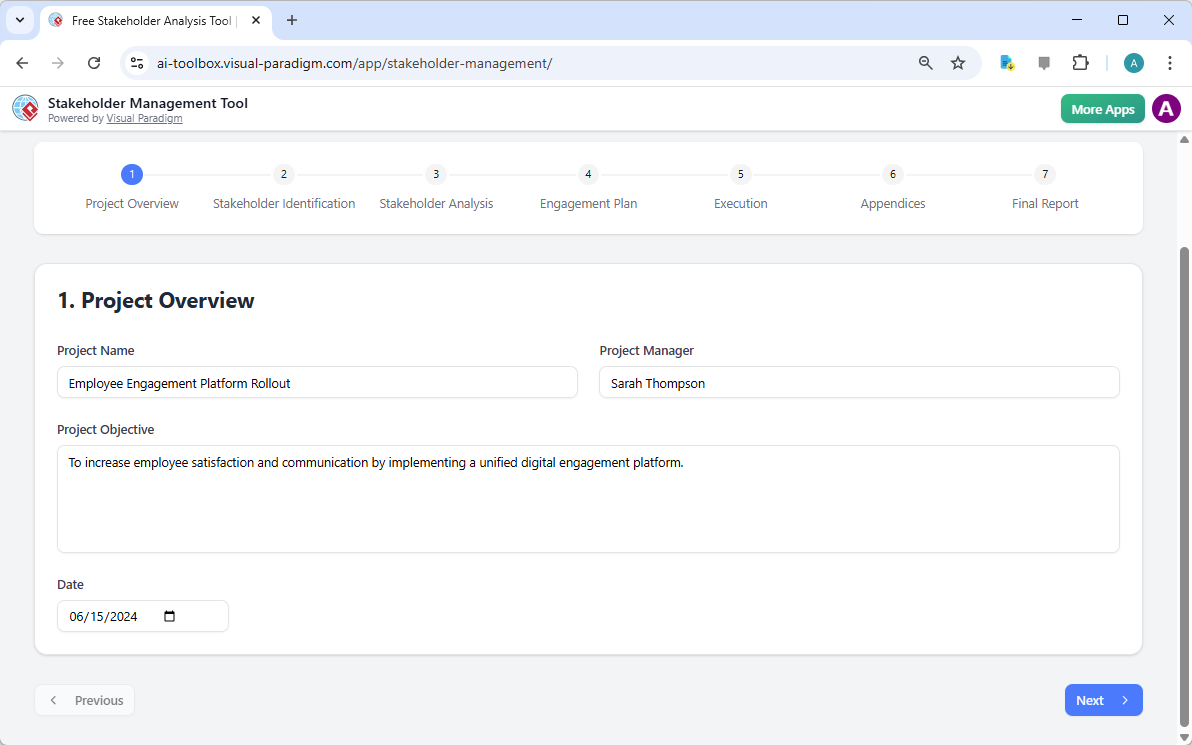
Độ chính xác trong tài liệu dự án là dấu ấn của một nhà quản lý kỷ luật. Bước đầu tiên trong quy trình, Tổng quan dự án, đảm bảo rằng tất cả dữ liệu nền tảng được thu thập trước khi chuyển sang phân tích phức tạp. Bước này ghi lại tên dự án, mục tiêu và người quản lý được chỉ định, cung cấp điểm tham chiếu rõ ràng cho mọi quyết định chiến lược tiếp theo. Rất quan trọng khi thiết lập các thông số này từ sớm để duy trì sự đồng bộ trong suốt vòng đời dự án.

This is the screenshot of Visual Paradigm's AI-Powered Stakeholder Management Tool. The initial data is generated by AI and i

Những điểm chính để quản lý bên liên quan hiệu quả

  • Quy trình 7 bước có hệ thống:Hướng dẫn người dùng từ việc xác định ban đầu đến thực hiện và báo cáo cuối cùng.

  • Tạo chiến lược do AI dẫn dắt:Nhanh chóng tạo bản nháp toàn diện về các bên liên quan, lợi ích và mức độ tham gia dựa trên bối cảnh dự án.

  • Xử lý dữ liệu lấy lợi ích riêng tư làm trung tâm:Tất cả dữ liệu dự án được lưu trữ cục bộ dưới dạng tệp .json, đảm bảo thông tin tổ chức nhạy cảm không bị lưu trên đám mây.

  • Lên kế hoạch giao tiếp linh hoạt:Hỗ trợ việc tạo lịch trình thông điệp được cá nhân hóa và các chiến lược giảm thiểu rủi ro.

  • Báo cáo chuyên nghiệp:Tạo bản tóm tắt tổng hợp phù hợp để xem xét bởi cấp lãnh đạo và đồng bộ hóa đội nhóm.

Xác định và phân loại yếu tố con người

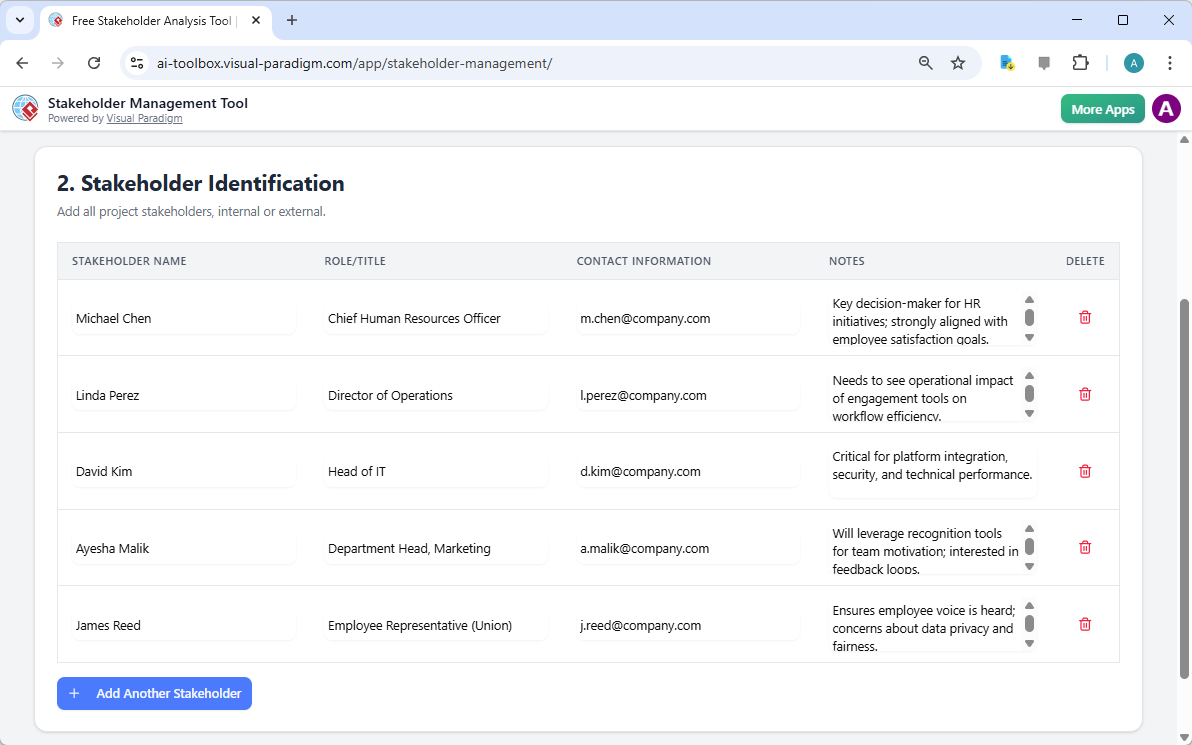
Sau khi thiết lập các thông số dự án, giai đoạn quan trọng tiếp theo là Xác định bên liên quan. Bước này bao gồm liệt kê mọi cá nhân hoặc nhóm có thể ảnh hưởng hoặc bị ảnh hưởng bởi sáng kiến. Trong bối cảnh một nền tảng tham gia, bao gồm các vai trò như Giám đốc Nhân sự, Giám đốc Vận hành và Trưởng phòng. Một ứng dụng quản lý bên liên quan dễ sử dụng phải cho phép lập hồ sơ chi tiết, bao gồm thông tin liên hệ và ghi chú cụ thể về quan điểm hoặc lo ngại riêng biệt của mỗi người.

This is the screenshot of Visual Paradigm's AI-Powered Stakeholder Management Tool. It is now at step 2 - Professional online

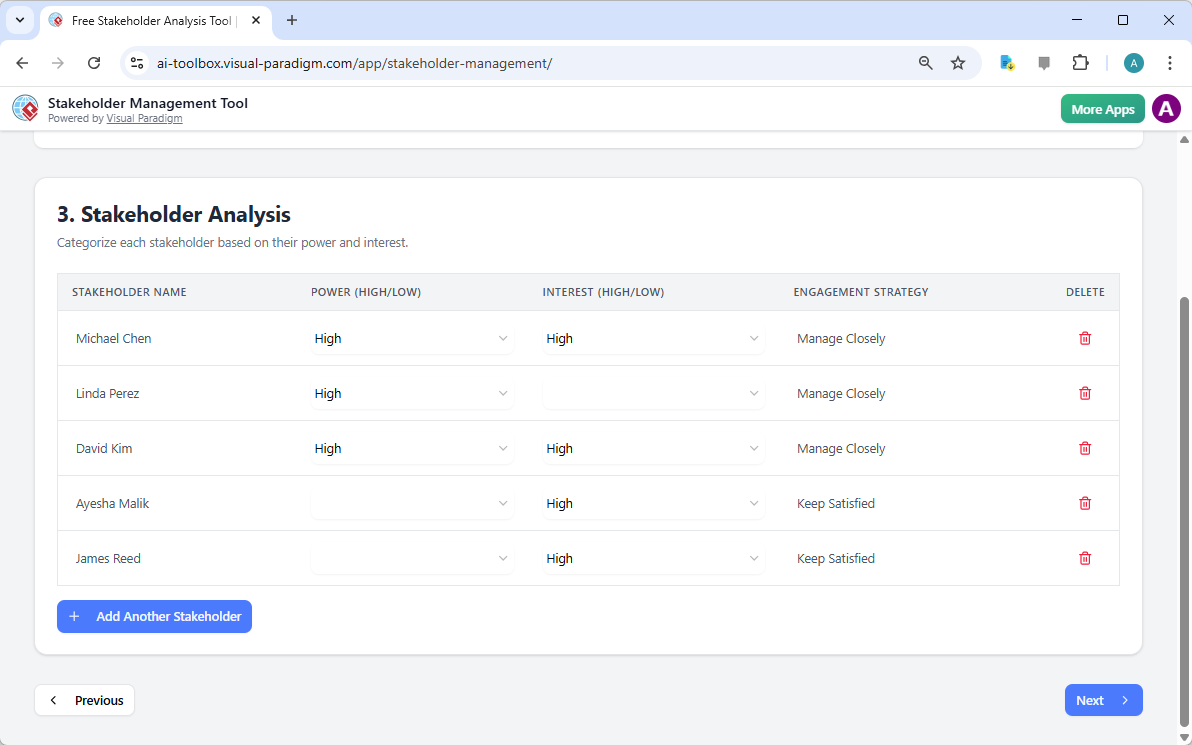
Chỉ xác định là chưa đủ; người ta phải áp dụng phân tích bên liên quan nghiêm ngặt để ưu tiên các nỗ lực tham gia. Điều này thường được thực hiện bằng cách đánh giá hai biến chính: Quyền lực (Ảnh hưởng) và Lợi ích. Các bên liên quan có quyền lực và lợi ích cao, chẳng hạn như Trưởng phòng CNTT hoặc CHRO, cần được “quản lý sát sao”, trong khi những người có ảnh hưởng thấp có thể chỉ cần được “giữ hài lòng” hoặc “được thông báo”. Việc phân loại này đảm bảo rằng nguồn lực giao tiếp hạn chế được phân bổ ở nơi có tác động lớn nhất đến thành công của dự án.

This is the screenshot of Visual Paradigm's AI-Powered Stakeholder Management Tool. It is now at step 3 - Professional online

Tham gia chiến lược và giảm thiểu rủi ro

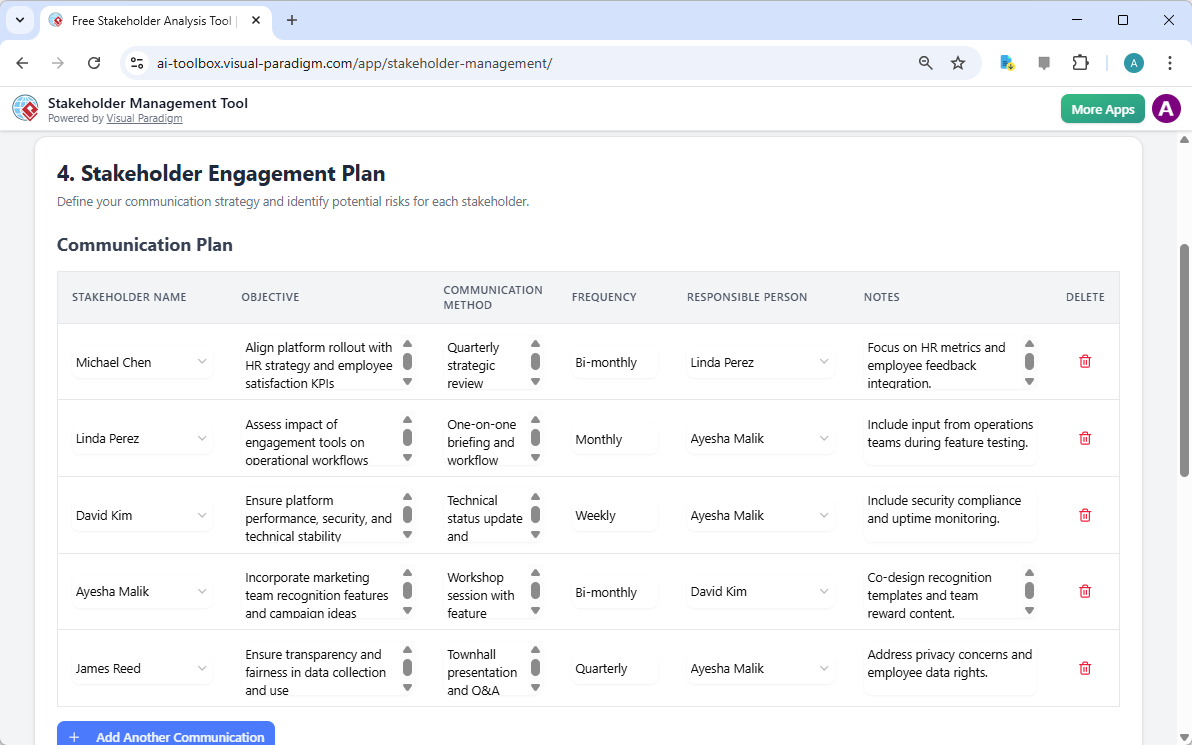
Sau khi phân tích hoàn tất, trọng tâm chuyển sang Kế hoạch tham gia bên liên quan. Đây là nơi mà ý định chiến lược được chuyển thành kế hoạch giao tiếp cụ thể. Mỗi bên liên quan được gán một mục tiêu giao tiếp cụ thể, phương pháp ưa thích (như đánh giá định kỳ quý hoặc họp toàn công ty) và tần suất. Mức độ chi tiết này giúp ngăn ngừa khoảng trống giao tiếp thường dẫn đến trì hoãn dự án. Ví dụ, một Cập nhật Tình trạng Kỹ thuật có thể được lên lịch hàng tuần cho bộ phận CNTT để đảm bảo độ ổn định của nền tảng, trong khi một buổi họp toàn công ty rộng rãi có thể diễn ra định kỳ quý cho toàn thể nhân viên.

This is the screenshot of Visual Paradigm's AI-Powered Stakeholder Management Tool. It is now at the upper part of step 4 - P

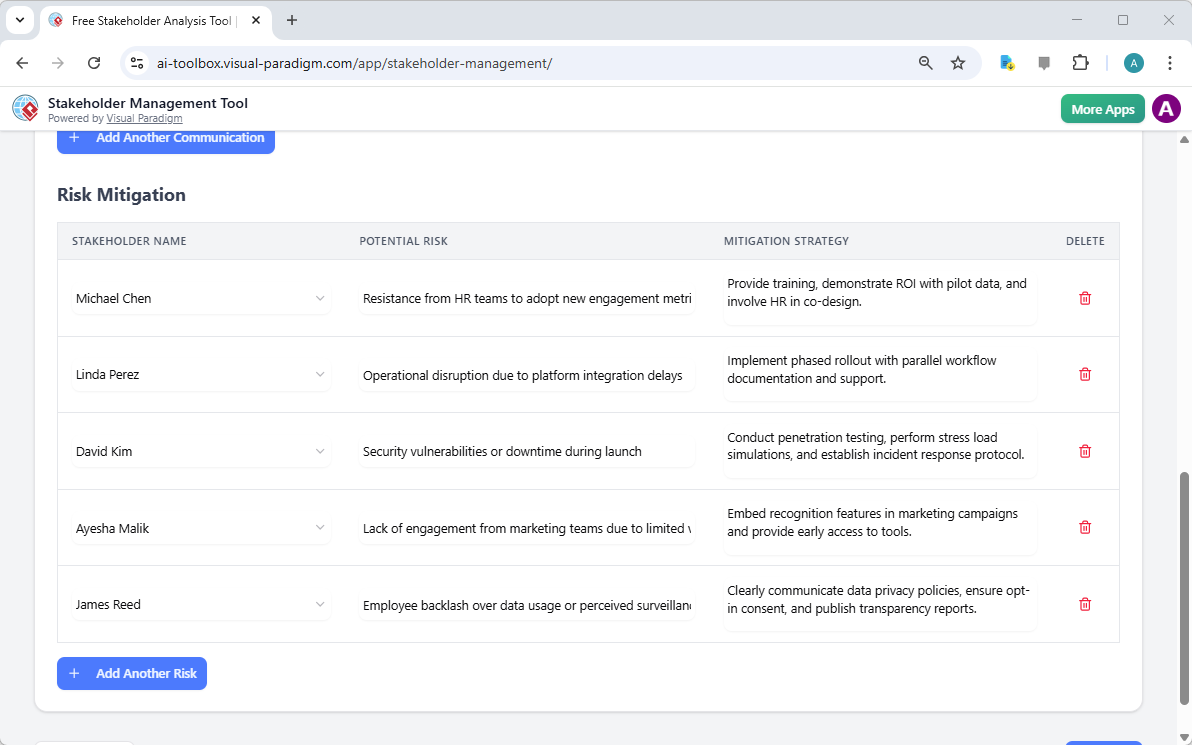
Hơn nữa, một cách tiếp cận chủ động yêu cầu xác định các rủi ro tiềm tàng và phát triển các chiến lược giảm thiểu. Sự phản đối là hệ quả tự nhiên của sự thay đổi; tuy nhiên, nó có thể được kiểm soát. Nếu AI xác định được một rủi ro như “phản ứng tiêu cực từ nhân viên về việc sử dụng dữ liệu”, công cụ cho phép người quản lý ghi lại một chiến lược giảm thiểu cụ thể, chẳng hạn như công bố báo cáo minh bạch hoặc truyền đạt rõ ràng các chính sách bảo mật dữ liệu. Cách tiếp cận có tầm nhìn dài hạn này chính là điều làm nên sự khác biệt của mộtphần mềm quản lý bên liên quan chuyên nghiệptừ một bảng tính đơn giản.

This is the screenshot of Visual Paradigm's AI-Powered Stakeholder Management Tool. It is now at the lower part of step 4 - P

Theo dõi thực hiện và đảm bảo trách nhiệm

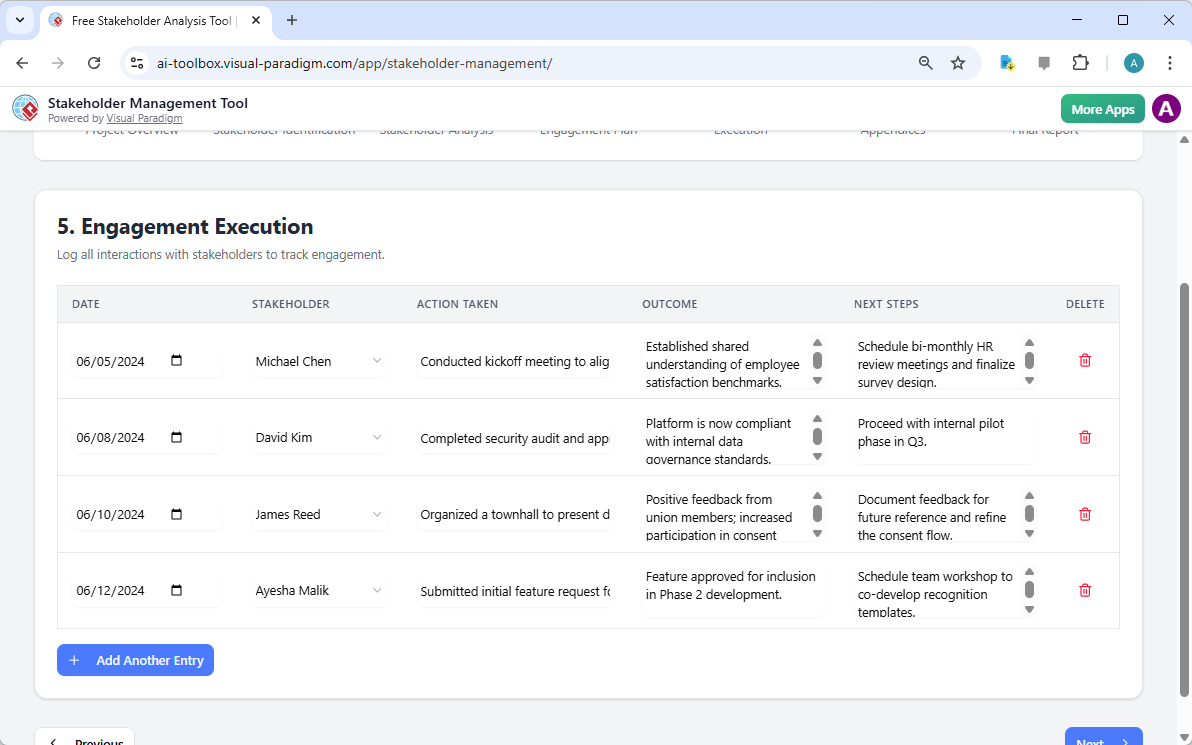
Chiến lược vẫn chỉ là lý thuyết cho đến khi được thực hiện. Bước thực hiện tham gia đóng vai trò như một sổ ghi chép cho mọi tương tác. Bằng cách ghi lại ngày, bên liên quan tham gia, hành động đã thực hiện và kết quả đạt được, các quản lý dự án duy trì một đường dẫn kiểm toán minh bạch cho các nỗ lực tham gia của họ. Bản ghi lịch sử này vô cùng quý giá để điều chỉnh chiến lược trong quá trình dự án nếu cảm xúc của một bên liên quan cụ thể thay đổi hoặc nếu xuất hiện những trở ngại bất ngờ trong quá trình triển khai.

This is the screenshot of Visual Paradigm's AI-Powered Stakeholder Management Tool. It is now at step 5 - Professional online

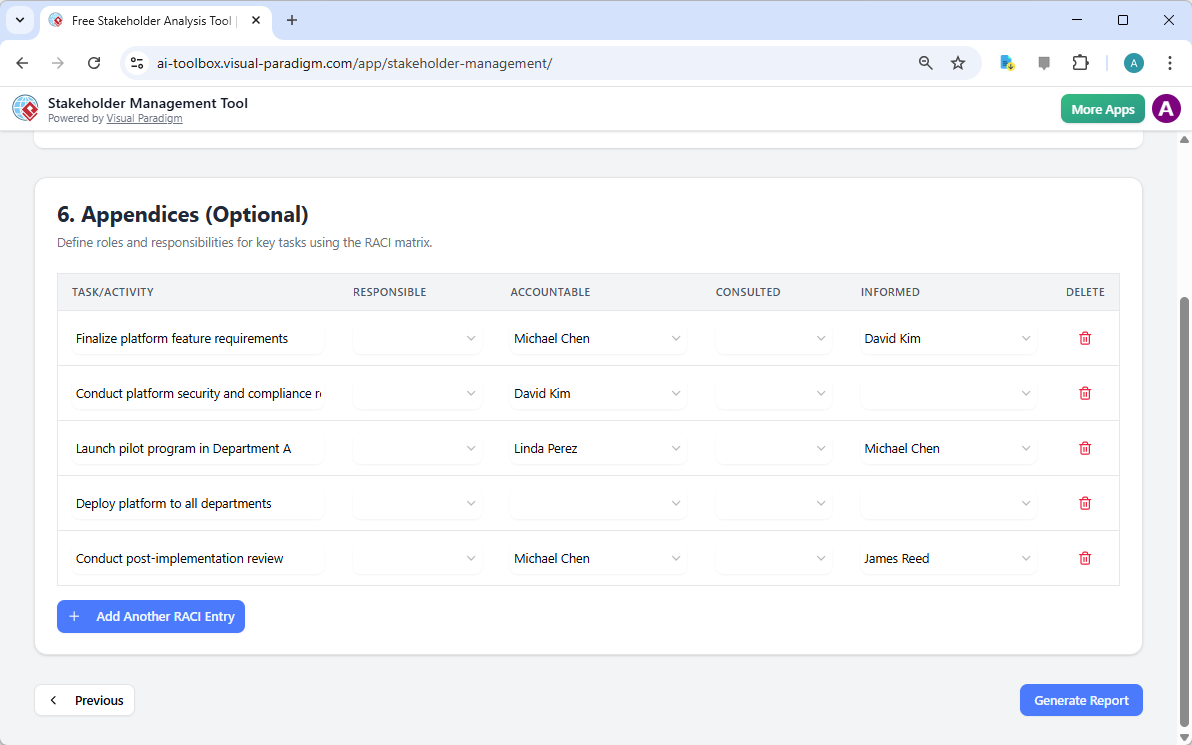
Để đảm bảo rằng các nhiệm vụ này không chỉ được ghi lại mà còn được quản lý hiệu quả, công cụ bao gồm một phần Phụ lục với ma trận RACI (Trách nhiệm, Có trách nhiệm, Được tham vấn, Được thông báo). Trong quá trình triển khai nền tảng tham gia, điều quan trọng là phải biết rõ ai là người “Có trách nhiệm” hoàn thiện các yêu cầu nền tảng so với ai chỉ cần “Được thông báo” về việc ra mắt chương trình thử nghiệm. Việc xác định rõ vai trò này loại bỏ sự mơ hồ và ngăn ngừa hiện tượng “rải rác trách nhiệm” thường xuyên làm ảnh hưởng đến các sáng kiến quy mô lớn trong doanh nghiệp.

This is the screenshot of Visual Paradigm's AI-Powered Stakeholder Management Tool. It is now at step 6 - Professional online

Tổng hợp thông tin vào báo cáo cuối cùng

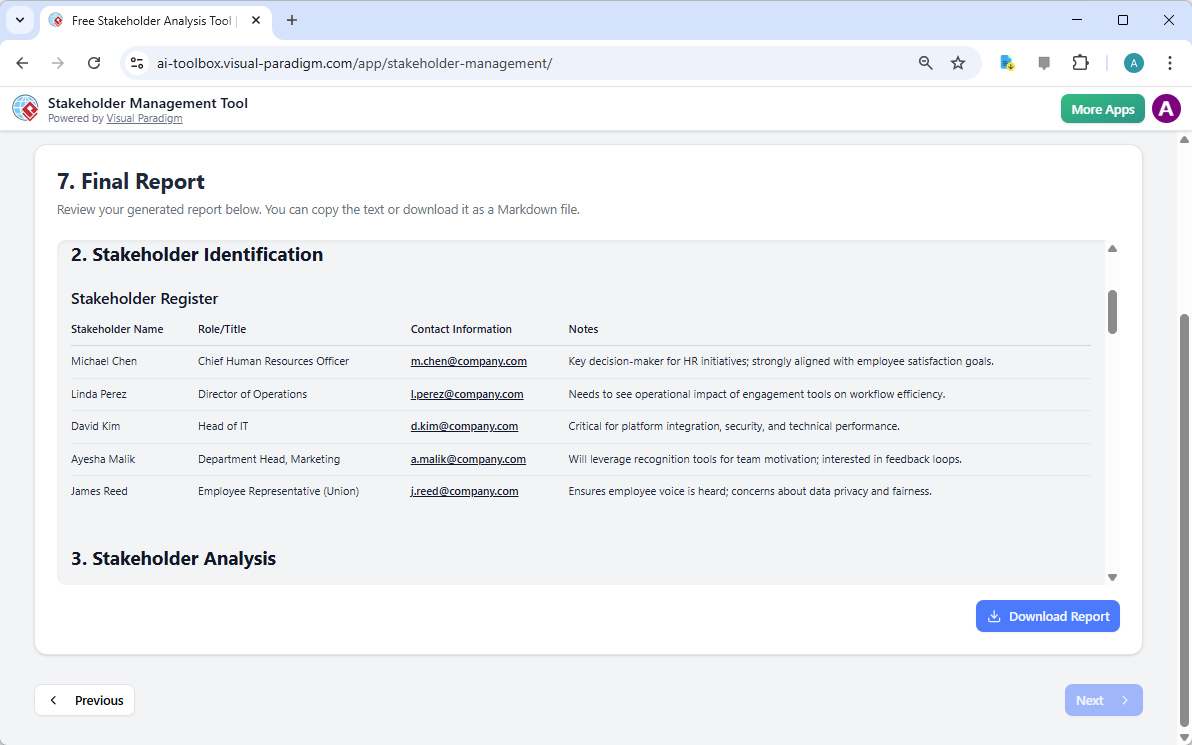
Đỉnh cao của quy trình 7 bước này là Báo cáo cuối cùng. Tài liệu này tổng hợp mọi bước xác định, phân tích, lịch trình truyền thông và nhật ký thực hiện vào một định dạng chuyên nghiệp, dễ đọc. Nó đóng vai trò là nguồn thông tin chính xác nhất cho chiến lược bên liên quan của dự án. Vì lý do nàyứng dụng quản lý bên liên quan trực tuyến tốt nhấtưu tiên quyền kiểm soát dữ liệu, báo cáo cuối cùng có thể được in hoặc lưu dưới dạng PDF từ trình duyệt của bạn, trong khi dữ liệu nền tảng vẫn được lưu trữ an toàn trên máy tính cục bộ của bạn.

This is the screenshot of Visual Paradigm's AI-Powered Stakeholder Management Tool. It is now at step 7. A report is produced

Tóm lại, việc điều hướng những phức tạp trong thay đổi tổ chức không chỉ cần trực giác; mà còn cần một phương pháp có cấu trúc được hỗ trợ bởi các công cụ thông minh. Công cụ quản lý bên liên quan của Visual Paradigmcông cụ quản lý bên liên quan được hỗ trợ bởi trí tuệ nhân tạotối ưu hóa những khía cạnh tốn nhiều công sức nhất trong quản trị dự án, giúp các nhà lãnh đạo tập trung vào điều thực sự quan trọng: xây dựng mối quan hệ và thúc đẩy kết quả. Bằng cách tuân theo quy trình 7 bước được hướng dẫn, bạn đảm bảo rằng không bên liên quan nào bị bỏ sót và mọi rủi ro đều được xử lý trước khi trở thành khủng hoảng.

Sẵn sàng làm chủ các mối quan hệ với bên liên quan của bạn?

Quản lý hiệu quả bắt đầu từ khung phù hợp. Dù bạn là một quản lý dự án, chuyên gia phân tích kinh doanh hay nhà lãnh đạo thay đổi, khả năng nhanh chóng tạo ra và thực hiện kế hoạch tham gia bên liên quan là một kỹ năng then chốt. Chúng tôi mời bạn trải nghiệm trực tiếp sự hiệu quả của cách tiếp cận được hỗ trợ bởi trí tuệ nhân tạo.

Để bắt đầu dự án của bạn:

  1. Truy cập công cụ thông quaThử ngayliên kết bên dưới.

  2. Nhập tên và mục tiêu dự án của bạn trong phần “Tổng quan dự án”.

  3. Sử dụng tính năng “Tạo bằng AI” để tạo ra bước xác định và phân tích ban đầu của bạn.

  4. Tinh chỉnh dữ liệu và lưu tiến độ của bạn cục bộ để duy trì quyền riêng tư hoàn toàn.

Tìm hiểu thêm về phương pháp: Hướng dẫn quản lý bên liên quan của Visual Paradigm

Bắt đầu dự án của bạn ngay hôm nay: Thử ngay công cụ quản lý bên liên quan được hỗ trợ bởi trí tuệ nhân tạo

Các liên kết liên quan

Optimizing Employee Engagement Platform Rollouts with Visual Paradigm’s AI-Powered Stakeholder Management Tool

Optimize employee engagement platform rollouts using Visual Paradigm’s AI tool. A 7-step guide to stakeholder management and organizational change.

Successful organizational change, such as the implementation of a company-wide digital engagement platform, depends less on the technology itself and more on the human dynamics surrounding it. Utilizing a professional stakeholder management software is no longer optional for project leaders who aim to minimize resistance and maximize adoption. Visual Paradigm’s AI-powered stakeholder management tool offers a systematic, 7-step methodology to navigate these complex interpersonal landscapes. By automating the identification and analysis phases, project managers can move from abstract concepts to actionable engagement strategies in a matter of minutes, ensuring that every individual—from executive sponsors to union representatives—is appropriately managed.

The process begins with the contextualization of the project. Within the interface, the user defines the scope, objectives, and specific nuances of the initiative. For instance, in an “Employee Engagement Platform Rollout,” the tool prompts the user to describe the platform’s features, such as surveys and recognition tools, and the necessity for change management support. This initial input serves as the foundational data for the artificial intelligence to generate a tailored management plan.

This is the screenshot of Visual Paradigm's AI-Powered Stakeholder Management Tool. It is now at AI generation screen, where

A Structured Approach to Project Governance

Precision in project documentation is the hallmark of a disciplined manager. The first step of the workflow, the Project Overview, ensures that all foundational data is captured before moving into complex analysis. This step records the project name, the objective, and the designated manager, providing a clear reference point for all subsequent strategic decisions. It is essential to establish these parameters early to maintain alignment throughout the project lifecycle.

This is the screenshot of Visual Paradigm's AI-Powered Stakeholder Management Tool. The initial data is generated by AI and i

Key Takeaways for Effective Stakeholder Management

  • Systematic 7-Step Workflow: Guides users from initial identification through to execution and final reporting.

  • AI-Driven Strategy Generation: Quickly produces a comprehensive draft of stakeholders, interests, and engagement levels based on project context.

  • Privacy-Centric Data Handling: All project data is saved locally as .json files, ensuring sensitive organizational information remains off the cloud.

  • Dynamic Communication Planning: Facilitates the creation of tailored messaging schedules and risk mitigation strategies.

  • Professional Reporting: Generates a consolidated summary suitable for executive review and team alignment.

Identifying and Categorizing the Human Element

Once the project parameters are set, the next critical phase is Stakeholder Identification. This step involves listing every individual or group that may affect or be affected by the initiative. In the context of an engagement platform, this includes roles such as the Chief Human Resources Officer, the Director of Operations, and Department Heads. An easy-to-use stakeholder management app must allow for detailed profiling, including contact information and specific notes regarding each person’s unique perspective or concerns.

This is the screenshot of Visual Paradigm's AI-Powered Stakeholder Management Tool. It is now at step 2 - Professional online

Identification alone is insufficient; one must apply a rigorous Stakeholder Analysis to prioritize engagement efforts. This is typically achieved by evaluating two primary variables: Power (Influence) and Interest. Stakeholders with high power and high interest, such as the Head of IT or the CHRO, require “close management,” whereas those with lower influence may simply need to be “kept satisfied” or “informed.” This categorization ensures that limited communication resources are allocated where they will have the most significant impact on project success.

This is the screenshot of Visual Paradigm's AI-Powered Stakeholder Management Tool. It is now at step 3 - Professional online

Strategic Engagement and Risk Mitigation

With the analysis complete, the focus shifts to the Stakeholder Engagement Plan. This is where strategic intent is converted into a tactical communication plan. Each stakeholder is assigned a specific communication objective, a preferred method (such as quarterly reviews or town halls), and a frequency. This level of detail prevents communication gaps that often lead to project delays. For example, a Technical Status Update might be scheduled weekly for the IT department to ensure platform stability, while a broader Town Hall might occur quarterly for the general employee population.

This is the screenshot of Visual Paradigm's AI-Powered Stakeholder Management Tool. It is now at the upper part of step 4 - P

Furthermore, a proactive approach requires the identification of potential risks and the development of mitigation strategies. Resistance is a natural byproduct of change; however, it can be managed. If the AI identifies a risk such as “employee backlash over data usage,” the tool allows the manager to document a specific mitigation strategy, such as publishing transparency reports or clearly communicating data privacy policies. This forward-thinking approach is what distinguishes a professional stakeholder management software from a simple spreadsheet.

This is the screenshot of Visual Paradigm's AI-Powered Stakeholder Management Tool. It is now at the lower part of step 4 - P

Tracking Execution and Ensuring Accountability

Strategy remains theoretical until it is executed. The Engagement Execution step serves as a ledger for all interactions. By logging the date, the stakeholder involved, the action taken, and the resulting outcome, project managers maintain a transparent audit trail of their engagement efforts. This historical record is invaluable for adjusting strategies mid-project if a particular stakeholder’s sentiment shifts or if unexpected obstacles arise during the rollout.

This is the screenshot of Visual Paradigm's AI-Powered Stakeholder Management Tool. It is now at step 5 - Professional online

To ensure that these tasks are not merely recorded but effectively managed, the tool includes an Appendices section featuring a RACI matrix (Responsible, Accountable, Consulted, Informed). In the rollout of an engagement platform, it is vital to know exactly who is “Accountable” for finalizing platform requirements versus who merely needs to be “Informed” of the pilot program launch. Defining these roles eliminates ambiguity and prevents the “diffusion of responsibility” that often plagues large-scale corporate initiatives.

This is the screenshot of Visual Paradigm's AI-Powered Stakeholder Management Tool. It is now at step 6 - Professional online

Consolidating Intelligence into a Final Report

The culmination of this 7-step process is the Final Report. This document consolidates every identification, analysis, communication schedule, and execution log into a professional, easy-to-read format. It serves as the definitive source of truth for the project’s stakeholder strategy. Because this best online stakeholder management app prioritizes data sovereignty, the final report can be printed or saved as a PDF from your browser, while the underlying data remains securely stored on your local machine.

This is the screenshot of Visual Paradigm's AI-Powered Stakeholder Management Tool. It is now at step 7. A report is produced

In summary, navigating the complexities of organizational change requires more than just intuition; it requires a structured methodology supported by intelligent tools. Visual Paradigm’s AI-powered stakeholder management tool streamlines the most labor-intensive aspects of project governance, allowing leaders to focus on what truly matters: building relationships and driving results. By following a guided 7-step workflow, you ensure that no stakeholder is overlooked and every risk is addressed before it becomes a crisis.

Ready to Master Your Stakeholder Relationships?

Effective management begins with the right framework. Whether you are a project manager, a business analyst, or a change leader, the ability to rapidly generate and execute a stakeholder engagement plan is a critical competency. We invite you to experience the efficiency of an AI-driven approach firsthand.

To begin your project:

  1. Access the tool via the Try Now link below.

  2. Enter your project name and objective in the “Project Overview.”

  3. Use the “Generate with AI” feature to produce your initial identification and analysis.

  4. Refine the data and save your progress locally to maintain full privacy.

Learn more about the methodology: Visual Paradigm Stakeholder Management Guide

Start your project today: Try the AI-Powered Stakeholder Management Tool Now

Related Links

Crafting a Crystal-Clear Problem Statement for Software Development

Use Visual Paradigm’s AI-powered tool to craft clear, structured problem statements for software projects with templates and real-time feedback.

Struggling to articulate the core challenge your software project aims to solve? The Problem Description Generator from Visual Paradigm is the ultimate AI-powered tool to transform your project’s initial chaos into a clear, focused, and compelling narrative. This innovative solution empowers project managers, business analysts, and product owners to define the “why” behind their work with unprecedented speed and precision. By leveraging a library of structured templates and real-time AI feedback, this tool ensures your problem statement is not just written, but optimized for maximum impact from day one. It’s the secret weapon for launching projects with laser focus and setting the stage for success.

Key Takeaways:

  • Use a template-driven approach to ensure your problem statement is comprehensive and structured.

  • Fill in specific variables to customize the description for your unique project.

  • Get instant AI feedback to refine your problem statement for clarity and effectiveness.

  • Start any project with a solid, well-articulated understanding of the core issue.

Step 1: Choose Your Template – The Foundation of a Strong Problem Statement

Every great project begins with a solid foundation, and for a problem statement, that foundation is the right template. The first step in using the AI-Powered Problem Description Generator is to select a template that perfectly aligns with your project’s nature. As shown in

This is a screenshot of Visual Paradigm's AI Powered Problem Description Generator. It shows the first step, which involves c

, the interface presents a clean, intuitive dashboard with a variety of templates for different business needs. Whether you’re tackling a software development initiative, optimizing a business process, or conducting a strategic analysis like a SWOT or PEST analysis, you can find a dedicated template. The “Software System Development” template, for instance, is specifically designed to help you create comprehensive software system requirements and specifications. By selecting the correct template, you immediately establish a professional structure that guides you to cover all critical aspects of the problem, ensuring no vital detail is overlooked. This step is crucial because it sets the tone and framework for the entire problem description, making the subsequent steps much more efficient and effective.

Step 2: Fill in the Variables – Customize Your Narrative

Once you’ve chosen your template, the magic happens in the “Edit Parameters” section.

This is a screenshot of Visual Paradigm's AI Powered Problem Description Generator. It shows the second step, which involves

vividly illustrates this second step. On the left, you’re presented with a form filled with specific fields, such as “Organization Name,” “Current Problem/Inefficiency,” and “Type of Software System.” This is where you inject your project’s unique DNA. As you type in the details, the tool’s real-time preview on the right side dynamically updates, showing you exactly how your filled-in variables will look in the final problem description. This live preview is incredibly powerful. It allows you to see the narrative form your inputs are creating, spot any awkward phrasing, and make adjustments on the fly. The variables are highlighted in green, making it easy to see exactly what content is being inserted into the template. This process is not just about filling blanks; it’s about shaping a coherent story that clearly explains the problem, its impact, and the desired outcome. The ability to see your description evolve in real-time is a game-changer for clarity and confidence.

Step 3: Review with AI – Your Instant Expert Editor

The final, and arguably most powerful, step is the AI review. After you’ve filled in all the variables and are satisfied with the live preview, you can click the “Review with AI” button.

This is a screenshot of Visual Paradigm's AI Powered Problem Description Generator. Once the details are filled in, you can c

captures this moment perfectly. A modal window appears, presenting a detailed analysis of your generated problem statement. The AI doesn’t just check for grammar; it evaluates the statement for clarity, completeness, logical flow, and the use of appropriate business terminology. It provides a clear “Status” (like “OK”) and a detailed “AI Analysis” that highlights strengths and suggests improvements. For example, the AI might confirm that your statement is clear and professionally written, or it might suggest a more impactful way to phrase a key objective. This instant, objective feedback acts as a virtual expert editor, helping you refine your problem statement to ensure it is not only correct but also highly effective in communicating the project’s purpose. This final step ensures that your problem statement is ready to be shared with stakeholders, developers, or clients with confidence.

Unlock Your Project’s Potential

Defining a problem is often the hardest part of any initiative. A vague or poorly articulated problem statement can lead to wasted effort, misaligned solutions, and ultimately, project failure. The Problem Description Generator from Visual Paradigm solves this fundamental challenge. It combines the power of structured templates with the intelligence of AI to create a workflow that is both efficient and effective. By following the three simple steps—choose a template, fill in the variables, and review with AI—you can transform your initial project idea into a clear, compelling, and professional problem statement in minutes. This tool is not just a convenience; it’s a strategic advantage that ensures your project starts on the right foot. Stop guessing and start defining with confidence. Try the AI-Powered Problem Description Generator now and experience the difference it makes.

Related Links